

Page 1

ibited to copy, disclose, distribute, or use this
document in part or as a whole for any purposes other than those for which this document is disclosed. This document
ts of DUALi Inc. Any
DE-ABCM6 User Manual
DUALi Inc.
Document Version: 1.2
Last Revised Date: 7 May 2013
Copyright ⓒ 2009 DUALi Inc. All rights reserved. You are strictly proh
is copyrighted and contains confidential information and other intellectual property righ
unauthorized use, copy, disclosure or distribution constitutes infringement of DUALi’s intellectual property rights.
Page 2

DUALi Inc. reserves the right to make changes to its applications or services or to discontinue any
application or service at any time without notice. DUALi provides customer assistance in various
technical areas, but does not have full access to data concerning the use and applications of
customer's products.
Therefore, DUALi assumes no liability and is not responsible for customer applications or software
design or performance relating to systems or applications incorporating DUALi products. In addition,
DUALi assumes no liability and is not responsible for infringement of patents and/or any other
intellectual or industrial property rights of third parties, which may result from assistance provided by
DUALi.
Composition of the information in this manual has been done to the best of our knowledge. DUALi
does not guarantee the correctness and completeness of the details given in this manual and may not
be held liable for damages ensuing from incorrect or incomplete information. Since, despite all our
efforts, errors may not be completely avoided, we are always grateful for your useful tips.
We have our development center in South Korea to provide technical support. For any technical
assistance can contact our technical support team as below;
Tel: +82 31 213 0074
e-mail : [email protected]
Page 3

DE-ABCM6 User Manual
Revision History
2012.10.29(Ver. 1.0) : First Release
2013.03.13(Ver. 1.1) : Add Flowchart
2013.05.07(Ver. 1.2) : Add Minimum current and change other currents
Version. 1.2 DUALi Inc. (http://www.duali.com)
3
Page 4

DE-ABCM6 User Manual
Contents
1 Summary..................................................................................................................................... 5
2 Structure...................................................................................................................................... 5
2.1 The Structure of equipment................................................................................................ 5
2.2 The block diagram of Module ............................................................................................. 6
2.3 Description of main Module................................................................................................ 6
3 Description of Surface ................................................................................................................. 7
3.1 The picture of device surface ............................................................................................. 7
3.2 The size of equipment surface ........................................................................................... 7
4 Connector pin assignment ........................................................................................................... 8
4.1 USB Connector.................................................................................................................. 8
4.2 RS-232 Connector............................................................................................................. 8
5 Description of electricity ............................................................................................................... 8
5.1 The Description of power................................................................................................... 8
5.2 The using electric current................................................................................................... 8
5.3 The Description of USB communication ............................................................................. 8
6 Description of Function................................................................................................................ 9
6.1 Protocol Specification ........................................................................................................ 9
6.2 Control Code Specification................................................................................................. 9
6.3 Download .......................................................................................................................... 9
7 Flowchart of Function .................................................................................................................. 9
8 Property..................................................................................................................................... 10
8.1 Environment to use.......................................................................................................... 10
8.2 Environment for storage................................................................................................... 10
9 Warning and Notice ................................................................................................................... 10
Version. 1.2 DUALi Inc. (http://www.duali.com)
4
Page 5
DE-ABCM6 User Manual
1 Summary
Smart Card Interface Contactless Smart Card (ISO 14443 A/B), MIFARE, FeliCa, NFC
Host Interface USB 2.0 Full Speed (12Mbps), also support USB 1.1
RS-232 or TTL UART, 115200bps
Host Communication PC/SC or Proprietary
CPU ARM 32-bit Cortex-M3(48MHz), 128Kbytes Flash, 20Kbytes
SRAM
Power Voltage 5V, USB Bus powered
Current MAX 165mA
Connection 4pin * 1.25mm for USB
5pin * 1.25mm for RS-232
Size 43.5(W) * 32(L) * 8(H)mm
Antenna Matching Direct matching
Certification CE, Fcc, RoHS compliant
Operating Temperature -10~60℃
2 Structure
2.1 The Structure of equipment
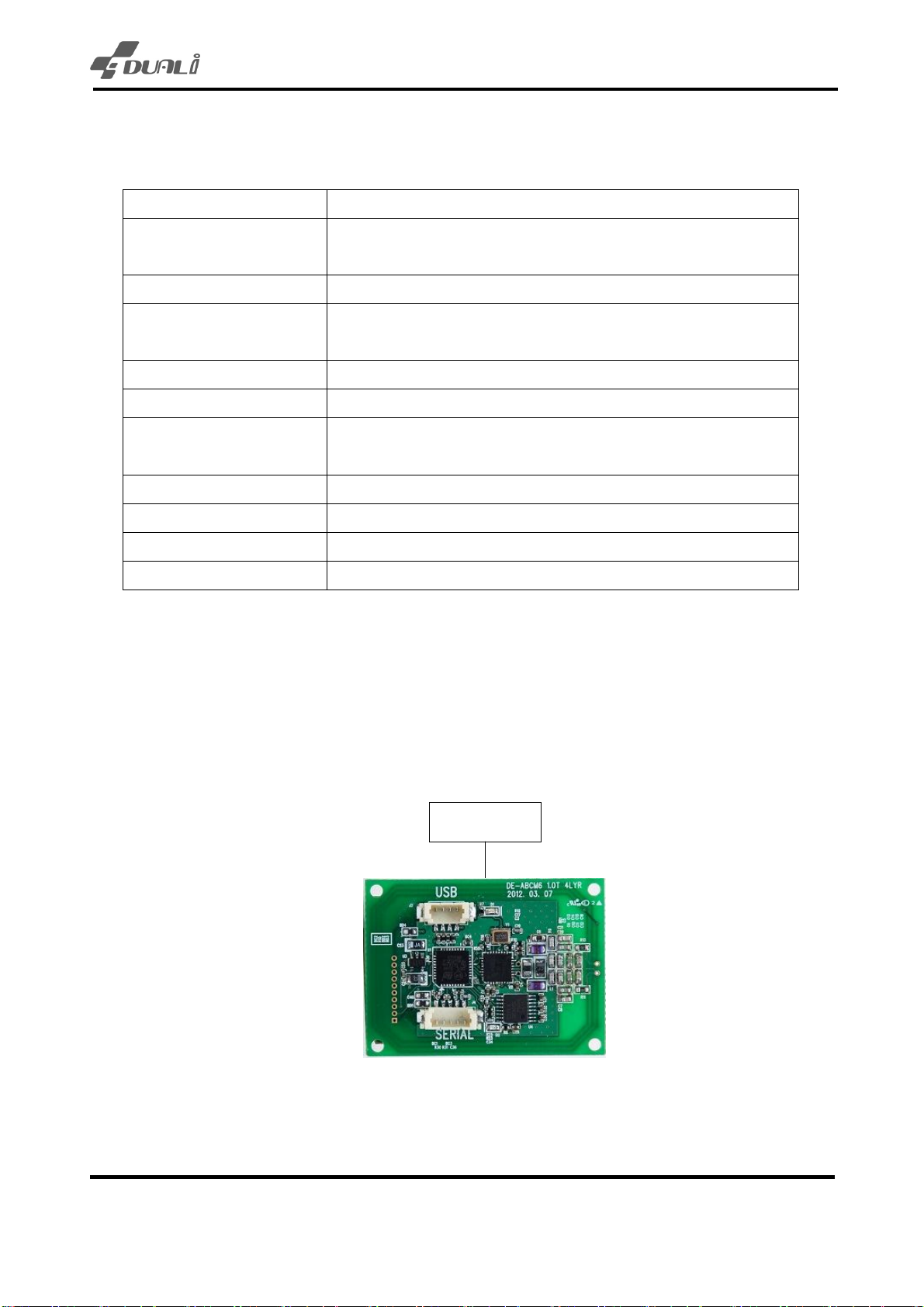
- DE-ABCM6 (RF module) itself contains all circuits include antenna.
(RS-232 or TTL UART)
Host PC
(USB 2.0)
Version. 1.2 DUALi Inc. (http://www.duali.com)
5
(DE-ABCM6)
Page 6
DE-ABCM6 User Manual
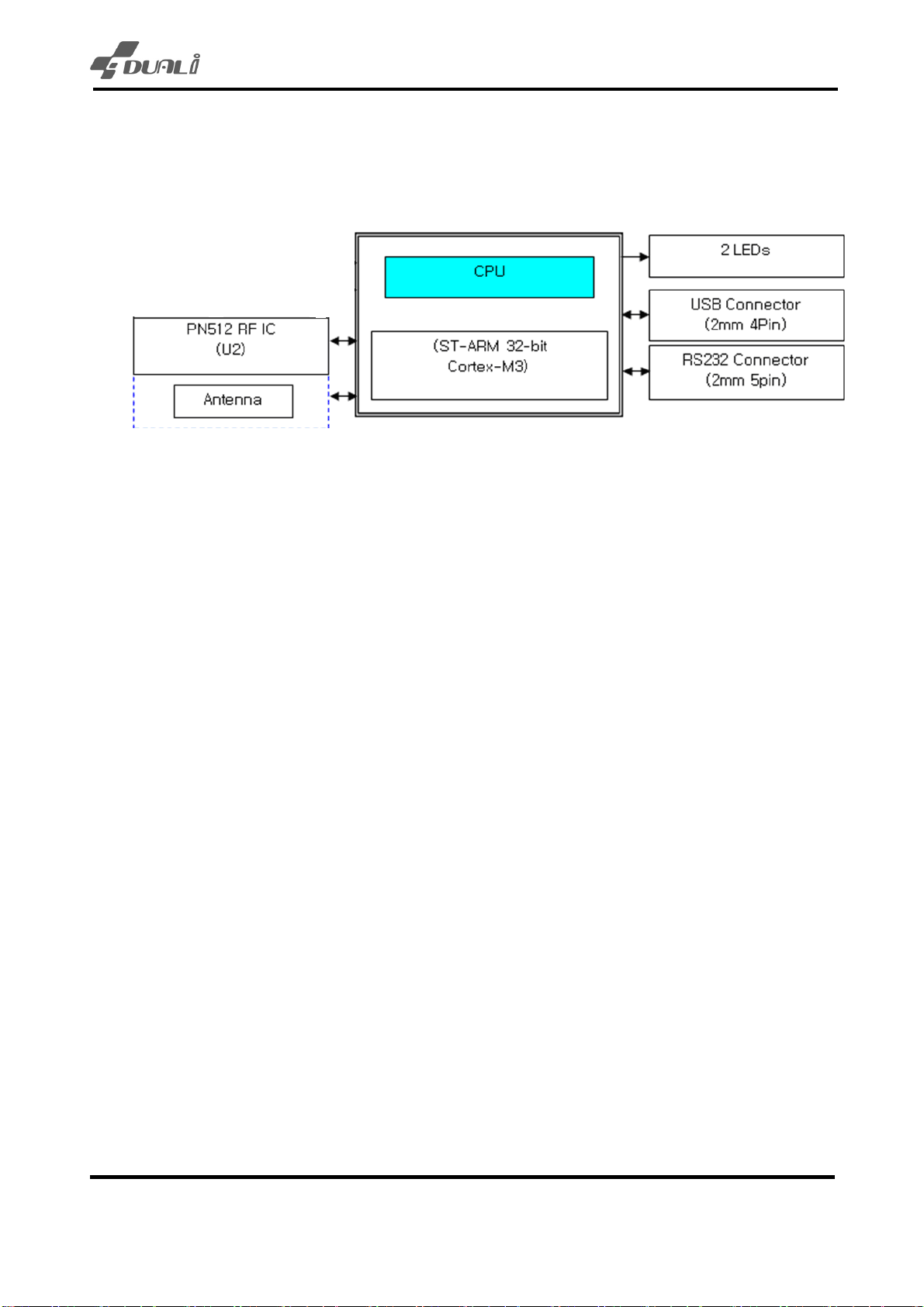
2.2 The block diagram of Module
2.3 Description of main Module
CPU : 32bit RISC CPU, It is stm32f103 which is ARM-based 32-bit MCU with Flash, USB, CAN,
seven 16-bit timers. This CPU has 128Kbyte Flash memory, 20Kbyte SRAM, 2 UART, USB 2.0
interface.
- PN512 RF IC : This Philips IC can control RF card like MIFARE card, type A/B card and FeliCa card
simultaneously.
- RS-232 Driver : It’s a Communication part for RS-232 communication.
- USB Connector : It’s a Communication part for USB communication.
- Status LED : It has 2 LEDs to display status of communication and RF card status.
Version. 1.2 DUALi Inc. (http://www.duali.com)
6
Page 7
DE-ABCM6 User Manual
3 Description of Surface
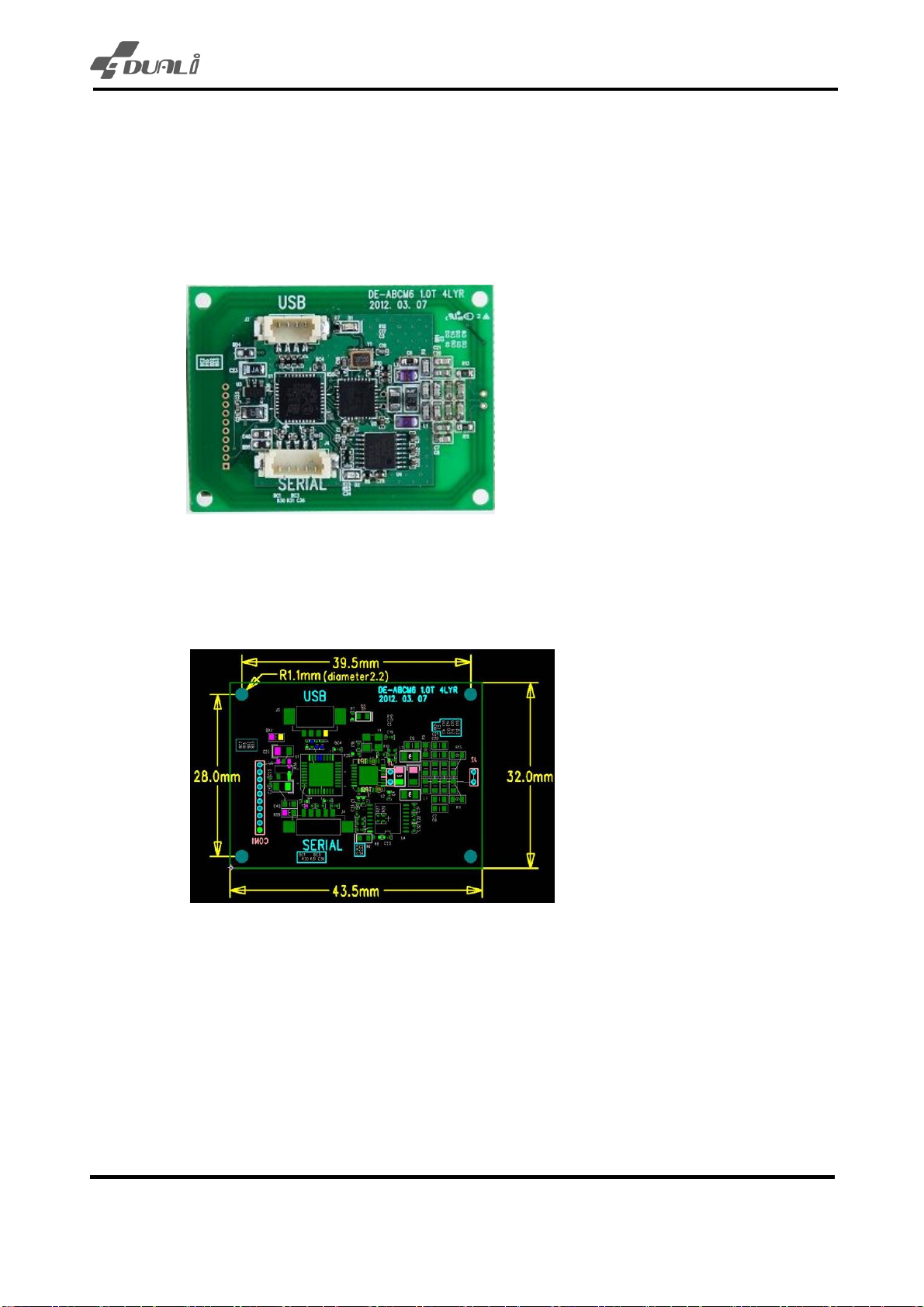
3.1 The picture of device surface
There are no parts at bottom. But there is a space for optional LEDs.
3.2 The size of equipment surface
- DE-ABCM : 43.5(W) * 32(L) * 8(H)mm
Version. 1.2 DUALi Inc. (http://www.duali.com)
7
Page 8

DE-ABCM6 User Manual
4 Connector pin assignment
4.1 USB Connector
[J2] (4Pin 1.25mm) -> PC USB Port
Pin No. Description
1 VCC(DC5V)
2 USB D-
3 USB D+
4 GND
PART : 12505WS-04 (Opposite PART : 12505HS-04)
VENDER : YEONHO ELECTRONICS
4.2 RS-232 Connector
[J4] (5Pin 1.25mm) -> RS-232 Port of controlling device
Pin No. Description
1 VCC(DC5V)
2 TxD(RS-232 or TTL)
3 RxD(RS-232 or TTL)
4 GND
5 External I/O
PART : 12505WS-05 (Opposite PART : 12505HS-05)
VENDER : YEONHO ELECTRONICS
Communication between RS-232 or TTL should be decided before make order.
Its default communication methods are RS-232 and USB.
5 Description of electricity
5.1 The Description of power
- Input power : 5V (USB Bus Powered)
5.2 The using electric current
- Normal 5V, 130 mA under
- MAX 5V, 165 mA under
- MIN 5V, 45mA under when RF is off state.
5.3 The Description of USB communication
- USB V2.0 FULL SPEED (12Mbps)
Version. 1.2 DUALi Inc. (http://www.duali.com)
8
Page 9
DE-ABCM6 User Manual
6 Description of Function
6.1 Protocol Specification
Refer to protocol specification for detail function.(provide on request)
6.2 Control Code Specification
Refer to control code specification for detail function.(provide on request)
6.3 Download
Refer download manual.(provide on request)
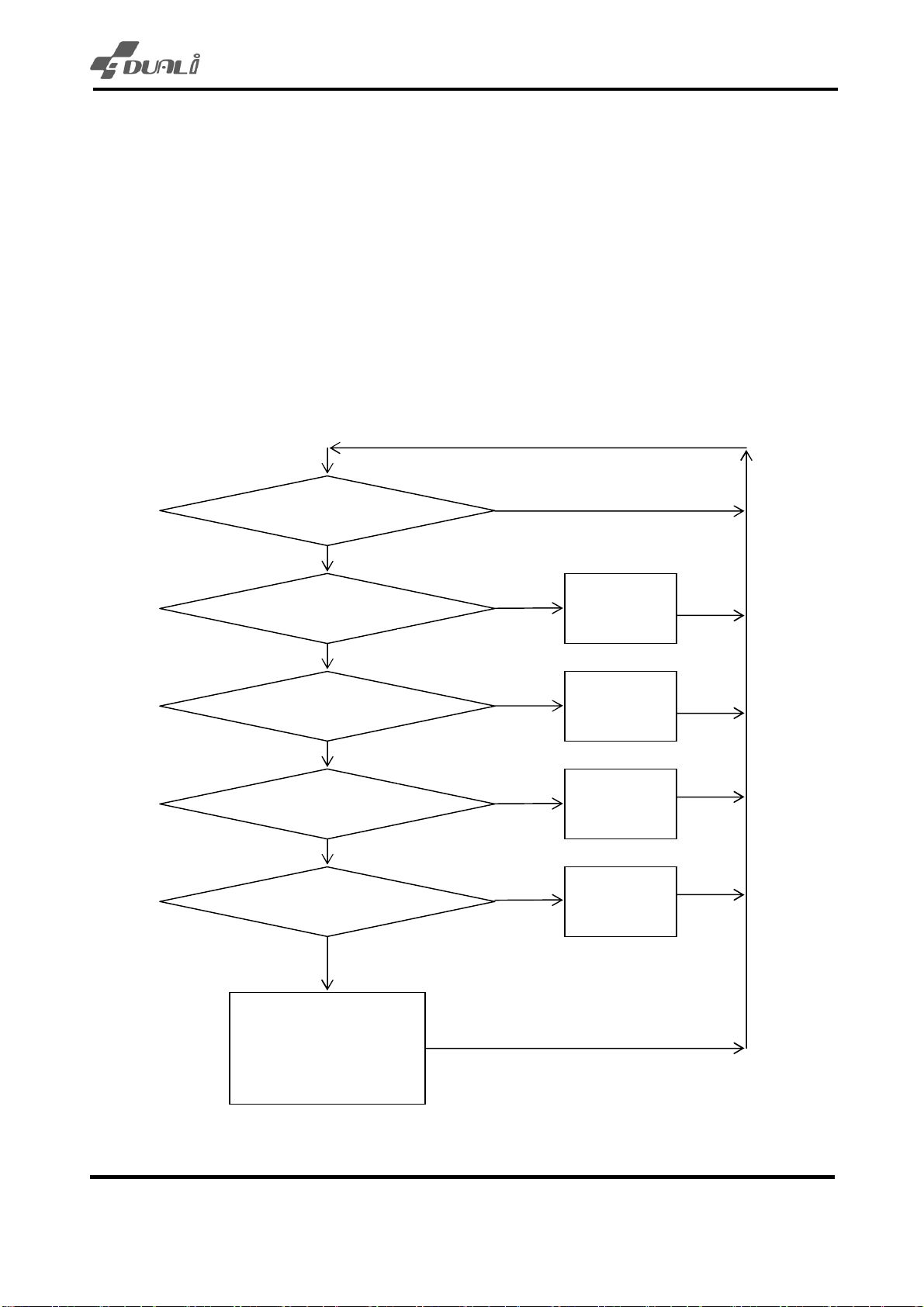
7 Flowchart of Function
No
Command Received?
Type-A Command?
Type-B Command?
FeliCa Command?
NFC Command?
Yes
Yes
Type-A
Operation
No
Yes
Type-B
Operation
No
Yes
FeliCa
Operation
No
Yes
NFC (P2P)
Operation
No
Reader Control
(RF On/Off, Download,
Version Check)
Version. 1.2 DUALi Inc. (http://www.duali.com)
9
Page 10

DE-ABCM6 User Manual
8 Property
8.1 Environment to use
- Temperature to use : -10 ~ 60 ℃
- Humidity to use : 30 ~ 90 % (relative humidity)
8.2 Environment for storage
- Temperature to keep : -20 ~ 80 ℃
- Humidity to use : 30 ~ 90 % (relative humidity)
9 Warning and Notice
- For indoor use only.
- This product is affected by an element like metal or Magnetism. So one has to take
precautions. We recommend that install reader 7cm away from metal
- This device is not waterproof.
Version. 1.2 DUALi Inc. (http://www.duali.com)
10
 Loading...