

Page 1
DMA6250U DMA6350U DMA6500U DMA6650U
Description
Features
Digital Mixer Amplifier
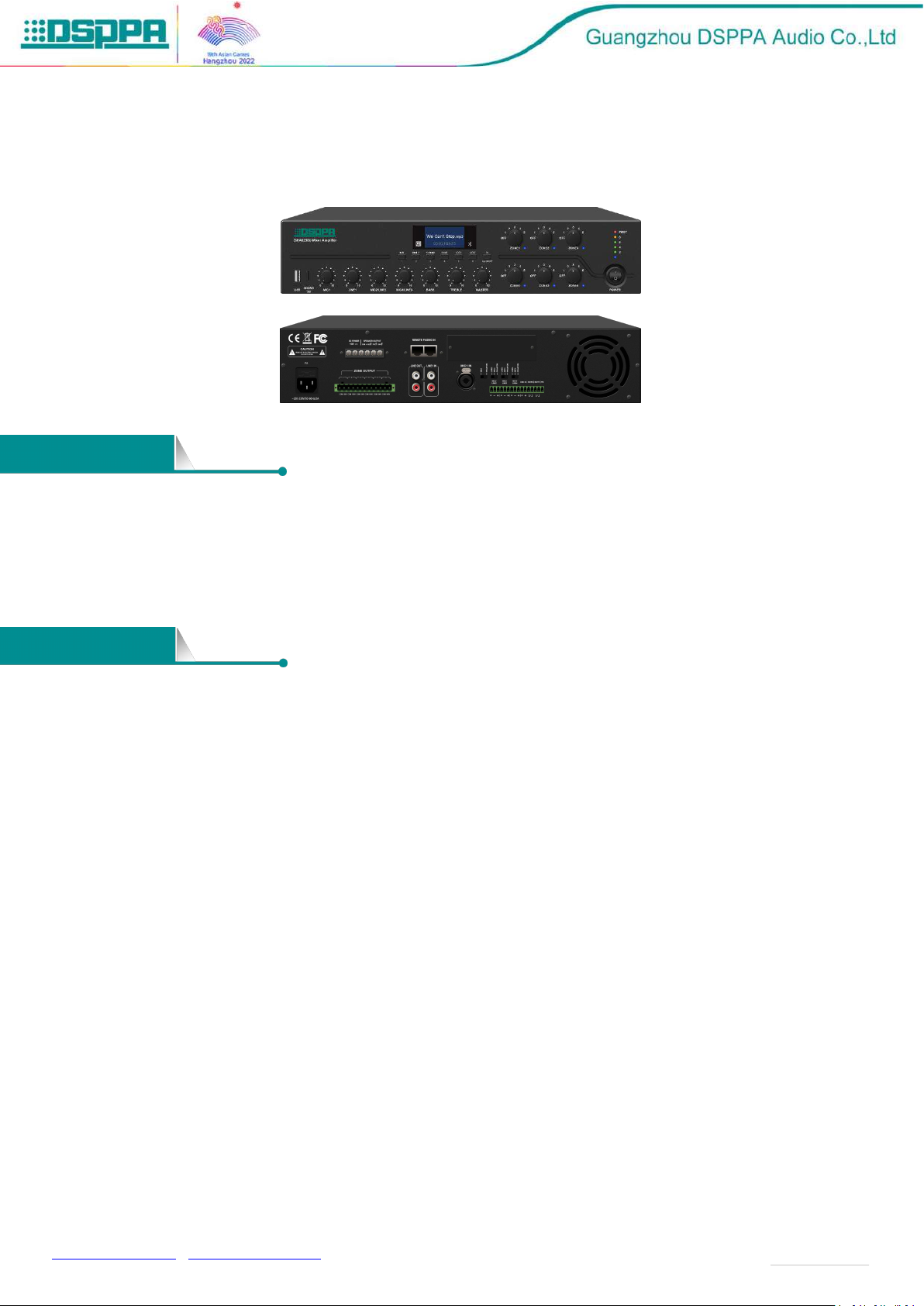
DMA6250U Series Digital Mixer Amplifier can be used in conjunction with the DMA20 Remote Paging
Station, supporting 2-channel RJ-45 remote paging microphone. The amplifier has a screen for intuitive
display, with such input sources as 4 MIC, 4 AUX, USB, FM, Bluetooth and TF. It also provides protection
function when overload, clipping, short circuit and abnormal working temperature occur. It is an amplifier
integrating multiple functions to meet users’ demand.
LCD lattice screen with backlight to display more information, more user-friendly;
Five-segment level indicator;
Built-in Bluetooth, FM, MP3 playback;
Two-channel RJ-45 remote paging microphone interfaces with zone control and strong cut function,
DC+24V power supply, 6 paging stations cascaded per channel, as far as 300m-600m transmission
distance.
With independent volume adjustment knob of six zones ;
With strong cut and one-touch to switch functions when broadcast certain zones;
AC and DC24V power supply can be turned off;
4 microphone inputs, 1 emergency signal input, 4 line inputs and 1 line output;
70V/100V fixed voltage output and 4-16Ω fixed-resistance output;
With priority function, the order is MUTE>EMC IN=SIREN>MIC1>CHIME>Remote
paging>LINE1=MIC2/LINE2=MIC3/LINE3=MIC4/LINE4=MP3=BT=FM (no chime output when there is an
alarm sound);
With total volume control; Zone, Siren, Chime, EMC IN, MIC and AUX volume control; treble and bass
tone control;
SIRNE short-circuit trigger function, the device can be remotely controlled or controlled by other
equipment, with independent alarm sound output;
MUTE short-circuit triggered mute function, which can be controlled remotely or by other devices;
[email protected] / www.dsppatech.com The specifications will be subject to changes without prior notice.
Copyright © Guangzhou DSPPA Audio Co.,Ltd All rights reserved.
Page 2
Model
DMA6250U
DMA6350U
DMA6500U
DMA6650U
Power
AC220-230V 50/ 60Hz
Input
Sensitivity
MIC1
5mV ±1mv (Balanced XLR Input)
MIC2/MIC3/MIC4
5mV ±1mv (Unbalanced Phoenix Jacks)
AUX1
350mV±50mv (Unbalanced RCA Input)
AUX2
350mV ±50mv (Unbalanced Phoenix Jacks)
EMC
350mV ±50mv (Unbalanced Phoenix Jacks)
MIC Frequency Response
120Hz~12kHz (±3dB)
AUX Frequency Response
80Hz~15kHz (±3dB)
THD
<1%
Treble Adjustment Range
10dB(±2
)
BASS Adjustment Range
10dB(±2
)
Phantom Power
+48V
Rated Output Power
250W
350W
500W
650W
Output Voltage of Port
4-16Ω,70V,100V(fixed voltage output)
Current
2A3A4A
Protection
F3.15AL
F6.3AL
F8AL
Machine Dimension(D×W×H)
430×390×88mm
Package Dimension:
545×500×165mm
Net Weight
8.6KG
9KG
10.1KG
11KG
Gross Weight
9.8KG
10.2KG
11.3KG
12.2KG
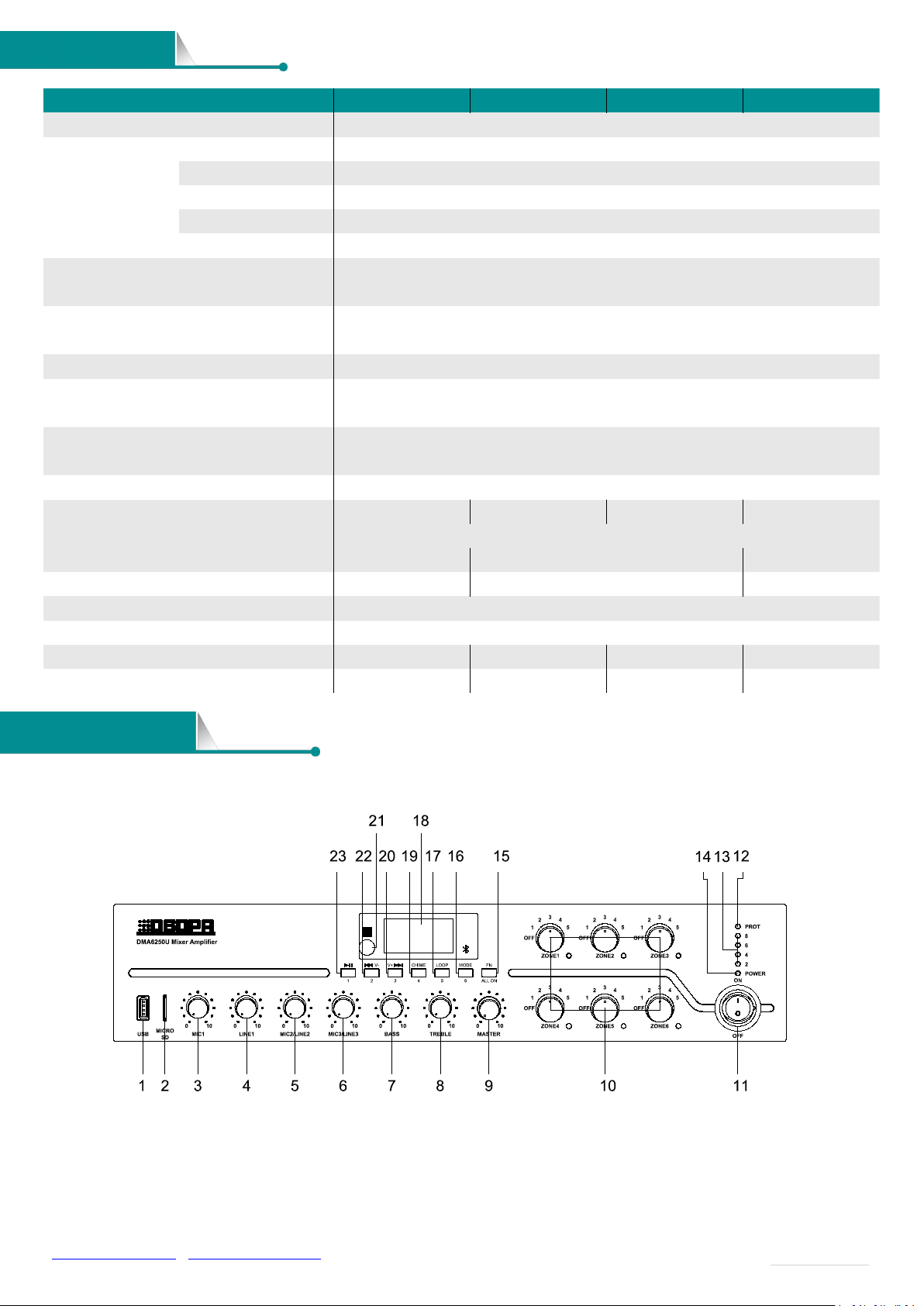
1. USB
Insert a USB flash drive here to provide programs to the
built-in MP3, whose memory is 32G;
2. SD Card
3. MIC1 Volume Adjustment Knob
Adjust the volume of the MIC1, clockwise to volume up
Front / Rear Panel
Specifications
[email protected] / www.dsppatech.com The specifications will be subject to changes without prior notice.
Copyright © Guangzhou DSPPA Audio Co.,Ltd All rights reserved.
Page 3

and counterclockwise to volume down;
4. LINE1 Volume Adjustment Knob
Adjust the volume of the LINE1, clockwise to volume up
and counterclockwise to volume down;
5. MIC2/LINE2 Volume Adjustment Knob
Adjust the volume of the MIC2/LINE2, clockwise to
volume up and counterclockwise to volume down;
6. MIC3/LINE3 Volume Adjustment Knob
Adjust the volume of the MIC3/LINE3, clockwise to
volume up and counterclockwise to volume down;
7. Bass Volume Adjustment Knob
With the center position as the reference, clockwise to
volume up and counterclockwise to volume down;
8. Treble Volume Adjustment Knob
With the center position as the reference, clockwise to
volume up and counterclockwise to volume down;
9. Main Volume Adjustment Knob
Adjust the volume of all signals (except the emergency
input signal on the rear panel), clockwise to volume up and
counterclockwise to volume down;
10. 6-Zone Volume Adjustment Knob & Indicator
Adjust the volume of 6 zones, clockwise to volume up
and counterclockwise to volume down;
When the zone is open, the corresponding indicator is
blue;
11. Power Switch
Press down button“ON” to turn on the power, and “OFF”
to turn it off;
12. Protection Indicator (DC temperature, overcurrent,
or short circuit protection)
13. Level Indicator
Level display of audio output;
14 . Power Supply LED
15. FN Zone Switch
Short press to control zone 1-6 to be on or off, press it to
turn on the zones, then use the button “1”, “2”, “3”, “4”, “5”,
“6” on the panel to turn on or off the corresponding zone. If
you press the FN button for more than 1s, all the zones will
be opened, and if you press the FN button for more than 1s
again, the zones will be restored to the state before they
were all opened.
16. Mode
The modes that can be switched are USB mode, AUX line
mode, Bluetooth play mode and FM radio mode;
17. LOOP Volume Adjustment Button
Adjustable volume of MIC4/LINE4, EMC, Chime, and
SIREN, volume 0-32 (for detailed operation, please refer to
No.8 of the "Operating Instructions" item below);
18. Display screen
19. Chime button
20. Next song / (FM mode for next program)
In USB and Bluetooth modes, press this button to the
"next song";
In FM mode, press this button to the "next program";
In FM, AUX, USB, SD and Bluetooth modes, long
press this button to turn down the volume of MP3
sources (including FM, SD, USB and Bluetooth)
21. Infrared Remote Control Receiving
22. Previous Song / (FM mode for previous program)
In USB and Bluetooth modes, press this button to the
"Previous song";
In FM mode, press this button to the "Previous
program";
In FM, AUX, USB, SD and Bluetooth modes, long
press this button to turn up the volume of MP3 sources
(including FM, SD, USB and Bluetooth)
23. Play/Pause
In USB and Bluetooth modes, press this button to
Pause;
In FM mode, press this button to the search;
[email protected] / www.dsppatech.com The specifications will be subject to changes without prior notice.
Copyright © Guangzhou DSPPA Audio Co.,Ltd All rights reserved.
Page 4
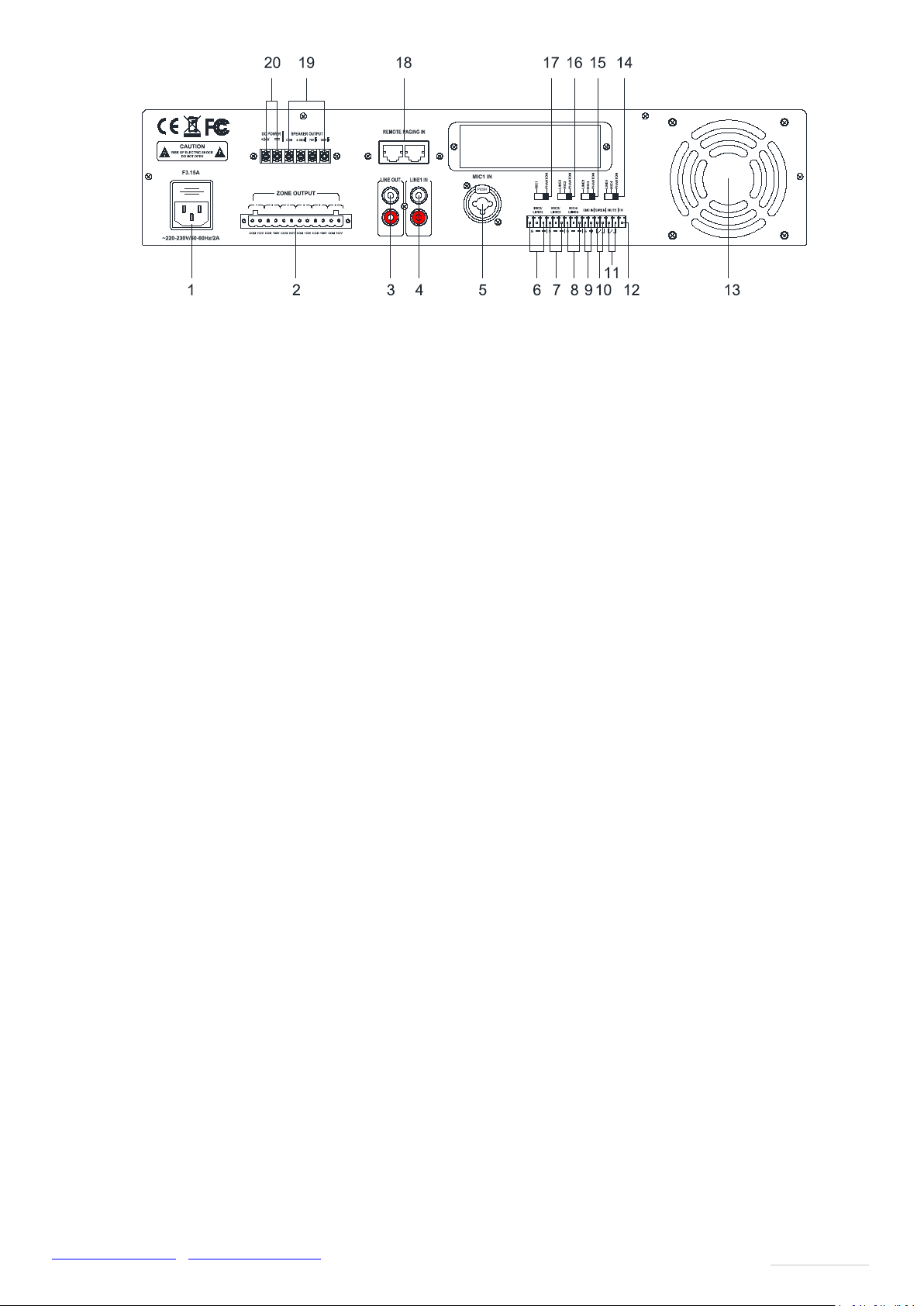
Take the rear panel of DMA6250U as an example
1. Power Input Connector AC220-230V
Access the power plug to this connector. When connecting,
please insert the plug of this device first, and then connect
to the grid.
2. 6-zone Output
3. LINE Output
4. LINE1 Input
5. MIC1 Balanced Input
6. MIC2, LINE2 Input
7. MIC3, LINE3 Input
8. MIC4, LINE4 Input
9. EMC Trigger Input
10. SIREN Short-circuit Trigger
11. Silent Short-circuit Trigger
12. FM Antenna
13. Fan Port
14. LINE4, MIC4 Phantom Voltage Switch
Toggling the switch to left and right (Note: When toggle
this switch, you need to turn down the volume of the device
or turn off the power of the device first)
15. LINE3/ MIC3 Phantom Voltage Switch
Toggling the switch to left and right (Note: When toggle
this switch, you need to turn down the volume of the device
or turn off the power of the device first)
16. LINE2/ MIC2 Phantom Voltage Switch
Toggling the switch to left and right (Note: When toggle
this switch, you need to turn down the volume of the device
or turn off the power of the device first)
17. MIC1 Phantom Voltage Switch
Toggling the switch to left and right (Note: When toggle
this switch, you need to turn down the volume of the device
or turn off the power of the device first)
18. DMA20 Remote Paging MIC Input
19. Fixed resistance and voltage output
Fixed resistance/voltage Speakers
20. DC+24V Power Input (emergency power input)
[email protected] / www.dsppatech.com The specifications will be subject to changes without prior notice.
Copyright © Guangzhou DSPPA Audio Co.,Ltd All rights reserved.
 Loading...