

Page 1
EX3
Quick Start
Farther.Faster.Clearer
Page 2
Aircraft
③
④
⑤
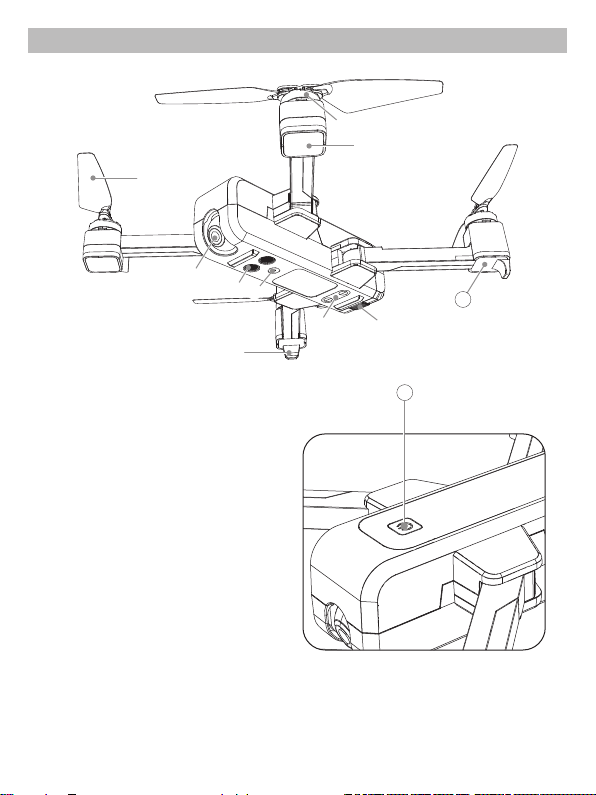
1. Brushless motor
2. Undercarriage
3. Propeller
4. Camera
5. Ultrasonic sensor
6. Lights
7. Vision positioning lens
8. Battery
9. Front light
10. Rear light
11. Power switch
②
⑦
⑥
①
⑨
10
⑧
11
*Please turn to User Manual for detailed information of flight environment requirements.
1
Page 3
Remote Controller
⑧
⑦
⑤
10
③
⑥
⑨
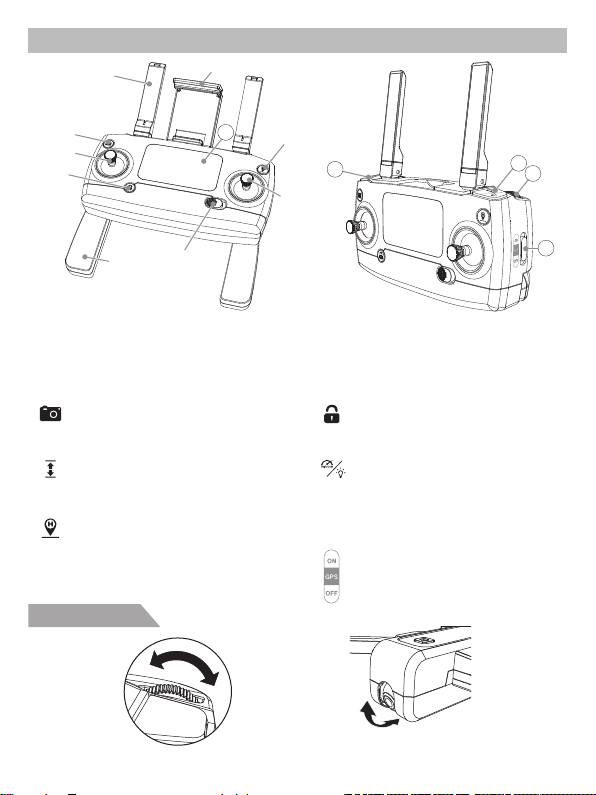
1. Power switch
2. One-key RTH
3. Left stick
4. Right stick
5. Photo/Video
6. One-key unlock
Photo/Video
Short-press to take photos; Long-press
to take videos.
One-key takeoff/One-key landing
Short-press to switch one-key takeoff or
one-key landing.
One-key RTH
Short-press to enter into RTH procedure;
Press again to exit RTH.
①
7. Mobile phone holder
8. Antenna
9. Hand stick
10. LCD display
11. One-key takeoff/One-key
landing
Gimbal trimmer
A
B
②
11
④
12. High/Low speed switch
(short-press); Light switch
(long-press)
13. Gimbal trimmer
14. Gesture/GPS mode switch
One-key unlock
Short-press to unlock; Long-press to
lock.
High/Low speed switch
(short-press); Light switch
(long-press)
Short-press to switch High/Low speed;
Long-press to turn on/off the LED lights.
Gesture/GPS mode switch
OFF - Gesture Mode;
ON - GPS Mode.
A
90°
The camera can be rotated by 90 degrees.
2
B
12
13
14
Page 4
LCD screen display
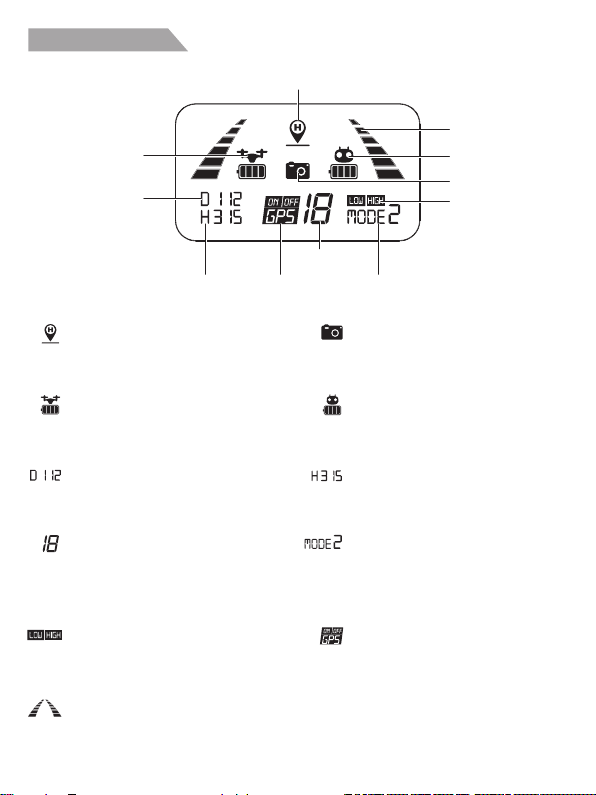
Return to Home
(RTH) icon
Aircraft battery
level
Distance against
Home Point
Altitude against
Home Point
Return to Home (RTH) Icon
The icon is on during the RTH procedure
and will be off once RTH procedure canceled.
Aircraft battery level
It indicates current aircraft battery level.
Distance against Home Point
It indicates current aircraft flying distance
against recorded Home Point.
Satellite amount
Once the GPS signal amount is over 7,
Home Point will be recorded at the location
where the aircraft takes off.
High/Low speed mode
LOW - Low Speed;
HIGH - High Speed.
Signal strength
It indicates the signal strength that the
remote controller receives from the aircraft.
GPS mode
Satellite
amount
Remote controller
throttle mode
Photo/Video
Flashing once to take photos; Keep
flashing to take videos.
Remote controller battery level
It indicates remote controller current
battery level.
Altitude against Home Point
It indicates aircraft current altitude
against Home Point.
Remote controller throttle mode
It indicates current throttle mode.
Throttle mode is set at Mode 2 by
default.
GPS mode
ON - GPS Mode;
OFF - Gesture Mode.
3
Signal strength
Remote controller
battery level
Photo/Video
High/Low speed
mode
Page 5
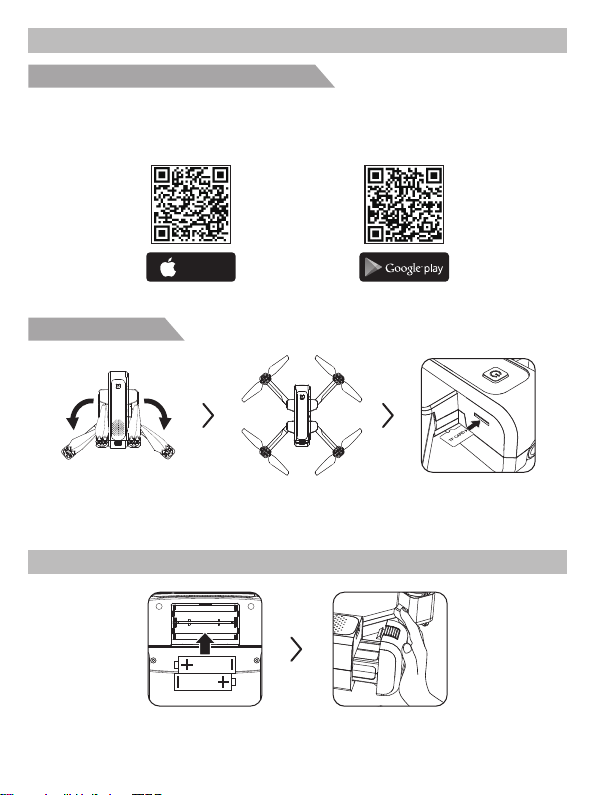
Preparation before Use
AA
AA
Download the software “X-DRONE” APP
● For Apple IOS system, please turn to Apple store, search “X-DRONE” or scan the QR code to
download the software.
● For Android system, please scan the “Google play” QR code or search “X-DRONE” in “Google play”
to download the software.
Available on the
App Store
Prepare your EX3
Unfold the rear arms. Unfold the front arms.
Flight Preparation
Install 2*AA batteries into the
remote controller.
Install the aircraft battery.
4
ANDROID APP ON
Insert the TF Card
(TF Card is not included).
Page 6
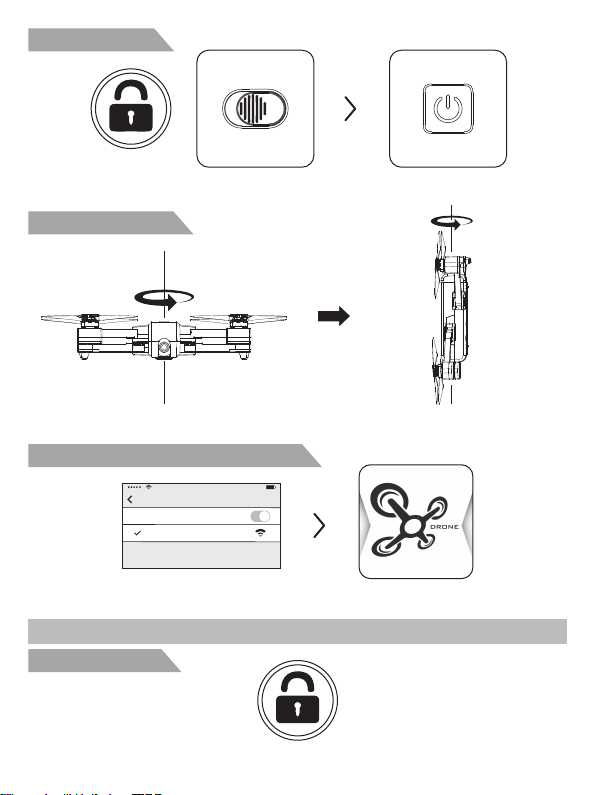
Signal connection
Keep pressing the unlock button and turn
on the remote controller.
Compass calibration
Step 1. Rotate the EX3 360 degrees for
3 circles horizontally.
Connect your mobile device with EX3
Setting
Wi-Fi
drone****
Flight
Unlock the aircraft
Short-press the unlock button.
Power on the aircraft by pressing the
switch on the aircraft for 3 seconds.
Step 2. Rotate the EX3 360 degrees for
3 circles vertically.
Tap “X-DRONE” AppConnect WIFI
5
Page 7
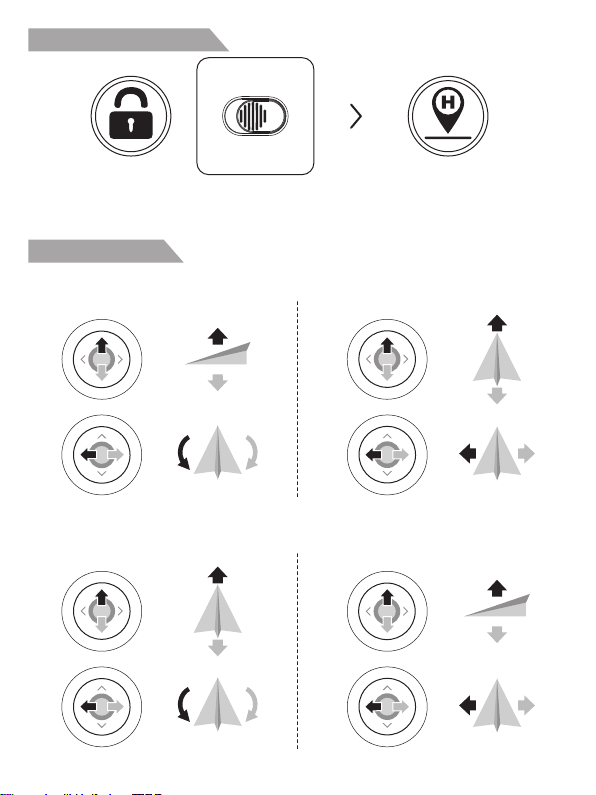
Change the throttle mode
Keep pressing the unlock button and turn
on the remote controller.
Keep pressing the RTH button for 3
seconds to change the throttle mode.
Control the aircraft
Throttle mode is set at Mode 2 by default. Left stick determines the aircraft’s altitude and orientation;
Right stick control the function of each stick movement.
Left stick
e
c
n
s
t
A
D
t
n
e
e
s
c
T
u
t
f
e
l
n
r
Mode 1 is opposite to Mode 2. That’s to say, in Mode 1, right stick determines the aircraft’s altitude
and orientation, left stick control the function of each stick movement.
r
n
r
i
g
h
u
t
T
Left stick Right stick
a
w
r
r
d
o
F
B
d
r
a
a
c
k
w
T
u
t
f
e
l
n
r
r
n
r
i
g
h
u
t
T
6
Right stick
a
w
r
o
F
B
a
c
k
w
t
h
g
i
l
f
d
r
a
w
t
f
e
L
e
c
s
A
D
e
s
c
t
h
g
i
l
f
d
r
a
w
t
f
e
L
r
d
d
r
a
R
i
g
h
t
w
a
r
d
f
l
i
g
h
t
n
t
t
n
e
R
i
g
h
t
w
a
r
d
f
l
i
g
h
t
Page 8
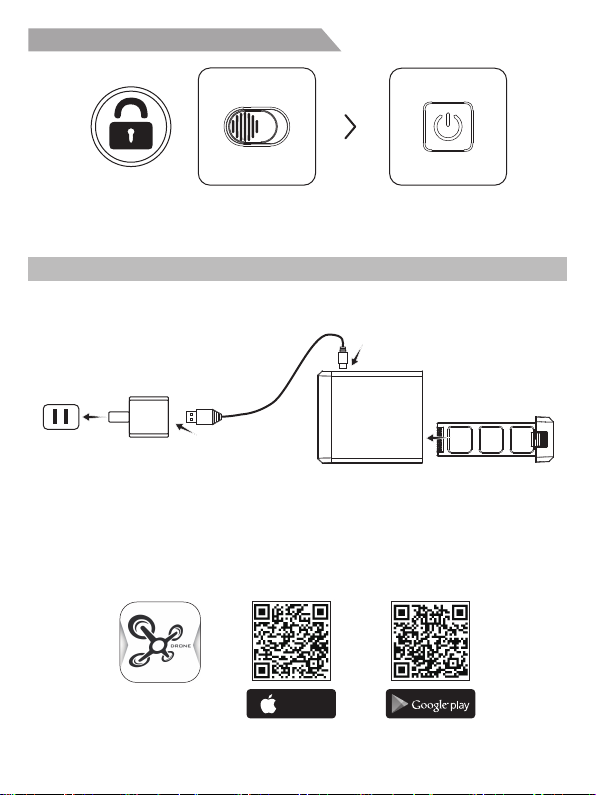
Turn off the remote controller and aircraft
Long-press the unlock button and turn off
the remote controller.
Charge the Aircraft Battery
● The aircraft needs to be full charged before every flight;
● Please use Eachine charging device for this aircraft;
● Full Charging time takes about 270 minutes.
USB
X-DRONE
Available on the
App Store
Power off your aircraft by pressing
the switch for 3 seconds.
ANDROID APP ON
 Loading...