

Page 1
Page 2
Control your lights from anywhere in the world.
Light must be installed and paired before starting.
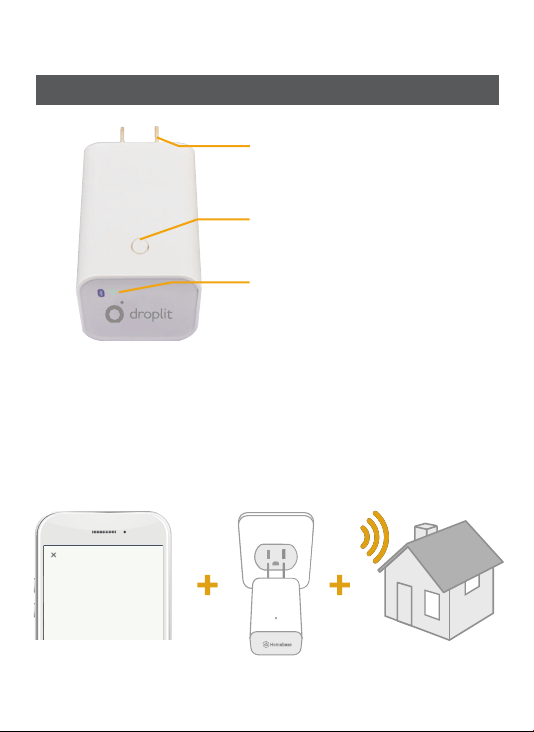
100-240V compatible
Manual reset
Bluetooth and Wi-Fi indicators
What does the Bridge do?
The Bridge creates a secure private connection to your local network and
the cloud service using your Wi-Fi router. With the Bridge you will be able
to control and manage your local devices from anywhere using your mobile
device or web browser and the voice control assistant Alexa.
Add Hub
Connect all of your smart devices in just
one place. Tap the arrow to begin the
setup process.
2
Page 3
Setup
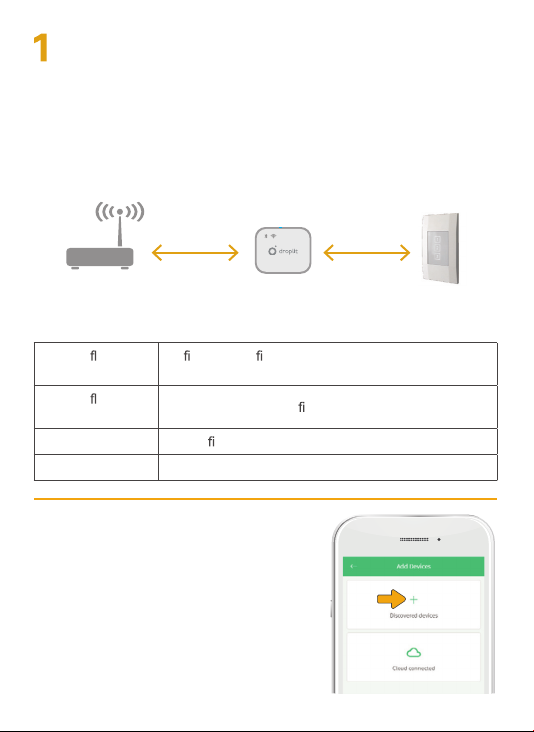
a. Make sure the Bridge is within 40 feet but not closer than 5 feet
of the wifi router you want to connect it to and 70 feet of the
nearest compatible device.
b. Plug the Internet Access Bridge into a 100-240V socket.
c. Wait 2 minutes for the bridge to initialize.
Note: Sometimes it may help to move a device closer to the Bridge
and the Bridge closer to the wifi router for setup.
50
feet
30 - 70
feet
What do the lights mean?
Double ashing
Green
Double ashing
Blue
Solid Green The wi
Solid Blue The Bridge is connected to an netw ork.
Add to the app:
2
Launch the app, go to the “Add device”
screen and tap the “ +” icon to scan
available devices.
Important:You will need to have at
least one compatible device already
set up and powered on before you try
to connect the Bridge.
Wi is not con gured or if it has been setup,
the router or internet are down.
The Bridge is not con
is connected to a router and the internet.
gured to an account.
3
Page 4
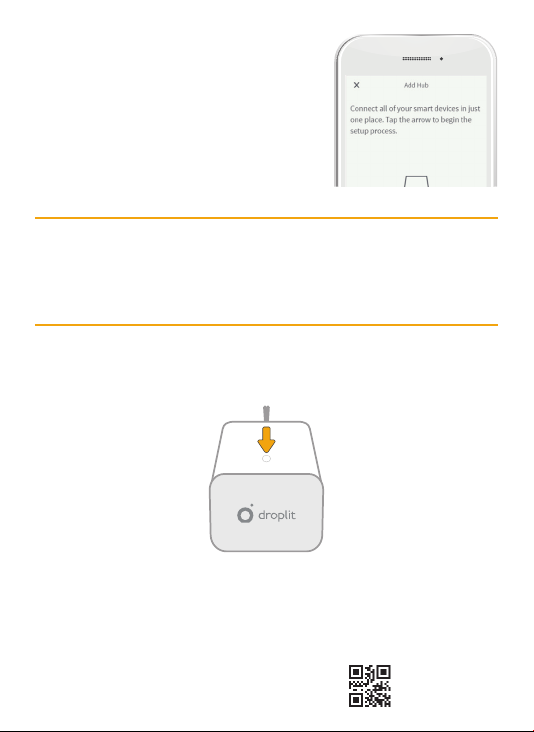
Select your Bridge from t he list
3
of scanned devices and press
“Done”
Choose your preferred Wi-Fi network from the list populated on the
app, then enter the Wi-Fi network password to complete the setup.
4
Note: Your wifi network password and your pass word may be different.
Having trouble?
There are two ways to refresh your Bridge. You can either reboot it or
factory reset it.
Reboot:
Press the button on the Bridge for one second to reboot the Bridge. This
will refresh the Bridge’s connection w ith the internet.
Factory Reset:
Having trouble and want to start over? Press the reset button for 15 seconds
to reset your Bridge back to factory settings.
4
72-DBK1W1-MANB3
Page 5

FCC
This equipment has been tested and found to comply with the limits for a Class B digital
device, pursuant to part 15 of the FCC Rules. These limits are designed to provide
reasonable protection against harmful interference in a residential installation. This
equipment generates, uses and can radiate radio frequency energy and, if not installed
and used in accordance with the instructions, may cause harmful interference to radio
communications. However, there is no guarantee that interference will not occur in a
particular installation. If this equipment does cause harmful interference to radio or
television reception, which can be determined by turning the equipment off and on, the
user is encouraged to try to correct the interference by one or more of the following
measures:
- Reorient or relocate the receiving antenna.
- Increase the separation between the equipment and receiver.
- Connect the equipment into an outlet on a circuit different from that to which the receiver
is connected.
- Consult the dealer or an experienced radio/TV technician for help.
This device complies with FCC radiation exposure limits set forth for an uncontrolled
environment. This equipment must be installed and operated in accordance with provided
instructions and the antenna(s) used for this transmitter must be installed to provide a
separation distance of at least 20 cm from all persons.
This device complies with Part 15 of the FCC Rules. Operation is subject to the following
two conditions:
(1) this device may not cause harmful interference, and
(2) this device must accept any interference received, including interference that may
cause undesired operation.
Warning: Changes or modifications to this unit not expressly approved by the party
responsible for compliance could void the user’s authority to operate the equipment.
NOTE: THE MANUFACTURER IS NOT RESPONSIBLE FOR ANY RADIO OR TV
INTERFERENCE CAUSED BY UNAUTHORIZED MODIFICATIONS TO THIS
EQUIPMENT. SUCH MODIFICATIONS COULD VOID THE USER’S AUTHORITY TO
OPERATE THE EQUIPMENT.
Industry Canada
This device complies with Industry Canada’s licence-exempt RSSs. Operation is
subject to the following two conditions:
(1) This device may not cause interference; and
(2) This device must accept any interference, including interference that may cause
undesired operation of the device.
Le présent appareil est conforme aux CNR d’Industrie Canada applicables aux appareils
radio exempts de licence. L’exploitation est autorisée aux deux conditions suivantes :
(1) l’appareil ne doit pas produire de brouillage, et
5
Page 6

(2) l’utilisateur de l’appareil doit accepter tout brouillage radioélectrique subi, même si le
brouillage est susceptible d’en compromettre le fonctionnement.
The device meets the exemption from the routine evaluation limits in section 2.5 of
RSS 102 and compliance with RSS-102 RF exposure, users can obtain Canadian
information on RF exposure and compliance.
Le dispositif rencontre l’exemption des limites courantes d’évaluation dans la section
2.5 de RSS 102 et la conformité à l’exposition de RSS-102 rf, utilisateurs peut obtenir
l’information canadienne sur l’exposition et la conformité de rf.
This transmitter must not be co-located or operating in conjunction with any other
antenna or transmitter. This equipment should be installed and operated with a minimum
distance of 20 centimeters between the radiator and your body.
Cet émetteur ne doit pas être Co-placé ou ne fonctionnant en même temps
qu’aucune autre antenne ou émetteur. Cet équipement devrait être installé et actionné
avec une distance minimum de 20 centimètres entre le radiateur et votre corps.
1.Read these instructions.
2.Keep these instructions.
3.Heed all warnings.
4.Follow all instructions.
5.Do not use this apparatus near water
6.Clean only with dry cloth.
7.Do not block any ventilation openings. Install in accordance with the manufacture’s
instructions.
8.Do not install near any heat sources such as radiators, heat registers, stoves, or other
apparatus (including amplifiers) that produce heat.
9.Do not defeat the safety purpose of the polarized or grounding plug. A polarized plug has
two blades with one wider than the other. A grounding plug has two blades and a third
grounding prong. The wide blade or the third prong is provided for your safety. If the
provided plug does not fit into your outlet, consult an electrician for replacement of the
obsolete outlet.
10.Protect the power cord from being walked on or pinched particularly at the plugs,
convenience receptacles, and at the point where they exit from the apparatus.
11.Only use attachments/accessories specified by the manufacturer.
12.Use only with the cart, stand, tripod, bracket, or table specified by the manufacturer, or
sold with the apparatus. When a cart or rack is used, use caution when moving the
cart/apparatus combination to avoid injury from tip-over.
13.Unplug the apparatus during lightning storms or when unused for long periods of time.
14.Refer all servicing to qualified personnel. Servicing is required when the apparatus
has been damaged in any way, such as power supply cord or plug is damaged, liquid
has been spilled or objects have fallen into the apparatus has been exposed to rain or
moisture, does not operate normally, or has been dropped.
15.WARNING: To reduce the risk of fire or electric shock, do not expose this apparatus
to rain or moisture. The apparatus shall not be exposed to dripping or splashing and that
objects filled with liquids, such as vases, shall not be placed on apparatus.
The direct plug-in a adapter is used as disconnect divice, the disconnect divice shall
remain readily operable.
6
 Loading...