

Page 1

DRIVESMART
ALPHA
Page 2
Introduction:
Thank you for purchasing the DriveSmart Alpha Radar, Laser
and GPS speed camera detector, powered by Laser Elite data.
We hope it gives you a safer and well informed driving
experience. With its loud clear voice alerts of pending warning
locations and speed limits of those areas it will allow you to drive
smart and safely within the speed limits. With the constant threat
of Mobile laser as well as fixed camera locations the DriveSmart
Alpha is a perfect choice. Powered by the Laser Elite GPS
database. The most comprehensive in the UK.
Laser Elite has the most up-to-date and sophisticated database
of Mobile Laser / Safety Van / Fixed camera locations available
with over 10 years of developing laser detection, diffusing and
jamming devices. As one of the biggest threats to driving in the
UK is mobile laser, Laser Elite was the clear choice for the
database supplier.
The biggest advantage of our database is the free for life
updates.
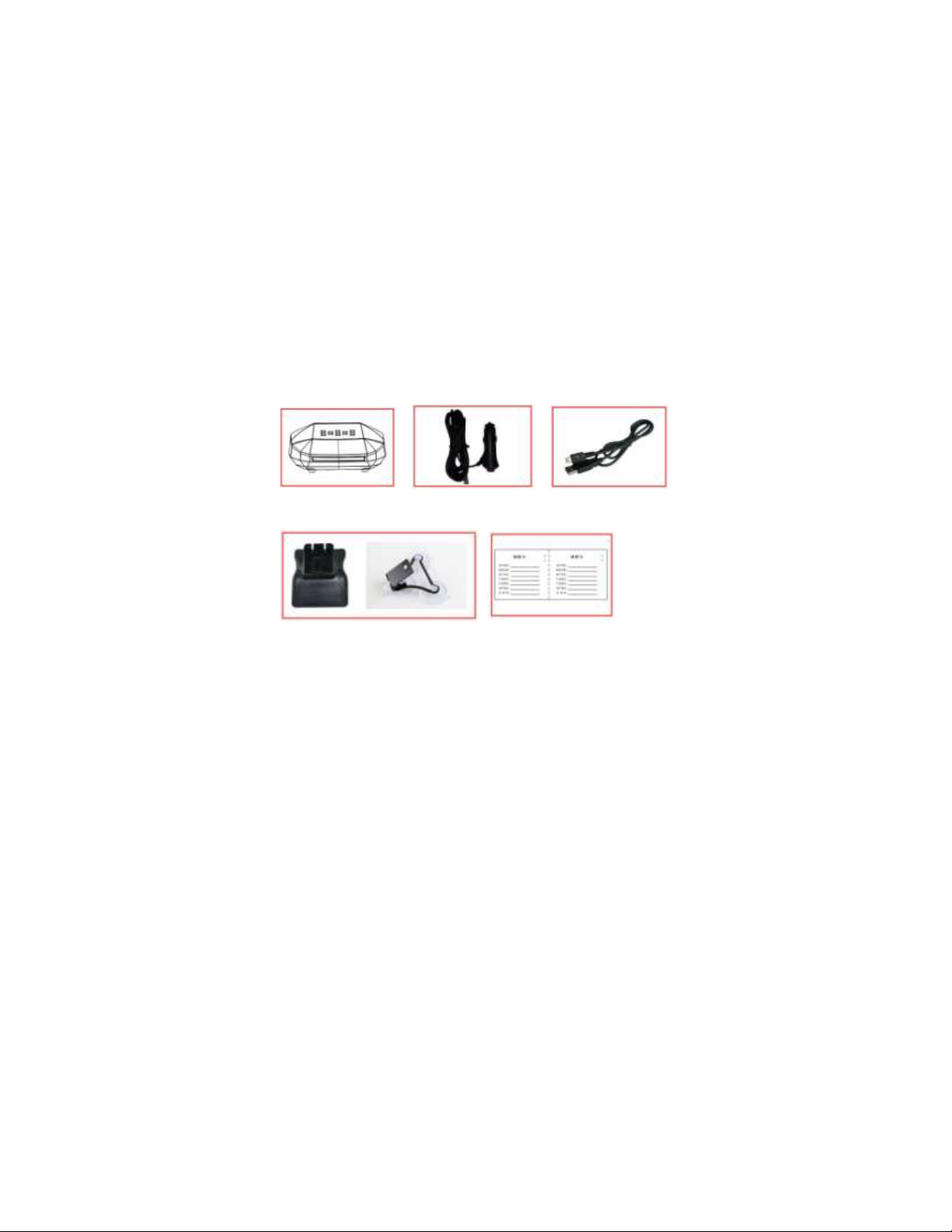
What’s Included in the Box:
Alpha Lighter Power Lead Update Cable
Brackets Manual
Page 3

Functions of the DriveSmart Buttons:
Top Side (Short Cuts):
GPS/Radar On/Off
Adjust Warning Distance
Under Side:
+ and - : Adjusts menu options up and down.
R: Changes the on screen real time display from miles per hour
to kilometers per hour. There is voice confirm of the setting.
M: Menu Button This will scroll through the various option
settings as detailed on the following pages. The volume + and –
buttons will allow you to change the settings.
Page 4

SPEED CAMERA DETECTION: Allows you to turn on/off fixed
speed camera alerts.
TRAFFIC LIGHT CAMERA DETECTED: Turns alerts for red
light cameras on/off.
SPECS START CAMERA: Turns alerts for SPECS cameras on.
These are the average speed cameras you tend to get on
motorway roadworks.
MOBILE CAMERA AREA: Turns alerts on for mobile camera
zone hot spots where mobile vans and hand held laser guns
have been reported operating in the past.
WARNING DISTANCE INCREASE: This increases the alert
range when you are over 60 MPH, we would suggest having this
on if you do a lot of motorway driving.
WARNING DISTANCE INCREASE FOR FIXED CAMERA
WHEN SPEED OVER 60 PER HOUR ON/OFF: Warning
distance will automatically increase to 800m when your vehicle
is travelling over 60mph.
RADAR ON WITH GPS ALERT: To reduce all false alerts the
radar detector will only become active when approaching a
radar based camera included in the GPS database like a Gatso
or Hadecs camera.
If you select off the radar detector will alert to all K band radar
types, this can include traffic lights and opening doors that
function on K band radar.
CRUISE OVER SPEED WARNING: Allows you to get an audible
alert when travelling over the set speed limit. You can set this
between 20 and 90 MPH/KPH to warn you if your speed drifts
above your defined limit.
CONTINUOUS ALARM FOR OVERSPEED WARNING: Sounds
when driving over the speed limit inside an alert area. Can be
switched on/off.
Page 5

FINE CORRECTION TO GPS SPEED: Allow you to adjust your
real time GPS to correctly match your speedometer. Your cars
speedometer will read higher than your actual speed and at a
contact speed the GPS will be showing your correct speed but
if you want to adjust this to match your cars speedo you can do
this here.
DISPLAY BRIGHTNESS: Has 3 levels Low / Normal / High
LASER DETECTOR ON/OFF: Allows you to turn on/off K band
radar detection (Ka band is the most commonly used in the UK).
K BAND ON/OFF: Allows you to turn on/off K band radar
detection (Not advised in UK as all radar based cameras use K
band).
Ka BAND ON/OFF: Allows you to turn on/off Ka band radar
detection (Ka band is the most commonly used in the EU).
GPS TIME ADJUSTMENT: Allows you to adjust + or - GMT on
the on-screen display time to allow for British Summer Time and
use around the world.
LASER DETECTION ON/OFF: Lets you choose to have laser
detection active.
FACTORY RESET: Reset your settings back to the factory
default ones
Page 6
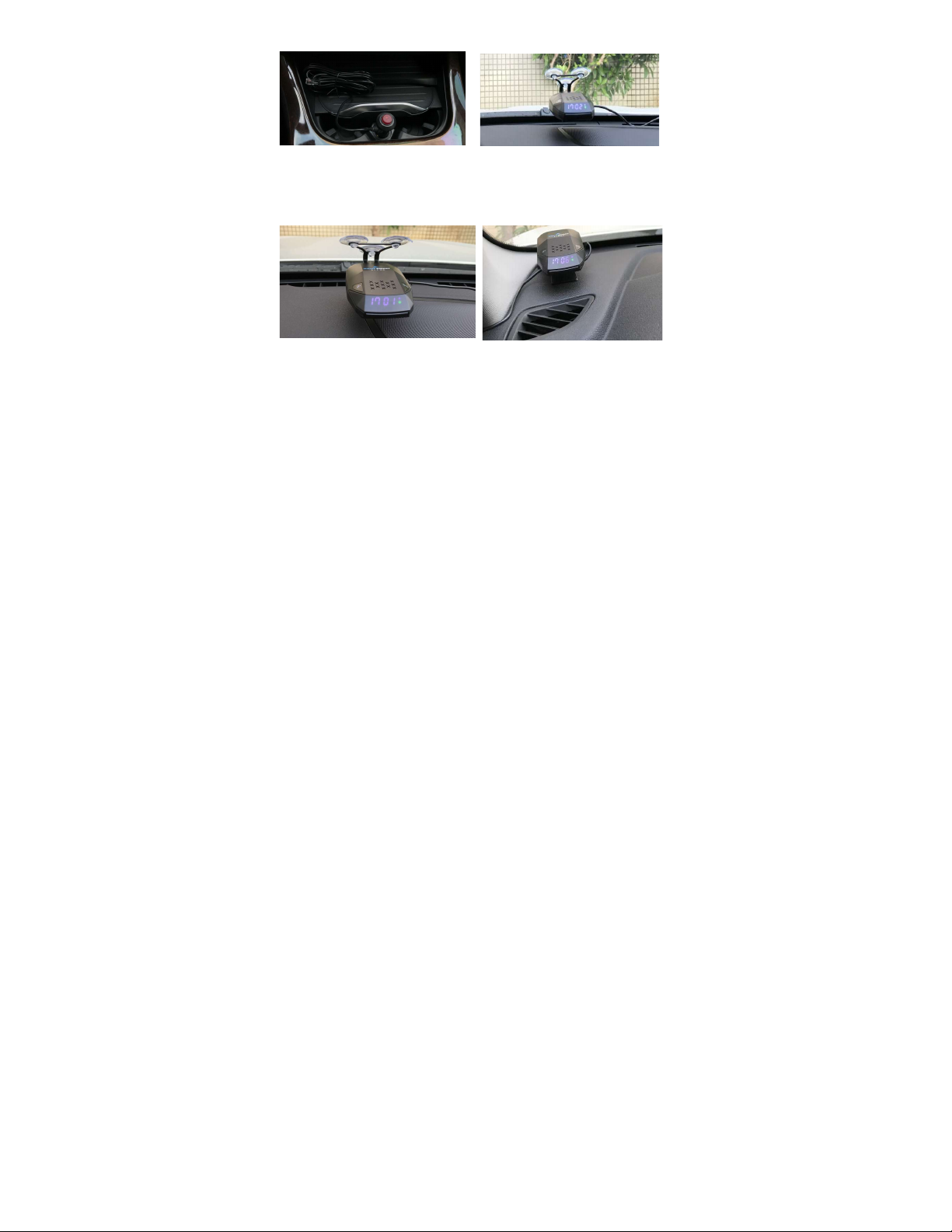
Connect For Power With 12v Adaptor.
Installation
Windscreen Mount Dash Mount
The supplied windscreen bracket allows for flexible installation
into any vehicle.
Make sure the suction cups are moist when applying to the
windscreen.
You can also bend the bracket to suit the windscreen rake angle.
Page 7

Operation:
Once you have connected the DriveSmart Alpha to the car
power supply, you will get the start-up voice message.
For the DriveSmart Alpha to work via the GPS satellite system it
may take up-to 2 minutes to locate and function correctly. It will
show the correct time when a satellite signal is acquired and you
will hear “GPS Lock” once it has gained enough satellites to
accurately pinpoint your location.
You will only hear a voice alert once you are approaching a
location stored in the database. You will be given an audible and
visual alert limit of the speed camera area and a visual indication
of the vehicle distance to the camera. This distance will
countdown as your approach.
Mobile laser speed camera data is included in the DriveSmart
database. Supplied by Laser Elite this will alert you to potential
laser speed traps. These types of mobile alerts will show you
where there has been a potential laser speed camera at some
point in time.
If you feel a speed camera is missing or some other data is
incorrect this can be submitted for correction through the
DriveSmart website. The database is updated every 1-2 weeks.
Page 8
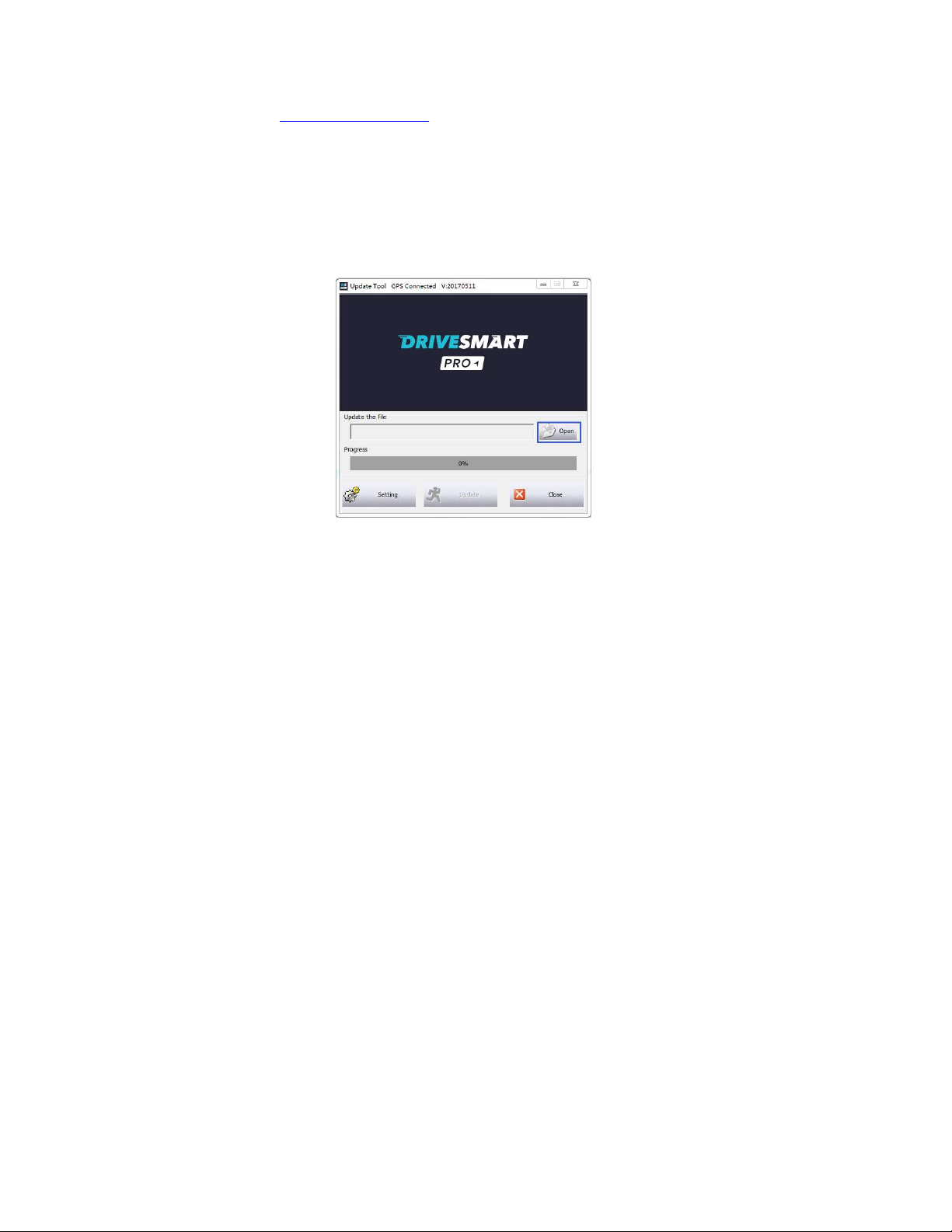
Updating the Firmware and Database from Your PC.
Your DriveSmart Alpha has been shipped with a current
database ready for you to use it out of the box. When you wish
to update this database you will need to download the
DriveSmart PC update tool from the website
www.drivesmartpro.com along with the latest camera database.
It will be named ALPHAXXX.DWN
Connect the DriveSmart via the mini USB socket you use to
power it in your vehicle on the side of the unit and connect to the
USB connector on our PC. The DriveSmart will give a voice alert
to confirm it is in PC Update Mode and “-DL-’ will be displayed
on the screen to confirm download is ready. Now open the
DriveSmart PC connection program to display the window on
your computer.
Click on the Open folder and then select the ALPHAXXX.DWM
file from whichever location you saved it to on your PC when you
download it form the website.
Page 9
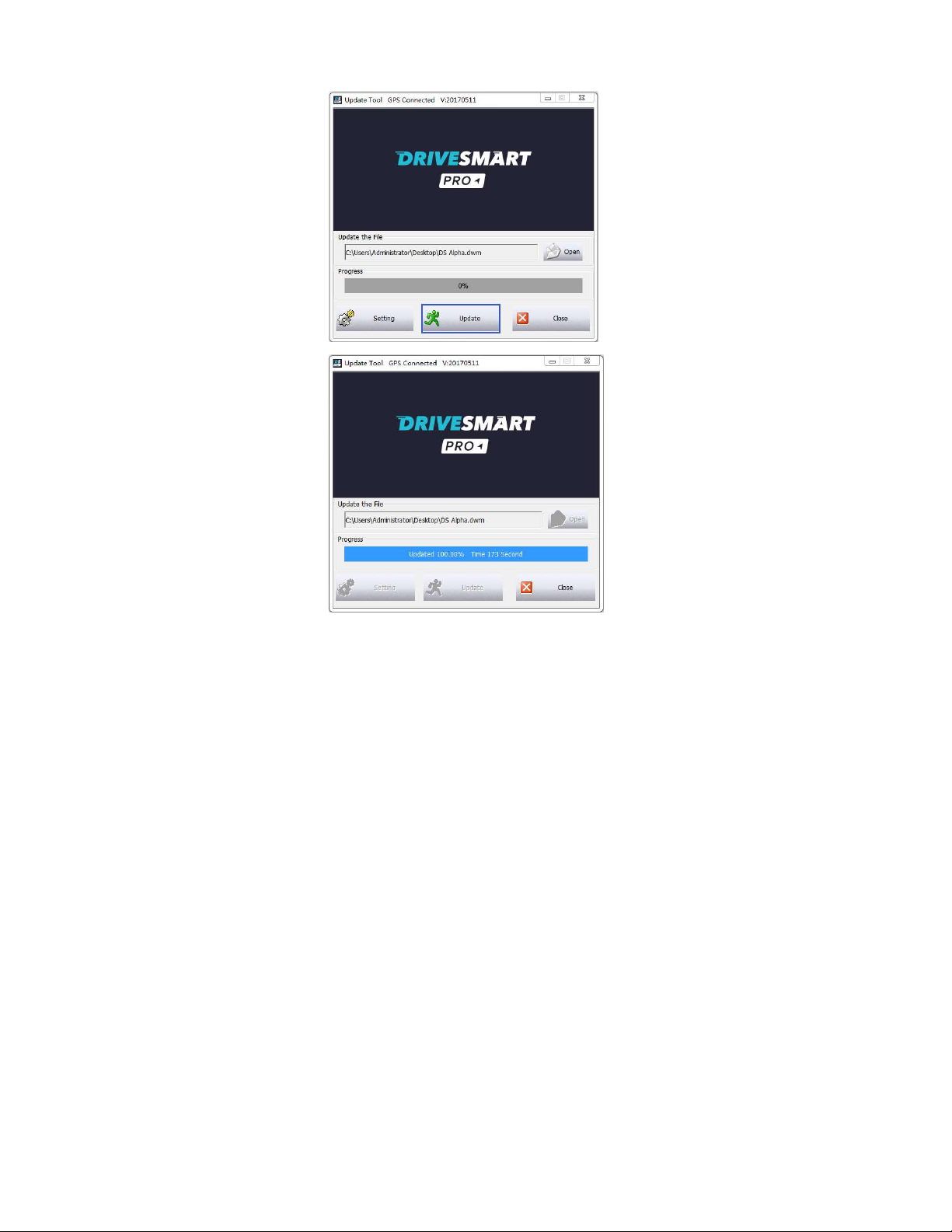
Now click Update. The DriveSmart will now update with the
latest database. You will see the progress bar moving until it
reaches 100%.it will then be fully updated and the DriveSmart
will reboot.
Page 10

Product Specification:
Model Alpha
Power Requirement Input: DC12V-15V
Current:200~350mA
Dimensions 116.5*63.05*33.8mm
Temperature Range
Radar Specification:
Radar Bands Frequency Sensitivity
K BAND 23.9~24.0GHz+/-20MHZ 123+/-dB
KA BAND 34.3~37.0GHz+/-20MHZ 125+/-dB
LASER 800~1100nm /
Operating -20℃~60℃
Storage -30℃~105℃
Page 11

Help / Trouble Shooting:
No Power
Continuous
Abnormal Alarm
No Voice Alarm But
Has Display Alarm
GPS System
Failure
GPS Lock is Slow
or Non Functioning
1. Check power
2. Check fuse
3. Check car charger
1. Restart
2. Check signal in car
3. Check device is functioning
correctly
1.Check volume setting
2.Restart to check again
1. Take note of location
2. Restart the GPS
3. Report to the place of purchase
1. Tall buildings and city driving can
cause interference
2.It can be normal to take up-to 5
minutes to get 1st GPS lock when
unit is new
3.Drive out of tunnel or enclosed
area
4.Check you do not have an
athermic / heat reflective windscreen
which generally has a purple tint.
No alarm of speed
camera
1. Download the newest database
2. Report the new points to
DriveSmart
Page 12
Contact info
LASER STAR TECHNOLOGY LTD
20 HAYWOOD DRIVE
FLEET
HAMPSHIRE
GU52 7RZ
WW.DRIVESMARTPRO.COM
 Loading...