

Page 1
Drivedata UK Ltd. PO Box 29, Sandhurst, GU47 0WR
Tel: +44 (0)8707 60 70 44 • Fax: +44 (0)1344 762835
e-mail:[email protected] • web: www.drivedata.com
Company No. 4437703 • VAT No. 797 8283 52
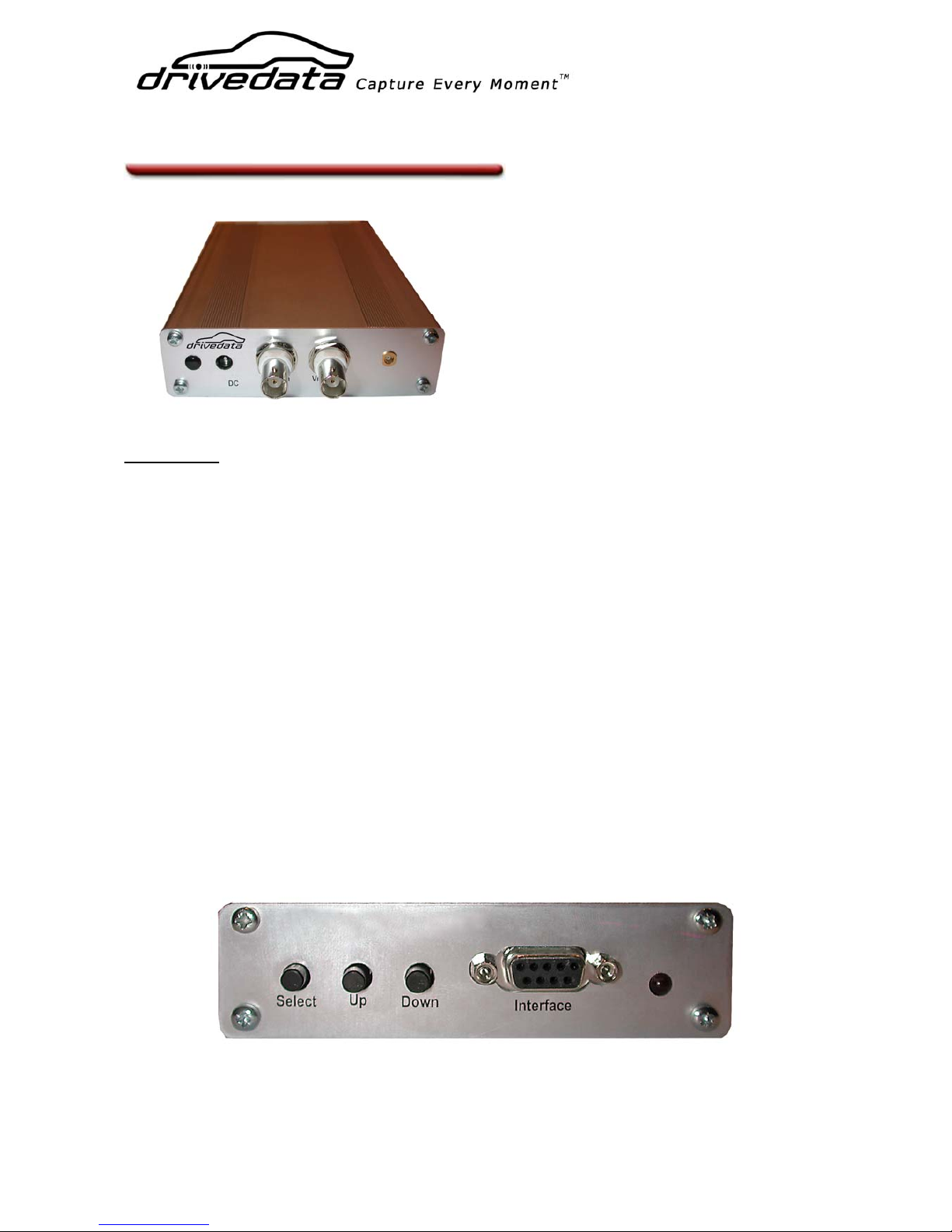
RT800 Video Overlay Unit
The RT800 is designed to connect in-line
between a composite (analogue) video
camera and video recording device (miniDV, VHS, DVD, Flashcard recorder etc.)
and overlays GPS data (speed, time,
position) as text on the video.
Installation
The RT800 can be installed in any vehicle, or carried in a backpack or pocket and is powered
from a 12v battery pack or a vehicle’s 12V supply. The unit can be mounted in any position,
although it is recommended to position it away from areas of excessive vibration, heat sources
(engine, exhaust, etc.) and where it could be exposed to rain or water. The unit can be
secured using self-adhesive pads, heavy-duty fastening strip (such as 3M Dual Lock) or
optional brackets available from Drivedata.
Connect a camera or other video source (for example from a Picture in Picture unit) to the
‘VIDEO IN’ socket, using a short BNC-BNC cable if necessary. Connect a monitor or video
recorder to the ‘VIDEO OUT’ socket.
Connect the GPS antenna supplied to the connector on the right of the front panel. The
antenna will usually work if positioned inside a car on the dashboard, but some cars may have
a metallic coating or embedded heating element in the windscreen which interferes with the
GPS signal. The accuracy and reliability of the on-screen data can be affected by the
positioning of the antenna. For best GPS reception, place the antenna on a flat metal surface
with a good view of the sky and do not cover with anything (even sticky tape) as this may
block the signal.
At the rear of the unit there are three programming buttons, an interface connector which is
not normally connected and a red LED to indicate the unit is powered up.
Page 2
Drivedata UK Ltd. PO Box 29, Sandhurst, GU47 0WR
Tel: +44 (0)8707 60 70 44 • Fax: +44 (0)1344 762835
e-mail:[email protected] • web: www.drivedata.com
Company No. 4437703 • VAT No. 797 8283 52
Powering the RT800
Connect the unit to a 12V DC power supply. The connector is a 2.1mm DC socket with the
centre pin being positive.
IMPORTANT: If you are powering the unit directly from a 12v battery or other un-fused
supply, we recommend fitting a 2 Amp fuse in the supply cable.
Configuring the RT800 screen layout
When you initially power the unit up or if you are testing it indoors or without the GPS antenna
connected, the message “NO GPS LOCK” will be displayed on the screen. If the antenna has a
good view of the sky, it should take between 15 seconds and 2 minutes for the GPS receiver to
lock on to the satellites initially. Subsequently, lock should be established in 15-30 seconds
each time the unit is turned on.
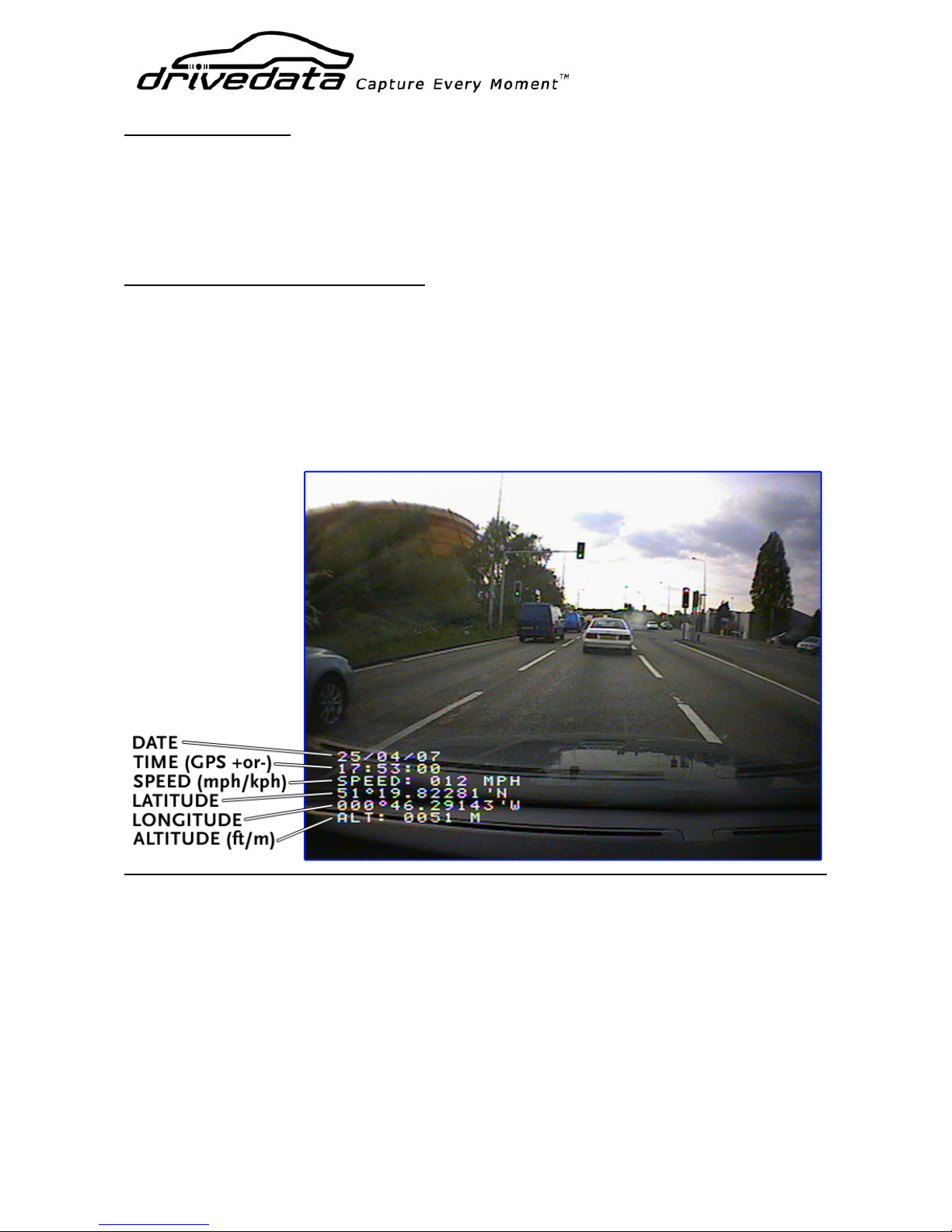
As soon as the GPS has locked on you will see the full display similar to the screenshot below:
The display can be configured using the three buttons on the back of the unit. To enter the
setup menu, press and hold the ‘select’ button for more than 2 seconds and the first menu
choice ‘DATE EDIT’ will appear.
You can now press the select button repeatedly to choose which option you want to change
and then use the ‘up’ and ‘down’ buttons to alter the setting. When you have chosen a setting,
press the select button to move on to the next option. The selections and choices you have are
detailed on the following page:
Page 3

Drivedata UK Ltd. PO Box 29, Sandhurst, GU47 0WR
Tel: +44 (0)8707 60 70 44 • Fax: +44 (0)1344 762835
e-mail:[email protected] • web: www.drivedata.com
Company No. 4437703 • VAT No. 797 8283 52
DATE EDIT – (ON/OFF)
This selects whether the date is displayed or not
TIME EDIT – (OFF/+0 to +12/-1 to -12)
As the time display is taken from the GPS satellite (it is always accurate to within 1 second),
you may have to apply an offset so it is displayed correctly for your time zone. For example,
UK British Summer Time would require an offset of +1. If you do not want the time to be
displayed, select ‘OFF’.
SPEED EDIT – (MPH/KPH/OFF)
Selects units of measurement for speed, or no speed display. Speed is measured from the GPS
position information and is accurate to <1mph. Please note that most vehicle speedometers
are designed to ‘over-read’ by 5-10%, so the RT800 speed displayed will not necessarily match
your vehicle’s speedometer.
LAT/LON EDIT – (ON/OFF)
Selects whether positional information (latitude and longitude) is displayed or not.
ALTITUDE EDIT – (METRES/FEET/OFF)
Selects units of measurement for altitude display or turns this display off. The accuracy of
altitude readings derived from GPS signals is dependant on the nu mber of satellites in view of
the antenna. In built-up areas the altitude displayed may change even when the vehicle is not
moving. This is because satellites are moving in and out of view and the receiver is const antly
re-calculating the data. For this reason, the accuracy of the altitude figure is likely to be +or-3
to 5 metres most of the time. Better accuracy would be obtained in a wide open space, up a
mountain or in an aircraft where more satellites are in view for more of the time.
BACKGND EDIT – (OFF/ON)
The on-screen text can be displayed on a black background by turning this feature on.
POSITION EDIT
This allows you to position the data displayed in one of four on-screen locations: Top left
corner, top right corner, bottom left or bottom right.
SUPPORT
If you have any technical questions or need assistance in fitting your RT800 unit, please
contact Drivedata by e-mailing us at:
Your RT800 is covered by a limited warranty. We will replace a faulty unit wit hin 12 months of
purchase free of charge if a fault develops during normal use. If a unit has been damaged in
any way as a result of improper installation, we reserve the right to charge the appropriate
repair costs. Drivedata (UK) and its representatives accept no liability for any damage or
accidents to persons or property caused as a result of fitting or using our products. It is your
responsibility to check that use of our equipment is legal in your country.
Page 4
Drivedata UK Ltd. PO Box 29, Sandhurst, GU47 0WR
Tel: +44 (0)8707 60 70 44 • Fax: +44 (0)1344 762835
e-mail:[email protected] • web: www.drivedata.com
Company No. 4437703 • VAT No. 797 8283 52
Specification
Video
Video Inputs 1 (more by using the Drivedata PPx or PQx processors)
Video outputs 1
Format
Composite video 75 Ω 1V peak – peak. PAL/NTSC (factory selectable)
Connectors BNC.
Power
Supply requirements 10-13V DC, 90mA internally regulated & filtered
Connector D.C. Socket 2.1mm, locking-type (requires screw-locking plug)
Dimensions (mm)
L x W x H 180 x 105 x 30
Weight
Main Unit - 410g
Specification subject to change without notice.
 Loading...