

Page 1

WARNING
To Buy: Contact Sylvane at 800-934-9194 or visit www.sylvane.com
Product Support: Contact Dri-Eaz at 800-932-3030
Owner’s Manual
Revolution LGR Dehumidifier
Model F413-115V
DRI-EAZ PRODUCTS, INC.
15180 Josh Wilson Road, Burlington, WA 98233
Phone: 800-932-3030 Fax: 360-757-7950 http://Revo.DriEaz.com
The Dri-Eaz® Revolution LGR Dehumidifier reduces humidity in enclosed environments by removing water vapor from the air. The Revolution is ideal for water damage restoration, structural drying, construction, and many other applications requiring temporary, high-performance dehumidification.
Patents: http://www.LBpatents.com
READ AND SAVE THESE INSTRUCTIONS
Read and understand manual before operating.
WARNING! Do not alte r or modify your Revolution in
any way. Use only replacement parts authorized by
Dri-Eaz Products, Inc. Modifications or use of unapproved parts could create a hazard and will void
your warranty. Contact your author ized Dri-Eaz distributor for assistance.
WARNING! Electric shock hazard, rotating fan, hot
surface hazards. Unplug unit before opening cover
for cleaning or servicing.
WARNING! Unit must be grounded.
• Keep motor and wiring dry. Keep out of standing water and do not install in area likely to be subject to
water intrusion. Do not expose to rain, water or
snow.
• Insert three-prong plug on power cord into a match-
ing electrically grounded ou tlet. Do not us e adapt er .
Never cut off third prong.
• Do not use an extension cord.
• To reduce the risk of fire or electric shock, do not
use this unit with any solid-state speed control device.
FIRE HAZARD
• Keep away from open flames and heat sources.
• Do not use or store where vapors from gasoline, sol-
vents, thinners or other flammable materials may be
present.
WARNING! Unplug unit before cleaning or servicing.
• Turn off unit and unplug before lifting or moving.
• Handle the unit carefully. Always operate the unit on
a stable, level surface. Do not drop, throw, or place
where it could fall. Rough treatment can damage the
unit, and may create a hazardous condition or void
the warranty.
• Inspect the power cord before use. If cord is damaged, do not use. Always grasp the plug (not the
cord) to unplug.
• The unit must be operated on a 115V/60 Hz circuit
protected by a Ground Fault Circuit Interrupter
(GFCI) device.
• Do not attempt to repair the unit. For Authorized
Service Centers, call Dri–Eaz Service at 800-932-
3030.
BEFORE YOU BEGIN
Warranty registration
Visit warranty.drieaz.com to register your purchase.
Registration allows us to better assist you with using,
maintaining or servicing your equipment and to contact
you in case we have important safety information concerning your Dri-Eaz product. If you determine service is
required, have your equipment model, serial number and
original proof of purchase available and call your distributor for assistance with obtaining a return material authorization (RMA).
INTRODUCTION
The Revolution Dehumidifier reduc es humidity in enclosed structural environments by removing water vapor
from the air. With proper use, the Revolution can help to
dry out damp structural materials, insulation, and contents, and maintain a healthy level of humidity. Using the
Revolution may also prevent secondary damage caused
by high humidity.
07-01839A F413-115V 2013-11 Warranty 07-00420 1 Dri-Eaz Products, Inc.
Page 2

How the Revolution works
Carry handles
Fig. A: Parts Identification
Condensate
Air inlet
Control
Remove/Insert
Air outlet
Power
socket
Cord and
Temp/RH
sensor
The Revolution refrigerant dehum idif ier uses a fan to
draw moist air in and condenses it into water that collects in a tray and is automatically pumped out through a
drain hose. The unit can be set to operate continuously
or the user may select Humidistat Mode. In Humidistat
Mode, the Revolution will turn on and off automatically to
maintain the inlet humidity level the user has selected.
Note that the fan will operate continuously when the unit
is in Humidistat Mode.
Features:
• Industrial-quality dehumidifier removes up to 134
pints (63 liters) of water per day.
• Automatic humidistat to set and maintain desired
humidity leve l.
• Recessed feet indents ensure secure stacking of up
to three Revolution units for storage and transport.
• Designed for convenient stacking and transporting
on a handtruck.
• Recessed handles for easy positioning in confined
spaces.
• Quiet operation and low power consumption.
hose storage
wraps.
drain quickconnect
panel
air filter here.
CONTROLS AND OPERATING INSTRUCTIONS
Set unit upright
NOTICE: Always store, transport, and use the unit in
a horizontal position. If the unit is ever placed in a
vertical position, return it to the horizontal position
and let it stand for at least 30 minutes before turning
it on.
Positioning a Dehumidifier
For best results, operate your dehumidifiers in an enclosed area. Close all doors and windows that open to
the outside to maximize water removal efficiency. Place
your dehumidifier away from obstructions, and keep it
away from anything that could block airflow into and out
of the unit. For more information about creating an optimum drying environment, contact Dri-Eaz at
800-932-3030.
Set up drain hose
The Revolution condensate pump connects to a plastic
drainage hose. This hose is equipped with a quickconnect fitting for quick attachment to the provided 40 ft.
(12 m) drain hose. Unwrap the entire hose and place the
unattached end in a sink, drain, bucket or outdoors –
anywhere that water can drain out safely. If you use a
bucket or other container for water collection, check it
regularly to prevent overflows.
NOTICE: Uncoil and straighten the entire drain hos e. Do
not leave any part of the hose coiled and do not place
07-01839A F413-115V 2013-11 Warranty 07-00420 2 Dri-Eaz Products, Inc.
the end of the hose higher than 20 ft. (6 m) above the
bottom of the unit. Also check for kinks or other obstructions that might restrict the flow of water. Obstructions
may cause a water backup and result in overflows.
Plug in electrical cord
The Revolution shou ld be plug ged int o a GFCI -protected
115 volt outlet rated for at least 15
amps. Always plug
the cord firmly into the unit first, and then plug the other
end into a suitable outlet.
Startup display and normal display mod es
When unit is first plugged in to AC power, the control
panel display will briefly cycle through a series of
readouts. This is part of the unit’s self-diagnosis procedure and no user intervention is required.
Turn the unit on
The control panel on the Revolution dehumidifier has a
display and a touchpad with four keys. Press the
ON/OFF to turn the unit on. T he unit will now go through
a compressor delay countdown (up to sixty seconds in
duration) and a self diagnostics process.
Once the compressor delay countdown and selfdiagnostics are complete, the display will switch to nor-
mal display mode.
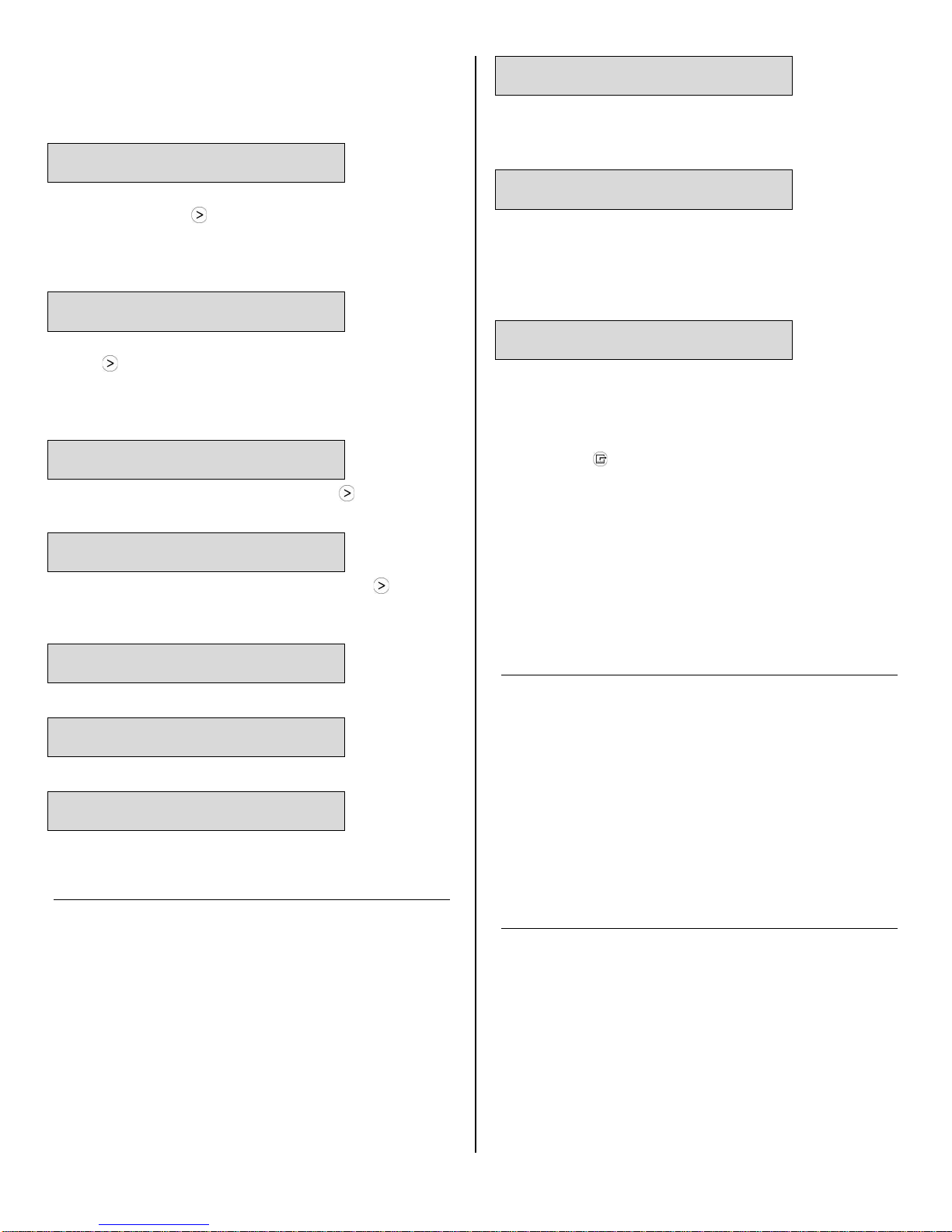
UNIT ON 00 HRS
INLET 00°C / INLET 00%
The first line of the display shows the total number of
hours the unit has been in operation. This value may be
Page 3

ON/OFF
DISPLAY
DISPLAY
MENU SEPURGE PUMP
reset to zero to track job hours (see “Job Hours Reset”
ON/OFF
Press and release to turn unit on
or off.
DISPLAY MENU
Press to select next item in menu.
Menu item will show in display.
MENU SELECTION /
UP KEY
Press to toggle or select values in
menu displayed.
PURGE PUMP
Press and release to start purge.
below). The second line of the display alternates between inlet temperature and inlet humidity.
User Settings Menu
A number of display settings ma y be changed by the
user. System information can also be displayed. These
items are accessed by pressing
DISPLAY MENU.
Each press of the key will display the next parameter.
When you reach the parameter you wish to adjust, press
MENU SELECTION to increase the val ue. Pres s
DISPLAY MENU again to accept the setting and re-start
the display cycle. If no keys are selected for 5 minutes
the display will automatically reset and return to the
normal display mode.
CONTROL PANEL
MENU
Display will count down seconds
remaining until purge is complete.
Note that only menu items followed by a greater-than
symbol ( > ) may be adjusted.
All settings and modes are discussed in detail in Control
Panel Guide, below.
Error messages
If the Revolution onboard diagnostics discover a problem, the unit will display an error message. See “System
Messages,” p. 6 for an explanation of each message.
LECTION /
UP KEY
Control Panel Guide
ON/OFF. Press to turn the unit on or off. When the
machine is turned on, the display normally reads
PLEASE WAIT COMP. DELAY and performs a numeral
countdown for a maximum of 60 seconds to 0. This delay allows time for refrigerant pressures to equalize for
easier starting. Once the unit completes the compressor
07-01839A F413-115V 2013-11 Warranty 07-00420 3 Dri-Eaz Products, Inc.
delay, the display shows UNIT ON XX HRS and cycles
between INLET XX°F and INLET XX%. NOTE: If no
compressor delay countdown is displayed, a delay is not
necessary and the machine will begin operation immediately.
DISPLAY MENU. Press to cycle through the display
of additional dehumidifier conditions and User Settings.
To return to the main menu, press the ON/OFF key
once.
MENU SELECTION. Press to change the values of
the "User Defined" settings. The MENU SELECTION
key acts as the UP key for adjusting the setpoint for Humidistat mode operation. See User Settings Menu (below) for details.
PURGE. Press to empty water from the condensate
pump reservoir. The display will read PUMP PURGING
with a numeral countdown. NOTE: During normal operation, the pump purges automatically every 20 minutes, or
whenever the reservoir is full.
Changing settings and viewing system information
Display setting changes and system information can be
accessed by pressing
DISPLAY MENU. Each press
of the key will display the next parameter (see list below). When you reach the parameter you wish to adjust,
press
Press
MENU SELECTION to increase the value.
DISPLAY MENU again to accept the setting
and re-start the display cycle. If no keys are selected for
5 minutes the display will automatically reset and return
to the normal display mode.
Note that only menu items followed by a greater-than
symbol ( > ) may be adjusted.
JOB HOURS
RESET? >
Press MENU SELECTION to reset hours to zero.
NOTE: When in Humidistat mode, the unit will display
HUMIDISTAT on the top line during normal operation
rather than JOB HOURS.
LIFE HOURS
00 HRS
Shows total unit operating hours. Value cannot be modified.
INLET OUTLET
00° 00% 00° 00%
Shows current temperature and RH of inlet and outlet.
Normal Operation
The default operating mode keeps the d ehumidifier
running at its maximum capacity. This is ideal for
most restoration application To control humidity at a
Page 4
specific level, choose Humidistat Mode, described below.
Humidistat Mode
UNIT ON 00 HRS
DEFROST XX
Display mode when unit is in defrost mode. XX indicates
the minutes remaining on the defrost cycle.
HUMIDISTAT MODE
ON/OFF >
In ON mode, unit will maintain the humidistat setpoint
(see below). Press MENU SELECTION to toggle between ON and OFF. NOTE: When in Humidistat mode,
the unit will display HUMIDISTAT on the top line during
normal operation rather than JOB HOURS.
HUMIDISTAT
SETPOINT 00% >
Sets humidity level when unit is in Humidistat Mode.
Press MENU SELECTION to change RH value. Each
press of the button increases the setting by 5% increments, cycling through 90%RH and starting again at
40%RH.
TEMP UNITS
F° >
Shows current temperature scale. Press MENU SELECTION to select Fahrenheit or Centigrade scale.
LANGUAGE
ENGLISH >
Shows current display panel langua ge. Pres s MENU
SELECTION to select Spanish, German, French or English.
Shutdown Sequence
WAIT FOR
DEFROST XX
Display mode when unit is in defrost and is powered
down by the user. Unit w ill c om plete the def ros t cycle to
remove any built-up ice and then purge the pump. XX
indicates the minutes remaining on the defrost cycle.
Normal Display:
UNIT ON 00 HRS
INLET XX° F
Wait until the control shows the normal display before
proceeding.
2. Gently rock the machine to ensure any water remaining on interior surfaces falls into the sump area.
3. Press the PURGE key. When the purge cycle is
complete, turn the unit off.
4. Remove the external drain hose, drain it carefully, coil
it and secure it with one of the Velcro straps provided on
the side of the unit.
5. Unplug power cord from power supply and from base
of the machine, coil neatly, coil it and secure it with one
of the Velcro straps provided on the side of the unit. (see
Fig. A).
COIL TEMP
00°F
Displays the cold (evaporator) coil temperature.
SENSOR ID >
00000000
This function is not used on the Revolution.
COMPRSSR CURRENT
0.0 A
Shows compressor current draw in amps.
AT THE END OF THE JOB
To reduce the possibility of drips when moving the unit,
follow these additional steps to ensure that all water is
removed from the unit.
NOTICE: To ensure the condensate tank empties completely while purging, make sure the unit is positioned
horizontally on a flat surface.
1. If the unit is in a defrost cycle, wait until the unit has
returned to normal operating mode before proceeding.
To check, review the control panel. The control panel will
show one of the following:
Defrost in progress:
TRANSPORTATION AND STORAGE
NOTICE: Handle the unit carefully. Do not drop, throw,
or place the unit where it could fall. Rough treatment can
damage this equipment and may create a hazardous
condition or void warranty.
• Do not expose the control panel to moisture, snow
or rain.
• Protect from freezing.
• Store and transp ort sec urel y to avoid an y dam aging
impact to internal parts.
• Secure during transport to prevent sliding and pos-
sible injury to vehicle occupants.
MAINTENANCE SCHEDULE
WARNING! ELECTRIC SHOCK HAZARD. Unplug unit
before cleaning or servicing.
WARNING: Risk of dust and contaminants exposure.
Use of respirator mask and gloves is recommended. If
unit has been exposed to potentially dangerous contaminants, clean thoroughly and sanitize before reuse.
NOTICE: The unit is fitted with sensitive electronic sensors. Protect the sensors and their lead wires from damage and do not expose them to water or cleaning solution.
07-01839A F413-115V 2013-11 Warranty 07-00420 4 Dri-Eaz Products, Inc.
Page 5
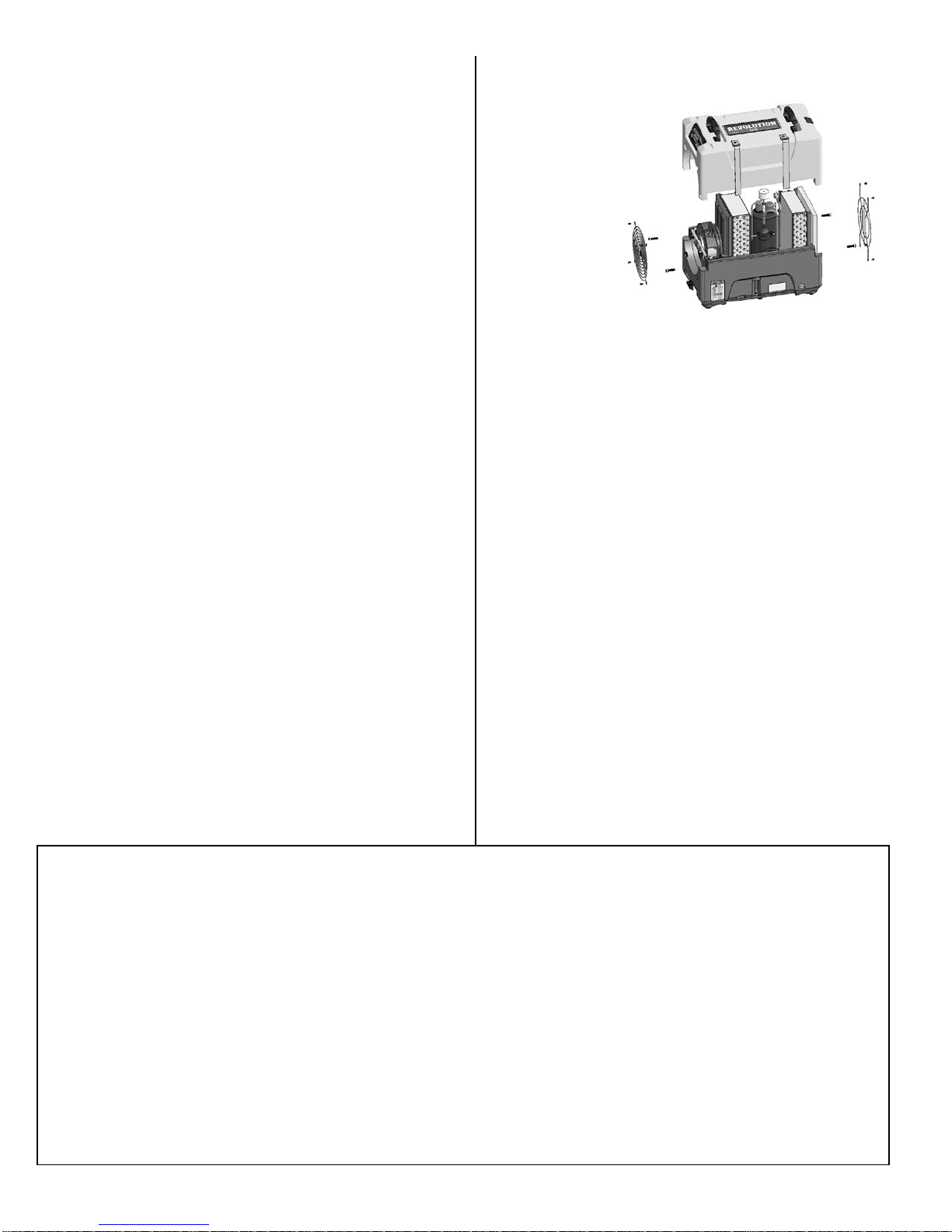
The following tools and supplies are needed to
Remove the 4 screws
Fig. B: Disassembly for Cleaning
complete the maintenance procedures described in
this manual:
Philips screwdriver
10 mm wrench
6 mm hex bit
¼ in. nut driver
Cleaning cloths
HEPA vacuum cleaner with soft brush nozzle and
crevice nozzle.
Recommended
Cordless drill, small knife, small-jaw pliers, coil cleaning solution, rotomolded housing cleaning solution.
from housing and 2
top screws each from
inlet and outlet grills
and lift off cover.
Before each use
Inspect the electrical cord for damage. Look for fray-
ing, cuts, etc. Replace the cord if you find any damage.
Inspect, vacuum or replace filter. The Revolution is
provided with a 3M™ HAF High Air Flow filter (part no.
F372). HAF filters may be vacuumed clean and re-
used up to three times before replacement. Use a
HEPA vacuum and brush tool to remove any dust or debris. Do not use compressed air or expose the filter to
any liquids, as may damage the filter.
Monthly
Inspect coils. Clean when dust accumulation is visible.
In normal use, dust can accumulate and can restrict airflow, reducing performance and causing the unit to overheat. Use a vacuum cleaner with a brush tool and a soft
cloth to remove any debris. Take care not to damage
any interior components.
To maintain appearance, wipe interior and exterior surfaces with a damp cloth. For deep cleaning and a lasting, protective shine, use an automotive int erior cleaner.
As Needed
Clean pump check valve and basin. If the unit displays
the message “ER9 PU MP BLO C KED CH E CK PUMP &
HOSE”, the pump check valve and pump basin may
need to be cleaned. Remove grills and cover as shown
in Fig. B. Remove screws from pump base and lift out
pump. Wipe out pump basin with a damp cloth. Inspect
the pump base for build-up of debris and clean if needed. Unthread barbed fitting with check valve and rinse
fitting and check valve with clean water. Reinstall chec k
valve into barbed fitting and install the barb ed fitt ing into
pump. Do not overtighten. Reinstall pump on base. Reinstall cover and grills.
Clean coils. Inspect the horizontal evaporator (cold) coil
with the cover removed. If excessive dust and debris is
present, vacuum thoroughly and/or clean with coil cleaner.
ABOUT 3M™ HIGH AIR FLOW FILTERS
HAF filters from 3M provide superior particle retention, resist microbial growth on filter surfaces and allow for maximum
airflow throughout the filter loading cycle. Follow these guidelines to ensure maximum protection for equipment, technicians and the job site:
Replace the HAF filter whenever it has been vacuumed clean and reused three times. HAF filters lose their effectiveness after
three uses.
Replace the HAF filter whenever it has been used on a mold remediation job or otherwise exposed to potentially dangerous
contaminants. Continued use of a contaminated filter risks the spread of contamination.
Do not wash or apply any liquids to the HAF filter. Exposure to liquids will reduce the effectiveness of the electrostatic material.
Do not operate without the HAF filter in place. Do not operate the unit with any other filter type. Incorrect filtration will reduce
unit efficiency and can cause damage to the unit.
Use the optional mesh filter when excessive dust or airborne particles are present. High volumes of particulates present during
sanding, spray painting, or similar operation s can clog the uni t and cause dam age.
07-01839A F413-115V 2013-11 Warranty 07-00420 5 Dri-Eaz Products, Inc.
Page 6
System messages
ER4 √ DEFROST SENSOR
CONNECT
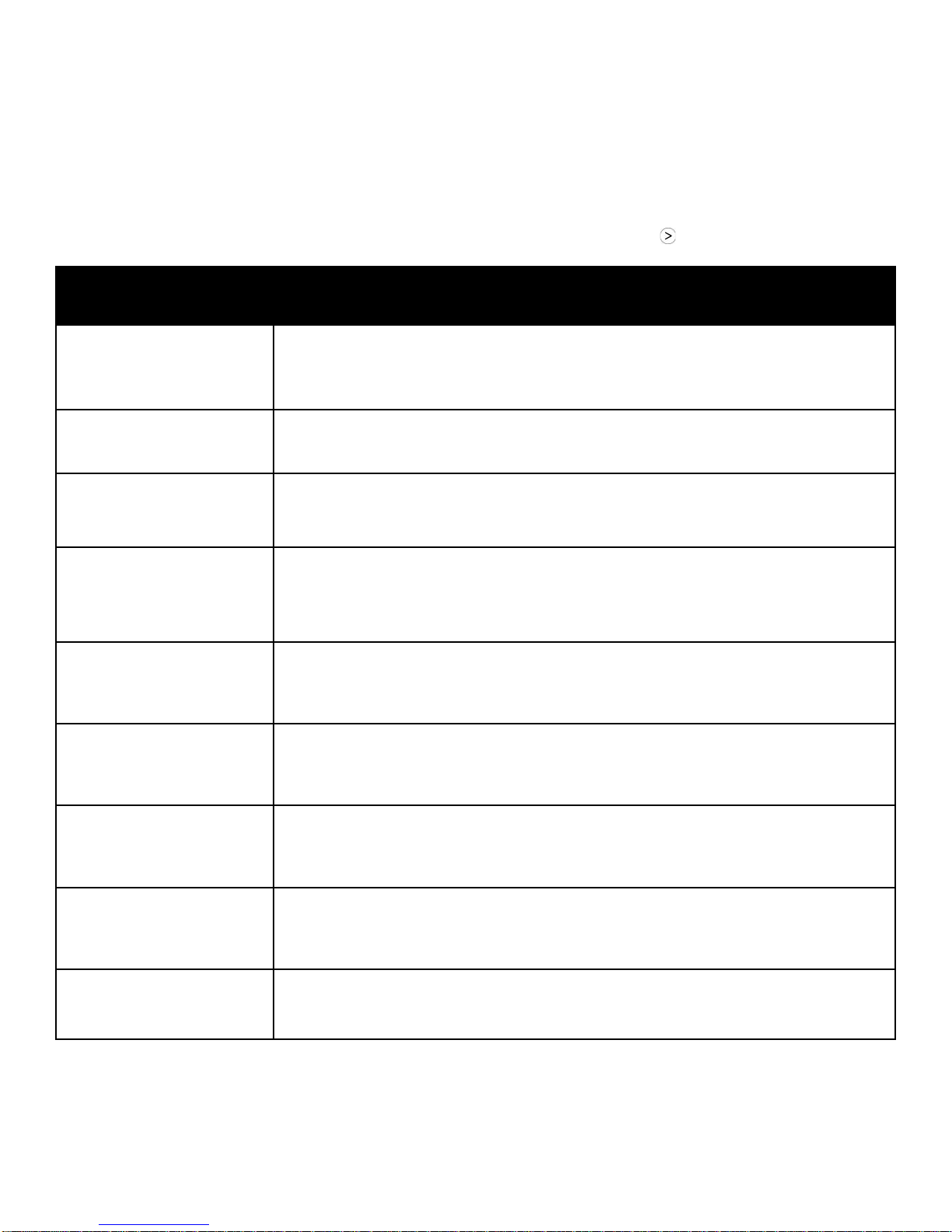
The Revolution control system constantly monitors internal operating conditions. If the system detects a problem, it will
produce an error (“ER”) message. If the display shows an ER message, first unplug the unit and then plug it back in. This
will usually reset the electronics, and the unit will begin operating normally. If the error message reappears, refer to the
explanation and solution shown below. If this still does not fix the problem, contact your local authorized service center or
call the Dri-Eaz Service Department at 800-932-3030.
NOTE: The message “POWER FAILURE” is not a system error. When this message is displayed, it indicates that
power to unit was interrupted and then restored. To clear the message, press the MENU SELECTION key.
CONTROL PANEL
MESSAGE
ER1 CONTACT SERVICE
CENTER
ER2 CONTACT SERVICE
CENTER
ER3 CONTACT SERVICE
CENTER
CONNECT
– alternate message –
ER4 √ OUTLET SENSOR
ER5 √ SENSOR
CONNECTION ON BD
EXPLANATION AND SOLUTION
Voltage error. Confirm that unit is connected to a suitable AC power supply and that the
circuit is not overloaded. If supply is correct, the electronic control panel may require
replacement. If error persists, contact service.
Control panel error. The electronic control panel may require replacement. If error persists, contact service.
Unit in defrost too long. Check defrost sensor cable for proper connection. If error persists, sensor assembly may require replacement. Contact service.
Sensor error. Check defrost sensor cable for proper connection. If error persists, sensor
assembly may require replacement. Contact service.
Check inlet Temp/RH sensor for proper connection. If error persists, contact service.
ER6 CONTACT
SERVICE CENTER
ER7 INVALID
MODEL SETTING
ER8 BUTTON STUCK √
ALL BUTTONS
ER9 PUMP BLOCKED √
CHECK PUMP & HOSE
07-01839A F413-115V 2013-11 Warranty 07-00420 6 Dri-Eaz Products, Inc.
High voltage error. The high voltage board may require replacement. If error persists,
contact service.
Control board DIP switch settings or firmware version may be incorrect. If error persists,
contact service. Service may ask you to verify DIP switch settings.
Press each membrane key and check for proper operation. If a key doesn’t function, or
if the error persists, the membrane overlay may require replacement. Contact service.
Check for obstructions in drain hose. If clogged, remove hose from unit and blow hose
out with compressed air. Inspect and clean the pump check valve and pump basin. See
“Clean pump check valve and basin,” p. 5.
Page 7
TROUBLESHOOTING
Switch unit on.
base of unit.
Revolution LGR Dehumidifier
80 pts/day | 38 L/day
may be approximate.
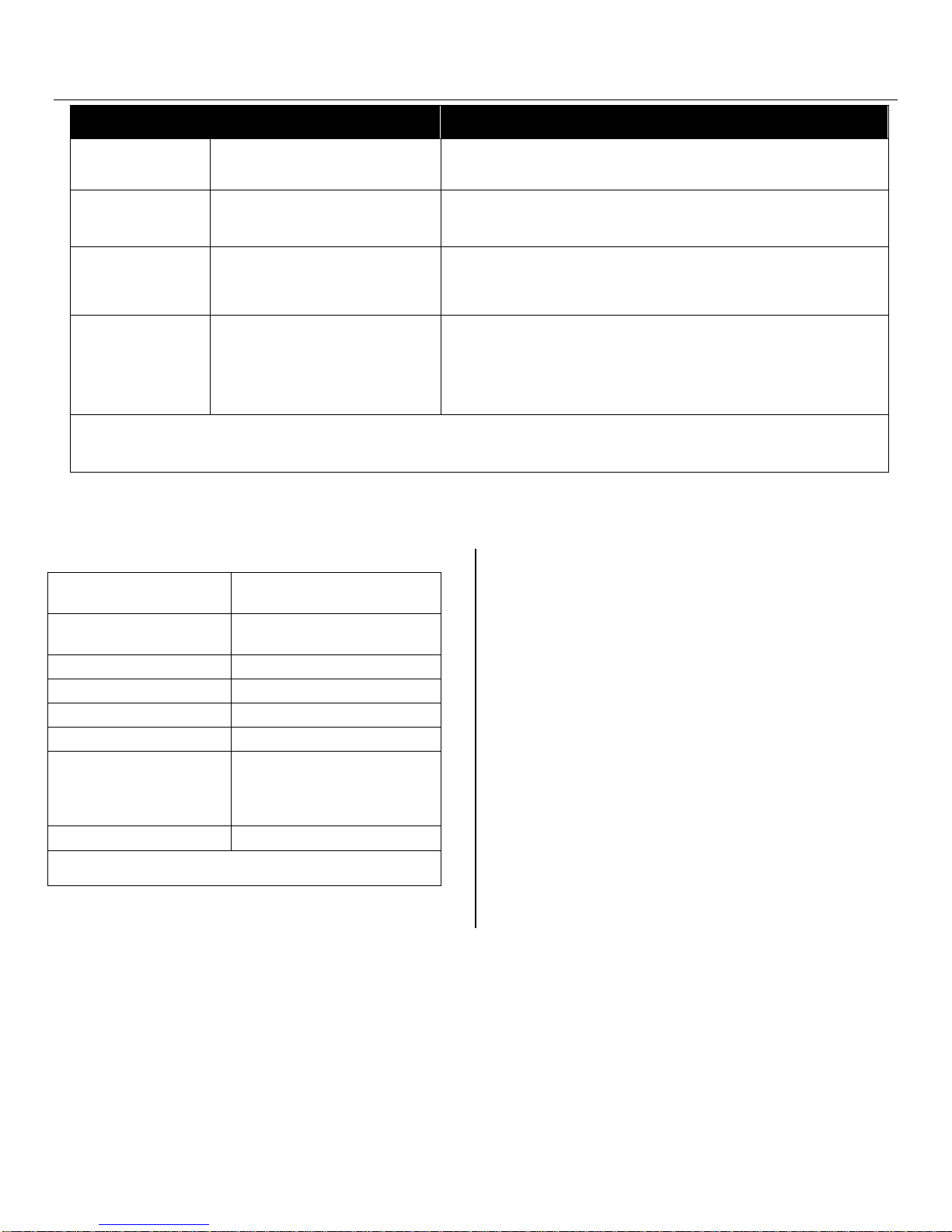
FAULT CAUSE SOLUTION
Water drips out
when moving unit
Unit does not
operate
Unit operating,
but room not dry
Unit was unplugged before
purging was complete.
Unit not switched on.
No power to machine.
Not enough time to dry.
Poor air movement in room.
Excessive moist air infiltration.
Room air is dry.
Unit collects too
little water
Room temperature is too low.
Filter is clogged.
Coils are clogged.
If the problem you are experiencing is not listed here, call your local distributor or contact
our Service Department toll-free at 800-932-3030 for further assistance.
SPECIFICATIONS
Name
Dimensions (W × H × D)
Weight (w/ cord & hose) 65 lbs. | 29.5 kg
Amps 6.2 amps at 80°F/60% RH
Power 115V / 60Hz
Air movement 121–180 CFM | 3.43–5.1 CMM
Water removal
Operating temperature range 33–100°F |1–38°C
Specifications are subject to change without notice. Some values
Model F413-115V
12.5 × 17.6 × 21.5 in.
31.8 × 44.7 × 130.8 cm
at 80°F/60% RH (AHAM)
134 pts/day | 63 L/day
at 90°F/90% RH
Purge unit before moving. See “At the End of the Job,” p. 4.
Plug in unit; check power cord connection at wall outlet and at
Allow more time for drying.
Increase air movement with air movers.
Seal off area to reduce infiltration.
Confirm humidity level with hygrom eter .
Increase room temperature.
Check filter. Clean or replace as necessary.
Check coils. Clean as necessary.
PARTS INCLUDED
40 ft. (12 m) of drain hose wit h quick-connect fitting.
25 ft. (7.6 m) detachable power cord.
3M™ HAF High Air Flow filter reorder no. F372 (24
pack)
ADDITIONAL PRODUCT INFORMATION and current
documentation is available at http://Revo.DriEaz.com.
FOR PARTS AND SERVICE CALL YOUR LOCAL
DISTRIBUTOR or Dri-Eaz at 800-932-3030.
www.dri-eaz.com
Visit warranty.DriEaz.com and register your purchase to
ensure you receive any important product releases.
07-01839A F413-115V 2013-11 Warranty 07-00420 7 Dri-Eaz Products, Inc.
Page 8

DRI-EAZ LIMITED WARRANTY
Evolution LGR, DrizAir 1200, LGR 2800i, LGR 3500i, LGR 7000XLi and Revolution LGR
This Warranty is provided to the original purchaser only a nd covers only products purchased by the original purchaser from
an authorized Dri-Eaz distributor.
How Long Does This Warranty Last?
This warranty runs for:
• Lifetime from the date of purchase on polyethylene body;
• Six (6) years from the date of purchase on the compressor and coils;
• One (1) year from the date of purchase on parts and labor (EXCEPT this warranty does not cover consumable or wear items
including, but not limited to, filters, batteries, power cords, belts, cords, switches, valves, hoses, and rubber parts);
What Dri-Eaz Will Do:
If a defect in materials or workmanship occurs within the warranty period for a product purchased by you from an authorized
distributor, Dri-Eaz at its election will repair or replace the defective part at no charge.
What This Warranty Does Not Cover:
This warranty does not cover or apply to damage or defects due directly or indirectly to misuse, abuse, disassembly, altera tion,
use of non-Dri-Eaz filters, corrosive chemicals, improper voltage, fire, flood, negligence, accident, improperly or incorrectly
performed maintenance or repair, or failure to perform necessary or recommended maintenance or repair (See your Owner’s Manual)
or if the use of this product is not in compliance with the instructions and specifications for its use. This warranty does not cover
filters. We limit all implied warranties to:
• Lifetime from the date of purchase on polyethylene body;
• Six (6) years from the purchase date on the sealed refrigeration system;
• One (1) year from the purchase date on parts and labor (EXCEPT this warranty does not cover consumable or wear items
including, but not limited to, filters, batteries, power cords, belts, cords, switches, valves, hoses, and rubber parts).
OTHER THAN THE WARRANTIES PROVIDED HEREIN, DRI-EAZ MAKES NO EXPRESS OR IMPLIED, ORAL OR
WRITTEN WARRANTIES WITH RESPECT TO THIS PRODUCT OR WORKMANSHIP AND ALL WARRANTIES
IMPLIED BY LAW INCLUDING ANY WARRANTIES OF MERCHANTABILITY OR FITNESS FOR A PARTICULAR
PURPOSE ARE LIMITED TO THE DURATION OF THIS WARRANTY. Some states do not allow limitations on how long an
implied warranty lasts, so the above limitations may not apply to you. WE SHALL IN NO EVENT BE LIABLE FOR DEATH,
INJURIES TO PERSONS OR PROPERTY OR FOR INCIDENTAL, CONTINGENT, SPECIAL OR CONSEQUENTIAL
DAMAGES ARISING FROM USE OF OUR PRODUCTS. Some states do not allow the exclusion or limitation of incidental or
consequential damages, so the above limitation or exclusion may not apply to you.
How Do I Get Service?
In order to be eligible for service under this warranty you MUST do the following: (a) visit
purchase to ensure you receive any important product releases; (b) write or call for a return material authorization (RMA); and (c)
have the serial number a nd original proof of purchase available. Contact us at:
We will inspect the product without charge and contact you within 72 hours of our receipt of the product to give you the results of our
inspection. If our inspection uncovers a defect we will repair or replace the product, at our election. If the product is returned to us on
or before ninety (90) days from the date of purchase, we will pay for the cost of shipping it to Dri-Eaz and the cost to return it to you.
If the product is returned to us after the expiration of ninety (90) days from the date of purchase, all shipping costs shall be paid by the
purchaser.
If it is determined that there is no defect in the product, or that the defect resulted from causes not within the scope of our warranty,
then the product will be repaired or replaced only at your request and at your expense and you must bear all shipping costs.
How Does State Law Apply?
This warranty gives you specific legal rights, and you may also have other rights which vary from state to state.
warranty.drieaz.com and register your
Dri-Eaz Products, Inc.
360-757-7776 or 800-932-3030
15181 Josh Wilson Road
Burlington, WA 98233
07-00420M 2013-11 1 Dri-Eaz Products, Inc.
Page 9

GARANTÍA LIMITADA DE DRI-EAZ
Evolution LGR, DrizAir 1200, LGR 2800i, LGR 3500i, LGR 7000XLi y Revolution LGR
Esta garantía se ofrece únicamente al comprador original y sólo cubre los productos comprados por el comprador original de
un distribuidor autorizado Dri-Eaz.
¿Cuánto tiempo dura esta garantía?
Esta garantía dura:
• Vida útil desde la fecha de compra con cuerpo de polietileno;
• Seis (6) años a partir de la fecha de compra en el caso del compresor y de las bobinas;
• Un (1) año a partir de la fecha de compra en el caso de las piezas y la mano de obra (EXCEPTO que esta garantía no cubre
los consumibles o piezas de desgaste, incluyendo, pero no limitado a, filtros, baterías, cables de alimentación, cinturones,
cordones, interruptores, válvulas, mangueras y elementos de goma).
Dri-Eaz realizará lo siguiente:
Si un defecto en los materiales o la fabricación dentro del período de garantía de un producto adquirido por usted de un
distribuidor autoriz ado, Dri-Eaz a su elección, reparará o reemplazará la pieza defectuosa sin costo alguno.
¿Qué no cubre esta garantía?
Esta garantía no cubre o no se aplica a los o defectos defectos que se produzcan como consecuencia directa o indirecta del uso
inadecuado, mal uso, realización incorrecta del montaje, alteración, uso de filtros no Dri-Eaz,químicos corrosivos, voltaje incorrecto,
fuego, inundación, negligencia, accidente, reparación o mantenimiento realizados de manera impropia o incorrecta o la no realización
de la reparación o mantenimiento necesarios o recomendados (consulte el Manual del propietario) o si se utiliza este producto sin
cumplir con las instrucciones y especificaciones para su uso. Esta garantía no cubre filtros. Limitamos toda garantía implícita a:
• Vida útil desde la fecha de compra con cuerpo de polietileno;
• Seis (6) años a partir de la fecha de compra del sistema de refrigeración sellado herméticamente;
• Un (1) año a partir de la fecha de compra en el caso de las piezas y la mano de obra (EXCEPTO que esta garantía no cubre
los consumibles o piezas de desgaste, incluyendo, pero no limitado a, filtros, baterías, cables de alimentación, cinturones,
cordones, interruptores, válvulas, mangueras y elementos de goma).
A DIFERENCIA DE LAS GARANTÍAS PRESENTES EN ESTE DOCUMENTO, DRI-EAZ NO ASUME GARANTÍA
ALGUNA EXPRESADA O IMPLÍCITA, SEA ORAL O ESCRITA CON RESPECTO A ESTE PRODUCTO O LA
FABRICACIÓN Y TODAS LAS GARANTÍAS IMPLÍCITAS POR LEY, ENTRE ELLAS TODAS LAS GARANTÍAS DE
COMERCIABILIDAD O ADECUACIÓN PARA UN PROPÓSTIO PARTICULAR ESTÁN LIMITADAS A LA DURACIÓN
DE ESTA GARANTÍA. Algunos estados no permiten limitaciones respecto a la duración de una garantía implícita, por lo que las
limitaciones expuestas anteriormente no pueden ser aplicables a usted. NO SEREMOS RESPONSABLES POR LA MUERTE O
DAÑOS A PERSONAS O PROPIEDADES O POR LOS DAÑOS O PERJUICIOS DIRECTOS, INDIRECTOS,
ESPECIALES O CONTINGENTES QUE SE DERIVEN DEL USO DE NUESTROS PRODUCTOS. Algunos estados no
permiten la exclusión o limitación de daños y perjuicios directos o indirectos, de modo que la limitación o exclusión expuestas
anteriormente no pueden no ser aplicables a usted.
¿Cómo puede conseguir este servicio?
Para que tenga derecho a recibir el servicio dispuesto en esta garantía, usted DEBE realizar lo siguiente: (a) visite
warranty.drieaz.com
o llamar para obtener una Autorización para material devuelto (RMA, por sus siglas en inglés) y (c) tener disponible el número de
serie y la prueba de compra original. Contáctese con nosotros al:
Examinaremos el producto sin costo y nos pondremos en contacto con usted dentro de 72 horas a partir del momento en que
recibamos el producto para entregarle los resultados de nuestra inspección. Si nuestra inspección descubre un defecto, lo repararemos
o reemplazaremos el producto, a nuestra elección. Si nos devuelve el producto dentro de o antes de los noventa (90) días a partir de la
fecha de compra, pagaremos el costo de envío hacia Dri-Eaz y de vuelta hacia usted. Si se nos devuelve el producto después d e la
fecha de expiración de noventa (90) días a partir de la fecha de compra, todos los costos de envío los deberá pagar el comprador.
y coloque su compra para asegurarse que usted recibe cualquier lanzamiento de producto importante; (b) escrib ir
Dri-Eaz Products, Inc.
360-757-7776 o 800-932-3030
15181 Josh Wilson Road
Burlington, WA 98233
Si se determina que no existe defecto en el producto o que el defecto es resultado de causas que no se encuentran establecidas en esta
garantía, el producto se reparará o reemplazará sólo si usted lo solicita y asume el costo y además deberá hacerse cargo de los costos
de envío.
¿Cómo se aplica la ley del estado?
Esta garantía le otorga derechos legales específicos y también podría ejercer otros derechos que varían de estado en estado.
07-00420M 2013-11 2 Dri-Eaz Products, Inc.
Page 10
GARANTIE LIMITÉE DE DRI-EAZ
Evolution LGR, DrizAir 1200, LGR 2800i, LGR 3500i, LGR 7000XLi et Revolution LGR
Cette garantie est offerte à l'acheteur original et ne couvre que les produits achetés par l'acheteur initial d'un distributeur
Dri-Eaz autorisé.
Quelle est la durée de la présente garantie ?
La présente garantie est valide
• À vie à partir de la date d’achat inscrite sur le corps en polyéthylène ;
• pendant six (6) ans à partir de la date de l’achat pour le compresseur et les serpentins ;
• pendant un (1) an à partir de la date de l’achat pour les pièces et la main d’œuvre (SAUF cette garantie ne couvre pas les
consommables ou de porter des objets, y compris, mais sans s’y limiter, les filtres, batteries, cordons d’alimentation,
ceintures, cordons, commutateurs, vannes, tuyaux et pièces en caoutchouc).
Ce que Dri-Eaz s’engage à faire :
Si un défaut de matériaux ou de fabrication a lieu dans la période de garantie pour un produit que vous avez acheté auprès d'un
distributeur agréé, Dri-Eaz à son choix réparer ou remplacer la pièce défectueuse sans frais.
Limitations de la présente garantie :
Cette garantie ne couvre ni ne s'applique aux dommages ou défauts dus directement ou indirectement à une utilisation abusive,
désassemblage, la modification, l'utilisation de filtres non-Dri-Eaz, des produits corrosifs, un voltage inadéquat, un incendie, une
inondation, la négligence, un accident, l’entretien ou la réparation incorrecte ou mal exécutée (voir le manuel d’utilisation) ou si le
produit n’est pas utilisé conformément aux instructions et aux stipulations qui s’y rapportent. Cette g arantie ne couvre pas les filtres.
Nous limitons toutes les garanties implicites à :
• À vie à partir de la date d’achat inscrite sur le corps en polyéthylène ;
• six (6) ans à partir de la date de l’achat pour le système frigorifique hermétique ;
• un (1) an à partir de la date de l’achat pour les pièces et la main d’œuvre (SAUF cette garantie ne couvre pas les
consommables ou de porter des objets, y compris, mais sans s’y limiter, les filtres, batteries, cordons d’alimentation,
ceintures, cordons, commutateurs, vannes, tuyaux et pièces en caoutchouc).
AUTRE QUE LES PRÉSENTES GARANTIES, DRI-EAZ NE FAIT AUCUNE GARANTIE EXPRESSE OU IMPLICITE,
ORALE OU ÉCRITE RELATIVE À CE PRODUIT OU À LA FABRICATION ET TOUTE GARANTIE, IMPLICITE EN
VERTU DE LA LOI, DE QUALITÉ MARCHANDE ET DE CONFORMITÉ À UN USAGE PARTICULIER EST
RESTREINTE À LA DURÉE DE CETTE GARANTIE. Certaines provinces n’autorisent pas de limitation de clauses ni de durée ;
par conséquent, les présentes limitations ne s’appliquent peut-être pas à vous. NOUS N’ACCEPTONS AUCUNE
RESPONSABILITÉ POUR LA MORT, LES BLESSURES, LES DÉGÂTS OU POUR DES DOMMAGES INDIRECTS,
PARTICULIERS, CONSÉCUTIFS OU RÉSULTANTS DE L’USAGE DE NOS PRODUITS. Certaines provinces n’autorisent
pas l’exclusion ou la limitation des dommages consécutifs ou indirects; par conséquent, cette présente limitation ne s’applique peutêtre pas à vous.
Comment obtenir le service ?
Pour obtenir le service en vertu de la présente garantie, vous devez OBLIGATOIREMENT faire ce qui suit : (a) visitez
warranty.drieaz.com
écrire ou téléphoner pour obtenir une autorisation de renvoi (AR) et (c) avoir à votre disposition le numéro de série et la preuve d'achat
originale. Communiquez avec nous aux coordonnées suivantes :
Nous inspecterons le produit sans frais et nous vous communiquerons les résultats de notre inspection dans les 72 heures de la
réception du produit. Si nous découvrons une défectuosité, nous choisirons soit de la réparer, soit de remplacer le produit. Si le produit
nous est renvoyé dans les quatre-vingt-dix (90) jours de la date de l'achat, nous assumerons les frais de transport aller-retour. Si le
produit nous est renvoyé après les quatre-vingt-dix (90) jours de la date de l'achat, tous les frais de transport seront la responsabilité de
l’acheteur.
Si on ne constate aucune défectuosité, ou si la défectuosité est le résultat de causes qui ne sont pas couvertes par la présente garantie,
le produit ne sera réparé ou remplacé que si vous en faites la demande, et cela, à vos frais y compris le transport.
et enregistrez votre achat pour s’assurer que vous recevez toutes les mises en vente du produit importantes ; (b)
Dri-Eaz Products Inc.
360-757-7776 ou 800-932-3030
15181 Josh Wilson Road
Burlington, WA 98233 USA
Effet des lois provinciales
La présente garantie vous donne certains droits et vous en avez peut-être d’autres en vertu des différentes lois provinciales.
07-00420M 2013-11 3 Dri-Eaz Products, Inc.
 Loading...