

Page 1
Page 2

CONTENTS
What’s in the box ...............................................................................................................................1
Top Panel .............................................................................................................................................2
Rear Panel ............................................................................................................................................3
Instruments Connections ................................................................................................................4
2.4G Wireless Multi-Pairing .............................................................................................................5
Bluetooth/Charging............................................................................................................................6
LED Indicator ......................................................................................................................................7
Mobile APP ..........................................................................................................................................8
Strap Assembly ...................................................................................................................................9
Specifications .............................................................................................................................10-13
Troubleshooting ..............................................................................................................................14
Page 3
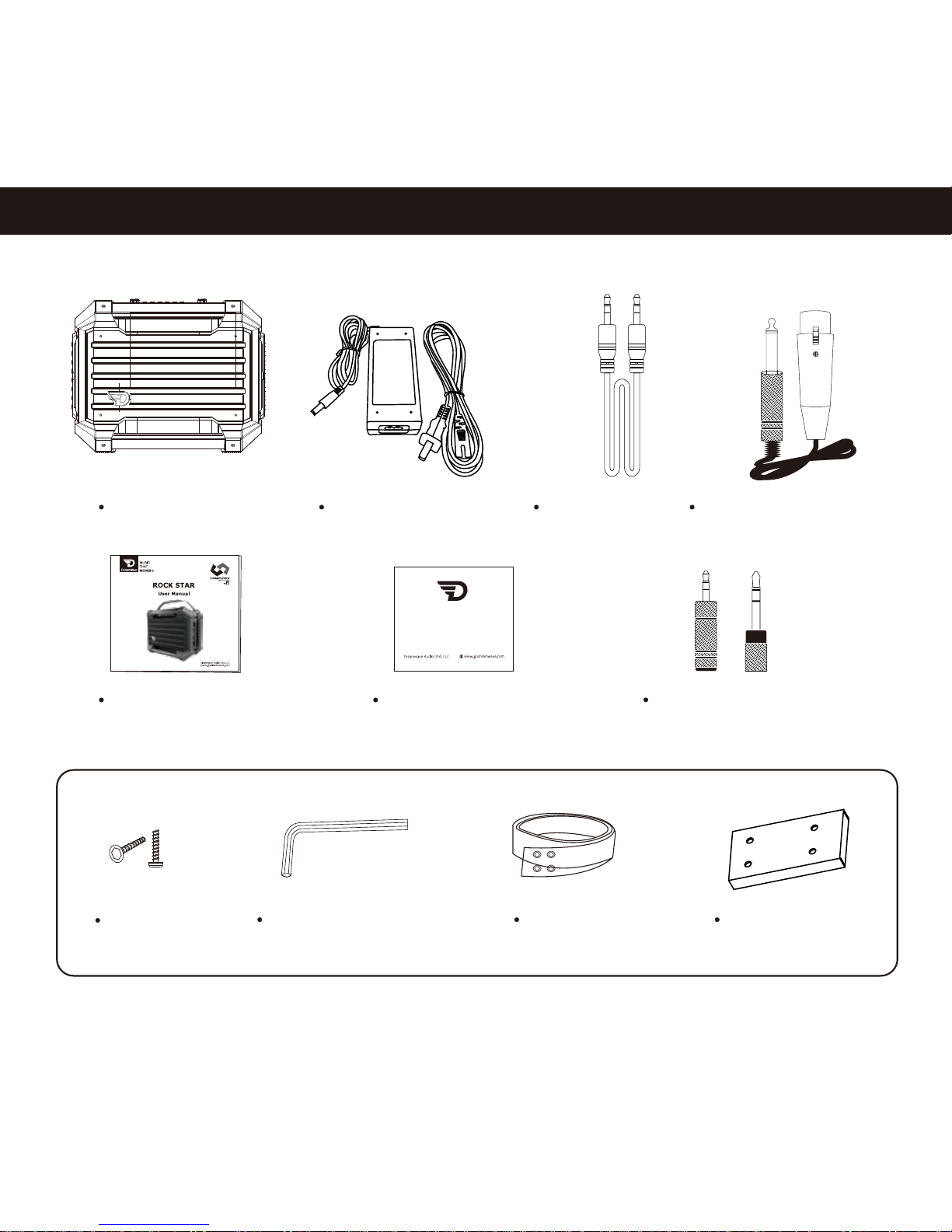
What’s in the box
1
User Manual * 1 Warranty Card * 1 AUX Connector Convertor
3.5mm in / 6.5mm out * 1
6.5mm in / 3.5mm out * 1
Screw * 8 L-shape screwdriver * 1 Strap * 1
Metal plate * 2
Strap Assembly Pack
Music that moves
RockStar * 1 AC Adaptor * 1
AUX Cable * 1
XLR Microphone Cable * 2
Page 4
2
Top Panel
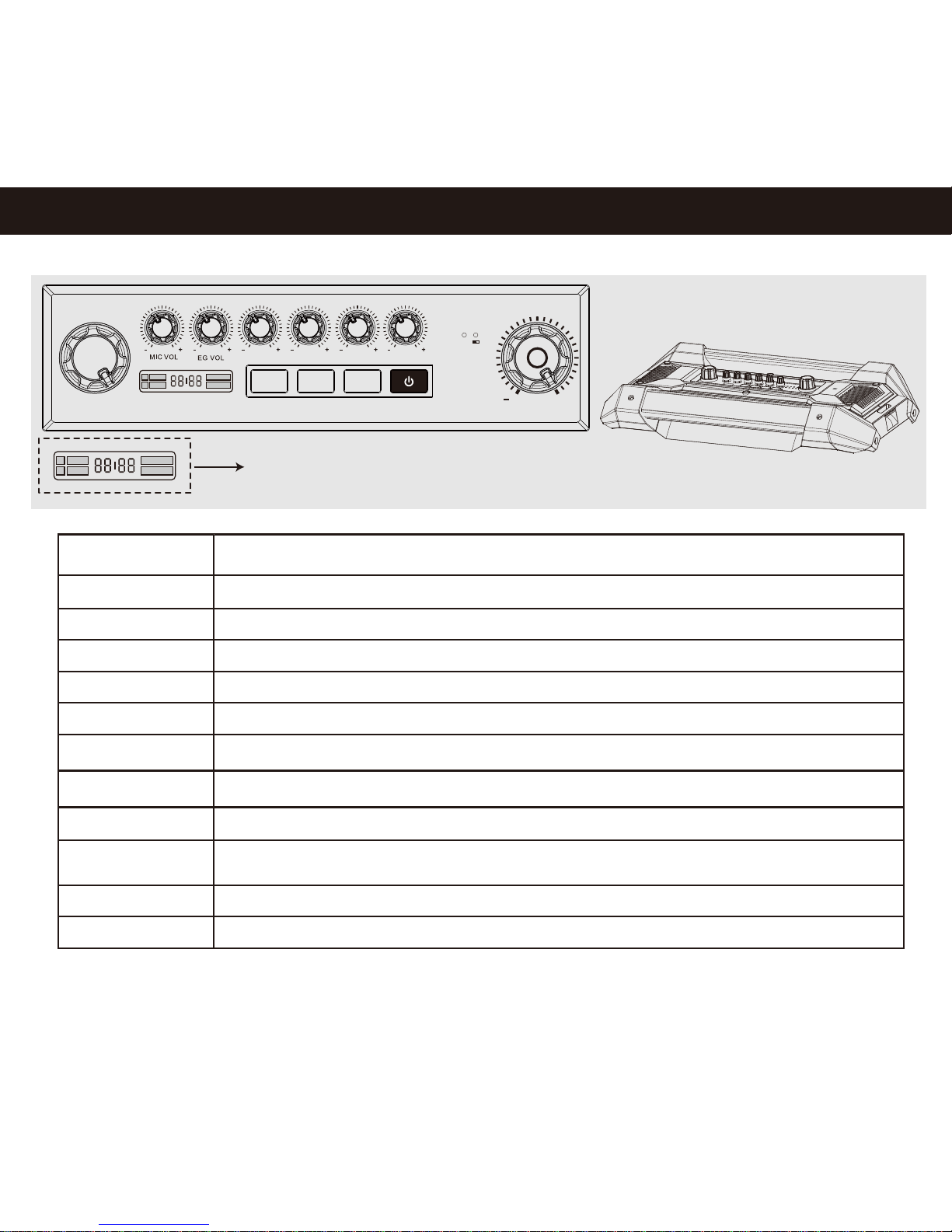
DSP MODE:
MIC VOL:
EG VOL:
AUX/BT VOL:
AG VOL:
KB/BASS VOL:
DRUM/LINE VOL:
MASTER VOL:
DSP ON/OFF:
BT:
2.4G/PAIR:
POWER:
Short press to select Default DSP or User DSP;
Turn the knob to select DSP sound effects
Adjust volume of Microphone for Input CH1 / CH2
Adjust volume of Electric Guitar for Input CH3
Adjust volume of Audio source for Input CH4
Adjust volume of Acoustic Guitar for Input AUX 1
Adjust volume of Keyboard or Bass for Input AUX 2
Adjust volume of Drum or Audio source for Input AUX 3
Press to turn On/Off DSP mode
Turn On/Off the RockStar
Connect or disconnect the MASTER and SLAVE speakers via 2.4G (Refer to Page 5)
Press and hold for 3 seconds to search for Bluetooth pairing;
While playing via Bluetooth devices, short press to Pause/Play.
Turn the knob to adjust volume for the audio system
Refer to Page 7
2.4G
KB /BASS VO LAG VOL DRUM /LINE VO L
BT 2.4 G/P AIR
DSP M ODE MAS TER V OL
DSP ON /O FF
AUX/ BT VOL
P OWE R
+
Page 5
3
Rear Panel
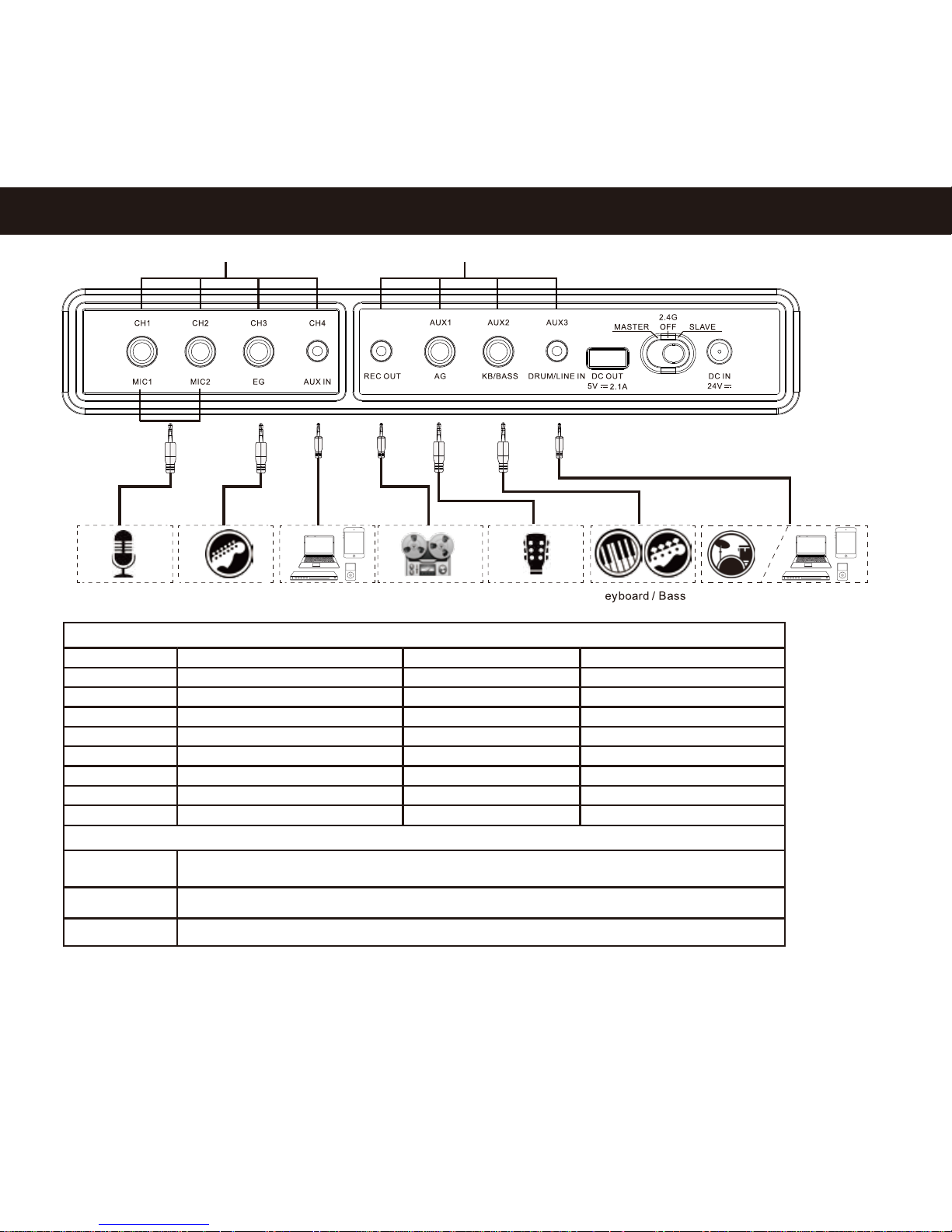
Audio Inputs
Others
Input
CH1
DC OUT
5V/2.1A
Built-in power bank for charging mobile devices, output 5V/2.1A (Refer to Page 6)
2.4G Wireless pairing for Mast er and Slave RockStar(Refer to Page 5 )
External Power Supply, AC100-240V, 50/60Hz Output 24V /4A (R efer t o Page 6 )
2.4G Switch
DC IN 24V
CH2
CH3
CH4
REC OUT
AUX1
AUX2
AUX3
Function
Mic
Electric Guitar
Mic
Acoustic Guitar
AUX in / Audio source
Keyboard or Bass
Electric Drum
Line in /
6.5mm, Mono
6.5mm, M
ono
6.5mm, Mono
6.5mm, Mono
6.5mm, Stereo
3.5mm, Stereo
3.5mm, Stereo
3.5mm, Mono
-34dBV
-34dBV
-20dBV
-14dBV
-14dBV
-14dBV
-9dBV
Type of Jack Sensitivity of 1KHz
*For optimum result, Stomp-box or Guitar e ects pedal is recommended for c onnecting Electric ff
Guitar t o RockStar
Recorder
Inputs with DSP e ectsff Inputs without DSP e ectsff
Mic Acoustic GuitarLine In K El ectric drum Line InRecorderElectric Guitar
Page 6
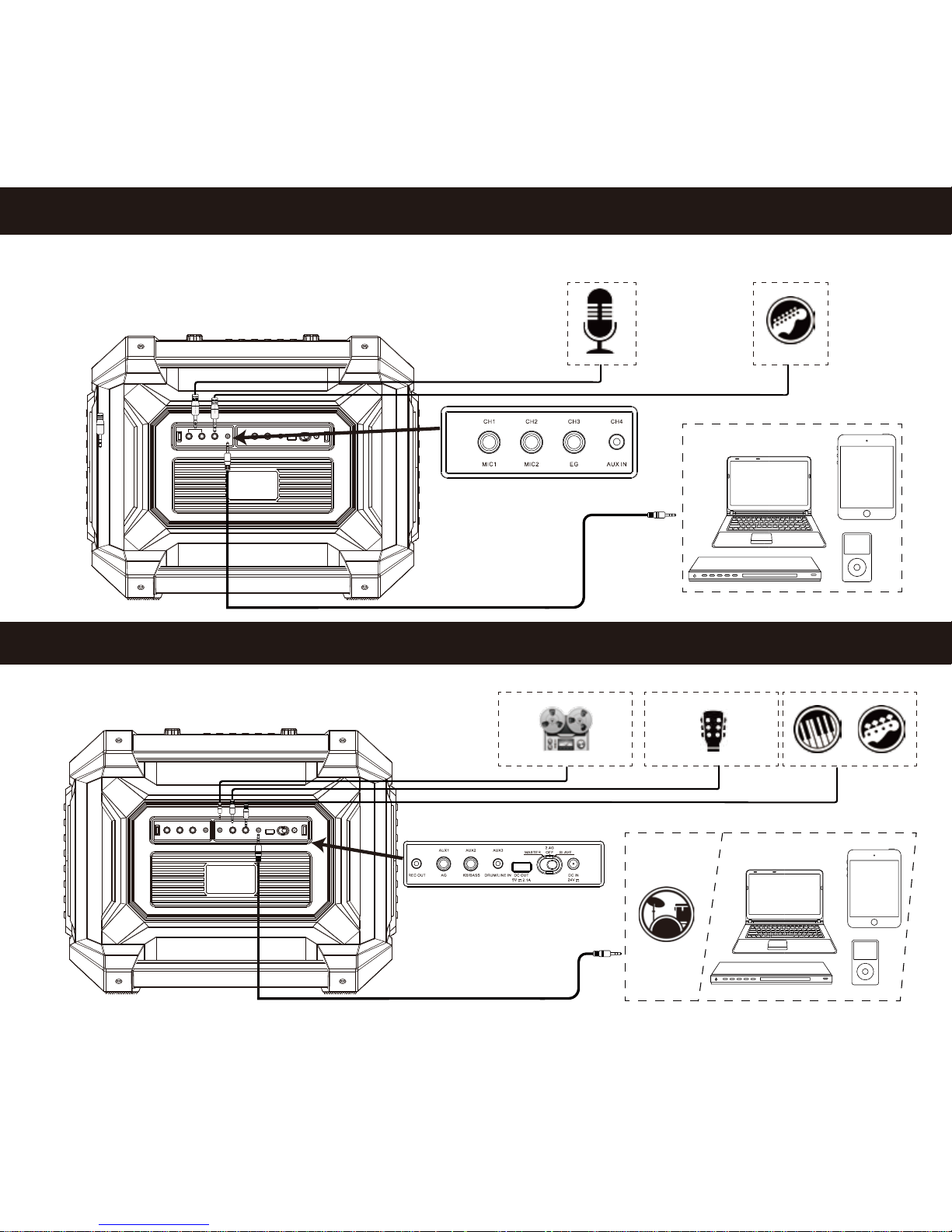
Inputs without DSP effects
Electric drum
4
Inputs with DSP effects
Mic Electric Guitar
*Initialisation may take 5 seconds upon plugging into CH1~CH4
Acoustic Guitar
Recorder
Keyboard / Bass
Audio Source
Audio Source
Page 7
5
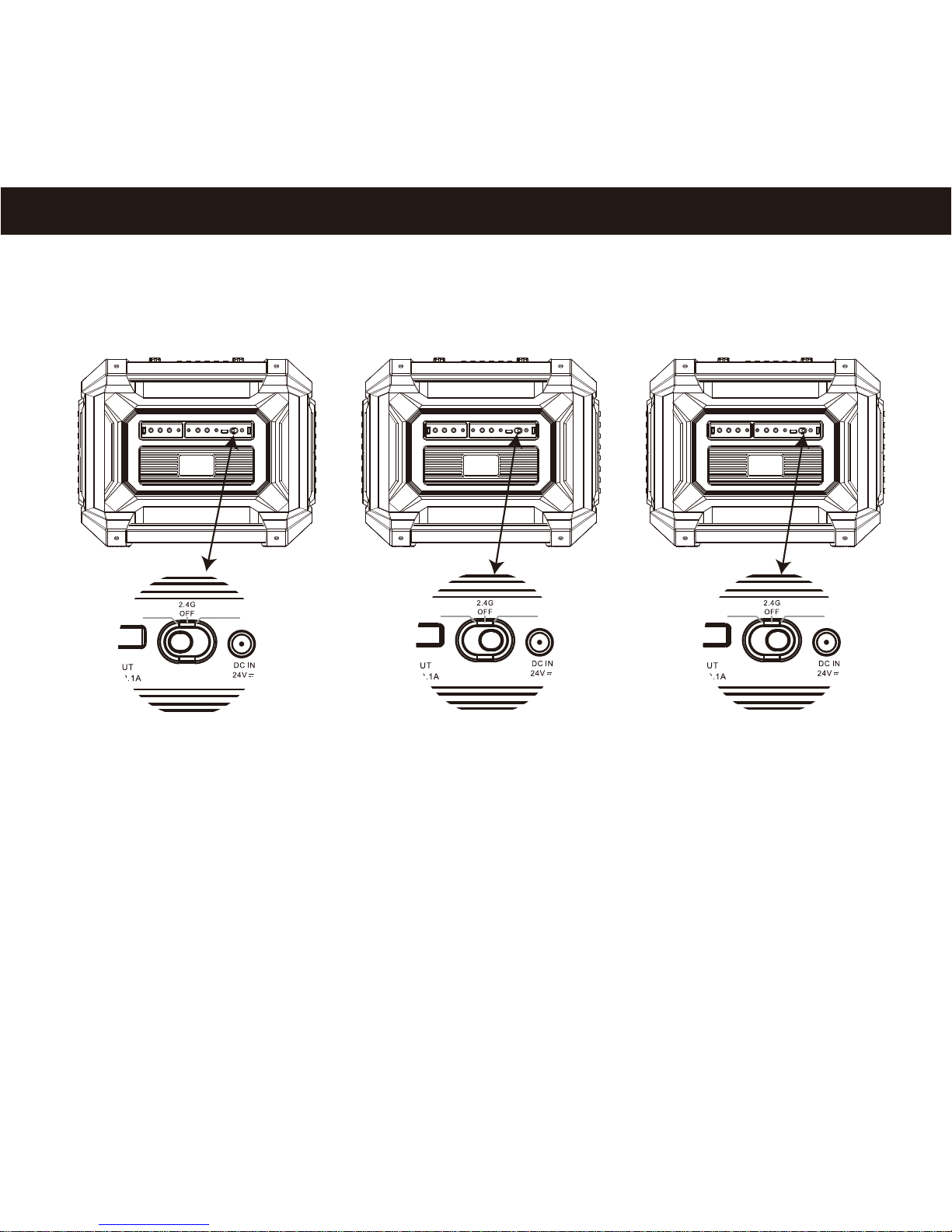
2.4G Wireless Multi-Pairing
MASTER SLAVE
MASTER SLAVEMASTER SLAVE
* More than one piece RockStar can be set as SLAVE speaker, within the 10M distance wireless range from the MASTER speaker.
MASTER SLAVE 1 SLAVE 2
Step 1. Choose one RockStar as Master speaker, turn it on and switch to MASTER, press button “2.4G/PAIR” for 3 seconds,
LED “2.4G” (Refer to Page 7) quick flash indicating searching for Slave speakers.
Step 2. Connect SLAVE 1 : Turn on the second RockStar and switch to SLAVE mode, press button “2.4G/PAIR” for 3 seconds,
pairing complete automatically after 3~5 second reaction.
Step 3. Connect SLAVE 2: Press MASTER speaker’s “2.4G/PAIR” button for 3 seconds, then turn on the third RockStar and switch to SLAVE mode,
press button “2.4G/PAIR” for 3 seconds as well. Pairing complete automatically after 3~5 second reaction.
Step 4. If more SLAVE speakers to be connected, repeat Step 3 operation.
*Wireless range: 10M between MASTER and SLAVE speakers.
*Under 2.4G pairing, SLAVE speakers are non-functional except the “2.4G/PAIR” button.
*To disconnect either SLAVE speaker from MASTER, press “2.4G/PAIR” on SLAVE speaker for 3 seconds.
*To disconnect all SLAVE speakers from 2.4G pairing, press “2.4G/PAIR” on MASTER speaker for 3 seconds.
*Do not slide over the “OFF” position when switching from MASTER to SLAVE, shall pause at “OFF” for two seconds.
Page 8
RockStar
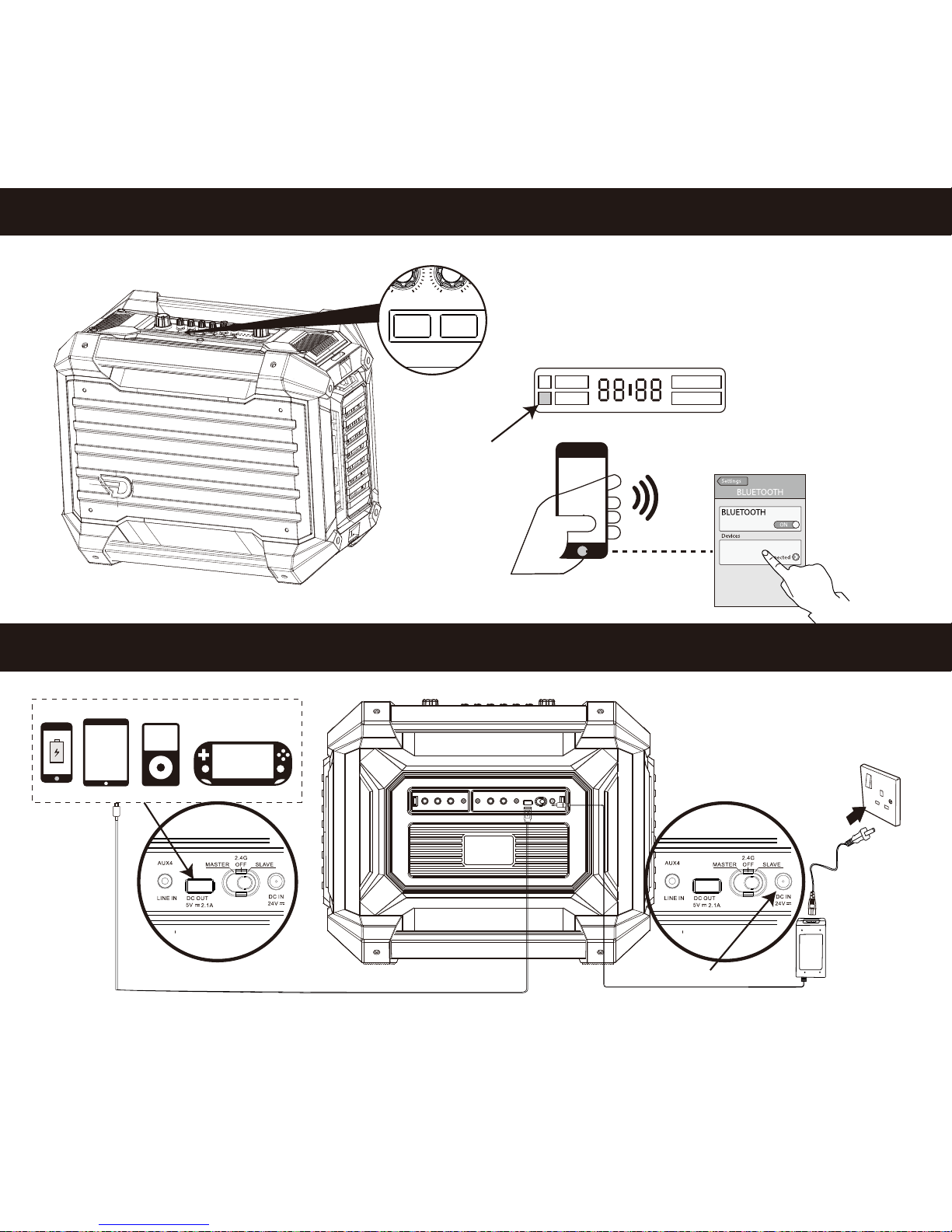
Bluetooth
Charging
6
Charge RockStar
Charge mobile devices
BT LED
KB /BASS VO LAG VOL DRUM /LINE VO L
BT 2.4 G/P AIR
DSP ON /O FF
AUX/ BT VOL
P OWE R
Short press BT button, BT LED quick flash in red light,
indicating to search for Bluetooth pairing.
BT LED in solid red -- Bluetooth pairing complete.
Page 9

7
LED Indicator
DSP On/Off
Low Power
Default DSP
Light on: Using Default DSP effects now
Light off: Default DSP effects are not being used
Light on: Power on
Light off: Power off
Light on: Using USER DSP effects now
Light off: USER DSP effects are not being used
Power
Bluetooth
User DSP
DSP Mode Type
2.4G Indicator:
Solid Red - 2.4G pairing complete
Quick Flashing Red - searching for 2.4G pairing
Charging Indicator:
Solid Red - charging
LED off - charging complete
2.4G
DSP On/Off
Low Power
Default DSP
Power
Bluetooth
User DSP
DSP Mode Type
②
②
③
③
④
④
⑦
⑦
⑤
⑤
⑥
⑥
①
①
Quick flashing: Searching for Bluetooth pairing
Solid on: Bluetooth connected
Light on: DSP mode off
Light off: Under DSP mode
Flashing: Power capacity less than 20%
Light off: Power capacity more than 20%
DSP Effect selection (11 Default effects + 11 User effects)
Page 10

RockStar APP
Modulation
Equalizer
Amplifier
LEVEL GAIN
Rate
MIN
MIN MIN
MAX
MAX MAX
MAX MAXMIN MIN
Res Depth
Advonced Options
30-Surround
Dynamic Loudness
Please download RockStar mobile APP using QR scanner:
Please download Mobile APP User Guide from: http://www.godreamwave.com/Manuals.aspx
iOS Google Play Store
8
Android
Mobile APP
Page 11
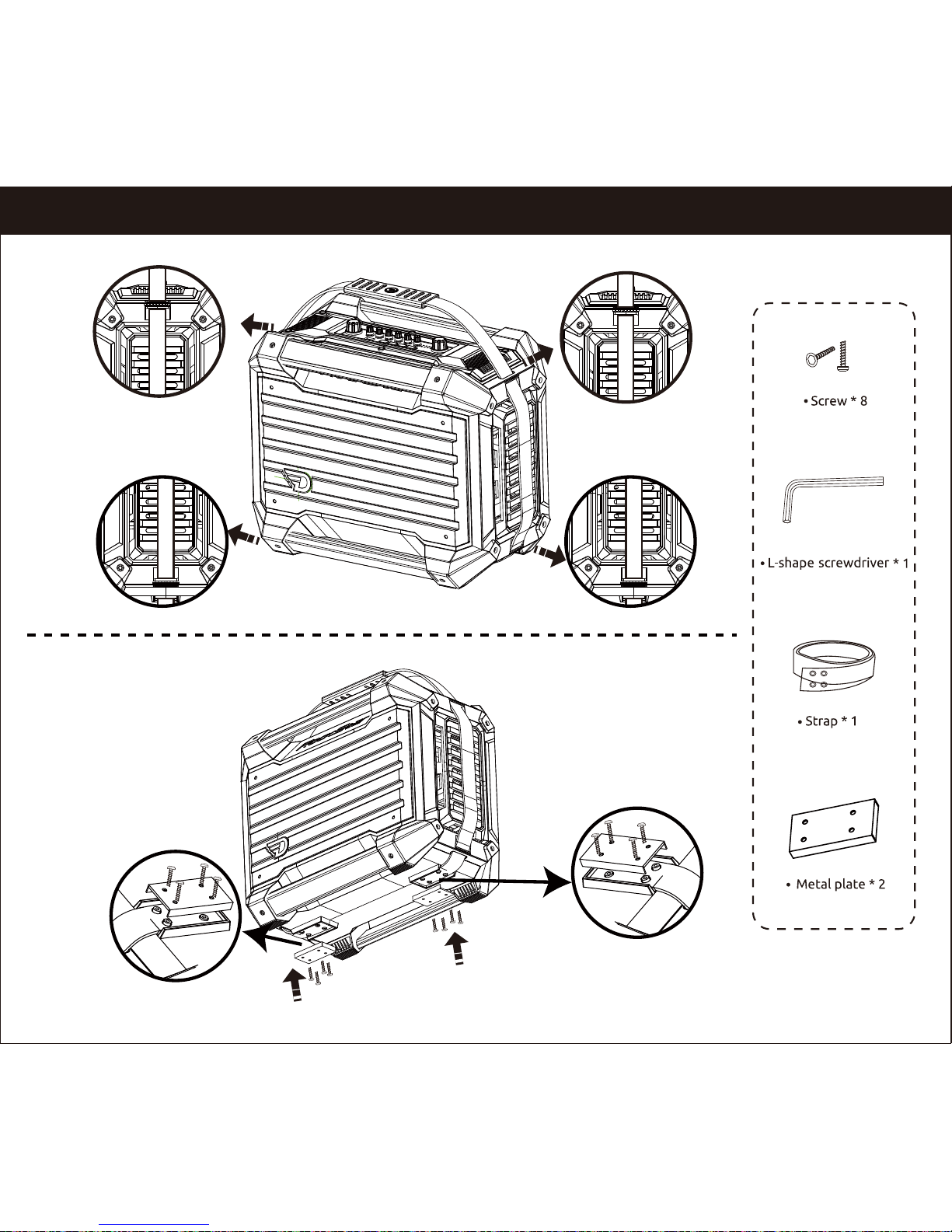
Strap Assembly (Optional)
9
Page 12
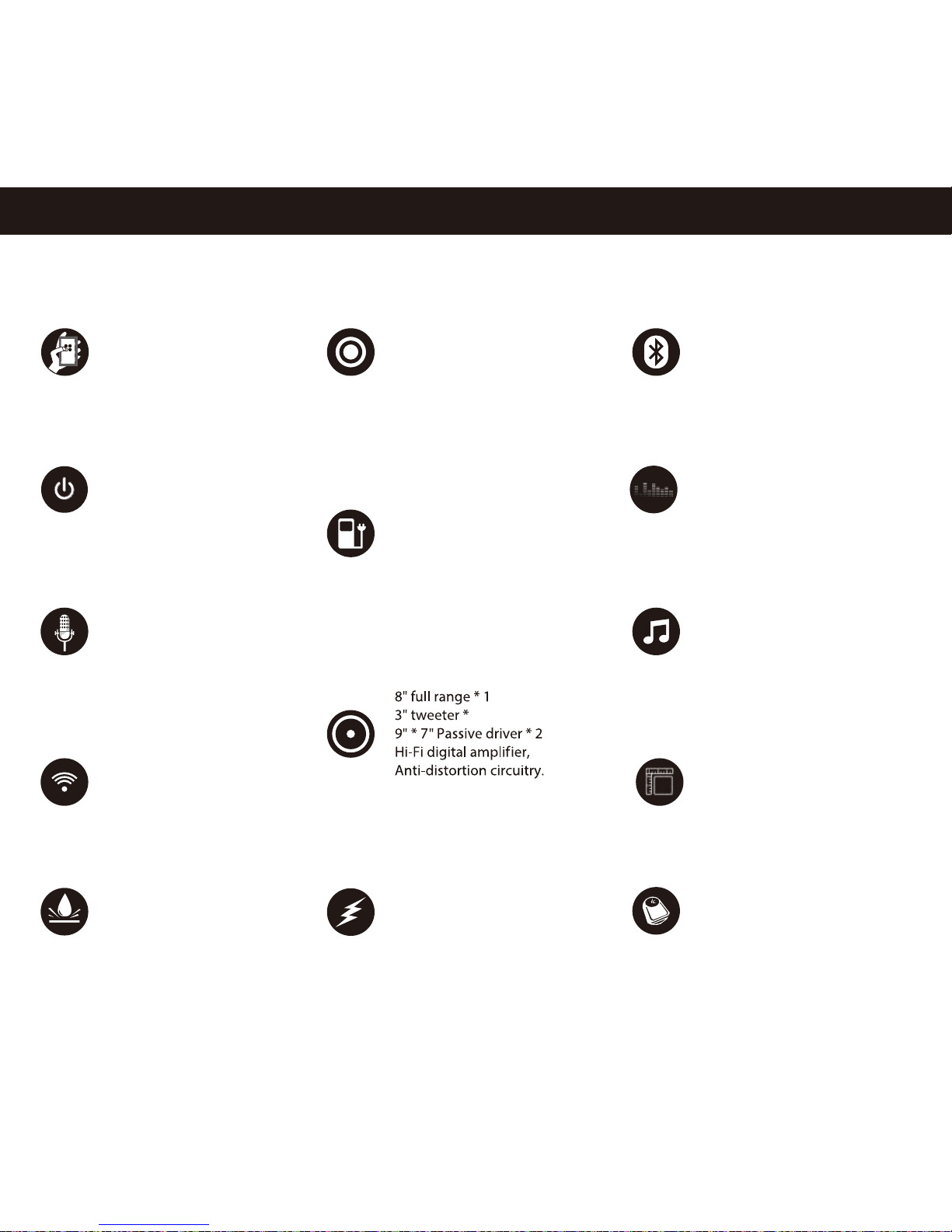
Bluetooth 4.0+EDR, A2DP AVRCP
Rechargeable Lithium Battery
3.7V/26000mAh
(18.5V/5200mAh)
Up to 12 hours Audio playback
Power: 80W RMS
Digital Sound Management
Inputs for MIC / Instruments
4 DSP Inputs
(3.5mm * 1, 6.5mm * 3 )
4 non-DSP inputs
(3.5mm * 2, 6.5mm * 2)
IPX5 splashproof
2.4G wireless Multi-pairing
Professional DSP
vocal/Karaoke
Specifications
(W)543 x (L)310 x (H)431 mm
21.37 x 12.20 x 16.96 inch
12300g /12.3KG/ 27.1 lb
433.86 oz
11 Default DSP
11 User DSP
USB 5V/2.1A output for
charging mobile devices
3.7V/26000mAh or
18.5V/5200mAh
96.2Wh
4
APP Enabled
10
Page 13

DK
Bluetooth : 4.0 + EDR
Understøtter: Mobile APP
A2DP, AVRCP
2.4G trådløs Multi-parring
DSP Studio Monitor lyd System
5V/2.1A power bank (96.2Wh)
IP rate: IPX5, splashproof
Eekt: 80W RMS
Frekvensområde: 38Hz-20kHz
Signal/støj forhold: 83dB
Batteri type: Genopladeligt Lithium
3.7V/26000mAh /(18.5V/5200mAh)
Afspilningstid: Mere end 12 timer
Dimensioner: (W)543 x (L)310 x (H)431 mm
21.37 x 12.20 x 16.96 inch
Vægt: 12300g /12.3KG / 27.11 lb 433.86 oz
EN
Bluetooth : 4.0 + EDR
Support: Mobile APP
A2DP, AVRCP
2.4G wireless Multi-pairing
DSP Studio Monitor Sound System
5V/2.1A power bank (96.2Wh)
IP rate: IPX5, splashproof
Rated power: 80W RMS
Frequency response: 38Hz-20kHz
SN Ratio: 83dB
Battery type: Rechargeable Lithium battery
3.7V/26000mAh (18.5V/5200mAh)
Music playing time: Up to 12 hours of Audio playback
Dimensions: (W)543 x (L)310 x (H)431 mm
21.37 x 12.20 x 16.96 inch
Weight: 12300g /12.3KG / 27.11 lb 433.86 oz
JP
Bluetooth: 4.0 + EDR
サポート Mobile APP
A2DP, AVRCP
2.4G ワイヤレス·マルチペアリング
DSPスタジオモニターサウンドシステム
5V/2.1A パワーバンク(96.2Wh)
防水性能: IPX5、生活防水
定格出力: 80W RMS
再生周波数: 38Hz-20kHz
SNレシオ: 83dB
バッテリー·タイプ: リチウム充電池
3.7V/26000mAh (18.5V/5200mAh)
連続再生時間: 12時間以上
寸法: (W)543 x (L)310 x (H)431 mm / 21.37 x 12.20 x 16.96 inch
重量: 12300g / 12.3KG / 27.11 lb / 433.86 oz
FR
Bluetooth: 4.0 + EDR
soutien: Mobile APP
A2DP, AVRCP
2.4G multi connection sans l
DSP Studio Monitor Sound System
5V/2.1A puissance mobile (96.2Wh)
IP niveau: IPX5,etanche
Puissance : 80W RMS
Frequence: 38Hz-20kHz
SN taux: 83dB
Batterie type: Lithium rechargeable
3.7V/26000mAh (18.5V/5200mAh)
Temps de lecteur: 12h environ
Dimensions: (W)543 x (L)310 x (H)431 mm / 21.37 x 12.20 x 16.96 inch
Poids: 12300g / 12.3KG/ 27.11 lb / 433.86 oz
11
Page 14

PL
Bluetooth: 4.0 + EDR
Funkcje: Mobile APP
A2DP, AVRCP
2.4G bezprzewodowe parowanie z kolejnym urządzeniem
DSP studyjny system monitorowania dźwięku
Power bank 5V/2.1A(96.2Wh)
Stopień ochrony: IPX5, odporny na zachlapania
Moc znamionowa: 80W RMS
Pasmo przenoszenia: 38Hz-20kHz
Stosunek sygnału do szumu (S/N): 83dB
Bateria: Akumulator Litowy
3.7V/26000mAh (18.5V/5200mAh)
Czas odtwarzania muzyki: Ponad 12 godzin
Wymiary: (W)543 x (L)310 x (H)431 mm
21.37 x 12.20 x 16.96 inch
Waga: 12300g / 12.3KG / 27.11 lb 433.86 oz
RU
Bluetooth: 4.0 + EDR
Поддерживает:
Mobile APP
A2DP, AVRCP
Подключение нескольких устройств одновременно по 2,4G
Цифровой процессор обработки звукового сигнала (DSP)
5V/2.1A аккумулятор (96.2Wh)
Степень защиты (IP): IPX5, odporny na zachlapania
Мощность: 80W RMS
Частотная характеристика: 38Hz-20kHz
Отношение сигнал/шум: 83dB
Тип батареи: Перезаряжаемая литиевая батарея емкостью
3.7V/26000мАч(18.5V/5200мАч)
Продолжительность проигрывания: Время работы от батареи: до 12 часов
Параметры: (W)543 x (L)310 x (H)431 mm / 21.37 x 12.20 x 16.96 inch
Вес: 12300g / 12.3KG / 27.11 lb 433.86 oz
DE
IT
Bluetooth: 4.0 + EDR
Supporta: Mobile APP
A2DP, AVRCP
2.4G wireless Multi-pairing
DSP Studio Monitor Sound System
5V/2.1A power bank (96.2Wh )
IP rate: IPX5, splashproof
Potenza dichiarata: 80W RMS
Risposta in fequenza: 38Hz-20kHz
Rapporto segnale/disturbo: 83dB
Batterie tipo: Ricaricabili al Litio
3.7V/26000mAh (18.5V/5200mAh)
Autonomia: Oltre 12 ore
Dimensioni: (W)543 x (L)310 x (H)431 mm
21.37 x 12.20 x 16.96 inch
Peso: 12300g / 12.3KG / 27.11 lb / 433.86 oz
Bluetooth: 4.0 + EDR
Unterstüzt: Mobile APP
A2DP, AVRCP
2.4G wirelsss Multi-pairing
DSP Studio Monitor Sound System
5V/2.1A power bank (96.2Wh)
IP rate: IPX5, spritzwasser geschützt
Power: 80W RMS
Frequenz: 38Hz-20kHz
SN Verhältnis: 83dB
Batterietyp: auadbare Batterie Lithium
3.7V/26000mAh (18.5V/5200mAh)
Musik Wiedergaberzeit: über 12 Stunden
Abmessungen: (W)543 x (L)310 x (H)431 mm
21.37 x 12.20 x 16.96 inch
Gewicht : 12300g / 12.3KG / 27.11 lb / 433.86 oz
12
Page 15

CHS
CHT
藍牙版本: 4.0 + EDR
支持: 手机 APP
A2DP, AVRCP
無線2.4G多臺設備連接
音频信号处理器-高端乐队音箱系统
5V/2.1A內置移動電源(96.2Wh)
防水等級: IPX5
功率: 80W RMS
頻率: 38Hz-20kHz
信噪比: 83dB
電池: 鋰電池 3.7V/26000mAh (18.5V/5200mAh)
播放時長: 12小時以上
產品尺寸: (W)543 x (L)310 x (H)431 mm
21.37 x 12.20 x 16.96 inch
產品淨重: 12300g / 12.3KG / 27.11 lb 433.86 oz
KR
블루투스 버전: 4.0 + EDR
지원가능: Mobile APP
A2DP, AVRCP
2.4G 와이어리스 멀티-페어링
DSP 스튜디오 모니터 사운드 시스템
5V/2.1A 파워 뱅크(96.2Wh)
P rate: IPX5, 스플래시프루프
정격 출력: 80와트 RMS
주파수 응답: 38Hz-20kHz
신호 대 잡음비: 83데시벨
배터리 타입: 재충전가능한 리튬
3.7V/26000mAh (18.5V/5200mAh)
음악 재생 시간: 12시간 이상
디멘션: (W)543 x (L)310 x (H)431 mm / 21.37 x 12.20 x 16.96 inch
무게 12300g /12.3KG / 27.11 lb 433.86 oz
AR
蓝牙版本: 4.0 + EDR
支持: 手机 APP
A2DP, AVRCP
无线2.4G多台设备连接
音频信号处理器-高端乐队音箱系统
5V/2.1A内置移动电源(96.2Wh)
防水等级: IPX5
功率: 80W RMS
频率: 38Hz-20kHz
信噪比: 83dB
电池: 锂电池 3.7V/26000mAh (18.5V/5200mAh)
播放时长: 12小时以上
产品尺寸: (W)543 x (L)310 x (H)431 mm / 21.37 x 12.20 x 16.96 inch
产品净重: 12300g /12.3KG / 27.11 lb / 433.86 oz
4,0+EDR :Bluetooth ﺍﻝﺍﺹﺩﺍﺭ
Mobile APP :ﺍﻝﺩﻉﻡ
A2DP, AVRCP
2,4G ﺍﻝﻝﺍﺱﻝﻙﻱﺓ ﻡﺕﻉﺩﺩﺓ ﺍﻝﺍﻕﺕﺭﺍﻥ
ﻥﻅﺍﻡ ﺍﺱﺕﻭﺩﻱﻭ ﺍﻝﺹﻭﺕ ﻡﻭﻥﻱﺕﻭﺭ DSP
IPX5 , ﻭﺩﻝﻱﻝ ﻉﻝﻱ ﺩﻑﻕﺓ :IP ﻡﻉﺩﻝ
80W RMS :ﺍﻝﻕﻭﺓ ﺍﻝﻡﺹﻥﻑﺓ
38 Hz - 20 kHz :ﺍﺱﺕﺝﺍﺏﺓ ﺍﻝﺕﺭﺩﺩ
83dB :SN ﻥﺱﺏﺓ
ﻑﻭﻕ 12 ﺱﺍﻉﺓ :ﻭﻕﺕ ﺕﺵﺥﻱﻝ
(W)543 x (L)310 x (H)431 mm / 21.37 x 12.20 x 16.96 inch :ﺍﻝﺍﺏﻉﺍﺩ
12300g / 12.3KG / 27.11 lb 433.86 oz :ﻭﺯﻥ
5V / 2,1A ﺍﻝﺏﻥﻭﻙ ﻭ ﺍﻝﻙﻩﺭ ﺏﺍء(96.2Wh )
3.7V/26000mAh (18.5V/5200mAh) ﺏﻁﺍﺭﻱﺓ ﻝﻱﺙﻱﻭﻡ ﻕﺍﺏﻝﺓ :ﻥﻭﻉ ﺍﻝﺏﻁﺍﺭﻱﺓ
13
Page 16
Troubleshooting
Power doesn't turn on when you press the Power button?
• Could the RockStar run out of power? - Full charge it with the offered DC24V adaptor.
• Is the AC adapter plugged into an AC outlet?
• Is the AC outlet working properly?
• Could the AC adapter be damaged?
No sound
• Could the volume of your audio device be turned down?
• Is your audio device/music resource connected correctly?
• Could your audio device cable be broken?
• Could the top panel knobs be set to the minimum value?
• Could you have activated the mute mode?
DSP Eects don’t apply
• Could the effect setting be off?
Use the DSP MODE knob to select the eect that you want to use.
Could the volume knobs of instruments be set to the minimum volue?
Adjust the volume knobs.
• Could you connect your audio devices to the AUX Inputs instead of DSP Inputs?
Make sure that you connect your audio devices to DSP inputs of CH1 / CH2 / CH3 / CH4.
2.4G Wireless multi-Pairing fail
. Could the 2.4G switch be on OFF mode? – Switch to MASTER or SLAVE to set correctly.
. Could the distance between Master & Slave devices be larger than 10 meters?
. Do not slide over the “OFF” position when switching from MASTER to SLAVE, shall pause for two seconds.
Audio is intermittent, crackling or distorted when streaming via Bluetooth
1. Try playing other audio les. Ensure that audio can play well from the same audio device when using a headphone.
2. If Step 1 is not the case, try listening to audio by connecting the speaker to the Bluetooth device using the Aux-in cable.
This will isolate if it's a Bluetooth connection issue or not. Remember to disconnect/un-pair the Bluetooth connection frst.
3. If the issue only happens when connecting via Bluetooth, do the following:
a. Check that you are connected to the correct speaker ( i.e. select “RockStar”within the Bluetooth list on your device).
b. Check that the volume is not set to minimum.
c. Ensure that the distance between the speaker and the Bluetooth device is with the distance of 10 meters.
d. Turn the speaker o and back on to reset the speaker.
e. Clear the current pairing entry from your Bluetooth device.
f. To further isolate the problem, do please shut down all other surrounding Bluetooth devices.
g. Try re-pairing the speaker and the Bluetooth device.
If all above do not solve your problem, please contact DreamWave Support via email.
14
.
Page 17

F
CC ID: 2AD2BGM100
Patent: ZL201630629919.7
FCC Statement
This equipment has been tested and found to comply with the limits for a Class B digital
device, pursuant to part 15 of the FCC Rules. These limits are designed to provide
reasonable protection against harmful interference in a residential installation. This
equipment generates, uses and can radiate radio frequency energy and, if not installed and
used in accordance with the instructions, may cause harmful interference to radio
communications. However, there is no guarantee that interference will not occur in a
particular installation. If this equipment does cause harmful interference to radio or
television reception, which can be determined by turning the equipment off and on, the
user is encouraged to try to correct the interference by one or more of the following
measures:
• Reorient or relocate the receiving antenna.
• Increase the separation between the equipment and receiver.
• Connect the equipment into an outlet on a circuit different from that to which the receiver
is connected.
• Consult the dealer or an experienced radio/TV technician for help.
Caution: Any changes or modifications to this device not explicitly approved by
manufacturer could void your authority to operate this equipment.
This device complies with part 15 of the FCC Rules. Operation is subject to the
following two conditions: (1) This device may not cause harmful interference, and (2) this
device must accept any interference received, including interference that may cause
undesired operation.
RF Exposure Information
The device has been evaluated to meet general RF exposure requirement. The device
can be used in portable exposure condition without restriction.
Page 18
 Loading...