

Dreamwave 4CH NVR KIT, 8CH NVR KIT, 16CH NVR KIT, 9508S, PoE switch Quick Installation Manual
Page 1

QUICK INSTALLATION GUIDE
4CH, 8CH & 16CH Surveillance System / NVR WiFi PoE Camera Kit
Page 2
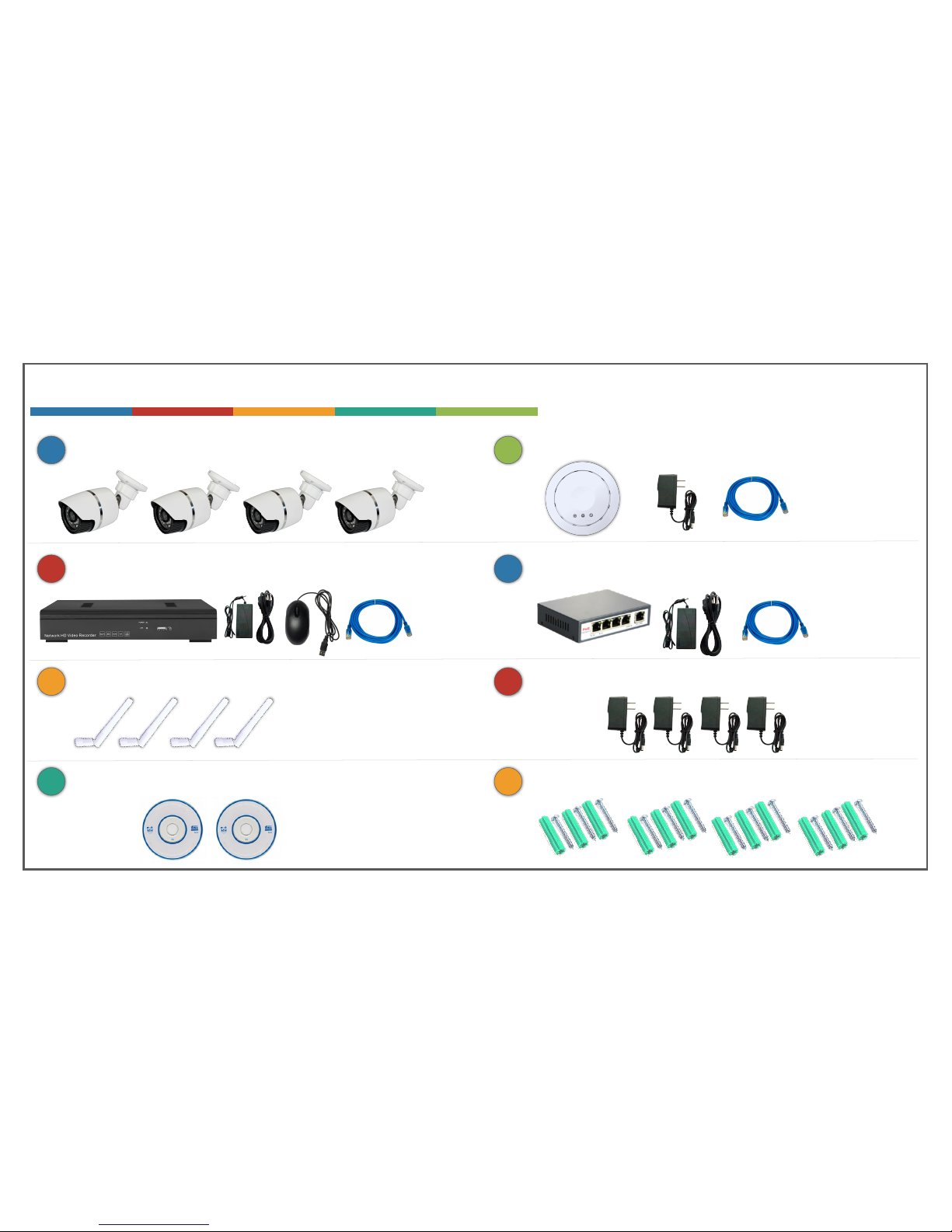
WHAT’S IN THE BOX – 4CH NVR KIT
Four (4) 631H2 WiFi PoE IP Cameras
1
Four (4) Antennas for Cameras
3
N8/1U 8 Channel IP NVR with 500GB Hard Drive
2
4
Software CDs for managing NVR & Cameras
9508S WiFi AP / Router
5
Four (4) power adapters for cameras
7
POE31004P 5-port PoE switch
6
8
Four (4) sets of mounting hardware for cameras
Page 3
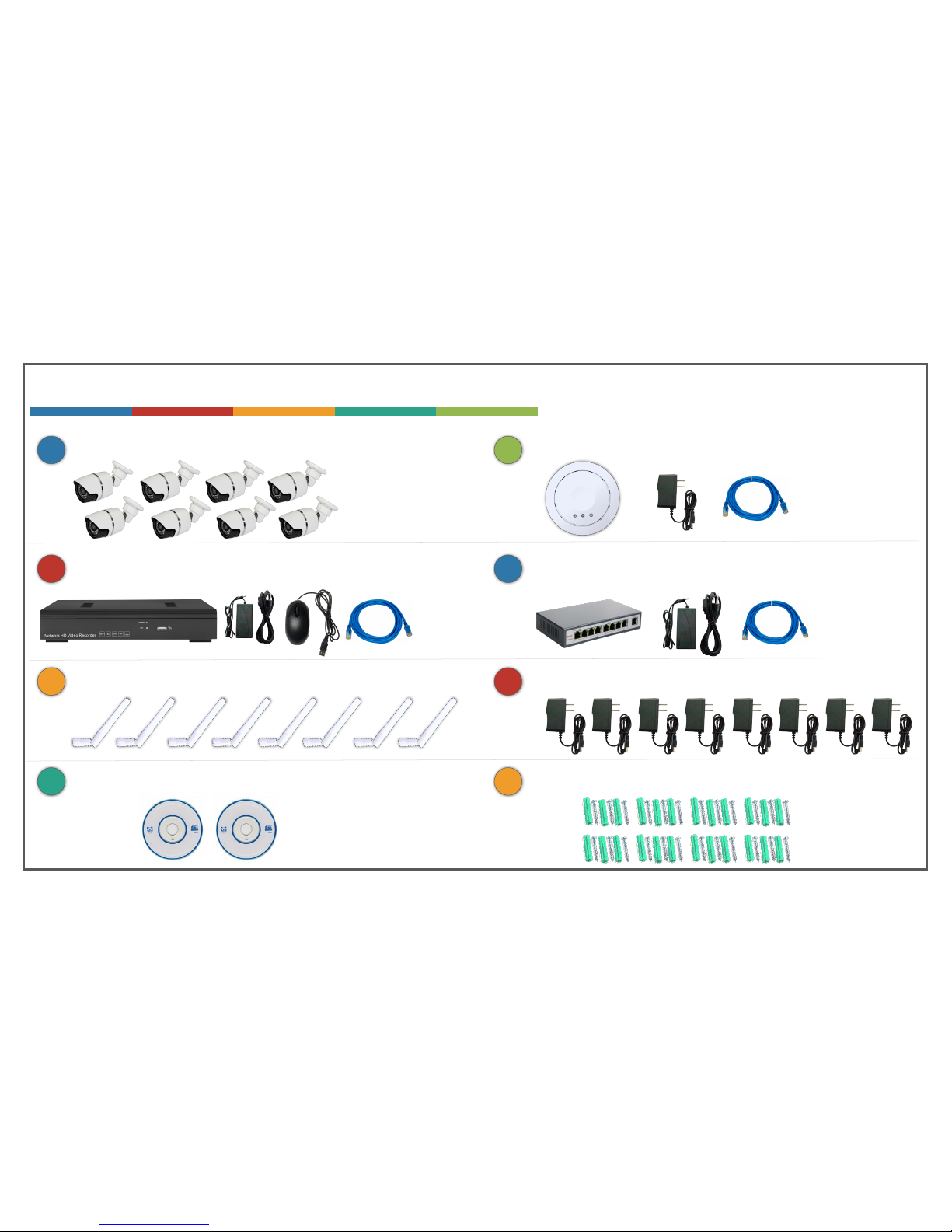
WHAT’S IN THE BOX – 8CH NVR KIT
Eight (8) 631H2 WiFi PoE IP Cameras
1
Eight (8) Antennas for Cameras
3
N8/1U 8 Channel IP NVR with 1TB Hard Drive
2
4
Software CDs for managing NVR & Cameras
9508S WiFi AP / Router
5
Eight (8) power adapters for cameras
7
POE31008P 9-port PoE switch
6
8
Eight (8) sets of mounting hardware for cameras
Page 4
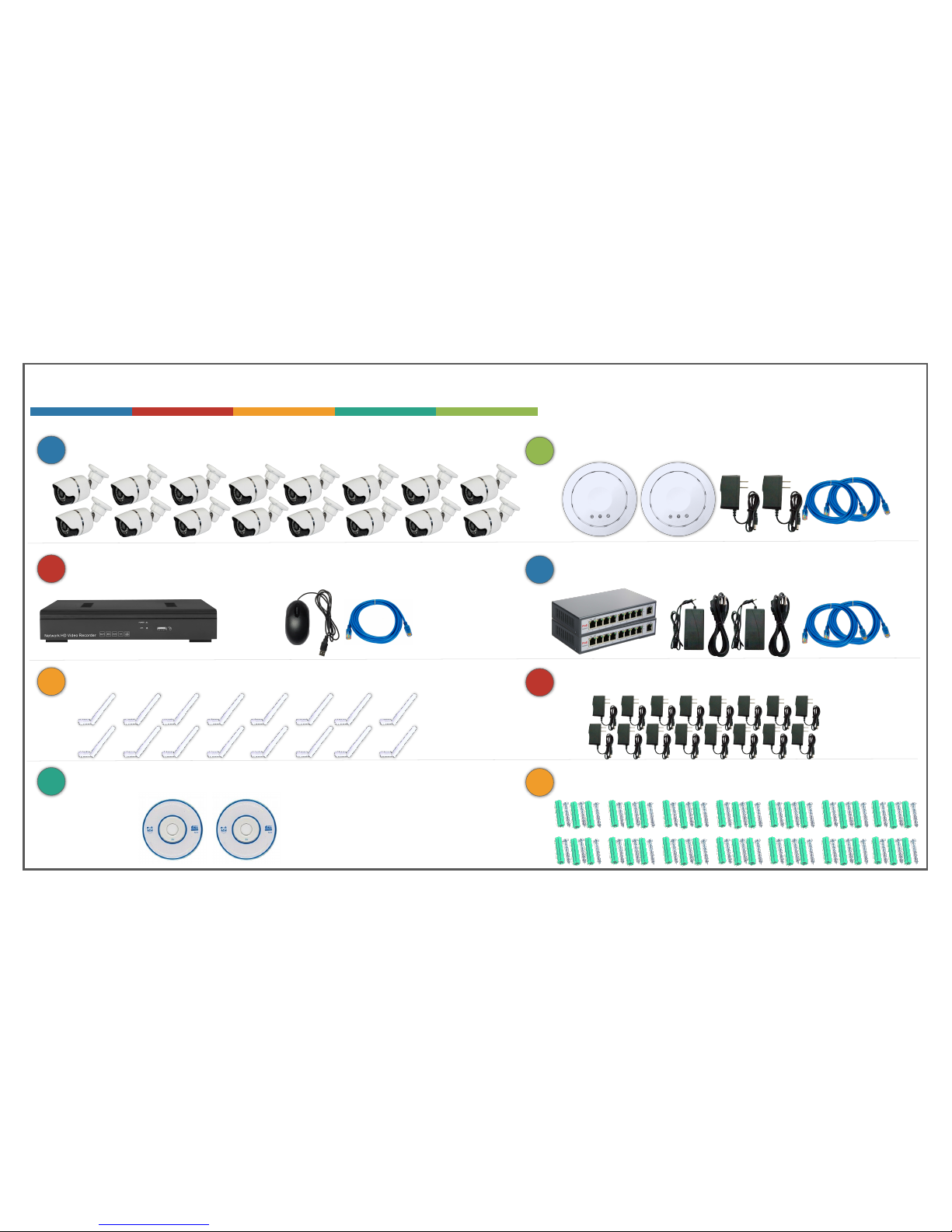
WHAT’S IN THE BOX – 16CH NVR KIT
Sixteen (16) 631H2 WiFi PoE IP Cameras
1
Sixteen (16) Antennas for Cameras
3
N25/1U 25 Channel IP NVR with 4TB Hard Drive
2
4
Software CDs for managing NVR & Cameras
TWO (2) 9508S WiFi AP / Routers
5
Sixteen (16) power adapters for cameras
7
TWO (2) POE31008P 9-port PoE switches
6
8
Sixteen (16) sets of mounting hardware for cameras
Page 5
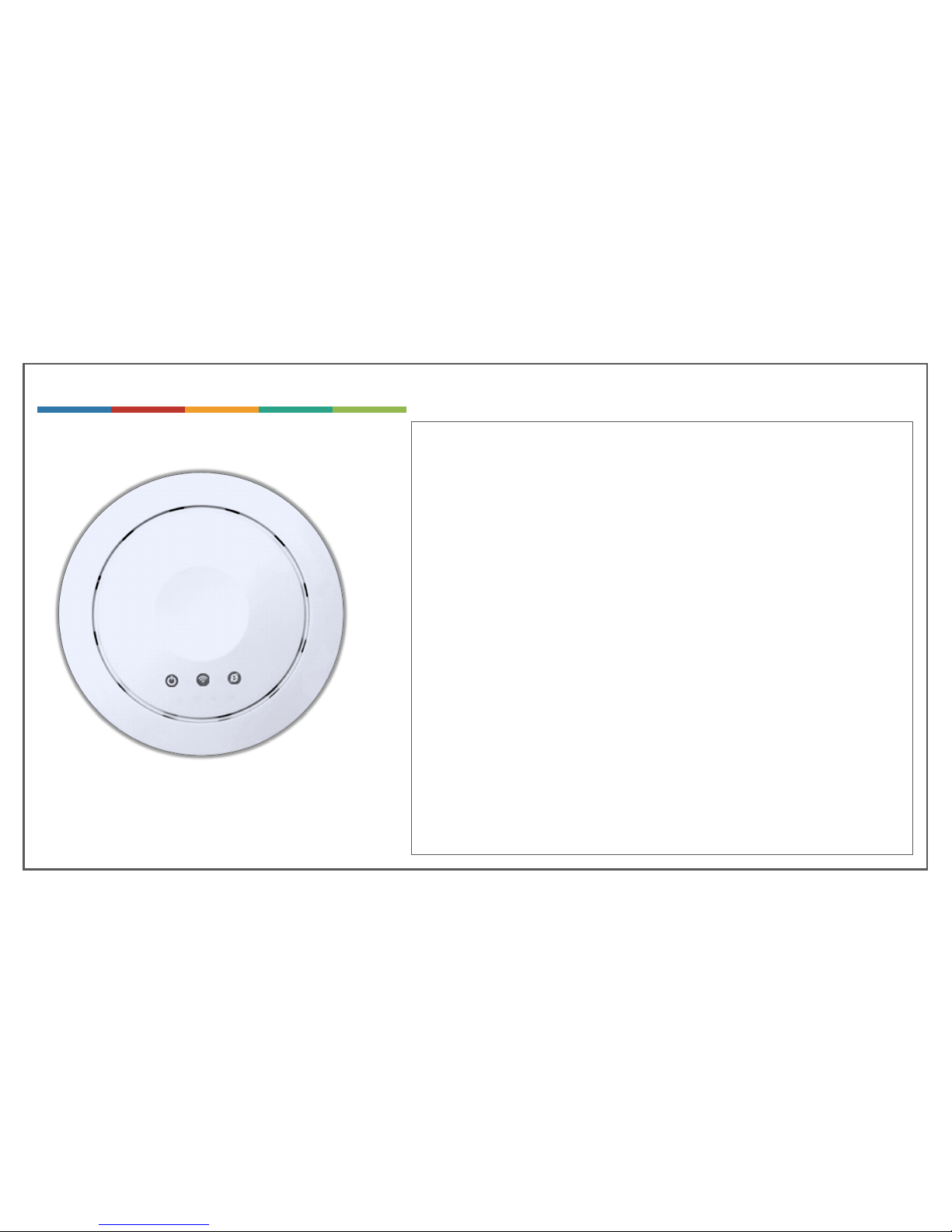
9508S WIFI AP / ROUTER
The 9508s is a 3-in-1 wireless device. It can be configured as a wireless
router, Access-Point or Repeater.
The 9508s is configured as an Access-Point by default to ensure it works
with your home / business Wireless router without any issues.
The WiFi cameras are pre-configured with the SSID & password of the
9508s.
The WiFi cameras generate a lot of wireless video traffic which might slow
down your existing wireless network. With the 9508s, the cameras are on a
different wireless network and do not share your home / business wireless
network. This will ensure that there is no load on your network from the IP
cameras.
The 9508s is configured with Channel 7. If you experience your wireless
network to be sluggish after installing the NVR system, we recommend you
to check the wireless channels settings on your wireless router and change
it to either channel 1 or channel 11 so it does not overlap with channel 7.
The cameras also supported wired connections. If you decide to go with
wired installation and not use the WiFi feature, then you do not need to
install the 9508s.
Page 6
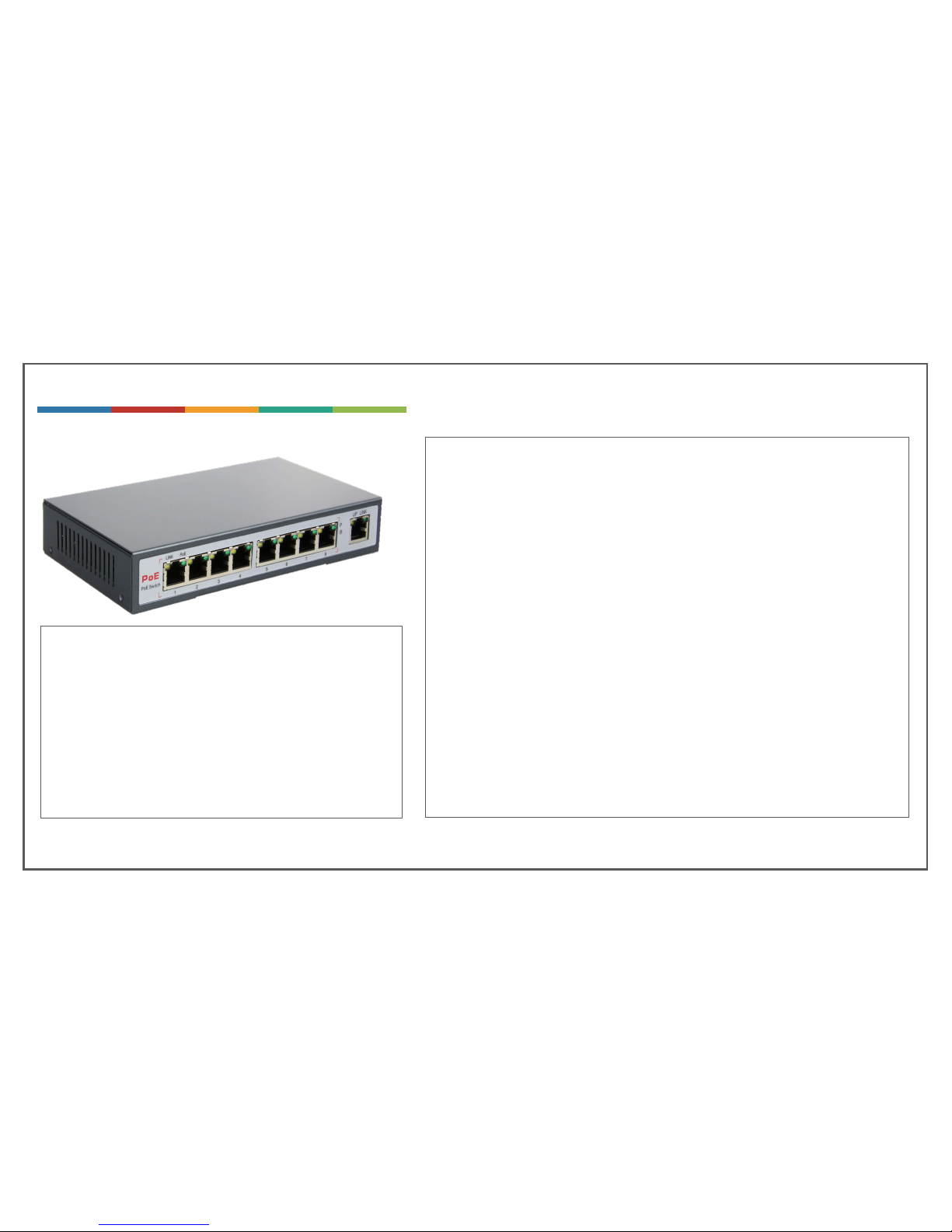
POE SWITCH
A PoE switch is same as a regular Ethernet switch except that it also sends
power over the same Ethernet cable, which is used to power the cameras. PoE
switch can power a variety of devices such as wireless routers, IP phones,
cameras, or any device that is PoE enabled.
The included PoE switch (PoE3100Xp) can be used to connect the cameras
using Ethernet cables. When the cameras are connected to the PoE switch, they
are automatically powered through the Ethernet cable, which eliminates the
need for using the power adapters to power the cameras.
If you decide to use the cameras wirelessly, then you do not need to use the PoE
switch. You can also use the PoE switch as a regular Ethernet switch to add
more ports to your wireless router in case you are out of free ports.
You can use the NVR system with both wired and wireless cameras, where some
cameras can be connected wirelessly using the 9508s AP and some cameras can
be connected over Ethernet cable using the PoE switch.
You can connect the cameras using Cat5e or Cat 6
Ethernet cable. The cable should be straight through will all
4 pairs terminated at both ends. Pairs 1,2 & 3,6 (data pairs)
are used for video transmission and pairs 4,5 & 7,8 (spare
pairs) are used to power the device.
The maximum length of the cable cannot exceed 300ft (100
meters) for the PoE switch to efficiently power the
cameras.
The PoE switch can send full power of 15.4W per each port
Page 7
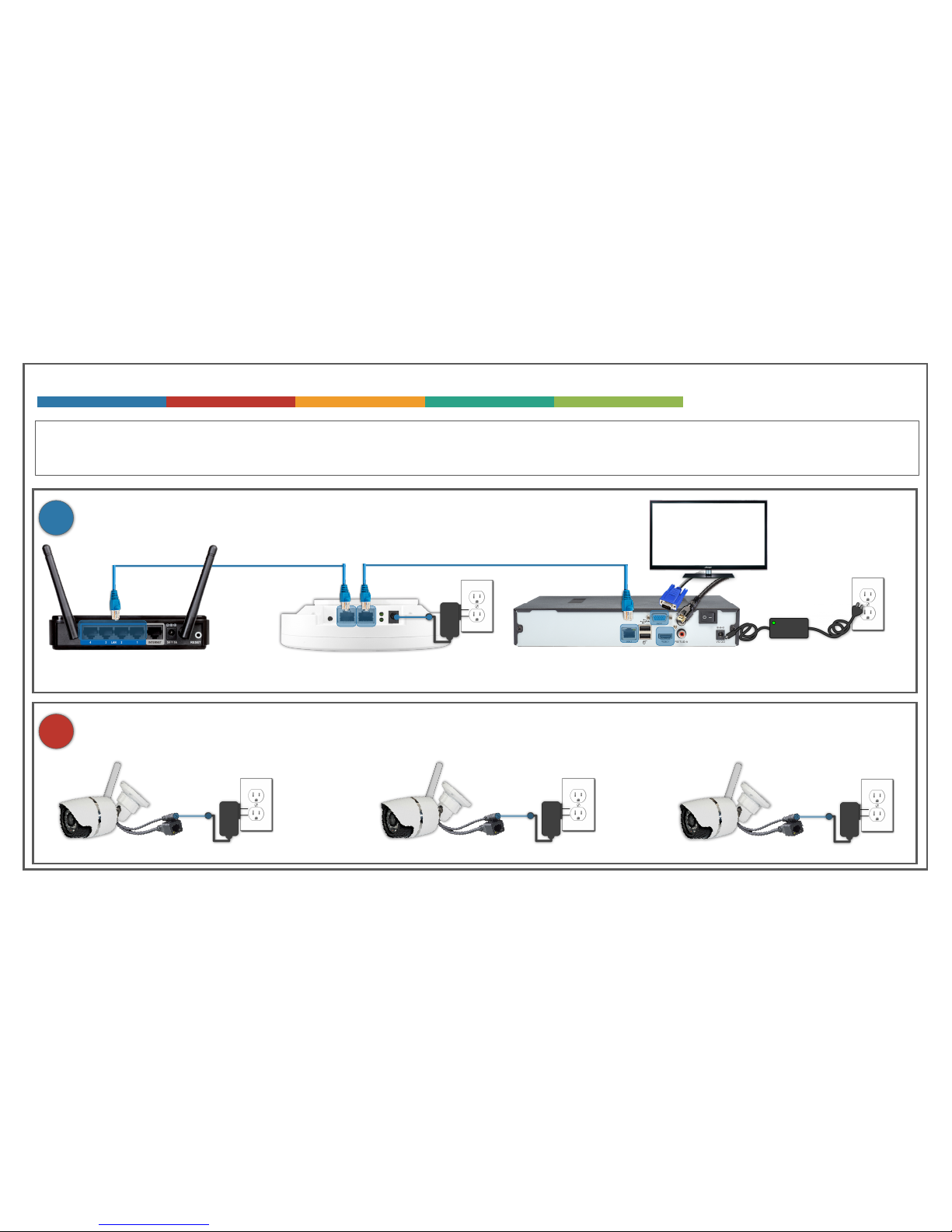
INSTALLING YOUR NVR SYSTEM – WIFI CONNECTIVITY (9508s)
LAN
WAN
LAN
2
Your Home / Business
WiFi / Internet Router
LAN
9508S WiFi AP 4CH / 8CH / 16CH NVR
Power on the Cameras
HD 1080p
TV or Monitor
HDMI or VGA
1
Connect the 9508S WiFi AP & the NVR to your Home / Business WiFi Router
The cameras can be connected either wired or wireless. If you are planning to use the cameras
wirelessly, follow the below instructions
Page 8
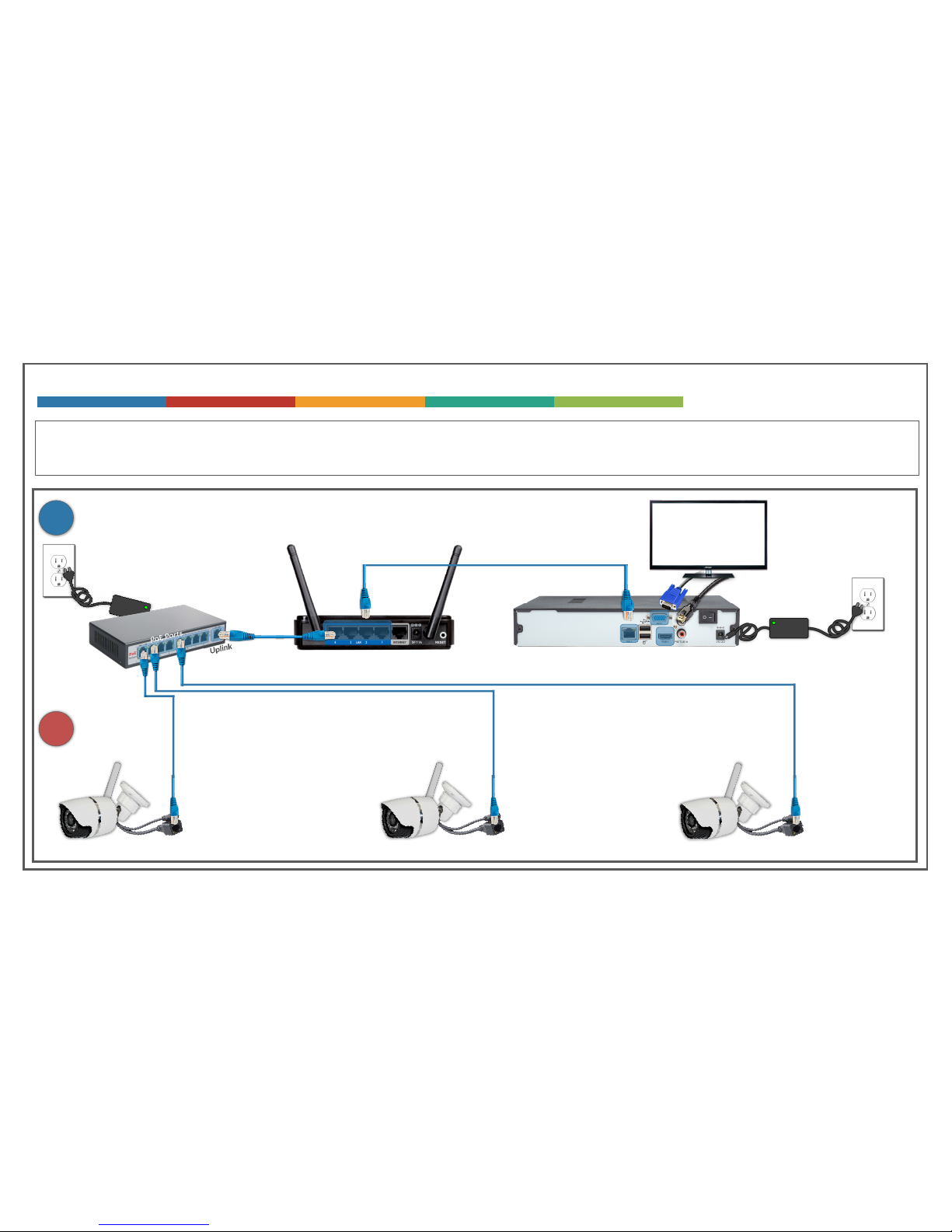
INSTALLING YOUR NVR SYSTEM – WIRED CONNECTIVITY (POE)
LAN
Your Home / Business
WiFi / Internet Router
LAN
POE3100Xp 4CH / 8CH / 16CH NVR
HD 1080p
TV or Monitor
HDMI or VGA
1
Connect the 9508S WiFi AP & the NVR to your Home / Business WiFi Router
The cameras can be connected either wired or wireless. If you are planning to connect the camera
using Ethernet cable, follow the below instructions
2
Connect the cameras using Cat5e or Cat 6 Ethernet cables.
Page 9

REMOTE VIEW APP (GOOLINK) SETUP ON YOUR SMART PHONE
1
Install the GOOLINK FREE app on your iPhone / Android phone
2
Start the app, click on “+” sign to add device & select QR Code Scan option.
3
Scan the QR code on the back of the NVR
4
The default username is “Admin” and leave the password blank.
5
Save the settings. And now you should be able to select the device you just added and watch the channels
Page 10

Device IP Address Username Password Admin GUI
NVR 192.168.1.20 admin (no password set) http://192.168.1.20
Camera 1 - 8 192.168.1.21 –
192.168.1.28
admin admin http://192.168.1.x
Where x = 21 for cam1,
22 for cam2 and so on.
9508S
WiFi Router
192.168.1.30 admin admin http://192.168.1.30
NVR System IP Address & Access Information (4CH & 8CH NVR Systems)
Page 11

Device IP Address Username Password Admin GUI
NVR 192.168.1.20 admin (no password set) http://192.168.1.20
Camera 1 - 16 192.168.1.21 –
192.168.1.36
admin admin http://192.168.1.x
Where x = 21 for cam1,
22 for cam2 and so on.
9508S -1
WiFi Router
192.168.1.39 admin admin http://192.168.1.30
9508S -1
WiFi Router
192.168.1.40 admin admin http://192.168.1.30
NVR System IP Address & Access Information (16CH NVR Systems)
Page 12

CAMERA GUIDE
CAMERAS
FEATURES 631H2 536H2 653H5 537H5
802.3af (POE) ✓ ✓ ✓ ✓
802.11n (WiFi) (2.4GHz) ✓ ✓ ✗ ✗
ONVIF 2.1 Compliant ✓ ✓ ✓ ✓
IP66 Weather Proof ✓ ✓ ✓ ✓
Lens 3.6mm Fixed Lens 3.6mm Fixed Lens Varifocal Lens (2.8mm – 12mm) Varifocal Lens (2.8mm – 12mm)
Zoom ✗ ✗ Manual Manual
CMOS Sensor 1/2.8” 1/2.8” 1/3” 1/3”
Resolution 1MP, 2MP@30fps 1MP,2MP@30fps 1MP,2MP@30fps, 3MP, 5MP@15fps 1MP,2MP@30fps, 3MP, 5MP@15fps
Two-Way Audio ✓ ✓ ✓ ✓
Casing Aluminum Mini Bullet Plastic Dome Aluminum Bullet Plastic Dome
IR Cut Night Vision ✓ ✓ ✓ ✓
IR Distance / LEDs 20M / 24 LEDs 20M / 24 LEDs 40M / 36 LEDs 40M / 36 LEDs
Partial Occlusion ✓ ✓ ✓ ✓
WDR ✓ ✓ ✓ ✓
Motion Detection ✓ ✓ ✓ ✓
Privacy Masking ✓ ✓ ✓ ✓
Auto Iris ✓ ✓ ✓ ✓
P2P Cloud ✓ ✓ ✓ ✓
Web Admin GUI ✓ ✓ ✓ ✓
 Loading...