

Page 1
-1-
GB NL FR D
USER’S MANUAL
--------------Manual/Dream-LED SP100/03-2016/V01--------------
Page 2
-2-
DECLARATION OF CONFORMITY
Hereby,
Company: TE-GROUP nv
Address: Kapelsestraat 61, 2950 Kapellen - BELGIUM
Declares that:
Product Name: STEREOBOOMM SP100
Product Type: LED-light + wireless Speaker
Is in compliance with the essential requirements and other relevant provisions of Directive 1999/5/EC,
2004/108/EC, 2006/95/EC.
The product has been tested against the followings standards and specications, applying versions
valid on the date that it was issued:
EN 60950-1
ETSI EN 300 328
ETSI EN 301 489-1
ETSI EN 301 489-17
Joseph van Oosterum, CEO TE Group NV,
Page 3
-3-
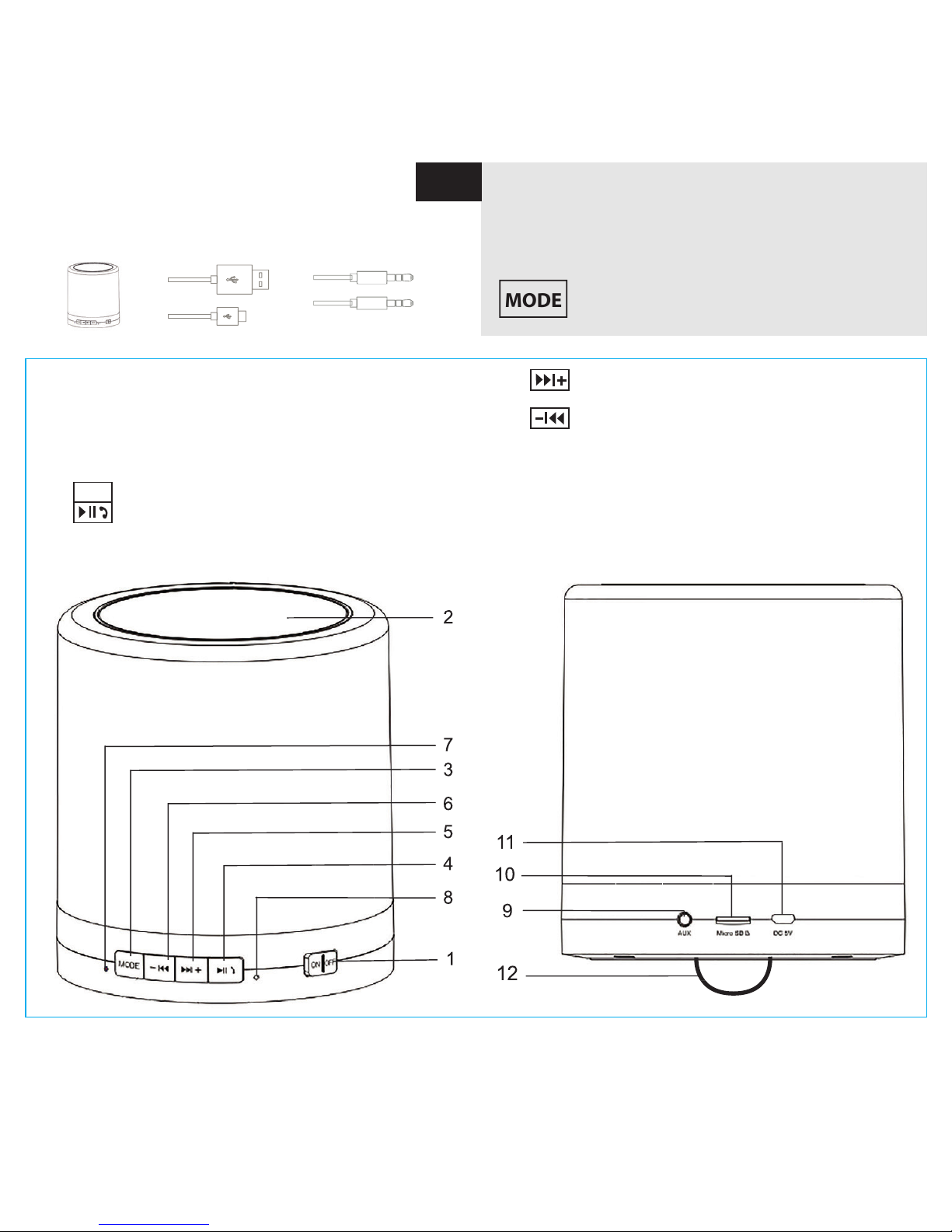
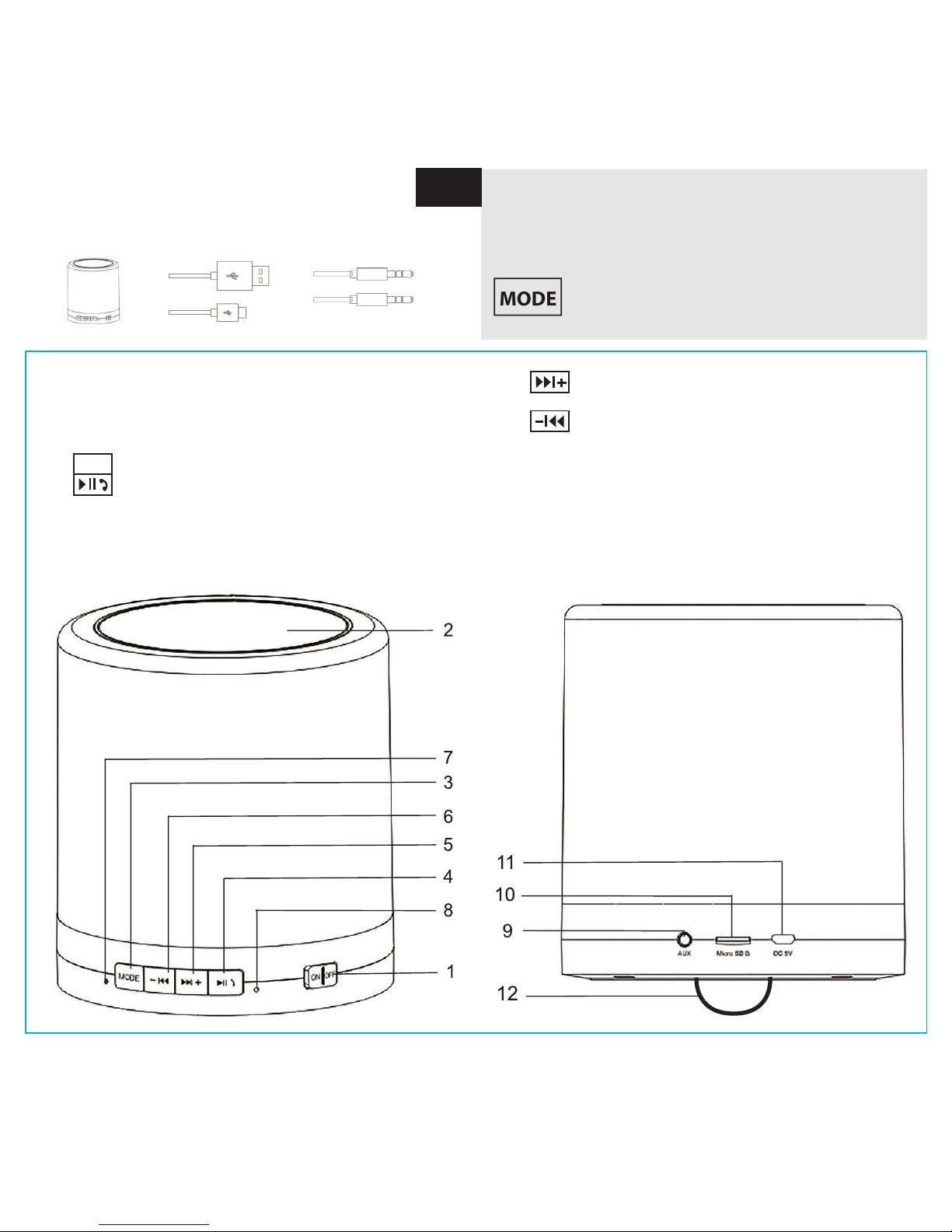
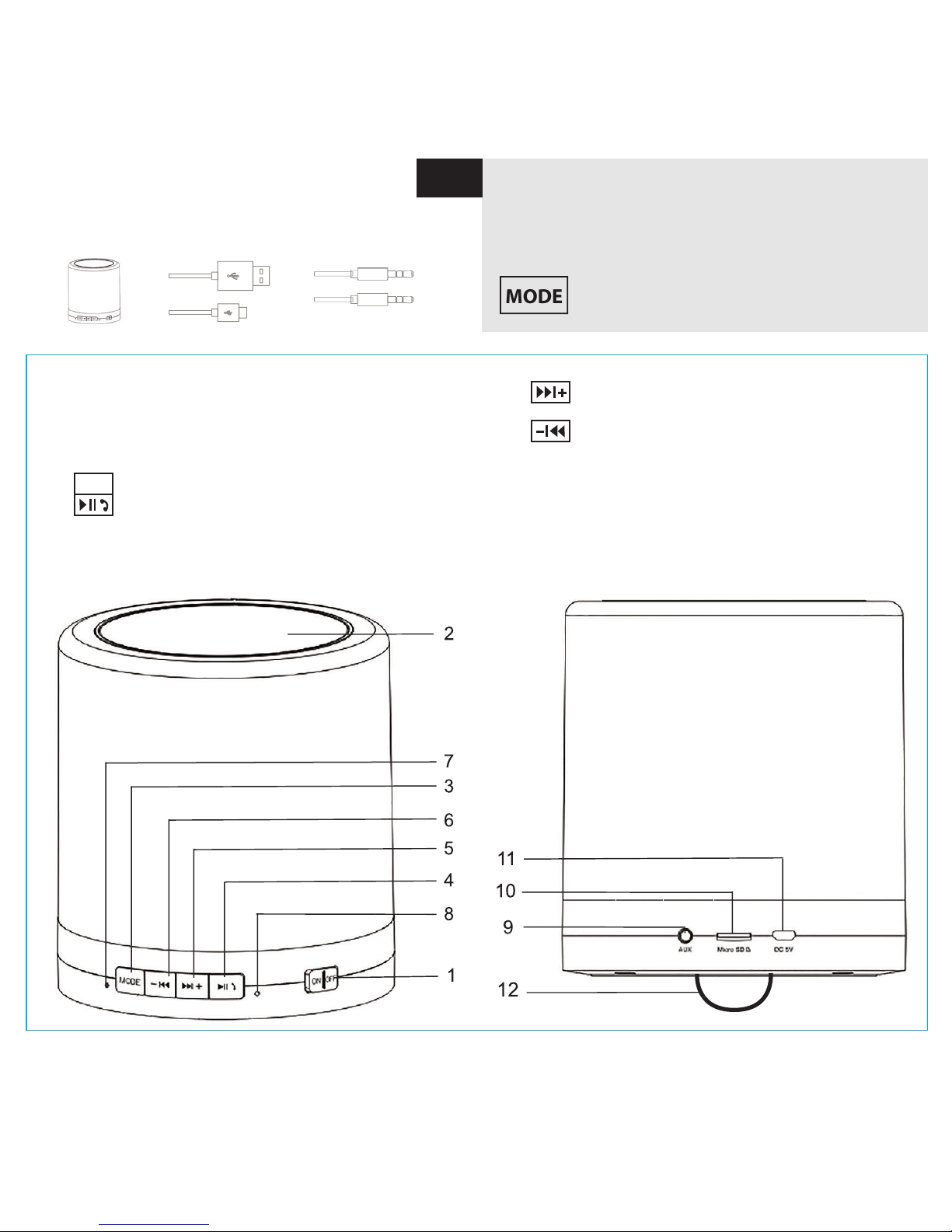
PACKAGE CONTENTS
DreamLED® Micro USB
SP100 charging cable AUX-cable
MODE
GB
How to use the DreamLED® SP100?
The DreamLED® SP100 is:
- Bluetooth® Speaker with HANDSFREE function
- Music player with AUX/TF input
- LED-light: changes brightness by TOUCH
! using the MODE key (3) you switch from LEDmode to BLUETOOTH® MODE to AUX-in MODE
PARTS & BUTTONS
1. ON/OFF POWER SWITCH:
Slide ON/OFF switch to start using DreamLED® SP100
2. LED-TOUCH PANEL:
LED ON/OFF + brightness adjustment
3.
MODE
short press – to activate the Bluetooth® mode
4. short press: Play/Pause music
Answer/end call during handsfree calling
Long press: Redial last number
5. Short press: Next song
Long press: Increase volume
6. Short press: previous song
Long press: decrease volume
7. LED indicator: ON/OFF + charging + Bluetooth® mode
8. Microphone for handsfree calling
9. AUX-input port
10. Micro SD/TF card input slot
11. Micro USB charging slot
12. Suspension HOOK
Page 4
-4-
CHARGING THE BATTERY
The SP100 must be fully charged before rst use!
- Plug the micro USB cable into the micro USB charging
socket (11).
- Plug the other end of the USB cable into your computer or
USB travel charger.
When the product is charging, the indication LED (7) will turn RED.
When the product is fully charged, the indication LED (7) will
turn BLUE.
When the battery capacity is LOW, you will hear a voice
prompt “battery low”.
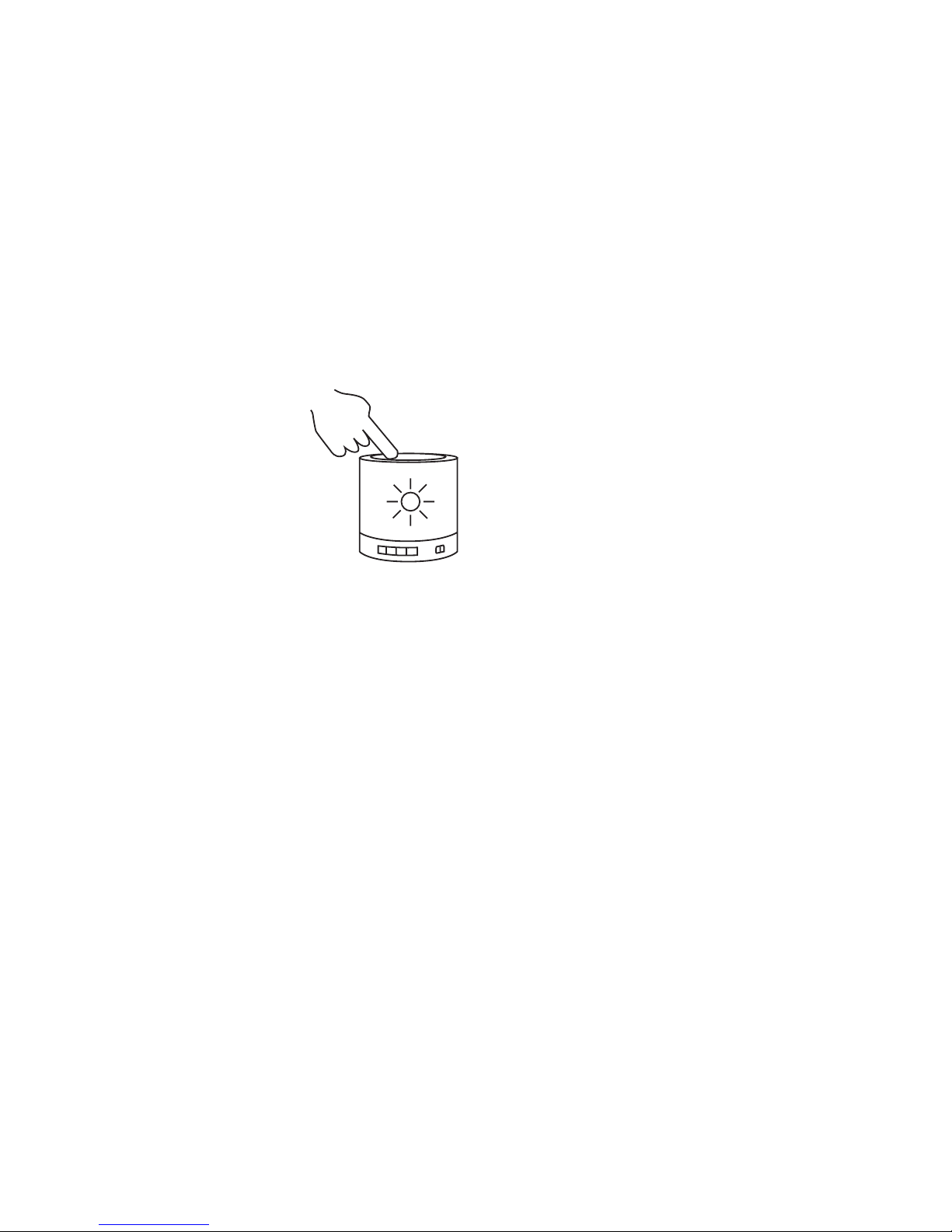
OPERATING THE LAMP
Slide the ON/OFF button (1) to start
using the SP100.
A voice prompt will
indicate that you’re in the “Lighting”-mode.
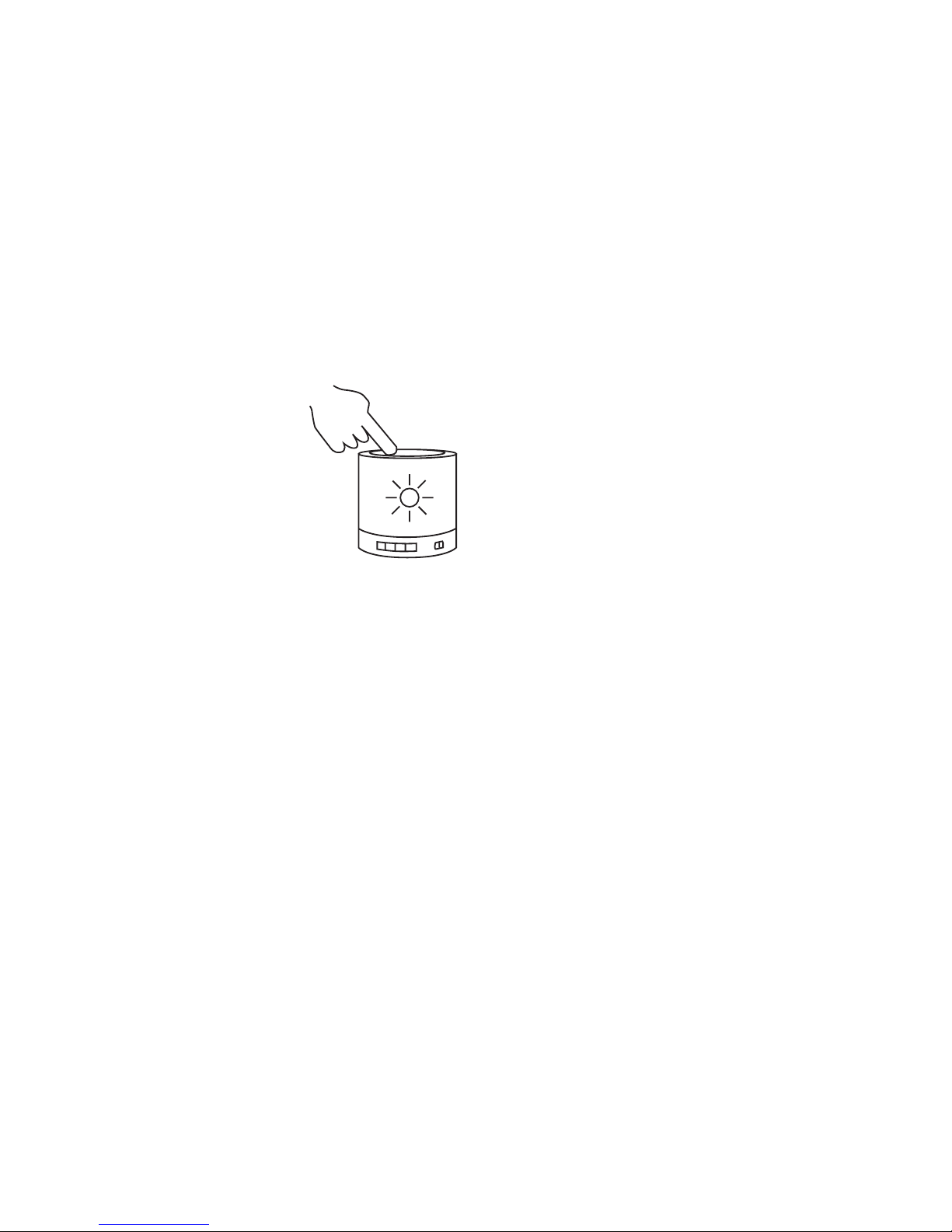
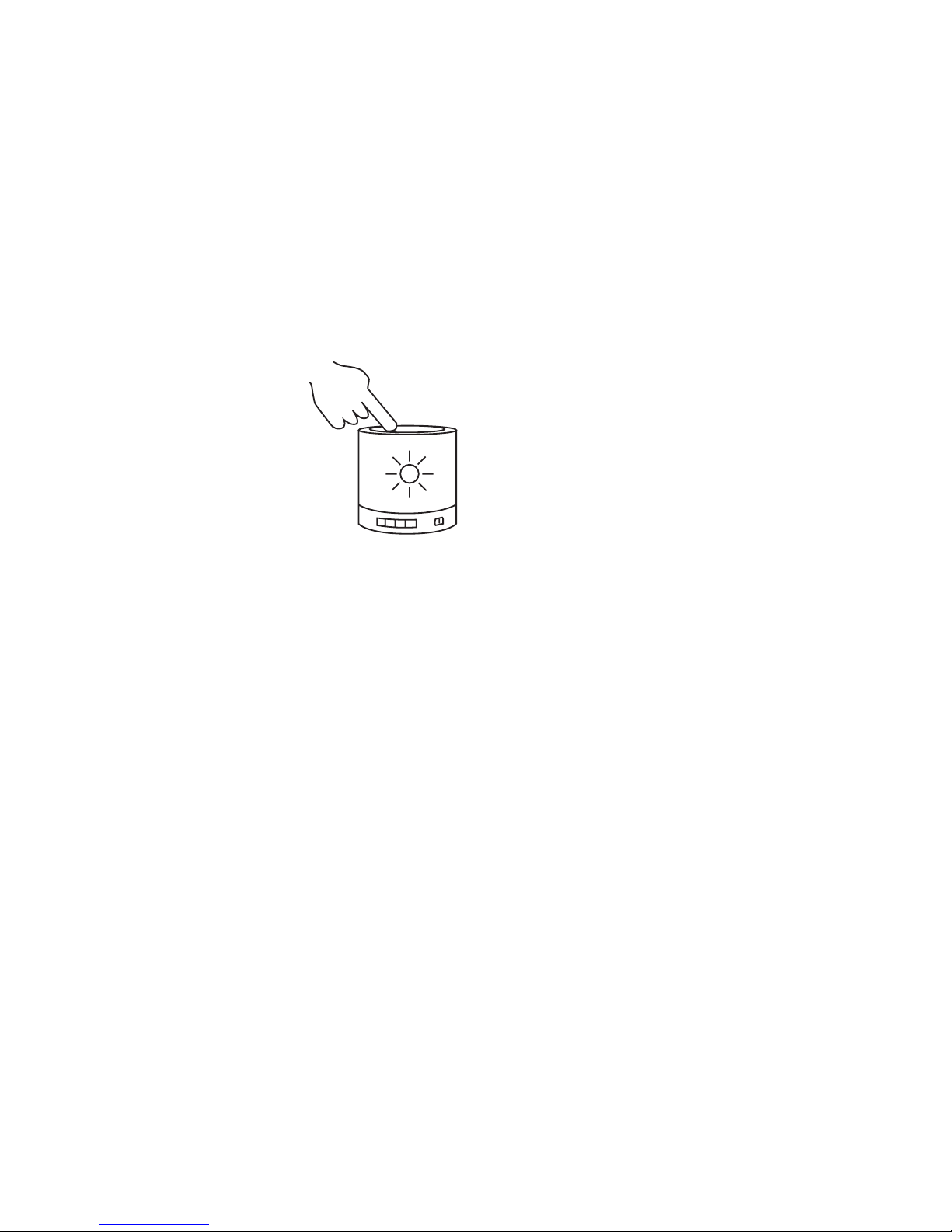
By TAPPING on top of the speaker-grill (2)
you can:
- light up the lamp
- choose its intensity (3 light intensities)
- turn OFF the lamp.
OPERATING THE SPEAKER
BLUETOOTH® MODE PAIRING
- Slide the ON/OFF button (1) to start using the SP100.
You will hear a voice prompt: “Lighting”.
To activate the “Bluetooth®”-mode & pairing, press the
MODE button (3) once. You will hear a voice prompt:
“Bluetooth®-mode has been ON”
- The blue LED is blinking and speaker will start searching
for devices to pair with.
You will hear a voice prompt: “Waiting for pairing”
- Let your phone search for Bluetooth® devices.
Select “DreamLED® SP100” to pair both devices. When 2
devices are paired, you will hear a voice prompt: “Paired”
You can now use your SP100 to listen to your favorite music
wirelessly.
To ensure automatic reconnection between the phone
and the DreamLED® SP100, we recommend setting the
DreamLED SP100 as “Authorized” in the Bluetooth® menu of
your phone! Please refer to the manual of your mobile phone
for more detailed information.
If the Bluetooth® connection is not restored automatically
after disconnection, you can restore the connection manually
by pressing PLAY/PAUSE (8) in Bluetooth® mode OR you can
restore the connection manually in the menu of your mobile
phone.
To control the music (play/pause/next…) you can use:
- Buttons on your smartphone, tablet…
- Buttons on SP100
CONTROLS FOR HANDSFREE CALLING
Press (4) to answer a call from your mobile phone. Press (4)
again to end the call. Long press (4) to reject a call.
AUX-IN MODE
Insert one end of the AUX cable into the AUX input port (9)
You will hear a voice prompt: “Now is AUX-in mode”
Insert the other end of the cable into an external multimedia
device such as mobile phone, MP3 player, tablet, laptop…
! In Bluetooth mode it is NOT possible to play music by AUX-cable.
To activate the AUX-mode while SP100 is in Bluetooth® mode,
press MODE-button once again.
You will hear a voice prompt: “Now is AUX-in mode”
To control the VOLUME or MUTE the music in “AUX-in mode”
you can use:
- Buttons on your smartphone, tablet…
- Buttons on SP100
! NEXT/Previous song should be controlled by smartphone,
tablet or other music source in AUX-in mode.
SD/TF CARD MODE
The DreamLED SP100 supports micro SD/ TF cards with
capacity of 32 GB.
Insert SD/TF card into the corresponding slot at the side of
the unit (10).
The music will start playing automatically.
SAFETY INSTRUCTIONS
Never open the DreamLED® SP100.
Never touch the plug contacts with sharp or metal objects and
handle with care.
Never place the device in the vicinity of heat sources.
Never place the unit on surfaces that are heat sensitive.
Protect the device from special liquids and vapors.
Unplug the unit from charging before cleaning.
Do not use any solvent based cleaning agents, only a soft,
dry anti-static cloth.
Do not attempt repairs yourself.
If the unit is not properly installed or operated DreamLED®
cannot accept liability.
Page 5
-5-
MODE
NL
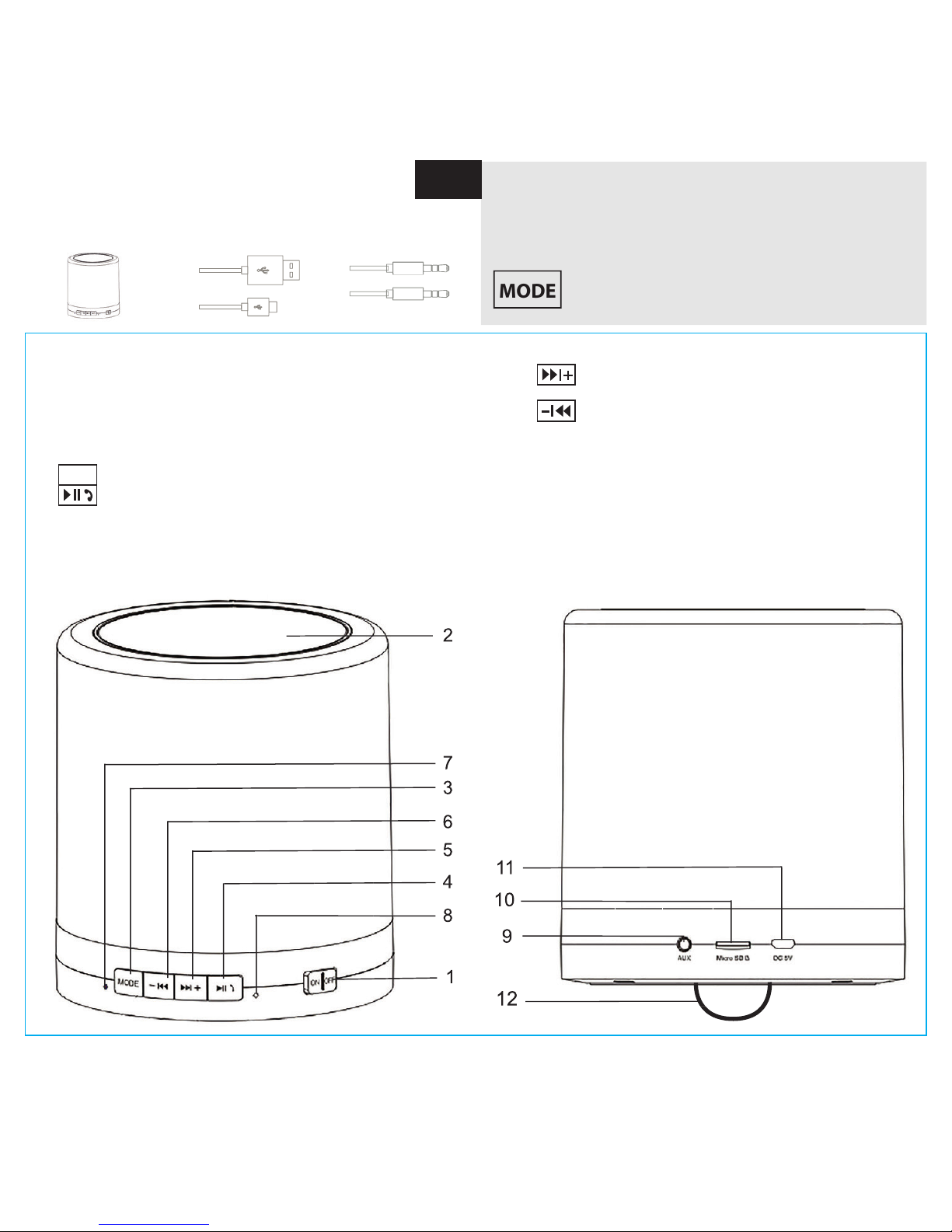
VERPAKKINGSINHOUD
DreamLED® SP 100 Micro USB laadkabel AUX-kabel
PARTS & BUTTONS
1. ON/OFF POWER toets: Verschuif deze toets om het
toestel te gebruiken
2.
LED-TOUCH panel: LED ON/OFF + helderheid aanpassen
3.
MODE
druk kort om de Bluetooth® modus te activeren
4. kort drukken: Play/Pauze muziek
Beantwoord of beëindig een gesprek tijdens het
handenvrij bellen
Lang drukken: Laatst gekozen nummer terugbel
len
Hoe de DreamLED SP100 te gebruiken?
De DreamLED® SP100 is:
- Bluetooth® Speaker met HANDSFREE functie
- Muziekspeler met AUX/TF input
- LED-lamp: verander de lichtsterkte door aanraking
! maak gebruik van de MODE toets (3) om te
wisselen tussen LED-modus, Bluetooth® modus
en AUX-in modus.
5. Kort drukken: Volgend nummer
Lang drukken: Volume omhoog
6. Kort drukken: Vorig nummer
Lang drukken: Volume omlaag
7.
LED indicator: ON/OFF + opladen + Bluetooth® modus
8. Microfoon voor handenvrij bellen
9. AUX-in poort
10. Micro SD/TF kaart sleuf
11. Micro USB laadaansluiting
12. Ophangingshaak
Page 6
-6-
OPLADEN VAN DE BATTERIJ
De SP100 moet voor het eerste gebruik volledig opladen!
- Sluit de micro USB kabel aan op de micro USB
laadaansluiting (11).
- Sluit het andere einde aan op je computer of USB lader.
Wanneer het toestel aan het opladen is, zal de LED-indicator
(7) ROOD oplichten.
Wanneer het toestel volledig opgeladen is, zal de LED-indicator
(7) BLAUW oplichten.
Als de batterij bijna leeg is hoor je de melding “Battery low”.
DE LAMP GEBRUIKEN
Verschuif de ON/OFF toets (1) om de
SP100 te gebruiken.
Je hoort een melding dat de lamp in
de “Lighting”-modus is.
Raak de bovenkant van de speakergrill (2) aan om:
- De lamp op te lichten
- De intensiteit te kiezen (3 tintensiteiten)
- De lamp uit te schakelen
DE SPEAKER GEBRUIKEN
BLUETOOTH MODE PAIRING
- Verschuif de ON/OFF knop (1) om de SP100 te gebruiken.
Je hoort de melding dat het toestel zich in de “Lighting”-
modus bevindt.
- Om de “Bluetooth®”-modus te activeren, druk je eenmaal
op de MODE toets (3). Je hoort de melding “Bluetooth®-
mode has been ON”
- De blauwe LED knippert en de luidspreker zal starten met
zoeken naar toestellen om mee te verbinden. Je hoort de
melding “Waiting for pairing”
- Laat je muziektoestel of smartphone zoeken naar andere
Bluetooth®-toestellen. Selecteer “DreamLED® SP100”
om de verbinding tussen de twee toestellen tot stand te
brengen. Als de twee toestellen verbonden zijn, hoor je de
melding: “Paired”
Je kan nu de SP100 gebruiken om draadloos naar je muziek
te luisteren!
Om te verzekeren dat de automatische verbinding tussen
je smartphone en de DreamLED® SP100 wordt hersteld,
raden we je aan om de SP100 als “Geautoriseerd” op te slaan
in het Bluetooth® menu van je smartphone ! Raadpleeg de
handleiding van je smarpthone voor meer informatie.
Als de Bluetooth®-verbinding
niet automatisch wordt hersteld,
kan je de verbinding manueel herstellen door op PLAY/PAUSE
(8) in de Bluetooth®-modus OF in het menu van je smartphone.
Om de muziek te bedienen (play/pause/volgende…) kan je:
-
De bedieningsknoppen op je smartphone, tablet,…
gebruiken
- De toetsen op de SP100 gebruiken
BEDIENING TIJDENS HANDENVRIJ BELLEN
Druk (4) om een inkomende oproep te beantwoorden. Druk
nogmaals (4) om het gesprek te beëindigen.
Druk langer op (4) om een oproep te weigeren.
AUX-in MODUS
Sluit een uiteinde van de AUX kabel aan op de AUX-in poort (9).
Je hoort de melding “Now is AUX-in mode”
Sluit het andere einde van de AUX kabel aan op een extern
multimedia toestel zoals smartphone, MP3 speler, tablet,
laptop…
! In de “Bluetooth® modus” is het NIET mogelijk om muziek
met de AUX-kabel af te spelen.
Om de AUX-modus te activeren, druk je op de MODE-toets.
Je krijgt dan de melding “Now is AUX-in MODE”
Om het volume te beheren of het geluid uit te schakelen in de
“AUX-in” modus kan je:
- de toetsen op je smartphone, tablet… gebruiken
- de toetsen op de SP100 gebruiken
! NEXT/Previous kan in de AUX-in modus enkel bediend
worden vanop je smartphone, tablet of ander muziektoestel.
SD/TF card MODUS
De DreamLED® SP100 ondersteunt SD/TF kaarten met een
capaciteit tot 32 GB.
Wanneer je SD/TF kaart in de overeenstemmende SD/TF
sleuf (10) steekt, begint de muziek automatisch af te spelen.
VEILIGHEIDSINSTRUCTIES
Raak nooit de stekkercontacten met scherpe en metalen
voorwerpen aan.
Zet het apparaat nooit in de nabijheid van warmtebronnen.
Zet het apparaat nooit op oppervlakken die gevoelig voor
warmte zijn.
Bescherm het apparaat tegen speciale vloeistoffen en wasems.
Gebruik voor het reinigen geen schoonmaakmiddelen
met oplosmiddel, maar uitsluitend een zachte, droge en
antistatische doek. Trek vóór elke reiniging van het apparaat
de stekker uit het stopcontact.
Een reparatie mag enkel door geschoold, geautoriseerd
personeel uitgevoerd worden.
Page 7
-7-
MODE
FR
CONTENU DE L’EMBALLAGE
DreamLED® SP 100 Câble de chargement Câble AUX
Micro USB
ÉQUIPEMENT & TOUCHES
1.
Interrupteur Marche/Arrêt (ON/OFF): Faites glisser
l’interrupteur Marche/Arrêt pour commencer à utiliser le
DreamLED® SP100
2. Panneau tactile LED: LED allumé/éteint (ON/OFF) +
réglage de luminosité
3.
MODE
Appui court – pour active le mode BLUETOOTH®
4. Appui court: Lecture/Pause
Répondre / terminer un appel lors d’une conversation
mains libres
Appui long: recomposer le dernier numéro
COMMENT UTILISER LE DreamLED SP100?
Le DreamLED® SP100 est:
- Lecteur de musique avec entrée AUX / TF
touche MODE (3) vous passez du
mode LED au mode BLUETOOTH® au mode AUX-IN.
5. Appui court: Piste suivante
Appui long : Augmenter le volume
6. Appui court: Piste précédente
Appui long : Diminuer le volume
7. Témoin LED: Marche/Arrêt + chargement + mode
Bluetooth®
8. Microphone pour les appels mains-libres
9. Port d’entrée AUX
10. Fente d’entrée de carte Micro SD / TF
11. Fente de chargement micro USB
12. Crochet de suspension
Page 8
-8-
CHARGER LA BATTERIE
! Le SP100 doit être entièrement chargée avant la première
utilisation !
- Branchez le câble micro USB dans la prise de recharge
micro USB (11).
- Branchez l’autre extrémité du câble USB dans votre
ordinateur ou chargeur USB.
Pendant la charge, le témoin LED (7) s’allume en ROUGE.
Quand la batterie est complètement chargée, le témoin LED (7)
passe au BLEU.
Lorsque la capacité de la batterie est faible, vous entendrez le
message “Battery low”
FONCTIONNEMENT DE LA LAMPE
Glissez l’interrupteur Marche/Arrêt (1)
pour pouvoir utiliser le SP100. Un
message vocal indique que vous êtes
dans le mode « Lumière ».
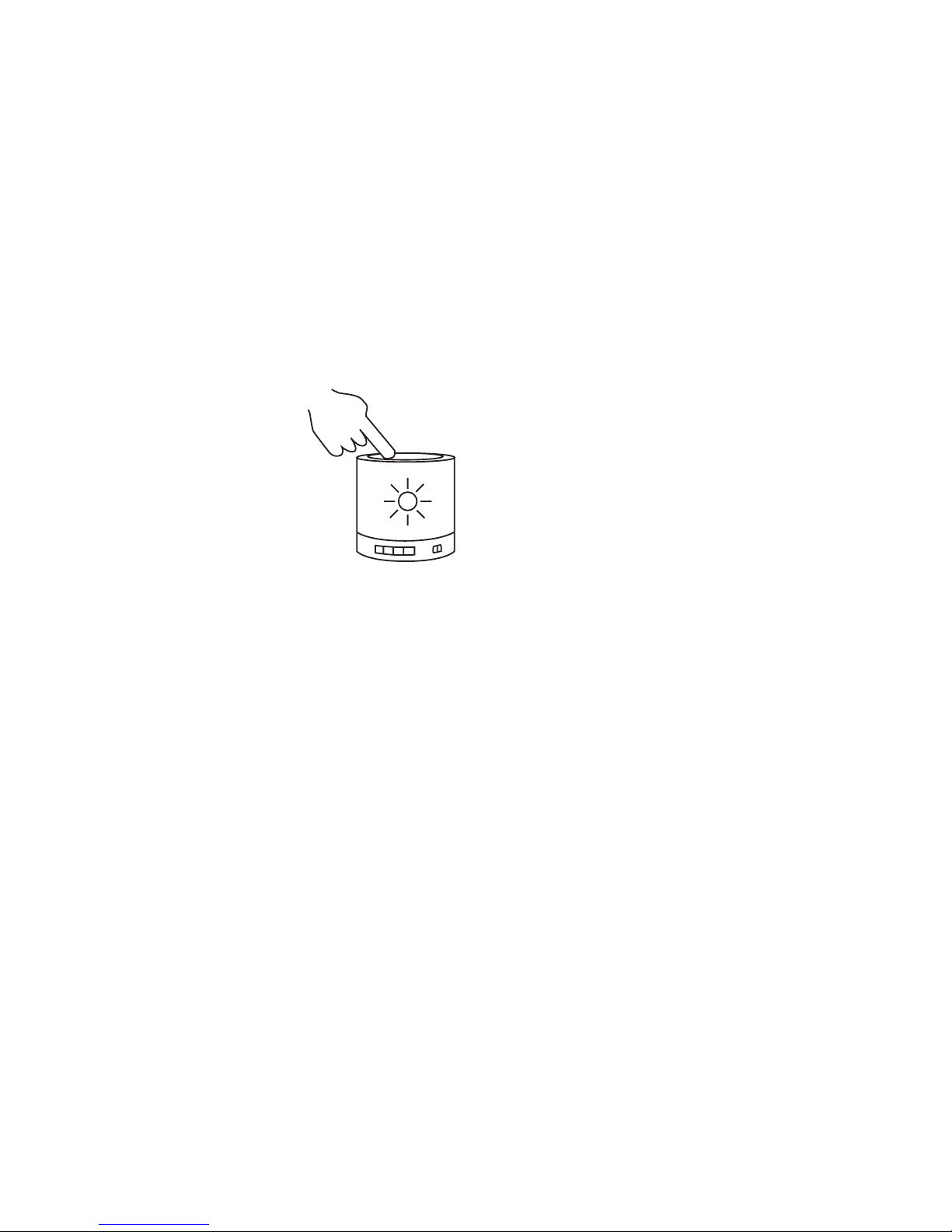
En tapant sur le dessus de la grille de
l’enceinte (2), vous pouvez:
- Allumer la lampe
- Choisir son intensité (3 niveaux)
- Éteindre la lampe.
FONCTIONNEMENT DE L’ENCEINTE
MODE BLUETOOTH ASSOCIATION (PAIRING)
- Glissez l’interrupteur Marche/Arrêt (1) pour pouvoir utiliser
le SP100. Vous entendrez un message vocal: “Lighting” .
- Pour activer le mode “Bluetooth® & l’association, appuyez
une seule fois sur la touche MODE (3). Vous entendrez un
message vocal: “Bluetooth®-mode has been ON”.
- La LED bleue clignote et le haut-parleur commencera à
chercher des appareils pour établir une connexion. Vous
entendrez un message vocal: “Waiting for pairing”.
- Lancez la recherche d’appareils Bluetooth® sur votre
téléphone mobile. Sélectionnez “DreamLED® SP100” pour
associer les 2 appareils. Après l’association, vous entendrez
un message vocal: “Paired”.
Vous pouvez maintenant utiliser votre SP100 pour écouter votre
musique préférée sans l.
An d’assurer la connexion automatique entre le téléphone et
le DreamLED SP100, nous vous conseillons de dénir comme
«Autorisé» la connexion avec le DreamLED SP100 dans le menu
Bluetooth® de votre téléphone mobile! Consultez le manuel de
votre téléphone mobile pour des informations supplémentaires.
Si la connexion Bluetooth® n’est pas rétablie automatiquement
après déconnexion, vous pouvez rétablir la connexion
manuellement en appuyant sur PLAY/PAUSE (8) en mode
Bluetooth® OU vous pouvez rétablir la connexion manuellement
dans le menu de votre téléphone mobile.
Pour contrôler la musique (lecture, pause, piste suivante ...),
vous pouvez utiliser:
- les touches de votre smartphone, tablette ...
- les touches du SP100
CONTRÔLE DES APPELS MAINS-LIBRES
Appuyez sur (4) pour répondre à un appel à partir de votre
téléphone mobile. Appuyez sur (4) pour terminer l’appel.
Appuyez et maintenez enfoncé (4) pour refuser l’appel.
MODE AUX-IN
Insérez une extrémité du câble AUX dans le port d’entrée AUX (9).
Vous entendrez un message vocal: “Now is AUX-in mode”.
Insérez l’autre extrémité du câble dans un dispositif multimédia
externe tel qu’un téléphone mobile, lecteur MP3, tablette,
ordinateur portable ...
! Il est n’est PAS possible de jouer de la musique avec câble
AUX en mode Bluetooth®.
Pour active le mode AUX lorsque le SP100 se trouve en mode
Bluetooth®, il faut appuyer encore une fois sur la touche MODE.
Vous entendrez un message vocal: “Now is AUX-in mode”.
Pour régler le volume ou couper le son en mode “AUX-in” vous
pouvez utiliser:
- les touches de votre smartphone, tablette ...
- les touches du SP100
! En mode AUX-in, les contrôles piste suivante/précédente
doivent être réglés par le smartphone, tablette ou autre source
de musique.
MODE CARTE SD/TF
Le DreamLED SP100 prend en charge les cartes SD/TF avec
une capacité de 32 GB. Insérez une carte SD / TF dans la
fente correspondante sur le côté de l’unité (10). La musique
commence à jouer automatiquement.
INSTRUCTIONS DE SÉCURITÉ
N’ouvrez jamais le DreamLED SP100.
Ne touchez pas les contacts à che avec des objets pointus ou
métalliques et manipulez l’appareil avec précaution.
Ne placez jamais l’appareil à proximité de sources de chaleur.
Ne placez jamais l’appareil sur des surfaces qui sont sensibles
à la chaleur.
Protégez l’appareil contre les liquides et les vapeurs.
Débranchez l’appareil avant de le nettoyer.
N’utilisez pas de produits de nettoyage à base de solvant,
seulement un chiffon antistatique sec et doux.
N’essayez pas de réparer l’appareil vous-même.
Si l’appareil n’est pas correctement installé ou utilisé, DreamLED®
n’accepte aucune responsabilité.
Page 9
-9-
PACKUNGSINHALT
DreamLED® SP100 Micro-USB-Ladekabel AUX-Kabel
MODE
D
WIE DIE DREAMLED SP100 ZU BENUTZEN?
Die DreamLED® SP100 ist:
- Bluetooth®-Lautsprecher mit Freisprechfunktion
- Musik-Player mit AUX / TF-Eingang
- LED-Licht: Ändert die Helligkeit durch BERÜHRUNG
! Mit die MODE Taste (3) können Sie wechseln
zwischen LED-Modus, BLUETOOTH®-Modus
und AUX- Modus.
TEILE UND TASTEN
1. EIN/AUS-Schalter: Schieben Sie den Schalter um die
DreamLED® SP100 zu benützen
2. LED-TOUCH-Panel: LED EIN/AUS + Helligkeitseinstellung
3.
MODE
Kurz-drücken um das Bluetooth®-Modus zu aktivieren
4. Kurz drücken: Wiedergabe / Pause
Anruf beantworten/beenden während des
Freisprechen
Lang drücken: Wahlwiederholung
5. Kurz drücken: Nächstes Lied
Lang drücken: Lautstärke erhöhen
6. Kurz drücken: Vorheriges Lied
Lang drücken: Lautstärke verringern
7. LED-Anzeige: EIN/AUS + Auaden + Bluetooth®-Modus
8. Mikrofon für Freisprechen
9. AUX-IN-Port
10. Mikro-SD / TF-Karteneingabeschlitz
11. Mikro-USB-Ladeschacht
12. Abhängehaken
Page 10
-10-
LADEN DES AKKUS
! Die SP100 muss vor dem ersten Gebrauch vollständig aufgeladen werden!
- Stecken Sie den Micro-USB-Kabel in den Ladebuchse (11).
- Stecken Sie das andere Ende des USB-Kabels in den
Computer oder USB-Ladegerät.
Wenn das Produkt aufgeladen wird, ist die LED-Anzeige (7)
ROT. Wenn der Akku vollständig aufgeladen ist, wird die LEDAnzeige (7) BLAU leuchten.
Wenn die Batterie schwach ist, hören Sie die Meldung „Battery Low“
BETRIEB DER LAMPE
Schieben Sie den EIN/AUS-Taste (1) um
die SP100 zu verwenden.
Die Sprachanweisungen führen an, dass Sie in der
Beleuchtung“ -Modus sind.
Durch Tippen auf der Oberseite der
Lautsprecher-Grill (2) können Sie:
- die Lampe anschalten
- die Intensität wählen (3 ichtintensitäten)
- die Lampe ausschalten
BETRIEB DER LAUTSPRECHER
BLUETOOTH®-MODUS PAIRING (KOPPLUNG)
- Schieben Sie den EIN/AUS-Taste (1) um die SP100 zu
verwenden. Sie hören die Sprachanweisung „Lighting“
(Beleuchtung).
- Drücken Sie die MODE-Taste (3) einmal um die
„Bluetooth®“ -Modus & Kooplung zu aktivieren. Sie hören
die Sprachanweisung „Bluetooth®-mode has been ON“
(Bluetooth®-Modus aktiviert).
- Die blaue LED blinkt und der Lautsprecher wird die Suche
nach Geräten starten. Sie hören die Sprachanweisung
„Waiting for pairing“ (Warten auf Kopplung).
- Lassen Sie Ihr Mobiltelefon nach Bluetooth®-Geräten suchen.
Wählen Sie SP100 , um beide Geräte zu koppeln. Wenn
zwei Geräte gekoppelt sind, hören Sie die Sprachanweisung
„Paired“.
Sie können jetzt Ihre SP100 benutzen, um Ihre Lieblingsmusik
drahtlos zu hören.
Um die automatische Wiederverbindung zwischen dem
Telefon und dem SP100 zu gewährleisten, empfehlen wir die
SP100 als „Authorized“ im Bluetooth®-Menü des Telefons
einzustellen! Bitte lesen Sie die Bedienungsanleitung Ihres
Mobiltelefons für detailliertere Informationen.
Wenn der Bluetooth®-Verbindung nicht automatisch wieder
hergestellt wird nach Trennung der Verbindung, können
Sie die Verbindung manuell wiederherzustellen durch
Drücken PLAY/PAUSE (8) im Bluetooth®-Modus, ODER Sie
können die Verbindung manuell im Menü Ihres Mobiltelefons
wiederherzustellen.
Zur Steuerung der Musik (Play, Pause, nächster Titel, ...) können
Sie verwenden:
• Tasten auf Ihrem Smartphone, Tablet ...
• Tasten auf SP100
FREISPRECHEN
Drücken Sie (4), um einen Anruf von Ihrem Mobiltelefon zu
beantworten. Drücken (4) erneut, um den Anruf zu beenden.
Drücken Sie lang (4), um einen Anruf abzuweisen.
AUX-MODUS
Stecken Sie ein Ende des AUX-Kabel in die AUX-Eingangsanschluss (9). Sie hören die Sprachanweisung „Now is AUX-in
mode“ (AUX-Modus aktiviert).
Stecken Sie das andere Ende des Kabels in eine externe
Multimedia-Gerät wie ein Handy, MP3-Player, Tablet, Laptop...
! In „Bluetooth®-Modus“ ist es nicht möglich Musik mit einem
AUX-Kabel zu spielen. Um den AUX-Modus zu aktivieren,
während SP100 in Bluetooth®- modus ist, drücken Sie erneut
die MODE-Taste (3). Sie hören die Sprachanweisung „Now is
AUX-in mode“ (AUX-Modus aktiviert).
In AUX-Modus können Sie die Lautstärke ändern oder die Musik
pausieren mit:
• Tasten auf Ihrem Smartphone, Tablet ...
• Tasten auf SP100
! Nächster / vorheriger Song sollte von Smartphone, Tablet oder
andere Musikquelle gesteuert werden in AUX- Modus.
SD/TF-KARTEN-MODUS
Die DreamLED SP100 unterstützt SD/TF-Karten mit einer
Kapazität von 32GB. Legen Sie eine SD/TF-Karte in den
entsprechenden Steckplatz auf der Seite des Gerätes (10).
Die Musik beginnt automatisch zu spielen.
SICHERHEITSHINWEISE
Öffnen Sie niemals das DREAMLED SP100.
Berühren Sie niemals die Steckkontakte mit spitzen oder
metallischen Gegenständen und handhaben mit Vorsicht.
Stellen Sie das Gerät niemals in der Nähe von Wärmequellen.
Stellen Sie das Gerät niemals auf Oberächen, die Hitzeempndlich sind. Schützen Sie das Gerät von speziellen
Flüssigkeiten und Dämpfen. Trennen Sie das Gerät vor dem
Reinigen von der Versorgungsspannung.
Verwenden Sie keine lösemittelhaltigen Reinigungsmittel, nur
ein weiches, trockenes Antistatiktuch.
Versuchen Sie nicht, das Gerät selbst zu reparieren.
Bei nicht bestimmungsgemäßem Gebrauch ist eine Haftung
durch DreamLED® ausgeschlossen.
Page 11

-11-
D - KUNDENDIENST
Für weitere Informationen, technische Fragen oder
Rücksendungen zu diesem Produkt wenden Sie sich bitte an:
GARANTIE
Copyright © DreamLED®. DreamLED® ist ein eingetragenes
Markenzeichen der TE-Group NV. Die DreamLED®Marke steht für überragende Qualität und hervorragenden
Kundenservice. Aus diesem Grund gibt DreamLED® auf
dieses Produkt eine Garantie von zwei (2) Jahren auf alle
Material- und Verarbeitungsfehler ab Originalkaufdatum des
Produktes. Die Bedingungen dieser Garantie und der Verantwortlichkeitsumfang von DreamLED in dieser Garantie
können Sie nden auf www.dream-led.eu.
GB - CUSTOMER SUPPORT
For more information, technical questions and return requests
concerning this product, you should contact:
[email protected].
GUARANTEE
Copyright © DreamLED®. DreamLED® is a registered
trademark of TE-Group NV. The DreamLED® brand stands
for superior product quality and outstanding customer service.
That is why DreamLED® warrants this product against all
defects in material and workmanship for a period of two (2)
years from the date of original purchase of the product. The
terms of this guarantee and the extent of responsibility of
DreamLED under this warranty can be downloaded from the
website: www.dream-led.eu.
NL - KLANTENONDERSTEUNING
Voor meer informatie, technische vragen of retouraanvragen
met betrekking tot dit product dient u rechtstreeks contact op
te nemen met [email protected] [email protected].
GARANTIE
Copyright © DreamLED®. DreamLED® is een gedeponeerd
handelsmerk van TE-Group NV. Het merk DreamLED® staat
voor producten van superieure kwaliteit en een uitstekende
klantenservice. Daarom garandeert DreamLED® dat dit
product vrij is van materiaal- en fabricagefouten gedurende
een periode van twee (2) jaar na de oorspronkelijke
aankoopdatum van het product. De voorwaarden van deze
garantie en de omvang van de verantwoordelijkheid van
DreamLED® onder deze garantie kunt u downloaden vanaf de
website: www.dream-led.eu.
FR - SUPPORT
Pour plus d’informations, des questions techniques ou des
demandes de retour concernant ce produit, il faut contacter:
GARANTIE
DreamLED® est une marque déposée de TE-Group NV. La
marque de DreamLED® est synonyme de produits de qualité
supérieure et d’un service après-vente excellent. C’est la
raison pour laquelle DreamLED® garantit ce produit contre
tout défaut de matériel ou de fabrication pour une période
de deux (2) ans à compter de la date d’achat initiale. Les
conditions de cette garantie et l’étendue de la responsabilité
de DreamLED® en vertu de cette garantie sont disponibles
chez www.dream-led.eu.
Page 12

-12-
 Loading...