

Page 1
EXPORTER GUIDE
Draganfly Exporter
User Guide
Version 1.2
Page 2

Operator Notice
The responsibility to operate in a safe manner, prevent injury to persons or damage to
property, and to take no unnecessary risks falls upon the owner and those whom the
owner authorizes to pilot and operate the Draganflyer helicopter.
Furthermore the onus is upon each owner/authorizer/pilot to comply with all regulations
pertinent to the use of the Draganflyer helicopter and associated components at the
location of operation with regards to the use of airspace as well as radio
communications.
Draganfly Innovations Inc. does not accept any responsibility for damages or financial
compensations which may arise as the result of an owner/authorizer/pilot failing to
comply with any regulations which would lead to a claim against the user.
Page 1
Page 3

Warning
The Draganflyer helicopter is a precision machine that is vulnerable to misuse and can
prove to be dangerous if not properly maintained or used in an inappropriate manor.
Helicopters by their nature are not positively stable. Although the Draganflyer can
maintain an attitude and a position relative to wind movement without constant control
input; operators should always be aware of its position and be able to take immediate
control of the helicopter to recover from an unwanted position and avoid any mishaps.
Please completely read and understand all Draganflyer helicopter instructional
information before attempting to fly the Draganflyer aircraft.
To provide optimum performance, a Lithium Polymer battery powers your Draganflyer
helicopter and controllers. The same properties that make these batteries extremely
powerful and lightweight also make them dangerous if handled incorrectly. Please read
and understand all information pertaining to the battery before attempting to use or
charge it.
IF MISUSED THIS AIRCRAFT IS CAPABLE OF CAUSING SERIOUS BODILY HARM
TO THE OPERATOR AND SPECTATORS AS WELL AS PROPERTY DAMAGE. ANY
DAMAGE OR INJURY OCCURRING DUE TO MISUSE OF THIS PRODUCT IS
SOLELY THE OPERATOR’S RESPONSIBILITY.
Page 2
Special notice:
Throughout this manual, look for and pay special attention to these information
boxes for tips, tricks, safety information, or serious warnings and risks,
associated with this product.
Page 4

DO NOT PLACE YOUR HANDS OR ARMS IN CLOSE PROXIMITY TO THE ROTORS
OR ATTEMPT TO STOP SPINNING ROTORS WITH YOUR HANDS AS SERIOUS
INJURY COULD RESULT FROM CONTACT.
THIS PRODUCT CONTAINS CHEMICALS WHICH ARE KNOWN BY THE STATE OF
CALIFORNIA TO CAUSE CANCER, BIRTH DEFECTS AND/OR OTHER
REPRODUCTIVE HARM.
Many common materials such as metals, plastics, glues, lubricants and other coatings
contain chemicals in varying amount and concentrations which will cause harm if
introduced into the human body. For further information on toxic or dangerous
chemicals please refer to California’s Health and Safety Codes Sections 25249.5-13
Page 3
Special notice:
We are always shocked, and you might also find it hard to believe, that
upon getting their new helicopter system many people want to take it apart
to see how it works.
Often to their dismay, all they learn is the helicopter and controller are as
beautiful on the inside as they are on the outside but more times than not,
they mix-up the motors or break something so our advice is please, just
enjoy the helicopter, the amazing DBS, and let your imagination soar with
this incredible aerial tool.
- Understand there is no need to lubricate the motors and often people
that don’t listen to us and do it anyway, end up damaging them.
- Please also understand that each motor is coded to a specific position on
the aircraft so don’t get the wild idea to move a motor from the back up to
the front. If you are experiencing a problem with the aircraft please just call
our support line at 1-800-979-9794 or drop us an e-mail to
support@draganfly.com.
Page 5

Safety Precautions
As the pilot in command you are responsible for the safety of yourself and others
whether it be in the immediate takeoff and landing area, or the general flight path area.
Please take safety very seriously.
• Always wear protective eyewear.
• Do not use batteries other than those specifically designed for the Draganflyer
aircraft; doing so may cause erratic flight performance and void warranty.
• Do not fly the Draganflyer aircraft in excessive winds.
• Do not fly the aircraft system in rain.
• Do not fly near people on the ground or objects in the air.
• Do not fly near pets or other animals.
• Do not fly near high-tension lines, electrical substations, high structures or
communication facilities.
• Be careful where you place the controller and aircraft during flight
preparations, be sure that they will not be dropped or suffer a fall as this may
cause serious damage.
• Never fly this aircraft where damage to property or injury to persons may
result if loss of control occurs.
• Never leave the Draganflyer aircraft unattended with the battery connected.
Make it a habit to always disconnect the battery when not flying.
• When possible fly with a spotter or observer
Page 4
Page 6
Draganfly Exporter
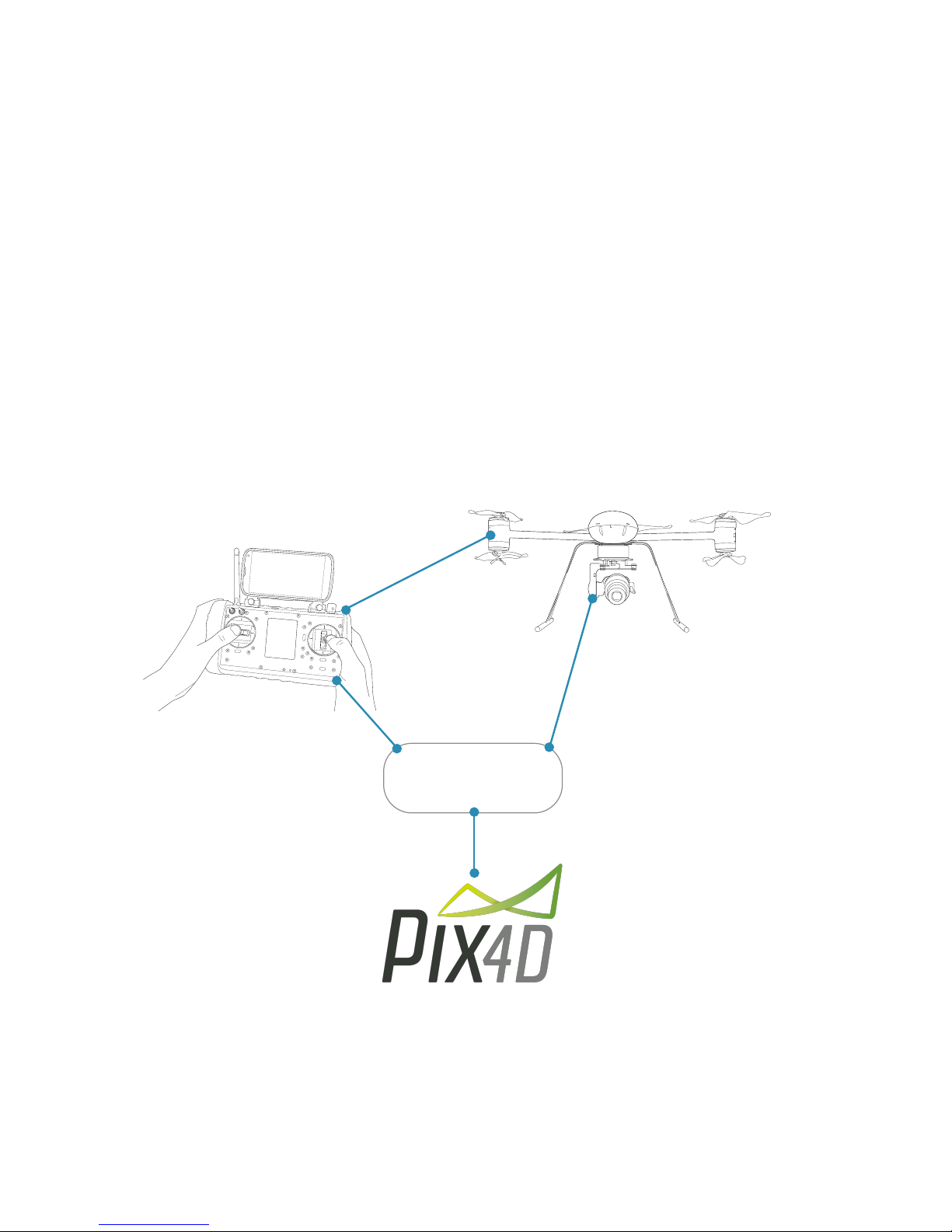
When it comes to mapping or building an aerial 3D scale model it’s good to include the
GPS position of each photograph. At Draganfly we’re always looking for the best
cameras to provide high resolution photography but they don’t always include GPS
capability so we developed the Exporter Utility. With the Exporter utility, you can easily
merge photos taken with helicopter GPS flight log data and shutter clicks.
The resulting Exporter output file is formatted to work with Pix4D mapper and after
merging the data, Exporter will automatically launch Pix4D, load the project photo list,
and from there you determine the project type and start processing.
Overview diagram:
Page 5
Exporter
Flight log: flight data log
used to import shutter
click and aircraft GPS
information
Project photos: after a flight
copy photos to your system
for processing and Pix4D
processing using exporter
Merges data: exporter
merges shutter click, GPS
position, and photos, to
automatically launch your
Pix4D project
Page 7

Contents
Chapter 1: Installation
Short, simple, and to the point ... this chapter will review
hardware requirements and step you through the installation
process.
Chapter 2: Your first project
This chapter will run you through a typical scenario from
flying, data preprocessing, to launching a Pix4D project.
Chapter 3: But I don’t use Pix4D
We understand there are other 3D modeling and mapping
software packages on the market and not everyone will be
using Pix4D. This chapter will discuss the location and
layout of the Exporter output .CSV file.
Page 6
Page 8

Chapter 1
Page 7
Page 9
Exporter setup
Exporter is intended to be run on an Intel Windows system typically installed on the
same computer running Pix4D. Often people will have Pix4D installed on a tablet or PC
used in the field to “Rapid Check” the project and also installed on a larger more
powerful system back at the office or home.
Installation
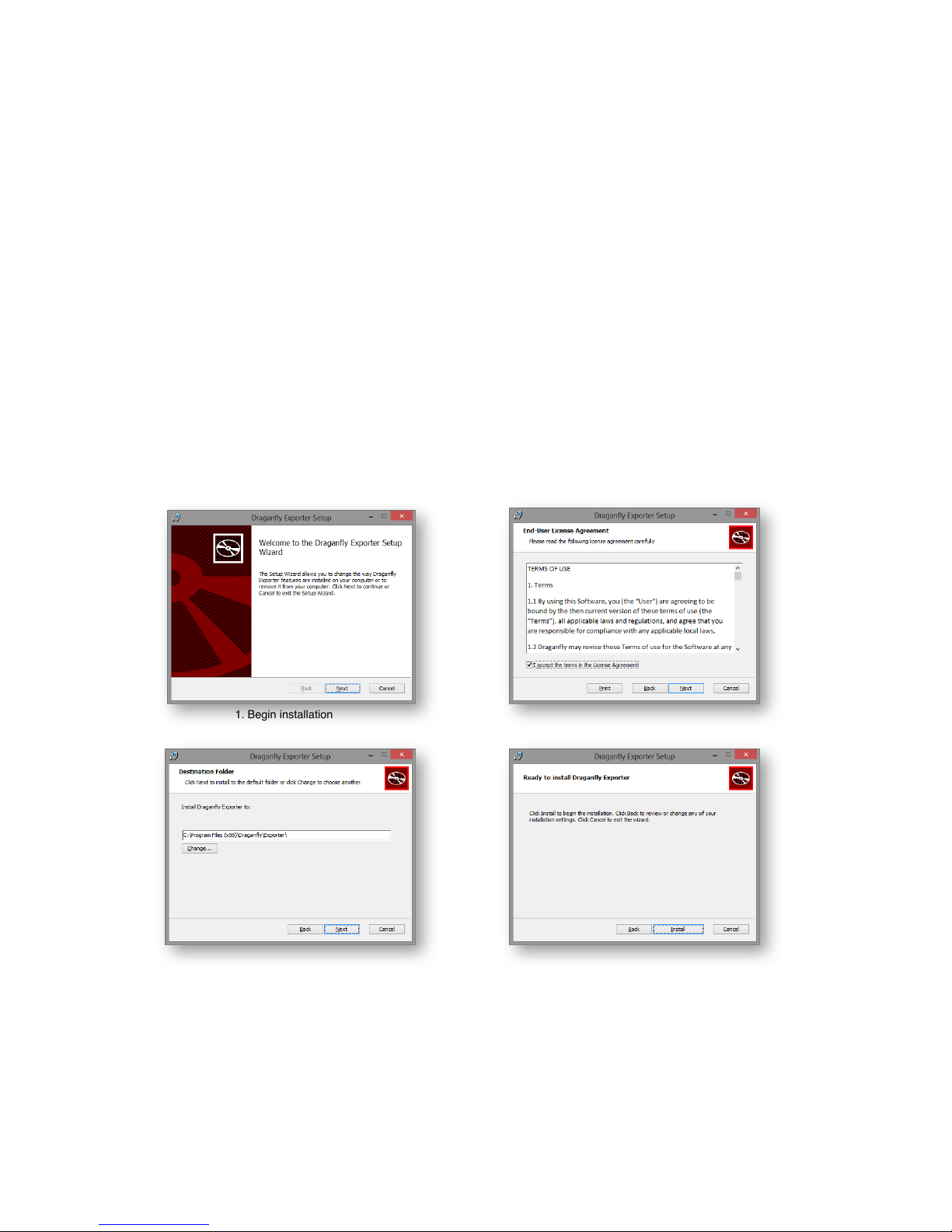
The Exporter windows installer follows the standard windows installation process.
Simply launch the installer and follow the instructions. If you have a special directory or
location where you want the program installed, now is the time to do it.
Page 8
1. Begin installation
2. Read and agree with license terms
3. Confirm installation path
4. Select install to load program
Page 10
Installation - continued
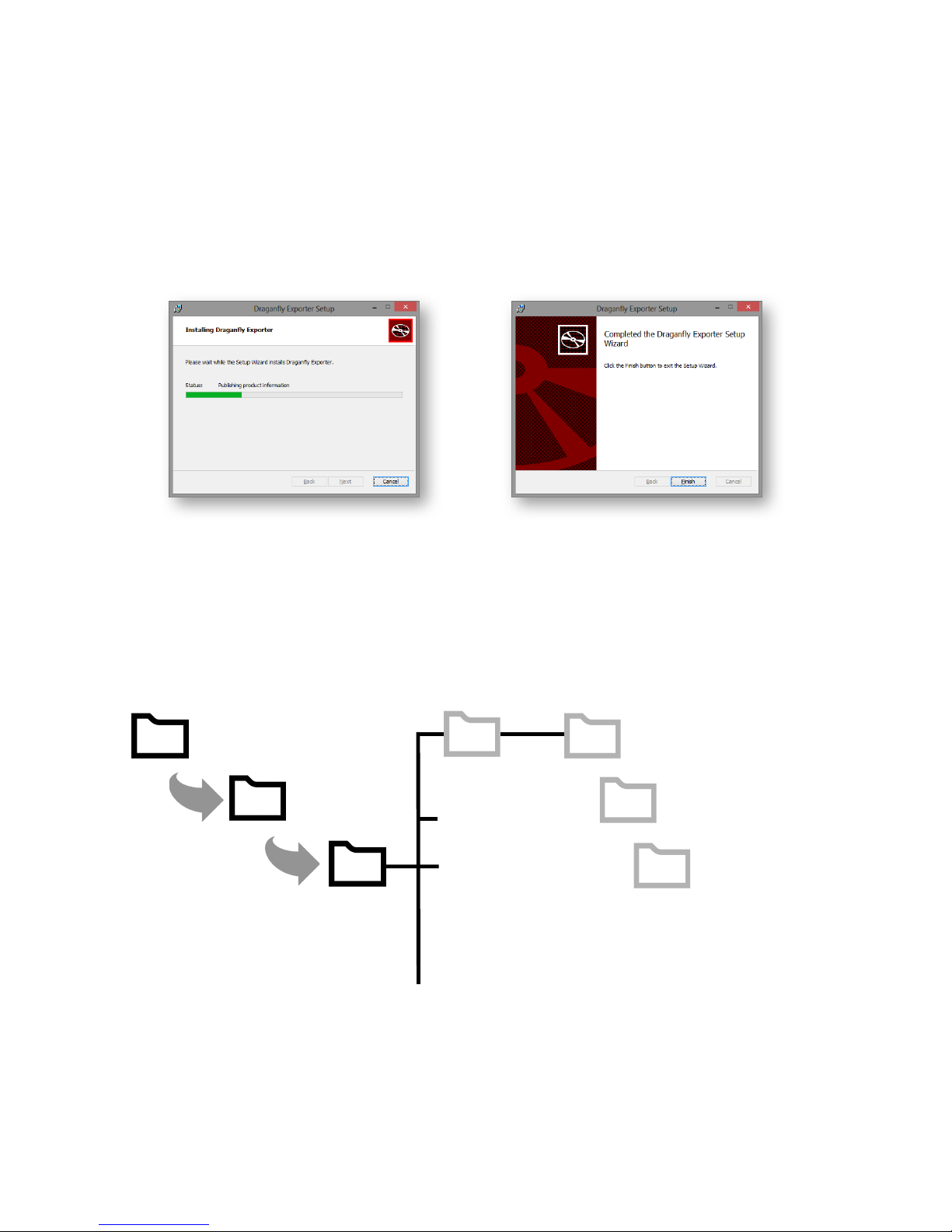
Exporter is now installed and ready for use. It’s a good idea to understand the directory
structure and where Exporter will put your projects as they are built and completed.
Below illustrates the file structure for a project called “my-project”.
Page 9
5. Illustrates installation progress 6. Select finish to complete installation
Documents
Draganfly
my-project
my-project.p4d
my-project.csv
Flights
Contains Pix4D quality
report and log files
3_dsm_ortho
2_densification
1_Initial
Contains Pix4D DSM
and Ortho imagery as
well as extra files
generated like triangle
models in the extras
folder
Contains Pix4D point
cloud files
CSV file created by
Exporter with image
file name and GPS
position information for
each photo shot during
flight.
Page 11

Chapter 2
Page 10
Page 12

Your first project
To get a feel for how everything works it’s suggested to fly and process a small project.
It’s assumed Pix4D and the Draganfly Exporter applications have been installed on your
computer.
Develop some good habits
Before heading out on a project it’s a good idea to format your camera memory card so
when it’s time to copy photos to your computer, you’re only copying photos from the
days project and not also photos from last month. Exporter is smart enough to know the
difference but why waste the disk space and waste time trying to figure out what photos
belong to your current project.
Before take off it’s always a good idea to shoot a photo, listen for the shutter click, and
make sure everything is working. When you take your ground shot either photo a dry
erase white board with the name of the project or more commonly, take a photo of one
foot at the start of a flight, and two feet at the end of the flight. It’s a good fast and easy
way to separate batches of photos flown during the same day.
Example project
Let’s assume you flew a grid pattern, camera pointed straight down, with the required
Pix4D image overlap and a second flight in a different area. After the flights you’ll need
to copy both the aircraft flight logs from the handheld controller, and the project camera
photos from both flights to your computer.
For example:
- create a directory called “pix4d-datasets”. This folder will contain multiple project
photo and flight data log folders.
- in pix4d-datasets, create a directory called “my-project-logs” and copy the log files.
- in pix4d-datasets, create a directory called “my-project-photos” and copy the photos.
Page 11
Page 13
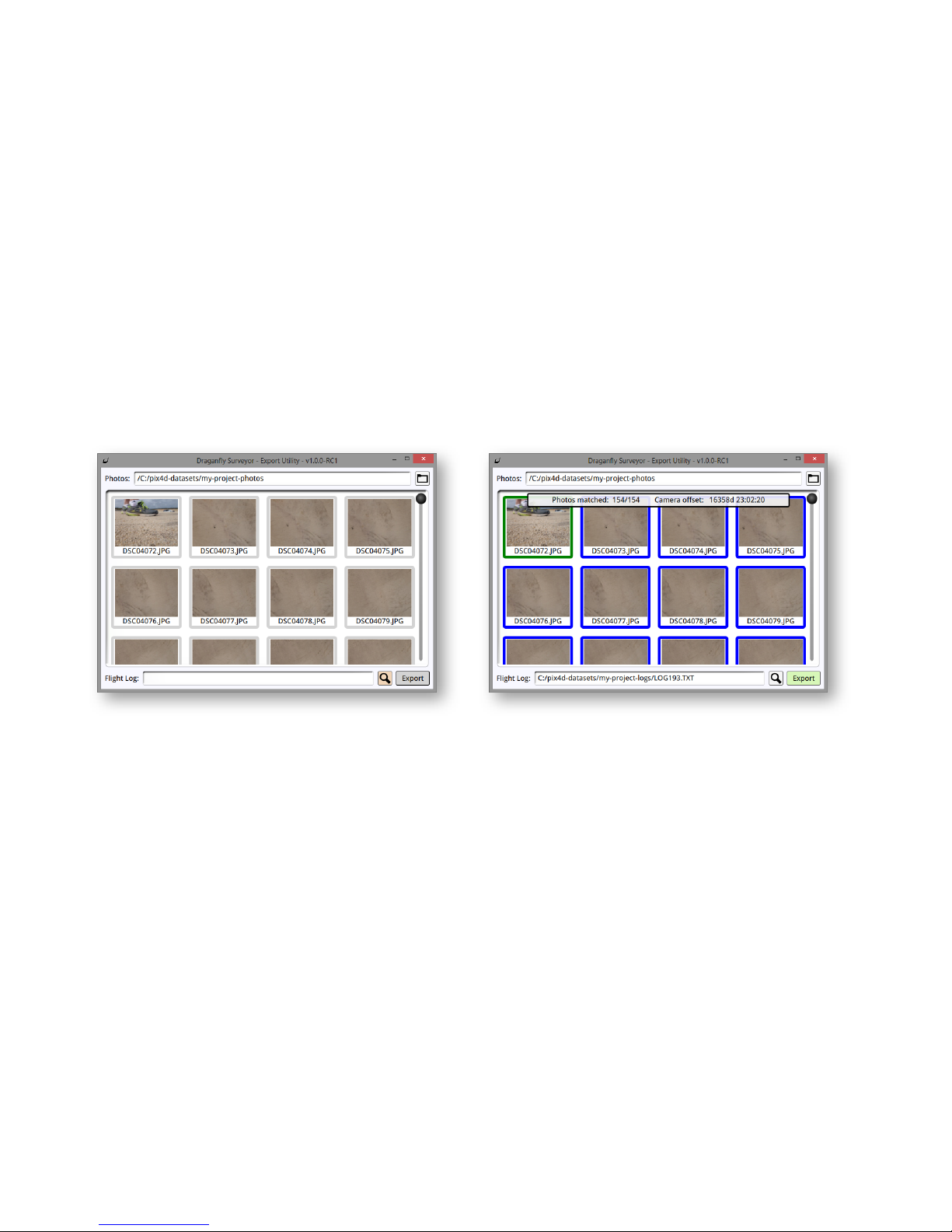
Launch Exporter
The Exporter application is intuitive and easy to use. As illustrated below provide
exporter with a path to the file folder containing the project photos, and then use the
search icon, to locate the project log file. Once the log file loads, it will highlight the first
photograph taken and photos from the flight.
The first photo was a ground test shot and not to worry, Exporter is smart enough to
know what photos were taken on the ground, and disables them from the Pix4D image
import list.
In summary, select the path to the project photos, select the flight log file for the project
and hit “Export” to name the project and launch Pix4D or optionally, click and hold the
“Export” button to auto-name the project and launch Pix4D.
Page 12
Use the file folder icon to locate the project
image directory. In our example, itʼs called
“my-project-photos” and contains images from
two flights flown that day.
Use the search icon to locate and select the
correct log file. Two flights were flown at this
location and the first project weʼre going to
run is log193.
Select “Export” to name the project, build
the export file and launch Pix4D.
In a hurry, and you would like Exporter to
“auto-name” your project based on the log
file number, click and hold the “Export”
button.
Page 14
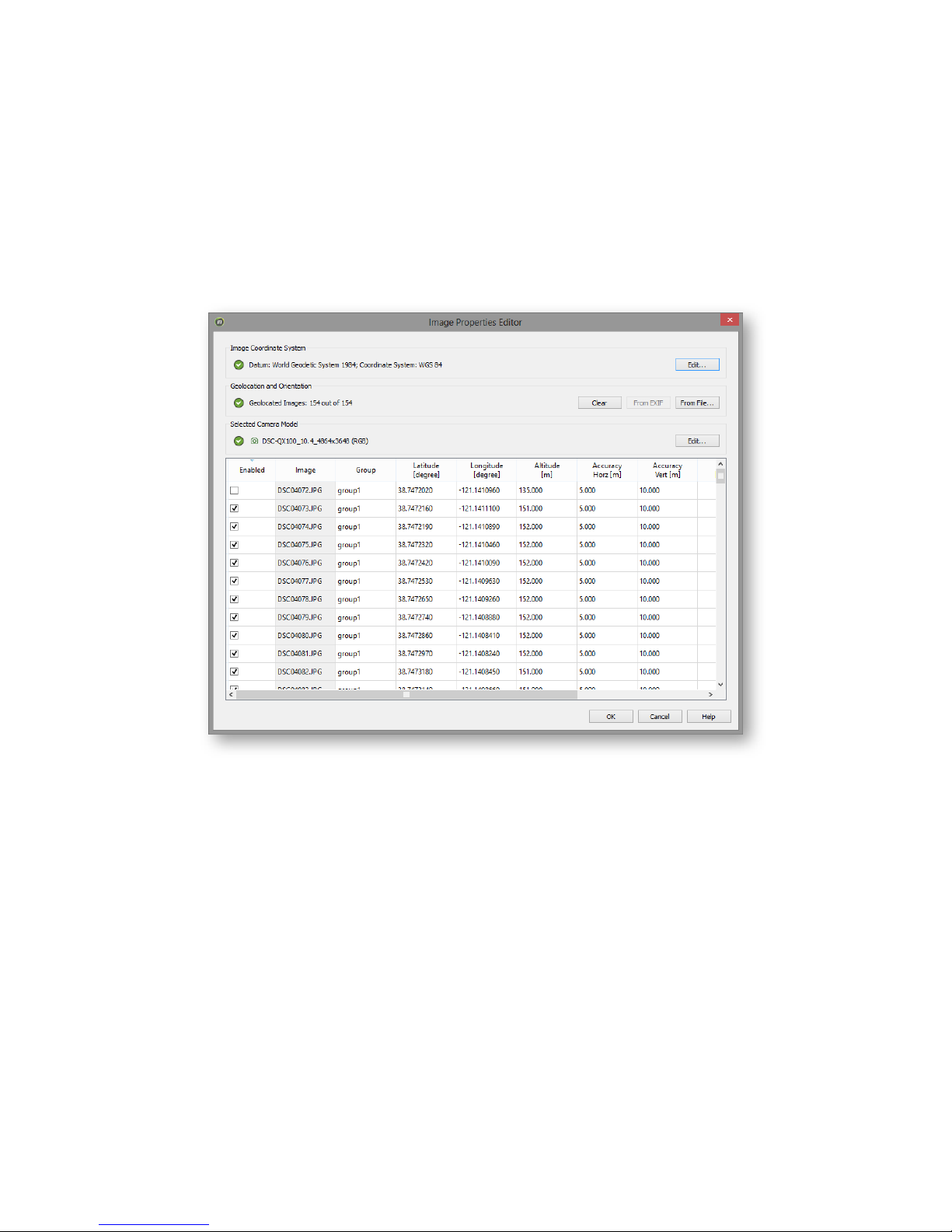
When Pix4D launches, open the Image Properties Editor to insure Pix4D selected the
correct camera type from the photo EXIF data, and as you can see in our example,
Exporter disabled the first photo, a ground shot, from being processed.
Continue using Pix4D as you normally would and enjoy the amazing results this software
has to offer for both interactive 3D modeling and 2D Orthomosaic imagery.
Page 13
Page 15

Chapter 3
Page 14
Page 16
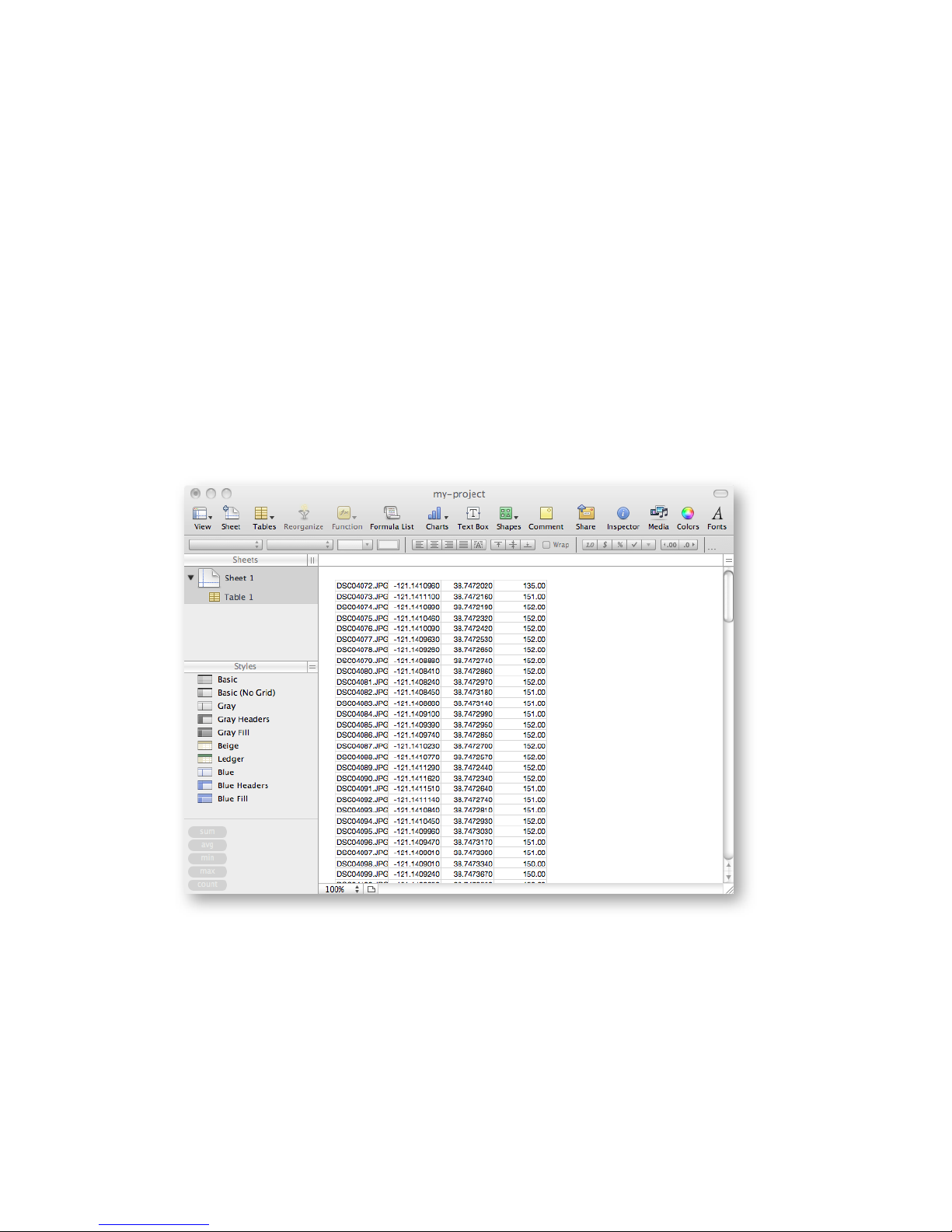
But I don’t use Pix4D
We understand there are other applications besides Pix4D for 3D aerial scanning and
mapping; and that’s okay, because Exporter will produce a .CSV file formatted with the
photo file name, longitude, latitude and GPS altitude.
As illustrated on page number 9 of this document, the .CSV file is located in the
documents, draganfly, flights, path location. Every program is a little different so if
needed, feel free to modify the data layout to work with your mapping and modeling
application.
Page 15
Example project .CSV file layout
Page 17
Contact Information
Page 16
This product and manual are copyrighted by Draganfly Innovations Inc. with all rights
reserved. No part of this product or start-up guide shall be reproduced in any form
without the prior written consent or authorization of Draganfly Innovations Inc. No patent
liability is assumed with respect to the use of the product or information contained herein.
Document Revision Level: v1.2
Draganfly Innovations Inc.
Sales information:
Phone: 1-800-979-9794
International: 1-306-955-9907
Online: www.draganfly.com
e-mail: sales@draganfly.com
https://www.draganfly.com
Product support:
Phone: 1-800-979-9794
International: 1-306-955-9907
e-mail: support@draganfly.com
Mailing address:
Draganfly Innovations Inc.
2108 St. George Avenue
Saskatoon, SK S7M0K7
Canada
 Loading...