

Page 1
7"DUAL SCREEN
PORTABLE DVD PLAYER
USER’S MANUAL
RoHS
COMPLIANT
DHD705
Page 2
Page 3
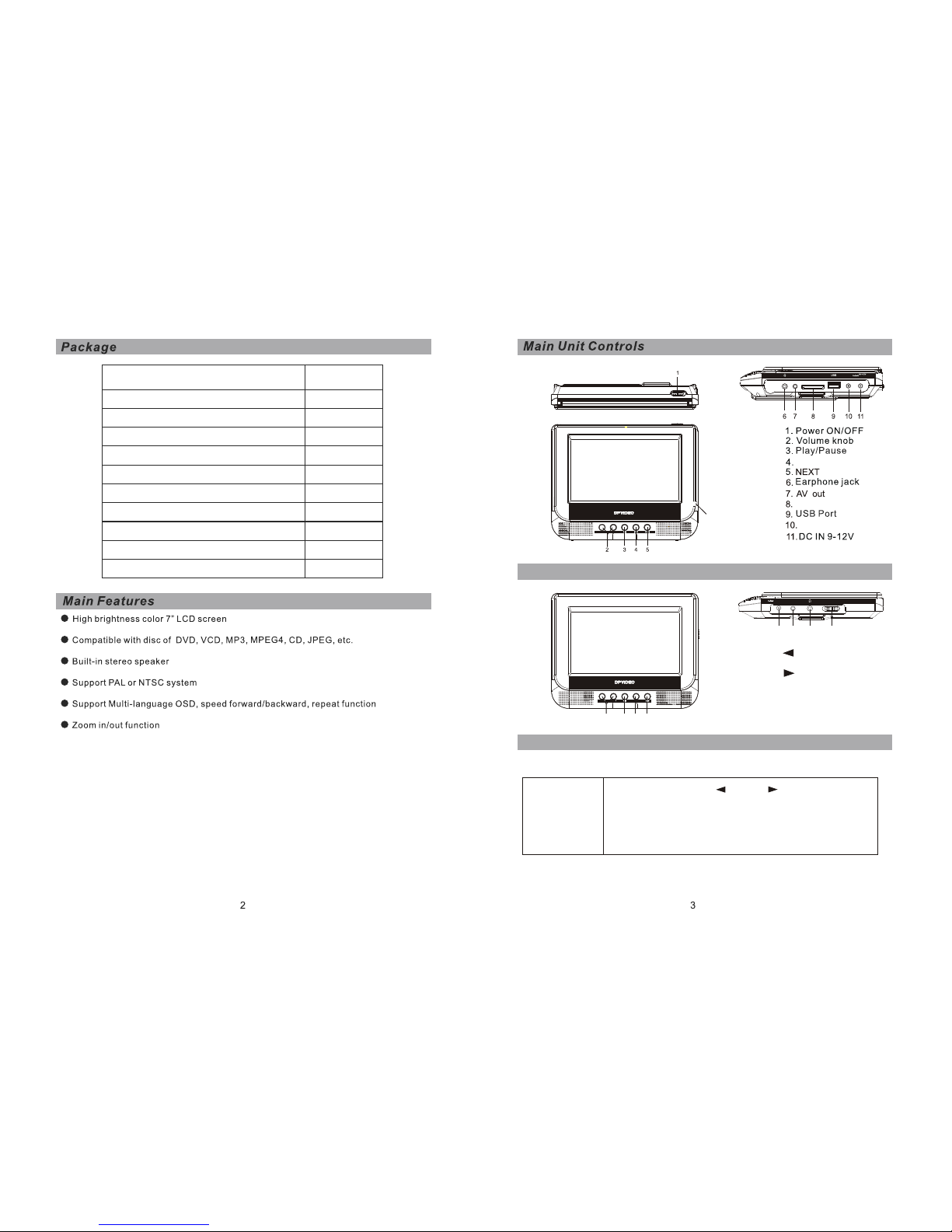
7"Portable DVD Player
Earphones
Headrest Mounting Kit
Remote Control
AV Connecting Cable
Car Adaptor
AV Cable (OUT)
User Manual
1
1
2
1
1
1
2
1
POWER ON/OFF
SD/MMC/MS
AV OUT
DC OUT
DC IN
PREV
SD/MMC/MS card
12.PULL TO OPEN
DC OUT
Monitor View
VOL - VOL +
12
MENU
VOL VOL
1 2
3
4
DC IN
AV IN
POWER OFF/ON
5
6
7
8
1.Volume knob
2.
3.MENU
4.
5.DC IN
6.AV IN
8.POWER OFF/ON
7.EARPHONE JACK
DC Connecting Cable
1
1
7"Portable Monitor Player
1
AC Adapter
Monitor menu setup
then you could use right ” ” and left ” ” direction button to
change the data on every item. meanwhile you Could use
the VOL+ To move down to choose the item which you want .
Press Vol-to move up to choose the items . there are four
items ( Bright, contrast ,color,”language”English. )
Bright, contrast ,color: all these items the default is 50
Bright 50
contrast 50
color 50
English
Press "Menu" on the panel . there will show out as below :
DHD705
DHD705
Page 4
SD/MMC/MS card
or MS card, insert it into the corresponding slot flatly with the label
side front ward until you hear a click.
SD/MMC/MS
AV OUT
DC OUT
DC IN
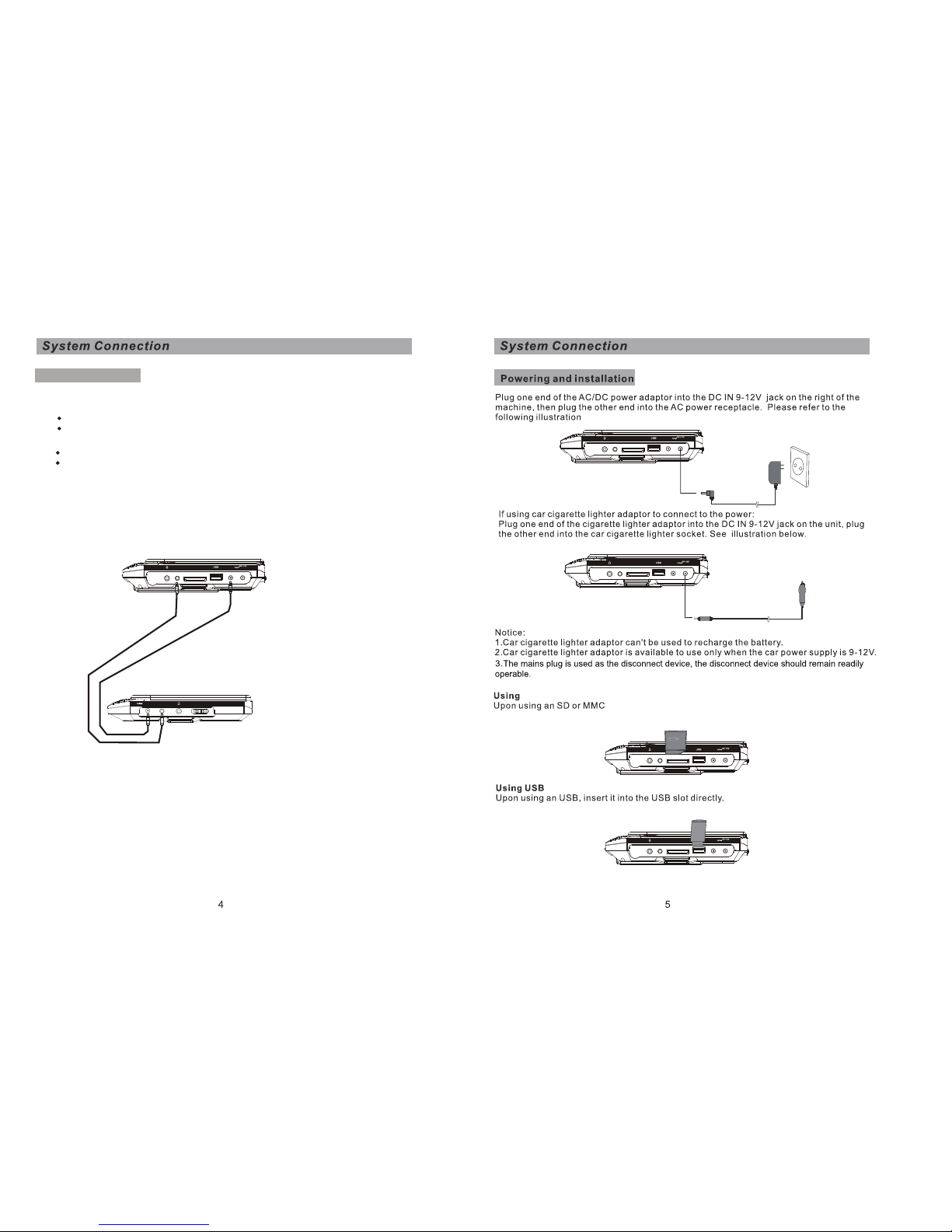
AV Connecting
Caution: turn off your player before you connect a unit
1.Connect the supplied AV connecting cable to:
the AV out jack on A unit.
the AV IN jack on B unit.
AV Connecting Cable
B unit
A unit
DC IN
AV IN
POWER OFF/ON
DC Connecting Cable
2.Connect the supplied DC connecting cable to:
the DC out jack on A unit.
the DC IN jack on B unit.
Please refer to the illustration below.
Note: You're advised to supply both units the power by the cigarette lighter
adapter only. The AC/DC adapter is used to supply power of one unit only
and as the charger to charge the main unit if it's with built-in battery.
SD/MMC/MS
AV OUT
DC OUT
DC IN
SD/MMC/MS
AV OUT
DC OUT
DC IN
SD/MMC/MS
AV OUT
DC OUT
DC IN
SD/MMC/MS
AV OUT
DC OUT
DC IN
Page 5
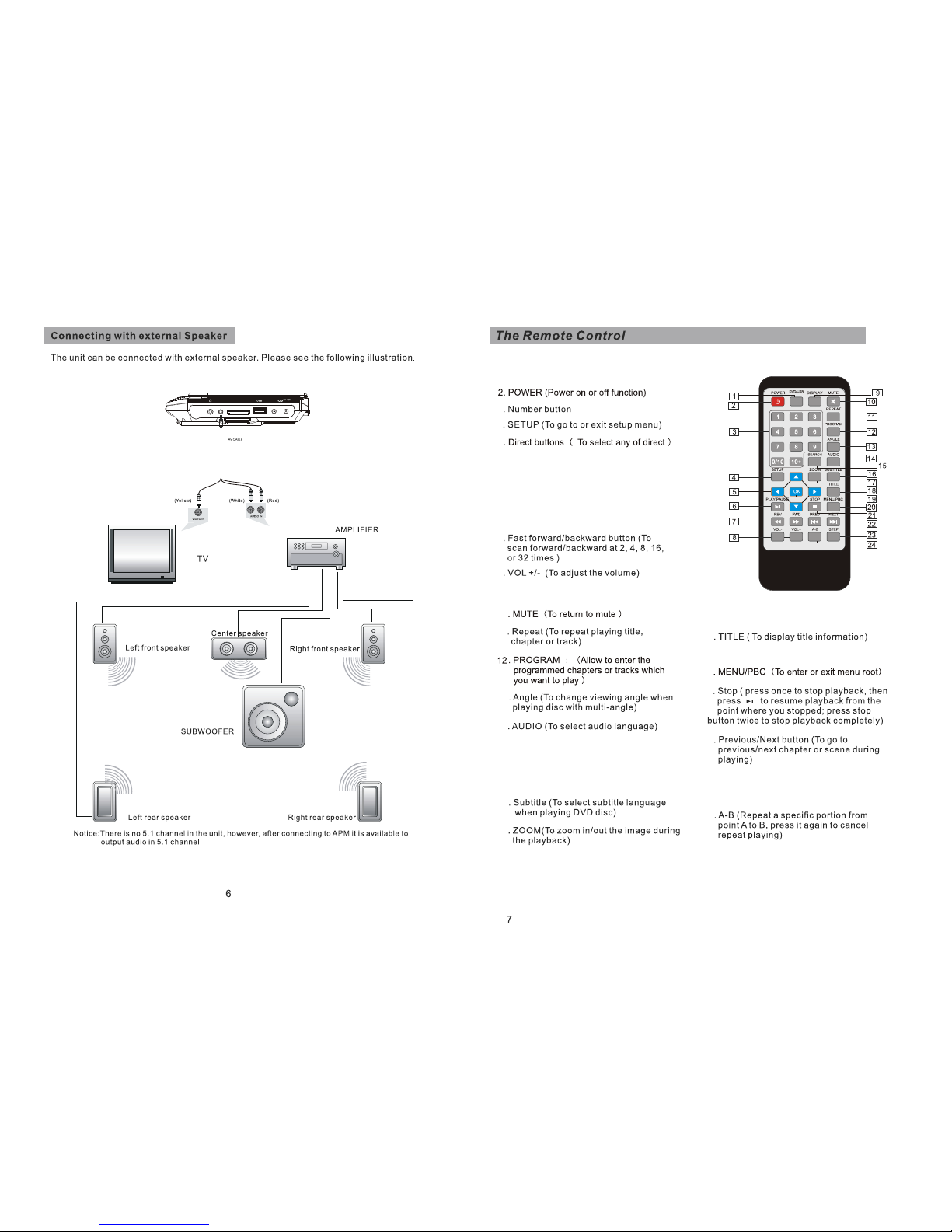
6.PLAY/PAUSE(play the playback,during the
state of stop,pause,slow motion ,fast forward or
fast reverse Etc. press Play button to return to
the normal playback ;while the player is the
playback mode , press Pause , the playback
will be paused. the picture will be still, Press
Again return to the normal playback . )
23.STEP (when playing DVD,SVCD,VCD Disc,
Press step once , the picture will be played to
next frame .)
15.Search (When you press Search
Button , the screen will be shown
which time you want . after you type
the time , the frame will be go to the
what you choose .
9. Display (Display kinds of information
on the screen)
1.DVD/USB/CARD (To select one in the three
kinds of source.)
3
4
5
7
8
10
11
13
14
16
17
18
19.OK (To confirm)
20
21
22
24
SD/MMC/MS
AV OUT
DC OUT
DC IN
/CARD
Page 6
/CARD
/CARD
DVIX
DVIX
/CARD
Page 7
/CARD
/CARD
Page 8
/CARD
/CARD
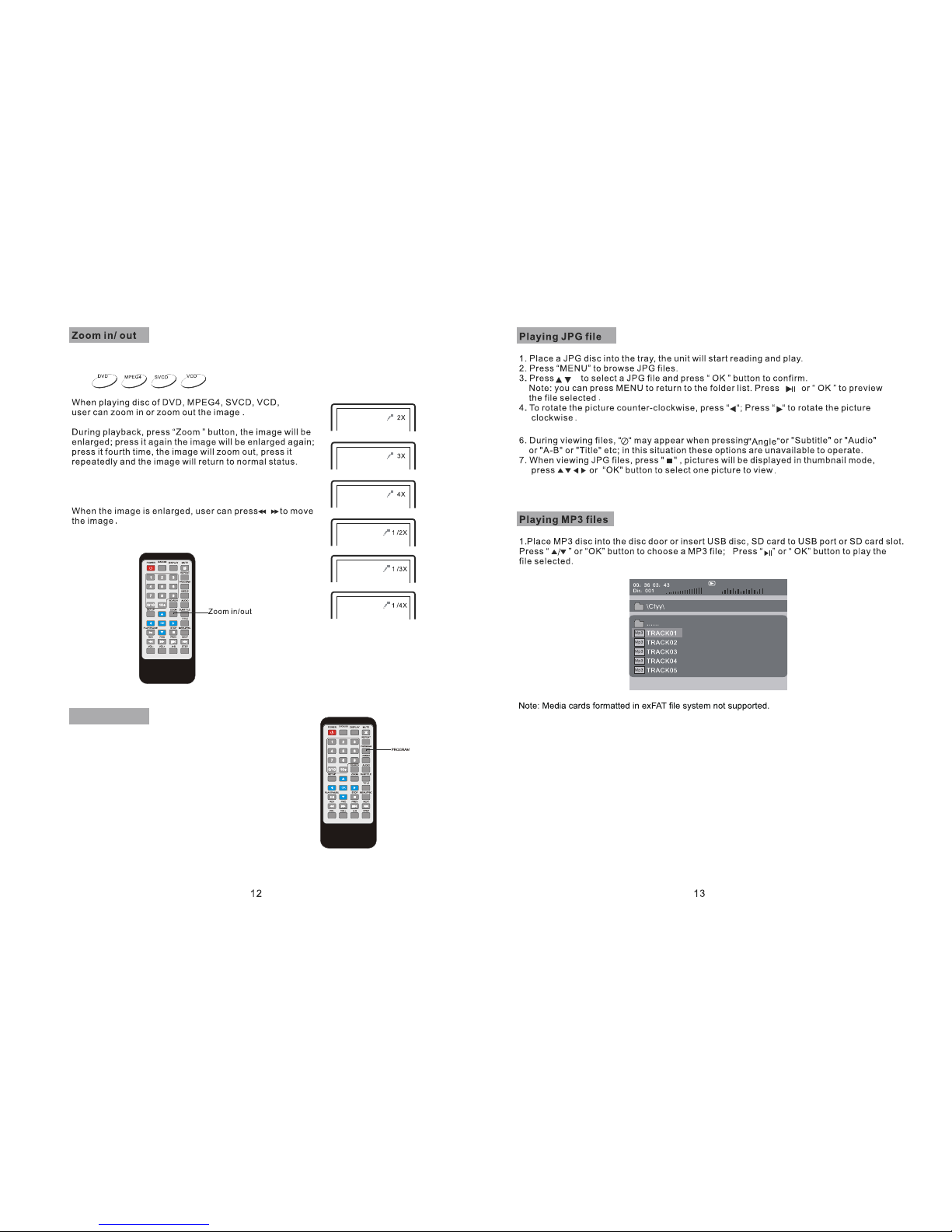
5.You can press PROGRAM repeatly to select the slide show mode,the are 16 types slide show.
PROGRAM
DVD/VCD/CD: The program function enables you to
store your favourite tracks from the disc.press PROGRAM
button,then PROGRAM MENU will appear on screen,now
you can use the number key to direct input the titles,
chapters or tracks number and select START option.TO
resume normal playback,press PROGRAM and select
STOP option on the program menu.
Page 9
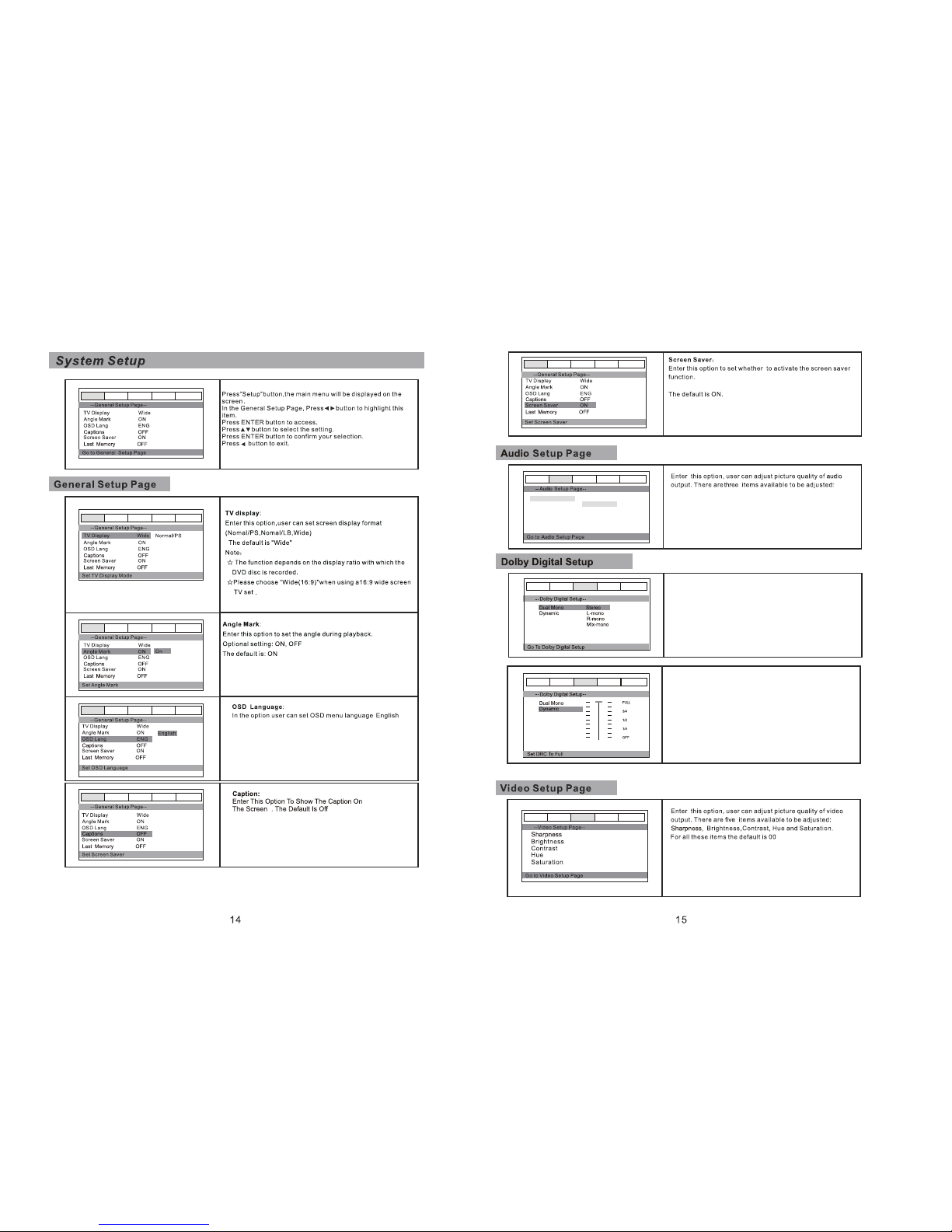
Dynamic:This function is generally used when playing high
volume programs at night,in order to minmize disturbances.
This setting can dynamically lower the volume and still keep
the original tone puality.This is the range,measured in
decibels(db),between the loudest and the quietest sound
registers in a soundtrack.
DUAL MONO: if your amplifier/decoder has Dolby
Digital output,you may select stereo,left mono,right
mono,or mixed mono mode fot your amplifier
decoder.
General Audio Dolby Video Preference
General Audio Dolby Video Preference
General Audio Dolby Video Preference
General Audio Dolby Video Preference
General Audio Dolby Video Preference
General Audio Dolby Video Preference
General Audio Dolby Video Preference
Downmix str
Lt/Rt
Stereo
General Audio Dolby Video Preference
General Audio Dolby Video Preference
Lt/Rt,Srereo
General Audio Dolby Video Preference
Page 10
6
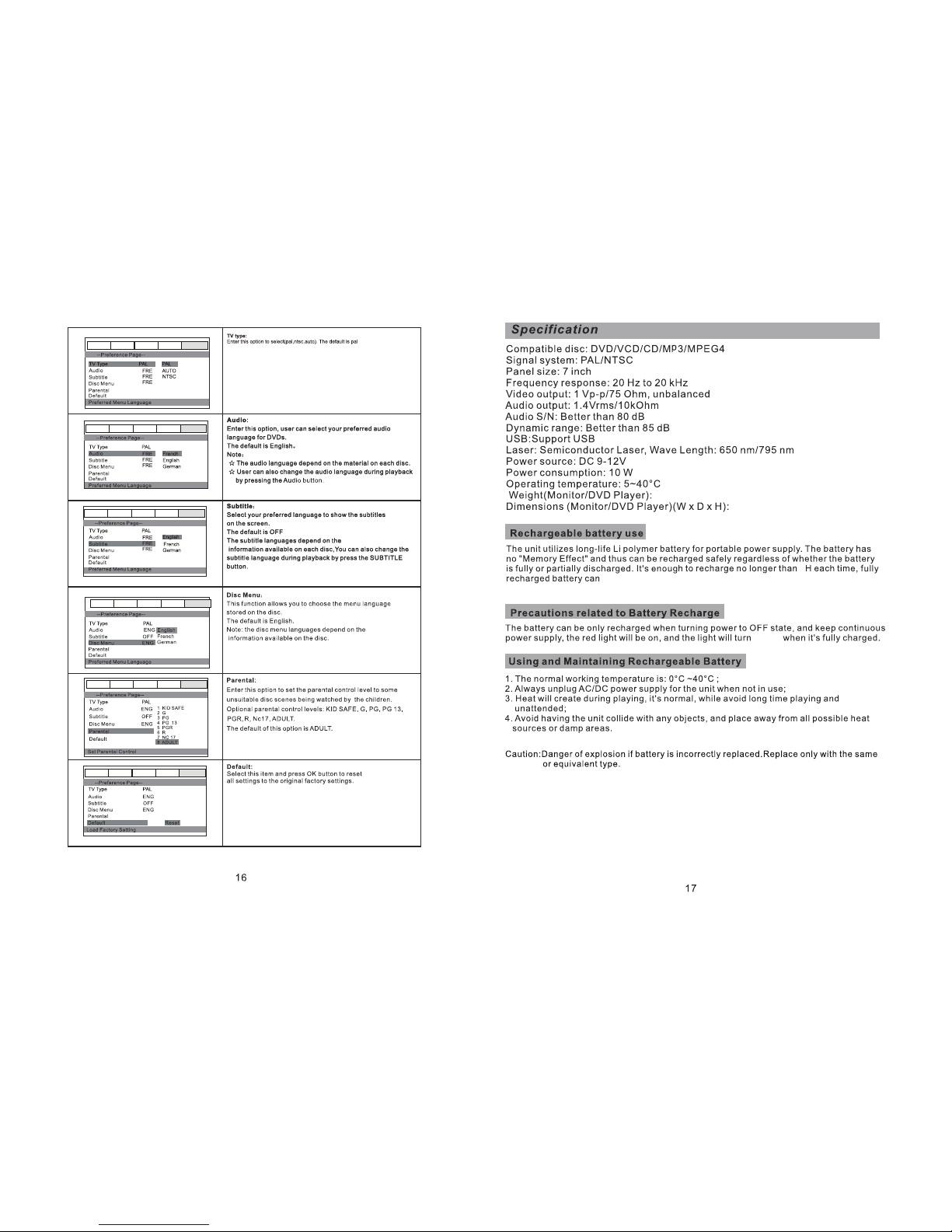
last about 2.5 hours,2.5hr based on powering only the primary unit.
210x165x30/210x165x40mm
0.35/0.67kg
2.0
Note: If you change this set,you must input
password.(initial password:0000)
green
General Audio Dolby Video Preference
General Audio Dolby Video Preference
General Audio Dolby Video Preference
General Audio Dolby Video Preference
General Audio Dolby Video Preference
General Audio Dolby Video Preference
Portuguese
Spanish
Portuguese
Spanish
Portuguese
Spanish
Page 11
Note on environmental protection:
After the implementation of the European Directive 2002/96/EU in the national legal system,
the following applies: Electrical and electronic devices may not be disposed of with domestic
waste .l consumers are obliged by law to return electrical and electronic devices at the end of
their service lives to the public collecting points set up for this purpose or point of sale. details
tO this are defined by the national law of the respective country. this symbol on this product .
the instruction manual or the package indicates that a product is subject to these regulations .
by recycling . reusing the materials or other forms of utilizing old devices . you are making an
important contribution to protecting our environment .
 Loading...