

Page 1
Page 2
BLUETOOTH
DP Video
please read
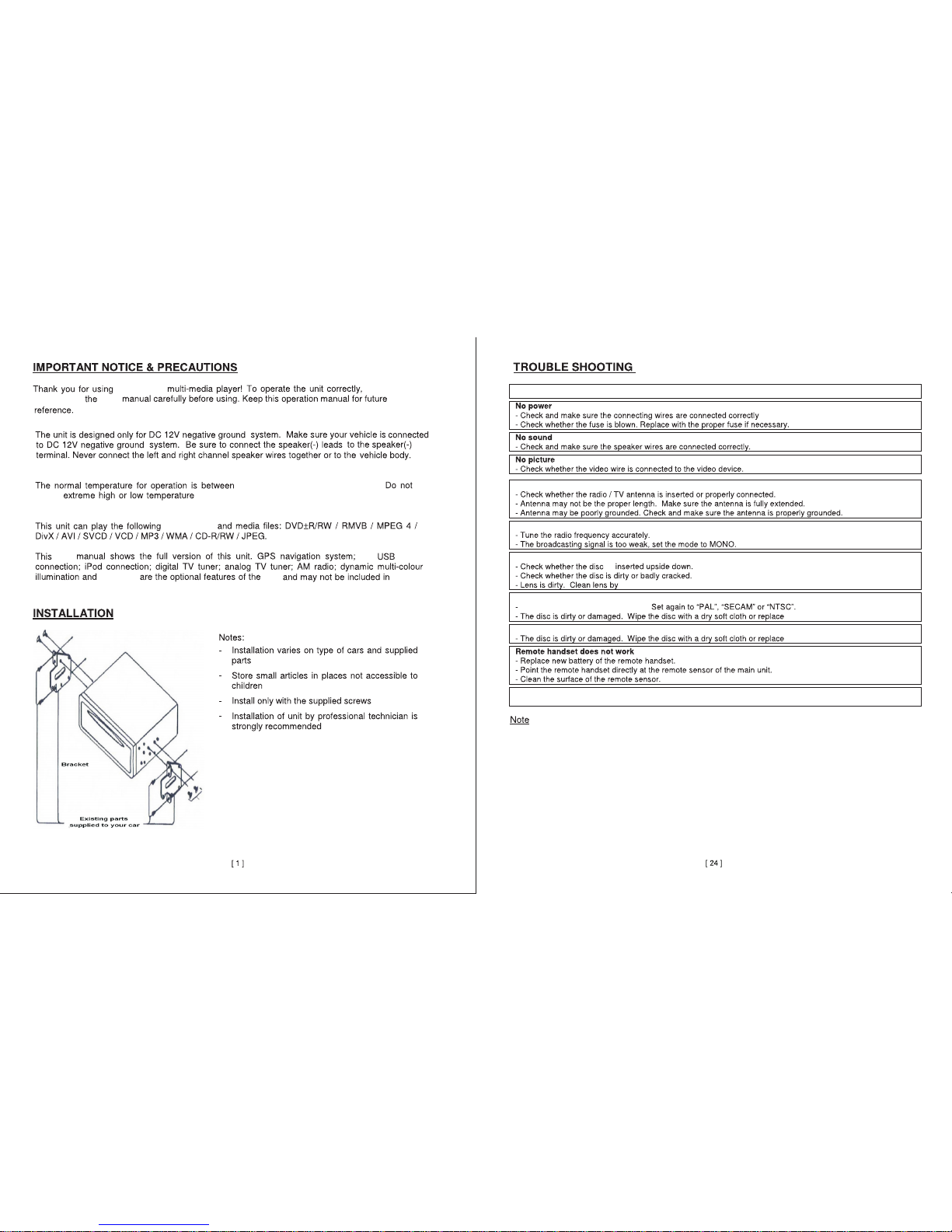
-4 Degrees and 140 degrees farenheit.
rear
Please Note:
Mounting brackets and screws are not included
with this unit.
Poor Radio/ TV Signal
No Radio signal
Disc Not Playing
No Sound/ No color during DVD playback
Bluetooth Not Responding
If the unit is still not working after troubleshooting consult your service technician.
Never attempt to disassemble the unit yourself.
user
use
types of CDs
user
unit
model.Refer to your exact unit to see which functions and features are available to you.
COMMON PROBLEMS AND SOLUTIONS
a lens cleaning solution (not included).
with a new disc.
CD Skipping
with a new disc.
- Make sure the devices are paired correctly.
in
.
Do not blo ck the ven ts or radi ator pa nels of th e unit.B locking
the m may ca use he at to build u p ins ide th e uni t and ma y caus e dam age or f ire .
your
is
Color settings are not set correctly.
Page 3
RADIO
DISC
BLUETOOTH
AUDIO
Please Note:Specifications functions and features are subject to change,Photos and diagrams in the
manual packaging may vary. Functions and features depend on unit inputs.Not all features are available
in all units.
Please Note:
This diagram shows the fully loaded
version of this unit.Certain ports may
not be available in some versions.
Refer to your exact unit for exact
functions and features.
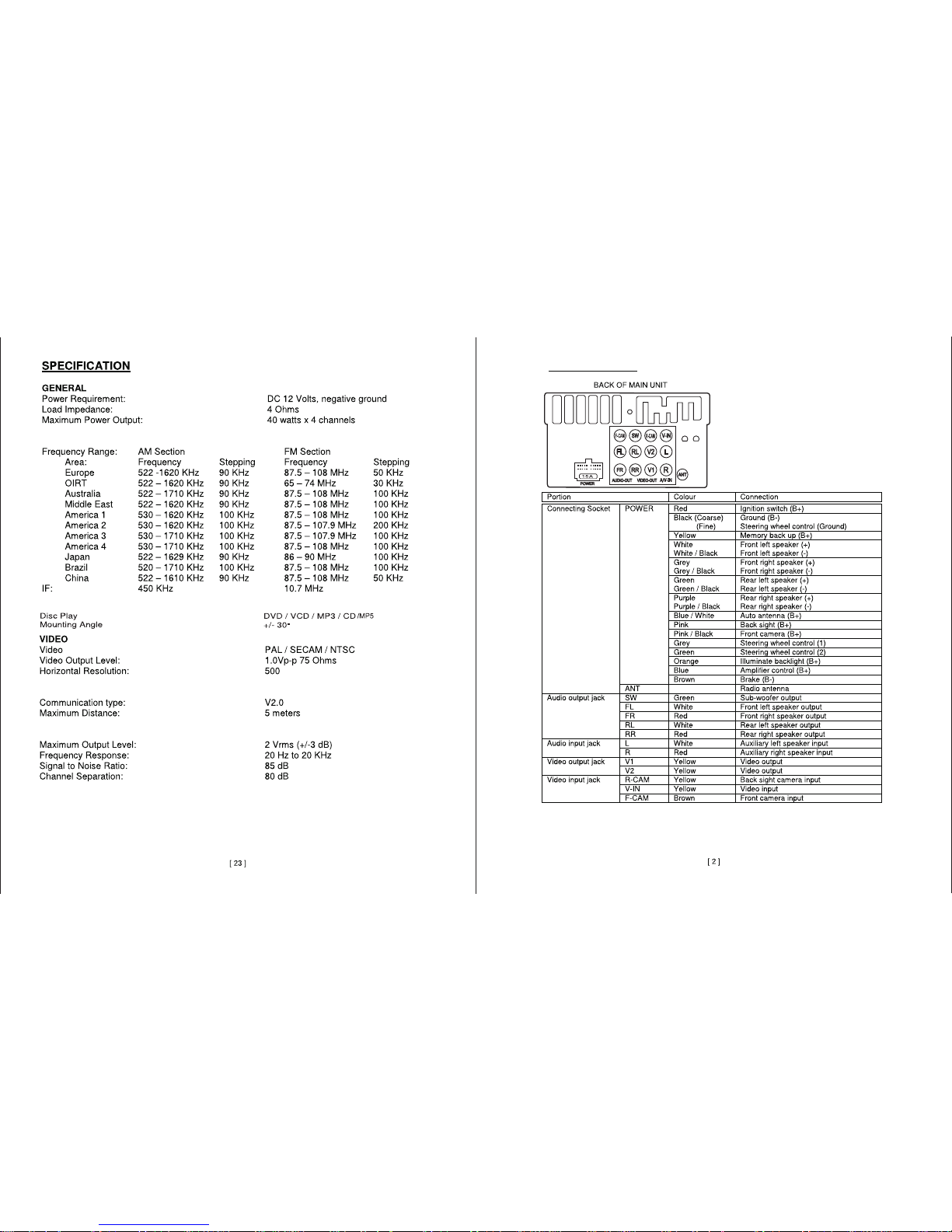
WIRING DIAGRAM
Page 4
BLUETOOTH
BLUETOOTH
1
2
3
4
5
6
7
8
10
11
9
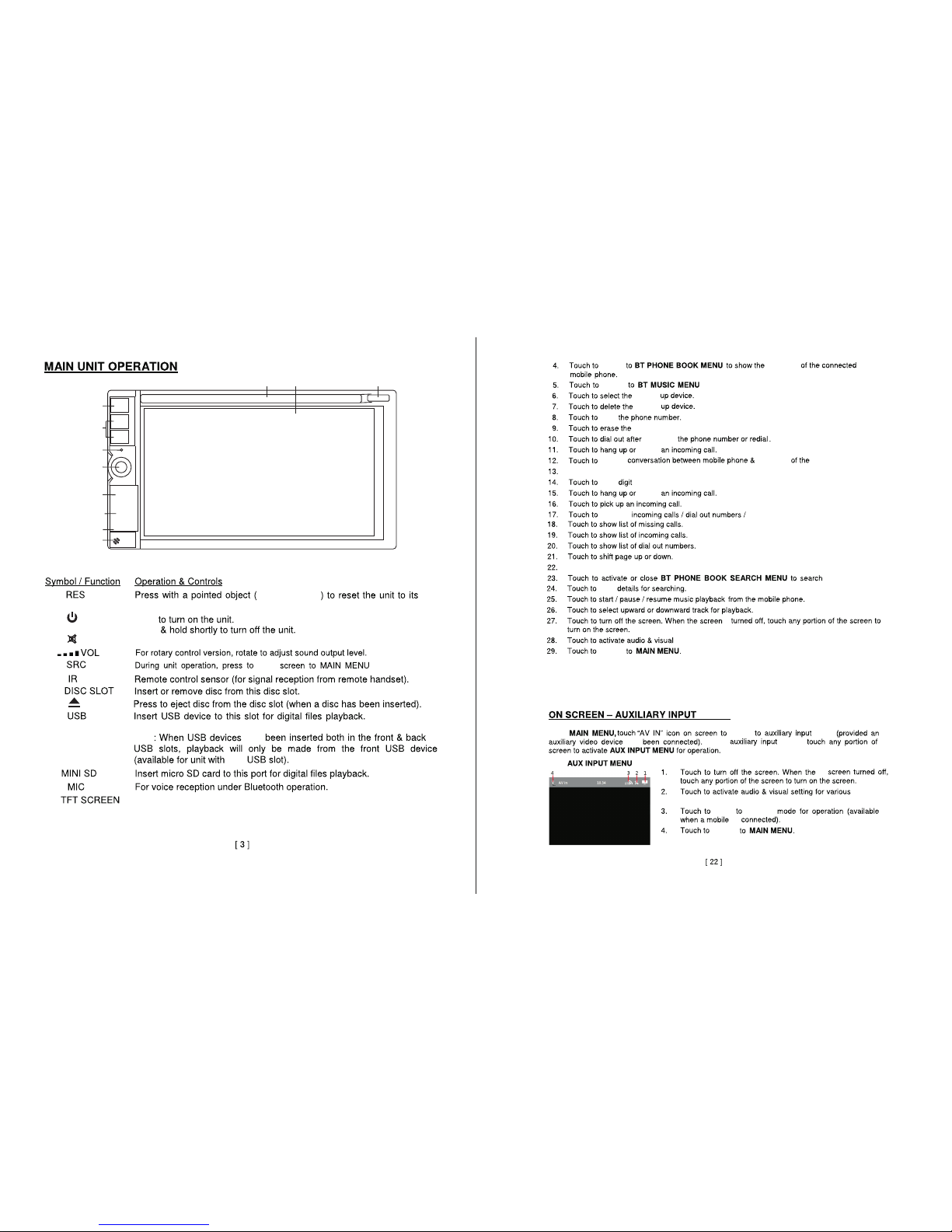
1:
2:
3:
4:
5:
6:
7:
8:
9:
10:
ball point pen
factory setting.
Mute sound
(Note:USB is
only intended for media playback not for charging devices.)
TFT touch screen that displays the current mode of the unit.For specific
functions of unit refer to other sections of this manual.
enter
entering
switch
enter
enter
return
During
mode,
switch
return
Press
Press
switch
Note
have
rear
switch
switch
for playback from connected bluetooth device.
paired
paired
character input.
ignore
reciever.
Touch to mute the microphone.
.
ignore
return missing calls.
contacts.
is
settings.
MODE
mode
switch
modes.
contacts
rece ive
Touch to sync the contact list of paired ph one.
In the
has
is
is
Page 5
BLUETOOTH
BT Call
BT Call
11:
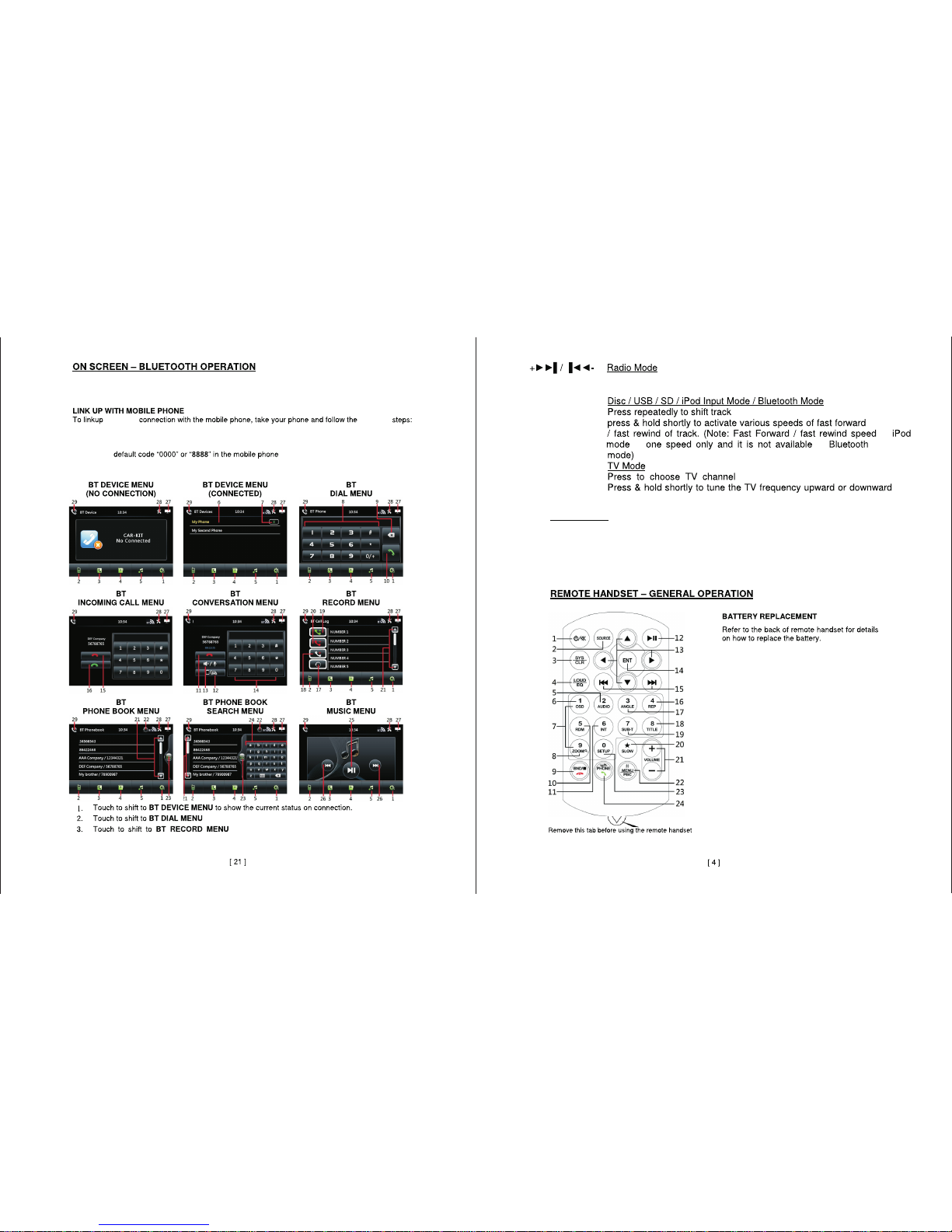
In the MAIN MENU and other screens,touch“BT” icon to switch to BLUETOOTH
mode.
- Turn on bluetooth mode on your mobile device.
- New Device will appear “CAR KIT”,“CAR BT”or similar.
- Enter the
- The device will appear in the “BT DEVICES MENU”on screen.
- Connection successful you can now start using the BLUETOOTH function.
to dial from phone.
to show the call log.
Press repeatedly to fine tune the radio frequency,Press and hold shortly to scan
for stations.
forward or backward.
in
in
is
.
.
Please Note:
The above mentioned operations are for various models of this unit,some features may not
be available on your unit ,lconography may vary from your exact unit.
following
- Search for new device.
Page 6
BLUETOOTH
BLUETOOTH
BLUETOOTH
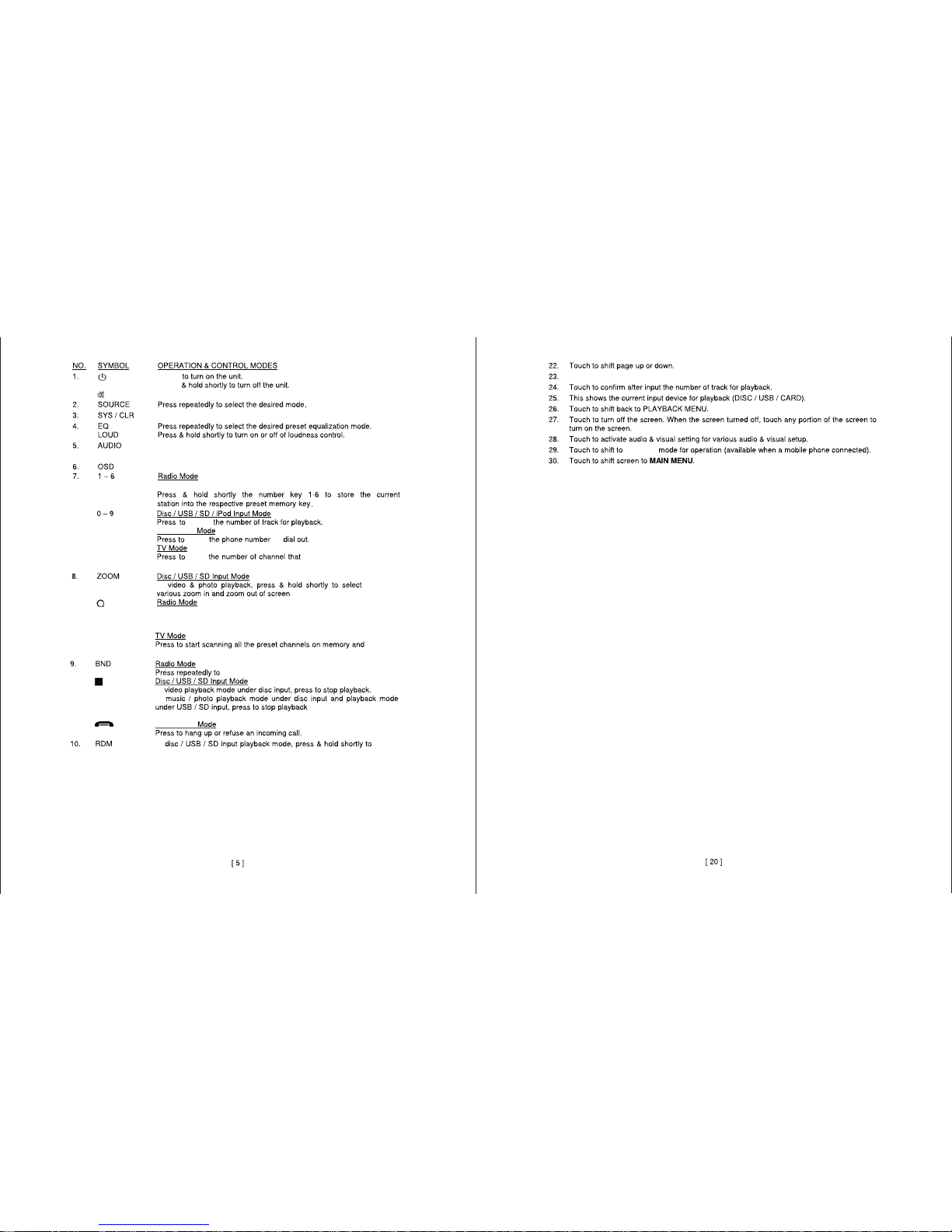
In BLUETOOTH mode press to delete input errors.
Press and hold to select different output channels.
Note:does not work under BLUETOOTH mode.
During DVD playback,press to show the on screen details.
Press any key 1-6 to access a preset statio.
select
enter
enter
.
switch between AM and FM.
shuffle
through random songs.
Touch to erase the entered characters.
Press
Press
Press to mute sound.
has been preset.
Press to scan preset stations.Stop pressing to play current station.
In
Press to scan and store stations with the strongest signal.
After unit has scanned stations the current station will start playing.
In
In
to
release
to broadcast current channel.
temporarily. Playback will
resume afte r a few seconds.
In
Page 7
BLUETOOTH
BLUETOOTH
BLUETOOTH
more options.
(Note:Depending on the DVD this function may not be accessible.)
In
In
During
During
During
During
During
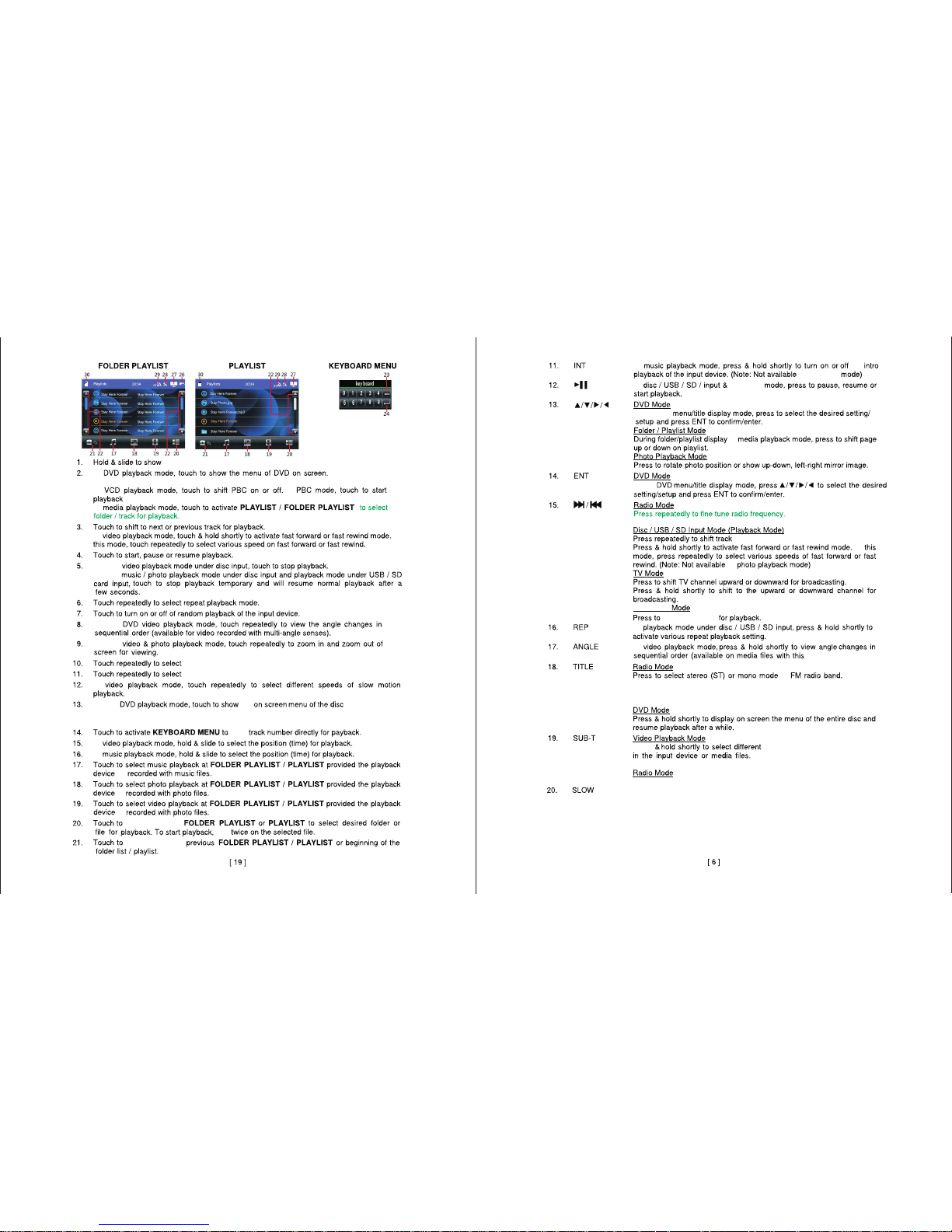
During video CD playback mode (VCD) touch to shift playback control (PCB) on or off.
enter
switch between
switch between
In
in
In
In the DVD
Press and hold to scan radio stations.
forward or backward.
In
in
browse tracks
In
In
features).
(Note:While recieving a stereo signal an indicator will appear on
the screen.No indicator means the signal being recieved is in
MONO.)
Press to activate subtitles when
available.Subtitles must be encoded into DVD or file.
Press to select the strongest signal or local AM or FM stations.
In videoplayback mode press and hold to slow video down.
In
In
In
chapter ord er.
In
.
different audio tracks encoded in the media.(when available)
diffe rent subti tles e ncod ed in the me dia.(wh en avai labl e)
In
the
In PCB m ode to uch to st art the pla ybac k from t he fir st cha pter.
In
In
is
is
is
tap
the
in
In the
in
sub tit les t hat a re en cod ed
Press
Page 8
BLUETOOTH
BLUETOOTH
Press and hold to activate the options and settings menu for the
current function,press again to exit the settings menus.
entering
dialed
Please note:Operation may vary depending on devices,file type and media.
selected station.(Press and hold the number to store the current station as a
preset station.)
.
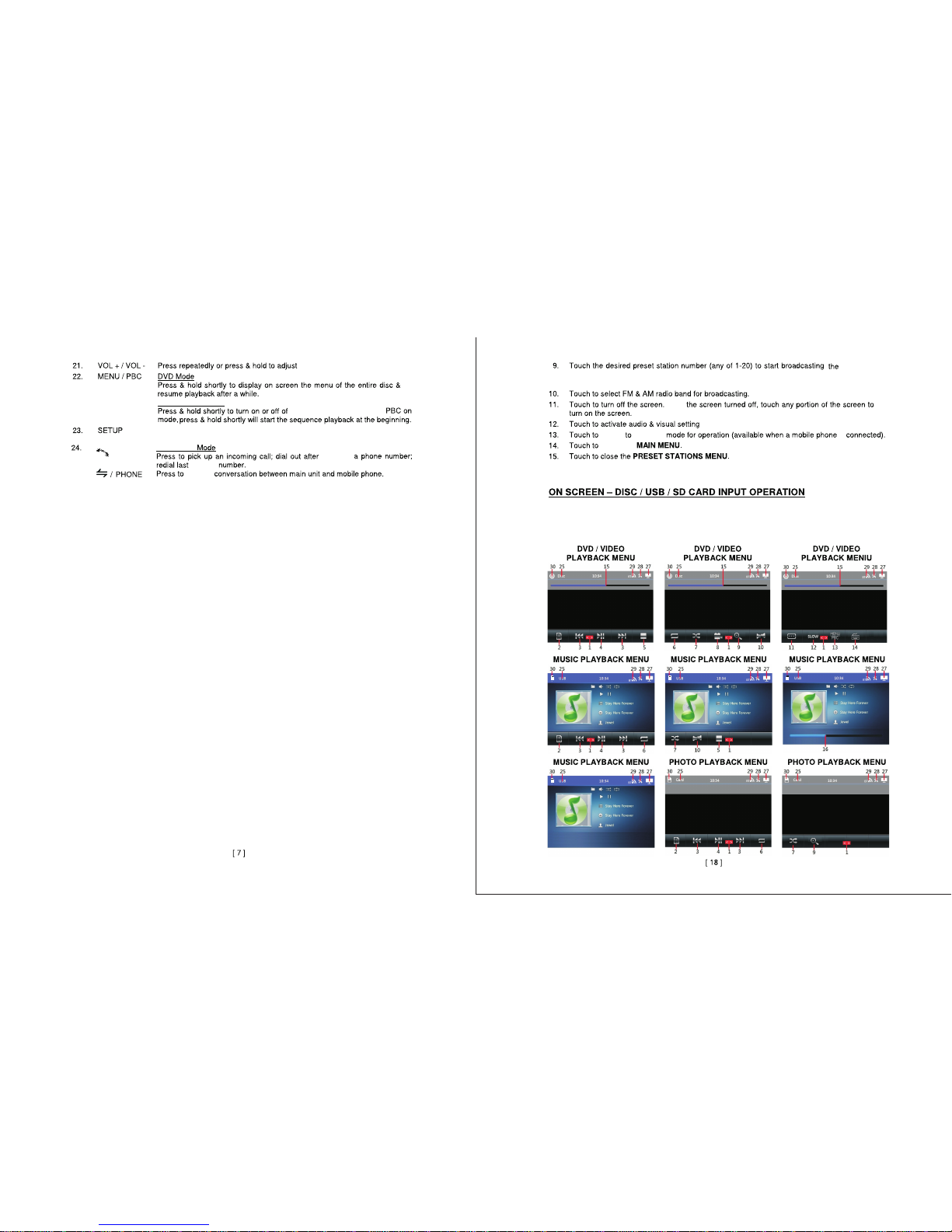
In the MAIN MENU touch“DISC/USB/CARD” icon on screen to switch between media
playback inputs.Playback will start automatically.Depending on the input device and
media,touch screen will show various playback menus and functions.
volume.
VIDEO CD MODE
play back control(PBC).
In
switch
switch
return to
Wit h
is
Page 9
BLUETOOTH
BLUETOOTH
BLUETOOTH
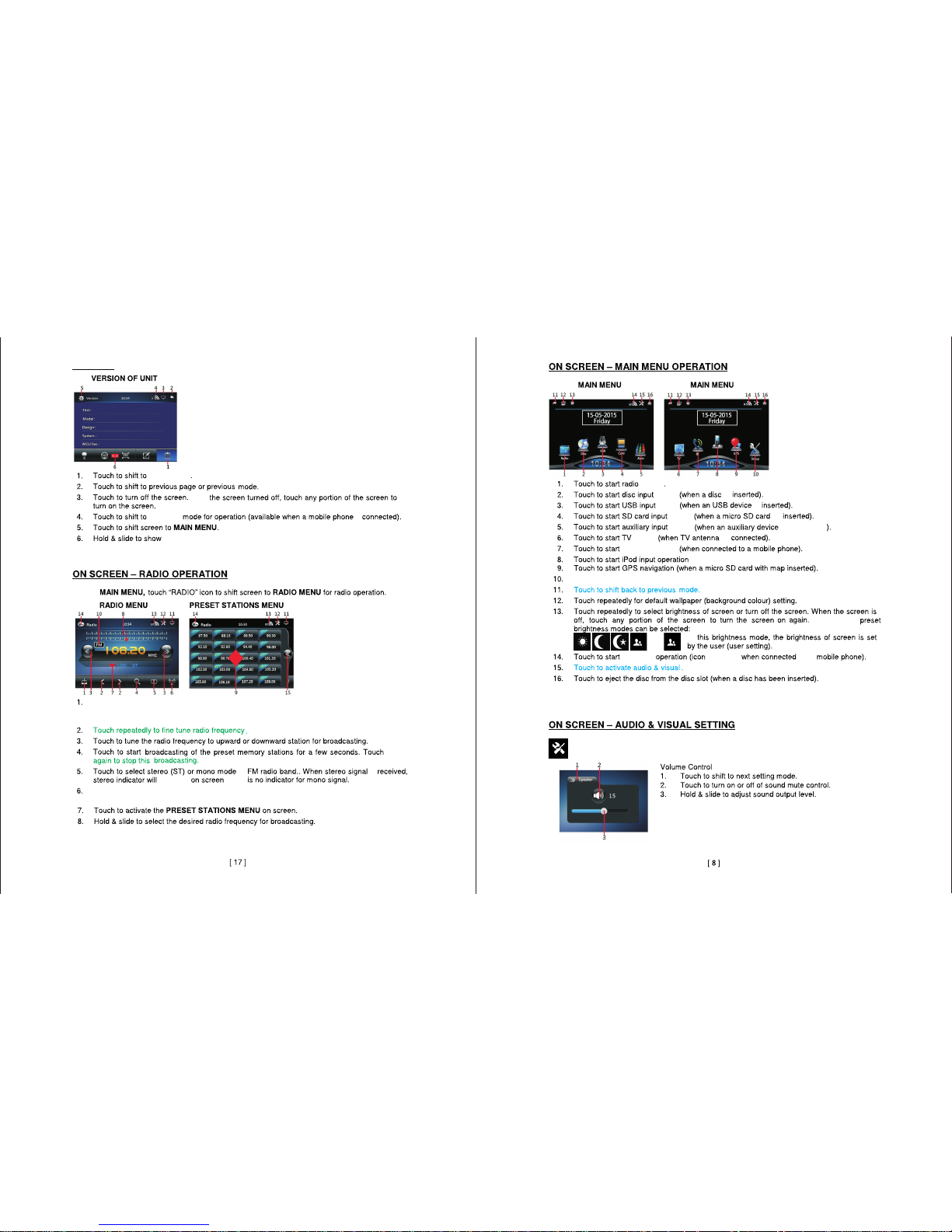
MUSIC
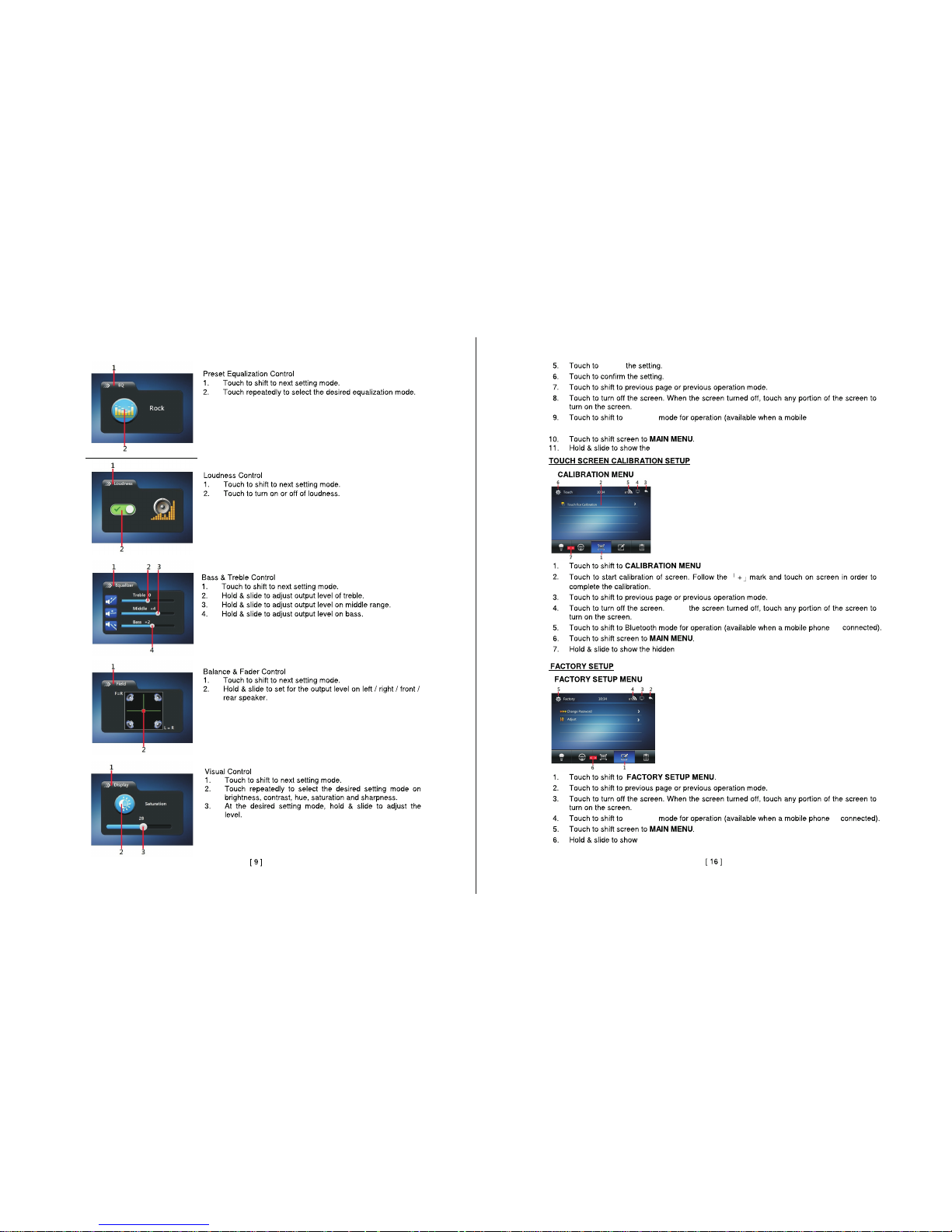
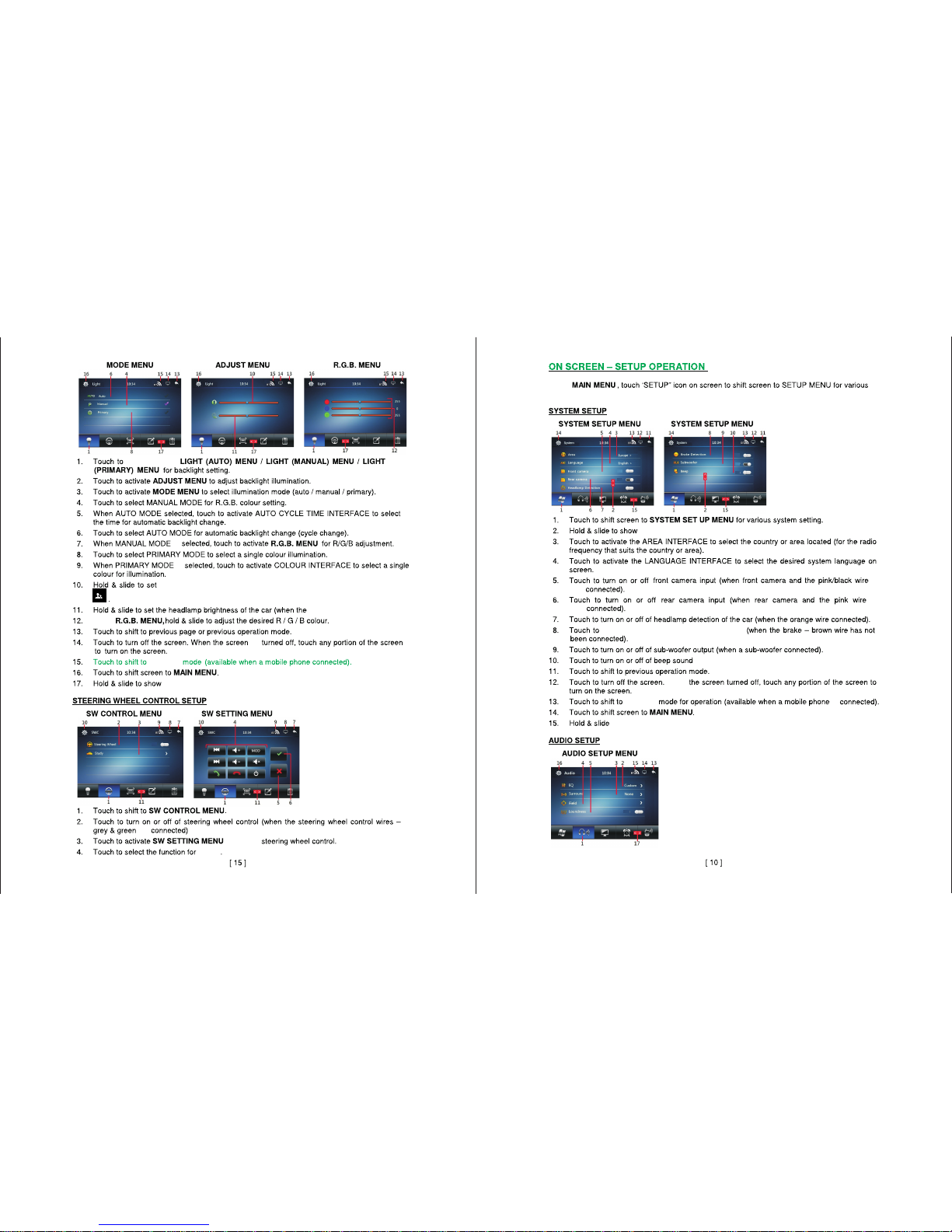
Note:Your settings maybe different from the pictured
diagram.Consult your unit for exact options.
Touch to select local (LOC) setting for recieving the local stations with the strongest
signal.During this mode LOC will appear on the screen.
Tap the icon of the function
you want to access to go.
Hold and slide lower portion
of the screen to return to main
menu or view other options.
When an ipod is connected.
Touch to access settings.
When this icon appears touch to activate audio and visual settings for different
functions.
SETTINGS
SETTINGS
In the
Touch to start cycling through radio stations. the unit will store the strongest stations
to the preset memory.once the unit stops cycling through all stations.radio playback
will begin.
in
is
appear
there
mode
mode
mode
mode
mode
mode
mode
In
Wit h
is
more options .
is
is
is
is connected
is
The following
appears
to a
.
Page 10
BLUETOOTH
BLUETOOTH
mobile phone is
connected).
revert
more options.
Wit h
is
more options.
is
more options.
Page 11
BLUETOOTH
BLUETOOTH
Of
f
Of
f
Of
f
Of
f
Of
f
O
n
O
n
Of
f
orange wire is connected).
is
are
system settings.
more options.
to show more options.
cycle through
is
is
more options.
custo m user sett ing for screen bri ghtne ss
In the
to set up
button
In the
are
are
enab le vid eo play back durin g driv ing.
inpu ttin g comma nds.
Wit h
is
Page 12
BLUETOOTH
BLUETOOTH
In
switch
more options.
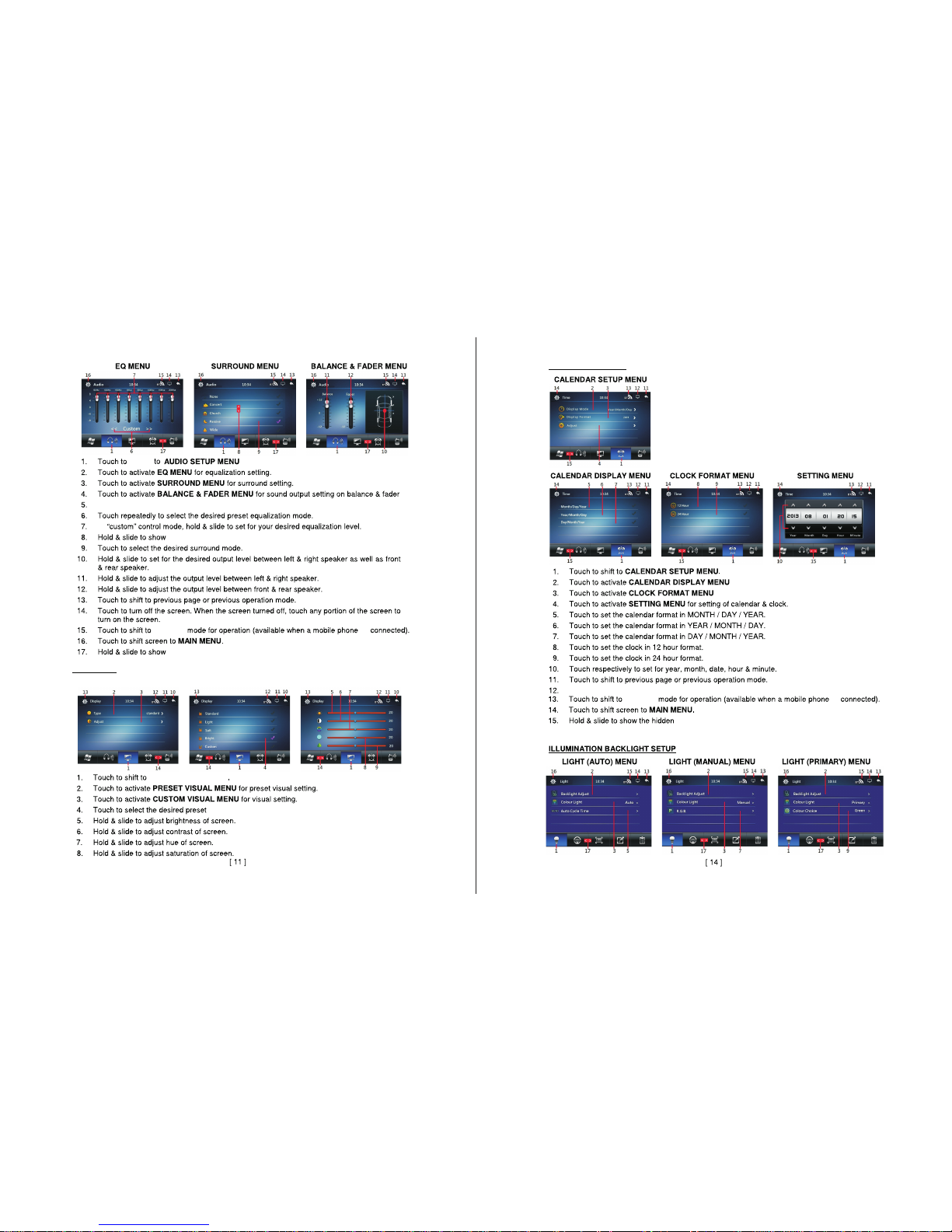
DISPLAY
DISPLAY MENU.
Touch to togg le loud ness co ntrol o n/off .
more options .
is
DISPLAY PRESETS
CUSTOM DISPLAY MENU
VISUAL SETUP MENU
screen modes.
DATE & TIME SETUP
to format date/ month/ye ar display setti ng.
for for mat clock set ting .
Touch to turn scr een on or off.
more options.
is
Page 13
BLUETOOTH
BLUETOOTH
BLUETOOTH
BLUETOOTH
BLUETOOTH
Of
f
Of
f
Of
f
Of
f
Of
f
Of
f
Of
f
Of
f
more options.
more options.
more options.
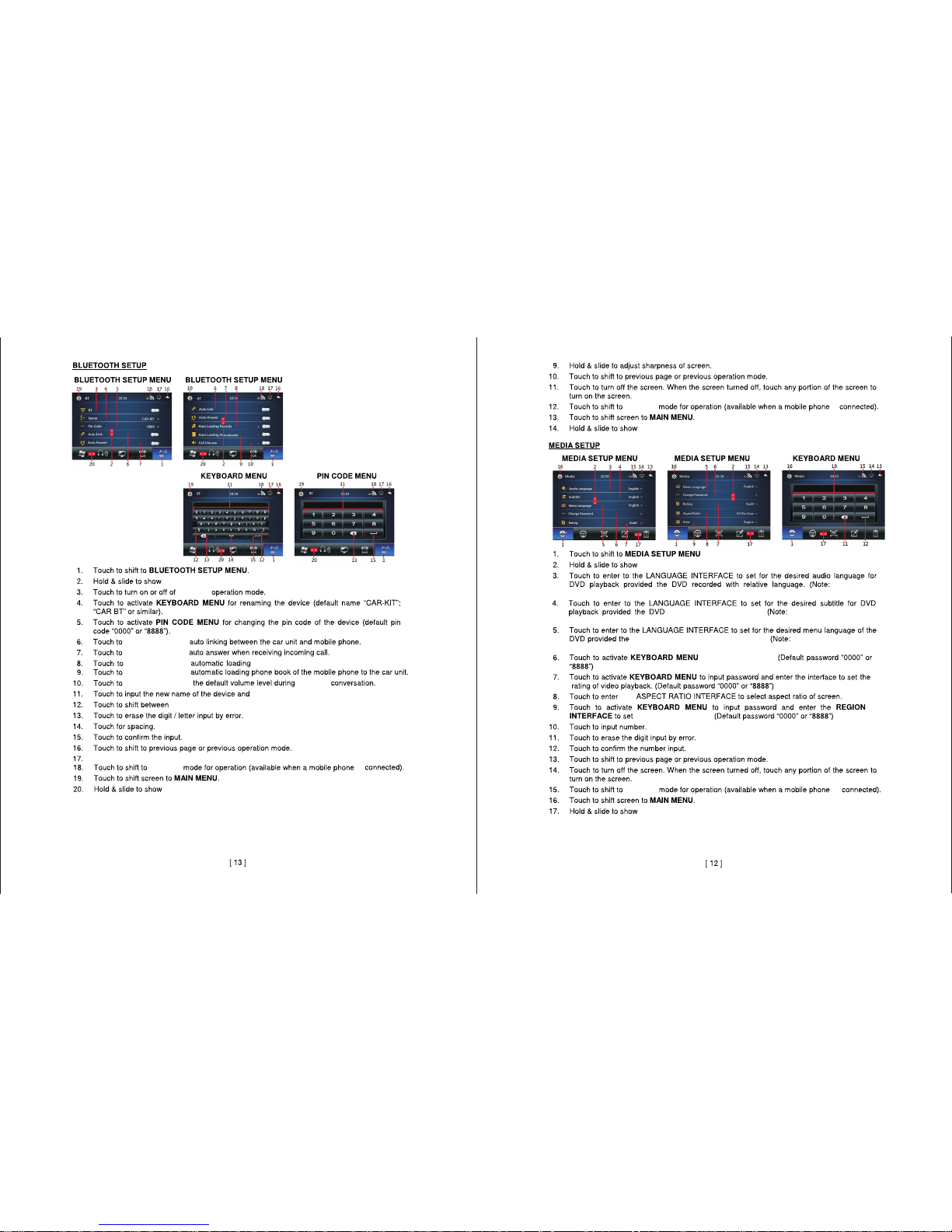
Language
cannot be changed during DVD playback,set language before beginning playback).
Language cannot be
changed during DVD playback,set language before beginning playback).
Menu Language
cannot be changed during DVD playback.set language before beginning playback).
call log.
change the pin.
enable or disable
enable or disable
enable or disable
enable or disable
enable or disa ble
upper case and lower case.
Touch to turn sc reen on or of f.
is
more options .
is enc oded wit h subt itles.
is enc oded w ith mu lti ple la ngua ges.
to change password.
the
the DVD region code.
is
more options.
is
 Loading...