

Page 1
™
DST
Dynamic Stair Trainer
Model 8000
User Guide
Do not
change the height of the Do not
stairs when someone is on the DST.
Page 2
2
Table of Contents:
1. Introduction
2. Precautions and safety instructions
3. Instructions for use
4. Moving the DST
5. Maintenance, Cleaning and Service
6. Troubleshooting
7. Specifications
Do not change the height of the stairs when someone is on the
DST. In case of emergency it is possible to lower the stairs with up
to 3 people on the DST in order to evacuate a patient.
:Please note
The front ramp, handrails and colors can
differ, depending on the model of your DST
Page 3

3
1. Introduction
Dear Physiotherapist,
Stair climbing is a basic everyday skill. The sooner patients
can achieve independence on stairs, the sooner they can
return to normal life.
The revolutionary Dynamic Stair Trainer was developed in
close cooperation with leading physiotherapists. It combines
parallel bars and the unique feature of height adjustable
stairs. This unique function helps you adapt to the needs
and abilities of your patient, while reducing anxiety and pain.
The DST features four steps whose height can be adjusted
from 0 to 16.5 centimeters (0 to 6.5 inches). The device is
equipped with adjustable handrails. In the flat position the DST
also serves as traditional parallel bars.
Thank you for choosing to incorporate the DST in your clinic
and rehabilitation program. We trust that it will help you
provide high quality, successful patient care.
Please read the instructions in this User's Guide before
operating the DST.
Page 4
4
2. Precautions and safety instructions
The DST is to be used under the supervision of an
authorized physiotherapist.
Do not place the DST next to windows that can interrupt
its movement.
Do not place the DST in a room with low ceiling. Make
sure that when the DST is fully elevated a patient’s head
dose not hit the ceiling when standing on the top stair.
Do not expose the DST to rain or moisture.
Do not use the DST where water spills can occur.
Do not use the DST when you or the patient are wet.
Do not place the DST near heating sources.
Do not allow anything to rest on the power cord, or leave
any cords hanging where people frequently walk.
Before operating the DST, verify that no objects or
people will interfere with the up/down movement.
Do not allow more than two people on the DST.
Unplug the DST before moving or cleaning.
Do not attempt to service the DST yourself. If the DST
does not operate, refer to section 6.
Unplug the DST and contact your authorized DST
representative if one or more of the following occurs:
The power cord or plug is damaged; The DST has been
exposed to water; The DST has been damaged; The
DST does not operate normally or unusual noises are
heard.
Do not change the height of the stairs when someone is on the
DST. In case of emergency it is possible to lower the stairs with up
to 3 people on the DST, in order to evacuate a patient.
Page 5
5
3. Instructions for use
General:
1. Plug in the power cord to a grounded wall outlet.
2. Verify that no objects or people will interfere with the
up/down movement of the DST.
3. First, make sure that the heights of handrails suit the
patient, then adjust the stairs height.
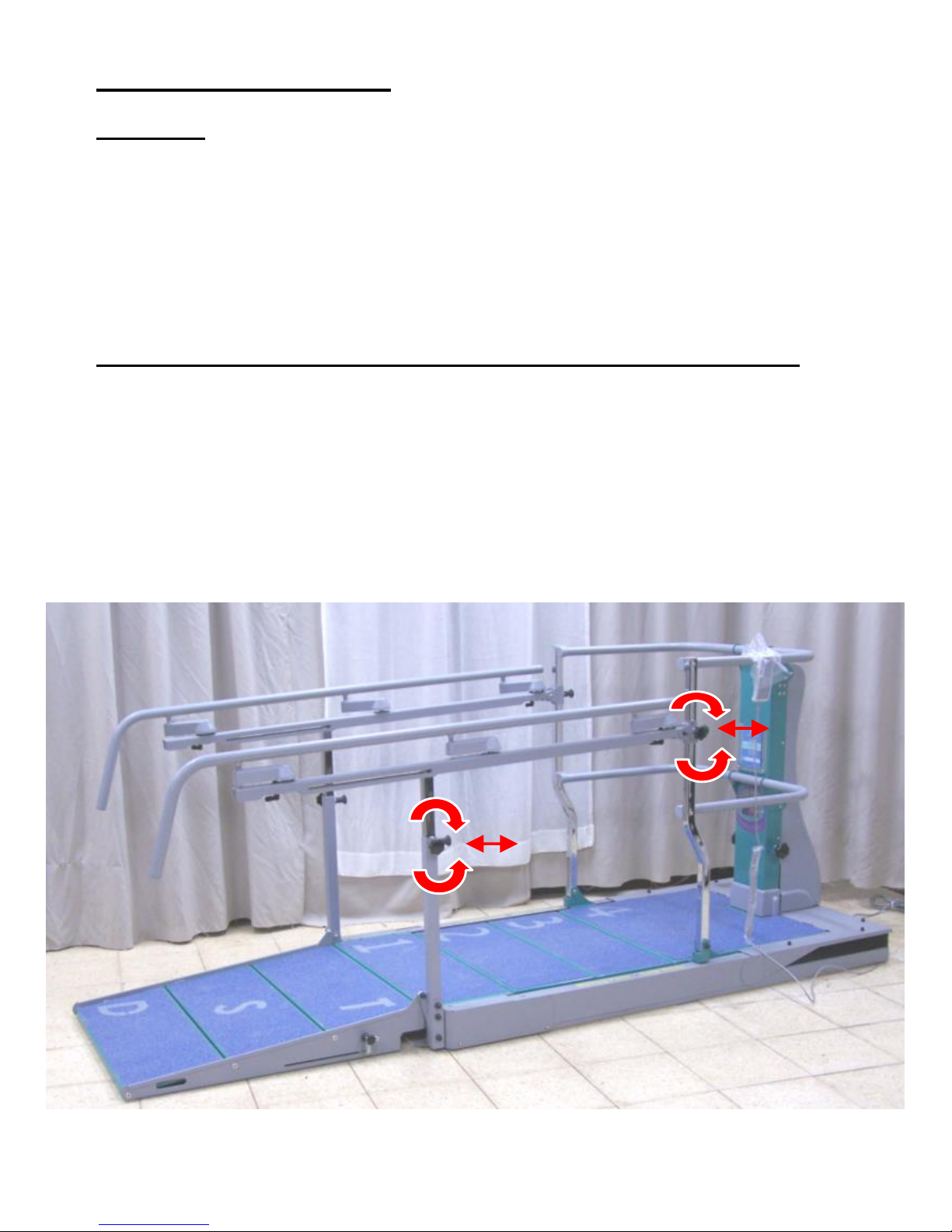
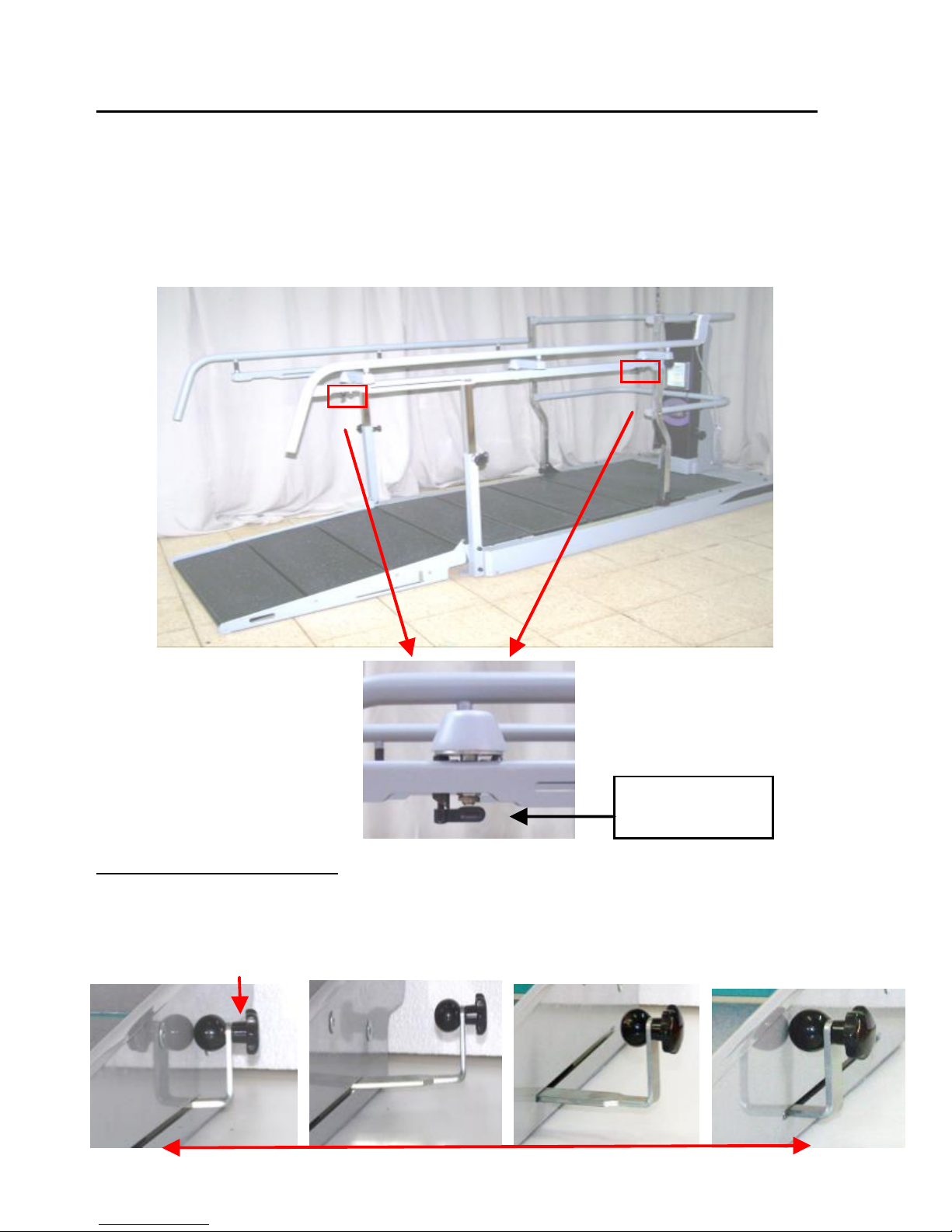
Adjusting the height of the handrails (see picture below):
1. Lower the DST to the lowest (Horizontal) position.
2. Turn the Handle counterclockwise.
3. Pull the Indexing plunger.
4. Adjust the height of the handrail and release the Indexing
plunger at the desire hole.
5. Tighten the Handel.
Page 6
6
(B)
3.1 Adjusting the width of the handrails (when applicable):
1. Lower the DST to the lowest (Horizontal) position.
2. Turn the two handles to point the rear of the DST (A)
3. Adjust the width with both hands to the next “click”
position.
4. Turn the two handles to point the front of the DST.
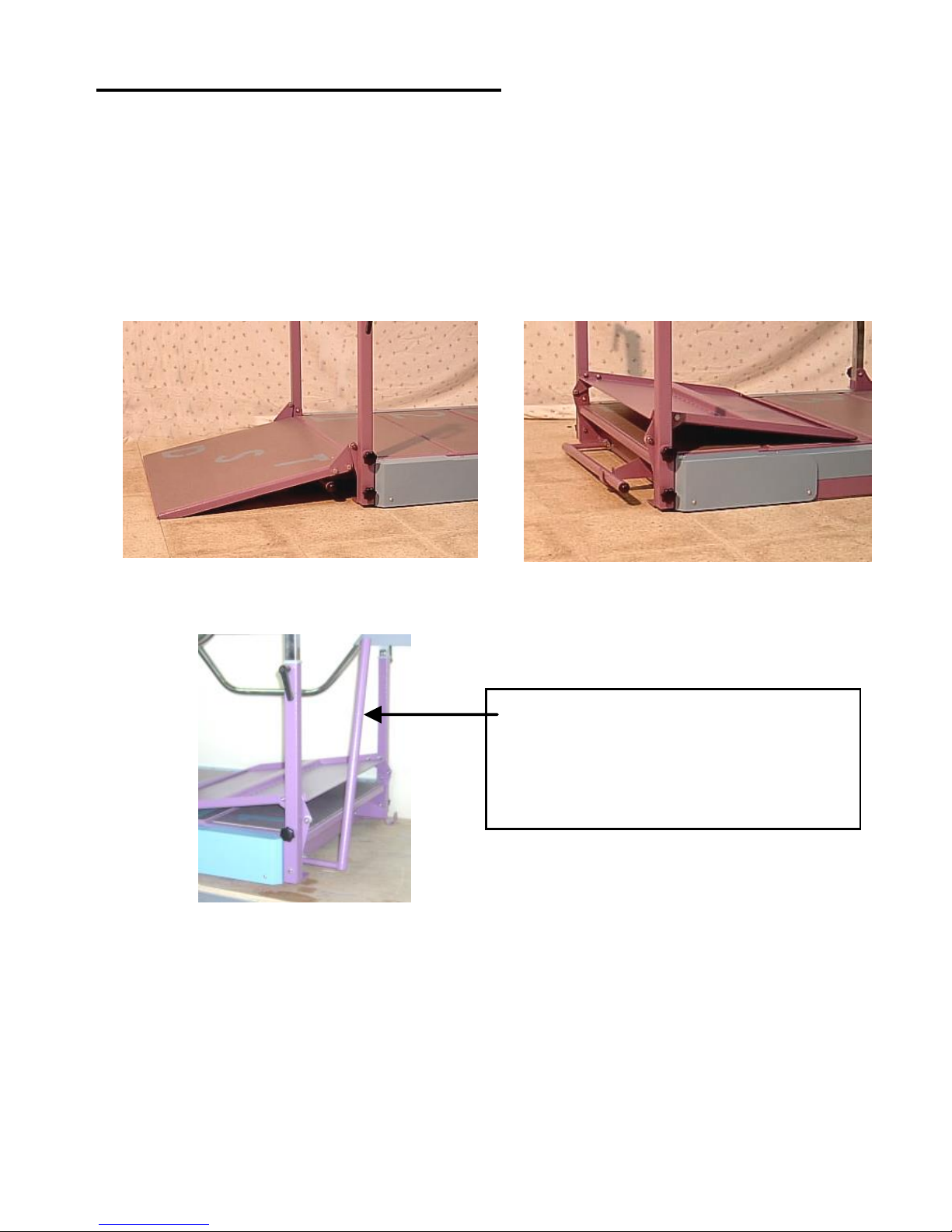
3.2 Using the RSR:
Pull and move the handle (B) forward/backward for changing
position from STAIRS to RAMP and vice versa. Push handle.
(A)
Handle
Page 7
7
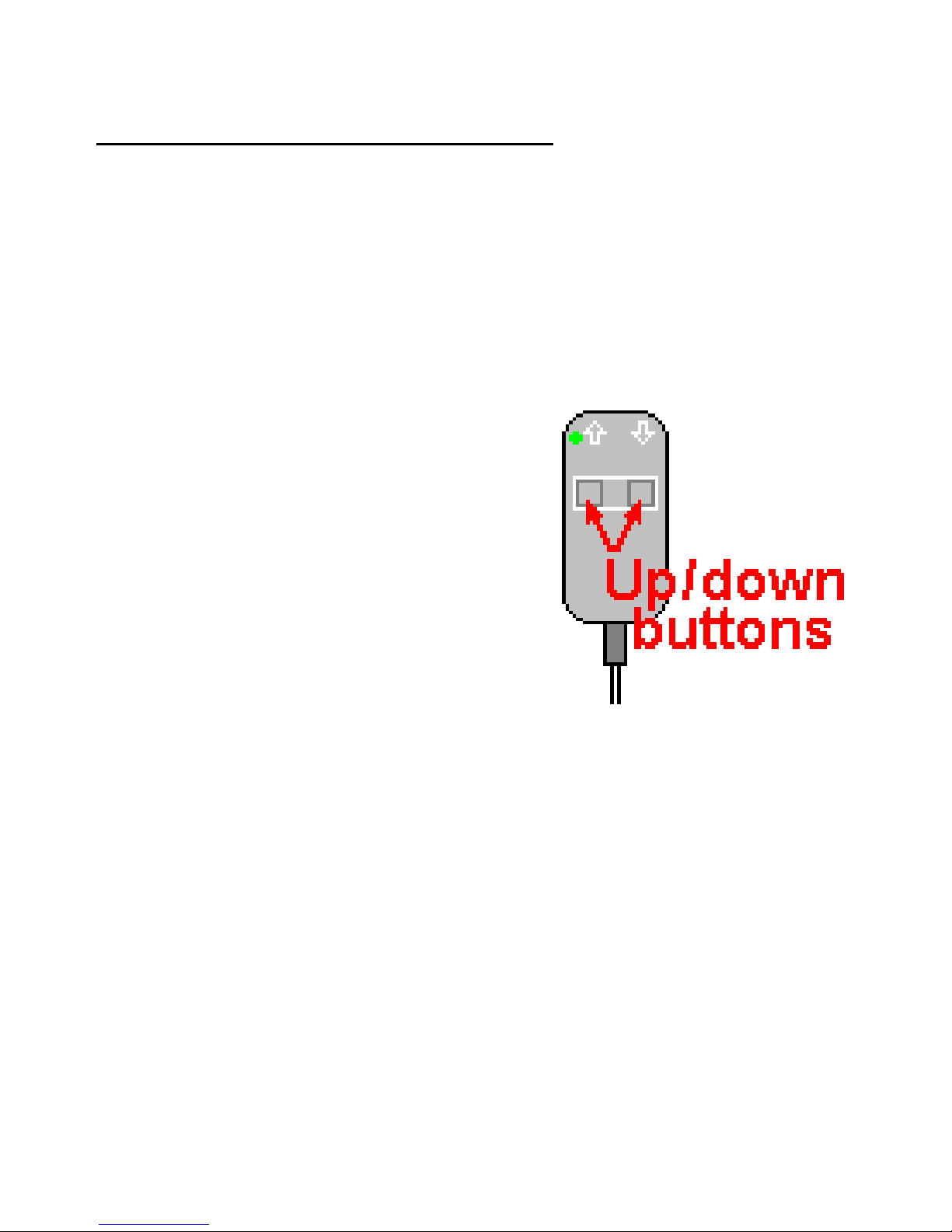
3.3 Adjusting the height of the stairs:
1. Holding the control unit, press and hold the appropriate
up/down button until the desired stair height is achieved.
2. A green indicator light will appear on the control unit as
long as DST is connected the wall outlet.
3. Monitor the height of the stairs by watching the ruler in the
window at the central column (centimeters are shown on
the left side of the ruler, while inches are shown on the
right side).The maximum stairs height is 16.5 centimeters
(6.5 inches).
Page 8
8
4. Moving the DST in the room
The DST is equipped with four retractable wheels for easy
moving. In order to move the DST, carry out the following
steps:
1. Lower the DST to the flat position.
2. Unplug the DST socket from the wall outlet.
3. Fold the front ramp 180 degrees.
4. Pull the front and rear handles. Now the DST is on wheels
and can be easily moved.
5. After positioning the DST in its new location, lower the two
handles.
6. Unfold the front ramp.
Front handle
(Find the rear handle at the
other end of the DST)
Page 9
9
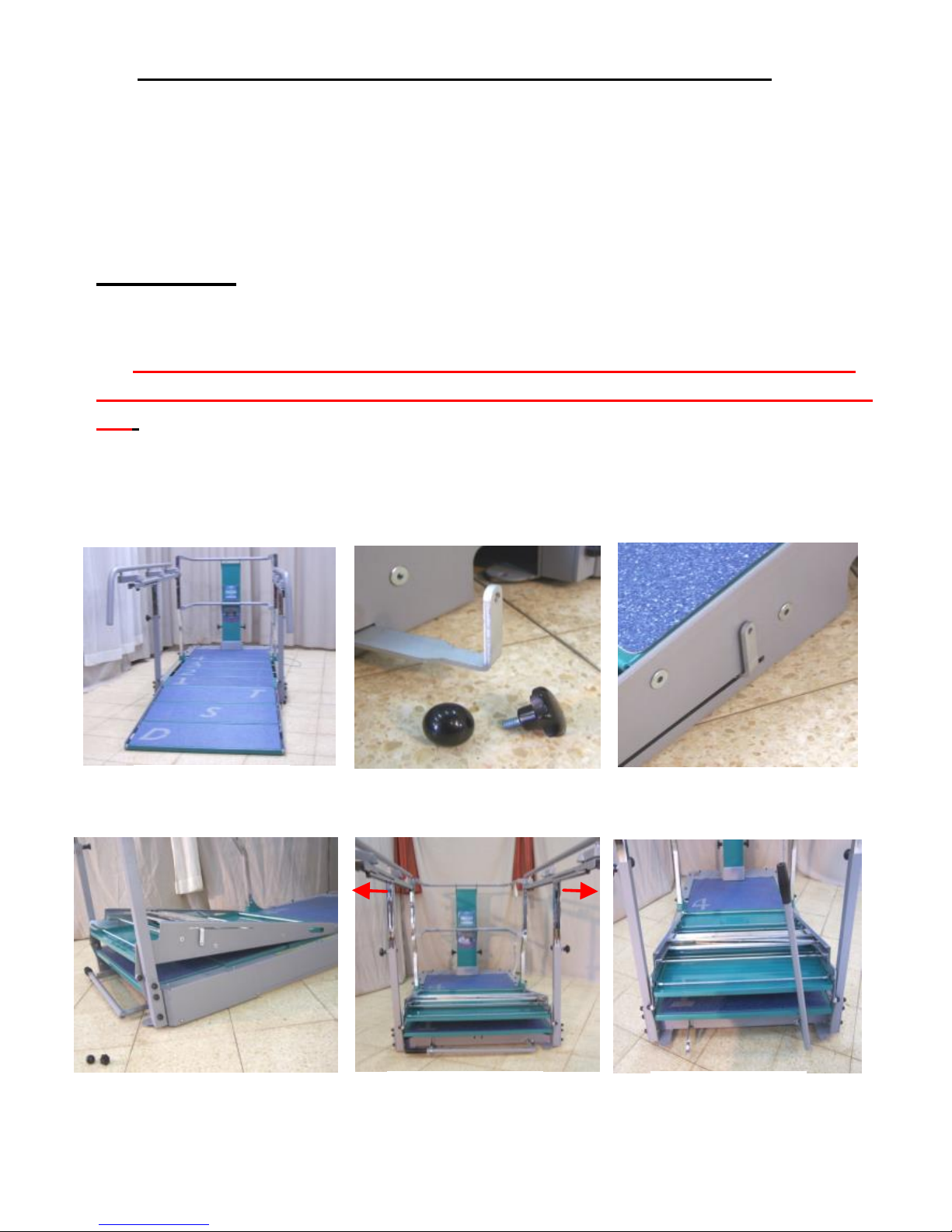
4.1 Folding the RSR and lifting the front moving Handle:
1. (Picture #1)-Lower the DST, lift the two handrails to the upper
position and adjust outwards the rail of the WAH.
2. (Picture #2)-Unassembled manually the black knobs of the RSR.
First the round knob and then the jagged knob.
3. (Picture #3)-Push the lever all the way towards the RSR.
4. (Picture #4)-Fold the RSR.
Please note:
a). The RSR is heavy. It is highly recommended that two people lift it
together.
b). If necessary, gently pull both Handrails outwards while lifting and
folding the RSR as it might collide the Handrails when folding (Picture
#5).
5. (Picture #6)-Lift the Moving Handle.
6. After moving the DST to its new location, perform the above steps
in the reverse order.
Picture #1
Picture #3
Picture #2
Picture #6
Picture #5
Picture #4
Page 10

01
5. Maintenance, Cleaning and Service
The DST requires no maintenance.
Before cleaning, unplug the DST from the wall outlet. The
outer surfaces of the DST may be cleaned with a dry cloth.
When service is required, or if you have any questions, please
call your distributor.
Page 11

00
6. Troubleshooting
Should the DST fail to operate properly, please check:
1. The power cord is connected to the wall outlet.
2. The wall outlet is indeed powered; Check by connecting
some other electrical appliance to the outlet.
3. The DST may be overloaded with excessive weight. Clear
the DST and try again after 3 hours.
If, after trying all of the above, the DST still fails to operate,
unplug the cord and contact your authorized DST
representative.
Page 12
02
7. Specifications
Product name:
Dynamic Stair Trainer (DST)
Model:
8000
Overall dimensions:
Length x Width x Height (stairs
down/up)
240x88x110/160cm (95x35x44/63in)
Shipment dimensions:
210x104x72cm (83 x42x30in)
Weight:
250Kg (550 lbs)
Stair width (regular):
74 cm (29 inches)
Stair height range:
0-16.5 cm (0-6.5 inches)
Capacity (static):
300 Kg (660 lbs)
Electrical requirements
100-240V, 50/60Hz, 4A max
Operating interval:
2 min on / 18 min off
Operating environment:
Temperature: 10° to 40°C (50°-104°F)
Humidity: 30% to 85% non-condensing
Storage environment:
Temperature: 10°-55°C (50°-131°F)
Humidity: 30%-85% non-condensing
Regulatory compliance:
IEC 601-1 CE, UL (motor, controls)
EC REP': Obelis s.a, 34 Av. de Tervuren, bte 44 Belgium
Tel: +32 2 7325954 Fax: +32 2 7326003
Worldwide patent
Color, design and specifications may vary
 Loading...