

Page 1

sprint
gate
solar
Install Manual
1.06.17
1
Page 2
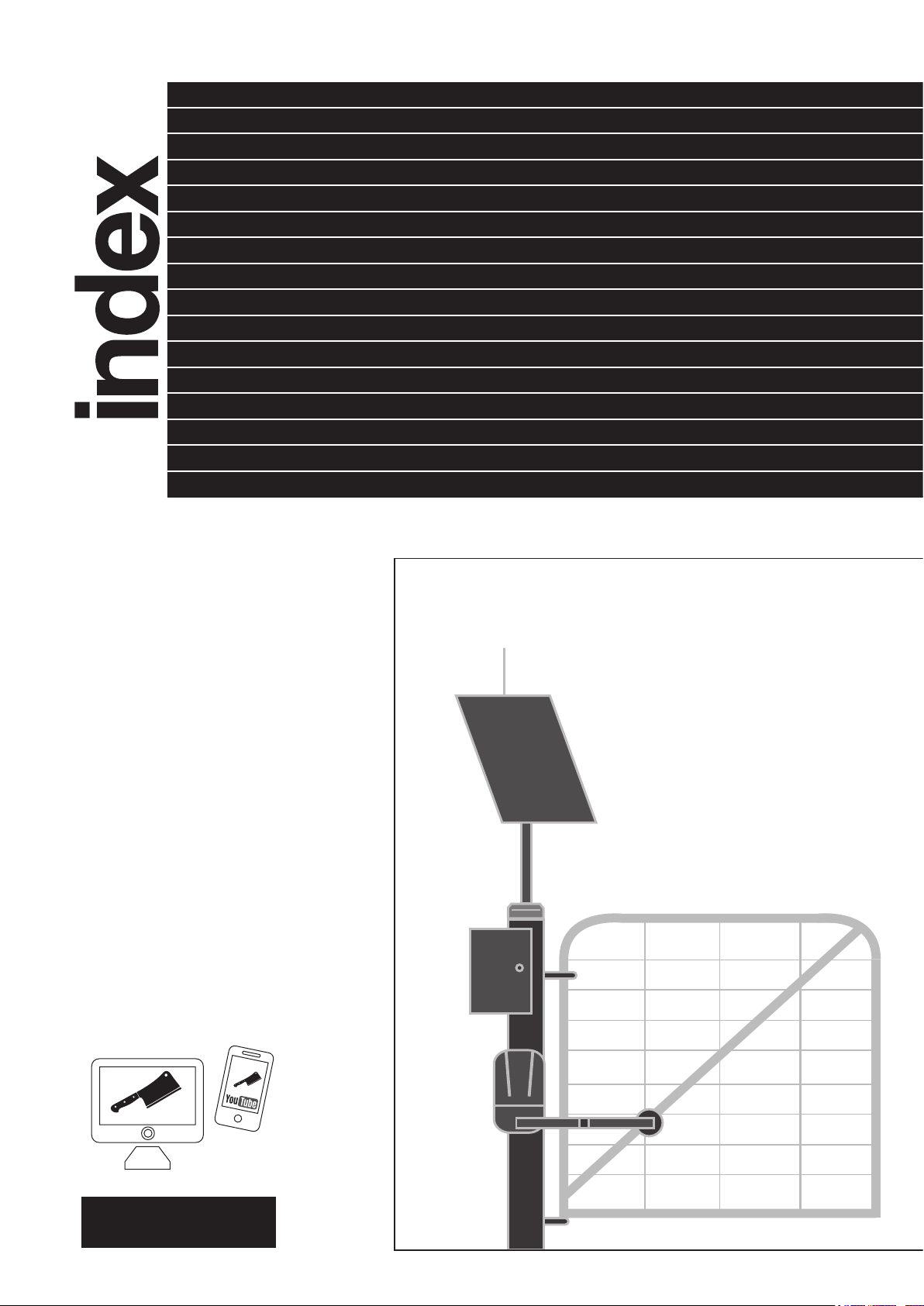
Page
Kit Parts 2
Purchase Separately 3
Motor 4
Battery Box 6
Solar Panel Post 6
Solar Panel 7
Gate Stops 7
Power Up 8
Programming 9
Connect Aerial 10
Connect Remotes 10
Set Solar Mode 11
Accessories 11
Solar Controller 12
Solar Gates In Winter 13
Solar Angles 13
trouble
shooting
Call our Tech Team
1800 241 733
kit parts
2
3
4
7
Video instructions are
on downee.com.au.
1
6
5
2
Page 3
S8-AT
G7-BBAT
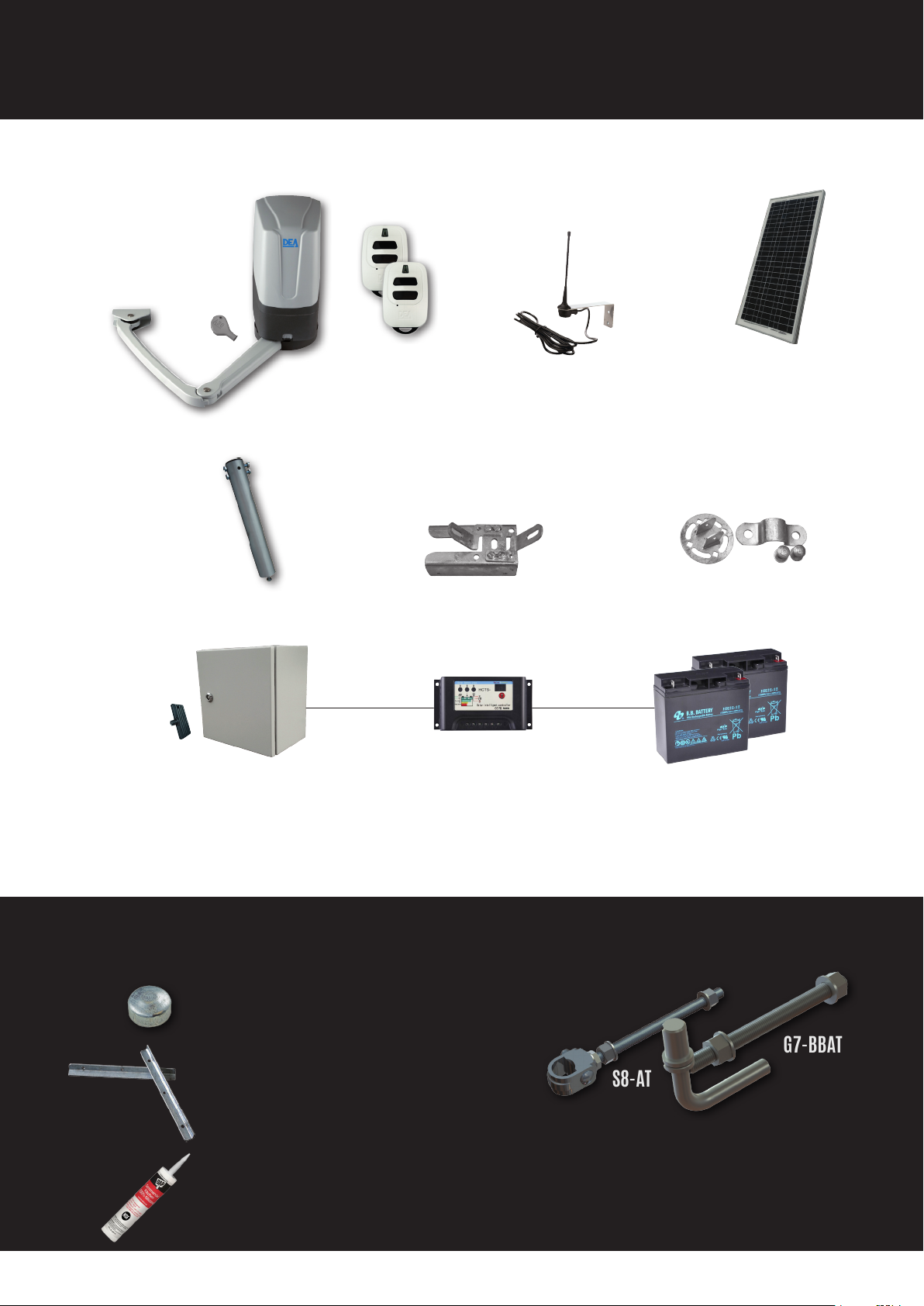
kit parts
24V
1 2 3
MOTOR
& KEY
(pre-wired)
REMOTES
MOTOR-TO-POST
BRACKET
5
4
SOLAR
PANEL
POST
BOOSTER
AERIAL
SOLAR
PANEL
(pre-wired)
ARM-TO-GATE
ROTATING BRACKET
6
BATTERY BOX
7
& KEY
(pre-wired) (pre-wired) (pre-wired)
SOLAR
CONTROLLER
purchase separately
Post Cap not supplied. Grab
one to match the gate post
Solar Panel is mounted on.
Battery Box mounts not
supplied. Two pieces of
25mm steel angle will work.
Bugs and insects in gate
motors will cause problems.
Use silicone to seal where
cables enter the base of motor.
12V
BATTERIES
HIGHLY RECOMMENDED
Automatic gates need
hinges able to handle the
motor’s forces. Made in
Australia for Sprint Gate.
3
Page 4
motor
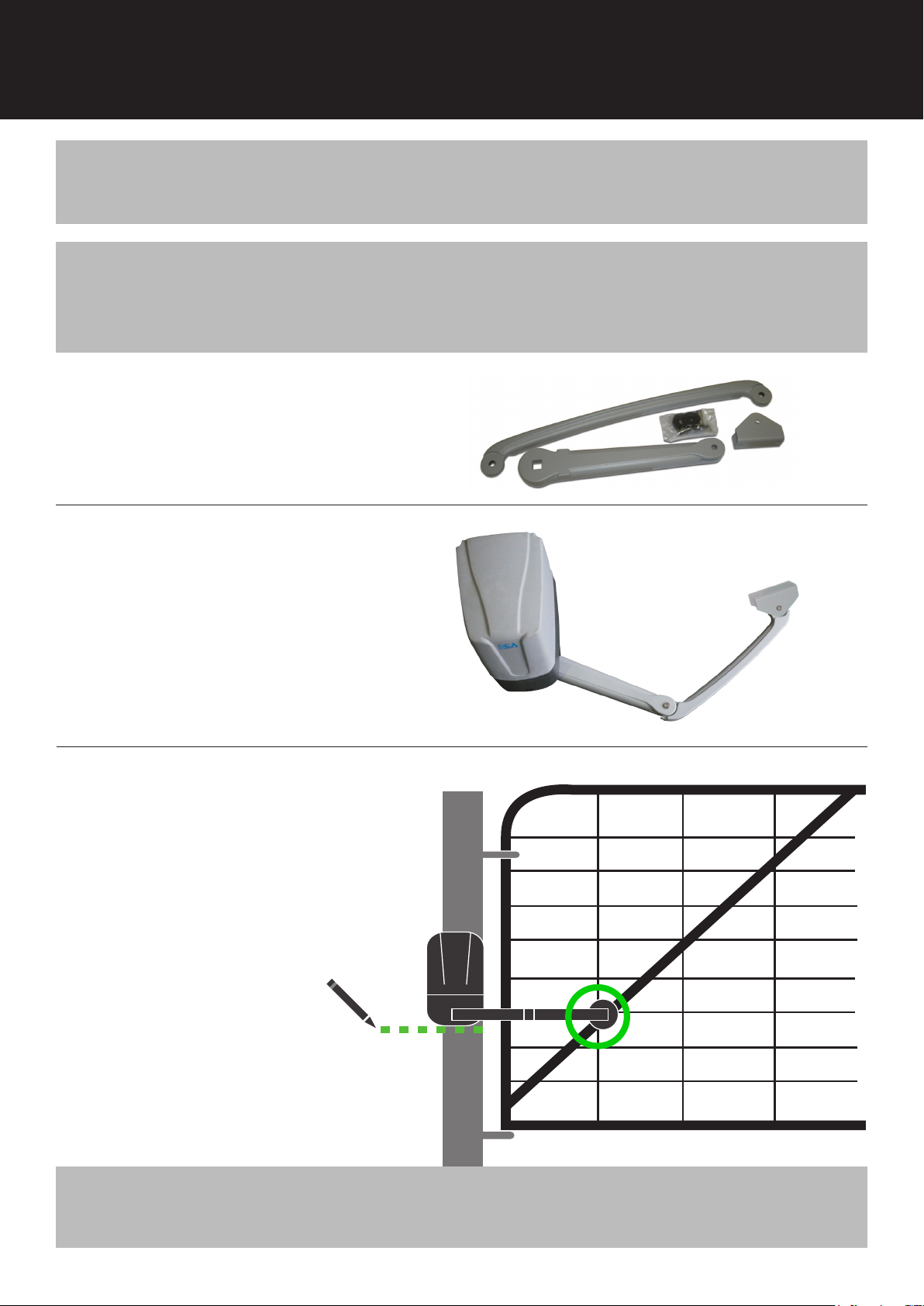
• Can be mounted on left or right post.
TIPS
NOTE
• Best motor position is half-way up gate post.
EXISTING GATES
Check gates are in excellent operating condition. Gates & hinges in poor
condition will give you trouble and prematurely wear the motor.
1
2
3
Pin all arms sections together.
Fit arm to motor.
Extend arm.
Close gates.
Mark posts at base where
motor will be mounted.
NOTE
Stay
Frame
Mount the motor where the arm meets the gate stay. Next best option is
the gate frame.
4
Page 5
4
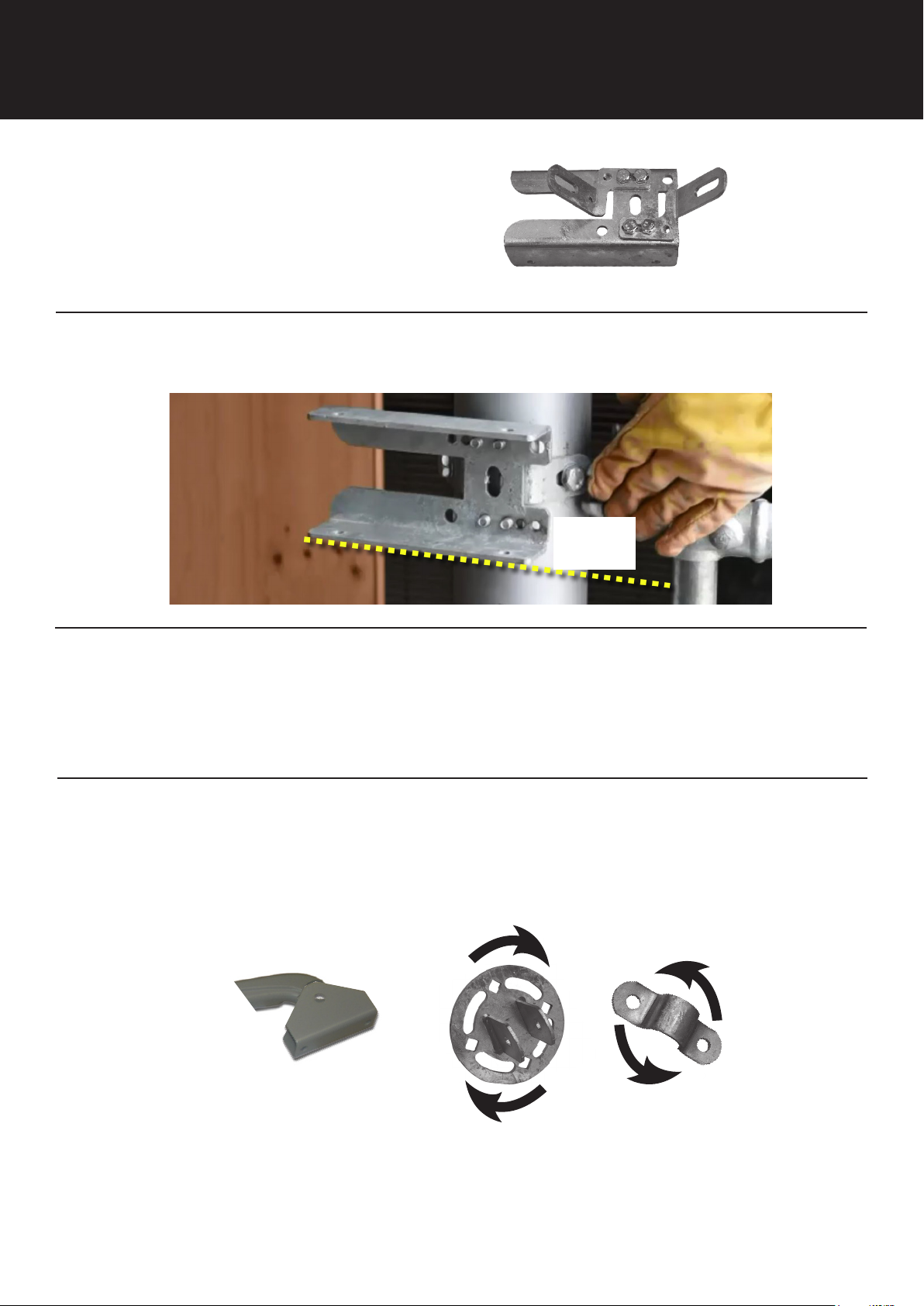
Adjust post bracket to t gate post.
5
6
Mount post bracket as shown, with bottom edge on mark. (See previous page)
GATE THIS
SIDE >>>>
Bolt motor to post bracket. Tighten arm on motor.
7
Play around to set the rotating bracket to the gate stay/frame.
Then attach it to arm pivot.
Arm
Pivot
5
Page 6
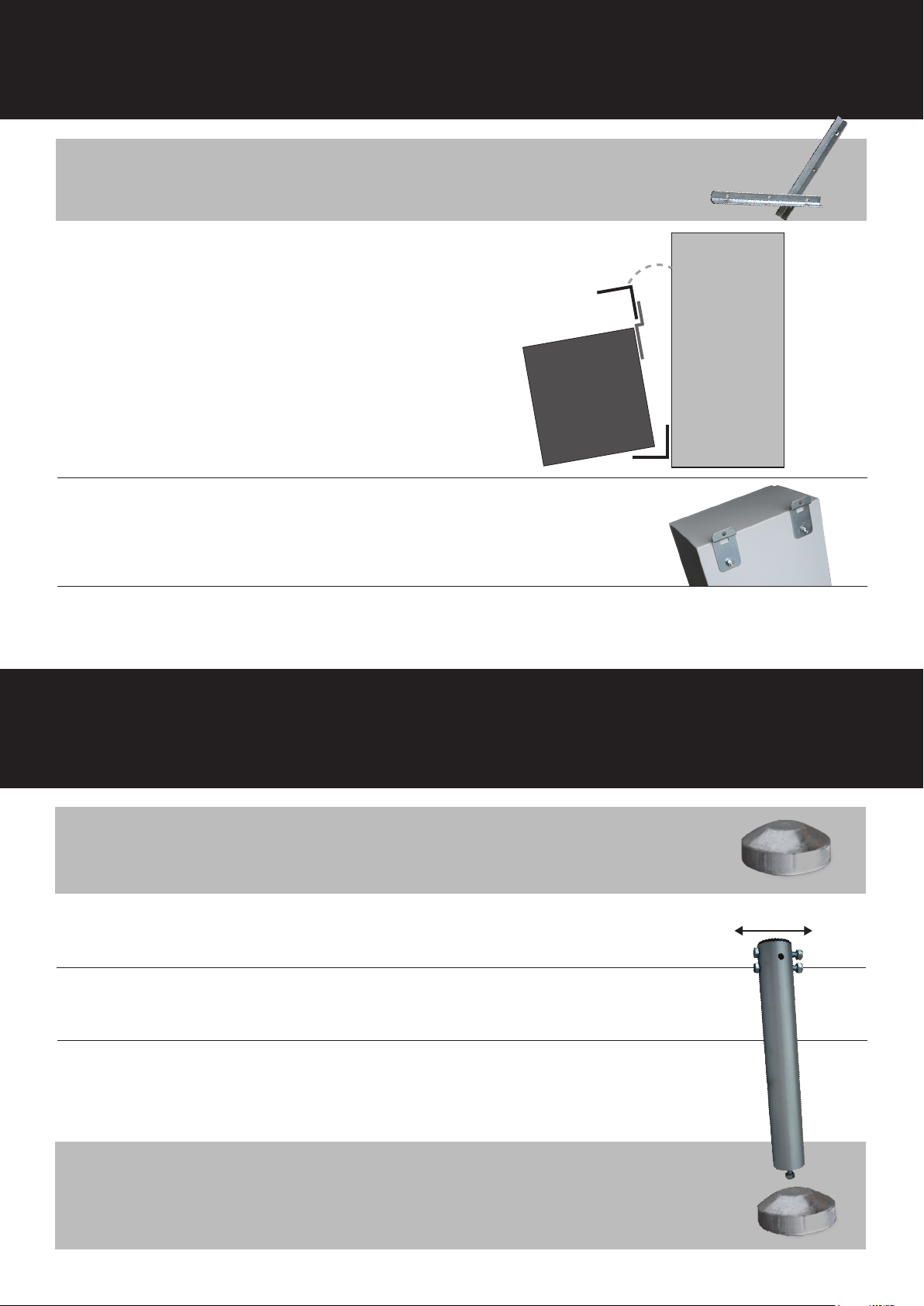
battery box
NOTE
Mount brackets not supplied. Good old steel angle does the job.
1
Mount an angle bracket to gate post,
with the solar panel.
Attach other angle bracket to battery box brackets (above).
2
Sit box on bottom bracket and attach top bracket to post.
Open battery box to remove foam packing.
3
Fit fuse into fuse holder.
solar panel post
Battery Box
Gate Post
Angle
Battery Box
NOTE
1
2
3
TIPS
Steel post cap not supplied in kit. Measure diameter of post
to match cap. Downee caps avail. to 150mm.
Drill a hole in centre of post cap and bolt it onto the panel post.
Position bolt holes east-west for the solar panel to face north.
Place cap & panel post on gate post. It may be tight and need
some encouragement with a rubber mallet. A couple of self
tappers will hold cap in place.
• Keep the solar panel box. You’ll need it a bit later.
• Not sure which direction north sits? Download a free
compass app onto your smart phone.
East-West
Panel Post
6
Page 7
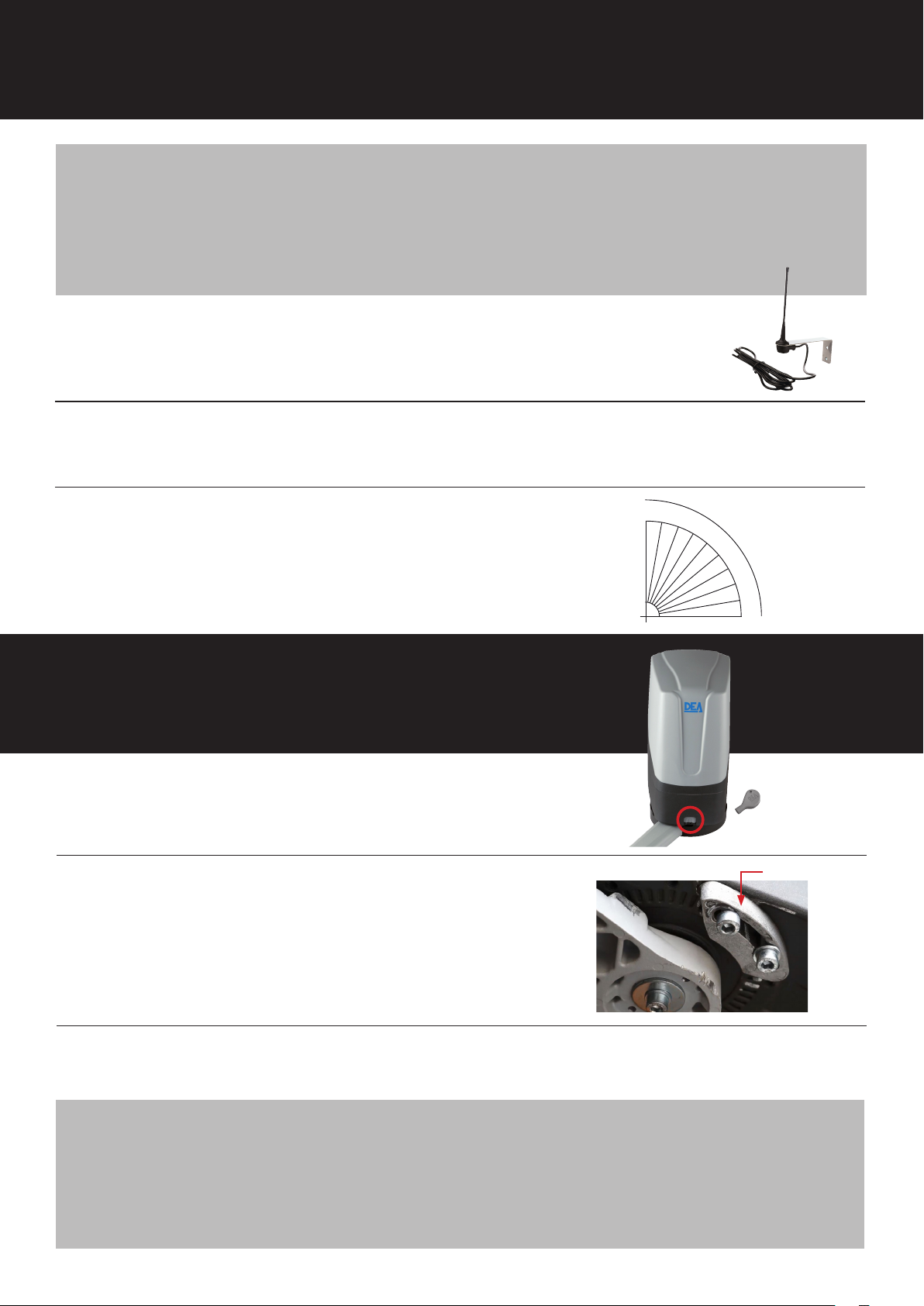
solar panel
If tree shade covers the solar panel between 9am – 3pm it can seriously
TIP
reduce the battery charge. Even if just for a short time.
Solar panel shouldn’t be covered by tree shade.
Panel can be placed in a full-sun position up to 30m* away from the gate.
*use low voltage cable (2-core + earth 2.5mm2).
1
2
PANEL
ANGLE
Tek screw aerial to top of solar panel frame.
Leave box on the panel. Bolt solar panel (facing north) to the panel post.
Set solar panel angle for maximum
charge. More locations on page 13.
gate stops
Unlock motor arm.
1
Close gate.
90
80
70
60
50
40
30
20
10
0
Key
2
3
TIP
Stop
Place a stop where arm will sit against it when
closed.
Adjust stops as needed, then tighten.
We strongly recommend physical stops in open & closed positions.
They remove a lot of stresses from the motor. A piece of angle works
justneasaground-stop.
We strongly recommend the use of a physical stop on both the open
& close.
7
Page 8
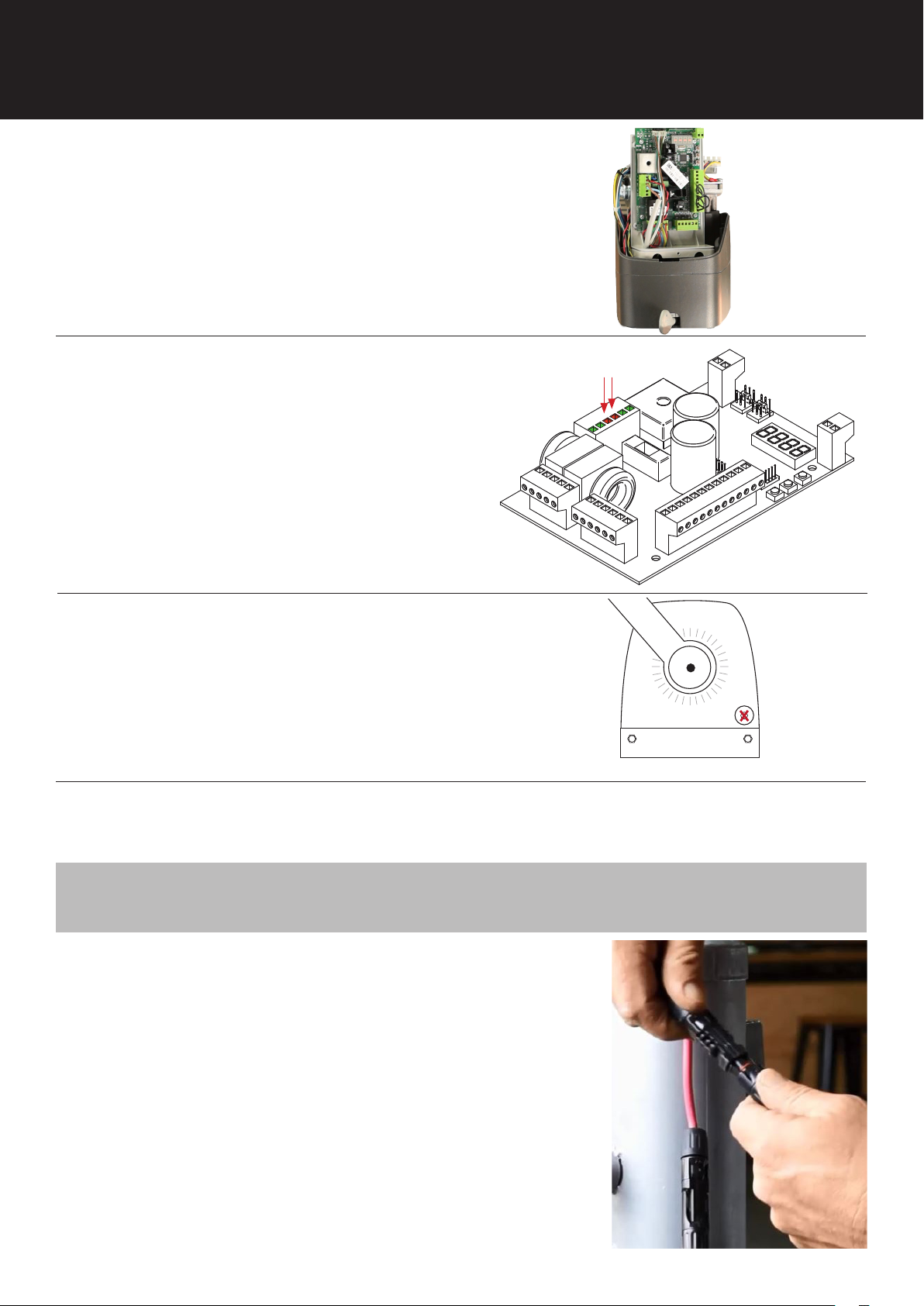
power up
1
2
Remove motor cover, and control board cover.
Remove existing black wires from
22VAC INPUT terminals. Pull them
through, out of the way.
Connect the brown-blue wires from
the battery into the 22VAC INPUT
terminals.
Control
Board
22VAC
INPUT
3
4
5
TIP
Control Board
Punch a hole in the grommet on motor base.
Grommet
Motor bottom view
Thread battery cable and aerial coaxial cable through the hole.
Strip the ends of cables.
Seal hole with silicone sealer. This will avoid problems caused when insects
nest in the motor.
Cover solar panel, connect black-red power
cables to Solar Panel and Batteries. Motor’s
control board plus solar controller are now
active. Controller may need to be turned on.
Cable tie the power cables against post.
8
Page 9
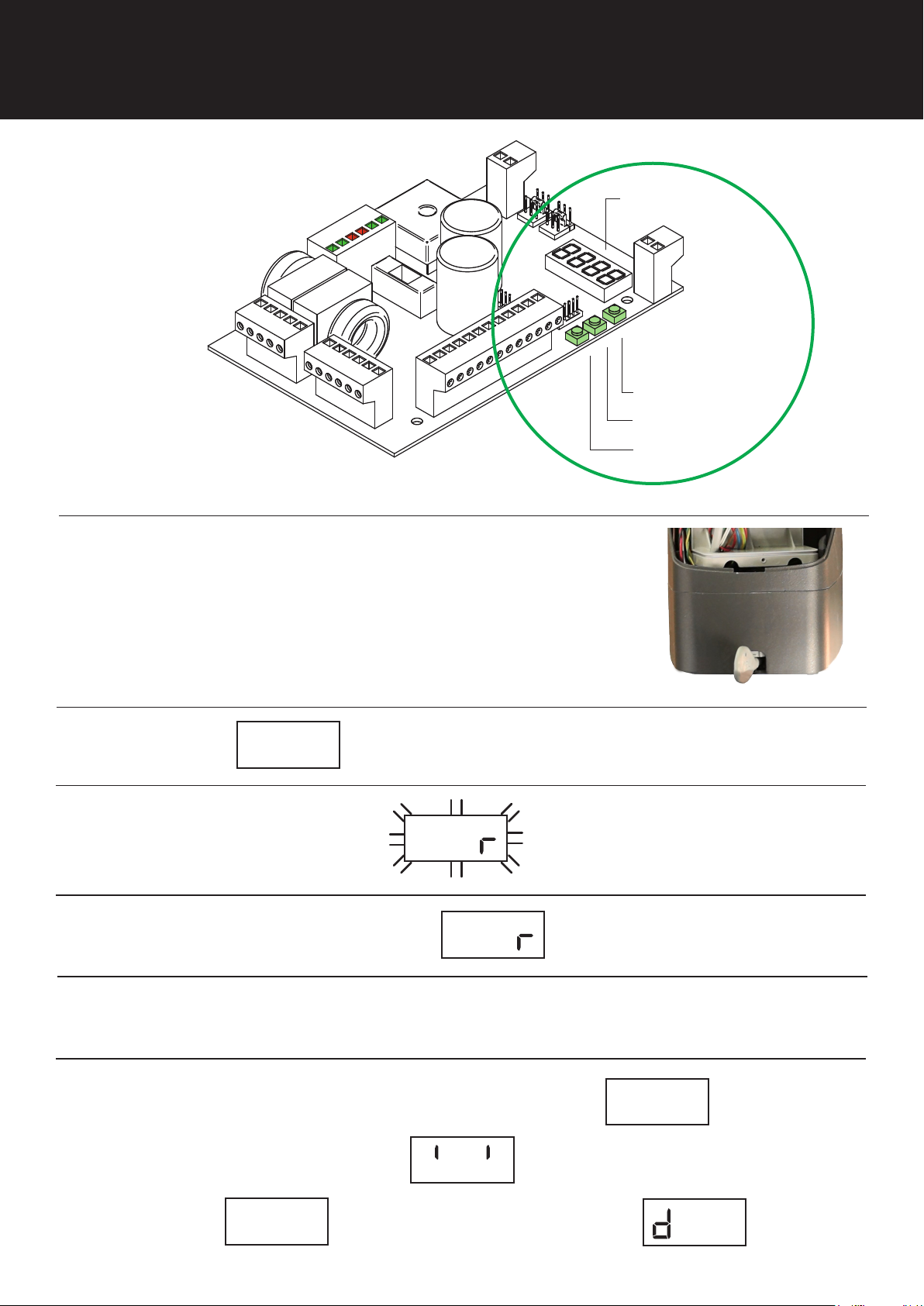
programming
Control Board
Digital
Display
Programming
Buttons
Scroll up
OK
Scroll down
1
2
3
4
5
Position gate half-way between open
closed. Lock arm with key (shown)
Scroll to shows on display.
Press middle button once. ashes.
Press & hold the middle button till stops ashing.
Gate will automatically open & close to search for gate stops.
Gate should nish in closed position.
8888p003
8888app
8888app
Arm lock key
6
The symbol for ‘Gate Closed’ shows when it’s nished.
If ‘Gate Open’ symbol appears
scroll to & press OK.
p 3
8888
06
8888- -
Change parameter to
9
8888----
8888
00
1
Page 10
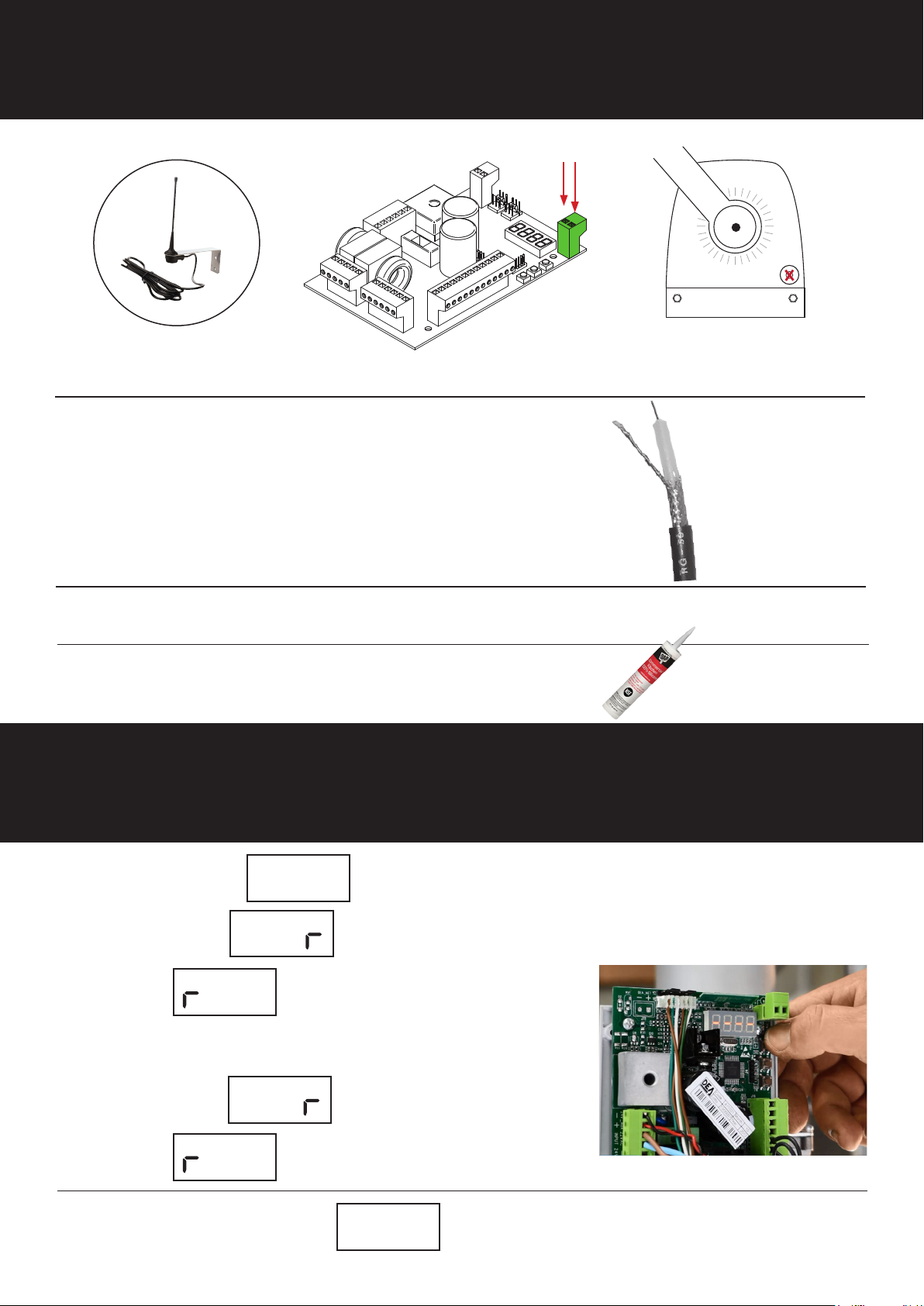
connect aerial
Aerial
Terminals
Grommet
1
2
3
4
Control Board
Thread coaxial cable through grommet in motor base.
Strip black outer cable approx. 50mm.
Separate inner & outer wires.
Twist outer wire.
Strip end o clear insulation.
Trim inner and outer cable to same length.
Connect both ends of coaxial in aerial terminals.
Completely seal the grommet with silicone sealant.
Motor bottom view
connect remotes
1
2
Scroll to & press OK
When shows, press any button on rst remote.
= remote connected.
8888
000
Within 8 seconds...
When shows, press second remote.
= second remote connected.
8888
00
Wait 10sec. for the symbol to conrm memory process is complete.
8888p005
a
8888le
a
8888le
1
____
8888
10
Page 11
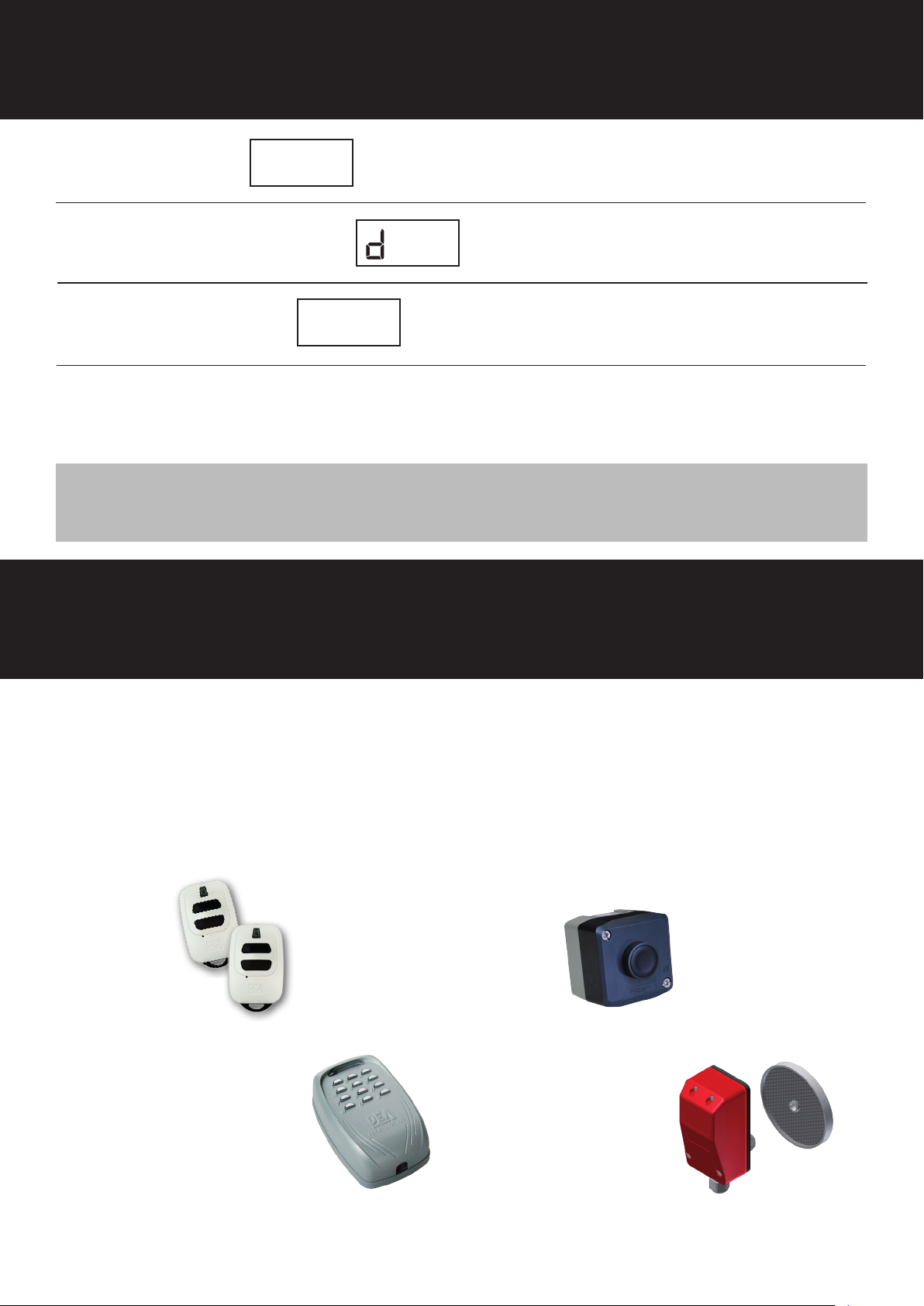
set solar mode
1
2
3
4
NOTE
Scroll to & Press OK
Change parameter to
Scroll back to
Test remote control.
If gate works replace the both covers ‘cos you’re done!
Insolarmode,screenwillturnoandblinkonceevery10sec
06
p 1
8888
____
8888
8888
00
1
accessories
The standard Sprint Gate is operated with remote controls. Other accessories can quickly and
easily be added to automate its open/close function such as visitor control and improved security.
However, more accessories will drain the batteries, so also consider upgrading your solar system
to a larger panel or bigger battery bank.
For more information see Access Control in the products menu on our website.
extra
remotes
ZIGGY-2B
open/close
control
AAC-PUSHB
wireless
keypad*
AAC-DIGIRAD
*Not supplied with SOLAR-LITE
reective
sensors*
AAC-PHR10
11
Page 12
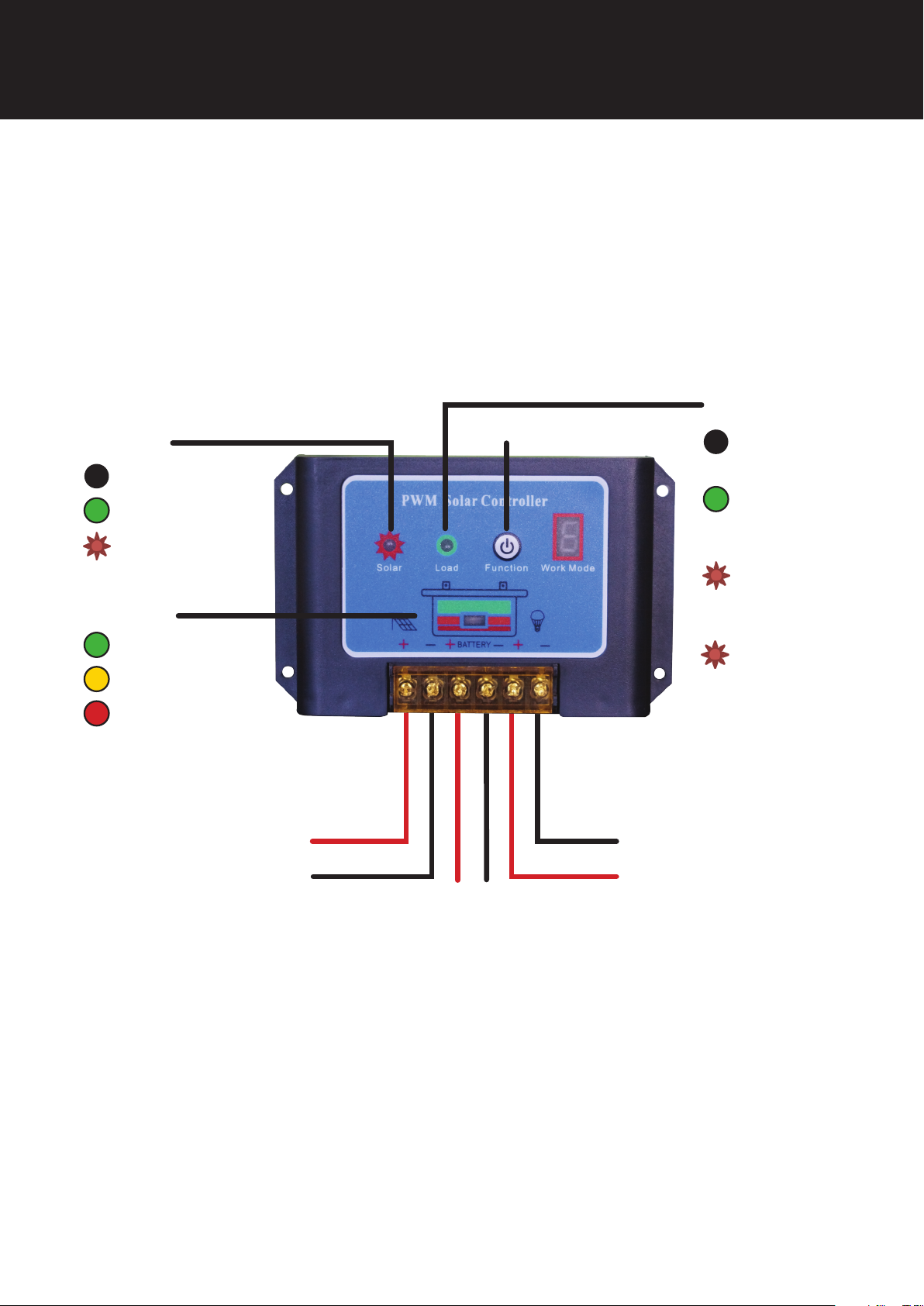
solar controller
The controller let’s you monitor solar panel and battery conditions.
No adjustments to controller are needed during installation.
Solar Controller is supplied pre-wired. Cables include connectors to plug the motor and
solar panel to the controller.
LOAD
ON/OFF
CHARGE
O: No Charge
On: Charging
Flash: Faulty Panel
O: Current
overload
On: correct
output
voltage
BATTERY
Voltage normal
Under voltage
Overcharge
PANEL
(pre-wired to
controller)
+
Slow Flash:
Over current
(momentary)
Fast Flash:
Short circuit
MOTOR
-
(pre-wired to
+
-
+
controller)
BATTERY
(pre-wired to
controller)
TROUBLE SHOOTING
No power at motor?
• Check fuse and connections
• If short-circuited or overloaded, press on/o button and wait 30 seconds.
• Check individual battery voltage with
multimeter. If under 11.1v, remove batteries and recharge using 12v car battery charger.
12
Page 13
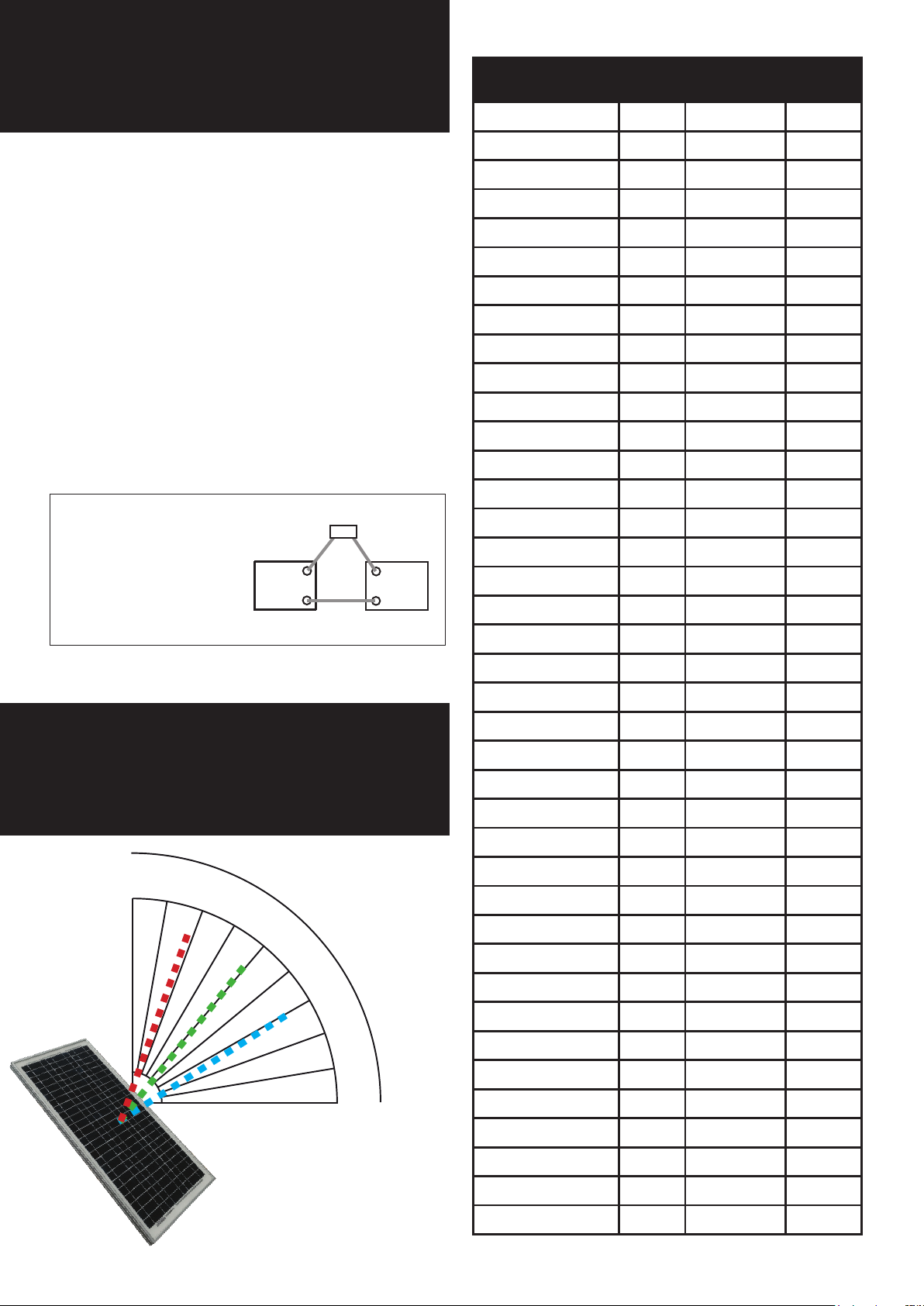
solar gates in winter
City Winter Spring/
Autumn
Adelaide 32° 55° 78°
Albany 32° 55° 78°
Summer
During colder months, solar gates in the
southern parts of Australia may not get
enough sun to fully charge batteries.
Homeowners may need to take simple steps
to keep their solar powered gate working
uninterrupted.
1. Adjust angle of the panel to maximise sun
exposure.
2. At the start of autumn and winter, charge
the batteries. This will stop batteries running
at, plus extend the life of the batteries.
Using a 12V car battery charger?
Disconnect cable between
batteries before charging.
solar
controller
-
+
batteries
x
+
-
Albury 30° 54° 78°
Alice Springs 42° 66° 90°
Armidale 36° 60° 84°
Ballarat 28° 52° 76°
Banora Point 38° 62° 86°
Bendigo 30° 53° 76°
Blacktown 32° 56° 80°
Brisbane 38° 62° 86°
Broken Hill 34° 58° 82°
Brunswick 28° 52° 76°
Buderim 40° 63° 86°
Bunbury 34° 57° 80°
Bundaberg 42° 65° 88°
Burnie 26° 49° 72°
Caboolture 40° 63° 86°
Carins 50° 73° 96°
Caloundra 40° 63° 86°
solar angles
90
80
70
60
50
40
30
20
10
0
Canberra 32° 55° 78°
Canning Vale 34° 58° 82°
Carindale 38° 62° 86°
Caringbah 32° 56° 80°
Carlingford 32° 56° 80°
Castle Hill 32° 56° 80°
Cessnock 34° 57° 80°
City of Parramatta 32° 56° 80°
Cos Harbour 36° 60° 84°
Craigieburn 28° 52° 76°
Cranbourne 28° 52° 76°
Cronulla 32° 56° 80°
Darwin 54° 78° 102°
Deception Bay 40° 63° 86°
Dee Why 32° 56° 80°
Devonport 26° 49° 72°
Tilt panel to suit
seasons.
Summer
Spring/Autumn
Winter
Dubbo 34° 58° 82°
Earlwood 32° 56° 80°
Echuca 30° 54° 78°
Engadine 32° 56° 80°
13
Page 14
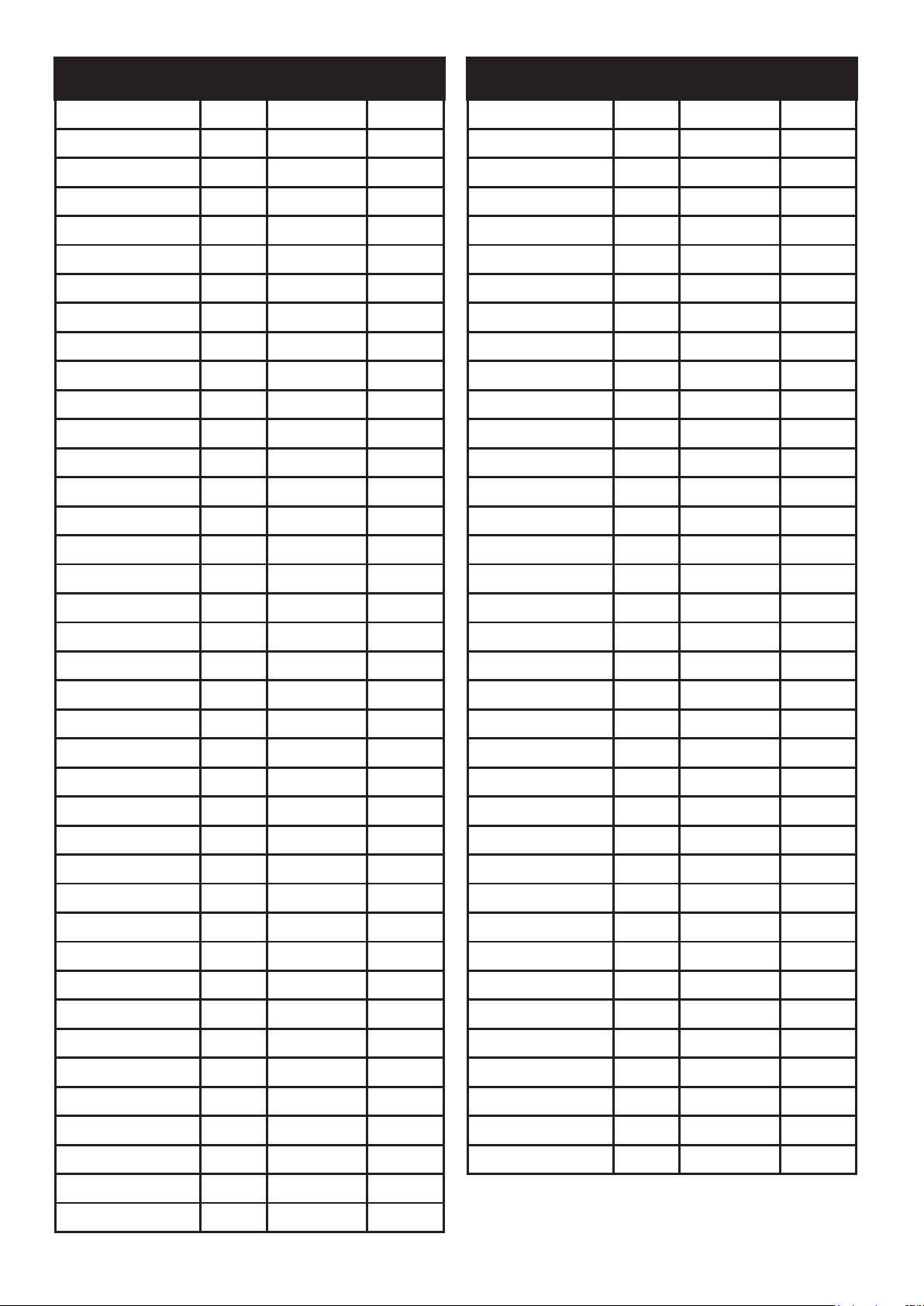
City Winter Spring/
Autumn
Summer
City Winter Spring/
Autumn
Summer
Epping 32° 56° 80°
Ferntree Gully 28° 52° 76°
Forster 34° 58° 82°
Frankston East 28° 52° 76°
Gawler 32° 55° 78°
Geelong 28° 52° 76°
Geraldton 38° 61° 84°
Gladstone 42° 66° 90°
Glenmore Park 32° 56° 80°
Gold Coast 38° 62° 86°
Gosnells 34° 58° 82°
Goulburn 32° 55° 78°
Granville 32° 56° 80°
Greensborough 28° 52° 76°
Grith 32° 56° 80°
Hobart 24° 47° 70°
Mount Isa 46° 69° 92°
Murray Bridge 32° 55° 78°
Nerang 38° 62° 86°
Newcastle 34° 57° 80°
North Shore 36° 59° 82°
Nowra 32° 55° 78°
Orange 34° 57° 80°
Palmerston 54° 78° 102°
Paramatta 32° 56° 80°
Perth 34° 58° 82°
Port Macquarie 36° 59° 82°
Port Stephens 34° 57° 80°
Quakers Hill 32° 56° 80°
Queanbeyan 32° 55° 78°
Rainbow Beach 40° 64° 88°
Randwick 32° 56° 80°
Hoppers Crossing 28° 52° 76°
Hornsby 32° 56° 80°
Jervis Bay Village 32° 55° 78°
Kalgoorlie 36° 59° 82°
Katoomba 32° 56° 80°
Kwinana 34° 58° 82°
Launceston 26° 49° 72°
Lismore 38° 61° 84°
Liverpool 32° 56° 80°
Logan City 38° 62° 86°
Mackay 46° 69° 92°
Mandurah 34° 57° 80°
Maroubra 32° 56° 80°
Marrickville 32° 56° 80°
Maryborough 40° 64° 88°
Melbourne 28° 52° 76°
Rockhampton 44° 67° 90°
Roebourne 46° 69° 92°
Shepparton 30° 54° 78°
South Brisbane 38° 62° 86°
South Grafton 36° 60° 84°
Southport 38° 62° 86°
Sunbury 28° 52° 76°
Sunnybank 38° 62° 86°
Surfers Paradise 38° 62° 86°
Sydney 32° 56° 80°
Tamworth 36° 59° 82°
Taree 34° 58° 82°
Toowoomba 38° 62° 86°
Torquay 42° 65° 88°
Townsville 48° 71° 94°
Traralgon 28° 52° 76°
Melton 28° 52° 76°
Mildura 32° 56° 80°
Mooloolaba 40° 63° 86°
Mornington 28° 52° 76°
Morphett Vale 32° 55° 78°
Mosman 32° 56° 80°
Mount Gambier 28° 52° 76°
Wagga Wagga 32° 55° 78°
Warrnambool 28° 52° 76°
Whyalla 34° 57° 80°
Wodonga 30° 54° 78°
Wollongong 32° 56° 80°
14
Page 15

trouble
shooting
Call our Tech Team
1800 241 733
15
Page 16

downee.com.au
16
 Loading...