

Page 1

585
Quick Start Guide
Page 2
2
Phone
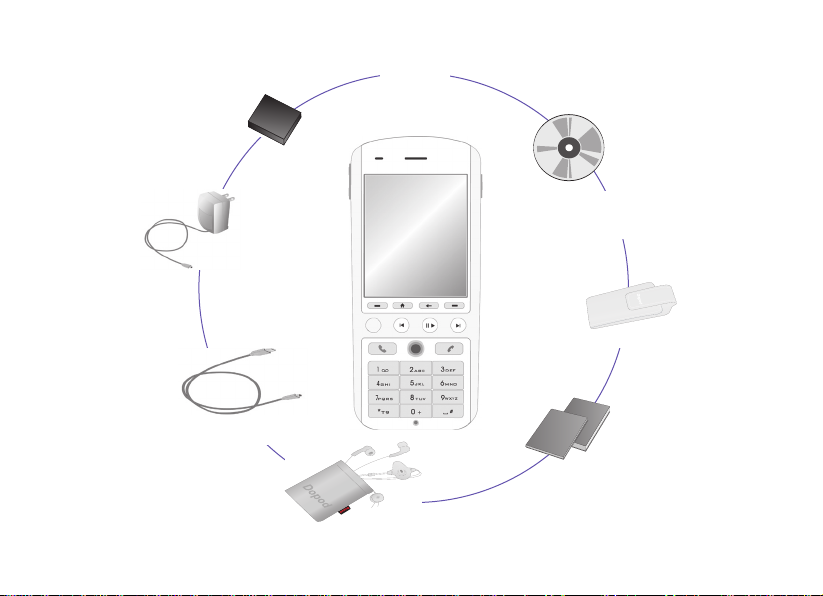
What's in the Box?
Sync Cable
Headset
User Manual and
Quick User Guide
AC Adapter
Battery
Carrying pouch
Companion CD
Page 3

3
Your Dopod585
Power Button
Speaker
Infrared Port
LED Indicator
Back:
Goes to the previous
screen, or backspaces over
characters.
Left/Right Softkeys: Select to
perform the command shown in
the label above the button.
End: Ends calls.
Volume Up / Voice Notes
Home:
Goes to the
Home screen.
Talk: Dials a phone
number; answers,
switches, or holds a call.
Media Player: Pause/Play/
Stop the current file playback.
Navigation Pad: Use
to scroll left, right, up, or
down. Or press straight
down for Action button.
# Key: Press and hold to
display a list of symbols.
* Key: Switches upper and
lower case text input, and
input modes.
Light Sensor: If enabled in Settings > Power Management, dark
conditions sensed here will activate a backlight under the keypad.
Camera: Launches the
Camera mode if not already
running. If already running,
captures an image or starts
capturing a video clip.
IE: Press to launch pIE
and go to the Operator
website.
Media Player: Next. (If not
already running, any of the
three Media Player buttons will
launch Windows Media Player.
Media Player: Previous.
Volume Down / Voice Tag
Page 4
4
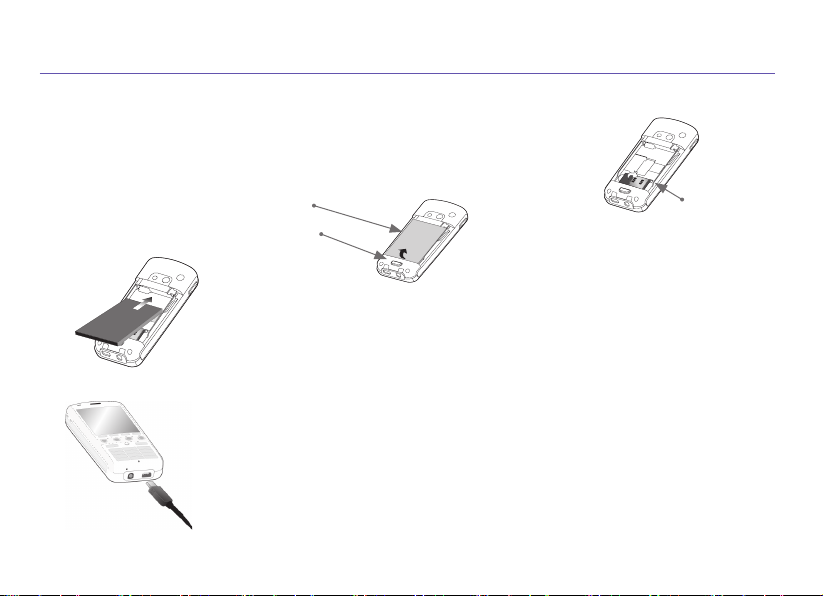
1. SIM Card and Battery
Inserting the SIM card
Press on the battery release latch to slide off the cover, and remove the
battery by lifting it up from the bottom end. Lift up the
SIM metal socket.
Insert the
SIM card with the gold-plated contact area on the card facing
down. Push the metal socket down to snap into place.
Inserting the battery
Insert the battery by aligning the exposed copper part of the battery pack with
the protruding copper conductor, then gently push the bottom of the battery
into place. Slide the cover on the phone.
Charging the battery
Charge the battery in your Dopod585 fully before turning it on for the first time.
Connect the power cable to the phone and plug it into an electrical outlet.
You can also charge the Dopod585 using the Sync cable while connected
to the PC's USB port.
Metal Socket
Battery Pack
Release Latch
Page 5

5
2. Turning On Your Dopod585 and Making a Call
Turning on your Dopod585
Press and hold the Power button for about 2-3 seconds to turn your
Dopod585 on (or off). Your mobile operator's screen and your Dopod585’s
Home screen will appear, prompting you to enter a PIN.
Activating your PIN
Activate the PIN (Personal Identification Number) as set by your mobile
operator. Enter the PIN number, then press the Left Softkey (“Done”).
Making a phone call
When in the Home screen, dial the phone number and press the Talk
button. You can also make a call directly from your Pocket Contacts or
from the Photo Caller ID utility, as explained in Chapter 2 of the User’s
Manual.
Power Button
Top View
Page 6

6
3. Synchronizing with ActiveSync
If you use Outlook on your desktop or notebook PC, you can synchronize E-mail, Contacts, Calendar,
and other data with your Dopod585.
Installing ActiveSync on your PC
Insert the ActiveSync CD into the CD drive of your PC. Follow the instructions on the screen. Once
installation is completed, connect the
Sync cable to your Dopod585, and plug it into your PC's USB
port to synchronize.
Establishing a partnership
Turn on your Dopod585 by pressing the Power button for 2-3 seconds. When the PC
detects the USB connection, it will start the ActiveSync New Partnership Setup Wizard.
Follow the instructions on the screen and select the items that you wish to be synchronized.
Your data will begin to synchronize between your Dopod585 phone and your PC.
Page 7

7
4. Surfing the Internet
You need to set up your Dopod585's data connection in order to surf the Internet, or access web-based
E-mail accounts. Your Dopod585 is already configured for Operator services.
Setting up an Internet connection
In the Home screen, select Settings > Data Connections from the Start menu. In the Internet
connection field, select the service offered by your mobile operator. (See Connecting to the Internet
in Chapter 5 of the User’s Manual for more information.)
Starting Internet Explorer
Highlight Internet Explorer on the Start menu, then press the Action button. Select an item from the
list, then press the Left Softkey (“Go”). Choose from the web sites listed, or select
Address Bar from
the menu and enter the URL address of the site you want to access. Then press
Go (Left Softkey).
Page 8

8
5. Using the Camera
Your Dopod585 is equipped with a camera (the lens is on the back of the device). You can capture
photos and short videos; then view and manage them. You can also directly send newly-captured or
existing files via E-mail or MMS, and edit still images.
Taking a picture or filming a short video
Select Camera from the Start menu to switch to Camera mode, or you can press the
Camera button on your Dopod585 (shown at right). The screen functions as a viewfinder.
From the menu, select the desired Capture Mode (Photo, Video, MMS Video, Photo ID,
or Picture Theme), and customize your options. Press the Camera or Action button on
your Dopod585, or the Left Softkey (“Capture”), to capture a photo. For video, press any
of them to start and to stop recording.
Camera Button,
located on the
right side of your
Dopod585.
Page 9

9
6. Entering Text, Numbers, and Symbols
To start a new line: Press the Action button.
To delete one character: Press the Back button once.
To delete all characters in a field:
Press and hold the Back button.
To enter a symbol: Press and hold the # key, select the symbol you want, and then press the
Done softkey.
Input Modes
To choose or change the input mode:
Press and hold the * key to pop up a menu, then select the
desired mode from the menu. An icon indicating the current input mode is shown in the Title Bar, as
follows:
Multipress mode: To enter the first alphabetic letter shown on a key, press the key once. If you
want to enter the second letter, press the key twice quickly, and so on.
T9 English mode: Press the number keys that contain the letters you want to form a word, and T9
will complete the word with suggestions, matching your entries character by character. If a suggestion
does not match the word you are looking for, enter the next letter of the word.
Numeric mode: Press the key containing the number you want to enter.
Page 10

10
Program Icons
Some items available in your phone’s Programs group are listed below. To access them, select
Programs from the Start menu. To start one of these programs, highlight it and then press the
Action button.
Messages
Lets you read received E-Mail, MMS, or SMS
messages; or compose new ones.
Contacts
Opens your contacts list alphabetically.
Calendar
Record your important events, and set alarms to
remind you when important events come up.
Settings
Personalize your phone to suit the way you use it.
Internet Explorer
Browse the Internet or visit your favorite sites on
your Dopod585, even while on the move.
ActiveSync
Keep your Contacts, Tasks, E-mail, and Calendar
events up-to-date on both your computer and
your phone, by synchronizing regularly.
Call History
View information about phone calls you have
made and received, such as length of last call
and Missed Calls.
MSN Messenger
Keep in touch with your friends in real-time by
subscribing to this free service.
SIM AT Manager
This is the SIM Application Toolkit (dependent on
which services you subscribe to).
Page 11

11
IE
Launch the Operator web site, where you can
access your E-mail, news, sports, music, games,
and more.
Camera
This application launches the Camera mode, which
lets you take pictures and shoot video clips using
any of five capture modes.
Java Manager
With Java MIDlet Manager, you can download and
manage additional Java games and utilities.
Photo Caller ID
Assign photos or animated GIF files to your
Contacts, so that when people call you, their Photo
ID will appear on your Dopod585's screen.
Tasks
Keep track of what you need to do, or have your
phone alert you of important pending events.
Voice Notes
Record your thoughts using your phone’s built-in
audio recorder, and save for later playback.
Windows Media Player
Play music and watch video clips while on the
move.
Page 12

12
Status Indicators
Status indicators are displayed in the Title Bar at the top of your Dopod585 phone’s screen.
New e-mail
New voice mail
New instant message
Voice call active
Data call active
Call forwarding
Call on hold
Missed call
“1” indicates Line 1; “2” indi
-
cates Line 2
Battery full
Battery very low (less than
4%)
Battery fault
Signal strength
Radio off
GPRS available
GPRS in use
Ringer off
Multipress input lower
Multipress text input mode,
uppercase
Multipress text input mode,
caps lock
T9 text input mode, lower
-
case
T9 text input mode, upper
-
case
Caller ID monitor is off
Caller ID monitor is running
 Loading...