

Page 1
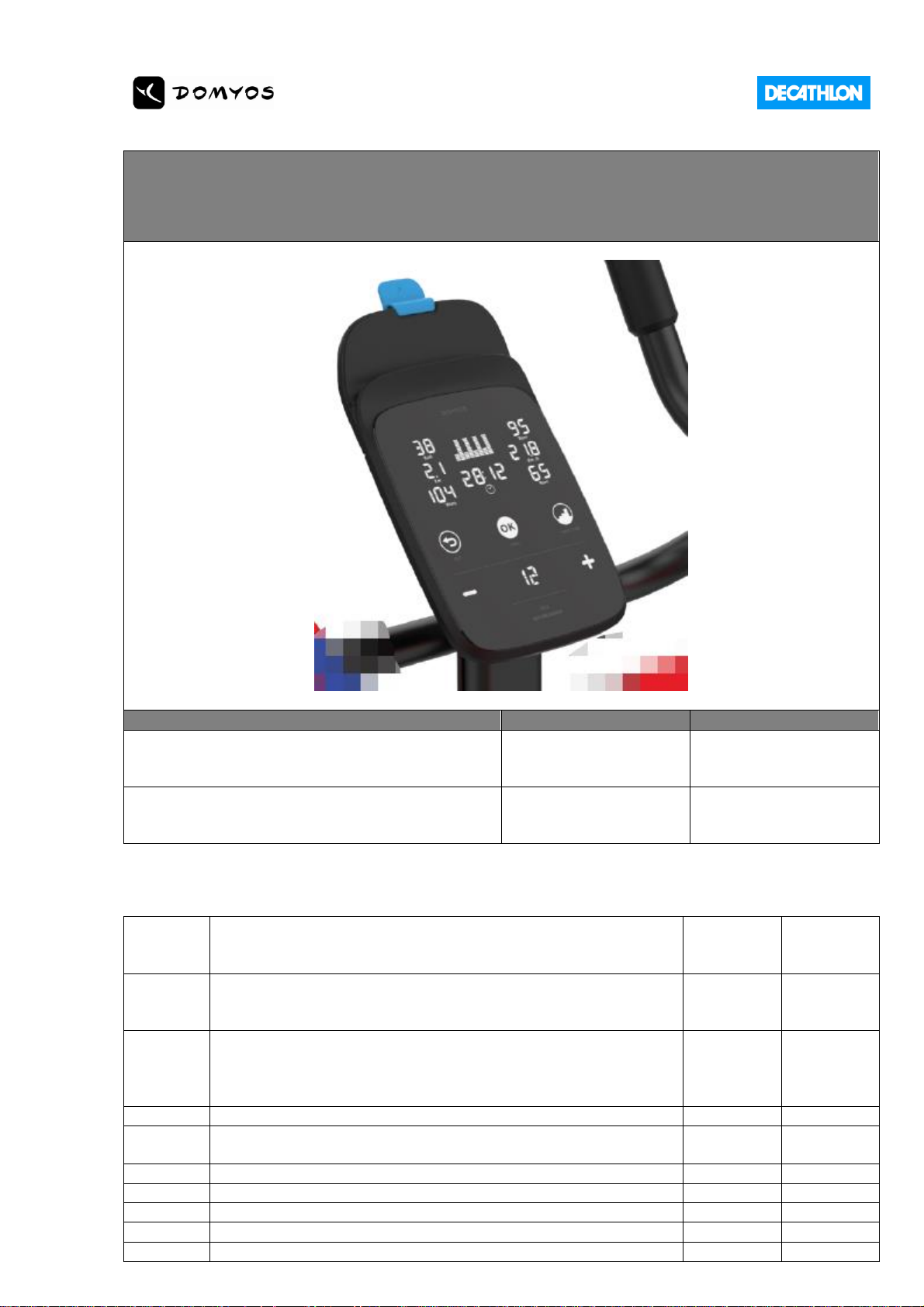
DOMYOS CONSOLE 3.2
- TECHNICAL SPECS -
PROJECT NAME
CONCEPTION CODE
MODEL CODE
DOMYOS CONSOLE 3.2 EN
325366
8586821
DOMYOS CONSOLE 3.2 CN
325366
8586822
REVISION HISTORY
2020-04-10
1. Keyflow update for BIKE 900/FEL 700/R500 SP
2. Remove Bluetooth light sensor
3. Initial heart value starts from 80
12
LEO LV
2020-02-28
1. Add CMIIT_FCC_IC sticker
2. Add FCC Statement
3. Add IC Statement
11
LEO LV
2019-12-15
1. Update Firmware(V 1.1) to connect new E CONNECTED APP,
2. New traceability sticker to better identify,
3. New Bluetooth Mapping
4. Stickers Colour Identification
10
LEO LV
2019-08-22
Add CMIIT ID sticker
9
LEO LV
2019-07-30
Specification Update for Mass Production V4(Table Page/Keyflow
Error Code)
8
LEO LV
2019-07-29
Specification Update for Mass Production V3(Front Casing/PMMA)
7
LEO LV
2019-07-22
Specification Update for Mass Production V2
6
LEO LV
2019-05-29
Specification Update for Mass Production
5
LEO LV
2019-02-25
Resistance level keep as 15, adjust Key flow to adapt LCD design
4
LEO LV
2019-01-16
Update for first prototype
3
LEO LV
Page 2
2018-12-18
Remove WATT display/USB charging, update name as console 3.2
2
LEO LV
2018-12-13
ORIGINAL DOCUMENT based on Console 2.1
1
LEO LV
DATE
DESCRIPTION
REVISION
AUTHOR
TABLE OF CONTENTS
1. PRODUCT PROFILE 3
1.1. Introducing 3
2. Standards of CONSOLE 3.2 4
3. USER-keyflow and Machine-Keyflow 4
4. Electronic hardware 5
4.1. Electronic schematic 5
4.2. PCBA 5
4.3. Bill of Material 5
4.4. Main EE components 5
4.5. Hand-pulse cables 5
5. Mechanical hardware 6
5.1. 2D drawings of consoles parts and assembly 6
5.2. Datasheet of the plastic parts 6
5.3. Elastic strap (for the tablet holder hook system) 2D drawing 7
5.4. Membrane artwork and cosmetic 7
6. Traceability 9
7. Bluetooth specification 10
7.1. Technical specification under this [LINK] 10
7.2. CMIIT_FCC_IC Label 11
7.3. FCC Statement 11
7.4. IC Statement 12
Page 3
1. PRODUCT PROFILE
1.1. Introducing
DOMYOS CONSOLE 3.2 is designed for FEB 900/FEL 700/R500 SP, finally assembly in ARCANA.
This console is connected thanks to Bluetooth Low energy protocol.
This console can connect an APP with Android and IOS devices as to provide a new user experience.
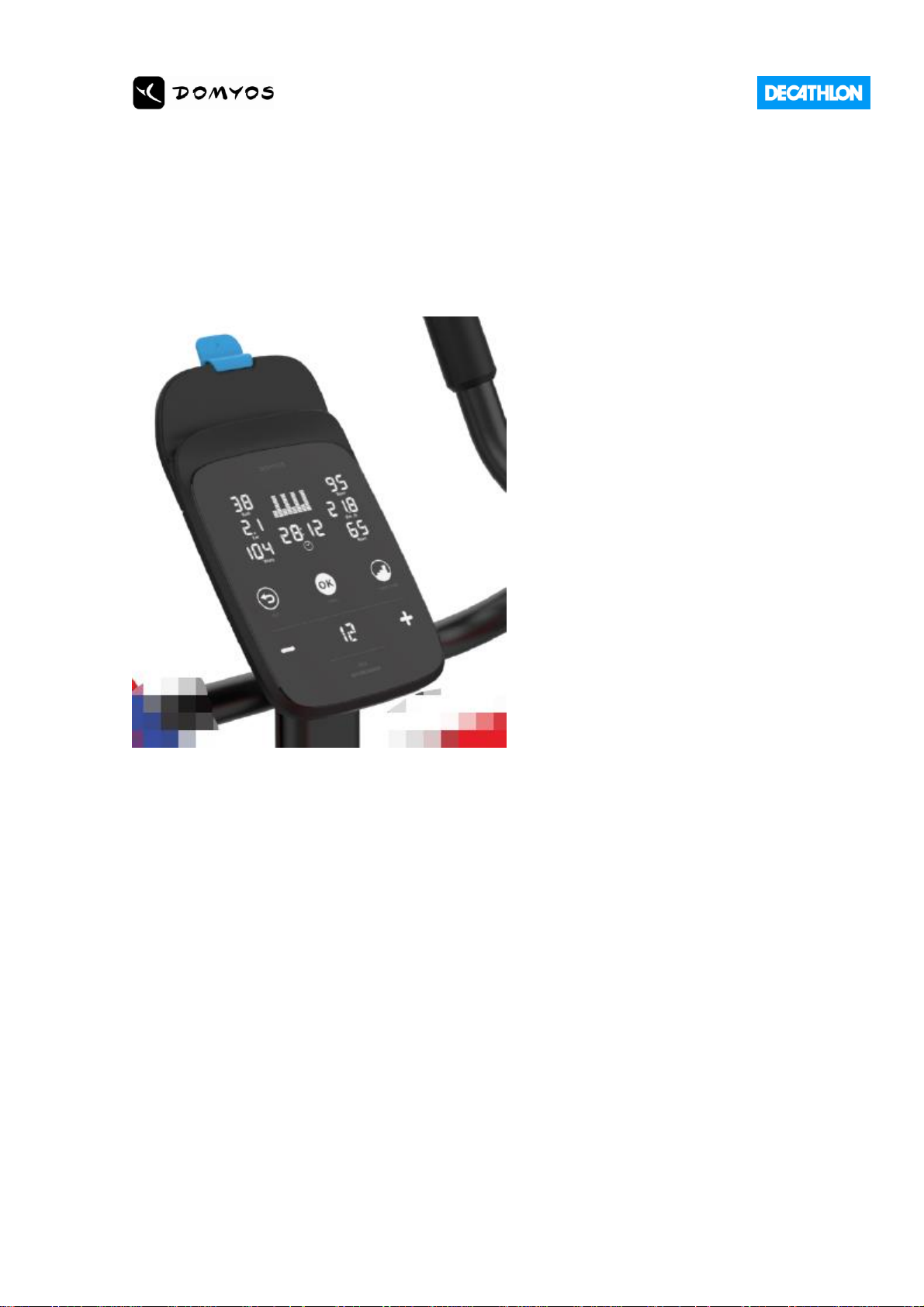
Console 3.2 main features:
● LCD (reversed / Backlight, 127 * 59 mm) :
● RPM information (pedalling cadence)
● KCAL information (calories burnt)
● SPEED information (Km/h or Mi/h)
● DISTANCE information (Km or Mi)
● HR information (Bpm)
● RESISTANCE LEVEL (1 to 15) separated display in small LCD(40 * 23 mm)
● TIME
● Workout profile (12x8 dots matrix)
● Bluetooth icon controlled ON or OFF by bluetooth through APP
● 5 touch-keys (capacitive membrane). Keys are in white colors.
● 24 programs(6 Calories, 6 Health/Fitness, 6 Tonification / 6 Performance)
● One heart-rate receiver
● One hand-pulse receiver + jack cable
● One chest-belt NOT provided with the Console 3.2
● Power by self power system(Control Board from Eway)
● PCBA LED Color: POWER LED RED, BLUETOOTH LED BLUE
● Tablet click color is BLUE for Fitness Bike
● LCD cover is shiny(PMMA)
Page 4
2. Standards of CONSOLE 3.2
DOMYOS CONSOLE CONCEPTION VALIDATION PLAN
CONSOLE PVC.xlsx
3. USER-keyflow and Machine-Keyflow
User-keyflow is the main keyflow used by end-customer.
20200410_keyflow_
bike900.pdf
20200410_keyflow_
FEL700.pdf
20200410_keyflow_
R500 SP.pdf
DECATHLON CONTROL
Test can be done using a bike or jig simulator proposed by Supplier.
Functional test of the user-interface of the console :
1) Displays are working and information values are changing during a training session.
(Kcal, distance, time, rpm, BPM (
when active
), resistance level, WATT)
2) Each touch-key is activate during a finger touch contact < 1 second
3) Servo-motor is turning when increase or decrease a resistance level (0 to 15)
ACCEPTANCE CRITERIA
Main functions are ok according to key flow specification
Machine-keyflow is a ghost menu for maintenance. This menu can check :
1. The firmware version of the console
2. The hardware version of the console
3. Console total time of use
4. Console total km of use
5. Console serial number (see traceabilty paragraph)
Machine-keyflow has also choice menu where end-user can change distance unit (from Km to Miles) and
Button Sound ON/OFF.
DECATHLON CONTROL
Firmware version is 1.1 (enter inside maintenance ghost menu)
Hardware version is 1.0 (enter inside maintenance ghost menu)
By default, console distance unit is Km, Button Sound is ON.
Page 5
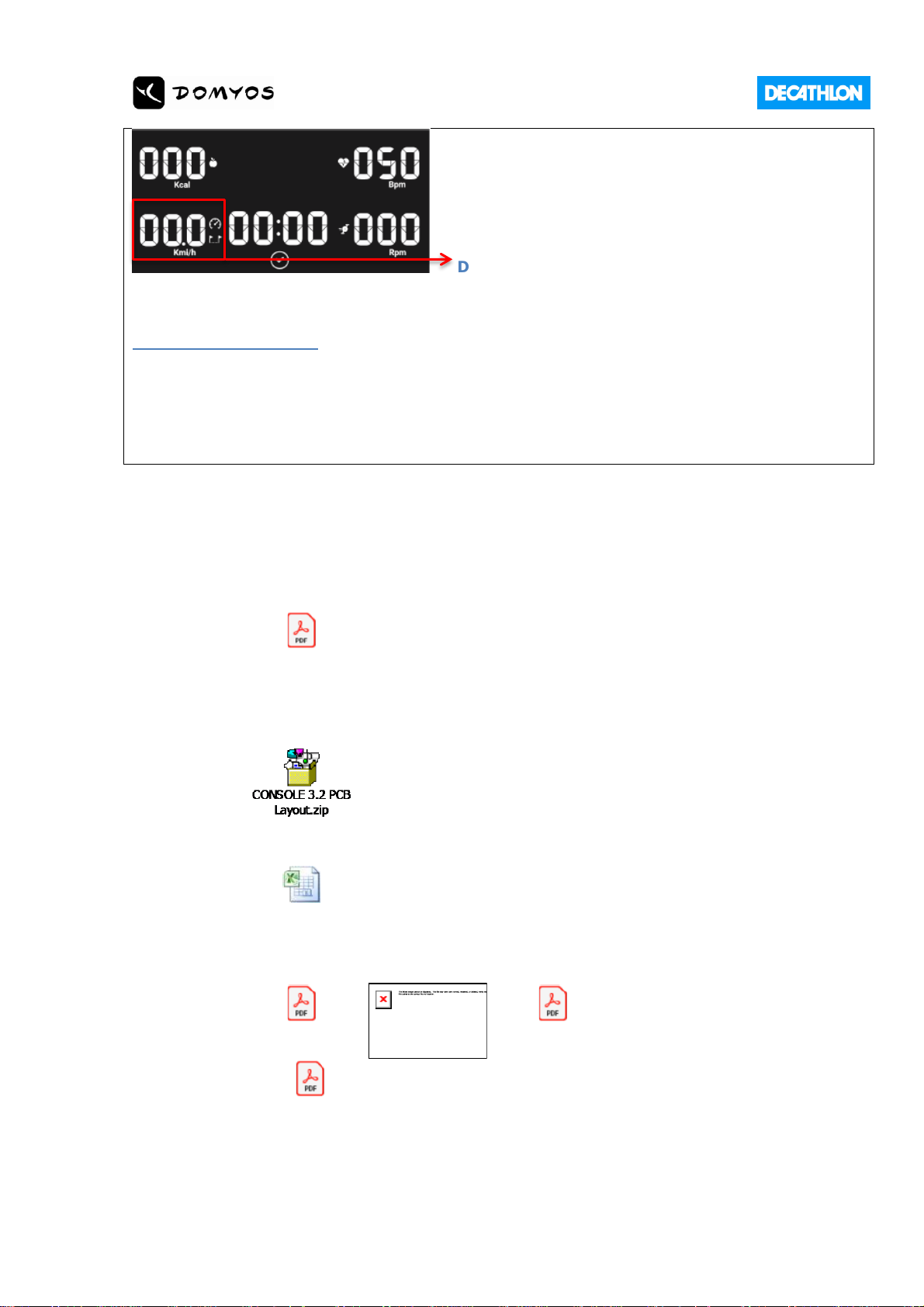
Display distance then speed every 5s(default)
Toggle-switch selector on the rear-casing is on VM
ACCEPTANCE CRITERIA
Firmware and Hardware version are ok
Default setting is ok
Traceability code from firmware is coherence with traceability sticker on casing, the
information is right
4. Electronic hardware
4.1. Electronic schematic
CONSOLE3.2
Schematic Design.pdf
4.2. PCBA
4.3. Bill of Material
CONSOLE 3.2 BOM.xls
4.4. Main EE components
HR7P201.PDF
NUC029.pdf
Small Back Light
Board.pdf
4.5. Hand-pulse cables
Page 6
DECATHLON CONTROL
Using Supplier hand-pulse sensor kit. For information hand-pulse monitoring is less accurate
than chest-belt monitoring.
Without tablet and smartphone put on the console tablet holder :
Testing method as end-user case :
a) put your hands on hand-pulse sensors jig
b) waiting 30 seconds to get a stabilized value
c) after these first 30 seconds, check if value fluctuation is under +/- 10bpm during 30 more seconds.
With tablet and smartphone put on the console tablet holder :
Testing method as end-user case :
a) put your hands on hand-pulse sensors jig
b) waiting 30 seconds to get a stabilized value
c) after these first 30 seconds, check if value fluctuation is under +/- 10bpm during 30 more seconds.
ACCEPTANCE CRITERIA
Heart-rate is ok with hand-pulse sensors
5. Mechanical hardware
5.1. 2D drawings of consoles parts and assembly
Console_3_2
Mechanical BOM.xlsx
Console 3.2 explosion
view.pdf
Console Inner Box
Drawing.pdf
Console Carton Box
Drawing.pdf
5.2. Datasheet of the plastic parts
TPR :
TPR Data sheet.doc
TPR MSDS.doc
Protection film:
PET Data Sheet.doc
PET MSDS.xlsx
Casing:
ABS
AG15E1-E4B23AP.pdf
ABS MSDS.pdf
Membrane (PMMA):
Page 7
PMMA Data Sheet.doc
PMMA MSDS.doc
5.3. Elastic strap (for the tablet holder hook system) 2D drawing
Console 3.2 Strap
2D.pdf
5.4. Membrane artwork and cosmetic
Important:
1. Words are in Chinese for China Version
2. Protection film is blank for China Version
Phone / Tablet Sticker
Console 3.2 Phone
Sticker 2D.pdf
Page 8
DECATHLON CONTROL
Cosmetic :
1) Few scratches on protection film surface
2) Protection film has no fold, no tear
3) No scratches on PMMA surface
4) No trace of glue on the edges of rubber and PMMA
5) No trace of incrusted dust on plastic casing
6) PMMA print is correct and clean (no drip, print is uniform, compliant with artwork)
Assembly :
1) Casing is correctly clipped all around (<1mm of air gap between front and rear plastic casing)
2) PMMA stickness is correct (example of 4 hours temperature 70°C test)
3) Rubber stickness is adjusted on all edges (<1mm of air gap between rubber edge and plastic
casing)
4) Rubber stickness is correct (example of 4 hours temperature 70°C test)
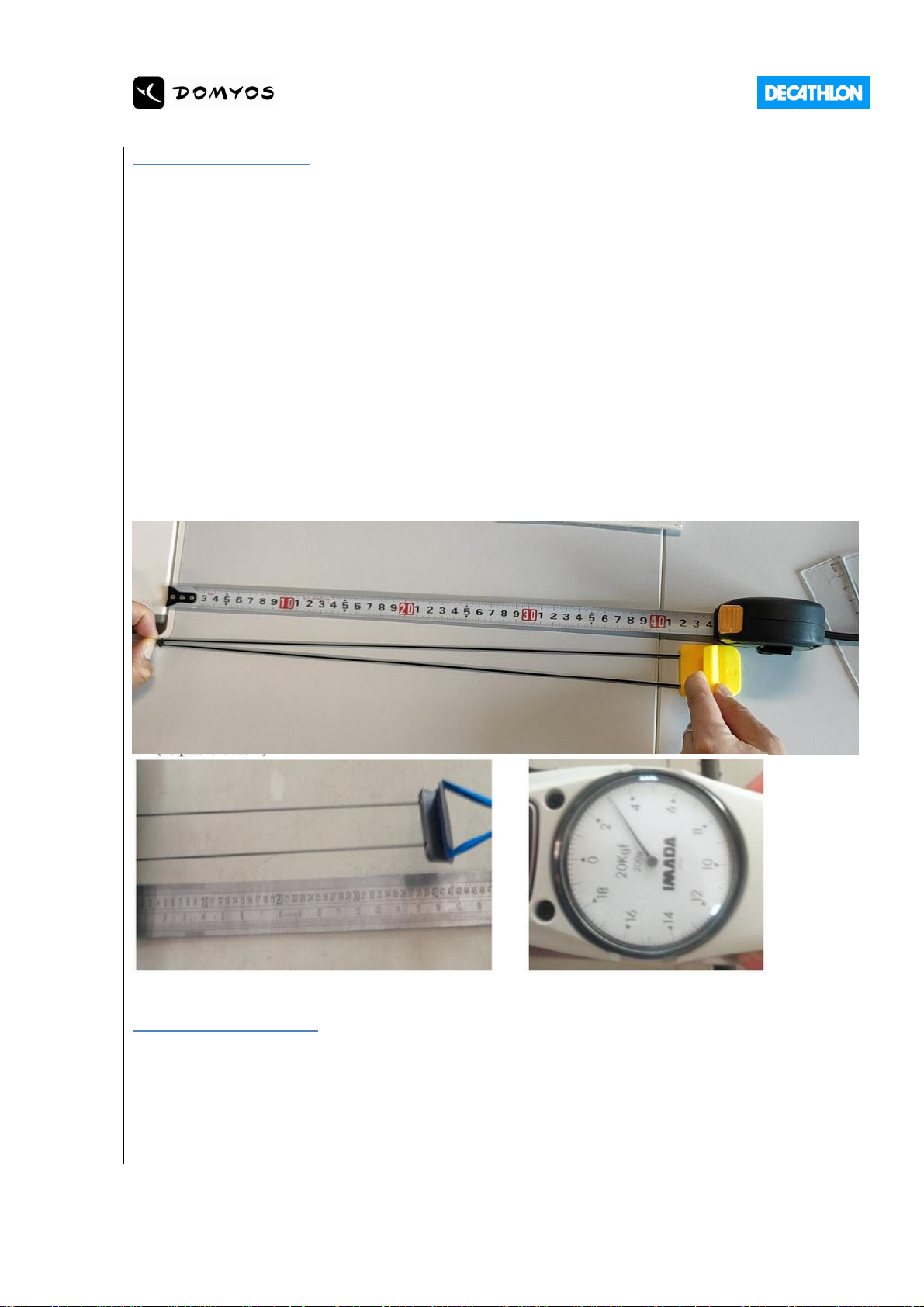
5) Elastic strap is correctly fixed, the plastic hook can cover a IPAD 10” when in landscape
The maximum lenght is 420mm (+/-5mm) after streching with a maximum pulling-force of 3,1Kg
ACCEPTANCE CRITERIA
This control is very subjective, trust on QPL high requirement to validate or not.
Rubber Pad is made by Double Injection, Decathlon has paid Double Injection Mold, QPL should make
sure production is using double injection.
Page 9
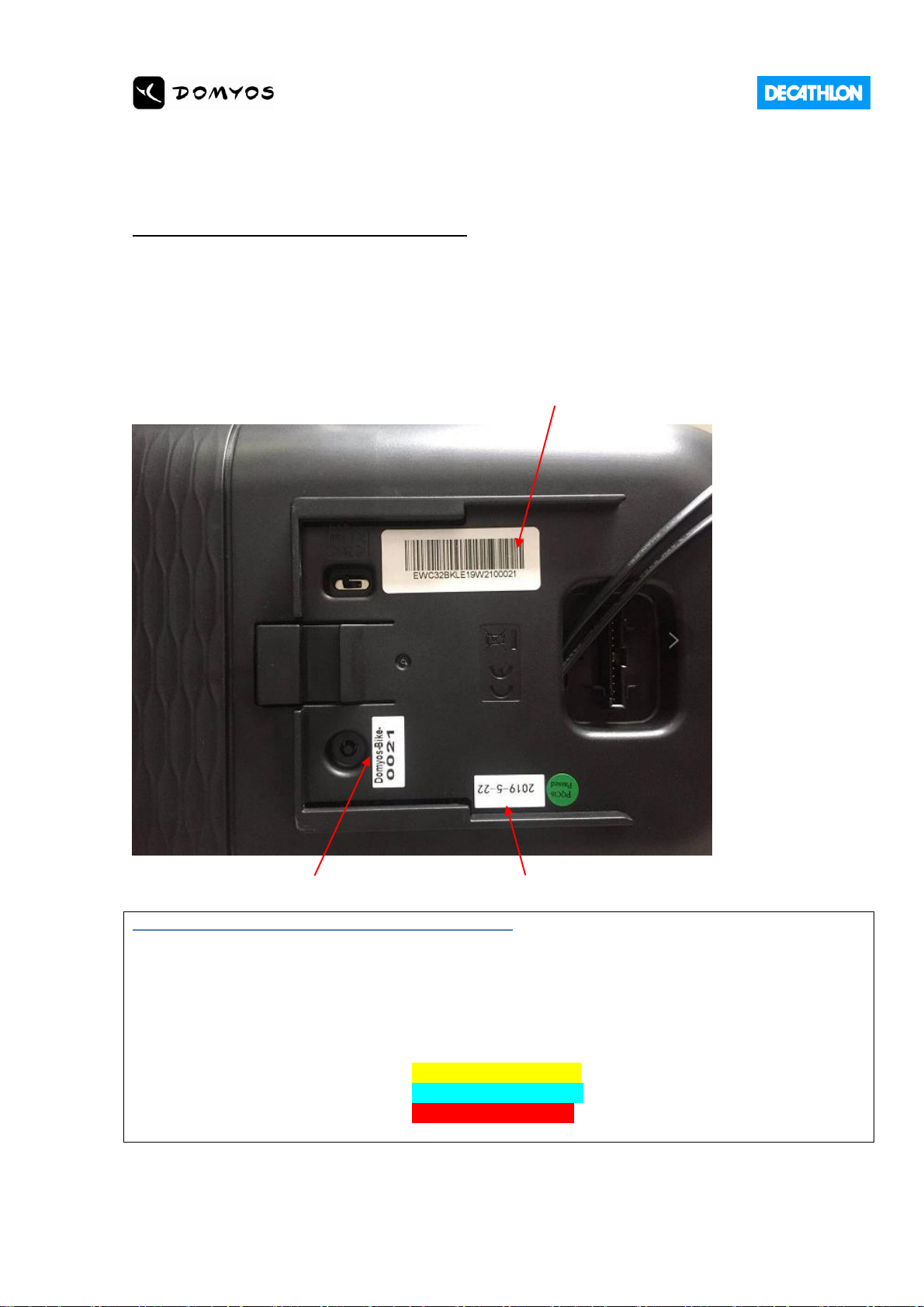
6. Traceability
Traceability sticker : console serial number
Format:EWC32ELEYYWwwxxxxx or EWC32ELCYYWwwxxxxx
Example: EWC32ELE17W0300001 (the 1st console produced in week
03/2017) (EW = Eway, C32= Console 3.2, BKE = Bike Europe or BKC =
Bike China)
LEO LV 20191215 Update:
Format:EWC321ELEYYWwwxxxxx or EWC321ELCYYWwwxxxxx
Example: EWC321ELE17W0300001 (the 1st console produced in week
03/2017) (EW = Eway, C321= Console 3.2.1, BKE = Bike Europe or BKC =
Bike China)
ID of the console for Bluetooth connection internal Supplier production sticker
DECATHLON CONTROL / ACCEPTANCE CRITERIA
Stickers are ok, traceability is ok
Console serial number inside firmware must be compliant with serial number on traceability
sticker (checking with Machine Keyflow menu)
Stickers Colour Identification for Anti Mixing:
Elliptical 椭圆机 Example FEL 520 / CONSOLE 3
Bike 健身车 Example EB900 / CONSOLE 3.2
Rower 划船器 Example R120 / CONSOLE 1.1
Page 10
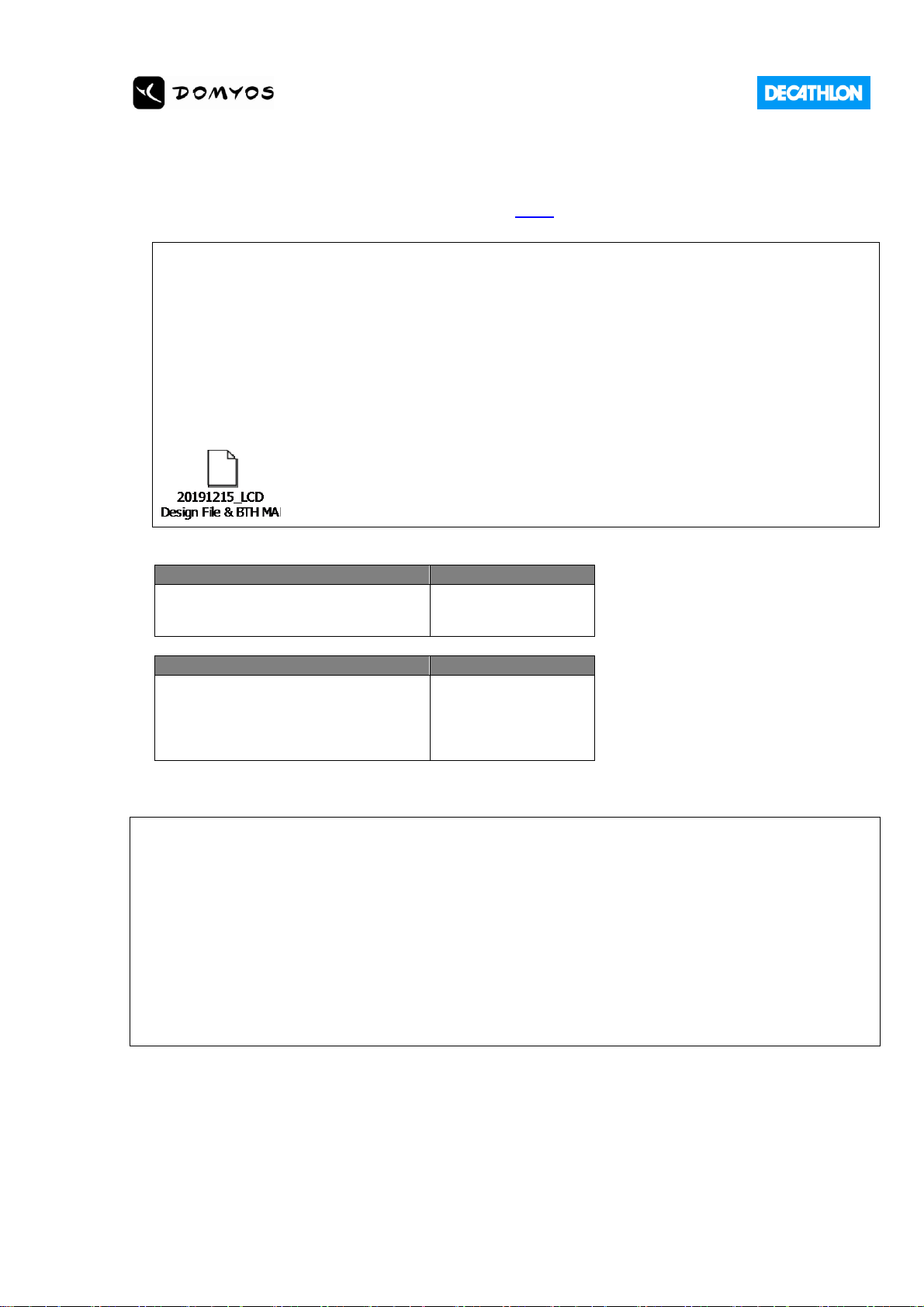
7. Bluetooth specification
7.1. Technical specification under this [LINK]
DECATHLON CONTROL
Connect the Console 3.2 with Supplier testing APP with Android tablet AND Ios tablet.
Activating one or two functions to check if bluetooth is working. Not necessary to check all
the functions.
ACCEPTANCE CRITERIA
Bluetooth connection with IOS and Android are ok
Bluetooth Mapping as below(Leo LV update on 20191215)
Console
Bluetooth code
DOMYOS CONSOLE 3.2
Domyos-BIKE-xxxx
Console
EquipmentModel
DOMYOS CONSOLE 3.2
DOMYOS CONSOLE 3.2 CN
3200001
3200002
DECATHLON CONTROL / ACCEPTANCE CRITERIA
Check the Bluetooth code written on sticker corresponds to the console Bluetooth code
pairing.
Check the EquipentModel Bluetooth code is correct (using Supplier testing App)
Important:
1. Supplier APP is using the same Bluetooth SDK as inside the end-user APP. The SDK is the
Bluetooth link between APP and Console. Supplier APP is reliable to control on production.
2. Supplier should ensure Bluetooth OAT function for any future firmware upgrade.
Page 11
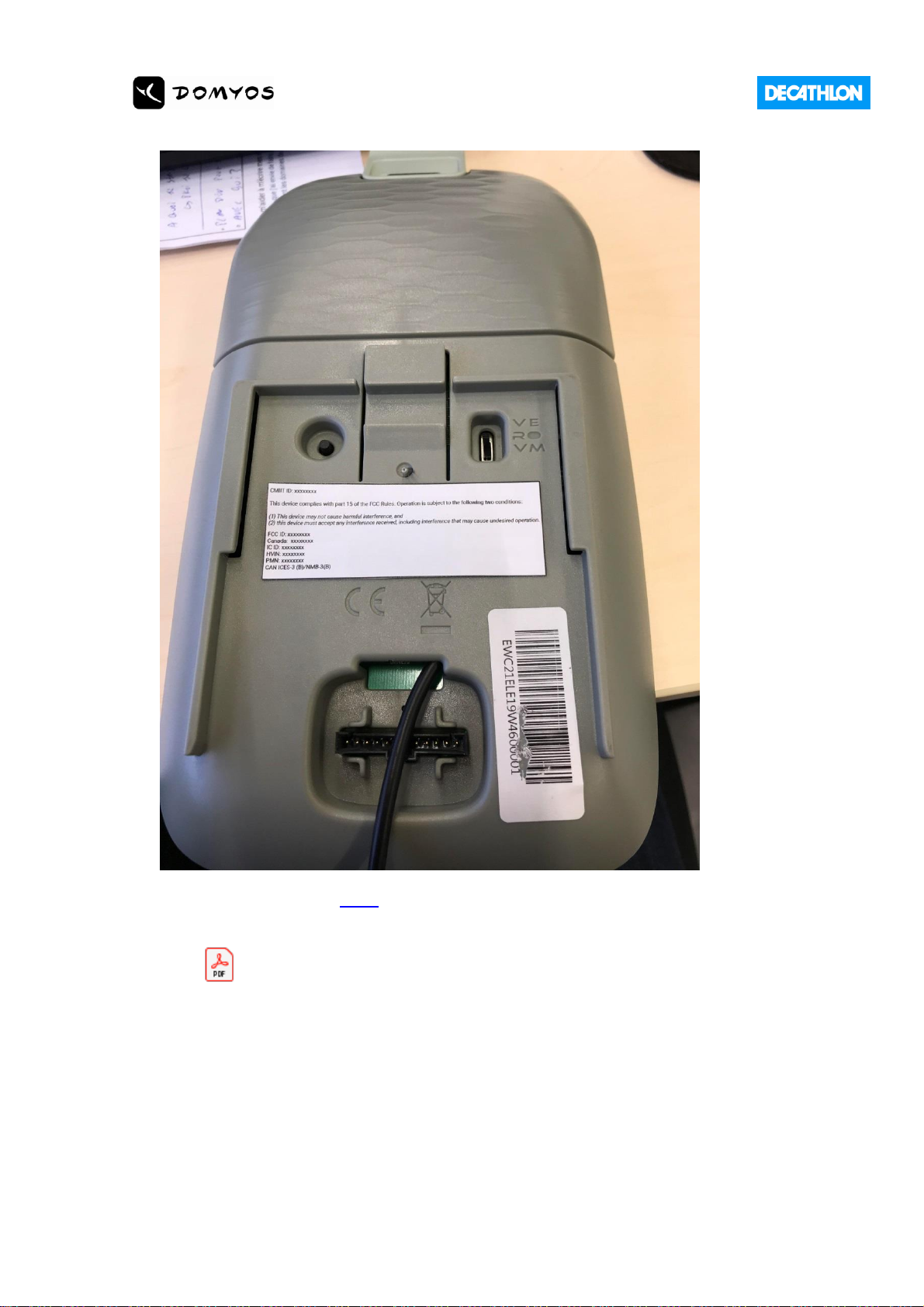
7.2. CMIIT_FCC_IC Label
CMIIT ID check in this LINK
CMIIT_FCC_IC Label Documents
SRRC_ID-FCC_ID-IC
_ID Label - CONSOLE 3.2.pdf
CMIIT ID: 2020DP1276
7.3. FCC Statement
FCC 15.21 Information to user
Please note that changes or modifications not expressly approved by the party responsible for compliance could void
the user’s authority to operate the equipment.
FCC 15.105 Information to the user (Class B)
Note: This equipment has been tested and found to comply with the limits for a Class B digital device, pursuant to
part 15 of the FCC Rules. These limits are designed to provide reasonable protection against harmful interference in
a residential installation. This equipment generates uses and can radiate radio frequency energy and, if not installed
Page 12

and used in accordance with the instructions, may cause harmful interference to radio communications. However,
there is no guarantee that interference will not occur in a particular installation. If this equipment does cause
harmful interference to radio or television reception, which can be determined by turning the equipment off and on,
the user is encouraged to try to correct the interference by one or more of the following measures:
—Reorient or relocate the receiving antenna.
—Increase the separation between the equipment and receiver.
—Connect the equipment into an outlet on a circuit different from that to which the receiver is connected.
—Consult the dealer or an experienced radio/TV technician for help.
This equipment complies with radio frequency exposure limits set forth by the FCC for an uncontrolled environment.
This equipment should be installed and operated with a minimum distance of 15 mm between the device and the
user or bystanders.
This device must not be co-located or operating in conjunction with any other antenna or transmitter.
7.4. IC Statement
IC RSS-Gen 8.4 User Manual Notice for Licence-Exempt Radio Apparatus
This device contains licence-exempt transmitter(s)/receiver(s) that comply with Innovation, Science and Economic
Development Canada’s licence-exempt RSS(s). Operation is subject to the following two conditions:
(1) This device may not cause interference; and
(2) This device must accept any interference, including interference that may cause undesired operation of the
device.
L’émetteur/récepteur exempt de licence contenu dans le présent appareil est conforme aux CNR d’Innovation,
Sciences et Développement économique Canada applicables aux appareils radio exempts de licence. L’exploitation
est autorisée aux deux conditions suivantes :
(1)L’appareil ne doit pas produire de brouillage;
(2)L’appareil doit accepter tout brouillage radioélectrique subi, même si le brouillage est
susceptible d’en compromettre le fonctionnement.
This equipment complies with radio frequency exposure limits set forth by the Innovation, Science and Economic
Development Canada for an uncontrolled environment.
This equipment should be installed and operated with a minimum distance of 15 mm between the device and
the user or bystanders.
This device must not be co-located or operating in conjunction with any other antenna or transmitter.
Cet équipement est conforme aux limites d'exposition aux radiofréquences définies par la Innovation, Sciences et
Développement économique Canada pour un environnement non contrôlé.
Cet équipement doit être installé et utilisé avec un minimum de 15 mm de distance entre le dispositif et
l'utilisateur ou des tiers.
Ce dispositif ne doit pas être utilisé à proximité d’une autre antenne ou d’un autre émetteur.
 Loading...