

Page 1
Always Connected. Always Covered.
Siren
DMS01
User Manual
Page 2

Preface
As this is the full User Manual, a working knowledge of Z-Wave automation
terminology and concepts will be assumed. If you are a basic user, please visit
www.domeha.com for instructions. This manual will provide in-depth techni-
cal information about the Siren, especially in regards to its compliance to the
Z-Wave standard (such as compatible Command Classes, Association Group ca-
pabilities, special features, and other information) that will help you maximize
the utility of this product in your system.
Siren Advanced User Manual
Preface
Page 2
Page 3

Table of Contents
Preface ................................................................................................................................. 2
Description & Features ..................................................................................................... 4
Specifications ..................................................................................................................... 5
Physical Characteristics ................................................................................................... 6
Inclusion & Exclusion ........................................................................................................ 7
Factory Reset & Misc. Functions ..................................................................................... 8
Physical Installation .......................................................................................................... 9
LED Behavior .................................................................................................................... 10
Compatible Command Classes ..................................................................................... 11
Configuration Parameters ............................................................................................. 13
Troubleshooting .............................................................................................................. 15
Warranty & Support ........................................................................................................ 16
Siren Advanced User Manual
Table of Contents
Page 3
Page 4
Description & Features
The Dome Siren is a battery powered Z-Wave Plus device that alerts the user
to events detected by the connected Z-Wave Controller using an audible alarm.
In addition to a DECIBEL dB audible alarm for critical events, the Siren has a
secondary chime to signal other events like movement or doors opening,
Key Features:
» Z-Wave Plus Certified
» DECIBEL dB Audible Alarm
» Visual indicator with built-in LED ring
» Secondary Chime
» Customizable notifications and volume levels
» Up to 150’ range
» Three-Year Battery Life
» Low Battery Indication
Siren Advanced User Manual
Description & Features
Page 4
Page 5
Specications
Technical Specications
Radio protocol
Power supply
Power Consumption
Working current
Operating temperature
Radio frequency
Range
Dimensions (L x W x H)
Table 1 - Technical Specications
Z-Wave(500 series)
2x CR123 3.0V battery
2W
35mA
32—104 °F (0—40 °C)
908.4 MHz US
Up to 150’ depending on environment
Ø2.75” x 1.2”
Package Contents:
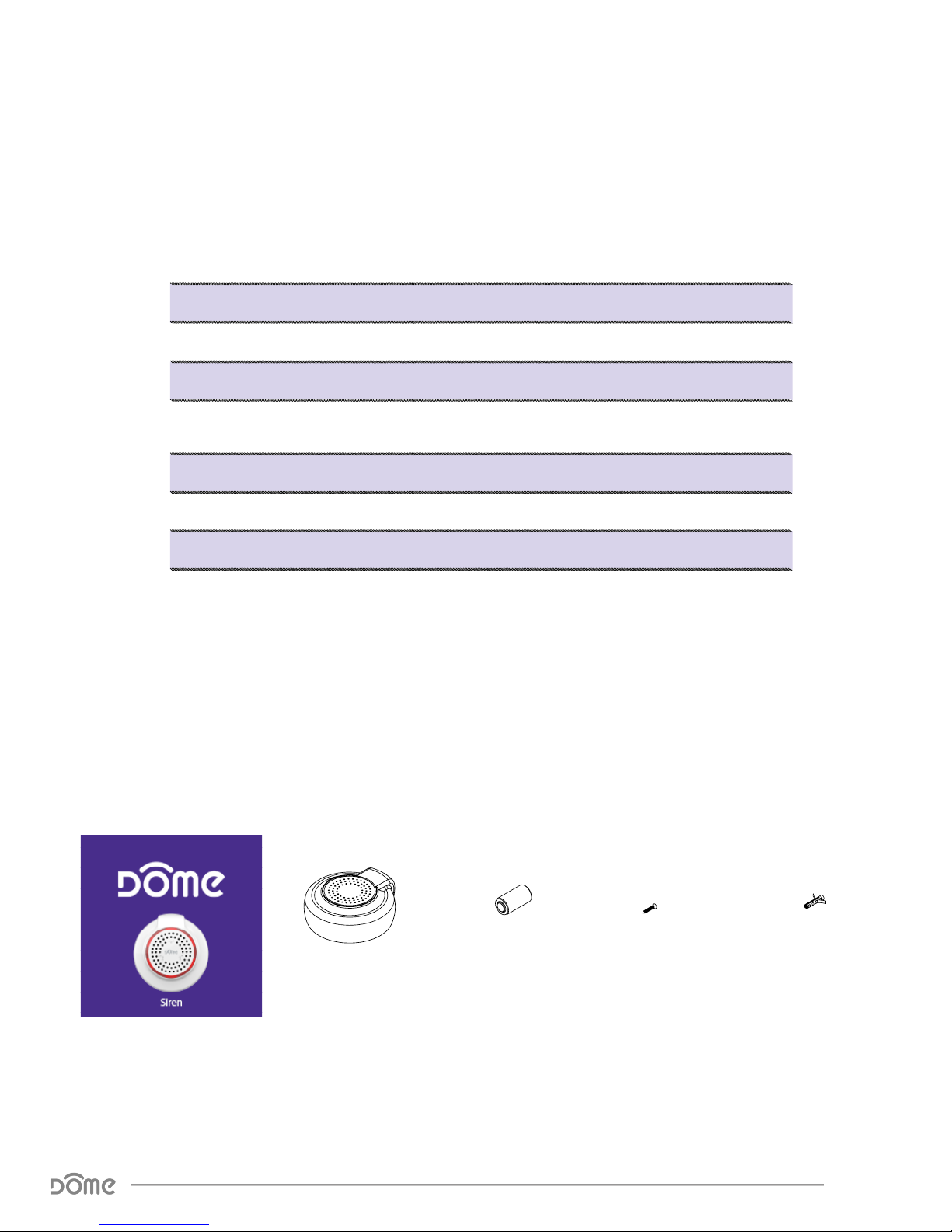
User Manual Siren 2x Battery 1x Screw 1x Wall Anchor
Siren Advanced User Manual
Specications
Page 5
Page 6
Physical Characteristics
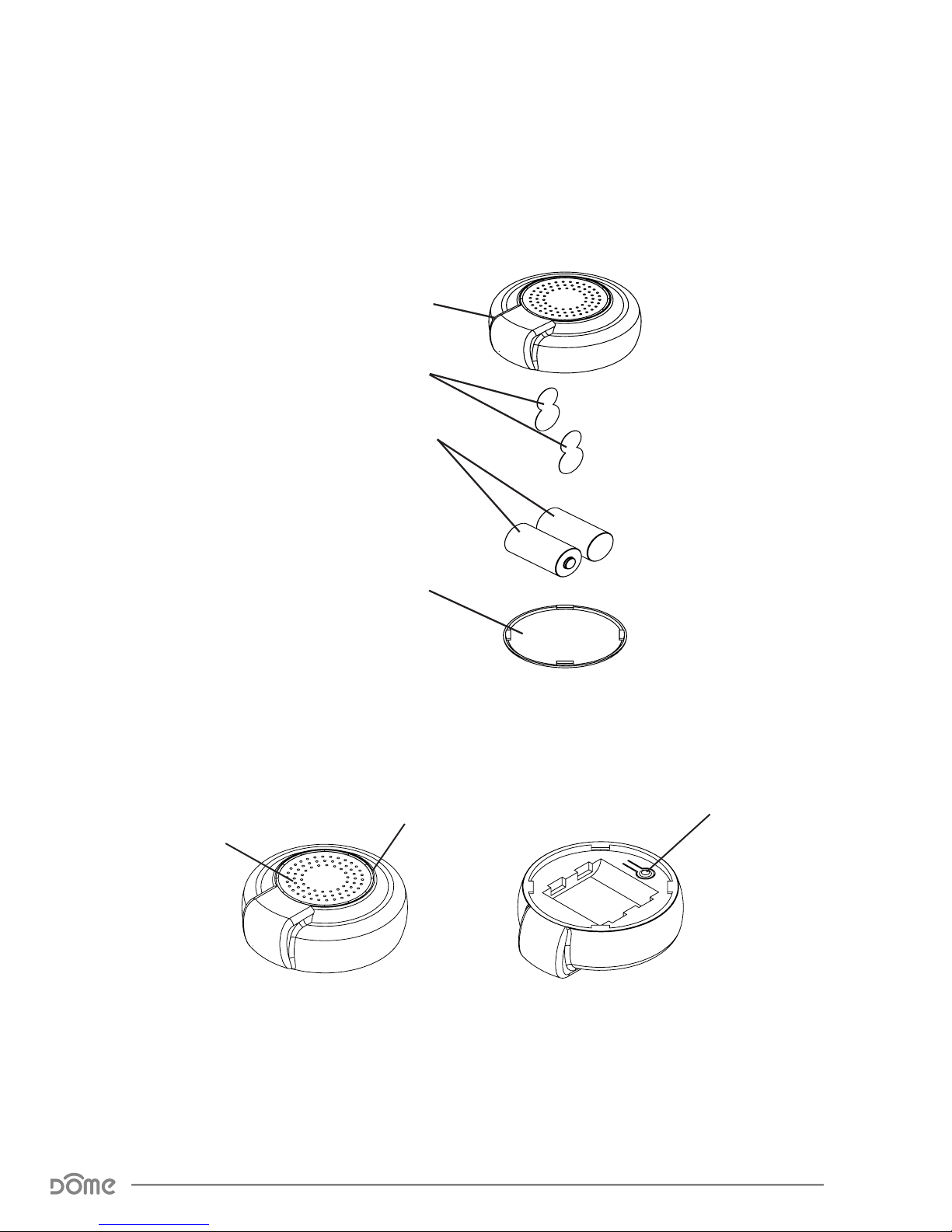
MAIN BODY
BATTERY TABS
BATTERIES
BACK COVER
Figure 1 - Exploded View
LED RING
SPEAKER
A. B.
Figure 2 - Showing individual parts A. Inside the Siren and B. Underneath the Siren.
CONNECT BUTTON
Siren Advanced User Manual
Physical Characteristics
Page 6
Page 7

Inclusion & Exclusion
Inclusion
Follow the instructions for your Z-Wave Certified Conto enter inclusion mode.
When prompted by the controller:
1. The Siren should be within 10’ of your Z-Wave controller for the inclusion
process. After successful pairing, the device can be brought to the desired lo-
cation.
2. Remove the BACK COVER by twisting it CLOCKWISE.
3. Remove the BATTERY TABS.
4. Press the CONNECT BUTTON quickly 3 times in a row.
The LED RING will flash five times indicating exclusion/disconnection.
Exclusion
Follow the instructions for your Z-Wave Certified Conto enter exclusion mode.
When prompted by the controller:
1. Remove the BACK COVER from the MAIN BODY.
2. Press the CONNECT BUTTON quickly 3 times in a row.
The LED RING will flash five times indicating exclusion/disconnection.
Siren Advanced User Manual
Inclusion & Exclusion
Page 7
Page 8

Factory Reset & Misc. Functions
Resetting the Siren
If needed, the Siren can be reset locally by following these steps. Only do this
when your Z-Wave controller is disconnected or otherwise unreachable. Beware
that resetting your device will disconnect it from the system:
1. Remove the BACK COVER and confirm that your Siren is powered up.
2. Press and hold the CONNECT BUTTON for at least 10 seconds then release.
A flashing light indicates a successful factory reset.
3. The Siren’s memory will be erased to factory settings.
Waking Up The Siren
Because the Siren is a battery powered device, it wakes up on regular intervals
to give battery and other status updates to the controller, as well as to accept
configuration settings from the controller. This helps to extend the battery life.
The device can be forced to wake up to submit these reports or accept new set-
tings immediately by simply pressing and holding the CONNECT BUTTON for two
seconds. The LED RING will flash once indicating successful wake up.
Siren Advanced User Manual
Factory Reset & Misc. Functions
Page 8
Page 9

Physical Installation
The device should already be included in your Z-Wave system before continuing
further. Study the Pre-Installation Checklist below for a broad overview of in-
stallation options and other notes to bear in mind .
Pre-Installation Checklist
9 The Siren can be mounted on a wall or placed on shelf or tabletop
9 The Siren is loud enough to be audible from inside a drawer
9 The BACK COVER twists CLOCKWISE to be removed
9 The Siren should be included in your Z-Wave System prior to installation
9 Confirm that your device can communicate with your Z-Wave Controller
from the final installed location before proceeding
Installation—With Double-Stick Tape
1. Wipe the surface you wish to attach the Siren to clean of any residue.
2. With the Siren completely assembled, peel the preapplied adhesive backing
and firmly push it against the wall.
Installation—Using Keyhole Slot
1. Drive a screw into the surface the Siren will be attached to, leaving it 1/8”
away from being completely flush.
2. Slide the fully assembled Siren around the screw, into the keyhole slot, and
pull it down to completely secure the device around the screw.
Installation—With Screws
1. Remove the BACK COVER by twisting it clockwise.
2. Hold the BACK COVER on the surface it will be attached to, and drive two of
the included screws through indentations on the BACK COVER. You may option-
ally install anchors in the wall for added support.
3. Twist the MAIN BODY counter clockwise onto the BACK COVER.
Siren Advanced User Manual
Physical Installation
Page 9
Page 10
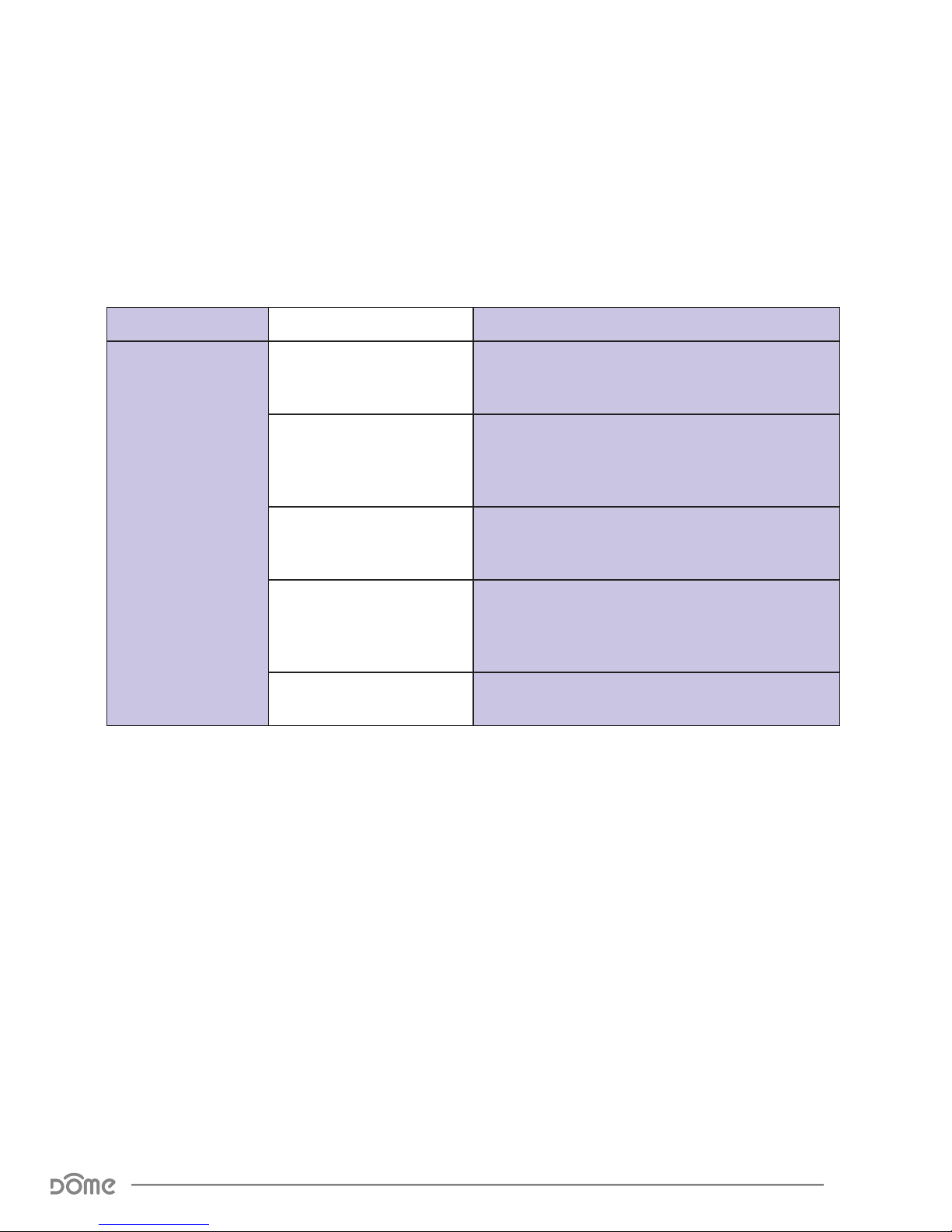
LED Behavior
Color Behavior This happens when…
Red
Blink 5 times in 1 second
Blink 5 times in 500ms
Blink 5 times in 300ms
Blink Once
Flashing and Spinning …the Siren is sounding its alarm.
Table 2 - LED Blinking Behavior
…the device powers on, but is not yet included in a
Z-Wave Network.
…the CONNECT BUTTON is pushed 3 times, either
resulting in the Siren sending its NodeInfo, or being
included or excluded from a Z-Wave network.
…the device powers on, and is arleady included in
a Z-wave network.
…the CONNECT BUTTON is pressed for an extended
period of time, resetting the Siren to factory default
settings.
Siren Advanced User Manual
LED Behavior
Page 10
Page 11
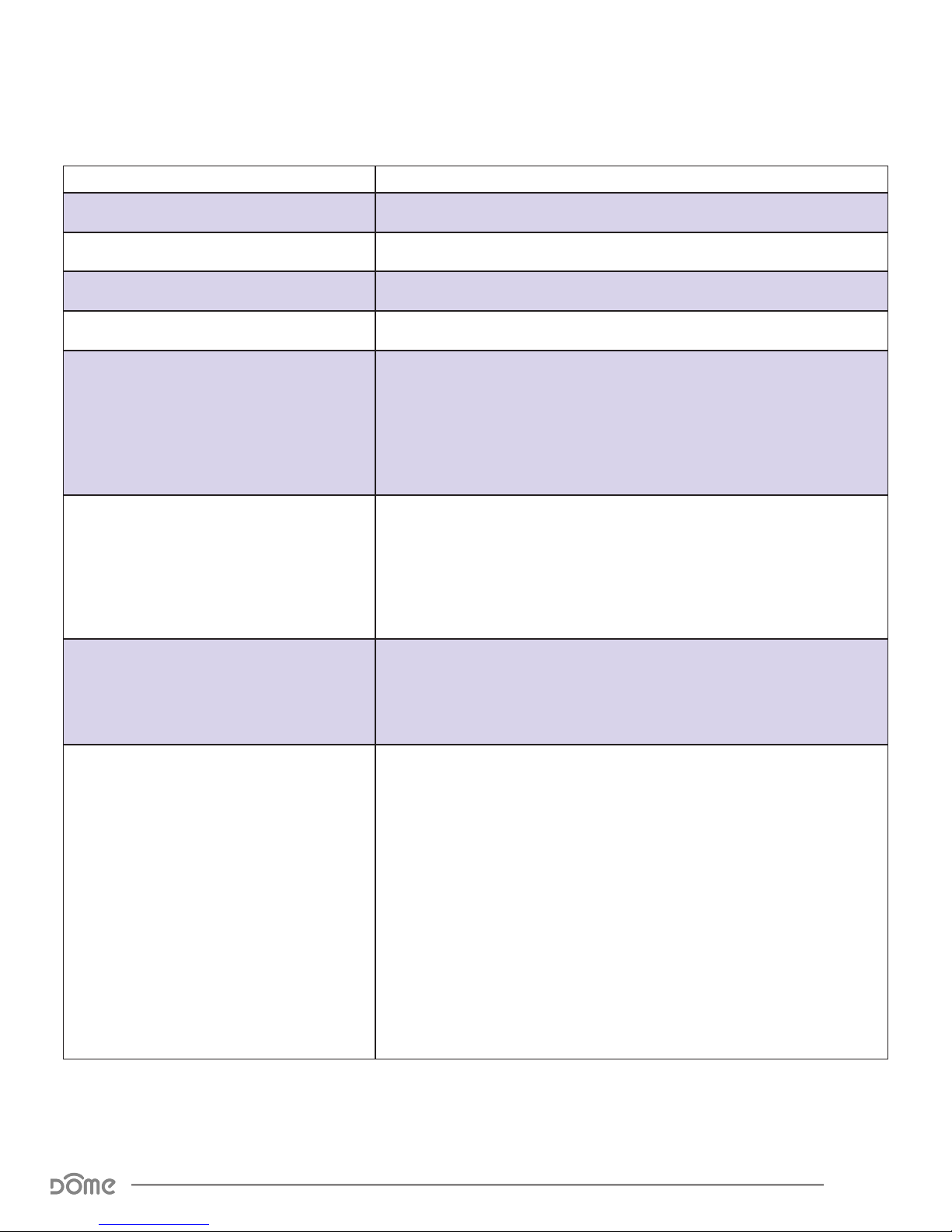
Compatible Command Classes
Command Class Notes
Device Reset Locally V1 (5A) -
Powerlevel V1 (73) -
Battery V1(80) -
Association Group Information V1 (59) -
Z-Wave Plus Info V2 (5E) Returned Value: 01 07 00 0F 00 0F 00
Z-Wave Plus Version: 01
Role Type: 07
Node Type: 00
Installer Icon Type: 0F 00
User Icon Type: 0F 00
Version V2 (86) Returned Value: 06 04 05 02 39 10 00
(Slave Sleeping Listening)
(Z-Wave Plus Node)
(Siren)
(Siren)
Manufacturer Specic V2 (72)
Association V2 (85)
Z-Wave Library Type: 06
Protocol Version: 04 05
Protocol Sub-Version: 02 39
Application Version: 10
Application Sub-Version: 00
Manufacturer ID: 02 1F
Product Type: 03
Product ID: 00 88
(Routing Slave)
Returned Value: 02 1F 03 01 02
Group 1
Group 1 is the “Lifeline” group, which can hold ve members, typically including the main Z-Wave controller. The Siren sends this group a
Notication Report and a Binary Switch Report when the siren is turned
on or off. It also sends this group a Battery Report in reponse to Battery
Get commands and a Locally Reset Notication upon local reset.
Group 2
Group 2 can hold ve members, and the Siren sends a single command
to this Association Group, the Binary Switch Report, whenever the Siren
is turned on or off.
Group 3
Group 2 can hold ve members, and the Siren sends a single command
to this Association Group, a Notication Report, whenever the Siren is
turned on or off.
Siren Advanced User Manual
Compatible Command Classes
Table 3 - Command Classes
Page 11
Page 12
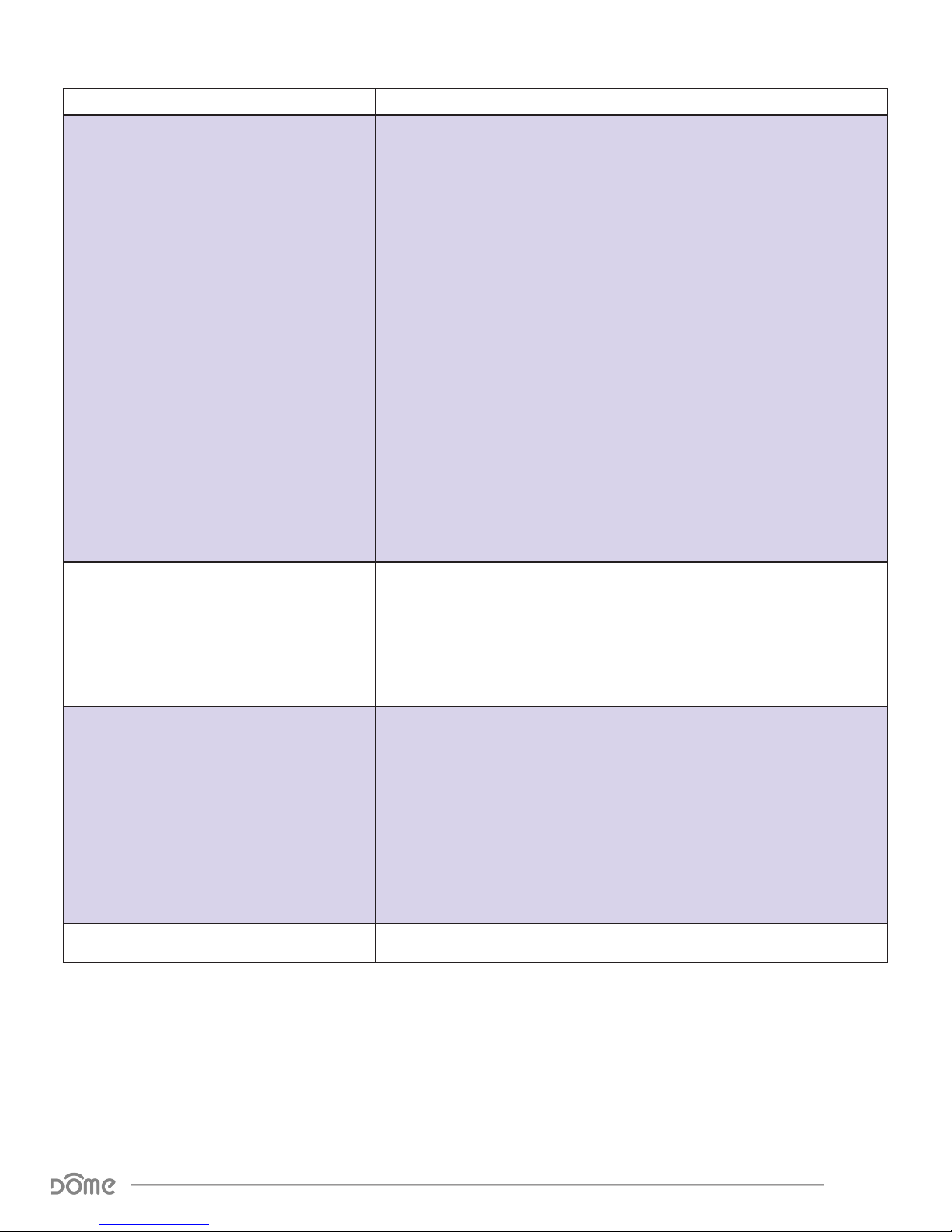
Command Class Notes
The Siren sends a Notication Report whenever it is turned on, and another report when the sound is turned off (either by the user, or by timing
out; see Conguration Parameters 2 and 3.) The Sequence Byte is used
to help the Controller keep track of multiple siren events—if a chime is
sounded while another chime is active, the sequence numbers will increment with each event, resetting back to 01 when no chime events are
active. See below for the NOTIFICATION_REPORT parameters sent:
Returned Value: 00 00 00 FF 0E XX 8X XX XX
Notication V4 (71)
Indicator (87)
V1 Alarm Type: 00
V1 Alarm Level: 00
Reserved: 00
Notication Status: FF
Notication Type: 0E
(Unsupported)
(Unsupported)
(Reserved)
(Unsolicited Reporting is Enabled)
(Siren)
Event:
Siren Active—01
Siren Off—00
(Siren Active)
(Event Inactive)
Sequence/Reserve/Event Param Length:
Siren Active—80
Siren Off—81
Notication Event Parameters: 01
Sequence Number: 00~FF
(Sequence = 1; Param Length = 0 0000)
(Sequence = 1; Param Length = 0 0001)
(Siren Active; only for “Siren Off” event)
(0~255)
The Indicator command class is used to trigger any one of ten different
secondary notications available to the Siren (the Binary Switch command class is used to trigger the primary notication.) See Conguration
Parameters 3 & 4 for more information relevant to the secondary chime.
See below for the Indicator Set values The Siren will respond to:
Trigger Secondary Chime: 01 ~ 0A
(Triggers Secondary Notications 1-10)
The Siren will respond to BINARY_SWITCH_SET(FF) and BINARY_
SWITCH_SET(00) commands by turning on and off, respectively, the
Siren (primary) notication sound.
Binary Switch (25)
Conguration V1(70) See “Conguration Parameters” on page 13.
Siren Advanced User Manual
Compatible Command Classes
The Siren also sends a Binary Switch Report when it turns on and
another report when the sound is turned off (either by the user, or by
timing out; see Conguration Parameters 2 and 3.) See below for the
Binary Switch Report parameters sent:
Siren On: FF
Siren Off: 00
Table 4 - Command Classes Continued
Page 12
Page 13
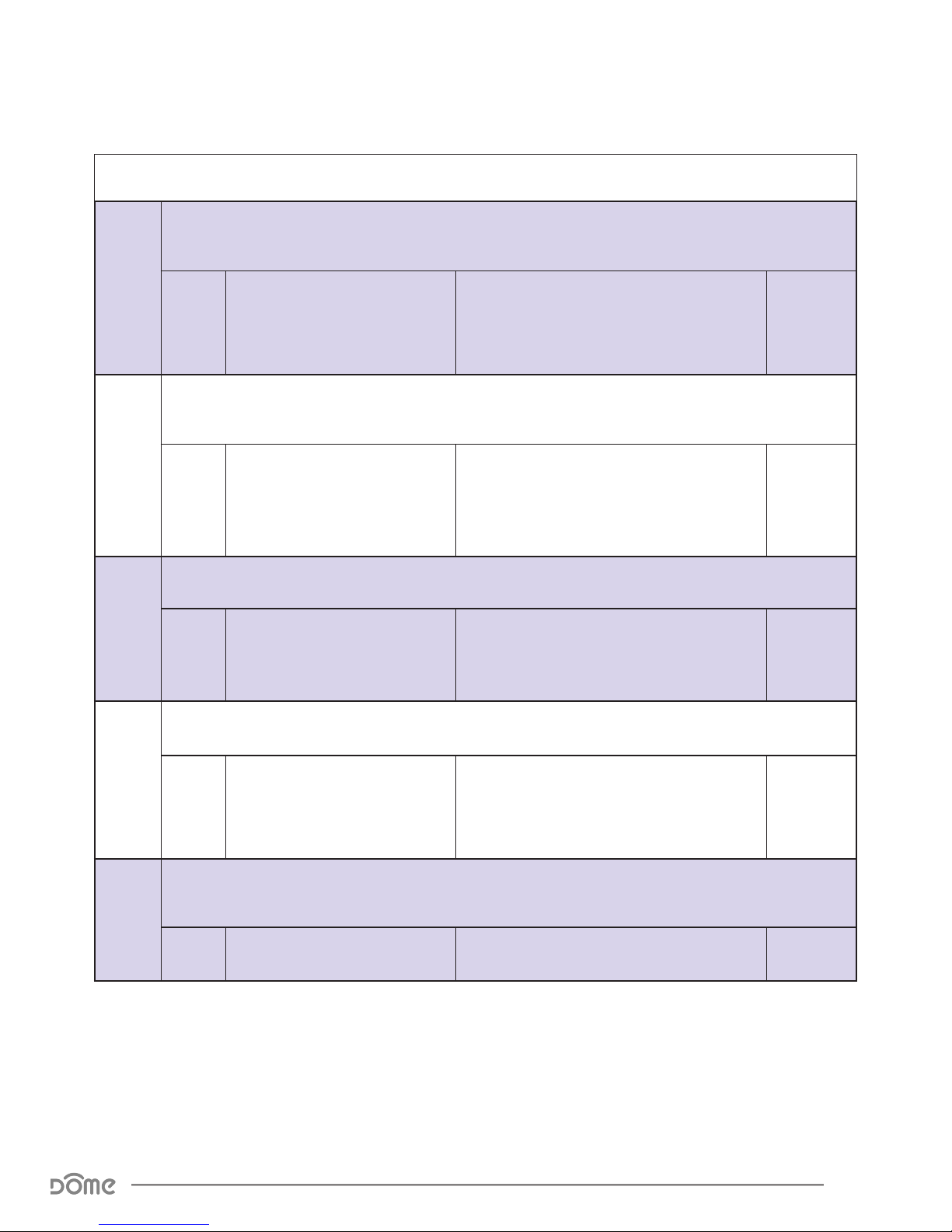
Conguration Parameters
Param
# Size Name Available Settings
This parameter sets the volume of the Siren (primary) sound. There are three possible volume levels available.
01
02
01
01
Primary Notication Volume Level
This parameter denes the length of the Alarm/primary notication.
Primary Notication Length
FF
This parameter denes the length of the Chime/secondary notication.
01
(Low Volume)
02
(Medium Volume)
03
(High Volume)
01
(30 Seconds)
02
(1 Minute)
03
(5 Minutes)
(Plays Until Battery is Depleted)
Default
Setting
02
(Medium
Volume)
02
(1 Minute)
03
04
05
00
(Does Not Stop)
01
This parameter sets the volume of the Chime (secondary) sound. There are three possible volume levels available.
01
The Siren offers ten different sounds to use as the Siren (primary) notication. This parameter sets the Siren
01
Secondary Notication Length
Secondary Notication Volume Level
(primary) notication sound.
Primary Notication Sound
Table 5 - Conguration Parameters
01~FE
FF
(Chime Duration in Minutes)
(Chime Will Not Play)
01
(Low Volume)
02
(Medium Volume)
03
(High Volume)
01 ~ 0A 09
01
(1 Minute)
02
(Medium
Volume)
Siren Advanced User Manual
Conguration Parameters
Page 13
Page 14
Param
# Size Name Available Settings
If Parameter 7 is set to 02, the Siren will play a secondary chime sound instead of the main alarm. The Siren offers
ten different sounds to use as the Chime (secondary) notication. This parameter sets the Chime (secondary)
06
notication sound.
Default
Setting
07
01
Secondary Notication Sound
01 ~ 0A 0A
This Parameter toggles between the Primary and Secondary notication sound to be played when
the Siren receives a BINARY_SWITCH_SET(FF) command.
01
(Primary
Notication
Will Play)
01
Toggle Secondary Chime
01
(Primary Notication Will Play)
02
(Secondary Notication Will Play)
Table 6 - Conguration Parameters Continued
Siren Advanced User Manual
Conguration Parameters
Page 14
Page 15

Troubleshooting
:Q Help! My Siren paired successfully, but my controller can’t see it
anymore after I installed it!
:A First, make sure your battery didn’t come loose during set-up. Otherwise, the
Z-Wave signal is probably weak in that area of your home. Remember that
the 120' - 150' range doesn’t take into account walls, furniture, and other
obstacles. To boost your Z-Wave network coverage, add a few non-battery
powered Z-Wave devices between the controller and the furthest device,
like the Dome On/Off Plug or Water Main Shut-Off. You can even purchase
dedicated Z-Wave extenders from 3rd party manufacturers.
:Q There’s so many words in this manual I don’t understand. How can
I learn more about Z-Wave?
:A Remember you don’t have to understand everything in this manual to start
automating your home. Our Quick-Start Guides have all you need to start
using any device. For more thorough information about Z-Wave home
automation, visit www.domeha.com/support.
:Q I’ve tried multiple times, but I can’t include the Siren in my system.
:A Check your battery and make sure your device is powered. Then, Factory
Reset (see “Resetting the Siren” on page 8) and repeat the inclusion
process. If you are still having issues, visit www.domeha.com/support
:Q The Siren is so loud! How can I make it quieter?
:A Fully supported Z-Wave controllers should allow volume adjustment—visit
www.domeha.com/support for a list of controllers tested to fully work with
our products. Otherwise, place the siren in a drawer or underneath something else to make the notifications milder to the ear.
:Q All of a sudden, my Siren is offline.
:A Check your battery and make sure your device is getting power. If powered,
make sure you still have Z-Wave network coverage. If you are still having
issues, visit www.domeha.com/support.
Siren Advanced User Manual
Troubleshooting
Page 15
Page 16

Warranty & Support
If you have questions, our trained Customer Service Department is happy to assist you 24 hours a day, 7 days a week.
Contact Dome Customer Service as follows: • In North America
dial: 1-855-249-1754 • Email Dome at [email protected]
DO NOT RETURN THIS PRODUCT TO THE STORE OR WEBSITE
FROM WHICH IT WAS PURCHASED
If you believe the product is defective, has a missing or broken
part or are having difculty with it please contact Dome as listed above for a quick and efcient solution to the problem.
Legal Notices: This device complies with part 15 of the FCC
rules. Operation is subject to the following two conditions (1)
This device may not cause harmful interference, and (2) this
device must accept any interference received, including interference that may cause undesired operation.
Note: This equipment has been tested and found to comply with
the limits for a Class B digital device, pursuant to part 15 of
the FCC Rules. These limits are designed to provide reasonable
protection against harmful interference in a residential installation. This equipment generates, uses and can radiate radio
frequency energy and, if not installed and used in accordance
with the instructions, may cause harmful interference to radio
communications.
However, there is no guarantee that interference will not occur
in a particular installation. If this equipment does cause harmful interference to radio or television reception, which can be
determined by turning the equipment off and on, the user is
encouraged to try to correct the
interference by one or more of the following measures: Reorient or relocate the receiving antenna; increase the separation
between the equipment and the receiver; connect the equipment into an outlet on a circuit different from that to which the
receiver is connected. Consult the dealer or an experienced
radio/TV technician for help.
This device complies with Industry Canada license-exempt RSS
standard(s). Operation is subject to the following two conditions: (1) this device may not cause interference, and (2) this
device must accept any interference, including interference
that may cause undesired operation of the device.
Elexa Consumer Products, Inc. (”ECP”) warrants to the original
retail purchaser (”Purchaser”) that the DOME Window/Door
sensor (the “Product”) will be free of defects in materials or
workmanship under use for one (1) year from the date of purchase (the “Warranty period”).
For the Purchaser only, if the Product fails to perform as speci-
ed during the Warranty Period due to defective parts or faulty
workmanship, ECP will repair or replace the defective or damaged parts of the Product. Normal wear and tear is not covered
nor is abnormal use, misuse, mishandling, faulty installation,
improper shipping, damage caused by disasters such as re,
ood or earthquake, neglect, accident or tampering. This war-
ranty covers only normal use in the United States or Canada.
To obtain warranty service during the Warranty Period, call
Dome Customer Service (1-855-249-1754) or email: support@
domeHA.com for instructions on sending damaged parts and
documentation for a Return Material Authorization (RMA).
Products returned to ECP for repair or replacement without authorization will be returned at the sender’s expense. All warranty claims must be accompanied by a legible copy of the original
receipt showing date and details of purchase. The RMA number
must be clearly written on the side of the shipping container in
which you return the Product or defective parts. Unless otherwise instructed by ECP, the Product must be sent freight prepaid to the following address:
Elexa Consumer Products, c/o Promac,
1153 Timber Dr., Elgin, IL 60123
ECP will repair or replace the defective parts and return them
at ECP’s cost by a shipping method selected by ECP. When contacting ECP to obtain an RMA, Purchaser may request expedited return shipping at Purchaser’s expense.
THIS WARRANTY IS NOT TRANSFERABLE, AND, TO THE MAXIMUM EXTENT PERMITTED BY APPLICABLE LAW IS IN LIEU OF
ALL OTHER WARRANTIES, REPRESENTATIONS AND CONDITIONS, EXPRESSED OR IMPLIED, STATUTORY OR OTHERWISE,
INCLUDING BUT NOT LIMITED TO THE IMPLIED WARRANTIES OF
MERCHANTABILITY AND FITNESS FOR A PARTICULAR PURPOSE.
NO OTHER PERSON OR REPRESENTATIVE IS AUTHORIZED TO
MAKE ANY OTHER WARRANTY ON BEHALF OF ECP OR ASSUME
FOR ECP ANY OTHER LIABILITY IN CONNECTION WITH THE SALE
OF THIS PRODUCT. IN NO EVENT WILL ECP BE LIABLE FOR ANY
DAMAGES, INCLUDING BUT NOT LIMITED TO INCIDENTAL, SPECIAL OR CONSEQUENTIAL DAMAGES ARISING OUT OF THE USE
OR INABILITY TO USE THE PRODUCT, INCLUDING DAMAGES
DUE TO ECP’S NEGLIGENCE.
THIS WARRANTY GIVES YOU SPECIFIC LEGAL RIGHTS, AND YOU
MAY ALSO HAVE OTHER RIGHTS WHICH VARY FROM STATE TO
STATE AND COUNTRY TO COUNTRY.
This marking on the product, accessories or literature indicates
that the product and its electronic accessories should not be
disposed of with other household waste.
To prevent possible harm to the environment or human health
from uncontrolled waste disposal, please separate these items
from other types of waste and recycle them responsibly to promote the sustainable reuse of material resources.
Household users should contact either the retailer where they
purchased this product, or their government ofce, for details
of where and how they can take these items for
environmentally safe recycling.
Business users should contact their supplier and check the
terms and conditions of the purchase contract. This product
and its electronic accessories should not be mixed with
other wastes for disposal.
This marking on the battery, manual or packaging indicates
that the batteries in this product should not be disposed of with
other household waste. Where marked, the chemical symbols
Hg, Cd or Pb indicate that the battery contains mercury, cadmium or lead above the reference levels in EC Directive 2006/66.
If batteries are not properly disposed of, these substances can
cause harm to human health or the environment.
Siren Advanced User Manual
Warranty & Support
Page 16
 Loading...