

Page 1

V10.26 2025-01-14 1 / 168 DoPE10
DoPE10
DoPE10
Software Manual
DOLI Elektronik GmbH
Rudolf-Diesel-Str. 3
72525 Münsingen, Germany
Headquarter
+49 7381 767320 0
Info
Web
www.doli.de
Support
+49 7381 767320 200
Support
Page 2

V10.26 2025-01-14 2 / 168 DoPE10
DoPE10
Index
DoPE10 Software Manual................................................................................................................................... 1
1 Overview ..................................................................................................................................................... 8
1.1 Tasks of DoPE .................................................................................................................................... 9
1.2 Initializing ............................................................................................................................................. 9
1.3 Supported programming languages .................................................................................................. 10
2 Communication Principles ...................................................................................................................... 11
2.1 Open a connection ............................................................................................................................ 11
2.2 Using Eventhandler ........................................................................................................................... 11
2.3 Transaction Number (TAN) ............................................................................................................... 12
3 Establish communication to EDC .......................................................................................................... 13
3.1 DoPEOpenDeviceID / DoPEOpenFunctionID ................................................................................... 13
3.2 DoPECloseLink ................................................................................................................................. 13
3.3 DoPEwOpenAll .................................................................................................................................. 14
3.4 DoPEwCloseAll ................................................................................................................................. 14
3.5 DoPEwPortInfo / DoPEwCurrentPortInfo .......................................................................................... 15
4 Message and Data handling .................................................................................................................... 16
4.1 DoPECurrentData ............................................................................................................................. 16
4.2 DoPEGetData .................................................................................................................................... 16
4.3 DoPEClearReceiver .......................................................................................................................... 16
4.4 DoPEClearTransmitter ...................................................................................................................... 16
4.5 DoPEGetErrors ................................................................................................................................. 17
4.6 DoPEClearErrors ............................................................................................................................... 17
4.7 DoPEGetState ................................................................................................................................... 17
5 Movement commands ............................................................................................................................. 18
5.1 Simple movement commands ........................................................................................................... 18
5.1.1 DoPEFMove, DoPEFMove_A ....................................................................................................... 18
5.1.2 DoPEPos, DoPEPos_A ................................................................................................................ 19
5.1.3 DoPEPosExt, DoPEPosExt_A ...................................................................................................... 20
5.2 Halt commands ................................................................................................................................. 23
5.2.1 DoPEHalt, DoPEHalt_A ................................................................................................................ 23
5.2.2 DoPESHalt .................................................................................................................................... 24
5.2.3 DoPEHaltW, DoPEHaltW_A ......................................................................................................... 25
5.2.4 DoPEXpCont ................................................................................................................................. 26
5.2.5 DoPETrig, DoPETrig_A ................................................................................................................ 27
5.3 Combined movement commands ..................................................................................................... 29
5.3.1 DoPEBlockHeader, DoPEBlockExecute ....................................................................................... 29
5.4 Complex movement commands ........................................................................................................ 30
5.4.1 DoPECycle .................................................................................................................................... 30
5.4.2 DoPEExt2Ctrl ................................................................................................................................ 31
5.4.3 DoPEFDPoti .................................................................................................................................. 32
5.4.4 DoPEOffsC.................................................................................................................................... 33
5.5 PC Command .................................................................................................................................... 34
5.5.1 DoPEPcCmd ................................................................................................................................. 34
5.5.2 DoPEPcCmdFromFile ................................................................................................................... 36
5.5.2.1 Scale and Offsets .......................................................................................................................... 38
5.5.2.2 Start/End Position, SpeedToStart and Fade In/Out ...................................................................... 39
5.5.2.3 Random Values ............................................................................................................................ 41
5.5.2.4 Cosine with one Cycle big Amplitude ........................................................................................... 42
5.5.2.5 Triangle with one Cycle big Amplitude .......................................................................................... 43
5.5.3 DoPERdPcCmdInfo ...................................................................................................................... 44
5.5.4 DoPECalculatePcCmd .................................................................................................................. 44
5.5.5 DoPECalculatePcCmdFromFile.................................................................................................... 45
Page 3

V10.26 2025-01-14 3 / 168 DoPE10
DoPE10
5.6 DoPEDynCycles ................................................................................................................................ 46
5.6.1 Basic Waveforms .......................................................................................................................... 49
5.6.1.1 Cosine/Sine ................................................................................................................................... 49
5.6.1.2 Triangle ......................................................................................................................................... 50
5.6.1.3 Rectangle ...................................................................................................................................... 50
5.6.1.4 Sawtooth ....................................................................................................................................... 51
5.6.1.5 Sawtooth inverse .......................................................................................................................... 51
5.6.1.6 Pulse ............................................................................................................................................. 52
5.6.2 Modify Parameter of an active test ............................................................................................... 52
5.6.3 Relative Destinations .................................................................................................................... 53
5.6.4 Peak Control ................................................................................................................................. 54
5.6.5 Sweeps ......................................................................................................................................... 55
5.6.6 Superposition Mode ...................................................................................................................... 57
5.6.7 Bimodal Control Mode .................................................................................................................. 58
5.6.7.1 Control arithmetic mean value ...................................................................................................... 58
5.6.7.2 Control mean value ....................................................................................................................... 58
5.6.7.3 Control minimum value ................................................................................................................. 59
5.6.7.4 Control maximum value ................................................................................................................ 59
5.6.7.5 Control minimum AND maximum values, ..................................................................................... 60
5.6.7.6 Control minimum AND maximum values ...................................................................................... 60
5.6.8 Restrictions: .................................................................................................................................. 61
5.6.9 DoPESetPeakCtrl ......................................................................................................................... 62
5.6.10 DoPESetPeakCtrlValue ................................................................................................................ 62
5.6.11 DoPEGetPeakCtrlValue ................................................................................................................ 62
6 Synchronized data and movement ........................................................................................................ 63
6.1 DoPESynchronizeData ...................................................................................................................... 64
6.2 DoPESetOnSynchronizeDataHdlr ..................................................................................................... 64
6.3 DoPESetOnSynchronizeDataOverflowHdlr ...................................................................................... 64
6.4 DoPESynchronizeSystemMode ........................................................................................................ 65
6.5 DoPESynchronizeSystemStart ......................................................................................................... 65
7 Miscellaneous Control Commands ........................................................................................................ 68
7.1 DoPEOn ............................................................................................................................................ 68
7.2 DoPEOff ............................................................................................................................................ 68
7.3 DoPEDefaultAcc ................................................................................................................................ 68
7.4 DoPESpeedLimit ............................................................................................................................... 69
7.5 DoPESetCtrl ...................................................................................................................................... 69
7.6 DoPEEmergencyMove ...................................................................................................................... 70
7.7 DoPEEmergencyOff .......................................................................................................................... 70
7.8 DoPESetOpenLoopCommand .......................................................................................................... 71
8 Event Handler ........................................................................................................................................... 72
8.1 Using DoPE Event handler................................................................................................................ 72
8.2 Overview of Events: .......................................................................................................................... 72
8.3 DoPESetOnLineHdlr ......................................................................................................................... 73
8.4 DoPESetOnDataBlockHdlr ................................................................................................................ 73
8.5 DoPESetOnDataBlockSize ............................................................................................................... 74
8.6 DoPEGetOnDataBlockSize ............................................................................................................... 74
8.7 DoPESetOnCommandErrorHdlr ....................................................................................................... 74
8.8 DoPESetOnPosMsgHdlr ................................................................................................................... 75
8.9 DoPESetOnTPosMsgHdlr ................................................................................................................. 76
8.10 DoPESetOnLPosMsgHdlr ................................................................................................................. 77
8.11 DoPESetOnSftMsgHdlr ..................................................................................................................... 77
8.12 DoPESetOnOffsCMsgHdlr ................................................................................................................ 78
8.13 DoPESetOnCheckMsgHdlr ............................................................................................................... 78
8.14 DoPESetOnRefSignalMsgHdlr .......................................................................................................... 79
8.15 DoPESetOnSensorMsgHdlr .............................................................................................................. 79
Page 4

V10.26 2025-01-14 4 / 168 DoPE10
DoPE10
8.16 DoPESetOnIoSHaltMsgHdlr ............................................................................................................. 80
8.17 DoPESetOnGuardMsgHandler ......................................................................................................... 80
8.18 DoPESetOnKeyMsgHdlr ................................................................................................................... 81
8.19 DoPESetOnRmcEventHdlr................................................................................................................ 81
8.20 DoPESetOnRuntimeErrorHdlr ........................................................................................................... 82
8.20.1 List of Runtime errors .................................................................................................................... 82
8.21 DoPESetOnOverflowHdlr .................................................................................................................. 83
8.22 DoPESetOnSystemMsgHdlr ............................................................................................................. 83
8.23 DoPESetOnDebugMsgHdlr ............................................................................................................... 84
8.24 DoPEThreadPollHdlr ......................................................................................................................... 85
9 Configuration ............................................................................................................................................ 86
9.1 DoPEwRdVersion .............................................................................................................................. 86
9.2 DoPEwRdLanguageInfo .................................................................................................................... 86
9.3 Data Acquisition commands .............................................................................................................. 87
9.3.1 DoPESetDataTransmissionRate................................................................................................... 87
9.3.2 DoPESetTime ............................................................................................................................... 87
9.3.3 DoPETransmitData ....................................................................................................................... 87
9.3.4 DoPEFilterTime ............................................................................................................................. 88
9.4 Channel supervision .......................................................................................................................... 89
9.4.1 DoPESetCheck ............................................................................................................................. 89
9.4.2 DoPEClrCheck .............................................................................................................................. 90
9.4.3 DoPESetCheckLimit ..................................................................................................................... 90
9.4.4 DoPEClrCheckLimit ...................................................................................................................... 90
9.4.5 DoPESetCheckLimitIO .................................................................................................................. 90
9.5 Controller Parameter ......................................................................................................................... 91
9.5.1 DoPEPosPID................................................................................................................................. 91
9.5.2 DoPERdPosPID ............................................................................................................................ 91
9.5.3 DoPEWrPosPID ............................................................................................................................ 91
9.5.4 DoPESpeedPID ............................................................................................................................ 92
9.5.5 DoPERdSpeedPID ........................................................................................................................ 92
9.5.6 DoPEWrSpeedPID ........................................................................................................................ 92
9.5.7 DoPEFeedForward ....................................................................................................................... 93
9.5.8 DoPERdFeedForward ................................................................................................................... 93
9.5.9 DoPEWrFeedForward ................................................................................................................... 93
9.5.10 DoPEOptimizeFeedForward ......................................................................................................... 94
9.5.11 DoPECurrentPID ........................................................................................................................... 94
9.5.12 DoPEDestWnd .............................................................................................................................. 95
9.5.13 DoPESft ........................................................................................................................................ 96
9.5.14 DoPECtrlSpeedTimeBase ............................................................................................................ 96
9.5.15 DoPEDeadbandCtrl ...................................................................................................................... 97
9.5.16 DoPESetDither .............................................................................................................................. 97
9.5.17 DoPERdCtrlParameter .................................................................................................................. 98
9.5.18 DoPESetNominalAccSpeed .......................................................................................................... 98
9.6 Tare functions .................................................................................................................................... 99
9.6.1 DoPE(Basic)TareSetValue ........................................................................................................... 99
9.6.2 DoPE(Basic)TareSetDisplay ......................................................................................................... 99
9.6.3 DoPE(Basic)Tare ........................................................................................................................ 100
9.6.4 DoPE(Basic)TareGetValue ......................................................................................................... 100
9.7 Reference signal handling of incremental sensors ......................................................................... 101
9.7.1 DoPESetRefSignalMode ............................................................................................................. 101
9.7.2 DoPESetRefSignalTare .............................................................................................................. 101
9.8 Calculated measuring channels ...................................................................................................... 102
9.8.1 DoPEConfPeakValue .................................................................................................................. 102
9.8.2 DoPEMc2Output ......................................................................................................................... 103
9.9 Sensor Correction ........................................................................................................................... 104
9.9.1 DoPESetSensorCorrection ......................................................................................................... 104
Page 5

V10.26 2025-01-14 5 / 168 DoPE10
DoPE10
9.9.2 DoPESetStiffnessCorrection ....................................................................................................... 104
9.10 Serial Sensors ................................................................................................................................. 105
9.10.1 DoPEWrSensorMsg .................................................................................................................... 105
9.10.2 DoPESerialSensorDef ................................................................................................................ 105
9.10.3 DoPESetSerialSensor ................................................................................................................. 105
9.10.4 DoPESetSerialSensorTransparent ............................................................................................. 106
9.11 Debug Messages ............................................................................................................................ 107
9.11.1 DoPEDebugMsgEnable .............................................................................................................. 107
9.11.2 DoPESendDebugCommand ....................................................................................................... 107
10 Input / Output-Commands ..................................................................................................................... 108
10.1 Analogue output .............................................................................................................................. 108
10.1.1 DoPESetOutput .......................................................................................................................... 108
10.1.2 DoPESetOutChannelOffset ........................................................................................................ 108
10.1.3 DoPEOfflineActionOutput ........................................................................................................... 109
10.2 Bit I/O-Commands ........................................................................................................................... 109
10.2.1 DoPESetBit ................................................................................................................................. 109
10.2.2 DoPECalOut................................................................................................................................ 110
10.2.3 DoPEBeep .................................................................................................................................. 110
10.2.4 DoPEBypass ............................................................................................................................... 110
10.2.5 DoPERdBitInput .......................................................................................................................... 111
10.2.6 DoPEWrBitOutput ....................................................................................................................... 111
10.2.7 DoPEOfflineActionBitOutput ....................................................................................................... 111
10.3 IOSignals ......................................................................................................................................... 112
10.3.1 DoPEIOGripEnable ..................................................................................................................... 112
10.3.2 DoPEIOGripSet ........................................................................................................................... 112
10.3.3 DoPEIOExtEnable ...................................................................................................................... 113
10.3.4 DoPEIOExtSet ............................................................................................................................ 113
10.3.5 DoPEIOFixedXHeadEnable ........................................................................................................ 113
10.3.6 DoPEIOFixedXHeadSet .............................................................................................................. 113
10.3.7 DoPEIOHighPressureEnable ...................................................................................................... 114
10.3.8 DoPEIOHighPressureSet ............................................................................................................ 114
10.3.9 DoPEIOGuardSetLimitedMode ................................................................................................... 114
10.3.10 DoPEIOGuardSetUnlockRequest ............................................................................................... 114
10.3.11 DoPEIOGuardSetRangeLimit ..................................................................................................... 114
10.3.12 DoPEIOGuardGetRangeLimit ..................................................................................................... 115
10.3.13 DoPEIOGuardSetMuteGuard ..................................................................................................... 115
10.3.14 DoPEIOGuardGetMuteGuard ..................................................................................................... 115
10.3.15 DoPEIOGuardSetMuteSpeedLimit ............................................................................................. 115
10.3.16 DoPEIOGuardGetMuteSpeedLimit ............................................................................................. 116
10.3.17 DoPEIOGuardSetMuteRangeLimit ............................................................................................. 116
10.3.18 DoPEIOGuardGetMuteRangeLimit ............................................................................................. 116
10.4 Display Commands ......................................................................................................................... 117
10.4.1 DoPEDspClear ............................................................................................................................ 117
10.4.2 DoPEwDspHeadLine .................................................................................................................. 117
10.4.3 DoPEwDspFKeys ....................................................................................................................... 117
10.4.4 DoPEwDspMValue ..................................................................................................................... 118
11 EDC keyboard interface ........................................................................................................................ 119
11.1 DoPERdNumberOfKeyboards ........................................................................................................ 119
11.2 DoPESetKeyShiftState .................................................................................................................... 119
11.3 DoPERdKeyShiftState ..................................................................................................................... 119
11.4 DoPESetLed .................................................................................................................................... 119
11.5 DoPELedMask ................................................................................................................................ 120
11.6 DoPECurrentKeys ........................................................................................................................... 120
11.7 DoPEKeyPressed ............................................................................................................................ 120
11.8 DoPEKeyGet ................................................................................................................................... 120
11.9 Definition of keys ............................................................................................................................. 121
Page 6

V10.26 2025-01-14 6 / 168 DoPE10
DoPE10
11.10 Keyboard Lock Commands ............................................................................................................. 123
11.10.1 DoPESetKeyboardLockState ...................................................................................................... 123
11.10.2 DoPEGetKeyboardLockState ..................................................................................................... 123
11.11 Definition of LEDs ............................................................................................................................ 124
11.12 RMC Default Handling ..................................................................................................................... 126
11.12.1 DoPERmcEnable ........................................................................................................................ 127
11.12.2 DoPERmcKeys ........................................................................................................................... 128
11.12.3 DoPERmcState ........................................................................................................................... 128
11.12.4 DoPESetOnRmcEventHdlr ......................................................................................................... 128
12 Setup Commands................................................................................................................................... 129
12.1 GeneralData .................................................................................................................................... 129
12.1.1 DoPEGeneralData Structure ....................................................................................................... 129
12.1.2 DoPERdGeneralData .................................................................................................................. 129
12.1.3 DoPEWrGeneralData .................................................................................................................. 130
12.2 Machine Data .................................................................................................................................. 131
12.2.1 DoPEMachine Structure ............................................................................................................. 131
12.2.1.1 DoPEMachineDef ....................................................................................................................... 131
12.2.1.2 DoPESenDef ............................................................................................................................... 132
12.2.1.3 DoPECtrlSenDef ......................................................................................................................... 133
12.2.1.4 DoPEOutChaDef ......................................................................................................................... 134
12.2.1.5 DoPEBitDef ................................................................................................................................. 134
12.2.1.6 DoPEIOSignals ........................................................................................................................... 135
12.2.1.6.1 DoPEIOGrip ....................................................................................................................... 135
12.2.1.6.2 DoPEIOExt ......................................................................................................................... 136
12.2.1.6.3 DoPEIOFixedXHead .......................................................................................................... 136
12.2.1.6.4 DoPEIOHighPressure ........................................................................................................ 137
12.2.1.6.5 DoPEIOMisc ....................................................................................................................... 137
12.2.1.6.6 DoPEIOSHalt ..................................................................................................................... 138
12.2.1.6.7 DoPEIOKey ........................................................................................................................ 138
12.2.1.6.8 DoPEIOLimit ....................................................................................................................... 138
12.2.1.6.9 DoPEIOGuard .................................................................................................................... 139
12.2.1.7 DoPEMainMenu: ......................................................................................................................... 140
12.2.2 DoPERdMachine ........................................................................................................................ 140
12.2.3 DoPEWrMachine ........................................................................................................................ 140
12.2.4 DoPEMachineScale .................................................................................................................... 141
12.2.5 DoPERdMachineNumber ............................................................................................................ 141
12.2.6 DoPESelMachine ........................................................................................................................ 141
12.3 DoPEInitialize .................................................................................................................................. 142
12.4 DoPEInitializeResetXHead.............................................................................................................. 142
12.5 DoPERdSensorInfo ......................................................................................................................... 142
12.6 DoPERdSensorUserData ................................................................................................................ 143
12.7 DoPEWrSensorUserData ................................................................................................................ 143
12.8 DoPEwRdModuleInfo ...................................................................................................................... 143
12.9 DoPEwRdDriveInfo ......................................................................................................................... 144
13 Sensor EEPROM Handling .................................................................................................................... 145
13.1 DoPERdSensorConKey .................................................................................................................. 145
13.2 DoPERdSensorHeaderData............................................................................................................ 145
13.3 DoPEWrSensorHeaderData............................................................................................................ 146
13.4 DoPERdSensorAnalogueData ........................................................................................................ 147
13.5 DoPEWrSensorAnalogueData ........................................................................................................ 147
13.6 DoPERdSensorIncData................................................................................................................... 148
13.7 DoPEWrSensorIncData ................................................................................................................... 148
13.8 DoPERdSensorAbsData ................................................................................................................. 149
13.9 DoPEWrSensorAbsData ................................................................................................................. 149
13.10 DoPECalcSensorAbsGenericSignalType ....................................................................................... 150
13.11 DoPECalcSensorAbsGenericData .................................................................................................. 150
Page 7

V10.26 2025-01-14 7 / 168 DoPE10
DoPE10
14 Reestablishing a Connection ................................................................................................................ 151
14.1 DoPEReInitializeEnable .................................................................................................................. 151
14.2 DoPEReInitialize ............................................................................................................................. 151
15 Default Measuring Data Record............................................................................................................ 153
15.1 Logical Input Signals ....................................................................................................................... 154
15.2 Logical Output Signals .................................................................................................................... 155
15.3 Controller State WORD 1 ................................................................................................................ 156
15.4 Controller State WORD 2 ................................................................................................................ 156
15.5 Drive Interface State Input 1............................................................................................................ 157
15.6 Drive Interface State Input 2............................................................................................................ 158
15.7 Drive Interface State Output ............................................................................................................ 158
15.8 Detecting Cycles ............................................................................................................................. 159
16 DoPE System Message ......................................................................................................................... 160
17 DoPE Error Constants ........................................................................................................................... 162
18 For Experts ............................................................................................................................................. 163
18.1 Realtime Version of DoPE Event Handler ....................................................................................... 163
19 .NET Wrapper ......................................................................................................................................... 164
19.1 Establish Communication ................................................................................................................ 164
19.2 Event Handler .................................................................................................................................. 164
19.3 .NET API function groups ................................................................................................................ 164
19.4 .NET Version Support ..................................................................................................................... 165
19.5 IntelliSense ...................................................................................................................................... 166
20 Versions .................................................................................................................................................. 167
Page 8
V10.26 2025-01-14 8 / 168 DoPE10
DoPE10
1 Overview
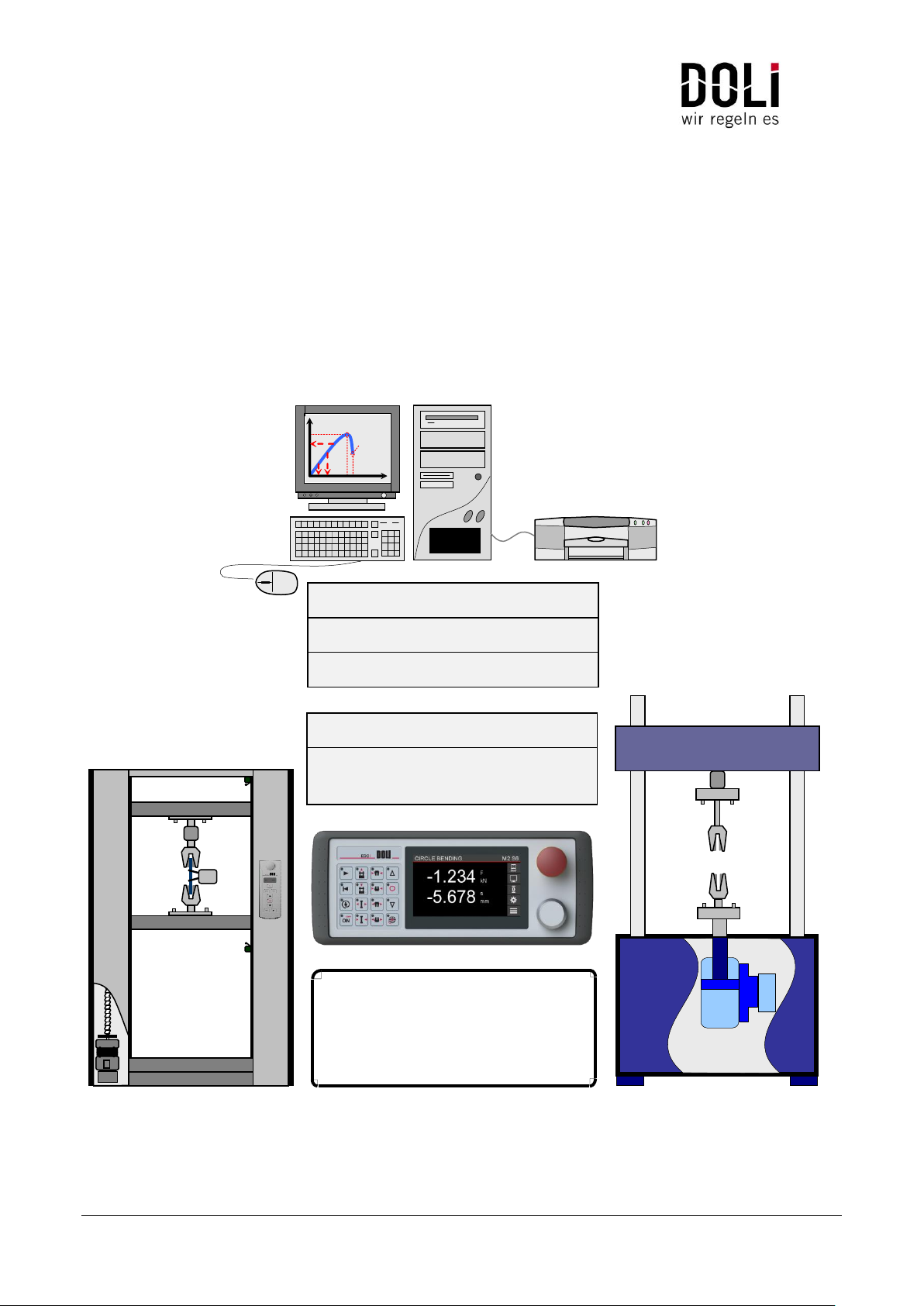
DOLI has very powerful software for data acquisition and closed loop control for testing instruments like tensile
testers. This software runs on the DOLI EDCi hardware platform like EDCi50 (support for older hardware (EDC5
to EDC220V/580V) is discontinued). It is configurable within a wide range to satisfy all requirements at a testing
instrument.
Communication between EDC and PC is handled by a communication layer, called DPX. DPX is a secured
protocol and currently supports USB, and Ethernet (LAN) as transportation layer.
DoPE10 represents the interface to access all EDC-functions from any standard PC with Windows.
DoPE10 DLL
Application program
DPX protocol for USB and LAN
DPX protocol for USB and LAN
DOLI Sub System for data acquisition and
closed loop control for testing instruments
F
Fmax
P3 Fb
P2
➢
Energie
P1
➢
dL Fmax dL Fb
dL
power amplifier
Page 9
V10.26 2025-01-14 9 / 168 DoPE10
DoPE10
1.1 Tasks of DoPE
• DoPE will initialize the EDC according to predefined set-up data, stored in EDC memory.
• DoPE provides the application program with measuring data in SI-units (N, m etc.)
• DoPE offers a wide range of machine control commands
Simple commands like:
„move Up in position control with 0.01 m/s“
Complex commands like:
„move in position control with 0.02 m/s to 500 N and keep 500 N in load control“
Cycling commands like:
„do 100 sinusoidal load cycles with an amplitude of 100N with 3 Hz“
• DoPE reports events like limit switch etc.
DoPE is available as a
• 32/64 Bit DLL for Windows 7/8/8.1/10/11
• 64 Bit Shared Object for x64 Linux
1.2 Initializing
The EDC firmware can handle up to:
• sixteen logical measuring channels
• sixteen logical analogue output channels
• ten logical Bit input devices
• ten logical Bit output devices
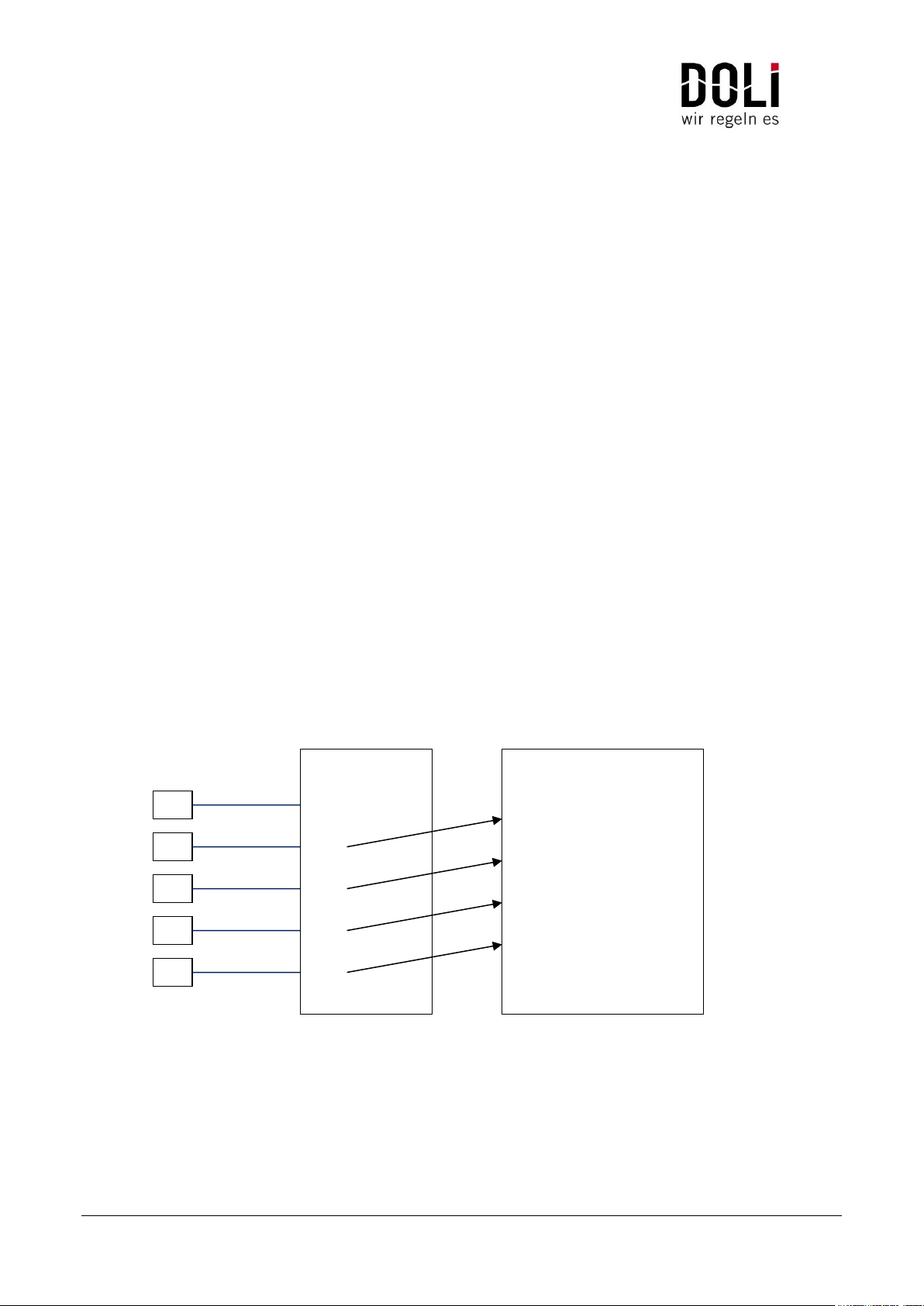
The above logical channels and devices must be assigned to physical interfaces. For assignment you just have
to specify the connector number, the logical measuring channel and some transducer specific data.
Use DOLI Installation Center to edit all necessary set-up data.
All Set-up data will be stored in the EDC.
X4
X7
X21B
X22A
X23B
0 = XHead
1 = Load
2 = Extension
3 = Temperature
4 = xxx
EDC Connectors
Logical measuring channels
Page 10

V10.26 2025-01-14 10 / 168 DoPE10
DoPE10
1.3 Supported programming languages
DoPE is delivered as a DLL running under Windows operating system. Each programming language that
supports the use of DLLs can be used for the application program.
However, DOLI supplies only header files for “C”, “Delphi/Pascal”, and a .NET wrapper.
For these programming languages, simple demo programs are available.
Two DLLs are needed to use DoPE: “DoPE10.DLL” and “DoDPX10.DLL”. The .NET wrapper is placed in the
“DoPE10Net.DLL”.
For the 64bit Version, “DoPE10x64.DLL” and “DoDPX10x64.DLL” is needed. And the 64 bit .NET wrapper is
placed in the “DoPE10x64Net.DLL”.
Page 11

V10.26 2025-01-14 11 / 168 DoPE10
DoPE10
2 Communication Principles
DoPE represents a library that uses functions inside the remote EDC controller. Physically EDC and PC are
connected via a standard communication port, like USB or LAN. A safe protocol is used for communication.
This protocol, named DPX, detects ON/OFF-line transitions, transmits messages and measured data packets.
The user of DoPE must always be aware of the remote controller and due to this an asynchronous behavior of
DoPE.
2.1 Open a connection
The application program establishes a connection by calling one of the DoPEOpen... functions. This function
creates a thread with a priority depending on the priority of the application thread.
Normally the DoPE thread will use the priority THREAD_PRIORITY_TIME_CRITICAL. If the application
thread has REALTIME_PRIORITY_CLASS, the DoPE thread will use the priority
THREAD_PRIORITY_ABOVE_NORMAL.
The application thread should not start another thread with a higher priority than its own. Otherwise the
communication with the EDC might be delayed. This will cause unpredictable problems.
By this mechanism it is safeguarded that DoPE and hence the communication with the EDC has always a
higher priority than the application program.
2.2 Using Eventhandler
Whenever necessary, EDC will send a message, possibly with parameter to PC. There are many different
reasons for such messages. E.g. if a positioning command has reached the destination, EDC will send a
message to PC, reporting the destination has been reached.
To make it easy for the application program to get these messages, DoPE offers an event handler interface.
For each event, the application program wants to process, an event handler must be installed. DoPE will call
these event handlers, whenever the event occurs.
Page 12
V10.26 2025-01-14 12 / 168 DoPE10
DoPE10
2.3 Transaction Number (TAN)
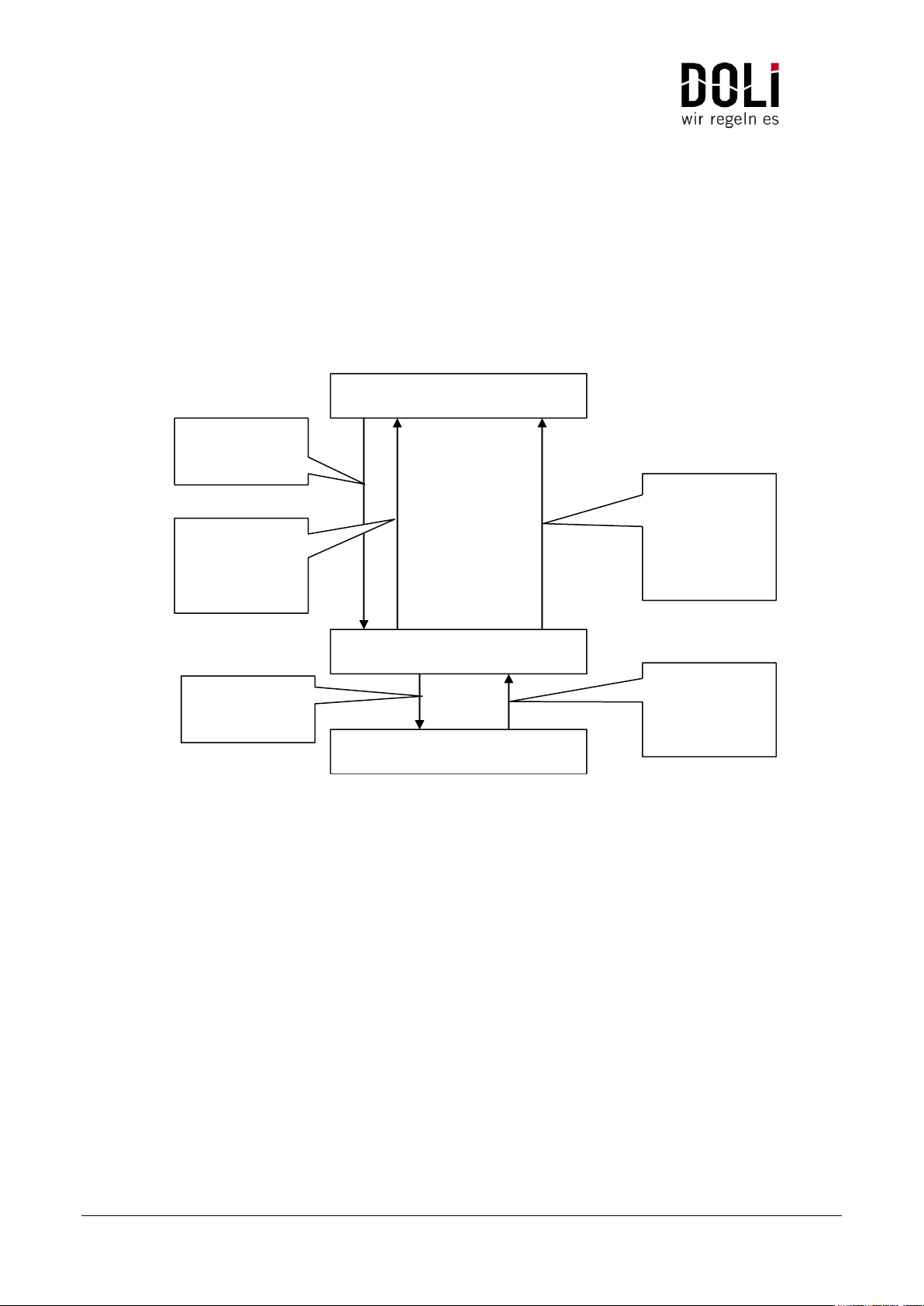
Some of the following commands have pointers to a transaction number (lpusTAN) as a parameter. This TAN
may be used to identify messages, which are received asynchronously, to the command.
Example: A positioning command is sent to the EDC. After 30 seconds the desired position is reached
and a message “position reached” is received. This message comes with the TAN of the
positioning command.
The TAN is generated by DoPE for all commands, which may send a message later on. It’s optional to use the
TAN. If NULL pointers are passed, no TANs are returned.
Application program
DoPE
EDC
1. Call of a
DoPE function
2. Return of
TAN as a
reference
number
3. DoPE sends
command to
EDC with TAN
4. EDC reports
completion of
command with
TAN
5. DoPE
passes EDC
message to
application
program with
TAN
Page 13
V10.26 2025-01-14 13 / 168 DoPE10
DoPE10
3 Establish communication to EDC
3.1 DoPEOpenDeviceID / DoPEOpenFunctionID
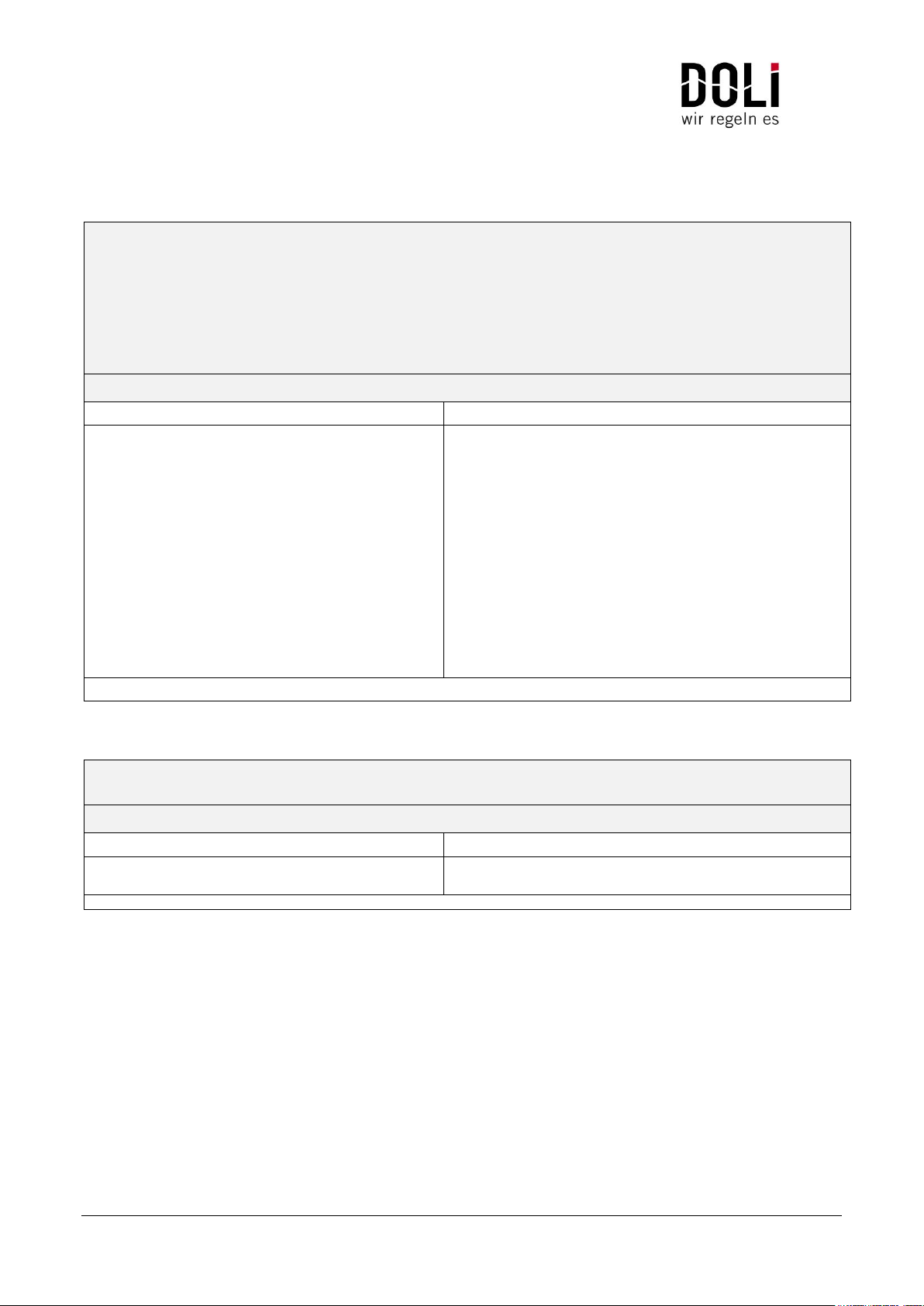
Open the given DoPE link with a matching device or function ID. All USB and LAN communication ports are
scanned, starting with USB. All LAN ports of the PC are included to the scan. The link parameters are set
and the link is established. If DoPEOpenDeviceID / DoPEOpenFunctionID returns DoPERR_TIMEOUT,
connection to the EDC did not go online. You must connect the EDC, switch it on and try the open function
again. If the return code is DoPERR_VERSION an EDC went online but either the DoPE API version or the
EDC type didn’t match.
If the parameter DeviceID in DoPEOpenDeviceID is set to ZERO, DoPE will open communication to
the first EDC that answers. This method is recommended for systems with only one EDC.
Minimum requirements: EDCi with EDCiApp 9149.001, DoPE 10.00
Function declaration
Description
extern unsigned DLLAPI DoPEOpenDeviceID /
DoPEOpenFunctionID (
unsigned DeviceID/ FunctionID
unsigned RcvBuffers
unsigned XmitBuffers
unsigned DataBuffers
unsigned APIVersion
void *Reserved
DoPE_HANDLE *DoPEHdl
Function returns Error constant (DoPERR_xxxx)
EDC Device ID / Function ID
Number of requested receiver buffers for messages. This number of
messages can be stored inside DoPE until they are read with
DoPEGetMsg function.
Number of requested transmitter buffers for messages. This number of
messages can be stored inside DoPE. They will be transmitted by
DoPE to EDC.
Number of requested data buffers. The measuring data record will be
stored inside DoPE in a circular buffer. If data are not read with
DoPEGetData the oldest record will be overwritten!
DoPE API version used by the DoPE user.
Reserved for future use
Pointer to memory for DoPE link handle
This handle has to be used for all further DoPE commands as a
reference for this link.
.NET <Edc object> = new Edc(DoPE.OpenBy.DeviceId/FunctionId, 0);
3.2 DoPECloseLink
Close the link and free all allocated memory.
After this call DoPEHdl is invalid and all further calls with this DoPEHdl will return with an error.
Minimum requirements: EDCi with EDCiApp 9149.001, DoPE 10.00
Function declaration
Description
extern unsigned DLLAPI DoPECloseLink (
DoPE_HANDLE *DoPEHdl)
Function returns Error constant (DoPERR_xxxx)
Pointer to DoPE link handle (is set to NULL after call)
.NET <Edc object>.Dispose()
Page 14
V10.26 2025-01-14 14 / 168 DoPE10
DoPE10
3.3 DoPEwOpenAll
Open all available DoPE links and fill the open link info table. All USB and LAN communication ports are
scanned, starting with DoPEPORT_USB. All LAN ports of the PC are included to the scan.
Minimum requirements: EDCi with EDCiApp 9149.001, DoPE 10.00
Function declaration
Description
extern unsigned DLLAPI DoPEwOpenAll (
unsigned RcvBuffers
unsigned XmitBuffers
unsigned DataBuffers
unsigned APIVersion
void *Reserved
unsigned InfoTableMaxEntries
unsigned *InfoTableValidEntries
DoPEwOpenLinkInfo InfoTable[ ])
Function returns Error constant (DoPERR_xxxx)
Number of requested receiver buffers for messages. This number of
messages can be stored inside DoPE until they are read with
DoPEGetMsg function.
Number of requested transmitter buffers for messages. This number of
messages can be stored inside DoPE. They will be transmitted by
DoPE to EDC.
Number of requested data buffers. The measuring data record will be
stored inside DoPE in a circular buffer. If data are not read with
DoPEGetData the oldest record will be overwritten!
DoPE API version used by the DoPE user.
Reserved for future use
Number of entries that can be stored to the info table.
Pointer to storage for the number of valid entries in the info table.
Info table will be filled by with all detected EDC’s
typedef struct
{
DoPE_HANDLE DoPEHdl;
unsigned PortType; /* DoPEPORT_USB or DoPEPORT_LAN */
DoPE_wPORTINFO PortInfo;
DoPEwModuleInfo ModuleInfo;
} DoPEwOpenLinkInfo;
.NET <EdcList object> = new EdcList(int MaximumNumberOfEdcs)
3.4 DoPEwCloseAll
Close all DoPE links previously opened by DoPEwOpenAll.
Minimum requirements: EDCi with EDCiApp 9149.001, DoPE 10.00
Function declaration
Description
extern unsigned DLLAPI DoPECloseAll (
unsigned InfoTableValidEntries
DoPEOpenLinkInfo InfoTable[ ])
Function returns Error constant (DoPERR_xxxx)
Number of valid entries in the info table.
Info table containing valid DoPE handles for all links to close.
All DoPE handles in the InfoTable are set to NULL.
extern unsigned DLLAPI DoPEwCloseAll (
unsigned InfoTableValidEntries
DoPEwOpenLinkInfo InfoTable[ ])
Function returns Error constant (DoPERR_xxxx)
Number of valid entries in the info table.
Info table containing valid DoPE handles for all links to close.
All DoPE handles in the InfoTable are set to NULL.
.NET <EdcList object>.Dispose()
Page 15
V10.26 2025-01-14 15 / 168 DoPE10
DoPE10
3.5 DoPEwPortInfo / DoPEwCurrentPortInfo
Get the port information for PC-communication ports (USB, LAN)
Minimum requirements: EDCi with EDCiApp 9149.001, DoPE 10.00
Function declaration
Description
extern unsigned DLLAPI DoPEwPortInfo (
unsigned Port,
unsigned First,
DoPE_wPORTINFO *pPortInfo)
Function returns Error constant (DoPERR_xxxx)
(DPXERR_BADPORT if no more port info is available)
Communication Port Type. (DoPEPORT_USB, DoPEPORT_LAN)
!= 0: get the first port information
== 0: get the next port information
pointer to port info structure
.NET RdPortInfo(DoPE.Port Port, bool First, ref DoPE.PortInfo PortInfo)
Get the current port informationof an established link
Function declaration
Description
extern unsigned DLLAPI DoPECurrentPortInfo (
DoPE_HANDLE DoPEHdl,
DoPE_PORTINFO *pPortInfo)
Function returns Error constant (DoPERR_xxxx)
DoPE link handle
pointer to port info structure
extern unsigned DLLAPI DoPEwCurrentPortInfo (
DoPE_HANDLE DoPEHdl,
DoPE_wPORTINFO *pPortInfo)
Function returns Error constant (DoPERR_xxxx)
DoPE link handle
pointer to port info structure
typedef struct
{
unsigned Ix; /* Device index */
wchar_t Name[DoPE_PORTNAMELEN]; /* Device name */
unsigned PortType; /* DoPEPORT_USB or DoPEPORT_LAN */
MAC NicMAC; /* NIC address */
} DoPE_wPORTINFO;
.NET <EdcList object>.PortInfo
Page 16
V10.26 2025-01-14 16 / 168 DoPE10
DoPE10
4 Message and Data handling
4.1 DoPECurrentData
Get current samples from receiver buffer.
DoPE receives measuring data in an adjustable time scale. The data record is stored inside DoPE in a
circular buffer. You can read the latest data record with this function.
For definition of DoPEData record refer to chapter 15.
Minimum requirements: EDCi with EDCiApp 9149.001, DoPE 10.00
Function declaration
Description
extern unsigned DLLAPI DoPECurrentData(
DoPE_HANDLE DoPEHdl,
DoPEData *Sample)
Function returns Error constant (DoPERR_xxxx)
DoPE link handle
Pointer to storage for data record.
.NET <Edc object>.Data.CurrentData(ref DoPE.Data Sample)
4.2 DoPEGetData
Get oldest sample from receiver buffer.
DoPE receives measuring data in an adjustable time scale. The data record is stored inside DoPE in a
circular buffer. You can read the oldest data record in the buffer with this function.
For definition of DoPEData record refer to chapter 15.
Minimum requirements: EDCi with EDCiApp 9149.001, DoPE 10.00
Function declaration
Description
extern unsigned DLLAPI DoPEGetData(
DoPE_HANDLE DoPEHdl,
DoPEData *Sample)
Function returns Error constant (DoPERR_xxxx)
DoPE link handle
Pointer to storage for data record.
.NET <Edc object>.Data.GetData(ref DoPE.Data Sample)
4.3 DoPEClearReceiver
Discard all received messages. If you want to get rid of old messages, that are of no interest anymore, use
this command.
Function declaration
Description
extern unsigned DLLAPI DoPEClearReceiver (
DoPE_HANDLE DoPEHdl)
Function returns Error constant (DoPERR_xxxx)
DoPE link handle
.NET not available
4.4 DoPEClearTransmitter
Discard all unsent transmitter buffers
Function declaration
Description
extern unsigned DLLAPI DoPEClearTransmitter (
DoPE_HANDLE DoPEHdl)
Function returns Error constant (DoPERR_xxxx)
DoPE link handle
.NET not available
Page 17
V10.26 2025-01-14 17 / 168 DoPE10
DoPE10
4.5 DoPEGetErrors
Get current error counter values. DoPE counts all sort of communication errors. You may read these errors
by using this command.
The DoPEError-structure contains several communication error counters. Whenever an error is detected, the
appropriate counter is increased by one. This error counters are useful to analyze communication problems.
Minimum requirements: EDCi with EDCiApp 9149.001, DoPE 10.00
Function declaration
Description
extern unsigned DLLAPI DoPEGetErrors(
DoPE_HANDLE DoPEHdl,
DoPEError * Error)
Function returns Error constant (DoPERR_xxxx)
DoPE link handle
Pointer to buffer for error counters
typedef struct
{
unsigned Overrun;
unsigned InvACK;
unsigned NoBuffer;
unsigned BccErr;
unsigned MwError;
} DoPEError;
Error counters
DoPE link handle
LAN Packet Overrun errors
Invalid ACKs received
No receiver buffer available
Checksum error
Invalid sample encoding
.NET not available
4.6 DoPEClearErrors
Clear current error counter values.
Minimum requirements: EDCi with EDCiApp 9149.001, DoPE 10.00
Function declaration
Description
extern unsigned DLLAPI DoPEClearErrors(
DoPE_HANDLE DoPEHdl)
Function returns Error constant (DoPERR_xxxx)
DoPE link handle
.NET not available
4.7 DoPEGetState
Get state information structure.
Minimum requirements: EDCi with EDCiApp 9149.001, DoPE 10.00
Function declaration
Description
extern unsigned DLLAPI DoPEGetState (
DoPE_HANDLE DoPEHdl
DoPEState *Status)
Function returns Error constant (DoPERR_xxxx)
DoPE link handle
Pointer to buffer for state information
typedef struct
{
unsigned ComState;
unsigned RcvBuffer;
unsigned XmitBuffer;
} DoPEState;
Constants for ComState
COM_STATE_OFF
COM_STATE_OFFLINE
COM_STATE_INITCYCLE
COM_STATE_ONLINE
Communication state
Number messages in receive queue
Number of messages to be transmitted
Link is disabled
Link is offline
Link is initializing
Link is established and Online
.NET not available
Page 18
V10.26 2025-01-14 18 / 168 DoPE10
DoPE10
5 Movement commands
DoPE provides several commands for moving the crosshead of a machine. The movement may be in different
control modes, such as position, load or extension control. There are simple commands like move up, or down
with a certain speed without explicit destination, or commands with a given destination. Furthermore DoPE
supplies commands with a destination in another control channel such as go in position control to a load
destination, and cyclic commands.
For most of the movement commands DoPE provides a command that uses default acceleration e.g.
DoPEPos and another where acceleration and deceleration are specified in the command e.g. DoPEPos_A.
After a movement has been finished, the event OnPosMsg will be activated.
A new movement command terminates an active movement command.
5.1 Simple movement commands
5.1.1 DoPEFMove, DoPEFMove_A
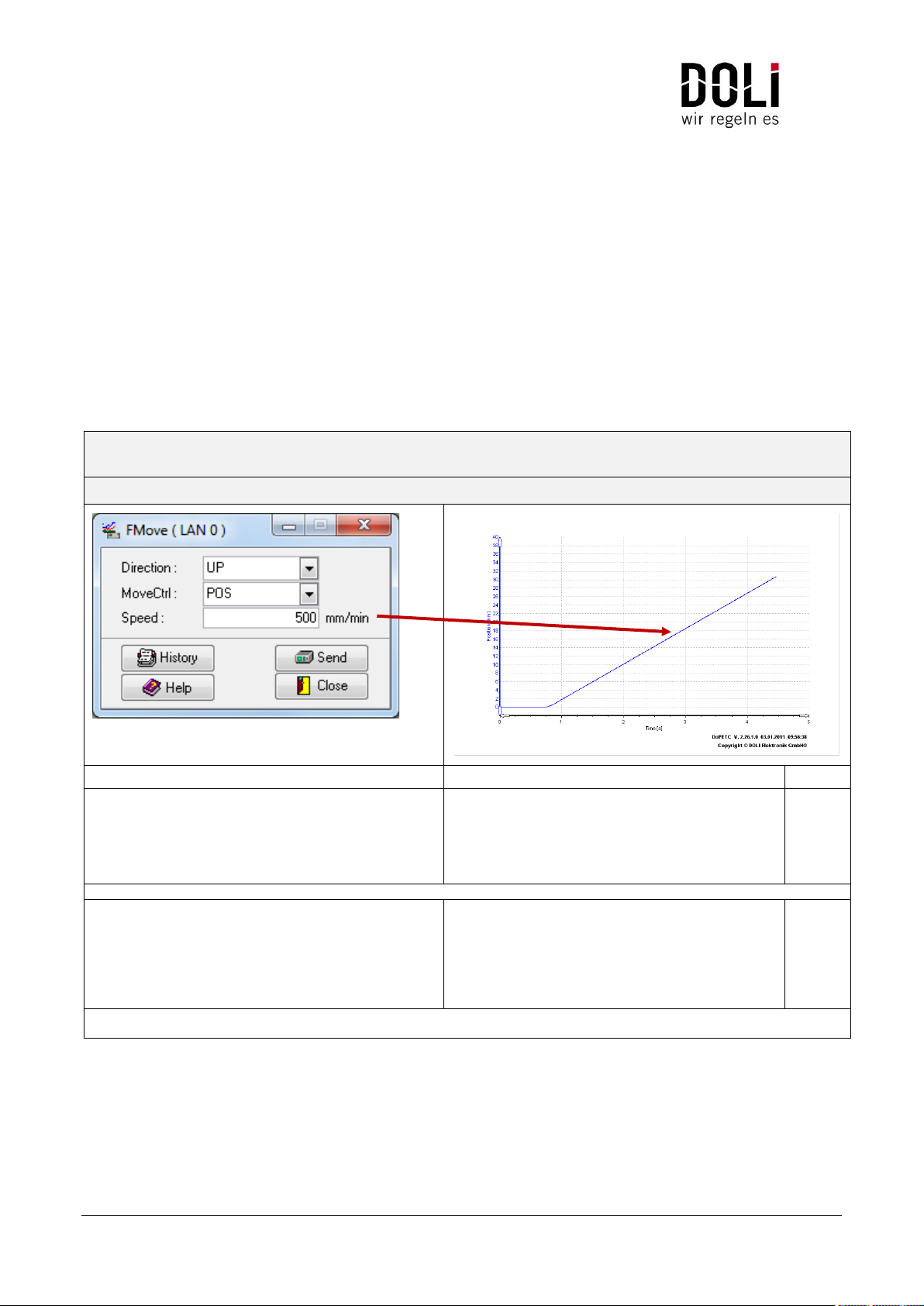
Move crosshead in the specified control mode and speed UP or DOWN. As an implicit limit of this command,
softends are used, if active.
Minimum requirements: EDCi with EDCiApp 9149.001, DoPE 10.00
Function declaration
Description
Unit
extern unsigned DLLAPI DoPEFMove(
DoPE_HANDLE DoPEHdl,
unsigned short Direction,
unsigned short MoveCtrl,
double Speed,
unsigned short * lpusTAN );
Function returns Error constant (DoPERR_xxxx)
DoPE link handle
Direction of movement
Control mode ofmovement (CTRL_xxx)
Speed for movement
Pointer to transaction number.
Unit/s
.NET <Edc object>.Move. FMove(DoPE.MOVE Direction, DoPE.CTRL MoveCtrl, Double Speed, ref Int16 Tan)
extern unsigned DLLAPI DoPEFMove_A(
DoPE_HANDLE DoPEHdl,
unsigned short Direction,
unsigned short MoveCtrl,
double Acc
double Speed,
unsigned short * lpusTAN );
Function returns Error constant (DoPERR_xxxx)
DoPE link handle
Direction of movement
Control mode of movement(CTRL_xxx)
Acceleration
Speed for movement
Pointer to transaction number.
Unit/s²
Unit/s
.NET <Edc object>.Move.FMove_A(
DoPE.MOVE Direction, DoPE.CTRL MoveCtrl, Double Acc, Double Speed, ref Int16 Tan)
Page 19
V10.26 2025-01-14 19 / 168 DoPE10
DoPE10
5.1.2 DoPEPos, DoPEPos_A
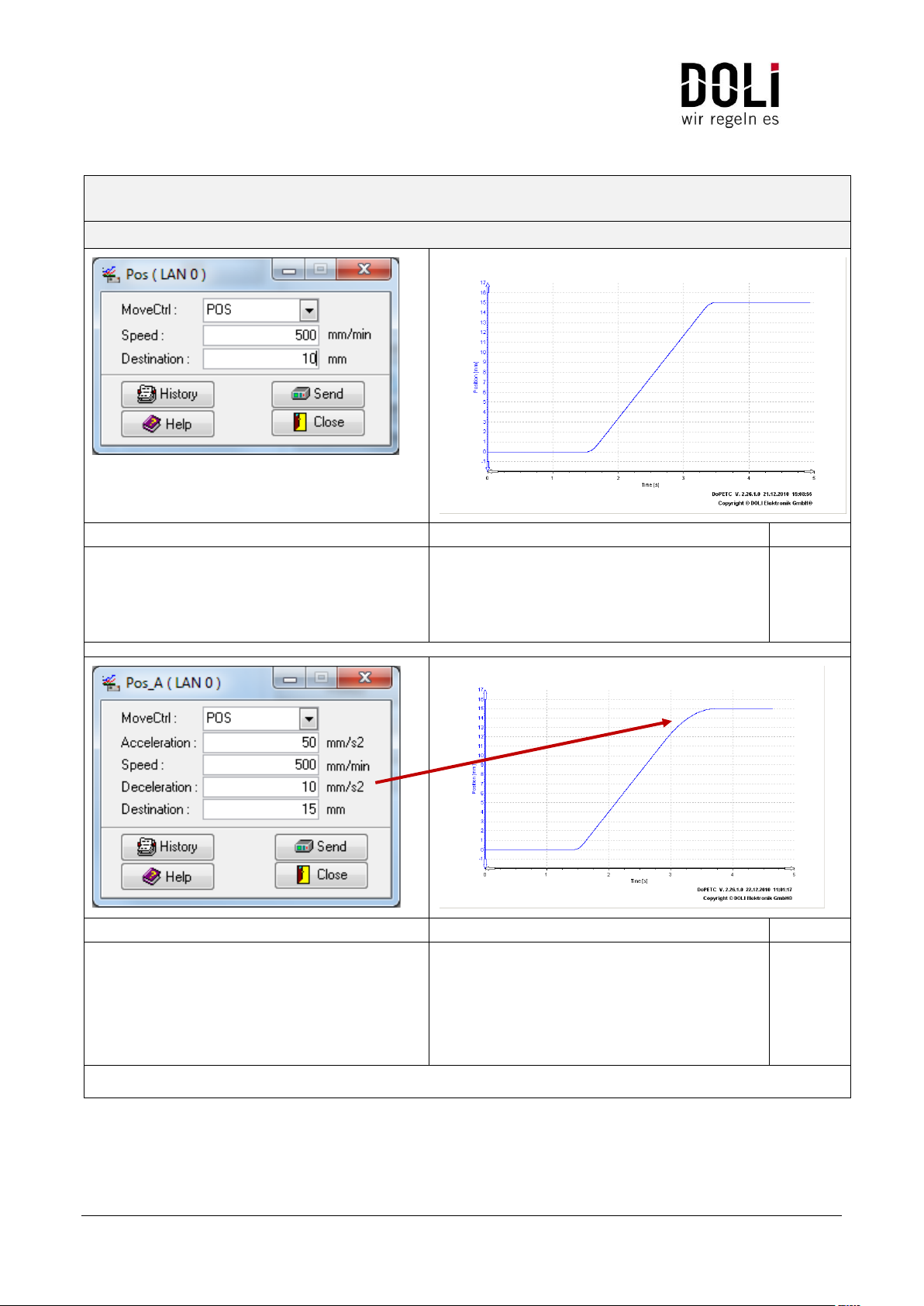
Move crosshead in the specified control mode and speed to the given destination.
DoPEPos will use the default acceleration while DoPEPos_A uses the given acceleration.
Minimum requirements: EDCi with EDCiApp 9149.001, DoPE 10.00
Function declaration
Description
Unit
extern unsigned DLLAPI DoPEPos (
DoPE_HANDLE DoPEHdl,
unsigned short MoveCtrl,
double Speed,
double Destination
unsigned short * lpusTAN );
Function returns Error constant (DoPERR_xxxx)
DoPE link handle
Control mode (CTRL_xxx)
Speed for movement
Final destination
Pointer to transaction number.
Unit/s
Unit
.NET <Edc object>.Move.Pos(DoPE.CTRL MoveCtrl, Double Speed, Double Destination, ref Int16 Tan)
Function declaration
Description
Unit
extern unsigned DLLAPI DoPEPos_A (
DoPE_HANDLE DoPEHdl,
unsigned short MoveCtrl,
double Acc
double Speed,
double Dec
double Destination
unsigned short * lpusTAN );
Function returns Error constant (DoPERR_xxxx)
DoPE link handle
Control mode (CTRL_xxx)
Acceleration
Speed for movement
Deceleration
Final destination
Pointer to transaction number.
Unit/s²
Unit/s
Unit/s²
Unit
.NET <Edc object>.Move.Pos_A(DoPE.CTRL MoveCtrl, Double Acc, Double Speed, Double Dec, Double Destination,
ref Int16 Tan)
Page 20
V10.26 2025-01-14 20 / 168 DoPE10
DoPE10
5.1.3 DoPEPosExt, DoPEPosExt_A
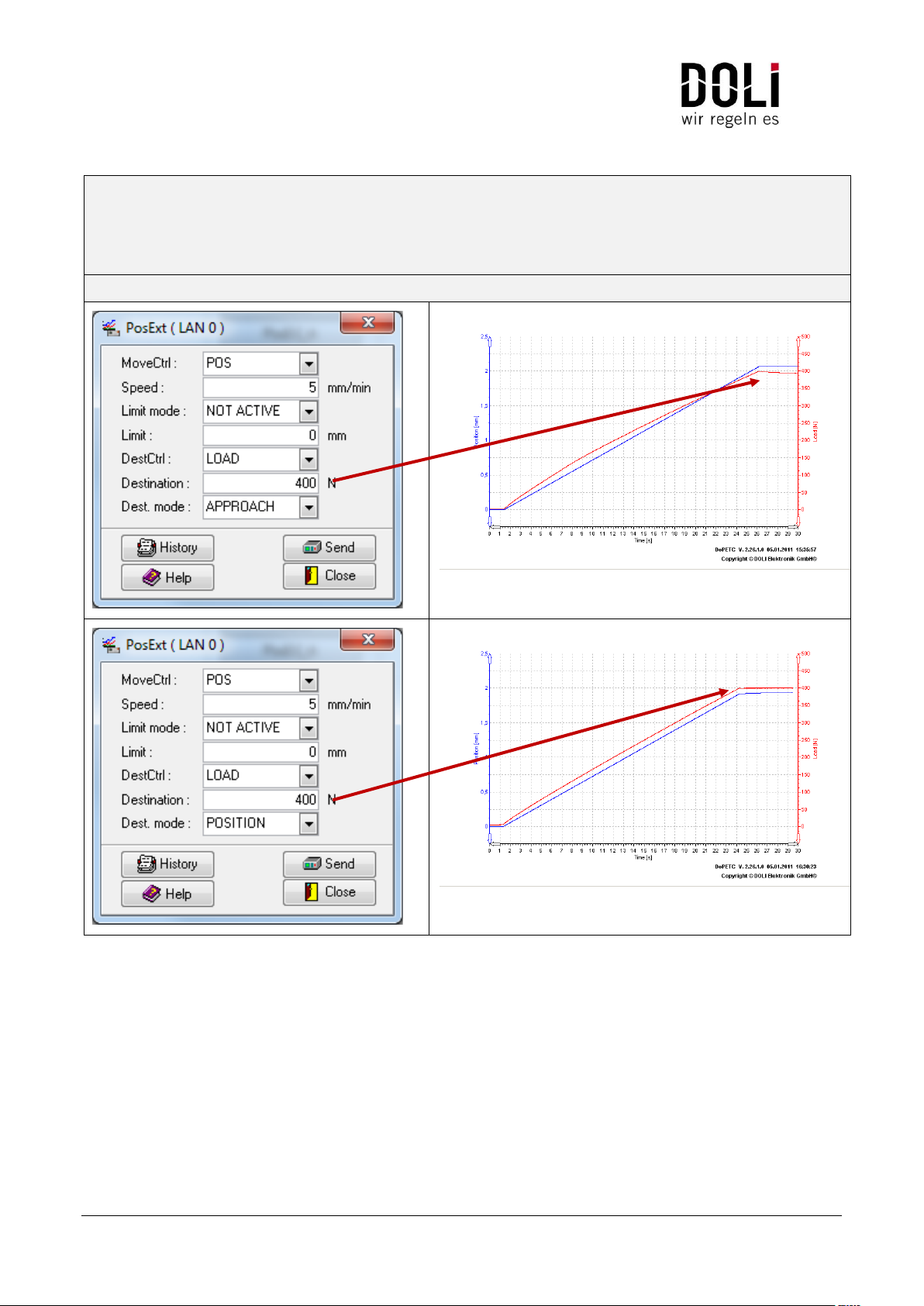
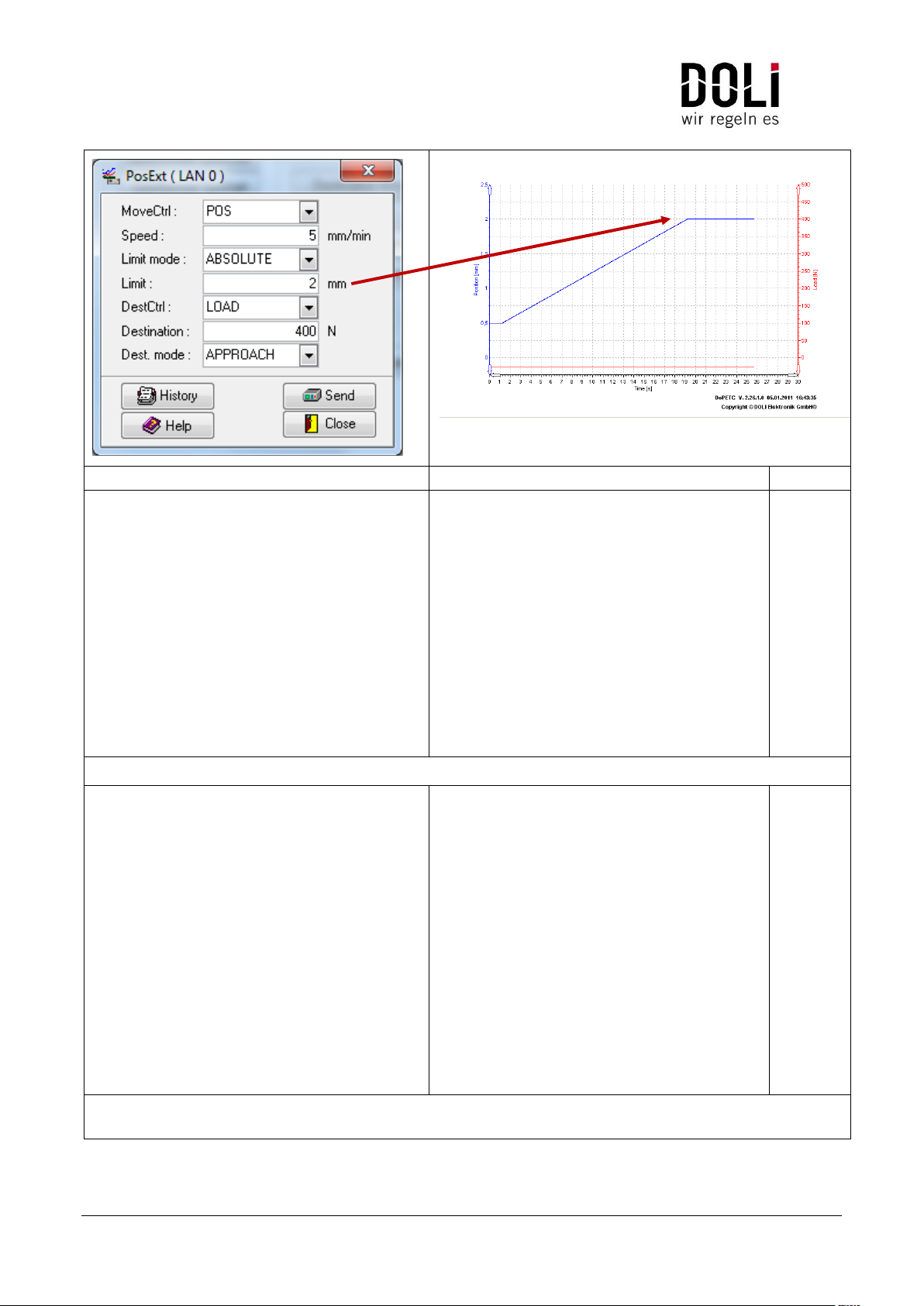
Move crosshead in the specified control mode ‘MoveCtrl’ and ‘Speed’ to the given ‘Destination’.
‘DestinationCtrl’ may be different to ‘MoveCtrl’. Default acceleration and deceleration will be used.
The Parameter ‘DestinationMode’ specifies how to reach destination position and the action after reaching it.
In case the limit position is reached before destination position, crosshead will be halted in ‘MoveCtrl’ at limit
position.
Minimum requirements: EDCi with EDCiApp 9149.001, DoPE 10.00
Halt in position control after load destination is reached.
Due to specimen relaxation, load will decrease!
Switch to load control just before load destination is reached. Load is kept
constant, position is increasing, due to specimen relaxation.
Page 21
V10.26 2025-01-14 21 / 168 DoPE10
DoPE10
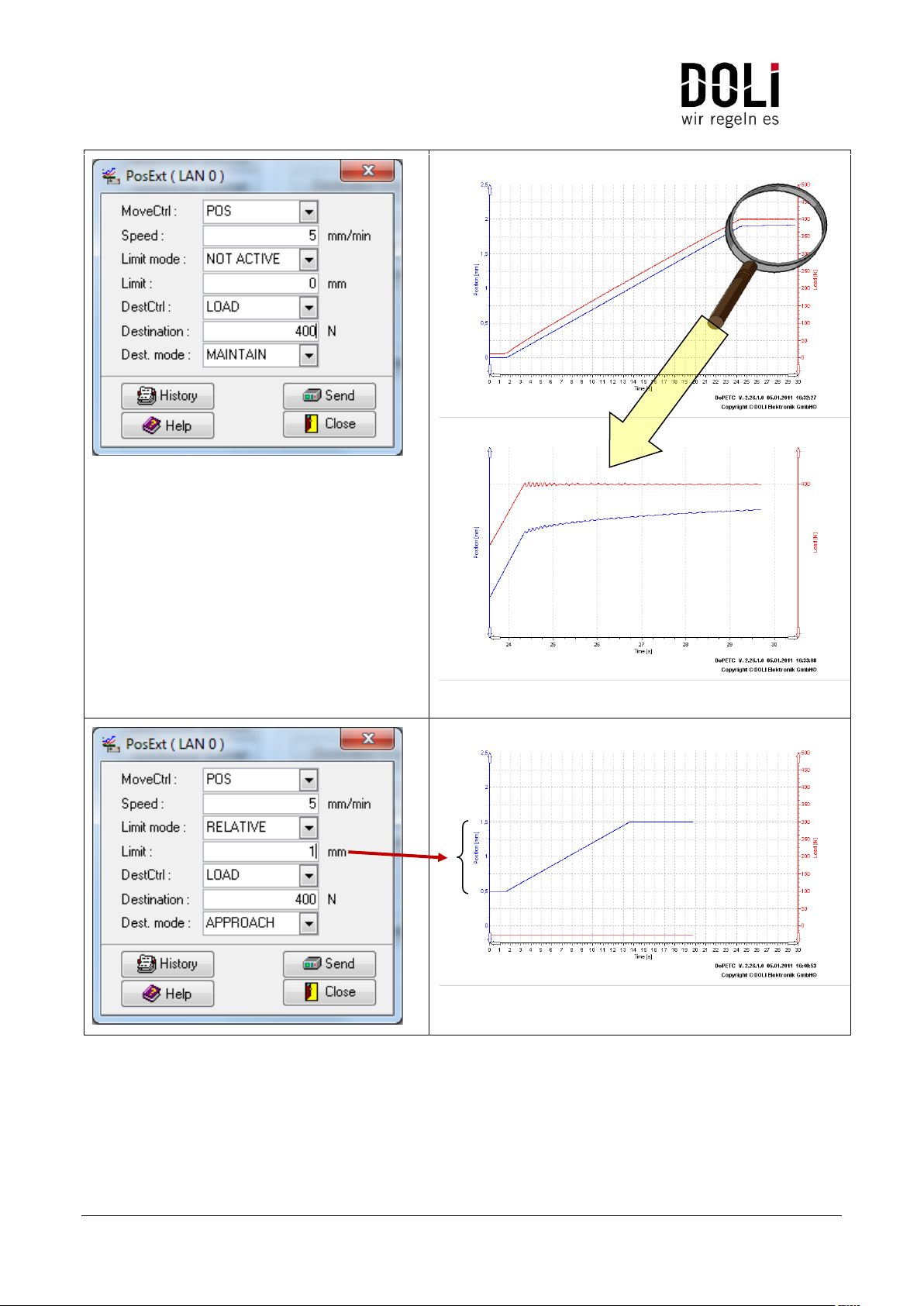
Halt in position control after load destination is reached and maintain this
load destination in position control.
Load destination cannot be reached after 1 mm relative movement.
Movement command is terminated.
Page 22
V10.26 2025-01-14 22 / 168 DoPE10
DoPE10
Load destination cannot be reached after the absolute position of 2mm is
reached. Movement command is terminated.
Function declaration
Description
Unit
extern unsigned DLLAPI DoPEPosExt (
DoPE_HANDLE DoPEHdl,
unsigned short MoveCtrl,
double Speed,
unsigned short LimitMode,
double Limit,
unsigned short DestinationCtrl,
double Destination
unsigned short DestinationMode,
unsigned short * lpusTAN );
Function returns Error constant (DoPERR_xxxx)
DoPE link handle
Control mode (CTRL_xxx)
Speed for movement
LIMIT_ABSOLUTE: Limit is a absolute position
LIMIT_RELATIVE: Limit is a distance (relative) position
LIMIT_NOT_ACTIVE: No Limit is active
Limit position in case Destination cannot be reached
Channel definition for destination (CTRL_xxx)
Final destination
DEST_APPROACH: Halt after reaching destination, do
not change control mode.
DEST_POSITION: Switch to ‘DestinationCtrl’ just before
‘Destination’ is reached. Then move to ‘Destination’.
DEST_MAINTAIN: No change of control mode at
destination but maintain destination in ‘MoveCtrl’ mode.
Pointer to transaction number.
Unit/s
Unit
Unit
.NET <Edc object>.Move.PosExt(DoPE.CTRL MoveCtrl, Double Speed, DoPE.LIMITMODE LimitMode, Double Limit,
DoPE.CTRL DestinationCtrl, Double Destination, DoPE.DESTMODE DestinationMode, ref Int16 Tan)
extern unsigned DLLAPI DoPEPosExt_A (
DoPE_HANDLE DoPEHdl,
unsigned short MoveCtrl,
double Acc,
double Speed,
double DecLimit,
unsigned short LimitMode,
double Limit,
unsigned short DestinationCtrl,
double DecDestination,
double Destination
unsigned short DestinationMode,
unsigned short * lpusTAN );
Function returns Error constant (DoPERR_xxxx)
DoPE link handle
Control mode (CTRL_xxx)
Acceleration
Speed for movement
Deceleration at Limit
LIMIT_ABSOLUTE: Limit is a absolute position
LIMIT_RELATIVE: Limit is a distance (relative) position
LIMIT_NOT_ACTIVE: No Limit is active
Limit position in case Destination cannot be reached
Channel definition for destination (CTRL_xxx)
Deceleration at Limit
Final destination
DEST_APPROACH: Halt after reaching destination, do
not change control mode.
DEST_POSITION: Switch to ‘DestinationCtrl’ just before
‘Destination’ is reached. Then move to ‘Destination’.
DEST_MAINTAIN: No change of control mode at
destination but maintain destination in ‘MoveCtrl’mode.
Pointer to transaction number.
Unit/s²
Unit/s
Unit/s²
Unit
Unit/s²
Unit
.NET <Edc object>.Move.PosExt_A(DoPE.CTRL MoveCtrl, Double Acc, Double Speed, Double DecLimit,
DoPE.LIMITMODE LimitMode, Double Limit, DoPE.CTRL DestinationCtrl, Double DecDestination,
Double Destination, DoPE.DESTMODE DestinationMode, ref Int16 Tan)
Page 23
V10.26 2025-01-14 23 / 168 DoPE10
DoPE10
5.2 Halt commands
5.2.1 DoPEHalt, DoPEHalt_A
HALT is understood as a deceleration from current speed to speed zero. This is done by the build in position
generator. If not specified by the halt command default deceleration will be used. The final destination
position cannot be specified, it depends on current speed and deceleration.
Minimum requirements: EDCi with EDCiApp 9149.001, DoPE 10.00
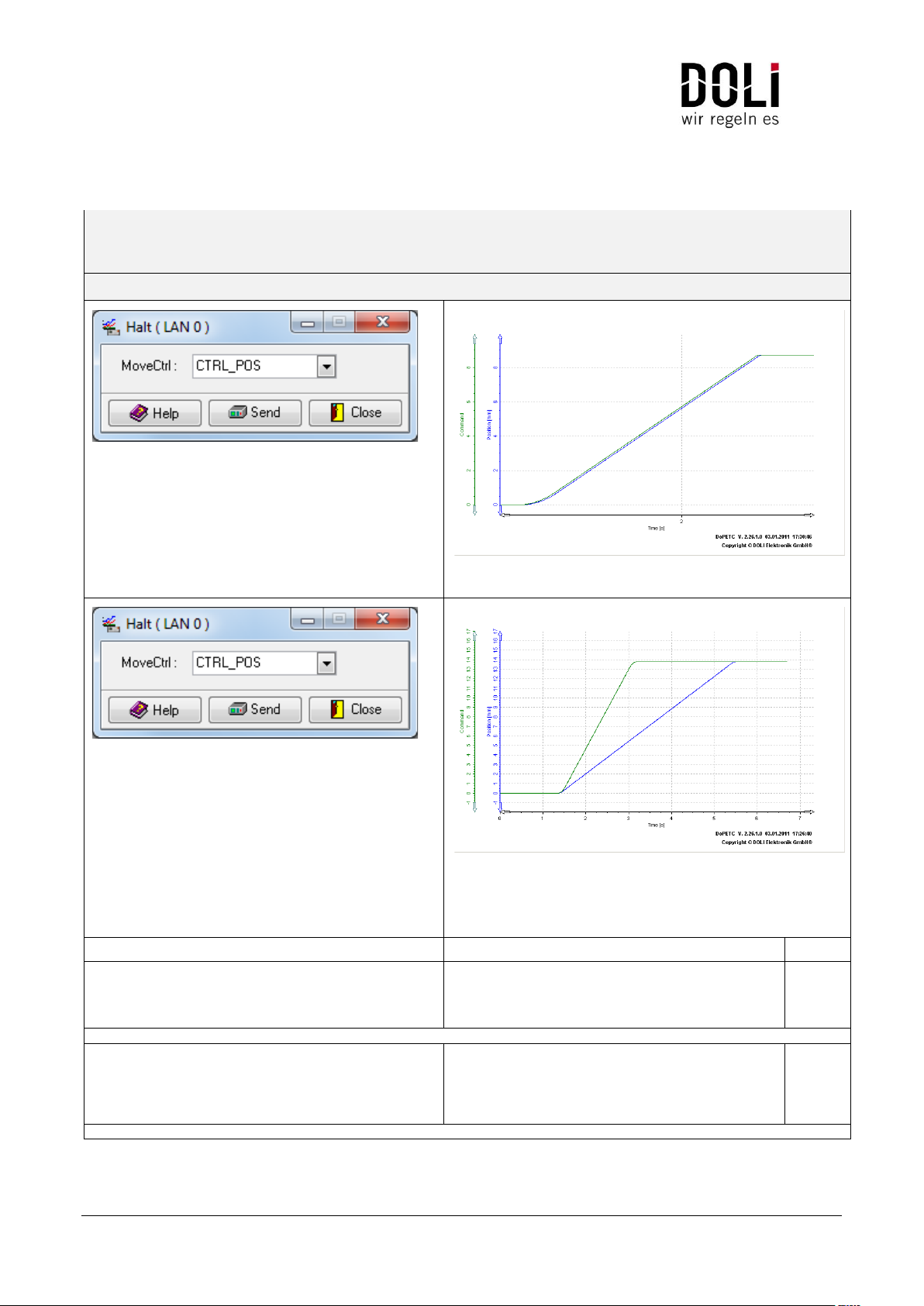
DoPEHalt will terminate a current movement command. The
Command will be decelerated to ZERO speed.
The machine cannot follow the desired speed.
(nominal speed in set-up is too high)
Command will be decelerated to ZERO speed.
After the command has decreased speed to zero, the machine is still
moving, until the command position has been reached.
Function declaration
Description
Unit
extern unsigned DLLAPI DoPEHalt(
DoPE_HANDLE DoPEHdl,
unsigned short MoveCtrl,
unsigned short * lpusTAN );
Function returns Error constant (DoPERR_xxxx)
DoPE link handle
Control mode (CTRL_xxx)
Pointer to transaction number.
.NET <Edc object>.Move.Halt(DoPE.CTRL MoveCtrl, ref Int16 Tan)
extern unsigned DLLAPI DoPEHalt_A(
DoPE_HANDLE DoPEHdl,
unsigned short MoveCtrl,
double Dec
unsigned short * lpusTAN );
Function returns Error constant (DoPERR_xxxx)
DoPE link handle
Control mode of movement (CTRL_xxx)
Deceleration
Pointer to transaction number.
Unit/s²
.NET <Edc object>.Move.Halt_A(DoPE.CTRL MoveCtrl, Double Dec, ref Int16 Tan)
Page 24
V10.26 2025-01-14 24 / 168 DoPE10
DoPE10
5.2.2 DoPESHalt
Instant Halt of crosshead in position control mode. If needed, the control mode is changed to position control.
Before decelerating with default deceleration, the command is set to the current position.
This is the fastest method to halt the machine in position control.
Minimum requirements: EDCi with EDCiApp 9149.001, DoPE 10.00
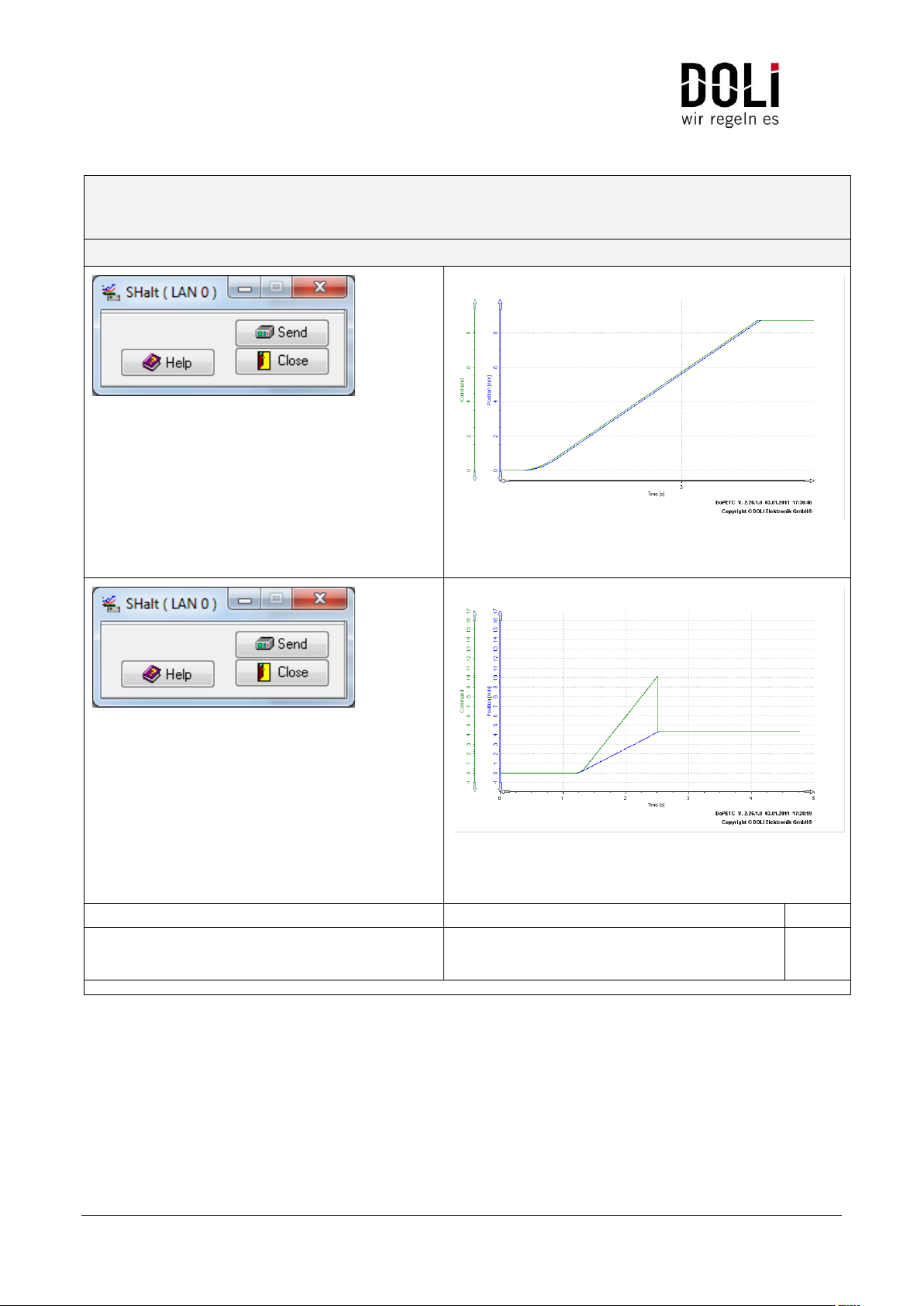
DoPESHalt will terminate a current movement command.
If nominal speed is set correctly, there is no difference to DoPEHalt
command.
The machine cannot follow the desired speed.
(nominal speed in set-up is too high)
Command will be set to current position and then decelerated to ZERO
speed.
Function declaration
Description
Unit
extern unsigned DLLAPI DoPESHalt(
DoPE_HANDLE DoPEHdl,
unsigned short * lpusTAN );
Function returns Error constant (DoPERR_xxxx)
DoPE link handle
Pointer to transaction number.
.NET <Edc object>Move.SHalt(ref Int16 Tan)
Page 25
V10.26 2025-01-14 25 / 168 DoPE10
DoPE10
5.2.3 DoPEHaltW, DoPEHaltW_A
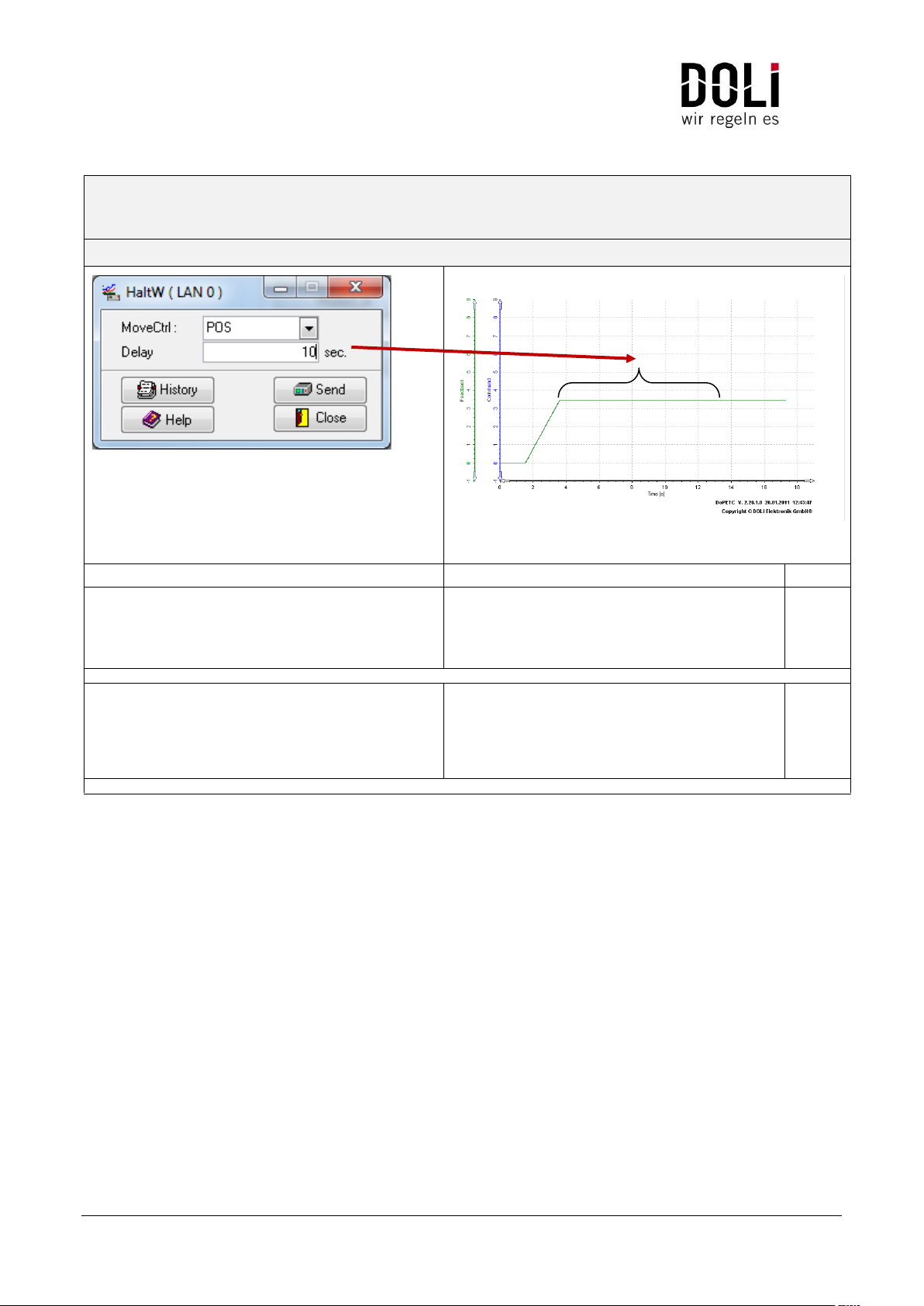
Decelerate from current speed to speed zero and wait delay time. After delay time has expired, the command
has finished and a position reached message is generated.
This command is only useful inside a combined movement command.
Minimum requirements: EDCi with EDCiApp 9149.001, DoPE 10.00
DoPEHalt will terminate a current movement command. The message,
indicating the end of this command will be delayed. (here 10 seconds)
Function declaration
Description
Unit
extern unsigned DLLAPI DoPEHaltW(
DoPE_HANDLE DoPEHdl,
unsigned short MoveCtrl,
double Delay
unsigned short * lpusTAN );
Function returns Error constant (DoPERR_xxxx)
DoPE link handle
Control mode (CTRL_xxx)
Delay time
Pointer to transaction number.
s
.NET <Edc object>.Move.HaltW(DoPE.CTRL MoveCtrl, Double Delay, ref Int16 Tan)
extern unsigned DLLAPI DoPEHaltW_A(
DoPE_HANDLE DoPEHdl,
unsigned short MoveCtrl,
double Dec
double Delay
unsigned short * lpusTAN );
Function returns Error constant (DoPERR_xxxx)
DoPE link handle
Control mode of movement (CTRL_xxx)
Deceleration
Delay time
Pointer to transaction number.
Unit/s²
s
.NET <Edc object>.Move.HaltW_A(DoPE.CTRL MoveCtrl, Double Dec, Double Delay, ref Int16 Tan)
Page 26
V10.26 2025-01-14 26 / 168 DoPE10
DoPE10
5.2.4 DoPEXpCont
Change control mode and continue movement in the new control mode with the current speed.
Minimum requirements: EDCi with EDCiApp 9149.001, DoPE 10.00
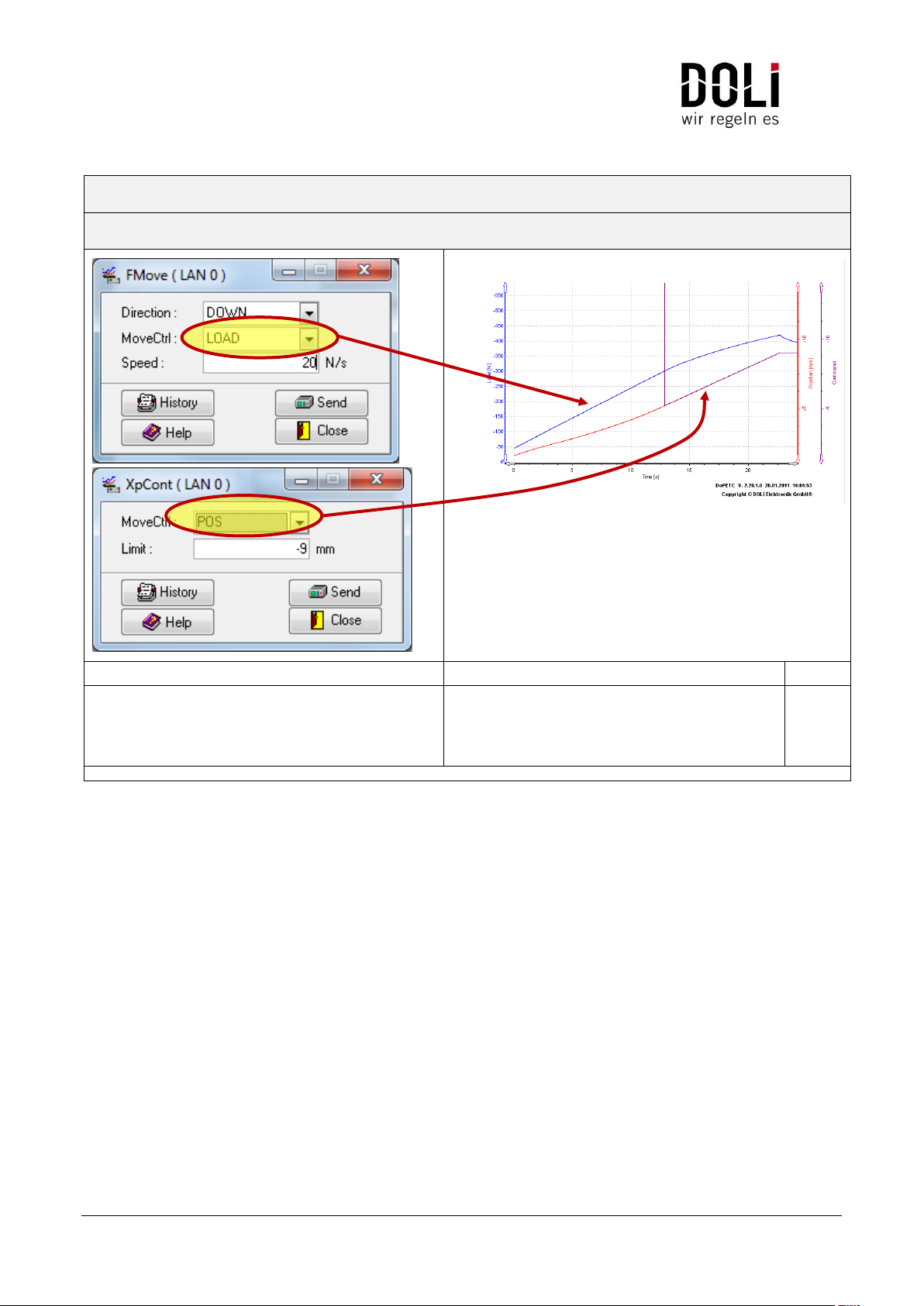
Machine is moving in load control with 20 N/s. At about 17 s, the
DoPEXpCont command switches to position control, and continues
with the current speed in position. After reaching the Limit position, the
command is terminated.
Function declaration
Description
Unit
extern unsigned DLLAPI DoPEXpCont(
DoPE_HANDLE DoPEHdl,
unsigned short MoveCtrl,
double Limit
unsigned short * lpusTAN );
Function returns Error constant (DoPERR_xxxx)
DoPE link handle
Control mode (CTRL_xxx)
Limit position
Pointer to transaction number.
Unit
.NET <Edc object>.Move.XpCont(DoPE.CTRL MoveCtrl, Double Limit, ref Int16 Tan)
Page 27
V10.26 2025-01-14 27 / 168 DoPE10
DoPE10
5.2.5 DoPETrig, DoPETrig_A
Move crosshead with the specified speed to the limit position. If the trigger position is reached a message will
be transmitted and if used inside a combined movement sequence, the next command is activated.
Minimum requirements: EDCi with EDCiApp 9149.001, DoPE 10.00
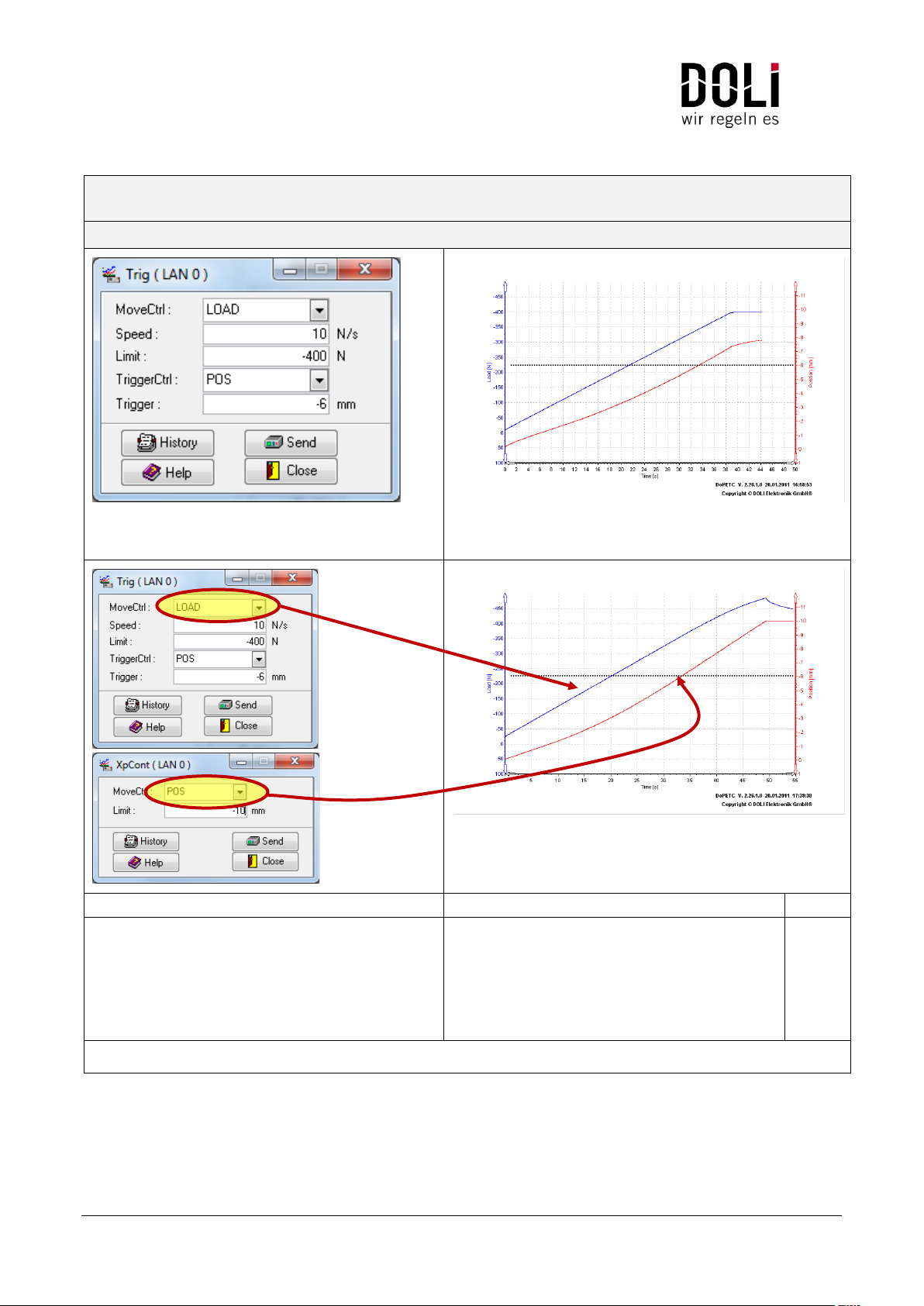
Move in load control with 10 N/s to -400N. A trigger message is
generated at -6mm position. Upon this, the PC program may send
another e.g. movement command.
The DoPETrig command can be used inside a combined movement
command. Upon reaching -6mm, the next command will be
automatically started. Here go with the current speed in position to 10mm.
Function declaration
Description
Unit
extern unsigned DLLAPI DoPETrig(
DoPE_HANDLE DoPEHdl,
unsigned short MoveCtrl,
double Speed,
double Limit,
unsigned short TriggerCtrl,
double Trigger,
unsigned short * lpusTAN );
Function returns Error constant (DoPERR_xxxx)
DoPE link handle
Control mode (CTRL_xxx)
Speed for movement
Limit position in case Destination cannot be reached
Control mode for trigger channel(CTRL_xxx)
Trigger level
Pointer to transaction number.
Unit/s
.NET <Edc object>.Move.Trig(DoPE.CTRL MoveCtrl, Double Speed, Double Limit,
DoPE.CTRL TriggerCtrl, Double Trigger, ref Int16 Tan)
Page 28

V10.26 2025-01-14 28 / 168 DoPE10
DoPE10
extern unsigned DLLAPI DoPETrig_A(
DoPE_HANDLE DoPEHdl,
unsigned short MoveCtrl,
double Acc,
double Speed,
double Dec,
double Limit,
unsigned short TriggerCtrl,
double Trigger,
unsigned short * lpusTAN );
Function returns Error constant (DoPERR_xxxx)
DoPE link handle
Control mode (CTRL_xxx)
Acceleration
Speed for movement
Deceleration
Limit position in case Destination cannot be reached
Control mode for trigger channel (CTRL_xxx)
Trigger level
Pointer to transaction number.
Units/s²
Unit/s
Units/s²
.NET <Edc object>.Move.Trig_A(DoPE.CTRL MoveCtrl, Double Acc, Double Speed, Double Dec, Double Limit,
DoPE.CTRL TriggerCtrl, Double Trigger, ref Int16 Tan)
Page 29
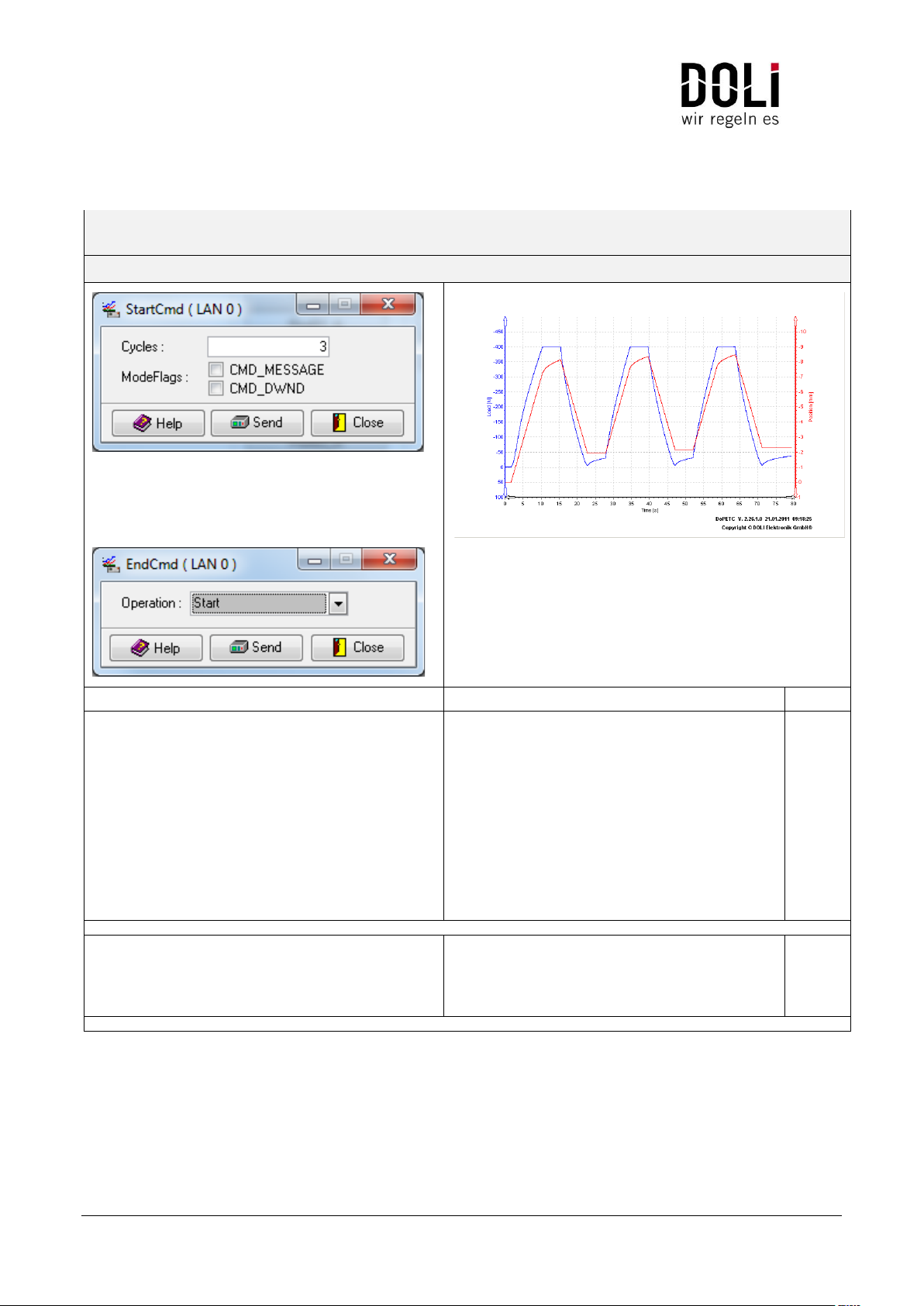
V10.26 2025-01-14 29 / 168 DoPE10
DoPE10
5.3 Combined movement commands
5.3.1 DoPEBlockHeader, DoPEBlockExecute
All simple movement commands can be used inside a combined movement command. The combined
movement command starts with DoPEBlockHeader and ends with DoPEBlockExecute.
Minimum requirements: EDCi with EDCiApp 9149.001, DoPE 10.00
DoPEPosExt(CTRL_POS, 0.833, LIMIT_RELATIVE, 10,
CTRL_LOAD, -400, DEST_POSITION);
DoPEHaltW(CTRL_LOAD, 5);
DoPEPosExt(CTRL_POS, 0.833, LIMIT_RELATIVE, 10,
CTRL_LOAD, -5, DEST_APPROACH)
DoPEHaltW(CTRL_POS, 5);
Repeat following sequence 3 times:
1. Go in position control with 8.33 mm/s (50 mm/min) to -400N
and switch to load control.
2. Keep load for 5 seconds.
3. Go in position control with 8.33 mm/s (50 mm/min) to -5N
and halt in position control.
4. Keep position for 5 seconds.
Function declaration
Description
Unit
extern unsigned DLLAPI DoPEBlockHeader (
DoPE_HANDLE DoPEHdl,
unsigned long Cycles,
unsigned short ModeFlags );
Function returns Error constant (DoPERR_xxxx)
DoPE link handle
Number of cycles to be done
Flags. Both flags may be ignored.
CMD_DWND: Supervise destination window.
Next command is started after the current reaches its
destination window. Otherwise the next command is
started, after the command value reaches its destination
CMD_MESSAGE: Report intermediate destinations.
For each single command a message (OnTPos) is sent
after it was finished.
After the last command in the sequence is finished a
message (OnPos) is always sent.
.NET <Edc object>.Block. Header(Int32 Cycles, DoPE.CMD_MODE ModeFlags)
extern unsignedDLLAPI DoPEBlockExecute(
DoPE_HANDLE DoPEHdl,
unsigned short Operation,
unsigned short * lpusTAN );
Function returns Error constant (DoPERR_xxxx)
DoPE link handle
CMD_START: Start the command sequence.
CMD_DISCARD: Discard the command sequence.
Pointer to transaction number.
.NET <Edc object>.Block.Execute(DoPE.CMD_OPERATION Operation, ref Int16 Tan)
Page 30
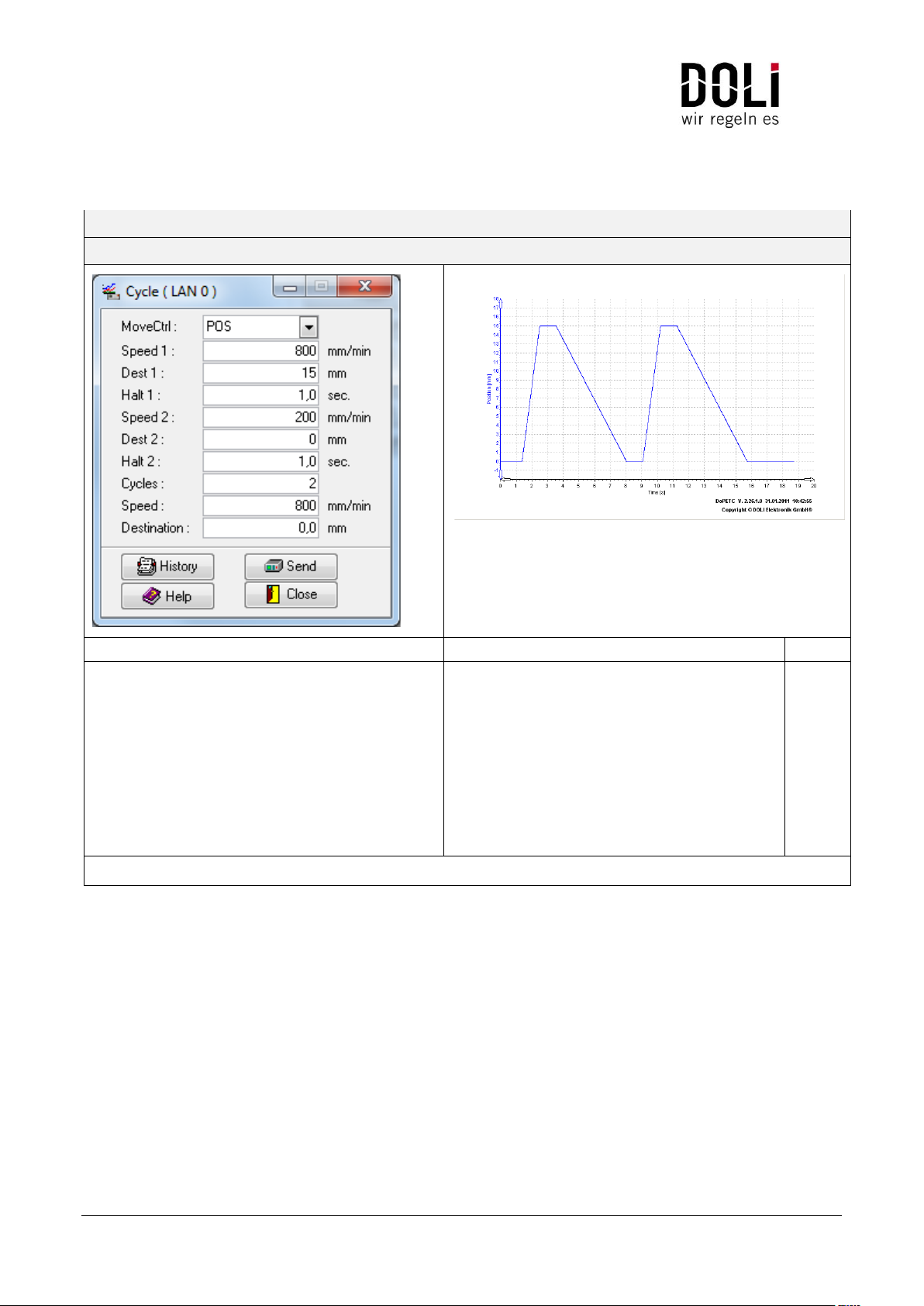
V10.26 2025-01-14 30 / 168 DoPE10
DoPE10
5.4 Complex movement commands
5.4.1 DoPECycle
Cycle movement using ramps.
Minimum requirements: EDCi with EDCiApp 9149.001, DoPE 10.00
Go with 800mm/min to 15mm, Halt 15mm for 1 second, go with
200mm/min to 0mm and halt 0mm for 1 second.
Repeat this sequence two times.
Function declaration
Description
Unit
extern unsigned DLLAPI DoPECycle(
DoPE_HANDLE DoPEHdl
unsigned short MoveCtrl
double Speed1
double Dest1
double Halt1
double Speed2
double Dest2
double Halt2
unsigned long Cycles
double Speed
double Destination
unsigned short * lpusTAN
Function returns Error constant (DoPERR_xxxx)
DoPE link handle
Control mode (CTRL_xxx)
Speed to reach destination 1
Destination 1
Halt time at destination 1
Speed to reach destination 2
Destination 2
Halt time at destination 2
Number of cycles
Speed to final destination
Final destination
Pointer to transaction number.
Unit/s
Unit
s
Unit/s
Unit
s
Unit/s
Unit
.NET <Edc object>.Move.Cycles(DoPE.CTRL MoveCtrl, Double Speed1, Double Dest1, Double Halt1,
Double Speed2, Double Dest2, Double Halt2, Int32 Cycles, Double Speed, Double Destination, ref Int16 Tan)
Page 31
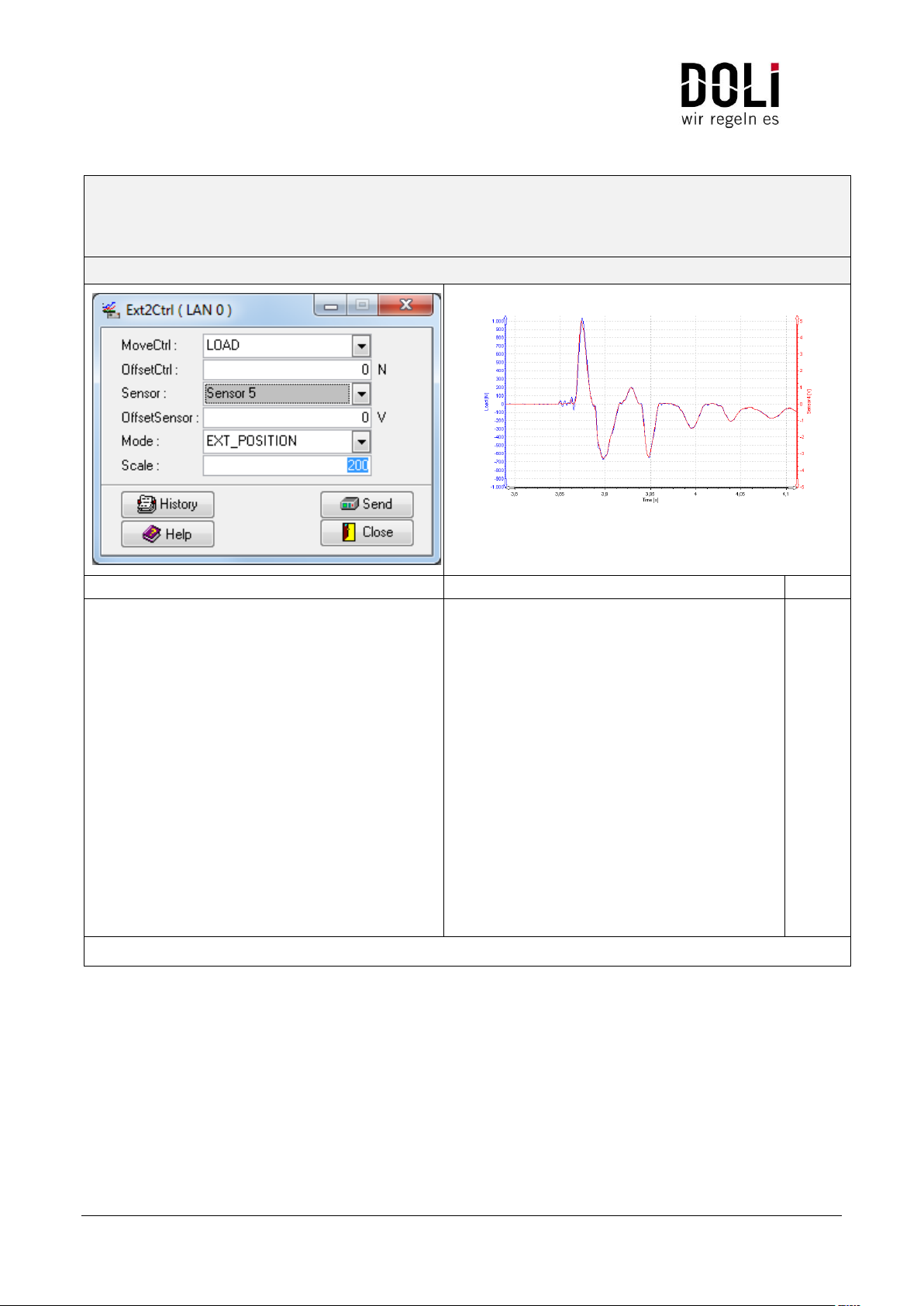
V10.26 2025-01-14 31 / 168 DoPE10
DoPE10
5.4.2 DoPEExt2Ctrl
Move crosshead according to an external command signal. You may supply a random function to an A/D
converter and specify movement according to this random function. Scaling of the command- and sensorsystem is done by offsets and scale. Following formula is used:
Output = (ExternalCommandValue – OffsetSensor) * Scale + OffsetCtrl
Minimum requirements: EDCi with EDCiApp 9149.001, DoPE 10.00
Follow external signal at Sensor4 in load control.
0V at Sensor4 will be 0N,
10V at Sensor4 will be 2000N.
Function declaration
Description
Unit
extern unsigned DLLAPI DoPEExt2Ctrl (
DoPE_HANDLE DoPEHdl
unsigned short MoveCtrl
double OffsetCtrl
unsigned short SensorNo
double OffsetSensor
unsigned short Mode
double Scale
unsigned short * lpusTAN)
Function returns Error constant (DoPERR_xxxx)
DoPE link handle
Control mode (CTRL_xxx)
Offset for position, load or extension
Sensor number for the external command signal
Offset for external command signal
various position or speed control modes (see next page)
Scaling factor for external command signal
Scale = 1 for POSITION mode:
Nominal value of external command
(e.g. 10V, or 1 round of a encoder)
represents one unit of the control channel
(e.g. 1mm, or 1N, or 1kN)
Scale = 1 for SPEED mode:
Nominal value of external command
(e.g. 10V, or 1 round of a encoder)
represents nominal speed of the control channel
(e.g. 20mm/s, or 100kN/s)
Scale = 1 for OPENLOOP mode:
Nominal value of external command
(e.g. 10V, or 1 round of a encoder)
represents 100% output
Pointer to transaction number.
Unit
.NET <Edc object>.Move.Ext2Ctrl(DoPE.CTRL MoveCtrl, Double OffsetCtrl, DoPE.SENSOR SensorNo, Double OffsetSensor,
DoPE.EXT Mode, Double Scale, ref Int16 Tan)
Page 32
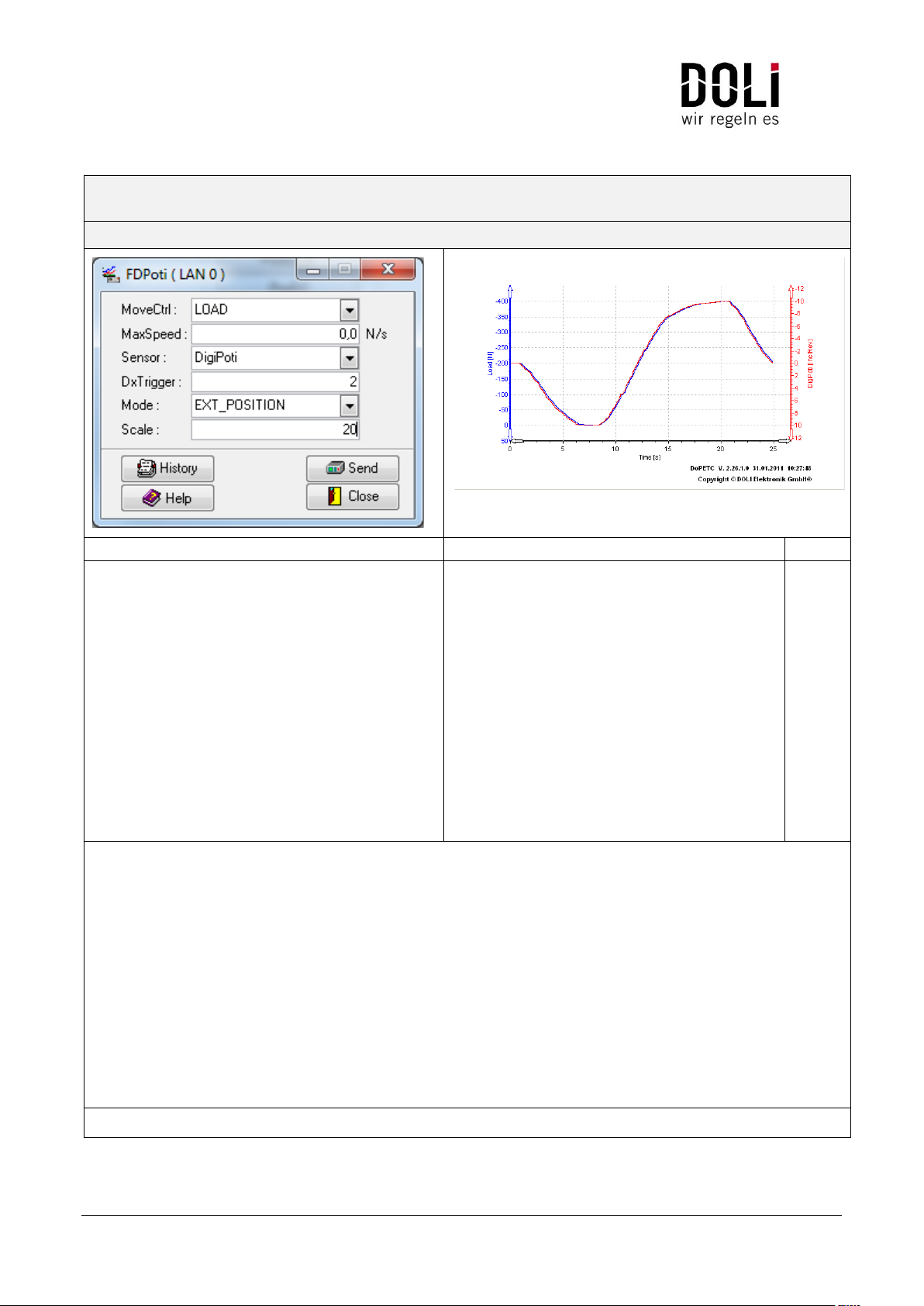
V10.26 2025-01-14 32 / 168 DoPE10
DoPE10
5.4.3 DoPEFDPoti
Move crosshead according to an external command signal generated by a digital encoder (DigiPoti). This is a
special version of the DoPEExt2Ctrl command. Offsets and limits are handled inside this function.
Minimum requirements: EDCi with EDCiApp 9149.001, DoPE 10.00
Follow DigiPoti signal in load control.
One revolution of the DigiPoti will cause 20N in load.
Function declaration
Description
Unit
extern unsigned DLLAPI DoPEFDPoti (
DoPE_HANDLE DoPEHdl
unsigned short MoveCtrl
double MaxSpeed
unsigned short SensorNo
unsigned short DxTrigger
unsigned short Mode
double Scale
unsigned short * lpusTAN
Function returns Error constant (DoPERR_xxxx)
DoPE link handle
Control mode (CTRL_xxx)
Start speed for speed controlled modes
Sensor number for the external command input.
Use sensor SENSOR_DP for Digital Encoder (DigiPoti) on
EDC front panel.
Dead area of encoder.
The Encoder has to change the specified number of digits
before the command is active. For EDC front panel
DigiPoti 2 or 3 is a good value.
various position or speed control modes (see below)
For EXT_POSITION Number of Units per revolution
e.g. Scale = 1 -> 1 mm per revolution
Scale = 10 -> 10 N per revolution.
For EXT_SPEED_xx number of revolutions to nominal
speed
e.g. Scale = 2 -> after 2 revolutions to nominal speed.
Pointer to transaction number.
Unit/s
Various position or speed control modes:
The first four modes refer to measuring values. E.g. EXT_SPEED_POSITIVE moves to increasing measuring values.
EXT_POSITION 0 Position, moves to increasing and decreasing positions
EXT_SPEED_BIPOLAR 1 Speed bipolar (positive and negative speed)
EXT_SPEED_POSITIVE 2 Speed positive direction
EXT_SPEED_NEGATIVE 3 Speed negative direction
The next four modes refer to movement UP/DOWN. E.g. EXT_SPEED_UP moves Cross-head UP. The relation between measured
values and movement Up/Down is defined in the set-up data.
EXT_POS_UP_DOWN 4 Position Up / Down
EXT_SPEED_UP_DOWN 5 Speed bipolar (Up and Down)
EXT_SPEED_UP 6 Speed UP
EXT_SPEED_DOWN 7 Speed DOWN
EXT_POS_OPENLOOP 8 Position mode for openloop configurations.
For use with DoPEFDPoti command we recommend only the following modes:
EXT_POS_UP_DOWN, EXT_SPEED_UP, EXT_SPEED_DOWN, EXT_POS_OPENLOOP
.NET <Edc object>.Move.FDPoti(DoPE.CTRL MoveCtrl, Double MaxSpeed, DoPE.SENSOR Sensor, Int16 DxTrigger,
DoPE.EXT Mode, Double Scale, ref Int16 Tan)
Page 33
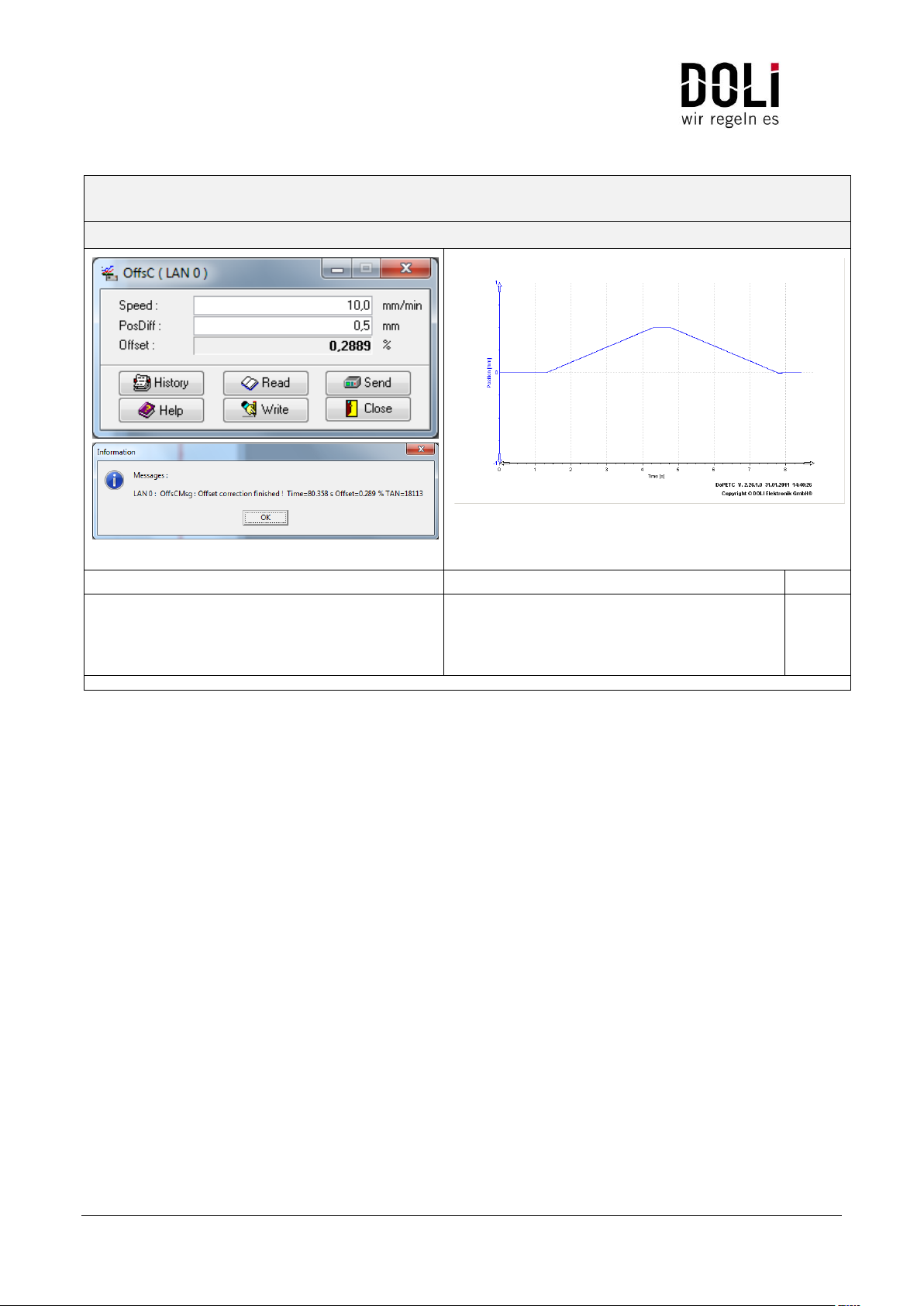
V10.26 2025-01-14 33 / 168 DoPE10
DoPE10
5.4.4 DoPEOffsC
Special movement command to measure the offset of an external, analogue speed controller. This offset will
be used for the speed output signal and compensates the offset of the external speed controller.
Minimum requirements: EDCi with EDCiApp 9149.001, DoPE 10.00
Move 0.5 mm up and down and calculate the offset.
The offset is transmitted to PC (see DoPEOnOffsCMsgHdlr)
Function declaration
Description
Unit
extern unsigned DLLAPI DoPEOffsC (
DoPE_HANDLE DoPEHdl
double Speed
double PosDiff
unsigned short * lpusTAN
Function returns Error constant (DoPERR_xxxx)
DoPE link handle
Speed
Distance to move cross-head
Pointer to transaction number.
Unit/s
Unit
.NET <Edc object>.Move.OffsC(Double Speed, Double PosDiff, ref Int16 Tan)
Page 34
V10.26 2025-01-14 34 / 168 DoPE10
DoPE10
5.5 PC Command
With the PC Command a digital command signal can be used to move the crosshead.
PC Command is not supported by EDCi10
5.5.1 DoPEPcCmd
Move crosshead according to a digital command signal.
Scaling of the command- and sensor-system is done by offsets and scale. Following formula is used:
Output = (Value – Offset) * Scale + OffsetCtrl
Minimum requirements: EDCi with EDCiApp 9149.001, DoPE 10.00
(not supported by EDCi10)
Function declaration
Description
Unit
extern unsigned DLLAPI DoPEPcCmd (
DoPE_HANDLE DoPEHdl,
unsigned short ExecutionMode,
unsigned short MoveCtrl,
unsigned short CmdMode,
double SpeedToStart,
double Offset,
double Scale,
double OffsetCtrl,
double FadeInTime,
double FadeOutTime,
unsigned Cycles,
unsigned Count,
DoPEPcCmdData *Data,
unsigned short * lpusTAN );
Function returns Error constant (DoPERR_xxxx)
DoPE link handle
(see description below)
Control mode for movement (Position, Load, Extension)
Interpolation mode between the values
DoPE_PC_CMD_MODE_POS:
Command data are position values for each control loop
cycle.
DoPE_PC_CMD_MODE_POS_LINEAR:
Command data are time and position. A linear function is
interpolated between the position values
DoPE_PC_CMD_MODE_POS_COSINUS:
Command data are time and position. A cosine function is
interpolated between the position values
Speed to StartPosition
Offset for stimulation signal
Scaling factor for stimulation signal
Offset for move control channel
Fade in time
Fade out time
Number of cycles (ignored in append mode)
Number of PcCmdData items in Data array
Pointer to PcCmdData array
In DoPE_PC_CMD_MODE_POS mode the time values
will be ignored
Pointer to transaction number.
Unit/s
stimUnit
Unit
s
s
typedef struct
{
double Time;
double StimulationSignal;
} DoPEPcCmdData;
s
stimUnit
.NET <Edc object>.Ilc.PcCmd(DoPE.PC_CMD_EXECUTE ExecutionMode, DoPE.CTRL MoveCtrl,
DoPE.PC_CMD_MODE CmdMode, Double SpeedToStart, Double Offset, Double Scale, Double OffsetCtrl,
Double FadeInTime, Double FadeOutTime, Int32 Cycles, Int32 Count, DoPE.PcCmdData[] Data, ref Int16 Tan)
DoPEPcCmd can be used in two different ways. A single call can include all information to perform the
movement command. In this case ExecutionMode DoPE_PC_CMD_EXECUTE_LAST must be used and all
parameters are considered. Appending data to the running movement command isn’t possible.
If the Data can’t be stored on the EDC the command will be discarded and the return code is set to
DoPERR_PARAMETER.
In the second case ExecutionMode is set to DoPE_PC_CMD_EXECUTE_APPEND in the first call. The
movement command starts immediately after the transmission of the data. Now any number of calls can follow
to append data to the running movement command (DoPE_PC_CMD_EXECUTE_APPEND). With the last
call ExecutionMode must be set to DoPE_PC_CMD_EXECUTE_LAST. No more data can be appended.
In the append mode buffer overruns and underruns can occur. At a buffer overrun PC Command data is
provided to fast and can’t be buffered in the EDC. In this case the data block will be discarded and the return
code is set to DoPERR_PARAMETER.
At a buffer underrun PC Command data isn’t provided fast enough. In this case the last point of the latest PC
Page 35
V10.26 2025-01-14 35 / 168 DoPE10
DoPE10
Command data block is used as stimulation signal until a new data block is available.
The number of buffer underruns can be retrieved with DoPERdPcCmdInfo.
Parameter
First call
Following calls
Last call
ExecutionMode
EXECUTE_APPEND
EXECUTE_APPEND
EXECUTE_LAST
MoveCtrl
valid
ignored
ignored
SpeedToStart
valid
ignored
ignored
CmdMode, Offset, Scale,
OffsetCtrl, Count, Data
valid
valid
valid
FadeInTime
valid
ignored
ignored
FadeOutTime
ignored
ignored
valid
Cycles
ignored
ignored
valid
lpusTAN
valid
ignored
ignored
To interrupt, continue or terminate a running movement command the ExecutionModes
DoPE_PC_CMD_EXECUTE_PAUSE, DoPE_PC_CMD_EXECUTE_CONTINUE and
DoPE_PC_CMD_EXECUTE_TERMINATE can be used.
ExecutionMode
EXECUTE_PAUSE
EXECUTE_CONTINUE
EXECUTE_TERMINATE
MoveCtrl
ignored
ignored
ignored
SpeedToStart
ignored
ignored
ignored
CmdMode, Offset, Scale,
OffsetCtrl, Count, Data
ignored
ignored
ignored
FadeInTime
ignored
valid
ignored
FadeOutTime
valid
ignored
valid
Cycles
ignored
ignored
ignored
lpusTAN
ignored
ignored
ignored
OffsetCtrl will be used as start/end point of the movement command if fade in/out will be used. Otherwise the
first/last Data point will be used.
The Cycles count of the measuring data record is set to zero at the PcCmd call. Cycles count will be
incremented with the execution of the first point of each PC Command data block.
For a detailed description of the SpeedToStart, Scale and Offset parameters and the fade times, please refer
to the DoPEPcCmdFromFile documentation.
Page 36
V10.26 2025-01-14 36 / 168 DoPE10
DoPE10
5.5.2 DoPEPcCmdFromFile
Move crosshead according to a digital command signal stored in a file.
DoPEPcCmdFromFile is similar to DoPEPcCmd except the stimulation data is passed thru a file and no data
can be appended. So, all parameters will be considered.
Scaling of the command- and sensor-system is done by offsets and scale. Following formula is used:
Output = (Value – Offset) * Scale + OffsetCtrl
Minimum requirements: EDCi with EDCiApp 9149.001, DoPE 10.00
(not supported by EDCi10)
Function declaration
Description
Unit
extern unsigned DLLAPI DoPEPcCmdFromFile (
DoPE_HANDLE DoPEHdl,
unsigned short MoveCtrl,
unsigned short CmdMode,
double SpeedToStart,
double Offset,
double Scale,
double OffsetCtrl,
double FadeInTime,
double FadeOutTime,
unsigned Cycles,
unsigned Column,
char *FileName,
unsigned short * lpusTAN );
Function returns Error constant (DoPERR_xxxx)
DoPE link handle
Control mode for movement (Position, Load, Extension)
Interpolation mode between the values
DoPE_PC_CMD_MODE_POS:
Command data are position values for each control loop
cycle.
DoPE_PC_CMD_MODE_POS_LINEAR:
Command data are time and position. A linear function is
interpolated between the position values
DoPE_PC_CMD_MODE_POS_COSINUS:
Command data are time and position. A cosine function is
interpolated between the position values
Speed to StartPosition
Offset for stimulation signal
Scaling factor for stimulation signal
Offset for move control channel
Fade in time
Fade out time
Number of cycles
Column number of Stimulation Signal
In interpolation modes Time has always column number 0
Pointer to file name and path.
Supported file types:
csv "Comma Separated Values" text file:
Value separator must be ';'
Decimal point can be '.' or ','
Lines NOT starting with a number or a separator will
be skipped
bmv "DOLI Binary Measured Values" file:
generated by DoPETestCenter version 2.27.1 (or
above)
In DoPE_PC_CMD_MODE_POS the time values
will be ignored
bmv2 "DOLI Binary Measured Values 2" file:
generated by DoliInstallationCenter V10.13 (or
above)
In DoPE_PC_CMD_MODE_POS the time values
will be ignored
File access errors (e.g. wrong file extension) leads to an
DoPERR_OPEN error
Pointer to transaction number.
Unit/s
stimUnit
Unit
s
s
.NET <Edc object>.Ilc.PcCmdFromFile(DoPE.CTRL MoveCtrl, DoPE.PC_CMD_MODE CmdMode,
Double SpeedToStart, Double OffsetFile, Double Scale, Double OffsetCtrl, Double FadeInTime, Double FadeOutTime,
Int32 Cycles, Int32 Column, String FileName, ref Int16 Tan)
Page 37
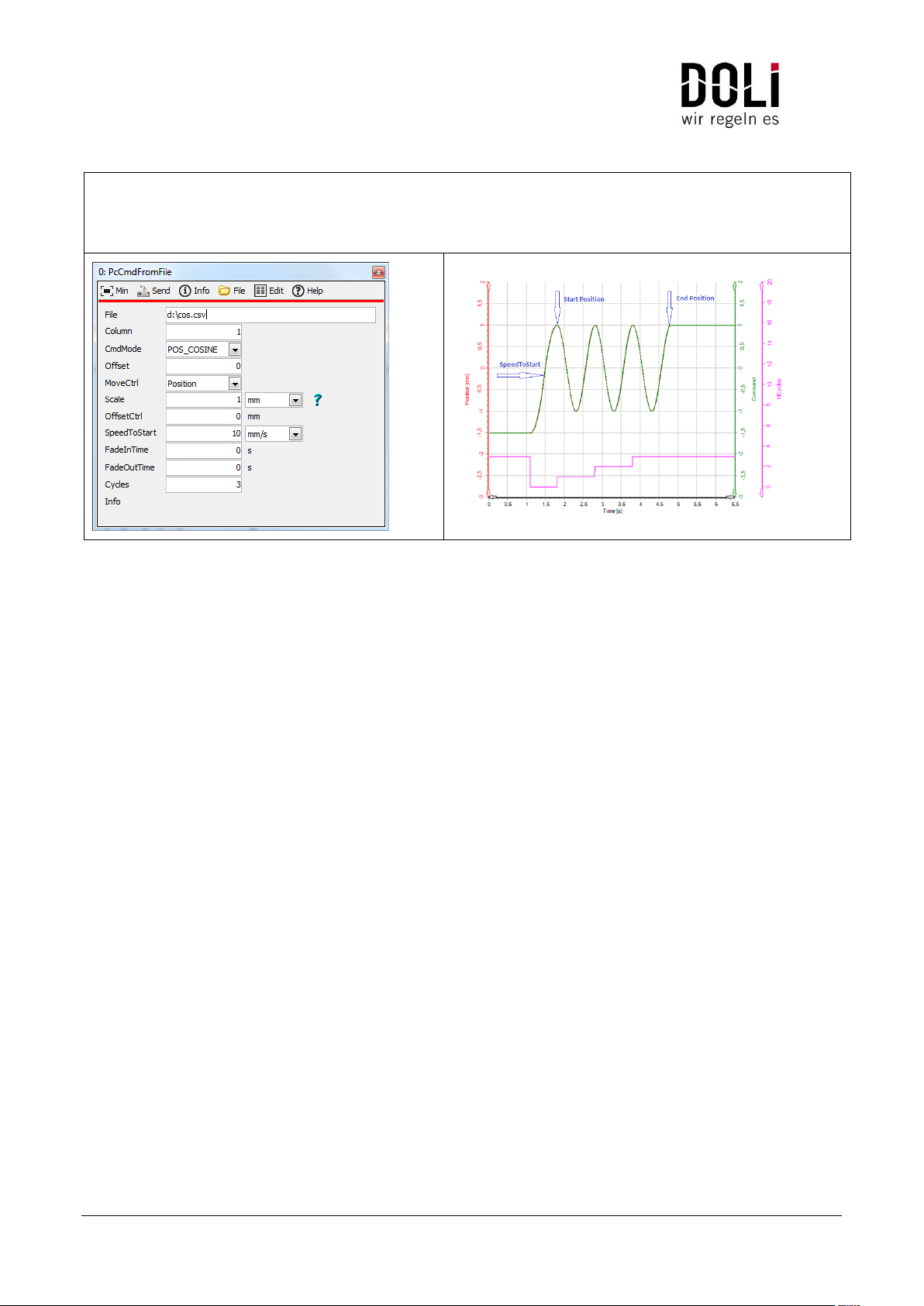
V10.26 2025-01-14 37 / 168 DoPE10
DoPE10
To illustrate the various parameters, we use a simple cos.csv file with cosinus interpolation and three cycles.
Time;
Position
Sec;
mm
0; 1 0.5;
-1
1.0;
1
Page 38
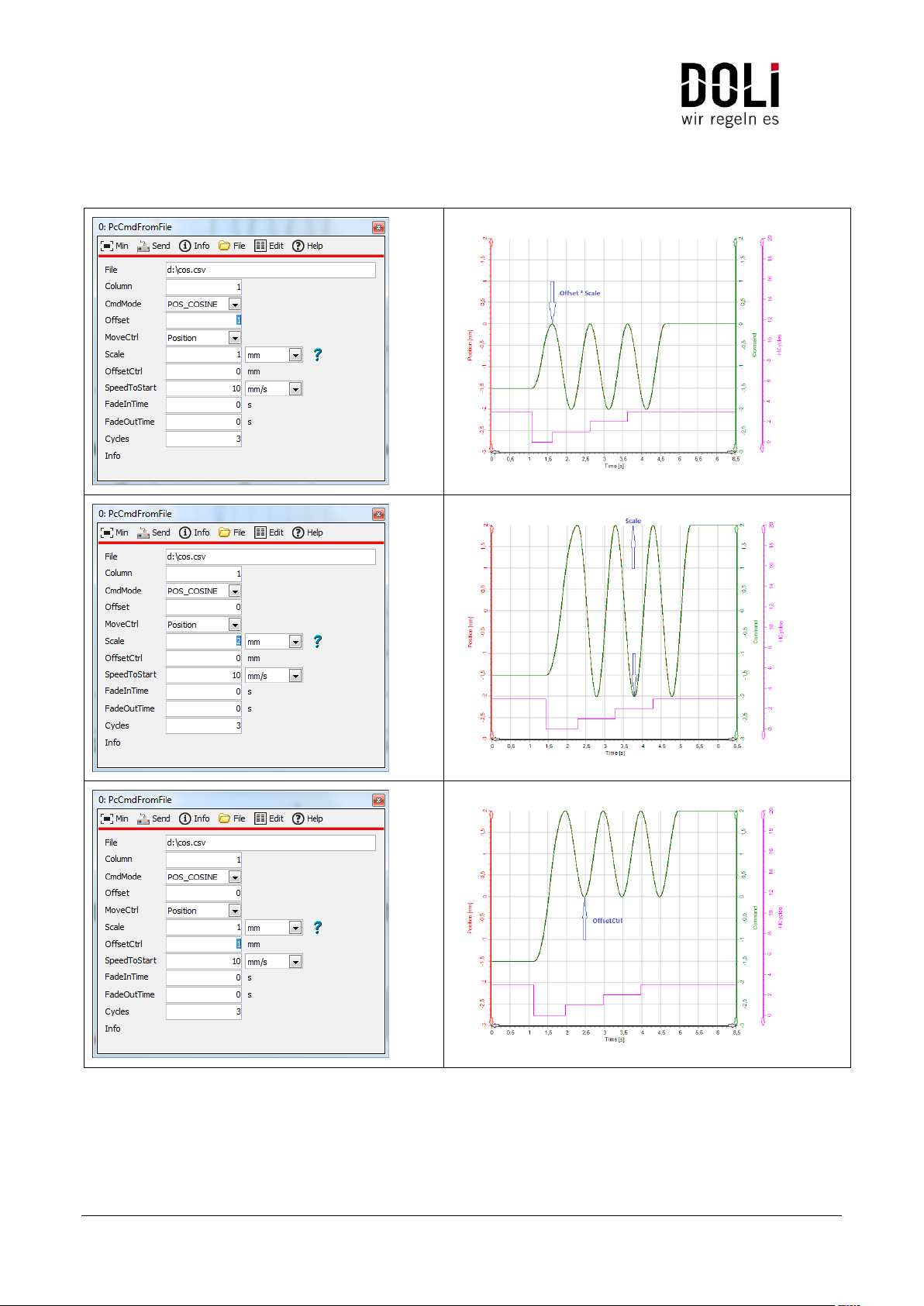
V10.26 2025-01-14 38 / 168 DoPE10
DoPE10
5.5.2.1 Scale and Offsets
Scaling of the command- and sensor-system is done by offsets and scale. Following formula is used:
Output = (Value – Offset) * Scale + OffsetCtrl
To convert e.g. temperature from Fahrenheit to Celsius according the formula °C = (°F-30)/2 Offset should
be 30 and Scale 0.5.
OffsetCtrl specifies the start/end position for fade in/out.
Page 39
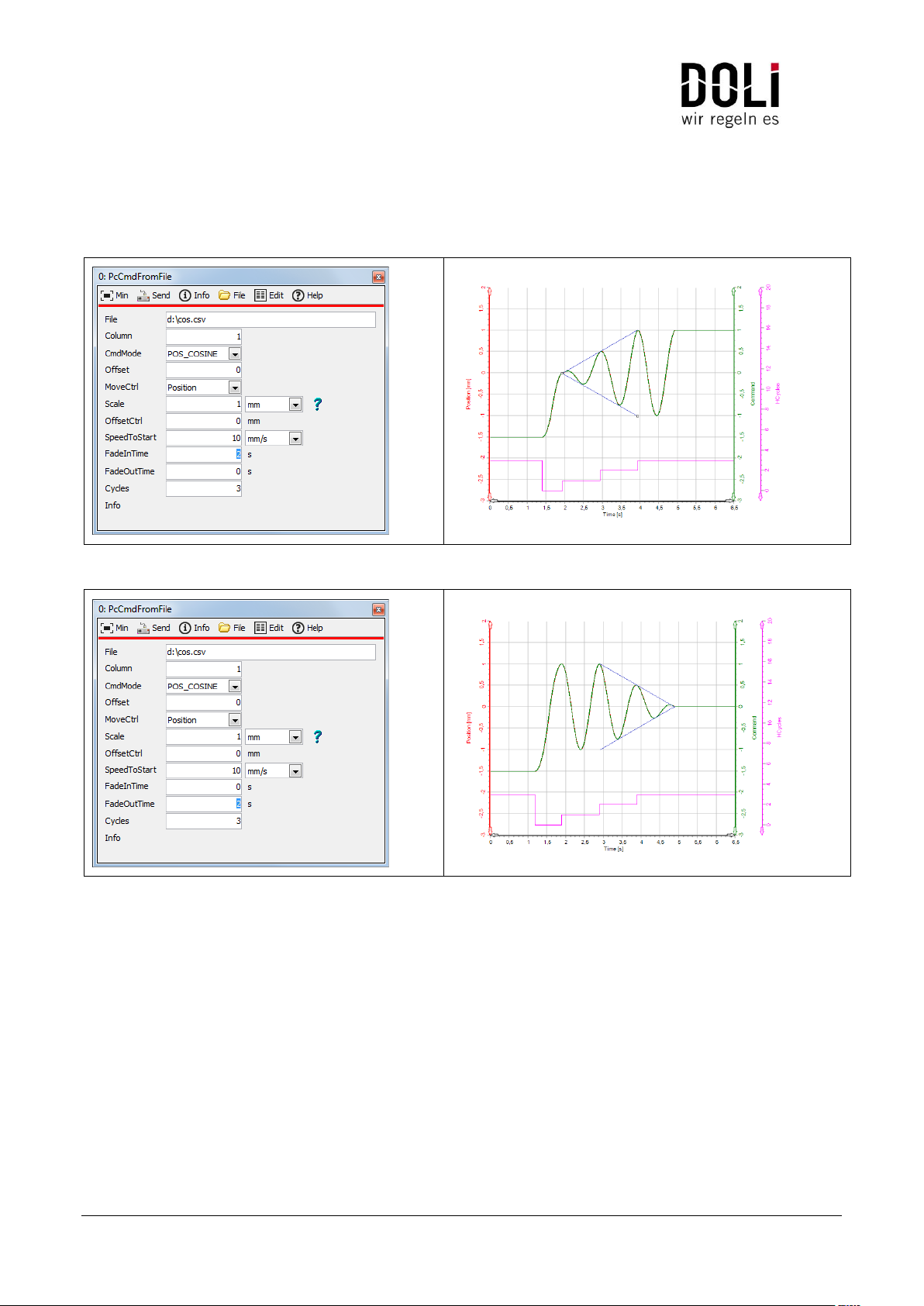
V10.26 2025-01-14 39 / 168 DoPE10
DoPE10
5.5.2.2 Start/End Position, SpeedToStart and Fade In/Out
If fade in/out time are zero the first point of the PcCmd data is used as the start/end position.
Otherwise OffsetCtrl is used as the start/end position.
During the Fade In time the following formula is used:
Output(t) = ((Value(t) – Offset) * Scale + OffsetCtrl) * (t – t0) / FadeInTime
During the Fade Out time the following formula is used:
Output(t) = ((Value(t) – Offset) * Scale + OffsetCtrl) * (tend – t) / FadeOutTime
Page 40
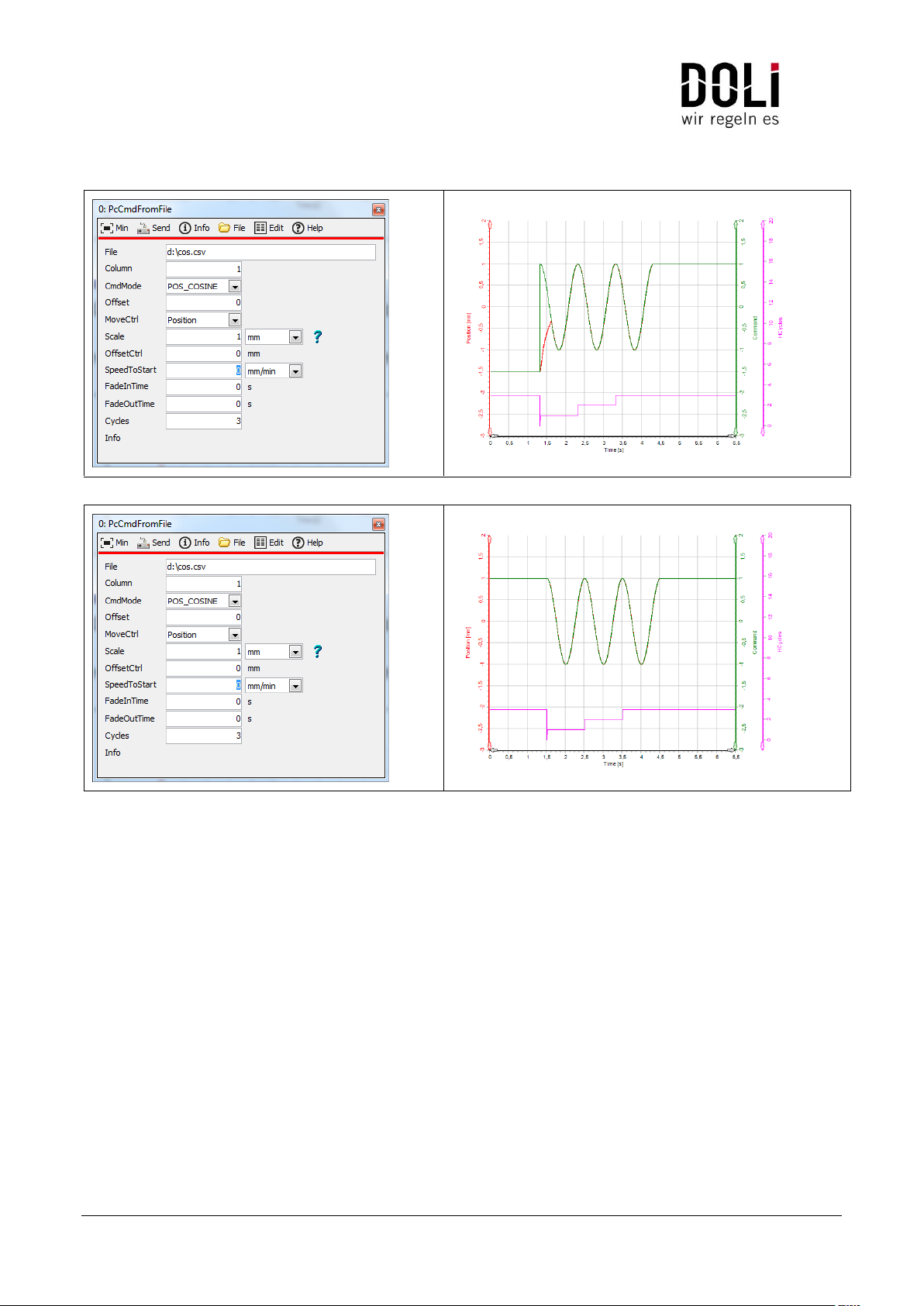
V10.26 2025-01-14 40 / 168 DoPE10
DoPE10
If SpeedToStart is set to zero the command of the closed loop controller ‘jumps’ to the start position
within one closed loop controller cycle. This is a feature used for synchronized EDCs.
Obviously the start position should be set by a separate movement command.
Page 41
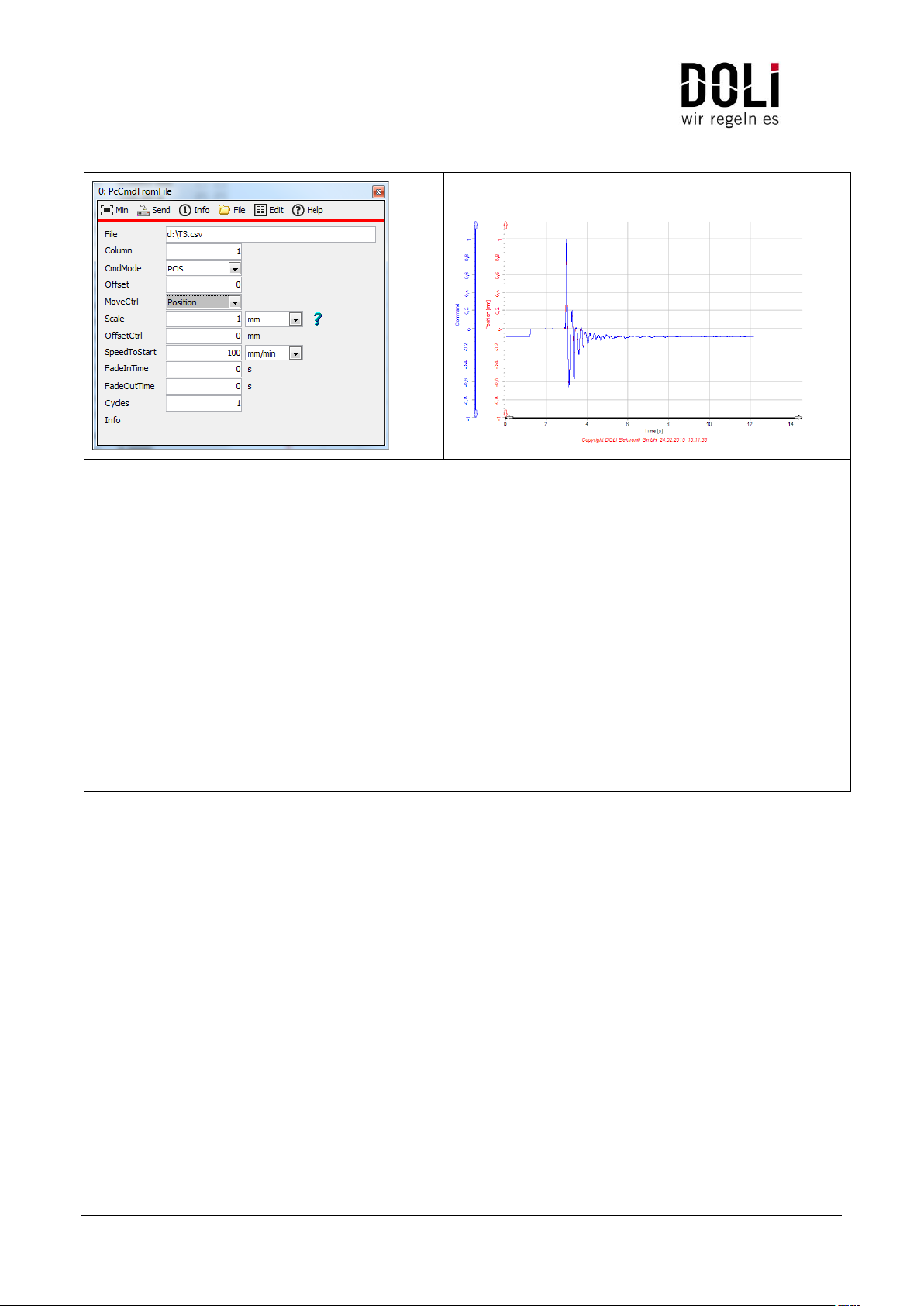
V10.26 2025-01-14 41 / 168 DoPE10
DoPE10
5.5.2.3 Random Values
Follow digital command from PC in position control. Don’t use interpolation between the points in the file (ignore time column).
Use scale 0.001 to convert µm to mm.
Sample of a csv file:
Time;
Position
Sec;
µm
3.819;
-0,8092685
3.8192;
-0,6743904
3.8194;
-0,6069514
3.8196;
-0,5395123
3.8198;
-0,6069514
3.820;
-0,6743904
3.8202;
-0,6743904
3.8204;
-0,7418295
3.8206;
-0,8767075
3.8208;
-1,011586
3.821;
-1,146464
3.8212;
-1,281342
3.8214;
-1,146464
3.8216;
-1,011586
3.8218;
-0,8767075
3.822;
-0,8092685
…
…
Page 42
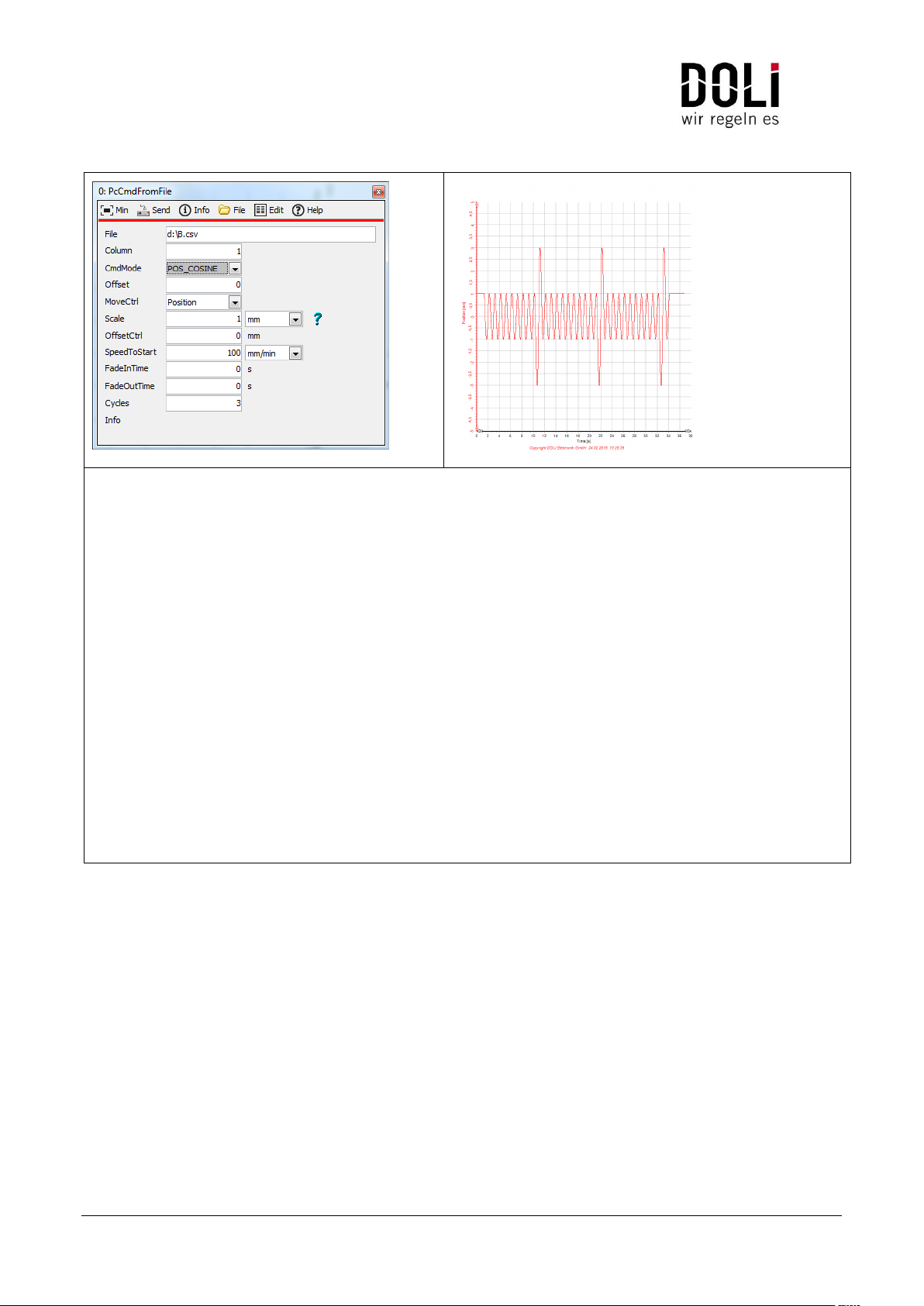
V10.26 2025-01-14 42 / 168 DoPE10
DoPE10
5.5.2.4 Cosine with one Cycle big Amplitude
Follow digital command from PC in position control. Use a cosine interpolation between the points in the file.
Sample of a csv file:
Time;
Position
Sec;
mm
0;
1.0
0.5;
-1.0
1.0;
1.0
1.5;
-1.0
2.0;
1.0
2.5;
-1.0
3.0;
1.0
3.5;
-1.0
4.0;
1.0
4.5;
-1.0
5.0;
1.0
5.5;
-1.0
6.0;
1.0
6.5;
-1.0
7.0;
1.0
7.5;
-1.0
8.0;
1.0
8.5;
-1.0
9.0;
1.0
9.5;
-3.0
10.0;
3.0
10.5;
-1.0
11.0;
1.0
Page 43
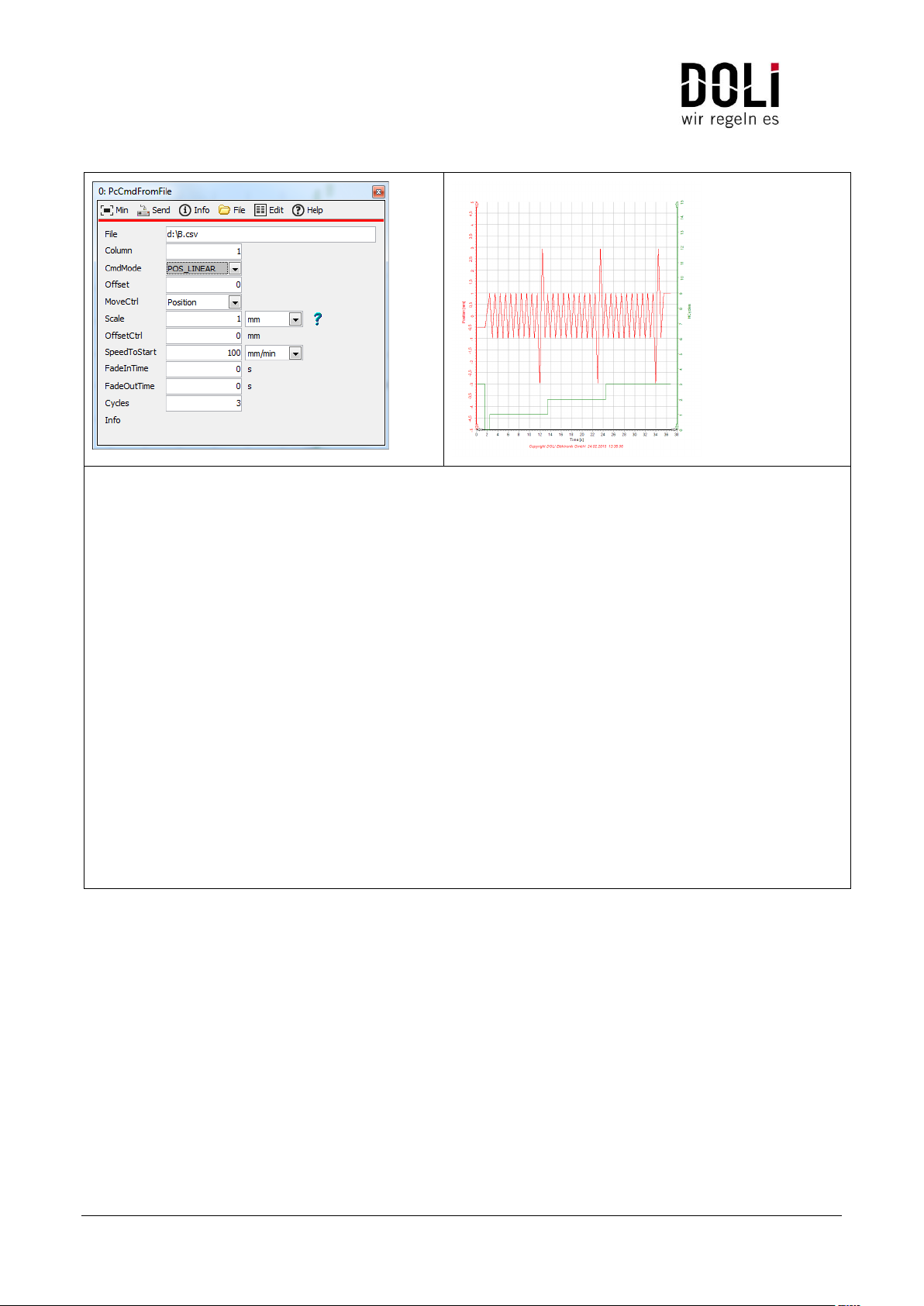
V10.26 2025-01-14 43 / 168 DoPE10
DoPE10
5.5.2.5 Triangle with one Cycle big Amplitude
Follow digital command from PC in position control. Use a linear interpolation between the points in the file.
At the beginning of the command, the HCycle counter is set to zero. At the beginning of each cycle, the counter is incremented.
Sample of a csv file:
Time;
Position
Sec;
mm
0;
1.0
0.5;
-1.0
1.0;
1.0
1.5;
-1.0
2.0;
1.0
2.5;
-1.0
3.0;
1.0
3.5;
-1.0
4.0;
1.0
4.5;
-1.0
5.0;
1.0
5.5;
-1.0
6.0;
1.0
6.5;
-1.0
7.0;
1.0
7.5;
-1.0
8.0;
1.0
8.5;
-1.0
9.0;
1.0
9.5;
-3.0
10.0;
3.0
10.5;
-1.0
11.0;
1.0
Page 44
V10.26 2025-01-14 44 / 168 DoPE10
DoPE10
5.5.3 DoPERdPcCmdInfo
Read PC Command buffer and status information.
Minimum requirements: EDCi with EDCiApp 9149.001, DoPE 10.00
(not supported by EDCi10)
Function declaration
Description
Unit
extern unsigned DLLAPI DoPERdPcCmdInfo (
DoPE_HANDLE DoPEHdl,
DoPEPcCmdInfo *Info );
Function returns Error constant (DoPERR_xxxx)
DoPE link handle
Pointer for DoPEPcCmdInfo structure.
typedef struct
{
unsigned BufItemsFree
unsigned BufItemsUsed;
unsigned BufferUnderrun;
double PosCtrlTime;
unsigned Paused;
} DoPEPcCmdInfo;
number of available PcCmdData items
number of used PcCmdData items
number of buffer underruns
Position controller cycle time
PC Command execution paused
s
.NET <Edc object>.Ilc.RdPcCmdInfo(ref DoPE.PcCmdInfo Info)
5.5.4 DoPECalculatePcCmd
Calculate a digital command for each control loop cycle without execution.
If the OutData buffer size isn’t sufficient the function returns DoPERR_NOMEM.
Minimum requirements: EDCi with EDCiApp 9149.001, DoPE 10.00
(not supported by EDCi10)
Function declaration
Description
Unit
extern unsigned DLLAPI DoPECalculatePcCmd (
DoPE_HANDLE DoPEHdl,
unsigned short ExecutionMode,
unsigned short CmdMode,
double Offset,
double Scale,
double OffsetCtrl,
double FadeInTime,
double FadeOutTime,
unsigned Cycles,
unsigned InCount,
DoPEPcCmdData *InData,
double SpeedT,
unsigned OutCountMax,
unsigned *OutCount
DoPEPcCmdData *OutData );
Function returns Error constant (DoPERR_xxxx)
DoPE link handle (can be NULL for offline links)
(see description at DoPEPcCmd,
PAUSE, CONTINUE and TERMIATE mode have no
effect)
Interpolation mode between the values
DoPE_PC_CMD_MODE_POS:
Command data are position values for each control loop
cycle.
DoPE_PC_CMD_MODE_POS_LINEAR:
Command data are time and position. A linear function is
interpolated between the position values
DoPE_PC_CMD_MODE_POS_COSINUS:
Command data are time and position. A cosine function is
interpolated between the position values
Offset for stimulation signal
Scaling factor for stimulation signal
Offset for move control channel
Fade in time
Fade out time
Number of cycles (ignored in append mode)
Number of PcCmdData items in InData array
Pointer to PcCmdData InData array
In DoPE_PC_CMD_MODE_POS mode the time values
will be ignored
Speed controller time (can be 0 to use the
Speed Controller Time of an online connection)
Maximum number of PcCmdData items in OutData array
(typically (start time – end time) / SpeedT * Cycles + 1,
Can be more in append mode and due to numeric
inaccuracy)
Pointer to number of valid PcCmdData items in OutData
array
Pointer to PcCmdData OutData array
Unit/s
stimUnit
Unit
s
s
typedef struct
{
double Time;
double Signal;
} DoPEPcCmdData;
s
Unit
Page 45
V10.26 2025-01-14 45 / 168 DoPE10
DoPE10
.NET <Edc object>.Ilc.CalculatePcCmd(DoPE.PC_CMD_EXECUTE ExecutionMode, DoPE.PC_CMD_MODE CmdMode,
Double Offset, Double Scale, Double OffsetCtrl, Double FadeInTime, Double FadeOutTime, Int32 Cycles,
Int32 InCount, DoPE.PcCmdData[] InData, Double SystemTime, Int32 OutCountMax, ref Int32 OutCount,
ref DoPE.PcCmdData[] OutData)
5.5.5 DoPECalculatePcCmdFromFile
Calculate a digital command stored in a file for each control loop cycle without execution.
The command creates a new csv output file. The size of this file is limited to 2 GB. If the limit is reached or
temporarily allocated memory isn’t sufficient the function returns DoPERR_NOMEM.
Minimum requirements: EDCi with EDCiApp 9149.001, DoPE 10.00
(not supported by EDCi10)
Function declaration
Description
Unit
extern unsigned DLLAPI DoPECalculatePcCmdFromFile (
DoPE_HANDLE DoPEHdl,
unsigned short CmdMode,
double Offset,
double Scale,
double OffsetCtrl,
double FadeInTime,
double FadeOutTime,
unsigned Cycles,
unsigned Column,
char *InFileName,
double SpeedT,
char *OutFileName );
Function returns Error constant (DoPERR_xxxx)
DoPE link handle (can be NULL for offline links)
Interpolation mode between the values
DoPE_PC_CMD_MODE_POS:
Command data are position values for each control loop
cycle.
DoPE_PC_CMD_MODE_POS_LINEAR:
Command data are time and position. A linear function is
interpolated between the position values
DoPE_PC_CMD_MODE_POS_COSINUS:
Command data are time and position. A cosine function is
interpolated between the position values
Offset for stimulation signal
Scaling factor for stimulation signal
Offset for move control channel
Fade in time
Fade out time
Number of cycles
Column number of Stimulation Signal
In interpolation modes Time has always column number 0
Pointer to input file name and path.
Supported file types:
csv "Comma Separated Values" text file:
Value separator must be ';'
Decimal point can be '.' or ','
Lines NOT starting with a number or a separator will
be skipped
bmv "DOLI Binary Measured Values" file:
generated by DoPETestCenter version 2.27.1 (or
above)
In DoPE_PC_CMD_MODE_POS the time values
will be ignored
bmv2 "DOLI Binary Measured Values 2" file:
generated by DoliInstallationCenter V10.13 (or
above)
In DoPE_PC_CMD_MODE_POS the time values
will be ignored
File access errors (e.g. wrong file extension) leads to an
DoPERR_OPEN error
Speed controller time (can be 0 to use the current
Speed Controller Time of an online connection)
Pointer to output file name and path.
Each line contains the time and command value separated
by ‘;’ with ‘.’ as decimal point.
E.g: 0.0708;-9.62E-04
Unit/s
stimUnit
Unit
s
s
.NET <Edc object>.Ilc.CalculatePcCmdFromFile(DoPE.PC_CMD_MODE CmdMode, Double OffsetFile, Double Scale,
Double OffsetCtrl, Double FadeInTime, Double FadeOutTime, Int32 Cycles, Int32 Column, String InFileName,
Double SystemTime, String OutFileName)
Page 46
V10.26 2025-01-14 46 / 168 DoPE10
DoPE10
5.6 DoPEDynCycles
Generates the most common waveforms like Cosine, Triangle, Rectangle, Saw tooth, inverted Saw
tooth, Pulse and Sine.
Additional functions can be activated like:
Peak Control, to correct amplitude errors and increase control fidelity.
Linear or logarithmic Sweeps for frequency, offset, amplitude or a combination of sweeps.
All waveforms can be superimposed with a cosine wave.
Bi-Modal modes, to perform a test in e.g. position control and keep load peak/mean values constant.
Minimum requirements: EDCi with EDCiApp 9149.001, DoPE 10.00
Waveform Sine requires EDCiApp 9149.026 and DoPE 10.22 or higher.
(Modify, Sweeps, Superposition and Bimodal Modes are not supported by EDCi10)
Function declaration
Description
Unit
extern unsigned DLLAPI DoPEDynCycles (
DoPE_HANDLE DoPEHdl
unsigned short WaveForm
unsigned short Modify
unsigned short PeakCtrl
unsigned short MoveCtrl
unsigned short RelativeDestination
double SpeedToStart
double Offset
double Amplitude
double HaltAtPlusAmplitude
double HaltAtMinusAmplitude
double Frequency
unsigned long HalfCycles
double SpeedToDestination
double Destination
unsigned short SweepFrequencyMode
double SweepEndFrequency
double SweepFrequencyTime
unsigned long SweepFrequencyCount
unsigned short SweepOffsetMode
double SweepEndOffset
double SweepOffsetTime
unsigned long SweepOffsetCount
unsigned short SweepAmplitudeMode
double SweepEndAmplitude
double SweepAmplitudeTime
unsigned long SweepAmplitudeCount
unsigned short SuperpositionMode
double SuperpositionFrequency
double SuperpositionAmplitude
unsigned short BimodalCtrlMode
unsigned short BimodalCtrlSensor
double BimodalValue1
double BimodalValue2
double BimodalScale
unsigned short * lpusTAN
Function returns Error constant (DoPERR_xxxx)
DoPE link handle
DYN_WAVEFORM_xxx (Cosine, Triangular,…)
Modify Parameter of active cycles
Peak Control Gain 0-100% if DYN_PEAK_CTRL_PERCENT
is added. Or (0..16) see 5.6.4 Peak Control
Control mode (CTRL_xxx)
false, Offset, and Destination absolute
true, Offset, and Destination relative
Speed to Offset + Amplitude
Offset
Amplitude
Halt Time at Offset + Amplitude
Halt Time at Offset – Amplitude
Frequency
Number of half cycles
Speed to final destination (0=automatic speed calculation)
Final destination
DYN_SWEEP_xxx (Off, Linear, Logarithmic,…)
End frequency for frequency sweep
Time for frequency sweep
Frequency sweep counter (0=infinitive)
DYN_SWEEP_xxx (Off, Linear, Logarithmic,…)
Second offset for offset sweep
Time for offset sweep
Offset sweep counter (0=infinitive)
DYN_SWEEP_xxx (Off, Linear, Logarithmic,…)
Second offset for offset sweep
Time for amplitude sweep
Amplitude sweep counter (0=infinitive)
Superposition Mode (DYN_SUPERPOS_ON / _OFF)
Superposition Frequency
Superposition Amplitude
Mode for bimodal control
Sensor for bimodal control
Value1 to keep constant
Value2 only for DYN_BIMODAL_AMPLITUDE_OFFSET_VAR
Scale
Pointer to transaction number.
%
Unit/s
Unit
Unit
s
s
Hz
Unit/s
Unit
Hz
s
Unit
s
Unit
s
Unit
Hz
Unit
UnitBi
UnitBi
Unit/UnitBi
Page 47

V10.26 2025-01-14 47 / 168 DoPE10
DoPE10
Constants for DoPEDynCycles:
Constants for waveform:
DYN_WAVEFORM_COSINE
DYN_WAVEFORM_TRIANGLE
DYN_WAVEFORM_RECTANGLE
DYN_WAVEFORM_SAW_TOOTH
DYN_WAVEFORM_SAW_TOOTH_INV
DYN_WAVEFORM_PULSE
DYN_WAVEFORM_SINE
Constants for PeakCtrl:
DYN_PEAK_CTRL_PERCENT
Constants for SweepMode:
DYN_SWEEP_OFF
DYN_SWEEP_LINEAR
DYN_SWEEP_LINEAR_START_END
DYN_SWEEP_LOGARITHMIC
DYN_SWEEP_LOGARITHMIC_START_END
Constants for SuperpositionMode:
DYN_SUPERPOS_OFF
DYN_SUPERPOS_ON
Constants for BimodalCtrlMode:
DYN_BIMODAL_CTRL_OFF
DYN_BIMODAL_ARITHMETIC_MEAN_VALUE
DYN_BIMODAL_MEAN_VALUE
DYN_BIMODAL_MIN_VALUE
DYN_BIMODAL_MAX_VALUE
DYN_BIMODAL_AMPLITUDE_OFFSET_VAR
DYN_BIMODAL_AMPLITUDE_OFFSET_CONST
Cosine waveform
Triangle waveform
Rectangular waveform
Sawtooth waveform
Inverse sawtooth waveform
Pulse waveform
Sine waveform
Control bit to set peak control value in percent
No sweep active
Linear sweep from e.g Frequency to SweepEndFrequency
Linear sweep at Start and End of cycles
Logarithmic sweep
Logarithmic sweep at Start and End of cycles
No superposition active
Superposition active
No bimodal control active
Keep arithmetic mean value of second sensor constant by
changing the offset of the controlled sensor
Keep the mean value of second sensor constant by
changing the offset of the controlled sensor
Keep the minimum value of second sensor constant by
changing the offset of the controlled sensor
Keep the maximum value of second sensor constant by
changing the offset of the controlled sensor
Keep the amplitude of second sensor constant by changing
the offset and amplitude of the controlled sensor
Keep the amplitude of second sensor constant by changing
the amplitude of the controlled sensor. The offset of the
controlled sensor is constant
Page 48

V10.26 2025-01-14 48 / 168 DoPE10
DoPE10
.NET <Edc object>.Move.DynCycles(
DoPE.DYN_WAVEFORM WaveForm,
bool Modify,
DoPE.DYN_PEAKCTRL PeakCtrl, // for PeakCtrl in % (e.g. 50%) …, DYN_PEAKCTRL.PERCENT + 50, …
DoPE.CTRL MoveCtrl,
bool RelativeDestination,
Double SpeedToStart,
Double Offset, Double Amplitude,
Double HaltAtPlusAmplitude,
Double HaltAtMinusAmplitude,
Double Frequency, Int32 HalfCycles,
Double SpeedToDestination,
Double Destination,
DoPE.DYN_SWEEP SweepFrequencyMode,
Double SweepEndFrequency,
Double SweepFrequencyTime,
Int32 SweepFrequencyCount,
DoPE.DYN_SWEEP SweepOffsetMode,
Double SweepEndOffset,
Double SweepOffsetTime,
Int32 SweepOffsetCount,
DoPE.DYN_SWEEP SweepAmplitudeMode,
Double SweepEndAmplitude,
Double SweepAmplitudeTime,
Int32 SweepAmplitudeCount,
DoPE.DYN_SUPERPOS SuperpositionMode,
Double SuperpositionFrequency,
Double SuperpositionAmplitude,
DoPE.DYN_BIMODAL BimodalCtrlMode,
DoPE.SENSOR BimodalCtrlSensor,
Double BimodalValue1,
Double BimodalValue2,
Double BimodalScale,
ref Int16 Tan)
Page 49
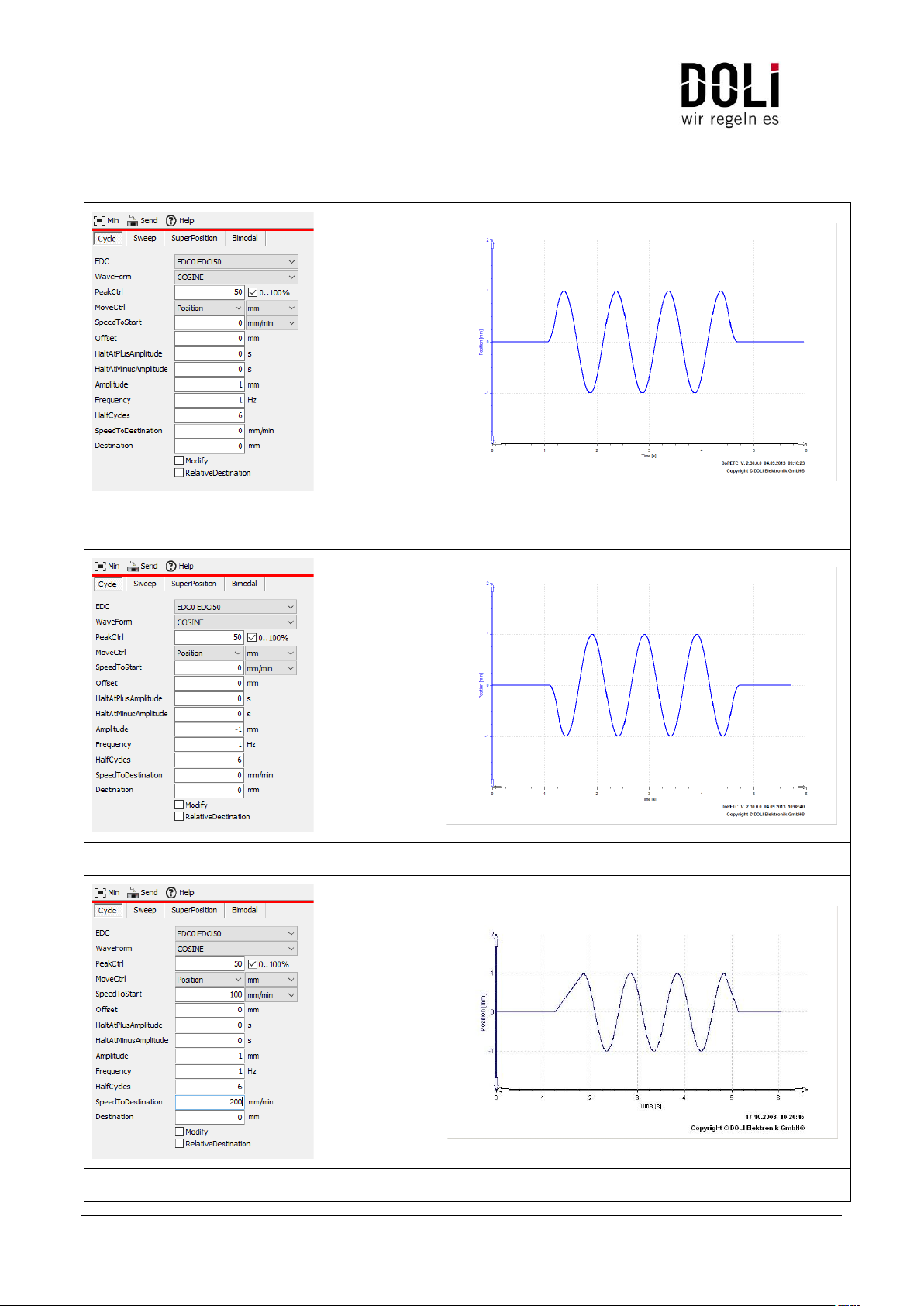
V10.26 2025-01-14 49 / 168 DoPE10
DoPE10
5.6.1 Basic Waveforms
5.6.1.1 Cosine/Sine
Cosine with 0 mm offset, 1mm amplitude, frequency 1Hz and 6 half-cycles (3 cosine periods). SpeedToStart and SpeedToDestination
has been set to 0 mm/min so the ramp to the starting point (1mm) and destination point (0mm) will be calculated automatically.
Same parameters as above but with -1 mm amplitude. This will
Same as above but SpeedToStart and SpeedToDestination specified.
Page 50
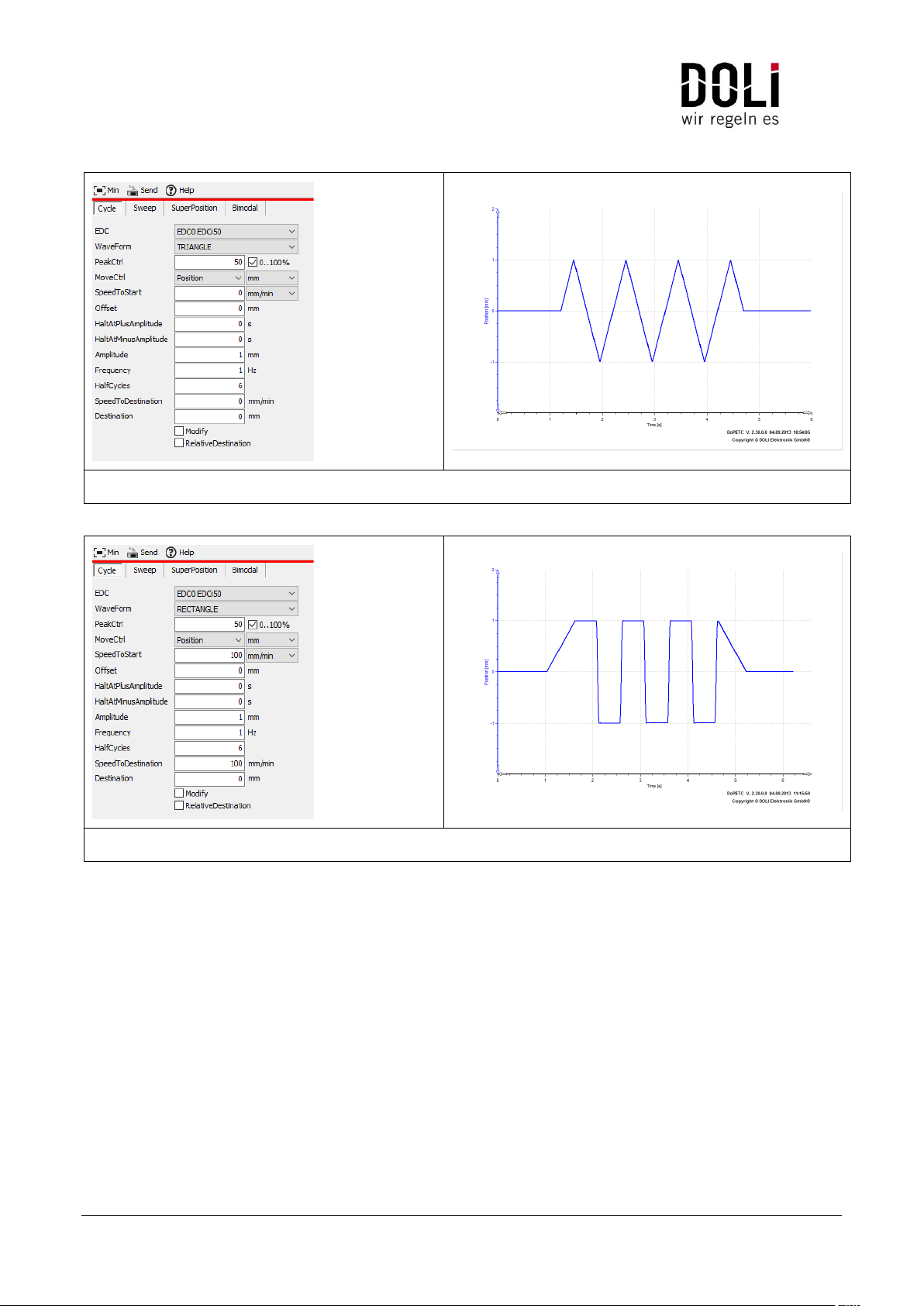
V10.26 2025-01-14 50 / 168 DoPE10
DoPE10
5.6.1.2 Triangle
Same as above but with Triangle waveform.
5.6.1.3 Rectangle
Same as above but with Rectangle waveform.
Page 51
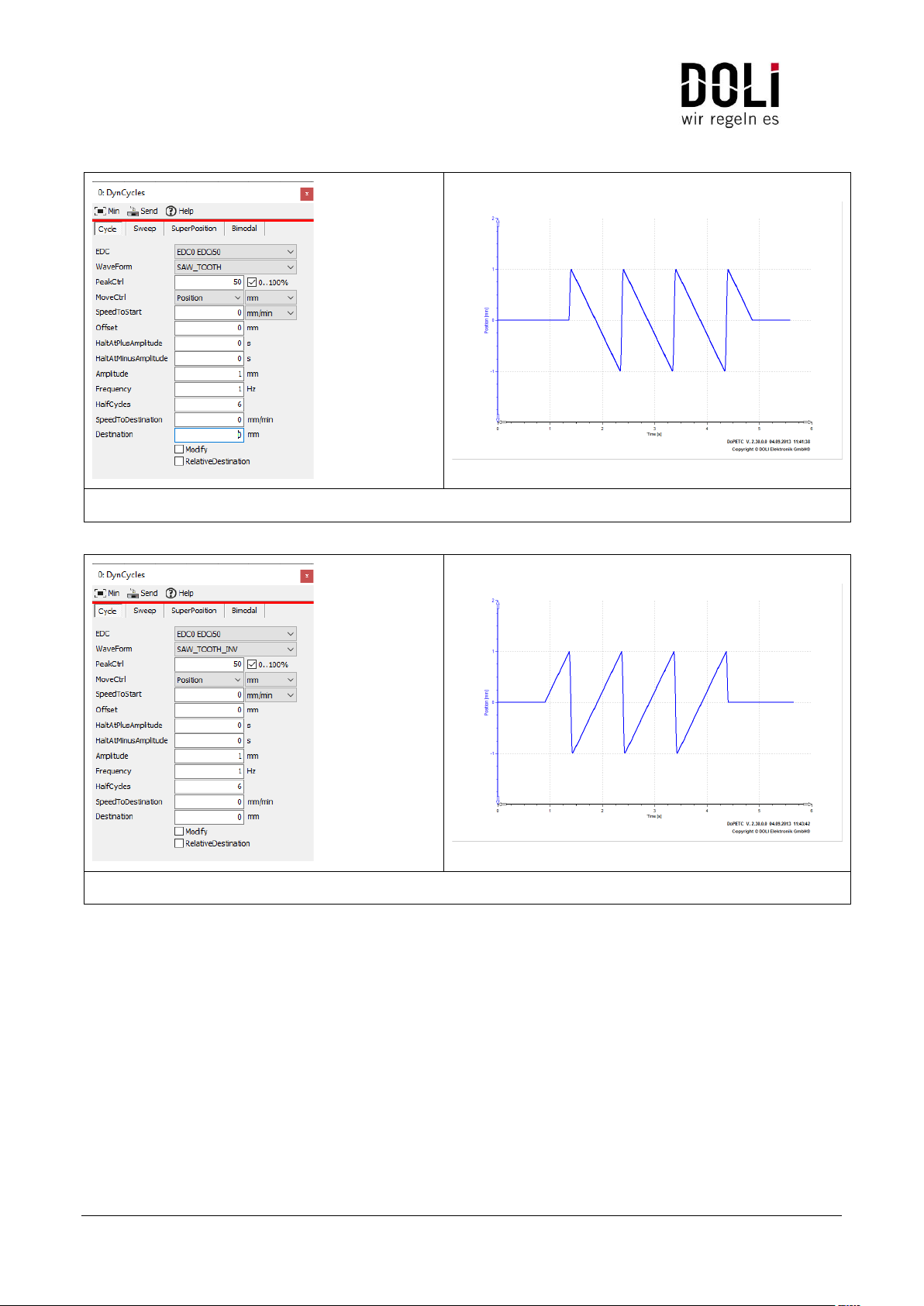
V10.26 2025-01-14 51 / 168 DoPE10
DoPE10
5.6.1.4 Sawtooth
Same as above but with Sawtooth waveform.
5.6.1.5 Sawtooth inverse
Same as above but with an inverted Sawtooth waveform.
Page 52
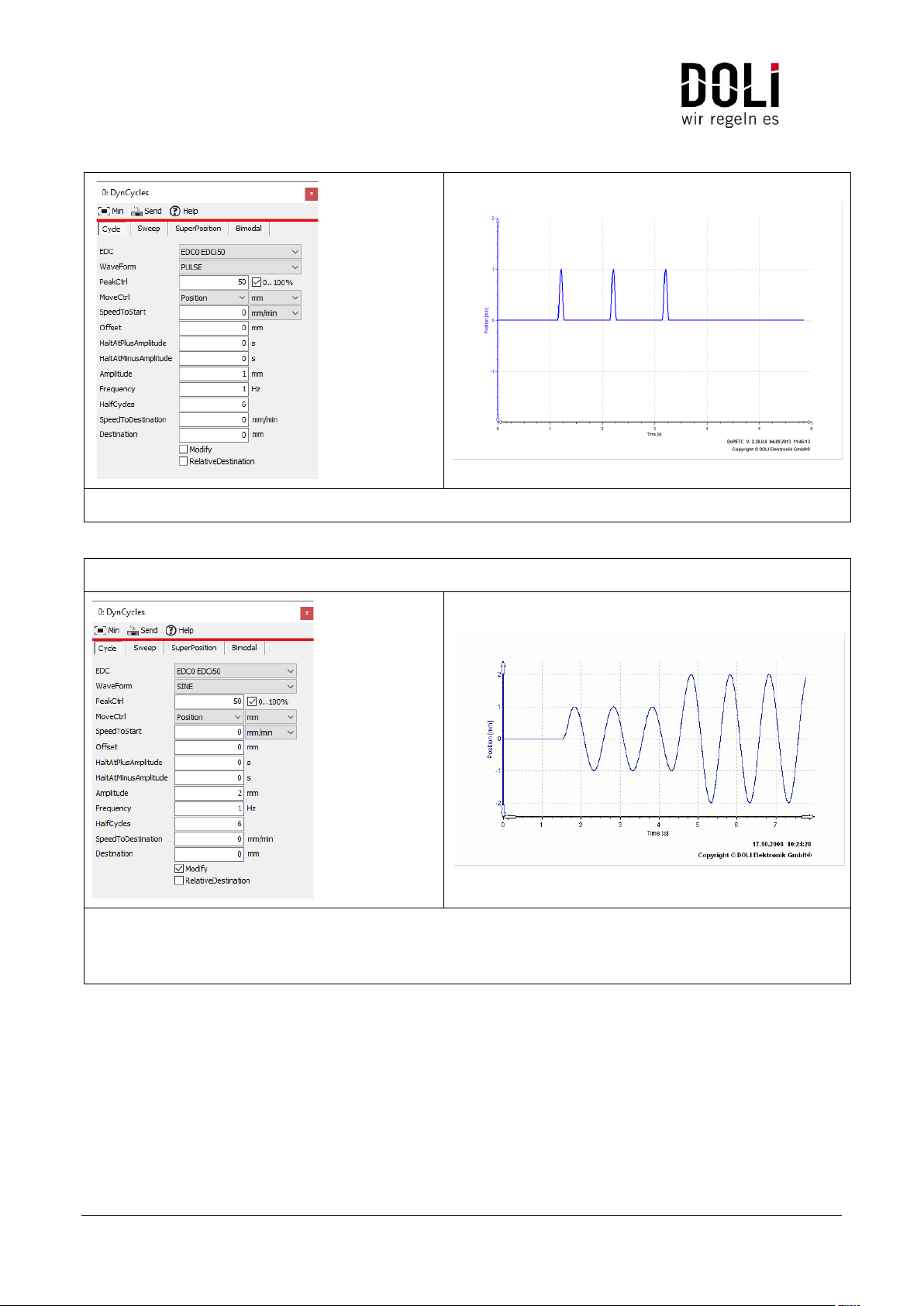
V10.26 2025-01-14 52 / 168 DoPE10
DoPE10
5.6.1.6 Pulse
Same as above but with Pulse waveform.
5.6.2 Modify Parameter of an active test
The Modify Parameter is not supported by EDCi10
Modify amplitude of an active Sine.
Sine was started with 1mm amplitude. After some cycles, DynCycle command was sent again, with the Modify flag set and amplitude of
2mm.
Besides amplitude the offset and frequency may also be modified.
Page 53
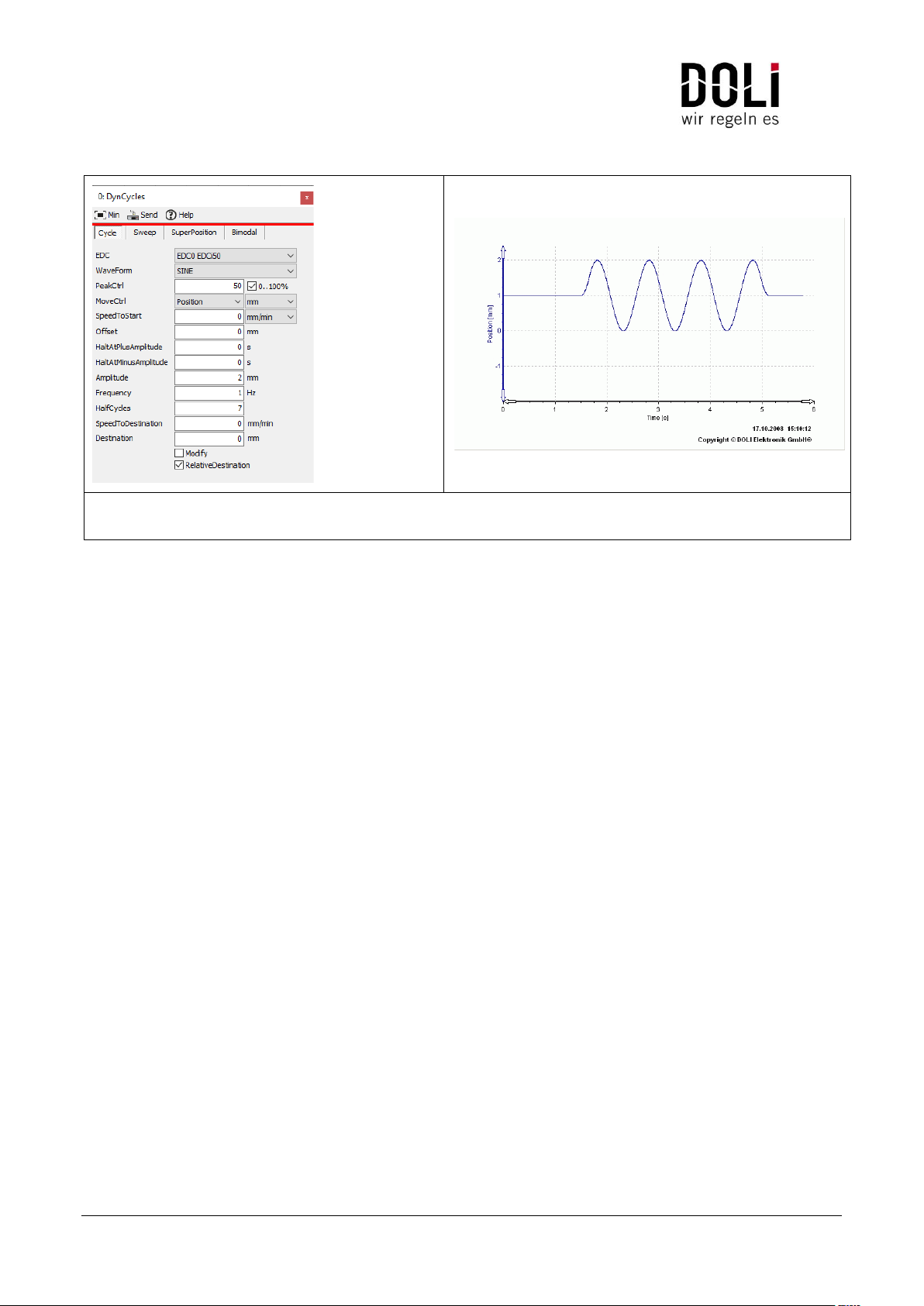
V10.26 2025-01-14 53 / 168 DoPE10
DoPE10
5.6.3 Relative Destinations
Sine command with relative Destinations.
Sine was started at a position of 1mm. This current position will be added to the offset, and Destination.
Page 54
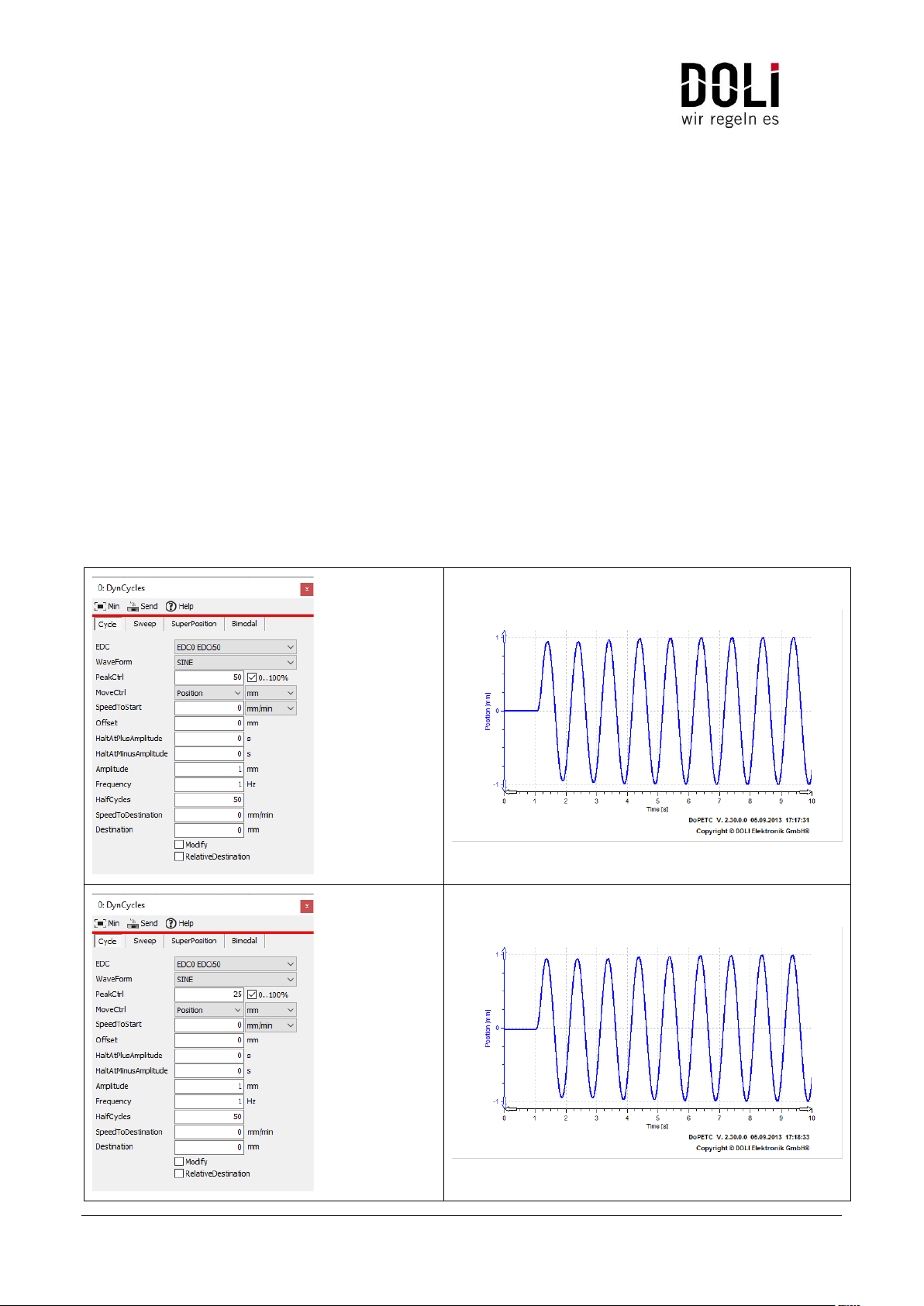
V10.26 2025-01-14 54 / 168 DoPE10
DoPE10
5.6.4 Peak Control
Peak Control can be activated for all waveforms by choosing any value for PeakCtrl.
PeakCtrl = 0 peak control is deactivated.
The value can be set in two different ways:
Control bit in PeakCtrl is set to 1 (EDCiApp 9149.027 or higher):
PeakCtrl can be set between 0% and 100%. The peaks will be corrected with the percentage of the detected
peak deviation at every maximum and minimum.
To set the control bit the constant DYN_PEAK_CTRL_PERCENT (0x8000) has to be added to the peak
control percent value. (e.g. 50% …, DYN_PEAK_CTRL_PERCENT + 50, …)
Control bit in PeakCtrl is set to 0:
PeakCtrl = 1 peak control is activated. Controls the peak value every cycle using 50% of the peak deviation.
PeakCtrl = 2,4,8,16
• EDCiApp 9149.026 or higher :
Controls the peak value every cycle using the average error of 1,2,4,8,16 cycles.
• EDCiApp 9149.025 or lower:
Controls the error every 1st,2nd,4th,8th,16th peak and valley points, using the average error of 1,2,4,8 or
16 cycles.
Page 55
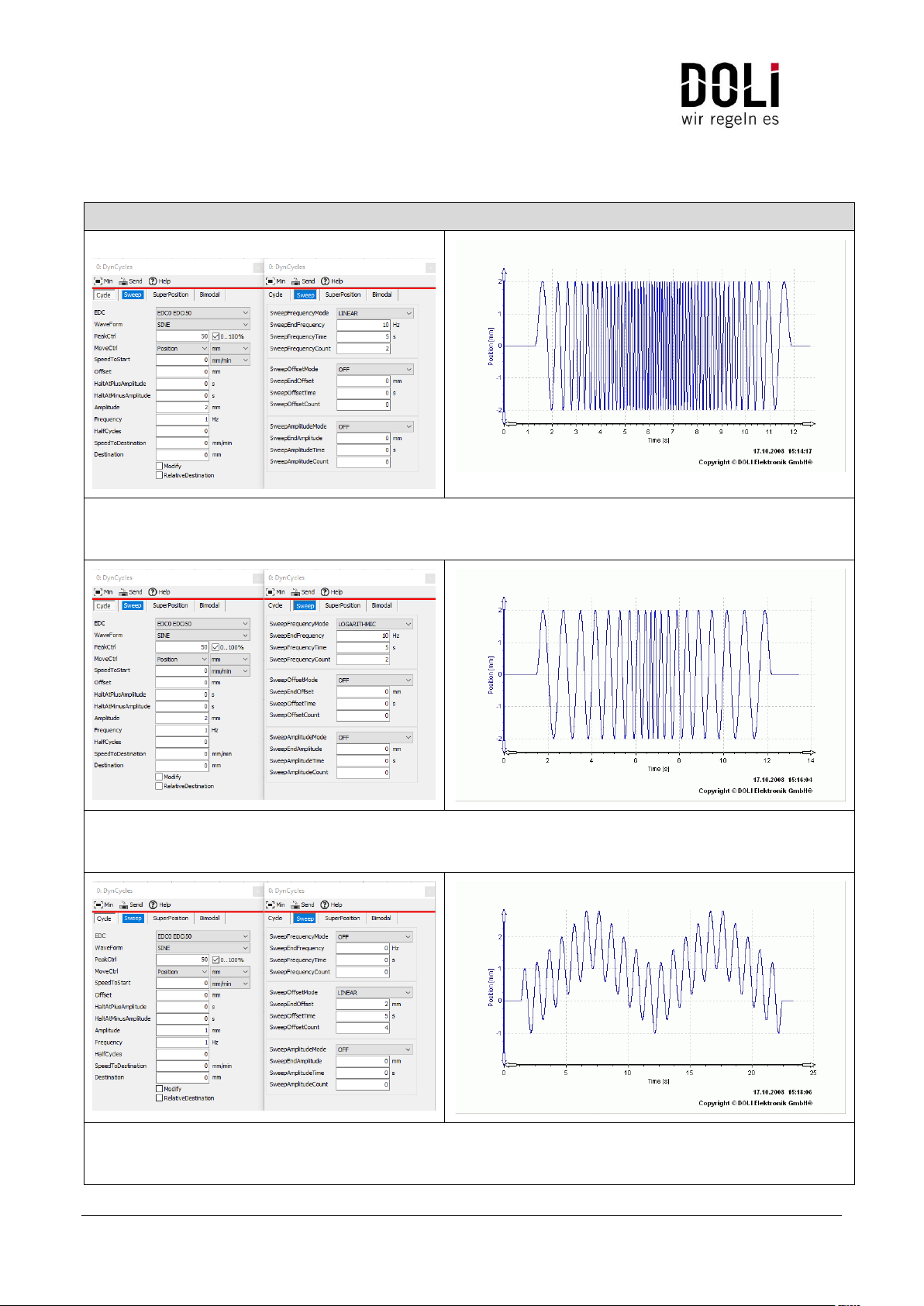
V10.26 2025-01-14 55 / 168 DoPE10
DoPE10
5.6.5 Sweeps
Sweeps are not supported by EDCi10
Sine command with a linear frequency sweep.
Sine starts with a frequency of 1Hz. The frequency will be continuously increased to 10Hz within 5 seconds. The parameter
SweepFrequencyCount specifies how many sweeps should be done. In this case go up to 10Hz, and back to 1Hz.
Sine command with a logarithmic frequency sweep.
Sine starts with a frequency of 1Hz. The frequency will be exponentially increased to 10Hz within 5 seconds. The parameter
SweepFrequencyCount specifies how many sweeps should be done. In this case go up to 10Hz, and back to 1Hz.
Sine command with a linear offset sweep.
Cosine starts with an offset of 0mm. The offset is linearly increased to 2mm within 5 seconds. The parameter SweepOffsetCount
specifies how many sweeps should be done.
Page 56
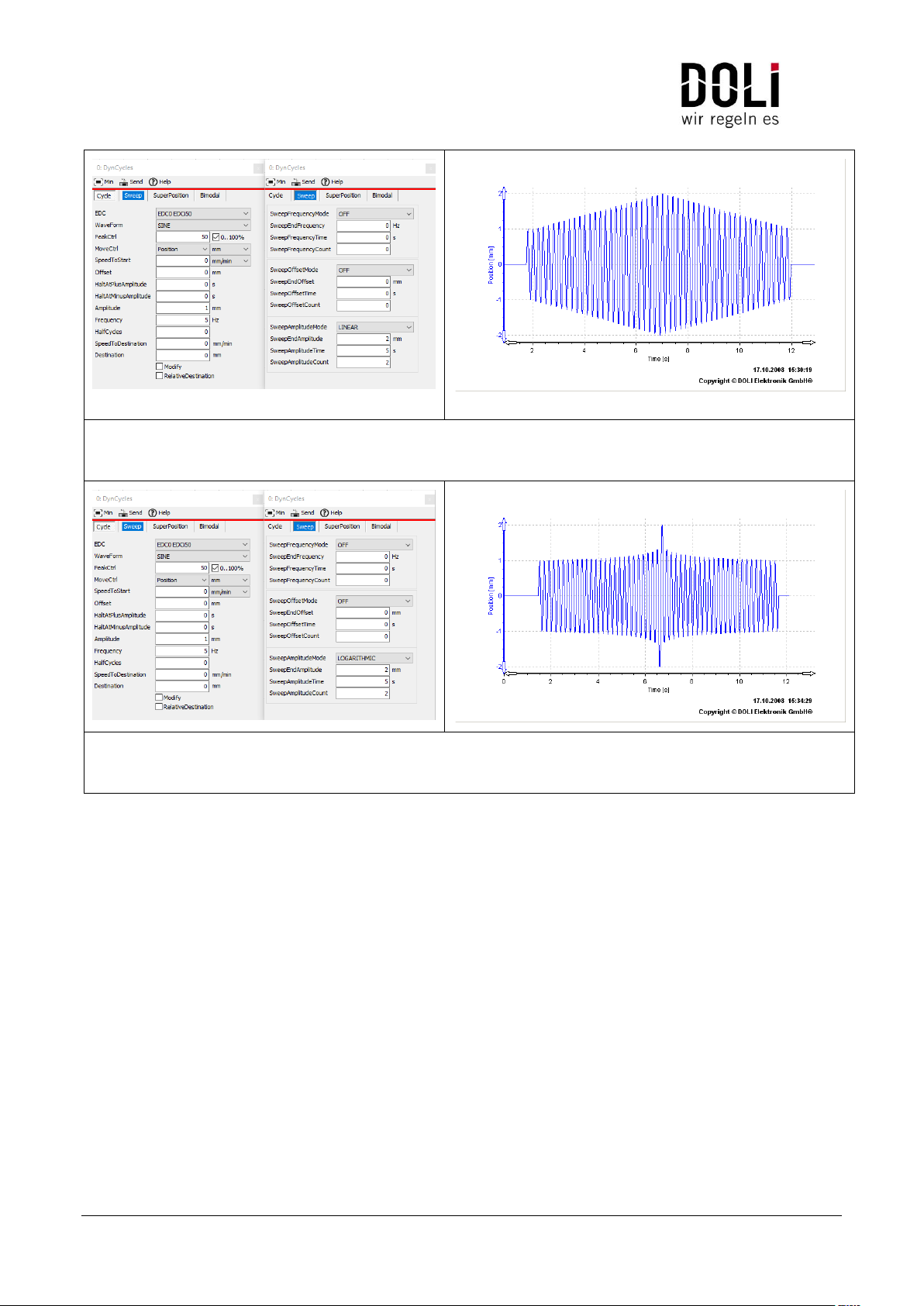
V10.26 2025-01-14 56 / 168 DoPE10
DoPE10
Sine command with a linear amplitude sweep.
Sine starts with amplitude of 1mm. The amplitude is linearly increased to 2mm within 5 seconds. The parameter SweepAmplitudeCount
specifies how many sweeps should be done.
Sine command with a logarithmic amplitude sweep.
Sine starts with amplitude of 1mm. The amplitude is exponentially increased to 2mm within 5 seconds. The parameter
SweepAmplitudeCount specifies how many sweeps should be done.
Please note: it is also possible to have different kind of sweeps at the same time. E.g. Frequency and
amplitude sweep.
Criteria for detecting end of cycles:
First the parameter HalfCycles will be considered. If it’s not equal to zero, the command is finished after the
number of half-cycles are done, no matter if the sweep count has been reached.
If the parameter HalfCycles is set to zero, the command will be finished after all sweeps are completed.
Page 57
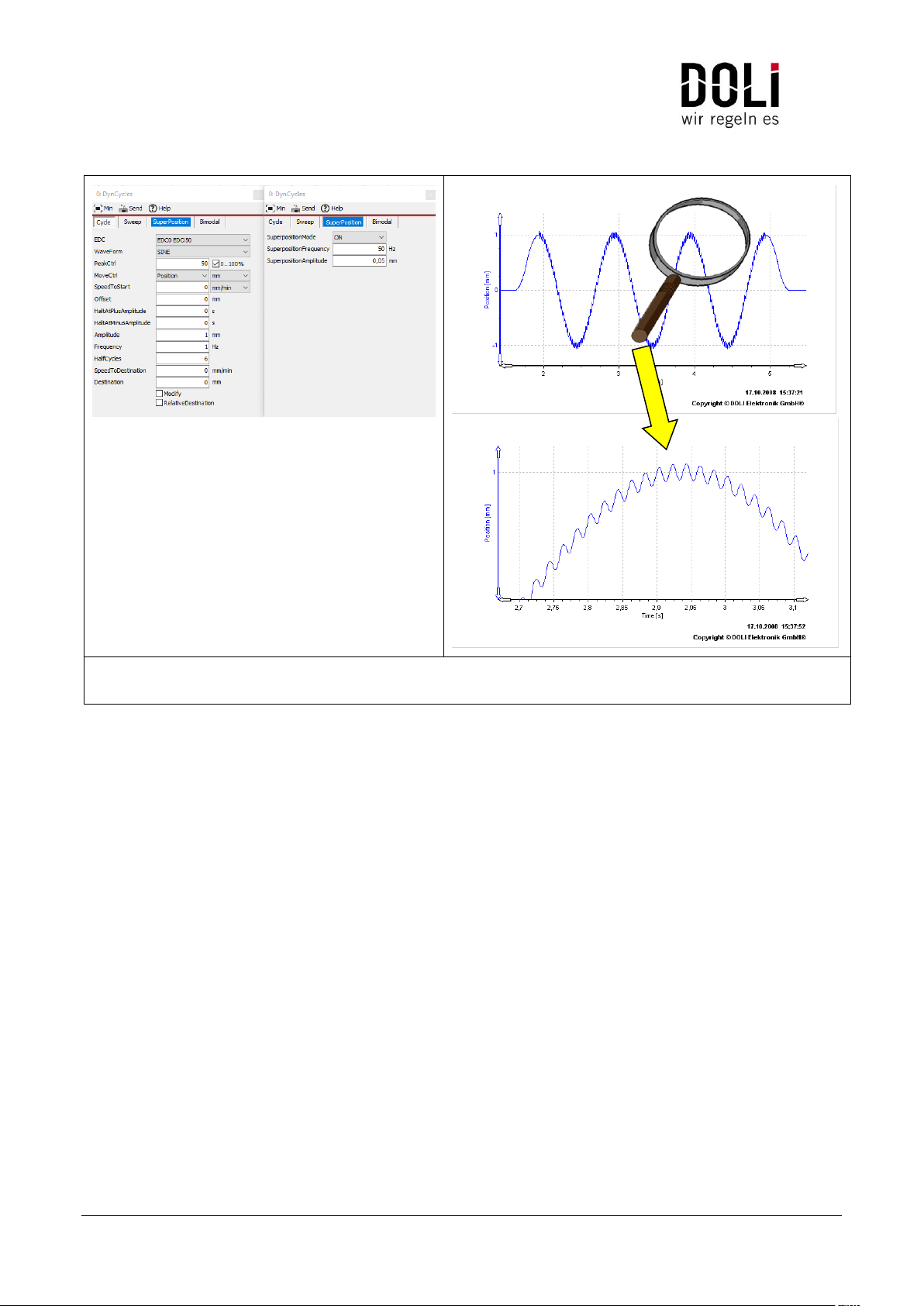
V10.26 2025-01-14 57 / 168 DoPE10
DoPE10
5.6.6 Superposition Mode
Sine command superposition cosine.
The basic frequency of the Cosine is 1Hz. A cosine with a frequency of 50Hz and amplitude of 0.05mm is superimposed.
Page 58
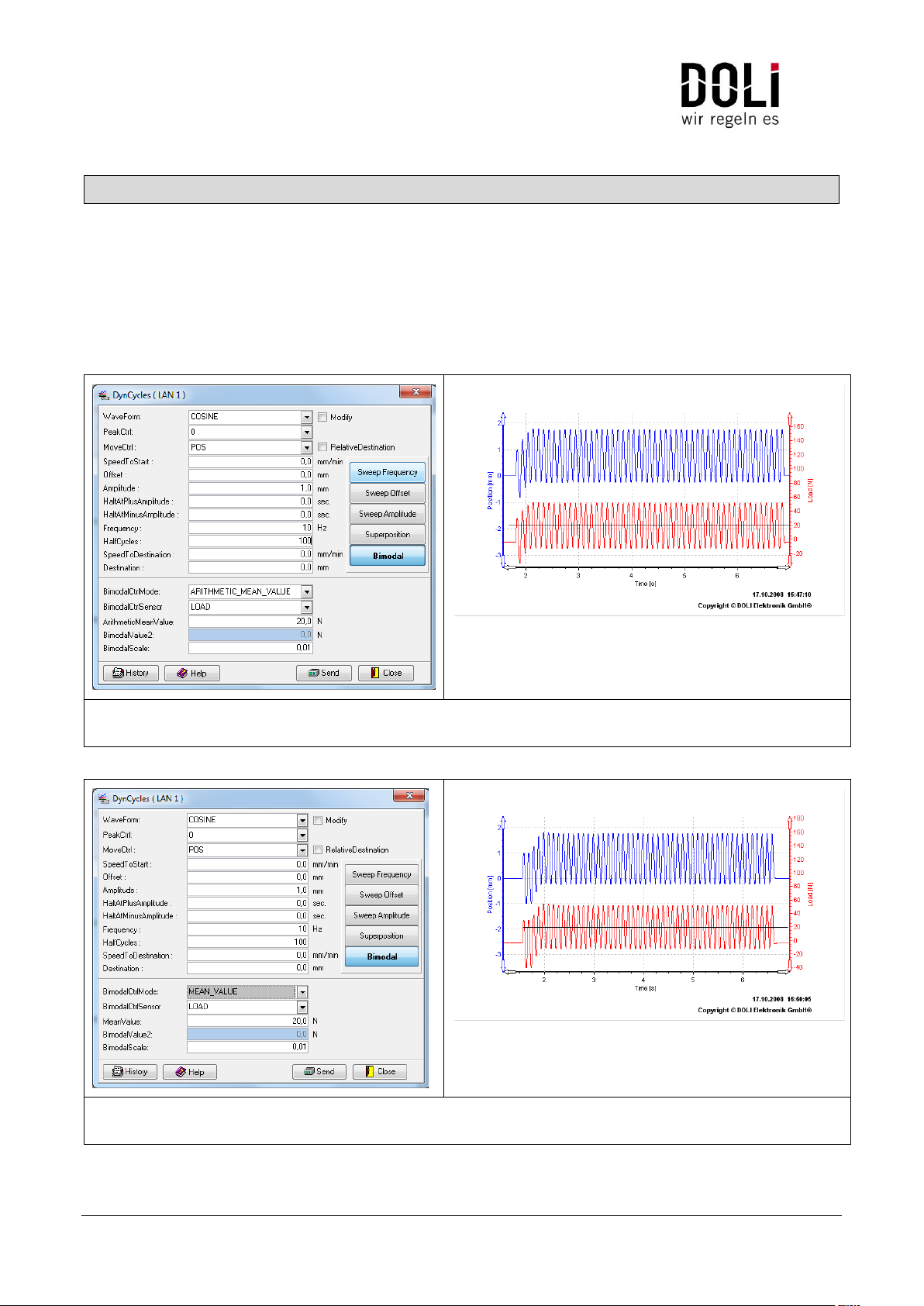
V10.26 2025-01-14 58 / 168 DoPE10
DoPE10
5.6.7 Bimodal Control Mode
Bimodal commands are not supported by EDCi10
A bimodal command runs the test in e.g. position control, but keep a certain e.g. load. The load is controlled
by changing the offset of e.g. position. The parameter BimodalScale defines the scaling between the two
sensors. You may calculate this parameter by determining the ratio between move control sensor / bimodal
control sensor.
(For move control = Position, and bimodal control = Load, BimodalScale represents 1/stiffness of your
specimen in mm/N.)
5.6.7.1 Control arithmetic mean value
Do cosine cycles in position control with amplitude of 1mm and starting offset of 0mm.
Control the arithmetic mean value of load at 20N, by modifying the offset of position.
5.6.7.2 Control mean value
Do cosine cycles in position control with an amplitude of 1mm and starting offset of 0mm.
Control the mean value of load at 20N, by modifying the offset of position.
Page 59
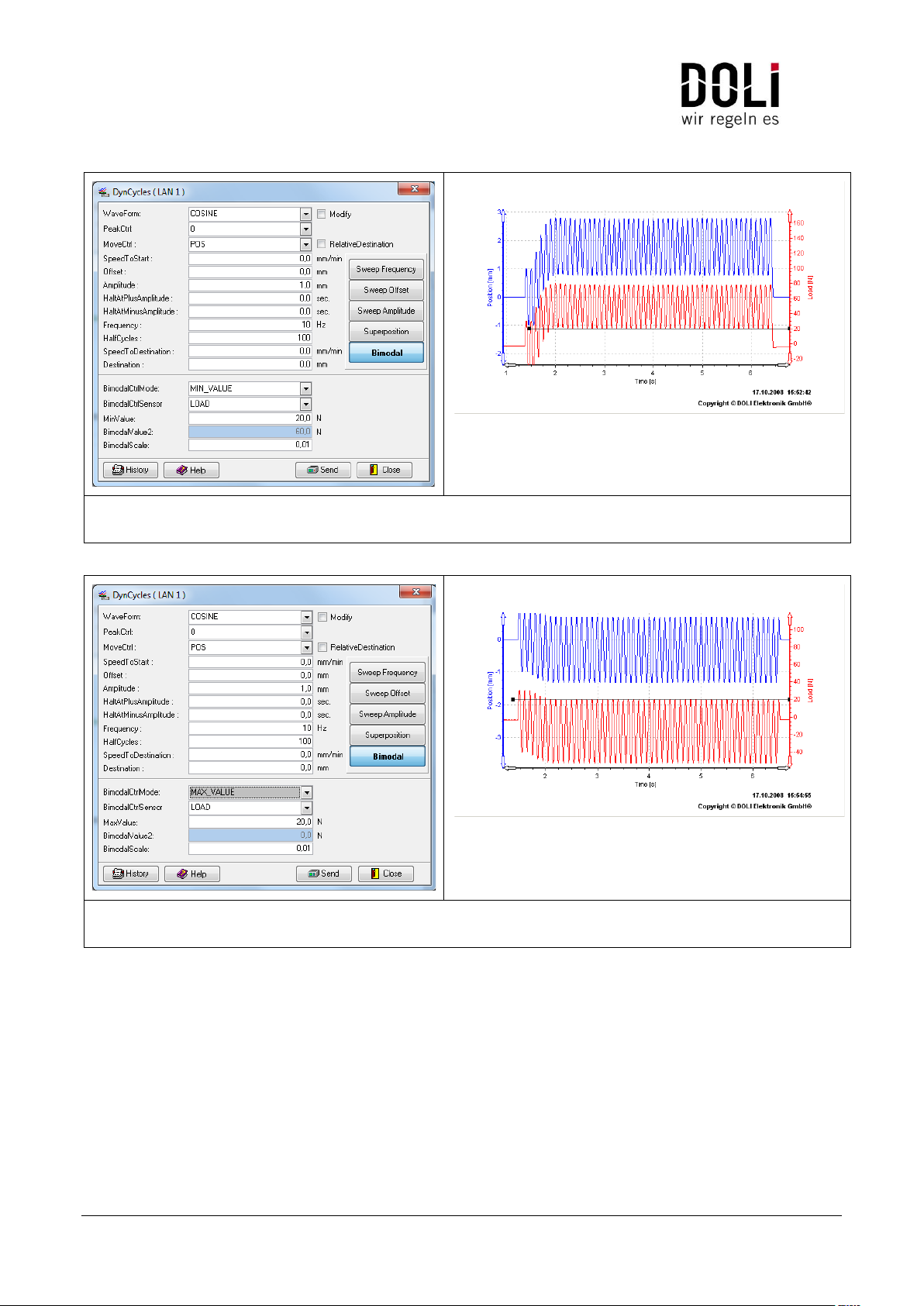
V10.26 2025-01-14 59 / 168 DoPE10
DoPE10
5.6.7.3 Control minimum value
Do cosine cycles in position control with amplitude of 1mm and starting offset of 0mm.
Control the minimum value of load at 20N, by modifying the offset of position.
5.6.7.4 Control maximum value
Do cosine cycles in position control with amplitude of 1mm and starting offset of 0mm.
Control the maximum value of load at 20N, by modifying the offset of position.
Page 60
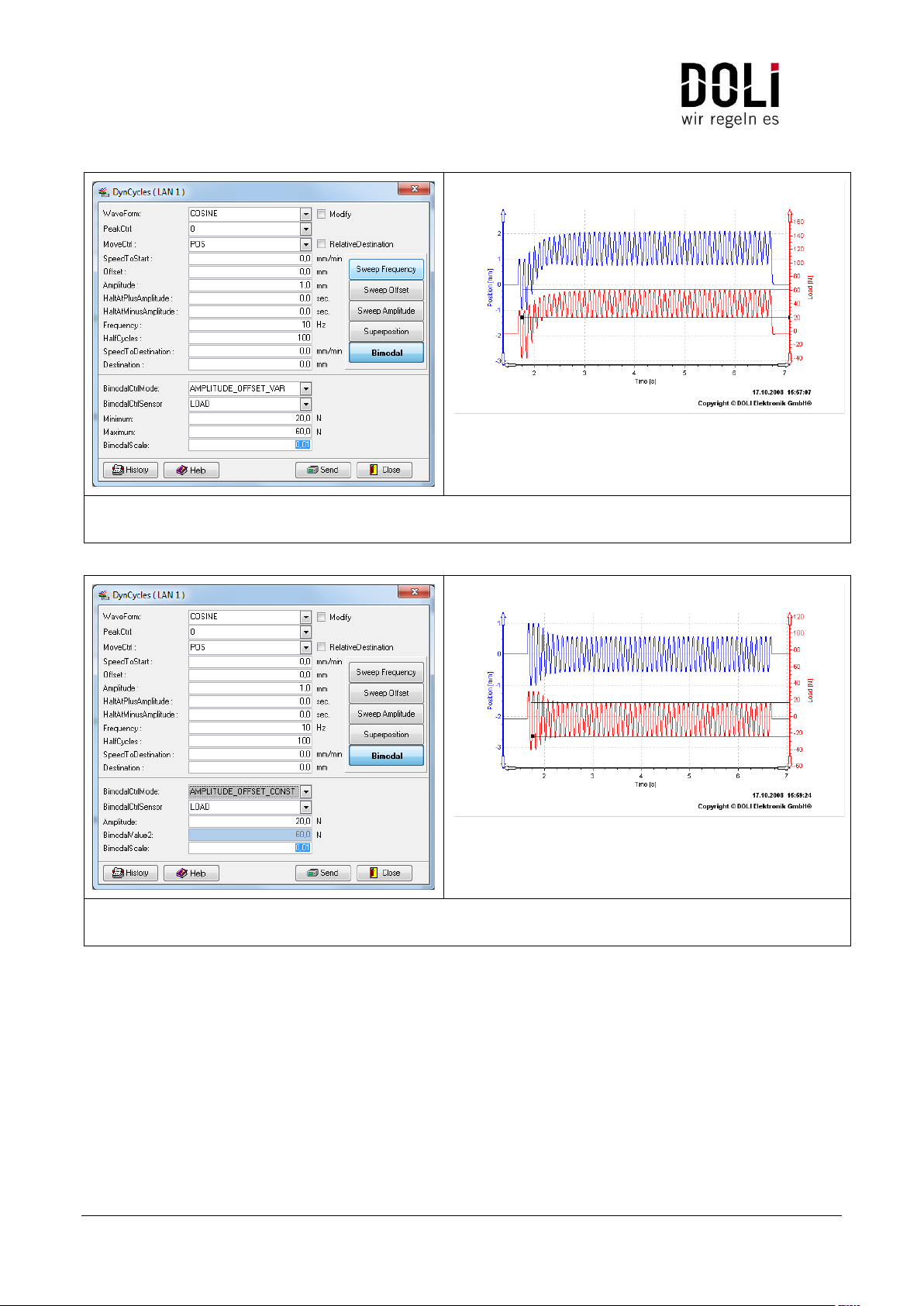
V10.26 2025-01-14 60 / 168 DoPE10
DoPE10
5.6.7.5 Control minimum AND maximum values,
Do cosine cycles in position control with amplitude of 1mm and starting offset of 0mm.
Control the minimum and maximum value of the load at 20N, and 60N, by modifying the offset, and amplitude of position.
5.6.7.6 Control minimum AND maximum values
Do cosine cycles in position control with amplitude of 1mm and starting offset of 0mm.
Control the amplitude of load at 20N, by modifying the amplitude of position.
Page 61

V10.26 2025-01-14 61 / 168 DoPE10
DoPE10
5.6.8 Restrictions:
• Frequency Sweeps are only possible for Cosine and Sine waveforms
• Amplitude or Offset sweep should not change faster than 4 * 1/frequency
• Amplitude AND SweepEndAmplitude MUST have the same sign!
• Modify not permitted with active Amplitude or Offset Sweep
• Modify not permitted for different waveforms
• Modify not permitted for different control modes
• Modify not permitted for different signs of the Amplitude
• Modify not permitted with RelativeDestination
• Bimodal control sensor must be different to move control sensor
• BimodalValue1 must be smaller than BimodalValue2
• BimodalValue1 (Amplitude) must be positive
• BimodalScale must be smaller than 32767 (EDC point scale)
• Amplitude and Offset Sweeps are not permitted for bi-modal modes:
“DYN_BIMODAL_MIN_VALUE” or “DYN_BIMODAL_MAX_VALUE”.
• Amplitude and Offset Sweeps are not permitted for bi-modal modes:
“DYN_BIMODAL_AMPLITUDE_OFFSET_VAR” or
“DYN_BIMODAL_AMPLITUDE_OFFSET_CONST”
• Modify, Sweeps, Bimodal Control and Superposition are not supported by EDCi10
Page 62
V10.26 2025-01-14 62 / 168 DoPE10
DoPE10
5.6.9 DoPESetPeakCtrl
Modify peak control cycles of a running DoPEDynCycles command.
Refer to 5.6.4 Peak Control for details.
Minimum requirements: EDCi with EDCiApp 9149.001, DoPE 10.00
Function declaration
Description
extern unsigned DLLAPI DoPESetPeakCtrl (
DoPE_HANDLE DoPEHdl,
unsigned short PeakCtrl)
Function returns Error constant (DoPERR_xxxx)
DoPE link handle
Peak control cycles 0, 1,2,4,8,16
.NET <Edc object>.Move.PeakCtrl(Int16 Cycles)
5.6.10 DoPESetPeakCtrlValue
Modify peak control of the next coming or a running DoPEDynCycles command.
Refer to 5.6.4 Peak Control for details.
Minimum requirements: EDCi with EDCiApp 9149.022, DoPE 10.20
Function declaration
Description
extern unsigned DLLAPI DoPESetPeakCtrlValue(
DoPE_HANDLE DoPEHdl,
unsigned short PeakCtrlMode,
double PeakCtrlPlusAmplitude,
double PeakCtrlMinusAmplitude)
Function returns Error constant (DoPERR_xxxx)
DoPE link handle
Peak control mode (see constants below)
Peak control value for plus amplitude in % of the Amplitude
Peak control value for minus amplitude in % of the Amplitude
Constants for PeakCtrlMode:
PEAK_CTRL_OFF
PEAK_CTRL_AUTO
PEAK_CTRL_FIX
Peak control off (PeakCtrlPlusAmplitude and PeakCtrlMinusAmplitude will be
ignored and set to 100%)
Automatic peak control, set start values
Fix peak control, set values
.NET <Edc object>.Move.SetPeakCtrlValue(Int16 PeakCtrlMode, Double PeakCtrlPlusAmplitude, ouble PeakCtrlMinusAmplitude)
5.6.11 DoPEGetPeakCtrlValue
Get the current peak control values of the running or the last DoPEDynCycles command.
Refer to 5.6.4 Peak Control for details.
Minimum requirements: EDCi with EDCiApp 9149.022, DoPE 10.20
Function declaration
Description
extern unsigned DLLAPI DoPEGetPeakCtrlValue(
DoPE_HANDLE DoPEHdl,
unsigned short *PeakCtrlMode,
double *PeakCtrlPlusAmplitude,
double *PeakCtrlMinusAmplitude)
Function returns Error constant (DoPERR_xxxx)
DoPE link handle
Peak control mode (refer to constants in 5.6.10 DoPESetPeakCtrlValue)
Peak control value for plus amplitude in % of the Amplitude
Peak control value for minus amplitude in % of the Amplitude
.NET <Edc object>.Move.GetPeakCtrlValue(ref Int16 PeakCtrlMode, ref Double PeakCtrlPlusAmplitude,
ref Double PeakCtrlMinusAmplitude)
Page 63
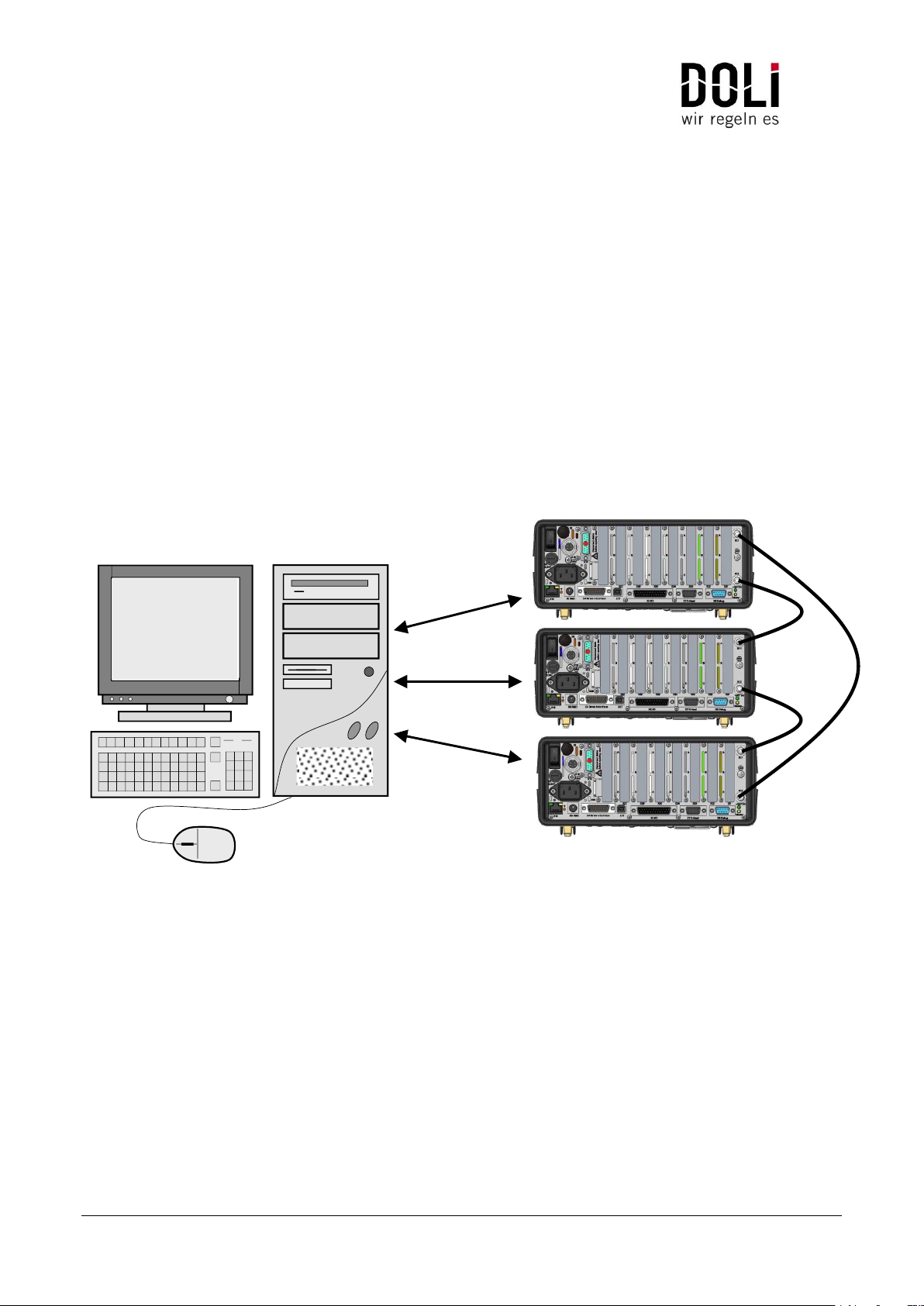
V10.26 2025-01-14 63 / 168 DoPE10
DoPE10
6 Synchronized data and movement
There are two commands (DoPESynchronizeSystemMode, DoPESynchronizeSystemStart) to control
synchronized movement of two or more EDC systems. These commands are only useful if the
synchronization option is installed, and the two or more EDC are correctly connected.
Important: Make sure that all synchronized EDCs use the same
- System Time
- Data Transmission Rate
With DoPESynchronizeSystemMode you can synchronize time and movement, with
DoPESynchronizeSystemStart you can start the synchronization.
There is also an event handler for synchronized measuring data samples available
(DoPESetOnSynchronizeDataHdlr). Activate sample synchronization after EDC initialization with the
command DoPESynchronizeData. The event is activated after DoPE receives samples with the same time
from all synchronized EDCs.
The parameter SyncOption of DoPEGeneralData must be set correctly in the EDC setup:
SYNC_OPTION_MASTER: for one Master EDC
SYNC_OPTION_SLAVE: for all other Slave EDCs
There might be undefined measured values if a sync cable is unplugged during operation. We
recommend supervising the CTRL_SYNCINPUT Bit of the Controller Status WORD 1 and take actions
if the cabling is interrupted (e.g. switching off the drive and reinitializing the EDCs).
LAN
LAN
LAN
Master
Slave
Slave
Page 64
V10.26 2025-01-14 64 / 168 DoPE10
DoPE10
6.1 DoPESynchronizeData
Activate sample synchronization for a list of DoPE handles after EDC initialization.
Passing an empty link list (first item NULL) stops sample synchronization. Initializing, selecting a setup or
closing one or more links stops sample synchronization, too.
Minimum requirements: EDCi with EDCiApp 9149.008, DoPE 10.11
Function declaration
Description
extern unsigned DLLAPI DoPESynchronizeData(
DoPE_HANDLE DoPEHdl[]
DoPE_HANDLE *pMaster)
Function returns Error constant (DoPERR_xxxx)
DoPE link handle array (terminated by NULL).
Pointer to storage for the master DoPE link handle.
.NET <EdcList object>.Syn.SynchronizeData(EdcList ListEdc, out Edc MasterEdc)
6.2 DoPESetOnSynchronizeDataHdlr
Set the OnSynchronizeData handler.
Minimum requirements: EDCi with EDCiApp 9149.008, DoPE 10.11
Function declaration
Description
extern unsigned DLLAPI DoPESetOnSynchronizeDataHdlr(
DoPEOnSynchronizeDataHdlr Hdlr
LPVOID lpParameter)
Function returns Error constant (DoPERR_xxxx)
User function to be called with every received synchronized sample.
User specific pointer.
User function for the OnSynchronizeDataevent:
unsigned CALLBACK OnSynchronizeData
DoPE_HANDLE DoPEHdl
DoPEOnSynchronizeData *Data
LPVOID lpParameter
Function should return 0 (reserved for future versions)
DoPE link handle
Pointer to received data
User specific pointer set with DoPESetOnSynchronizeDataHdlr
typedef struct
{
unsigned DoPError
unsigned nData
DoPELinkData *Sample
double Occupied
} DoPEOnSynchronizeData;
typedef struct
{
DoPE_HANDLE DP
DoPEData Data
} DoPELinkData
DoPERR_NOERROR event is ok.
Number of measuring data records
Array of measuring data records.
Utilization [% of data buffer size]
DoPE link handle
Measuring data record
.NET <EdcList object>.Syn.DoPEOnSynchronizeDataHdlr += new DoPE.OnSynchronizeDataHdlr(Hdlr)
6.3 DoPESetOnSynchronizeDataOverflowHdlr
Set the OnSynchronizeDataOverflow handler.
Minimum requirements: EDCi with EDCiApp 9149.008, DoPE 10.11
Function declaration
Description
extern unsigned DLLAPI DoPESetOnSynchronizeDataOverflowHdlr(
DoPEOnSynchronizeDataOverflowHdlr Hdlr
LPVOID lpParameter
Function returns Error constant (DoPERR_xxxx)
User function to be called with every overflow of synchronized sample.
User specific pointer.
User function for the OnSynchronizeDataOverflow event:
unsigned CALLBACK OnSynchronizeDataOverflow
LPVOID lpParameter
Function should return 0 (reserved for future versions)
Userspecific pointer set with
DoPESetOnSynchronizeDataOverflowHdlr
.NET <EdcList object>.Syn.DoPEOnSynchronizeDataOverflowHdlr += new DoPE.OnSynchronizeDataOverflowHdlr (Hdlr)
Page 65
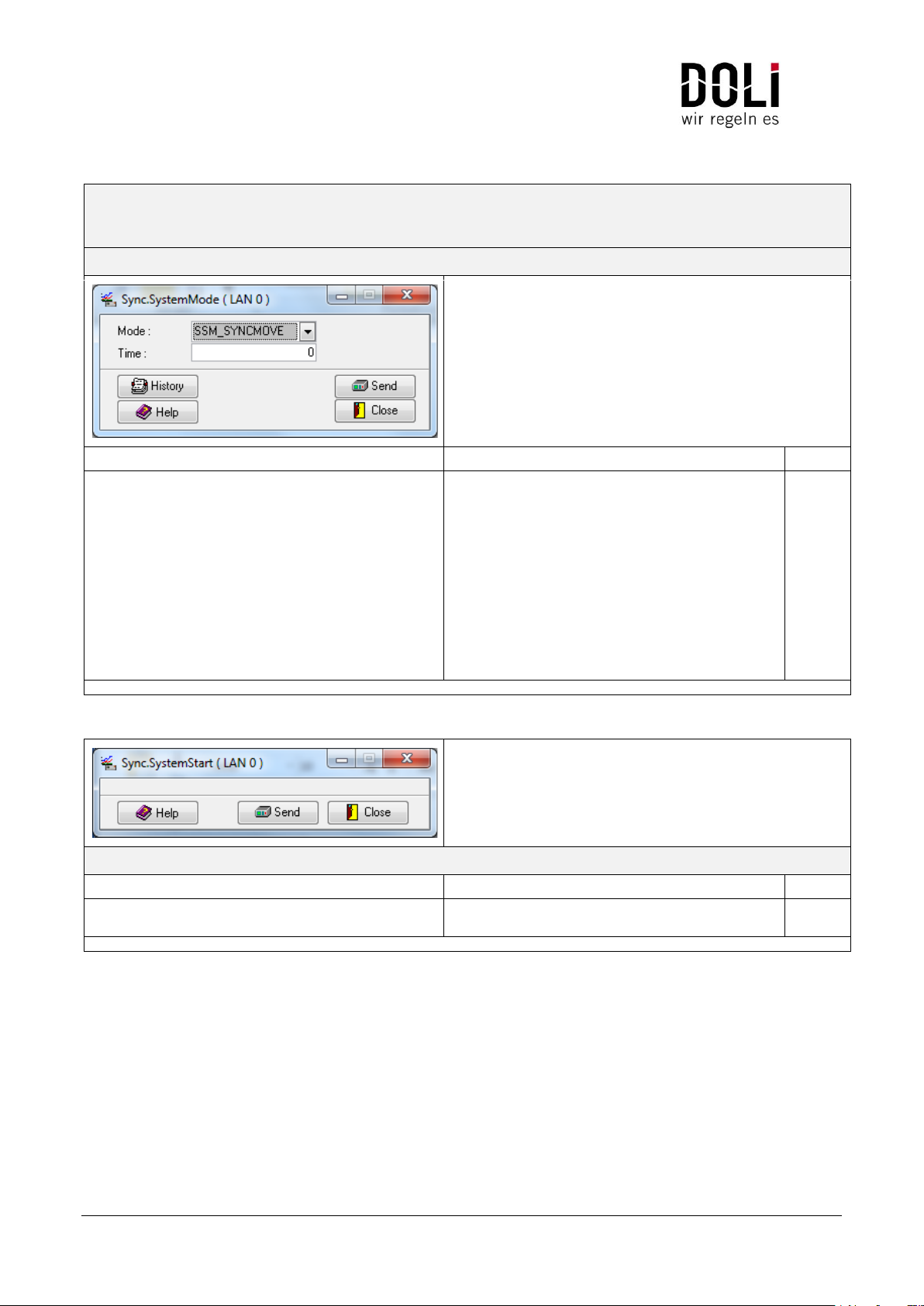
V10.26 2025-01-14 65 / 168 DoPE10
DoPE10
6.4 DoPESynchronizeSystemMode
DoPESynchronizeSystemMode command is used for synchronized movement
(see sample and state diagram below).
Minimum requirements: EDCi with EDCiApp 9149.008, DoPE 10.11
If Mode is SSM_SYNCMOVE, the next movement command like
DoPEPos, DoPECosine or any other movement command will be
delayed until synchronization condition is true. The systems will be
synchronized by the DoPESynchronizeSystemStart command.
Function declaration
Description
Unit
extern unsigned DLLAPI DoPESynchronizeSystemMode(
DoPE_HANDLE DoPEHdl
unsigned short Mode
double Time
Function returns Error constant (DoPERR_xxxx)
DoPE link handle
SSM_SYNCMOVE: If Time is ZERO, start movement
after synchronize signal is active.
If Time is not ZERO, wait Time
after synchronize signal is active
before starting the movement.
SSM_SYSTEMTIME: Set EDC-system time to Time,
after synchronize signal is active.
SSM_DISCARD: Discard previous
DoPESynchronizeSystemMode
command.
Delay or system time to set with the next
DoPESynchronizeSystemStart command.
s
.NET <Edc object>.Syn.SynchronizeSystemMode(DoPE.SSM Mode, Double Time)
6.5 DoPESynchronizeSystemStart
This function can only be processed on the Master-EDC.
The digital synchronization signal will be activated, and with the next
system clock, all involved EDC will start the previously defined actions,
set by DoPESynchronizeSystemMode.
Minimum requirements: EDCi with EDCiApp 9149.008, DoPE 10.11
Function declaration
Description
Unit
extern unsigned DLLAPI DoPESynchronizeSystemStart (
DoPE_HANDLE DoPEHdl
Function returns Error constant (DoPERR_xxxx)
DoPE link handle of Master EDC
.NET <Edc object>.Syn.SynchronizeSystemStart()
Page 66
V10.26 2025-01-14 66 / 168 DoPE10
DoPE10
Example1: Two axes should do synchronized sinusoidal cycles with no phase shift.
Attention: A real program must check the return codes!
/* activate sample synchronization after EDC initialization once */
DoPE_HANDLE DoPEHdl[] = {DoPEHdl_1, DoPEHdl_2, NULL};
DoPE_HANDLE DoPEHdl_Master;
Error = DoPESynchronizeData(DoPEHdl, &DoPEHdl_Master);
Error = DoPESetOnSynchronizeDataHdlr(MyOnSynchronizeDataHdlr, NULL);
/* move both EDCs to the start position */
Error = DoPEPos(DoPEHdl_1, CTRL_POS, Speed, Offset + Amplitude, &lpusTAN_1);
Error = DoPEPos(DoPEHdl_2, CTRL_POS, Speed, Offset + Amplitude, &lpusTAN_2);
/* wait until both EDCs reached the start position (check OnPosMsg handler) */
/* start cosine after synchronization without delay */
Error = DoPESynchronizeSystemMode(DoPEHdl_1, SSM_SYNCMOVE, 0);
Error = DoPEDynCycles(DoPEHdl_1, DYN_WAVEFORM_COSINE, ...);
/* start cosine after synchronization without delay */
Error = DoPESynchronizeSystemMode(DoPEHdl_2, SSM_SYNCMOVE, 0);
Error = DoPEDynCycles(DoPEHdl_2, DYN_WAVEFORM_COSINE, ...);
/* start synchronization at Master EDC */
Error = DoPESynchronizeSystemStart(DoPEHdl_Master);
Wait for any
DoPE-
movement
command
DoPESynchronizeSystemModeSSM_SYNCMOVE
• CTRL_SYNCHWAIT State = true
Idle
DoPESynchronize-SystemStart
•
CTRL_SYNCHWAIT State = false
• Synchronized start of movement
Wait for
Hardware
Sync-Start
Signal
AnyDoPEmovingcommand
• Prepare for moving
DoPESynchronize-SystemMode
SSM_DISCARD
• CTRL_SYNCHWAIT State = false
DoPESynchronize-SystemMode
SSM_DISCARD
• CTRL_SYNCHWAIT State = false
Page 67

V10.26 2025-01-14 67 / 168 DoPE10
DoPE10
Example2: Two axes should do synchronized sinusoidal cycles with 90° phase shift.
Attention: A real program must check the return codes!
/* activate sample synchronization after EDC initialization once */
DoPE_HANDLE DoPEHdl[] = {DoPEHdl_1, DoPEHdl_2, NULL};
DoPE_HANDLE DoPEHdl_Master;
Error = DoPESynchronizeData(DoPEHdl, &DoPEHdl_Master);
Error = DoPESetOnSynchronizeDataHdlr(MyOnSynchronizeDataHdlr, NULL);
/* move both EDCs to the start position */
Error = DoPEPos(DoPEHdl_1, CTRL_POS, Speed, Offset + Amplitude, &lpusTAN_1);
Error = DoPEPos(DoPEHdl_2, CTRL_POS, Speed, Offset + Amplitude, &lpusTAN_2);
/* wait until both EDCs reached the start position (check OnPosMsg handler) */
/* start cosine after synchronization without delay */
Error = DoPESynchronizeSystemMode(DoPEHdl_1, SSM_SYNCMOVE, 0);
Error = DoPEDynCycles(DoPEHdl_1, DYN_WAVEFORM_COSINE, ...);
/* start cosine after synchronization 90° phase shift */
Error = DoPESynchronizeSystemMode(DoPEHdl_2, SSM_SYNCMOVE, 1 / (Frequency * 4));
Error = DoPEDynCycles(DoPEHdl_2, DYN_WAVEFORM_COSINE, ...);
/* start synchronization at Master EDC */
Error = DoPESynchronizeSystemStart(DoPEHdl_Master);
Page 68
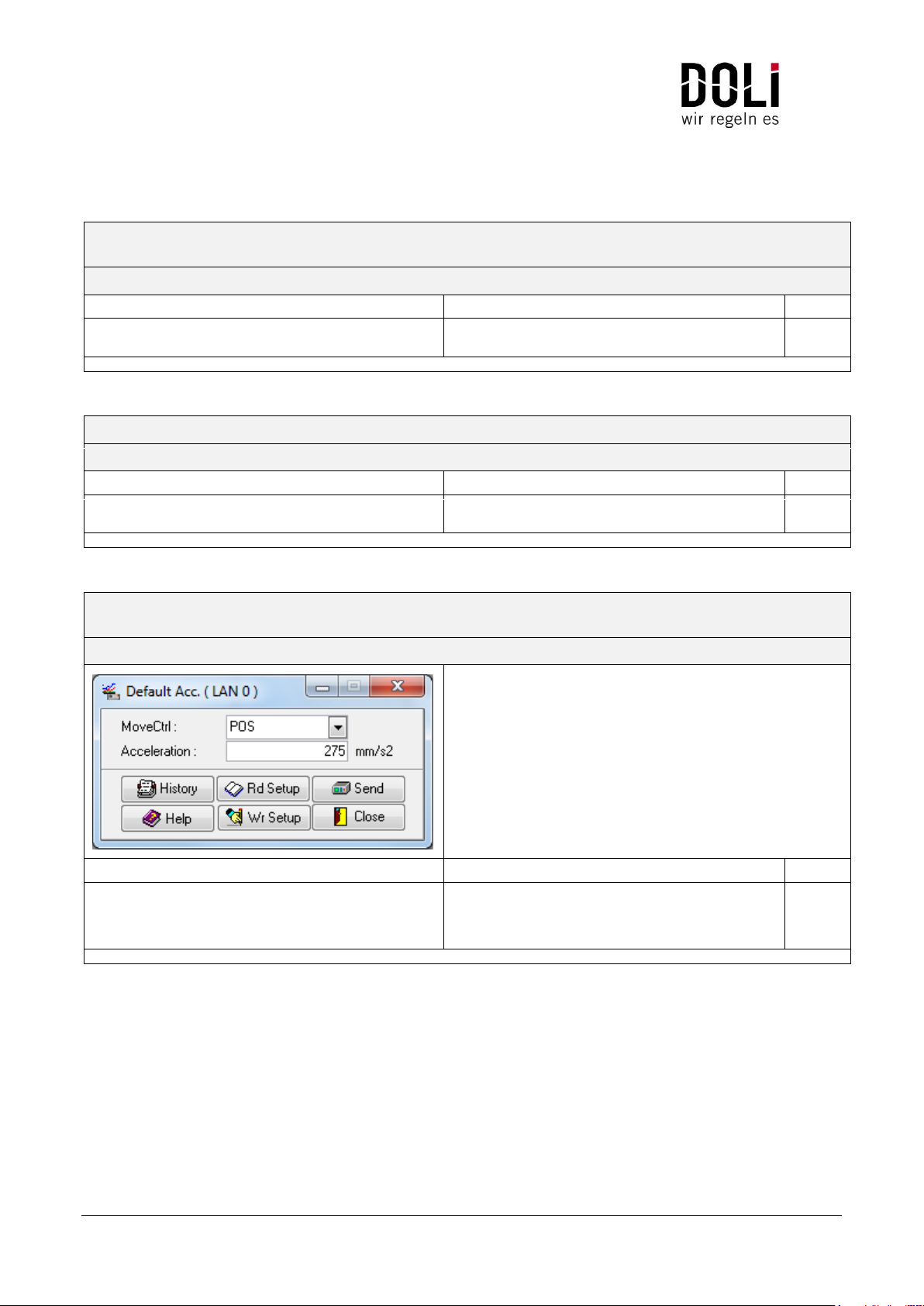
V10.26 2025-01-14 68 / 168 DoPE10
DoPE10
7 Miscellaneous Control Commands
7.1 DoPEOn
Activate drive.
Wait until the CTRL_READY bit in controller status word 1 is active before any movement command is used.
Minimum requirements: EDCi with EDCiApp 9149.001, DoPE 10.00
Function declaration
Description
Unit
extern unsigned DLLAPI DoPEOn(
DoPE_HANDLE DoPEHdl
Function returns Error constant (DoPERR_xxxx)
DoPE link handle
.NET <Edc object>.Move.On()
7.2 DoPEOff
Deactivate drive.
Minimum requirements: EDCi with EDCiApp 9149.001, DoPE 10.00
Function declaration
Description
Unit
extern unsigned DLLAPI DoPEOff(
DoPE_HANDLE DoPEHdl
Function returns Error constant (DoPERR_xxxx)
DoPE link handle
.NET <Edc object>.Move.Off()
7.3 DoPEDefaultAcc
Set default acceleration (and deceleration) for all movement commands. After initialization default and
nominal acceleration are identical.
Minimum requirements: EDCi with EDCiApp 9149.001, DoPE 10.00
Function declaration
Description
Unit
extern unsigned DLLAPI DoPEDefaultAcc (
DoPE_HANDLE DoPEHdl
unsigned short MoveCtrl
double Acc
Function returns Error constant (DoPERR_xxxx)
DoPE link handle
Control mode (CTRL_xxx)
Default Acceleration
.NET <Edc object>.Move.DefaultAcc(DoPE.CTRL MoveCtrl, Double Acc)
Page 69
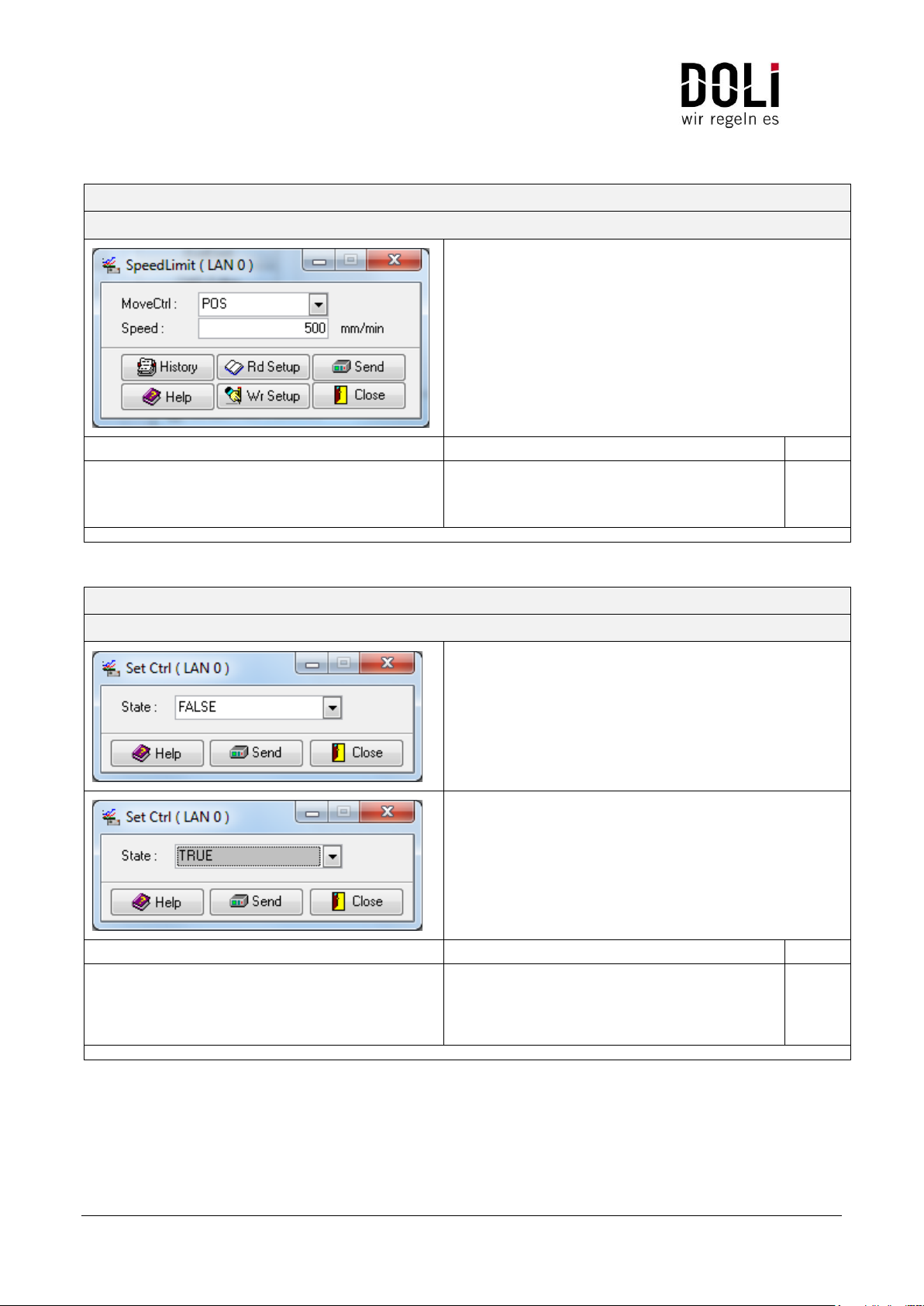
V10.26 2025-01-14 69 / 168 DoPE10
DoPE10
7.4 DoPESpeedLimit
Set speed limit. The maximum speed for all movement commands will be limited to this speed limit.
Minimum requirements: EDCi with EDCiApp 9149.001, DoPE 10.00
Function declaration
Description
Unit
extern unsigned DLLAPI DoPESpeedLimit (
DoPE_HANDLE DoPEHdl
unsigned short MoveCtrl
double Speed
Function returns Error constant (DoPERR_xxxx)
DoPE link handle
Control mode (CTRL_xxx)
Maximum allowed speed (must be below nominal speed)
Unit/s
.NET <Edc object>.Move.SpeedLimit(DoPE.CTRL MoveCtrl, Double Speed)
7.5 DoPESetCtrl
Enable / disable closed loop control.
Minimum requirements: EDCi with EDCiApp 9149.001, DoPE 10.00
Use this command to switch off EDC-Closed Loop Control.
After switching closed loop control off, PC must wait unlil all bits in
ActiveCtrl are ZERO.
This command activates closed loop control of EDC.
Wait until the CTRL_READY bit in controller status word 1 is active
before any movement command is used!
Function declaration
Description
Unit
extern unsigned DLLAPI DoPESetCtrl (
DoPE_HANDLE DoPEHdl
unsigned Enable
WORD *lpusTAN
Function returns Error constant (DoPERR_xxxx)
DoPE link handle
!=0 enables
=0 disables closed loop control
Pointer to transaction number.
.NET <Edc object>.Move.SetCtrl(bool Enable, ref Int16 Tan)
Page 70
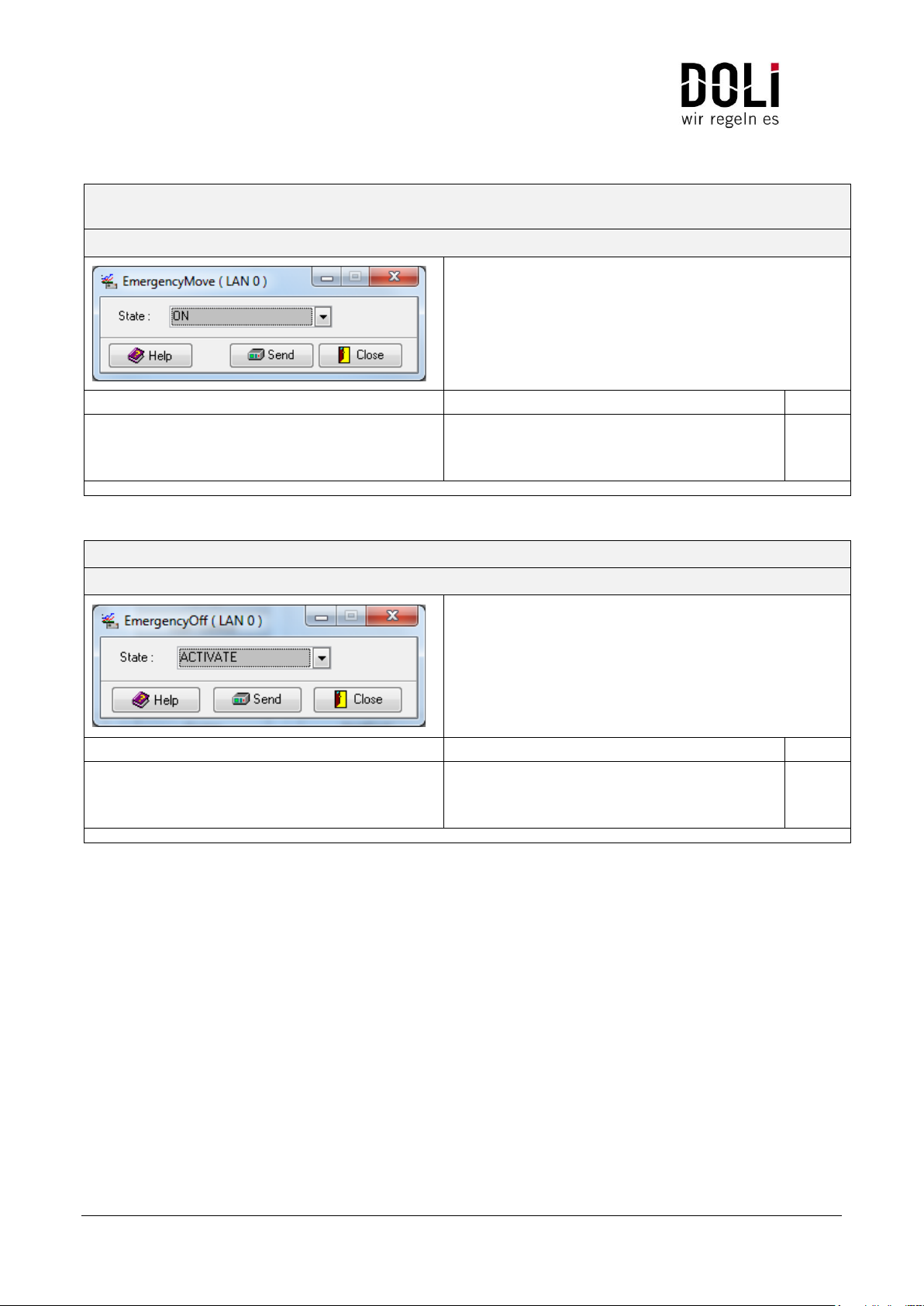
V10.26 2025-01-14 70 / 168 DoPE10
DoPE10
7.6 DoPEEmergencyMove
Activate / deactivate emergency movement. Emergency movement is used to move crosshead if the
hardware limit switch is active.
Minimum requirements: EDCi with EDCiApp 9149.001, DoPE 10.00
Function declaration
Description
Unit
extern unsigned DLLAPI DoPEEmergencyMove (
DoPE_HANDLE DoPEHdl
Unsigned short State
Function returns Error constant (DoPERR_xxxx)
DoPE link handle
!=0 on
=0 off
.NET <Edc object>.Move.EmergencyMove(bool Activate)
7.7 DoPEEmergencyOff
Activate / deactivate EmergencyOff state.
Minimum requirements: EDCi with EDCiApp 9149.001, DoPE 10.00
The emergency off state may be activated or deactivated by software.
Function declaration
Description
Unit
extern unsigned DLLAPI DoPEEmergencyOff (
DoPE_HANDLE DoPEHdl
Unsigned short State
Function returns Error constant (DoPERR_xxxx)
DoPE link handle
!=0 Activate emergency off
=0 Deactivate emergency off
.NET <Edc object>.Move.EmergencyOff(bool Activate)
Page 71
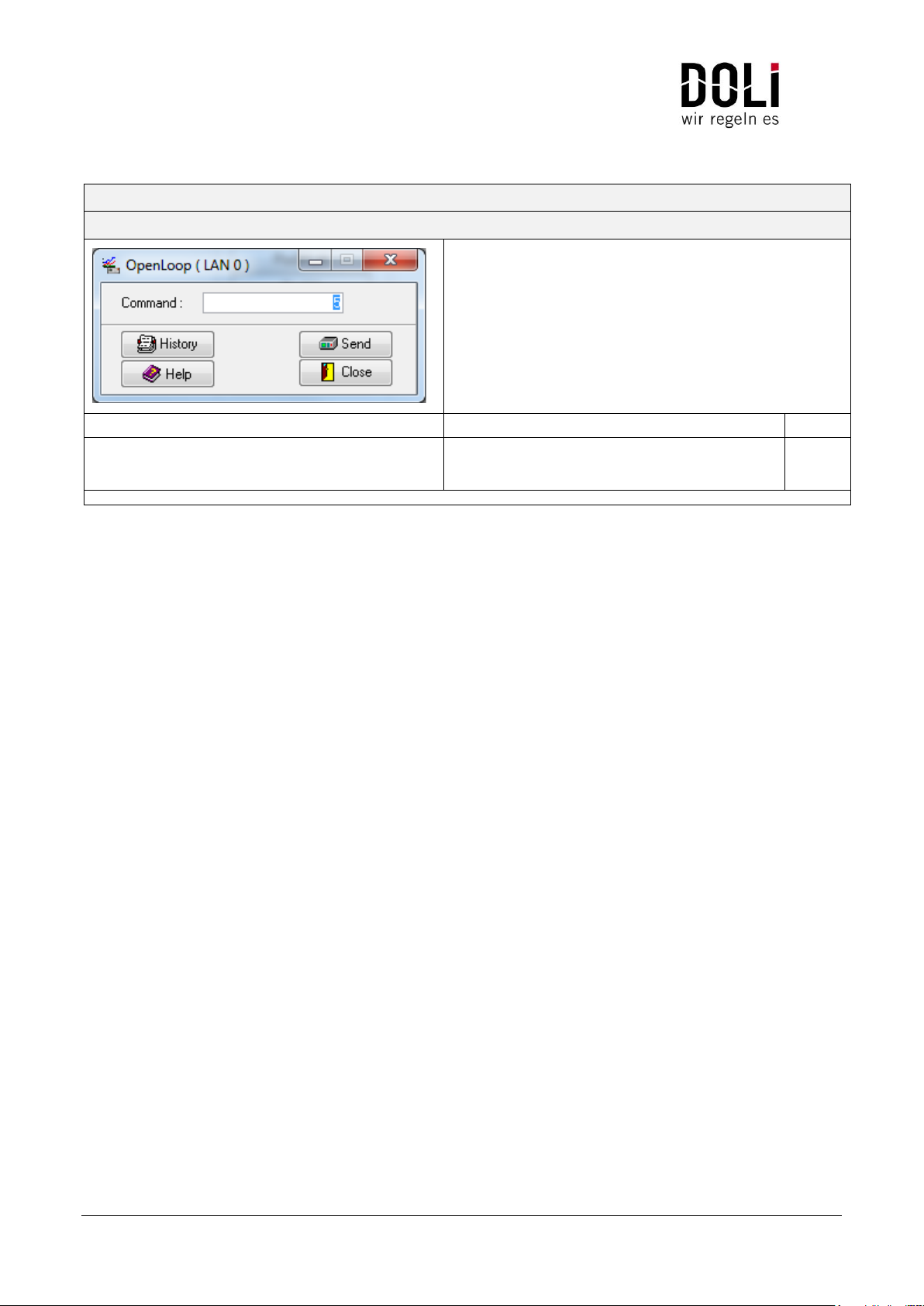
V10.26 2025-01-14 71 / 168 DoPE10
DoPE10
7.8 DoPESetOpenLoopCommand
Set command output to a given valve.
Minimum requirements: EDCi with EDCiApp 9149.001, DoPE 10.00
Sets the command output to a given value.
This command is used in open loop controller structure (typically
hydraulic concrete testing machines) to move the machine without
position feedback.
In all other controller structures the command deactivates the
controller and sets the command output to the given “Command”
value. The controller will be reactivated by sending any other
movement or halt command to the controller.
Function declaration
Description
Unit
extern unsigned DLLAPI DoPESetOpenLoopCommand (
DoPE_HANDLE DoPEHdl
double Command
Function returns Error constant (DoPERR_xxxx)
DoPE link handle
Output value to valve in %.
%
.NET <Edc object>.Output.SetOpenLoopCommand(Double Command)
Page 72
V10.26 2025-01-14 72 / 168 DoPE10
DoPE10
8 Event Handler
8.1 Using DoPE Event handler
Whenever necessary, EDC will send a message, possibly with parameters to PC. There are many different
reasons for such messages. E.g. if a positioning command has reached the destination, EDC will send a
message to PC, reporting the destination has been reached.
To make it easy for the application program to get these messages, DoPE offers an event handler interface.
For each event, the application program wants to process, an event handler must be installed. DoPE will call
these event handlers, whenever the event occurs.
8.2 Overview of Events:
Event Name
Description
Related DoPE Command
OnLine
EDC goes On/Offline
-
OnDataBlock
New data record(s) with measures values
-
OnCommandError
Error event upon a command
Any command
OnPosMsg
A positioning command has reached the
destination
Any positioning command
like DoPEPos,
DoPEBlockExecute
OnTPosMsg
Trigger position hit
DoPETrig,
Positioning command with
DoPEBlockHeader/Execute
OnLPosMsg
Limit position reached
DoPEPosExt,
DoPEFDPoti when reaching
softend
OnSftMsg
Softend reached
DoPESft,
Any positioning command
OnOffsCMsg
Offset correction finished
DoPEOffsC
OnCheckMsg
A measuring channel supervision hit.
DoPESetCheck
OnRefSignalMsg
Reference signal message of an encoder
DoPESetRefSignalMode
OnSensorMsg
Message from a serial sensor
-
OnOverflow
Overflow of data records
-
OnRuntimeError
Any error condition, like emergency off active.
-
OnIoSHaltMsg
Upper / Lower S-Halt input triggered
-
OnGuardMsg
Guard option range or speed limit triggered
-
OnKeyMsg
RMC-key state
-
OnSystemMsg
System message, like initialization errors
-
OnDebugMsg
Debug message (for remote support)
DoPEDebugMsgEnable
DoPESendDebugCommand
OnRmcEvent
RMC default handling for keys and LEDs
DoPERmcEnable
Page 73
V10.26 2025-01-14 73 / 168 DoPE10
DoPE10
8.3 DoPESetOnLineHdlr
The OnLine Handler supplies any change of the communication state between EDC and PC.
Minimum requirements: EDCi with EDCiApp 9149.001, DoPE 10.00
Function declaration
Description
extern unsigned DLLAPI DoPESetOnLineHdlr
DoPE_HANDLE DoPEHdl
DoPEOnLineHdlr Hdlr
LPVOID lpParameter
Function returns Error constant (DoPERR_xxxx)
DoPE link handle
User function to be called after every line state change.
User specific pointer.
User function for the OnLine event:
unsigned CALLBACK OnLine
DoPE_HANDLE DoPEHdl
int LineState
LPVOID lpParameter
Function should return 0 (reserved for future versions)
DoPE link handle
DoPEOFFLINE (0) link is offline
DoPEONLINE (1) link is online
DoPERESTART (2) asynchronous restart of the link
User specific pointer set with DoPESetOnLineHdlr
.NET <Edc object>.Eh.OnLineHdlr += new DoPE.OnLineHdlr(Hdlr)
8.4 DoPESetOnDataBlockHdlr
The OnDataBlock event handler is called with each received measuring data record block from EDC.
Per default DoPE collects 50 measuring data records in a block. This number can be changed with the
DoPESetOnDataBlockSize function.
Minimum requirements: EDCi with EDCiApp 9149.001, DoPE 10.00
Function declaration
Description
extern unsigned DLLAPI DoPESetOnDataBlockHdlr
DoPE_HANDLE DoPEHdl
DoPEOnDataBlockHdlr Hdlr
LPVOID lpParameter
Function returns Error constant (DoPERR_xxxx)
DoPE link handle
User function to be called after a new data record block is available.
User specific pointer
User function for the OnDataBlock event:
unsigned CALLBACK OnDataBlock
DoPE_HANDLE DoPEHdl
DoPEOnDataBlock *pData
LPVOID lpParameter
Function should return 0 (reserved for future versions)
DoPE link handle
Pointer to measuring data record block
User specific pointer set with DoPESetOnDataBlockHdlr
typedef struct
{
unsigned DoPError;
unsigned nData
DoPEOnData *pData
double Occupied;
} DoPEOnDataBlock;
DoPERR_NOERROR event is ok,
else at least one measuring data record reports an error.
Number of measuring data records in the block
Pointer to measuring data records
Utilization in percent of the measuring data circular buffer inside DoPE.
typedef struct
{
unsigned DoPError
DoPEData Data
double Occupied;
} DoPEOnData;
DoPERR_NOERROR event is ok,
Measuring data record
Utilization in percent of the measuring data circular buffer inside DoPE
.NET <Edc object>.Eh.OnDataBlockHdlr += new DoPE.OnDataBlockHdlr(Hdlr)
Page 74
V10.26 2025-01-14 74 / 168 DoPE10
DoPE10
8.5 DoPESetOnDataBlockSize
Set the number of measuring data records to collect in an OnDataBlock block.
Minimum requirements: EDCi with EDCiApp 9149.001, DoPE 10.00
Function declaration
Description
extern unsigned DLLAPI DoPESetOnDataBlockSize
DoPE_HANDLE DoPEHdl
unsigned nData
Function returns Error constant (DoPERR_xxxx)
DoPE link handle
Number of samples to collect in a block
.NET <Edc object>.Eh.SetOnDataBlockSize(Int32 nData)
8.6 DoPEGetOnDataBlockSize
Get the number of measuring data record to collect in an OnDataBlock block.
Minimum requirements: EDCi with EDCiApp 9149.001, DoPE 10.00
Function declaration
Description
extern unsigned DLLAPI DoPEGetOnDataBlockSize
DoPE_HANDLE DoPEHdl
unsigned *nData
Function returns Error constant (DoPERR_xxxx)
DoPE link handle
Pointer to storage for number of samples to collect in a block
.NET <Edc object>.Eh.GetOnDataBlockSize(ref Int32 nData)
8.7 DoPESetOnCommandErrorHdlr
The OnCommandError event handler is called after parameter check of DoPE commands in the EDC
firmware.
Normally all DoPE commands report parameter errors as return value, after being checked by the EDC
firmware. Therefor you don’t need to use the OnCommandError event handler.
If you send a DoPE command from a DoPE realtime handler (see chapter 18.1), DoPE can’t wait for the
answer of the EDC firmware, due to the high priority level. In this case you must use the OnCommandError
event handler to get the parameter errors form the EDC firmware. Some internal DoPE functions also use the
realtime handler, e.g. RMC default handler.
Minimum requirements: EDCi with EDCiApp 9149.001, DoPE 10.00
Function declaration
Description
extern unsigned DLLAPI DoPESetOnCommandErrorHdlr
DoPE_HANDLE DoPEHdl
DoPEOnCommandErrorHdlr Hdlr
LPVOID lpParameter
Function returns Error constant (DoPERR_xxxx)
DoPE link handle
User function to be called.
User specific pointer.
User function for the OnCommandErrorevent:
unsigned CALLBACK OnCommandError
DoPE_HANDLE DoPEHdl
DoPEOnCommandError *pError
LPVOID lpParameter
Function should return 0 (reserved for future versions)
DoPE link handle
Pointer to command error structure
User specific pointer set with DoPESetOnDataHdlr
typedef struct
{
unsigned short CommandNumber
unsigned short ErrorNumber
unsigned short usTAN
} DoPEOnCommandError;
EDC internal command number (for internal use).
ErrorNumber specifies the error type (see DoPERR_CMD_xxx).
Transaction number of the corresponding DoPE command.
.NET <Edc object>.Eh.OnCommandErrorHdlr += new DoPE.OnCommandErrorHdlr(Hdlr)
Page 75
V10.26 2025-01-14 75 / 168 DoPE10
DoPE10
8.8 DoPESetOnPosMsgHdlr
Whenever a movement command, like DoPEPos, is finished, EDC will send a message to PC. The
movement command is finished after the command generator reached the final destination. DoPE will call the
OnPosMsg event handler with a pointer to the DoPEOnPosMsg structure:
Minimum requirements: EDCi with EDCiApp 9149.001, DoPE 10.00
Function declaration
Description
extern unsigned DLLAPI DoPESetOnPosMsgHdlr
DoPE_HANDLE DoPEHdl
DoPEOnPosMsgHdlr Hdlr
LPVOID lpParameter
Function returns Error constant (DoPERR_xxxx)
DoPE link handle
User function to be called.
User specific pointer.
User function for the OnPosMsg event:
unsigned CALLBACK OnPosMsg
DoPE_HANDLE DoPEHdl
DoPEOnPosMsg * pPosMsg
LPVOID lpParameter
Function should return 0 (reserved for future versions)
DoPE link handle
Pointer to positioning message structure
User specific pointer set with DoPESetOnPosMsgHdlr
typedef struct
{
unsigned DoPError
unsigned short Reached
double Time
unsigned short Control
double Position
unsigned short DControl
double Destination
unsigned short usTAN
} DoPEOnPosMsg;
DoPERR_NOERROR event is ok.
Else error occurred during event generation, e.g. data conversion
error.
1 if current position is within the destination window,
0 if current position is outside destination window.
EDC-System time when reaching destination.
Control mode of the next parameter (Position)
If Reached = 1 Destination of the corresponding movement command.
If Reached = 0 Current position.
Control mode of the next parameter (Destination)
Here: DControl has always the same value as Control.
Destination of the corresponding movement command.
Transaction number of the corresponding movement command.
.NET <Edc object>.Eh.OnPosMsgHdlr += new DoPE.OnPosMsgHdlr(Hdlr)
Page 76
V10.26 2025-01-14 76 / 168 DoPE10
DoPE10
8.9 DoPESetOnTPosMsgHdlr
This event is sent if the trigger position of a DoPETrig command hits. DoPE will call the OnTPosMsg event
handler with a pointer to the DoPEOnPosMsg structure:
Minimum requirements: EDCi with EDCiApp 9149.001, DoPE 10.00
Function declaration
Description
extern unsigned DLLAPI DoPESetOnTPosMsgHdlr
DoPE_HANDLE DoPEHdl
DoPEOnTPosMsgHdlr Hdlr
LPVOID lpParameter
Function returns Error constant (DoPERR_xxxx)
DoPE link handle
User function to be called after the trigger position of DoPETrig
command hits.
User specific pointer.
User function for the OnTPosMsg event:
unsigned CALLBACK OnTPosMsg
DoPE_HANDLE DoPEHdl
DoPEOnTPosMsg * pTPosMsg
LPVOID lpParameter
Function should return 0 (reserved for future versions)
DoPE link handle
Pointer to positioning message structure
User specific pointer set with DoPESetOnTPosMsgHdlr
typedef struct
{
unsigned DoPError
unsigned short Reached
double Time
unsigned short Control
double Position
unsigned short DControl
double Destination
unsigned short usTAN
} DoPEOnPosMsg;
DoPERR_NOERROR event is ok.
Else error occurred during event generation,
e.g. data conversion error.
Always 1.
EDC-System time when trigger hits.
Control mode of the next parameter (Position)
Limit position of DoPETrig com.
Control mode of the next parameter (Destination).
Trigger position of DoPETrig command.
Transaction number of the corresponding DoPETrig command.
.NET <Edc object>.Eh.OnTPosMsgHdlr += new DoPE.OnTPosMsgHdlr(Hdlr)
Page 77
V10.26 2025-01-14 77 / 168 DoPE10
DoPE10
8.10 DoPESetOnLPosMsgHdlr
This event is sent if the limit position of a DoPEPosExt command hits, or a softend position exceeds during
DoPEFDPoti command. DoPE will call the OnLPosMsg event handler with a pointer to the DoPEOnPosMsg
structure:
Minimum requirements: EDCi with EDCiApp 9149.001, DoPE 10.00
Function declaration
Description
extern unsigned DLLAPI DoPESetOnLPosMsgHdlr
DoPE_HANDLE DoPEHdl
DoPEOnLPosMsgHdlr Hdlr
LPVOID lpParameter
Function returns Error constant (DoPERR_xxxx)
DoPE link handle
User function to be called after the limit position of DoPEPosExt
command hits.
User specific pointer.
User function for the OnLPosMsg event:
unsigned CALLBACK OnLPosMsg
DoPE_HANDLE DoPEHdl
DoPEOnLPosMsg * pLPosMsg
LPVOID lpParameter
Function should return 0 (reserved for future versions)
DoPE link handle
Pointer to positioning message structure
User specific pointer set with DoPESetOnLPosMsgHdlr
typedef struct
{
unsigned DoPError
unsigned short Reached
double Time
unsigned short Control
double Position
unsigned short DControl
double Destination
unsigned short usTAN
} DoPEOnPosMsg;
DoPERR_NOERROR event is ok.
Else error occurred during event generation,
e.g. data conversion error.
Always 1.
EDC-System time when limit hits.
Control mode of the next parameter (Position)
Limit position of DoPEPosExt com.
Control mode of the next parameter (Destination).
Destination position of DoPEPosExt command.
Transaction number of the corresponding DoPEPosExt command.
.NET <Edc object>.Eh.OnLPosMsgHdlr += new DoPE.OnLPosMsgHdlr(Hdlr)
8.11 DoPESetOnSftMsgHdlr
This event is sent if a softend position was exceeded.
Minimum requirements: EDCi with EDCiApp 9149.001, DoPE 10.00
Function declaration
Description
extern unsigned DLLAPI DoPESetOnSftMsgHdlr
DoPE_HANDLE DoPEHdl
DoPEOnSftMsgHdlr Hdlr
LPVOID lpParameter
Function returns Error constant (DoPERR_xxxx)
DoPE link handle
User function to be called after a positioning command wasfinished.
User specific pointer.
User function for the OnSftMsg event:
unsigned CALLBACK OnSftMsg
DoPE_HANDLE DoPEHdl
DoPEOnSftMsg *pSftMsg
LPVOID lpParameter
Function should return 0 (reserved for future versions)
DoPE link handle
Pointer to positioning message structure
User specific pointer set with DoPESetOnSftMsgHdlr
typedef struct
{
unsigned DoPError
unsigned short Upper
double Time
unsigned short Control
double Position
unsigned short usTAN
} DoPEOnSftMsg;
DoPERR_NOERROR event is ok.
Else error occurred during event generation,
e.g. data conversion error.
1 = upper softend.
0 = lower softend.
EDC-System time when softend was exceeded.
Control mode of the softend that was exceeded.
Position, where the softend was detected.
Transaction number of the last positioning command.
.NET <Edc object>.Eh.OnSftMsgHdlr += new DoPE.OnSftMsgHdlr(Hdlr)
Page 78
V10.26 2025-01-14 78 / 168 DoPE10
DoPE10
8.12 DoPESetOnOffsCMsgHdlr
Handler for offset correction messages
Minimum requirements: EDCi with EDCiApp 9149.001, DoPE 10.00
Function declaration
Description
extern unsigned DLLAPI DoPESetOnOffsCMsgHdlr
DoPE_HANDLE DoPEHdl
DoPEOnOffsCMsgHdlr Hdlr
LPVOID lpParameter
Function returns Error constant (DoPERR_xxxx)
DoPE link handle
User function to be called after an offset correction, activated
withDoPEOffsC command was finished.
User specific pointer.
User function for the OnOffsCMsg event:
unsigned CALLBACK OnOffsCMsg
DoPE_HANDLE DoPEHdl
DoPEOnOffsCMsg *pOffsCMsg
LPVOID lpParameter
Function should return 0 (reserved for future versions)
DoPE link handle
Pointer to positioning message structure
User specific pointer set with DoPESetOnOffsCMsgHdlr
typedef struct
{
unsigned DoPError
double Time
unsigned short Offset
unsigned short usTAN
} DoPEOnOffsCMsg;
DoPERR_NOERROR event is ok.
Else error occurred during event generation,
e.g. data conversion error.
EDC-System time when offset correction was finished.
Measured offset of the output channel.
Transaction number of the corresponding DoPEOffsC command.
.NET <Edc object>.Eh.OnOffsCMsgHdlr += new DoPE.OnOffsCMsgHdlr(Hdlr)
8.13 DoPESetOnCheckMsgHdlr
Handler for channel supervision messages
Minimum requirements: EDCi with EDCiApp 9149.001, DoPE 10.00
Function declaration
Description
extern unsigned DLLAPI DoPESetOnCheckMsgHdlr
DoPE_HANDLE DoPEHdl
DoPEOnCheckMsgHdlr Hdlr
LPVOID lpParameter
Function returns Error constant (DoPERR_xxxx)
DoPE link handle
User function to be called after a channel supervision condition hits.
User specific pointer.
User function for the OnCheckMsg event:
unsigned CALLBACK OnCheckMsg
DoPE_HANDLE DoPEHdl
DoPEOnCheckMsg *pCheckMsg
LPVOID lpParameter
Function should return 0 (reserved for future versions)
DoPE link handle
Pointer to check message structure
User specific pointer set with DoPESetOnCheckMsgHdlr
typedef struct
{
unsigned DoPError
unsigned short Action
double Time
unsigned short CheckId
Double Position
unsigned short SensorNo
unsigned short usTAN
} DoPEOnCheckMsg;
DoPERR_NOERROR event is ok.
Else error occurred during event generation,
e.g. data conversion error.
1 = the action of DoPESetCheck command was started.
0 = the action of DoPESetCheck command was NOT started.
(due to an error condition like active softend)
EDC-System time.
ID of measuring channel check.
Position of the supervised sensor.
Supervised sensor.
Transaction number of the corresponding DoPESetCheck command.
.NET <Edc object>.Eh.OnCheckMsgHdlr += new DoPE.OnCheckMsgHdlr(Hdlr)
Page 79
V10.26 2025-01-14 79 / 168 DoPE10
DoPE10
8.14 DoPESetOnRefSignalMsgHdlr
Handler for reference signal messages
Minimum requirements: EDCi with EDCiApp 9149.001, DoPE 10.00
Function declaration
Description
extern unsigned DLLAPIDoPESetOnRefSignalMsgHdlr
DoPE_HANDLE DoPEHdl
DoPESetOnRefSignalMsgHdlr Hdlr
LPVOID lpParameter
Function returns Error constant (DoPERR_xxxx)
DoPE link handle
User function to be called after a reference signal occurred.
User specific pointer.
User function for the OnRefSignalMsg event:
unsigned CALLBACK OnRefSignalMsg
DoPE_HANDLE DoPEHdl
DoPEOnRefSignalMsg * pRefSignalMsg
LPVOID lpParameter
Function should return 0 (reserved for future versions)
DoPE link handle
Pointer to reference signal message structure.
User specific pointer set with DoPESetOnRefSignalMsgHdlr
typedef struct
{
unsigned DoPError
double Time
unsigned short SensorNo
Double Position
unsigned short usTAN
} DoPEOnRefSignalMsg;
DoPERR_NOERROR event is ok.
Else error occurred during event generation,
e.g. data conversion error.
EDC-System time.
Sensor where the reference signal occurred.
Position at reference signal.
Transaction number of the corresponding DoPESetRefSignalMode
command.
.NET <Edc object>.Eh.OnRefSignalMsgHdlr += new DoPE.OnRefSignalMsgHdlr(Hdlr)
8.15 DoPESetOnSensorMsgHdlr
Handler for serial sensor messages
Minimum requirements: EDCi with EDCiApp 9149.001, DoPE 10.00
Function declaration
Description
extern unsigned DLLAPIDoPESetOnSensorMsgHdlr
DoPE_HANDLE DoPEHdl
DoPESetOnSensorMsgHdlr Hdlr
LPVOID lpParameter
Function returns Error constant (DoPERR_xxxx)
DoPE link handle
User function to be called after a message from a serial sensor has
been received.
User specific pointer.
User function for the OnSensorMsg event:
unsigned CALLBACK OnSensorMsg
DoPE_HANDLE DoPEHdl
DoPEOnSensorMsg * pOnSensorMsg
LPVOID lpParameter
Function should return 0 (reserved for future versions)
DoPE link handle
Pointer to serial sensor message structure.
User specific pointer set with DoPESetOnSensorMsgHdlr
typedef struct
{
unsigned DoPError
double Time
unsigned short SensorNo
unsigned short Length
unsigned char Data[SENSOR_MSG_LEN+1]
unsigned short usTAN
} DoPEOnSensorMsg;
DoPERR_NOERROR event is ok.
Else error occurred during event generation,
e.g. data conversion error.
EDC-System time.
Sensor number.
Number of bytes in Data.
Message from the sensor.
Transaction number is unused, always ZERO.
.NET <Edc object>.Eh.OnSensorMsgHdlr += new DoPE.OnSensorMsgHdlr(Hdlr)
Page 80
V10.26 2025-01-14 80 / 168 DoPE10
DoPE10
8.16 DoPESetOnIoSHaltMsgHdlr
Handler for IO-SHalt messages.
Minimum requirements: EDCi with EDCiApp 9149.001, DoPE 10.00
Function declaration
Description
extern unsigned DLLAPI DoPESetOnIoSHaltMsgHdlr
DoPE_HANDLE DoPEHdl
DoPESetOnIoSHaltMsgHdlr Hdlr
LPVOID lpParameter
Function returns Error constant (DoPERR_xxxx)
DoPE link handle
User function to be called after a SHalt input has triggered.
User specific pointer.
User function for the OnIoSHaltMsg event:
unsigned CALLBACK OnIoSHaltMsg
DoPE_HANDLE DoPEHdl
DoPEOnIoSHaltMsg * pOnIoSHaltMsg
LPVOID lpParameter
Function should return 0 (reserved for future versions)
DoPE link handle
Pointer to IO-SHalt message structure.
User specific pointer set with DoPESetOnIoSHaltMsgHdlr
typedef struct
{
unsigned DoPError
unsigned short Upper
double Time
unsigned short Control
double Position
unsigned short usTAN
} DoPEOnIoSHaltMsg;
DoPERR_NOERROR event is ok.
Else error occurred during event generation.
1: Upper SHalt input triggered.
0: Lower SHalt input triggered.
EDC-System time.
Control mode of Position.
Position at SHalt input trigger.
Transaction number.
.NET <Edc object>.Eh.OnIoSHaltMsgHdlr += new DoPE.OnIoSHaltMsgHdlr(Hdlr)
8.17 DoPESetOnGuardMsgHandler
Handler for guard option messages.
Minimum requirements: EDCi with EDCiApp 9149.022, DoPE 10.19
Function declaration
Description
extern unsigned DLLAPI DoPESetOnGuardMsgHdlr
DoPE_HANDLE DoPEHdl
DoPEOnGuardMsgHdlr Hdlr
void *lpParameter
Function returns Error constant (DoPERR_xxxx)
DoPE link handle
User function to be called after a guard event has triggered.
User specific pointer.
User function for the OnGuardMsg event:
unsigned CALLBACK DoPEOnGuardMsgHdlr
DoPE_HANDLE DoPEHdl
DoPEOnGuardMsg *pOnGuardMsg
void lpParameter
Function should return 0 (reserved for future versions)
DoPE link handle
Pointer to guard message structure.
User specific pointer set with DoPESetOnGuardMsgHdlr
typedef struct
{
unsigned DoPError
unsigned short Trigger
double Time
unsigned short TriggerSensor
double TriggerValue
unsigned short usTAN
} DoPEOnGuardMsg;
DoPERR_NOERROR event is ok.
Else error occurred during event generation,
Trigger of the guard event message. See Constants.
EDC-System time, when triggered.
Number of the monitored sensor. (RangeLimit- /SpeedLimitSensor)
Value of the monitored sensor when triggered.
Transaction number.
Constants for Trigger
GUARD_UPPER_RANGE_LIMIT_HALT
GUARD_LOWER_RANGE_LIMIT_HALT
GUARD_UPPER_RANGE_LIMIT_OVERRUN
GUARD_LOWER_RANGE_LIMIT_OVERRUN
GUARD_SPEED_LIMIT_OVERRUN
Halt at upper range limit triggered
Halt at lower range limit triggered
Upper range limit overrun
Lower range limit overrun
Speed limit overrun
.NET <Edc object>.Eh.OnGuardMsgHdlr += new DoPE.OnGuardMsgHdlr(Hdlr)
Page 81
V10.26 2025-01-14 81 / 168 DoPE10
DoPE10
8.18 DoPESetOnKeyMsgHdlr
Handler for key messages. For each activated or deactivated key this message is sent.
Minimum requirements: EDCi with EDCiApp 9149.001, DoPE 10.00
Function declaration
Description
extern unsigned DLLAPI DoPESetOnKeyMsgHdlr
DoPE_HANDLE DoPEHdl
DoPESetOnKeyMsgHdlr Hdlr
LPVOID lpParameter
Function returns Error constant (DoPERR_xxxx)
DoPE link handle
User function to be called after a change of any (RMC) key was
detected.
User specific pointer.
User function for the OnKeyMsg event:
unsigned CALLBACK OnKeyMsg
DoPE_HANDLE DoPEHdl
DoPEOnKeyMsg * pOnKeyMsg
LPVOID lpParameter
Function should return 0 (reserved for future versions)
DoPE link handle
Pointer to key message structure.
User specific pointer set with DoPESetOnKeyMsgHdlr
typedef struct
{
unsigned DoPError
double Time
unsigned __int64 Keys
unsigned __int64 NewKeys
unsigned __int64 GoneKeys
unsigned short OemKeys
unsigned short NewOemKeys
unsigned short GoneOemKeys
unsigned short usTAN
} DoPEOnKeyMsg;
DoPERR_NOERROR event is ok.
Else error occurred during event generation,
e.g. data conversion error.
EDC-System time.
Current key state.
All new keys.
All gone keys.
Current OEM key state (for future use).
New OEM keys (for future use).
Gone OEM keys (for future use).
Transaction number.
.NET <Edc object>.Eh.OnKeyMsgHdlr += new DoPE.OnKeyMsgHdlr(Hdlr)
8.19 DoPESetOnRmcEventHdlr
The OnRmcEvent Handler supplies any change of RMC default handler key input and LED output.
Function declaration
Description
extern unsigned DLLAPI DoPESetOnRmcEventHdlr
DoPE_HANDLE DoPEHdl
DoPEOnRmcEventHdlr Hdlr
LPVOID lpParameter
Function returns Error constant (DoPERR_xxxx)
DoPE link handle
User function to be called after every RMC default handler key and
LED changes.
User specific pointer.
User function for the OnRmcEvent event:
unsigned CALLBACK OnRmcEvent
DoPE_HANDLE DoPEHdl
DoPEOnRmcEvent *pRmcEvent
LPVOID lpParameter
Function should return 0 (reserved for future versions)
DoPE link handle
Pointer to received RMC event structure
User specific pointer set with DoPESetOnRmcEventHdlr
typedef struct
{
unsigned __int64 Keys
unsigned __int64 NewKeys
unsigned __int64 GoneKeys
unsigned __int64 Leds
unsigned __int64 NewLeds
unsigned __int64 GoneLeds
} DoPEOnRmcEvent
Current key state
New keys
Gone keys
Current LED state
New LED’s
Gone LED’s
.NET <Edc object>.Eh.OnRmcEventHdlr += new DoPE.OnRmcEventHdlr (Hdlr)
Page 82
V10.26 2025-01-14 82 / 168 DoPE10
DoPE10
8.20 DoPESetOnRuntimeErrorHdlr
Handler for runtime errormessages.
Minimum requirements: EDCi with EDCiApp 9149.001, DoPE 10.00
Function declaration
Description
extern unsigned DLLAPIDoPESetOnRuntimeErrorHdlr
DoPE_HANDLE DoPEHdl
DoPEOnRuntimeErrorHdlr Hdlr
LPVOID lpParameter
Function returns Error constant (DoPERR_xxxx)
DoPE link handle
User function to be called after a runtime error occurred.
User specific pointer.
User function for the OnOnRuntimeError event:
unsigned CALLBACK OnRuntimeError
DoPE_HANDLE DoPEHdl
pOnRuntimeError * pOnRuntimeError
LPVOID lpParameter
Function should return 0 (reserved for future versions)
DoPE link handle
Pointer to runtime error structure.
User specific pointer set with DoPESetOnRuntimeErrorHdlr
typedef struct
{
unsigned DoPError
unsigned short ErrorNumber
double Time
unsigned short Device
unsigned short Bits
unsigned short usTAN
} DoPEOnRuntimeError;
DoPERR_NOERROR event is ok.
Else error occurred during event generation,
e.g. data conversion error.
Number of run time error.
System time the error occurred.
Device Number responsible for the error.
Responsible bits of the device.
Transaction number.
Note: Device and Bits are only information for DOLI service
personal.
.NET <Edc object>.Eh.OnRuntimeErrorHdlr += new DoPE.OnRuntimeErrorHdlr(Hdlr)
8.20.1 List of Runtime errors
Error number
Error constant
Description
104
RTE_EMOVE_END
Error at end of emergency movement still active
105
RTE_CTRL_DEVIATION
Controller deviation error (Control channel see device)
201
RTE_DRIVE_OFF
Drive off or emergency off
202
RTE_E_MOVE_RQ
emergency off, emergency drive required
203
RTE_UPPER_LIMIT_SWITCH
Upper hard-limit switch active
204
RTE_LOWER_LIMIT_SWITCH
Lower hard-limit switch active
205
RTE_STOP
Drive not ready
206
RTE_DF_KEY
Drive free withdrawn by key
207
RTE_SHALT
Signal S-HALT activated
301
RTE_UPPER_LIMIT
Upper range limit exceeded
302
RTE_LOWER_LIMIT
Lower range limit exceeded
Page 83
V10.26 2025-01-14 83 / 168 DoPE10
DoPE10
8.21 DoPESetOnOverflowHdlr
Handler for overflow messages.
An overflow may occur, if data records or messages from EDC are not processed by the application program
for a longer time. The application program can adjust the number of data records, and messages when
opening the link to EDC with DoPE open functions.
Minimum requirements: EDCi with EDCiApp 9149.001, DoPE 10.00
Function declaration
Description
extern unsigned DLLAPIDoPESetOnOverflowHdlr
DoPE_HANDLE DoPEHdl
DoPEOnOverflowHdlr Hdlr
LPVOID lpParameter
Function returns Error constant (DoPERR_xxxx)
DoPE link handle
User function to be called after overflow detection.
User specific pointer.
User function for the OnOverflow event:
unsigned CALLBACK OnOverflow
DoPE_HANDLE DoPEHdl
int Overflowtype
LPVOID lpParameter
Function should return 0 (reserved for future versions)
DoPE link handle
0=measuring data records lost
else =message lost.
User specific pointer set with DoPESetOnOverflowHdlr
.NET <Edc object>.Eh.OnOverflowHdlr += new DoPE.OnOverflowHdlr(Hdlr)
8.22 DoPESetOnSystemMsgHdlr
Handler for EDC system messages.
Minimum requirements: EDCi with EDCiApp 9149.001, DoPE 10.00
Function declaration
Description
extern unsigned DLLAPI DoPESetOnSystemMsgHdlr
DoPE_HANDLE DoPEHdl
DoPEOnSystemMsgHdlr Hdlr
LPVOID lpParameter
Function returns Error constant (DoPERR_xxxx)
DoPE link handle
User function to be called for system messages.
User specific pointer.
User function for the OnSystemMsg event:
unsigned CALLBACK OnSystemMsg
DoPE_HANDLE DoPEHdl
DoPEOnSystemMsg *SystemMsg
LPVOID lpParameter
Function should return 0 (reserved for future versions)
DoPE link handle
Pointer to received system message
User specific pointer set with DoPESetOnSystemMsgHdlr
typedef struct
{
unsigned DoPError
unsigned short MsgNumber
double Time
wchar_t Text[SYSTEM_MSG_TEXT_LEN]
} DoPEOnSystemMsg;
DoPERR_NOERROR event is ok.
Number of system message (SYSTEM_MSG_xxx)
System time the message was sent.
Message text
.NET <Edc object>.Eh.OnSystemMsgHdlr += new DoPE.OnSystemMsgHdlr(Hdlr)
Page 84
V10.26 2025-01-14 84 / 168 DoPE10
DoPE10
8.23 DoPESetOnDebugMsgHdlr
Handler for EDC debug messages.
Minimum requirements: EDCi with EDCiApp 9149.001, DoPE 10.00
Function declaration
Description
extern unsigned DLLAPI DoPESetOnDebugMsgHdlr
DoPE_HANDLE DoPEHdl
DoPEOnDebugMsgHdlr Hdlr
LPVOID lpParameter
Function returns Error constant (DoPERR_xxxx)
DoPE link handle
User function to be called for debug messages.
User specific pointer.
User function for the OnDebugMsg event:
unsigned CALLBACK OnDebugMsg
DoPE_HANDLE DoPEHdl
DoPEOnDebugMsg *DebugMsg
LPVOID lpParameter
Function should return 0 (reserved for future versions)
DoPE link handle
Pointer to received debug message
User specific pointer set with DoPESetOnDebugMsgHdlr
typedef struct
{
unsigned DoPError
unsigned short MsgType
double Time
wchar_t Text[DEBUG_MSG_TEXT_LEN]
} DoPEOnDebugMsg;
DoPERR_NOERROR event is ok.
Type of debug message
System time the message was sent.
Message text
Constants for MsgType
DEBUG_MSG
DEBUG_MSG_DATA
General debug message
Measured values debug message (typically sent every 500ms)
.NET <Edc object>.Eh.OnDebugMsgHdlr += new DoPE.OnDebugMsgHdlr(Hdlr)
Page 85

V10.26 2025-01-14 85 / 168 DoPE10
DoPE10
8.24 DoPEThreadPollHdlr
In case, the application program uses an extra thread for communication with DoPE, the DoPEThreadPollHdlr
must be called periodically.
1. The application program must install a tread message queue for the thread, using the windows APIfunction MsgWaitForMultipleObjectsEx.
2. Open communication with a DoPE open function.
3. Install all event handlers you want to process.
4. Use MsgWaitForMultipleObjectsEx function, and wait for tread messages.
5. Call DoPEThreadPollHdlr function if MsgWaitForMultipleObjectsEx stops waiting due to the
QS_POSTMESSAGE wait mask. (See Microsoft MSDN for details)
Here a “C” sample program:
UINT Thread( LPVOID pParam)
{
DoPE_HANDLE DoPEHdl = NULL;
unsigned DoPEErr;
// create a message queue for the thread
MsgWaitForMultipleObjectsEx(
0, //DWORD nCount, // number of handles in the handle array
NULL, //LPHANDLE pHandles, // pointer to the object-handle array
0, //DWORD dwMilliseconds, // time-out interval in milliseconds
QS_POSTMESSAGE,//DWORD dwWakeMask // type of input events to wait for
MWMO_INPUTAVAILABLE //DWORD dwFlags // wait flags
);
DoPEErr = DoPEErr = DoPEOpenFunctionID( ... &DoPEHdl ); // open the communication link
if( DoPEErr != DoPERR_NOERROR)
//add errorhandling here
DoPEErr = DoPESelMachine ( DoPEHdl, 1, UserScale );
if(DoPEErr != DoPERR_NOERROR)
//add errorhandling here
// install the on data handler
DoPEErr = DoPESetOnDataBlockHdlr ( DoPEHdl, OnData, NULL);
if(DoPEErr != DoPERR_NOERROR)
//add errorhandling here
for ( BOOL Terminate = FALSE; !Terminate; ) // thread loop
{
DWORD n;
#define nCOUNT 0
switch(n=MsgWaitForMultipleObjectsEx(
nCOUNT, //DWORD nCount, // number of handles in the handle array
NULL, //LPHANDLE pHandles, // pointer to the object-handle array
1000, //DWORD dwMilliseconds, // time-out interval in milliseconds
QS_POSTMESSAGE,//DWORD dwWakeMask // type of input events to wait for
MWMO_INPUTAVAILABLE //DWORD dwFlags // wait flags
))
{
case WAIT_TIMEOUT:
break;
case WAIT_OBJECT_0 + nCOUNT:
// New input of the type specified in the dwWakeMask parameter
// is available in the thread's input queue.
DoPEErr=DoPEThreadPollHdlr ( DoPEHdl );
if(DoPEErr!=DoPERR_NOERROR)
{
//add errorhandling here
Terminate = TRUE;
}
// process thread messages with PeekMessage ( &Msg, NULL, WM_USER, WM_USER, PM_REMOVE ))
break;
}
}
return 0;
}
Page 86
V10.26 2025-01-14 86 / 168 DoPE10
DoPE10
9 Configuration
9.1 DoPEwRdVersion
Read version strings.
Minimum requirements: EDCi with EDCiApp 9149.001, DoPE 10.00
Function declaration
Description
extern unsigned DLLAPIDoPEwRdVersion
DoPE_HANDLE DoPEHdl
DoPEwVersion *Version
Function returns Error constant (DoPERR_xxxx)
DoPE link handle
Version strings.
typedef struct
{
wchar_t PeInterface[6];
wchar_t Application [13];
wchar_t Subsy[6];
wchar_t SubsyCustVer[6];
wchar_t SubsyCustName[9];
wchar_t Bios[6];
wchar_t HwCtrl[7];
wchar_t PeInterfacePC[6];
wchar_t DpxVer[6];
wchar_t SerialNumber[17];
} DoPEwVersion;
PE interface EDC VERSION "xx.xx"
EDC appl. Version "xxxxxxxx.xxx”
Subsystem version "xx.xx”
Subsystem customer version "xx.xx”
Subsystem customer name "xxxxxxxx"
EDC BIOS version "xx.xx”
EDC controller hardware no "xxxx.x"
PE interface PC Version "xx.xx"
DPX version "xx.xx"
EDC serial number "xxxxxxxxxxxxxxxx"
Strings are zero terminated '\0'
.NET <Edc object>.Info.RdVersion(ref DoPE.VersionInfo VersionInfo)
9.2 DoPEwRdLanguageInfo
Read language info.
Minimum requirements: EDCi with EDCiApp 9149.001, DoPE 10.00
Function declaration
Description
extern unsigned DLLAPIDoPEwRdLanguageInfo
DoPE_HANDLE DoPEHdl
DoPEwLanguageInfo *Info
Function returns Error constant (DoPERR_xxxx)
DoPE link handle
Pointer to storage for the language info.
typedef struct
{
wchar_t Name0[LANGINFO_NAME_LEN];
wchar_t Name1[LANGINFO_NAME_LEN];
wchar_t Name2[LANGINFO_NAME_LEN];
wchar_t Name3[LANGINFO_NAME_LEN];
}DoPEwLanguageInfo;
Language name 0 (e.g. "English")
Language name 1 (e.g. "German")
Language name 2 (e.g. "Spanish")
Language name 3 (e.g. "French")
.NET <Edc object>.Info.RdLanguageInfo(ref DoPE.LanguageInfo LanguageInfo)
Page 87
V10.26 2025-01-14 87 / 168 DoPE10
DoPE10
9.3 Data Acquisition commands
9.3.1 DoPESetDataTransmissionRate
Set time base for data transmission. The default refresh time is defined in the set-up data. You may change it
according to your needs. The EDC system time is the minimum possible value.
Minimum requirements: EDCi with EDCiApp 9149.001, DoPE 10.00
Function declaration
Description
extern unsigned DLLAPI DoPESetDataTransmissionRate (
DoPE_HANDLE DoPEHdl
double Refresh)
Function returns Error constant (DoPERR_xxxx)
DoPE link handle
Refresh time
s
.NET <Edc object>.Data.SetDataTransmissionRate(Double Refresh)
9.3.2 DoPESetTime
Set internal EDC time counter to a desired value.
Minimum requirements: EDCi with EDCiApp 9149.001, DoPE 10.00
Function declaration
Description
extern unsigned DLLAPI DoPESetTime (
DoPE_HANDLE DoPEHdl
unsigned sort Mode
double Time)
Function returns Error constant (DoPERR_xxxx)
DoPE link handle
SETTIME_MODE_IMMEDIATE: set time without a delay
SETTIME_MODE_MOVE: set time at the beginning of the
next movement command
SETTIME_MODE_CYCLE: set time at the beginning of the
first cycle of the next cyclic command
New value for Time
s
.NET <Edc object>.Data.SetTime(DoPE.SETTIME_MODE Mode, Double Time)
9.3.3 DoPETransmitData
Activate / Deactivate transmission of data. If deactivated NO measuring data will be transmitted to the PC!
Minimum requirements: EDCi with EDCiApp 9149.001, DoPE 10.00
Function declaration
Description
extern unsigned DLLAPI DoPETransmitData (
DoPE_HANDLE DoPEHdl
unsigned short Enable)
Function returns Error constant (DoPERR_xxxx)
DoPE link handle
TRUE = Activate transmission
FALSE = Deactivate transmission
.NET <Edc object>.Data.TransmitData(bool Enable)
Page 88
V10.26 2025-01-14 88 / 168 DoPE10
DoPE10
9.3.4 DoPEFilterTime
Sets the filter time for a measuring channel. Normally filter time of analogue measuring channels is set to
20 ms at with static tests. If this time is increased to a higher value e.g. 100 ms, noise will be decreased. For
example, you have a 100 kN load cell and you display 1 N as the smallest value. Now you increase the time
to 100 ms and you still display only 1 N steps, your signal noise will be reduced. You may use this effect for a
stable load display while no test is running. Set filter time always to 250 ms while no test is running and just
before starting a test reduce it to e.g. 20 ms.
Note: The filter time is independent from the refresh time (DoPESetDataTransmissionRate). It is possible to
set the refresh time to 20 ms and the filter time to 100ms.
Minimum requirements: EDCi with EDCiApp 9149.001, DoPE 10.00
Function declaration
Description
extern unsigned DLLAPI DoPEFiltertime (
DoPE_HANDLE DoPEHdl
unsigned short SensorNo
double FilterTime)
Function returns Error constant (DoPERR_xxxx)
DoPE link handle
Sensor Number
Filter time for measuring channels in sec.
The maximum time is 1sec.
The minimum time is the system time.
(see machine set-up data)
s
.NET <Edc object>.Data.FilterTime(DoPE.SENSOR SensorNo, Double FilterTime)
Page 89
V10.26 2025-01-14 89 / 168 DoPE10
DoPE10
9.4 Channel supervision
9.4.1 DoPESetCheck
Activate measuring channel supervision.
As support for special condition movement sequences, up to ten measurement channel supervisions are
provided, all may be simultaneously active. Each supervision consists of the condition to supervise and the
associated action. Supervisions are applicable to all configured measuring channels also for calculated
channels if configured. All possible conditions and actions are listed below.
The condition of all active supervisions will be checked every 20 ms.
If a supervision condition hits, the associated action will be executed, an appropriate message transmitted,
the current supervision and all other supervisions (which are not marked with the CHK_NOCLEAR bit) are
deactivated.
Minimum requirements: EDCi with EDCiApp 9149.001, DoPE 10.00
Function declaration
Description
extern unsigned DLLAPI DoPESetCheck (
DoPE_HANDLE DoPEHdl
unsigned short CheckId
unsigned short SensorNo
double Limit
unsigned short Mode
unsigned short Action
unsigned short Ctrl
double Acc
double Speed
double Dec
double Destination
unsigned short * lpusTAN)
Function returns Error constant (DoPERR_xxxx)
DoPE link handle
ID of this check,
use the CheckId constants (CHK_ID0 ... CHK_ID9)
Sensor to be supervised
Limit to be supervised
Mode, how the limit is detected. (see below)
This action will be activated if the check hits. (see below)
Control mode for selected action (CTRL_xxx)
Acceleration
Maximum speed
Deceleration
Final destination
Pointer to transaction number.
Unit
Unit/s²
Unit/s
Unit/s²
Unit
Possible modes:
CHK_BELOW Action if Value < Limit
CHK_ABOVE Action if Value > Limit
CHK_PERCENT_MAX Action if MaxValue – Value > MaxValue * Limit / 100
CHK_PERCENT_MIN Action if Value – MinValue > MinValue * Limit / 100
CHK_ABS_MAX Action if MaxValue – Value > Limit
CHK_ABS_MIN Action if Value – MinValue > Limit
Possible actions:
ACTION_HALT HALT with default deceleration
ACTION_HALT_A HALT with specified deceleration
ACTION_POS Go to a position with default deceleration
ACTION_POS_A Go to a position with specified deceleration
ACTION_XPCONT Change control mode, go on with current speed
ACTION_STOP Switch off closed loop control.
(Use this action for machines without position sensor)
ACTION_NOACTION No action, only message to host
ACTION_SETOL Set command output (only in open loop structure)
ACTION_SHALT Immediate Halt in X-head position control
ACTION_UP Move Up with specified speed
ACTION_DOWN Move Down with specified speed
ACTION_DRIVE_OFF Switch drive OFF
.NET <Edc object>.Check.SetCheck(DoPE.CHK_ID CheckId, DoPE.SENSOR SensorNo, Double Limit, DoPE.CHK_MODE Mode,
DoPE.ACTION Action, DoPE.CTRL Ctrl, Double Acc, Double Speed, Double Dec, Double Destination, ref Int16 Tan)
Page 90
V10.26 2025-01-14 90 / 168 DoPE10
DoPE10
9.4.2 DoPEClrCheck
Deactivate a measuring channel supervision
Minimum requirements: EDCi with EDCiApp 9149.001, DoPE 10.00
Function declaration
Description
extern unsigned DLLAPI DoPEClrCheck (
DoPE_HANDLE DoPEHdl
unsigned short CheckId)
Function returns Error constant (DoPERR_xxxx)
DoPE link handle
ID of this check,
use the CheckId constants (CHK_ID0 ... CHK_ID9)
.NET <Edc object>.Check.ClrCheck(DoPE.CHK_ID CheckId)
9.4.3 DoPESetCheckLimit
Activate limit supervision for a measuring channel. If the measured value is outside UprLimitSet or
LwrLimitSet a digital output will be set. This function may be used to prevent opening of clamps under load
(see DoPEIOGrip configuration).
The allocation of the digital output depends on the device selected in EDC-Set-up.
Attention: The values for UprLimitSet, UprLimitReset, LwrLimitReset and LwrLimitSet are calculated with the
current Tare and BasicTare. If BasicTare is changed, while limit check is still active, these values are
recalculated with the new BasicTare. A new Tare does not affect these values!
Minimum requirements: EDCi with EDCiApp 9149.001, DoPE 10.00
Function declaration
Description
extern unsigned DLLAPI DoPESetCheckLimit (
DoPE_HANDLE DoPEHdl
unsigned short SensorNo
double UprLimitSet
double UprLimitReset
double LwrLimitReset
double LwrLimitSet)
Function returns Error constant (DoPERR_xxxx)
DoPE link handle
Defines the sensor to be supervised.
For all values above, the digital output will be set.
For all values below, the digital output will be reset.
For all values above, the digital output will be reset
For all values below, the digital output will be set.
.NET <Edc object>.Check.SetCheckLimit(DoPE.SENSOR SensorNo, Double UprLimitSet, Double UprLimitReset,
Double LwrLimitReset, Double LwrLimitSet)
9.4.4 DoPEClrCheckLimit
Deactivate check limit function. The digital output will be set inactive.
Minimum requirements: EDCi with EDCiApp 9149.001, DoPE 10.00
Function declaration
Description
extern unsigned DLLAPI DoPEClrCheckLimit (
DoPE_HANDLE DoPEHdl)
Function returns Error constant (DoPERR_xxxx)
DoPE link handle
.NET <Edc object>.Check.ClrCheckLimit()
9.4.5 DoPESetCheckLimitIO
Set / reset measuring channel supervision IO.
Minimum requirements: EDCi with EDCiApp 9149.001, DoPE 10.00
Function declaration
Description
extern unsigned DLLAPI DoPESetCheckLimitIO (
DoPE_HANDLE DoPEHdl
unsigned short Value)
Function returns Error constant (DoPERR_xxxx)
DoPE link handle
0 = reset, 1 = Set
.NET <Edc object>.Check.
Page 91
V10.26 2025-01-14 91 / 168 DoPE10
DoPE10
9.5 Controller Parameter
All controller parameters can be modified at any time!
9.5.1 DoPEPosPID
Set parameters for closed loop position controller. Parameters will be applied for the current control mode
(LowPressure / HighPressure). Parameters will not be stored in the machine setup.
Minimum requirements: EDCi with EDCiApp 9149.001, DoPE 10.00
Function declaration
Description
extern unsigned DLLAPI DoPEPosPID (
DoPE_HANDLE DoPEHdl
unsigned short MoveCtrl
double P
double I
double D)
Function returns Error constant (DoPERR_xxxx)
DoPE link handle
Control mode (CTRL_xxx)
Proportional gain of the position controller
Integration time constant
Derivative time constant
s s Attention: Normally there is a speed control loop with an integration part. In such cases set I in PosPID to ZERO. Otherwise,
the control loop has two integrating parts which leads to instability!
.NET <Edc object>.Ctrl.PosPID(DoPE.CTRL MoveCtrl, Double PosP, Double PosI, Double PosD)
9.5.2 DoPERdPosPID
Get parameters for closed loop position controller. The currently active parameters are read. (Not from the
machine setup)
Minimum requirements: EDCi with EDCiApp 9149.001, DoPE 10.00
Function declaration
Description
extern unsigned DLLAPI DoPERdPosPID (
DoPE_HANDLE DoPEHdl
unsigned short MoveCtrl
unsigned HighPressure
double *P
double *I
double *D)
Function returns Error constant (DoPERR_xxxx)
DoPE link handle
Control mode (CTRL_xxx)
0 get parameter for low pressure
!=0 get parameter for high pressure
Pointer to Proportional gain of the position controller
Pointer to Integration time constant
Pointer to Derivative time constant
s
s
.NET <Edc object>.Ctrl.RdPosPID(DoPE.CTRL MoveCtrl, bool HighPressure, ref Double PosP, ref Double PosI, ref Double PosD)
9.5.3 DoPEWrPosPID
Set parameters for closed loop position controller. Parameters will not be stored in the machine setup.
Minimum requirements: EDCi with EDCiApp 9149.001, DoPE 10.00
Function declaration
Description
extern unsigned DLLAPI DoPEWrPosPID (
DoPE_HANDLE DoPEHdl
unsigned short MoveCtrl
unsigned HighPressure
double P
double I
double D)
Function returns Error constant (DoPERR_xxxx)
DoPE link handle
Control mode (CTRL_xxx)
0 set parameter for low pressure
!=0 set parameter for high pressure
Proportional gain of the position controller
Integration time constant
Derivative time constant
s
s
Attention: Normally there is a speed control loop with an integration part. In such cases set I in PosPID to ZERO. Otherwise,
the control loop has two integrating parts which leads to instability!
.NET <Edc object>.Ctrl.WrPosPID(DoPE.CTRL MoveCtrl, bool HighPressure, Double PosP, Double PosI, Double PosD)
Page 92
V10.26 2025-01-14 92 / 168 DoPE10
DoPE10
9.5.4 DoPESpeedPID
Set parameters for closed loop speed controller. Parameters will be applied for the current control mode
(LowPressure / HighPressure). Parameters will not be stored in the machine setup.
Minimum requirements: EDCi with EDCiApp 9149.001, DoPE 10.00
Function declaration
Description
extern unsigned DLLAPI DoPESpeedPID (
DoPE_HANDLE DoPEHdl
unsigned short MoveCtrl
double P
double I
double D)
Function returns Error constant (DoPERR_xxxx)
DoPE link handle
Control mode (CTRL_xxx)
Proportional gain of the speed controller
Integration time constant
Derivative time constant
s
s
.NET <Edc object>.Ctrl.SpeedPID(DoPE.CTRL MoveCtrl, Double SpeedP, Double SpeedI, Double SpeedD)
9.5.5 DoPERdSpeedPID
Get parameters for closed loop speed controller. The currently active parameters are read. (Not from the
machine setup).
Minimum requirements: EDCi with EDCiApp 9149.001, DoPE 10.00
Function declaration
Description
extern unsigned DLLAPI DoPERdSpeedPID (
DoPE_HANDLE DoPEHdl
unsigned short MoveCtrl
unsigned HighPressure
double *P
double *I
double *D
Function returns Error constant (DoPERR_xxxx)
DoPE link handle
Control mode (CTRL_xxx)
0 get parameter for low pressure
!=0 get parameter for high pressure
Pointer to Proportional gain of the speed controller
Pointer to Integration time constant
Pointer to Derivative time constant
s
s
.NET <Edc object>.Ctrl.RdSpeedPID(DoPE.CTRL MoveCtrl, bool HighPressure,
ref Double SpeedP, ref Double SpeedI, ref Double SpeedD)
9.5.6 DoPEWrSpeedPID
Set parameters for closed loop speed controller. Parameters will not be stored in the machine setup.
Minimum requirements: EDCi with EDCiApp 9149.001, DoPE 10.00
Function declaration
Description
extern unsigned DLLAPI DoPEWrSpeedPID (
DoPE_HANDLE DoPEHdl
unsigned short MoveCtrl
unsigned HighPressure
double P
double I
double D)
Function returns Error constant (DoPERR_xxxx)
DoPE link handle
Control mode (CTRL_xxx)
0 set parameter for low pressure
!=0 set parameter for high pressure
Proportional gain of the speed controller
Integration time constant
Derivative time constant
s
s
.NET <Edc object>.Ctrl.WrSpeedPID(DoPE.CTRL MoveCtrl, bool HighPressure, Double SpeedP, Double SpeedI, Double SpeedD)
Page 93
V10.26 2025-01-14 93 / 168 DoPE10
DoPE10
9.5.7 DoPEFeedForward
Set feed forward parameters. Parameters will be applied for the current control mode (LowPressure /
HighPressure). Parameters will not be stored in the machine setup.
Minimum requirements: EDCi with EDCiApp 9149.001, DoPE 10.00
Function declaration
Description
extern unsigned DLLAPI DoPEFeedForward (
DoPE_HANDLE DoPEHdl
unsigned short MoveCtrl
double SpeedFFP
double PosDelay)
Function returns Error constant (DoPERR_xxxx)
DoPE link handle
Control mode (CTRL_xxx)
FeedForward for speed controller in % of command speed
Delay for Position command
%
s
.NET <Edc object>.Ctrl.FeedForward(DoPE.CTRL MoveCtrl, Double SpeedFFP, Double PosDelay)
9.5.8 DoPERdFeedForward
Get feed forward parameters. The currently active parameters are read. (Not from the machine setup).
Minimum requirements: EDCi with EDCiApp 9149.001, DoPE 10.00
Function declaration
Description
extern unsigned DLLAPI DoPERdFeedForward (
DoPE_HANDLE DoPEHdl
unsigned short MoveCtrl
unsigned HighPressure
double *SpeedFFP
double *PosDelay
Function returns Error constant (DoPERR_xxxx)
DoPE link handle
Control mode (CTRL_xxx)
0 get parameter for low pressure
!=0 get parameter for high pressure
Pointer to FeedForward for speed controller in % of
command speed
Pointer to Delay for Position command
%
s
.NET <Edc object>.Ctrl.RdFeedForward(DoPE.CTRL MoveCtrl, bool HighPressure, ref Double SpeedFFP, ref Double PosDelay)
9.5.9 DoPEWrFeedForward
Set feed forward parameter. Parameters will not be stored in the machine setup.
Minimum requirements: EDCi with EDCiApp 9149.001, DoPE 10.00
Function declaration
Description
extern unsigned DLLAPI DoPEWrFeedForward (
DoPE_HANDLE DoPEHdl
unsigned short MoveCtrl
unsigned HighPressure
double SpeedFFP
double PosDelay)
Function returns Error constant (DoPERR_xxxx)
DoPE link handle
Control mode (CTRL_xxx)
0 set parameter for low pressure
!=0 set parameter for high pressure
FeedForward for speed controller in % of command speed
Delay for Position command
%
s
.NET <Edc object>.Ctrl.WrFeedForward(DoPE.CTRL MoveCtrl, bool HighPressure, Double SpeedFFP, Double PosDelay)
Page 94
V10.26 2025-01-14 94 / 168 DoPE10
DoPE10
9.5.10 DoPEOptimizeFeedForward
Optimize feed forward parameter.
For optimization you specify e.g. a cosine cycle and the optimization function will find SpeedFFP and
PosDelay values.
Minimum requirements: EDCi with EDCiApp 9149.001, DoPE 10.00
Function declaration
Description
extern unsigned DLLAPI DoPEOptimizeFeedForward(
DoPE_HANDLE DoPEHdl
unsigned short MoveCtrl
unsigned short Mode
double Offset
double Amplitude
double Frequency)
Function returns Error constant (DoPERR_xxxx)
DoPE link handle
Control mode (CTRL_xxx)
Waveform: OPTIMIZE_COSINE, OPTIMIZE_TRIANGLE,
or OPTIMIZE_RECTANGLE
Offset
Amplitude
Frequency
Unit
Unit
Hz
.NET <Edc object>.Ctrl.OptimizeFeedForward(DoPE.CTRL MoveCtrl, DoPE.OPTIMIZE Mode,
Double Offset, Double Amplitude, Double Frequency, ref Int16 Tan)
9.5.11 DoPECurrentPID
Sets the current closed loop controller parameters for internal DOLI drive amplifiers.
Minimum requirements: EDCi with EDCiApp 9149.001, DoPE 10.00
Function declaration
Description
extern unsigned DLLAPI DoPECurrentPID (
DoPE_HANDLE DoPEHdl
unsigned short MoveCtrl
unsigned long P
unsigned short I
unsigned short D)
Function returns Error constant (DoPERR_xxxx)
DoPE link handle
Control mode (CTRL_xxx)
Proportional gain of the current controller
Integration time constant
Derivative time constant
.NET <Edc object>.Output.CurrentPID(DoPE.OUT Output, Int32 P, Int16 I, Int16 D)
Page 95
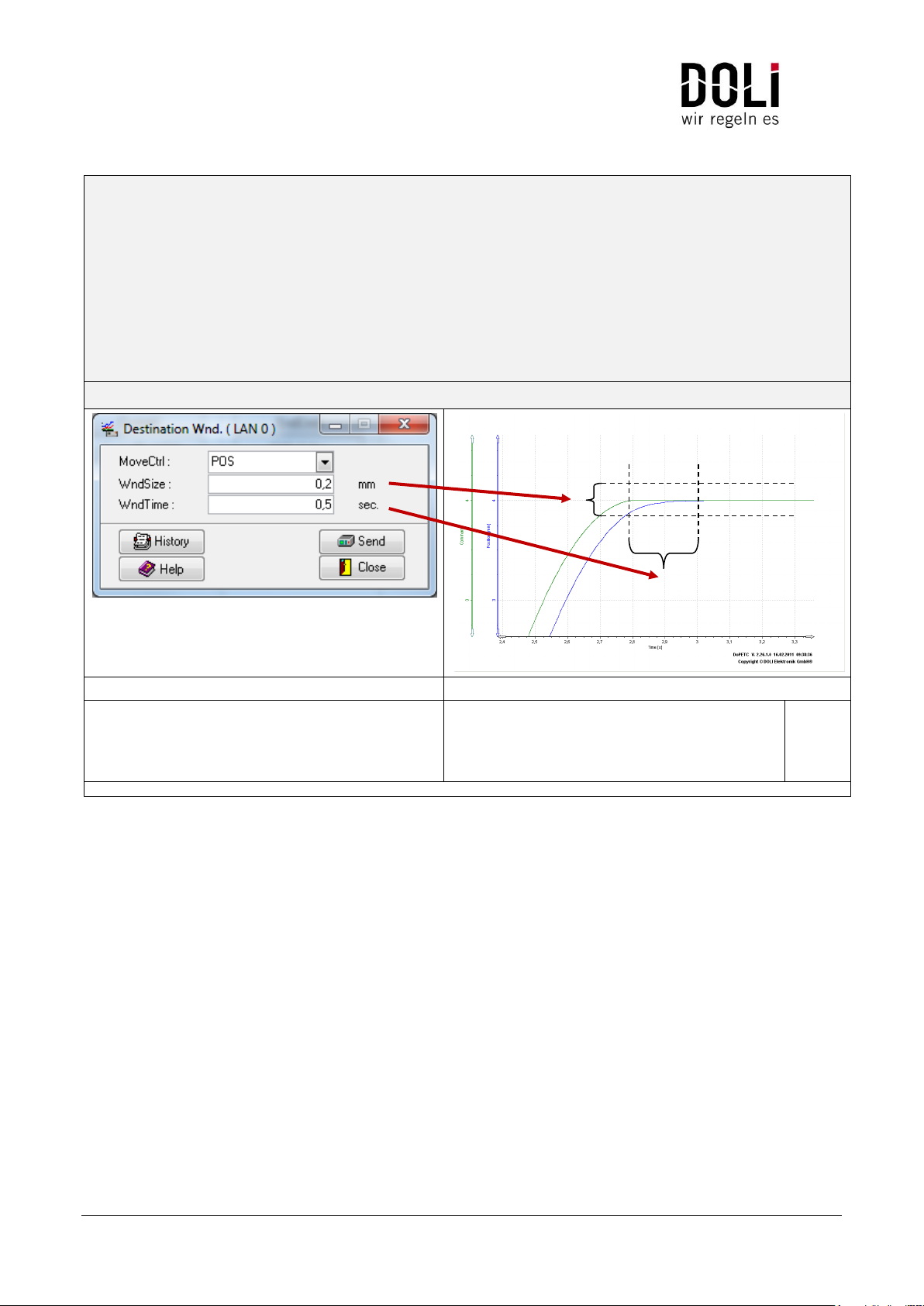
V10.26 2025-01-14 95 / 168 DoPE10
DoPE10
9.5.12 DoPEDestWnd
Definitions for destination window.
The closed loop controller supervises the controlled channel. After the command value reaches the final
destination, the controlled channel has to reach this position within the specified destination window.
If the actual value reaches the destination window within the specified time a DoPEOnPosMsg event is sent
to the application program. The Reached parameter of the event is set to 1.
If it does not reach it, the event is sent with the Reached set to 0.
By default, the destination limit is set to:
For absolute sensors WndSize = 0.2% of the nominal sensor range.
For incremental position sensors WndSize = 0.05 mm
For incremental extension sensors WndSize = 0.005 mm
For all sensors WndTime = 0.5 s.
Minimum requirements: EDCi with EDCiApp 9149.001, DoPE 10.00
Function declaration
Description
extern unsigned DLLAPI DoPEDestWnd (
DoPE_HANDLE DoPEHdl
unsigned short MoveCtrl
double WndSize
double WndTime)
Function returns Error constant (DoPERR_xxxx)
DoPE link handle
Control mode (CTRL_xxx)
Size of destination window
Time for destination window
Unit
s
.NET <Edc object>.Ctrl.DestWnd(DoPE.CTRL MoveCtrl, Double WndSize, Double WndTime)
Page 96
V10.26 2025-01-14 96 / 168 DoPE10
DoPE10
9.5.13 DoPESft
Definitions of limits supervised by software (softend).
If Reaction is defined as REACT_ACTION all movement commands will limit destinations to this softends.
In contrast to the range limits of the measurement channels, softends are working limits that can be changed
at any time.
By default, all softends are set to the range limits and REACT_STATUS.
The state of the softends is maintained in UpperSft and LowerSft (see default measuring data record).
Attention: The values for UpperSft and LowerSft are calculated with the current Tare and BasicTare.
If BasicTare is changed, these values are recalculated with the new BasicTare.
A new Tare does not affect these values!
The softends have a hysteresis which is
- 0.2% of the distance between UpperSft and LowerSft (EDCiApp ≥ 9149.29)
- the size of the destination window (EDCiApp ≤ 9149.28)
Minimum requirements: EDCi with EDCiApp 9149.001, DoPE 10.00
Function declaration
Description
extern unsigned DLLAPI DoPESft(
DoPE_HANDLE DoPEHdl
unsigned short MoveCtrl
double UpperSft
double LowerSft
unsigned short Reaction)
Function returns Error constant (DoPERR_xxxx)
DoPE link handle
Control mode (CTRL_xxx)
Upper soft limit
Lower soft limit
REACT_STATUS No reaction if softend is reached, only
status bits are set
REACT_ACTION Halt in X-head position control if
softend is reached
Unit
Unit
.NET <Edc object>.Ctrl.Sft(DoPE.CTRL MoveCtrl, Double UpperSft, Double LowerSft, DoPE.REACT Reaction)
9.5.14 DoPECtrlSpeedTimeBase
Define maximum time base for speed calculation.
When changing control mode, the current speed of the new control channel is used as the start speed after
control mode was changed. Normally this speed is determined by differentiation by two following position
values. In case of a small resolution of the transducer for the new control mode, the speed values are very
small and thus also inaccurate. Using this command, the time base can be increased and thus a higher
accuracy for speed calculation can be archived. Use this command only if speed is not changing too fast
otherwise with a big time base the calculated speed is incorrect. This time base exclusively works for the
determination of the start speed when control mode is changed. It has no effect for speed calculation for the
digital speed controller.
Minimum requirements: EDCi with EDCiApp 9149.001, DoPE 10.00
Function declaration
Description
extern unsigned DLLAPI DoPECtrlSpeedTimeBase(
DoPE_HANDLE DoPEHdl
double Time
)
Function returns Error constant (DoPERR_xxxx)
DoPE link handle
Time base in for speed calculation
Note: for EdcApp versions up to 9140.015:
internally only 1, 2, 4, 8, 16, 32, 64, 128 x position
controller time base will be used!
s
.NET <Edc object>.Ctrl.CtrlSpeedTimeBase(Double Time)
Page 97
V10.26 2025-01-14 97 / 168 DoPE10
DoPE10
9.5.15 DoPEDeadbandCtrl
Set parameter for error deadband controller.
A deadband can be used to reduce or eliminate a limit cycle due to friction.
Inside an area “setpoint plus Deadband and setpoint minus Deadband” the gain of position controller is
continuously reduced from PosP = 100% to a minimum value (PercentP of PosP = 100%).
Note: a well-adjusted feed forward is needed for a good function of Deadband control!
Minimum requirements: EDCi with EDCiApp 9149.001, DoPE 10.00
Function declaration
Description
extern unsigned DLLAPI DoPEDeadbandCtrl (
DoPE_HANDLE DoPEHdl
unsigned short MoveCtrl
double Deadband
unsigned short PercentP )
Function returns Error constant (DoPERR_xxxx)
DoPE link handle
Control mode (CTRL_xxx)
Width of error deadband around setpoint
Smallest P inside deadband
PercentP range is 0..100%
100% disables error deadband controller
0% sets the PosP to the smallest value (1)
Unit
%
.NET <Edc object>.Ctrl.DeadbandCtrl(DoPE.CTRL MoveCtrl, Double Deadband, Int16 PercentP)
9.5.16 DoPESetDither
Set a dither to the controller output for a specific control channel. The dither amplitude and frequency can be
set by this command. This function is only available for analog outputs with a digital dither generator.
Minimum requirements: EDCi with EDCiApp 9149.001, DoPE 10.00
Function declaration
Description
extern unsigned DLLAPI DoPESetDither (
DoPE_HANDLE DoPEHdl
unsigned short MoveCtrl
double Frequency
double Amplitude)
Function returns Error constant (DoPERR_xxxx)
DoPE link handle
Control mode
Dither frequency in Hz
Dither amplitude in % of the nominal output
Hz
%
.NET <Edc object>.Ctrl.SetDither(DoPE.CTRL MoveCtrl, Double Frequency, Double Amplitude)
Command
(Setpoint)
Command
MINUS
Deadband
Command
PLUS
Deadband
PosP = 100%
PosP = 100%
PosP = PercentP
Page 98
V10.26 2025-01-14 98 / 168 DoPE10
DoPE10
9.5.17 DoPERdCtrlParameter
Get closed loop controller parameters. The currently active parameters are read. (Not from the machine
setup).
Minimum requirements: EDCi with EDCiApp 9149.001, DoPE 10.00
Function declaration
Description
extern unsigned DLLAPI DoPERdCtrlParameter (
DoPE_HANDLE DoPEHdl
unsigned short MoveCtrl
DoPECtrlParameter *CtrlParameter)
Function returns Error constant (DoPERR_xxxx)
DoPE link handle
Control mode (CTRL_xxx)
Pointer for DoPECtrlParameter structure
typedef struct {
// Controller parameters
double PosP
double PosI
double PosD
double SpeedP
double SpeedI
double SpeedD
double SpeedFFP
double PosDelay
double Acceleration
double Speed
double Deviation
unsigned short DevReaction
double DestinationWnd
double DestinationTime
double UpperSoftEnd
double LowerSoftEnd
unsigned short SoftEndReaktion
// numerical limitations for acceleration and speed
double MinAcceleration
double MaxAcceleration
double MinDeceleration
double MaxDeceleration
double MinSpeed
double MaxSpeed
// error dead band controller parameter
double Deadband
unsigned short PercentP
// dither parameter
double DitherFrequency
double DitherAmplitude
} DoPECtrlParameter
Pos. contr. P: gain
Pos. contr. I: time constant
Pos. contr. D: time constant
Speed contr. P: gain
Speed contr. I: time constant
Speed contr. D: time constant
Speed feed forward
Delay for Command
default acceleration
speed limit
Max. deviation of controller
Reaction if deviation exceeded
Size of 1/2 destination window
Time until feedback must reach destination window
Upper softend
Lower softend
Reaction if softend is reached
minimum acceleration
maximum acceleration
minimum deceleration
maximum deceleration
minimum speed
maximum speed
Error deadband around setpoint
Smallest P inside deadband
Dither frequency
Dither amplitude
s
s
s
s
%
s
Unit/s²
Unit/s
Unit
Unit
s
Unit
Unit
Unit/s²
Unit/s²
Unit/s²
Unit/s²
Unit/s
Unit/s
Unit
%
Hz
%
.NET <Edc object>.Ctrl.RdCtrlParameter(DoPE.CTRL MoveCtrl, ref DoPE.CtrlParameter CtrlParameter)
9.5.18 DoPESetNominalAccSpeed
Set nominal values for the position generator.
Minimum requirements: EDCi with EDCiApp 9149.001, DoPE 10.00
Function declaration
Description
extern unsigned DLLAPI DoPESetNominalAccSpeed (
DoPE_HANDLE DoPEHdl
Unsigned short MoveCtrl
double Acc
double Speed)
Function returns Error constant (DoPERR_xxxx)
DoPE link handle
Control mode (CTRL_xxx)
Acceleration
Nominal speed
Unit/s²
Unit/s
.NET <Edc object>.Ctrl.SetNominalAccSpeed(DoPE.CTRL MoveCtrl, Double Acc, Double Speed)
Page 99
V10.26 2025-01-14 99 / 168 DoPE10
DoPE10
9.6 Tare functions
DoPE offers two different tare functions, Tare and BasicTare.
The BasicTare functions should be used for set-up the machine configuration like changing grips. The Basic-
Tare value is stored in the machine set-up inside EDC. After switching mains power off / on, the Basic-Tare
value is still valid.
The DoPETare, DoPETareSetValue and DoPETareSetDisplay functions can be used at any time. The tare
value will be lost after reset.
9.6.1 DoPE(Basic)TareSetValue
Set (basic) tare of the measuring channel.
Note: DoPEBasicTaresetValue clears the ordinary tare value
Minimum requirements: EDCi with EDCiApp 9149.001, DoPE 10.00
Function declaration
Description
extern unsigned DLLAPI DoPEBasicTareSetValue (
DoPE_HANDLE DoPEHdl
unsigned short SensorNo
double Value )
Function returns Error constant (DoPERR_xxxx)
DoPE link handle
Sensor number
Value will be subtracted
This is useful to compensate the weight of grips.
Unit
extern unsigned DLLAPI DoPETareSetValue (
DoPE_HANDLE DoPEHdl
unsigned short SensorNo
double Value )
Function returns Error constant (DoPERR_xxxx)
DoPE link handle
Sensor number
Value will be subtracted
This is useful to compensate the weight of grips.
Unit
.NET <Edc object>.Tare.BasicTareSetValue(DoPE.SENSOR SensorNo, Double Value)
<Edc object>.Tare.TareSetValue(DoPE.SENSOR SensorNo, Double Value)
9.6.2 DoPE(Basic)TareSetDisplay
Set (basic) tare of the measuring channel.
Note: DoPEBasicTareSetDisplay clears the ordinary tare value
Minimum requirements: EDCi with EDCiApp 9149.001, DoPE 10.00
Function declaration
Description
extern unsigned DLLAPI DoPEBasicTareSetDisplay (
DoPE_HANDLE DoPEHdl
unsigned short SensorNo
double Value )
Function returns Error constant (DoPERR_xxxx)
DoPE link handle
Sensor number
Value represents the desired measuring value. This is
useful to set crosshead position for systems with encoder.
Unit
extern unsigned DLLAPI DoPETareSetDisplay (
DoPE_HANDLE DoPEHdl
unsigned short SensorNo
double Value )
Function returns Error constant (DoPERR_xxxx)
DoPE link handle
Sensor number
Value represents the desired measuring value. This is
useful to set crosshead position for systems with encoder.
Unit
.NET <Edc object>.Tare.BasicTareSetDisplay(DoPE.SENSOR SensorNo, Double Value)
<Edc object>.Tare.TareSetDisplay(DoPE.SENSOR SensorNo, Double Value)
Page 100
V10.26 2025-01-14 100 / 168 DoPE10
DoPE10
9.6.3 DoPE(Basic)Tare
Enable / disable (basic) tare of the measuring channel.
Minimum requirements: EDCi with EDCiApp 9149.001, DoPE 10.00
Function declaration
Description
extern unsigned DLLAPI DoPEBasicTare (
DoPE_HANDLE DoPEHdl
unsigned short SensorNo
unsigned Enable )
Function returns Error constant (DoPERR_xxxx)
DoPE link handle
Sensor number
!= 0: activates basic tare,
like DoPEBasicTareSetDisplay(…, 0)
== 0: clears basic tare,
like DoPE(Basic)TareSetValue(…, 0)
Unit
extern unsigned DLLAPI DoPETare (
DoPE_HANDLE DoPEHdl
unsigned short SensorNo
unsigned Enable )
Function returns Error constant (DoPERR_xxxx)
DoPE link handle
Sensor number
!= 0: activates tare,
like DoPETareSetDisplay(…, 0)
== 0: clears tare,
like DoPETareSetValue(…, 0)
Unit
.NET <Edc object>.Tare.BasicTare(DoPE.SENSOR SensorNo, bool Enable)
<Edc object>.Tare.Tare(DoPE.SENSOR SensorNo, bool Enable
9.6.4 DoPE(Basic)TareGetValue
Read (basic) tare value of the measuring channel.
Minimum requirements: EDCi with EDCiApp 9149.001, DoPE 10.00
Function declaration
Description
extern unsigned DLLAPI DoPEGetBasicTareValue (
DoPE_HANDLE DoPEHdl
unsigned short SensorNo
double * Value
Function returns Error constant (DoPERR_xxxx)
DoPE link handle
Sensor number
Pointer for basic tare value
Unit
extern unsigned DLLAPI DoPEGet(Basic)TareValue (
DoPE_HANDLE DoPEHdl
unsigned short SensorNo
double * Value
Function returns Error constant (DoPERR_xxxx)
DoPE link handle
Sensor number
Pointer for tare value
Unit
.NET <Edc object>.Tare.BasicTareGetValue(DoPE.SENSOR SensorNo, ref Double Value)
<Edc object>.Tare.TareGetValue(DoPE.SENSOR SensorNo, ref Double Value)
 Loading...