

Page 1
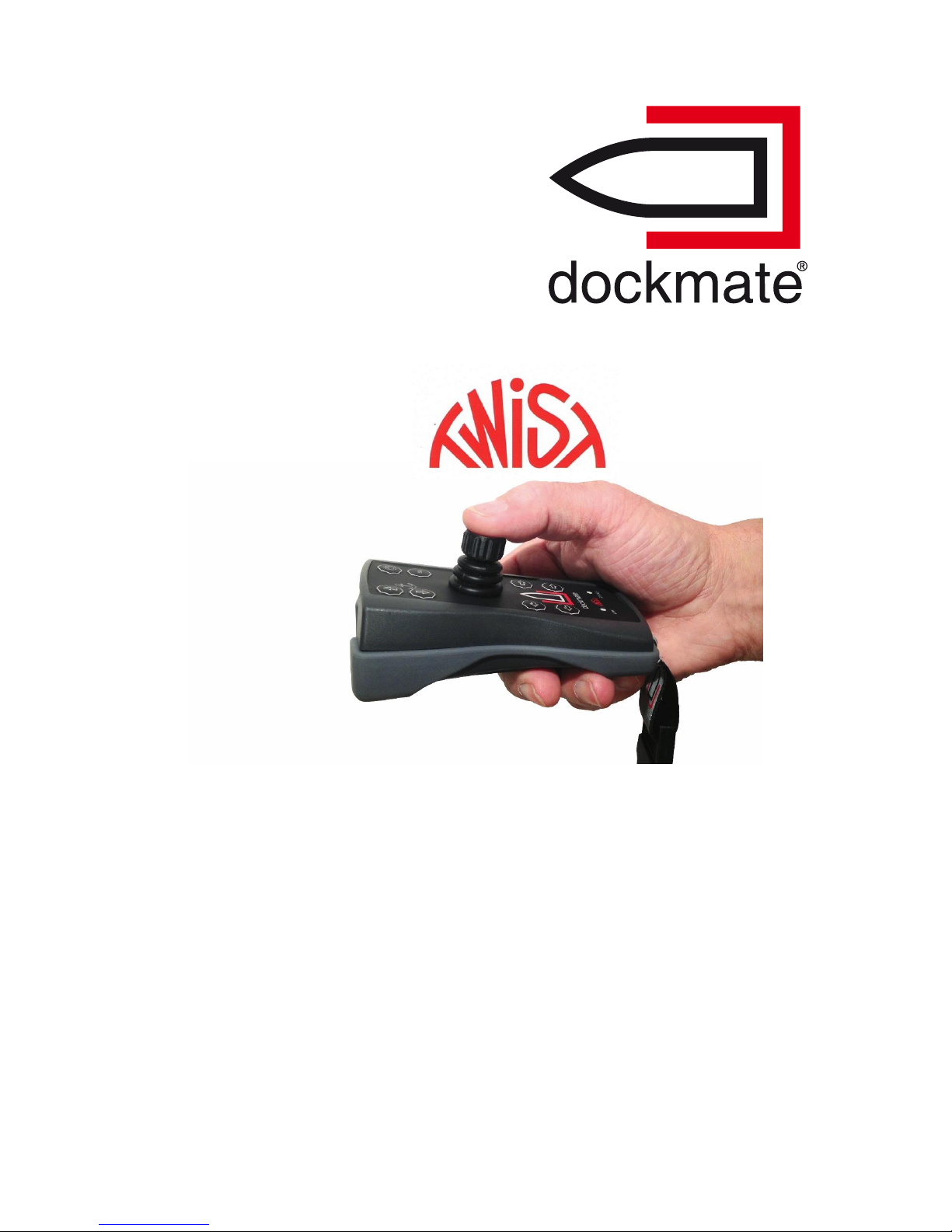
Wireless Joystick Control
EASY TO USE
EASY TO INSTALL
100% SAFE
2 User manual V6
Page 2

1
V1-04-17
Dockmate (by PPA-Electronics) PostPress Advisers b.v.b.a. – Albert Geudensstraat 4 – 2800 Mechelen – BELGIUM
Tel. +32 (0)15 43 39 94 – Mob. +32 (0)475 45 37 35
VAT: BE 0891.773.260
Page 3

2
V1-04-17
Dockmate (by PPA-Electronics) PostPress Advisers b.v.b.a. – Albert Geudensstraat 4 – 2800 Mechelen – BELGIUM
Tel. +32 (0)15 43 39 94 – Mob. +32 (0)475 45 37 35
VAT: BE 0891.773.260
DOCKMATE TWIST transmitter
This device complies with part 15 of the FCC Rules.
Operation is subject to the following two conditions:
(1) This device may not cause harmful interference, and
(2) this device must accept any interference received, including interference that may
cause undesired operation.
Changes or modifications not expressly approved by the party responsible for
compliance could void the user’s authority to operate the equipment.
DOCKMATE receiver
Information to the User (Part 15.105 (b))
Note: This equipment has been tested and found to comply with the limits for a Class B digital device,
pursuant to part 15 of the FCC Rules. These limits are designed to provide reasonable protection
against harmful interference in a residential installation. This equipment generates, uses and can
radiate radio frequency energy and, if not installed and used in accordance with the instructions, may
cause harmful interference to radio communications. However, there is no guarantee that interference
will not occur in a particular installation. If this equipment does cause harmful interference to radio or
television reception, which can be determined by turning the equipment off and on, the user is
encouraged to try to correct the interference by one or more of the following measures:
--Reorient or relocate the receiving antenna.
--Increase the separation between the equipment and receiver.
--Connect the equipment into an outlet on a circuit different from that to which the receiver is
connected.
--Consult the dealer or an experienced radio/TV technician for help.
Changes or modifications not expressly approved by the party responsible for
compliance could void the user’s authority to operate the equipment.
This in particular is applicable for the antenna which has been delivered with the
DOCKMATE receiver.
Page 4

3
V1-04-17
Dockmate (by PPA-Electronics) PostPress Advisers b.v.b.a. – Albert Geudensstraat 4 – 2800 Mechelen – BELGIUM
Tel. +32 (0)15 43 39 94 – Mob. +32 (0)475 45 37 35
VAT: BE 0891.773.260
Congratulations on your purchase of a DOCKMATE system. Please read the
following instructions carefully before getting started.
DOCKMATE is a wireless system that enables you to maneuver your ship. With your
fingertips you can control the engines, horn, bow- and stern thruster and anchor
winch.
IMPORTANT:
Read the Precautions section before the first use!
Contents
1. What’s in the box ?
2. Precautions
3. Installation
4. Use of the DOCKMATE
5. Charging the batteries
6. Turning on the transmitter
7. Maintenance
8. Troubleshooting
9. Technical specifications
10. Environmental Information
11. Product registration
12. Warranty
13. Declaration of Conformity
Page 5

4
V1-04-17
Dockmate (by PPA-Electronics) PostPress Advisers b.v.b.a. – Albert Geudensstraat 4 – 2800 Mechelen – BELGIUM
Tel. +32 (0)15 43 39 94 – Mob. +32 (0)475 45 37 35
VAT: BE 0891.773.260
1. What’s in the box ?
- This user manual
- Installation manual
- The DOCKMATE receiver
- The DOCKMATE TWIST transmitter
- Lanyard
- All necessary wiring cut to length
- Antenna
- Battery charger
2. Precautions
To avoid damage to your DOCKMATE and hurting yourself or others, you
should read the following safety precautions before using the device. Keep
these safety instructions in an area where all users can read them.
When in doubt, contact PPA-Electronics regarding the use or operation of the
unit.
PPA-Electronics is not responsible for injuries or damage caused as a result of
improper use or installation by a non-qualified technician.
2.1. The transmitter is sensitive to magnetic fields. Keep
it at least 1m from any devices that generate
magnetic fields like compasses. Otherwise the
operation of the joystick can be disturbed.
2.2. Do not put the transmitter that is switched on
onto the wireless charger. Always switch it off first,
before charging. The charger generates a magnetic
field, that will disturb the joystick when it is turned on.
2.3. Switch off the receiver when malfunctioning.
If you notice smoke, or when an unusual smell escapes from the
receiver, switch it off. Make sure not to get burnt. Continuing using the
device may lead to injury. The receiver should be checked by an
authorized dealer after shutdown.
2.4. Do not disassemble the transmitter or receiver.
Touching the internal parts may lead to injuries. Repairs may only be
performed by licensed technicians.
2.5. Do not use near flammable gases or liquids.
This may cause an explosion or fire.
Page 6

5
V1-04-17
Dockmate (by PPA-Electronics) PostPress Advisers b.v.b.a. – Albert Geudensstraat 4 – 2800 Mechelen – BELGIUM
Tel. +32 (0)15 43 39 94 – Mob. +32 (0)475 45 37 35
VAT: BE 0891.773.260
2.6. Keep out of reach of children.
The devices contain small parts which can be swallowed by children.
Beware for suffocation by plastic packaging.
2.7. The DOCKMATE may only be used by persons who have the
necessary skills of maneuvring a yacht.
2.8. Be careful with the lanyard.
Keep it away from small children (choking hazard).
2.9. Do not use the DOCKMATE when the transmitter or receiver have been
immersed in water. The units may be damaged beyond repair. Test
both devices before use with the boat in a safe environment.
Contact your DOCKMATE dealer when any abnormality is detected.
2.10. Make sure you can operate the DOCKMATE like an expert before
actually using it in a crowded harbor.
2.11. In very exceptional circumstances, the communication between the
transmitter and receiver can be disturbed by radio frequency
transmitters in the immediate neighborhood.
2.12. Never use the DOCKMATE if you are not on the ship. Remember that
the use of the DOCKMATE from ashore or the jetty is a criminal offense
in several countries.
2.13. Batteries should be charged as soon as the orange LED signal on the
transmitter lights.
2.14. Please note that when the system is in operation each involuntary push
on the buttons of the transmitter has an action as a result.
2.15. The transmitter and receiver may only be opened by an authorized
technician.
Page 7

6
V1-04-17
Dockmate (by PPA-Electronics) PostPress Advisers b.v.b.a. – Albert Geudensstraat 4 – 2800 Mechelen – BELGIUM
Tel. +32 (0)15 43 39 94 – Mob. +32 (0)475 45 37 35
VAT: BE 0891.773.260
3. Installation
The installation has to be done by a qualified engineer.
Our system consists of two major components; a transmitter and a receiver. These
have already been paired so they recognize each other.
3.1. Installation of the receiver
Dimensions : 22 x 22 x 5,4 cm.
Install the receiver in a dry, not too warm area.
Install the receiver free of vibrations.
Place the receiver close to the dashboard, as close as possible to the controls of
the parts to be controlled (throttles, horn, anchor winch, bow- and stern
thrusters).
Please note that one-time settings are needed at the receiver.
(accessible by screwdriver?)
Page 8
7
V1-04-17
Dockmate (by PPA-Electronics) PostPress Advisers b.v.b.a. – Albert Geudensstraat 4 – 2800 Mechelen – BELGIUM
Tel. +32 (0)15 43 39 94 – Mob. +32 (0)475 45 37 35
VAT: BE 0891.773.260
4. Use of the DOCKMATE
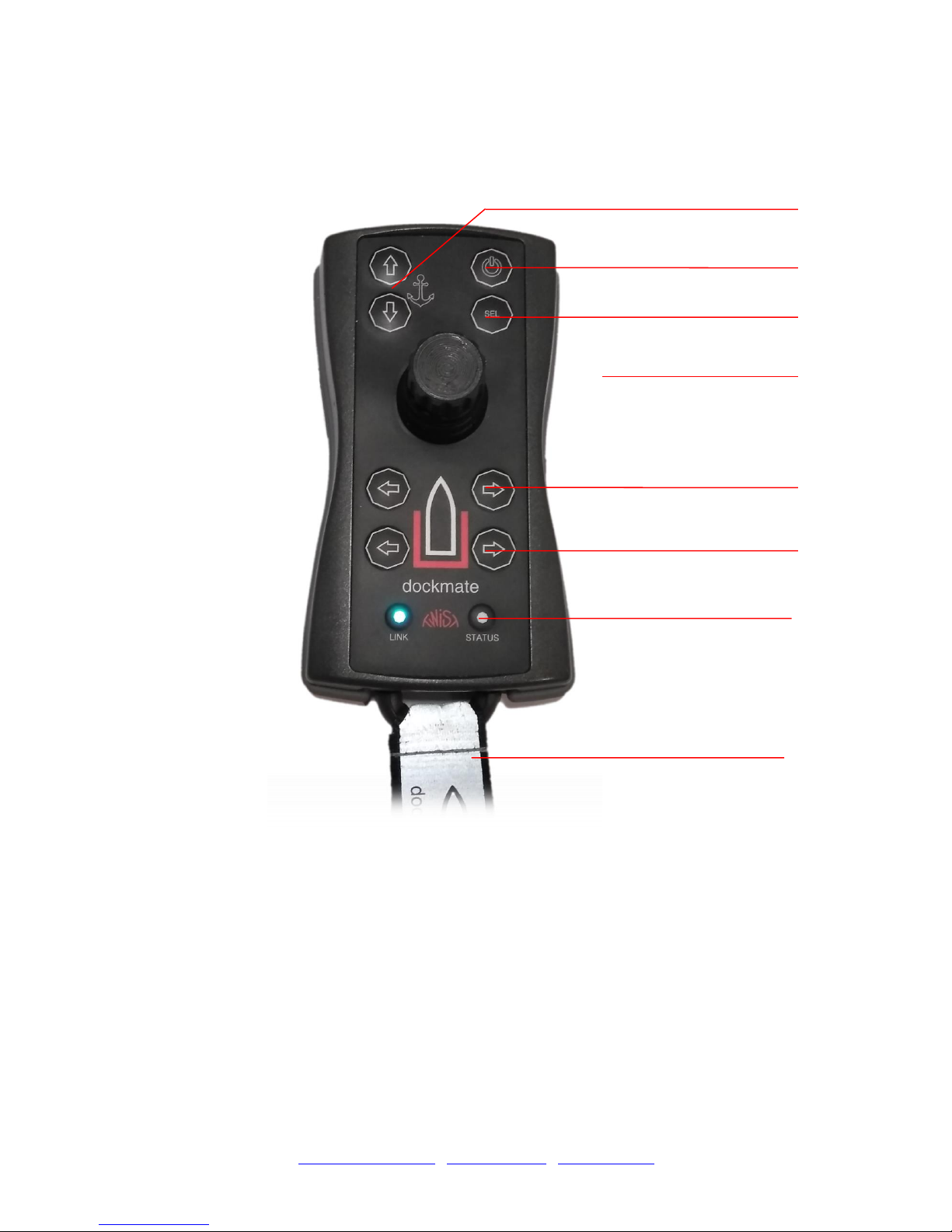
Activates engines,
thrusters, horn.
.
Joystick
On/Off button
Take Command/
Mode Select button
Bow Thruster buttons
Stern Thruster buttons
Link and Satus LED
Indicators
Lanyard
Anchor buttons
Page 9

8
V1-04-17
Dockmate (by PPA-Electronics) PostPress Advisers b.v.b.a. – Albert Geudensstraat 4 – 2800 Mechelen – BELGIUM
Tel. +32 (0)15 43 39 94 – Mob. +32 (0)475 45 37 35
VAT: BE 0891.773.260
We recommend that you always wear the lanyard around your neck while using the
DOCKMATE.
The transmitter has the following features :
LINK LED
Shows the status of connection with the receiver.
Status LED
Shows the status of the transmitter
BUZZER
Indicates no communication or low battery.
Keys anchor winch
By pressing the upper button you lower the anchor.
By pressing the lower button, you go anchor up. When pressed together, you can
choose between windlass 1 and 2 (2 or 4 beeps) if the Dockmate receiver is fitted
with AnchorX2 module.
On / Off button
Press and hold to turn the transmitter on. Press 3 times quickly or hold for 3s to
shut it off.
NOTE: When this button is pressed other signals are inhibited for safety, so the
boat controls go to neutral, regardless of the position of the joystick.
Take Command button
Pressing this button makes the Dockmate the active steering position.
NOTE: With the Gearbox driver installed it has no effect – Dockmate is always
active then.
Keys bow thruster:
By pressing the left button (port) the bow thruster gives thrust to the right so the
bow is moving to the left.
By pressing the right button (starboard) the bow thruster gives thrust
to the left so the bow is moving to the right.
Keys stern thruster :
By pressing the left button (port) the stern thruster gives thrust to the
right so the stern is moving to the left.
By pressing the right button (starboard) the stern thruster gives thrust
to the left so the stern is moving to the right.
Joystick:
By moving the joystick forwards, both engines (or one in single engine
configuration) are switched forward.
By moving the joystick rearwards both engines are switched to the rear.
Moving the joystick to the left makes both (if installed) thrusters move the boat to
Page 10

9
V1-04-17
Dockmate (by PPA-Electronics) PostPress Advisers b.v.b.a. – Albert Geudensstraat 4 – 2800 Mechelen – BELGIUM
Tel. +32 (0)15 43 39 94 – Mob. +32 (0)475 45 37 35
VAT: BE 0891.773.260
the left.
Moving the joystick to the right makes both thrusters move the boat to the right.
Moving the joystick forwards and right in a 45º angle causes the left engine to go
forward and makes the boat steer to the right.
The other 45º angle positions on the joystick work on the same basis.
The Dockmate Twist can be fully programmed by your dealer so that combining
engines and thrusters in any position of the joystick is possible.
Twisting the joystick knob to the right causes the boat to rotate to the right (left
engine switched forward, right engine switched rearward).
Twisting the joystick knob to the left will do the opposite.
Pressing the knob of the joystick will sound the horn.
When a “SpeedCtrl” Module is installed in the Dockmate receiver you can
control the engines throttle by varying the pressure on the joystick.
When the thruster modules with SpeedCtrl are installed in the Dockmate
receiver you can control the thrusters’ power by varying the pressure on
the joystick
Page 11
10
V1-04-17
Dockmate (by PPA-Electronics) PostPress Advisers b.v.b.a. – Albert Geudensstraat 4 – 2800 Mechelen – BELGIUM
Tel. +32 (0)15 43 39 94 – Mob. +32 (0)475 45 37 35
VAT: BE 0891.773.260
5. Charging the batteries
The Dockmate TWIST transmitter is fitted with a Li-Ion battery that has to be charged
occasionally.
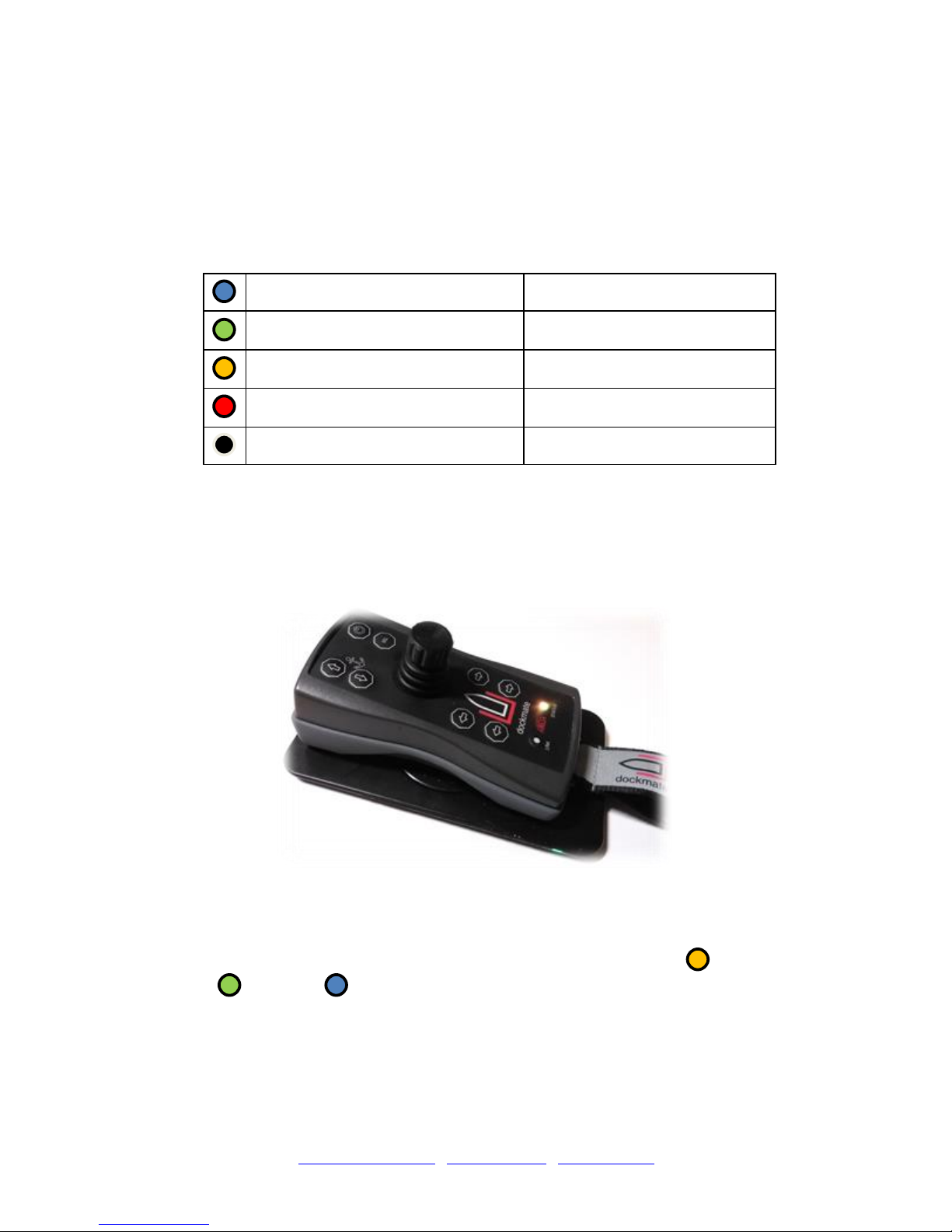
When the Dockmate TWIST transmitter is turned on, both LEDs will go white. Then
the Status LED will show one of the following:
Battery fully charged
More than 3.90V
Battery OK
Between 3.45V and 3.90V
Battery Warning
Between 3.45V and 3.30V
Battery Failed
Less than 3.30V
Battery Failed
Less than 3.00V
It is not possible to turn on the transmitter when the battery voltage drops below
3.30V.
It is highly recommended to charge the transmitter when the LED shows orange on
the starting up.
The Dockmate TWIST transmitter will start to charge when placed on the Dockmate
wireless charger. The LEDs on the charger will change in color from blue to green
indicating the charging process. Also the Status LED on the transmitter will start to
flash in different colors depending on the battery percentage ( 0-50%: ,
50-80% : , 80-100% ).
When charging is completed the Dockmate transmitter will shut down automatically.
Page 12
11
V1-04-17
Dockmate (by PPA-Electronics) PostPress Advisers b.v.b.a. – Albert Geudensstraat 4 – 2800 Mechelen – BELGIUM
Tel. +32 (0)15 43 39 94 – Mob. +32 (0)475 45 37 35
VAT: BE 0891.773.260
6. Turning the transmitter on and off
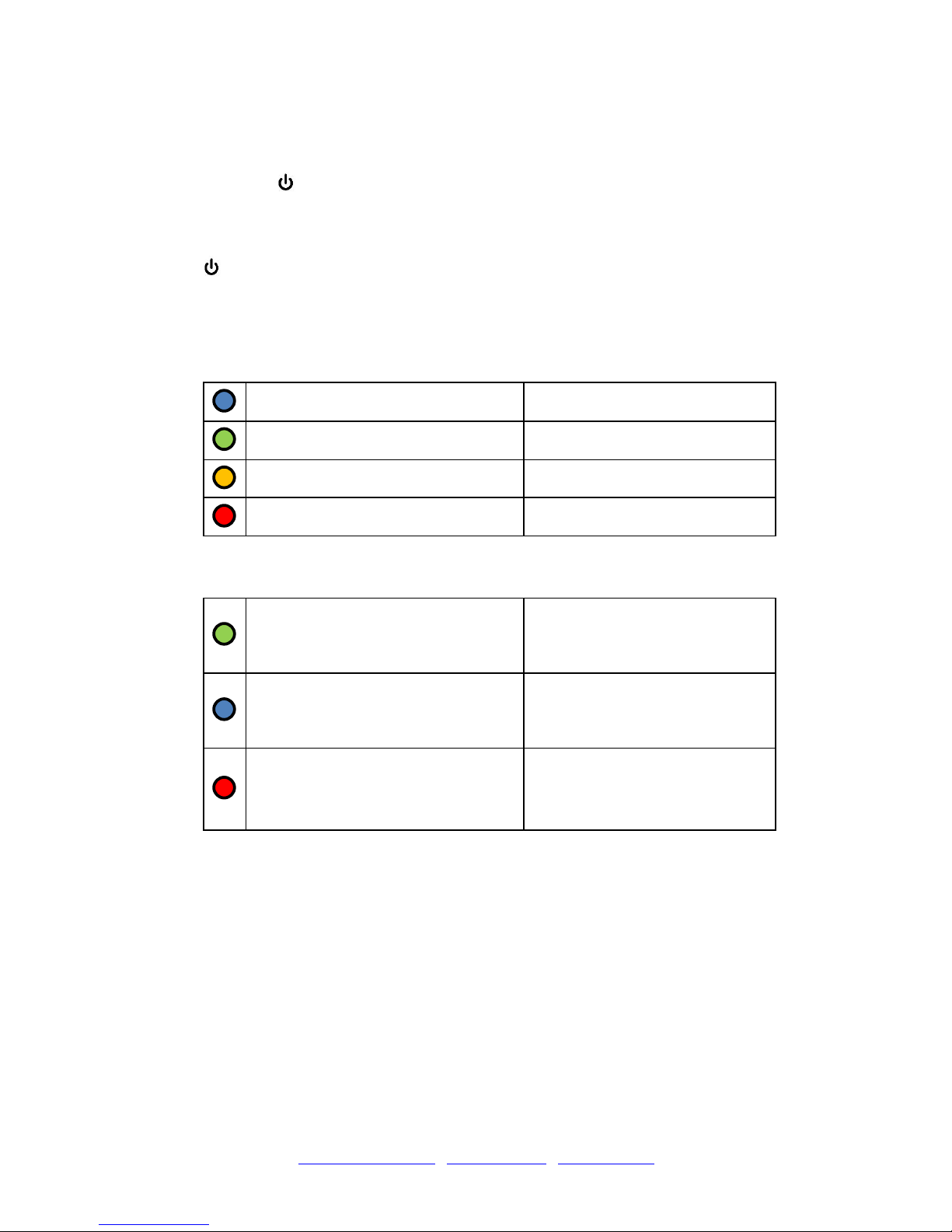
Press the key for 1 second to turn on the transmitter.
The transmitter will be automatically switched off after 30 minutes of non use.
Alternatively the transmitter can be switched off by pressing 3 times the
button or holding it down for 3 sec.
After the transmitter is switched on, both LEDs will go white. Then the LINK
light will go dark and the STATUS LED will show one of following:
Battery fully charged
More than 3.90V
Battery OK
Between 3.45V and 3.90V
Battery Warning
Between 3.45V and 3.30V
Battery Failed
Less than 3.30V
Then it will go dark and the LINK light will show the communication status:
Communication OK, actively
transmitting data
When moving the joystick or
pressing a button
Communication OK, standby
mode
When not moving the joystick
or pressing any button for
more than 15s
Communication lost
When communication could
not been established or was
interrupted. The transmitter
also beeps.
Depending on the equipment of the boat (gear lever system) the Dockmate
can automatically take command after the transmitter is switched on.
You can also take over command by pressing the “SEL” button.
Page 13

12
V1-04-17
Dockmate (by PPA-Electronics) PostPress Advisers b.v.b.a. – Albert Geudensstraat 4 – 2800 Mechelen – BELGIUM
Tel. +32 (0)15 43 39 94 – Mob. +32 (0)475 45 37 35
VAT: BE 0891.773.260
7. Maintenance
The installation is 100 % maintenance free, except for battery charging.
Eventually the transmitter and receiver can be cleaned with a damp cloth.
8. Troubleshooting
PROBLEM
POSSIBLE CAUSE
SOLUTION
The receiver does not work.
The Dockmate transmitter is
switched off.
The Dockmate receiver
does not receive D/C Volts.
Switch on (see point 6 in this
manual).
Check : fuse blown ?
The transmitter does not
work.
The batteries are empty.
Charge the batteries (see
point 5 in this manual).
The LED low battery on the
transmitter is on.
The batteries are empty.
Charge the batteries (see
point 5 in this manual).
The transmitter has fallen in
the water.
Rinse with clear water and
dry with a soft cloth.
Open the transmitter by
unscrewing the 4 screws
ono the back (behind) the
grey rubber and put the
transmitter in a wellventilated area for 24 hours.
Assemble and test the
transmitter before use with
the boat in a safe
environment.
Page 14

13
V1-04-17
Dockmate (by PPA-Electronics) PostPress Advisers b.v.b.a. – Albert Geudensstraat 4 – 2800 Mechelen – BELGIUM
Tel. +32 (0)15 43 39 94 – Mob. +32 (0)475 45 37 35
VAT: BE 0891.773.260
9. Technical specifications
Transmitter
Battery : 360mAh Li-ion
Housing : ABS + rubber according to IP67 specifications
Dimensions : 70 x 150 x 40 mm
Weight : ca. 150 gr
Frequency : 433,1 – 433,6 MHz
Operating temp. : -5°C to +50°C
Receiver
D/C Volts : 12-24 V D/C
Housing : ABS according to IP50 specifications
Dimensions : 22 x 22 x 6 cm
Weight : ca. 950 gr
Frequency : 433,1 – 433,6 MHz
Operating temp. : -5°C to +50°C
Page 15

14
V1-04-17
Dockmate (by PPA-Electronics) PostPress Advisers b.v.b.a. – Albert Geudensstraat 4 – 2800 Mechelen – BELGIUM
Tel. +32 (0)15 43 39 94 – Mob. +32 (0)475 45 37 35
VAT: BE 0891.773.260
10. Environmental Information
The equipment that you have bought requires the extraction and use of natural
sources for its production. It may contain substances that are hazardous to
health and the environment.
In order to avoid the dissemination of those substances in our environment,
and to diminish the pressure on natural resources, we encourage you to use
the appropriate take-back systems. These systems will reuse or recycle most
of the materials of your end-of-life equipment in an environmentally sound
way.
The crossed-bin symbol marked on your device indicates you should use
these systems.
If you need more information on the collection, reuse, and recycling of this
product, please contact your local or regional waste administration.
You can also contact us for more information on the environmental
performance of our products.
11. Product registration
In order to benefit from our 3 years factory warranty, please go to
www.dockmate.eu/productregistration and fill out the form.
Page 16

15
V1-04-17
Dockmate (by PPA-Electronics) PostPress Advisers b.v.b.a. – Albert Geudensstraat 4 – 2800 Mechelen – BELGIUM
Tel. +32 (0)15 43 39 94 – Mob. +32 (0)475 45 37 35
VAT: BE 0891.773.260
12. Warranty
Each DOCKMATE has a 3-year warranty from the date of registration by the
first owner. The warranty covers all defects and failures that are not caused by
the customer. The manufacturer will repair or replace your product free of
charge on the following conditions :
- The warranty is not valid in case of improper installation or improper use of
the device. Products must have been used strictly in accordance with
operating instructions supplied. Dockmate will have no liability for defects
caused by accident, misuse, alteration or neglect.
- The electrical components must remain complete.
They may not be disassembled, not tampered with, nor be modified in any
way. The use of non-original electronic accessories can damage the device.
This is not covered by the warranty.
- When the receiver has water damage, the warranty is not valid.
- Returns of defective equipment under this warranty :
° Before returning, please contact the vendor of the device by phone or e-mail
° Always include a brief description of the problem that occurs.
° Do not forget to include your full contact and delivery details : name,
telephone, complete address
° To avoid damage during shipment, the unit must be adequately packaged.
The manufacturer will accept no liability for units lost or damaged in transit
from the customer.
° Shipment costs are always for the buyer.
- The liability of the manufacturer is limited to replacing or repairing the unit.
The manufacturer decides whether the device will be repaired or replaced.
- The buyer agrees that the liability of the manufacturer is limited to the
purchase price of the equipment, regardless of the circumstances.
The manufacturer is not responsible for damages resulting from the use of
the device.
The manufacturer can never be held responsible for any accidents and / or
damage caused to persons and / or property.
- The repair or replacement of the equipment during the warranty period, does
not extend the original warranty period.
- Without warning the manufacturer may at any time make changes to the
specifications of the device, both to the hardware and the software.
- The manufacturer has taken all the necessary steps to ensure that the
information in this guide is accurate and complete.
Page 17

16
V1-04-17
Dockmate (by PPA-Electronics) PostPress Advisers b.v.b.a. – Albert Geudensstraat 4 – 2800 Mechelen – BELGIUM
Tel. +32 (0)15 43 39 94 – Mob. +32 (0)475 45 37 35
VAT: BE 0891.773.260
This manual may in no way be reproduced, complete or partial, without the
written permission of PPA-Electronics.
 Loading...