

Page 1
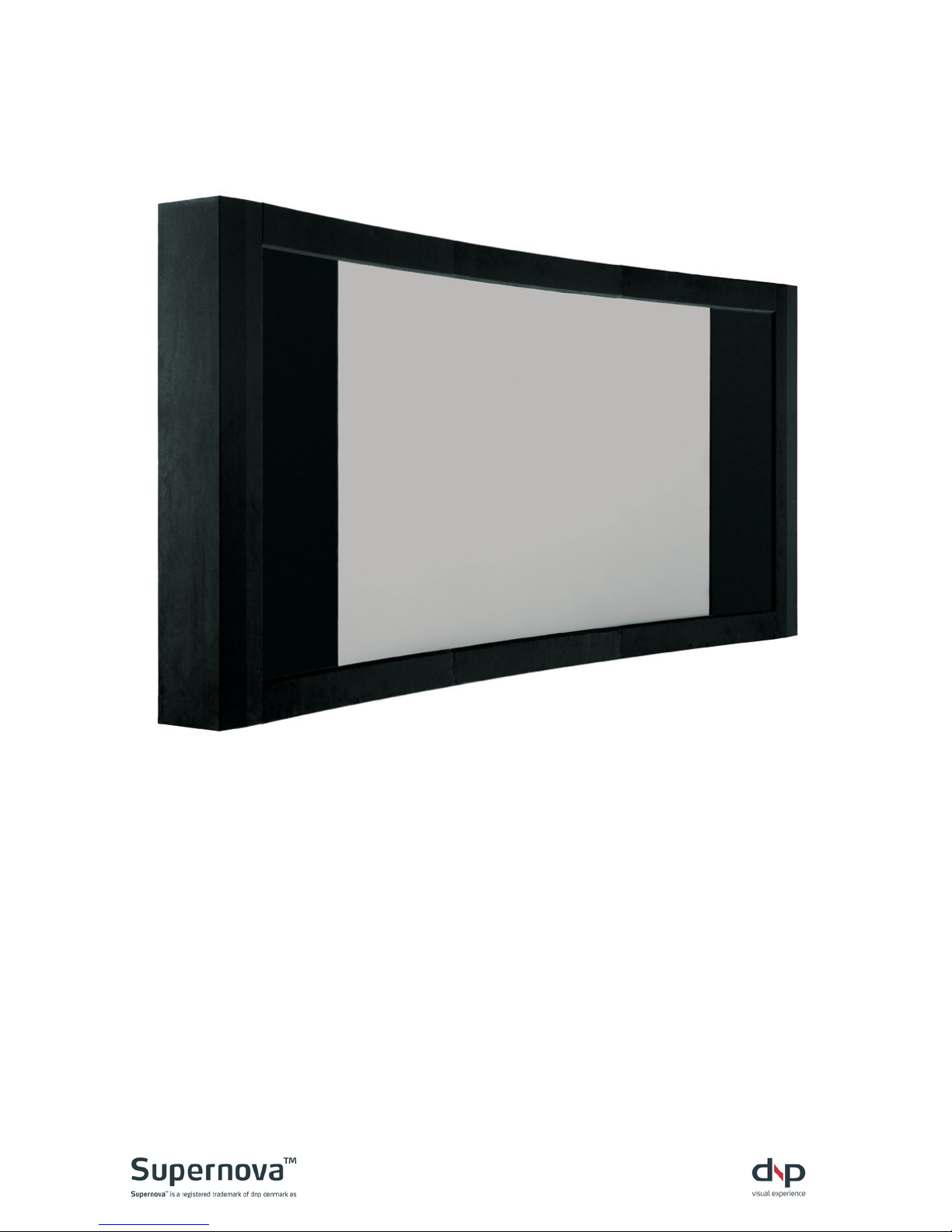
Supernova™ Epic
User Guide / Service Guide
Page 2

2
Contents
Section Page
A Welcome ................................................................................ 3
B Important Safety Instructi ons ............................................... 4
C Instructions de sécurité importantes ................................... 5
D Remote control ...................................................................... 7
E Powering up ........................................................................... 9
F Communication .................................................................... 10
G Cleaning ............................................................................... 11
H Troubleshooting .................................................................. 12
I Sales & delivery terms .......................................................... 13
J Service contact .................................................................... 15
K Manufacturer information ................................................... 16
Page 3

3
A Welcome
Congratulations on your purchase of the dnp Supernova Epic Screen.
Lean back and enjoy the vivid colours and superior image quality of this unique product. You’ll
experience exceptional pi c ture detail and be able to enjoy many hours of quality
entertainment.
Please study the ins t ructions carefully before operating the screen.
The perfectly curved Supernova Epic combines superior Supernova optical screen
technology with the best of ’real’ cinemas. Viewers get swept into the action. An
electronically controlled masking system adjusts screen width to fit any movie format.
Velvet curtains glide open and shut at the screening’s start and finish. The experience is
epic.
Supports all formats Now you can watch all your movies in the format the director intended – the
Supernova Epic supports all film formats up to ult ra-wide Cinemascope 2.4:1. The elegant black
velvet masking system silently glides into place to maintain a constant image height and eliminate
the visibility of black bars. The ultimate in home theatre screens, the Supernova Epic features a
curved screen surface to enhance the perceived depth and uniformity of the image. The result: a
high-quality, dynamic viewing experience, day or night.
Award-winning technology Created using award-winning Supernova Screen technology, the
Supernova Epic features high-contrast filters that enable the projected image to be optimally
reflected from the screen. With its advanced layer of lenses, it actively combats retro-illumination –
where light from the screen i mage is r eflected back onto the screen from the room. The screen
renders images in 100% neutral colour for superior, realistic colour reproduction and has a
completely passive, shimmer-free front s urface.
Getting started This user manual is your guide to operating the Supernova Epic and keeping
it in good condition. Pleas e s tudy it carefully befor e oper ating the screen.
Page 4

4
B Important Safety Instructions
Read these instructions.
Keep these instructions.
Heed all warnings.
Follow all instructions.
Do not block any ventilation openings. Install in accordance with the
manufacturer’s instructions.
Install the screen against a wall. If the screen is to be installed out from the wall a
backside protection cover must be used
Use the enclosed tip-over safeguard
Do not scratch or bend the screen material during handling.
Do not operate the screen before it is installed on wall.
Do not pull or tug on screen when mounted on wall.
Do not restrict the masking curtains from moving.
The screen is a class I construction and shall be connected to a mai ns socke t
outlet with protective earthing connection. Do not install without a ground
connection.
Do not defeat the safety purpose of the grounding-type plug. A grounding type
plug has two blades and a third grounding prong. The third prong is provided for
your safety. If the provided plug does not fit into your outlet, consult an electrician
for replacement of the obsolete outlet.
The mains plug, extension cord, appliance inlet or power strip is used as the
disconnect device, the disconnect device must remain readily operable.
Protect the power cord from being walked on or pinched particularly at plugs,
convenience receptacles and the point where they exit from the apparatus.
Unplug this apparatus during lightning storms or when unused for long periods of
time.
WARNING! To reduce the risk of fire or electric shock, do not expose this
apparatus to rain or moistur e.
The apparatus shall not be exposed to dripping or splashing and no objects filled
with liquids, such as vases, shall be placed on the apparatus.
Operate within specified temperature and humidity range (see installation manual).
Batteries in Remote Controller shall not be exposed to excessive heat such as
sunshine, fire or the like.
Do NOT use re-charg eabl e batteries.
In order not to overheat the curtain motors, do not open and close the masking
curtains more than 5 times per hour .
Do not attempt to disassemble any part of the screen (electric shock hazard).
Do not permit children to play with screen controls.
Examine the screen for imbalance or signs of wear during operation. If needed,
adjust before operating .
Page 5

5
C Instructions de sécurité importantes
Lire ces instructions.
Conserver ces instructions.
Tenir compte de tous les avertissements.
Suivre toutes les instructions.
Ne bloquer aucune ouverture de ventilation. Installer conformément aux instructions
du fabricant.
Installer l’écran contre un mur. Si l’écran n’est pas installé contre un mur, une
protection arrière doit êtr e installée.
Utilisez les systèmes anti basculement fournis
Ne pas érafler ou courber le matériel de l’écran lors des manipulations.
Ne pas faire fonctionner l'écran avant qu'il ne soit installé sur le mur.
Ne pas tirer sur l’écran une fois qu’il est monté sur le mur.
Ne pas empêcher le déplacement des rideaux occulteurs.
L’écran est de classe I et doit être connecté à une prise secteur disposant d’une
mise à la terre. Ne pas installer le système en l’absence de prise de terre.
Ne pas négliger la sécurité que procure une prise avec raccordement à la terre. Une
prise avec raccordement à la terre comporte deux fiches plus une troisième reliée à
la terre. Cette troisième fiche est là pour votre sécurité. Si le conne cteur fo urni ne
s’insère pas dans votre prise de courant, consulter un électricien afin de la
remplacer.
La prise secteur, le cordon, l’alimentation de l’appareil ou la barrette d’alimentation
sont utilisés comme dispositifs de déconnexion et doivent être facile à actionner.
Protéger le cordon d’alimentation principale afin qu’il ne soit pas écrasé ou pincé, en
particulier au niveau des prises de courant et au point de sortie de l’appareil.
Débrancher cet appareil en cas d’orage avec risque de foudre ou lorsqu’il n’est pas
utilisé pendant des péri odes pr ol ong ées .
ATTENTION! Pour réduire le risque d’incendie ou de choc électrique, ne pas
exposer cet appareil à la pluie ou à l'humi di t é.
L’app ar ei l ne doit pas êtr e expos é à un égouttement ou des éclaboussures et il
convient de ne placer aucun objet contenant un liquide, comme un vase, sur
l’appareil.
Utiliser l’écran selon les plages de température et d’humidité spécifiées (cf. manuel
d’installation).
Les piles de la télécommande ne doivent pas être exposées à une source de
chaleur excessive telle que la lumière du soleil, le feu ou une source similaire
Ne pas utiliser de piles rechargeables.
Afin de ne pas surchauffer leurs moteurs, ne pas ouvrir et fermer les rideaux de
protection plus de 5 fois par heure.
Ne pas tenter de démonter quelque partie de l’écran que ce soit (danger de choc
électrique).
Ne pas laisser les enfants jouer avec les commandes de l’écran.
Examiner l’écran afin de détecter tout déséquilibre ou signe d’usure pendant le
fonctionnement. Si néc es sai r e, aj ust er avant de faire fonctionner
Page 6

6
NOTE:
This equipment has been tested and found to comply with the limits for a Class B digital
device, pursuant to part 15 of the FCC Rules. These limits are desi g ned to pr ovide
reasonable protection against harmful interference in a residential installation.
This equipment generates, uses and can radiate radio frequency energy and, if not
installed and used in accordance with the instructions, may cause harmful interference to
radio Communications. However, there is no guarantee that interference will not occur in a
particular installation. If this equipment does cause harmful interference to radio or
television reception, which can be determined by turning the equipment off and on, the
user is encouraged to try to correct the interference by one or more of the following
measures:
- Reorient or relocate the receiving antenna.
- Increase the separation between the equipment and receiver.
- Connect the equipment into an outlet on a circuit different from that to which the
receiver is connected.
- Consult the dealer or an experienced radio/TV technician for help.
This device complies with Part 15 of the FCC Rules. Operation is subject to the following
two conditions: (1) this device may not cause harmful interference, and (2) this device
must accept any interference received, including interference that may cause undesired
operation.
This Class B digital apparatus complies with Canadian ICES-003.
Cet appareil numérique de la classe B est conforme à la norme NMB-003 du Canada.
CAUTION:
Changes or modifications not expressly approved by dnp denmark as could void the
user’s authority to operate this equipment according to part 15 of the FCC rules.
Page 7
7
D Remote control
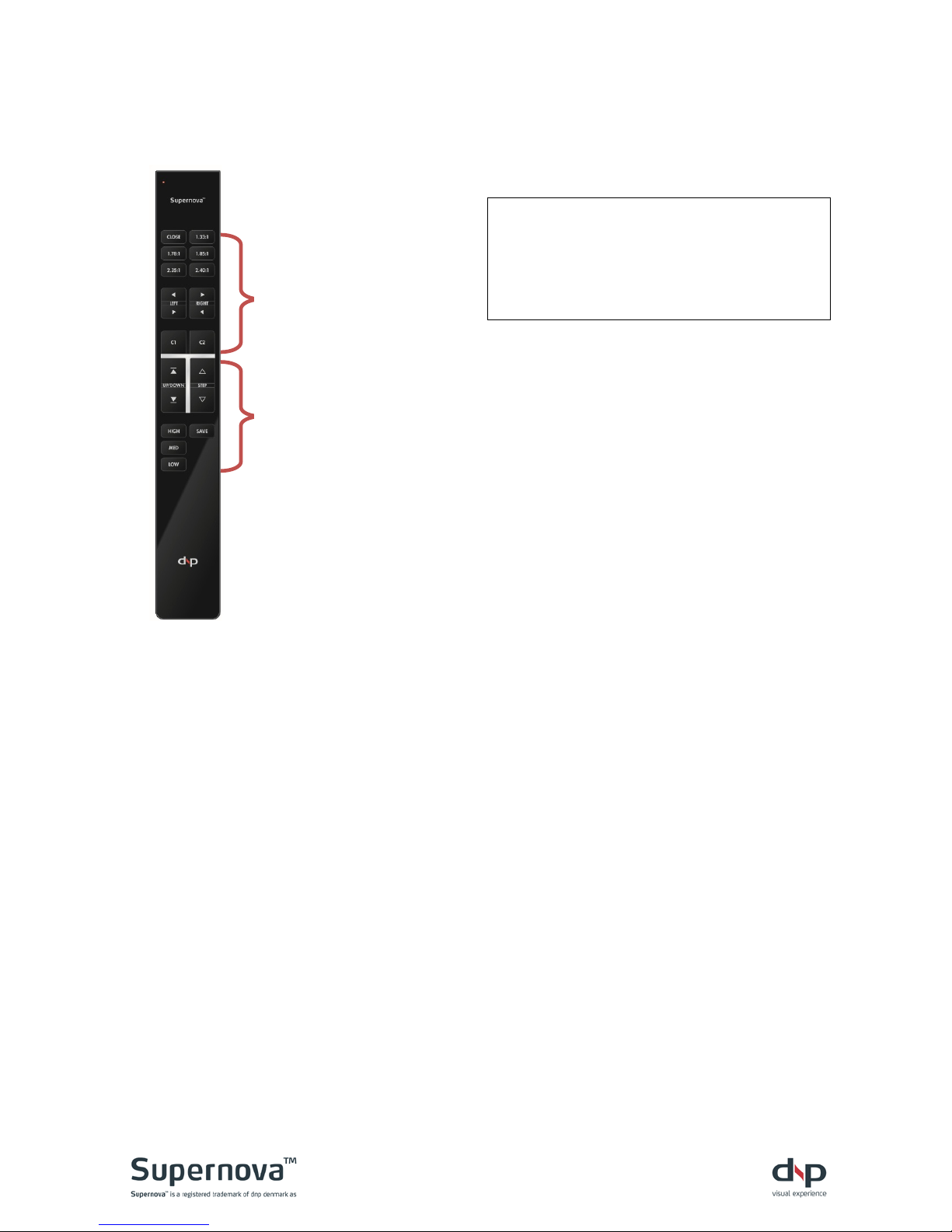
The remote is factory programmed for Supernova Epic.
NOTE! Be aware when installing the
screen close to equipment using the
same IR communication protocol.
Commands may activate other
electronic components.
Batteries
Remove rear cover and replace with 2x 3V CR2032 coin cell batteries.
CAUTION!
Danger of explosion if battery is incorrectly replaced.
Replace only with the same or equivalent type.
Do not use re-chargeable batteries.
Batteries (battery pack or batteries installed) shall not be exposed to
excessive heat such as sunshine, fire or the like.
ATTENTION!
Danger d'explosion si la pile n’est pas remplacée correctement.
Ne remplacer que par le même type ou un type équivalent.
Ne pas utiliser de pil es r echargeables
Les batteries (bloc de batteries ou batteries installées) ne doivent pas être
exposées à une chaleur excessive telle que celle du soleil, d’un feu ou d’origine
similaire
Buttons for
Supernova Epic
Buttons for
Supernova Flex
Page 8
8
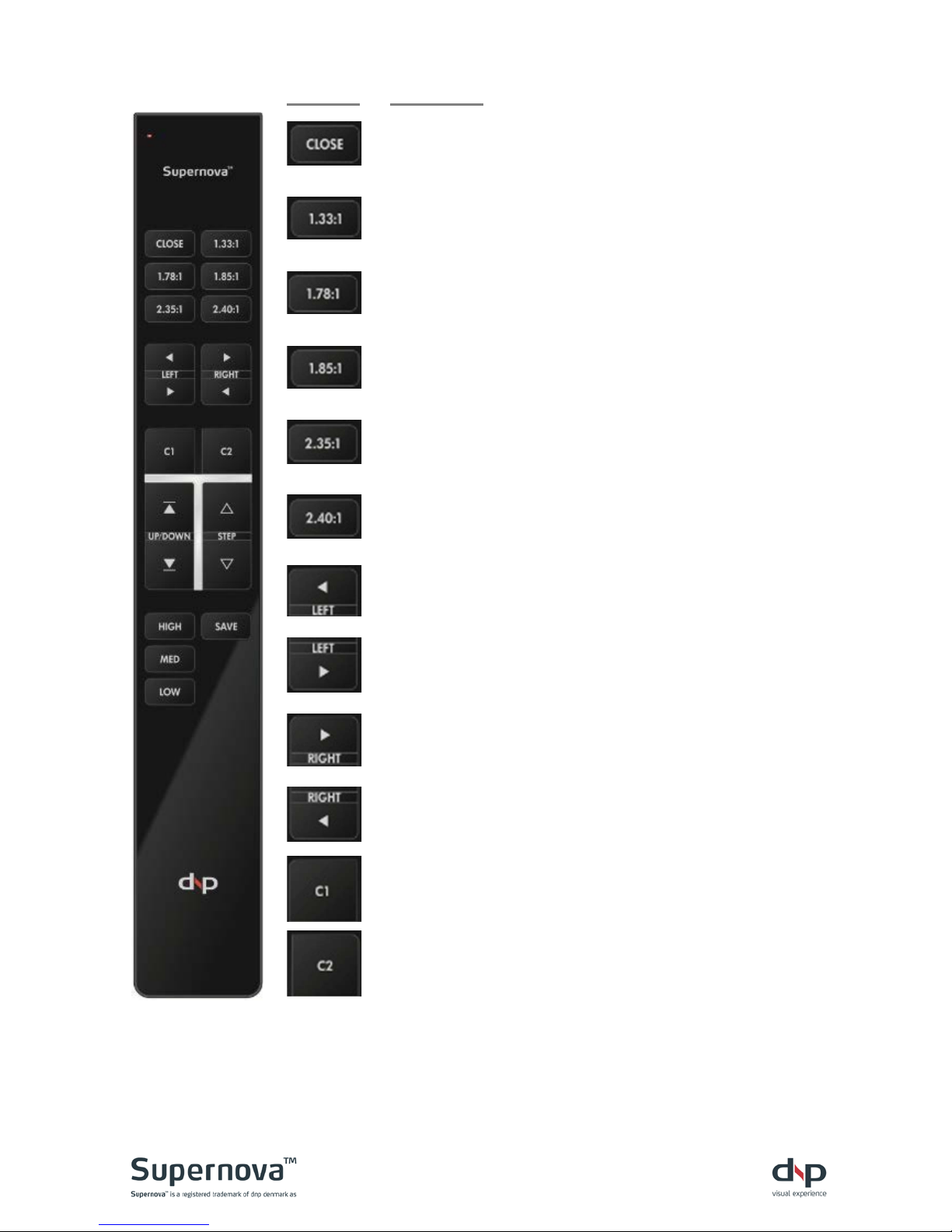
Button:
Function:
Press once to close curtains.
Press once to move curtains to 4:3 format.
Press once to move curtains to 16:9 format.
Press once to move curtains to 1.85:1 format.
Press once to move curtains to 2.35:1 format.
Press once to move curtains to 2.40:1 format.
Press and hold to move left curtain left. Release to stop.
Press and hold to move left curtain right. Release to stop.
Press and hold to move right curtain right. Release to
stop.
Press and hold to move right curtain left. Release to stop.
Press and hold for 3 seconds to save current curtain
position as “Custom 1” format.
Press once to move curtains to “Custom 1” format
Press and hold for 3 seconds to save current curtain
position as “Custom 2” format.
Press once to move curtains to “Custom 2” format
Page 9
9
E Powering up
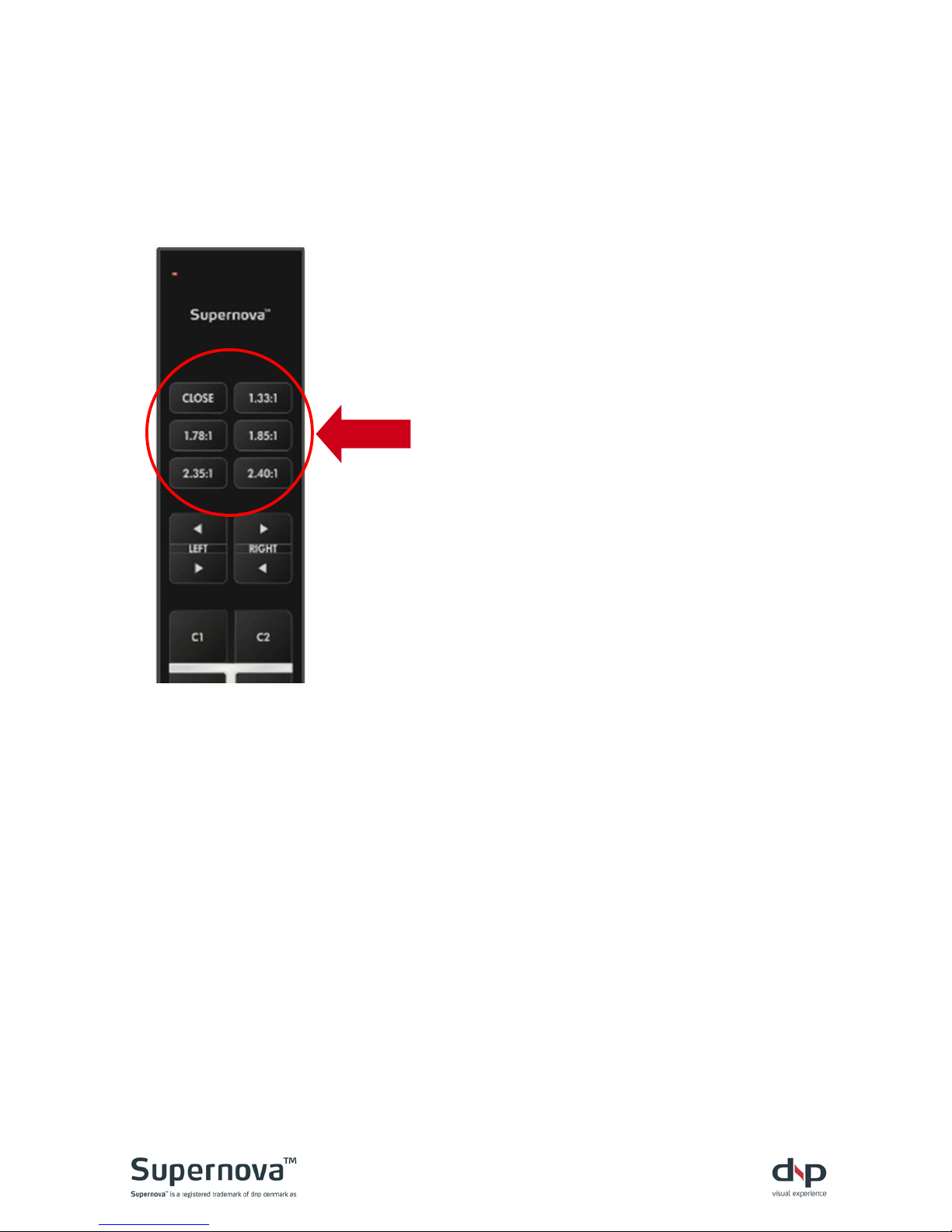
Plug the power cord into the wall socket.
a. After powering on, press any format on the remote.
b. First, the screen automatically calibrates by opening fully.
c. Then, moves to the desired aspect ratio.
d. There will be a delay before screen movement occurs after pressing the
button.
Page 10
10
F Communication
IR remote control
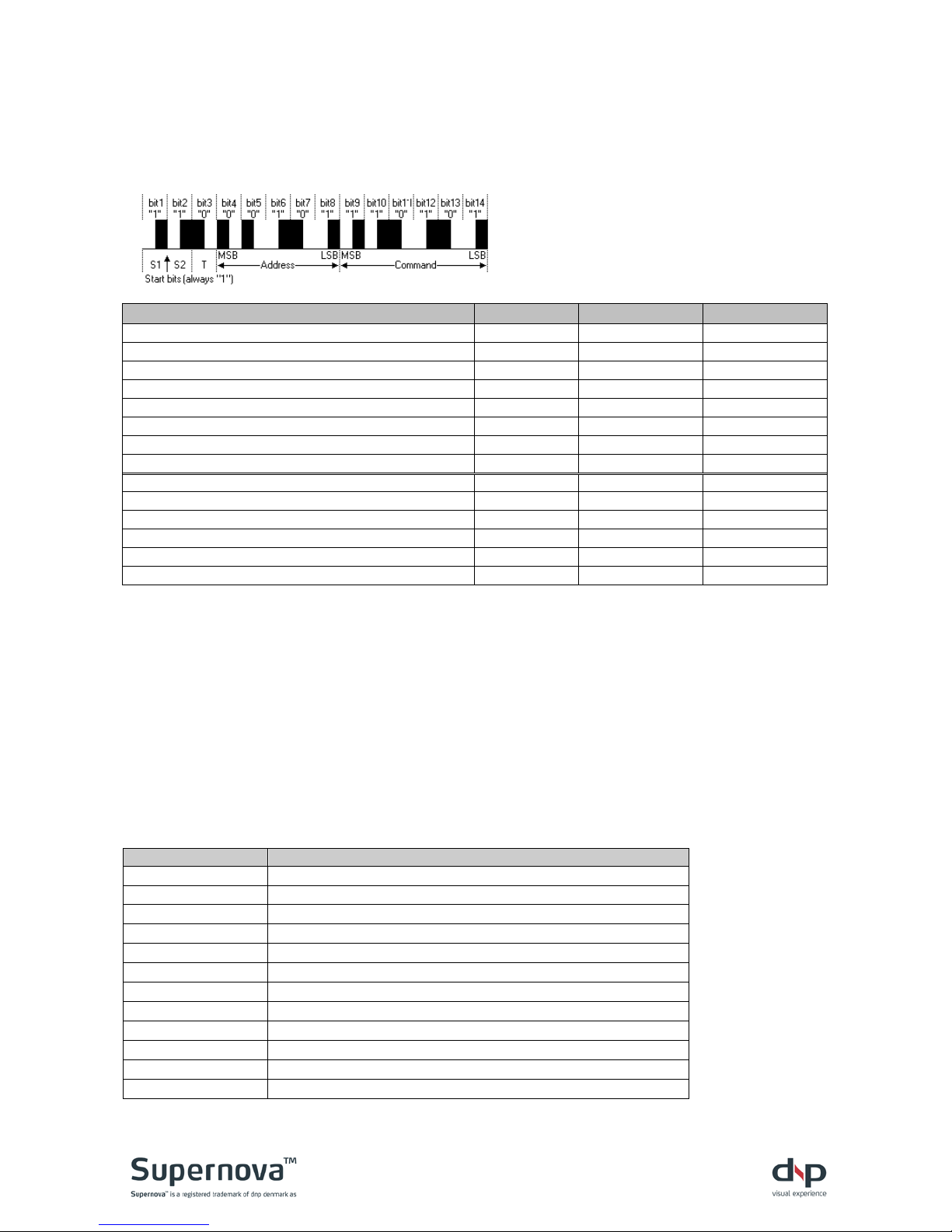
The screen is operated by the standard protocol, RC5. Please see below for details:
Description LCD remote RC5 address RC5 command
Close curtains CLOSE 0x1B - 27 0x2C - 44
Move curtains to 1.33:1 (4:3) format 1.33:1 0x1B - 27 0x2D - 45
Move curtains to 1.78:1 (16:9) format 1.78:1 0x1B - 27 0x2E - 46
Move curtains to 1.85:1 format 1.85:1 0x1B - 27 0x2F - 47
Move curtains to 2.35:1 format 2.35:1 0x1B - 27 0x35 - 53
Move curtains to 2.40:1 format 2.40:1 0x1B - 27 0x36 - 54
Move curtains to “Custom 1” format C1 0x1B - 27 0x1E - 30
Move curtains to “Custom 2” format C2 0x1B - 27 0x1F - 31
Move left curtain left (L) ◄ 0x1B - 27 0x29 - 41
Move left curtain right (L) ► 0x1B - 27 0x27 - 39
Move right curtain left (R) ◄ 0x1B - 27 0x28 - 40
Move right curtain right (R) ► 0x1B - 27 0x26 - 38
Save current curtain positions as “custom 1” format SAVE C1 0x1B - 27 0x32 - 50
Save current curtain posi tions as “custom 2” format SAVE C2 0x1B - 27 0x39 - 57
RS-232 serial control
Protocol
The interface is based on RS-232 using 115200 Baud, 8 bits, 1 start bit, 1 stop bit and no parity.
Use RS-232 straight-through cables.
The protocol is line-oriented. The controller expects single command lines containing a command
word - optionally followed by one or more parameters, each separated by one or more spaces.
Command lines must be terminated by a single carriage return (ASCII code 13) and may be
optionally followed by a linefeed (ASCII code 10).
User commands
Command
Function
? or h
Shows the help menu
close Moves the curtains to fully closed position
format 133 Moves the curtains to 1.33:1 format position
format 178
Moves the curtains to 1.78:1 format position
format 185
Moves the curtains to 1:85:1 format position
format 235
Moves the curtains to 2.35:1 format position
format 240 Moves the curtains to 2.40:1 format position
format 1
Moves the curtains to “custom 1” format position
format 2
Moves the curtains to “custom 2” format position
reset Resets curtains
x
Immediately stops current screen movement
V
Shows the firmware version
The illustration shows a typical pulse
train of an RC5 message.
This example transmits command
0x35-53 to address 0x05-5.
Page 11
11
G Cleaning
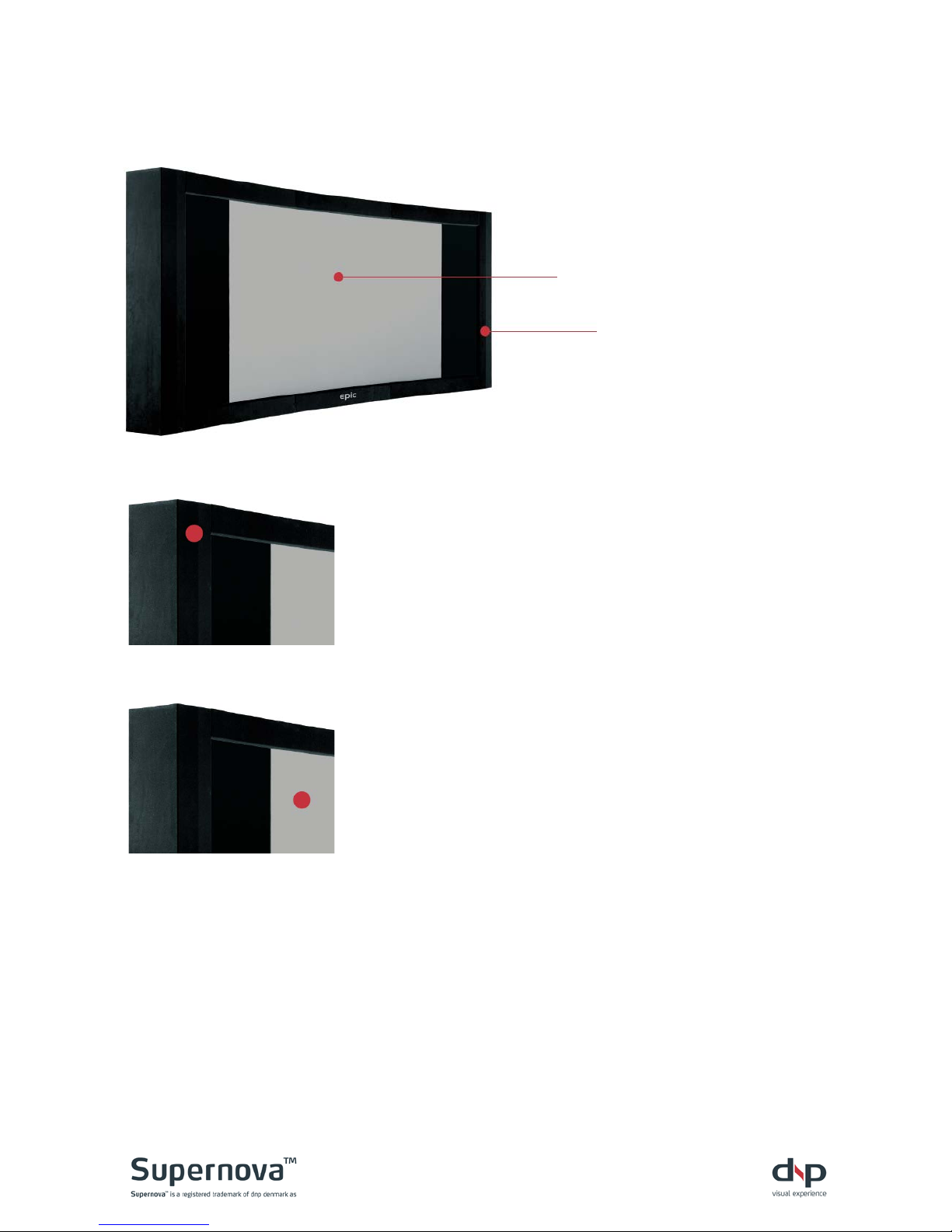
Black velvet chassis and curtains
Slightly dusty
Dust with a feather duster or
something similar. Lig ht
vacuum cleaning is possible,
but make sure to use a fitting
with bristles that are not too
hard to scratch the surface.
Dirty
Clean with a gentle detergent
solution. Apply with a small
brush. We recommend a soft
toothbrush. Dry with a lint-free
cloth or with a hairdryer
without heat.
Screen image area
Slightly dusty
Dust with a feather duster or
something similar. Lig ht
vacuum cleaning is possible,
but be careful not to apply too
much pressure on the screen
and make sure to use a fitting
with bristles that are neither
too soft nor scratch the
surface.
Dirty
A professional installer should
preferably carry out this part.
Use an ordinary window
cleaner with ammonia or
alcohol. Treat the entire image
area and clean with a paint
pad or lint-free cloth. Be
careful only to apply very
gentle pressure on the front
side. Make sure the screen is
completely dry afterwards.
Warning! Never use detergent solutions that will leave a film or layer on the surface.
Also, never rub the screen hard and persistently to remove stains, as this could cause
permanent damage to the screen surface.
Should these treatments prove inadequate, please contact your local dnp distri butor
or dnp denmark.
Screen image area
Black velvet frame area
Page 12

12
H Troubleshooting
The screen will not move:
Check
Solution
Is the power cord connected?
Plug into screen and wall socket.
Is screen already at fully open
position?
Screen cannot move beyond 2.40:1 format
position. Move inwards.
Is screen already at fully closed
position?
Screen cannot move further inwards. Move
outwards.
If RS-232 is used:
Contact installer.
A number of failures (i.e. screen
overload) will automatically disable
the controller.
1) Disconnect and re-connect power. 2) Follow
section “E Powering up” of this manual.
Are IR remote batteries installed?
Install batteries.
Is there visible contact to infrared
sensor?
Move any obstructions. The IR angle is limited.
Move in front of the screen.
Still not working?
Install new batteries.
Still not working?
Contact place of purchase.
The screen stops in the wrong positi on:
Check
Solution
If RS-232 is used:
Contact installer.
The screen will not close fully
Disconnect/reconnect power to re-calibrate.
Close curtains again by pressing [CLOSE]
One aspect ratio does not fit a
projected image
All aspect ratios are factory calibrated. If one
format does not fit all formats should not fit.
Adjust projector
All aspect ratios do not fit the
projected images
Disconnect/reconnect power to re-calibrate.
Then press the button of the desired aspect
ratio.
Adjust projector.
Still not working?
Contact place of purchase.
Page 13

13
I Sales & delivery terms
1. SCOPE. These sales and delivery terms apply to all quotations, orders, sales, and deliveries of
mechanical products more specific Supernova Flex, Supernova Epic, and Supernova Mobile from
dnp denmark as unless otherwise agreed in writing.
2. PRODUCT INFORMATION FROM DNP DENMARK A/S. Inf ormation in advertising materials,
folders, installation guidelines etc. on construction, materials, specifications, installation, and use of
dnp denmark's products is subject to change without notice. Such information is binding on dnp
denmark only if agreed in writing or confirmed by dnp denmark. dnp denmark reserves the right to
make changes to agreed specifications, instructions on installation and mounting if this is possible
without disadvantage to the customer.
3. PAYMENT. Payment shall be made by the customer at latest on the due date fixed in dnp
denmark's invoice. In case of late payment dnp may add interest on the sum owing at the rate of 2%
per running month from the due date. Unless otherwise agreed in writing, all deliveries will be
made when dnp denmark has received payment from the customer.
4. DELIVERY. All deliveries from dnp denmark are ex works unless other terms of delivery are
agreed in writing. If so, the terms of delivery shall be interpreted and understood in accordance
with the Incoterms applicable as of the date of the agreement.
5. DELAY. The delivery date is fixed in accordance with dnp denmark's best estimate based on the
conditions applying as of the date of the agreement. Unless otherwise expressly agreed, a
postponement by dnp denmark of 30 days of the delivery date attributable to circumstances
relating to dnp denmark shall be deemed in all respects to be timely delivery, and the customer
shall not be entitled to terminate the agreement or invoke any of the breach of contract provisions
otherwise applicable as a consequence of the postponement.
If the order includes various products confirmed for delivery at the same time, dnp denmark shall
be entitled to deliver the products which are ready for delivery at the agreed time and to postpone
delivery of the other products included in the agreement against payment of freight costs
associated with such delivery by dnp. In such event the customer shall not be entitled to cancel the
agreement or to claim breach of contract as a consequence of the delay.
If dnp denmark is prevented from fulfilling the agreement or if fulfilment of the agreement would be
unreasonably burdensome by reason of extraneous circumstances (force majeure) such as strike,
fire, war, requisitioning of operating equipment, sequestration, currency restrictions, civil
disturbance or unrest, or missing or delayed deliveries from subcontractors attributable to the
above circumstances, the delivery time shall be postponed by the duration of the disturbance and
none of the parties shall be entitled to claim against each other.
dnp denmark will advise the customer of changes to the delivery date without undue delay in
accordance with the above provisions and as far as possible give a new delivery date.
6. DEFECTS AND DEFICIENCIES. Immediately on receipt of the delivery the customer is required
to examine the delivery in accordance with normal business practices.
If the customer wishes to claim a defect or deficiency, dnp denmark shall be advised immediately
in writing. The customer shall otherwise forfeit any claim against dnp denmark.
dnp denmark may rectify the deficiency by replacement of product parts, repair or redelivery.
Freight costs in connection with return of the delivery to dnp denmark will be refunded to the
customer if dnp denmark can accept that the delivery was defective.
If defects or deficiencies have not been claimed against dnp denmark within (24) months of the
delivery, the customer shall not be entitled to make subsequent claim.
Page 14

14
dnp denmark shall not be liable for defects and deficiencies attributable to circumstances outside
of dnp’s control or of no concern to dnp including
• Inadequate training of the customer's personnel
• Failure to observe dnp denmark's instructions
• Faults arising from normal use
• Damage arising during the purchaser's transport of the delivery.
7. WARRANTY. dnp denmark as warrants the product against defects in material and
workmanship under normal use in accordance with dnp denmark’s instructions on installation, use,
maintenance, and repair etc. dnp denmark as will for a period of (1) year from date of invoice
without extra cost for the customer make replacements, repair or redelivery of the parts with
defects due to defective materials or workmanship. Replacement, repair, or redelivery is made by
dnp denmark as at its option and the warranty hereof is valid for the remaining period of the
original warranty period.
To obtain warranty service the product serial number or other identification according to the
agreement may not be removed or defaced. Furthermore, this warranty does not apply to damages
or defects caused by normal use, accidents, wear and tear, reckless use of the product, use of the
product for other than intended purposes and/or use not complying with dnp denmark’s instructions
on correct use, maintenance, handling, or installation. Claims during the warranty period also
require that the product is used according to the current local technical or security standards, and
no unauthorised or non-approved accessories have been used, as well as any modifications and
changes in the product regardless of the reason and regardless if the adjustment has been
correctly made. Additionally warranty claims are conditioned by no use of unauthorised software or
virus and the warrant does not apply to damage caused by force majeure among others fire, flood
etc.
The warranty does only apply product defects in the above stated. The guarantee does not cover
financial losses, direct or indirect losses or consequential damages.
8. PRODUCT LIABILITY. dnp denmark is liable for damage or injury to person only if documentary
evidence can be provided that the damage is attributable to error or negligence on the part of dnp
denmark. dnp denmark shall not be liable for damage to property or chattels belonging to the
purchaser or others unless the damage is due to gross negligence on the part of dnp denmark. dnp
denmark's liability may in no case exceed DKK five (5) million. dnp denmark can in no event be
held liable for operating loss, loss of profit or any other indirect losses.
If product liability is ascribed to dnp denmark by third party, the customer shall indemnify dnp
denmark to the limit of dnp denmark's liability under this provision.
9. LIMITATION OF LIABILITY. The customer may in no event claim compensation for operating
loss, loss of profit or other indirect losses in cases of delays, defects or deficiencies, irrespective of
whether the delay, defect or the deficiency may be attributable to dnp denmark.
The customer may only claim a proportionate rebate in the purchase sum or compensation for the
customer's direct documented loss if the delay or the deficiency is attributable to gross negligence
on the part of dnp denmark.
10. DISPUTES AND JURISDICTION. Unless otherwise agreed in writing, any dispute between the
parties concerning the agreement shall be settled by arbitration in Copenhagen, Denmark, at the
Danish Institute for Arbitration, det Danske Voldgiftsinstitut, in accordance with the rules for
processing of cases at the General Arbitration Court in Denmark, "Regler for behandling af sager
ved Det Danske Voldgiftsinstitut". Danish law shall apply.
Page 15

15
J Service contact
Contact place of purchase
Date of purchase:
Where purchased:
US hotline: +1 (619) 600 2 892
Page 16

16
K Manufacturer information
dnp denmark as
Skruegangen 2
DK-2690 Karlslunde
Denmark
Tel: +45 46 16 51 00
Fax: +45 46 16 52 00
M@il: [email protected]
www.dnp-screens.com
www.dnp-screens.com
Rev. 1.6
 Loading...