

Page 1
Page 2

English
English
WARNING
To reduce the risk of fire or electric shock, do not expose this apparatus to rain or moisture. To avoid electrical shock, do not open the
cabinet. Refer servicing to qualified personnel only.
This apparatus must be earthed.
For pluggable equipment, the socket-outlet be installed near the equipment and shall be easily accessible.
To disconnect the main power, unplug the AC IN connector.
When installing the unit, incorporate a readily accessible disconnect device in the fixed wiring, or connect the power plug to an easily
accessible socket-outlet near the unit. If a fault should occur during operation of the unit, operate the disconnect device to switch the
power supply off, or disconnect the power plug.
Warning on power connection
Use a proper power cord for your local power supply.
1. Use the approved Power Cord (3-core mains lead) /Appliance Connector / Plug with earthing-contacts that conforms to the
safety regulations of each country if applicable.
2. Use the Power Cord (3-core mains lead) / Appliance Connector /Plug conforming to the proper ratings (Voltage, Ampere).
If you have questions on the use of the above Power Cord/Appliance Connector/Plug, please consult a qualified service personnel or
the distributor.
For the Customers in Europe
This product shall not be used in the residential area.
This is a Class A product. In a domestic environment, this product may cause radio interference in which case the user may be
required to take adequate measures.
Dai Nippon Printing Co.,Ltd. hereby declares that this DP-DS80D is in compliance with the essential requirements and other relevant
provisions of Directive 1999/5/EC.
The manufacturer of this product is Dai Nippon Printing Co.,Ltd.
1-1-1 Ichigaya Kagacho, Shinjuku-ku, Tokyo 162-8001, Japan.
The importer for R&TTE and RoHS is DNP PHOTO IMAGING EUROPE SAS,
ZI PARIS NORD II -BP 51077, 22 AVENUE DES NATIONS, PARC SILIC -VILLEPINTE, 95948 ROISSY
CDG CEDEX, FRANCE.
If you want to dispose this product, do not mix with general household waste. There is a separate collection
system for used electronics products in accordance with legislation under the WEEE Directive (Directive
2002/96/EC) and is effective only within European Union. For details, consult your dealer.
For kundene i Norge
Dette utstyret kan kobles til et IT-strømfordelingssystem.
Page 3

dansk
Undertegnede Dai Nippon Printing Co.,Ltd. erklærer herved, at følgende udstyr DP-DS80D overholder de væsentlige krav og øvrige
relevante krav i direktiv 1999/5/EF.
Nederlands
Hierbij verklaart Dai Nippon Printing Co.,Ltd. dat het toestel DP-DS80D in overeenstemming is met de essentiële eisen en de andere
relevante bepalingen van richtlijn 1999/5/EG.
suomi
Dai Nippon Printing Co.,Ltd. vakuuttaa täten että DP-DS80D tyyppinen laite on direktiivin 1999/5/EY oleellisten vaatimusten ja sitä
koskevien direktiivin muiden ehtojen mukainen.
ελληνικά
Με την παρούσα η Dai Nippon Printing Co.,Ltd δηλώνει ότι DP-DS80D συμμορφώνεται προς της ουσιώδεις απαιτήσεις
και τις λοιπές σχετικές διατάξεις της οδηγίας 1999/5/ΕΚ.
magyar
Alulírott, Dai Nippon Printing Co.,Ltd. nyilatkozom, hogy a(z) DP-DS80D megfelel a vonatkozó alapvető követelményeknek és az
1999/5/EC irányelv egyéb előírásainak.
italiano
Con la presente Dai Nippon Printing Co.,Ltd. dichiara che questo DP-DS80D è conforme ai requisiti essenziali ed alle altre
disposizioni pertinenti stabilite dalla direttiva 1999/5/CE.
norsk
Dai Nippon Printing Co.,Ltd. erklærer herved at utstyret DP-DS80D er i samsvar med de grunnleggende krav og øvrige relevante
krav i direktiv 1999/5/EF.
português
Dai Nippon Printing Co.,Ltd. declara que este DP-DS80D está conforme com os requisitos essenciais e outras disposições da
Directiva 1999/5/CE.
svenska
Härmed intygar Dai Nippon Printing Co.,Ltd. att denna DP-DS80D står I överensstämmelse med de väsentliga egenskapskrav och
övriga relevanta bestämmelser som framgår av direktiv 1999/5/EG.
Page 4

For the Customer in USA
FCC part 15
This equipment has been tested and found to comply with the limits for a Class A digital device, pursuant to Part 15 of the
FCC Rules.
These limits are designed to provide reasonable protection against harmful interference when the equipment is operated in a
commercial environment.
This equipment generates, uses and can radiate radio frequency energy and, if not installed and used in accordance with the
instruction manual, may cause harmful interference to radio communications. Operation of this equipment in a residential
area is likely to cause harmful interference in which case the user will be required to correct the interference at his or her
own expense.
Changes or modifications not expressly approved by the party responsible for compliance could void the user's authority to
operate the equipment under FCC rules.
This device complies with FCC radiation exposure limits set forth for an uncontrolled environment. The antenna used for
this transmitter must be installed to provide a separation distance of at least 20 cm from all persons and must not be
co-located or operating in conjunction with any other antenna or transmitter.
Caution: Use shielded cables to connect this computers.
Any changes or modifications not expressly approved by the grantee of this device could void the users authority
to operate the equipment.
Page 5
For Safe Operation
Please read this document carefully before use.
・ Be sure to read this document before using the product. After reading, keep it in a safe place where it can be easily
accessed as needed.
・ For more information about how to use this product, please refer to User’s manual (in the attached CD-ROM).
・ The warnings listed here are to ensure prope r use of the product, to prevent physical injury to the customer or other
persons, and to prevent property damage. Please follow these warnings.
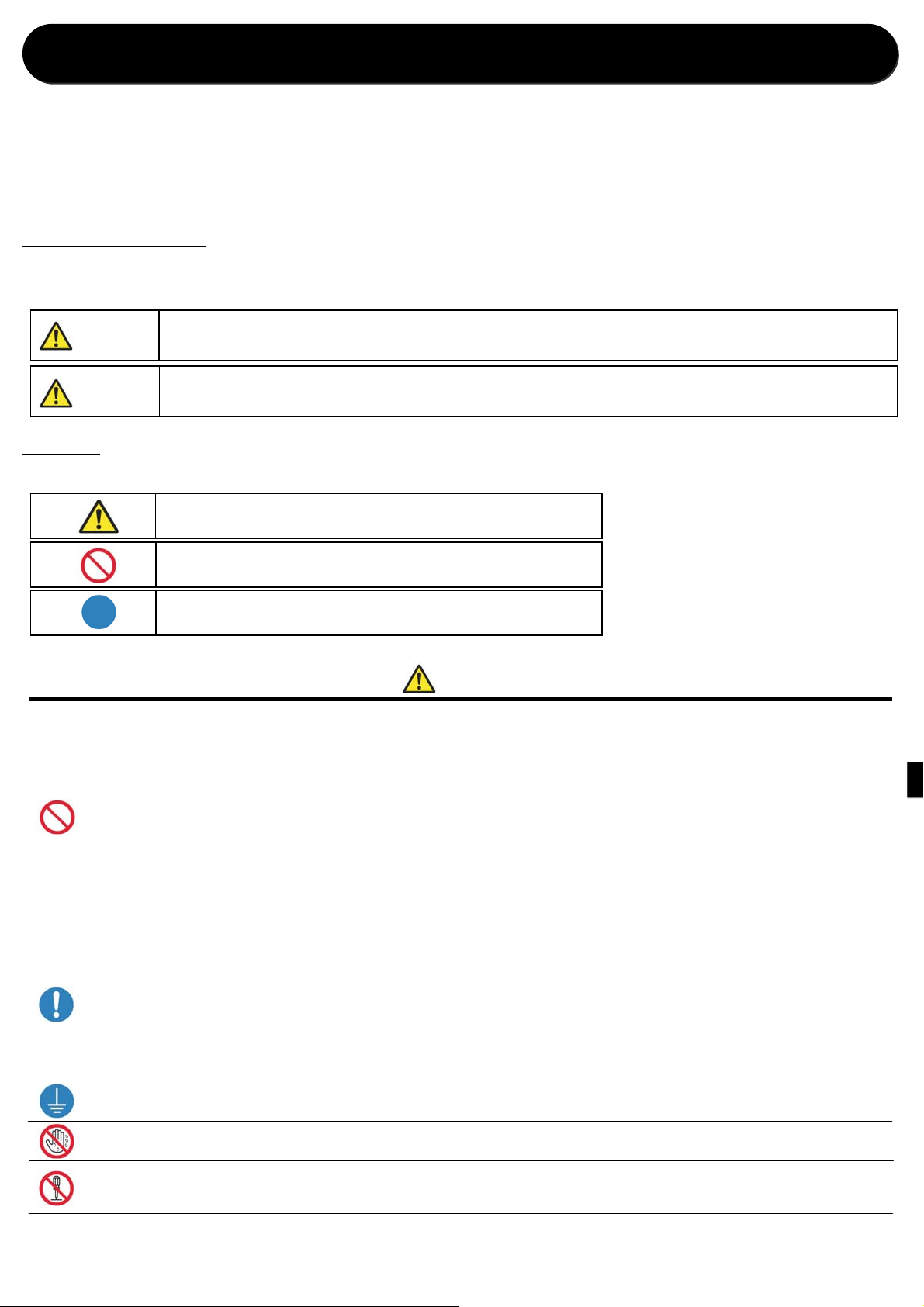
■Warnings and Cautions
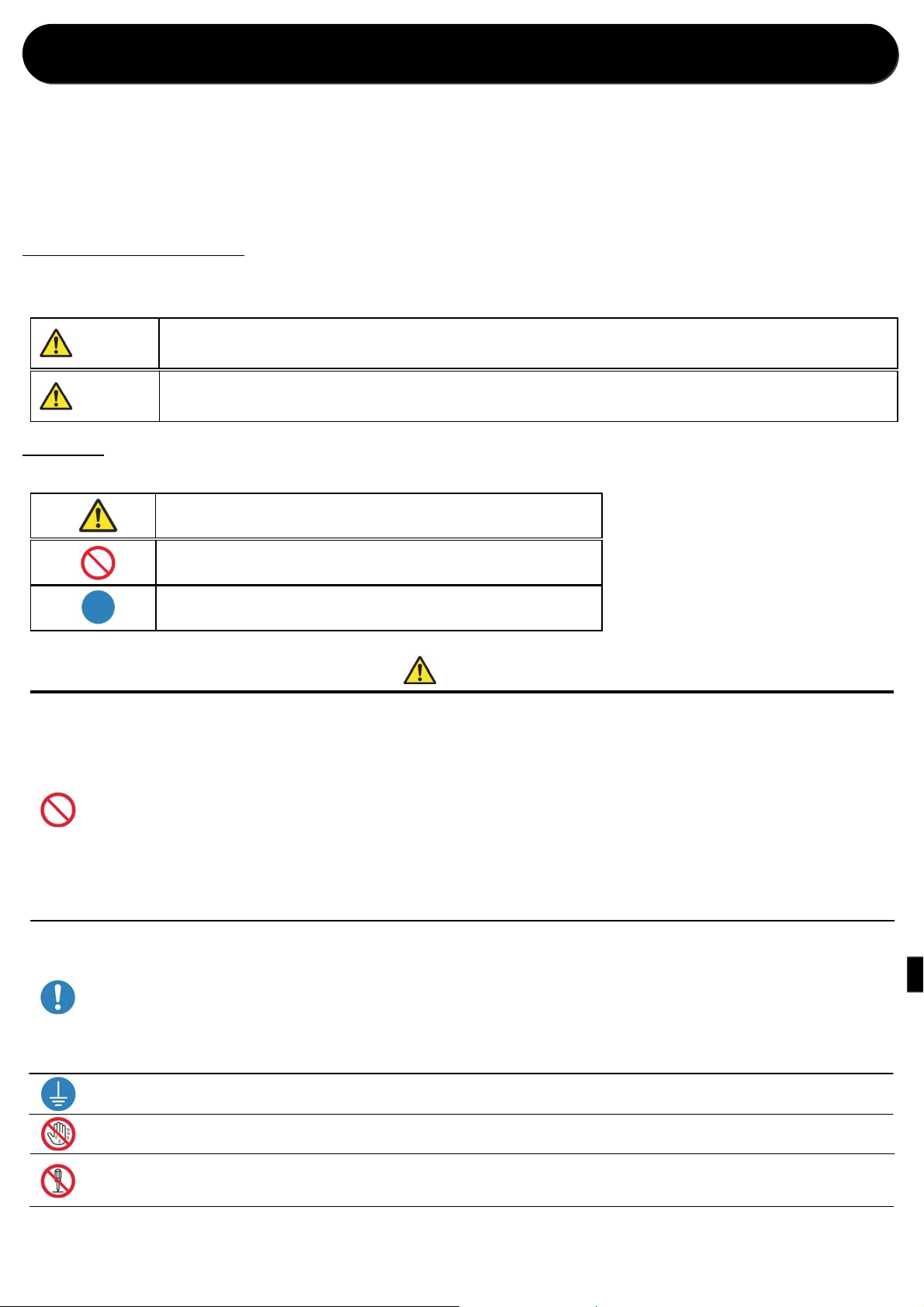
The possible levels of injury or damage due to misuse are categorized below as Warnings and Cautions, according to the
degree of danger involved.
Warning
Caution
■Symbols
The symbols shown have the following meanings:
Accidents caused by failure to heed the warnings accompanying this symbol may lead to serious or
fatal injury.
Accidents caused by failure to heed the cautions accompanying this symbol may lead to physical
injury or property damage.
This symbol indicates warning and caution messages.
The warning content is indicated in or near the symbol.
This symbol indicates prohibited actions.
The prohibited action is indicated in or near the symbol.
This symbol indicates necessary actions or instructions.
The action is indicated in the symbol.
Warning
・ Use the product only with the designated voltage and frequency. Improper connection may cause an electric shock or fire.
・ Avoid connecting too many devices to the outlet used for this product and using extension cords. The outlet may overheat and cause a fire.
・ Do not damage, cut, bundle, or alter the power cord. Also, the cord may be damaged if heavy objects are placed on it, or if pulled or bent with excessive
force, and it may cause a fire or an electric shock.
・ Do not install the product in places with salinity or corrosive gases in the air. This may cause a fire.
・ Do not block the vents of the product. Heat may build up in the product and cause a malfunction or fire.
・ Do not stand on or place heavy objects on the product. Also, do not apply excessive force on the buttons, switches, terminals, etc. This may damage the
product and cause injury to the user or other people.
・ Store the bag of the product out of the reach of children. It may cause suffocation if placed over the head.
・ Be careful not to injure yourself or damage other things on the edges of the product.
・ Do not use this product for applications involving human life (such as medical, space, aeronautic, or other applications that require extreme reliability).
・ The product weighs approximately 14 kg (31 lbs.). When moving it, lift it in a way that avoids excessive physical stress. Lifting recklessly or dropping the
product may cause physical injury.
・ Place the product as close to an outlet as possible to be able to easily unplug the power cord in case of problem.
・ If there is dust on the plug, clean it off thoroughly. It may cause an electric shock or a short circuit.
・ If metal objects or liquids have fallen into the product, or if there is smoke, a strange odor, or any other abnormality, immediately turn the power off, and
unplug the power cord. Then contact a service representative. Do not continue using the product if it is not operating properly. This may cause an electrical
shock, a short circuit, fire, or a malfunction.
Be sure to ground the product. Otherwise, a short circuit may occur, causing fire or an electric shock.
・
Do not plug or unplug the cord with wet hands. This may cause an electric shock.
・
Do not open the product, disassemble internal parts, or modify the product. It may cause an electric shock, fire, or injury, or a product
・
malfunction. For internal check-ups, adjustments, or repair, please contact a service representative.
Page 6
Caution
・ Do not install the product in dusty or humid places. This may cause fire or an electric shock, or damage the product.
・ Do not install the product on an unstable surface. It may fall and cause injury to the user or other people.
・ Do not allow foreign objects to enter into the product. They may cause an electric shock, a sho rt circui t, or fire , or dam age the product. If something falls i nto
the product, immediately turn the power off, unplug the power cord, and call a service representative.
・ Do not open the cover while printing. This may damage the product.
・ Do not spill or spray liquids or chemicals onto the product.
・ When cleaning the cover, do not use thinner, trichloroethane, benzene, ketone-based cleaners, or chemically treated cloths. They could discolor or
deteriorate the cover.
・ At least once a year, unplug the power cord, and clean the prongs and the plug. If dust accumulates, it may cause a fire.
・ When printing continuously for long periods in a small room, be sure to ventilate the room properly.
・ If you intend to use the product on a transportation vehicle (train, truck, ship, etc.), please talk to a representative in advance.
・ When disposing of the product, accessories, packaging materials, or media (paper, ribbon), please abide by local waste removal ordinances. For details,
contact your local government offices.
・ When unplugging the cord, always grip the plug. Do not pull on the cord as it may damage the cord and cause an electric shock or fire.
・ When moving the product, be sure to unplug the power cord. Otherwise, the cord may be damaged, which may cause fire or an electric shock.
・ For safety, when not using th e produ ct for a n ex tended peri od o f time, be sure to unplug the pow er cord . O therwise, i t may cause an electric shock, fire, or a
malfunction.
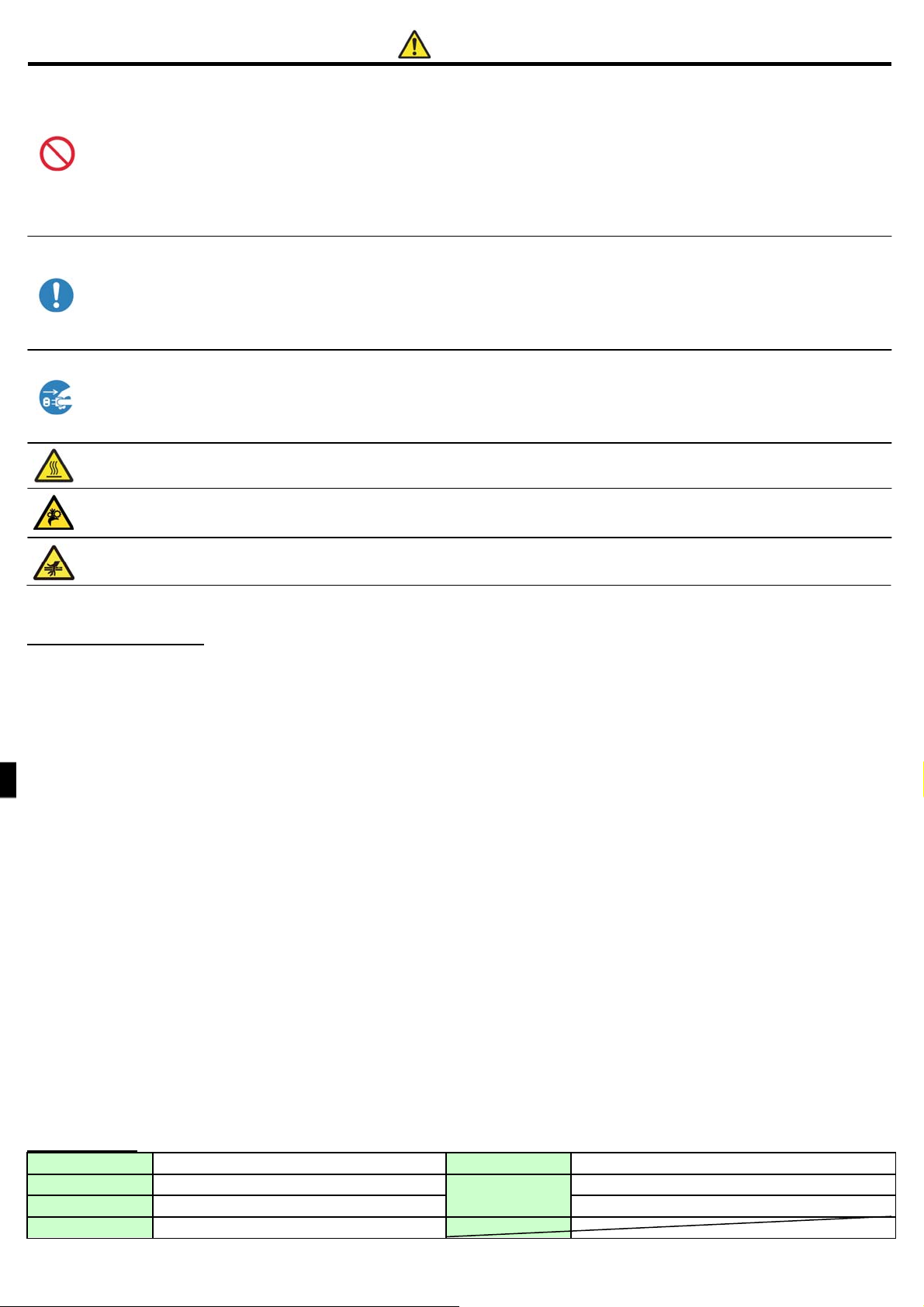
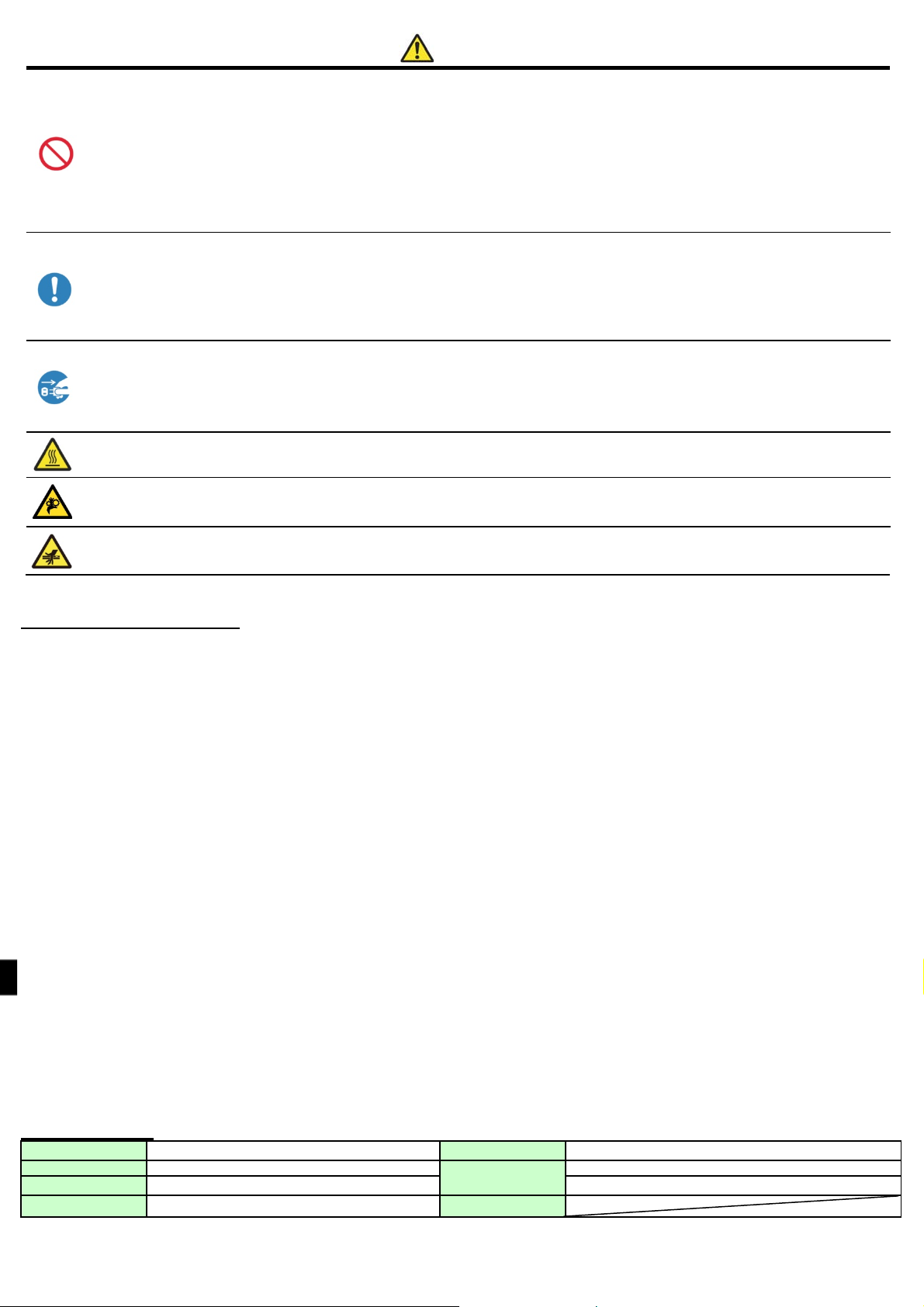
Parts with this warning get extremely hot. Do not touch these parts after printing. There is a danger of burns.
・
Do not touch the gear mechanisms. There is a danger of injury if fingers get caught in spinning gears.
・
Do not put your fingers inside the parts showing this mark. There is a danger of injury.
・
Caution for installation
・ Before using the product, read “For Safe Operation” carefully and observe the instructions therein.
・ Use care when moving the product. Never try to carry the product alone. Dropping it may cause injury or property damage.
・ Do not use or store the product near a fire, humid places, in direct sunlight, near an air conditioner or heater, or any other location with unusually high or low temperature,
strong humidity, or excessive dust.
・ Do not place the product where chemical reactions occur, such as in a laboratory.
・ Do not install the product where there is salinity or corrosive gas in the air.
・ The product must be installed on a firm, level surface where there is ample ventilation.
・ Do not put anything on top of the product.
・ Do not use the product near a radio or television, and do not use the same wall outlet for the product and a radio or television. Otherwise radio or television reception may be
adversely affected.
・ Do not use a power voltage or a frequency other than those specified.
・ Do not put anything on the power cord or step on it.
・ Do not drag or carry the product by the power cord or the USB cable.
・ Avoid plugging the power cord into an outlet with many other cables connected.
・ Do not bundle the power cord.
・ Always grip the plug housing, not the cord, to plug or unplug the power cord.
・ Make certain the power is turned off before connecting or disconnecting the USB cable.
・ Avoid using a long USB cable or connecting it to any noise-producing device. If it is unavoidable, use a shielded cable or twisted pair for each signal.
・ Use a shielded USB cable compatible with t h e USB 2.0 specifications.
・ Place the product near the outlet where the power cord can be unplugged easily to shut the power off.
・ Use an AC outlet that accepts a three-pronged plug. Otherwise, there may be a danger of electric shock.
・ Do not use the cord set supplied with the printer for other devices.
・ Use the cord set supplied for the product.
・ Only use items that are certified safe according to the standards of the country where they are to be used.
・ Make sure the blind plates are installed when not using the Turning Unit. Otherwise, there may be a danger of fire.
Specifications
Print method Thermal dye sublimation transfer Rated current 100 V 3.96 A 240 V 1.69 A
Dimensions
Weight Approx. 14.0 kg (printer unit only) Humidity 35% to 80% with no condensation
Rated voltage AC100 V – 240 V 50 Hz/60 Hz
322 mm(W)×367 mm(D)×171 mm(H)
Operating environment
Temperature 5°C to 35°C in natural convection conditions
Page 7
p g
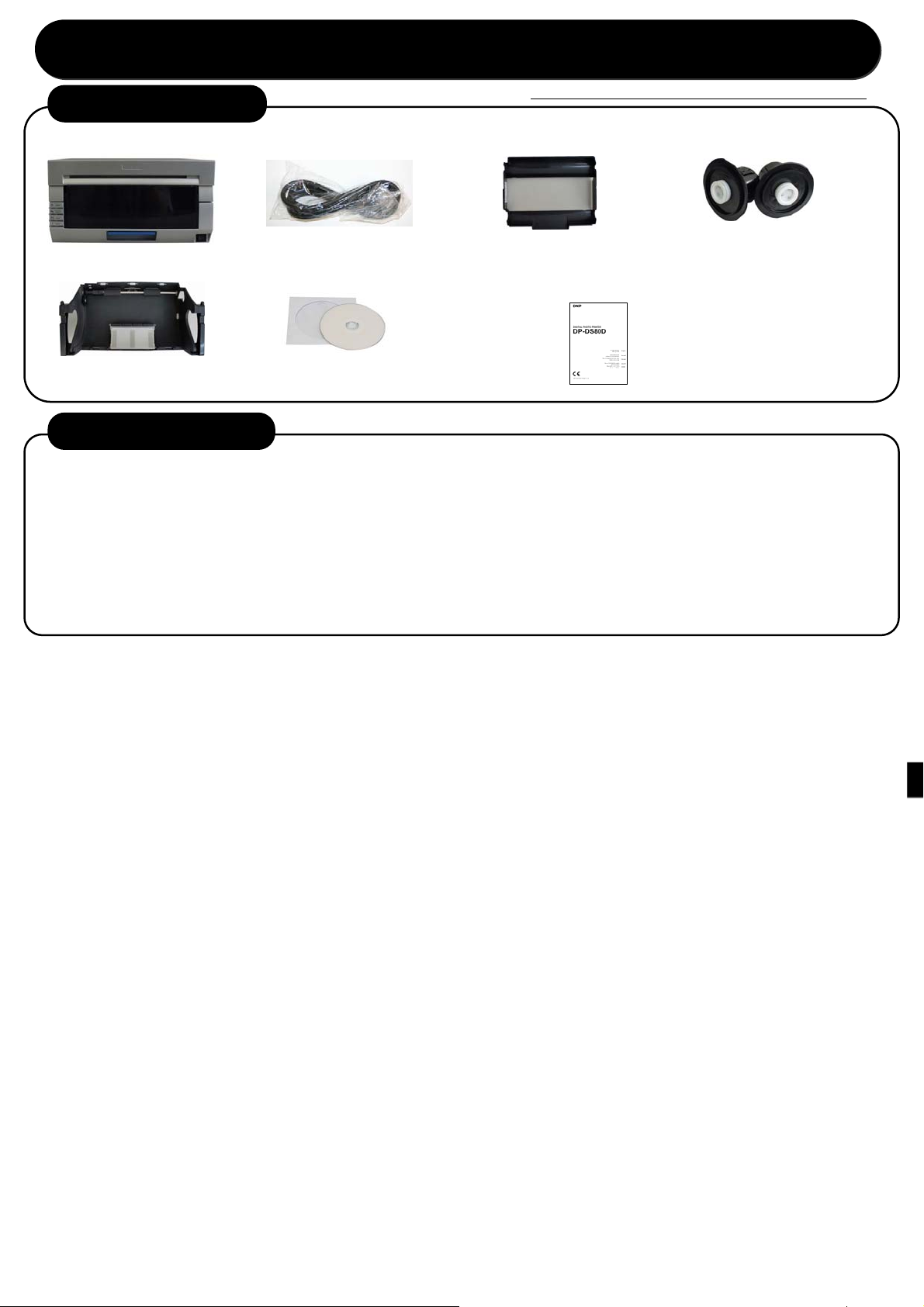
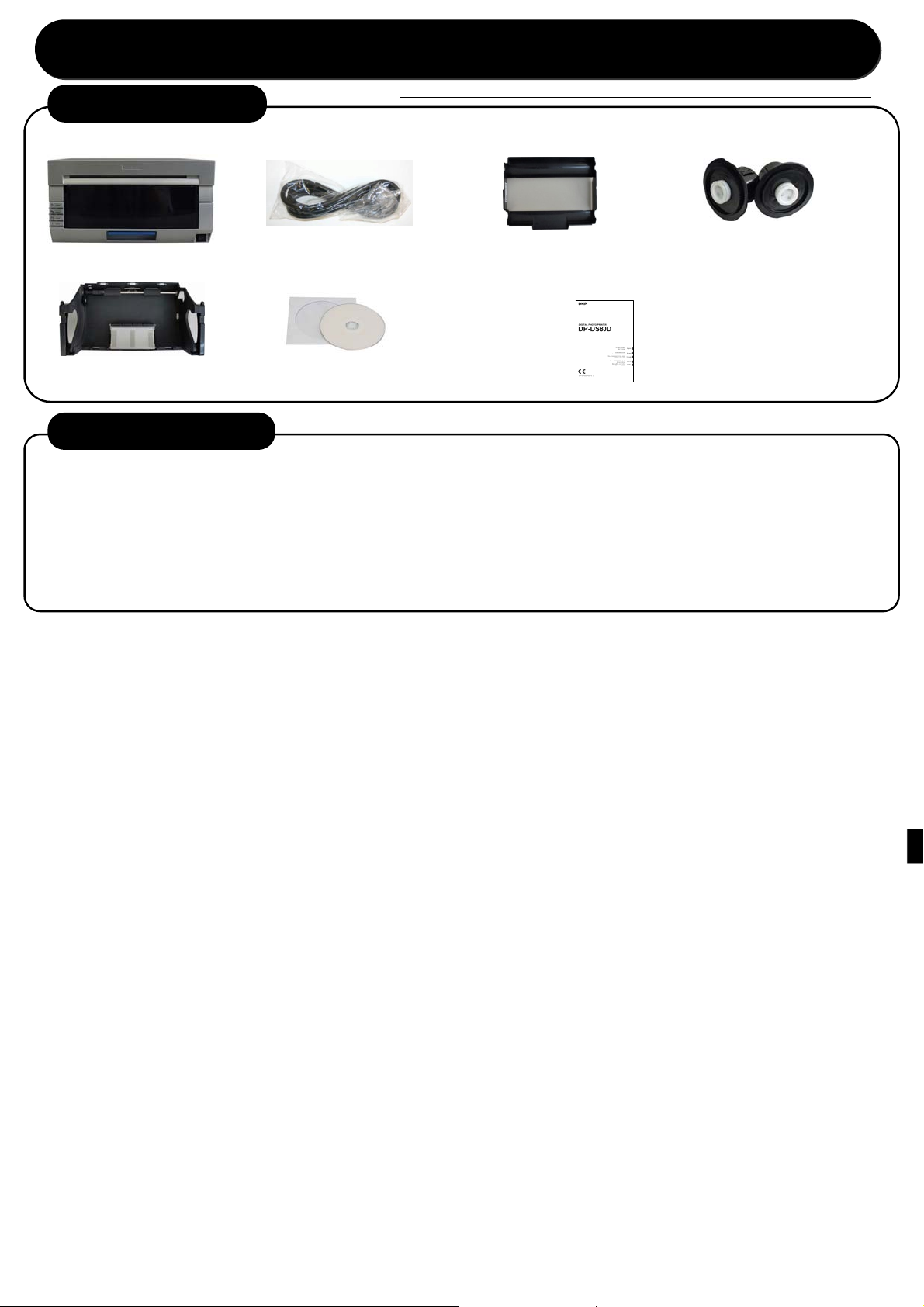
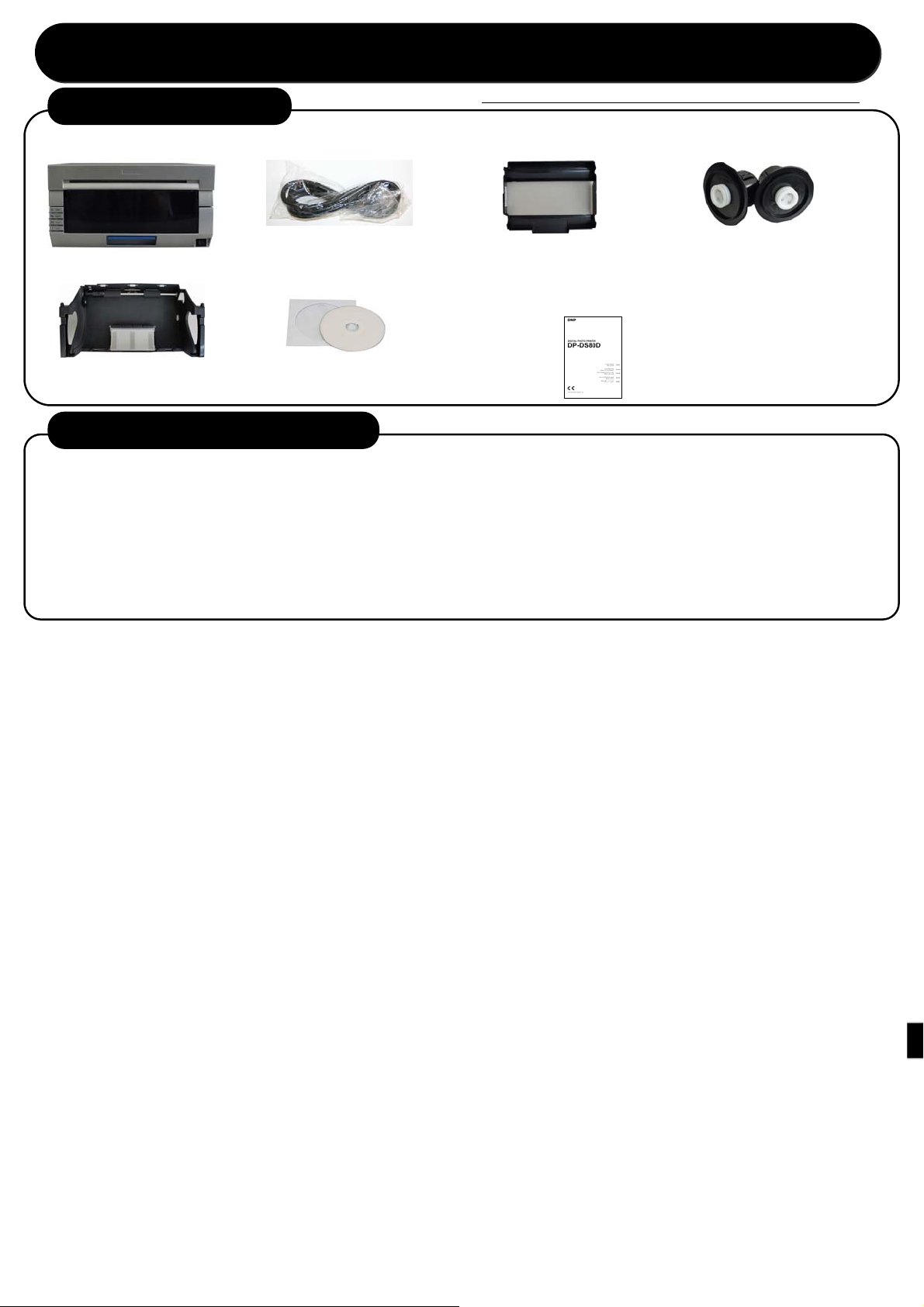
1.Checking the contents
Printer unit
Start Up Guide
Before using the product, read “For Safe Operation” carefully.
Power cord
Ribbon cassette Paper holder
Paper cassette
CD-ROM
・User’s manual
Explanation booklet (this document)
・For Safe Operation
・Start u
uide
2.Duplex printing (option)
This product supports duplex printing when used together with the optional Turning Unit.
For more information about duplex printing, refer to the Operating Instructions supplied with the optional Turning
Unit.
Contents
■
(1) Overview
(2) Preparation
(3) Operation
(4) Cleaning and Clearing Paper Jams
Page 8
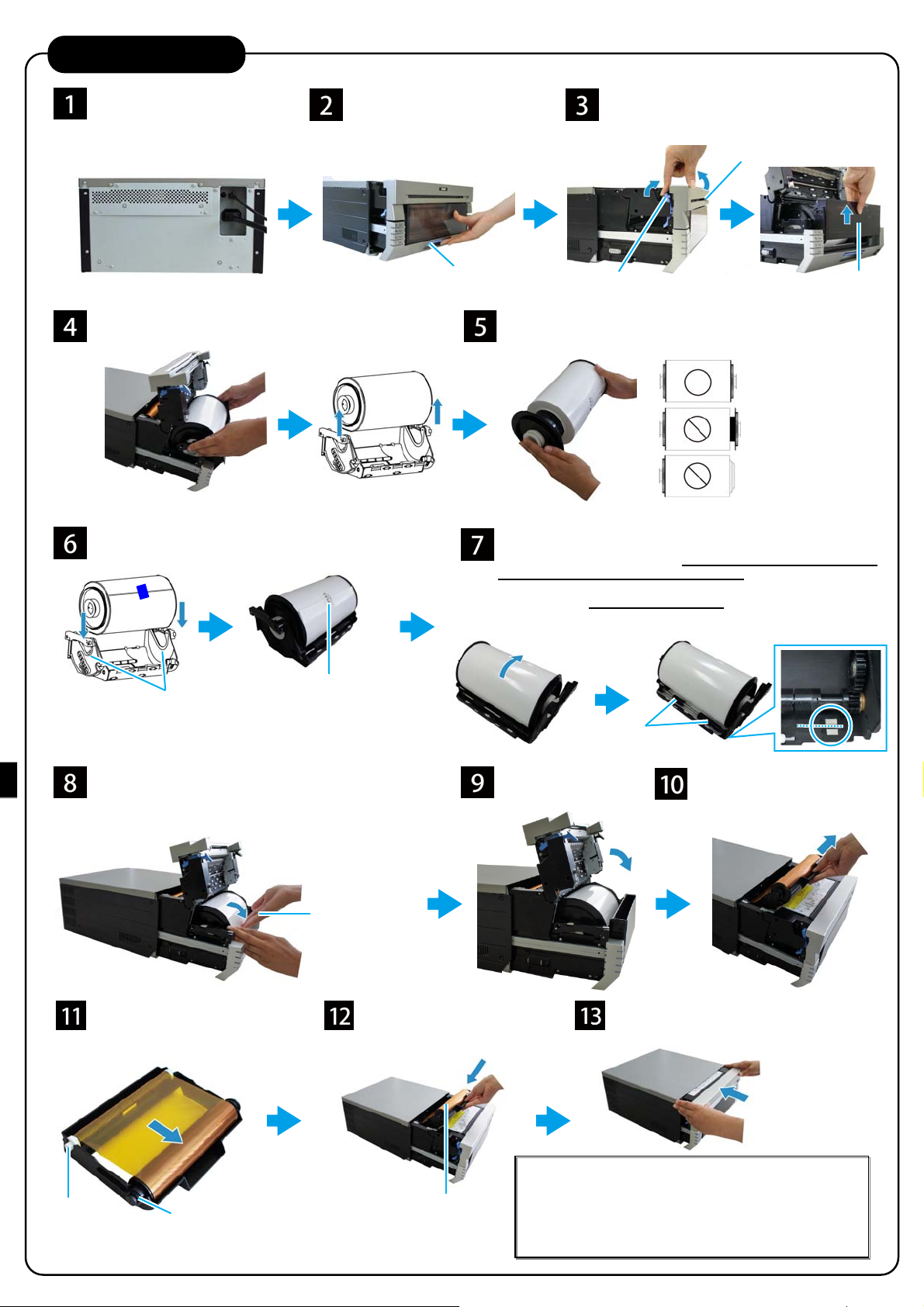
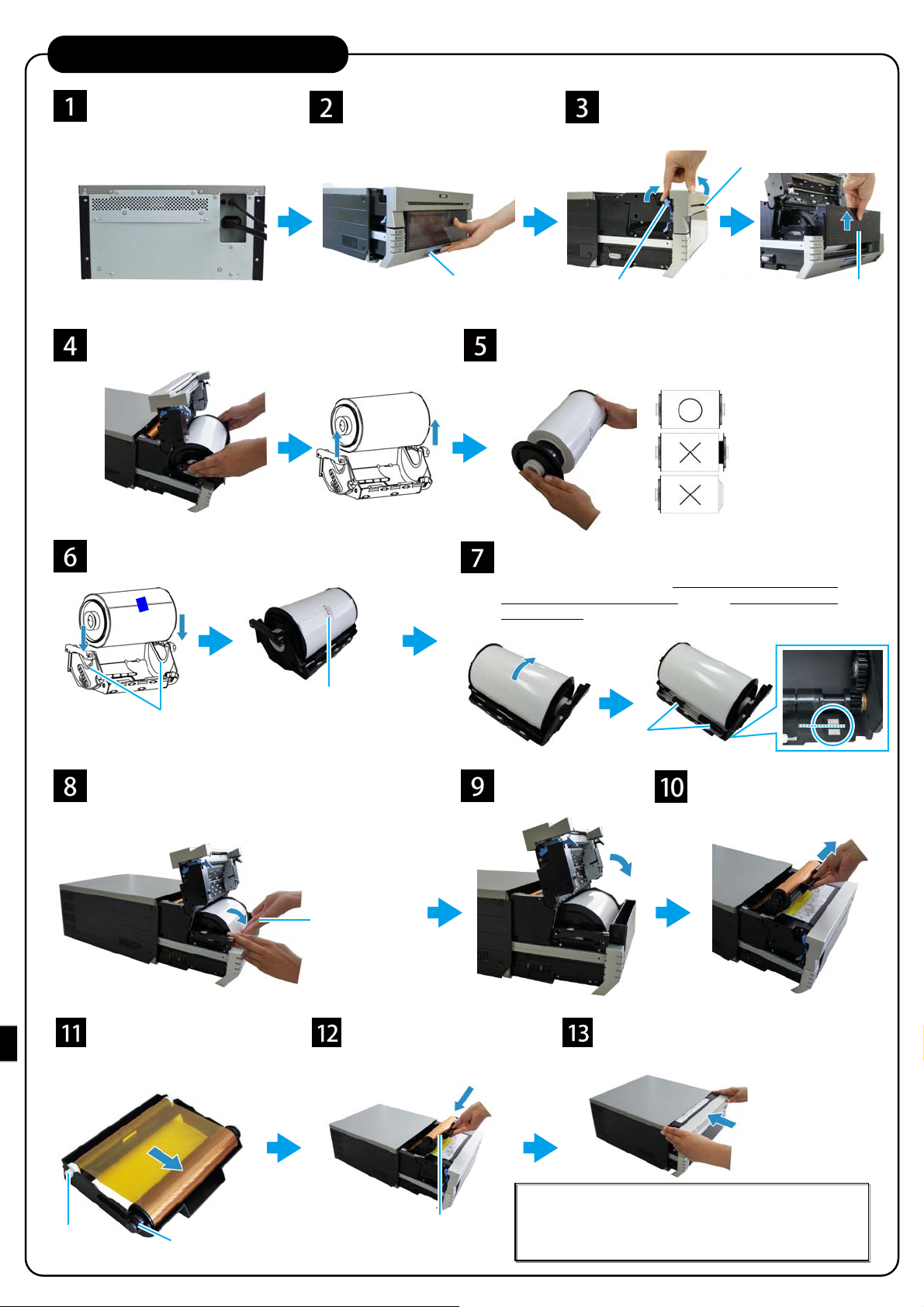
3.Printer installation
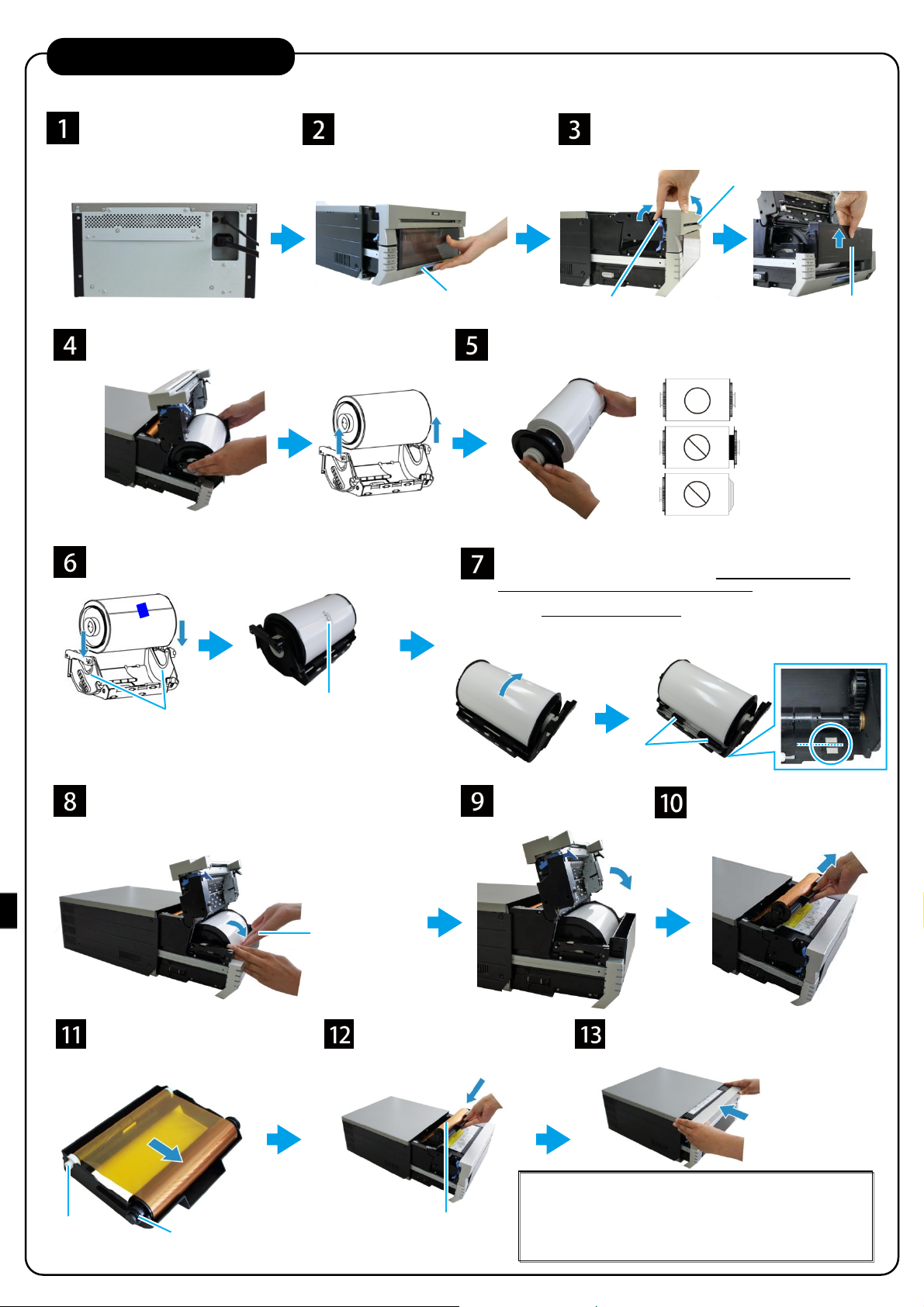
Plug the power cord (supplied)
and the USB cable, and turn
on.
* If you have to install the printer
drive, do not plug the USB cable
now.
Remove the paper cassette, and remove the paper
holders from the paper cassette.
Set the paper holders into the paper cassette.
Set it firmly all the way in.
Set the paper cassette into the printer. Rotate the paper in
the direction of the arrow to advance the leading edge
until the buzzer beeps.
When paper is correctly inserted the paper LED turns off.
Set the new ribbon into the
ribbon cassette.
Rotate the roller in the direction of
the arrow to take up the slack.
Release the opening lever and
pull out the mechanism unit.
Set the paper roll with the
“PULL” sticker in the same
orientation as shown above.
Hold the paper
holder to prevent
it from turning
when rotating the
paper.
Install the ribbon cassette
to the printer unit.
Opening lever
Remove packaging materials from the paper holders and set the
new paper roll.
Set the roll so that there is no gap between the paper and the holder.
Remove the “PULL” sticker attached to the roll, and rotate the
roll in the direction of the arrow to feed the paper.
Feed the paper until its edge is aligned in the middle of the two
holes (dashed line) on the paper cassette as shown in the picture
on the right.
Pay attention to feed the paper straight. If the paper is not straight,
white space may appear on the edges of the printout, the ribbon may
wrinkle, and the resister may slip.
Set the scrap box and
close the front cover.
Lift the paper lever, raise the front cover
and remove the scrap box.
Front cover
Paper lever
Feed the paper
under the roller.
Remove the ribbon cassette
from the printer unit.
Close the mechanism unit.
Scrap box
Take-up side
(white roller)
Supply side
(black roller)
Install the cassette so that
the supply side (black roller)
is at the front.
Note: When the mechanism unit is closed, the printer starts
paper initialization (4 blank sheets are output).
Through paper initialization, the outer layer of the paper that
may be dirty is cut off.
However, if the power is turned on after the paper is set, the
paper initialization will not start.
Page 9

Page 10

Deutsch Deutsch
WARNUNG
Um die Gefahr von Bränden oder elektrischen Schlägen zu verringern, darf dieses Gerät nicht Regen oder Feuchtigkeit ausgesetzt
werden. Um einen elektrischen Schlag zu vermeiden, darf das Gehäuse nicht geöffnet werden. Überlassen Sie Wartungsarbeiten stets
nur qualifiziertem Fachpersonal.
Dieses Gerät muss geerdet werden.
Bei Geräten, die Steckdose in der Nähe des Gerätes befinden und leicht zugänglich sein.
Um die Stromversorgung zu beenden, ziehen Sie den AC IN-Auschluss (Netzanschluss) ab.
Beim Einbau des Geräts ist daher im Festkabel ein leicht zugänglicher Unterbrecher einzufügen, oder der Netzstecker muss mit einer
in der Nähe des Geräts befindlichen, leicht zugänglichen Wandsteckdose verbunden werden. Wenn während des Betriebs eine
Funktionsstörung auftritt, ist der Unterbrecher zu betätigen bzw. der Netzstecker abzuziehen, damit die Stromversorgung zum Gerät
unterbrochen wird.
WARNUNG zum Netzanschluss
Verwenden Sie das für die Stromversorgung in Ihrem Land geeignete Netzkabel.
1. Verwenden Sie ein geprüftes Netzkabel (2-adriges Stromkabel)/einen geprüften Geräteanschluss/einen geprüften Stecker
entsprechend den Sicherheitsvorschriften, die im betreffenden Land gelten.
2. Verwenden Sie ein Netzkabel (2-adriges Stromkabel)/einen Geräteanschluss/einen Stecker mit den geeigneten Anschlusswerten
(Volt, Ampere).
Wenn Sie Fragen zur Verwendung von Netzkabel/Geräteanschluss/Stecker haben, wenden Sie sich bitte an qualifiziertes
Kundendienstpersonal.
Für Kunden in Europa
Dieser Apparat darf nicht im Wohnbereich verwendet werden.
Dies ist eine Einrichtung, welche die Funk-Entstörung nach Klasse A besitzt. Diese Einrichtung kann im Wohnbereich Funkstörungen
verursachen; in diesem Fall kann vom Betreiber verlangt werden, angemessene Maßnahmen durchzuführen und dafür aufzukommen.
Dai Nippon Printing Co.,Ltd. erklärt, dass dieses DP-DS80D in Übereinstimmung mit den grundlegenden Anforderungen und anderen
relevanten Bestimmungen der Richtlinie 1999/5/EG befindet.
Der Hersteller dieses Produktes ist Dai Nippon Printing Co.,Ltd.
1-1-1 Ichigaya Kagacho, Shinjuku-ku, Tokyo 162-8001, Japan.
Der Importeur für R & TTE und RoHS ist DNP PHOTO IMAGING EUROPE SAS,
ZI PARIS NORD II -BP 51077, 22 AVENUE DES NATIONS, PARC SILIC -VILLEPINTE, 95948 ROISSY
CDG CEDEX, FRANCE.
Wenn Sie dieses Produkt wegwerfen, bitte mischen Sie das nicht mitdem allgemeinen Hausmüll. Es gibt ein
separates Sammelsystem für gebrauchte elektronische Produkte aufgrund der Gesetze nach der WEEE-Direktive
(Direktive 2002/96/EC) und es ist nur innerhalb der Europäischen Union gültig.
Page 11
Für einen sicheren Betrieb
Bitte lesen Sie dieses Dokument vor dem Gebrauch
sorgfältig durch.
• Lesen Sie dieses Dokument vor dem Gebrauch dieses Produkts unbedingt sorgfältig durch. Bewahren Sie das
Dokument nach dem Lesen an einem sichern Ort auf, damit Sie jederzeit darauf zurückgreifen können.
• Weitere Informationen zur Verwendung dieses Produkts finden Sie im Benutzerhandbuch (auf der mitgelieferten
CD-ROM).
• Die hier aufgeführten Warnhinweise sollen sicherstellen, dass das Produkt ordnungsgemäß verwendet wird, um
Körperverletzungen des Kunden oder anderer Personen sowie Sachschäden zu vermeiden. Bitte befolgen Sie diese
Warnhinweise.
Warnungen und Vorsichtshinweise
Der mögliche Schweregrad der Verletzungen oder Beschädigungen, die durch einen unsachgemäßen Gebrauch
entstehen, werden nachfolgend als „Achtung“ und „Vorsicht“ eingestuft, je nach dem wie hoch die damit verbundene
Gefahr ist.
Achtung
Unfälle, die durch Nichtbeachtung der durch dieses Symbol gekennzeichneten Warnhinweise
verursacht werden, könnten zu ernsthaften oder tödlichen Verletzungen führen.
Vorsicht
Unfälle, die durch Nichtbeachtung der durch dieses Symbol gekennzeichneten Warnhinweise
verursacht werden, könnten zu Körperverletzungen oder Sachschäden führen.
Symbole
Die dargestellten Symbole haben folgende Bedeutungen:
Dieses Symbol verweist auf Warn- und Vorsichtshinweise.
Der genaue Inhalt der Warnung wird im oder neben dem Symbol angezeigt.
Dieses Symbol weist auf verbotene Handlungen hin.
Der genaue Inhalt des Verbots wird im oder neben dem Symbol angezeigt.
Dieses Symbol weist auf notwendige Handlungen und Anleitungen hin.
Die genaue Handlung wird im Symbol angezeigt.
• Verwenden Sie das Produkt ausschließlich mit der vorgesehenen Spannung und Frequenz. Ein unsachgemäßer Anschluss könnte zu einem Stromschlag
führen oder einen Brand verursachen.
• Vermeiden Sie den Anschluss zu vieler Geräte an die Steckdose, die für dieses Produkt verwendet wird, und die Verwendung von Verlängerungskabeln.
Die Steckdose könnte überhitzen und einen Brand verursachen.
• Das Netzstromkabel darf nicht beschädigt, zerschnitten, mit anderen Kabeln zusammengelegt oder modifiziert werden. Das Kabel könnte zudem
beschädigt werden, wenn schwere Gegenstände darauf abgestellt werden und wenn es mit viel Kraft gezogen oder gekrümmt wird. Dies könnte einen
Brand oder Stromschlag verursachen.
• Stellen Sie das Produkt nicht an Orten mit hohem Salzgehalt auf, oder an denen sich korrosive Gase in der Luft befinden. Dies könnte zu einem Brand
führen.
• Blockieren Sie niemals die Lüftungsöffnungen des Produkts. Im Produkt könnte sich Hitze aufstauen und zu einer Fehlfunktion oder einem Brand führen.
• Stellen Sie sich nicht auf das Produkt und stellen Sie keine schweren Gegenstände darauf ab. Wenden Sie außerdem keine übermäßige Kraft auf die
Knöpfe, Schalter, Anschlüsse etc. an. Dadurch könnte das Produkt beschädigt und der Bediener oder andere Personen verletzt werden.
• Bewahren Sie die Produkttüte außerhalb der Reichweite von Kindern auf. Sollte diese über den Kopf gezogen werden, besteht Erstickungsgefahr.
• Achten Sie darauf, dass Sie sich an den Kanten des Produkts nicht verletzen oder andere Gegenstände beschädigen.
• Verwenden Sie das Produkt nicht für Anwendungen, die das menschliche Wohl betreffen (wie z. B. in der Medizin, Raum- oder Luftfahrt, oder für andere
Anwendungen, die eine äußerste Zuverlässigkeit erfordern).
• Das Produkt wiegt ca.14 kg. Wenn Sie das Produkt bewegen, heben Sie es so an, dass eine übermäßige körperliche Belastung vermieden wird.
Leichtsinniges Anheben oder ein Fallenlassen des Produkts kann zu Körperverletzungen führen.
• Platzieren Sie das Produkt so nah wie möglich an einer Steckdose, um das Netzstromkabel im Falle eines Problems schnell und unkompliziert aus der
Steckdose ziehen zu können.
• Sollte sich Staub auf dem Stecker befinden, entfernen Sie diesen gründlich. Der Staub könnte einen Stromschlag oder einen Kurzschluss auslösen.
• Falls Metallteile oder Flüssigkeiten in das Produkt gelangt sind oder falls Rauch sichtbar ist, Sie einen ungewöhnlichen Geruch oder jegliche andere
Auffälligkeiten wahrnehmen, schalten Sie das Gerät unverzüglich aus und ziehen Sie das Netzstromkabel ab. Kontaktieren Sie den Kundendienst.
Verwenden Sie das Produkt nicht weiter, wenn dieses nicht ordnungsgemäß funktioniert. Dies könnte einen Stromschlag, einen Kurzschluss, einen Brand
oder eine Fehlfunktion verursachen.
• Stellen Sie sicher, dass das Produkt geerdet ist. Andernfalls kann es zu einem Kurzschluss kommen und dadurch ein Stromschlag oder Brand ausgelöst
werden.
• Stecken Sie das Kabel nicht mit nassen Händen in die Steckdose bzw. ziehen es aus der Steckdose. Dies könnte einen Stromschlag auslösen.
• Öffnen Sie nicht das Produkt, nehmen Sie die Innenteile nicht auseinander oder modifizieren Sie das Produkt nicht. Dies könnte zu einem Stromschlag,
Brand, Verletzungen oder einer Produktfehlfunktion führen. Für Überprüfungen, Einstellungen oder Reparaturen im Innern des Druckers, kontaktieren Sie
bitte einen Kundendienstvertreter.
Achtung
Page 12
V
Vorsicht
• Stellen Sie das Produkt nicht an staubigen oder feuchten Orten auf. Diese könnte sonst einen Brand oder Stromschlag auslösen oder das Produkt
beschädigen.
• Stellen Sie das Produkt nicht auf einer instabilen Oberfläche auf. Es könnte herunterfallen und den Bediener oder andere Personen verletzen.
• Achten Sie darauf, dass keine Fremdkörper in das Produkt gelangen. Diese könnten sonst einen S tromschlag , Kurzschluss oder Brand auslösen oder da s
Produkt beschädigen. Sollte etwas in das Produkt hineinfallen, schalten Sie das Gerät umgehend aus, trennen Sie das Netzstromkabel und kontaktieren
Sie einen Kundendienstvertreter.
• Öffnen Sie während des Druckvorgangs nicht die Abdeckung. Dadurch könnte das Produkt beschädigt werden.
• Verschütten oder sprühen Sie keine Flüssigkeiten oder Chemikalien über oder auf das Produkt.
• Verwenden Sie bei der Reinigung der Abdeckung keine Verdünner, trichlorethan-, benzol- oder ketonhaltige Reinigungsmittel oder chemisch behandelte
Tücher. Die Abdeckung könnte verfärben oder sich zersetzen.
• Ziehen Sie mindestens einmal im Jahr das Netzstromkabel und reinigen Sie die Kontaktstifte und den Stecker. Wenn sich Staub ansamm e lt, könnte dies
einen Brand verursachen.
• Wenn Sie ununterbrochen über einen längeren Zeitraum hinweg in einem kleinen Raum drucken, achten Sie darauf, den Raum richtig zu lüften.
• Wenn Sie das Produkt auf einem Transportfahrzeug (Zug, Lastkraftwagen, Schiff etc.) verwenden möchten, sprechen Sie bitte im Voraus mit einem
Kundendienstvertreter.
• Wenn Sie das Produkt, Zubehörteile, Verpackungsmaterial, Papier oder Farbband entsorgen möchten, befolgen Sie bitte die örtlichen Bestimmungen zur
Abfallbeseitigung. Für weitere Informationen wenden Sie sich an Ihre örtliche Behörde.
• Halten Sie immer den Stecker fest, wenn Sie das Kabel aus der Steckdose ziehen. Ziehen Sie nicht am Kabel, da es dadurch beschädigt werden und
einen Stromschlag oder Brand verursachen könnte.
• Stellen Sie sicher, dass das Netzstromkabel getrennt ist, wenn Sie das Produkt bewegen. Andernfalls könnte das Kabel beschädigt werden und einen
Stromschlag oder Brand auslösen.
• Wenn Sie das Produkt für längere Zeit nicht verwenden, ziehen Sie aus Sicherheitsgründen das Netzstromkabel aus der Steckdose. Andernfalls könnte
dies einen Stromschlag, einen Brand oder eine Fehlfunktion verursachen.
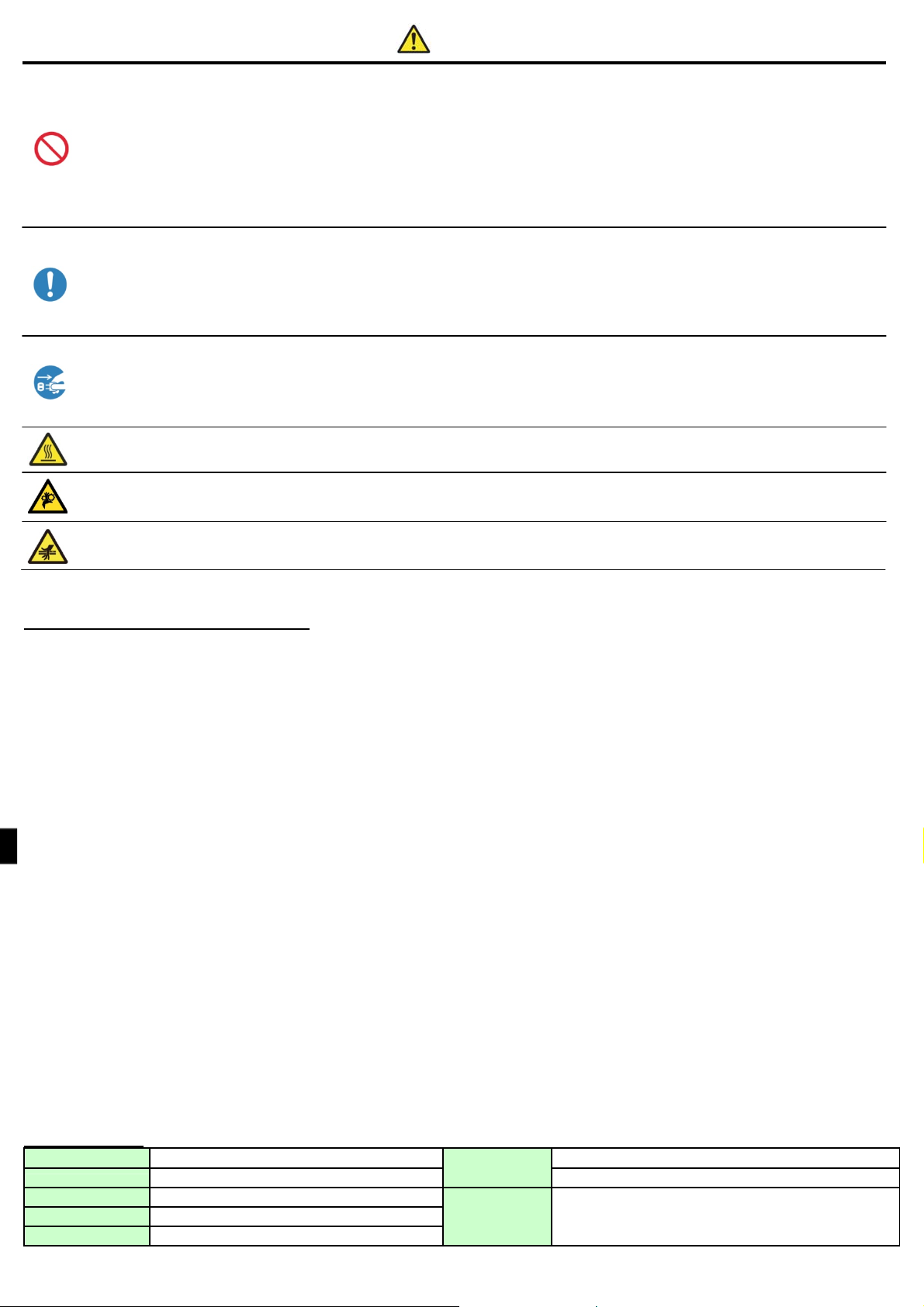
• Teile mit diesem Warnhinweis werden sehr heiß. Berühren Sie diese nach dem Druckvorgang nicht. Es besteht Verbrennungsgefahr.
• Berühren Sie nicht das Getriebe. Es besteht Verletzungsgefahr, wenn sich die Finger in dem drehenden Getriebe verfangen.
• Stecken Sie Ihre Finger nicht in Teile, die mit diesem Symbol markiert sind. Es besteht Verletzungsgefahr.
orsichtshinweise für die Installation
• Lesen Sie vor der Verwendung des Produkts sorgfältig den Abschnitt „Für einen sicheren Betrieb“ und befolgen Sie die darin beschriebenen Anweisungen.
• Seien Sie beim Bewegen des Produkts vorsichtig. Tragen Sie das Produkt niemals alleine. Wenn Sie das Produkt fallenlassen, könnten Sie sich verletzen oder
Sachbeschädigungen verursachen.
• Verwenden oder lagern Sie das Produ kt nicht in der Nähe von Feuer, feuchten Orten, in direktem Sonnenlicht, in der Nähe einer Klimaanlage oder Heizung oder einem anderen
Ort mit ungewöhnlich hoher oder niedriger Temperatur, hoher Feuchtigkeit oder übermäßigen Staub.
• Platzieren Sie das Produkt nicht an einem Ort, an dem chemische Reaktionen stattfinden, wie z. B. in einem Labor.
• Stellen Sie das Produkt nicht an Orten mit hohem Salzgehalt auf, oder an denen sich korrosive Gase in der Luft befinden.
• Das Produkt muss auf eine feste, ebene Fläche mit ausreichender Belüftung gestellt werden.
• Stellen Sie nichts auf dem Produkt ab.
• Verwenden Sie das Produkt nicht in der Nähe eines Radios oder eines Fernsehgeräts und verwenden Sie nicht dieselbe Steckdose für das Produkt und ein Radio- oder
Fernsehgerät. Der Radio- oder Fernsehempfang könnte andernfalls beeinträchtigt werden.
• Verwenden Sie das Produkt nur mit der angegebenen Spannung und Frequenz.
• Stellen Sie keine Gegenstände auf das Netzstromkabel und treten Sie nicht darauf.
• Ziehen oder tragen Sie das Produkt nicht am Netzstromkabel oder am USB-Kabel.
• Vermeiden Sie es, das Netzstromkabel in eine Steckdose mit vielen weiteren angeschlossenen Kabeln einzustecken.
• Legen Sie das Netzstromkabel nicht mit anderen Kabeln zusammen.
• Um das Netzstromkabel einzustecken oder aus der Steckdose zu ziehen, greifen Sie es immer am Steckergehäuse und nicht am Kabel.
• Achten Sie darauf, dass das Gerät ausgeschaltet ist, bevor Sie das USB-Kabel anschließen oder trennen.
• Vermeiden Sie die Verwendung eines langen USB-Kabels oder das Anschließen an ein geräuscherzeugendes Gerät. Wenn es unvermeidbar ist, verwenden Sie ein
abgeschirmtes Kabel oder ein verdrilltes Doppelkabel für jedes Signal.
• Verwenden Sie ein geschirmtes USB-Kabel, das den Spezifikationsanforderungen für USB 2.0 entspricht.
• Stellen Sie das Produkt in die Nähe der Steckdose auf, so dass das Netzstromkabel, zur Trennung der Stromversorgung, einfach aus der Steckdose gezogen werden kann.
• Verwenden Sie eine Wechselstromsteckdose, die für Dreifachstecker geeignet ist. Andernfalls besteht die Gefahr eines Stromschlags.
• Verwenden Sie die mit dem Drucker mitgelieferten Kabel nicht für andere Geräte.
• Verwenden Sie die mit dem Produkt mitgelieferten Kabel.
• Verwenden Sie nur Gegenstände, die nach den Maßstäben des Landes, in dem sie verwendet werden, als sicher zertifiziert sind.
• Achten Sie darauf, dass die Blindplatten eingesetzt sind, wenn die Wendeeinheit nicht verwendet wird. Andernfalls besteht Brandgefahr.
• Das Gerät ist nicht für die Benutzung am Bildschirmarbeitsplatz entsprechend BildscharbV vorgesehen.
Spezifikationen
Druckmethode Thermische Farbstoffsublimationsübertragung Betriebsumgebung Temperatur von 5 bis 35 °C bei natürlichen Konvektionsbedingungen
Abmessungen 322 mm (B) × 367 mm (T) × 171 mm (H) Luftfeuchtigkeit von 35 bis 80 % ohne Kondensation
Gewicht Ca. 14,0 kg (nur Druckereinheit) Lärm Maschinenlärminformations-Verordnung - 3. GPSGV,06.01.2004
Netzspannung Wechselstrom 100 - 240 V, 50/60 Hz
Bemessungsstrom 100 V, 3,96 A 240 V, 1,69 A
Der höchste Schalldruckpegel beträgt 70 dB(A)
oder weniger gemäß EN ISO 7779
Page 13
1. Überprüfung des Inhalts
Druckeinheit
Papierkassette
2. Duplexdruck (optional)
Dieses Produkt unterstützt den Duplexdruck, wenn es gemeinsam mit der optionalen Wendeeinheit verwendet wird.
Weitere Informationen zum Duplexdruck finden Sie in der mitgelieferten Anleitung der optionalen Wendeeinheit.
■Inhalt
(1) Überblick
(2) Vorbereitung
(3) Betrieb
(4) Reinigung und Beheben von Papierstaus
Leitfaden zur Inbetriebnahme
Lesen Sie vor der Verwendung des Produkts sorgfältig den Abschnitt „Für einen sicheren Betrieb“.
Netzstromkabel
CD-ROM
• Benutzerhandbuch
Farbbandkassette Papierhalter
Erläuterungsheft (dieses Dokument)
• Für einen sicheren Betrieb
• Leitfaden zur Inbetriebnahme
Page 14
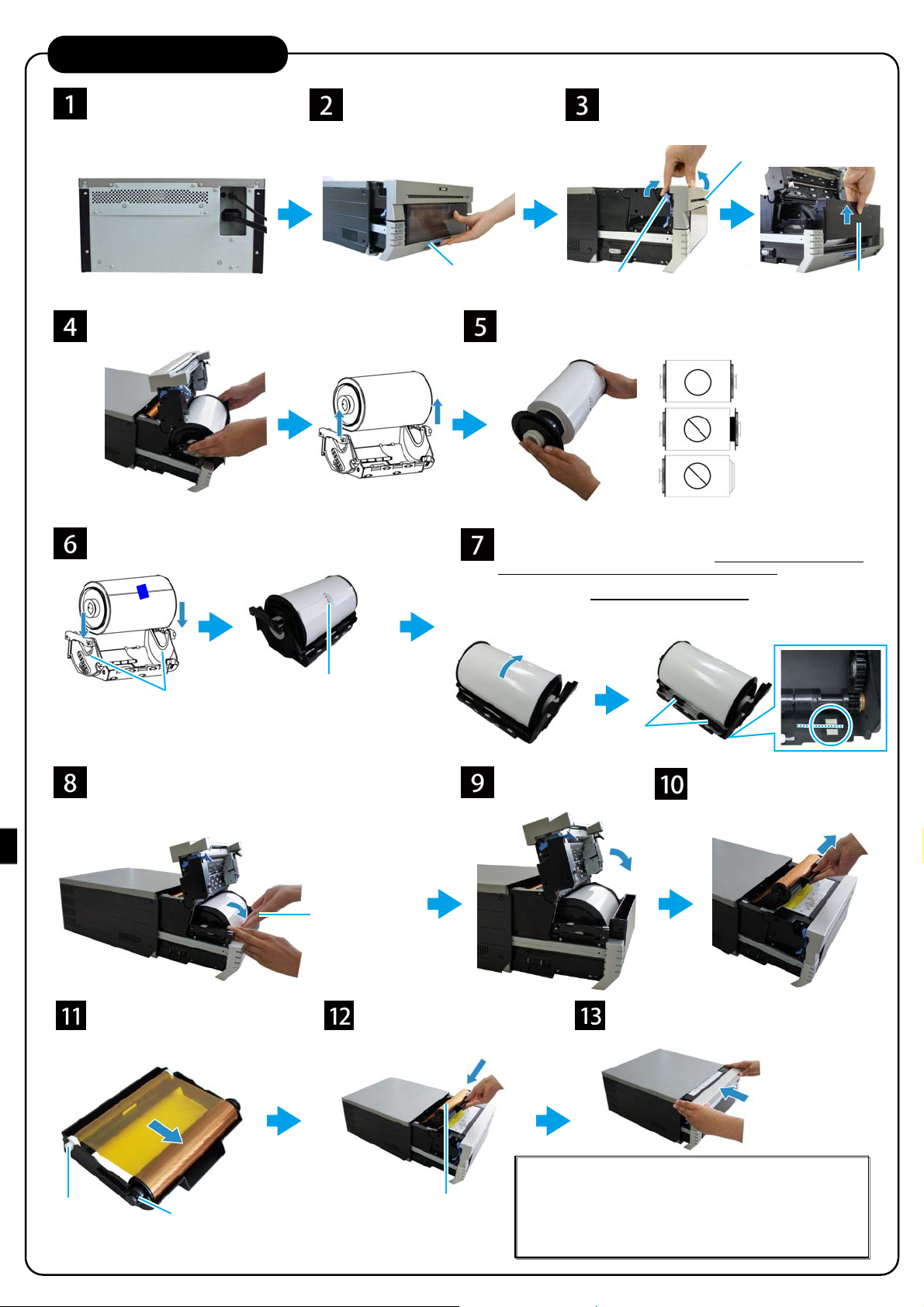
3. Installation des Druckers
Stecken Sie das Netzstromkabel
(mitgeliefert) und USB-Kabel an,
und schalten Sie das Gerät ein.
* Schließen Sie das USB-Kabel noch
nicht an, wenn Sie zuerst den
Druckertreiber installieren müssen.
Entnehmen Sie die Papierkassette, und entnehmen Sie dann
den Papierhalter aus der Papierkassette.
Legen Sie die Papierhalter in die Papierkassette ein.
Fest bis zum Anschlag
einsetzen.
Setzen Sie die Papierkassette in den Drucker ein. Drehen Sie das
Papier in Pfeilrichtung, um die Führungskanten soweit
einzuführen, bis ein Piepton ertönt.
Wenn das Papier richtig eingelegt ist, erlischt die Papier-LED.
Lösen Sie den Öffnungshebel, und
ziehen Sie die Haupteinheit heraus.
Legen Sie die Papierrolle mit
dem „PULL“-Aufkleber in die
gleiche Richtung wie oben
dargestellt ein.
Halten Sie den
Papierhalter fest, um
zu verhindern, dass er
sich beim Drehen des
Papiers mitdreht.
Öffnungshebel
Ziehen Sie den Papierhebel nach oben, heben
Sie die vordere Abdeckung an, und entnehmen
Sie die Abfallbox.
Vordere Abdeckung
Papierhebel
Entfernen Sie das Verpackungsmaterial von den Papierhaltern, und legen
Sie eine neue Papierrolle ein.
Setzen Sie die Rolle so ein, dass kein Spalt zwischen Papier und Halter
vorhanden ist.
Entfernen Sie den an der Rolle befestigten „PULL“-Aufkleber, und drehen
Sie die Rolle in Pfeilrichtung, um das Papier zuzuführen.
Führen Sie soviel Papier zu, bis seine Kante an der Mitte der zwei Löcher
(gestrichelte Linie) der Papierkassette ausgerichtet ist, wie im Bild rechts
dargestellt.
Achten Sie darauf, das Papier gerade einzuführen. Wenn das Papier nicht
gerade eingelegt ist, könnten weiße Ränder am Ausdruck auftreten, das Band
zerknittern und der Widerstand verrutschen.
Führen Sie das
Papier unter die
Rolle.
Setzen Sie die Abfallbox
ein, und schließen Sie die
vordere Abdeckung.
Nehmen Sie die Farbbandkassette
aus der Druckereinheit.
Abfallbox
Aufwickelseite
(weiße Rolle)
Legen Sie ein neues Farbband in
die Farbbandkassette ein.
Drehen Sie die Rolle in Pfeilrichtung,
um das Band zu straffen.
Zufuhrseite
(schwarze Rolle)
Setzen Sie die
Farbbandkassette in die
Die Kassette so einlegen, dass
sich die Zufuhrseite (schwarze
Rolle) vorn befindet.
Schließen Sie die Haupteinheit.
Hinweis: Wenn die Haupteinheit geschlossen wird, beginnt der
Drucker mit der Initialisierung (es werden 4 leere Blätter
ausgegeben).
Bei der Papierinitialisierung wird die äußere, eventuell verschmutzte
Papierschicht abgetrennt.
Wenn jedoch nach dem Einlegen des Papiers das Gerät
eingeschaltet wird, erfolgt keine Papierinitialisierung.
Page 15

Page 16

français
français
AVERTISSEMENT
Afin de réduire les risques d’incendie ou d’électrocution, ne pas exposer cet appareil à la pluie ou à l’humidité. Afin d’écarter tout
risque d’électrocution, garder le coffret fermé. Ne confier l’entretien de l’appareil qu’à un personnel qualifié.
Cet appareil doit être relié à la terre.
Pour les appareils raccordés, la prise de courant est installée près de l'équipement et doit être facilement accessible.
Pour déconnecter l'alimentation principale, débranchez le connecteur AC IN.
Lors de l’installation de l’appareil, incorporer un dispositive de coupure dans le câblage fixe ou brancher la fiche d’alimentation dans
une prise murale facilement accessible proche de l’appareil. En cas de problème lors du fonctionnement de l’appareil, enclencher le
dispositif de coupure d’alimentation ou débrancher la fiche d’alimentation.
AVERTISSEMENT sur le connecteur d’alimentation
Utiliser un cordon d’alimentation approprié à votre tension d’alimentation secteur locale.
1. Utilisez un cordon d’alimentation (câble secteur à 2 fils)/fiche femelle/fiche mâle conformes à la réglementation de sécurité
locale applicable.
2. Utilisez un cordon d’alimentation (câble secteur à 2 fils)/fiche femelle/fiche mâle avec des caractéristiques nominales (tension,
ampérage) appropriées.
Pour toute question sur l’utilisation du cordon d’alimentation/fiche femelle/fiche mâle ci-dessus, consultez un technicien du service
après-vente qualifié.
Pour les clients en Europe
Ne pas utiliser cet appareil dans une zone résidentielle.
Il s’agit d’un produit de Classe A. Dans un environnement domestique, cet appareil peut provoquer des interferences radio, dans ce
cas l’utilisateur peut être amené à prendre des mesures appropriées.
Dai Nippon Printing Co., Ltd déclare par la présente que cette DP-DS80D est conforme aux exigences essentielles et aux autres
dispositions pertinentes de la directive 1999/5/CE.
Le fabricant de ce produit est Dai Nippon Printing Co., Ltd
1-1-1 Ichigaya Kagacho, Shinjuku-ku, Tokyo 162-8001, Japan.
L'importateur pour la R & TTE et RoHS est DNP PHOTO IMAGING EUROPE SAS,
ZI PARIS NORD II -BP 51077, 22 AVENUE DES NATIONS, PARC SILIC -VILLEPINTE, 95948 ROISSY
CDG CEDEX, FRANCE.
Si vous souhaitez vous séparer de ce produit, ne le jetez pas avec les déchets ménagers.
Conformément à la legislation établie par la Directive WEEE (Directive 2002/96/EC) unsystème de collecte
séparée des produits électroniques usages est mis en place dans les pays de l’Union Européenne.
Page 17
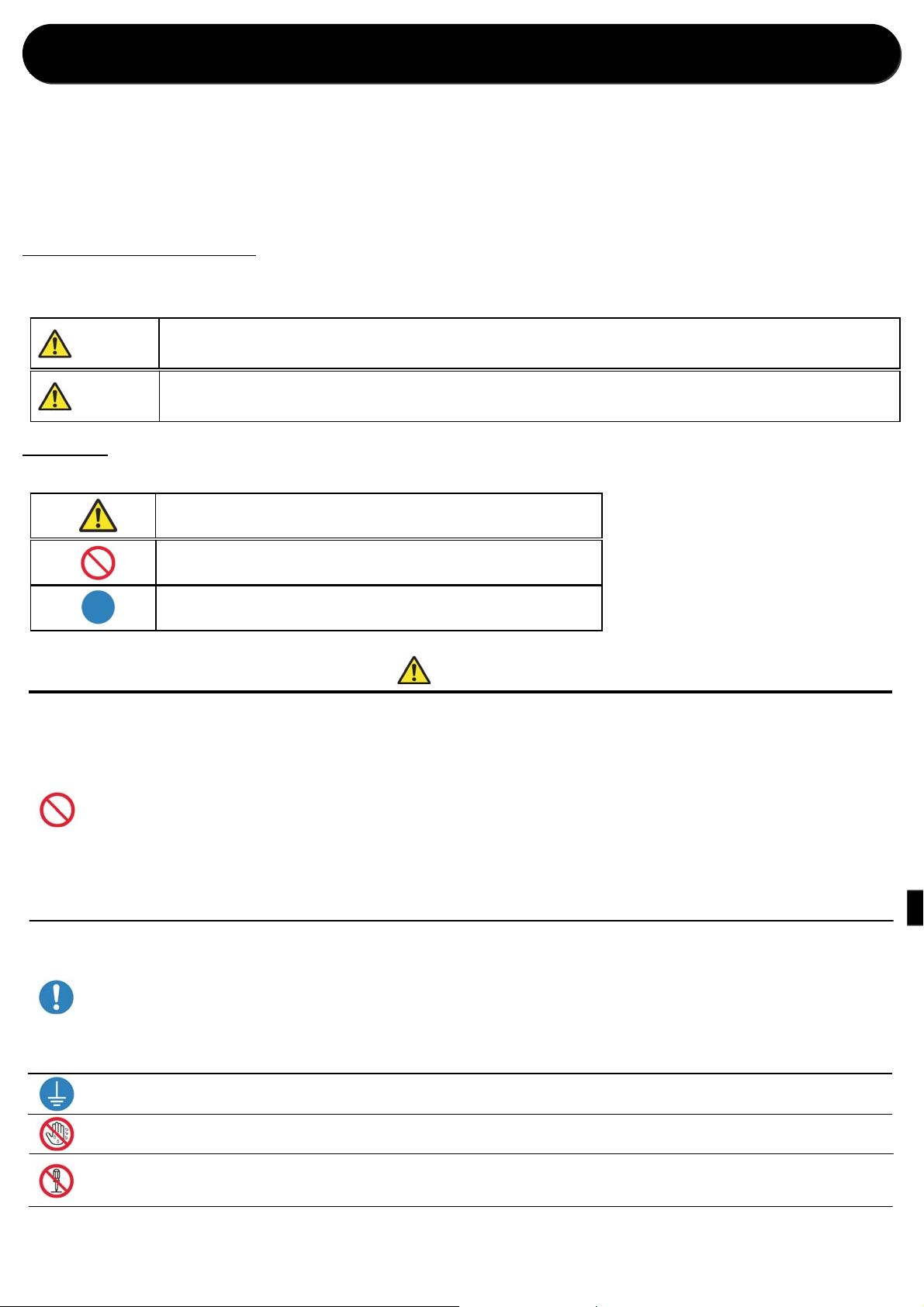
Pour un fonctionnement sans risque
Veuillez lire ce document attentivement
avant utilisation.
• Assurez-vous de lire ce document avant d’utiliser le produit. Après l’avoir lu, conservez-le en lieu sûr afin de pouvoir y
accéder facilement en cas de besoin.
• Pour plus d’informations sur la façon d’utiliser ce produit, veuillez vous reporter au Mode d’emploi (sur le CD-ROM
fourni).
• Les avertissements figurant ici visent à garantir une utilisation appropriée du produit, à éviter que l’utilisateur ou
d’autres personnes ne se blesse(nt) et à prévenir les dommages matériels. Veuillez respecter ces avertissements.
Avertissements et Précautions
Les niveaux de blessures ou de dommages possibles dus à une utilisation inappropriée sont énumérés ci-dessous et
classés comme Avertissements et Précautions, en fonction du degré de danger qu’ils représentent.
Avertissement
Les accidents causés par la non prise en compte des avertissements accompagnant ce symbole
peuvent entraîner des blessures graves ou mortelles.
Précaution
Les accidents causés par la non prise en compte des précautions accompagnant ce symbole
peuvent entraîner des blessures physiques ou des dommages matériels.
Symboles
Les symboles ci-dessous ont la signification suivante :
Ce symbole indique des messages d’avertissement et de précaution.
Le contenu de l’avertissement est indiqué dans ou près du symbole.
Ce symbole indique des actions interdites.
L’action interdite est indiquée dans ou près du symbole.
Ce symbole indique des instructions ou des actions nécessaires.
L’action est indiquée dans le symbole.
• Utilisez le produit uniquement à la tension et la fréquence prévues. Un raccordement incorrect peut provoquer un choc électrique ou un incendie.
• Évitez de raccorder trop de dispositifs à la prise utilisée pour ce produit et d’utiliser des rallonges. La prise peut surchauffer et provoquer un incendie.
• N’endommagez, ne coupez, n’enveloppez et n’altérez pas le cordon d’alimentation. De même, le cordon peut être endommagé si vous placez dessus des
objets lourds, ou si vous le tirez ou le pliez de façon excessive, car cela pourrait causer un incendie ou un choc électrique.
• N’installez pas le produit à des endroits où l’air contient une forte teneur en sel ou des gaz corrosifs. Cela pourrait provoquer un incendie.
• N’obstruez pas les orifices d’aération du produit. La chaleur peut s’accumuler dans le produit et provoquer un dysfonctionnement ou un incendie.
• Ne montez pas sur le produit et ne placez pas d’objets lourds dessus. En outre, ne forcez pas excessivement sur les touches, les commutateurs, les
bornes, etc. Cela pourrait endommager le produit et blesser l’utilisateur ou d’autres personnes.
• Rangez le sac du produit hors de la portée des enfants. Cela peut causer un étouffement s’ils le placent sur la tête.
• Faites attention à ne pas vous blesser ou endommager d’autres objets sur les bords du produit.
• N’utilisez pas ce produit pour des applications mettant en jeu la vie d’une personne (comme les applications médicales, spatiales, aéronautiques, ou
d’autres applications exigeant une extrême fiabilité).
• Le produit pèse environ 14 kg (31 lb). Lorsque vous le déplacez, soulevez-le de façon à éviter une contrainte physique excessive. Le fait de soulever le
produit de manière imprudente ou de le faire tomber peut provoquer des blessures.
• Placez le produit aussi près que possible d’une prise afin de pouvoir débrancher facilement le cordon d’alimentation en cas de problème.
• S’il y a de la poussière sur la fiche, nettoyez-la bien. Cela pourrait provoquer un choc électrique ou un court-circuit.
• Si des objets métalliques ou des liquides sont tombés dans le produit ou s’il y a de la fumée, une odeur étrange ou toute autre anomalie, mettez
immédiatement l’imprimante hors tension et débranche z le cordon d’alimentation. Ensuite, contactez un représentant du service après-vente. Ne continuez
pas à utiliser le produit s’il ne fonctionne pas correctement. Cela pourrait provoquer un choc électrique, un court-circuit, un incendie ou un
dysfonctionnement.
• Assurez-vous de relier le produit à la terre. Sinon, cela pourrait causer un court-circuit et entraîner un incendie ou un choc électrique.
• Ne branchez ou débranchez pas le cordon avec les mains mouillées. Cela pourrait provoquer un choc électrique.
• N’ouvrez pas le produit, ne démontez pas les pièces internes et ne modifiez pas le produit. Cela peut provoquer un choc électrique, un incendie, des
blessures ou un dysfonctionnement du produit. Pour les vérifications, les ajustements ou les réparations internes, veuillez contacter un représentant du
service après-vente.
Avertissement
Page 18
Précaution
• N’installez pas le produit à des endroits poussiéreux ou humides. Cela peut provoquer un incendie ou un choc électrique, ou endommager le produit.
• N’installez pas le produit sur une surface instable. Il pourrait tomber et blesser l’utilisateur ou d’autres personnes.
• Ne laissez pas de corps étrangers pénétrer dans le produit. Ils peuvent provoquer un choc électrique, un court-circuit ou incendie, ou endommager le
produit. Si quelque chose tombe dans le produit, mettez-le immédiatement hors tension, débranchez le cordon d’alimentation et appelez un représentant
du service après-vente.
• N’ouvrez pas le capot pendant l’impression. Cela pourrait endommager le produit.
• Ne déversez ou ne vaporisez jamais de liquides ou de produits chimiques sur le produit.
• Lors du nettoyage du capot, n’utilisez pas de nettoyants à base de diluant, de trichloroéthane, de benzène, ou de cétone, ou de chiffons traités
chimiquement. Ils pourraient décolorer ou détériorer le capot.
• Au moins une fois par an, débranchez le cordon d’alimentation et nettoyez les broches et la fiche. Une accumulation de poussière pourrait provoquer un
incendie.
• Lorsque vous imprimez en continu pendant de longues durées dans une petite pièce, assurez-vous que la pièce est suffisamment ventilée.
• Si vous avez prévu d’utiliser le produit dans un véhicule de transport (train, camion, bateau, etc.), veuillez en parler au préalable à un représentant.
• Lorsque vous vous débarrassez du produit, des accessoires, des matériaux d’emballage ou des supports (papier, rouleau), veuillez respecter les
ordonnances locales d’enlèvement des déchets. Pour en savoir plus, contactez les administrations publiques locales.
• Lorsque vous débranchez le cordon, saisissez touj our s la fich e. Ne tire z p a s sur le cor don car cel a pourrai t l’endom mager e t cau ser un cho c éle ctrique ou
un incendie.
• Lorsque vous déplacez le produit, assurez-vous de débrancher le cordon d’alimentation. Sinon, le cordon risque d’être endommagé, ce qui pourrait
provoquer un incendie ou un choc électrique.
• Pour votre sécurité, lorsque vous n’utilisez pas le produit pendant des périodes prolongées, assurez-vous de débrancher le cordon d’alimentation. Sinon,
cela pourrait provoquer un choc électrique, un incendie ou un dysfonctionnement.
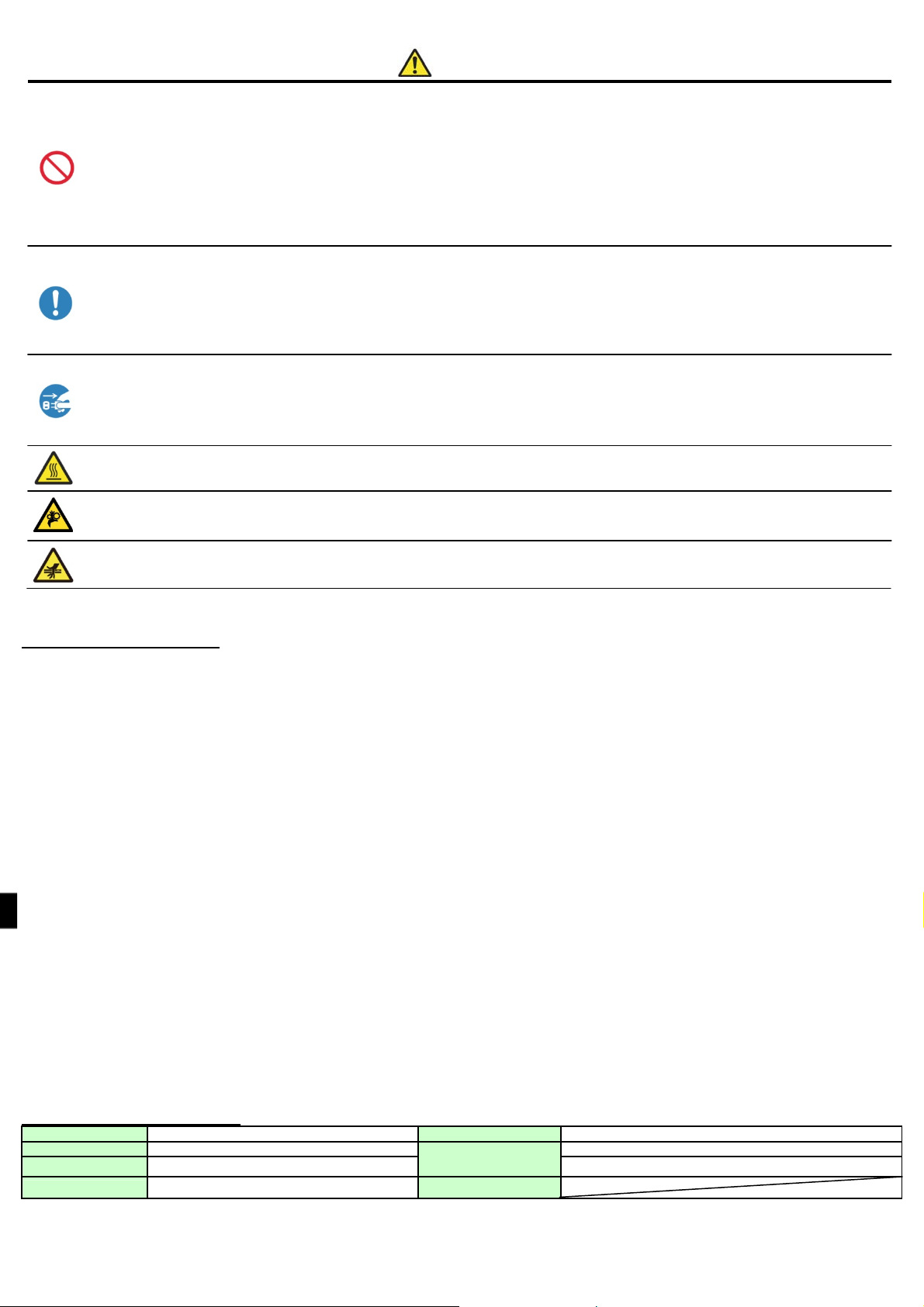
• Les pièces accompagnées de cet avertissement deviennent extrêmement chaudes. Ne les touchez pas après l’impression. Vous risqueriez de vous
brûler.
• Ne touchez pas les mécanismes d’entraînement à engren ages. Vous risqueriez de vous blesser si vos doigts se coincent dans les engrenages tournan ts.
• Ne mettez pas vos doigts à l’intérieur des pièces accompagnées de cette marque. Vous risqueriez de vous blesser.
Précautions d’installation
• Avant d’utiliser le produit, lisez attentivement « Pour un fonctionnement sans risque » et respectez les instructions qui y figurent.
• Faites bien attention lors du déplacement du produit. N’essayez jamais de porter seul le produit. Sa chute pourrait entraîner des blessures ou des dommages matériels.
• N’utilisez pas et ne rangez pas le produit près d’un feu, à des endroits humides, à la lumière directe du soleil, près d’un climatiseur, d’un chauffage, ou à tout autre endroit ayant
une température anormalement basse ou élevée, excessivement humide ou excessivement poussiéreux.
• Ne placez pas le produit à des endroits où des réactions chimiques ont lieu, comme dans un laboratoire.
• N’installez pas le produit à des endroits où l’air contient une forte teneur en sel ou des gaz corrosifs.
• Le produit doit être installé sur une surface plane, ferme et suffisamment ventilée.
• Ne placez rien sur le dessus du produit.
• N’utilisez pas le produit à proximité d’une radio ou d’une télévision et n’utilisez pas la même prise murale pour brancher le produit et une radio ou une télévision. Sinon, cela
pourrait entraver la réception des programmes de radio et de télévision.
• N’utilisez pas de tension ou de fréquence d’alimentation autre que celle spécifiée.
• Ne placez rien sur le cordon d’alimentation et ne marchez pas dessus.
• Ne tirez pas et ne portez pas le produit par le cordon d’alimentation ou le câble USB.
• Évitez de brancher le cordon d’alimentation dans une prise où d’autres câbles sont branchés.
• N’enveloppez pas le cordon d’alimentation.
• Saisissez toujours la fiche et non le cordon lorsque vous branchez ou débranchez le cordon d’alimentation.
• Assurez-vous que l’appareil est hors tension avant de brancher ou de débrancher le câble USB.
• Évitez d’utiliser un long câble USB ou de le raccorder à un dispositif générant du bruit. Si cela est inévitable, utilisez un câble blindé ou à paire torsadée pour chaque signal.
• Utilisez un câble USB blindé compatible avec les caractéristiques USB 2.0.
• Placez le produit à proximité de la prise de façon à pouvoir débrancher facilement le cordon d’alimentation pour couper l’alimentation.
• Utilisez une prise secteur acceptant les fiches à trois broches. Sinon, il y a un risque de choc électrique.
• N’utilisez pas le cordon fourni avec l’imprimante pour les autres dispositifs.
• Utilisez le cordon fourni pour le produit.
• Utilisez uniquement des éléments dont la sûreté est certifiée conformément aux normes du pays dans lequel ils doivent être utilisés.
• Assurez-vous que les plaques d’obturation sont installées lorsque vous n’utilisez pas l’unité de retournement. Sinon, il y a un risque d’incendie.
Caractéristiques techniques
Méthode d’impression Transfert thermique par sublimation Courant nominal 100 V 3,96 A 240 V 1,69 A
Dimensions 322 mm (L) × 367 mm (P) × 171 mm (H)
Poids Environ 14,0 kg (unité d’impression uniquement) Humidité 35 % à 80 % sans condensation
Tension nominale 100 V - 240 V CA 50 Hz/60 Hz
Environnement de
fonctionnement
Température 5°C à 35°C dans des conditions de convection naturelle
Page 19
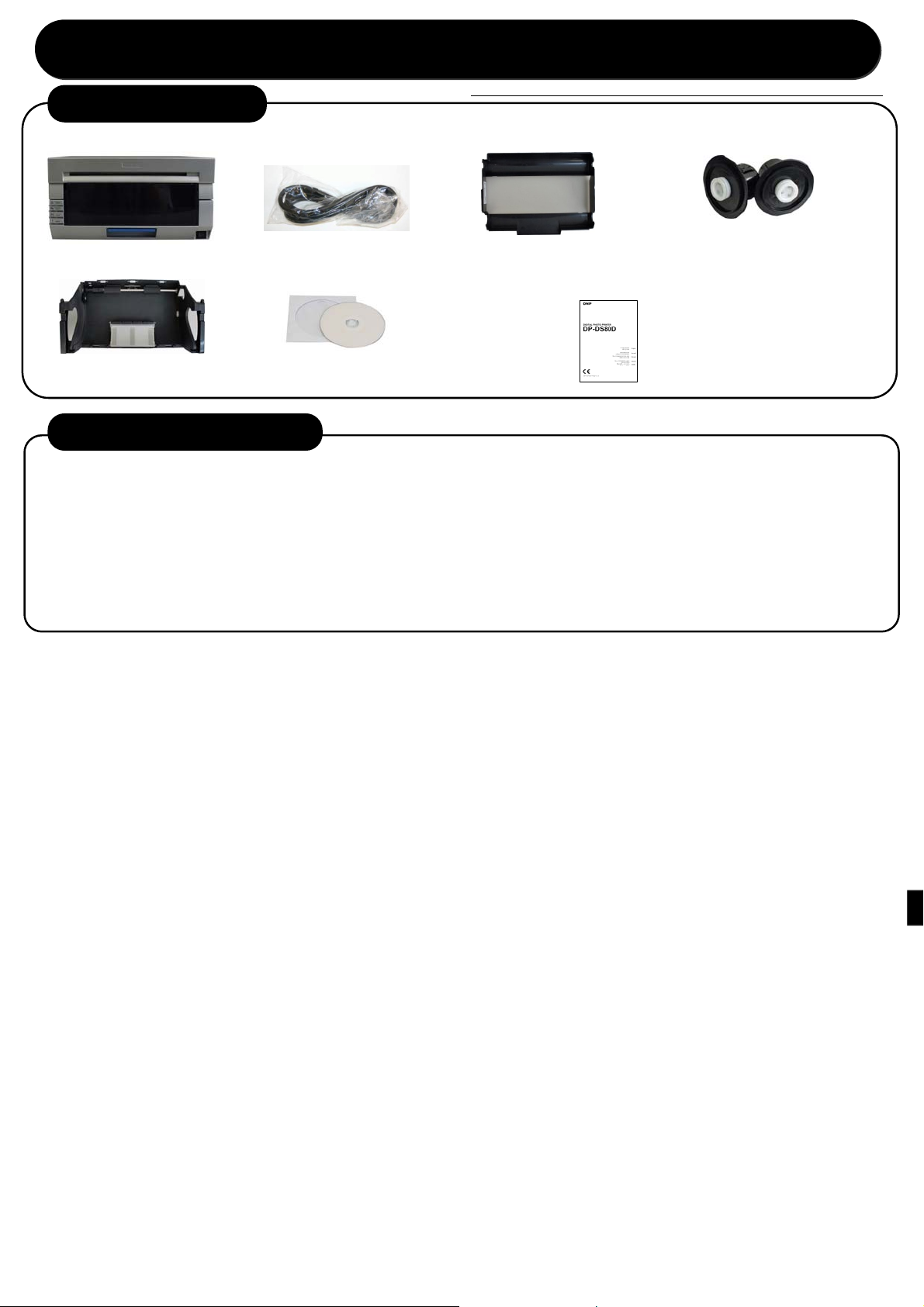
1.Vérification du contenu
Imprimante Porte-papier
Guide de démarrage
Avant d’utiliser le produit, lisez attentivement « Pour un fonctionnement sans risque ».
Cassette à ruban
Cordon d’alimentation
Cassette à papier CD-ROM
• Mode d’emploi
Livret d’explication (ce document)
• Pour un fonctionnement sans risque
• Guide de démarrage
2.Impression recto verso (option)
Ce produit prend en charge l’impression recto verso lorsque vous l’utilisez en association avec l’unité de retourne ment
en option.
Pour plus d’informations sur l’impression recto verso, reportez-vous au manuel fourni avec l’unité de retournement en
option.
■Contenu
(1) Présentation
(2) Préparation
(3) Fonctionnement
(4) Nettoyage et élimination des bourrages papier
Page 20
(
3.Installation de l’imprimante
Branchez le cordon d’alimentation
(fourni) et le câble USB, puis mettez
l’imprimante sous tension.
* Si vous devez installer le pilote
d’imprimante, ne branchez pas le câble
USB maintenant.
Retirez la cassette de papier, puis retirez les porte-papiers de
la cassette de papier.
Placez les porte-papiers dans la cassette de papier.
Placez-le fermement tout
du long.
Placez la cassette de papier dans l’imprimante. Faites tourner le
papier dans le sens de la flèche pour faire avancer le premier bord
jusqu’à ce que le bip sonore retentisse.
Lorsque le papier est correctement inséré la DEL du papier s’éteint.
Relâchez le levier d’ouverture et
tirez le mécanisme.
Installez le rouleau de papier
avec l’autocollant « PULL »
(TIRER) dans le même sens tel
qu’illustré ci-dessus.
Maintenez le
porte-papier pour
éviter qu’il ne tourne
lorsque vous faites
tourner le papier.
Levier d’ouverture
Enlevez les matériaux d’emballage des porte-papiers et installez le nouveau
rouleau de papier.
Placez le rouleau de sorte qu’il n’y ait pas d’écart entre le papier et le porte-papier.
Soulevez le levier de papier, levez le capot
avant et retirez le réceptacle de chutes de
papier.
Capot avant
Levier de papier
Enlevez l’autocollant « PULL » (TIRER) apposé sur le rouleau, puis
tournez le rouleau dans le sens de la flèche pour charger le papier.
Chargez le papier jusqu’à ce que le bord soit aligné au milieu des deux
orifices (ligne pointillée) sur la cassette de papier, tel qu’illustré dans le
dessin de droite.
Veillez à charger le papier bien droit. Si le papier n’est pas droit, un espace
blanc peut apparaître sur les bords des feuilles imprimées, le ruban peut se
froisser et le registre peut être décalé.
Chargez le papier
sous le rouleau.
Placez le réceptacle de
chutes de papier et fermez
le capot avant.
Retirez la cassette à ruban de
l’imprimante.
Réceptacle de
chutes de papier
Placez le nouveau ruban dans la
cassette à ruban.
Faites tourner le rouleau dans le sens
de la flèche pour le tendre.
Installez la cassette à ruban
dans l’imprimante.
Fermez le mécanisme.
Remarque : Lorsque le mécanisme est fermé, l’imprimante
commence l’initialisation du papier (4 feuilles vierges sont émises).
Installez la cassette afin que le
Côté de réception
(rouleau blanc)
Côté
d’alimentation
rouleau noir)
côté d’alimentation (rouleau noir)
soit à l’avant.
Pendant l’initialisation du papier, la couche extérieure du papier qui
peut être sale est coupée.
Cependant, si l’imprimante est mise sous tension après que le p apier
est installé, l’initialisation du papier ne démarrera pas.
Page 21

Page 22
español
español
ADVERTENCIA
Para reducir el riesgo de electrocución, no exponga este aparato a la lluvia ni a la humedad. Para evitar descargas eléctricas, no abra el
aparato. Solicite asistencia técnica únicamente a personal especializado.
Este aparato debe conectarse a tierra.
Para equipos conectables, enchufe de corriente debe instalarse cerca del equipo y debe ser fácilmente accesible.
Para desconectar la alimentación principal, desenchufe el connector AC IN.
Al instalar la unidad, incluya un dispositivo de desconexión fácilmente accesible en el cableado fijo, o conecte el enchufe de
alimentación a una toma de corriente fácilmente accesible cerca de la unidad. Si se produce una anomalía durante el funcionamiento
de la unidad, accione el dispositivo de desconexión para desactivar la alimentación o desconecte el enchufe de alimentación.
ADVERTENCIA sobre la conexión de la alimentación
Utilice un cable de alimentación adecuado al suministro eléctrico local.
1. Utilice un cable de alimentación (cable de alimentación de 2 hilos)/conector/enchufe del aparato recomendado con toma de tierra
y que cumpla con la normativa de seguridad de cada país, si procede.
2. Utilice un cable de alimentación (cable de alimentación de 2 hilos)/conector/enchufe del aparato que cumpla con los valores
nominales correspondientes en cuanto a tensión e intensidad.
Si tiene alguna duda sobre el uso del cable de alimentación/conector/enchufe del aparato, consulte a un técnico de servicio cualificado.
Para los clientes de Europa
Este dispositivo no debe utilizarse en zonas residenciales.
Éste es un producto de clase A. En un ambiente doméstico, este producto puede causar interferencias radioeléctricas, en cuyo caso el
usuario puede tener que tomar las medidas adecuadas.
Por medio de la presente Dai Nippon Printing Co.,Ltd. declara que el DP-DS80D cumple con losrequisitos esenciales y cualesquiera
otras disposiciones aplicables o exigibles de la Directiva 1999/5/CE.
El fabricante de este producto es Dai Nippon Printing Co.,Ltd.,
con dirección en 1-1-1, Ichigaya Kagacho, Shinjukuku, Tokio, Japón.
El importador para R&TTE y RoHS es DNP PHOTO IMAGING EUROPE SAS,
ZI PARIS NORD II - BP 51077, 22 AVENUE DES NATIONS, PARC SILIC - VILLEPINTE, 95948 ROISSY CDG CEDEX,
FRANCIA.
Si desea desechar este producto, no lo mezcle con otros residuos domésticos. Conforme a lo estipulado en la
Directiva RAEE (Directiva 2002/96/CE), existe un sistema de recogida específico para los productos electrónicos
que sólo está vigente dentro de la Unión Europea.
Page 23
Para un funcionamiento seguro
Asegúrese de leer este documento con
detenimiento antes de su utilización.
• Asegúrese de leer este documento antes de utilizar el producto. Después de leerlo, guárdelo en un lugar seguro para
que pueda acceder a él fácilmente en caso necesario.
• Para obtener más información sobre cómo utilizar este producto, consulte el manual de usuario (en el CD-ROM
incluido).
• Las advertencias que se enumeran tienen como objetivo garantizar un uso adecuado del producto y evitar lesiones al
usuario o a otras personas, así como daños materiales. Siga estas advertencias.
Advertencias y precauciones
A continuación, se clasifican en Advertencia y Precaución los posibles niveles de lesiones o daños derivados de un mal
uso, según el grado de peligro que implican.
Advertencia
Los accidentes ocasionados por hacer caso omiso a los mensajes de advertencia que acompañan
a este símbolo podrían provocar lesiones graves o mortales.
Precaución
Los accidentes ocasionados por hacer caso omiso a los mensajes de precaución que acompañan a
este símbolo podrían provocar lesiones o daños materiales.
Símbolos
Los símbolos mostrados tienen los siguientes significados:
Este símbolo indica mensajes de advertencia y de precaución.
El contenido de advertencia se indica con, o cerca de, este símbolo.
Este símbolo indica acciones prohibidas.
La acción prohibida se indica con, o cerca de, este símbolo.
Este símbolo indica acciones o instrucciones necesarias.
Las acciones se indican con este símbolo.
• Utilice el producto sólo con el voltaje y la frecuencia designados. Una conexión incorrecta podría provocar una descarga eléctrica o un incendio.
• Evite conectar demasiados dispositivos a la toma de corriente que utiliza este producto, así como utilizar alargadores. La toma de corriente podría
recalentarse y provocar un incendio.
• No dañe, corte, ate, ni modifique el cable de alimentación. Por otra parte, el cable puede dañarse si se colocan objetos pesados encima de él, o si se tira
de él o se dobla con excesiva fuerza, y podría provocar un incendio o una descarga eléctrica.
• No instale el producto en lugares con alta salinidad o con gases corrosivos en el aire. Esto podría ocasionar un incendio.
• No obstruya las rejillas de ventilación del producto. El calor podría acumularse en el producto y provocar un mal funcionamiento o un incendio.
• No se suba ni coloque objetos pesados sobre el producto. No ejerza una fuerza excesiva en los botones, interruptores, terminales, etc. El producto podría
resultar dañado y causar lesiones al usuario o a otras personas.
• Guarde la bolsa del producto fuera del alcance de los niños. Podría ocasionar asfixia si se coloca en la cabeza.
• Tenga cuidado de no lesionarse ni dañar objetos con los bordes del producto.
• No utilice este producto en aplicaciones que puedan poner en peligro vidas humanas (como médicas, espaciales, aeronáutica s u otras aplicaciones que
requieran una fiabilidad extrema).
• Este producto pesa aproximadamente 14 kg (31 lbs.). Al desplazarlo, levántelo de forma que evite una sobrecarga física excesiva. Levantar o dejar caer el
producto sin cuidado podría ocasionar lesiones físicas.
• Sitúe el producto lo más cerca posible de una toma de corriente, y deje espacio suficien te para desconectar fácilmente el cable de alimentación en caso de
problemas.
• Si hay polvo en el enchufe, límpielo minuciosamente. Podría provocar una descarga eléctrica o un cortocircuito.
• Si caen dentro del producto líquidos u objetos metálicos o se desprende humo, un olor raro o se da cualquier otra anomalía aparente, apague
inmediatamente la unidad y desenchufe el cable de alimentación. A continuación, póngase en contacto con el servicio técnico. No continúe utilizando el
producto si no funciona correctamente. Esto podría ocasionar una descarga eléctrica, un cortocircuito, un incendio o un mal funcionamiento.
• Asegúrese de conectar a tierra el producto. De lo contrario, podría ocasionarse un cortocircuito, un incendio o una descarga eléctrica.
• No enchufe ni desenchufe el cable con las manos mojadas. Podría ocasionar una descarga eléctrica.
• No abra el producto, desmonte las piezas internas ni modifique el producto. Podría ocasionar una descarga eléctrica, un incendio, lesiones personales o
un mal funcionamiento del producto. Para revisiones, ajustes o reparaciones internos, póngase en contacto con el servicio técnico.
Advertencia
Page 24
• No coloque el producto en lugares llenos de polvo o humedad. Podría ocasionar un incendio o una descarga eléctrica, o dañar el producto.
• No coloque el producto en una superficie inestable. Podría caerse y provocar lesiones al usuario o a otras personas.
• No deje que entren objetos extraños en el producto . Podría ocasionar una descarga eléctrica, un cortocircuito, un incendio o dañar el producto. Si se cae
algo dentro del producto, desconéctelo inmediatamente, desconecte el cable de alimentación y póngase en contacto con el servicio técnico.
• No abra la tapa durante la impresión. Podría dañar el producto.
• No derrame ni pulverice líquidos ni sustancias químicas en el producto.
• Cuando limpie la tapa, no utilice diluyentes, tricloroetano, benceno, productos de limpieza con cetona ni paños trat ados químicamente. Podrían decolorar
o deteriorar la tapa.
• Al menos una vez al año, desenchufe el cable de alimentación y limpie las clavijas y el enchufe. Si se acumula polvo, podría ocasionar un incendio.
• Cuando se imprima de forma continuada y durante periodos de tiempo prolongados en una habitación pequeña, asegúrese de ventilarla correctamente.
• Si planea utilizar el producto en un vehículo (tren, camión, barco, etc.), coménteselo previamente a un comercial.
• Cuando deseche el producto, los accesorios, el embalaje o los consumibles (papel, cinta), siga la normativa local de recogida de residuos. Para obtener
más información, póngase en contacto con las autoridades locales.
• Cuando desenchufe el cable, tire siempre de la clavija. No ti re del cable, y a que podría dañarse el cable y oca sionar una descarga eléctrica o un incendio.
• Cuando mueva el producto, asegúrese de desconectar el cable de alimentación. De lo contrario, el cable de alimentación podría dañarse y ocasionar un
incendio o una descarga eléctrica.
• Por seguridad, cuando no utilice el producto durante un periodo largo de tiempo, asegúrese de desenchufar el cable de alimentación. De lo contrario,
podría ocasionar una descarga eléctrica, un incendio o un mal funcionamiento.
• Las piezas con esta advertencia se calientan mucho. No las toque después de imprimir. Existe peligro de quemaduras.
• No toque los mecanismos de engranaje. Podría lesionarse si se le quedan los dedos enganchados en los engranajes de giro.
• No meta los dedos dentro de las piezas con esta marca. Existe peligro de lesiones.
Precaución
Precaución en la instalación
• Antes de utilizar el producto, lea atentamente “Para un funcionamiento seguro” y siga las instrucciones indicadas.
• Tenga cuidado al mover el producto. Nunca intente trasladar el producto solo. Si lo deja caer, podrían ocasionarse lesiones o daños a la propiedad.
• No utilice ni guarde el producto cerca del fuego, en entornos húmedos, bajo la luz solar directa, cerca de aparatos de aire acondicionado o de calefacción o en cualquier otra
ubicación con temperatura inusualmente alta o baja o con gran humedad, o en lugares con excesivo polvo.
• No coloque el producto en entornos donde se produzcan reacciones químicas, como en un laboratorio.
• No instale el producto en lugares con alta salinidad o con gases corrosivos en el aire.
• El producto debe colocarse sobre una superficie nivelada y firme, y con suficiente ventilación.
• No coloque nadie encima del producto.
• No utilice el producto cerca de una radio o televisión y no utilice la misma toma de corriente con el producto y una toma de radio o televisión. De lo contrario, la recepción de
radio o de televisión podría verse afectada.
• No utilice un voltaje ni una frecuencia distintos de los especificados.
• No coloque nada encima del cable de alimentación ni lo pise.
• No arrastre ni transporte el producto por el cable de alimentación ni por el cable USB.
• Evite enchufar el cable de alimentación en una toma de corriente con muchos cables conectados.
• No ate el cable de alimentación.
• Sujete siempre por la clavija del enchufe en vez del cable para enchufar o desenchufar el cable de alimentación.
• Asegúrese de que la alimentación de corriente está desconectada antes de conectar o desconectar el cable USB.
• Evite utilizar un cable USB largo o conectarlo a un dispositivo ruidoso. Si es inevitable, utilice un cable blindado o un par trenzado para cada señal.
• Utilice un cable USB blindado compatible con las especificaciones USB 2.0.
• Coloque el producto cerca de la toma de corriente para que se pueda desenchufar fácilmente el cable de alimentación para desconectar el suministro de energía.
• Utilice una toma de CA que acepte enchufes de tres clavijas. De lo contrario, puede haber riesgo de una descarga eléctrica.
• No utilice el cable conector suministrado con la impresora en otros dispositivos.
• Utilice el cable conector suministrado para el producto.
• Utilice sólo los elementos que tengan el certificado de seguridad de acuerdo con la normativa del país donde vayan a utilizarse.
• Asegúrese de que las placas ciegas están instaladas cuando no utilice la unidad de giro. De lo contrario, puede haber riesgo de incendio.
Especificaciones
Método de impresión Transferencia térmica de sublimación de tinta Corriente nominal 100 V 3,96 A 240 V 1,69 A
Dimensiones 322mm (An.) × 367mm (Prof.) × 171mm (Al.)
Peso Aprox. 14,0kg (sólo la impresora) Humedad 35 % a 80 % sin condensación
Tensión nominal
100V CA – 240V 50Hz/60Hz
Entorno de
funcionamiento
Temperatura 5 °C a 35 °C en condiciones de convección natural
Page 25
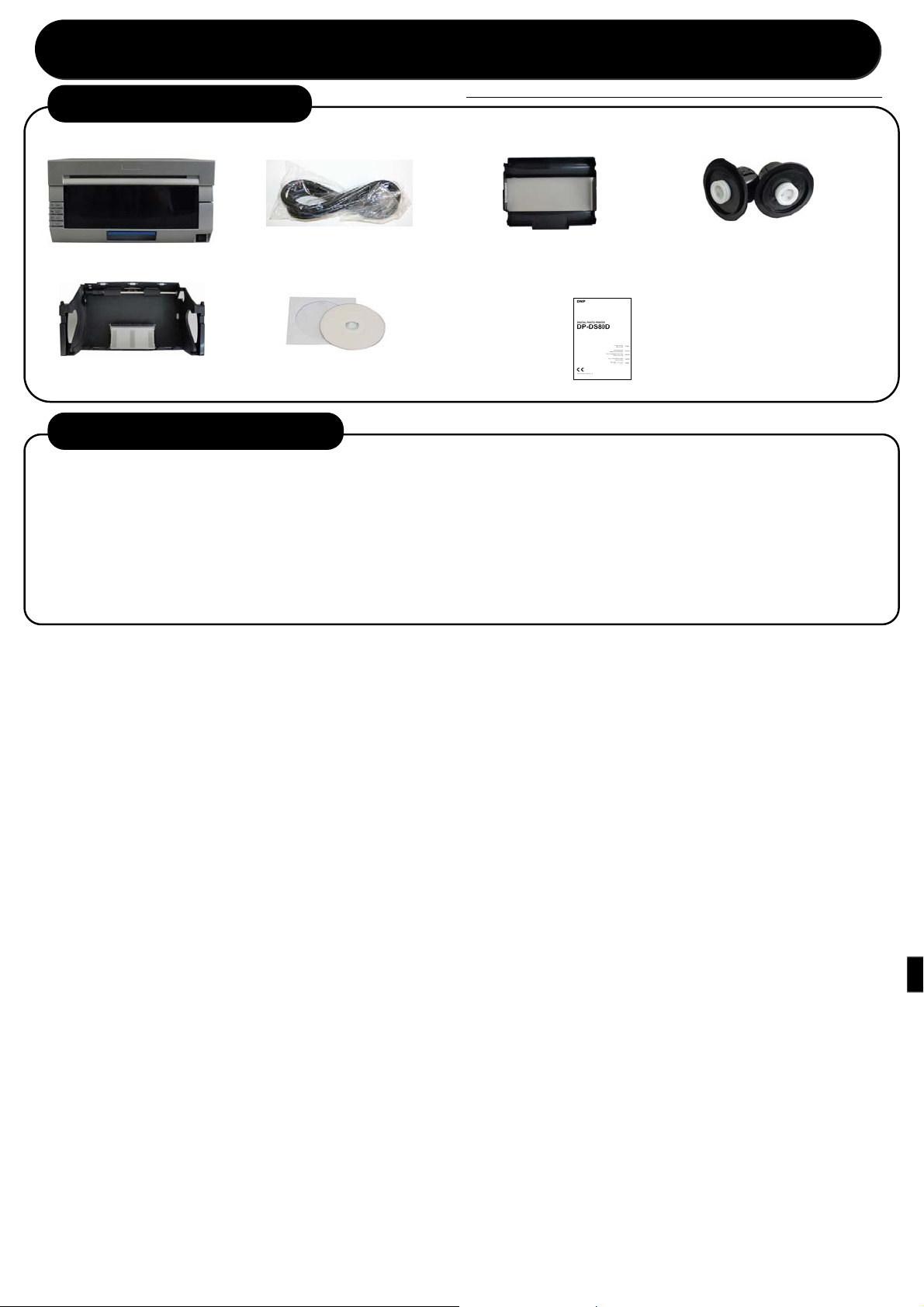
1. Comprobación del contenido
Impresora Soporte del papel
Cable de alimentación
Guía de inicio
Antes de la utilización del producto, lea atentamente “Para un funcionamiento seguro”.
Cinta de impresión
Cinta del papel CD-ROM
• Manual de usuario
Folleto de instrucciones (este documento)
• Para un funcionamiento seguro
• Guía de inicio
2. Impresión a doble cara (opcional)
Este producto admite la impresión a doble cara cuando se utiliza junto a una unidad de giro opcional.
Para obtener más información sobre la impresión a doble cara, consulte el manual suministrado con la unidad de
giro opcional.
Contenidos
■
(1) Información general
(2) Preparación
(3) Funcionamiento
(4) Limpieza y eliminación de atascos de papel
Page 26
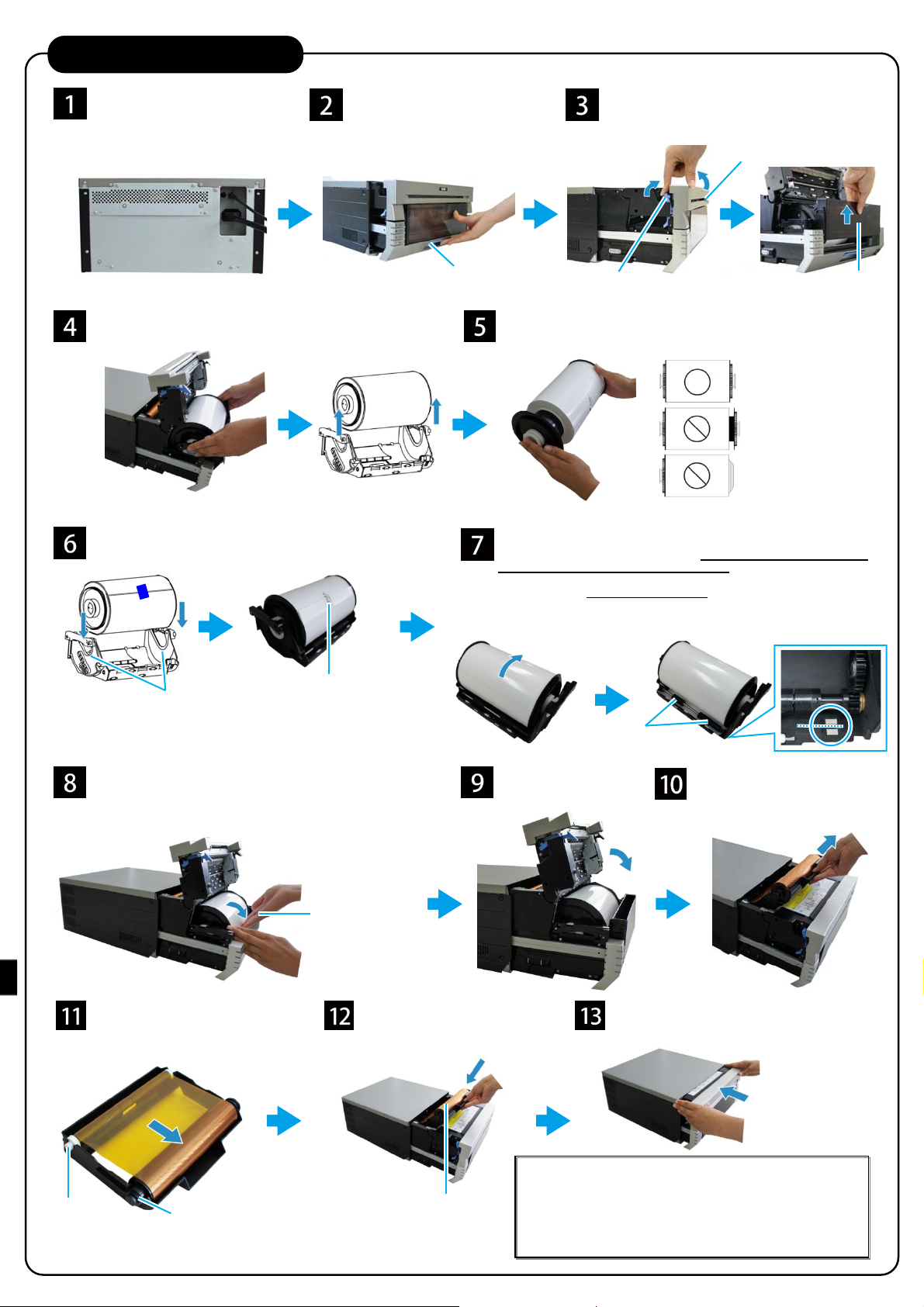
3. Instalación de la impresora
Enchufe el cable de alimentación
(suministrado) y el cable USB y
encienda el dispositivo.
* Si debe instalar el controlador de
impresión, no conecte todavía el
cable USB.
Retire la cinta del papel y retire los soportes de papel de la
cinta de papel.
Coloque los soportes del papel en la cinta del papel.
Colóquelo con firmeza
hasta el fondo.
Ajuste la cinta del papel en la impresora. Gire el papel en la
dirección de la flecha para hacer avanzar el borde primero hasta
que pite el avisador.
Cuando el papel esté correctamente insertado, se apaga el LED del
papel.
Libere la palanca de apertura y
extraiga el mecanismo.
Coloque el rollo de papel con el
adhesivo “PULL” en la orientación
que se muestra arriba.
Sostenga el soporte
del papel para evitar
que gire al girar el
papel.
Palanca de apertura
Retire el embalaje de los soportes del papel y coloque el nuevo rollo de
papel.
Coloque el rollo de forma que no quede hueco entre el papel y el soporte.
Retire el adhesivo “PULL” acoplado al rollo y gire el rollo en la dirección
de la flecha para alimentar el papel.
Alimente el papel hasta que el borde esté alineado en el centro de los dos
orificios (línea de untos) de la cinta del papel, como se muestra en la
imagen de la derecha.
Tenga cuidado de alimentar el papel recto. Si el papel no está recto, podría
aparecer espacio blanco en los bordes de la impresión, la cinta podría
arrugarse y la caja podría resbalar.
Coloque la caja de recogida
y cierre la tapa frontal.
Levante la palanca del papel, levante la tapa
frontal y retire la caja de recogida.
Tapa frontal
Palanca del papel
Alimente el papel
por debajo del
rollo.
Retire la cinta del papel de la
impresora.
Caja de recogida
Lado de bobinado
(rodillo blanco)
Coloque la nueva cinta en la cinta
del papel.
Gire el rodillo en la dirección de la
flecha para tensarlo.
Lado de suministro
(rodillo negro)
Coloque la cinta del papel en la
impresora.
Coloque la cinta de forma que el
lado de suministro (el rodillo
negro) esté por delante.
Cierre el mecanismo.
Nota: Cuando el mecanismo se cierre, la impresora arranca la
inicialización de papel (salen 4 hojas en blanco).
Mediante la inicialización del papel, se elimina la capa externa del
papel que pudiera estar sucia.
Sin embargo, si se enciende la alimentación después de colocar el
papel, no arrancará la inicialización del papel.
Page 27

Page 28

español
日本語
日本のお客様へ
電波障害について
この装置は、クラスA情報技術装置です。この装置を家庭環境で使用すると電波妨害を引き起こすことがあります。
この場合には使用者が適切な対策を講ずるよう要求されることがあります。
VCCI-A
Page 29
安全にお使いいただくために 必ずお守りください!
・ ご使用前に必ず本書をよくお読みください。お読みになったあとは大切に保管し、必要なときに読み直せるようにしてください。
・ 製品の詳しい説明はユーザーズマニュアル(添付CD-ROM)をご覧ください。
・ ここに示した注意事項は、製品を安全に正しくご使用いただき、お客様や他の方々への危害や財産への損害を未然に防止するためのものです。
必ずお守りください。
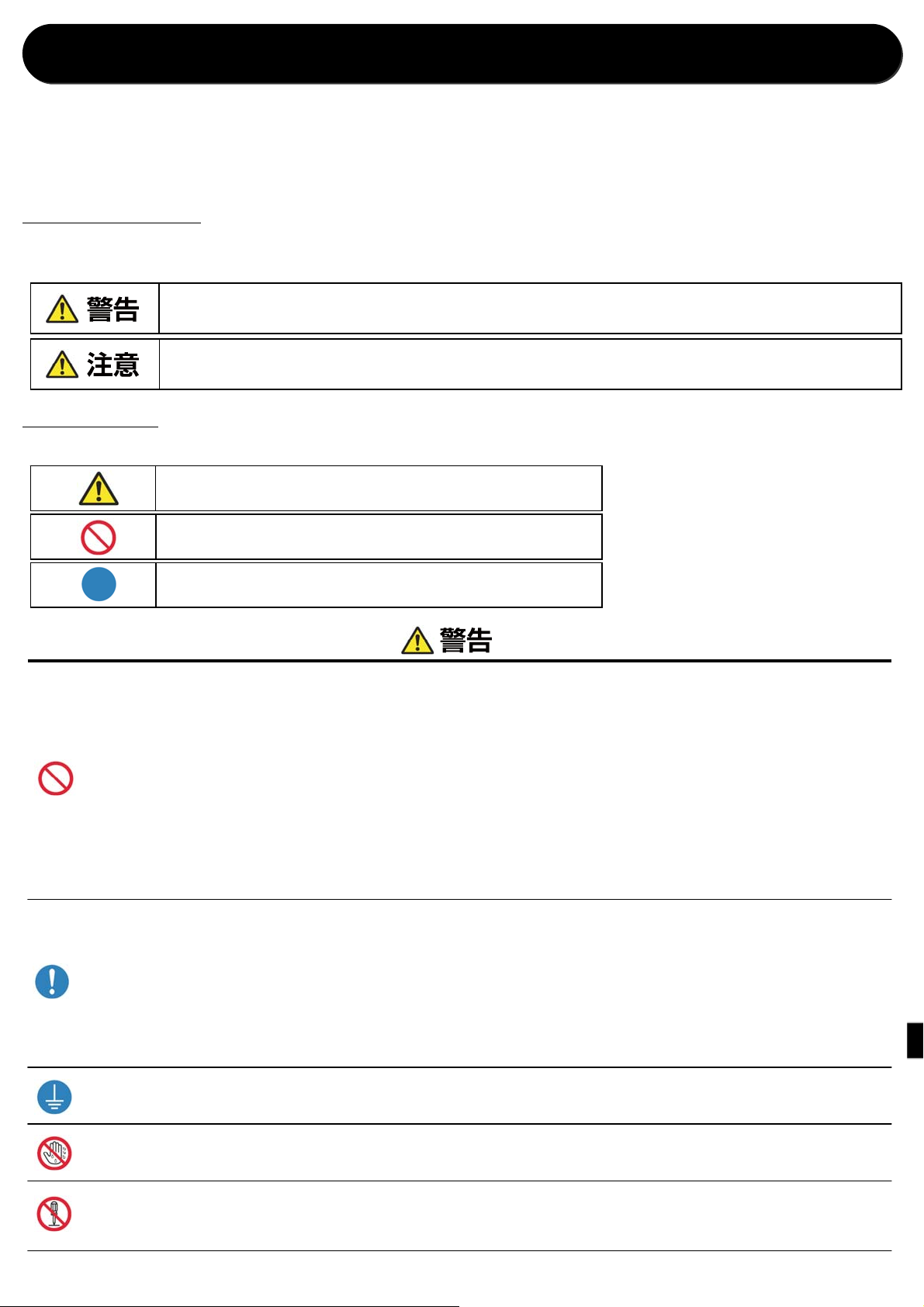
■「警告」と「注意」について
以下、誤った取り扱い方をして生じることが想定される内容を、危害や損害の大きさと切迫の程度を明示するために、「警告」と「注意」
に区分して掲載しています。
■記号表示について
表示されている記号には、次のような意味があります。
この表示を守らずに誤った使い方をすると「死亡または重症などを負う可能性が想定される」内容を示します。
この表示を守らずに誤った使い方をすると「障害を負う可能性または物的損害が発生する可能性が想定される」内容を示します。
この記号は警告、注意を促す内容があることを告げるものです。
この記号の中や近くに具体的な内容が書かれています。
この記号は禁止する内容があることを告げるものです。
この記号の中や近くに具体的な内容が書かれています。
この記号は行為を強制したり、指示する内容を告げるものです。
この記号の中には具体的な内容が書かれています。
・ 表示された電源電圧、周波数以外の電圧で使用しないでください。誤って接続すると感電や火災の原因になります。
・ タコ足配線、延長コードの使用は避けてください。コンセント部が異常発熱して火災の原因になります。
・ 電源コードを傷つけたり、破損したり、束ねたり、加工したりしないでください。また、重いものを載せたり、引っ張ったり、無理に曲げたりすると電源コードをい
ため、火災や感電の原因になります。
・ 空気が塩分や腐食性ガスを含んでいるような場所に置かないでください。火災の原因になります。
・ 製品の通気口をふさがないでください。製品内部に熱がこもり、故障や火災の原因になります。
・ 製品の上に乗ったり、重いものを乗せたりしないでください。また、ボタンやスイッチ、入力端子などに無理な力を加えないでください。製品が破損したり、お客
様や他の方々がケガをする原因になります。
・ 製品が入っていた袋はお子様の手の届かない場所に保管してください。かぶると窒息の恐れがあります。
・ 製品のエッジ部で身体や他の物を傷つけないようご注意ください。
・ 人命にかかわるような用途(たとえば医療機器、宇宙機器、航空機など、極めて信頼性の要求されるもの)ではご使用を避けてください。
・ 本機は約14 kgあります。製品を移動するときは、体に負担がかからない状態で持ち上げてください。無理をして持ち上げたり、乱暴に扱って落としたりする
と、ケガをする恐れがあります。
・ 製品は電源コンセントにできるだけ近い位置に設置し、異常時に電源プラグを簡単に外せるようにしてください。
・ 電源プラグにほこりが付着している場合は、ほこりをきれいに拭き取ってください。感電やショートの原因になります。
・ 万が一、金属、液体などの異物が製品内部に入った場合や、発煙、異臭などの異常状態が見られる場合は、すぐに電源スイッチを切り、そのあと必ず電源
プラグをコンセントから抜いたうえでサービス実施店に連絡してください。製品が故障したり、不具合のまま使用し続けないでください。感電、ショート、火災や
故障の原因になります。
・ アースプラグを確実に取り付けてください。漏電し、火災や感電の原因になります。
・ 濡れた手で電源プラグを抜き差ししないでください。感電の原因になります。
・ 製品内部を開けたり、内部の部品を分解したり、改造したりしないでください。感電や火災、ケガ、または故障の原因になります。製品内部の点検・調整・修理
はサービス実施店に依頼してください。
Page 30
・ 湿気やほこりの多い場所に置かないでください。火災や感電、または故障の原因になります。
・ 不安定な場所に置かないでください。製品が転倒して、お客様や他の方々がケガをする原因になります。
・ 製品の中に異物を混入させないでください。感電、ショート、火災や故障の原因になります。入った場合は、すぐに電源スイッチを切り、電源プラグを抜いた
うえで、サービス実施店に依頼してください。
・ 印画中にカバーを開けないでください。故障の原因になります。
・ 製品に液体や薬剤などをこぼしたり、吹きかけないでください。
・ カバーを清掃する場合、シンナー、トリクレン、ベンジン、ケトン系溶剤や化学ぞうきんなどを使用しないでください。変色、変質の原因になります。
・ 電源プラグは年に1回以上コンセントから抜いて、プラグの刃と刃の周辺部分の掃除をしてください。ほこりがたまると、火災の原因になります。
・ 狭い部屋で長時間連続してご使用になるときは、換気にご注意ください。
・ 輸送機器(列車、自動車、船舶等)にご使用をお考えの際は事前に販売窓口までご相談ください。
・ 製品、付属品、梱包材、メディア(用紙、リボン)を廃棄するときは、地方自治体の条例に従ってください。条例の内容については、各地方自治体にお問い合
わせください。
・ 電源プラグを抜くときは、必ず電源プラグを持って抜いてください。電源コードを引っ張るとコードに傷がつき、火災や感電の原因になります。
・ 機械を移動する場合は、必ず電源プラグをコンセントから抜いてください。コードが傷つき、火災や感電の原因になります。
・ 長期間ご使用にならないときは、安全のため必ず電源プラグをコンセントから抜いてください。感電や火災、故障の原因になります。
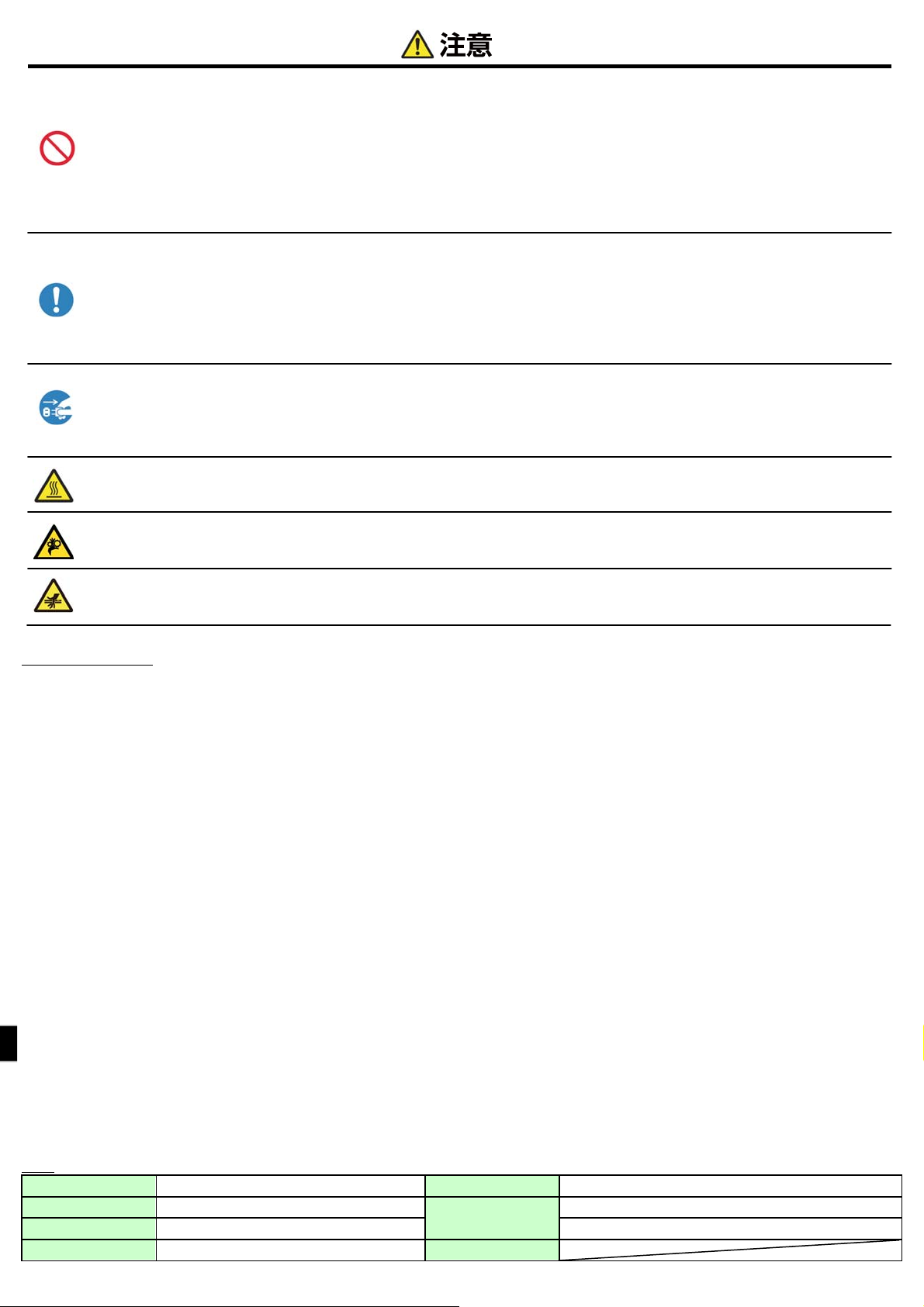
・ このマークが付いている部分は高温になります。印画直後は手を触れないでください。やけどをする恐れがあります。
・ 駆動部に触れないでください。駆動部が回転し、指が挟みこまれケガをする恐れがあります。
・ このマークが付いている部分は指が挟みこまれケガをする恐れがあります。
設置上の注意事項
・ 本機の使用にあたっては「安全にお使いいただくために」をよくお読みになり、その指示に従ってください。
・ 本機の移動、設置の際は二人以上で十分注意して行ってください。落下させると身体や、他の物を傷つける恐れがあります。
・ 火気や水気のある場所、直射日光の当たる場所、暖房器具や熱器具の近くなど、温度の異常に高い場所、低い場所、湿気やほこりの多い場所でのご使用、保管はしないでく
ださい。
・ 実験室など化学反応を起こすような場所に設置しないでください。
・ 空気が塩分や腐食性ガスを含んでいるような場所には設置しないでください。
・ プリンタ本体は水平で安定した卓上で通気性のよい所に設置してください。
・ 本機の上に物を載せないでください。
・ ラジオやテレビの近くで使用したり同じコンセントを使用したりすると受信障害の原因となることがありますので注意してください。
・ 指定された電源電圧、周波数以外で使用しないでください。
・ 電源コードの上に物を置いたり踏んだりしないでください。
・ 電源コードまたは USB ケーブルを持って本体を引っ張ったり、持ち運びをしないでください。
・ 電源コードのタコ足配線は避けてください。
・ 電源コードを束ねて使用しないでください。
・ 電源コードの抜き差しは必ず電源プラグを持って行ってください。
・ USB ケーブルの取り付けや取り外しは、必ず電源スイッチを切って行ってください。
・ USB ケーブルを長く配線したり、ノイズの多い機器と接続したりすることは極力避けてください。やむをえず配線するときは信号ごとにシールド線、ツイストペア線などを使用する
よう十分な対策をしてください。
・ USB2.0 仕様に適応したシールド付き USB ケーブルを使用してください。
・ 機器の近くにコンセントがあり、かつ、そのコンセントから電源プラグを抜き、簡単に電源を遮断できるような場所に設置してください。
・ コンセントは、アース付き 3 端子コンセントを使用してください。感電の恐れがあります。
・ 製品同梱されている電源コードセットは、本製品以外で使用しないでください。
・ 製品には、同梱された電源コードセットをご使用ください。
・ 使用している国の安全規格認定品をご使用ください。
・ オプションの反転ユニットを使用しない場合は、必ずブラインドプレートを取り付けて使用してください。火災の恐れがあります。
仕様
プリント方式 昇華型熱転写方式 消費電流 100 V 3.96 A 240 V 1.69 A
外形寸法 322 mm(W)×367mm(D)×171 mm(H)
重量 約 14.0 kg(プリンタ本体のみ) 湿度 35 %~80 % 結露なきこと
電源 AC100 V ─ 240 V 50 Hz/60 Hz
動作環境
温度 5 ℃~35 ℃ 自然対流があること
Page 31
リ
ダ
1.梱包内容の確認
プリンタ本体
ペーパーカセット
2.両面印刷方法(オプション)
本機はオプションの反転ユニットを利用することで両面印刷に対応します。
両面印刷に関する内容は、オプションの反転ユニットに添付される取扱説明書に従ってください。
■記載項目
① 反転ユニットの概要
② 反転ユニットの準備
③ 両面印刷時の操作
④ クリーニング、及びトラブルシューティング
スタートアップガイド
ご使用の前に、「安全にお使いいただくために」を必ずお読みください
電源コード
CD-ROM
・ユーザーズマニュアル
ボンカセット ペーパーホル
説明冊子 (本書)
・安全にお使いいただくために
・スタートアップガイド
Page 32
3.プリンタのセットアップ
電源コード(同梱)、USB ケーブ
ルを接続し、電源を入れます。
※プリンタドライバをインストールす
る場合には、ここでは USB ケー
ブルを接続しないでください。
ペーパーカセットを取り外し、さらにペーパーカセットから
ペーパーホルダを取り外します。
ペーパーカセットにペーパーホルダをセットします。
奥までしっかり入れてください。
プリンタ本体にペーパーカセットをセットしたら、用紙を矢印の
方向に回転させ、ピピッとブザーが鳴るところまで用紙先端を
差し込んでください。
差し込むとペーパーLED が消灯します。
リボンカセットにリボンをセッ
トします。
矢印の方向に回転し、たるみ
を巻き取ります。
オープンレバーを解除し、メカユ
ニットを引き出します。
用紙に貼ってあるシール
(→PULL)が上記と同じ向
きになるようにセットしてく
ださい。
ペーパーホルダを
押えながら用紙を
回転させます。
プリンタ本体にリボンカセット
をセットします。
オープンレバー
用紙交換レバーを解除し、フロントカバーを
上に開けて、ごみ箱を取り外します。
フロントカバー
用紙交換レバー
ペーパーホルダから梱包材を取り外し、用紙をセットします。
用紙とホルダに隙間のないようにセットしてください。
用紙に貼ってあるシール(→PULL)を剥がし、用紙を矢印方向
に回転させ用紙を挿入してください。
用紙先端は右記の写真のようにペーパーカセットの二つの穴の
中間(破線)に合わせてください。このとき、用紙はまっすぐに挿
入してください。用紙が蛇行し、印画物の左右に余白が出たり、リ
ボンしわ、レジずれの原因となります。
ローラーの下
に用紙を挿入
します。
ごみ箱をセットし、フロント
カバーを閉めます。
メカユニットを閉めます。
プリンタ本体からリボンカセッ
トを取り外します。
ごみ箱
[備考]メカユニットを閉めると用紙の初期化動作を行います(4
供給側(黒色) 巻取側(白色)
供給側(黒色)が手前になるよ
うにセットします。
枚の白紙を排出)。初期化動作では用紙の外周の汚れた用紙
を切除します。ただし、用紙セット後に電源を入れた場合、初期
化動作は行われません。
Page 33

Printed in JAPAN 2014.01.07
70904600_01
 Loading...