

Page 1
DMXking.com • JPK Systems Limited • New Zealand
0091-700-2.1
eDMX2
Interface
USER MANUAL
Page 2

DMXking.com • JPK Systems Limited • New Zealand
0091-700-2.1
ii
TABLE O F CONTENTS
1. Introduction ............................................................................................................................................................................... 1
Main Features ................................................................................................................................................................................. 1
2. Exterior View .............................................................................................................................................................................. 1
Front View ....................................................................................................................................................................................... 1
Status LED Table .............................................................................................................................................................................. 2
3. Default Configuration ................................................................................................................................................................. 2
4. Configuration Utility ................................................................................................................................................................... 3
Network Tab ................................................................................................................................................................................... 3
Port Tab ........................................................................................................................................................................................... 4
DMX Display Function ..................................................................................................................................................................... 5
Art-Net Node Name ........................................................................................................................................................................ 6
Factory Reset .................................................................................................................................................................................. 6
5. Compatible Software ................................................................................................................................................................. 7
Controllers ...................................................................................................................................................................................... 7
Media Servers / VJ .......................................................................................................................................................................... 8
Visualizers ....................................................................................................................................................................................... 8
Mobile Apps .................................................................................................................................................................................... 8
6. Technical Specifications ............................................................................................................................................................. 9
7. Warranty .................................................................................................................................................................................... 9
DMXking.com Hardware Limited Warranty .................................................................................................................................... 9
8. Declarations (FCC & CE) ............................................................................................................................................................. 9
Federal Communications Commission (FCC) Declaration of Conformity ....................................................................................... 9
EEC Declaration ............................................................................................................................................................................. 10
Page 3
DMXking.com • JPK Systems Limited • New Zealand
0091-700-2.1
1
1. INTROD U C TION
Thanks for purchasing a DMXking.com product. Our aim is to bring you high quality products with great features we know you’ll
appreciate. We ship only what’s required which is why there’s no CD or printed manual in the box, this is part of our
commitment to minimizing environmental impact which also translates into end user savings.
The DMXking.com eDMX2 range covers several models providing functionality perfectly matched to your application.
Model Highlights
eDMX2 TX 2 Universe DMX512-A output only. Merge 2 ArtNet/sACN streams on each channel.
eDMX2 RDM 2 Universe DMX512-A output or input. RDM functionality. Merge 2 ArtNet/sACN streams on each channel.
MAI N FEATURES
− Supported operating systems: Any with Ethernet networking support. Windows, Mac, Linux, iOS, Android.
− DMX512 Out or DMX512 In functionality selectable on each port (*eDMX2 TX model only has Out function).
− Art-Net broadcast, Art-Net II & III unicast, sACN/E1.31 Multicast and sACN Unicast support.
− E1.20 RDM over Art-Net support.
− User configuration of Art-Net Node short and long names.
− Compact tough metal enclosure with multiple mounting options including 19” rack adapter.
− Available with 3 pin or 5 pin XLR socket, no adapter purchase required.
− Compliant with 802.3af PoE power over Ethernet. Send power through the Ethernet cable up to 100m distance.
− ANSI E1.11 Higher Protection Level “DMX512-A Protected” device.
− Fully compatible with *ALL* software and hardware that supports Art-Net, Art-Net II & III, and sACN protocols.
− Configuration utility with basic Art-Net output/input test functionality.
− Firmware updates can be performed by end user.
2. EXTE R I O R VIEW
FR O N T VIEW
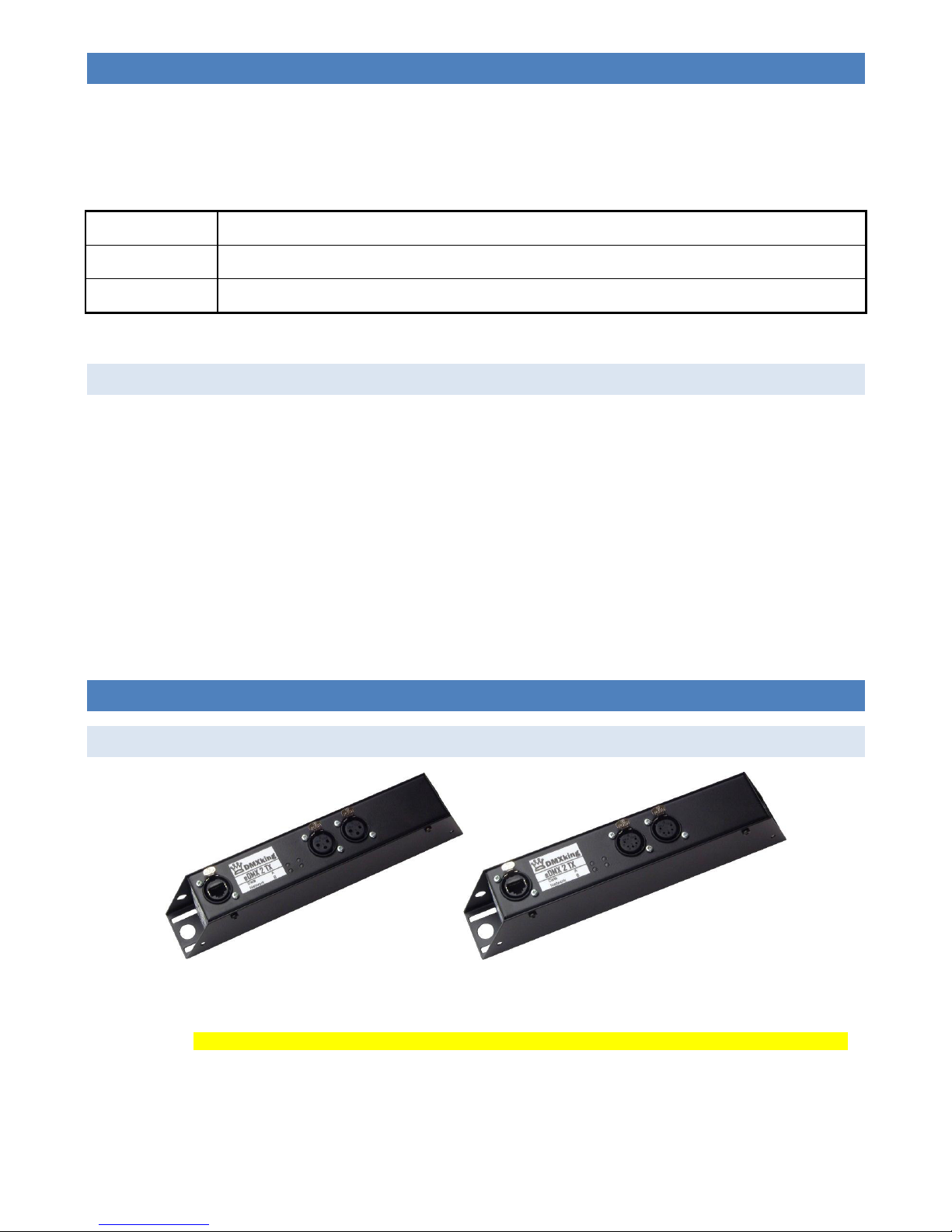
Ethercon connector for power/network using 802.3af PoE switch or power injector. Two female 3pin or 5pin XLR connectors for
DMX512-A input (eDMX2 RDM only) or output function on each port.
Important Note: eDMX2 requires either an 802.3af compliant network switch or power injector. See DMXking.com accessories.
Page 4
DMXking.com • JPK Systems Limited • New Zealand
0091-700-2.1
2
ST A T U S LED TABLE
LED Indication
Data Protocol activity. Red = RX, Green = TX, Orange = Boot loader mode
Network Network activity. Green = Link, Flash = Traffic
A DMX512 Port A. Green = TX, Red = RX
B DMX512 Port B. Green = TX, Red = RX
3. DEF A U L T CONFIGURATI O N
All eDMX2 units ship with default IP address settings. Please reconfigure for your requirements before use!
Parameter Default Setting
IP Address 192.168.0.112
Subnet Mask 255.255.255.0
Default Gateway 192.168.0.254
DMX512 and Art-Net configuration parameters are also configured with default values. Where noted please do not alter
parameters without first contacting DMXking.com support.
Parameter Default Setting
Network Mode Custom IP address
*Operation Mode DMX Out
*DMX Universe 1-2 [Net 00, Subnet 0, Universe 0-1]
Note sACN Universe 1 = Art-Net 00:0:0
*Merge Mode HTP
*DMX512 Update Rate
40 [DMX512 frames per second]
*RDM Packet Spacing 1/20s
*RDM Discovery Period 0s [RDM Disabled]
*Broadcast Threshold 0 [Force Art-Net broadcast]. Don’t change this unless you want Art-Net
II/III unicast on DMX In ports.
*These parameters are per port.
Page 5
DMXking.com • JPK Systems Limited • New Zealand
0091-700-2.1
3
4. CON F I G U R ATION UTILI T Y
The eDMX Configuration utility provides a simple interface to all device parameters. Typically these are set once during initial
configuration and left untouched. If you are not confident in setting up network IP Address, Subnet Mask and Default Gateway
parameters please get in touch with DMXking.com support and we’ll walk you through the process.
Special note: Once you’ve finished configuring your eDMX product close the application before starting your lighting control
application if it’s run from the same computer.
NE T W O RK TAB
Before starting the eDMX Configuration utility please ensure your computer has appropriate IPv4 network settings, for example
IP 192.168.0.100 Subnet 255.255.255.0 Gateway 192.168.0.254.
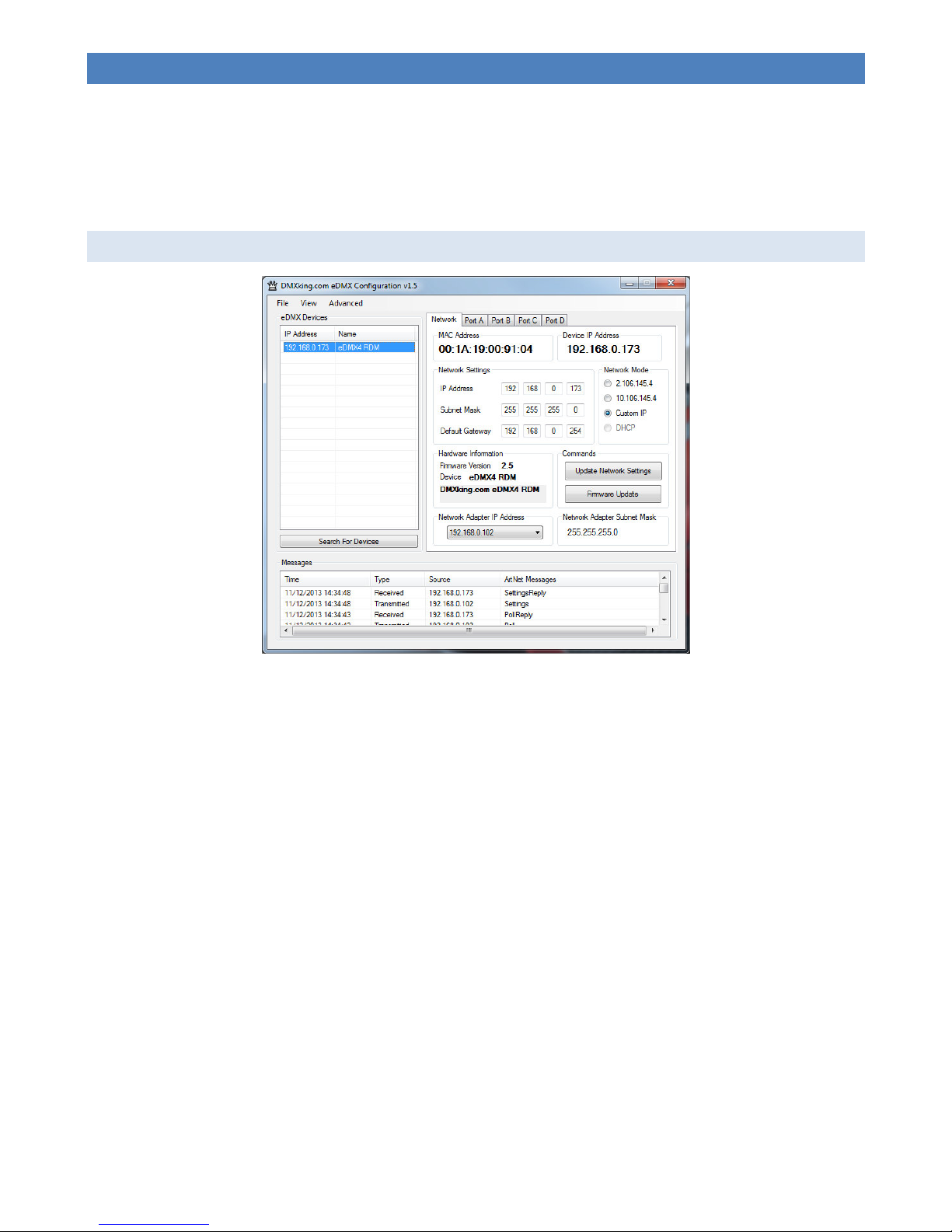
Upon startup eDMX devices on the same subnet are automatically detected and displayed by IP address. You can re-poll for new
devices or just check the communications is okay by clicking “Search For Devices”.
Click on the desired device’s IP address in the list and all Settings will be retrieved. Note that if no response is received the
settings will be greyed out. An activity box shows both transmitted and received messages to help with diagnosing
communication issues. If your network configuration has multiple adapters and or IP addresses you need to select the same
network range as the eDMX from the Network Adapter IP Address dropdown box and also ensure the subnet mask is
appropriate.
Make changes to the applicable settings on the Network tab then click “Update Network Settings”. If you select the Art-Net
2.x.y.z or 10.x.y.z addressing scheme please note the custom IP address will still be valid during initial boot stages (i.e. firmware
updates are always on the Network Settings address, not 2.x.y.z or 10.x.y.z) The eDMX unit will reboot after network any
settings changes.
Selecting “Firmware Update” will prompt for an appropriate firmware file and upload upon confirmation. A built in boot loader
permits updating of the eDMX firmware. Note only signed encrypted firmware files from DMXking.com can be successfully
loaded to ensure you won’t brick your device by accident. Future firmware releases for this product will be in the form 0091500-VersionMajor.VersionMinor.enc
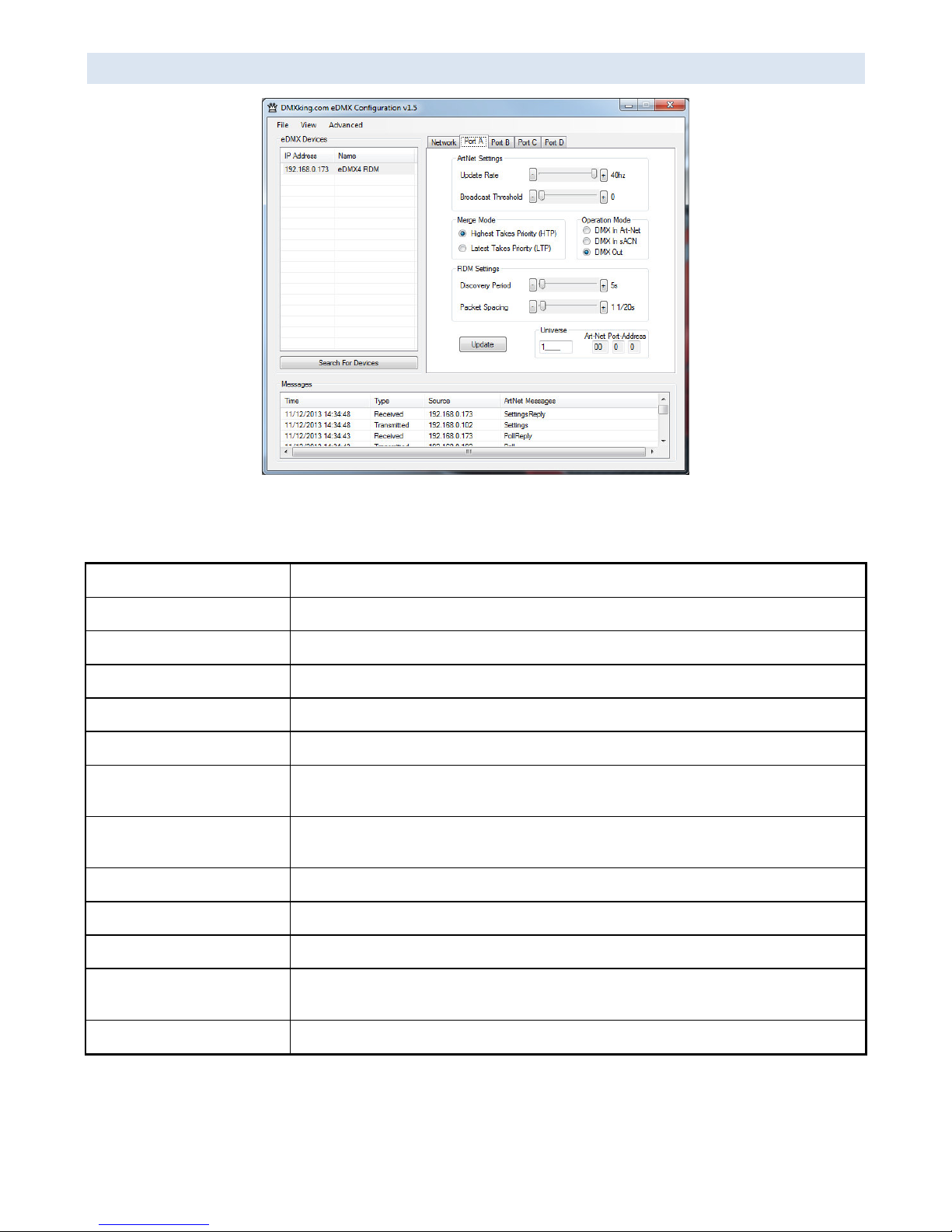
The Port A - B tabs provide access to the DMX512 port parameters.
Page 6
DMXking.com • JPK Systems Limited • New Zealand
0091-700-2.1
4
PORT T A B
Make changes to the applicable Port settings then click “Update”.
The following table explains each of the settings parameters.
Parameter Usage
MAC Address Factory programmed Ethernet MAC address
IP Address IPv4 network address
Subnet Mask Subnet mask, typically 255.0.0.0, 255.255.0.0 or 255.255.255.0 for class A,B & C respectively
Default Gateway Address of network gateway (router) for communications beyond local subnet
Network Mode Custom IP, Art-Net 2.x.y.z , Art-Net 10.x.y.z
Operation Mode DMX In Art-Net, DMX In sACN (multicast only), DMX Out (both Art-Net and sACN
simultaneously). eDMX4 TX models only support DMX Out.
DMX Universe sACN 1-63999 which is translated to an Art-Net Port-Address (Net:Sub:Uni). Setting DMX
Universe = 1 results in sACN Universe = 1 and Art-Net 00:0:0 (Universe 1 = Art-Net Universe 0)
Merge Mode HTP (Highest Takes Precedence - dimmers), LTP (Last Takes Precedence – moving lights)
Update Rate DMX512 output frame rate/frequency
RDM Packet Spacing Number of 1/20sec intervals enforced minimum between RDM messages on DMX line
RDM Discovery Period Number of seconds between internally initiated RDM Discovery attempt. Setting Discovery
Period = 0s will disable RDM which is the default.
Broadcast Threshold 0 = Force Art-Net broadcast mode, > 0 Art-Net II/III unicast.
Page 7
DMXking.com • JPK Systems Limited • New Zealand
0091-700-2.1
5
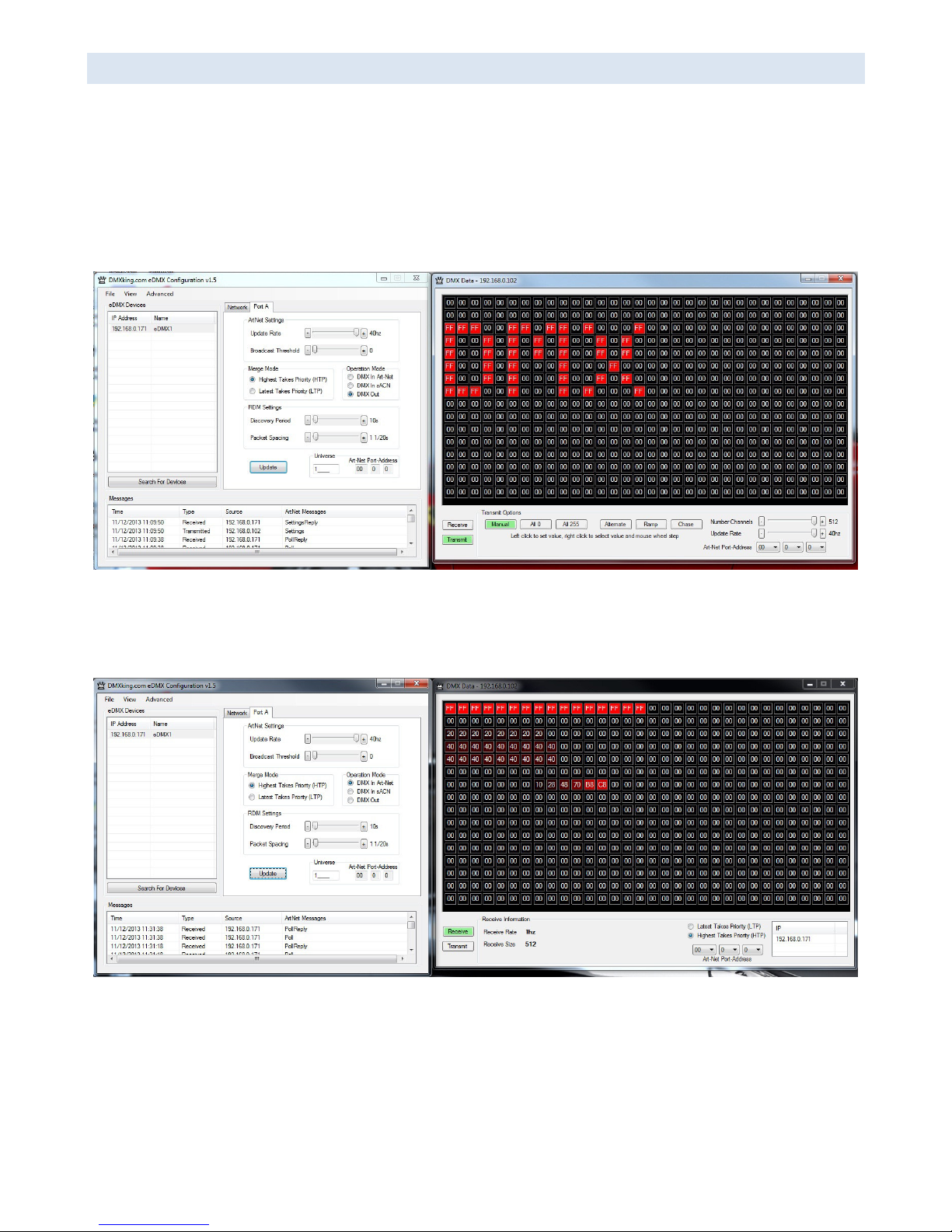
DMX D I S P L AY FUNCTI O N
Select View | DMX Display for a simple DMX512 test utility. To generate an Art-Net output stream click Transmit then select one
of the 6 Transmit Options and change Art-Net Universe as applicable. When in Manual mode you can click on any of the
channels (represented by small boxes with hexadecimal channel level inside) to set ON level and double click to set zero. The
mouse scroll wheel adjusts a channel by a defined increment. Channel number increases left to right, top to bottom and the
roaming tool tip provides information about a specific channel.
Both the ON level and mouse wheel step can be set by right clicking anywhere within the black display area. Number of channels
transmitted and the refresh rate can be adjusted using the applicable sliders adjacent to transmit options.
Changing to Receive mode will display the selected Art-Net universe number with merged streams if more than 1 is present.
Note Art-Net II unicast is not supported meaning only Art-Net broadcast streams are displayed.
The DMX Display utility works with any manufacturers Art-Net hardware and can be useful for diagnostics and simple testing of
DMX512 fixtures.
Page 8
DMXking.com • JPK Systems Limited • New Zealand
0091-700-2.1
6
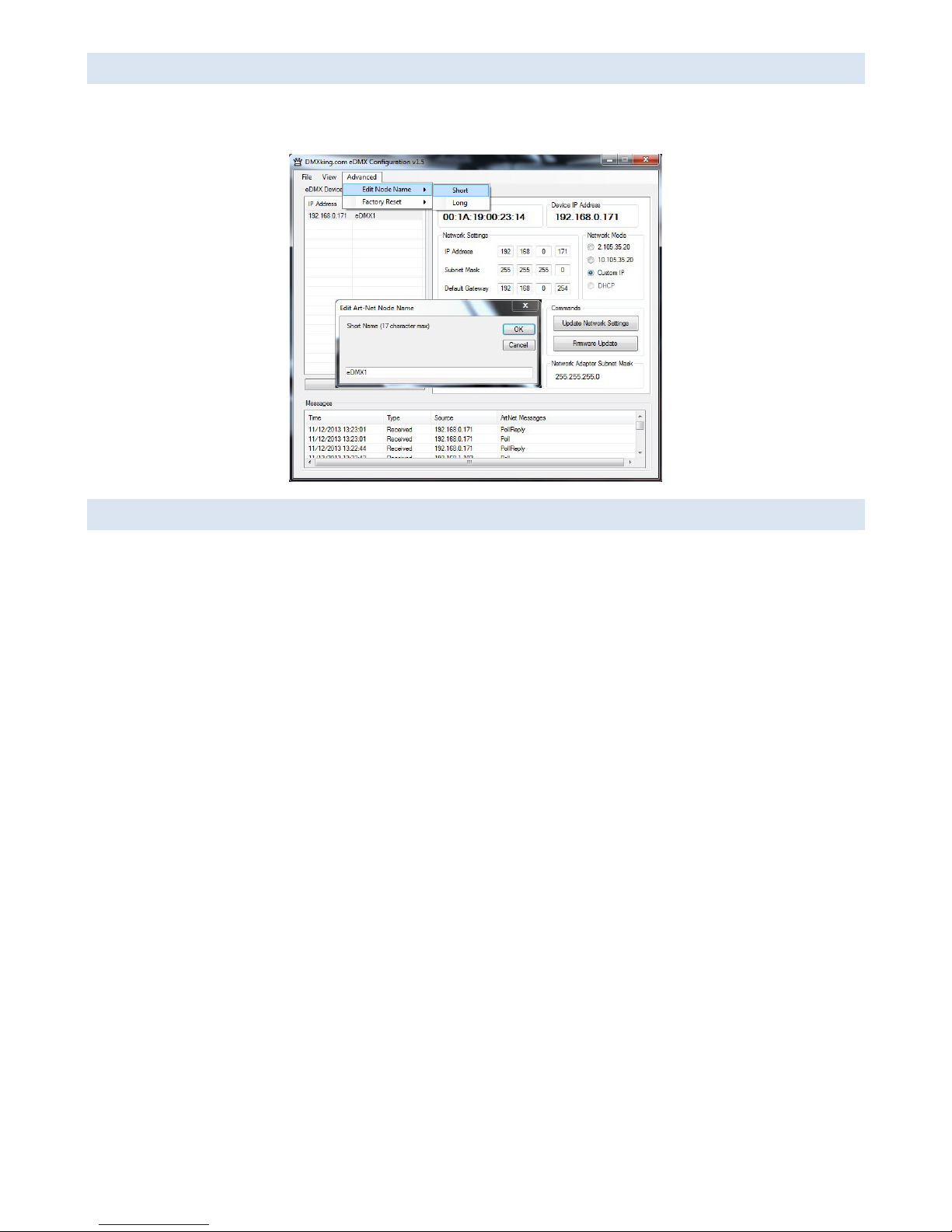
AR T - NET NODE NAME
The Art-Net protocol supports device naming which can make larger installations more manageable. Both Short Name (17
characters) and Long Name (63 characters) for an eDMX Device can be modified using the Advanced | Edit Node Name dialog.
FA C T ORY RESET
This is a last resort option if for whatever reason incorrect or forgotten device network settings have rendered your device
unusable. A word of warning – this function will factory reset *ALL* eDMX devices on your network so it’s critical to separate off
the device requiring reset. We recommend directly connecting a computer and eDMX device using a crossover cable so there’s
no chance of additional eDMX devices accidentally being reset too.
Several warnings are presented before the command is sent.
Page 9
DMXking.com • JPK Systems Limited • New Zealand
0091-700-2.1
7
5. COM P A T I B LE SOFTWA R E
Art-Net and DMX512 are the most commonly used lighting control protocols with roots in simple theatrical light dimming. These
days almost any lighting or stage effect equipment may be controlled using DMX512 (with explicit exclusion of anything
involving potentially dangerous operations such as pyrotechnics) including moving lights, LED screens, fog machines and laser
displays.
The DMXking.com eDMX4 unit is a 4 universe Art-Net device designed for use with computer based show control software. It
replaces an entire lighting console allowing the user to perform sophisticated shows with little more than a laptop. There are
many free and commercial software packages available and by selecting Art-Net as your DMX device compatibility is guaranteed.
The following tables are by no means a definitive guide to Art-Net & sACN compatible software however it’s a good starting
point.
CON T R OLLERS
LightFactory http://www.lifact.com/
Venue Magic http://www.venuemagic.com/
FreeStyler http://www.freestylerdmx.be/
MagicQ – ChamSys (Windows, Mac, Linux) http://www.chamsys.co.uk/download
LumiDMX http://www.lumidmx.com/
LX Series (Mac OS-X) http://lx.claudeheintzdesign.com/
Q Lighting Controller+ (Linux, Mac OS-X, Windows) http://qlcplus.sourceforge.net/
LSC Clarity (Windows, Mac OS-X) http://www.lsclighting.com/products/clarity-control-
system/clarity-for-pcmac
Max – Cycling 74 (Windows, OS-X) http://cycling74.com/products/maxmspjitter/
White Cat Lighting Board http://www.le-chat-noir-numerique.fr/
TJShow http://www.tjshow.com/
MADRIX – LED Lighting Control http://www.madrix.com/
DMXControl http://www.dmxcontrol.org/
vvv – a multipurpose toolkit http://vvvv.org/
Enttec D-Pro http://www.enttec.com/
D::Light http://www.nicole-banana.com/
Chameleon (Mac) http://www.maclightingsoftware.com/
Lightjams – Live interactive control MIDI / TUIO http://www.lightjams.com/
StageSoft – CHROMA http://www.stagesoft.com/chroma.html
Martin M-PC Free Edition http://www.martin.com/controllersupport/m-
pc_software.html
ShowMagic http://www.showmagic.com/
Page 10
DMXking.com • JPK Systems Limited • New Zealand
0091-700-2.1
8
MEDI A SERVERS / V J
ArKaos MediaMaster Pro, MediaMasterExpress, Media Server http://www.arkaos.net/category/index.php?catid=2
Resolume Avenue 3 http://www.resolume.com/
MXWendler FXServer http://www.mxwendler.net/Product.4.0.html
Kineme Art-Net Tools for Quartz Composer http://kineme.net/product/ArtNetTools
TroikaTronix – Isadora http://troikatronix.com/isadora.html
VI S U ALIZERS
Capture http://www.capturesweden.com/
WYSIWYG http://www.cast-soft.com/
ESP Vision http://www.espvision.com/
SoftPlot http://www.stageresearch.com/products/SoftPlot9/SoftPlot9.aspx
LD Assistant http://www.ldassistant.com/
MOBI L E APPS
Luminair (iPhone/iPad) http://www.synthe-fx.com/products/luminair
LightingPad (iPhone/iPad) http://www.alcorn.com/products/lightingpad/index.html
ArtNet DMX Remote (iOS) http://lightning-dmxcontrol.com/
LED Remote (iOS) http://arminarzani.com/en/
Page 11

DMXking.com • JPK Systems Limited • New Zealand
0091-700-2.1
9
6. TECH N I C A L SPECIFICATI O N S
• Dimensions: 250x44x60mm (WxHxD)
• Weight: 0.47kg
• DMX512 connector: 3 or 5 pin XLR Female per port
• Internal DMX512-A line biasing termination as per ANSI E1.20 RDM requirements.
• 1500V isolation on each port.
• Power input: 802.3af Power over Ethernet.
• Art-Net, Art-Net II, Art-Net III and sACN/E1.31 support.
• ANSI E1.20 RDM compliant with RDM over Art-Net.
• Both HTP and LTP merging of 2 Art-Net/sACN streams per port
• Internal merging capability with DMX In and DMX Out ports on same Universe.
• IPv4 Addressing
• DMX512 Frame Rate: Adjustable per port
• DMX512 Port Protection: DMX512-A Protected as per E1.11-2008
7. WA R R A N T Y
DMXKI N G.COM HARD W A R E LIMITED WAR R A NT Y
What is covered
This warranty covers any defects in materials or workmanship with the exceptions stated below.
How long coverage lasts
This warranty runs for one year from the date of shipment from an authorized DMXking.com distributor.
What is not covered
Failure due to operator error or incorrect application of product. Opening the unit voids the warranty.
What DMXking.com will do
DMXking.com will repair or replace, at its sole discretion, the defective hardware. Return shipping costs from our service facility
in New Zealand shall be free of charge.
How to obtain service
Contact DMXking.com directly by email [email protected]
8. DEC L A R A T I ONS (FCC & C E )
FE D E R AL COMMUNICA T I O NS COMMISSIO N ( FC C) DECLARATI O N OF CONFORM I T Y
Responsible Party: JPK Systems Limited
PO Box 493
Pukekohe 2340
Page 12

DMXking.com • JPK Systems Limited • New Zealand
0091-700-2.1
10
New Zealand
declares that the product eDMX2 complies with Part 15 of the FCC rules.
Operation is subject to the following two conditions: (1) This device may not cause
harmful interference, and (2) this device must accept any interference received,
including interference that may cause undesired operation.
This equipment has been tested and found to comply with the limits for a class B
digital device, pursuant to Part 15 of the FCC rules. These limits are designed to
provide reasonable protection against harmful interference in a residential
installation. This equipment generates, uses and can radiate radio frequency energy
and, if not installed and used in accordance with the instructions, may cause harmful
interference to radio communications. However, there is no guarantee that interference
will not occur in a particular installation. If this equipment does cause harmful
interference to radio or television reception, which can be determined by turning the
equipment off and on, the user is encouraged to try to correct the interference by one
or more of the following measures:
- Reorient or relocate the receiving antenna.
- Increase the separation between the equipment and the receiver.
- Connect the equipment into an outlet on a circuit different from that to which
the receiver is connected.
- Consult the dealer or an experienced radio/TV technician for help.
EEC D E CLARATION
We
JPK Systems Limited
PO Box 493
Pukekohe 2340
New Zealand
declare under our sole responsibility that our product eDMX2 conforms to the
requirements of Council Directives 89/336/EEC and 73/23/EEC and therefore complies with
the requirements of Council Directive 73/23/EEC, (The Low Voltage Directive) on the
harmonisation of the laws of Member States relating to electrical equipment designed
for use within certain voltage limits as amended by Article 13 of Council Directive
93/68/EEC
• EN 55103-1
• EN 50103-2
• EN 60065
Signed: Jason Kyle
Date: 17 December 2012
Position: Managing Director
 Loading...