

Page 1
Printed in Korea.
User Manual
English
Bluetooth Stereo Speaker
BS-SP120R / BS-SP120L
DM-SP120
DM-SP120
DM-SP120R / DM-SP120L
User Manual
English
Bluetooth Stereo Speaker
Printed in Korea.
Page 2
INTRODUCTION
WELCOME
SPECIFICATIONS FEATURES
CHARGE THE BATTERY
RECHARGING
INTRODUCTION
WELCOME
Bluetooth wireless technology is a short-range wireless technology that enables wireless data
communication between digital devices like a mobile phone. Bluetooth wireless technology operates
within a range of about 10m(30feet). You do not need to use a cable for connection. Bluetooth
technology is an international standard supported by millions of companies all over the world.
Thank you for purchasing the DM-SP120, the Bluetooth Stereo Speaker.
We hope you will be satisfied with its operation. Please read the user manual carefully to
start using the speakers and to make the best use of the speaker’s features.
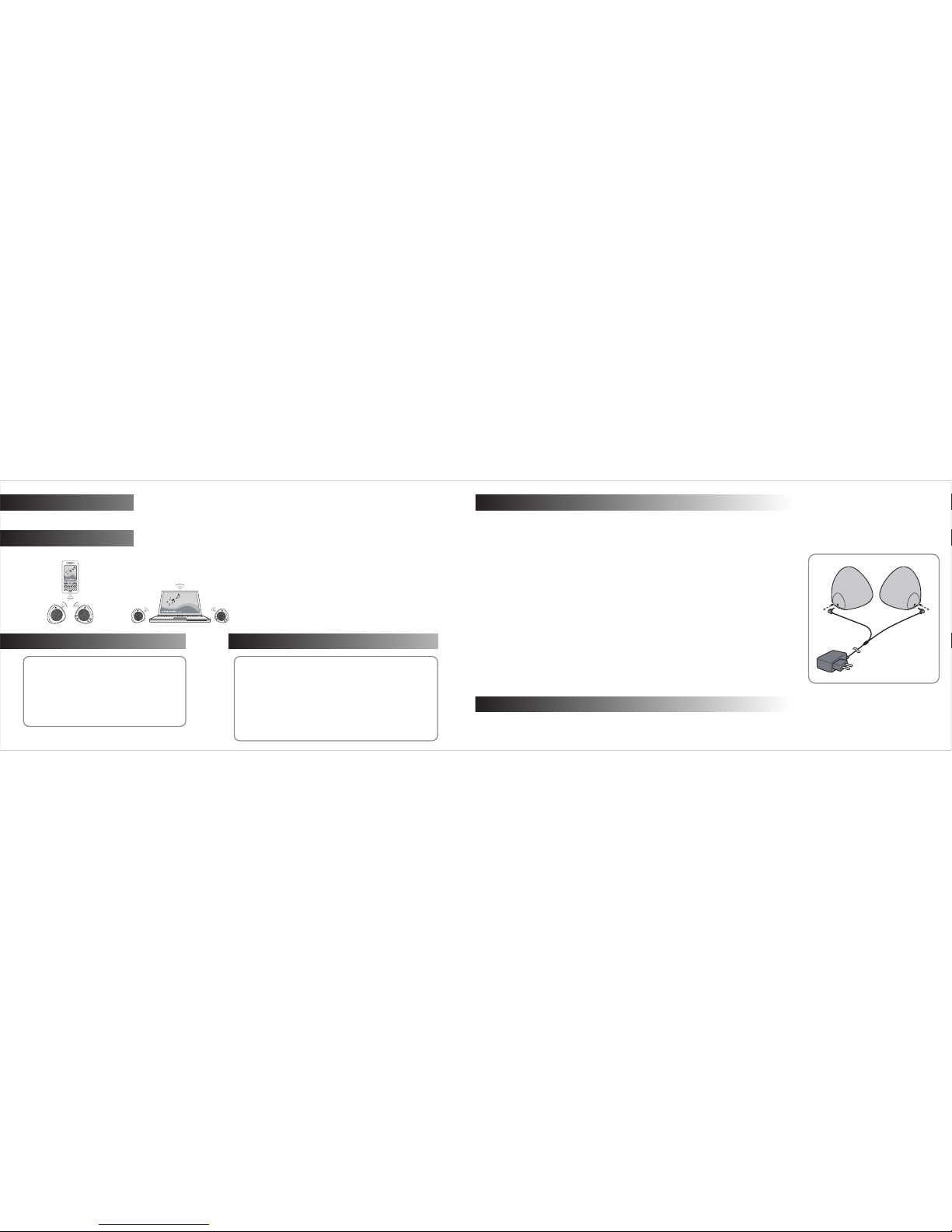
The distinctive wireless connection between two (left/right)
completely independent speakers provides the ultimate in ease of
setup and in freedom of movement.
Type : Bluetooth Stereo Speaker
*Play Time : up to 8 hours
*Stand-by Time : up to 240 hours
*Charging Time : approx. 3 ½ hours
Bluetooth v2.0, A2DP, AVRCP
Transmission Power Level : Class 2 (up to 10m)
Rechargeable Li-Polymer Battery (2ea)
Accessories included : AC Charger, Manual, Pouch
*Performance may vary depending on device or environment.
SPECIFICATIONS
Impedance : 8 Ω
Maximum Input Power : 40mW
Audio Output : 1.2W/Channel
SNR : 70dB
Sound Frequency Response : 60 ~15,000 Hz
Battery Capacity : 880 mAh /ea
Weight : 335g (with battery)
1
2
CHARGE THE BATTERY
RECHARGING
Your DM-SP120 speakers have internal, no removable, and rechargeable batteries.
Before you start using the speakers, the battery must be fully charged and the speakers must be paired with a
compatible Bluetooth device like mobile phone.
Warning:
Do not attempt to charge the speakers with anything other than the AC Charger
provided. The use of any other types of charger may invalidate any approval or warranty, and
may damage the speakers.
The fully charged battery has approximately 8 hours of play time or up to 100 hours of standby
time. However, the play time and standby time may vary depending on mobile phones, products
that use a Bluetooth connection, and/or playing conditions.
Charging:
1. Connect the AC Charger to the speakers.
2. Connect the AC Charger to a wall outlet. The red indicator light is displayed during charging.
3. When the battery is fully charged, the red indicator light turns to the blue light.
First-time use : Charge approximately for 3 ½ hours before using the speakers.
When battery power is low, and the speakers’ blue indicator light located on the back of speakers turn to red light, the speakers’
batteries need to be recharged. During playing music, speakers are not charged but AC power is supplied.
AC Charger
FEATURES
Page 3
3
OVERVIEW
The DM-SP120 is compatible with most Bluetooth devices, such as mobile phones, PDAs, MP3 players and laptops that are
compliant with the Bluetooth version 1.0, 1.2, or 2.0.
Please make sure that your device has Bluetooth capability and supports Advanced Audio Distribution
Profile (A2DP) and Audio Video Remote Control Profile (AVRCP).
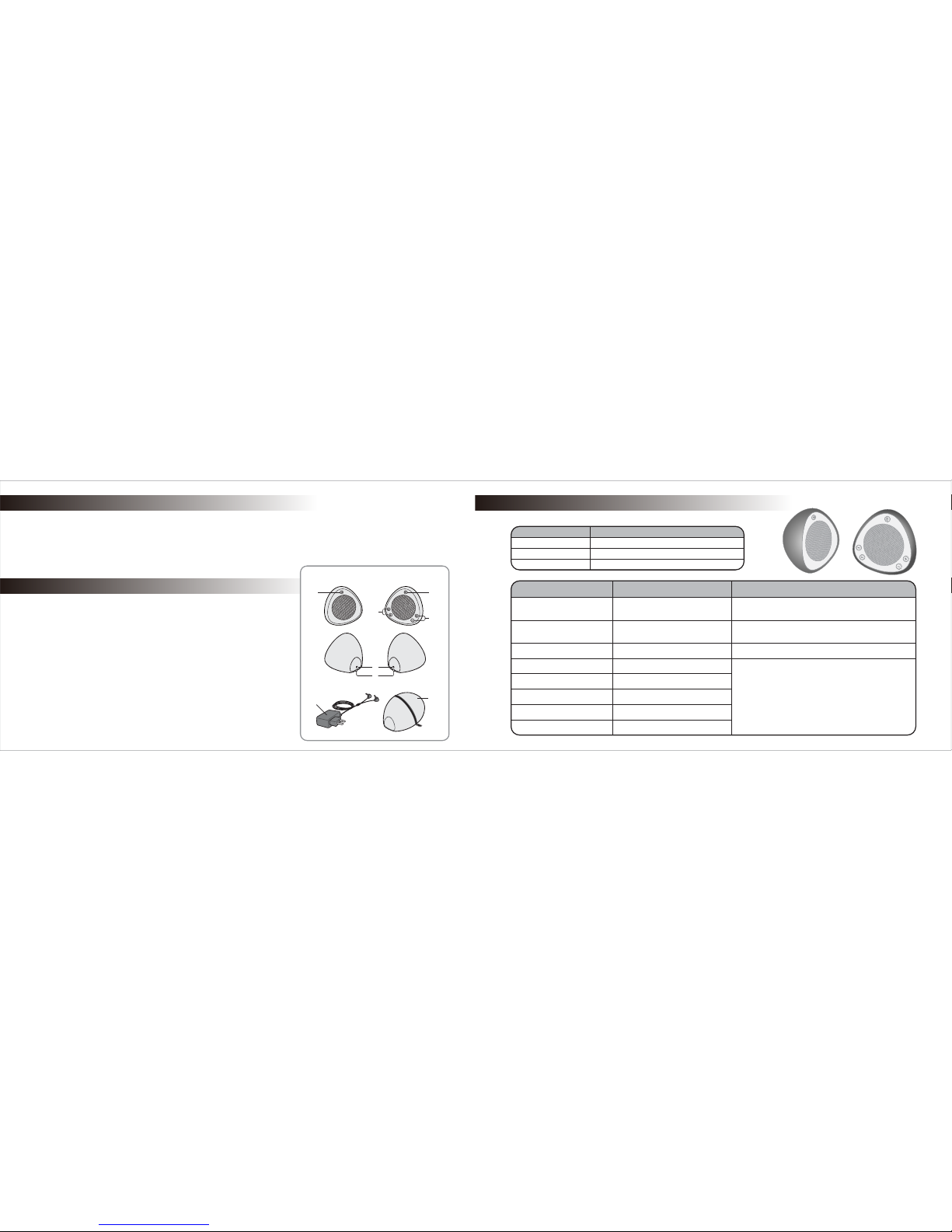
① Multifunction Button (MFB)
Power On/Off, Pairing,
Pause/Stop/Play music
② Volume Buttons
To adjust Volume up and down
③ FF/REW Buttons
To search and select music
(moves to the next or previous song)
④ On/Off Button
To turn On/Off Slave speaker
⑤ Charging Jack
To connect AC Charger to the internal
speaker batteries
(See rear side of speakers)
⑦ AC Charger ⑧ Pouch
⑥ Charging indicator
To provide visual indications
about speaker’s charging status
③
①
②
⑥
⑧
④
⑤
Master Speaker
Control several functions
Slave Speaker
Play the music
⑦
4
Tap
Press
Press and Hold
about 1 second
about 2 second
about mor than 4 seconds
Power On
Press MFB
Press On/Off button
Blue light flashes on master speaker
Blue light remains solid on slave speaker
Power Off
Press and Hold MFB
Press On/Off button
Press and Hold MFB
Red light flashes on Master Speaker and
the lights are unlit on both speakers
Paring
Playing Music Tap MFB
Tap MFB
Press MFB
Tap Volume Buttons
Tap FF/REW Buttons
Pause Music
Stop Music
Volume Up and Down
FF/REW
Blue light On and Red light flashes
Instruction Duration of Press
sthgiL rotacidnIot woHnoitcnuF
COMPATIBILITY
OVERVIEW
BUTTON OPERATION
Page 4
MFB
On/Off
Slave speaker
Master speaker
The speaker ID is now stored in the Bluetooth device’s memory.
For details about device discovery please refer to user guide of your bluetooth product to be paired.
Note :
When the speakers are not paired with a device for
3 minutes the paring mode is automatically turned off.
Please turn the speaker off and re-attempt paring
procedure from turning the speaker on (Step 1).
Re-pairing :
1.
2.
Press and hold MFB for more than 5 seconds until you hear the tones and
blue and red lights flash. You will hear tones twice at this time. (1st tone: when
the speakers turn on, 2nd tone : when the speakers are in pairing mode)
If the first step for repairing is successful please follow step 2 - 6 in pairing
procedure.
Pairing with Bluetooth Device :
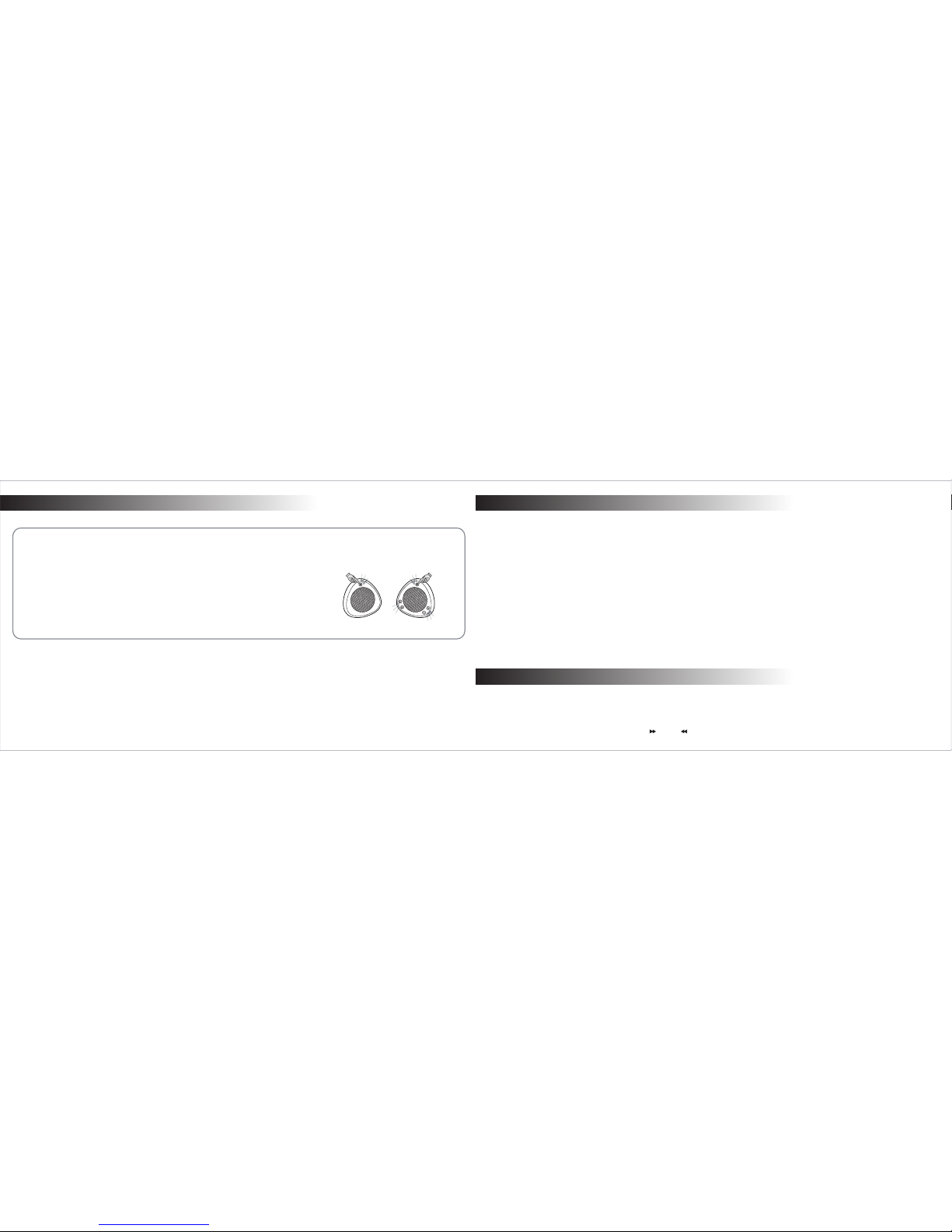
Press and hold the multi-function button
(MFB) for more than 5 seconds until you
hear the tone twice and blue and red lights
are flashing, then release.
1.
Set your own Bluetooth device to discover
the DM-SP120 speaker by following
instruction guide of your bluetooth device.
2.
Select “DM-SP120” in the list of
discovered devices and confirm.
3.
When requested by the bluetooth device,
enter the passkey “0000” and confirm.
4. Select the music you want to listen to on
your Bluetooth device and enjoy the music.
7.
When the speakers are connected to a
paired device and are ready for use, the
blue indicator light flashes slowly(every
4 seconds) on the master speaker.
5.
Pressing On/Off button to turn on slave
speaker. The slave will be automatically
paired and connected to a master speaker.
6.
65
ENJOY THE MUSIC
Pairing with Another Bluetooth Device :
If you want to pair with another bluetooth device, first disconnect the speakers from paired bluetooth device you are using and then try pairing
with another bluetooth device following the pairing procedure.
If speakers are not connected to any device for about 30 minutes, master speaker turns off automatically. Slave speaker will be turned off
automatically in approximately 10 minutes after master speaker turns off. However, if you do not want to wait until speakers turn off
automatically, simply press On/Off button on the slave speaker and press and hold MFB to turn master speaker off.
“Auto-Connection” between speakers and the bluetooth enabled device like a mobile phone is available if the connected bluetooth
device is turned on again and speakers are within the communication range.
Disconnection :
In case the connected bluetooth device is turned off or the distance between speakers and connected bluetooth device is over the communication range (30 feet) recommended, speakers will be disconnected from bluetooth device paired. If the speakers lose their connection-target
you will hear warning ‘beep’ sound to search a device to connect.
Select the music you want to listen to on your bluetooth device.
Press On/Off button on slave speaker to turn on slave speaker to enjoy the stereo audio sound.
Adjust the volume by pressing the Volume Up/Down buttons.
Play, Stop, and Pause the music by pressing the multi-function button.
Play the music by pressing the multi-function button on the master speaker.
Select the music you want to listen by controlling FF( ), REW( ).
PAIRING
ENJOY THE MUSIC
PAIRING......continued
Page 5

Declaration of Conformity
This product is CE marked according to the provisions of the Radio and Telecommunications Terminal Equipment(R&TTE) Directive. We,
DMTechnology Co., Ltd. declares that this product, DM-SP120, is in conformity with the appropriate and essential requirements and other
related provisions of Directive.
<<NOTICE>>
The changes or modifications not expressly approved by DMTechnology will void the user’s authority to operate the equipment.
8
TROUBLE SHOOTINGS
Ensure that the Bluetooth feature (A2DP and AVRCP) is activated on your devices.
If speakers are disconnected and/or speakers are not in pairing mode, you will hear warning ‘beep’ sound. Then please turn off your
speakers and try to re-connect with your compatible device.
If the volume is on the maximum or minimum level, you will hear 3 beep sounds.
When the volume is on the maximum level, audio quality may not be the best according to the sound source. Then, please make the
volume level down until you can hear the optimum quality of the sound.
Please always use the master and slave speakers “together” and make them charged enough when not in use.
The communication range between master and slave speakers is within 3 meters under the optimal condition for enjoying the stereo
sound.
Check that the master speaker is within 10 meters (30 feet) from your bluetooth device to be paired and that there are no obstructions
between the master and slave speakers and between the speakers and the bluetooth device, such as walls or other electronic devices.
1.
2.
3.
4.
5.
6.
7.
7
0678
Declaration of Conformity
TROUBLE SHOOTINGS
Page 6
9
Radio frequency exposure :
This Bluetooth® Stereo Speaker, DM-SP120, is designed to operate in compliance with the RF exposure guidelines and limits set by
international agencies. The internal wireless radio operates within the guidelines found in radio frequency safety standards and recommendation, which reflect the consensus of the scientific community. Independent studies have shown that the internal wireless radio is safe for
use by consumers.
Potentially explosive environment :
Turn off your electronic device when in any area with a potentially explosive atmosphere. It is rare, but your electronic device could
generate sparks. Sparks in such areas could cause an explosive or fire resulting in bodily injury or even death. Areas with a potentially
explosive atmosphere are open, but not always, clearly marked.
Battery information :
A rechargeable battery has a long service life if treated properly. A new battery or one that has not been used for long periods of time could
have reduced capacity. Do not expose the battery to extreme temperatures, never above +140 F(+60 C) or under +14 F(-10 C). For more
maximum battery capacity, use the battery in room temperature. If the batter is used in low temperatures, the battery capacity will be
reduced. The battery can only be charged in temperatures between +32 F(+0 C) and +113 F(+45 C).
Recycling the battery in your Bluetooth
®
Stereo Speaker :
The battery in your Bluetooth
®
Stereo Speaker must be disposed of properly and should never be placed in municipal waste.
1.
2.
3.
4.
The Bluetooth® mark and logos are owned by the Bluetooth SIG, Inc.
WEEE
These products are WEEE marked according to the provisions of the Directive
2002/96/EC. Dispose of the product according to local standards and
regulations.
ⓒ
2007 DMTechnology Co., Ltd. All rights reserved.
DMTECH is trademarks or registered trademark of DMTechnology Co., Ltd.
Design and specifications subject to change without notice. Please visit www.dmtechnology.co.kr for more information.
10
Additional Information
 Loading...