

Page 1
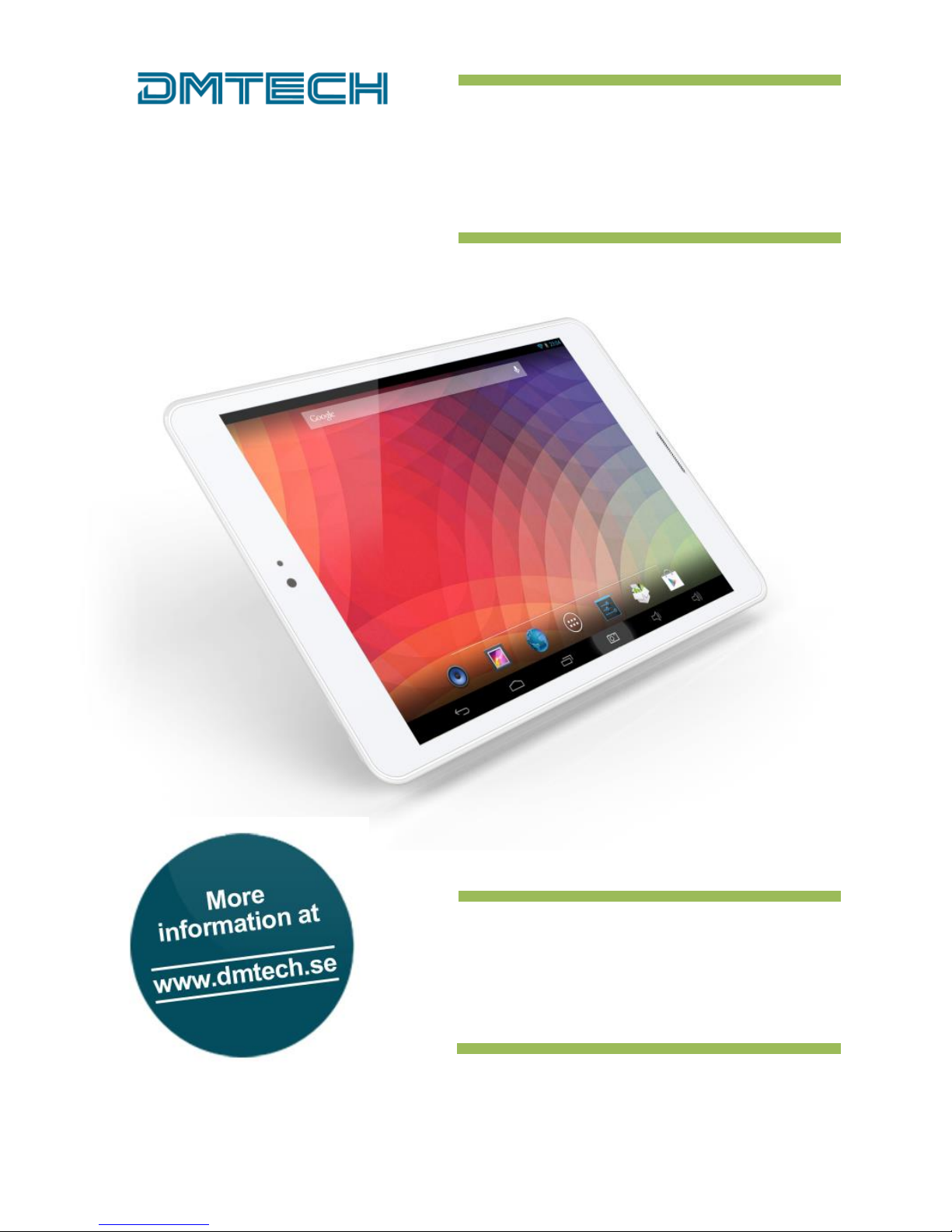
7.85" Tablet for Android
Tablet 7945
Hurtig Start Guide – Side 1
Quick Start Guide – Page 13
Page 2
1
Egenskaper
● 7.85-tommers IPS touchscreen ● Wi-Fi 802.11 b/g/n ● Støtter apper fra 3. part
● Kamera foran og bak ● G-sensor ● Mediespiller
Hva finnes i esken
Surfeplate ● USB-kabel ● Nettadapter
Hodetelefoner ● OTG USB-kabel ● Hurtig start guide
Beskrivelse
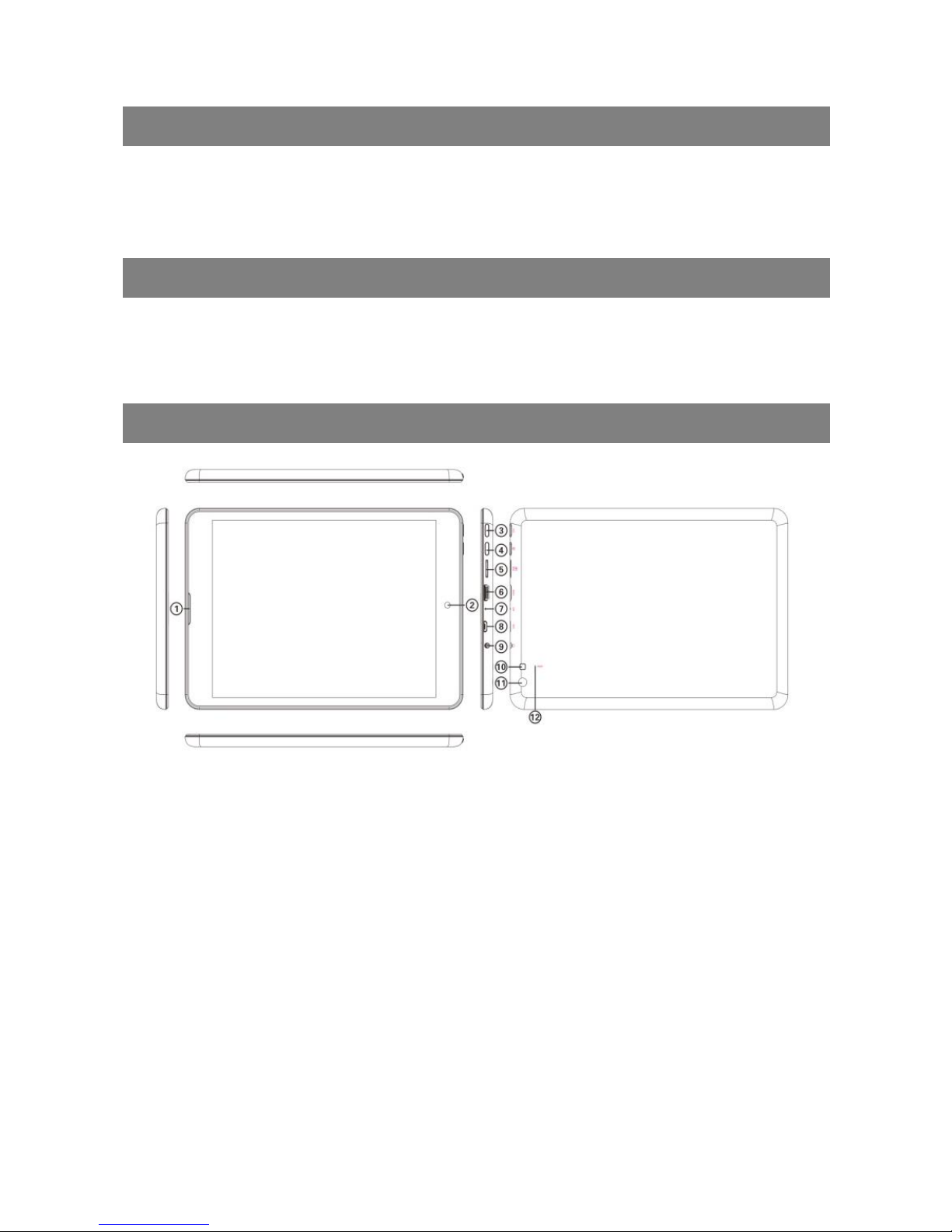
1. Høyttaler
2. 2 MP Foran kamera / Lyssensor - Justerer lyset på skjermen automatisk
3. Tilbakeknapp
4. Strøm – Trykk og hold inne for å slå enheten på eller av; trykk kort for å låse eller
låse opp skjermen
5. MicroSD kortspor
6. Micro USB-port – Kobler til PC via USB-kabel, kobler til USB-minneenhet,
tastatur/mus eller 3G-dongel via USB-vertskabel
7. Mikrofon
8. HDMI
9. Hodetelefonkontakt – Kobler til stereohodetelefoner
10. Blits - Aktiver blitsen ved fotografering i mørket
11. 5 MP Bak kamera
12. Reset-åpning – Reset enheten hvis den fryser
Page 3
2
Før bruk
På
Trykk på knappen på/av og hold den inne til skjermen slår seg på og startbildet vises.
Platen kan bruke ett til to minutter på å starte.
Av
Trykk på knappen på/av og hold den inne til dialogboksen Power Off åpnes, og trykk
deretter på OK for å slå av platen.
Låse opp skjermlåsen
Skjermlåsen aktiveres automatisk når platen ikke har vært i bruk en viss tid.
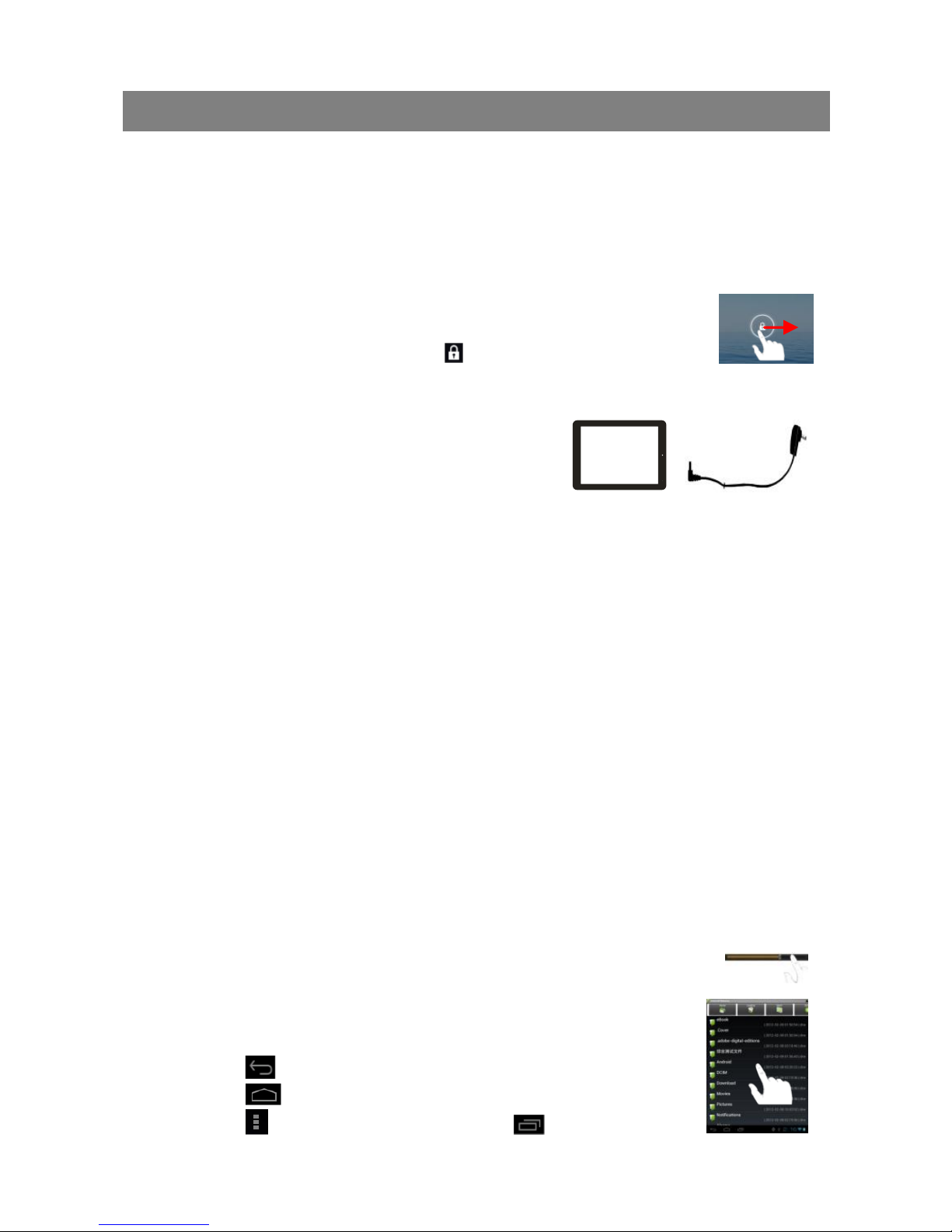
Lås opp skjermen igjen ved å dra ikonet mot høyre på skjermen.
Lade batteriene
Sett platen på lading når batteriindikatoren viser tomt
batteri. Koble laderen til USB porten og deretter til en
vanlig stikkontakt med spenningen 220–240 V. Det
tar opptil 5 timer å lade fullstendig. Full kapasitet nås
først etter flere ladninger og utladninger.
Installere minnekort
For å øke lagringsminnet kan du sette inn et microSD-kort i minnekortleseren på
platens bakside. Minnekort på opptil 32 GB kan brukes.
Overføre filer fra en datamaskin
Du kan overføre filer, f.eks. bilder, filmer og musikk eller apper, fra en datamaskin.
1. Koble platen til datamaskinen med den medfølgende USB-kabelen.
2. Når platen er tilkoblet, vises den som en ekstern enhet i Utforskeren
på datamaskinen.
3. Kopier filer til enten platens internminne eller et minnekort.
Reset (nullstilling)
1. Hvis platen henger seg opp, kan du prøve å starte den på nytt ved å holde
på/av-knappen inne og velge å slå av.
2. Hvis dette ikke hjelper, kan du føre inn en binders i hullet merket Reset. Da
starter platen på nytt. Vær oppmerksom på at ingen lagrede filer eller
innstillinger forsvinner ved denne typen nullstilling.
Tips
Ved avspilling av musikk eller film kan du dra i glidebryteren for å flytte fremover
eller bakover i låten/filmen.
Når du arbeider i filbehandleren, kan du dra med fingeren for å bla
opp og ned på skjermen.
I filbehandleren for musikk, video osv. kan du holde fingeren på
en fil for å se ulike alternativer.
Trykk på for å gå tilbake til foregående valg/meny.
Trykk på for å gå til startskjermen.
Trykk på for å åpne menyvalg og på for å vise nylig
åpnede apper (programmer).
Page 4
3
Grunnleggende bruk
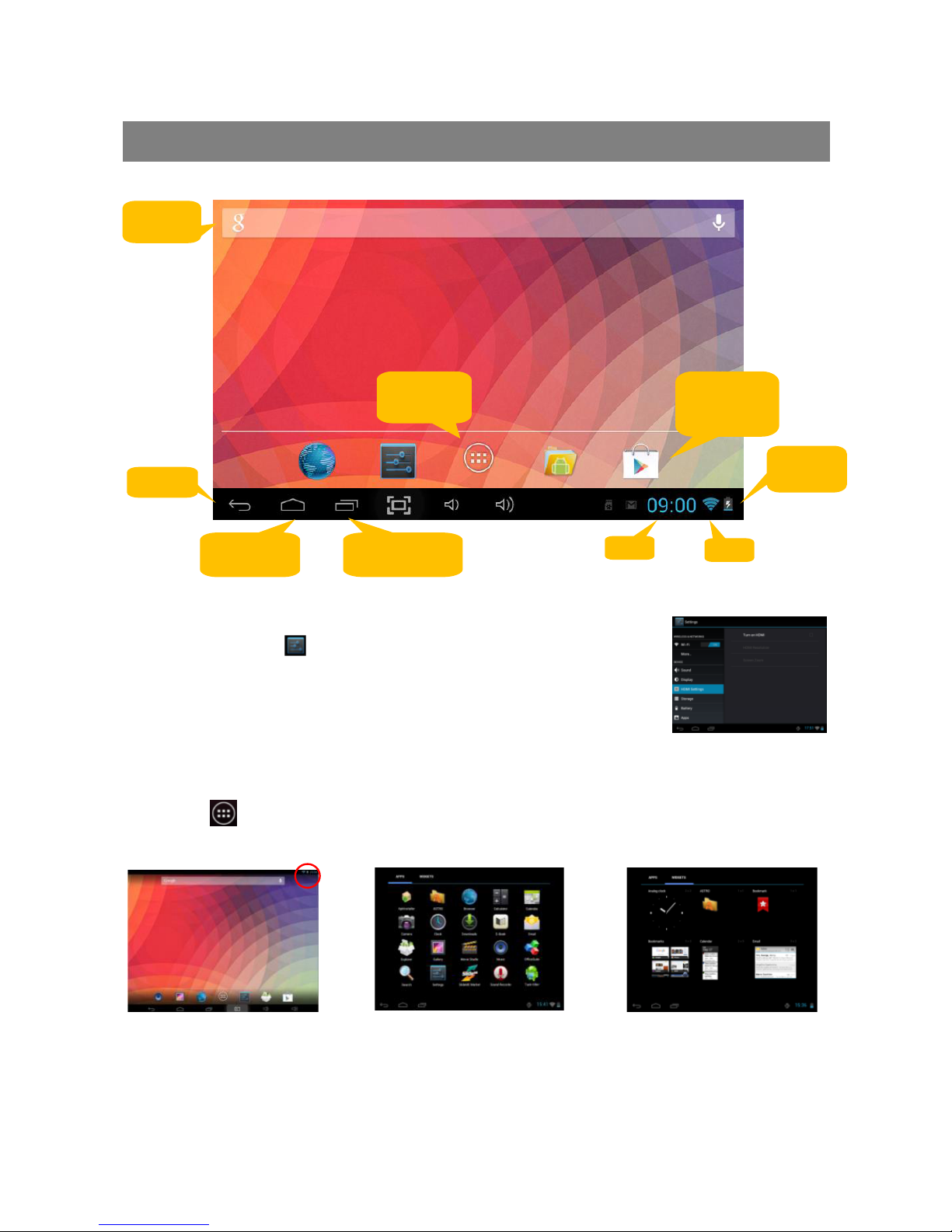
Startskjerm
Systeminnstillinger
Trykk på snarveien på startskjermen. Her velger du passord for
det trådløse nettverket (WiFi), skjerminnstillinger, språk, klokke osv.
Vise alle installerte apper og widgeter
Denne platen leveres med mange forhåndsinstallerte apper og widgeter.
Trykk på for å vise dem.
Googlesøk
Gå til
appskjermen
Snarvei til
Play Store
Startskjerm
Sist åpnede
apper
Klokk
WiFi
Batterinivå
Tilbake
Page 5
4
Personlige innstillinger for startskjermen
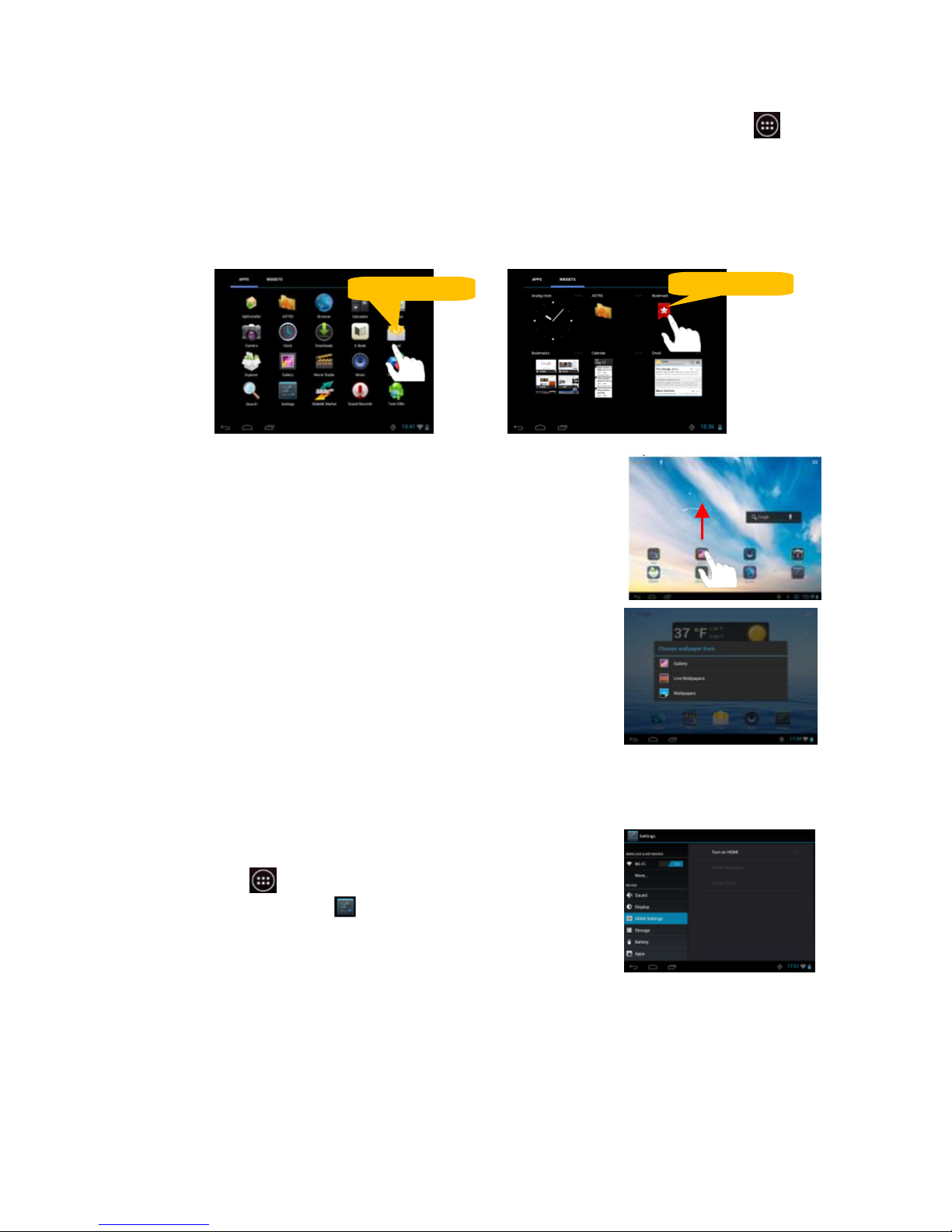
Legge til en snarvei til et favorittprogram (app) på startskjermen: Trykk på for å
vise alle. Pek på et ikon og hold fingeren på det for å legge til appen på
startskjermen.
OBS! Hvis det ikke er nok plass på skjermen, vises det en melding om dette. Du kan da lage
ytterligere en startskjerm.
Flytte et ikon: Pek på det og dra det til det stedet
der du vil ha det.
Slette et ikon: Trykk på det og dra det til papirkurven
på skjermen.
Bytte skrivebordsbakgrunn: Hold fingeren på en tom
flate inntil teksten Bytte skrivebordsbakgrunn vises,
og velg et annet bilde.
Koble til et trådløst nettverk
Hvis du vil starte webleseren (browseren), må du først
aktivere det trådløse nettverket:
1. Trykk på for å vise alle apper.
2. Trykk på snarveien på appskjermen.
3. Dra glidebryteren Wi-Fi på skjermen til ON.
4. Platen søker etter synlige nettverk og viser dem.
5. Velg et nettverk og trykk på koble til. Hvis
nettverket er kryptert, må du angi passordet for det aktuelle nettverket.
Hold fingeren på
Hold fingeren på
Page 6
5
3G-tilkobling
I tillegg til trådløst nettverk kan du også bruke de vanligste USB-modemene, versjon
3G. 3G-modem inngår ikke. Dessuten må du ha en USB-adapter for å koble modemet
til platen. De fleste mobiloperatørers APN-innstillinger er forhåndsinnstilte.
Åpne webleseren
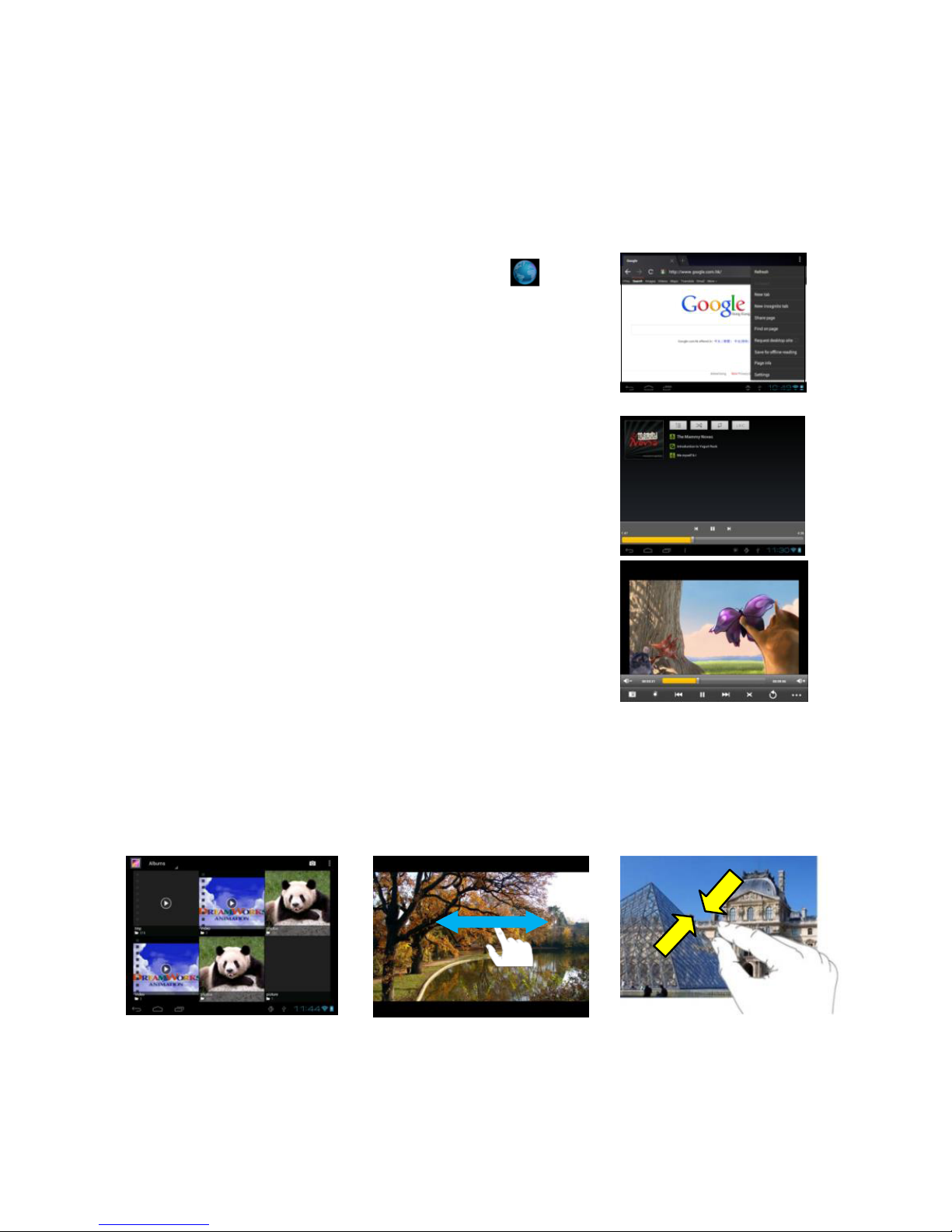
Du åpner webleseren ved å trykke på ikonet
på startskjermen. Du kan også installere valgfri webleser
fra tredjepart.
Spille musikk
1. Trykk på musikkikonet på appskjermen.
2. Naviger i musikkbiblioteket.
3. Trykk
på en låttittel for å avspille låten.
Vise film
1. Trykk på videoikonet på appskjermen.
2. Naviger i videobiblioteket.
3. Trykk på en filmtittel for å vise filmen.
Vise fotografier
1. Trykk på bildegalleriet på appskjermen for å åpne bildeviseren.
2. Bla mellom miniatyrbildene.
3. Trykk på et miniatyrbilde for å åpne bildet som et helskjermsbilde.
4. Dra med fingeren til høyre eller venstre for å bla mellom bildene.
5. Før fingrene sammen eller fra hverandre som vist på bild
et nedenfor for å
zoome inn eller ut.
Page 7
6
Kamera
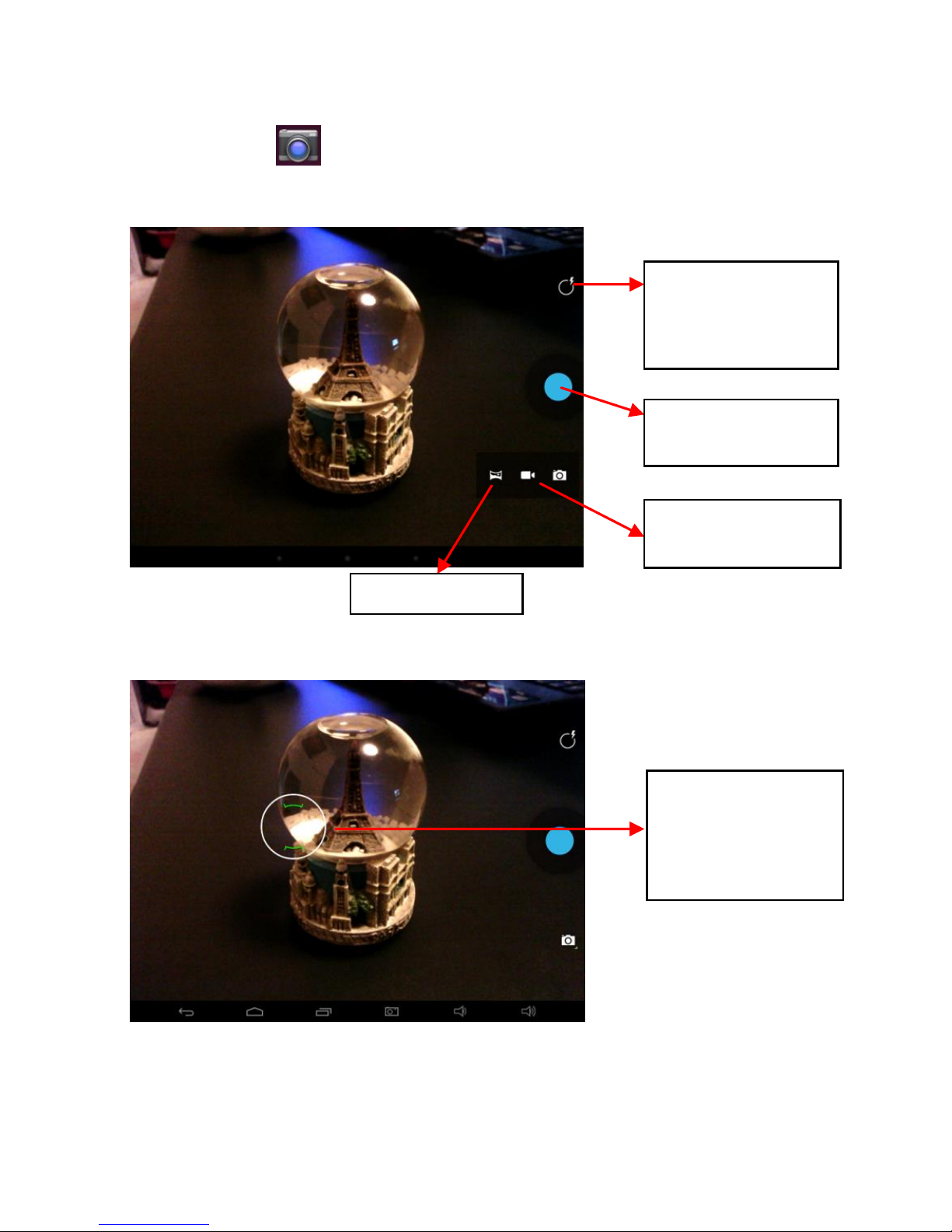
Pek på symbolet for å åpne kameraet. Nettbrettet har kamera både foran og
bak. Begge kameraer kan brukes til å ta bilder og spille inn video.
Still inn hvitbalansen, velg
scenario, aktiver
blits osv.
Trykk på utløseren
for å ta et bilde
Panoramabilde
Skift til innspilling
av video
Du kan fokusere
et objekt ved å
peke på skjermen
før du trykker på
utløseren
Page 8
7
Filbehandling
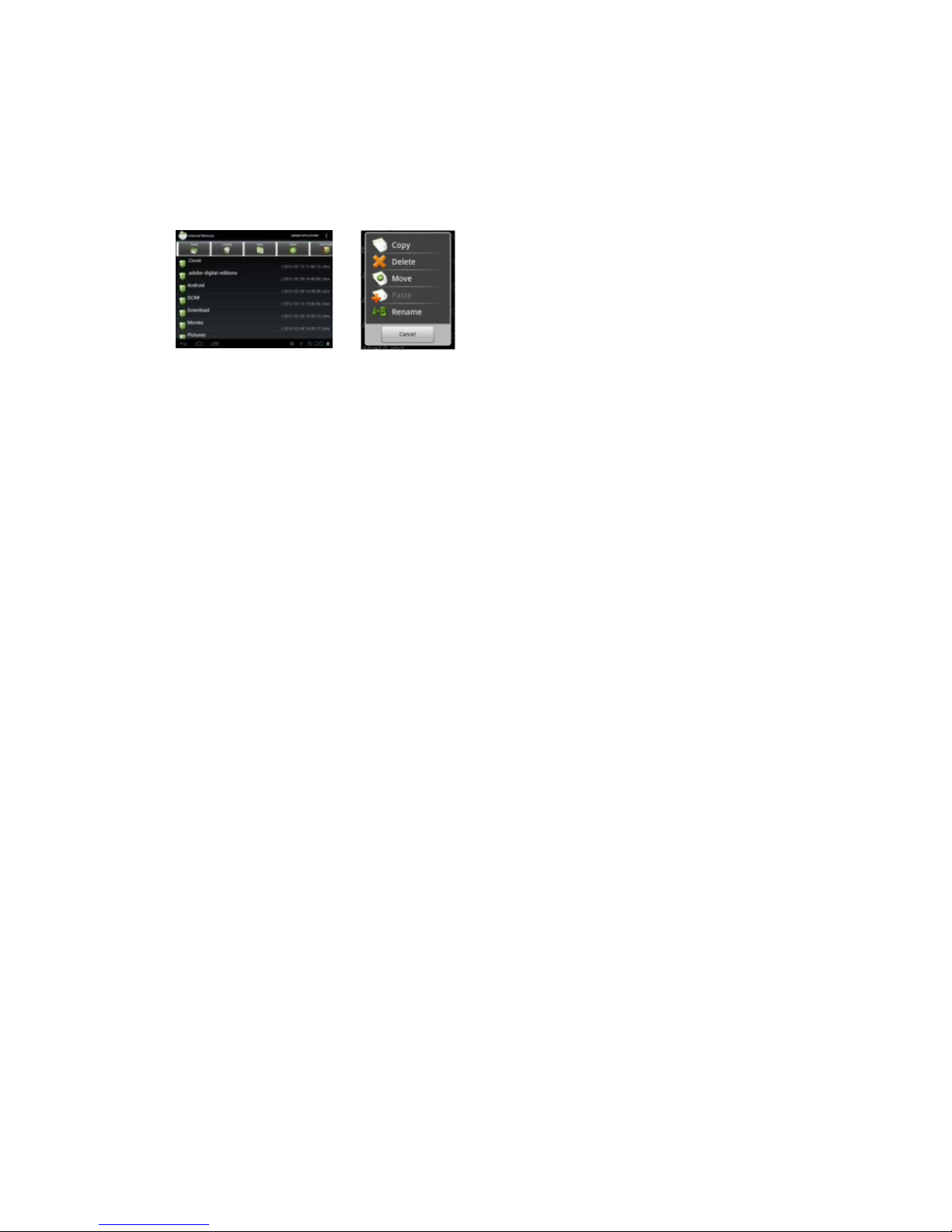
Med filbehandleren kan du utforske og behandle filer.
1. Trykk på ikonet Explorer for å åpne filbehandleren.
2. Der kan du se og bla gjennom filene.
3. Trykk på menyknappen for å åpne en meny der du kan velge å kopiere, slette,
flytte, lime inn eller bytte navn på filen.
E-post
Du kan også sende og motta e-post dersom platen er koblet til et trådløst nettverk.
Opprette en e-postkonto:
1. Trykk på e-postikonet.
2. Skriv inn e-postadressen din og passordet ditt.
3. Trykk på Manuelle innstillinger og angi kontoinformasjon og serverinformasjon
(fås fra e-postleverandøren din).
4. Trykk på Neste for å fortsette. Systemet kontrollerer innstillingene. Når teksten
Kontoen din er opprettet og e-post er på vei vises, er kontoen ferdig innstilt.
5. Skriv inn navnet ditt og trykk på Fullført.
Håndtere apper og oppgaver
Det finnes en hel del forhåndsinstallerte nytteprogrammer, men du kan også installere
egne apper fra andre leverandører ved f.eks. å laste dem ned fra Internett (apk-filer).
Laste ned og kjøpe apper
Med denne platen kan du surfe inn på ulike handelsplasser for å laste ned apper.
Det finnes både gratisapper og apper som koster penger. Aktiver Google play,
trykk på innstillinger, deretter på program og merk av i ruten for
servicefunksjoner. Gå tilbake til appskjermen for å se handelsplassen.
Installere apper
1. Åpne filbehandleren Explorer og trykk på den apk-filen du vil installere. Følg
anvisningene på skjermen.
2. Visse apper blokkeres og det vises en sikkerhetsadvarsel. For å kunne
installere en slik app, til tross for sikkerhetsadvarselen, må du merke av i
ruten for ukjente kilder under Program i innstillingsmenyen.
3. Når installasjonen er ferdig, legges det en snarvei for den aktuelle appen på
appskjermen (i bokstavrekkefølge).
Page 9
8
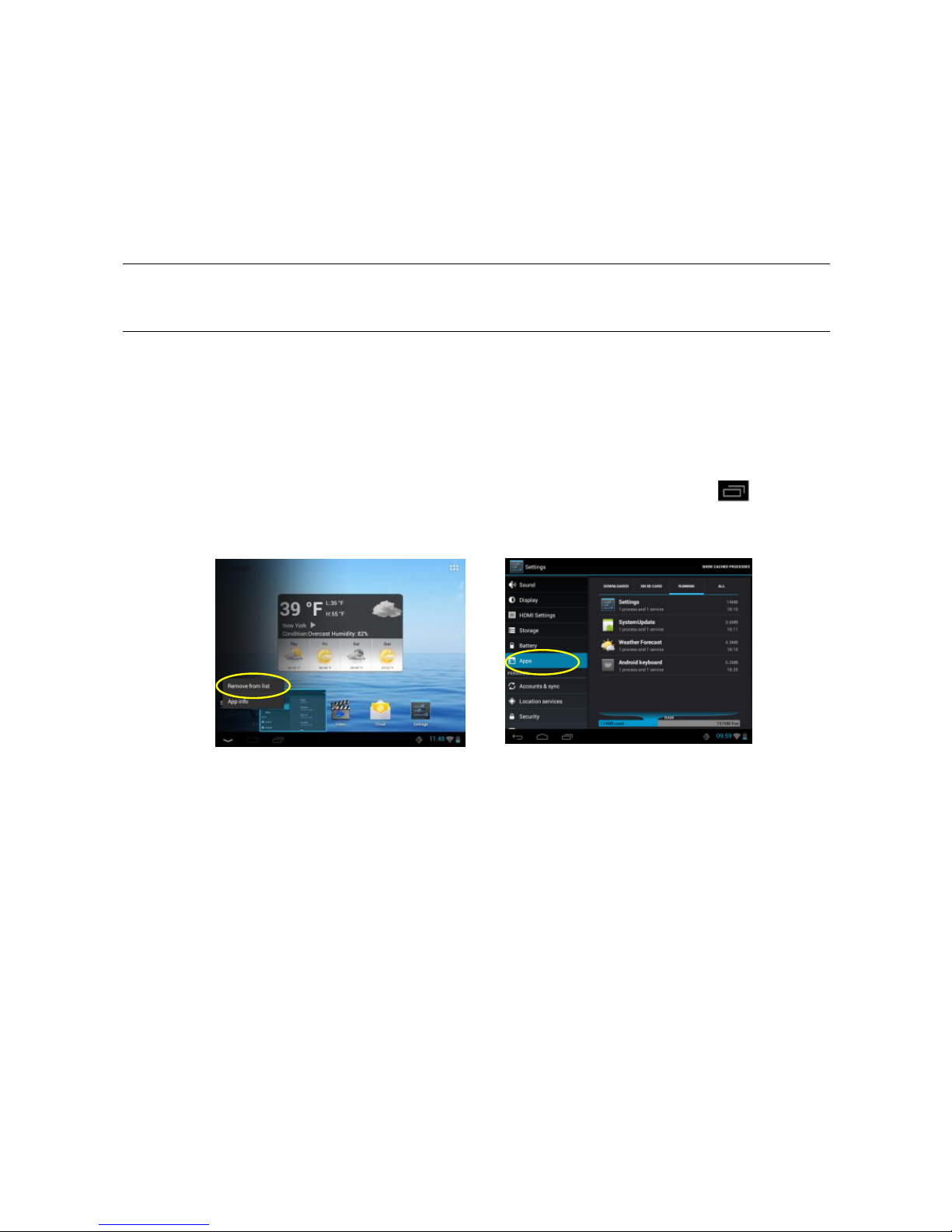
Avinstallere tredjepartsapp
1. Trykk på innstillingsikonet for å åpne innstillingsmenyen.
2. Velg Program og deretter Håndtere program. Trykk på den appen du vil
avinstallere, og velg deretter Slett.
3. En annen løsning er å holde fingeren på en app på appskjermen og flytte den
til startskjermen. Hold deretter fingeren på appen på startskjermen og dra den
til papirkurven.
OBS!
Fabrikkinstallerte apper kan ikke avinstalleres.
En app som skal lastes ned og installeres, må ha filendelsen .apk.
Håndtere prosesser
Du kan også kjøre flere programmer samtidig, f.eks. se på bilder samtidig som
du lytter til musikk.
1. Hvis du vil slette en app fra listen Sist brukte, trykker du på for å
vise appene og deretter holder du fingeren på den appen/prosessen du vil
avslutte/stoppe. Til slutt velger du Slett fra liste.
2. Du kan også installere en spesialfunksjon som avslutter alle prosesser.
Det finnes en rekke ulike slike programmer som du kan laste ned fra
Internett. Prøv deg frem og finn ut hva passer best for deg.
3. En prosess kan også avsluttes fra menyen Program under Innstillinger.
Page 10
9
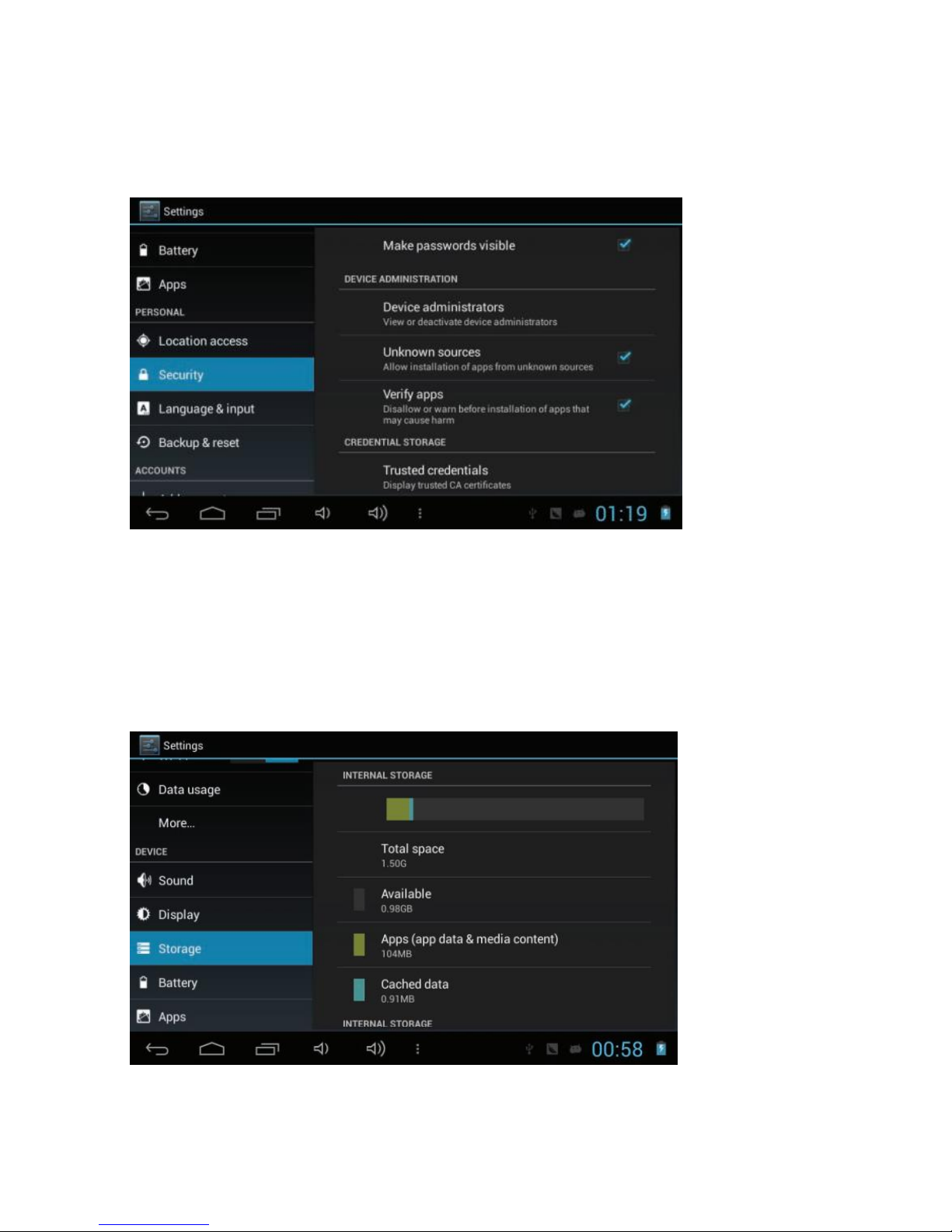
Sikkerhet
Ukjente kilder: Angi at enheten skal installere applikasjoner lastet ned fra enhver kilde.
Hvis du ikke velger dette alternativet, kan du bare installere applikasjoner lastet ned
fra Play Store.
Minne
Vis minneinformasjon for enheten og minnekortet. Du kan også formatere
minnekortet.
Når du formaterer et minnekort, slettes alle data permanent fra minnet.
Den faktiske tilgjengelige kapasiteten i det interne minnet er mindre enn
den angitte kapasiteten fordi operativsystemet og standardapplikasjonene
bruker deler av minnet.
Page 11
10
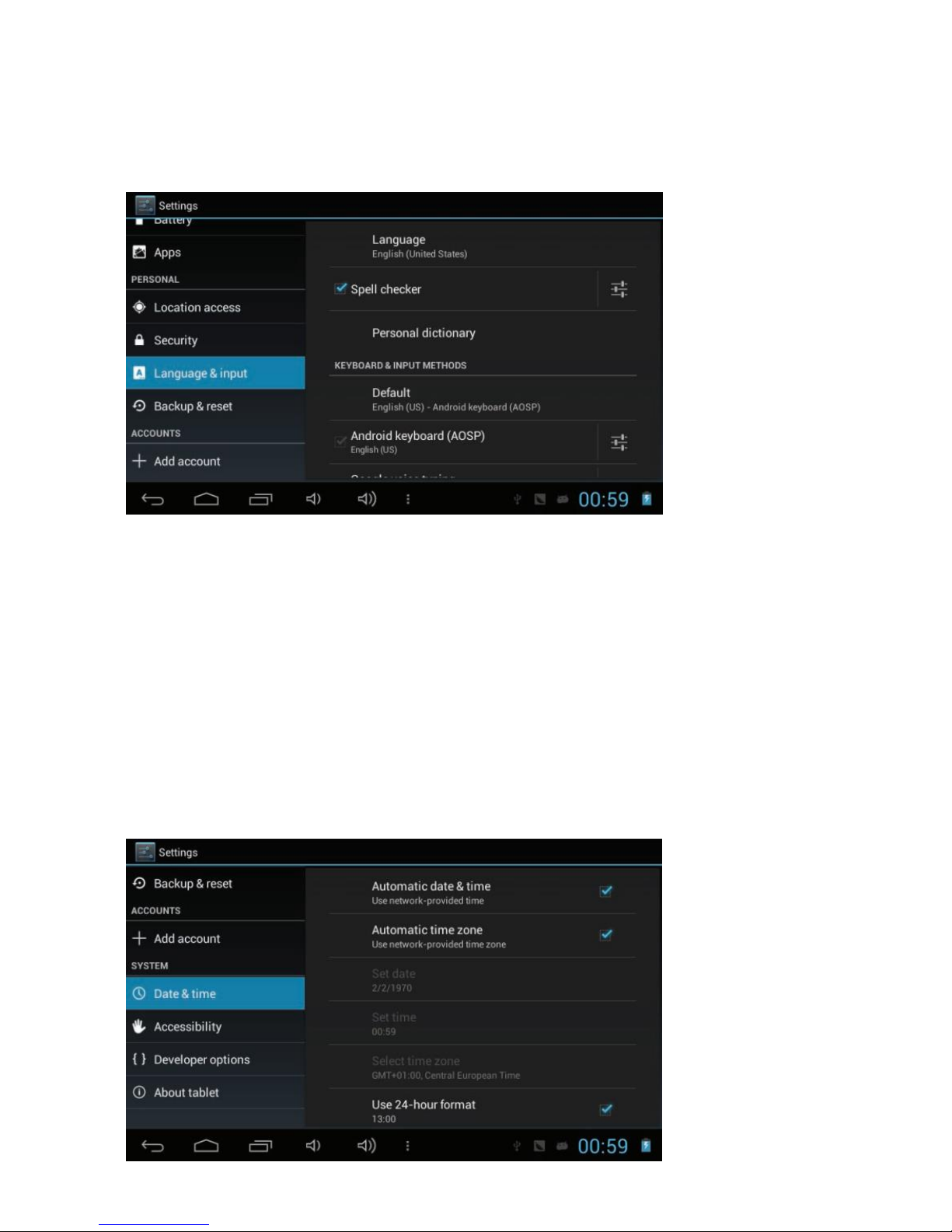
Språk og inndata
Endre innstillingene for språk og innskriving av tekst.
Språk: Velg språket som skal brukes.
Tastatur og inndatametoder: Velg hvordan tekst skal skrives inn.
Dato og tid
Endre innstillingene for å kontrollere hvordan tid og dato vises på enheten.
Automatisk dato og tid: Tidsinformasjon mottas fra nettverket og tid og dato
oppdateres automatisk.
Angi dato: Angi gjeldende dato manuelt.
Angi tid: Angi gjeldende tid manuelt.
Automatisk tidssone: Tidssoneinformasjon mottas automatisk fra nettverket
når du beveger deg mellom tidssoner.
Velg tidssone: Velg en tidssone.
Bruk 24-timers format: Angi om tiden skal vises med 24-timers eller
12-timers format.
Velg datoformat: Velg et datoformat.
Page 12
11
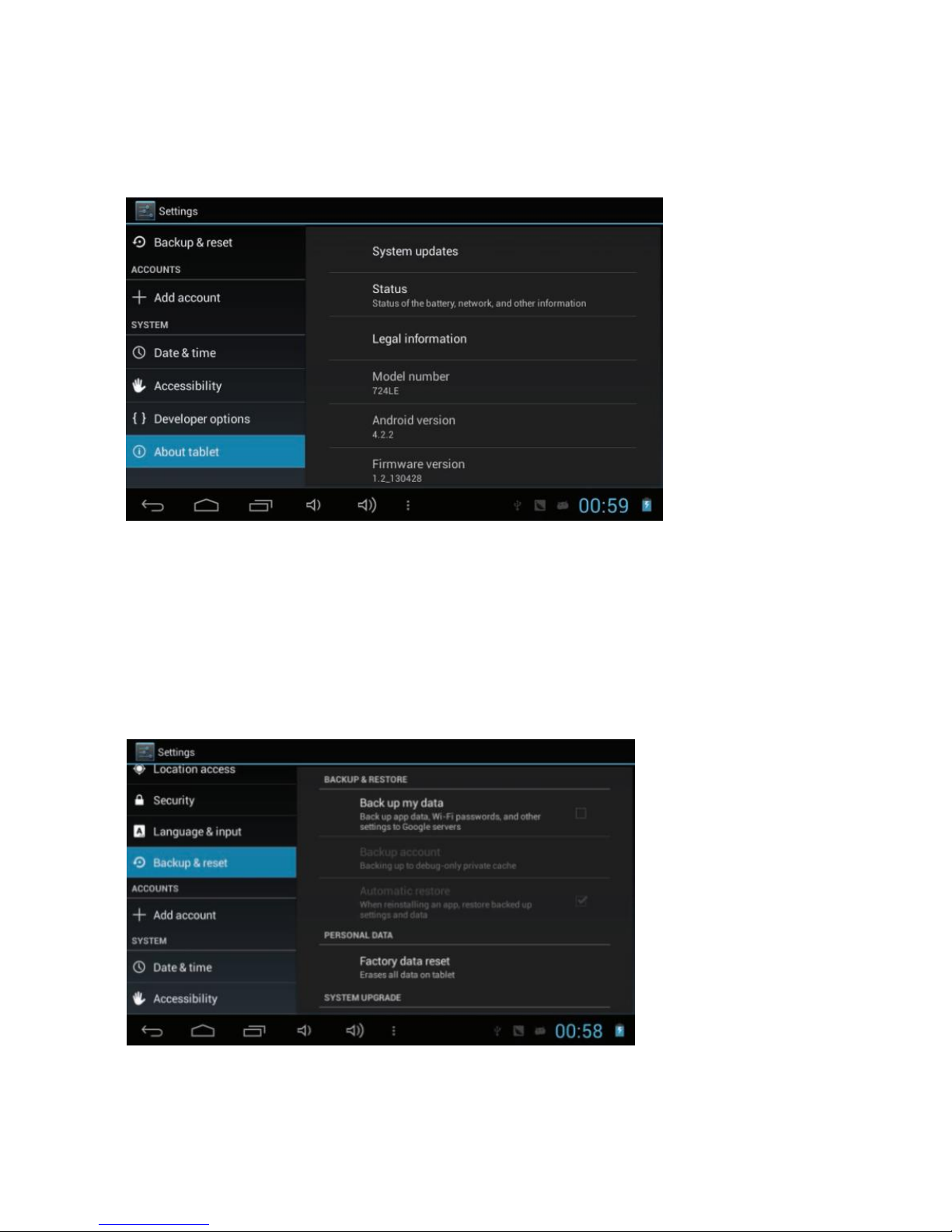
On nettbrettet
Vis informasjon om enheten, f.eks. modellnummer og versjon.
Backup og nullstilling
Endre innstillingene for håndtering av innstillinger og data:
Ta backup av data: Angi at det skal tas backup av innstillinger og
applikasjonsdata til Google-serveren.
Backupkonto: Sett opp eller rediger din Google backupkonto.
Automatisk gjenoppretting: Angi at innstillinger og applikasjonsdata skal
gjenopprettes automatisk når du må installere en applikasjon på nytt.
Bruk fabrikkinnstillinger: Gjenopprett fabrikkinnstillingene for enheten og slett alle
dataene dine.
Page 13
12
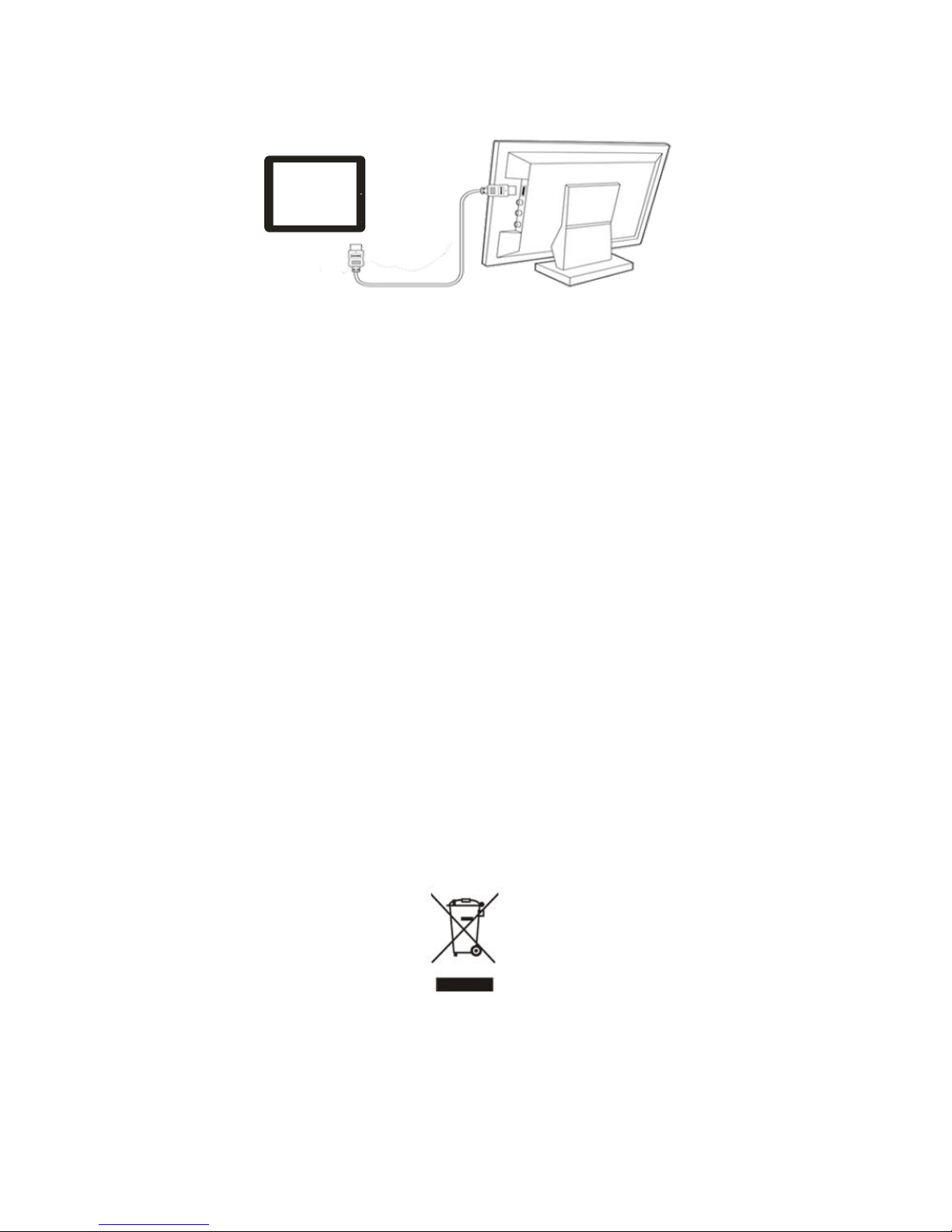
Koble platen til en HD-TV:
Denne surfeplaten har en HDMI-utgang, slik at den kan kobles til en TV eller
dataskjerm med tilsvarende inngang.
1. Åpne appen Innstillinger og velg HDMI. Velg deretter egnet oppløsning.
2. Slå på TV-en eller dataskjermen og velg HDMI som inngang på
TV-en/dataskjermen.
3. Koble platen til TV-en eller dataskjermen med en HDMI-kabel.
4. Når platen er tilkoblet, forsvinner bildet fra platen og vises i stedet på TV-en.
5. Trekk ut HDMI-kabelen fra platen når du vil gå tilbake til visning på platen.
Gjenoppretting av fastvare eller programvare
Dette er for å forbedre din tablet-PC - derfor bør du regelmessig se etter
oppgraderinger til din modell. Vi anbefaler at du oppgraderer fastvare og programvare
før du leverer din tablet-PC til service fordi det kan løse problemer og tekniske forhold
når din tablet-PC ikke fungerer slik den skal.
Gå til www.netlogic.se og finn din modell. Følg instruksjonene om hvordan du
oppgraderer din tablet-PC.
Ved å gjøre oppgraderingen selv før du sender enheten til servicesenteret,
minimaliserer du risikoen for å bli fakturert for fastvare- og
programvareoppgraderinger. Oppgradering av fastvare og programvare er ikke
inkludert i den servicen som dekkes av garantien.
Dette symbolet på produktet eller i instruksjonene betyr at det
elektriske og elektroniske utstyret ikke skal kastes sammen med husholdnings-
avfallet ved endt levetid. I EU-landene finnes det separate innsamlingssystemer
til resirkulering. Kontakt lokale myndigheter eller forhandleren du kjøpte
produktet av for ytterligere informasjon.
Page 14
13
Main Features
● Wi-Fi Connectivity ● 7.85" IPS Touch Screen ● 3
rd
Party Apps Support
● Dual Camera with Flash Light ● Built-in G-sensor / Gyro-sensor ● Media Player
● Electronic Compass ● Light Sensor for Auto-Brightness
Box Content
Main Unit ● USB Cable ● AC Adaptor
Earphones ● OTG USB Cable ● Quick Start Guide
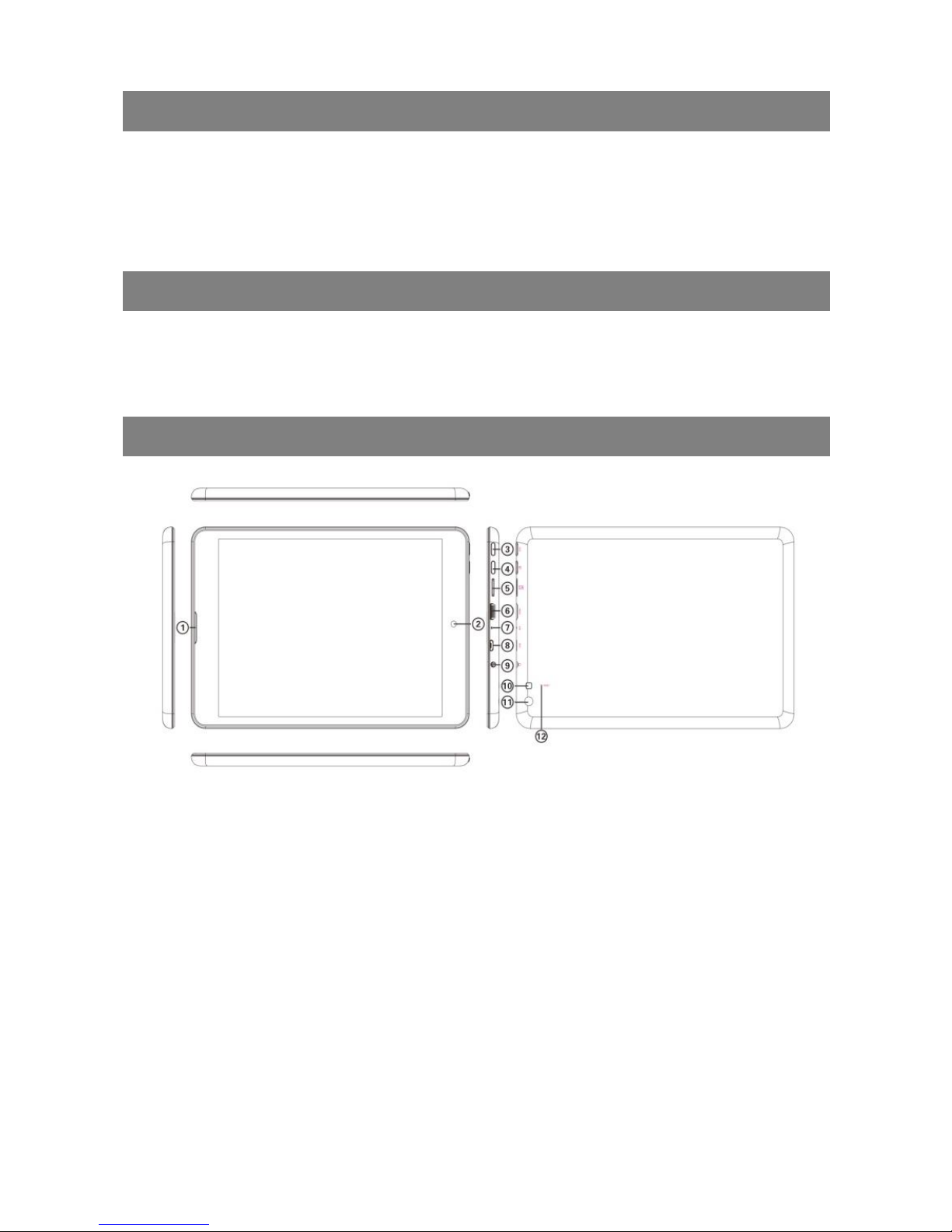
Product Overview
1. Speaker
2. 2M pixel Front Camera / Light Sensor - Adjust the brightness of screen
automatically
3. ESC button
4. Power – Press and hold to turn on or off the unit; briefly press to lock or unlock
the screen
5. MicroSD Card Slot
6. Micro USB port – USB Power / Connects to PC via USB cable / Connects to
USB memory device, keyboard/mouse or 3G dongle via USB host cable
7. Microphone
8. HDMI
9. Earphone Socket – Connects to stereo earphones
10. Flash light - Turn on the Flash while taking picture in dark condition
11. 5M pixel Rear Camera
12. Reset Pin Hole – Reset your device if the device freezes
Page 15
14
Before Operation
Power On/ Off the Device
To turn on the device, press and hold the Power button on the unit and release it
when you see the boot-up screen. It may take one or two minutes to start up the
system, please be patient before you proceed.
To turn off the device, press and hold the Power button to bring up the “Power Off”
option, then tap on “Power Off” and “OK”.
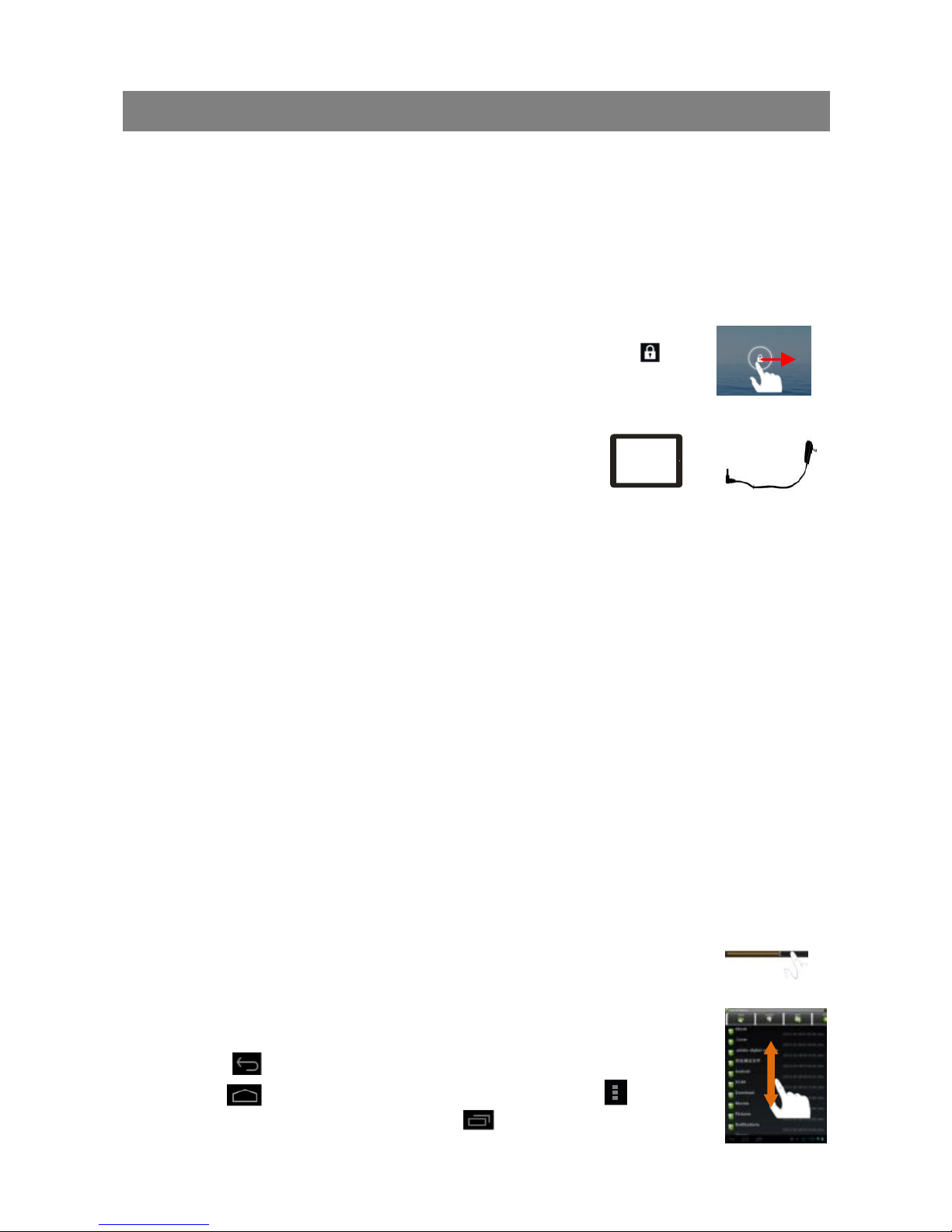
Unlock the Screen Display
The screen display will be locked when the device is idle for a few
seconds. You need to unlock the screen by dragging the lock icon
rightwards before you continue to use the device.
Charge the Battery
Charge the device when it indicates low battery. To
charge the battery, connect the device to any standard
wall outlet via the USB port using the power adaptor. It
takes about 5 hours to fully charge the battery.
Install Memory Card
To install a memory card, find the card slot on the device and then insert the memory
card into the slot in the correct orientation.
Transfer Files from PC
You may need to transfer media files from a computer to the device.
1. Connect the device to a computer with the supplied USB cable.
2. Once the connection is done, an icon of mobile phone (internal memory)
will appear on your computer.
3. Copy files from the PC to the internal memory or the memory card.
Reset the Device
1. If the device freezes, you can force the device to shut down by holding the
Power button for seconds.
2. If the above operation does not work, use a pin to penetrate into the “pinhole
reset” button.
General Touch Actions
During playback of music or video, you can tap on the progress bar to change the
playback progress.
In different browsers (e.g. File, Music etc.), you can slide your
finger on the screen up and down to scroll the file list.
In some browsers (File, Music, Video, Web etc.), you may hold
your finger on an item to display options.
Tap on button to get back to previous operation interface;
tap on button to go to the Home Screen; tap on button
to display the menu options; tap on button to check the
recently opened apps.
Page 16
15
Basic Operation
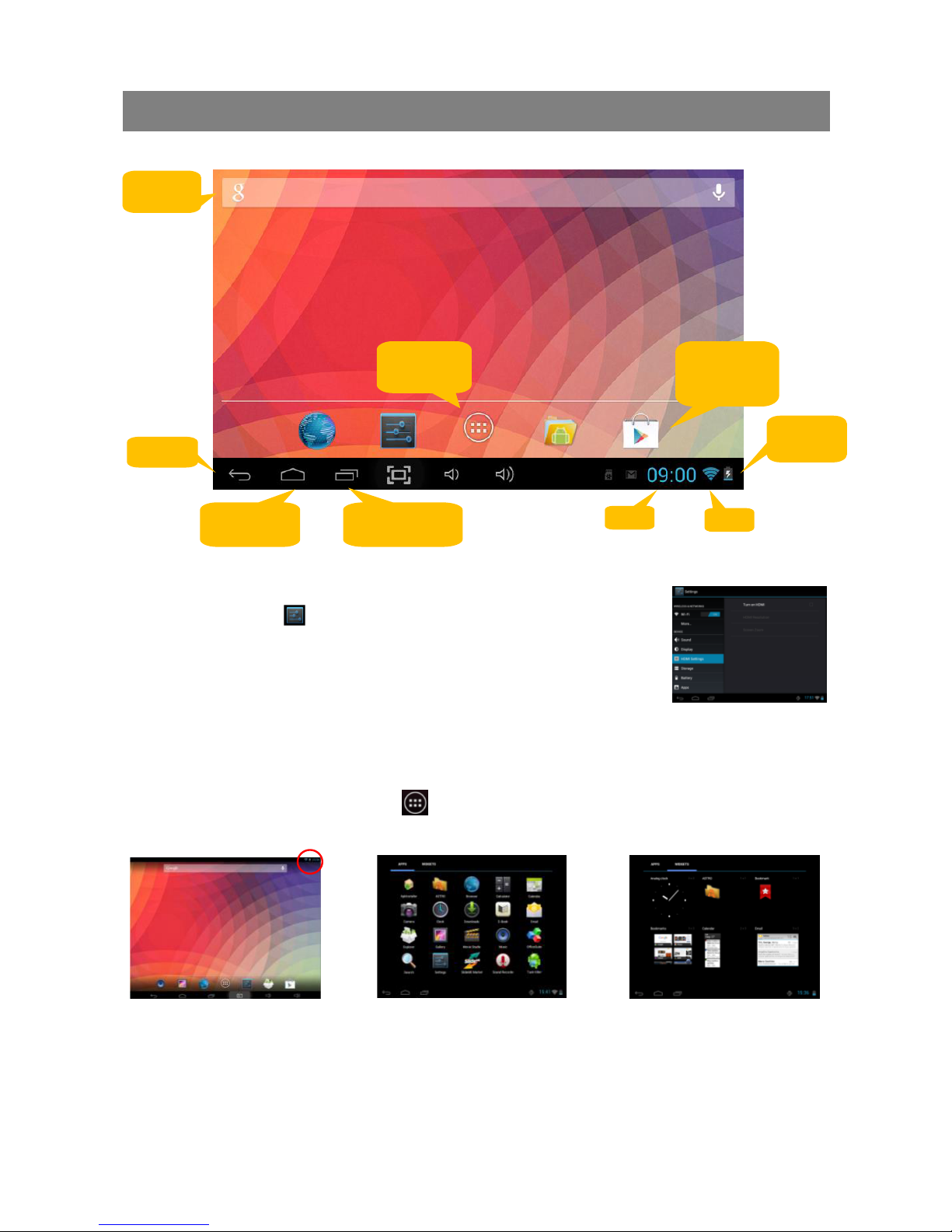
Home Screen
System Settings
Tap the Setting icon on the Home Screen to open the system
setting menu. Here you can setup the working environment for the
device, e.g. Language, Display, WiFi, Sound, Apps etc.
Display all Applications and Widgets
The device has many useful pre-installed applications/widgets.
You can tap the Application Tab to display them.
Google
Search
Go to apps
page
Shortcut to
Play Store
Go to Home
screen
Recently
opened apps
Time
WiFi
Batterinivå
Return
Page 17
16
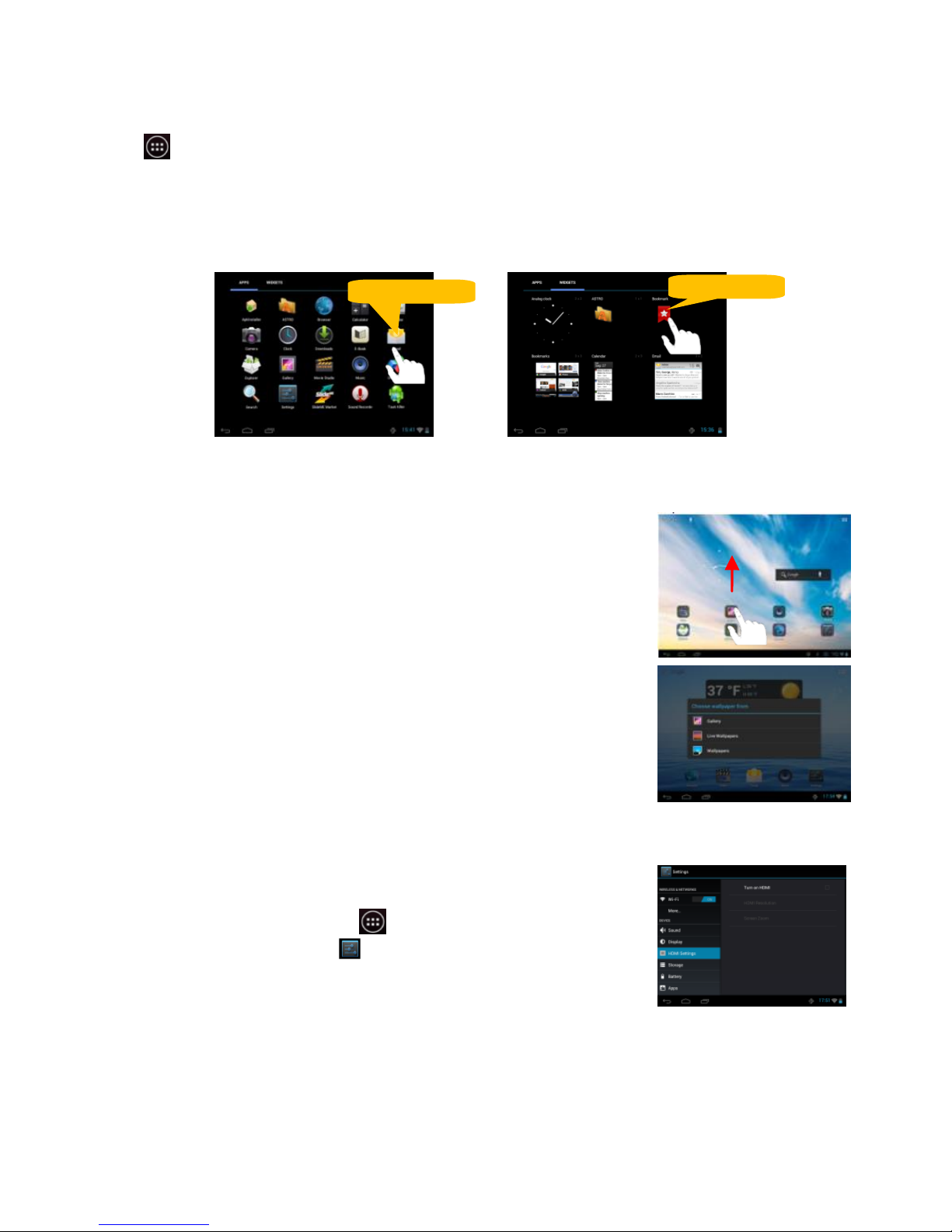
Customizing Home Screen Items
To add a Home Screen item (shortcut, widget etc.), you can tap the application icon
to display all applications and widgets, then hold your tap on an item to place it
on the home page.
NOTE: If current page of the Home Screen has no enough room for a shortcut or
widget, you will be prompted that there is no more room.
To move a Home Screen item, hold your finger onto it to
highlight it, then drag it to the desired location, and release it.
To remove a Home Screen item, hold your finger onto it to
highlight it, drag it to the recycle bin “X Remove” and then
release your finger.
To change the wallpaper, hold your tap on the Home screen till a
menu appears, then tap on “Wallpaper” to set the desktop
wallpaper.
Make Wi-Fi Connection
Before launching the web browser, you first need to activate
the Wi-Fi and configure a Wi-Fi network.
1. Tap tap the Apps Tab to display all apps.
2. Tap the Setting icon on the apps screen.
3. Slide the WIFI toggle switch to “ON” to turn on Wi-Fi.
4. The device will scan automatically for available Wi-Fi
networks and display them.
5. Choose a network from the list and then tap “Connect” to connect.
Hold down
Hold down
Page 18
17
3G Connectivity
Besides Wi-Fi connection, you can access internet by 3G dongle. Connect a 3G
dongle (not provided) to the device through the USB host cable(not provided), and
then the 3G network is enabled with 3G network icon appearing at the bottom right of
the screen. You can surf on the Internet freely now.
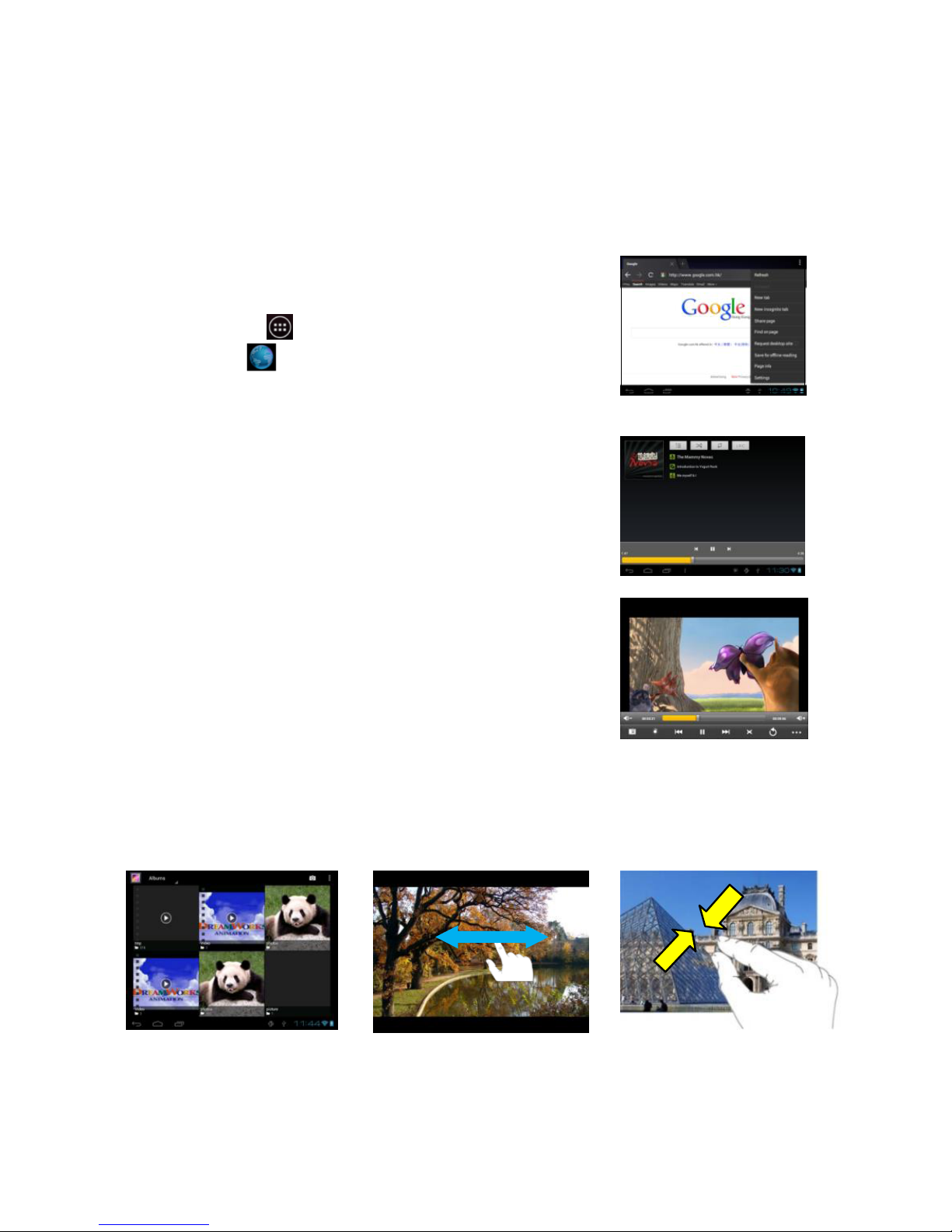
Launching the Web browser
To launch the Web browser, you can tap the
Application Tab and then the
Browser icon in the Home screen.
Playing Music
1. Tap the M
usic icon in the application page to
launch the music player.
2. Navigate through the music library.
3. Select a file and tap it to enjoy the music.
Playing Videos
1. Tap the Video icon in the Home Screen to launch
the video player.
2. Navigate through the video files if available.
3. Tap on a video file to start playing it.
Viewing photos
1. Tap the Gallery icon in the application page to launch the Photo Gallery.
2. Browse photos listed in thumbnail.
3. Tap a photo thu
mbnail to view the photo in full screen.
4. To display the previous/next picture, slide your finger on the screen horizontally.
5. To zoom in or out the picture, pinch your finger on the picture.
Page 19
18
Camera
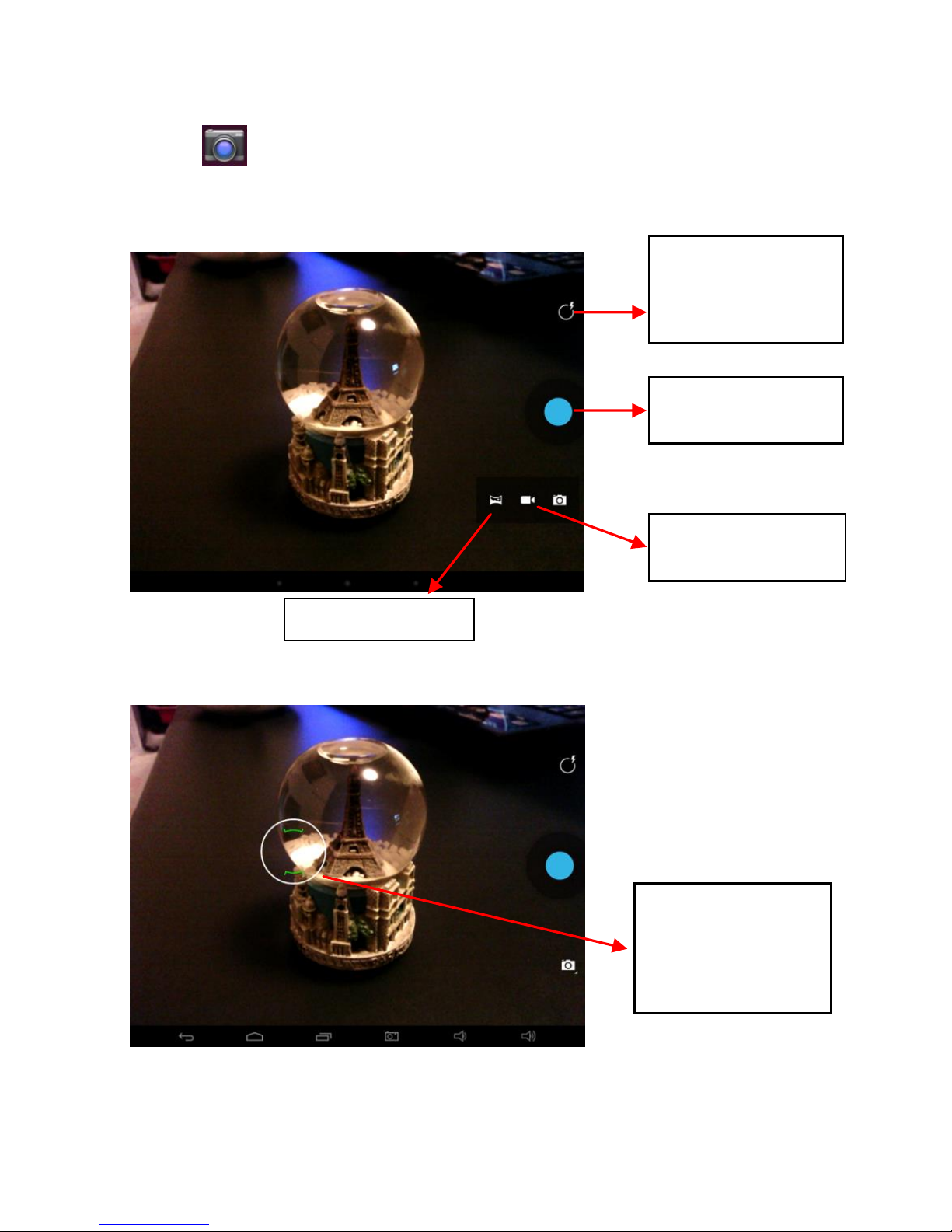
Tap the icon to open camera. Your tablet is built in with 2M front camera and
5M rear camera with auto-focus and flash light. You can take a photo, or a video both
by front camera and rear camera.
You can focus on
any subject by
tapping the screen
before pressing the
shutter
Tab to take a
photo
Set white balance,
Scene mode,
Flash, Swap
camera, etc.
Change to video
recording
Panorama shot
Page 20
19
Managing the Files
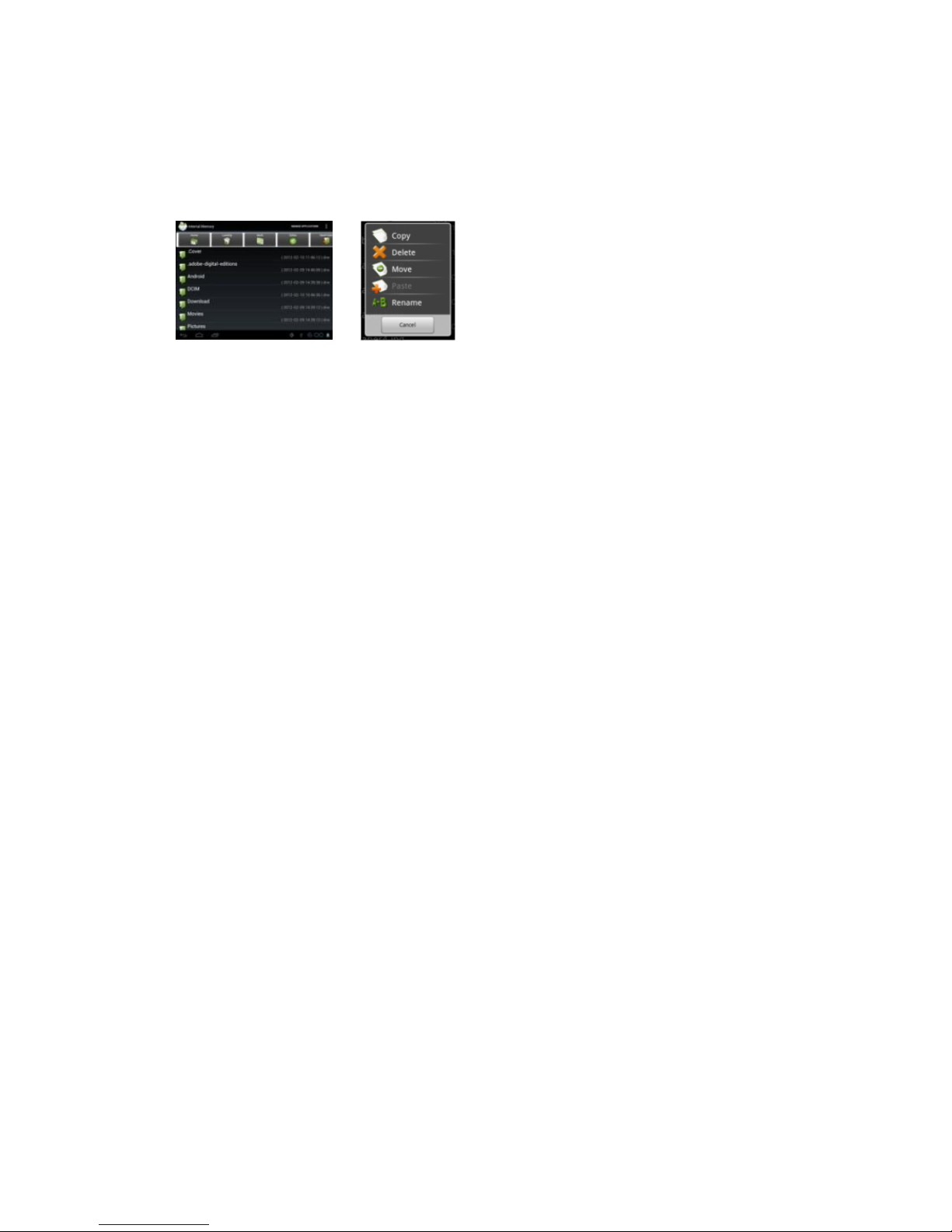
You can check or manage your files with Explorer application.
1. Tap the Explorer icon in the apps page to open this mode.
2. In this mode, you can look through all your file resources.
3. You can also manage your file resources by bringing up the menu.
Receiving and Sending Emails
You can receive and send emails with this device if internet access is available.
Setup your Email Account:
1. Start up the email application by tapping the Email application icon.
2. Input your email address and login password.
3. Tap “Manual Setup” to set the email server information.
4. Click “Next” to continue. Your tablet will check the server settings. When it
prompts you that “Your account is set up, and email is on its way”, your account
is set up successfully.
5. Input your name and then tap on “Done” to finish.
Managing apps and tasks
There are number of useful apps pre-installed in the device as it is produced at the
factory, and you can copy, download or purchase some 3rd apps from other
resources (e.g. the Internet).
Download or purchase apps
With your device, you can visit an apps store or E-market website (e.g. SlideMe)
that offers you plenty of free or paid apps to download.
Install apps
1. Open the Explorer application, then find the app you want to install.
2. Tap the app to start installation. However, for the sake of security, the
installation may be blocked if the device is not sure of the source of the app. In
this case, you shall have to check the “Unknown sources” in the pop-up
setting menu before you go on with the installation.
3. Once the installation finishes, you can find the icon of the app in the apps
screen. It is available for you now.
Uninstall 3rd party apps
1. Tap the Settings icon to display setting menus.
2. Select “Apps”.
Page 21
20
3. Tab on the application that you want to uninstall.
4. Tab on “Uninstall” to uninstall the application.
5. You can simply tap and hold on an app icon to jump to the Home Screen,
then drag it to the dustbin icon to uninstall it.
Note:
You cannot uninstall the pre-installed applications, but you can deactivate
or stop them; Only the 3rd party apps you installed can be uninstalled.
Make sure all apps you have copied or downloaded to your device are in
the .apk format.
Managing tasks
You can handle multiple tasks at the same time with this device. For example, you
can view photos while listening to music.
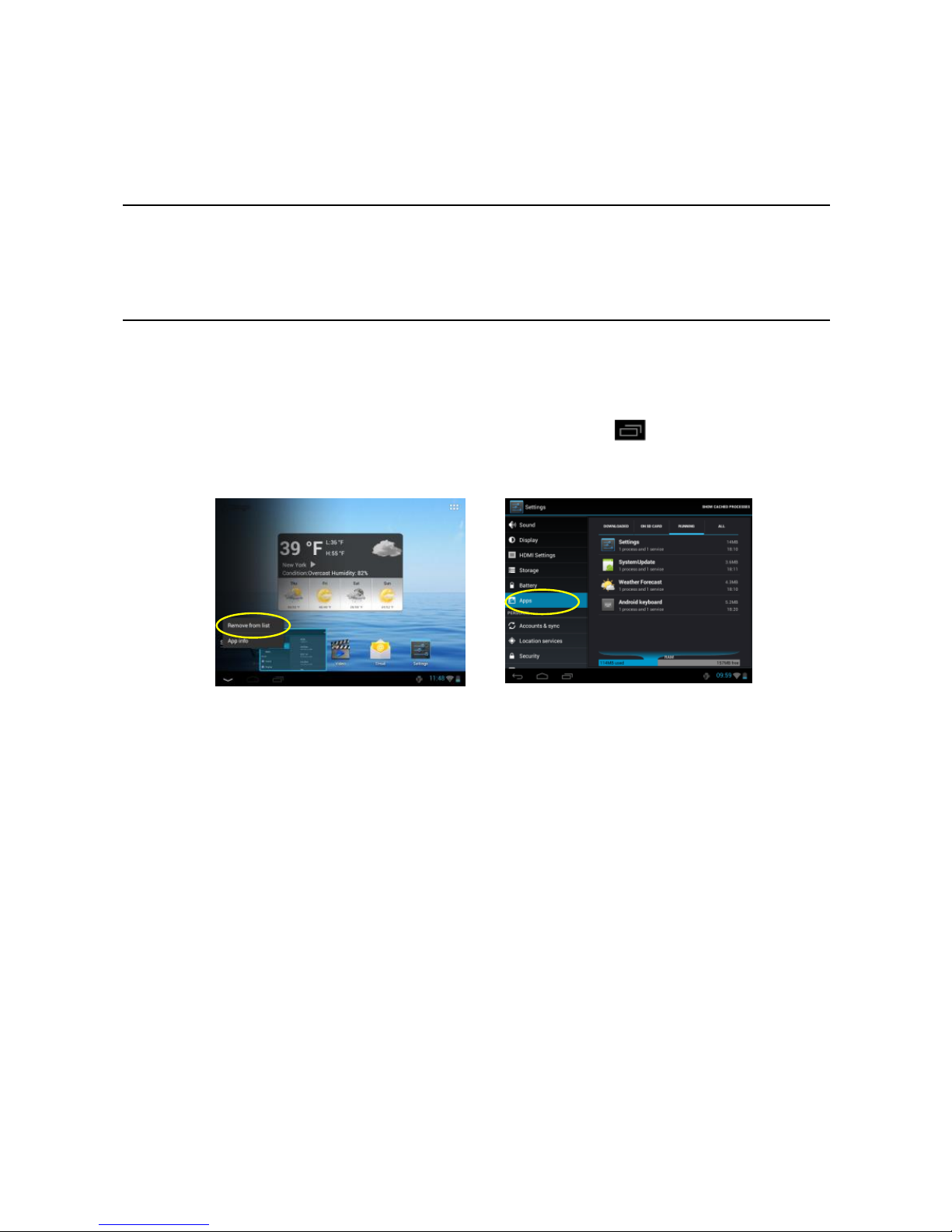
1. To remove the apps used recently, you can tap button to display
them, then hold your tap on the app that you want to stop, and finally select
“Remove from list”.
2. You can also run the application Advanced Task Killer (if avaialble) to kill
your tasks.
3. You can open the Settings menu and select Apps to stop the tasks.
Page 22
21
Security
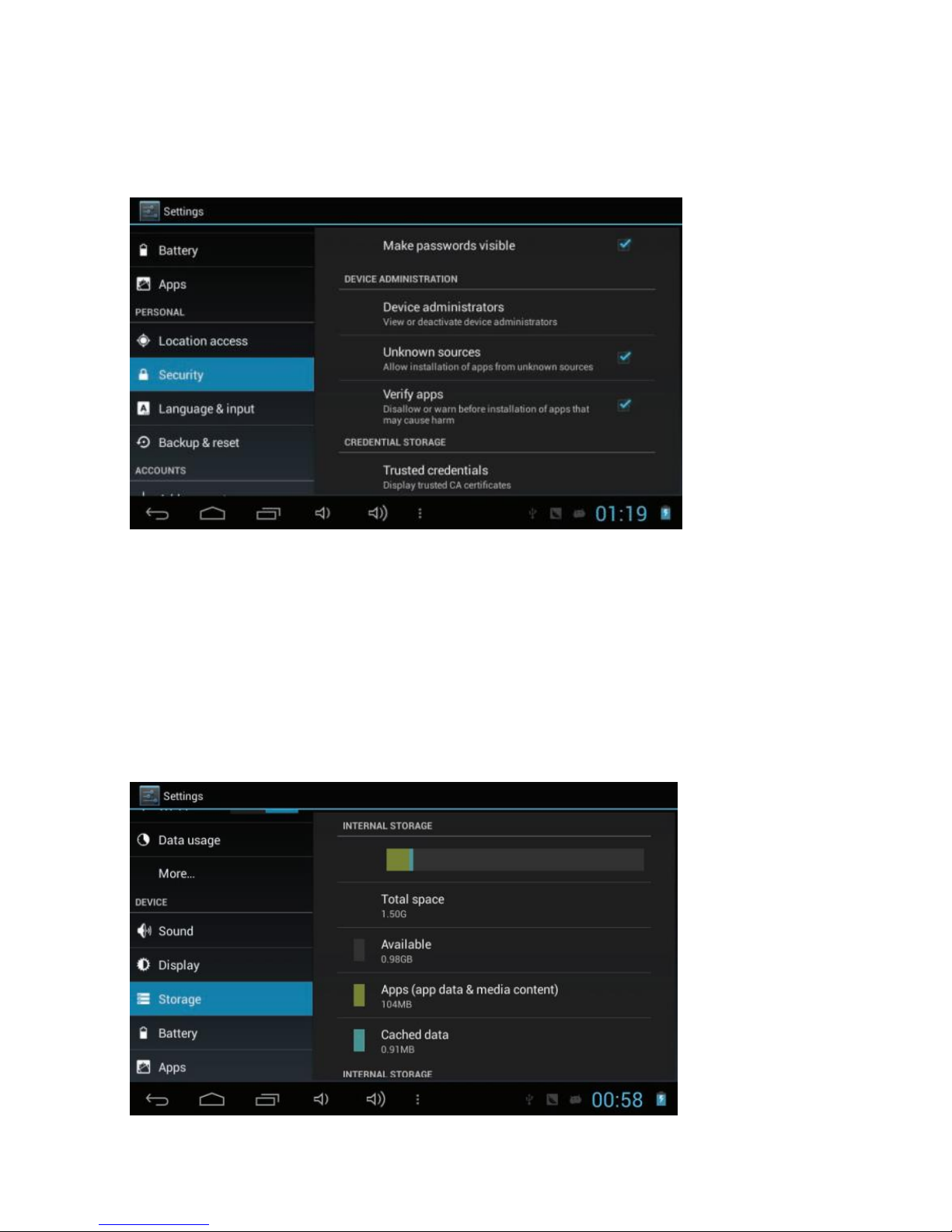
Unknown sources: Set the device to install applications downloaded from any source.
If you do not select this option, you can install only applications downloaded from Play
Store.
Storage
View memory information for your device and memory card. You can also format the
memory card.
Formatting a memory card will permanently delete all data from the
memory location.
The actual available capacity of the internal memory is less than the
specified capacity because the operating system and default applications
occupy part of the memory.
Page 23
22
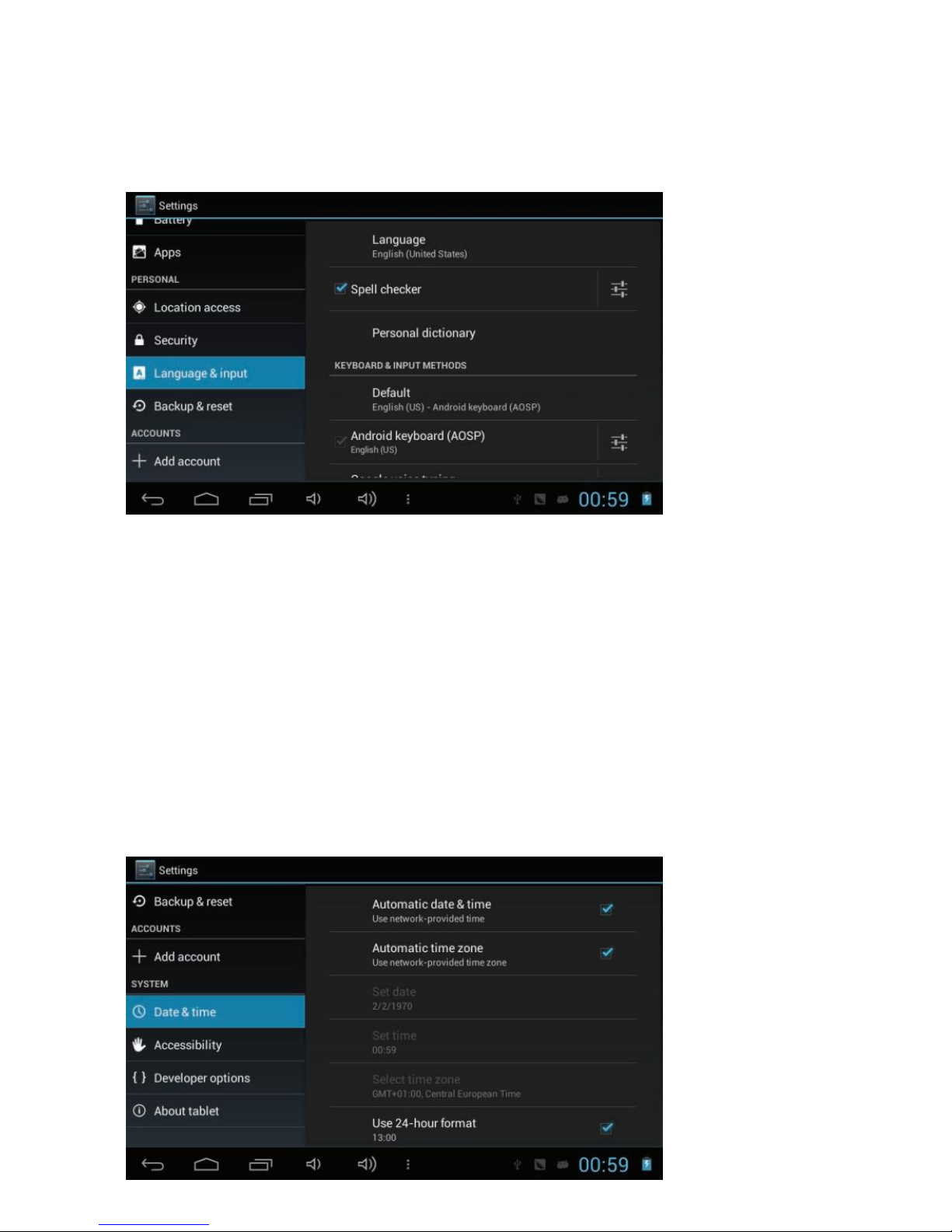
Language and input
Change the settings for languages and text input.
Language: Select a display language.
Keyboard & input methods: Select a text input method.
Date and time
Change the settings to control how time and date appears on your device
• Automatic date and time: Set to receive time information from
the network and update the time and date automatically.
• Set date: Set the current date manually.
• Set time: Set the current time manually.
• Automatic time zone: Set to receive time zone information from
the network when you move across time zones.
• Select time zone: Select a time zone.
• Use 24-hour format: Set to show the time in 24-hour format
or 12-hour format.
Select date format: Select a date format.
Page 24
23
About tablet
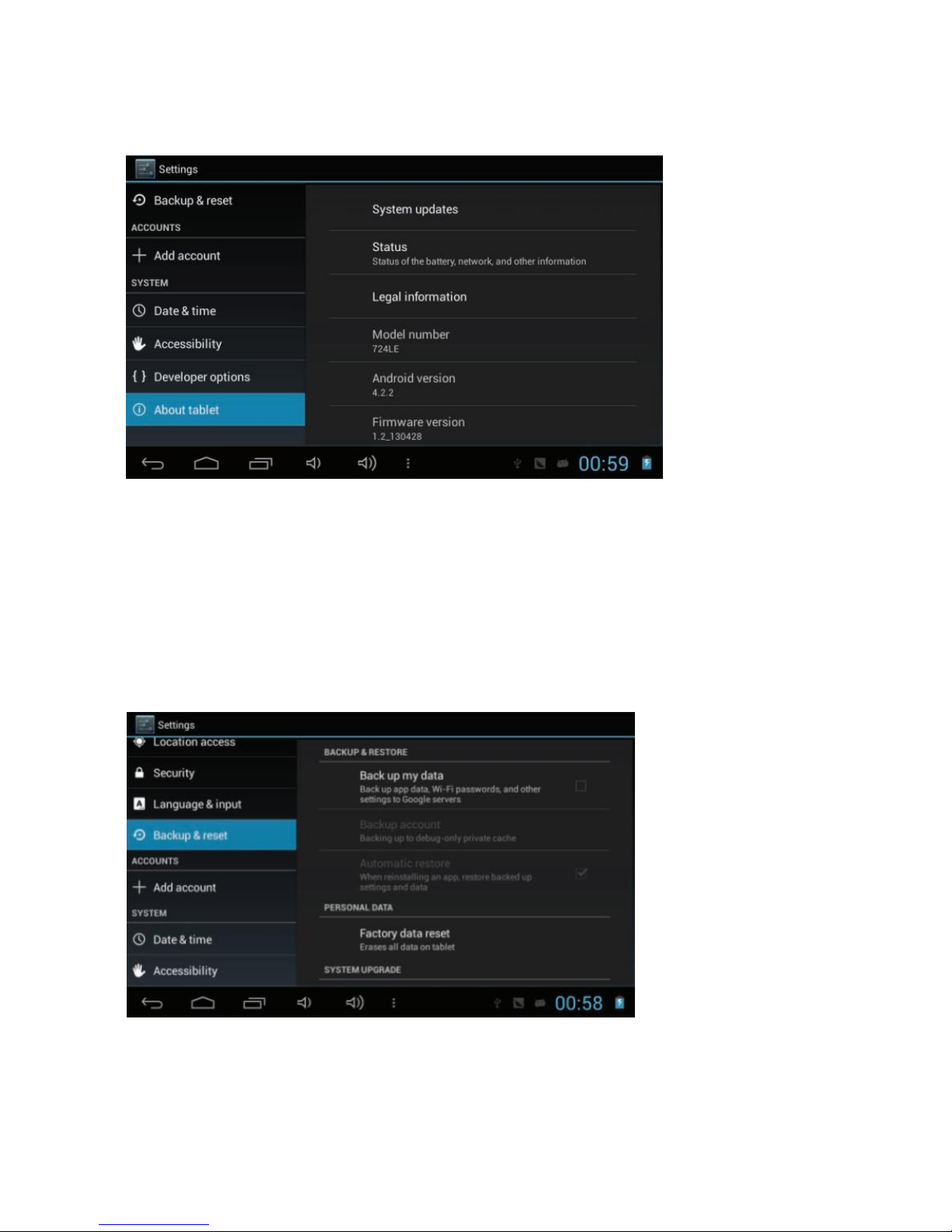
View information about your device, such as model number and version.
Back up and reset
Change the settings for managing settings and data.
Back up my data: Set to back up your settings and application data to
the Google server.
Backup account: Set up or edit your Google backup account.
Automatic restore: Set to restore your settings and application data when
you must reinstall an application.
Factory data reset: Reset your settings to the factory defaults and delete
all your data.
Page 25
24
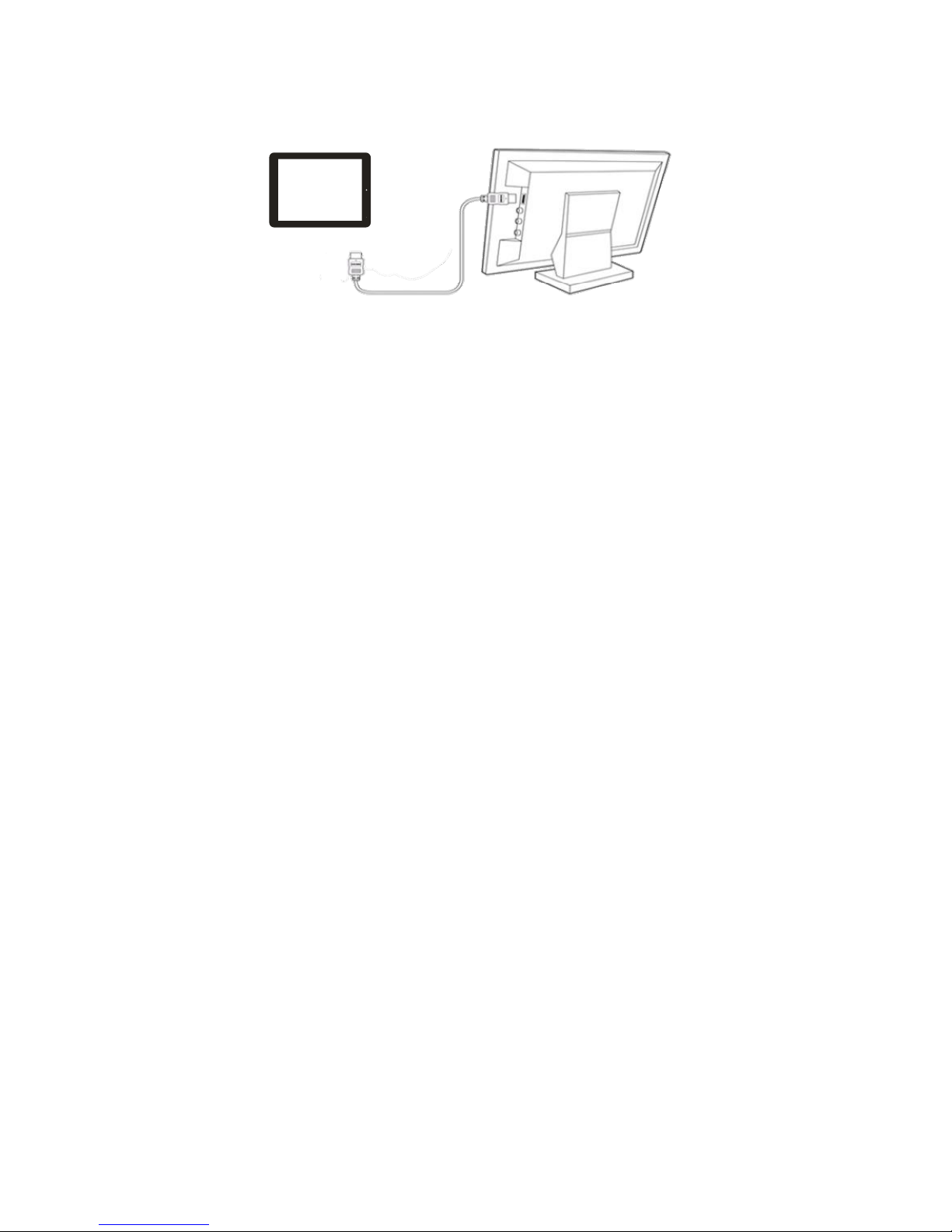
Connecting to HD TV
The device features a HDMI interface with which you can connect the device to digital
televisions. HDMI connection can deliver high-definition audio and video quality.
To use the HDMI function on digital televisions:
1. Open the Settings menu, then select HDMI setting to turn on HDMI output
and choose an HDMI resolution option;
2. Turn on the digital television, and switch its Source mode to HDMI.
3. Connect the device to the digital television through HDMI cable.
4. Once the connection is built, the display of the device will turn black,
and simultaneously the digital TV shows what should be displayed on
the device screen.
5. Enjoy the sharpest image quality on the wide screen of television.
6. To switch the display back from the TV to the tablet, just disconnect the
HDMI connection.
Recovery of firmware or software
This is made to improve your tablet - therefore you should regularly look for upgrades
for your model. We recommend you to upgrade the firmware or software before you
turn in your tablet for service, since it can solve problems and technical issues if your
tablet doesn't work to your gratification.
Go to www.netlogic.se and find your model.
Follow the instructions on how to upgrade your tablet.
By doing the upgrade by yourself you minimize the risk of being charged for firmware
or software upgrades before you send it to a service center. Upgrading firmware or
software is not included in the service that the warranty covers.
Page 26
25
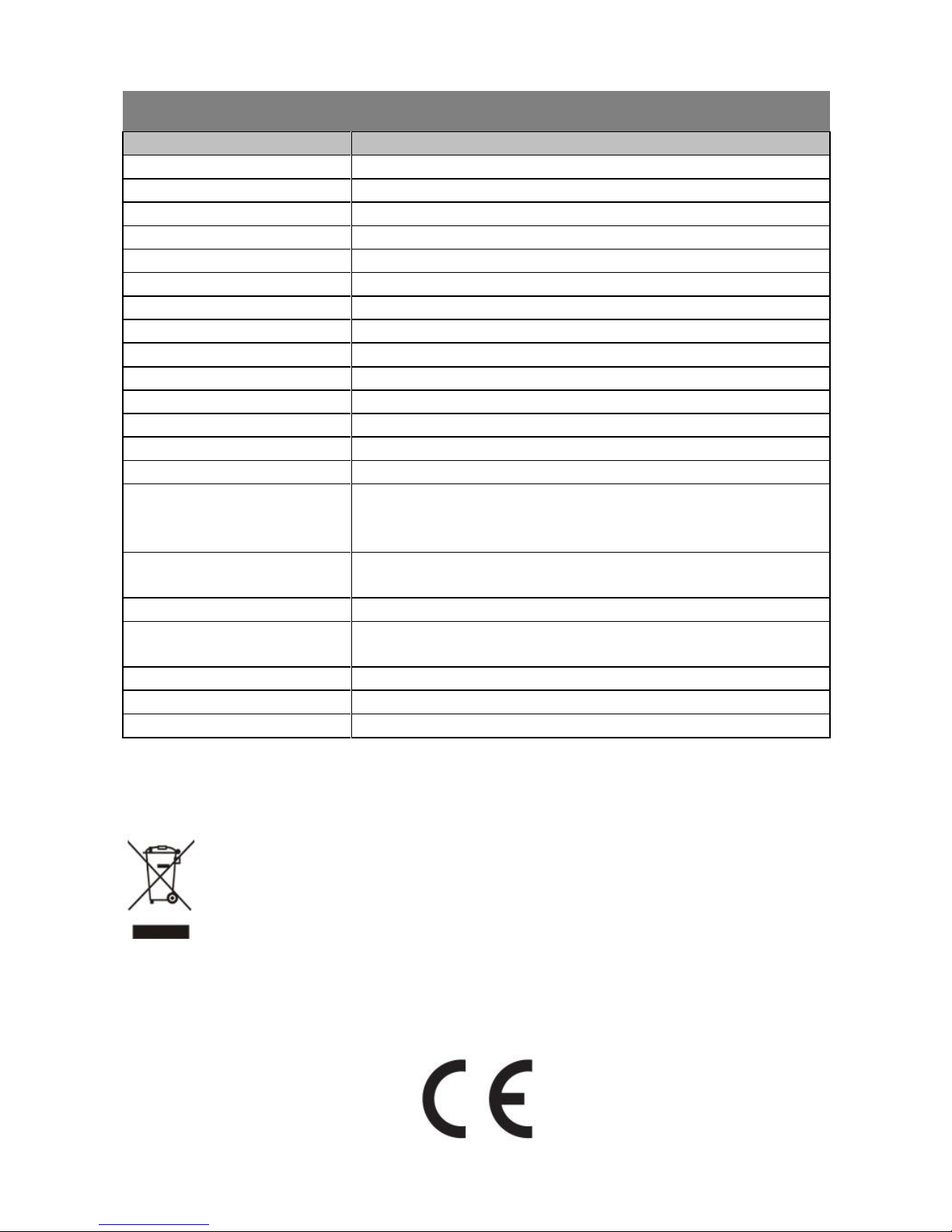
Specifications
Item
Description
Processor
CPU Cortex-A9 Quad Core 1.6GHz + GPU Quad Core Mali 400
DDR
2GB
Built-in Operating System
Android OS 4.2
Hardware
IBM PC or compatible PC, Note-book or Macintosh with USB port
Internal Memory
16GB (3.5 GB for internal system)
Memory Card Type
SD card: 2GB, 4GB (SDHC), 8GB, 16GB, 32GB (SDHC)
Interface
USB2.0 High speed / Micro SD / 3.5mm Earphone / Microphone
Network Connection
WiFi (802.11 b/g/n)
Built-in Sensor
G-sensor, Gyro-sensor, Light-sensor
E-Book Format
PDF/EPUB/TXT/FB2/PDB/RTF
Photo Format
JPEG/BMP/GIF/PNG
Audio Format
MP3/WAV/OGG/FLAC/APE/AAC
Video Format
AVI, 3GP, MP4, RM, RMVB, FLV, MOV
Battery Charge Time
About 5 Hours
Battery Life
About 6 hours of music playback
About 5 hours of video playback
About 4 hours of web browsing
Display
7.85-inch IPS LCD, Touch panel (capacitive touch panel), 1024 x 768
pixels with Auto-brightness
Front / Rear webcam
2 Mega Pixels / 5 Mega Pixels with Auto-focus and flash light
Power Supply
Rechargeable lithium-ion battery;
AC Adapter: AC Input 100-240V~50/60Hz, DC Output USB 5V/2A
Storage Temp.
-10℃~ 45℃
Ambient Temp.
0℃ ~ 35℃
Operation Relative Humidity
20% ~ 95% (35℃)
Specifications and contents of this manual are subject to change without notice.
This symbol on the product or in the instructions means that your
electrical and electronic equipment should be disposed at the end of its
life separately from your household waste. There are separate collection
systems for recycling in the EU. For more information, please contact the
local authority or your retailer where you purchased the product.
 Loading...