

Page 1
QUICK
INSTALLATION
GUIDE
WIRELESS AC1200 DUAL BAND ROUTER
WITH SIGNAL PLUS
DIR-806
КРАТКОЕ РУКОВОДСТВО ПО УСТАНОВКЕ
GUÍA DE INSTALACIÓN RÁPIDA
GUIA DE INSTALAÇÃO RÁPIDA
快速安裝指南
PETUNJUK PEMASANGAN CEPAT
GUIDE D'INSTALLATION RAPIDE
Page 2
DIR-80 6
2
ENGLISH
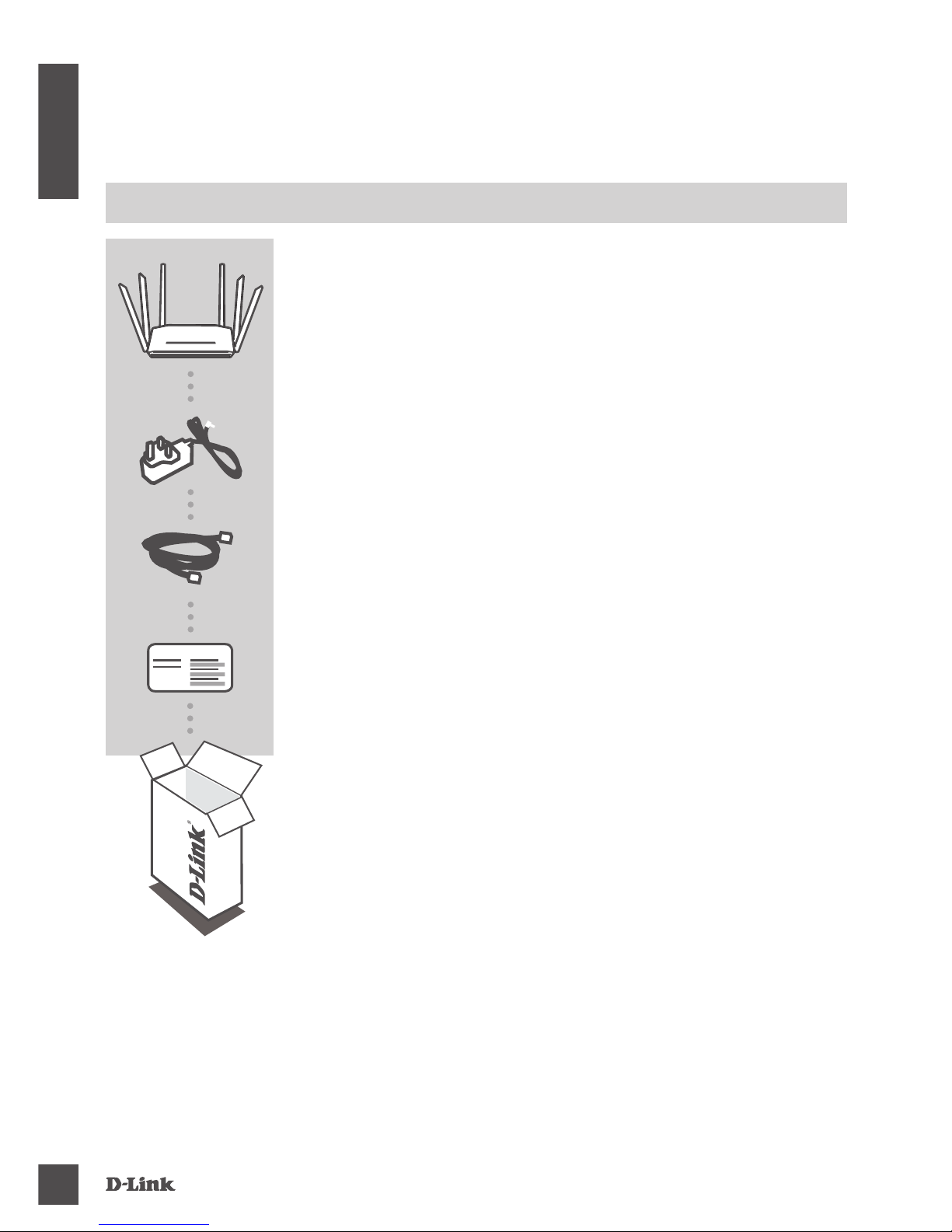
CONTENTS OF
PACKAGING
POWER ADAPTER
12V / 1A
ETHERNET CABLE (CAT5 UTP)
CONNECT THE ROUTER TO YOUR PC DURING SETUP
If any of these items are missing from your packaging, contact
your reseller.
WI-FI CONFIGURATION NOTE
CONTAINS THE DEFAULT WI-FI INFORMATION
WIRELESS AC1200 DUAL BAND ROUTER WITH
SIGNAL PLUS
DIR-806
CONTENTS
Wi-Fi Conguration Note
Page 3
DIR-80 6
3
ENGLISH
PRODUCT SETUP
WEB-BASED SETUP
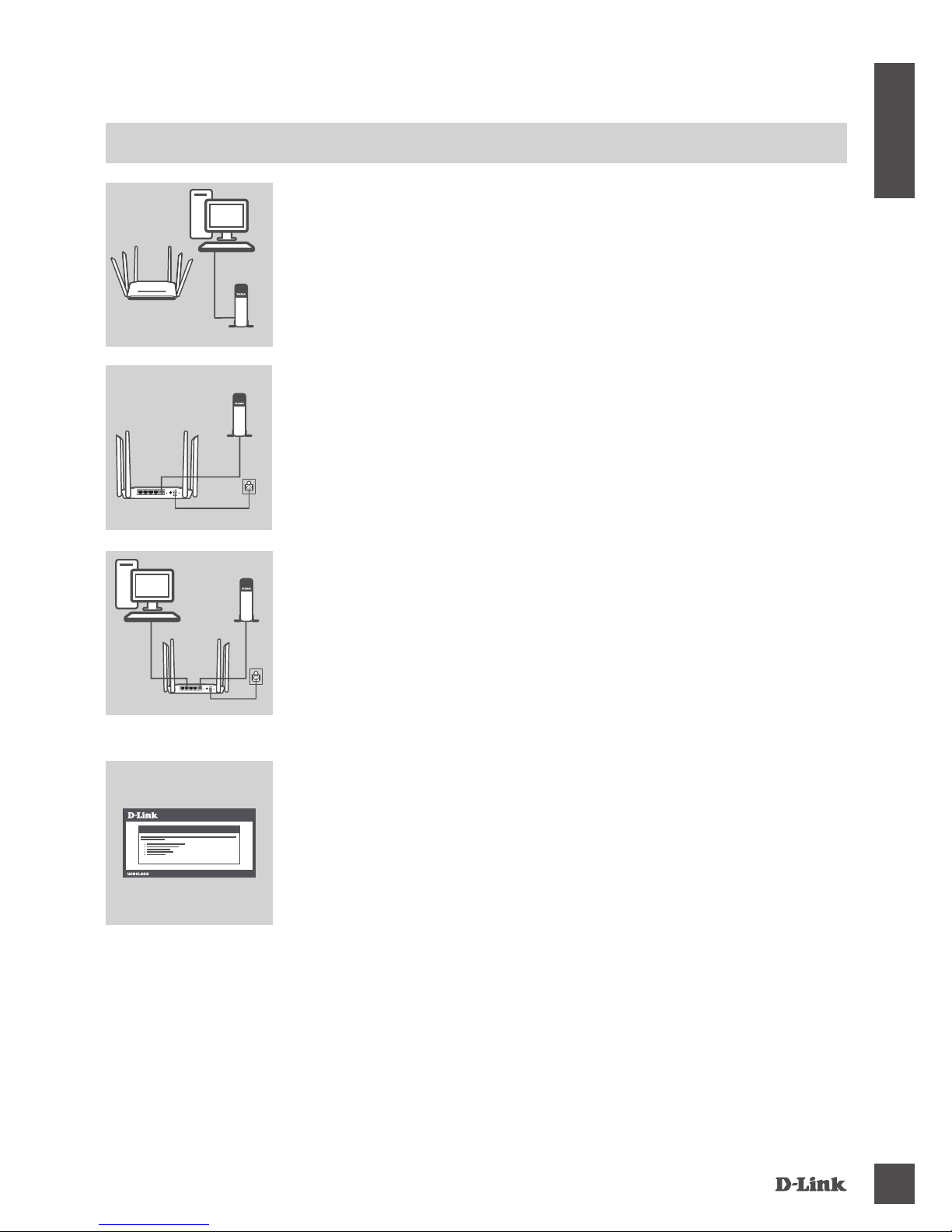
Step 1
Position your DIR-806 near your Internet-connected modem and
PC. Keep the router in an open area for better wireless coverage.
Step 4
Open a browser on the connected computer. If you are not
automatically directed to the D-Link Setup Wizard, go to
‘http://dlinkrouter.local./’ and follow the onscreen instructions to
congure your DIR-806. Use ‘Admin’ as your username and leave
the password blank to congure manually.
Step 2
Unplug the modem Ethernet cable connected to your computer and
plug it into the port labeled ‘INTERNET’ on the router.
Connect the supplied power adapter to the router and a power
outlet, then verify that the power LED is on.
Step 3
Plug one end of the supplied Ethernet cable into the port labeled ‘1’
on the back of the router, and the other end into the Ethernet port on
your computer.
To set up the DIR-806 through Wi-Fi, go to your computer or mobile
device's Wi-Fi settings and select the network (ex: dlink-A8FA).
Enter Wi-Fi password (ex: akbdj19368) on the included Wi-Fi
Conguration Note.
1234 RESETINTERNET
POWER12V 1A
WPS
1234 RESETINTERNET
POWER12V 1A
WPS
Modem
PC
Router
Modem
Router
PC
Modem
Router
WELCOME TO THE D-LINK SETUP WIZARD
Page 4
DIR-80 6
4
ENGLISH
TROUBLESHOOTING
SETUP AND CONFIGURATION PROBLEMS
1. HOW DO I CONFIGURE MY DIR-806 ROUTER MANUALLY?
- Connect your PC to the router using an Ethernet cable.
- Open a web browser and enter the address ‘http://dlinkrouter.local./’ (or ‘192.168.0.1’).
- The default username is ‘Admin’. The password should be left blank by default.
- If you have changed the password and can not remember it, you will need to reset the router to
return to an empty password eld.
2. HOW DO I RESET MY DIR-806 ROUTER TO FACTORY DEFAULT SETTINGS?
- Ensure the router is powered on.
- Press and hold the reset button at the bottom of the device for 10 seconds.
Note: Resetting the router to factory default will erase the current conguration settings.
To re-congure your settings, log into the router as outlined in question 1, then run the Setup Wizard.
3. HOW DO I ADD A NEW WIRELESS CLIENT OR PC IF I HAVE FORGOTTEN MY
WI-FI NAME (SSID) OR WI-FI PASSWORD?
- For every PC that needs to connect to the router wirelessly, you will need to ensure you use the
correct Wi-Fi Name (SSID) and Wi-Fi password.
- Use the web-based user interface (as described in question 1 above) to check or choose your
wireless settings.
- Make sure you write down these settings so that you can enter them for each wirelessly
connected PC. The back of this document features an area to record this important information.
4. WHY CAN'T I GET AN INTERNET CONNECTION?
- For ADSL users, please contact your ISP to make sure the service has been enabled/connected
by your ISP and that your ISP username and password is correct.
Page 5

DIR-80 6
5
ENGLISH
TECHNICAL SUPPORT
Australia:
Tel: 1300-766-868
24/7 Technical Support
Web: http://www.dlink.com.au
E-mail: [email protected]
India:
Tel: +91-832-2856000
Toll Free 1800-233-0000
Web: www.dlink.co.in
E-Mail: [email protected]
Singapore, Thailand, Indonesia,
Malaysia, Philippines, Vietnam:
Singapore - www.dlink.com.sg
Thailand - www.dlink.co.th
Indonesia - www.dlink.co.id
Malaysia - www.dlink.com.my
Philippines - www.dlink.com.ph
Vietnam - www.dlink.com.vn
Korea:
Tel : +82-2-2028-1810
Monday to Friday 9:00am to 6:00pm
Web : http://d-link.co.kr
E-mail : [email protected]
New Zealand:
Tel: 0800-900-900
24/7 Technical Support
Web: http://www.dlink.co.nz
E-mail: [email protected]
South Africa and Sub Sahara
Region:
Tel: +27 12 661 2025
08600 DLINK (for South Africa only)
Monday to Friday 8:30am to 9:00pm South
Africa Time
Web: http://www.d-link.co.za
E-mail: [email protected]
D-Link Middle East - Dubai, U.A.E.
Plot No. S31102,
Jebel Ali Free Zone South,
P.O.Box 18224, Dubai, U.A.E.
Tel: +971-4-8809022
Fax: +971-4-8809066 / 8809069
Technical Support: +971-4-8809033
General Inquiries: [email protected]
Tech Support: [email protected]
Egypt
1, Makram Ebeid Street - City Lights Building
Nasrcity - Cairo, Egypt
Floor 6, ofce C2
Tel.: +2 02 26718375 - +2 02 26717280
Technical Support: +2 02 26738470
General Inquiries: [email protected]
Tech Support: [email protected]
Kingdom of Saudi Arabia
Ofce # 84 ,
Al Khaleej Building ( Mujamathu Al-Khaleej)
Opp. King Fahd Road, Olaya
Riyadh - Saudi Arabia
Tel: +966 1121 70008
Technical Support:
+966 1121 70009
General Inquiries: info.sa@ dlinkmea.com
Tech Support: support.sa@ dlinkmea.com
Pakistan
Islamabad Ofce:
61-A, Jinnah Avenue, Blue Area,
Suite # 11, EBC, Saudi Pak Tower,
Islamabad - Pakistan
Tel.: +92-51-2800397, 2800398
Fax: +92-51-2800399
Karachi Ofce:
D-147/1, KDA Scheme # 1,
Opposite Mudassir Park, Karsaz Road,
Karachi – Pakistan
Phone: +92-21-34548158, 34326649
Fax: +92-21-4375727
Technical Support: +92-21-34548310, 34305069
General Inquiries: [email protected]
Tech Support: [email protected]
You can nd software updates and user documentation on the D-Link website.
Tech Support for customers in
Page 6
DIR-80 6
6
ENGLISH
TECHNICAL SUPPORT
Iran
Unit 5, 5th Floor, No. 20, 17th Alley , Bokharest
St. , Argentine Sq. ,
Tehran IRAN
Postal Code : 1513833817
Tel: +98-21-88880918,19
+98-21-88706653,54
General Inquiries: [email protected]
Tech Support: [email protected]
Morocco
M.I.T.C
Route de Nouaceur angle RS et CT 1029
Bureau N° 312 ET 337
Casablanca , Maroc
Phone : +212 663 72 73 24
Email: [email protected]
Lebanon RMA center
Dbayeh/Lebanon
PO Box:901589
Tel: +961 4 54 49 71 Ext:14
Fax: +961 4 54 49 71 Ext:12
Email: [email protected]
Bahrain
Technical Support: +973 1 3332904
Kuwait:
Technical Support: + 965 22453939 / +965
22453949
Türkiye
Büyükdere Cad. Ferro Plaza No:155
D: 1 K: 1 Zincirlikuyu / Istanbul
Tel: +90 (212) 289-56-59
Email: [email protected]
 Loading...