

Page 1
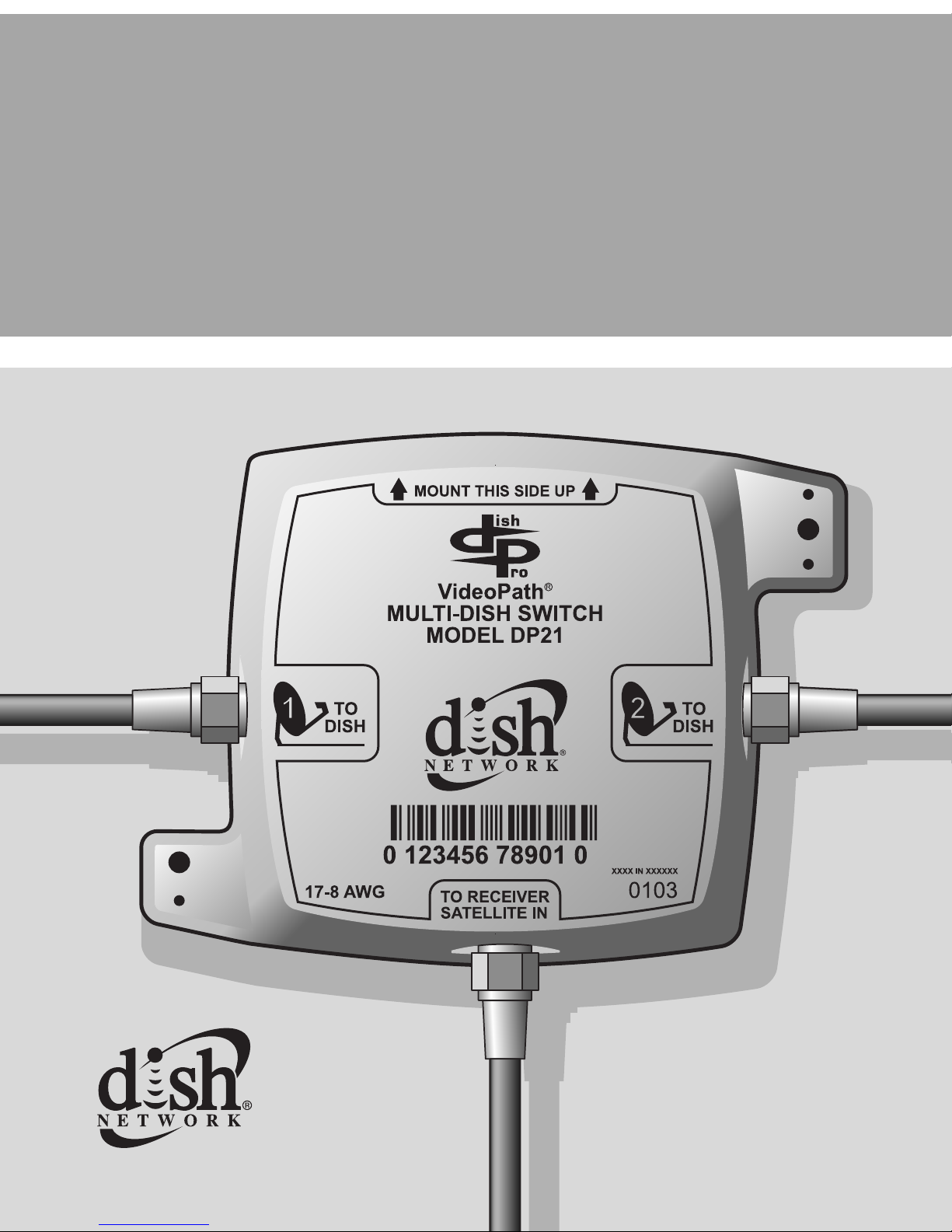
DishPro 21 Multi-Dish Switch
Installation Guide
Page 2
Inside_Front_Small.fm Page 2 Tuesday, January 7, 2003 4:08 P M
Important Safety Instructions
You must keep safety in mind when you install and use the DP21 switch.
Refer to the safety instructions in the installation instructions that came
with your system. In this Guide, the following notes tell you when you
need to pay special attention:
Marks a procedure where the following
may ha ppen:
• Personal injury or death may occur.
• Equipment or property may be damaged.
Marks the following issues:
• Important operation or maintenance instructions
follow.
• Special attention i s required.
Important Regulatory Factors
This device complies with Part 15 of the FCC Rules.
Operation is subject to the following two conditions:
(1) this device may not cause harmful interference, and
(2) this device must accept any interference received,
including interference that may cause undesired operation.
Page 3

Instructions_Small.fm Page 3 Tuesday, January 14, 2003 2:08 PM
Contents
Introduction.....................................page 4
How to Install the DP21 Sw itch .....page 5
Operating with a DishPro
Compliant Splitter .....................page 10
Wiring Diagrams.............................page 10
Limited Warranty ............................page 14
3
Page 4
Instructions_Small.fm Page 4 Tuesday, January 14, 2003 2:08 PM
Introduction
A DishPro 21 (DP21) Multi-Dish Switch allows you to receive signals
from two DishPro LNBFs, and route these signals to a DishPro satellite
receiver (see page 10 for wiring diagrams).
This guide explains how to install a DP21 Multi-Dish Switch. Use this
guide along with the DishPro InstallationInstructions thatare in the user
guide that came with your receiver.
The DP21 switch can be used only with DishPro LNBFs,
DishPro Receivers, and non-DishPro receivers equipped
with the DishPro Adapter. DishPro products can be
identified by the DishPro logo shown below.
4
Page 5
Instructions_Small.fm Page 5 Tuesday, January 14, 2003 2:08 PM
How to Install a DP21 Switch
The following instructions assume you have already
pointed your dish for the strongest possible signal, that you
have run Check Switch with the DishPro LNBF
connected directly to the receiver’s Satellite In port, and
that you have taken a software upgrade from the satellite. If
not, follow the Dish installation instructions that came with
your receiver.
Connections
1. Mount the DP21 switch onto the side of a building, or on some
other sturdy structure. Make sure that the switch is mounted with
the port labeled To Receiver Satellite In pointing down. Fasten
the switch tightly to the surface.
Note: The DP21 switch is designed for outside use
Youcanhaveupto200feetofRG-6cablebetweena
DishPro LNBF and a DishPro satellite receiver with the
DP21Switch connectedat anypointalong the200 feetof
RG-6 cable. The cable must be RG-6 or Series 6 and
marked for use at 2200MHz or higher. If you are unsure
contact your local DISH Network retailer, or DISH
.
Network at 1-800-333-DISH (3473) to arrange for a
professional installation. Use of the incorrect type of
cable may affect system operation or performance.
5
Page 6

Instructions_Small.fm Page 6 Tuesday, January 14, 2003 2:08 PM
2. Connect the coaxial cables from a DISH 500 or a DISH 300 to the
ports on the DP21 switch labeled To Dish as shown in the wiring
diagrams that begin on page 10.
3. Connect t he cable from the satellite receiver port labelled Satellite
In to the DP21 port labeled To Receiver Satellite In.
Run Check Switch
After you have connected cables and DP21 Switches to all receivers i n
the system, run Check Switch on each receiverinyour system,oneata
time. To do this, follow these instructions which apply to most receivers
or consult your user guide:
1. Select the Main Menu, then System Setup,
Instal lation,andPoint Dish/Signal.
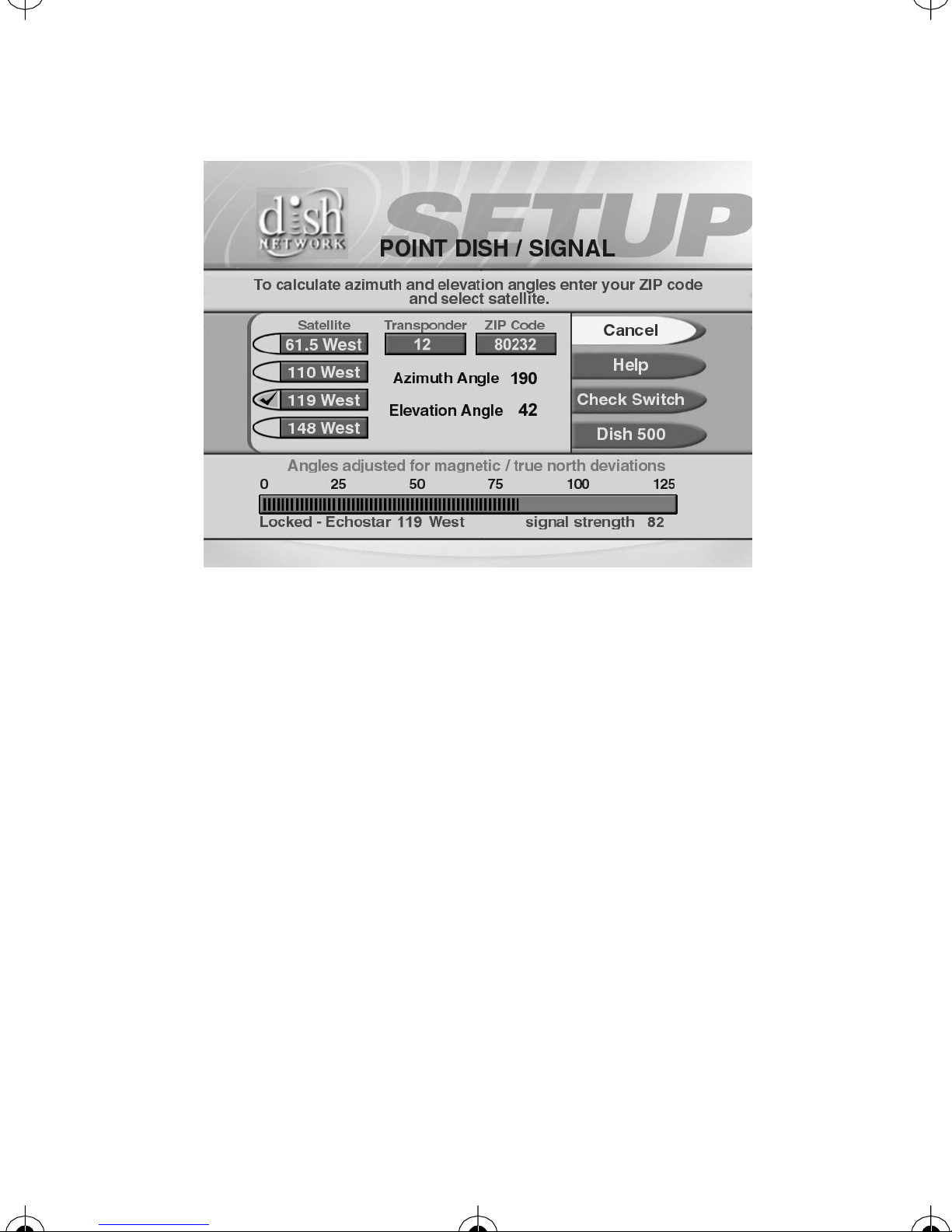
2. A Point Dish/Signal menu similar to the one shown as Figure 1
on page 7 will open.
3. Select Check Switch. The Check Switch screen will open.
Select Check.
6
Page 7
Instructions_Small.fm Page 7 Tuesday, January 14, 2003 2:08 PM
Figure 1. Point Dish/Signal
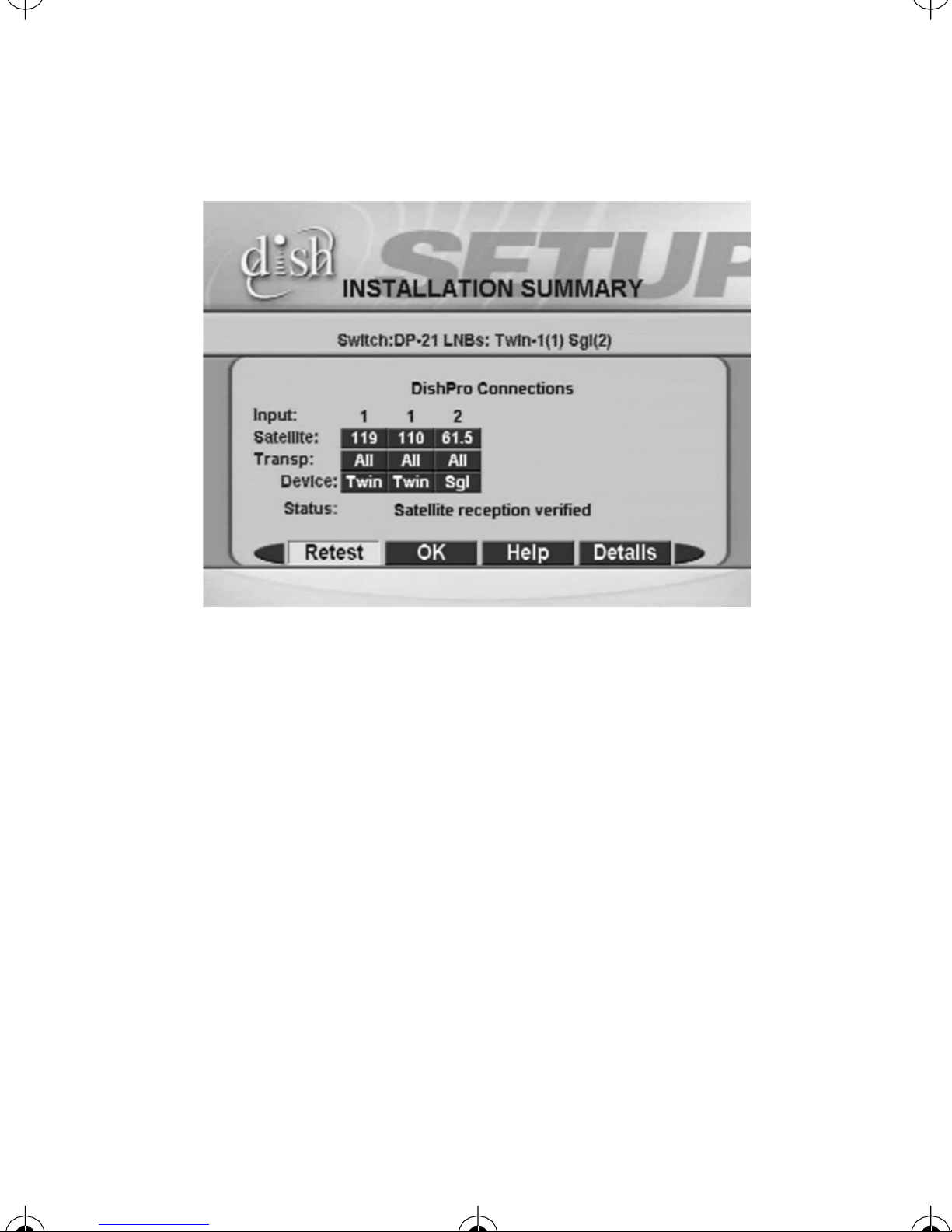
4. The Check Swi tch procedure will run. When it finishes, you will
see an Installation Summary screen similar to Figure 2 on
page 8. This screen should identify the installed switch as a DP21.
You should see every satellite location that your system is receiving
on the Satellite line, and the word “All” on the Tr ansp line under
both 1 and 2.
7
Page 8
Instructions_Small.fm Page 8 Tuesday, January 14, 2003 2:08 PM
Figure 2. Installation Summary
with Identified Devices
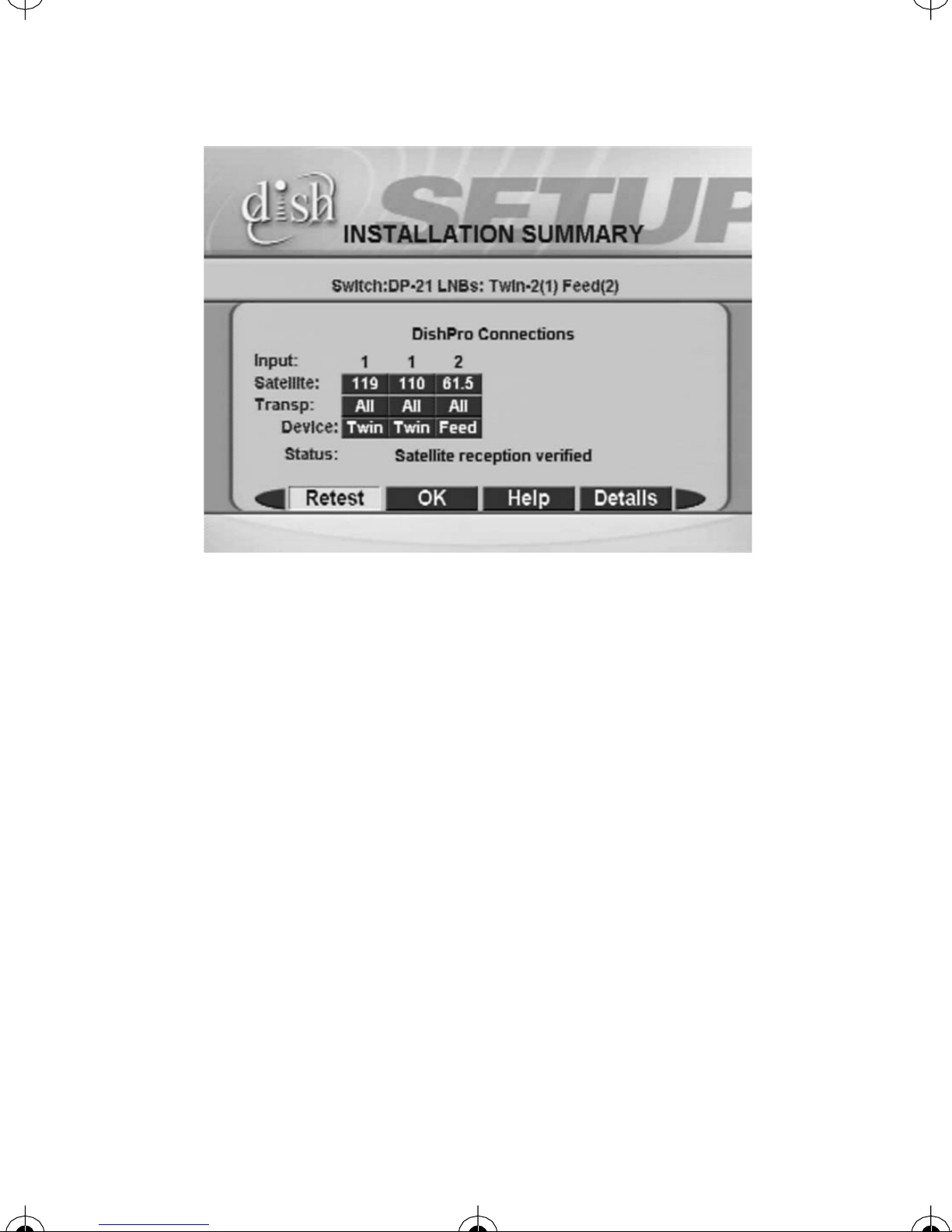
Note: If you use a DishPro compliant splitter, one side of the splitter
blocks the communications between the receiver and the LNBF, but will
allow the satellite TV signals to pass. You will see an Installation
Summary screen similar to the one shown in Figure 3, which will
identify the DP Single LNBF as a “Feed.” This is OK because the
satellite signal from the DP Single LNBF is still being received from all
transponders. See the next section regarding operating with a DishPro
compliant splitter.
8
Page 9
Instructions_Small.fm Page 9 Tuesday, January 14, 2003 2:08 PM
Figure 3. Installation Summary
without Identified Devices
5. If the Installation Summary does not show that Check Switch
completed successfully as shown in step 4, check your connections
on all cables at the receivers, switches, and LNBFs, and then run
Check Switch again.
6. If you still do not see the Satellite reception verified message,
turn the receiver off and reconnect your it directly to the LNBF so
you can upgrade your receiver’s software (see your receiver’s user
guide for more information). After receiving the upgrade, reinstall
your DP21 and run check switch.
9
Page 10
Instructions_Small.fm Page 10 Tuesday, January 14, 2003 2:08 PM
7. If you still do not see the Satellite reception verified message,
call the DISH Network Customer Service Center at 1-800-333DISH (3474).
Operating with a DishPro Compliant Splitter
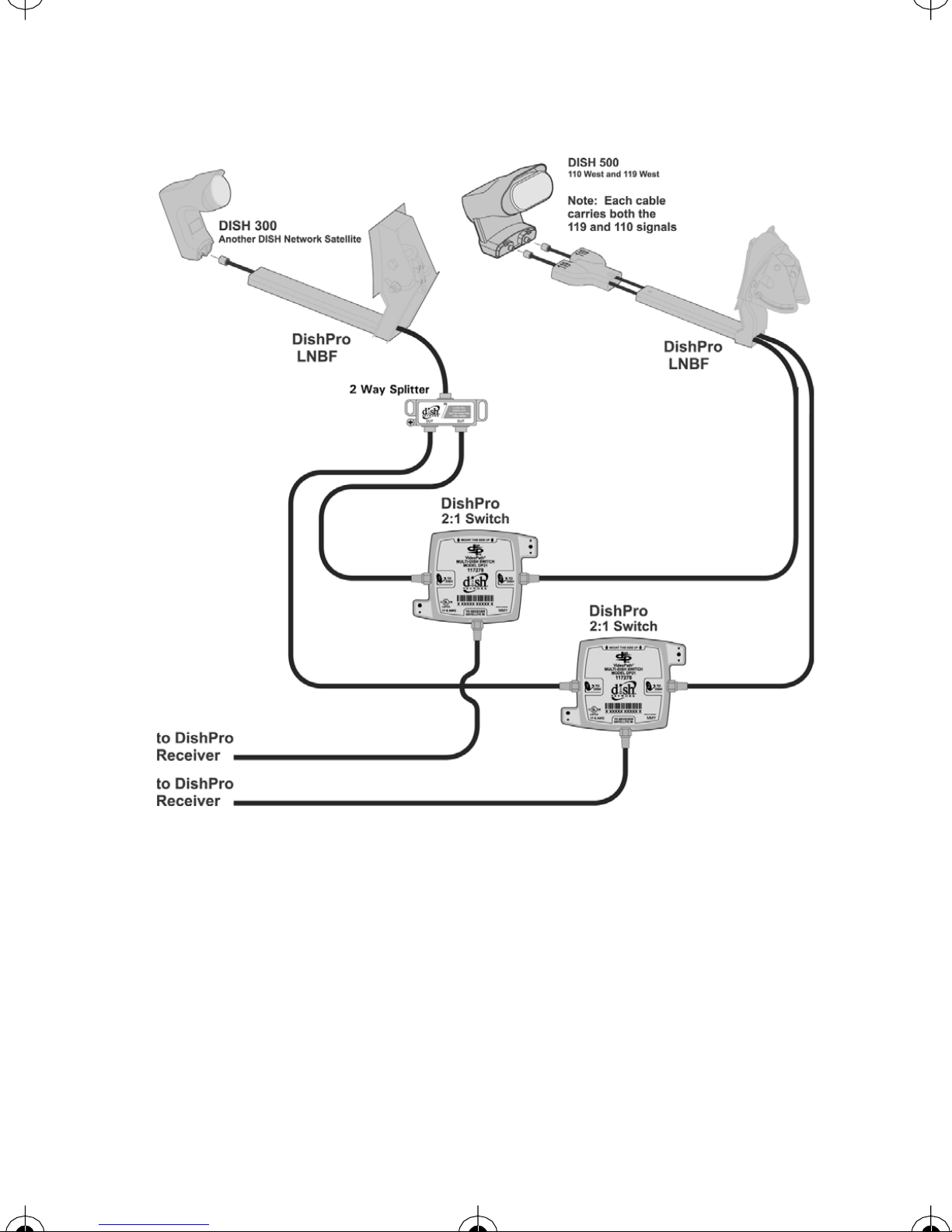
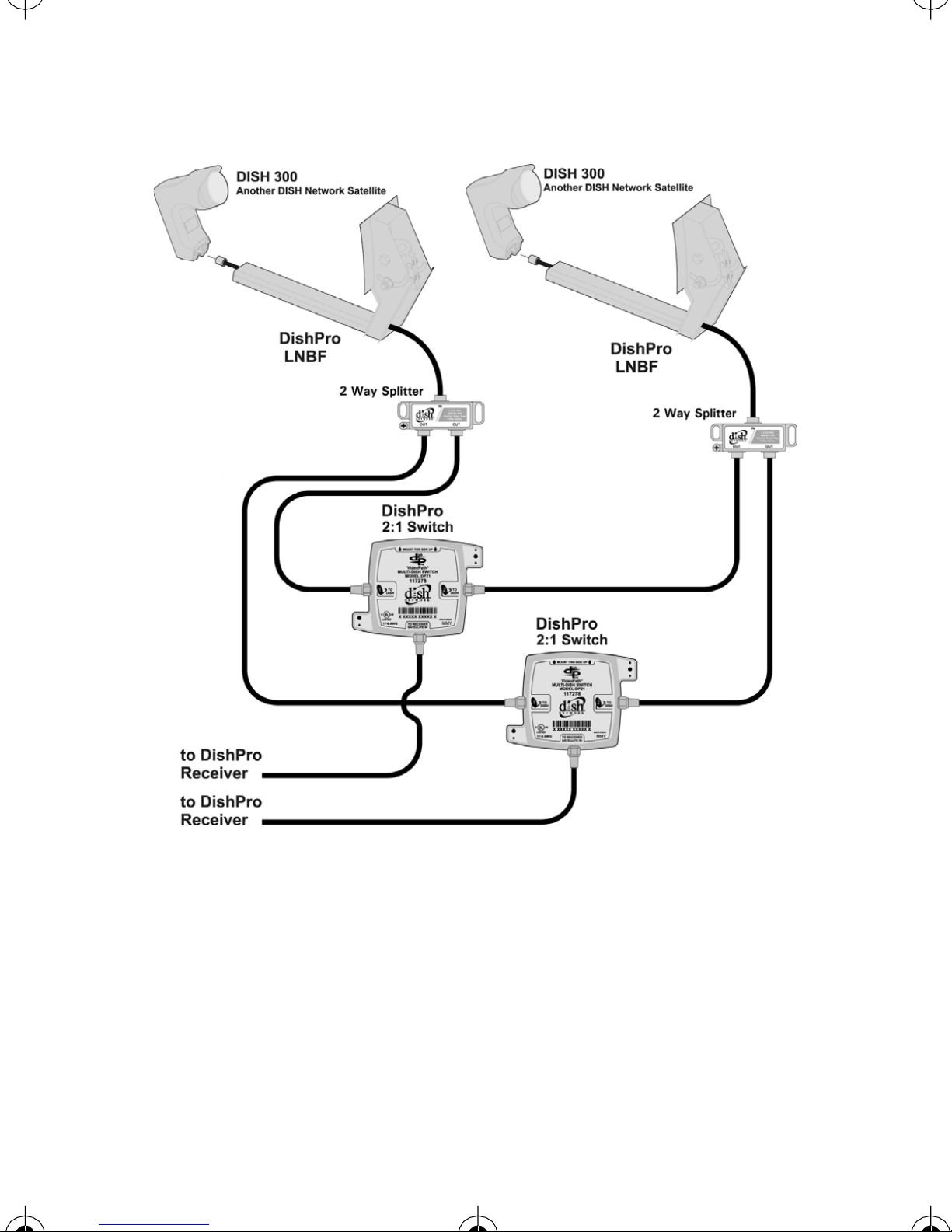
When using a DishPro compliant splitter to split the signal from a
DishPro single LNBF (as shown in Figures 4 and 5), the receiver whose
DP21 switch is connected to the passing side of the splitter must be
plugged into a live power outlet at all times. If not, the DishPro single
LNBF will not have any power and will not be able to provide satellite
signal to the other receiver.
Wiring Diagrams
The w iring diagrams that begin on page 11 omit cable drip
loopsandgrounding for clarity.Make suretouse drip loops,
and to ground the system per the National Electrical Code
(NEC) and all local electrical codes.
The wiring diagrams that begin on page 11 show optional
splitters between the L N BFs and the DP21. O nly use
DishPro co mpliant splitters. Use of splitters that are not
DishPro compliant may cause undesirable operation,
including loss of channels, black screens, and incorrect
Check Switch results.
10
Page 11
Instructions_Small.fm Page 11 Tuesday, January 14, 2003 2:08 PM
Figure 4. DISH 500 with DishPro Twi n LNBF,
DISH 300 with a Single LNBF, Two DP21 Switches, and a
DishPro C ompliant Splitter. Supports two receivers from
three satellite locations.
11
Page 12
Instructions_Small.fm Page 12 Tuesday, January 14, 2003 2:08 PM
Figure 5. Two DISH 300s with Single DishPro LNBFs, Two
DP21 Switches, and Two DishPro Compliant Splitters.
Supports two receivers from two satellite locations.
12
Page 13
Instructions_Small.fm Page 13 Tuesday, January 14, 2003 2:08 PM
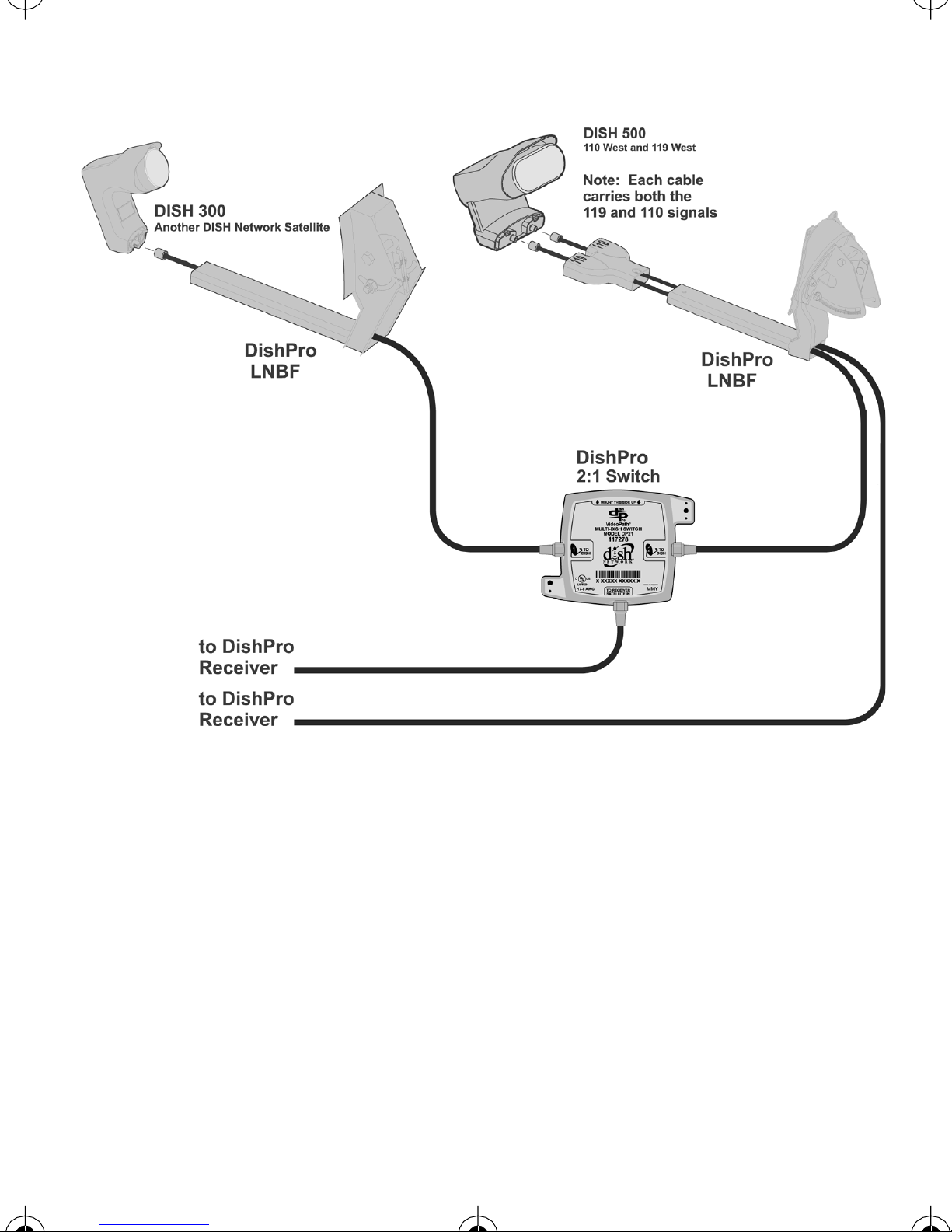
Figure 6. One Di sh 500 with a Twin LNBF, One Dish 300
with a Single LNBF, and One DP21 Switch. Supports one
receiver from three satellite locations and one receiver
from t wo satellite locations.
13
Page 14

Instructions_Small.fm Page 14 Tuesday, January 14, 2003 2:08 PM
Limited W arranty
This warranty extends only to the original user of the DISH Network™DP21
Switch (“you,” “your”) and i s limited to the purchase price of the switch.
EchoStar Communications Corporation and its affiliated companies (“we,” “our,”
“us”) warrant this switch control against defects i n materials or workmanship as
follows.
For one year f rom the original date o f purchase, if we find t hat the switch is
defective subject to the limits of this warranty, we will replace the switch at no
charge for parts or labor. We warrant any such work done against defects in
materials or workmanship for the remaining part of the original warranty period.
This warranty does not cover installation of the DISH Network System; consumer
instruction; physical set up or adjustment of any consumer electronic device;
switch batteries; signal r eception problems; loss of use of the equipment; unused
programming charges due t o equipment malfunction; cosmetic damage; damage
due to lightning, electrical or telephone line surges, fire, flood, or other acts of
Nature; accident; misuse; abuse; repair or alteration by other than our factory
service; negligence; commercial or institutional use; improper or neglected
maintenance; equipment sold AS IS or WITH ALL FAULTS; equipment removal
or reinstallation; shipping damage if the equipment was not packed and shipped in
the manner we prescribe; nor equipment purchased, serviced, o r operated outside
the contiguous United States of America.
REPLACEMENT AS PROVIDED UNDER THIS WARRANTY IS YOUR
EXCLUSIVE REMEDY. WE SHALL NOT BE HELD LIABLE FOR ANY
INCIDENTAL OR CONSEQUENTIAL DAMAGES FOR BREACH OF ANY
EXPRESSED OR IMPLIED WARRANTY ON THIS DEVICE, NOR FOR ANY
INCIDENTAL OR CONSEQUENTIAL DAMAGE RESULTING FROM THE
14
Page 15

Instructions_Small.fm Page 15 Tuesday, January 14, 2003 2:08 PM
USE OF, OR INABILITY TO US E, THIS DEVICE. UNDER NO
CIRCUMSTANCES SHALL OUR LIABILITY, IF ANY, EXCEED THE
PURCHASE PRICE PAID FOR THIS DEVICE. EXCEPT TO THE EXTENT
PROHIBITED BY APPLICABLE LAW, ANY IMPLIED WARRANTY OF
MERCHANTABILITY OR FITNESS FOR A PARTICULAR PURPOSE ON
THIS DEVICE IS LIMITED IN DURATION TO THE DURATION OF THIS
WARRANTY. WE RESERVE THE RIGHT TO REFUSE TO HONOR THIS
WARRANTY IF WE DETERMINE ANY OF THE ABOVE EXCEPTIONS TO
HAVE CAUSED THIS DEVICE NOT TO HAVE PERFORMED PROPERLY.
THIS WARRANTY SHALL BE VOID IF ANY FACTORY-APPLIED
IDENTIFICATION MARK, INCLUDING BUT NOT LIMITED TO SERIAL
OR CONDITIONAL ACCESS NUMBERS, HAS BEEN ALTERED OR
REMOVED. THIS WARRANTY SHALL ALSO BE V OID IF THE DEVICE
HAS BEEN OP ENED BY AN UNAUTHORIZED PERSON.
This warranty gives you specific legal rights which may vary from state to state.
Some states do not allow the exclusion or limitations of incidental or
consequential damages, or allow limitations on the duration of an implied
warranty, so those limitations may not apply to you.
Advance Exchange Program
The Advance Exchange Program allows you to have replacement equipment
shipped immediately to you (depending upon where you l ive, it could take three
to five business days). Along with replacement equipment, you will receive a
prepaid shipping label and instructions on how to return the defective equipment.
15
Page 16

Instructions_Small.fm Page 16 Tuesday, January 14, 2003 2:08 PM
The shipping charge, for receiving replacement equipment and returning the
defective equipment, is a one time fee based on EchoStar's competitive bulk
shipping rates (additional charges may apply outside of the continental US). This
fee will be charged to your billing account or your valid credit card.
If you do not ship the defective equipment to EchoStar within ten days after
receiving the replacement, your billing account or credit card will be charged the
market price of the replacement. If you return the defective equipment after ten
days, you will receive a full refund less an administrative fee.
If your equipment is out of warranty and can be repaired your billing account or
credit card will be charged the standard repair fee for the replacement. If damage
to the defective equipment is found, which EchoStar in its sole discretion
determines has voided the warranty, or makes the equipment unrepairable, your
billing account or credit card will be charged the market price of the replacement.
Post Receipt Exchange Program
You may choose to ship the equipment to us at your cost. To provide faster
service, upon receipt of your equipment you will be shipped a replacement. Your
original equipment will not be available for return.
The equipment you return will be checked to verify whether it is covered u nder
this warranty . If the defective equipment is covered under this warranty, it will be
replaced and shipped back to you at no additional cost (additional charges may
apply outside of the continental US).
If your equipment is out of warranty and can be repaired your billing account or
credit card will be charged the standard repair fee for the replacement. If damage
to the defective equipment is found, which EchoStar in its sole discretion
determines has voided the warranty, or makes the equipment unrepairable, your
billing account or credit card will be charged the market price of the replacement.
16
Page 17

Instructions_Small.fm Page 17 Tuesday, January 14, 2003 2:08 PM
Accessory Warranty
An accessory is any DISH Network branded equipment, displaying the DISH
Network logo, excluding t he receiver, Smart Card, cables and hookups, and nonmechanical components. A one-year warranty becomes effective upon the
activation of the DISH system or date of purchase, if bought separately. A proof
of purchase is required to verify the purchase date. If an accessory has an expired
warranty, no exchange will be issued. You may purchase replacement accessories
from DISH Network or your local retailer.
IfYouNeedHelp
Review this Guide.
™
Call the DISH Network
date of purchase and your customer account number ready.
A Representative will assist you. The Representative w ill try to troubleshoot any
problem you may be having. He or she also will check whether the switch is
covered under this warranty.
If the Representative finds that you should return the switch, you will get a
telephone number to call for a Return Authorization (RA) number. Before
shipping any equipment to us, you must get a Return Authorization number from
the Service Center.
You must package returned equipment properly. Follow the instructions that t he
Representative givesyou. Write the RA number in large, clearly visible characters
on the outside of the shipping box used to return the equipment. To avoid
Service Center at 1-800-333-DISH (3474). Have the
confusion and misunderstandings, we will return shipments without an RA
number clearly visible on the outside of the box to you at your expense.
17
Page 18

Instructions_Small.fm Page 18 Tuesday, January 14, 2003 2:08 PM
We will:
Check the switch, including whether it is covered under the warranty.
Replace any switch that we find is defective with a new or refurbished switch, if
the defective switch is covered under the warranty. We will ship the replacement
switch at our expense.
If a defective switch is not covered under the warranty, we will tell you. We may
assess you a flat rate charge for a replacement switch, including shipping and
insurance.
FCC Information
This equipment has been tested and found to comply with the limits for a Class B
digital device, pursuant to Part 15 of the FCC Rules. These limits are designed to
provide reasonable protection against harmful interference in a re sidential
installation. This equipment generates, uses and can radiate radio frequency
energy and, if not installed and used in accordance with the instructions, may
cause harmful interference t o radio communications. However, there is no
guarantee that interference will not occur in a particular installation. If this
equipment does cause harmful interference to radioor televisionreception, which
can be determined by turning the equipment off and on, the user i s encouraged to
try to correct the interference by one or more of the following measures:
-- Reorient or relocate the receiving antenna.
-- Increase the separation between the equipment and receiver.
-- Connect the equipment into an outlet on a circuit different from that to which
the receiver is connected.
-- Consult the dealer or an experienced radio/TV technician for help.
If you modify this equipment in any way, you will no longer be authorized to use
it.
18
Page 19
Inside_Back_Small.fm Page 19 Tuesday, January 7, 2003 4:10 PM
Copyright © 2003, EchoStar Technologies Corporation, Englewood,
Colorado 80112. All rights reserved.
The information in this Guide may change without notice. Revisions
may be issued to tell you about such changes.
You should address comments or questions about this Guide to
Technical Publications, EchoStar Technologies Corporation, 94
Inverness Terrace East, Englewood, Colorado 80112.
Document Number: 120131
Printed in China.
DISH Network is a trademark and service mark of EchoStar
Communications Corporation.
All product names, trade names, or corporate names mentioned in this
Guide are acknowledged t o be the proprietary property of the registered
owners.
 Loading...