

Page 1
Page 2
Attention and Warning Symbols
You must be aware of safety when you install and use this system.
This Guide provides various procedures. If you do some of these
procedures carelessly, you could injure or kill yourself or damage
equipment or property. Some other procedures require special
attention.
Marks a procedure where the following
may happen:
• Personal injury or death may occur.
• Equipment or property may be damaged.
Marks the following issues:
• Important operation or maintenance
instructions follow.
• Special attention is required.
Page 3

Important Safety Instructions
Keep safety in mind when you install and use the
DISH Pro 34 (DP34). Refer to the safety instructions in the
installation instructions that came with your system. In this guide,
the following notes tell you when you need to pay special attention:
1. Read these instructions.
2. Keep these instructions.
3. Heed all warnings.
4. Follow all instructions.
Keep the following in mind when you in stall the DP34:
• Before you drill any holes in your building, make sure there are no
wires or pipes near the holes.
• Install the equipment in accor dance with the local building and
electrical codes. If you aren’t sure, call a licensed building inspector
or electrician for help.
• Never install near power lines.
• Don’t install composite on materials such as strand, chip, fiber, or
particle board unless the fastener attaches securely to a wall stud,
rafter , or other foundation material beneath the surface.
Page 1
Page 4

Contents
Important Safety Instructions..............................1
Introduction...........................................................3
Installation Instructions.......................................5
Wiring Diagrams.................................................10
Limited Warranty ................................................13
If You Need Help .................................................17
FCC Compliance.................................................18
Page 2
Page 5

Introduction
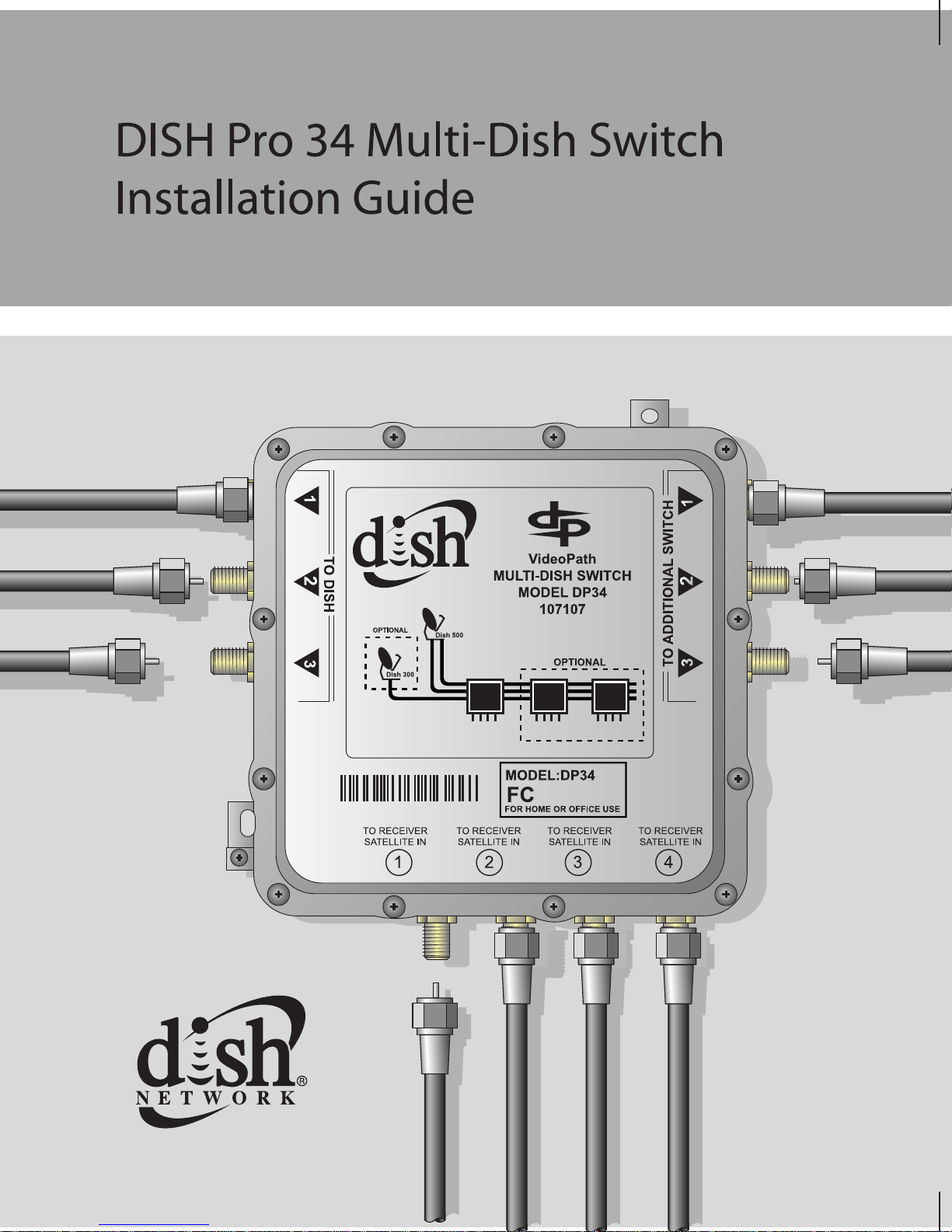
A DP34 switch allows you to receive signals from up to three DISH
Network satellite locations, and route these signals to as many as
four compatible Dish Network satellite receivers.
You can connect up to three DP34 switches to each other and route
signals from up to three satellites to as many as twelve compatible
DISH Network receivers.
Compatible satellite receivers include:
• DISH Pro satellite receivers have a single
which can be directly connected to a DP34 switch receiver
port. These receivers and other DISH Pro products are
identified by the DISH Pro logo shown below.
• DISH Pro Plus satellite receivers have two
which can be directly connected to two DP34 switch
receiver ports. These receivers and other DISH Pro Plus
products are identified by the DISH Pro Plus logo shown
SAT IN tuner
SAT IN tuners
below.
Page 3
Page 6
• For other Dish Network receivers without DISH Pro or
DISH Plus logos, you must purchase and use a DISH Pro
Adapter for each of these receivers. DISH Pro Adapters
can be purchased from your DISH Network retailer, or by
calling our Customer Service Center at 1-800-333 -DISH
(3474). The DISH Pro Adapter includes instructions for
setting up and installing the receiver
SAT IN tuner
connection to a DP34 switch receiver port.
Attention: The switch can be used only with DISH Pro
and DISH Network Bandstacked FSS and DBS
LNBFs. The DP34 switch will not work with the DISH
Pro Plus or non-DISH Pro LNBFs.
This Guide explains how to install one or more DP34 Multi-Dish
Switches. You should use this Guide along with the DISH Pro
Installation Instructions that are in the user guide that came with
your receiver.
The following instructions assume you have already poi nted yo ur
dish for the strongest possible signal, and have run Check Switch
with the DISH Pro LNBF connected directly to the receiver’s
Satellite In port. If not, you must install the dish, using the
instructions that came with it, before instal ling the switch.
Page 4
Page 7
Installation Instructions
1. Mount the DP34 switch onto the side of a building, or on some
other sturdy structure. Make sure that the mounting locatio n is
stable, and that you fasten the switch tightly to the surface. The
DP34 should be fixed by suitable hardware for the wall or
ceiling.
The DP34 switch can be installed outside your
home or building, because this device is designed
for outside use.
You can have up to 20 0 feet of cable between a
DISH Pro LNBF and a DISH Pro or DISH Pro Plus
satellite receiver with the DP34 switch connected at
any point along the 200 feet of cable. The cable
must be rated for 950 to 2150 MHz. Some cable is
labeled “Swept tested to 2150 MHz.” If you are
unsure whether your cable is rated to 2150 MHz,
check the container it came in, examine the cable’s
outside jacket, or talk to your retailer.
Note: Mount the switch so that the connections are horizontal
(as shown in Figure 1), and put drip loops in all coaxial cables.
This helps prevent leakage of moisture into the switch.
Page 5
Page 8
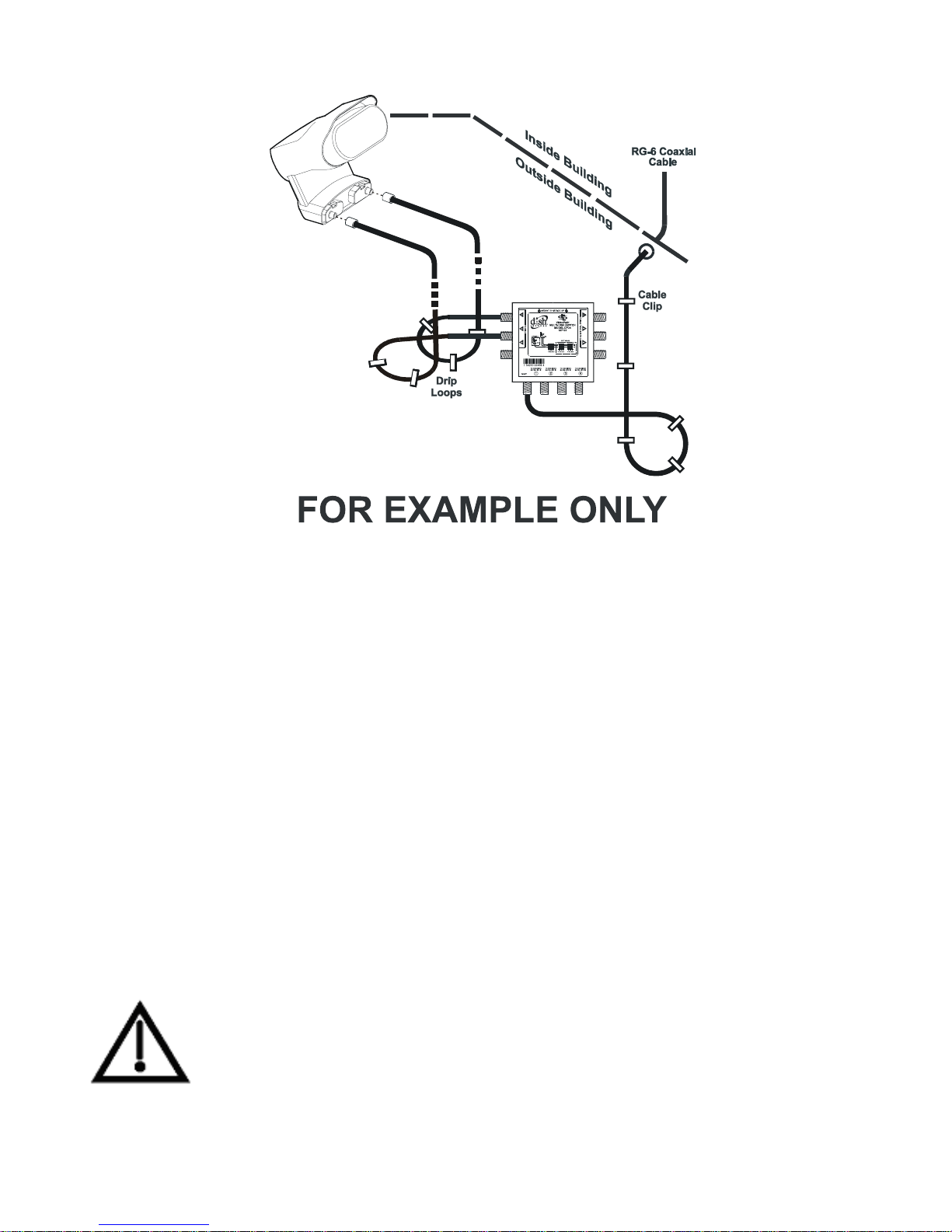
Figure 1. Switch Mounting
2. Connect the coaxial cables from a DISH 500 or a DISH
Network bandstacked FSS or DBS LNBF to the ports on the
DP34 switch labeled
TO DISH (see also the wiring diagrams that
begin on page 10).
3. Connect the cables from the DISH Network receiver’s back
panel
R
ECEIVER SATELLITE IN. The switch’s four outputs each supply
SATELLITE IN port(s) to the DP34 ports labeled TO
signals from up to three orbital locations, so you can
route the signals from up to three orbital locations to as many
as four receiver tuner inputs.
Do not connect the receiver to the ports labeled
ADDITIONAL SWITCH as this can cause other receivers
TO
in the system to experience loss of video.
Page 6
Page 9
4. Ground the system in accordance with the National Electric
Code (NEC) and all local electrical codes.
After you have connected cables and DP34 Switches to all
receivers in the system, you will need to run
receiver in your system, one at a time.
To do this, follow these
instructions for most receivers:
1. Open the
Point Dish/Signal.
2. A
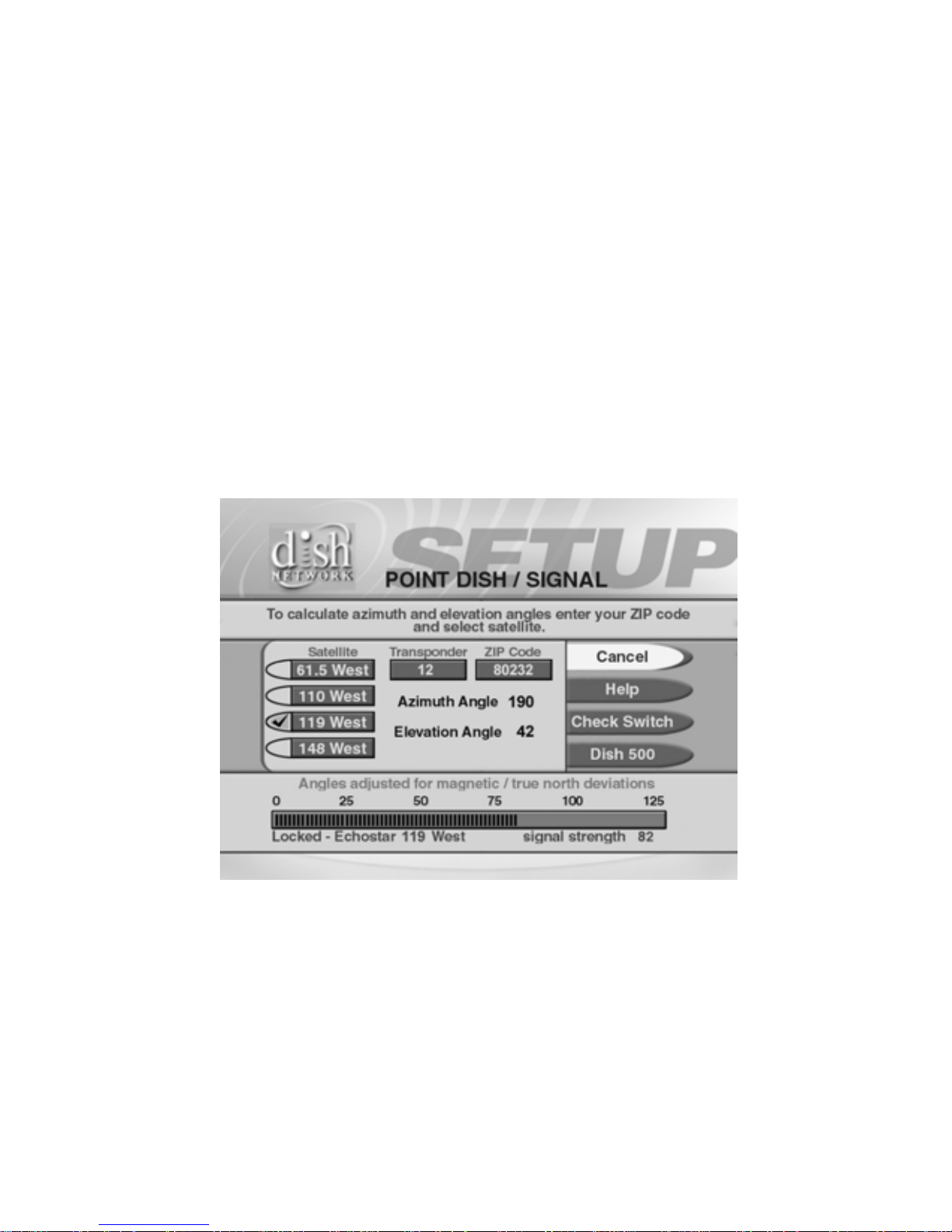
Point Dish/Signal menu similar to the one shown in
Main Menu, then System Setup, Installation, and
Figure 2 will open.
Check Switch on each
Figure 2. Point Dish/S ig na l E xam ple
3. Select Check Switch or Check. The Check Switch screen will
open. Select
Check or Test.
Page 7
Page 10
4. The Check Switch procedure will run. When it finishes, you
will see an
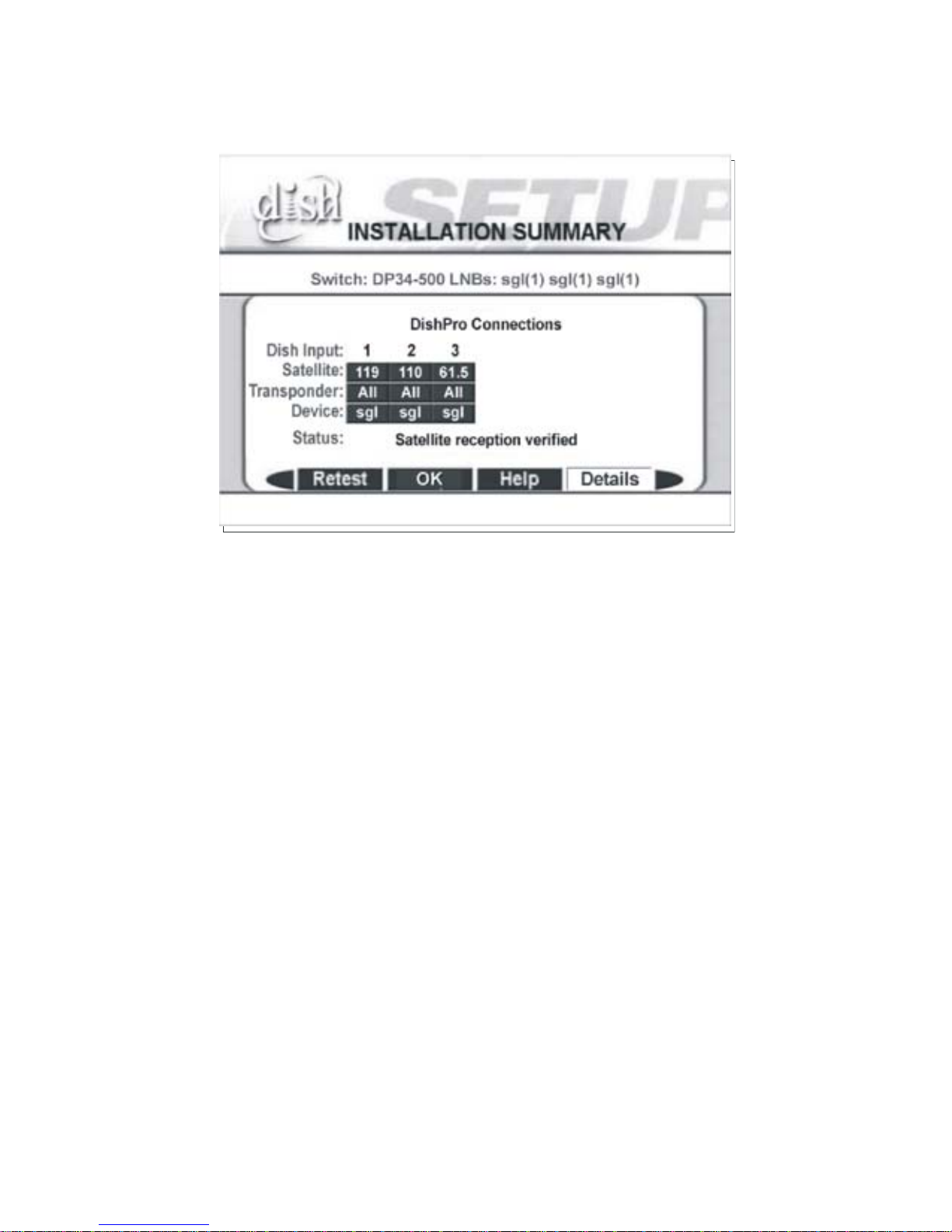
Installation Summary screen.
Figure 3. Installation Summary Example
While your screen may not look exactly like the one shown in
Figure 3, you must see:
• Switch identified as a DP34.
• Dish Input identifies the orbital locations where satellite signals
are detected.
• Devices (LNBFs) correctly identified.
• Satellite reception verified.
If any of the information is missing, check all cables and
switches, and then run
Check Switch again.
Page 8
Page 11

The wiring diagrams in th is Guide that begin on
page 10 omit cable drip loops and grounding for
clarity. Make sure to use drip loops, and to ground
the system per the National Electrical Code (NEC)
and all local electrical codes.
Page 9
Page 12
Wiring Diagrams
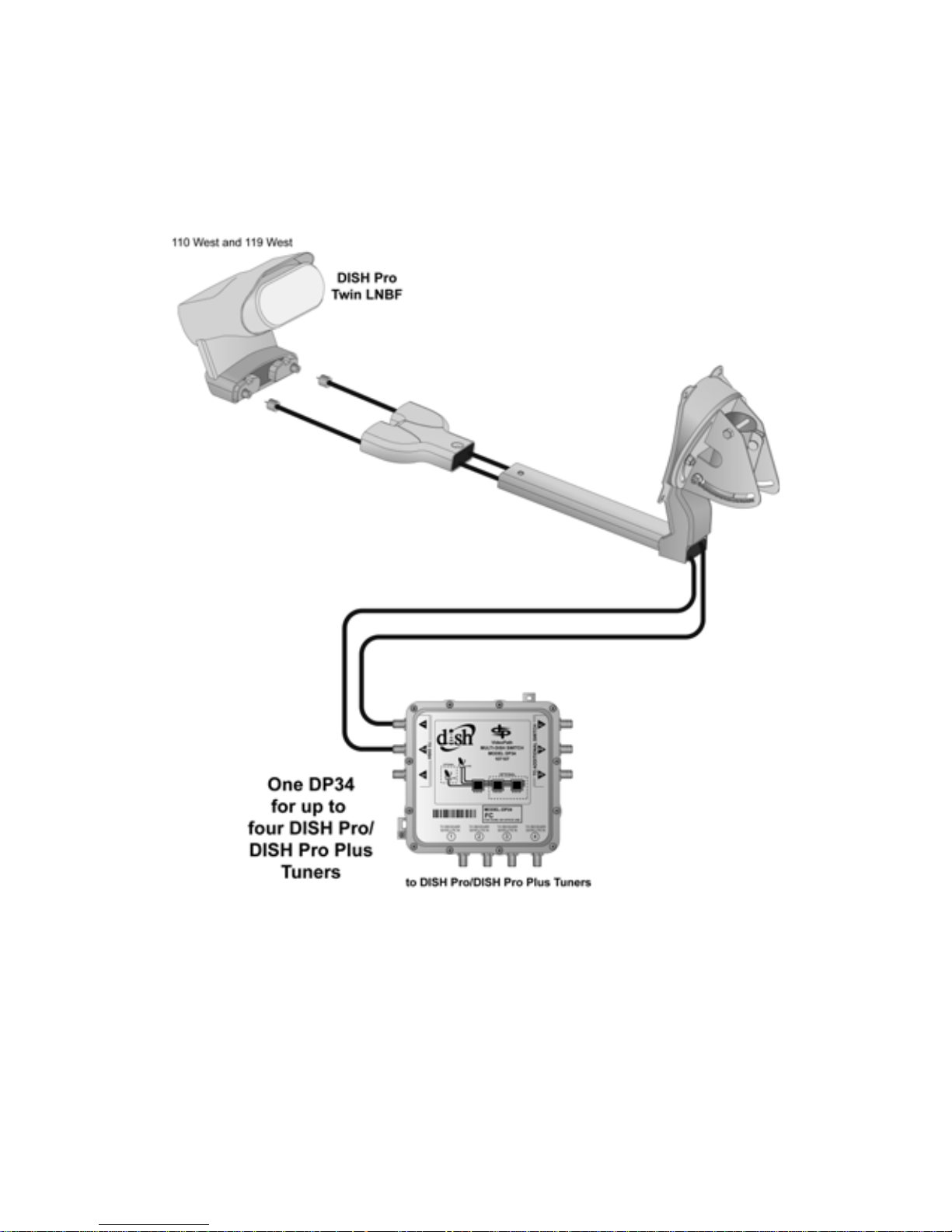
DISH 500 with DISH Pro Twin LNBF and a
DP34 Switch
Connect both ports (connections) on the DISH Pro Twin LNBF to
any two ports on the DP34 Switch that are marked
sure there is no more than 200 feet of cable between the LNBF and
the receiver(s).
Page 10
TO DISH. Make
Page 13
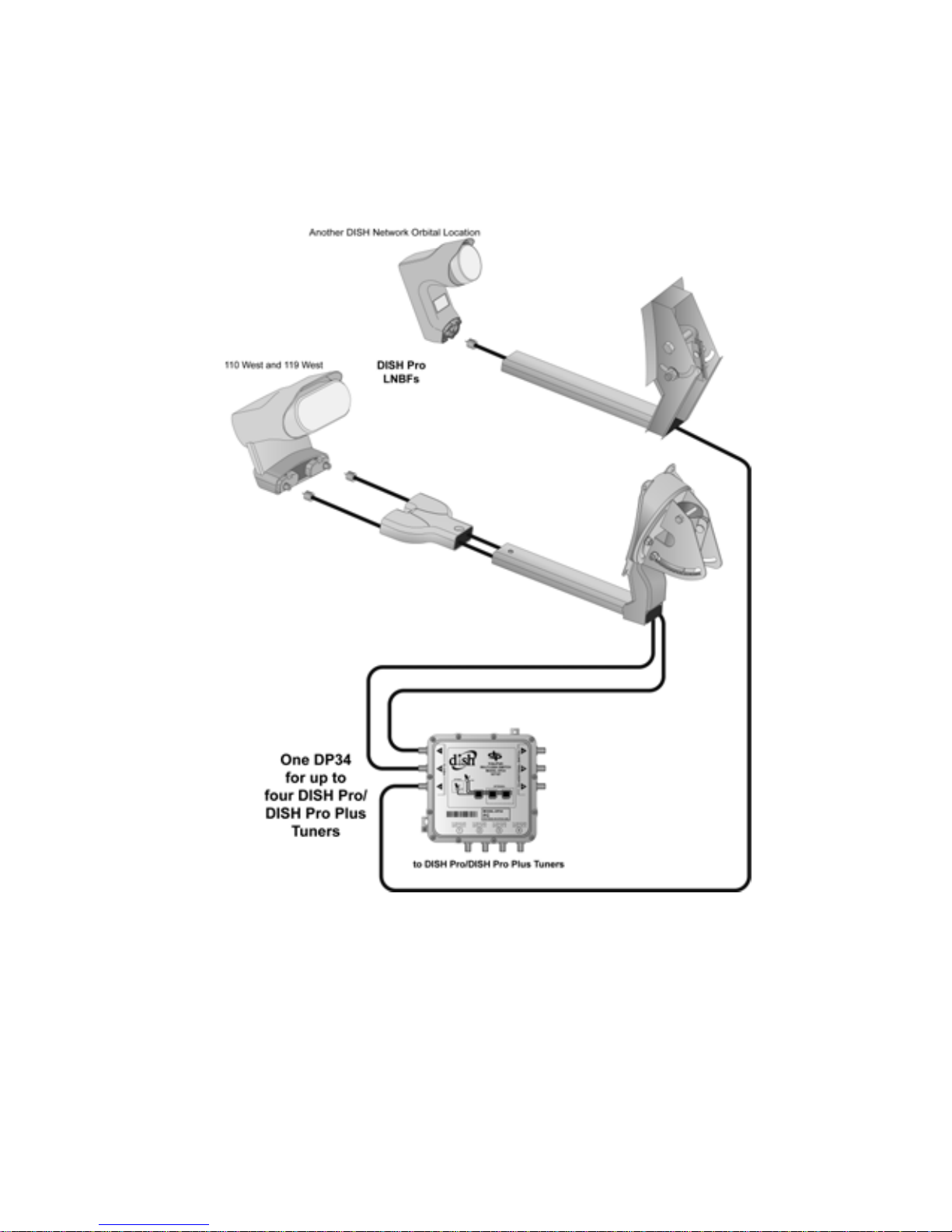
DISH 500 with DISH Pro Twin LNBF, Another
Dish with DISH Pro LNBF or DISH Network
Bandstacked FSS or DBS LNBF, and a DP34
Switch
Connect both ports (connections) of the DISH Pro Twin LNBF to
any two ports on the DP34 Switch that are marked
Connect the DISH Pro LNBF to any port of the DP34 marked
D
ISH. Make sure there is no more than 200 feet of cable between the
receiver and either LNBF.
TO DISH.
TO
Page 11
Page 14
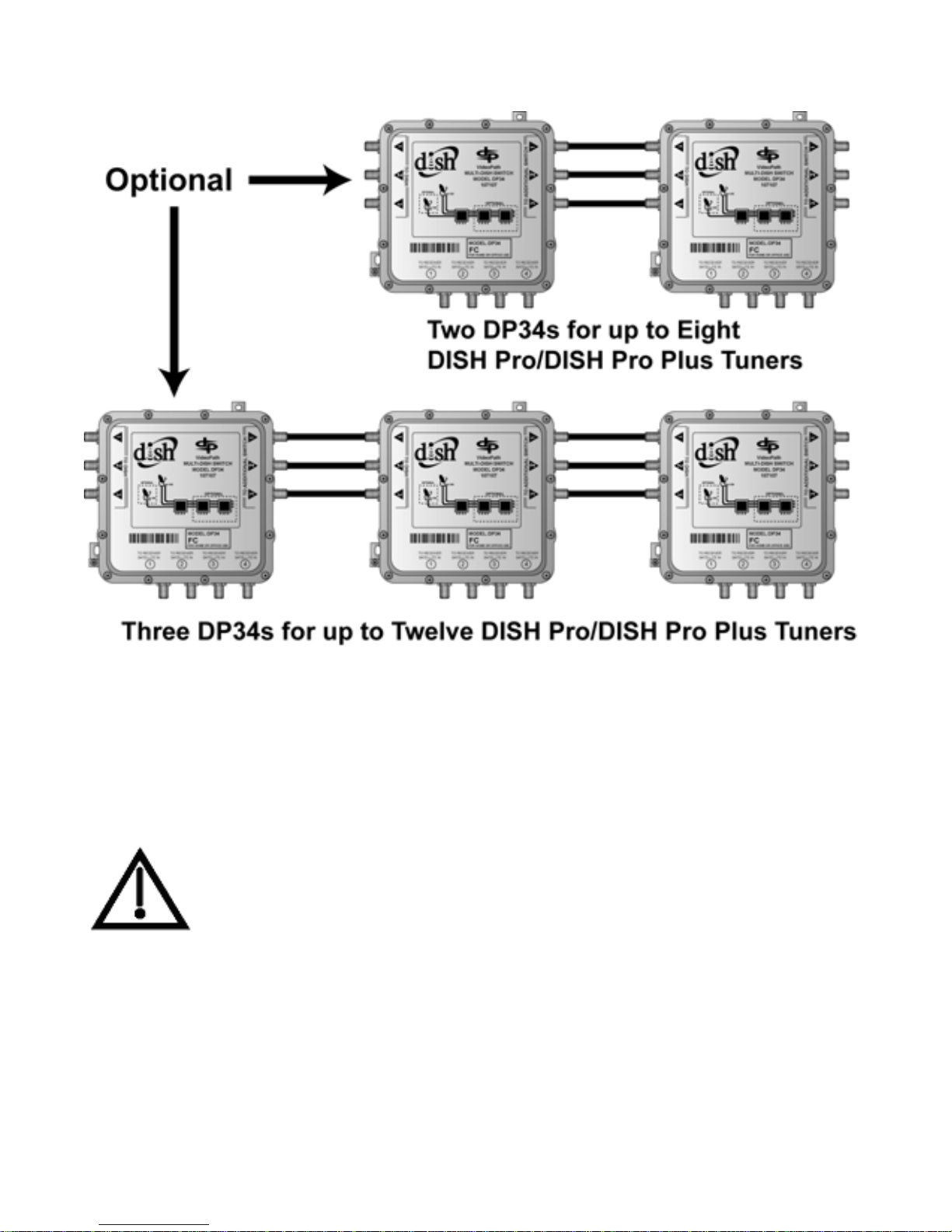
Connecting Several DP34 Switches
Connect DISH Pro LNBF(s) to ports marked TO DISH. Connect
DP34 Switches together between ports marked
S
WITCH and TO DISH.
TO ADDITIONAL
You must have at least one satellite receiver
connected to each DP34 switch and plugged in to
provide power to that switch.
Page 12
Page 15

Limited Wa rranty
This warranty extends only to the original user (“you,” “your”) of the
™
DISH Network
switch. EchoStar Technologies Corporations and its affiliated companies
(“we,” “our,” “us”) warrant this switch control against defects in materials
or workmanship as follows.
For one year from the original da te of purchase, if we fin d that the switch is
defective subject to the l imits of this warranty, we will replace the switch at
no charge for parts or labor. We warrant any such work done against
defects in materials or workmanship for the remaining part of the original
warranty period.
This warranty does not cover installation of th e DISH Network
DP34 Switch and is limited to the purchase price of the
TM
System;
consumer instruction; physical set up or adjustment of any consumer
electronic device; signal reception problems; loss of use of the equipment;
unused programming charges due to equipment malfunction; cosmetic
damage; damage due to lightning, electrical or telephone line surges, fire,
flood, or other acts of Nature; accident; misuse; abuse; repair or alteration
by other than our factory service; negligence; commercial or institutional
use; improper or neglected maintenance; equipment sold AS IS or WITH
ALL FAULTS; equipment removal or reinstallation; shipping damage if
the equipment was not packed and shipped in the manner we prescribe; nor
equipment purchased, serviced, or operated outside the contiguous United
States of Ameri ca .
Page 13
Page 16

REPLACEMENT AS PROVIDED UNDER THIS WARRANTY IS
YOUR EXCLUSIVE REMEDY. WE SHALL NOT BE HELD LIABLE
FOR ANY INCIDENTAL OR CONSEQUENTIAL DAMAGES FOR
BREACH OF ANY EXPRESSED OR IMPLIED WARRANTY ON THIS
DEVICE, NOR FOR ANY INCIDENTAL OR CONSEQUENTIAL
DAMAGE RESULTING FROM THE USE OF , OR INABILITY TO USE,
THIS DEVICE. UNDER NO CIRCUMSTANCES SHALL OUR
LIABILITY, IF ANY, EXCEED THE PURCHASE PRICE PAID FOR
THIS DEVICE. EXCEPT TO THE EXTENT PROHIBITED BY
APPLICABLE LAW, ANY IMPLIED WARRANTY OF
MERCHANTABILITY OR FITNESS FOR A PAR TICULAR PURPOSE
ON THIS DEVICE IS LIMITED IN DURATION TO THE DURATION
OF THIS WARRANT Y. WE RESERVE THE RIGHT TO REFUSE TO
HONOR THIS WARRANTY IF WE DETERMINE ANY OF THE
ABOVE EXCEPTIONS TO HAVE CAUSED THIS DEVICE NOT TO
HAVE PERFORMED PROPERLY. THIS WARRANTY SHALL BE
VOID IF ANY FACTORY-APPLIED IDENTIFICATION MARK,
INCLUDING BUT NOT LIMITED TO SERIAL OR CONDITIONAL
ACCESS NUMBERS, HAS BEEN ALTERED OR REMOVED. THIS
WARRANTY SHALL ALSO BE VOID IF THE DEVICE HAS BEEN
OPENED BY AN UNAUTHORIZED PERSON.
This warranty gives you specific legal rights which may vary from state to
state. Some states do not allow th e excl usion or limitations o f incidental or
consequential damages, or allow limitations on the duration of an implied
warranty, so those limitations may not apply to you.
Page 14
Page 17

Advance Exchange Program
The Advance Exchange Program allows you to have replacement
equipment shipped immediately to you (depending upon where you
live, it could take three to five business days). Along with
replacement equipment, you will receive a prepaid shipping label
and instructions on how to return the defective equipment.
The shipping charge, for receiving replacement equipment and
returning the defective equipment, is a one time fee based on
EchoStar's competitive bulk shipping rates (additional charges may
apply outside of the continental US). This fee will be charged to
your billing account or your valid credit card.
If you do not ship the defective equipment to EchoStar within ten
days after receiving the replacement, your billing account or credit
card will be charged the market price of the replacement. If you
return the defective equipment after ten days, you will receive a full
refund less an administrative fee.
If your equipment is out of warranty and can be repaired your
billing account or credit card will be charged the standard repair fee
for the replacement. If damage to the defective equipment is found,
which EchoStar in its sole discretion determines has voided the
warranty, or makes the equ ipment unrepairable, your billing
account or credit card will be charged the market price of the
replacement.
Page 15
Page 18

Post Receipt Exchange Program
You may cho ose to ship the equipment to us at your cost. To
provide faster service, upon receipt of your equipment you will be
shipped a replacement. Your original equipment will not be
available for return.
The equipment you return will be checked to verify whether it is
covered under this warranty. If the defective equipment is covered
under this warranty, it wil l be repl aced and shipped back to you at
no additional cost (additional charges may apply outside of the
continental US).
If your equipment is out of warranty and can be repaired your
billing account or credit card will be charged the standard repair fee
for the replacement. If damage to the defective equipment is found,
which EchoStar in its sole discretion determines has voided the
warranty, or makes the equ ipment unrepairable, your billing
account or credit card will be charged the market price of the
replacement.
Accessory Warranty
An accessory is any DISH Network branded equipment, displaying
the DISH Network logo, excluding the receiver , Smart Card, cables
and hookups, and non-mechanical componen ts. A one-year
warranty becomes effective upon the activation of the DISH system
or date of purchase, if bought separately. A pro of of purchase is
required to verify the purchase date. If an accessory has an expired
warranty, no exchange will be issued. You may purchase
replacement accessories from DISH Network or your local retailer.
Page 16
Page 19

If You Need Help
Review this Guide.
Call the DISH Network™ Service Center at 1-800-333-DISH (3474). Have
the date of purchase and your customer account number ready.
A Representative will assist you. The Representative will try to
troubleshoot any problem you may be having. He or she also will check
whether the switch is covered under this warranty.
If the Representative finds that you should return the switch, you will get a
telephone number to call for a Return Authorization (RA) number. Before
shipping any equipment to us, you must get a Return Authorization number
from the Service Center.
You must package returned equipment properly. Follow the instructions
that the Representative gives you. W rite the RA number in large, clearly
visible characters on the outside of the shipping box used to return the
equipment. To avoid confusion and misunderstandings, we will return
shipments without an RA number clearly visible on the outside of the box
to you at your expense.
We will:
Check the switch, including whether it is covered under the warranty.
Replace any switch that we find is defective with a new or refurbished
switch, if the defective switch is covered under the warranty. We will ship
the replacement switch at our expense.
If a defective switch is not covered under the warranty, we will tell
you. We may assess you a flat rate char ge for a replacement switch,
including shipping and insurance.
Page 17
Page 20

FCC Compliance
This equipment has been tested and found to comply with the limits
for a Class B digital device, pursuant to part 15 of the FCC Rules.
These limits are designed to provide reasonable protection against
harmful interference in a residential installation. This equipment
generates, uses and can radiate radio frequency energy and, if not
installed and used in accordance with the instructions, may cause
harmful interference to radio communications. However , there is no
guarantee that interference will not occur in a particular installation.
If this equipment does cause harmful interference to radio or
television reception, which can be determined by turning the
equipment off and on, the user is encouraged to try to correct the
interference by one or more of the following measures:
• Reorient or relocate the receiving antenna.
• Increase the separation between the equipment and receiver.
• Connect the equipment into an outlet on a circuit different from that
to which the receiver is connected.
• Consult the dealer or an experienced radio/TV technician for help.
Page 18
Page 21

Notes
Page 19
Page 22

Notes
Page 20
Page 23
Copyright © 2005. EchoStar Technologies Corporation, Englewood,
Colorado 80112. All rights reserved.
The information in this Guide may change without notice. Revisions
may be issued to tell you about such changes.
You should address comments or questions about this Guide to
Technical Publications, EchoStar Technologies Corporation, 94
Inverness Terrace East, Englewood, Colorado 80112.
Document Number: 134706
Printed in the United States of America.
DISH Network is a trademark and service mark of EchoStar Satellite
L.L.C.
All product names, trade names, or corporate names mentioned in this
Guide are acknowledged to be the proprietary property of the registered
owners.
Page 24
 Loading...