

Page 1

R
emote Control
Model 52.0
Quick Start Guide
Page 2

TV
AUX
SAT
52.0
SYS INFO
Turn On Your Remote
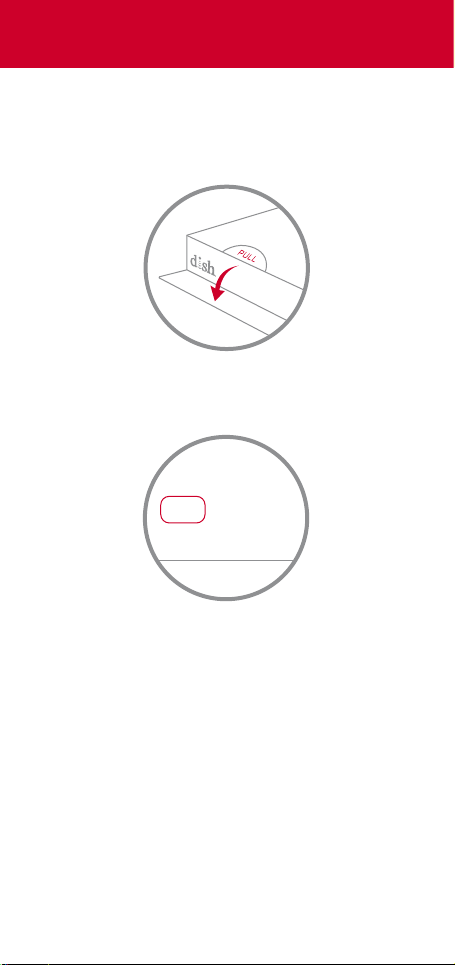
1 Remove the back cover by pushing the
tab upward, and remove the PULL tab
PULL
2 Replace the back cover
3 Open the front panel of your DISH
receiver, and press the SYS INFO button
4 Press the SAT button on the side of the
remote control
You will hear three beeps from the
remote control, indicating it has paired
with your DISH receiver
Page 3

TV
Auxiliary
DEVICES
Remote
Sengs
AUX
TV
SAT
Back
Options
Info
Apps
DVR
Guide
Live TV
Help
Pair Your Remote
1 Press the home button twice
2 Select Settings and then Remote Control
3 Select TV and then TV Pairing Wizard
4 Follow the prompts
5 If desired, pair your remote with an auxiliary
device such as a Blu-ray™ player or stereo
Page 4
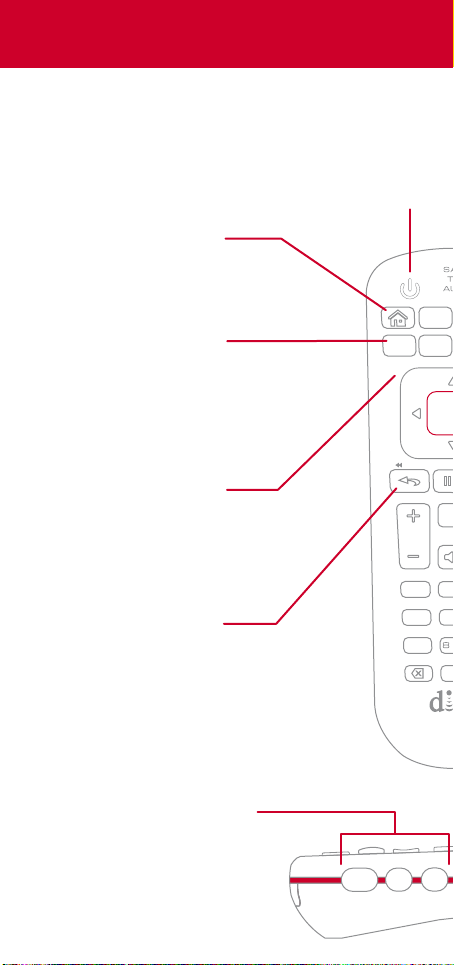
Explore Your Remote
Home
Easily find movies,
sports, and shows
that are live, on
your DVR, or on
demand—all in
one place
Back/Live TV
Press to go back
one menu
Press and hold to
go to live TV
Options
Access additional
options and features
in the current menu
Skip Backward
Press to skip back
10 seconds
Press and hold to
rewind
Device Power
Turn on and o
the device you’ve
selected on the
side of the remote
Back
Live TV
VOL
4
Apps
Options
Select
Recall
2
abc
1
jkl
ghi
5
tuv7
pqrs
0
Also, use the skip
buttons to change tabs
Device Buttons
Use your remote as a
universal remote control by
pairing it with your TV and
an auxiliary device such as
a Blu-ray™ player or stereo
SAT
AUX
TV
Page 5
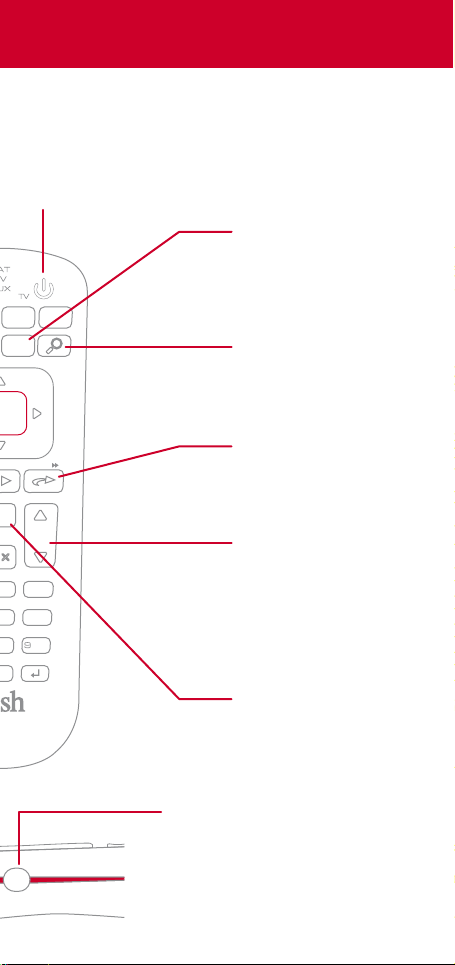
TV Power
When the remote
is paired with your
TV, this button
turns it on and o
DVR
Guide
Info
Help
CH
3 def
mno
6
tuv
wxyz
Info/Help
Press to get more
information about a
program
Press and hold to
get quick tips on
most screens
Search
Find your favorite
TV shows, movies,
and sports
Skip Forward
Press to skip forward
30 seconds
Press and hold to
fast-forward
Channel Up & Down
In addition to
changing channels,
use these buttons to
page through menus
such as the Guide
INPUT
Recall
While watching TV,
press to see the
channels you have
watched recently
Input
Change inputs on your TV when
in TV mode
When in SAT mode, use this
button to swap picture-inpicture or multi-view windows
Page 6
LOCATE
REMOTE
Locate Your Remote Anytime
1 Open the front panel of your DISH
receiver
2 Press the LOCATE REMOTE button
You will hear a series of beeps from your
remote, allowing you to find it
Page 7
Regulatory Information
This device complies with Part 15 of FCC Rules. Operation is subject to the
following two conditions:
1. This device may not cause harmful interference,
and
2. This device must accept any interference received, including
interference that may cause undesired operation.
This equipment has been tested and found to comply with the limits for a Class B
digital device, pursuant to Part 15 of the FCC Rules. These limits are designed to
provide protection against harmful interference in a residential installation. This
equipment generates, uses, and can radiate radio frequency energy and, if not
installed and used in accordance with the instructions, may cause harmful
interference to radio communications. However, there is no guarantee that
interference will not occur in a particular installation. If this equipment does cause
harmful interference to radio or television reception, which can be determined by
turning the equipment o and on, the user is encouraged to try to correct the
interference by following one or more of the following measures:
∙ Reorient or relocate the receiving antenna.
∙ Increase the separation between the equipment and receiver.
∙ Connect the equipment into an outlet on a circuit dierent from
that to which the receiver is connected.
∙ Consult the dealer or an experienced radio/TV technician for help.
Changes or modifications to this device may void your authority to operate this
equipment.
Safety Instructions
You must keep safety in mind while using this device. Keep these and any other
instructions for future reference.
Observe Warnings: Carefully follow all warnings on the device and in the operating
instructions.
Heat: Do NOT place the device near heat sources such as radiators, stoves, heat
registers, or other appliances that produce heat.
Case and Use
Cleaning: Do NOT use liquid, abrasive, solvent, or aerosol cleaners. Use a damp
cloth for cleaning.
When Not in Use: Remove the batteries if this device is to be left unattended or
unused for a long period of time.
WARNING - This product can expose you to Bisphenol A
(BPA) which is known to the State of California to cause
birth defects or other reproductive harm. For more
information go to www.P65Warnings.ca.gov
Refer servicing to qualified personnel when a solid object
or liquid has fallen onto or into the device.
Do NOT attempt to service this device. Refer all servicing to
qualified personnel. Opening covers other than the battery
cover will void the warranty.
Page 8
Need Help?
Press and hold Info/Help
Channel 103
The Hopper Features Guide
mydish.com/support/remotes
Warranty, safety, regulatory, and legal information
can be found at mydish.com/support/remotes
DN011580
 Loading...