

Page 1

Setting Up Your
Replacement Remote
Setting Up Your
Replacement Remote
301 and 311 Receivers
3.4 IR Remote Control
Page 2

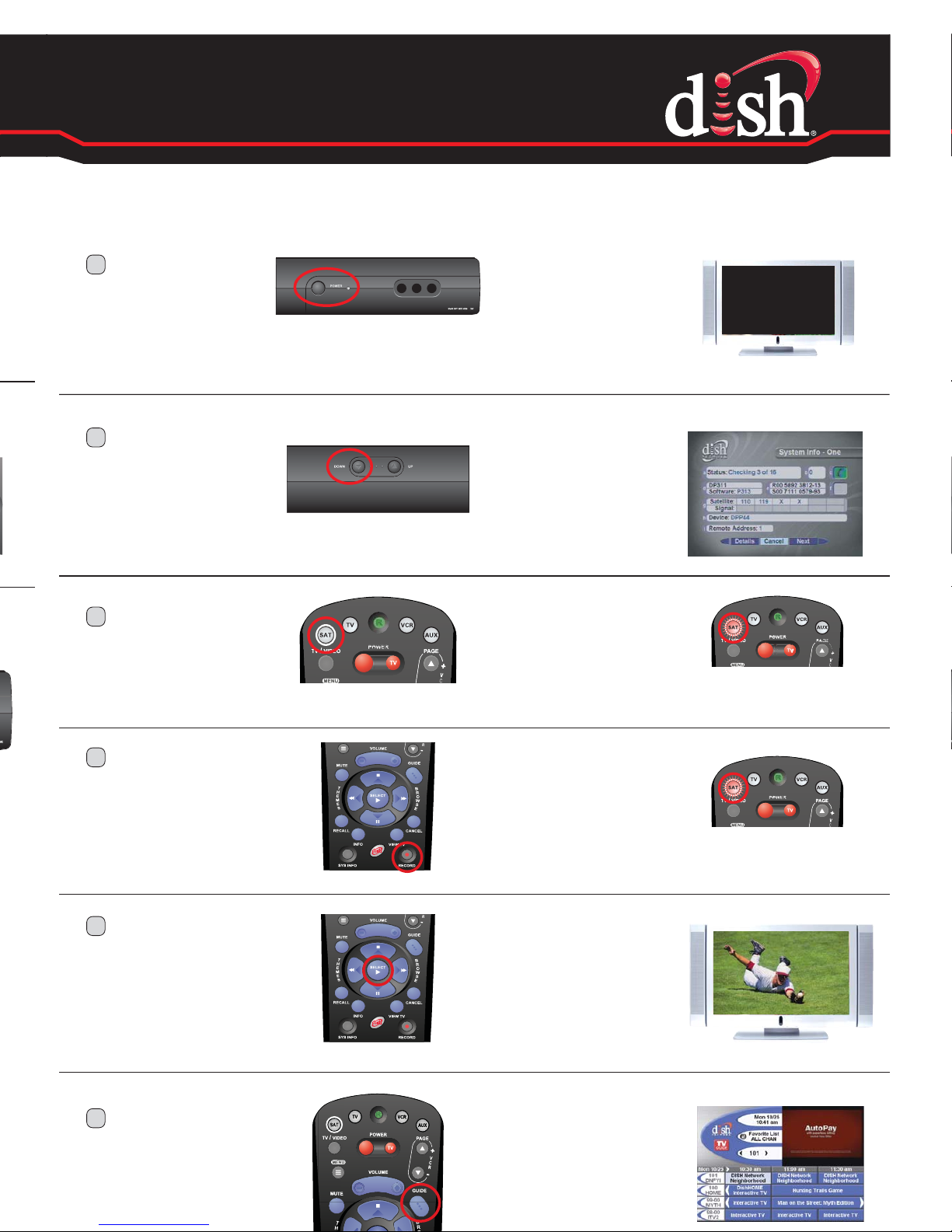
1.
Install the Batteries
4.
Program the Remote to Control Your Receiver
3.
Test Your Remote
2.
Attach Room Identication Labels
Remove the remote battery cover and install
the enclosed batteries. Replace the battery
cover.
Attach the correct identification labels to the
battery cover.
To turn your DISH receiver on, press and release
the POWER button on the front of your receiver .
Then, turn on your TV and press and release the
GUIDE button on your DISH remote.
If the programming guide displays
on your TV, skip to Step 5.
If the programming guide does not
display, continue with Step 4.
D
Press and
release the
RECORD
button.
C
Press and
release the
SAT mode
button on
your remote.
F
Go to the TV
where the
remote will be
used. Press and
release the
GUIDE button.
E
Press and
release the
SELECT button
to close the
System Info
screen.
A
Press and
release the
POWER button
on the front of
your receiver .
B
Press and
release the
DOWN ARROW
button on the
front of your
receiver .
FAMILY ROOM
TUNE
TV TO
AAA
AAA
Page 3
4.
Program the Remote to Control Your Receiver
D
Press and
release the
RECORD
button.
C
Press and
release the
SAT mode
button on
your remote.
F
Go to the TV
where the
remote will be
used. Press and
release the
GUIDE button.
The SAT mode
button will light
up again.
The SAT mode
button will light
up.
The
programming
guide will
display on the
TV.
E
Press and
release the
SELECT button
to close the
System Info
screen.
The System
Info screen
will close and
programming
will display.
The TV screen
will no longer
display a
picture.
A
Press and
release the
POWER button
on the front of
your receiver .
The System
Info screen
will display.
B
Press and
release the
DOWN ARROW
button on the
front of your
receiver .
Page 4
Setting Up Your
Replacement Remote
Setting Up Your
Replacement Remote
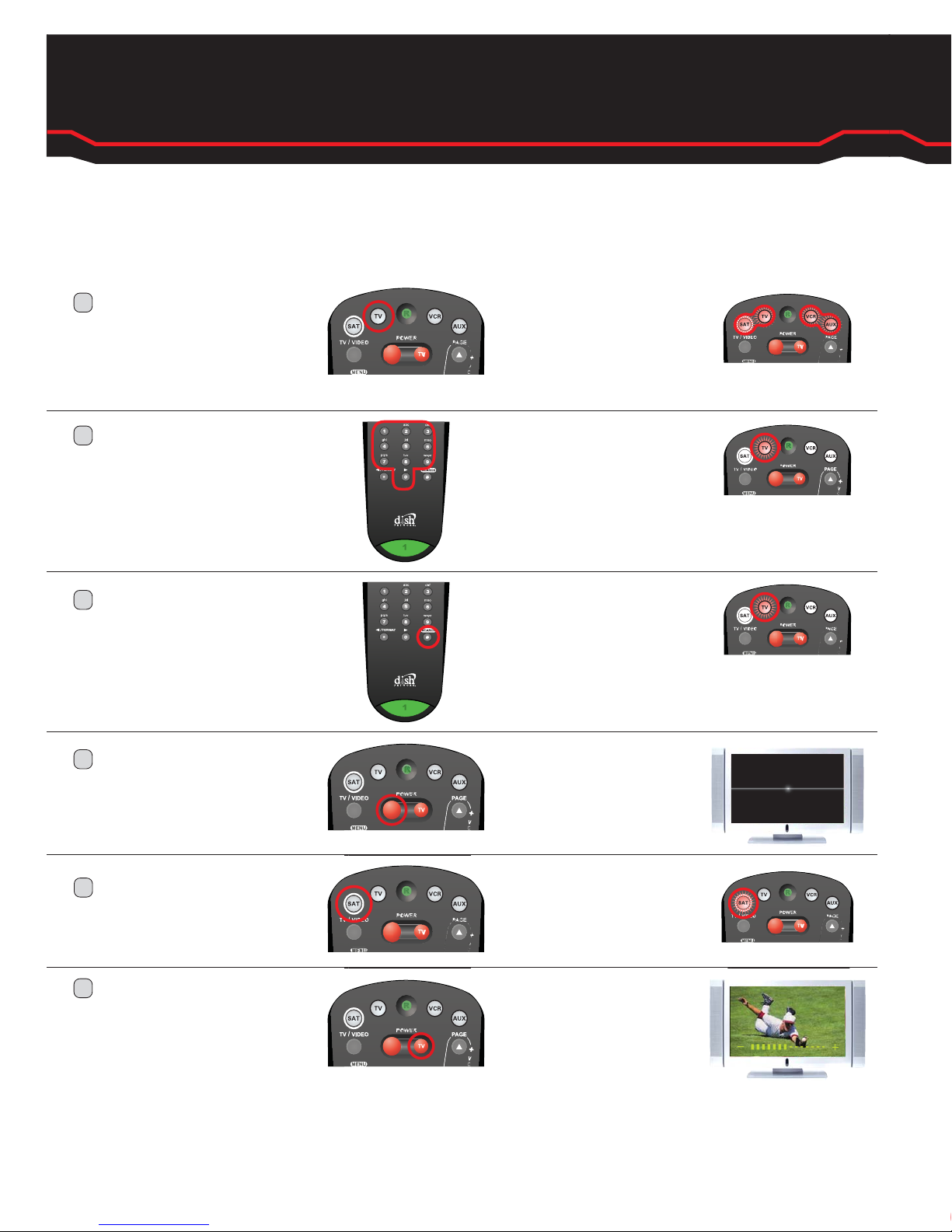
5.
Program the Remote to Control Your TV
301 and 311 Receivers
3.4 IR Remote Control
E
Press and release
the SAT mode
button.
The SAT
mode button
will light up.
Use the “Remote Control TV Codes” booklet that was included with your replacement
remote to find the code needed for your TV.
The TV
mode button
will flash
three times.
While facing the TV
where the remote
will be used, press
and hold the TV
mode button.
A
Press and release
the POUND (#)
button.
C
Press and release
the large, red
POWER button.
D
B
Enter the three-digit
remote control code
from the “Remote
Control TV Codes”
booklet.
Press and release
the TV POWER
button. Then, press
VOLUME up or
down to confirm
that the remote
operates your TV.
F
The TV
mode button
will light up.
All four mode
buttons will
light up.
The TV will
turn off.
The TV will
turn on and
respond to
remote
commands.*
Congratulations! You are now ready to enjoy DISH Network.
If your TV does not respond to the DISH remote, try another three-digit remote control TV code.
*
VOL
 Loading...