

Page 1

Discover Video
DEVOS System
Installation Planning Guide
Version 2.0
5/30/2017
Discover Video LLC
www.discovervideo.com
Page 2

General Description
The Discover Video DEVOS system consists of at least one DEVOS or
DVExpress server. A typical system also includes some number of other
system components such as video encoders, video players, and digital
signage display systems.
IP Signal Flow
DEVOS Systems operate over Ethernet/IP networks. No special or
exotic network configurations are required. The system does not
depend on IP Multicast. However, there must be adequate network
bandwidth available to support the intended use.
Encoders
DEVOS System Planning
Encoders, including Spirit, Rover, StreamEngine, Mantis, Hornet, and
Streamsie PC / Streamsie Mac / Streamsie iOS software transmit live
compressed video at the configured bit rate to the DEVOS server(s).
Live video is transmitted on IP port number 1935.
Encoders may also create video files which may be uploaded to the
DEVOS server(s). File upload occurs via webpage on port 80, and/or
via FTP using active mode FTP.
Viewing
Viewing of the content is done on conventional Windows or Mac
computers using a modern web browser (IE, Chrome, Safari). Viewers
access the DEVOS server(s) and receive content via streaming video on
port 1935 for Flash, or port 80 for HTML5. Other ports may also be
used depending on options. Viewing is available on virtually all
smartphones, tablets, and similar devices.
Navigation and viewing of the content is available on Set Top Boxes
and certain Samsung and Roku devices (may require additional
license).
Page 2
DEVOS System Planning
5-30-2017
Page 3

Digital Signage
Digital Signage is provided by the SignStick®, Signage Media Player,
or web browser which simply requires an IP connection, either wired or
WiFi.
Limited Digital Signage is also supported on certain consumer-grade
Roku Box/Stick.
DEVOS Server(s)
The DEVOS Server connects to the network via up to four (4) GigE
network connections that are configured for teaming (to increase the
network capacity).
DEVOS System Planning
Clustering
Multiple DEVOS servers may be used to increase throughput capacity
and resilience. No special provisions for clustering are necessary
beyond installing the desired number of physical servers and having a
Cluster License.
Stinger
Stinger is a non-redundant DEVOS server with Intel® Chipset. It is used
for non-critical use cases, small offices or departments. The server is
not rack-mounted but may sit on a shelf, desk, floor, etc.
DVExpress
The DV Express is similar to DEVOS server, has a simple set of features,
and has four HDMI encoder channels built-in. It is intended for simple
use cases for applications such as live “Morning Announcements”,
“Town Hall Meetings”, Digital Signage, and Video-on-Demand without
the complexity of user accounts, Active Directory, and without the
more sophisticated features found in DEVOS.
Page 3
DEVOS System Planning
5-30-2017
Page 4

Public Internet
The DEVOS server can "pull" and "push" live streams over the public
Internet, and can deliver content to public viewers via the public
Internet if so configured. To the extent the network is configured to
enable this, special attention should be paid to public Internet
bandwidth usage.
DEVOS and DVExpress can stream live video to YouTube and Facebook
as well as delivering video directly to viewers.
Network Bandwidth
Network bandwidth use is equal to the total number of simultaneous
viewers multiplied by the bit rate of the content being viewed. For
example, 100 viewers of a 500 Kbps stream would require 50,000 Kbps
(50 Mbps, or 50% of a 100 Mbps Ethernet, 5% of a 1 Gbps Ethernet).
DEVOS System Planning
Special attention should be paid to WiFi deployments to ensure
networks do not become oversubscribed.
DEVOS Cloud
DEVOS is available where the server is hosted by Discover Video on the
public Internet. In this case, all IP signal flow travels over the
customer's public Internet access connection, and special attention
should be paid to local capacity issues. Note that for live video
distribution, these issues can be mitigated by installing a
StreamPump® at the customer premises location(s).
Page 4
DEVOS System Planning
5-30-2017
Page 5
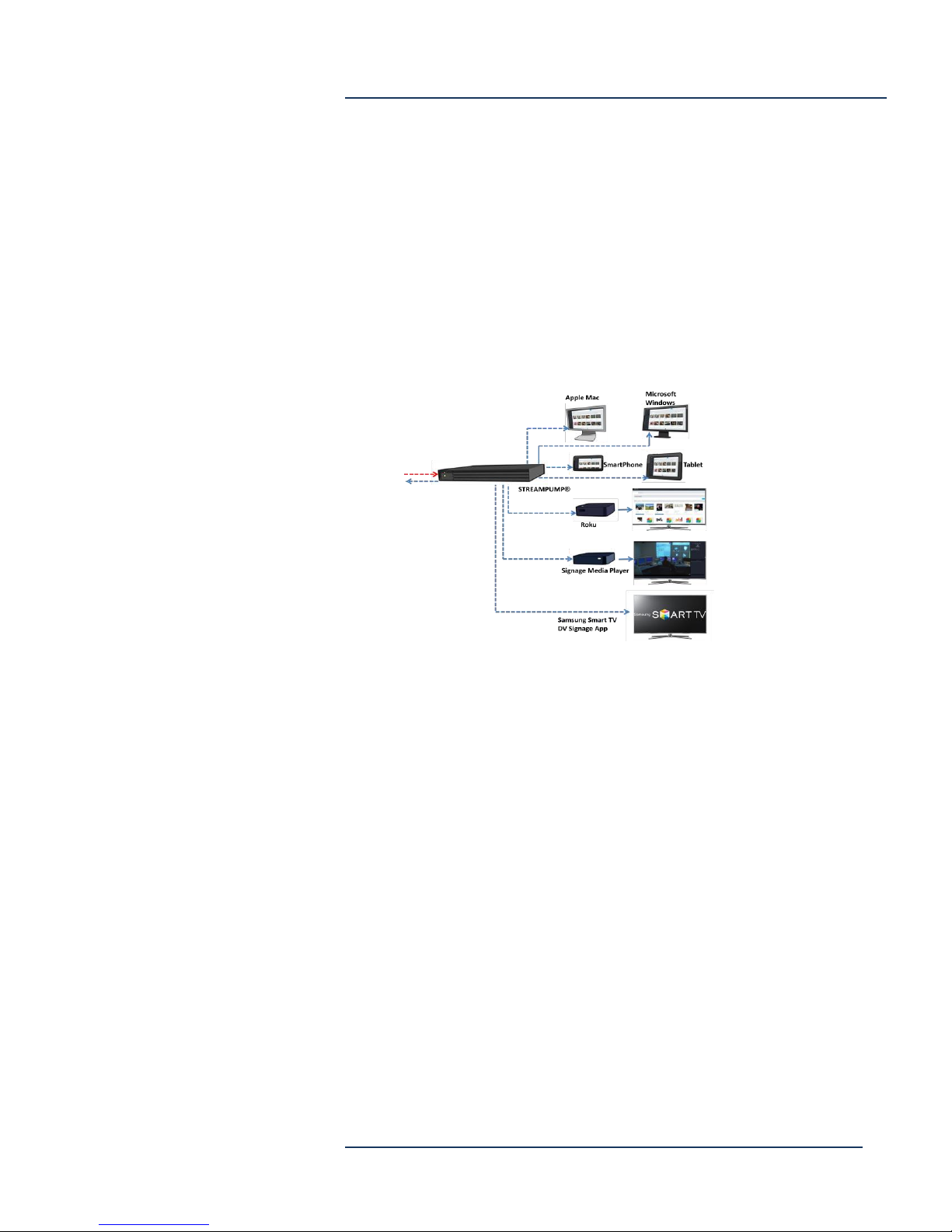
StreamPump®
StreamPump may be installed at any location, such as a remote branch
office or satellite site. StreamPump connects to the DEVOS server and
it receives one of each available live video streams as needed. When a
viewer wishes to watch a live video and they are on the same network
as the StreamPump, the stream automatically comes from the
StreamPump rather than from the DEVOS, thus allowing hundreds of
branch office viewers to access the streams while using the bandwidth
of only one.
DEVOS System Planning
StreamPump caches VoD content, vastly reducing bandwidth needs,
and support time-of-date pre-positioning of content.
Arcus or Streamsie Service
Arcus is an optional CDN service that provides live streaming
bandwidth for viewers on the public Internet. It can be used three
ways:
1) DEVOS can “push” any live stream to Arcus. For example a
DEVOS Encoder account’s live stream can be distributed via
DEVOS but also sent to Arcus where public viewers may watch it
without viewers consuming any of the customer’s bandwidth.
2) DEVOS can “pull” a live stream from Arcus. For example, a live
stream from an “away” location may use Streamsie to send the
live video directly to Arcus where the public can view it, and
DEVOS can “pull” that stream in to its distribution system for
local viewers.
3) Arcus can be used independently of DEVOS.
Page 5
DEVOS System Planning
5-30-2017
Page 6

IP Multicast
Unlike many other systems, the Discover Video solution does not
depend on IP multicast. Encoders always send video streams to the
DEVOS server, not directly to viewers.
If desired, a live stream can be configured to deliver IP multicast from
the server. Viewing of such streams is supported by DVPlayer, VLC,
QuickTime, etc. or a Set Top Box.
A/V Signal Flow
Audio/Video signals are either inputs to encoders, or outputs from
computers, Signage Media Player, SignStick, or Roku devices.
Depending on the Encoder model, the A/V inputs might be:
HDMI w/audio*
HDMI w/analog stereo audio*
Component RGB w/analog stereo audio
Composite w/analog stereo audio
SDI / HDSDI w/audio
SDI / HDSDI w/analog stereo audio
VGA w/o audio
VGA w/analog stereo audio
DVI w/o audio
DVI w/analog stereo audio
DEVOS System Planning
The SignStick and Digital Signage Media Player delivers HDMI w/audio
(only)
*HDMI output from consumer devices such as Cable TV boxes,
DVD players, BluRay players, etc. commonly have HDCP which
encrypts the signal. HCDP-protected content cannot be used with
any Discover Video (or other vendor’s) encoder.
To overcome this, you may be able to use a 3rd party HDMI splitter
if it supports HDCP toward the source.
Page 6
DEVOS System Planning
5-30-2017
Page 7

DEVOS System Planning
Installation Drawings and Connectors
DEVOS Server
The DEVOS 16 is a 2U server with 16 disk slots. Leave enough clearance
in front of the rack to enable you to open a door (~25 inches) and
approx. 30 inches of clearance in the back to allow for airflow and
servicing. The server is for installation in a Restricted Access Location
(dedicated equipment rooms, service closets, etc.). Review safety
precautions for lifting heavy equipment. Ensure the target rack is
properly secured, grounded, and prepared for installation of the server.
Specs (Subject to change)
DEVOS 16 17.2 x 3.5 x 24.8 in (437 x 89 x 630 mm)
Approx. 50 lbs.
19” Rack Mount Rails
2 x Quad-Core Intel® Xeon® Processor E5-2603 or equiv
1.80GHz 10MB Cache (80W)
32GB RAM
3 x 1.0TB SATA 6.0Gb/s 7200RPM - 2.5" RAID5
120GB 6.0Gb/s Solid State Drive
Intel® Ethernet Server Adapter I350-T2 Dual
Port (2x RJ-45)
LSI MegaRAID 9280-16i4e SAS 6Gb/s 20-Port
Controller with 512MB Cache
2 x 10-Core Intel® Xeon® Processor E5-2640 2.4GHz
25MB Cache (90W)
32GB RAM
3 x 2.0TB SATA 6.0Gb/s 7200RPM - 2.5" RAID5
120GB SATA 6.0Gb/s Solid State Drive
Intel® Ethernet Server Adapter I350-T2 Dual
Port (2x RJ-45)
LSI MegaRAID 9280-16i4e SAS 6Gb/s 20-Port
Controller with 512MB Cache
110-240 VAC, 50-60 Hz, auto-range
Redundant 740W Power Supplies
5 - 35 degrees C operating
8-90% non-condensing humidity
DEVOS 16H 17.2 x 3.5 x 24.8 in (437 x 89 x 630 mm)
Approx. 50 lbs.
19” Rack Mount Rails
110-240 VAC, 50-60 Hz, auto-range
Redundant 740W Power Supplies
5 - 35 degrees C operating
8-90% non-condensing humidity
DVExpress 1.7 x 17.2 x 14.4 in (43 x 427 x 369 mm)
Approx. 14 lbs
19” Rack Mount
Intel® C222 Chipset - Intel® Gigabit Ethernet
1U Chassis
350W Power Supply
Page 7
DEVOS System Planning
5-30-2017
Page 8

DEVOS System Planning
Quad-Core Intel® Xeon® Processor E3-1220 v3
3.10GHz 8MB Cache (80W)
8GB RAM
120GB Solid State Drive
2 TB Drive for content
Stinger 1.7 x 17.2 x 14.4 in (43 x 427 x 369 mm)
Approx. 14 lbs
19” Rack Mount
Intel® C222 Chipset - Intel® Gigabit Ethernet
1U Chassis
350W Power Supply
Quad-Core Intel® Xeon® Processor E3-1220 v3
3.10GHz 8MB Cache (80W)
8GB RAM
120GB Solid State Drive
2 TB Drive for content
Electromagnetic Emissions: FCC Class A, EN 55022 Class A, EN 61000-3-2/-3- 3, CISPR 22 Class A
Electromagnetic Immunity: EN 55024/CISPR 24, (EN 61000-4-2, EN 61000-4-3, EN 61000-4-4, EN 61000-4-5, EN
61000-4-6, EN 61000-4-8, EN 61000-4-11) Safety: CSA/EN/IEC/UL 60950-1 Compliant, UL or CSA Listed (USA
and Canada), CE Marking (Europe) California Best Management Practices Regulations for Perchlorate Materials:
This Perchlorate warning applies only to products containing CR (Manganese Dioxide) Lithium coin cells.
Perchlorate Material-special handling may apply.
Page 8
DEVOS System Planning
5-30-2017
Page 9
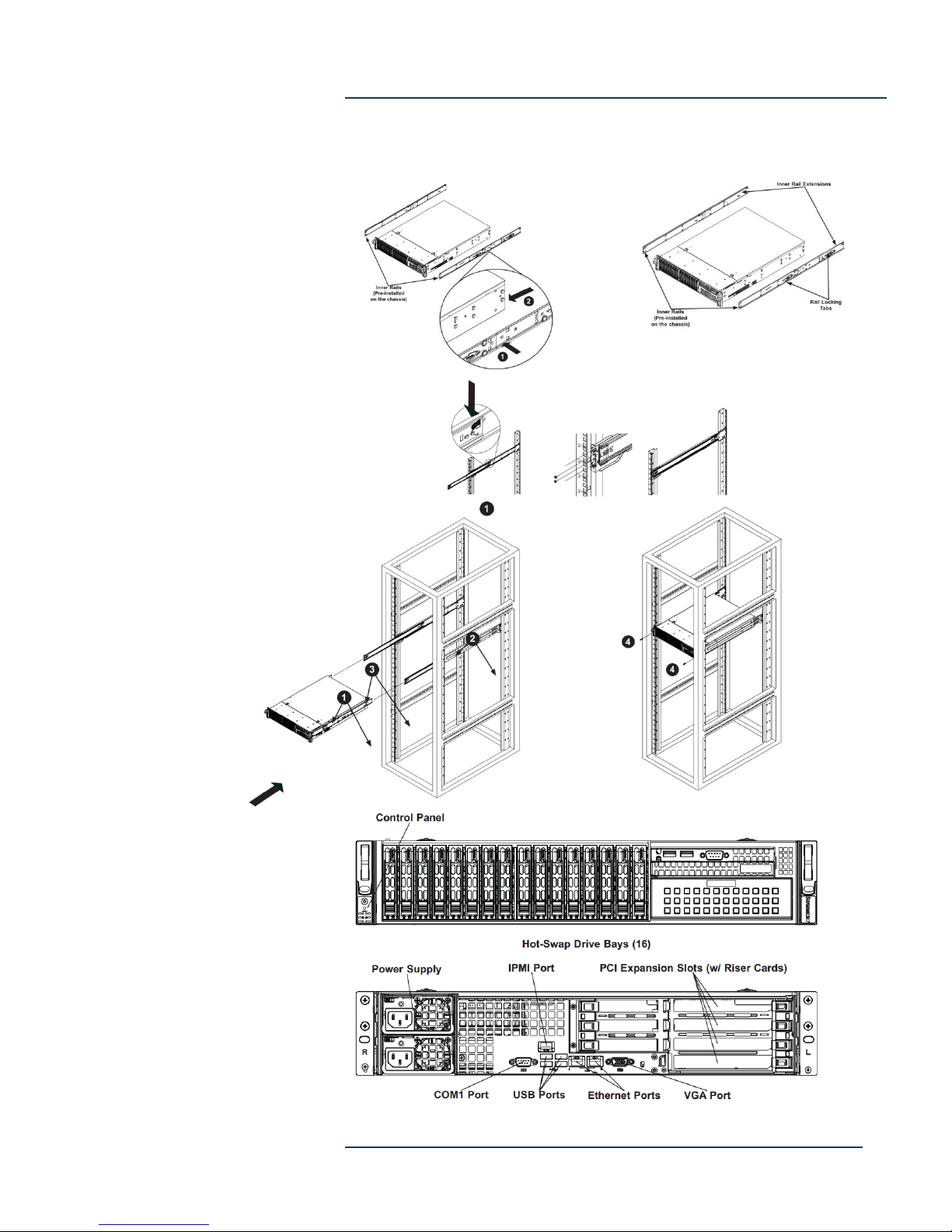
DEVOS System Planning
Installation Drawing (2U shown, 1U is similar)
Page 9
DEVOS System Planning
5-30-2017
Page 10

DEVOS Software
DEVOS may be installed on customer’s servers, often on a Virtual
Machine (VM). For these installations, the following applies:
1. Server must meet or exceed DV Specifications:
a. Windows 2012R2 Server
b. Quad Core CPU recommended
c. 16G RAM (32GB recommended)
d. 220GB Drive C
e. 100+GB Drive D (content storage)
f. Adequate network I/O (>1Gbps)
2. Discover Video must have remote access via RDP on port
3389 to the server for installation and maintenance. If
desired for security, this may be open only to Discover
Video’s company IP address. Alternate remote access
methods may be possible, contact us for information.
3. Security settings must be appropriate for the intended use.
NOTE: If the DEVOS server is installed on a domain and security
policies are used, then you must configure DEVOS tasks to use
your domain administrator account by setting the password for
the DEVOS System task. If you fail to do this, the server will not
operate properly.
DEVOS System Planning
When using customer’s VM, performance depends on the
hardware used. We recommend you closely match the specs for
the DEVOS 16 or 16H described above.
Page 10
DEVOS System Planning
5-30-2017
Page 11
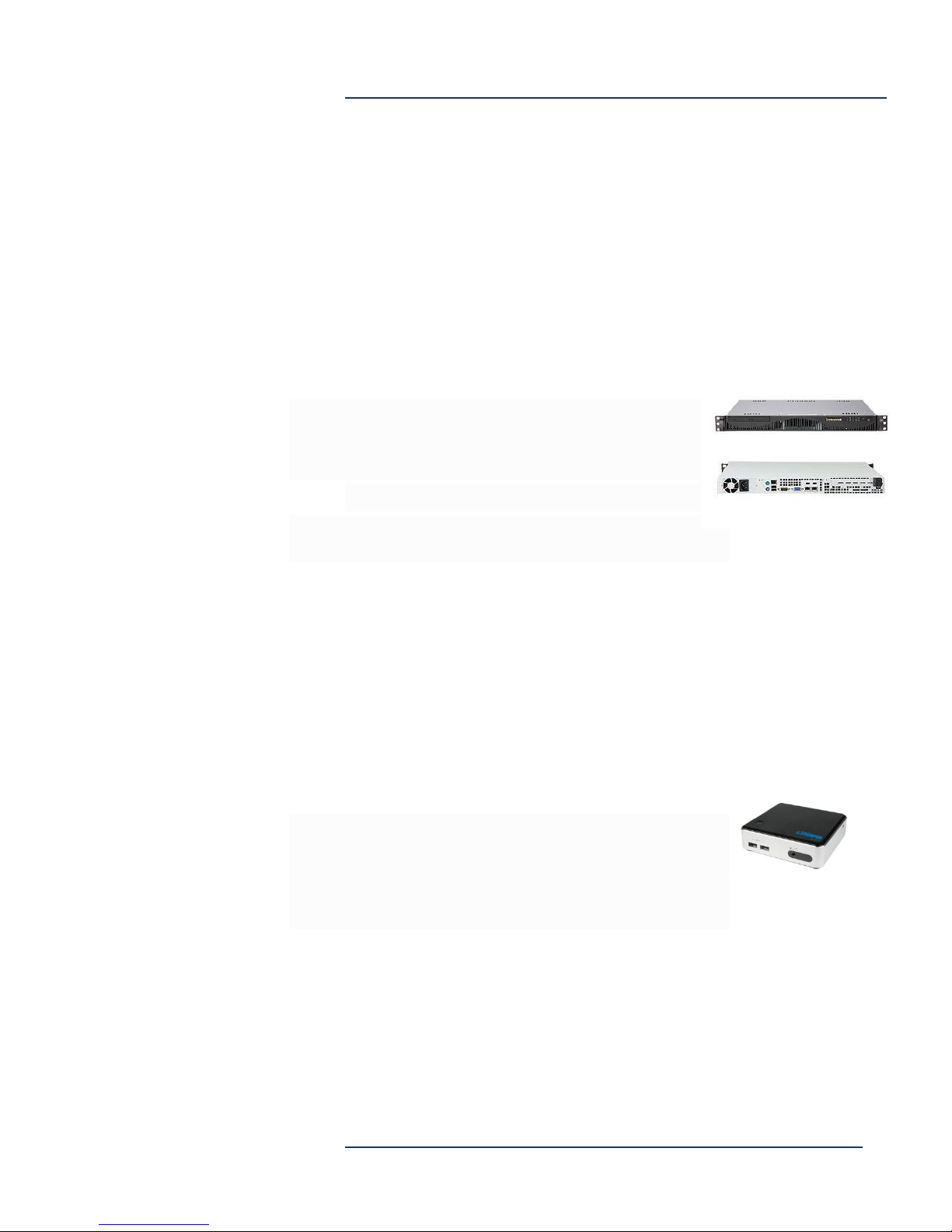
StreamPump®
StreamPump provides video distribution at remote locations.
StreamPump Standard
StreamPump Standard supports approx. 1,000 simultaneous viewers,
(depending on streaming bit rate) and caches up to 1 TB of content.
Specs (Subject to change)
1.7 x 17.2 x 14.4 in (43 x 427 x 369 mm)
Approx. 14 lbs
Intel® Intel® Gigabit Ethernet
1U Chassis, Rack Mount
350W Power Supply
Quad-Core Intel® Xeon® Processor E3-1220 v3 3.10GHz 8MB Cache
(80W)
8GB RAM DDR3-1600
120GB Solid State Drive
1 TB Drive for content cache
DEVOS System Planning
StreamPump Mini
StreamPump Mini supports approx. 100 simultaneous viewers,
(depending on streaming bit rate) and caches up to approx. 250 GB of
content.
Specs (Subject to change)
Approx. 4.1” x 4.5” x 2”
Approx. 1.2 lbs
10/100/1000 Ethernet
AC Power Supply adapter
4GB RAM
250GB Solid State Drive
Page 11
DEVOS System Planning
5-30-2017
Page 12
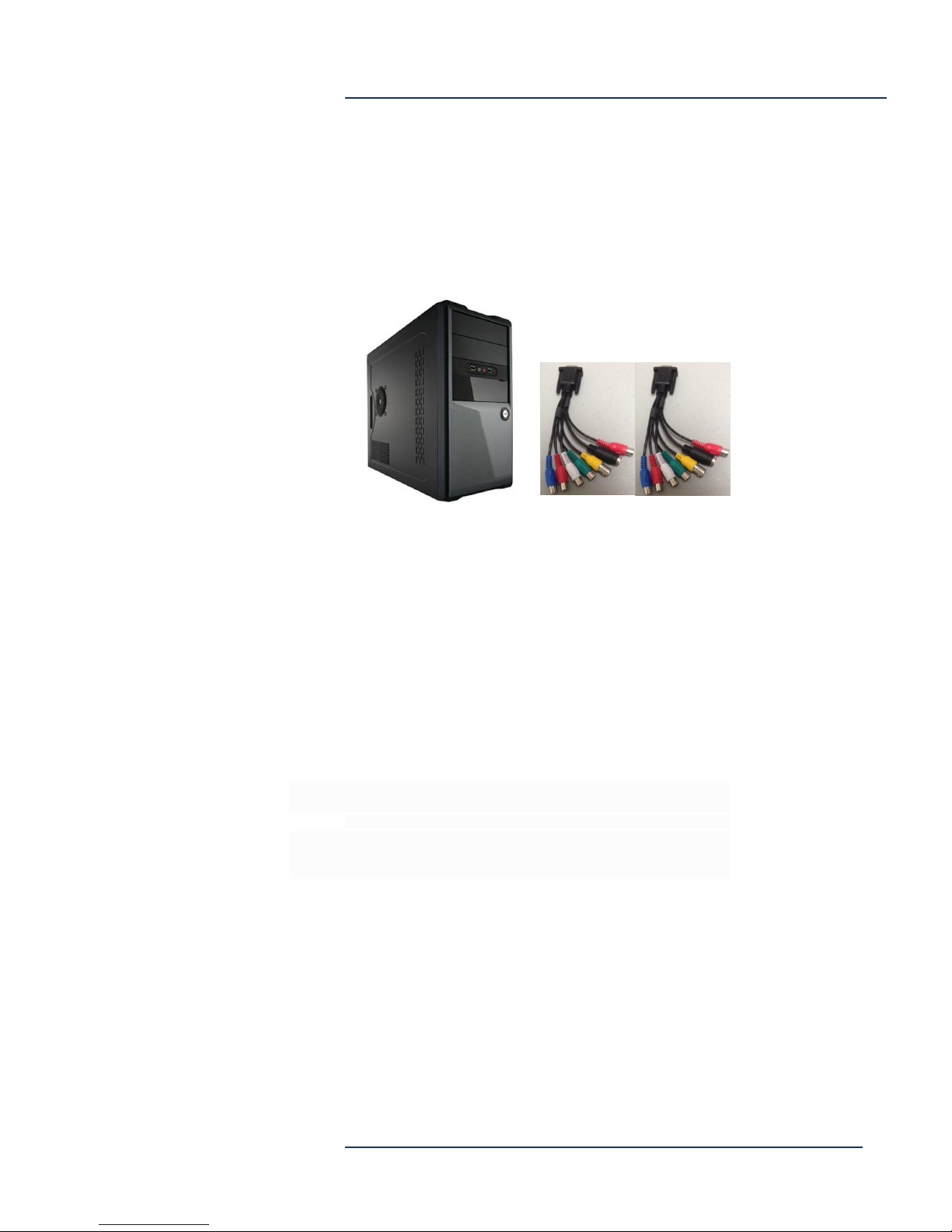
Spirit 3
Spirit-3 is a live encoding station that provides live streaming and/or
recording from a two, universal inputs. Typically used for video
production where input may be camera, computer VGA, or other
sources. Streamsie is installed on Spirit 3.
Input of the two inputs may be:
o HDMI, or
o SDI, or
o DVI, or
o VGA, or
o Composite (BNC female),
o Component RGB (RCA female),
o S-Video (DIN female)
o Analog stereo audio (RCA female)
DEVOS System Planning
10/100/1000 Ethernet, Win 10
Specs (Subject to change)
7 x 14.25 x 16 inches
Quad-Core Intel® Core™ i5-4460 3.20GHz 6MB Cache or equiv
Intel® H81 Chipset - 2x 3Gb/s and 2x 6Gb/s SATA
8 GB RAM 1600MHz DDR3
300 Watt Power Supply - Black/Silver
500GB SATA 6.0Gb/s 7200RPM - 3.5" - Seagate Barracuda® 7200.14
Page 12
DEVOS System Planning
5-30-2017
Page 13
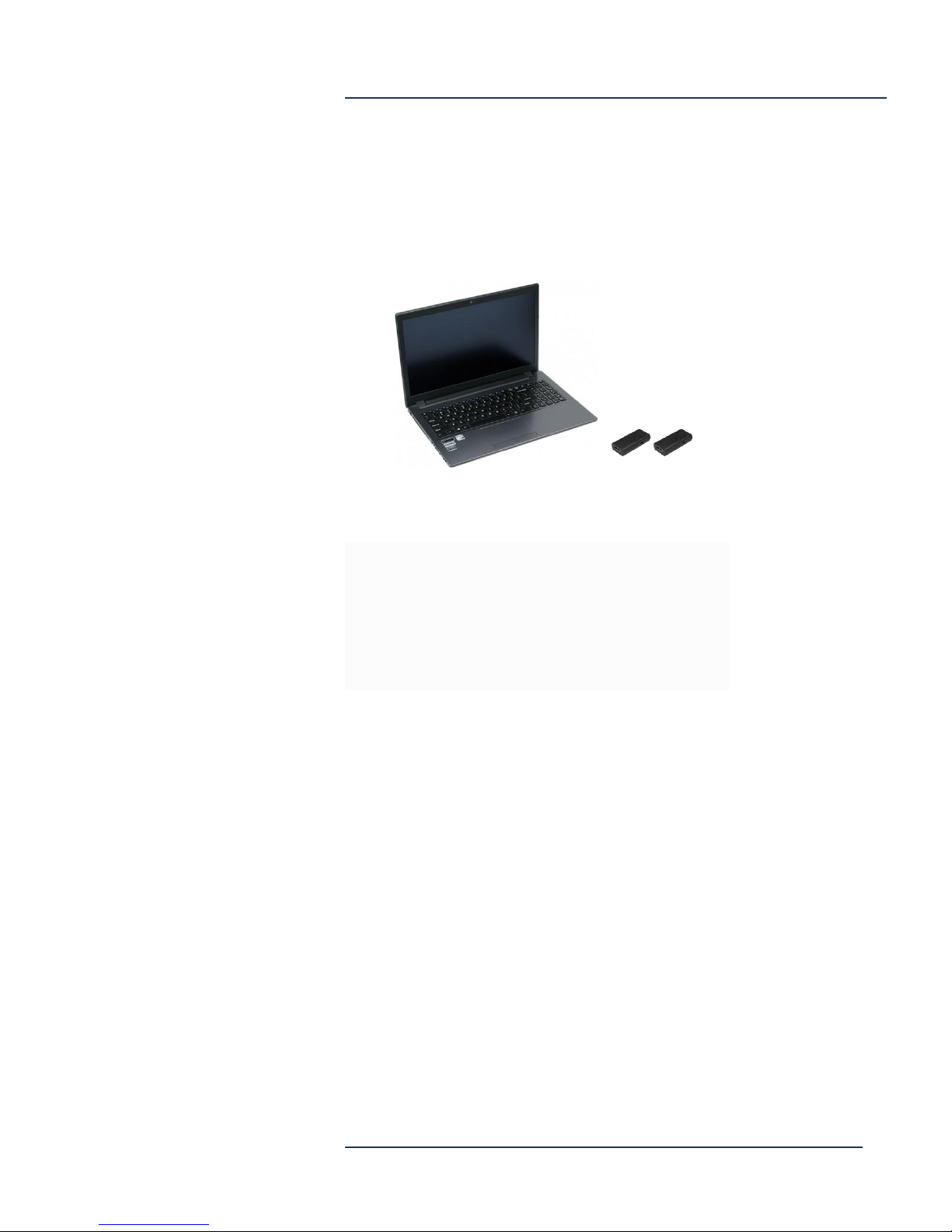
Rover
Rover is a laptop computer optimized for video capture and streaming.
It includes two Captiva MISO input dongles. Typically used for portable
streaming. The dongles may be used in USB 2 ports for live video
capture.
Specs (Subject to change)
15.6" 1920x1080 Full HD IPS LED-Backlit Wide Viewing Angle Panel - Intel®
Core™ i7-7700HQ
4GB PC4-19200 2400MHz DDR4 SODIMM
500GB SATA 6.0Gb/s 7200RPM - 2.5"
Super-Multi DVD-RW Drive (DVD RAM)
Intel Dual Band Wireless-AC 3165 (802.11AC) with Bluetooth
NVIDIA GeForce GTX 950M (2GB GDDR3) (Discrete Graphics)
Microsoft Windows 10 Professional (64-bit) with Recovery Partition
DEVOS System Planning
Page 13
DEVOS System Planning
5-30-2017
Page 14
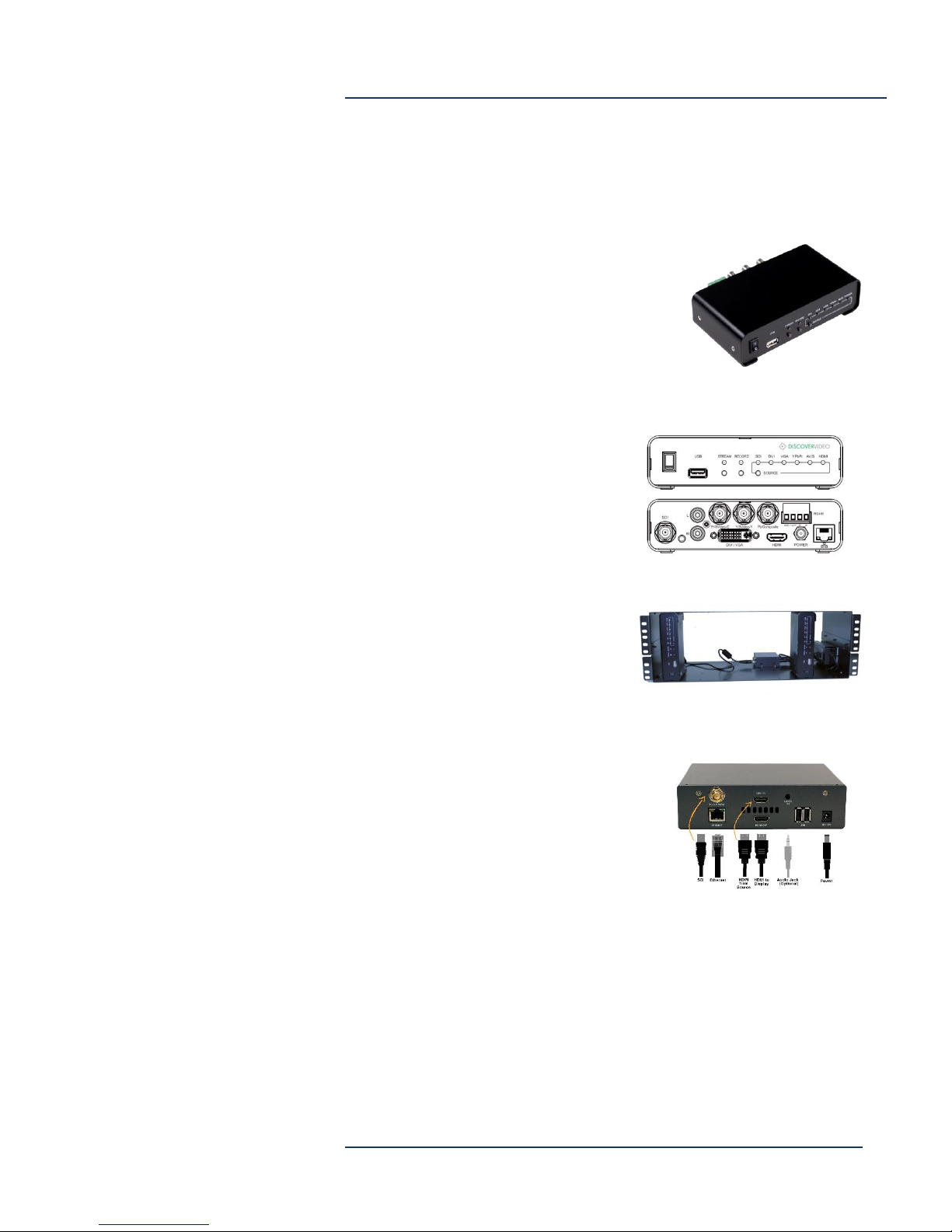
Mantis
The Mantis is an SD/HD video streaming appliance that provides live
video to the DEVOS system. Mantis supports HDMI, Composite,
Component, DVI, and SDI input. Recording
to USB device (not included). Does not
support HDMI HDCP. Mantis does not
deinterlace video and if used with
composite video, external deinterlace is
recommended.
Specs (Subject to change)
12VDC AC Power Supply
1 BNC for 3G / HD / SD-SDI
1 HDMI
1 DVI-I for DVI-D/HDMI and DVI-A / VGA
3 BNC for YPbPr/CVBS/S-Video
1 RCA for Analog L/R audio
SDI/HDMI/DVI-D embedded audio
1 3.5 mm phone jack
1 USB 2.0
10/100 Ethernet
Approx. 6” x 4” x 1.5”
DEVOS System Planning
Shelf
AC Power Supply
DC Power Distribution to up to 6 Mantis
Approx. 19” W x 6”H x 8 5/8” D
Hornet Encoder/Decoder
The Hornet is an HD video
encoder/decoder streaming appliance
that provides live video to the DEVOS
system. Recording to USB device (not
included). Supports optional HDMI HDCP.
Specs (Subject to change)
12VDC AC Power Supply
1 HDMI 1.4 Input
1 HDMI 1.4 Output
1 3.5 mm phone jack
1 USB 2.0
10/100 Ethernet
Approx. 1.75” x 6.45” x 6.2”
HDMI/SDI model has SDI BNC input
Page 14
DEVOS System Planning
5-30-2017
Page 15
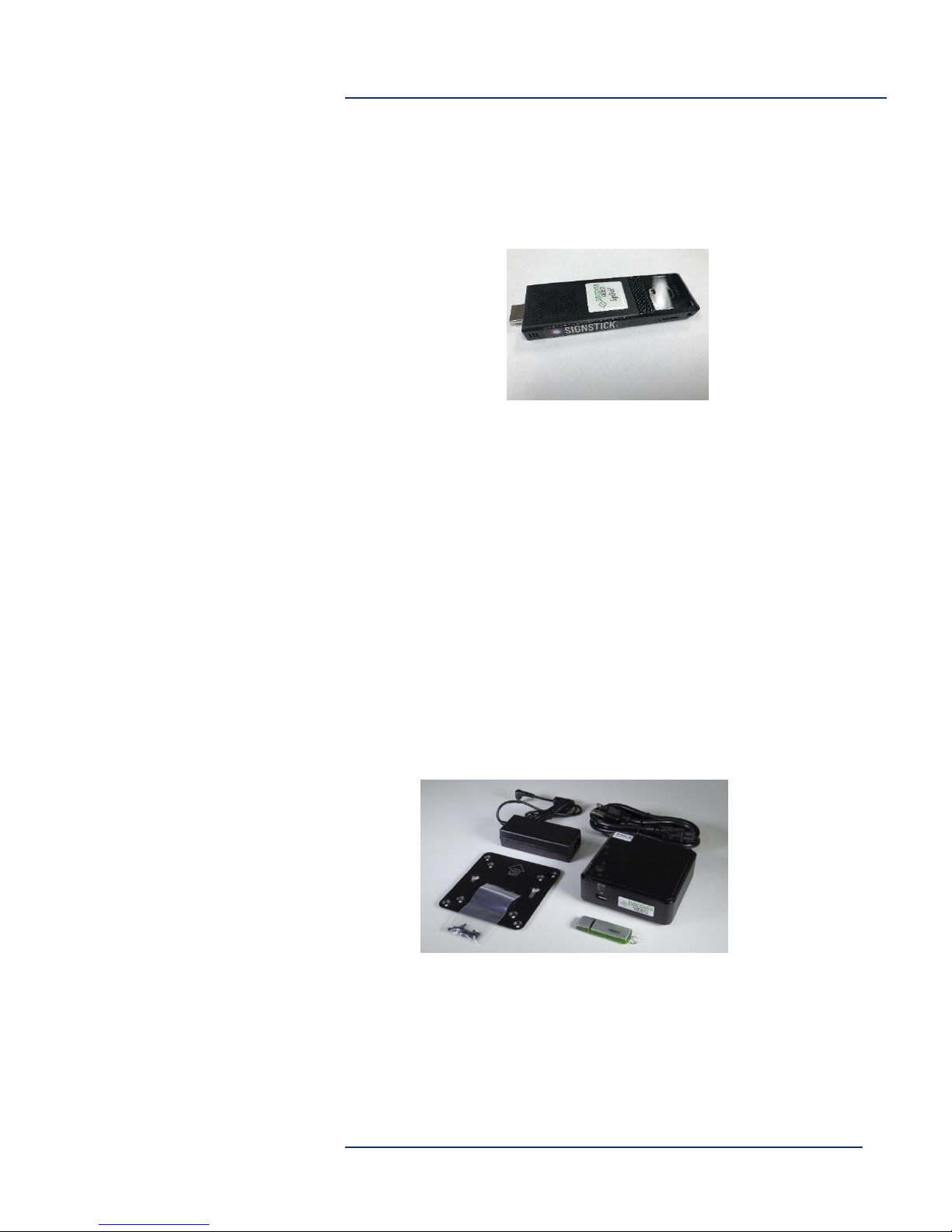
SignStick®
The DEVOS system supports the SignStick Digital Signage player. The
SignStick can plug directly into a TV via the HDMI connector.
The SignStick has 2 USB ports, one may be used for a wired Ethernet
adapter, included. (WiFi is supported but wired Ethernet recommended
for live video). It is powered from a USB AC adapter (or from a USB
port that has sufficient power using a mini-USB power cord, not
included).
DEVOS System Planning
Digital Signage Media Player
The Digital Signage Media Player may be used on a table top or may
be mounted directly to a surface using the supplied mounting bracket
and screws. The box is approximately 4.5” W x 4.5 D” x 2” H and
includes mounting plate. Video output is HDMI only. Uses same
system software as SignStick. (Hardware may differ slightly from the
photo below).
Page 15
DEVOS System Planning
5-30-2017
Page 16
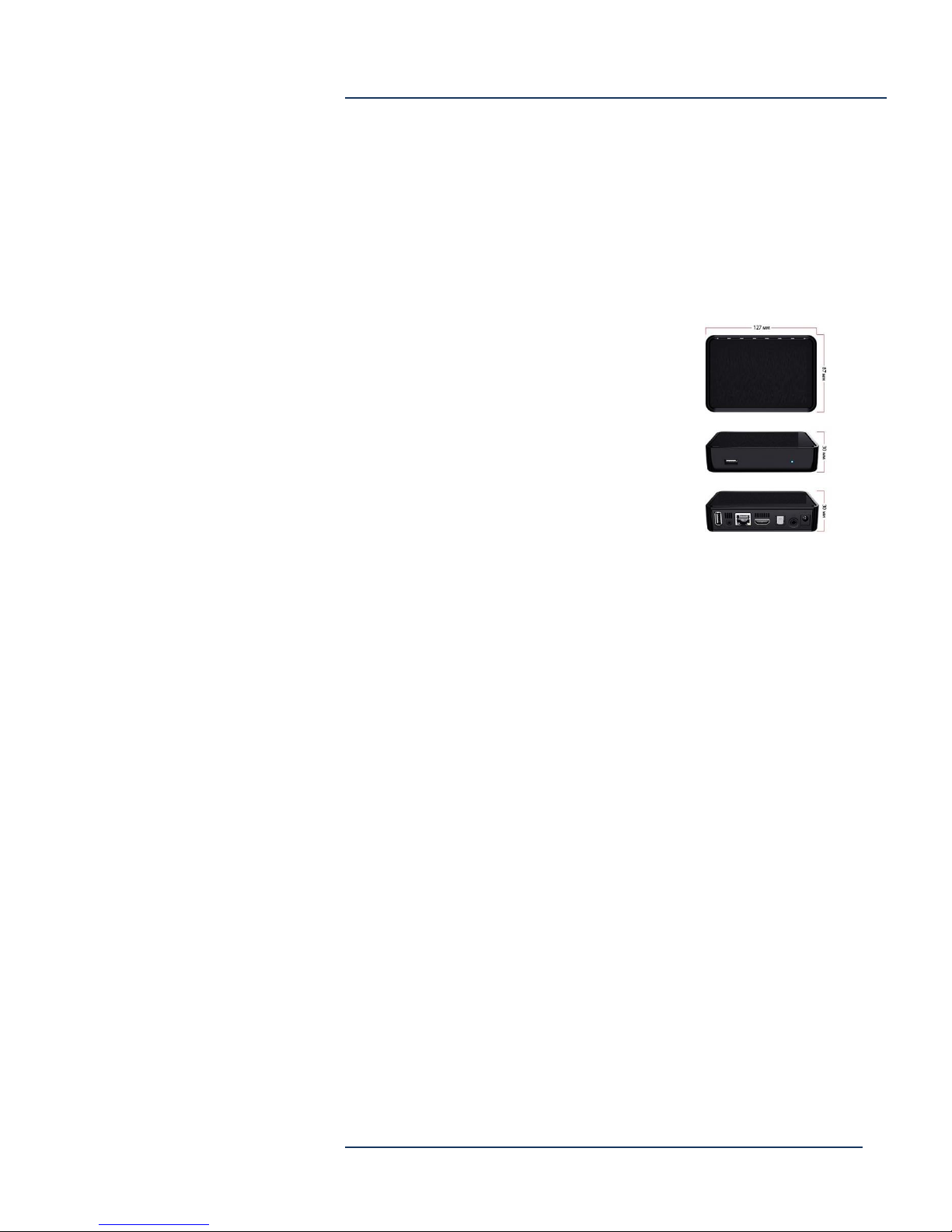
Set Top Box
The Set Top Box receives live video from a DEVOS or DVExpress
System and allows the viewer to select live TV channels using a handheld IR Remote Control (included).
Specs (subject to change)
Ethernet Input
HDMI Output
Composite Video Output via included adapter cable
IR Remote Control included
12V AC Power Supply included
DEVOS System Planning
Page 16
DEVOS System Planning
5-30-2017
Page 17
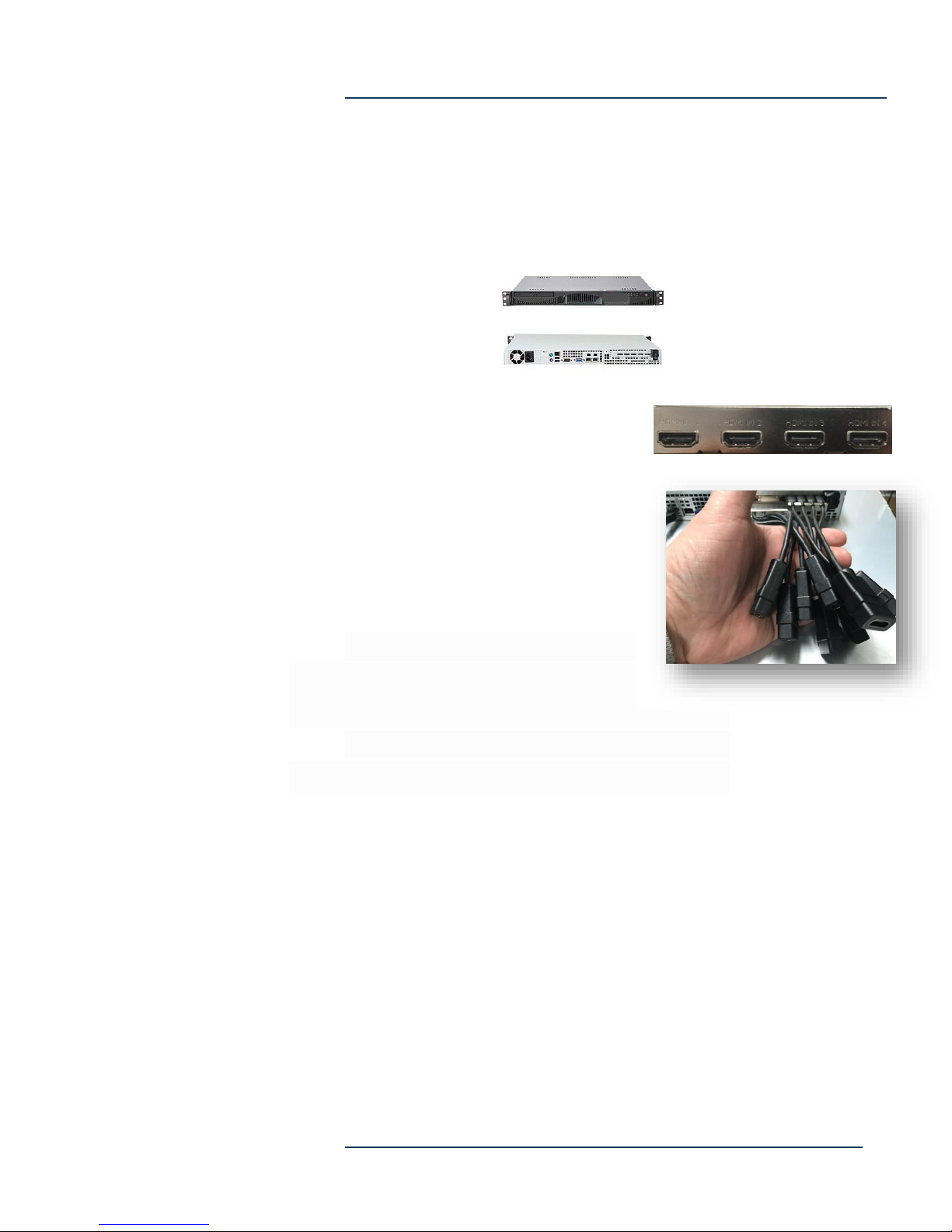
StreamEngine 4, 8 Channels
The StreamEngine supports up to 8 channels of live HD video via HDMI
inputs.
4-Channel HDMI Input
8-Channel HDMI Input
HDCP is not supported. The capacity of
additional (secondary) output streams
depends on output resolution and related
settings.
DEVOS System Planning
Specs (Subject to change)
1.7 x 17.2 x 14.4 in (43 x 427 x 369 mm) (StreamEngine 12
and 16 has 26” D chassis}
Approx. 14 lbs
Intel® Gigabit Ethernet
1U Chassis, Rack Mount
350W Power Supply
Quad-Core Intel® Xeon® Processor E3-1220 v3 3.10GHz 8MB Cache (80W) or
equiv
8GB RAM DDR3-1600
256GB Solid State Drive
Page 17
DEVOS System Planning
5-30-2017
Page 18

iTach
The iTach sends IR commands to up to three devices under command
of the DEVOS (V4.5 and above) system.
Specs (Subject to change)
9.0” x 3.5” x 2.0”
Approx. 1 lbs.
10/100 Ethernet
AC Power supply adapter (5V)
Supports PoE
iTach includes IR emitter that can be affixed to the IR receiver of
controlled devices (approx. 80” cord).
DEVOS System Planning
Page 18
DEVOS System Planning
5-30-2017
Page 19

Streamsie®
Streamsie is a software application for Windows 7/10 computers and
for Mac OS X (10.10.X and above) computers. Streamsie PC and Mac
provide advanced live streaming and capture capabilities using
webcam, Captiva® devices, and/or screen capture. Streamsie may be
installed on any number of computers that have access to a DEVOS
system, and use is controlled by a license on the DEVOS server.
Typically used for event streaming, flipped classroom, lecture captures,
training, CEO webcast, sports broadcasting, etc. Streamsie iOS is a
software App for iPhone and iPad that provides advanced live
streaming or capture from mobile devices. Streamsie iOS is available
from the iTunes store. Typically used for live streaming via cellular
network. Streamsie Pro for Windows supports Chroma Key,
Watermark, File Streaming. At least quad CPU recommended (e.g. Core
i7 or better).
DEVOS System Planning
Priority Alert
Priority Alert is a DEVOS system feature that can cause a live video, a
video-on-demand, a text message, or a web page, to automatically
appear on one, some, or all computers and Digital Signage displays
without requiring computer-user action. Priority Alert is available for
Windows and Mac computers. For Windows, the install program is
available as both setup.exe and setup.msi. Apple computers have a
.dmg installer. Windows computers in a network may be "imaged"
with Priority Alert.
Page 19
DEVOS System Planning
5-30-2017
Page 20
PRODUCT
A/V Input
Application
SPIRIT-3
2 x Single Channel All-In-One
HDMI,
SDI/HDSDI,
Component,
SVideo,
Composite,
DVI, VGA
Analog Audio
Event broadcast
Lecture Capture
Streaming with Production Value
StreamEngine
HDMI
VGA Monitor Out
Continuous live streaming
Video Archive
ROVER Laptop
2 x Captiva MISO for USB
Event broadcast
Lecture Capture
Streaming with Production Value
Mantis
HDMI, VGA, DVI, SDI, Composite,
Analog Audio
Continuous live streaming
Event broadcast
Hornet HDMI
HDMI Continuous live streaming
Event broadcast
Hornet SDI
HDMI
SDI
Continuous live streaming
Event broadcast
DEVOS Rack 16
None
VGA Monitor Out
Medium/Large
Corporate
Education
Government
DEVOS Rack 16H
None
VGA Monitor Out
Medium/Large
Corporate
Education
Government
DEVOS Rack 8
None
VGA Monitor Out
Small/Medium
Corporate
Education
Government
Stinger
None
VGA Monitor Out
Small
Corporate
Education
Government
DVExpress
HDMI x 4
VGA Monitor Out
Small/Medium
Corporate
Education
Government
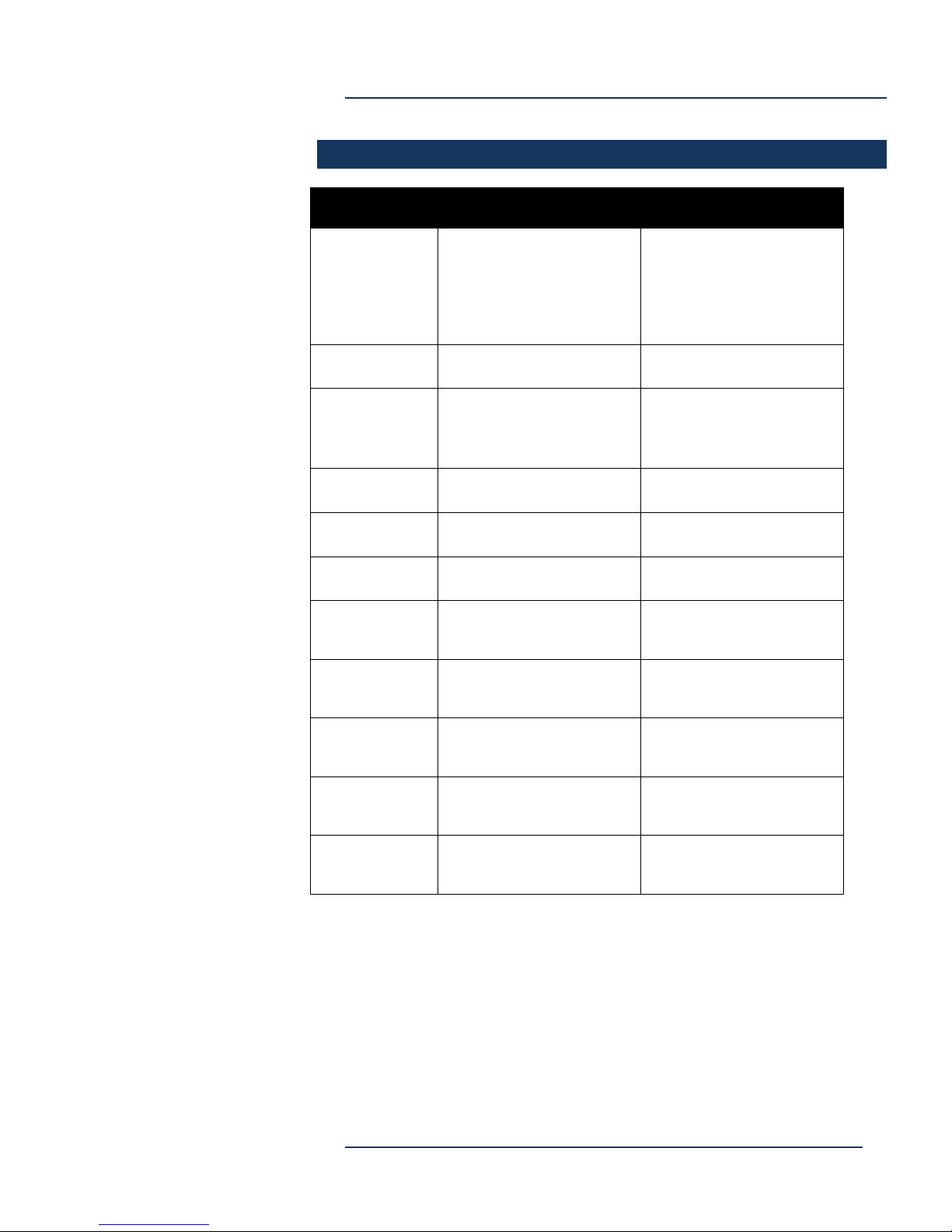
A/V INPUT QUICK REFERENCE
DEVOS System Planning
Page 20
DEVOS System Planning
5-30-2017
Page 21

DEVOS System Planning
Network
The system uses the following ports:
1935 for live ingest and flash streaming
80 / 443 (SSL)
21
24
9999 and/or 8410 for low delay video delivery
3380 RDP
Cables, Connectors & Accessories
Cables, adapters, connectors and
similar are NOT included and are the
responsibility of the system
integrator, reseller, or end customer.
This includes, but may not be limited to, Ethernet, video, audio,
HDMI, SDI, and similar.
Power cords for all hardware products are included.
Monitors are not included for any product.
Keyboard/mouse for server products are not included.
Mounting rails for rack-mount server products are included.
Page 21
DEVOS System Planning
5-30-2017
Page 22

DEVOS System Planning
DEVOS System Installation
The vast majority of the time required for a system installation is less
the physical install and more familiarization and training of the
system owner/administrator. Successful installation can be measured
by the ability of the system owner to perform basic system features
and functions.
A typical installation requires the following steps:
1. Physically mount the server in desired location.
2. Insert two AC Power cords
3. Insert 1 to 4 GigE cables
4. Connect VGA monitor, keyboard, and mouse.
5. Power on the server, and log in as Administrator (Password provided to the
system owner).
6. Set a fixed IP address for NIC labeled “team1”.
7. If the server is to be on a domain, set the domain and set all DEVOS tasks to
use the Administrator password of the domain.
8. If DNS is used, set the name that uses the DEVOS IP address.
9. If Active Directory is to be used, log in to DEVOS with Super privilege and set
desired Active Directory server, username, password, and optionally add
groups.
10. Verify that the test content on the server plays on desktop(s).
11. Set up at least one Streamsie Encoder account and verify live streaming is
operational by sending from Streamsie and viewing on another computer.
12. Using any FTP client (e.g. Filezilla), upload a known-good video file and verify
it appears in the DEVOS Media/Video-on-Demand list within 5 minutes.
13. Create a Digital Sign and verify web playout. If using SignStick2 for signage,
enter the DEVOS address and signage ID and view the signage.
14. If using Spirit, run the Streamsie installer and enter the name, phone, email,
of the user (Note: this is so that you can later identify conflicts in a Streamsie
account. Do not use the same information for multiple installs.). Setup
Streamsie with server address, account, and password and verify live
streaming and recording.
15. If using StreamEngine, setup up the streams and view them on desktop(s).
16. If using Mantis or Hornet, setup the stream and view on desktop(s).
Page 22
DEVOS System Planning
5-30-2017
Page 23

DEVOS System Planning
End User License Agreement (EULA)
The EULA for each product is shown during installation and appears in
the product manual. Installation and use of the product(s) indicates
acceptance of the EULA terms and conditions.
End user signature for server products required before shipment.
Page 23
DEVOS System Planning
5-30-2017
Page 24

DEVOS System Planning
Warranty and Special Information
See Hardware Warranty and Software Maintenance documents.
Some DEVOS servers come with a 5-year warranty from the server
manufacturer. The warranty includes advanced parts replacement and in
most cases next-day onsite service. DEVOS software support, which is
independent of hardware warranty, is an annual service that provides
software updates and support services.
Spirit, StreamEngine, and Rover generally have a 3-year return-to-factory
limited warranty (1 year on the Rover battery). Captiva products have a 1
year limited warranty. Software support for Spirit, StreamEngine, and
Rover is independent of hardware warranty and is an annual service
that provides software updates and support services on Discover
Video software installed on these platforms.
It is important to note that in no case will hardware warranty exceed
the periods stated. This means that if you have extended software
support beyond the hardware warranty period, Discover Video and its
suppliers cannot provide warranty service for out-of-warranty
hardware.
If installation, training, implementation, or other professional services
have been ordered, it will be done remotely via electronic means
unless the customer has included travel and living fees for on-site
support.
The products sold by Discover Video are not intended for and will not be used
in life support systems, medical equipment, nuclear facilities or systems,
aircraft, aircraft devices, aircraft/emergency communication devices or other
critical systems whose failure to perform be reasonably expected to result in
significant injury or loss of life or catastrophic property damage. Accordingly,
Discover Video disclaims any and all liability, and should buyer use or sell such
products for use in such ultra-hazardous applications, it does so entirely at its
own risk. Furthermore, buyer agrees to fully indemnify, defend and hold
Discover Video harmless for and against any and all claims, demands, actions,
litigation, and proceedings of any kind arising out of or related to such ultrahazardous use or sale.
Page 24
DEVOS System Planning
5-30-2017
 Loading...