

Page 1
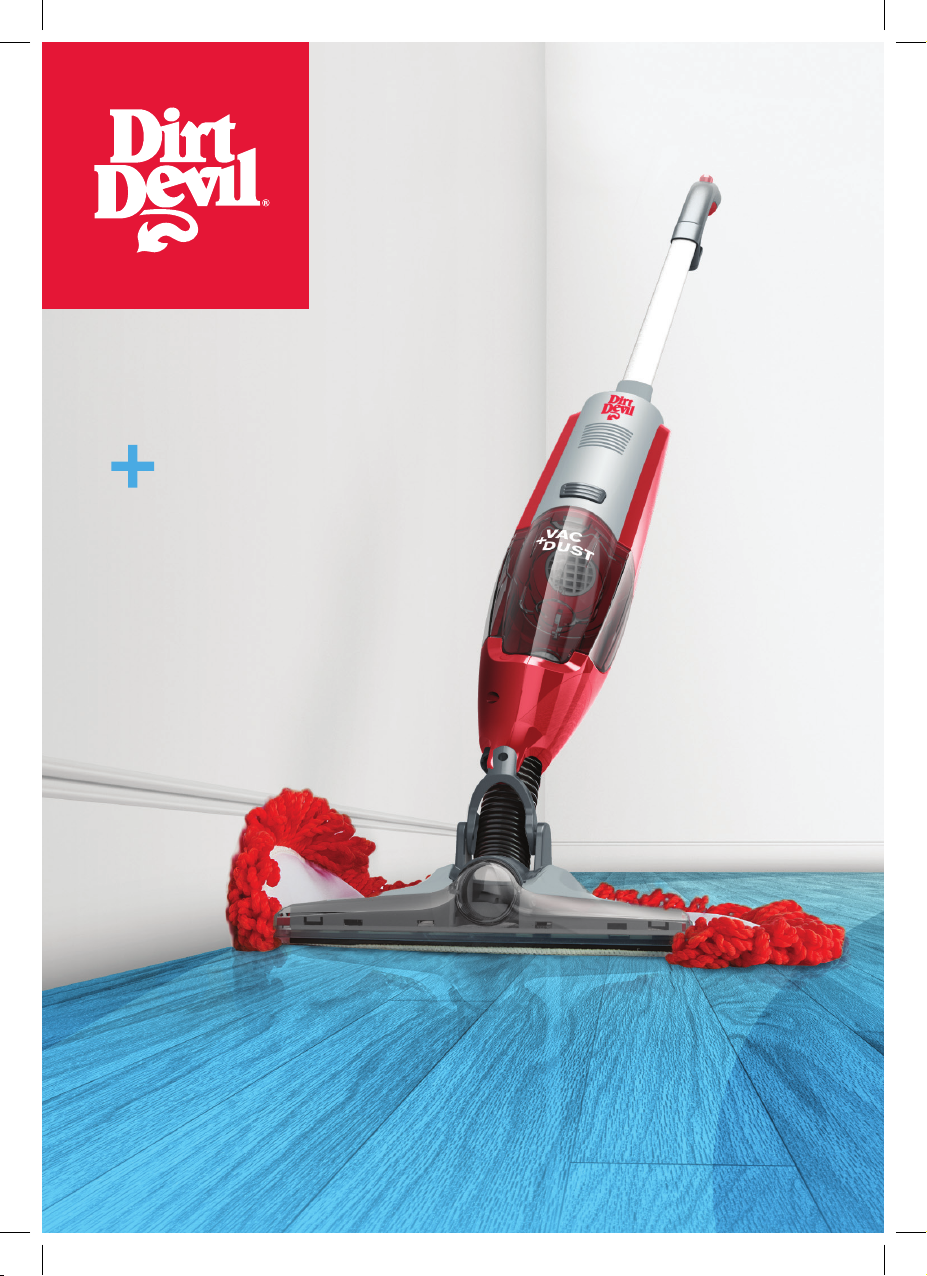
DRY
vac
Dust
DQC-DVB
DQC-DVB-HKA_UG_20140912_color print_003-ok.indb 1 28/07/2015 10:33 AM
Page 2

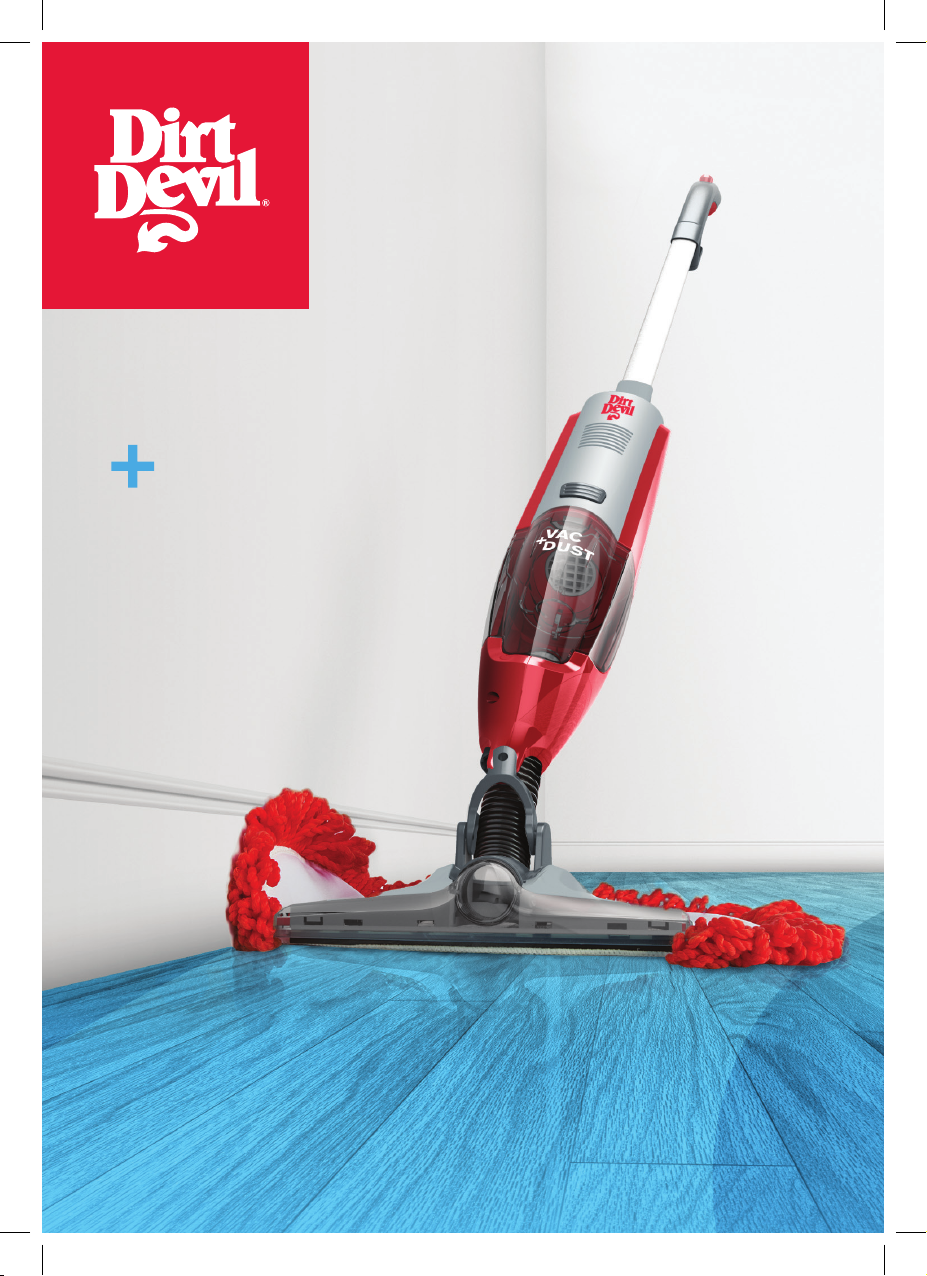
Thank you for buying this Vac & Dust.
Taking care of your hard floors
The Vac & Dust is designed to make cleaning sealed hard floors regularly, as effective and
efficient as possible and this user guide will help you get the most out of your machine.
Maintaining your hard floors will ensure they keep their appearance for longer and smell fresh
and clean.
Taking care of your Vac & Dust
Also inside this guide are instructions on maintaining your new machine, so that it’s always
ready when you are, to tackle your hard floors.
DQC-DVB-HKA_UG_20140912_color print_003-ok.indb 2 28/07/2015 10:33 AM
Page 3

Before we get started
Basic safety precautions
This Vac & Dust is intended for household use only and NOT
for commercial or industrial use.
• This Vac & Dust does not stay upright without constant
support.
• Only use the Vac & Dust indoors and keep the area you’re
cleaning well lit.
• Keep fingers, hair and loose clothing from moving parts and
openings whilst using the Vac & Dust.
• This appliance can be used by children aged from 8 years
and above and persons with reduced physical, sensory or
Dont’s
8 Don’t use this Vac & Dust if it has been dropped, damaged,
immersed in water or left outdoors.
8 Don’t run over the charger cord or use Vac & Dust if
the power cord or plug is damaged. Please contact our
authorized dealer or service center
8 Don’t handle the plug or use the Vac & Dust with wet hands.
8 Don’t throw the Vac & Dust into fire or expose to high
temperatures, as the Vac & Dust contains a rechargeable
nickel cadmium battery which may cause damage or burst.
8 Don’t pull or carry this Vac & Dust by the charger cord.
mental capabilities or lack of experience and knowledge if
they have been given supervision or instruction concerning
use of the appliance in a safe way and understand the
hazards involved.
• Children shall not play with the appliance. Cleaning and
user maintenance shall not be made by children without
supervision.
• Only Dirt Devil recommended tools and accessories should
be used with this Vac & Dust.
8 Don’t use the charger cord as a handle, pull the charger
cord around corners or sharp edges or close a door over the
power cord.
8 Don’t unplug Vac & Dust by pulling on the charger cord.
8 Don’t attempt to remove blockages with sharp objects as this
may cause damage to your Vac & Dust.
8 Don’t use the Vac & Dust with incorrect voltage as this may
result in damage or injury to the user. The correct voltage is
listed on the ratings label.
8 Don’t vacuum up hot coals, cigarette butts, matches or
smoking hot burning items or use in an area where there
may be harmful fluids (chlorine, bleach, and ammonia drain
cleaner).
Do’s
8 Always make sure the filter and dirt container are fitted
correctly before using your Vac & Dust.
8 Always turn off and unplug the Vac & Dust before carrying
out any maintenance.
8 Turn off all controls on the Vac & Dust before disconnecting
or connecting the power cord. After use always wrap the
power cord around the cord clips provided.
8 Take extra care when cleaning on the stairs.
DQC-DVB-HKA_UG_20140912_color print_003-ok.indb 3 28/07/2015 10:33 AM
8 Always replace the fuse in the plug with a 13amp fuse.
8 Always protect the power cord from heated surfaces or near
open flames.
8 Use only CE approved 13amp extension cords, non-approved
extension cords may overheat. Care should be taken to
arrange the extension cord as it can be a trip hazard.
8 Always carry the Vac & Dust by the handle.
8 Store your Vac & Dust in a cool, dry area.
Page 4
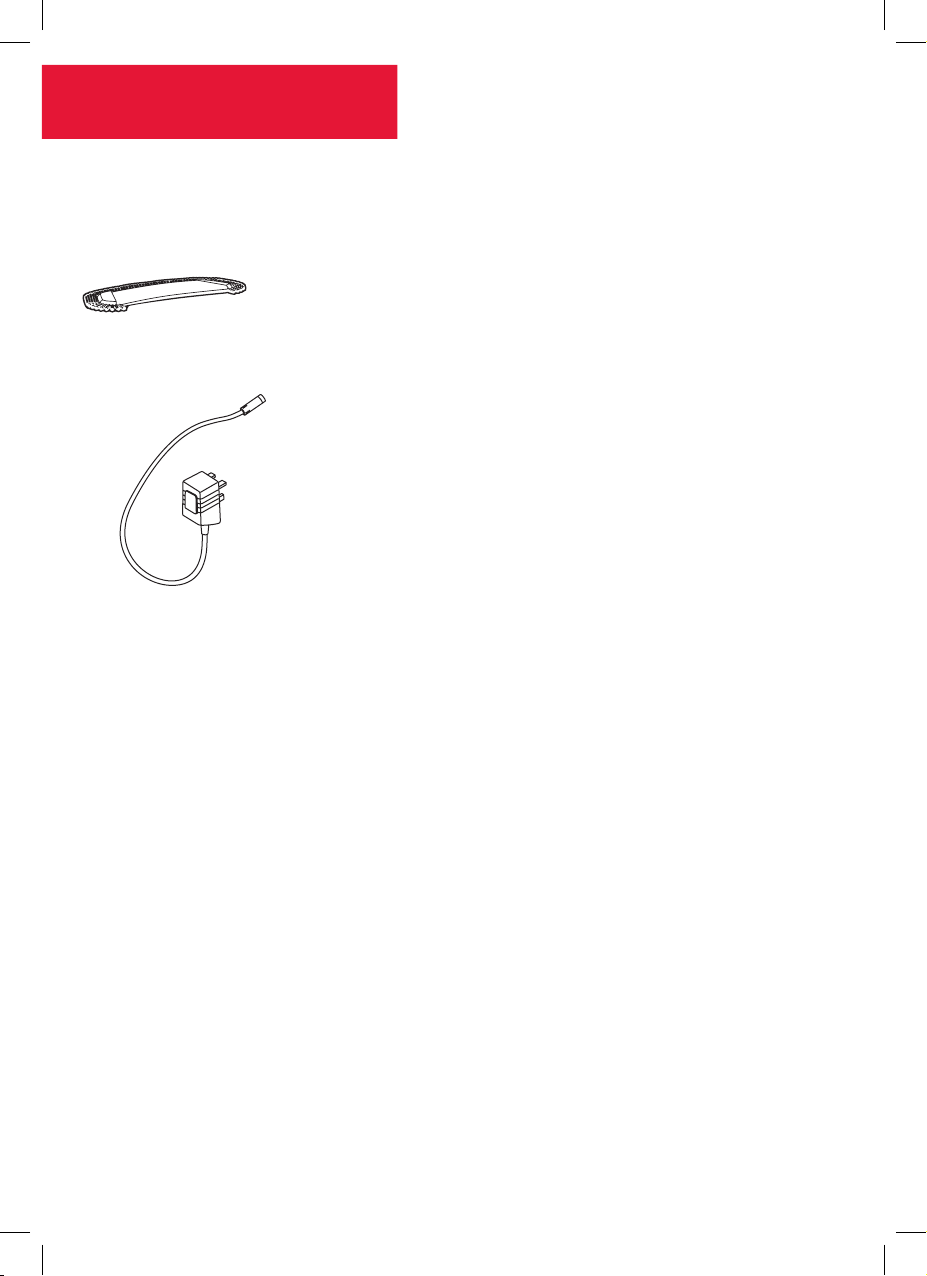
Vac & Dust
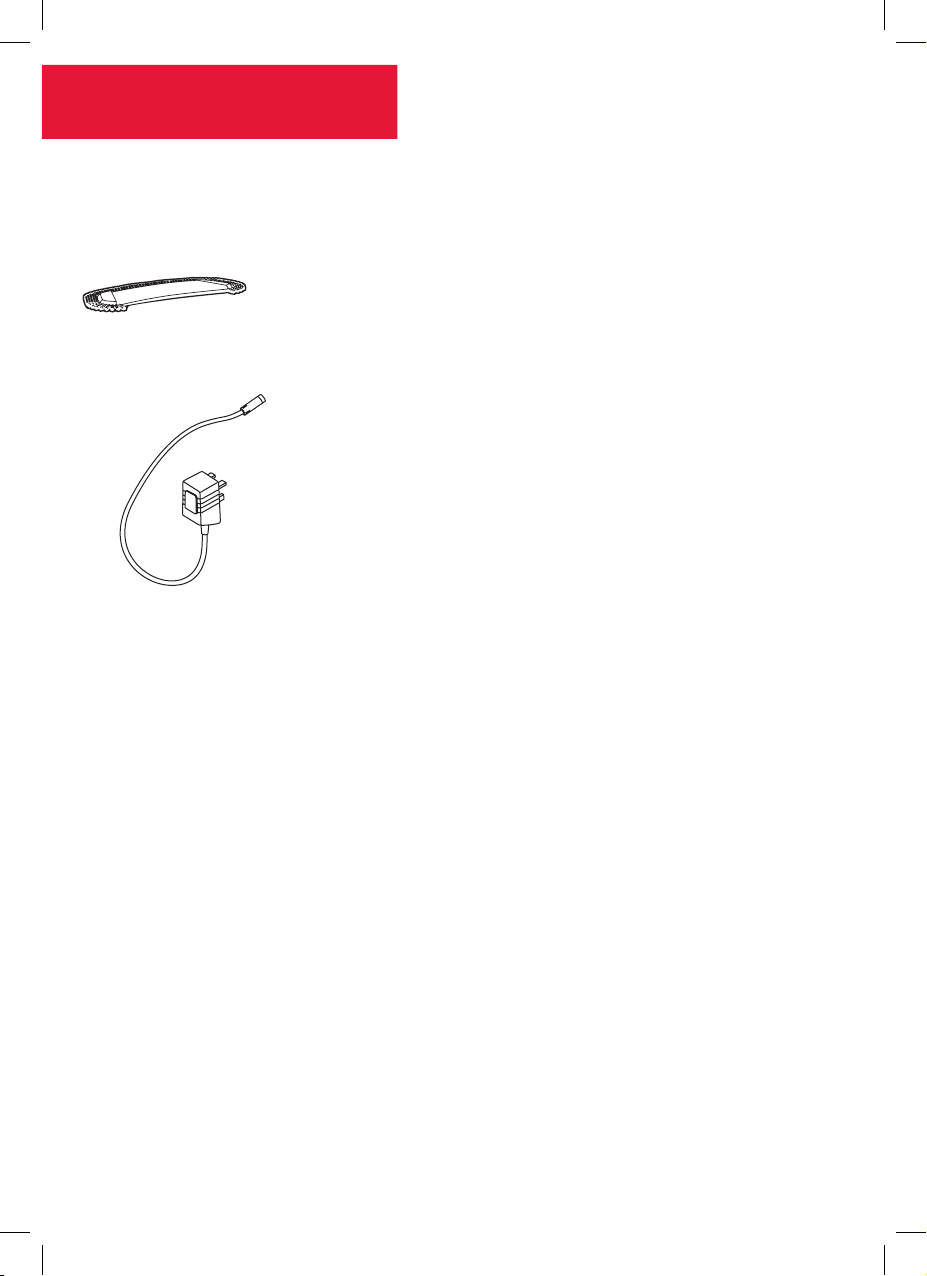
Included with your
machine
Washable Microfibre dusting pad
Charger
DQC-DVB-HKA_UG_20140912_color print_003-ok.indb 4 28/07/2015 10:33 AM
Page 5
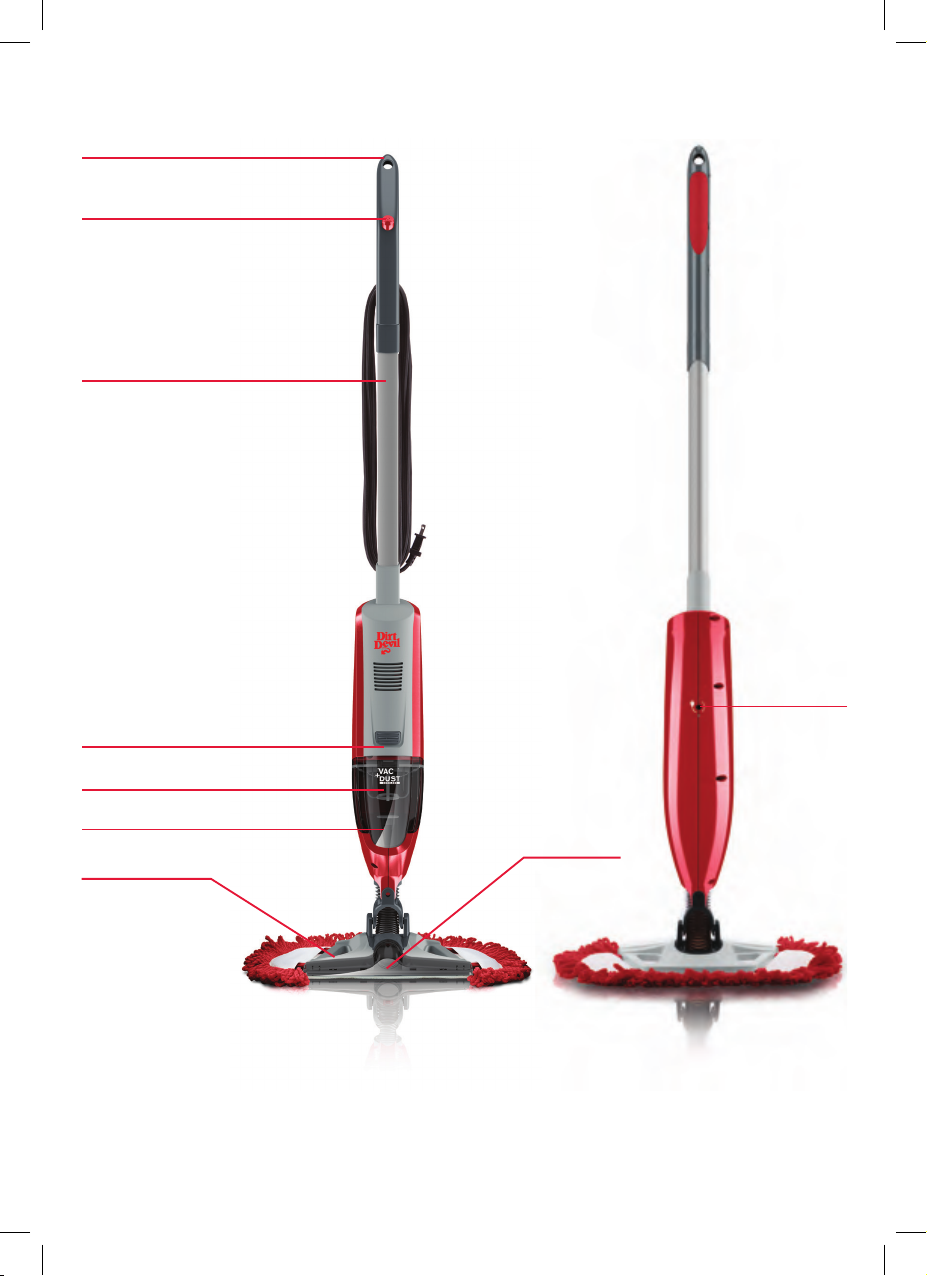
Getting to know your machine
Storage hook
Power button
Upper handle
Charging port
Dirt container release button
Dirt container
Filter
Vacuum nozzle
Frame for cleaning pad
Technical Specification
Name Vac & Dust
Model no DQC-DVB-HKA
Part Number 1-1-135190-00
Charger Input voltage 100-240V~
Battery voltage 10.8V
Cordless
Weight 1.8kg
Subject to technical change without notice.
DQC-DVB-HKA_UG_20140912_color print_003-ok.indb 5 28/07/2015 10:33 AM
Filter (Type 85)
Quick Clean Microfibre Pads (Type 1)
Page 6
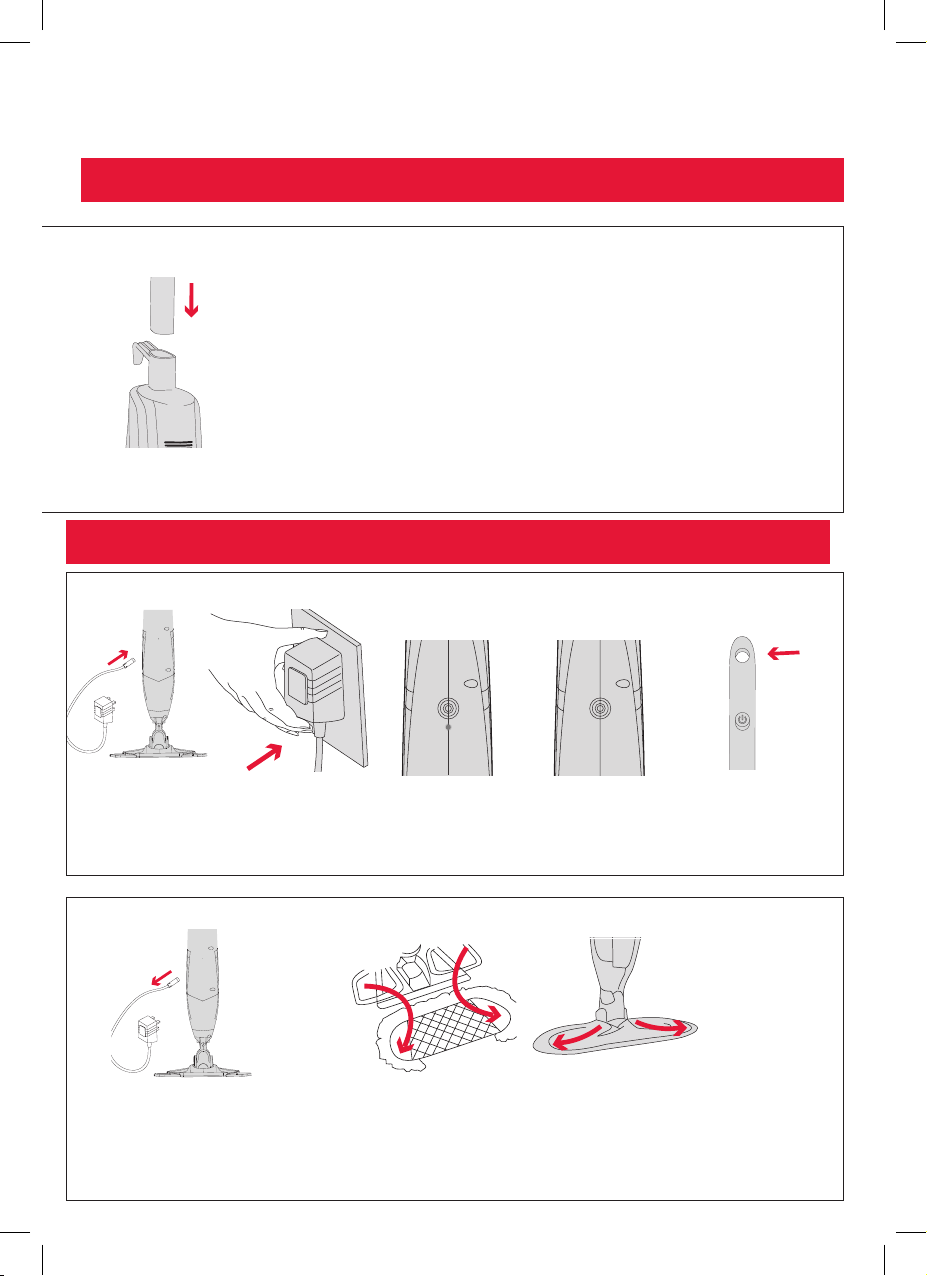
Getting started
Assembling your Vac & Dust
Push the handle into the
main body until it locks
into place
The machine must be charged for 24 hrs before use. Only use charger supplied by Dirt Devil.
NOTE: This machine is not free standing
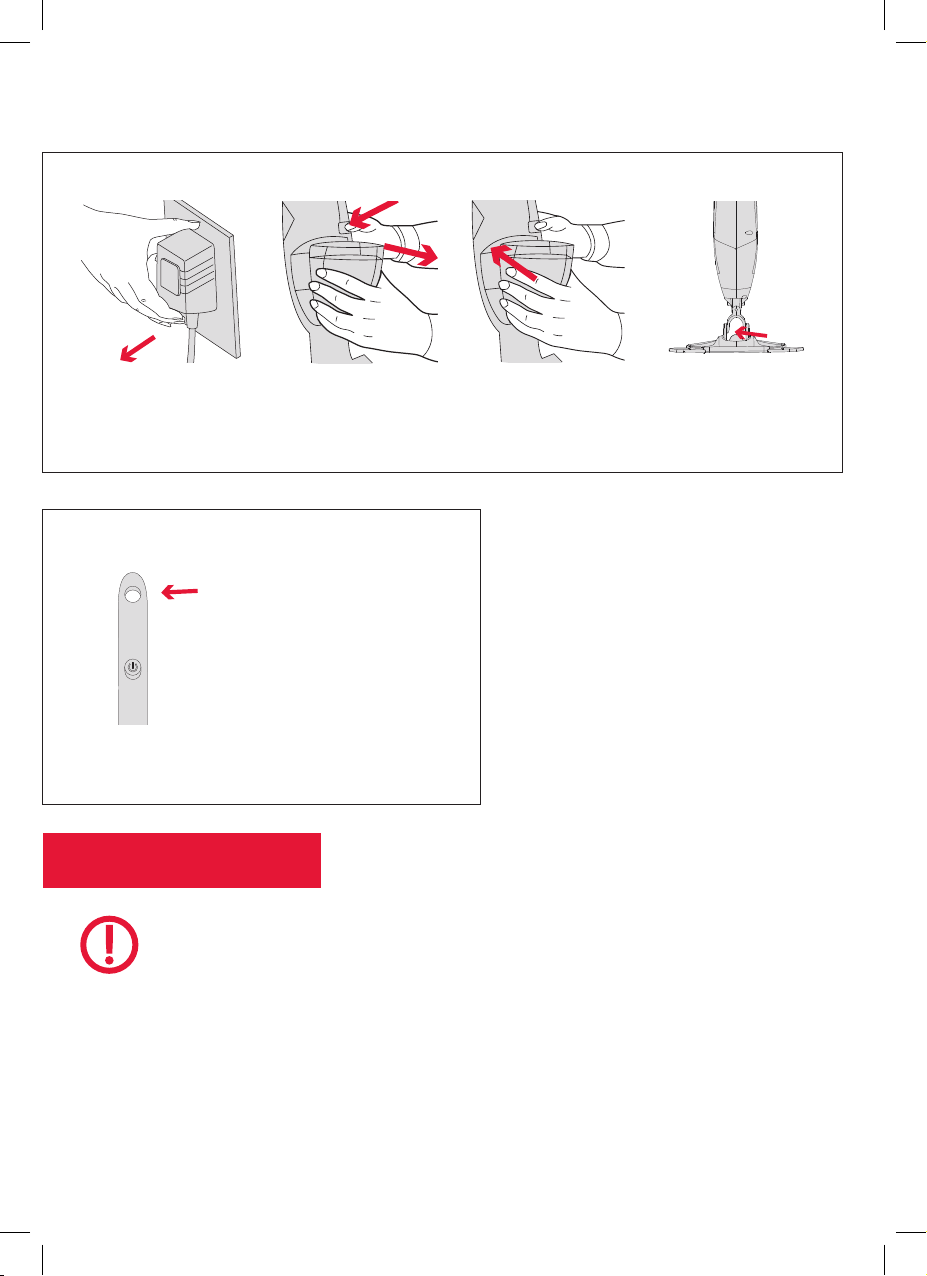
Charging your Vac & Dust
Plug your charger
into the back of
your machine
Plug your charger into
main wall socket
The charging light
will Illuminate when
charger is connected
and charging
Once fully charged
the illuminating light
will go out
Support Vac & Dust
whilst charging or use
storage hook to hang
where it can easily be
charged
Remove the machine
from charge
DQC-DVB-HKA_UG_20140912_color print_003-ok.indb 6 28/07/2015 10:33 AM
Slide the frame of your machine into the cleaning pad
pocket one side at a time
Page 7
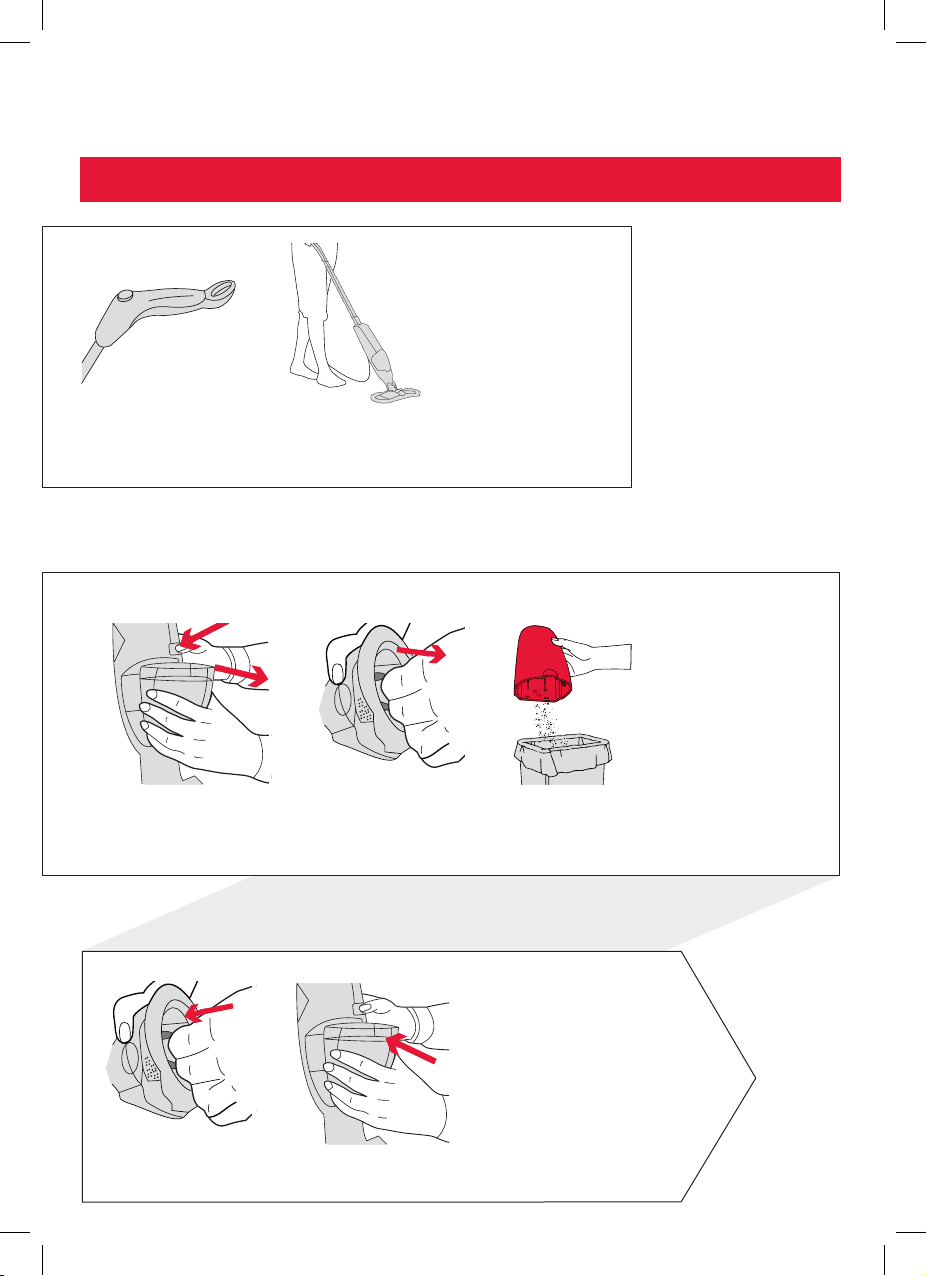
Using your machine
IMPORTANT: Always support Vac & Dust during use
Depress the power
button to turn machine
on and off
Use the microfibre pad to pick up fine
debris like dirt, dust and pet hair. Use
vacuum to suck up any left over debris
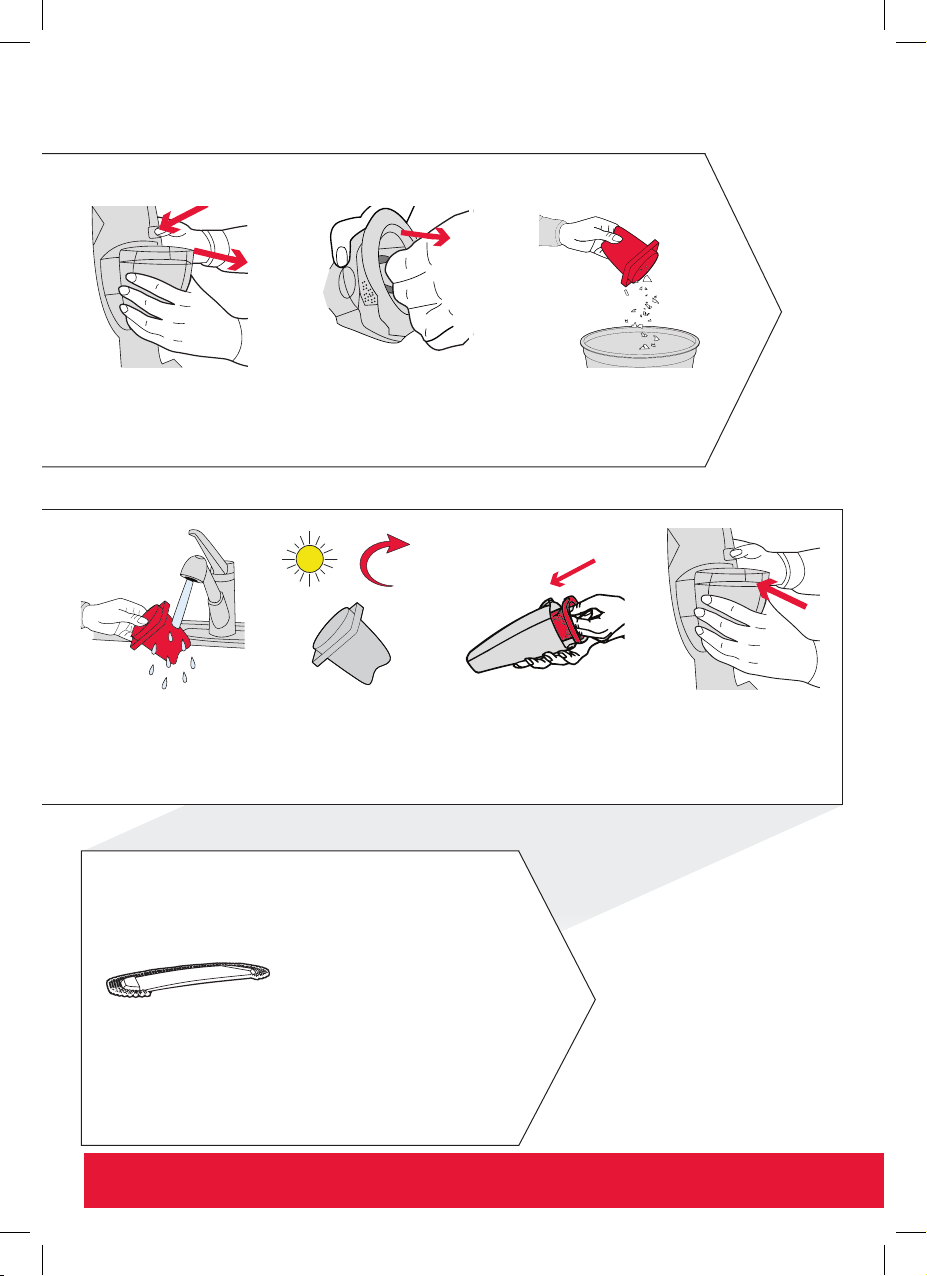
Emptying the Dirt Container
To empty the Vac &
Dust depress the release
button to remove the dirt
container
Grasp the center tab on
the filter and pull out of
the dirt container
Empty contents from
the container, shake and
lightly tap filter against bin
to remove remaining dirt
Gently push the filter into
the dirt container
DQC-DVB-HKA_UG_20140912_color print_003-ok.indb 7 28/07/2015 10:33 AM
To refit the dirt container tilt so that the bottom aligns
first, then gently push until it locks into place
Page 8
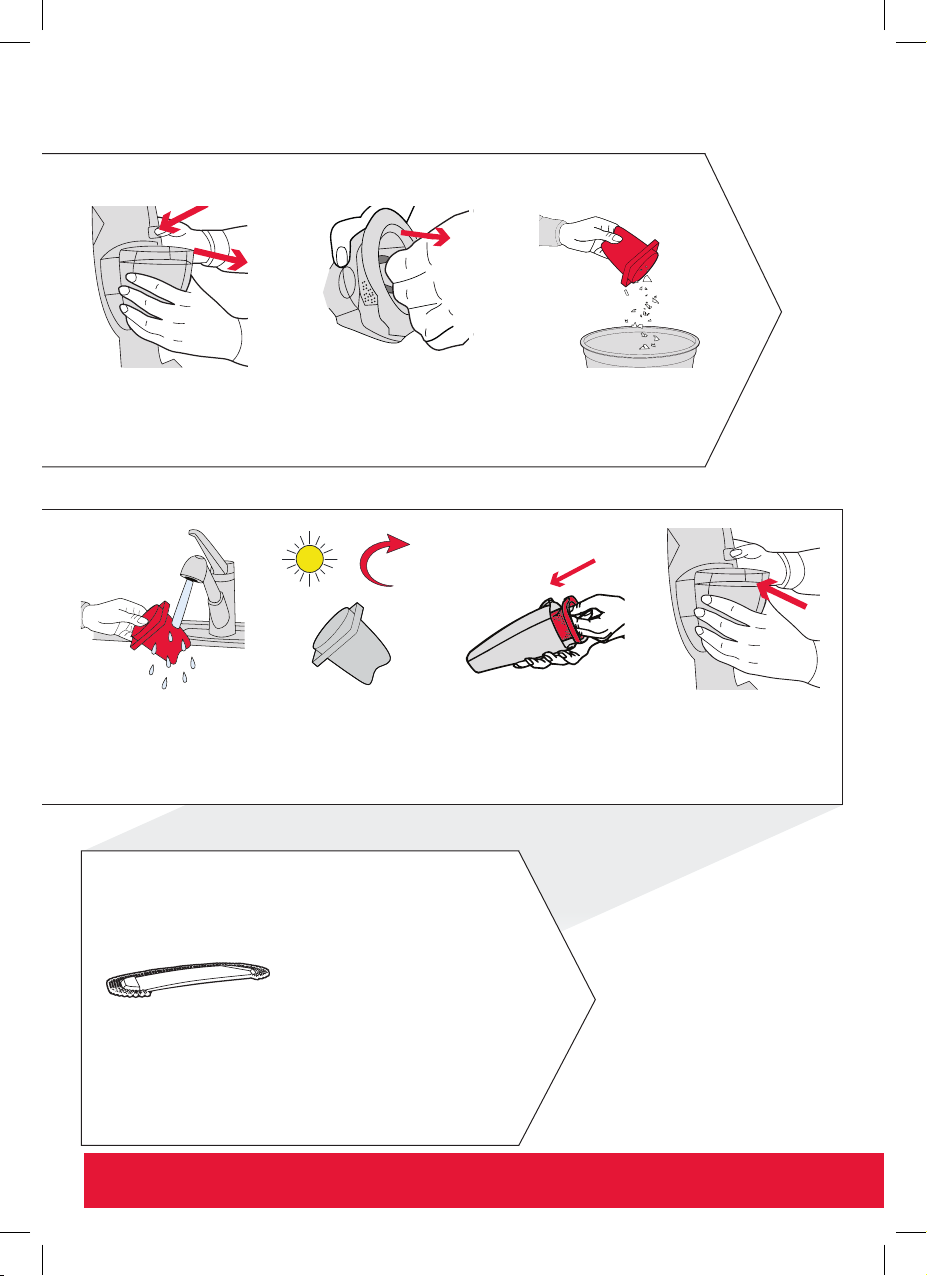
Maintenance
Maintaining your filter
Depress the release button
to remove the dirt container
Hold filter under warm
running water (max
40°C) to rinse. DO NOT
use soap/detergent. Tap
excess water out of filter
For best results tap out filter after every use and wash periodically
Grasp the center tab on
the filter and pull out of
the dirt container
Shake and lightly tap the
filter against the bin to
remove dirt
24hr
Allow filter to
COMPLETELY DRY for
at least 24 hours before
refitting into the dirt
container
Gently push the dry filter
back into the dirt container
To refit the dirt container tilt
so that the bottom aligns
first, then gently push until it
locks into place
Maintaining your Washable Microfibre
dusting pad
40°C MAX
Machine washable at warm temperature (40°C max).
Always use a mild detergent and lay flat to dry completely
before re-using
Important: DO NOT USE BLEACH or FABRIC SOFTENER. For best results, wash the microfibre cloth after every use
DQC-DVB-HKA_UG_20140912_color print_003-ok.indb 8 28/07/2015 10:33 AM
Page 9
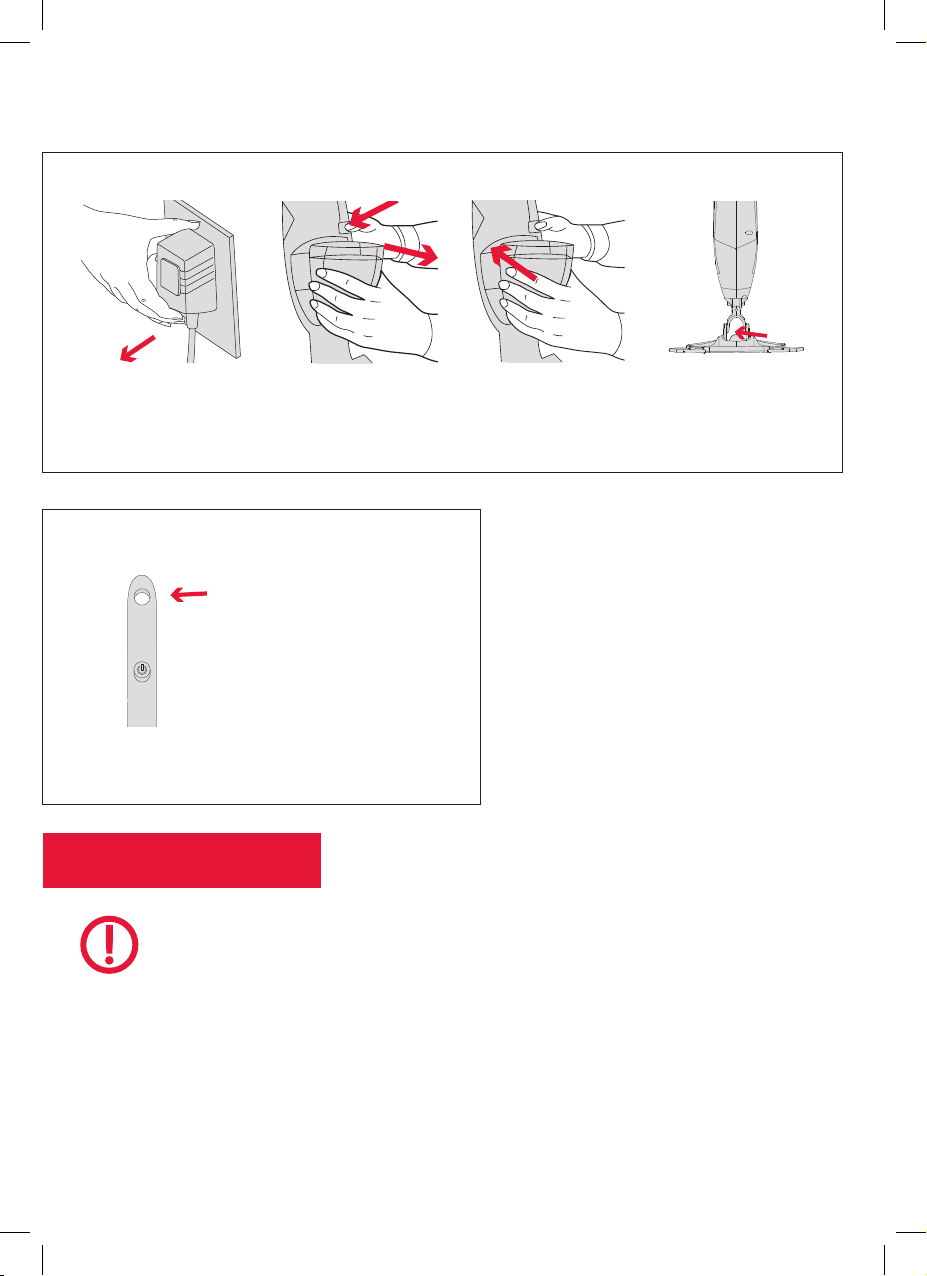
Maintenance
Clearing a blockage
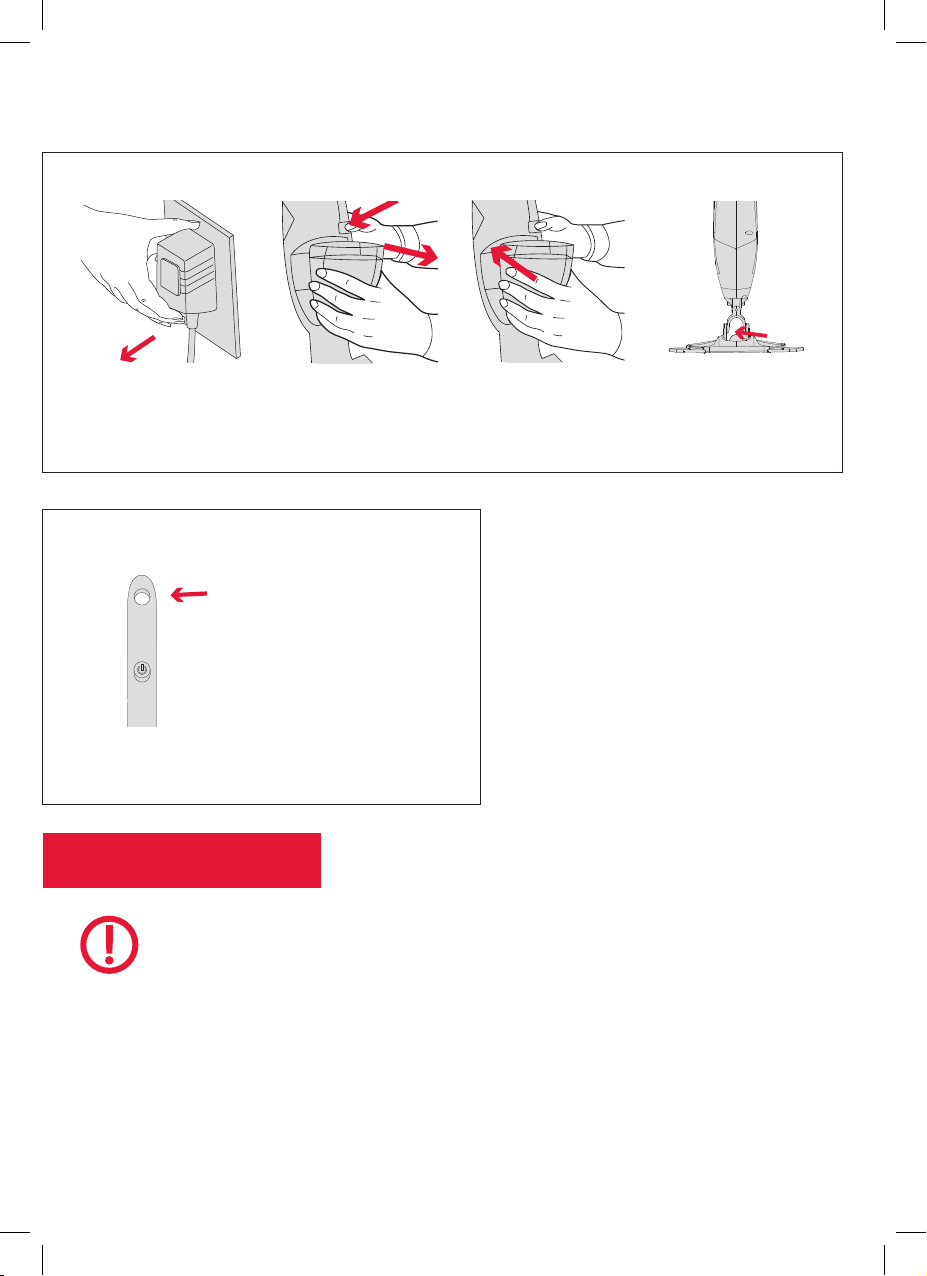
Switch off and unplug
Storage
Use storage hook to hang
Vac & Dust where is can
easily be charged
Important: Store in a cool dry area
NOTE
Depress the release
button to remove the dirt
container
Check dirt air path is clear of dust and debris above
the dirt container and below the base of Vac & Dust
Always switch off and uplug Vac & Dust
before carrying out any maintenance.
Ensure filter is fully dry (at least 24 hours
drying time) before refitting into the dirt
container and is replaced every 6 months.
DQC-DVB-HKA_UG_20140912_color print_003-ok.indb 9 28/07/2015 10:33 AM
Page 10

Troubleshooting
There is an
accessory
missing
Vac & Dust will
not switch on
Vac & Dust won’t
pick up or poor
suction
SolutionIf
• Check the ‘This pack contains’ panel on the box to make
sure the part is included with your machine.
• Ensure the handle is fitted correctly and pushed fully on to
the main body.
• Battery may not be fully charged. If using the Vac & Dust
for the first time the initial charge should be 24 hours. The
charging light will illuminate when charger is connected and
charging, once fully charged the illuminating light will go out.
• Empty dirt container, remove and wash filter allowing
24 hours to dry before refitting.
• Dirt container may not be fitted correctly. To refit the dirt
container tilt so that the bottom aligns first, and then gently
push until it locks into place.
• Poor suction can be caused due to battery power becoming
low and may need to have a full re-charge.
• Clear any blockages from the machine.
• Dirt container may be full and may need to be emptied.
• Filter may need to be washed please allow 24 hours to dry
Dust escaping
from Vac & Dust
DQC-DVB-HKA_UG_20140912_color print_003-ok.indb 10 28/07/2015 10:33 AM
before refitting.
• Clear any blockages from the machine.
Page 11
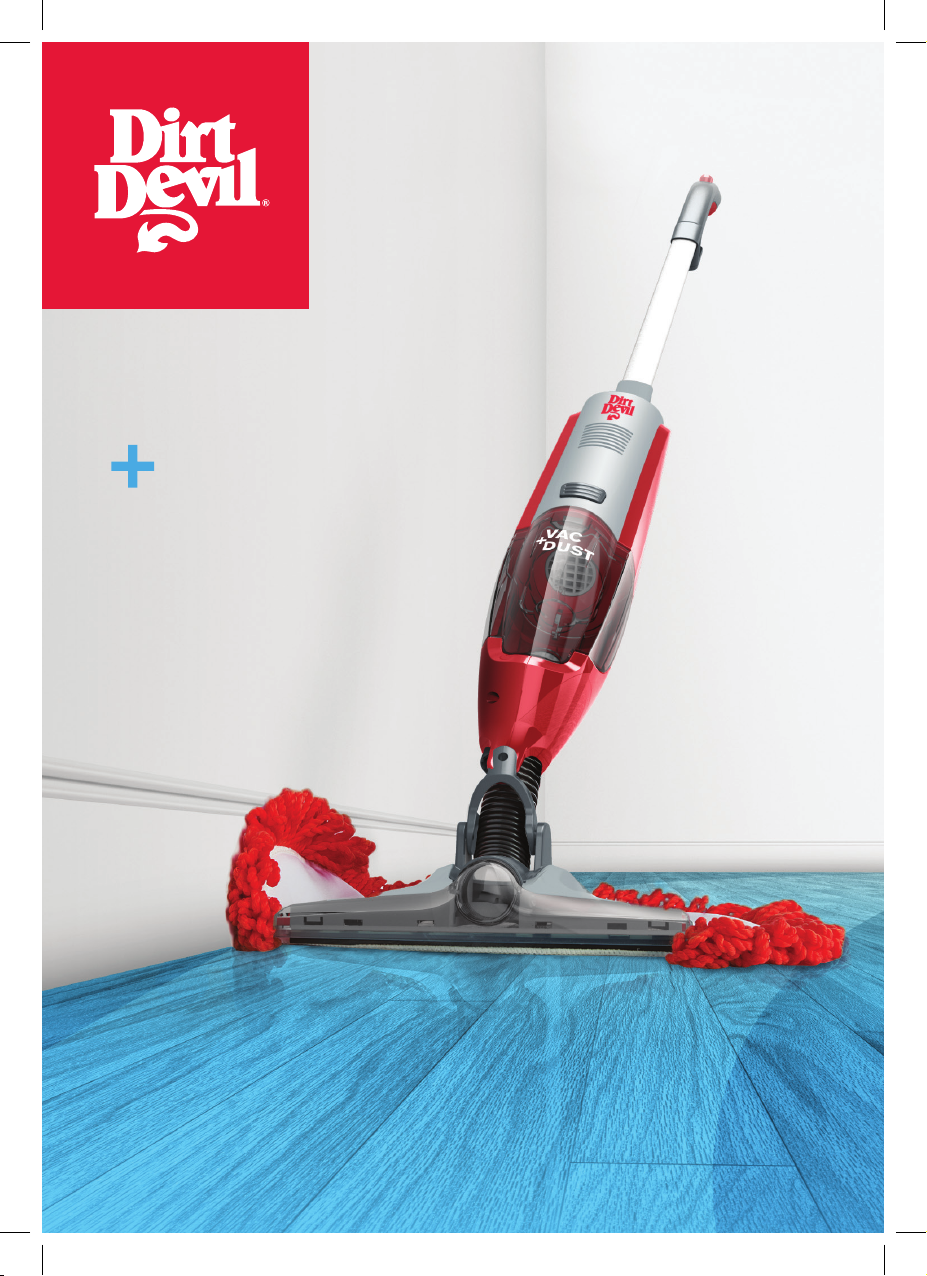
DRY
VAC
DUST
DQC-DVB
DQC-DVB-HKA_UG_20140912_color print_003-ok.indb 11 28/07/2015 10:33 AM
Page 12

感謝您購買Vac & Dust真空吸塵機!
護理您的地板
Vac & Dust能有效能和有效率地清潔密封硬木地板,令您的地板保養後更耐看,氣味清
新、乾淨。
本使用手冊將幫助您使用本機。
Vac & Dust的護理方法
本手冊包含吸塵機的保養方法,若有疑難請參閱有關指引。
DQC-DVB-HKA_UG_20140912_color print_003-ok.indb 12 28/07/2015 10:33 AM
Page 13

開始使用前
基本的安全預防措施
此部Vac & Dust僅供家居使用,不得用於商業或工業用途。
• 此部Vac & Dust沒有支撐便無法保持直立。
• 僅在室內使用Vac & Dust,並保持清潔,範圍內沒
有障礙物。
• 使用Vac & Dust時,請勿讓手指、頭髮或寬鬆衣服
接近可轉動的部件和吸塵機吸口。
禁止用法
8 若此Vac & Dust曾從高處墜下、損壞、浸水或置
於室外,切勿使用。
8 切勿擠壓充電器電線或插頭損壞時使用Vac & Dust。
請聯絡我們的授權經銷商或服務中心
8 手部沾濕時,切勿觸碰插頭或使用Vac & Dust。
8 切勿將Vac & Dust投入火中或暴露於高溫下,這
樣或會對Vac & Dust內含的充電式鎳鎘電池造成
損壞或爆裂。
8 切勿扯拉電線拖拽Vac & Dust。
• 8歲或以上的兒童以及體力、感官或精神上有障礙
者,也可以使用本產品,但必須有他人在場監督
或指導安全使用的方式,並了解當中的危險。
• 請小心監督兒童,確保他們不會把本裝置當作玩
具。若無人監督,請勿讓兒童清潔和維修本機。
• 僅可將Dirt Devil推薦的工具和配件用於Vac & Dust
之上。
請保留說明書以供日後使用。
8 切勿使用充電線作為手柄,在角落或邊緣銳利處
拉扯充電線,或關門時夾住電線。
8 切勿透過拉拽充電線拔下Vac & Dust。
8 切勿嘗試用尖銳物體去除堵塞,否則可能會損壞
您的Vac & Dust。
8 確保Vac & Dust使用電壓得當,否則可能導致設
備損壞或對使用者造成傷害。產品標籤上已列出
正確的電壓。
8 切勿用於吸熱煤、煙頭、火柴或正在冒煙的物
品,或用於有可能含有害液體的範圍,如氯、漂
白劑和氨水的清潔劑。
參照用法
8 確保使用您的Vac & Dust之前,已正確安裝過濾
網和集塵筒。
8 進行任何保養之前,務必關閉Vac & Dust並拔掉
電源。
8 斷開或連接電源線之前,關閉Vac & Dust的所有
操作。使用完畢後,緊記用附帶的線夾繞好電線。
8 清潔樓梯時要格外小心。
DQC-DVB-HKA_UG_20140912_color print_003-ok.indb 13 28/07/2015 10:33 AM
8 電源線須遠離明火或受熱表面。
8 僅使用CE認證的13安培延長線,未經許可的延長
線可能會導致過熱。延長線有絆倒的危機,使用
時請特別注意。
8 請使用手柄來搬動Vac & Dust。
8 請將Vac & Dust存放於陰涼乾燥處。
Page 14
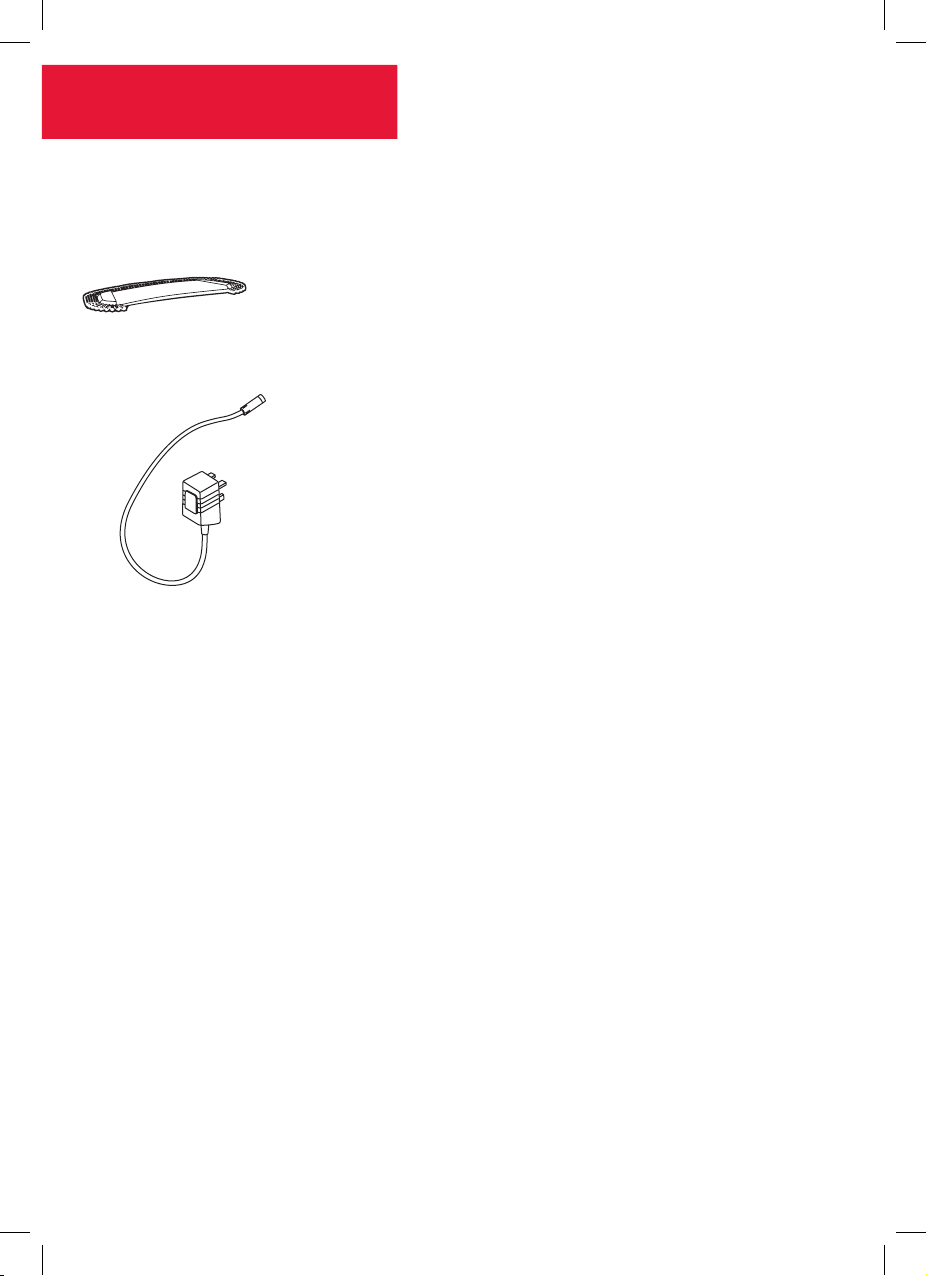
Vac & Dust
本機隨附物品
可水洗超細纖維除塵墊
充電器
DQC-DVB-HKA_UG_20140912_color print_003-ok.indb 14 28/07/2015 10:33 AM
Page 15
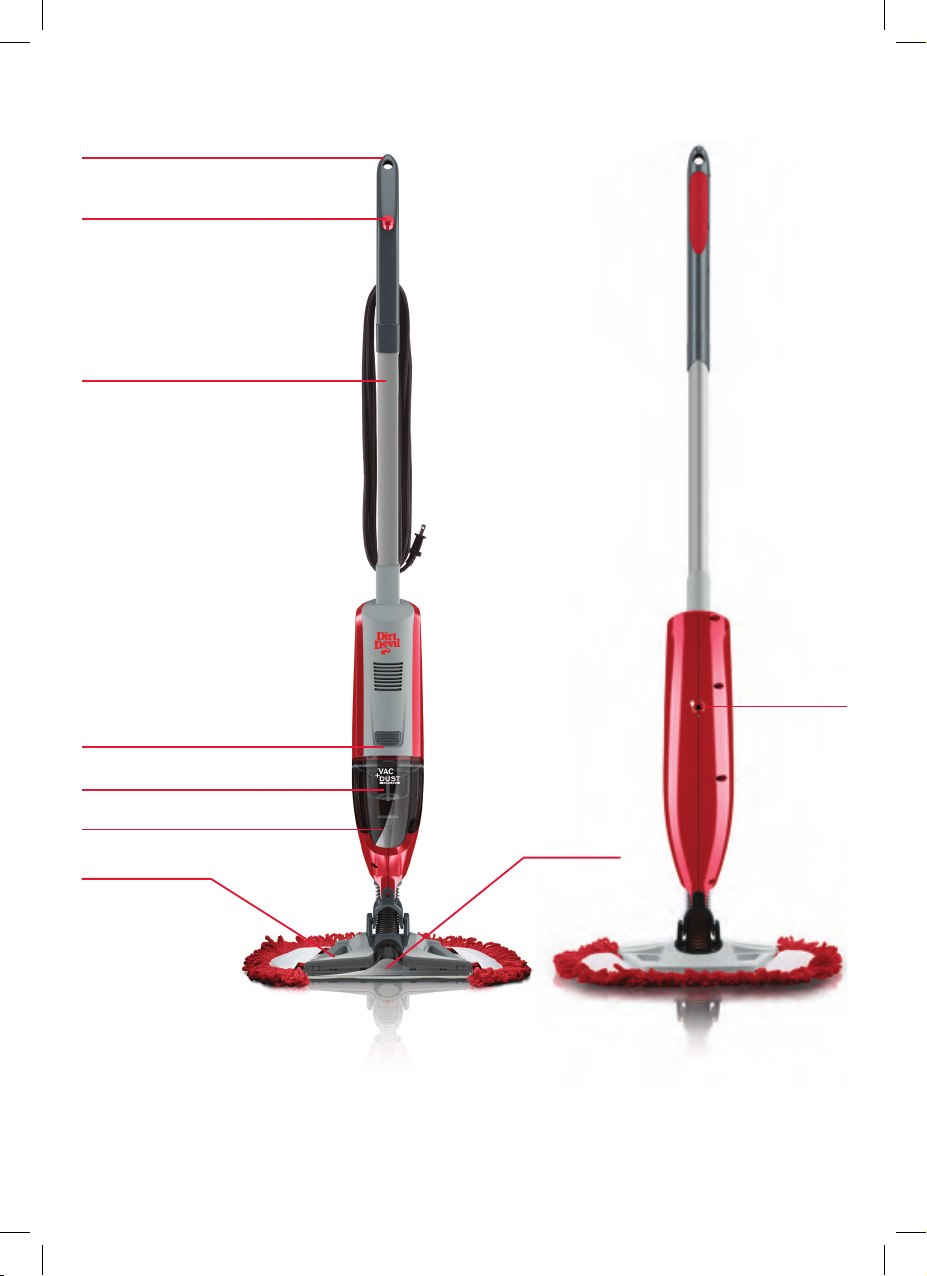
了解本機
掛鉤
開關按鈕
上部手柄
充電插口
集塵筒分離掣
集塵筒
過濾網
真空吸頭
清潔墊刷頭
技術規格
名稱 Vac & Dust
型號 DQC-DVB
產品編號 1-1-135190-00
輸入電壓 100-240V~
電池電壓 10.8V
無線
重量 1.8kg
如有技術變更,恕不另行通知。
DQC-DVB-HKA_UG_20140912_color print_003-ok.indb 15 28/07/2015 10:33 AM
過濾網(類型85)
快速清潔微纖維墊(類型1)
Page 16
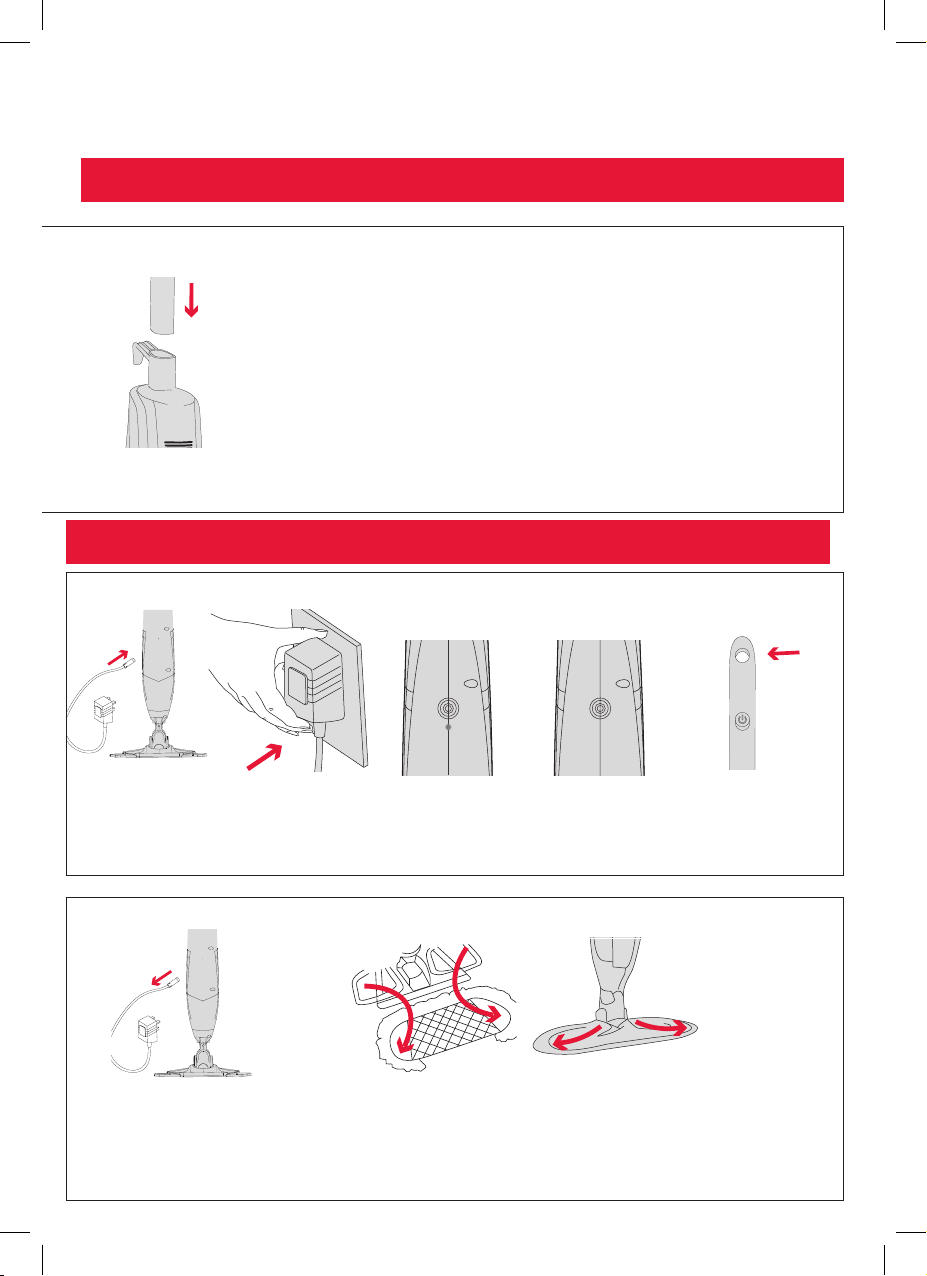
入門
使用前,請仔細閱讀「開始使用前」部分
組裝Vac & Dust
將手柄推入主機,
直至鎖定到位
重要事項:使用本機前必須充電24小時。僅使用Dirt Devil隨附的充電器。
注意:本機不能單獨直立
為Vac & Dust充電
將充電器插入本
機背面的充電口
將充電器插入電插頭
連接充電器和充電
時,指示燈會亮起
充滿電後,指示燈
會熄滅
充電時須支撐
Vac & Dust,或使
用掛鉤掛在容
易充電的地方
拔下充電器
DQC-DVB-HKA_UG_20140912_color print_003-ok.indb 16 28/07/2015 10:33 AM
將刷頭塞進清潔墊袋子,一次塞一邊
Page 17
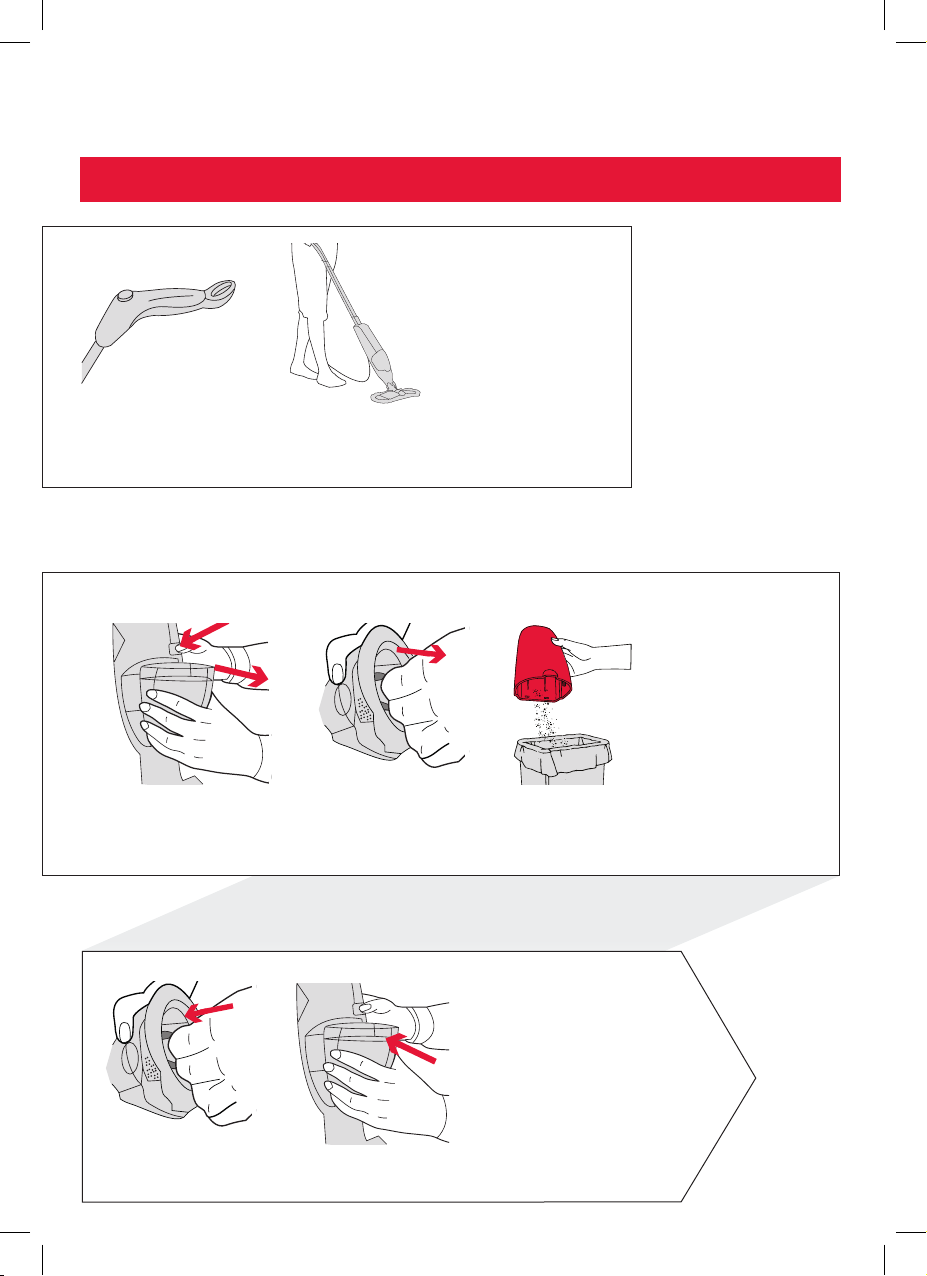
產品操作
重要事項:使用Vac & Dust時須握著手柄
按下電源按鈕來開啟和
關閉本機
清空集塵筒
要清空Vac & Dust,按下分
離掣以取下集塵筒
微纖維墊適用於清掃污垢、
灰塵和寵物毛髮等碎屑。吸
頭適用於吸走任何殘留碎屑
抓緊過濾網中間位置
並輕輕拉離集塵筒
將筒內灰塵清空,
搖抖及輕敲集塵筒
抖出殘留灰塵
輕推過濾網以裝入集塵筒將集塵筒底部對準後放
DQC-DVB-HKA_UG_20140912_color print_003-ok.indb 17 28/07/2015 10:33 AM
入直至鎖定到位
Page 18
保養
保養過濾網
按下分離掣以取下集塵筒
用溫暖的自來水(最高
40°C)沖洗過濾網。
切勿使用肥皂/洗滌
劑。輕拍過濾網以除去
多餘水漬
每次使用後,取出過濾網並定期清洗,以獲得最佳使用效果
抓緊過濾網中間位置並
輕輕拉離集塵筒
在廢紙簍內搖抖及輕敲
過濾網以倒掉垃圾
24hr
過濾網須乾透最少24
小時方可重新放入集
塵筒內
將過濾網輕輕推回入集
塵筒
將集塵筒底部對準後
放入直至鎖定到位
保養可水洗超細纖維除塵墊
最高40°C
可溫水機洗(最高溫度40°C)。使用溫和的洗潔精,
攤開平放至完全乾燥後方可再使用
重要事項:切勿使用漂白劑或衣物柔順劑。每次使用後,清洗微纖維清潔布以獲得最佳效果
DQC-DVB-HKA_UG_20140912_color print_003-ok.indb 18 28/07/2015 10:33 AM
Page 19
保養
清除堵塞
關閉電源及把充電器
拔出
收納
使用掛鉤將Vac & Dust掛
在易於充電之處
重要事項:存放在陰涼乾燥的地方
注意
按下分離掣以取下
集塵筒
確保集塵筒上和Vac & Dust底座下方的吸塵通
路中沒有灰塵和碎屑
請務必關閉Vac & Dust並拔掉電源以進
行任何保養。
過濾網重新放入集塵筒前,確保過濾
網已乾透(最少24小時),並每6個月
更換一次。
DQC-DVB-HKA_UG_20140912_color print_003-ok.indb 19 28/07/2015 10:33 AM
Page 20

常見問題
缺漏附件
Vac & Dust 無法
啟動
Vac & Dust沒有吸
力或吸力不佳
解決方法問題描述
• 檢查包裝盒上的「包裝隨附物品」板面,以確保該部件
已隨本機一同提供。
• 確保正確安裝手柄並連接到主機。
• 電池沒有充滿電。初次使用Vac & Dust時,應先充電24小
時。連接充電器和充電時,指示燈會亮起;充滿電後,
指示燈會熄滅。
• 清空集塵筒,取出過濾網清洗,確保過濾網乾透24小時
方可重新放入集塵筒內。
• 集塵筒或安裝不正確。將集塵筒底部對準後放入直至鎖
定到位。
• 吸力不佳或由電量較低引致,可能需要重新充電。
• 清除本機的任何堵塞。
• 集塵筒可能已滿,需要清空。
• 過濾網可能需要清洗,並須乾透最少24小時方可重新放
塵屑從Vac & Dust
溢出
DQC-DVB-HKA_UG_20140912_color print_003-ok.indb 20 28/07/2015 10:33 AM
入集塵筒內。
• 清除本機的任何堵塞。
Page 21
DRY
VAC
DUST
DQC-DVB
DQC-DVB-HKA_UG_20140912_color print_003-ok.indb 21 28/07/2015 10:33 AM
Page 22

感谢您选购 Vac & Dust 真空吸尘器。
硬地板保养
Vac & Dust 真空吸尘器的设计是为了保持密封硬地板的清洁,并使地板清洁工作更加高
效。随附的用户手册将助您发挥吸尘器的最大功效。
定期保养可使地板洁净如新,保持气味清新,并延长地板的使用寿命。
Vac & Dust 真空吸尘器的保养
用户手册中含有产品保养说明。定期保养有助于保持吸尘器的性能。
DQC-DVB-HKA_UG_20140912_color print_003-ok.indb 22 28/07/2015 10:33 AM
Page 23

开始使用前
基本安全预防措施
此 Vac & Dust 真空吸尘器仅供家居使用,不得用于商业或
工业用途。
• 此 Vac & Dust 真空吸尘器需有支撑物以保持直立。
• 仅在室内使用 Vac & Dust 真空吸尘器,确保清洁的照明条
件良好。
• 使用 Vac & Dust 真空吸尘器时,请保持手指、头发和宽
松的衣服远离产品的运转和通风部分。
• 8 岁及以上的儿童以及已经接受了设备安全使用方面的监
督或指导,并明白有关的危险性的人士,则可以使用该
设备。
• 儿童不得摆弄该设备。不得在没有监督的情况下,由儿
童对设备进行清洁和维修。
• 该 Vac & Dust 真空吸尘器只限与 Dirt Devil 推荐的工具和
配件搭配使用。
• 请妥善存放说明书以备将来使用。
8 如果此 Vac & Dust 真空吸尘器曾从高处坠落、损坏、浸
水或置于户外,请勿继续使用。
8 切勿踩踏电源线,如果电源线或插头已损坏,请勿继续
使用 Vac & Dust 真空吸尘器。请与授权经销商或服务中
心联络。
8 切勿用湿手拔插插头或使用 Vac & Dust 真空吸尘器。
8 Vac & Dust 真空吸尘器内置可充电镍镉电池,切勿将吸
尘器投入 火中或暴 露于高温 下,否则可能造成损毁或爆
裂。
8 切勿拉扯电线或用电线提起 Vac & Dust 真空吸尘器。
参考用法
8 在使用 Vac & Dust 真空吸尘器之前,务必确保滤网和集
尘杯安装正确。
8 进行任何维护保养之前,务必关闭 Vac & Dust 真空吸尘
器电源并拔出插头。
8 断开或连接电源线之前,请关掉 Vac & Dust 真空吸尘器
上的所有 控制装置 。使用后 请始终将电源线缠绕在随附
的线夹上。
8 用吸尘器清扫楼梯时需格外小心。
切勿
8 切勿将电线用作把手。不可在尖锐角落拉扯电线或夹着
电线关门。
8 切勿通过拉扯充电线拔下 Vac & Dust 真空吸尘器的插头。
8 切勿试图使用尖锐物体清除堵塞,因为这可能会对 Vac &
Dust 真空吸尘器造成损坏。
8 切勿在与产品不符的电压下使用 Vac & Dust 真空吸尘器,
否则可能 引起产品 损坏或导 致人身伤害。正确的电压标
电流指示标签上。
在
8 切勿用吸尘器吸除炽热的煤渣、烟头、火柴或正在冒烟/
燃烧的物 品,不得 在可能存 在有害液体(比如氯、漂白
剂和氨类通渠用品)的区域使用此吸尘器。
8 务必使电源线远离发热表面或明火。
8 只可使用欧盟 CE 认证的 13A 延长线,非认证延长线可
能会导致 过热。使 用延长线 时应当小心,因为可能会存
在绊倒的危险。
8 请使用手柄来提起 Vac & Dust 真空吸尘器。
8 应将 Vac & Dust 真空吸尘器存放在清凉干燥区域。
DQC-DVB-HKA_UG_20140912_color print_003-ok.indb 23 28/07/2015 10:33 AM
Page 24
Vac & Dust 真空吸尘器
产品随附物品
耐洗超细纤维清洁垫
充电器
DQC-DVB-HKA_UG_20140912_color print_003-ok.indb 24 28/07/2015 10:33 AM
Page 25
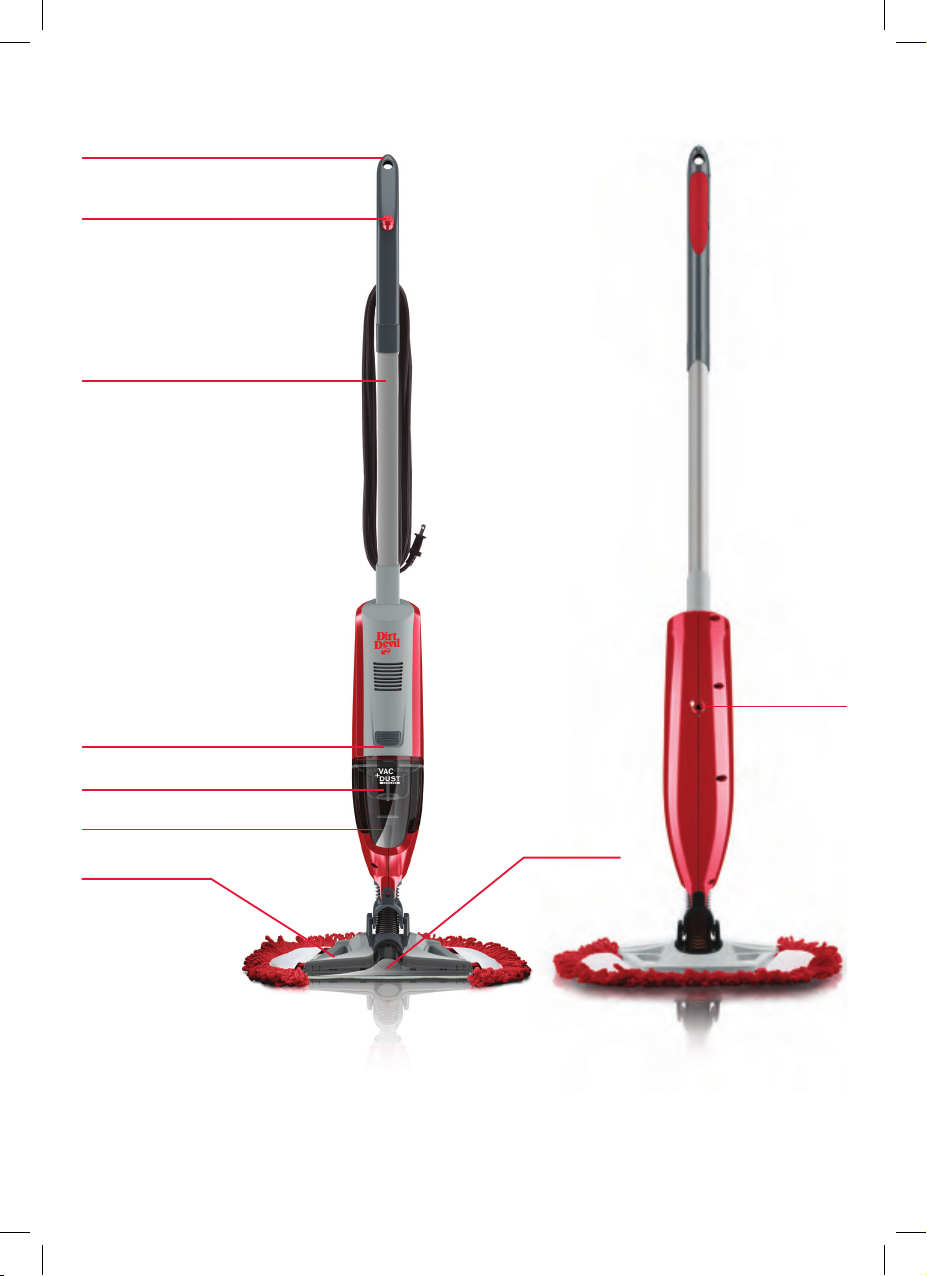
了解您的机器
挂钩
电源按钮
上手柄
充电接口
集尘杯释放钮
集尘杯
过滤网
真空吸头
清洁垫刷头
技术规格
名称:Vac & Dust 真空吸尘器
型号:DQC-DVB
产品编号:1-1-135190-00
输入电压:100-240V
电池电压:10.8V
无线
重量:1.8kg
技术参数如有更新,恕不另行通知。
DQC-DVB-HKA_UG_20140912_color print_003-ok.indb 25 28/07/2015 10:33 AM
过滤网(类型 85)
快速清洁超细纤维清洁垫(类型 1)
Page 26
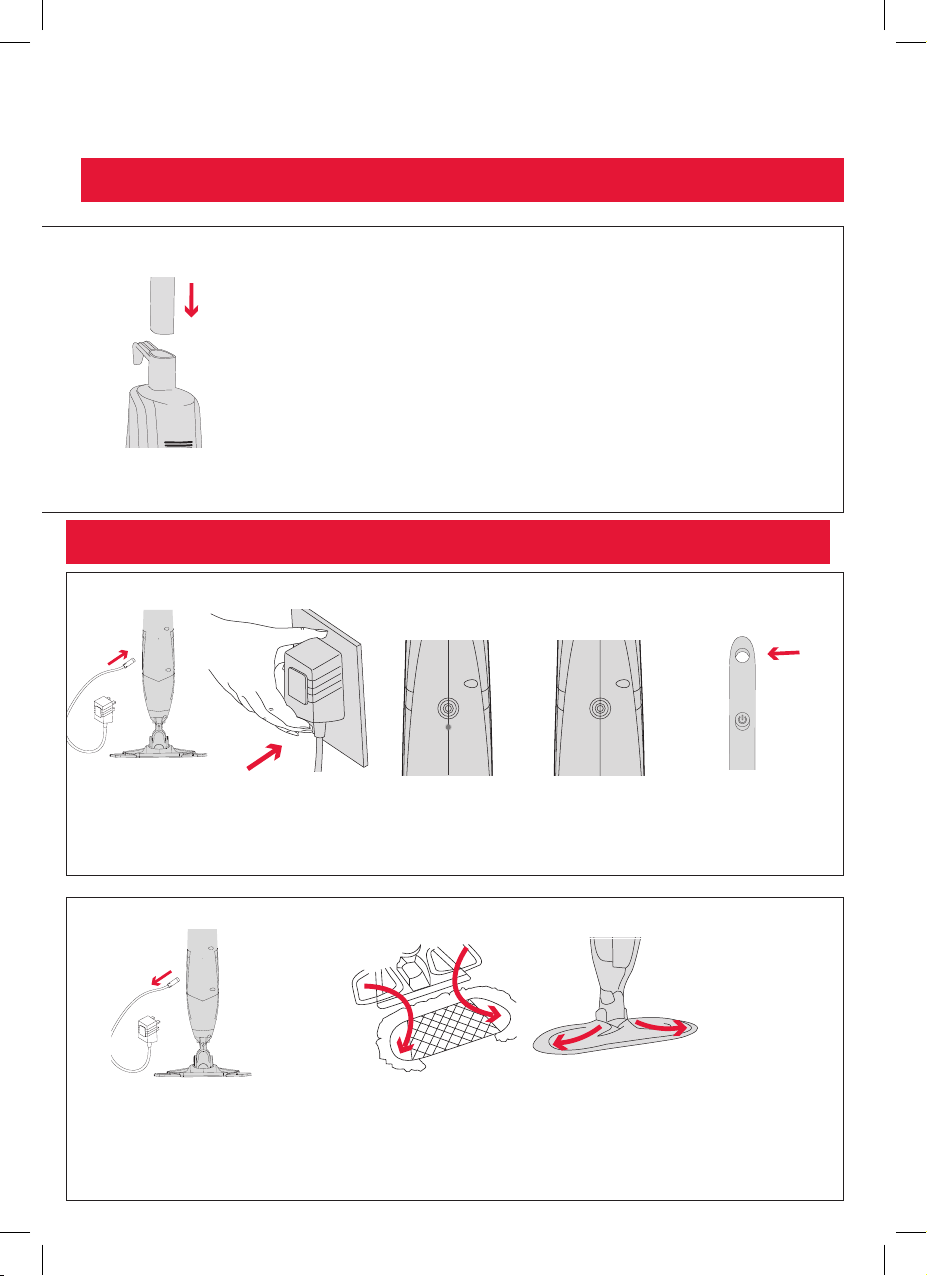
开始使用
使用前请仔细阅读“开始使用前”部分
安装 Vac & Dust 真空吸尘器
请将手柄插入吸尘器主体
直至锁紧入位
重要说明:使用本机前必须充电24小时。务必使用 Dirt Devil 提供的充电器。
注:没有支撑物,本产品不能直立
Vac & Dust 真空吸尘器充电操作
将充电器插入背
面的充电口
将充电器插入电源
插座
连接充电器和充电
时,指示灯会亮起
充满电后指示灯会
熄灭
充电时需使用支撑物
支起 Vac & Dust 真空
吸尘器或者使用挂钩
挂在容易充电的地方
将设备从充电器上
移除
DQC-DVB-HKA_UG_20140912_color print_003-ok.indb 26 28/07/2015 10:33 AM
将刷头套入清洁垫袋,每次套入一边
Page 27
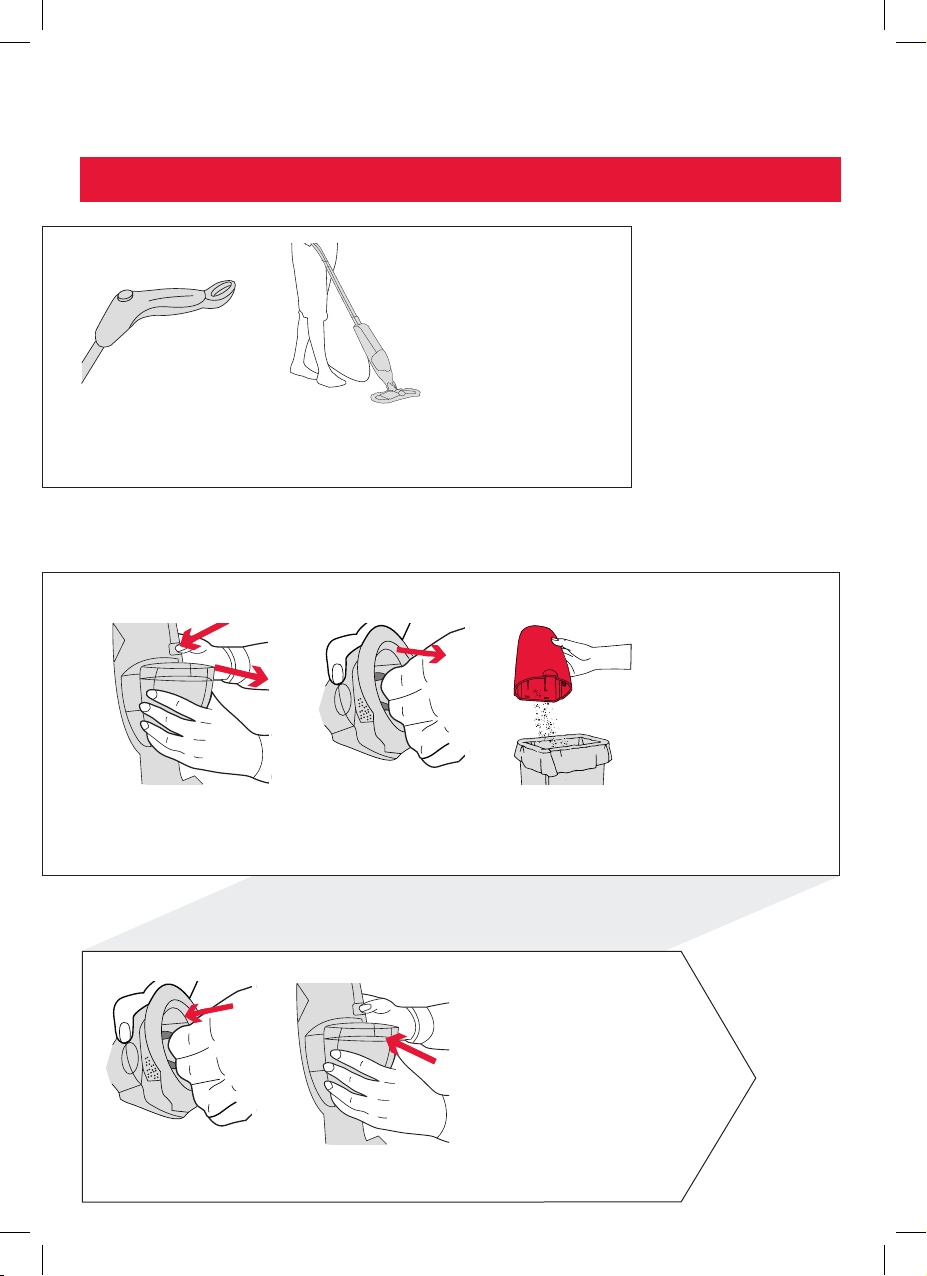
产品使用说明
重要说明:使用时请用手持住 Vac & Dust 真空吸尘器
按压电源按钮开启、关
闭设备电源
清空集尘杯
要清空 Vac & Dust 真空
吸尘器,请按下释放按钮
取下集尘杯
使用超细纤维清洁垫清扫污垢、灰尘
和宠物毛发等碎屑。用吸尘器吸走剩
余碎屑
紧握过滤网中间位置拉
出集尘杯
清空集尘杯,摇晃和轻
敲集尘杯过滤网,抖出
残留垃圾
轻轻将过滤器推进集
尘杯
DQC-DVB-HKA_UG_20140912_color print_003-ok.indb 27 28/07/2015 10:33 AM
重新安装集尘杯,从底部开始轻轻推入
直至锁紧入位
Page 28
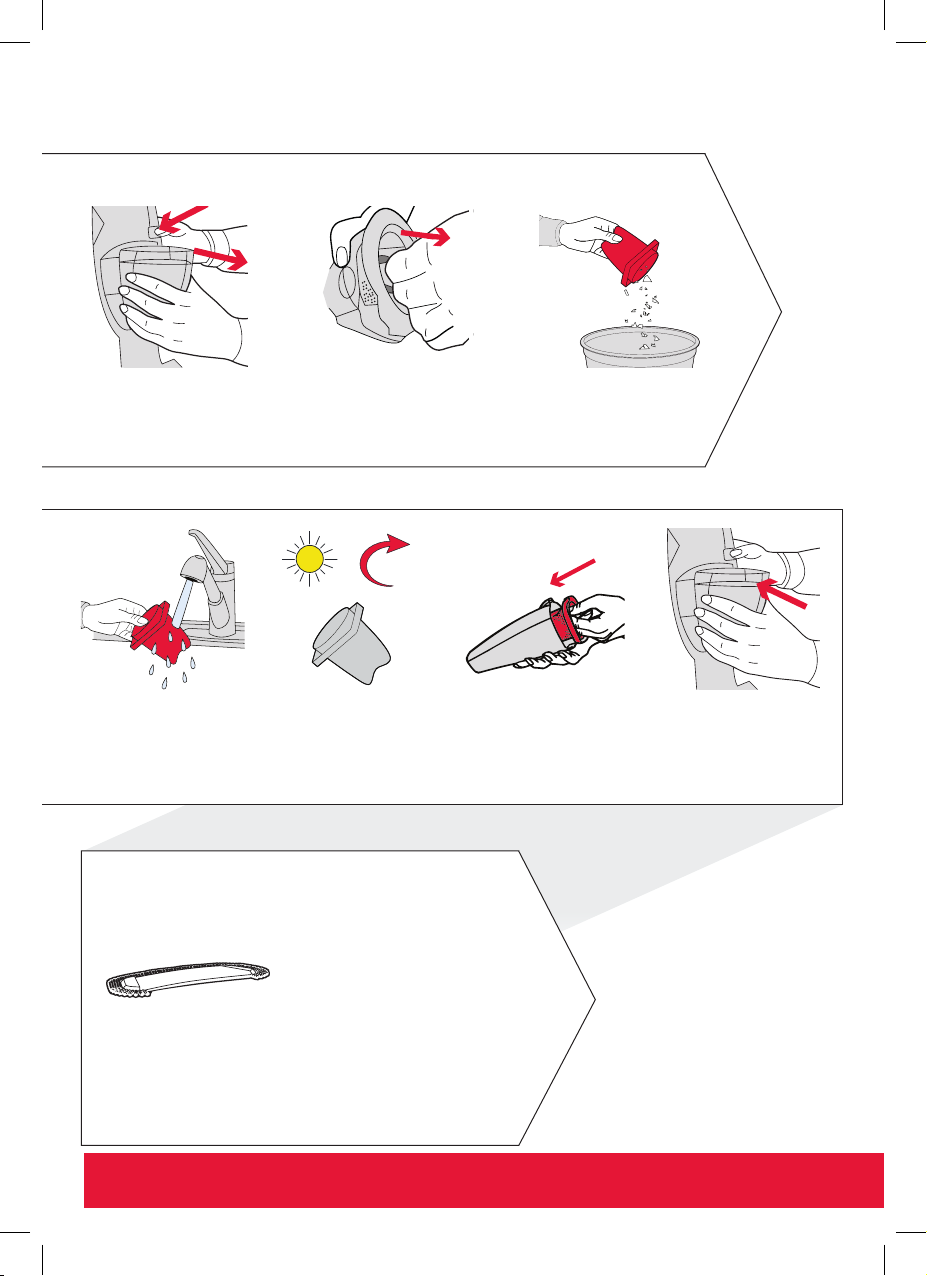
维护与保养
过滤网保养
按下释放按钮取下集尘杯
用流 动的温 水(水 温低
于 40°C)冲洗过滤网。
请 勿 使 用 肥 皂 和 清 洁
剂。 轻拍过 滤网, 去掉
多余水渍
每次使用后,取出过滤网并定期清洗,以便获得最佳使用效果
紧握过滤网中间位置拉
出集尘杯
容器口向下,摇抖容
器,轻敲过滤网倒出
垃圾
24hr
重新安装过滤网前至少晾
晒 24 小时至其完全晾干
将晾干的过滤网轻轻推入
集尘杯
重新安装集尘杯,从底
部开始轻轻推入直至锁
紧入位
耐洗超细纤维除尘垫保养
水温不得超过 40°C
温水清洗(水温不超过 40°C).请使用温性洗涤剂,摊开
平放至完全晾干再使用
重要说明:请勿使用漂白剂和衣物柔顺剂。为取得最佳使用效果,请在每次使用后清洗超细纤维垫
DQC-DVB-HKA_UG_20140912_color print_003-ok.indb 28 28/07/2015 10:33 AM
Page 29
维护与保养
清理堵塞物
关机并拔下电源插头
储存
请用挂钩将 Vac & Dust 真
空吸尘器挂在易于充电处
重要说明:存放在阴凉干燥处
注意
按下释放按钮取下集
尘杯
请保持集尘杯上和 Vac & Dust 真空吸尘器底座下
的吸尘通路中无灰尘与碎屑
进行任何维护保 养之前,务必关闭
Vac & Dust 真空吸尘器并拔出插头.
将过滤网重新装 入集尘杯前,确保
过滤网已完全晾干(至少晾晒 24 小
时),并每六个月更换一次。
DQC-DVB-HKA_UG_20140912_color print_003-ok.indb 29 28/07/2015 10:33 AM
Page 30

故障排除
附件缺失
Vac & Dust 真空
吸尘器无法启动
Vac & Dust 真空
吸尘器没有吸力或
吸力不强
解决办法如果发生以下事项
• 检查包装箱上的“配件内容”标签,查看该配是否包含
在设备中。
• 确保手柄正确安装并完全与主机连接。
• 电池可能未充满。第一次使用设备时需充电 24 小时。连
接充电器和充电时,指示灯会亮起,充满电后指示灯会
熄灭。
• 清空集尘杯,拆下过滤网清洗并晾晒至少 24 小时后方可
重新放入集尘杯中。
• 集尘杯可能安装不到位。重新安装集尘杯,从底部开始
轻轻推入直至锁紧入位。
• 吸力不佳可能是由电量过低引起,此时需再次充电。
• 请清除机器堵塞物。
• 集尘杯可能已满,请清空。
尘屑从 Vac &
Dust 真空吸尘器
中溢出
DQC-DVB-HKA_UG_20140912_color print_003-ok.indb 30 28/07/2015 10:33 AM
• 过滤网可能需要清洗。请晾晒至少 24 小时后再重新放入
集尘杯中。
• 请清除机器堵塞物。
 Loading...