

Dini Argeo TPW Series, TPWN, TPWA, TPWLK, TPWLKI User, Installation And Maintenance Instructions
...Page 1
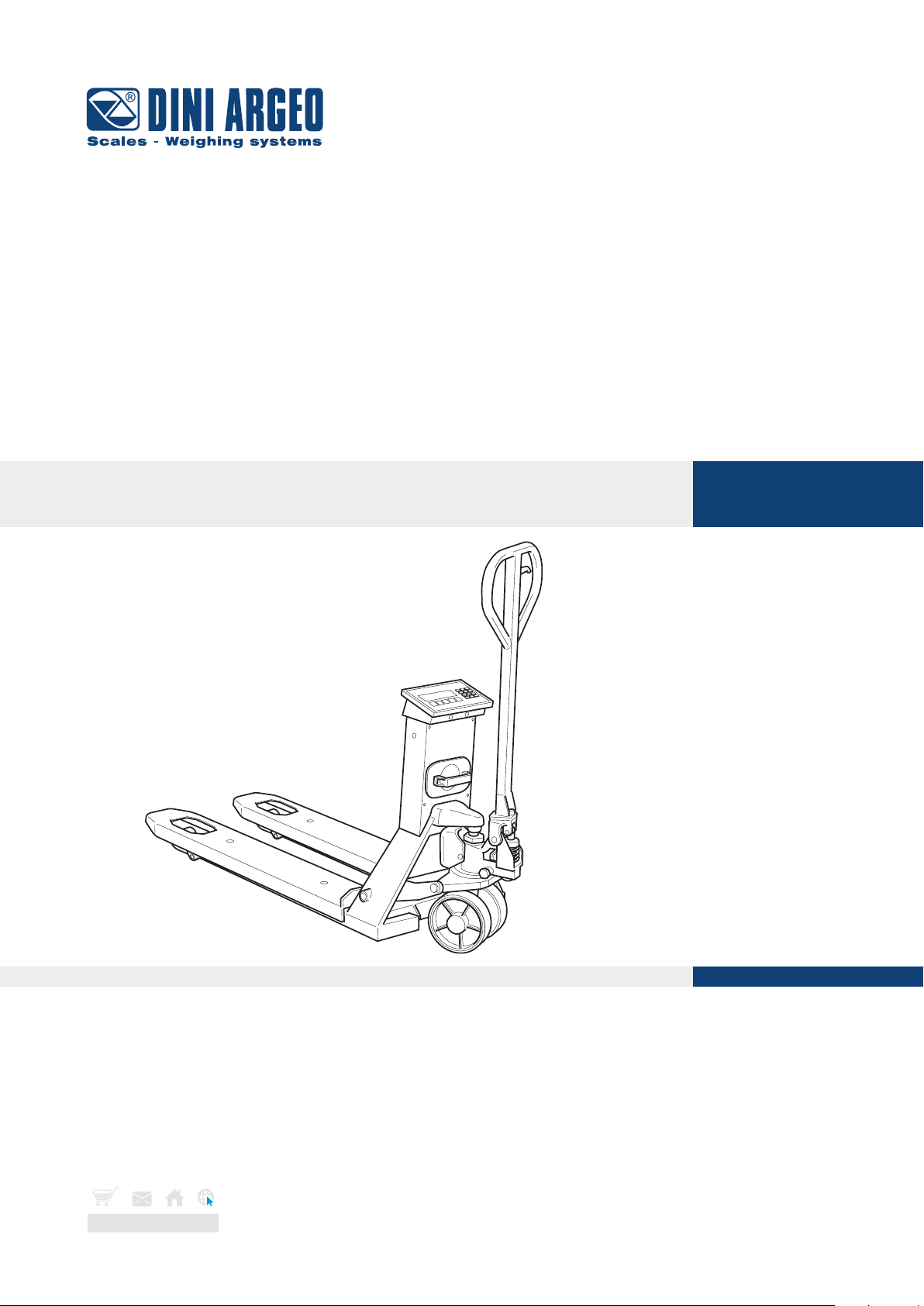
TPW
Pallet truck with integrated scale
USER, INSTALLATION, MAINTENANCE INSTRUCTIONS - v4
ENGLISH
www.diniargeo.com
Page 2

Page 3

ContentsContents
IDENTIFICATION 8
Identification of the Manufacturer 8
Machine identification 8
Identification plate 8
EC Declaration of Conformity 9
Reference directives 10
PRELIMINARY INFORMATION 11
Recipients 11
Supply and storage 11
Updates 11
Language 12
Operators 12
Symbols used inside the manual 12
Personal protective equipment 13
Warranty 14
SAFETY DEVICES 15
Noise 15
Vibrations 15
Residual risks 15
Safety pictograms applied to the machine 16
DESCRIPTION 17
Intended use (correct) 17
Reasonably foreseeable misuse 17
Obligations and prohibitions 18
Operator obligations 18
Operator prohibitions 18
Technical data 19
Environmental conditions permitted 22
Main components 23
Rechargeable battery 24
Optional components 25
TPW
USER_MAN_ENG_TPW_v4
3
Page 4

Contents
PACKAGING AND HANDLING 27
Packaging and handling warnings 27
Packaging 28
Packaging handling 28
Packaging removal 29
Packaging disposal 29
ASSEMBLY 30
Assembly warnings 30
Assembly procedure 31
Descent adjustment 35
COMMANDS 36
Tiller commands 36
Display 37
Keyboard types 38
USE 40
General warnings for correct use 40
Pallet truck conditions 42
Checks before use 43
Display switch-on 43
Pallet truck positioning 44
Load lifting and weight reading 44
How to replace the roll 45
Customisable printouts 45
BASIC SCALE FUNCTIONS 46
Start-up - On 46
Shutdown - O 46
Zero 46
Display brightness adjustment 47
Automatic tare 47
Tare deletion 48
TPW
USER_MAN_ENG_TPW_v4
4
Page 5

Contents
Set a known tare value (PT) 48
Print 49
Metrics 50
ADDITIONAL FUNCTIONS FOR MODELS WITH NUMBER KEYPAD 51
30-tare log 51
Automatic tare deletion 52
Number IDs 53
Date and time 54
Print (and reprint of last receipt) 55
Metrics 56
ADVANCED SCALE FUNCTIONS 57
How to access the function menu 57
Horizontal accumulator 58
Mixing several components 60
Piece count 62
Weight check 65
Exchange between net weight and gross weight 69
Percentage weighing 70
Unit of measurement conversion 73
METROLOGICAL SCALE INFORMATION 75
MAINTENANCE 76
Maintenance warnings 76
Scheduled maintenance 77
Scheduled maintenance table 77
Oil level top-up 78
Tank top-up for models with pump with plug 78
Tank top-up by means of syringe for models with mono-block pump 79
Unscheduled maintenance 80
TPW
USER_MAN_ENG_TPW_v4
5
Page 6

Contents
TROUBLESHOOTING CASES 81
Error messages 83
TPW
6
USER_MAN_ENG_TPW_v4
Page 7
Introduction
Dear Customer, Thank you for choosing a DINI ARGEO product.
The manual weighing pallet truck that you have purchased is ideal for handling and weighing pallets or standardised
containers directly where they are located, saving you time and money.
It is equipped with high performance weighing electronics, precise and durable, and features a multifunctional
program that can help you perform your daily tasks. Before using the instrument, please read this instruction manual
carefully in order to be able to use it in complete safety and to learn about all of the functions it oers.
Safety information - Warnings
The safety precautions described in this manual, marked with the symbol, must be followed during all installation,
use, maintenance or repair stages of the weighing system.
Any use other than that reported in this manual, as well as not following the safety precautions, relieves the
manufacturer from any responsibility and will void the product warranty.
• Read this manual carefully before carrying out any handling operations or lifting any loads.
• This pallet truck is designed to weigh exclusively on standardised pallets.
• With approved scale, you can perform weighing on EUR-EPAL pallet 800x1200mm (ref. Standards UIC
435-2 and UIC 435-4).
• NEVER load the scale beyond the maximum capacity stated on the plate of the weight readout instrument.
IT IS forbidden to use the scale in environments where there is the danger of fire or explosion.
• Do not load the forks when they are raised, not even partially.
• Before using the pallet truck ensure it is in perfect working order.
• To achieve a correct weighing result, the forks need to be raised by at least 5-10 cm (Paragraph “Load
lifting and weight reading” ref.).
• Do not expose the pallet truck to atmospheric agents (sun, rain, etc.).
• Use the pallet truck in non-condensing environments with moderate temperature and humidity levels
• Use the pallet truck where there are no vibrations.
• Carefully read and apply the aforementioned description of the weight indicator.
• To clean the pallet truck, avoid the use of solvents or aggressive substances.
• It is forbidden to make any modifications to the truck if not authorised by the manufacturer.
• It is forbidden to use the pallet truck when it no longer fulfils the safety criteria.
• It is forbidden to use flammable products to clean the truck.
• Except with specific models, it is forbidden to wash the pallet truck with direct jets of water.
• Do not pour liquids on the indicator.
• Anything not specifically described in this manual is to be considered improper use of the equipment.
TPW
i
• The crossed out wheelie bin symbol on the product shows that it must be brought to appropriate
separate waste collection centres at the end of its life cycle or returned to the dealer when purchasing a new equivalent product.
• Proper separate collection to then send the product to recycling contributes to preventing possible
negative effects on the environment and to health and promotes recycling. Users who dispose of
the product illegally shall face administrative sanctions as provided for by law.
7
USER_MAN_ENG_TPW_v4
Page 8
Identification
IDENTIFICATION
Identification of the Manufacturer
Manufacturer DINI ARGEO s.r.l.
Address Via della Fisica, 20
41042 Spezzano di Fiorano Mod.se (MO) - Italy
Tel. +39 0536 843418 Fax +39 0536 843521
Machine identification
Machine PALLET TRUCK WITH INTEGRATED SCALE
Model TPWXX
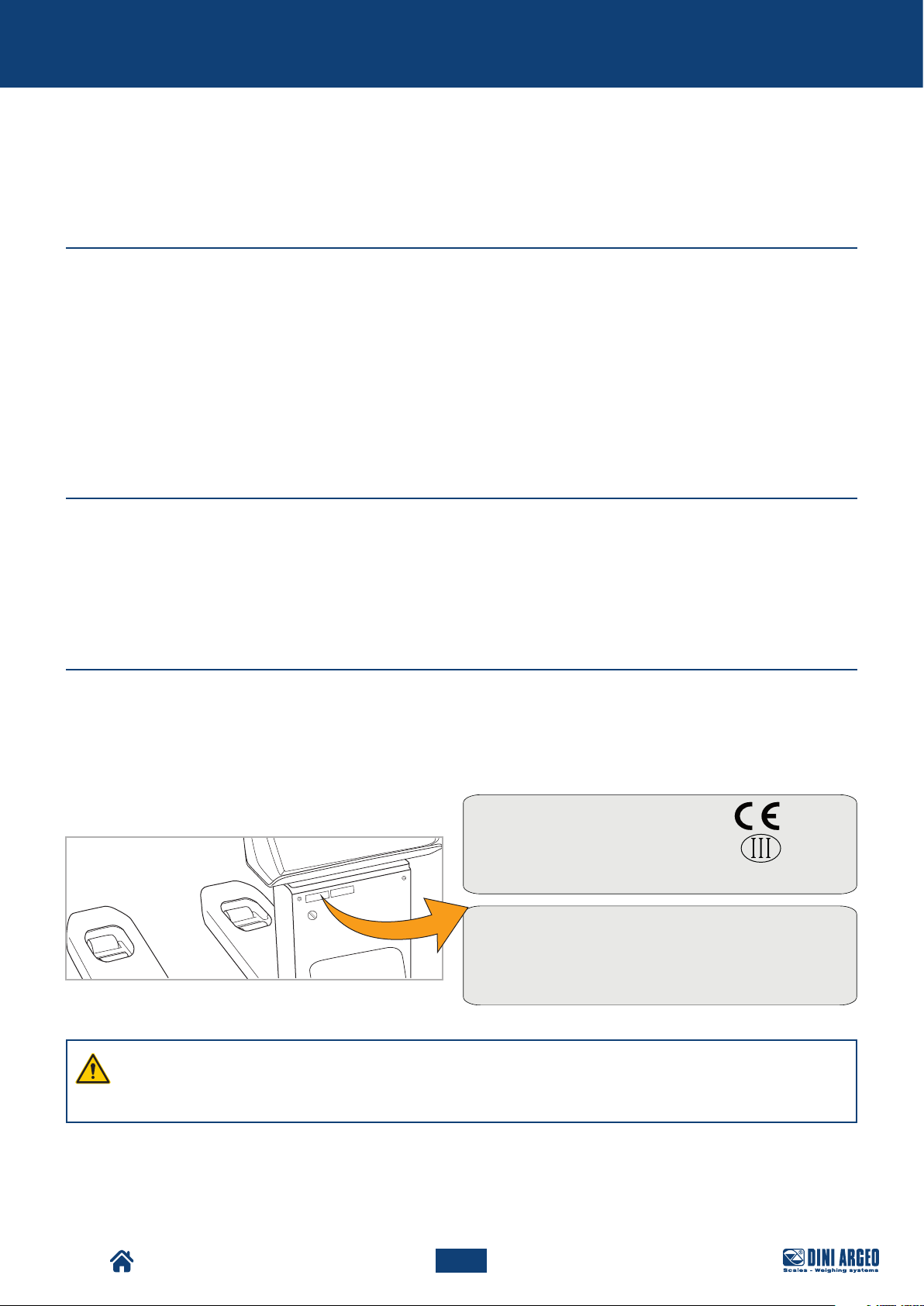
Identification plate
The machine is equipped with an identification plate positioned in the upper part of the column.
The identification details of the machine, to be cited to the Support Centre if required, are provided on the plate.
Mod.
TPWLKP-5
Sn
0100574294
Dini Argeo - v. Fisica, 20 - 41042 Fiorano (MO) Italy
B1W1 B1W2 B1W3
Max
Min
e =
500 kg 1000 kg 2000 kg
4 kg 10 kg 20 kg
0.2 kg
0.5 kg
UK 2945
6V DC
1 kg
TPW
WARNING!
It is strictly forbidden to remove the CE identification plate and/or replace it with other plates.
If, for accidental reasons, the plate is damaged or removed, the customer must inform the Manufacturer.
8
USER_MAN_ENG_TPW_v4
Page 9
Identification
EC Declaration of Conformity
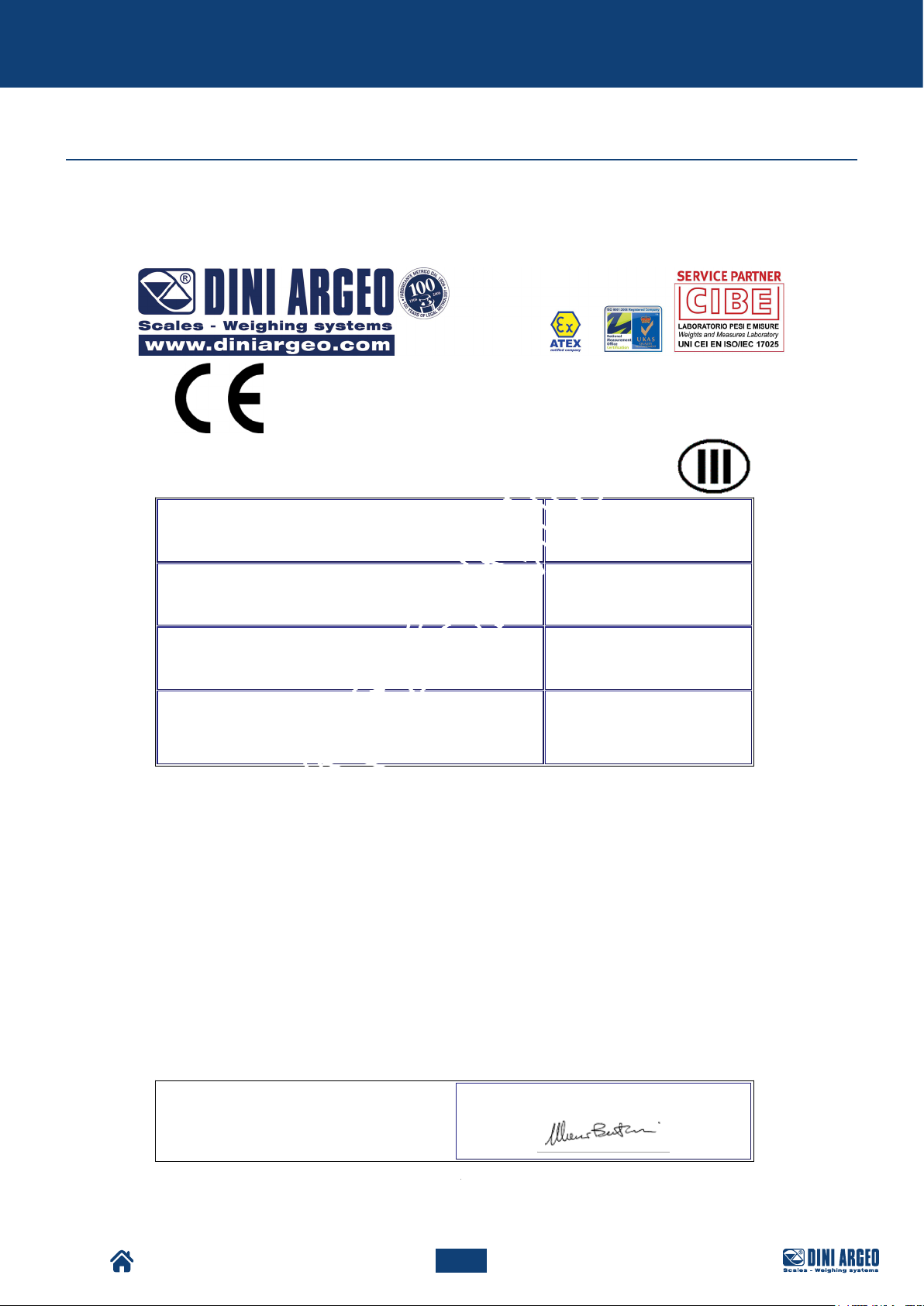
The EC Declaration of Conformity is available on: www.diniargeo.com
DICHIARAZIONE DI CONFORMITA’
DECLARATION OF CONFORMITY
KONFORMITÄTSERKLÄRUNG
DÉCLARATION DE CONFORMITÉ
DECLARACIÓN DE CONFORMIDAD
Fabbricante:
Manufacturer:
Hersteller:
Fabricant:
Fabricante:
Modello:
Model:
Modell:
Modèle:
Modelo:
Anno di costruzione:
Manufacturing year:
Herstellungsjahr:
Année de fabrication:
Año de construcción:
Numero di serie:
Serial number:
Seriennummer:
Numéro
de série:
Número de serie:
E’ conforme alle direttive:
-Conforms to the directives: / Konform mit folgenden richtlinien ist: / Est conforme aux directives: / Es conforme a las directivas:
2014/30/EU - Compatibilità Elettromagnetica
-Elecrtomagnetic Compatibility / Elektromagnetische Kompatibilität / La compatibilità Electromagnétique / Compatibilidad
Electromagnética
-Con riferimento alle norme armonizzate:
-With reference to these harmonised norms: / Mit Bezug auf die Normen: / En référence aux normes harmonisées: / Con referencia
a las normas armonizadas:
EN 61000-6-2 / 2005; EN 61000-6-4 / 2007 / A1:2011; EN 61326-1 / 2013; EN 55011 /
2009)
FAC-SIMILE
DINI ARGEO srl
Via della Fisica,20
Fiorano Modenese (MO) Italy
TPW20APM-2
2018
0100611649
TPW
2006/42/CE - Macchine
-Machines / Maschinen / Machines / Máquinas
UNI EN 13155 / 2009 ; UNI EN 13889
-Only for / Nur für / Seulemen pour / Solo per MCW/TPW
Dichiara inoltre che:
Declares also that: / Der Hersteller erklärt auβerdem, dass: / Déclare également que: / Declara también que:
-La persona autorizzata a costituire il fascicolo tecnico presso la sede del fabbricante è la
Direzione Tecnica.
The person authorised to compose the technical file at the premises of the manufacturer is the Technical Management. / Die
autorisierte Person, die die technischen Dokumente im Firmensitz des Herstellers verwaltet, ist das technische Management. / La
personne autorisée à constituer le dossier technique chez la siége du fabricant est le directeur technique. / La persona autorizada a
constituir el expediente técnico en la sede del fabricante es la Dirección Técnica.
Firma/Signature/Unterschrift
Fiorano Mod.se (MO) Italy, 14/03/2018
President
Rev. 2
9
USER_MAN_ENG_TPW_v4
Page 10

Identification
Reference directives
The machine supplied by DINI ARGEO does not fall within one of the categories of machines listed in Annex IV
of the Directive; therefore, for the purposes of certifying conformity of the machinery with the provisions of this
Directive, DINI ARGEO shall apply the conformity assessment procedure with internal check on the manufacture of
the machinery, as set out in Annex VIII.
To certify the conformity of the machine with the provisions of the Directive, DINI ARGEO before placing it on
the market, has carried out the risk assessment in order to verify compliance with the essential health and safety
requirements of the Directive as well as the tests and the checks required by the reference standards applied.
The technical construction file has been compiled in compliance with the provisions of Annex VII of Directive
2006/42/EC and is available for inspection by supervisory authorities upon a reasoned request, as required by the
laws in force on the matter.
DINI ARGEO s.r.l. then places the machine on the market, constituting it with:
• CE Marking
• EC Declaration of Conformity
• Instruction manual for use, installation and maintenance (Documentation drawn up according to section 1.7.4 of
the Machinery Directive 2006/42/EC)
please note that the machine has been designed according to the following Directives:
• 2006/42/EC Machinery Directive
• 2014/30/EU Electromagnetic Compatibility Directive
And that the following harmonised standards have been applied:
• EN 61000-6-2 / 2005
• EN 61000-6-4 / 2007 / A1:2011
• EN 61326-1 / 2013
• EN 55011 / 2009
• UNI EN 13155 / 2009
• UNI EN 13889
TPW
10
USER_MAN_ENG_TPW_v4
Page 11

Preliminary information
PRELIMINARY INFORMATION
Recipients
The manual is intended for operators responsible for using and managing the machine throughout all its technical
lifespan stages. It contains the topics referring to the correct use of the machine, in order to maintain its functional
and qualitative characteristics unchanged over time. All information and warnings for correct use in complete safety
are also provided.
The manual, similarly to the EC compliance certificate, is an integral part of the machine and must always accompany
it if moved or resold. It is the responsibility of the user to keep this documentation intact, to allow consultation,
throughout the lifespan of the machine itself.
Supply and storage
The manual is available in electronic format on: www.diniargeo.com
Store this manual supplied with the machine, in order for it to be easily consulted by the operator.
The manual is an integral part for safety purposes, therefore:
• it must be kept intact (in all its parts). Should it be lost or damaged, it is required to request a copy immediately.
• it must follow the machine until demolition (even in case of movements, sale, lease, rental, etc....);
DINI ARGEO declines any liability for improper use of the machine and/or damage caused as a result of operations
not covered by the technical documentation.
Updates
Should the machine require functional modifications or replacements, the revision or update of the manual is the
responsibility of the Manufacturer. The Manufacturer is responsible for the delivery of the update of the manual.
The user is also responsible for ensuring that, if the present document is modified by the Manufacturer, only the
updated versions of the manual are actually present in the points of use.
TPW
11
USER_MAN_ENG_TPW_v4
Page 12
Preliminary information
Language
The original manual has been drawn up in Italian.
Any translations into additional languages must be carried out starting from the original instructions.
The Manufacturer considers himself responsible for the information contained in the original instructions; translations
in dierent languages cannot be fully verified, therefore if an incongruity is detected, it is required to follow the
original text or contact the Support Centre.
Operators
In order to establish with certainty what are the skills and qualifications of the operators involved in the various tasks
(commissioning, cleaning, scheduled maintenance), refer to the following table:
Qualification Description
OPERATOR Personnel of the user trained and qualified to use and run the machine for production purposes for
the activities for which it was built and supplied.
They must be able to perform all the operations required for proper functioning of the machine
and for the safety of themselves or of any collaborators. They must have proven experience in the
correct use of these types of machines and be trained, informed and instructed in this regard. In
case of doubt, they must report any anomaly to their superior.
Note: they are not authorised to carry out any maintenance operation.
MECHANICAL
MAINTENANCE
TECHNICIAN
MANUFACTURER’S
TECHNICIAN
Qualified technician able to perform preventive/corrective maintenance on all mechanical parts of
the machine subject to maintenance or repair.
Qualified technician able to access all machine parts for visual analysis, checking the equipment
status, adjustments and calibrations.
Note: they are not authorised to operate on live electrical systems (if any).
Technician qualified by the Manufacturer and/or their distributor for complex operations, as they
are aware of the production cycle of the machine.
This person operates according to the user's requests.
Symbols used inside the manual
TPW
Symbol Description
Symbol used to identify important warnings for the safety of the operator and/or machine.
Symbol used to identify information of particular importance within the manual. The information
also concerns the safety of personnel involved in using the machine.
12
USER_MAN_ENG_TPW_v4
Page 13
Preliminary information
Personal protective equipment
When working near the machine, both for assembly operations and for maintenance and/or adjustment, it is strictly
required to comply with the general accident-prevention regulations, therefore it will be important to use the personal
protective equipment (PPE) required for each individual operation.
The complete list of personal protective equipment (PPE) that may be required for the dierent procedures is
provided below:
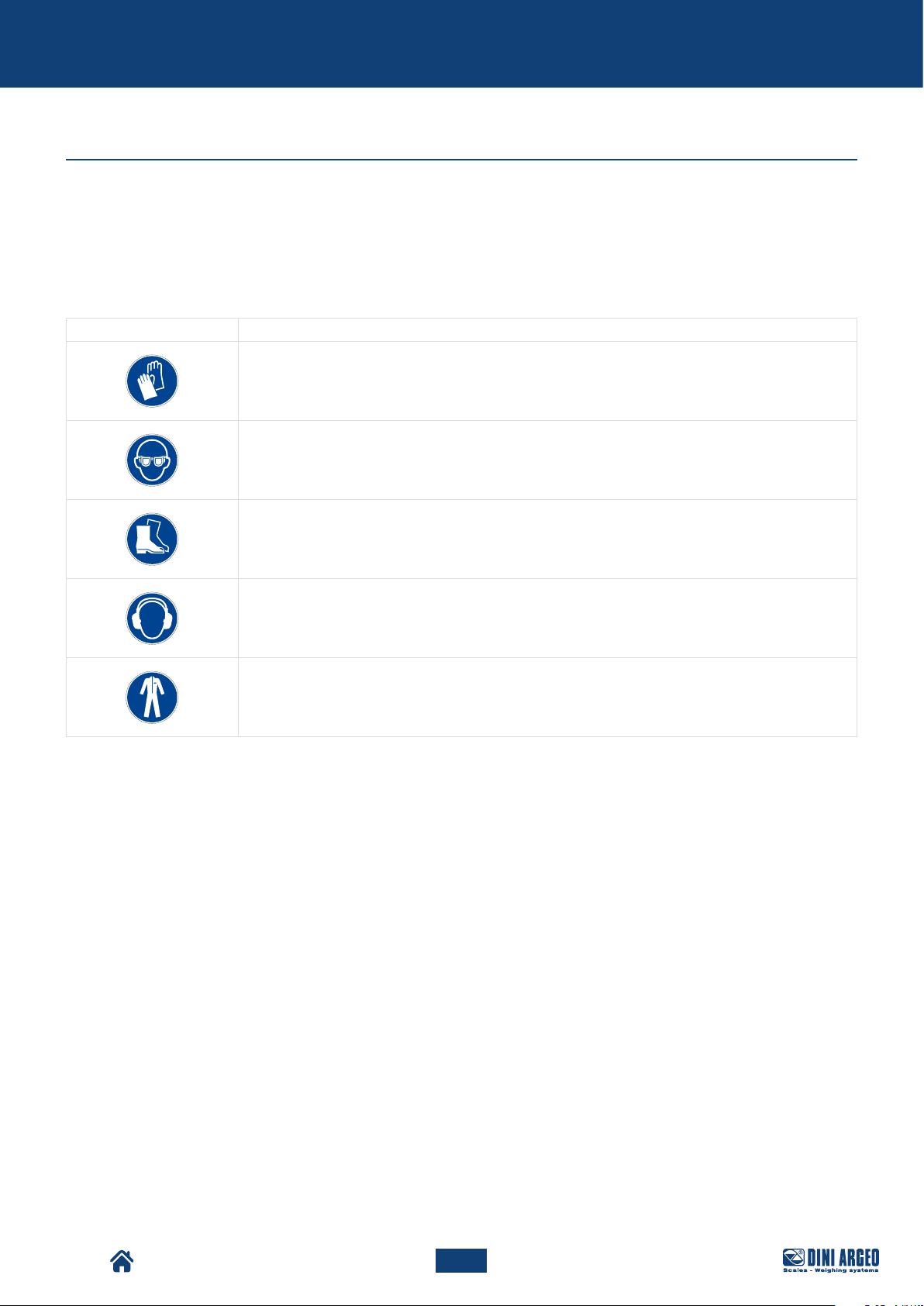
Symbol Description
Obligation to use safety or insulating gloves.
Indicates a requirement for the personnel to use safety or insulating gloves.
Obligation to use safety goggles.
Indicates a requirement for the personnel to use safety goggles.
Obligation to use safety footwear.
Indicates a requirement for the personnel to use safety footwear.
Obligation to use noise protection devices.
Indicates a requirement for the personnel to use earplugs or earmus for hearing protection.
Obligation to use safety clothing.
Indicates a requirement for the personnel to wear the specific safety clothing.
The clothing of those operating or maintaining the line must comply with the essential safety requirements defined
by the EU Reg.2016/425 and with the laws in force in the country where the line is installed.
TPW
13
USER_MAN_ENG_TPW_v4
Page 14
Preliminary information
Warranty
IMPORTANT!
The complete warranty terms are set out in the sales contract.
The conditions foreseen in the commercial contract (if different) have priority over what is provided in
this section.
The warranty is subject to the following general conditions:
• the machine must be used within the limits stated in the contract and provided in the technical documentation.
• maintenance must be carried out in the times and in the ways required by the manual, using original DINI ARGEO
spare parts and entrusting the operations to qualified personnel.
The warranty is void in case of:
• failure to comply with the safety regulations;
• removal or tampering with control and safety devices;
• improper use of the machine;
• use of the machine by untrained and/or unauthorised personnel or failure to comply with the skills of the various
operators, as indicated in the manual;
• modifications or repairs made by the user without the Manufacturer's written authorisation;
• partial or total failure to comply with the instructions;
• lack of maintenance;
• use of non-original spare parts;
• exceptional events such as flooding, fires (if not caused by the machines).
TPW
14
USER_MAN_ENG_TPW_v4
Page 15
Safety devices
SAFETY DEVICES
Noise
Noise measurements have been carried out in accordance with the provisions of standards UNI EN 11200 and UNI
EN ISO 3746.
During the operating cycles, under conditions of perfect functioning and maintenance and on a smooth industrial
surface, noise exposure of the personnel is less than 70 dB .
It is the user's responsibility to apply the resulting preventive and protective measures, in compliance with the
legislation of the country where the machine is installed and used.
Vibrations
The vibrations produced by the machine, according to its mode of operation, are not dangerous to the health of the
operators.
WARNING!
Excessive vibration can only be caused by a mechanical fault that must be immediately reported and
eliminated, in order not to compromise the safety of the line and of the operators.
Residual risks
The machine has been designed to assure the essential safety requirements for the operator.
Safety has been integrated into the design and construction of the machine as far as possible; however, risks from
which operators must be protected remain.
For each residual risk, a description of the risk and of the zone or part of the machine subject to the residual risk is
provided (unless it is a risk valid for the entire machine). Procedural information on how to avoid the risk and on the
correct use of the personal protection devices provided and required by the Manufacturer is also provided.
Risk Description and procedural information
TPW
Risk of crushing
Risk of load
falling
The risk of crushing lower limbs under the load during its descent remains.
The risk of load falling and crushing during handling operations remains.
15
USER_MAN_ENG_TPW_v4
Page 16
Safety devices
Safety pictograms applied to the machine
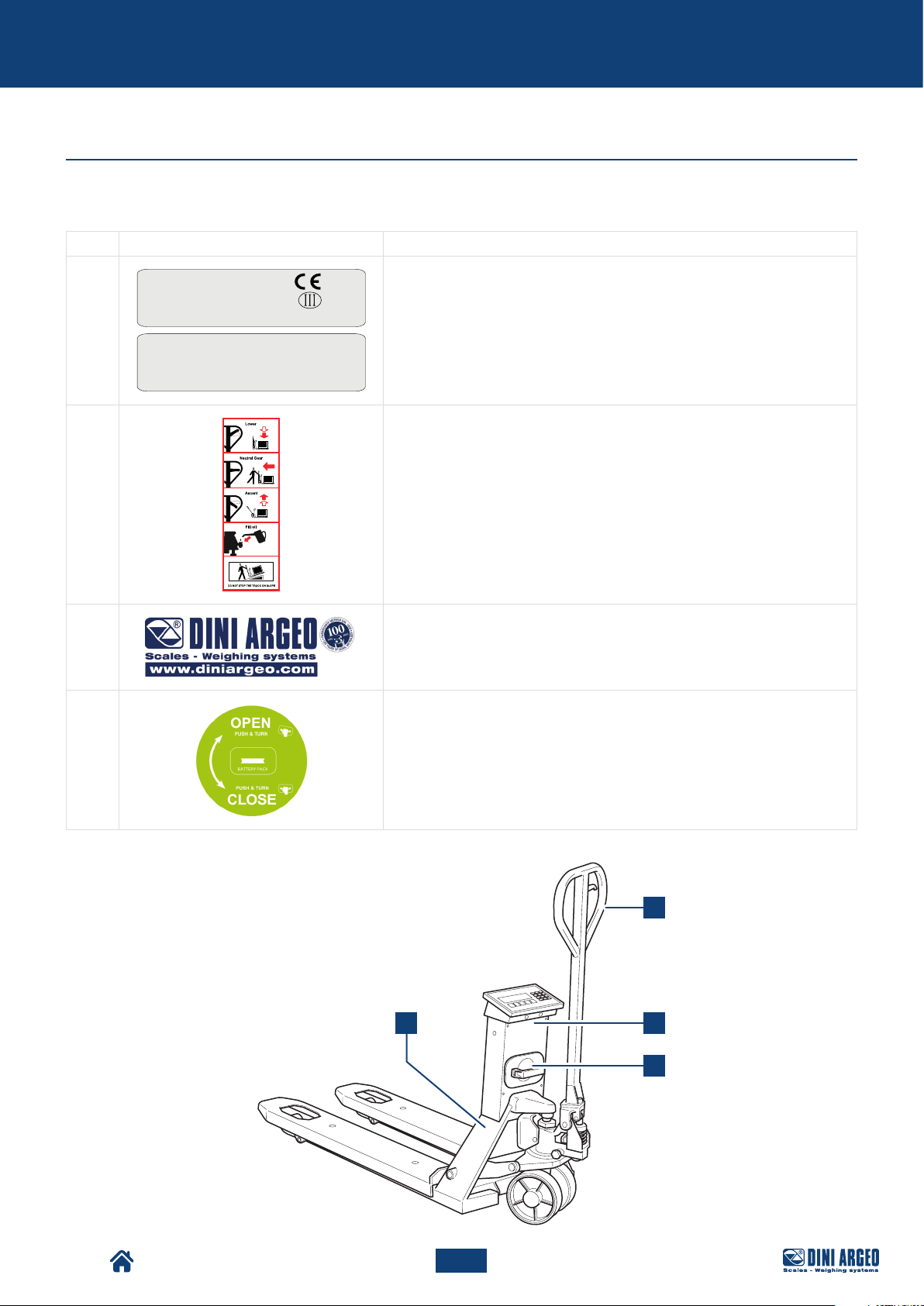
Stickers and safety plates are applied to the machine, as shown in the following table. Refer to the image for positioning.
Pos. Pictogram Description
Mod.
TPWLKP-5
Sn
0100574294
Dini Argeo - v. Fisica, 20 - 41042 Fiorano (MO) Italy
1
B1W1 B1W2 B1W3
Max
500 kg 1000 kg 2000 kg
Min
4 kg 10 kg 20 kg
0.2 kg
e =
2
0.5 kg
UK 2945
6V DC
CE IDENTIFICATION PLATES
1 kg
WARNING PLATE:
• load lowering;
• load transport;
• load lifting;
• oil filling;
• do not use on slopes.
3
4
MANUFACTURER DATA STICKER
BATTERY INDICATIONS STICKER
2
3
1
4
TPW
16
USER_MAN_ENG_TPW_v4
Page 17
Description
DESCRIPTION
Intended use (correct)
The machine in question is intended for industrial use for:
• the weighing and handling of objects placed on Europallet.
Max Europallet capacity permitted:
MODEL CAPACITY
TPWN 2000 kg
TPWP 2500 kg
TPWLK 2000 kg
TPWA 2000 kg
TPWI 2000 kg
TPWLKI 2000 kg
The machine has been designed to:
• meet the specific needs mentioned in the sales contract;
• be used according to the instructions and limits of use provided in this manual.
The machine has been designed and built to operate safely if:
• it is used within the limits stated on the contract and in this manual;
• the user manual procedures are followed;
• scheduled maintenance is carried out in the times and in the ways indicated;
• unscheduled maintenance is promptly carried out if required.
Reasonably foreseeable misuse
The reasonably foreseeable misuses, which are to be intended as strictly forbidden, are listed below:
• transporting people;
• transporting unstable or incorrectly stacked loads or fluids;
• using the machine as a support point;
• using the machine on a slope;
• using the machine in poorly lit areas;
• using the machine in order to obtain production values above the required limits;
• using the machine dierently than described in paragraph “Intended use (correct)”.
Any other use of the machine with respec t to that required must be previously authorised in writing by the Manufac turer.
In the absence of said written authorisation, the use is to be considered “improper use”; therefore the Manufacturer
declines any responsibility in regards to damage caused to property or people and deems any type of warranty on
the machine expired.
TPW
IMPORTANT!
An improper use of the machine relieves the Manufacturer from any responsibility.
17
USER_MAN_ENG_TPW_v4
Page 18
Description
Obligations and prohibitions
Operator obligations
The operator must:
• Perform maintenance operations always with the machine switched o. Not lubricate moving parts.
• When the machine is running, not operate nearby while wearing chains, bracelets, ties or other clothing that may
get caught in the mechanisms.
• Operators with long hair must tie them up in order to prevent them from getting entangled.
• During operation, pay the utmost attention that no person is able to directly access moving parts.
• Use the protective devices made available by the employer in an appropriate manner.
• Immediately report any deficiencies of the safety devices to the employer, the manager or the person in charge.
Operator prohibitions
Specifically, operators must not:
• use the machine improperly, i.e. for uses other than those indicated in the paragraph “Intended use (correct)”;
• remove or modify safety or warning devices without authorisation;
• carry out operations or manoeuvres that are not within their competence or that may compromise their own
safety or that of other workers on their own initiative;
• wear bracelets, rings or chains that can dangle and be dragged by moving parts, creating a hazard for the
operator;
• replace or modify the speed of the components of the machine without being authorised by a manager;
• use the machine if it has not been installed according to the regulations in force;
• use the machine as a support point even if it is not running (under risk of falling and/or the risk of damaging the
machine itself);
• use the machine outside the environmental conditions permitted (consult the paragraph “Environmental
conditions permitted”).
WARNING!
DINI ARGEO is not liable for damage to things or people if it is ascertained that the machine has been
used in a non permitted environment.
TPW
18
USER_MAN_ENG_TPW_v4
Page 19

Description
Technical data
TPWN
Material PAINTED STEEL
Fork dimensions 1150 x 550 x 87 mm *
Weight 110 kg
Wheels GUIDE WHEELS AND DOUBLE LOADING WHEELS IN POLYURETHANE *
Max capacity 2000 kg
IP Degree -
Power supply BATTERY, 4 “AA” TYPE
Printer -
Keyboard 5 KEYS
Operating life 40 hrs
* Dierent sizes and materials are available at the specific request of the purchaser.
TPWLK
Material PAINTED STEEL
Fork dimensions 1150 x 550 x 85 mm *
Weight 125 kg
Wheels GUIDE WHEELS AND DOUBLE LOADING WHEELS IN POLYURETHANE *
Max capacity 2000 kg
IP Degree 65 (ONLY VERSIONS WITHOUT PRINTER)
Power supply WITH REMOVABLE BATTERY
Printer OPTIONAL
Keyboard 17 KEYS
Operating life 80 hrs
* Dierent sizes and materials are available at the specific request of the purchaser.
TPWA
Material PAINTED STEEL
Fork dimensions 1150 x 550 x 85 mm *
Weight 125 kg
Wheels GUIDE WHEELS AND DOUBLE LOADING WHEELS IN POLYURETHANE *
Max capacity 2000 kg
IP Degree -
Power supply WITH REMOVABLE BATTERY
Printer AS PER STANDARD
Keyboard 17 KEYS
Operating life 80 hrs
* Dierent sizes and materials are available at the specific request of the purchaser.
TPW
19
USER_MAN_ENG_TPW_v4
Page 20

Description
TPWET
Material PAINTED STEEL
Fork dimensions 1150 x 550 x 85 mm *
Weight 125 kg
Wheels GUIDE WHEELS AND DOUBLE LOADING WHEELS IN POLYURETHANE *
Max capacity 2000 kg
IP Degree 65 (ONLY VERSIONS WITHOUT PRINTER)
Power supply WITH REMOVABLE BATTERY
Printer OPTIONAL
Keyboard TOUCHSCREEN
Operating life 10 hrs
* Dierent sizes and materials are available at the specific request of the purchaser.
WARNING!
For the functions of the models with touchscreen keypad, refer to the specific manual of the weight
indicator software.
TPWP
Material PAINTED STEEL
Fork dimensions 1150 x 550 x 85 mm *
Weight 125 kg
Wheels GUIDE WHEELS AND DOUBLE LOADING WHEELS IN POLYURETHANE *
Max capacity 2500 kg
IP Degree 65 (ONLY VERSIONS WITHOUT PRINTER)
Power supply WITH REMOVABLE BATTERY
Printer OPTIONAL
Keyboard 17 KEYS
Operating life 80 hrs
* Dierent sizes and materials are available at the specific request of the purchaser.
TPWLKW
Material PAINTED STEEL
Fork dimensions 1240 x 680 x 85 mm *
Weight 134 kg
Wheels GUIDE WHEELS AND DOUBLE LOADING WHEELS IN POLYURETHANE *
Max capacity 2000 kg
IP Degree 65 (ONLY VERSIONS WITHOUT PRINTER)
Power supply WITH REMOVABLE BATTERY
Printer OPTIONAL
Keyboard 17 KEYS
Operating life 80 hrs
* Dierent sizes and materials are available at the specific request of the purchaser.
TPW
20
USER_MAN_ENG_TPW_v4
Page 21

Description
TPWLKI
Material STAINLESS STEEL
Fork dimensions 1180 x 550 x 80 mm *
Weight 135 kg
Wheels GUIDE WHEELS AND DOUBLE LOADING WHEELS IN NYLON *
Max capacity 2000 kg
IP Degree 68 (ONLY VERSIONS WITHOUT PRINTER)
Power supply WITH NON REMOVABLE INTERNAL BATTERY
Printer OPTIONAL (IP65)
Keyboard 17 KEYS
Operating life 80 hrs
* Dierent sizes and materials are available at the specific request of the purchaser.
TPWI
Material STAINLESS STEEL
Fork dimensions 1180 x 550 x 80 mm *
Weight 135 kg
Wheels GUIDE WHEELS AND DOUBLE LOADING WHEELS IN NYLON *
[VULKOLAN FOR THE TPWID VERSION]
Max capacity 2000 kg
IP Degree 68 (ONLY VERSIONS WITHOUT PRINTER)
Power supply WITH NON REMOVABLE INTERNAL BATTERY
Printer OPTIONAL (IP65)
Keyboard 17 KEYS
Operating life 80 hrs
* Dierent sizes and materials are available at the specific request of the purchaser.
TPW
21
USER_MAN_ENG_TPW_v4
Page 22
Description
Environmental conditions permitted
The environment in which the machine must be used is an internal environment protected from weathering such as
rain (except IP versions), hail, snow, fog, suspended dust, combustible dust and must not be classified and protected
from aggressive agents such as corrosive vapours or excessive heat sources.
The ground must have an adequate maximum permitted load (cement, asphalt) and an even surface.
The machine has been designed and built to operate safely in the following environmental conditions:
Room temperature
Maximum relative humidity
Room lighting
Support surface
WARNING!
Environmental conditions other than those specified may cause serious damage to the machine and void
the warranty.
IMPORTANT!
The work surface must be sufficiently illuminated.
In the event of dark areas in the workplace, it will be the user's responsibility to provide suitable lighting
devices.
-10°C ~ + 40°C
85 % non-condensing
min. 50 lux - non-glare light
perfectly flat concrete industrial floor
TPW
22
USER_MAN_ENG_TPW_v4
Page 23
Description
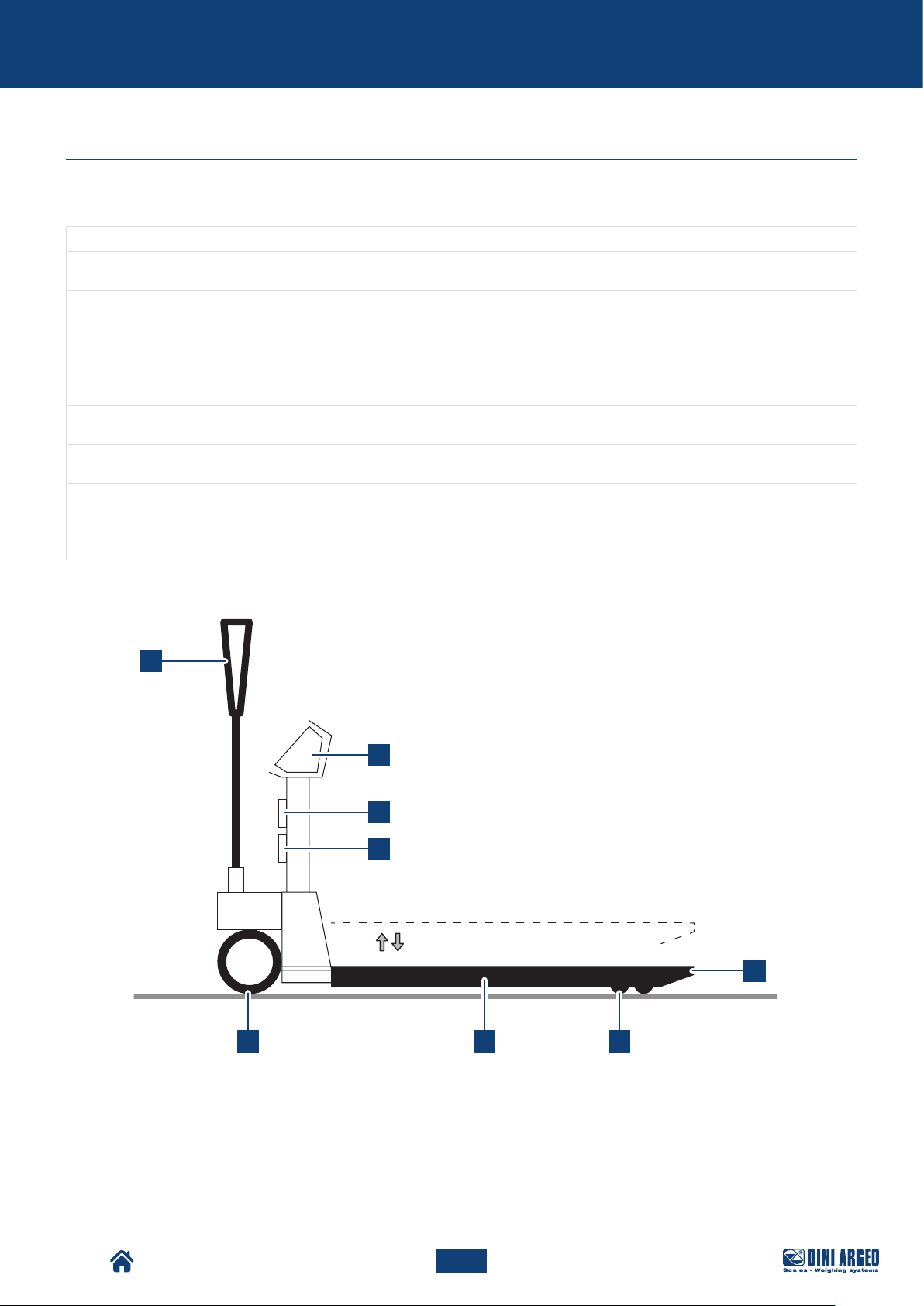
Main components
The machine is made up of the following main components:
Pos. Component
LOADING FORKS
1
LOAD CELLS
2
STEERING WHEELS
3
DOUBLE LOADING WHEELS
4
TILLER WITH MULTIFUNCTION LEVER
5
FIXED OR ADJUSTABLE MULTIFUNCTION WEIGHT INDICATOR
6
RECHARGEABLE BATTERY
7
BUILT-IN PRINTER
8
5
6
8
7
from 80 or 85 mm to 180 or 200 mm
1
TPW
2 43
23
USER_MAN_ENG_TPW_v4
Page 24
PILE
RICARICABILI
Description
Rechargeable battery
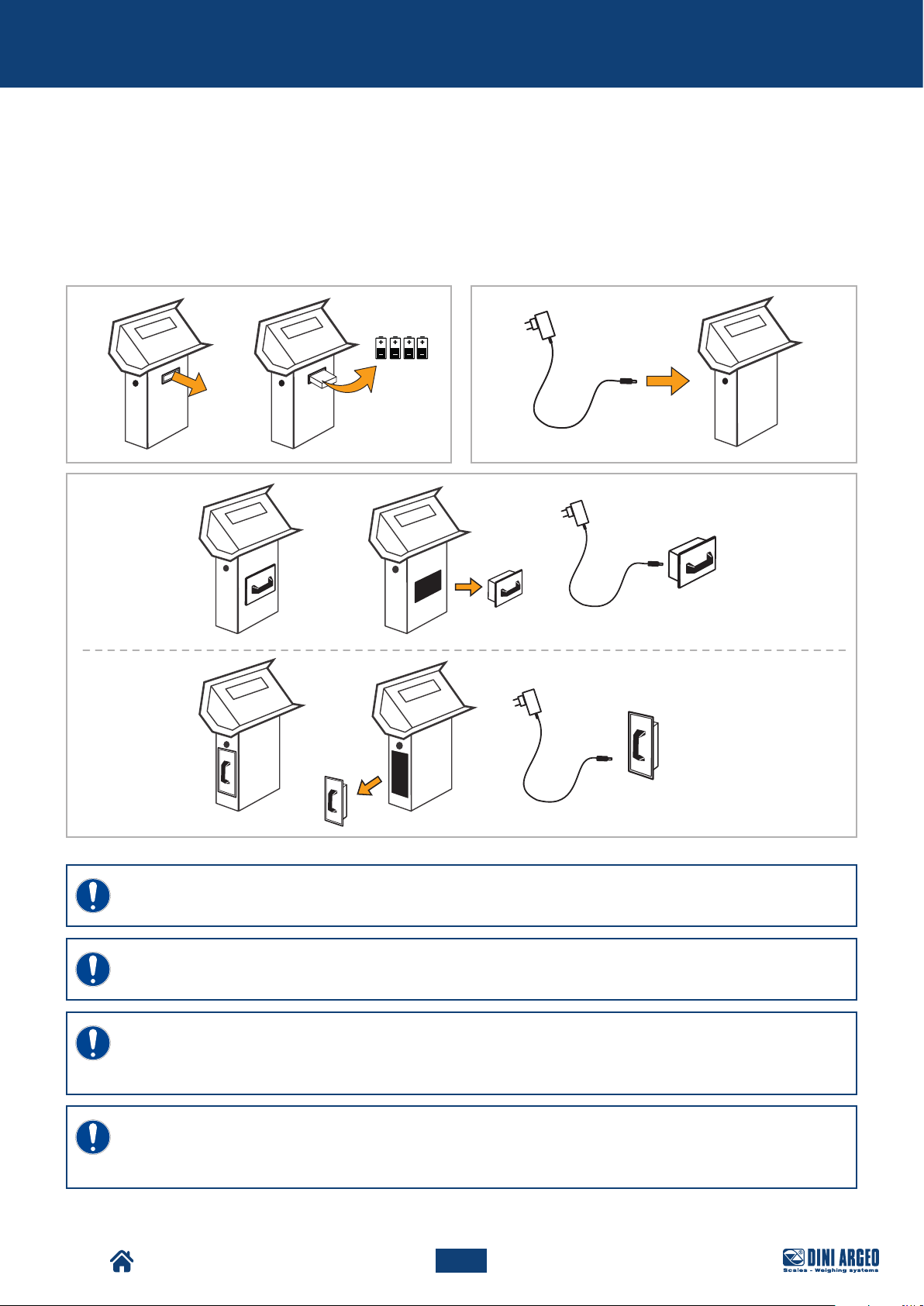
Depending on the model purchased, the Pallet truck can be equipped with:
• battery drawer (AA type) (A),
• internal rechargeable battery (B),
• removable rechargeable battery (C).
The battery life depends on the model, if from 10 to 80 hrs.
A
C
RECHARGEABLE
BATTERIES
B
REMOVABLE
BATTERIA
BATTERY
ESTRAIBILE
ONLY FOR
STAINLESS STEEL
VERSIONS
REMOVABLE
BATTERIA
BATTERY
ESTRAIBILE
IMPORTANT!
Before turning the pallet truck on for the first time, fully charge the battery for 12 hours.
IMPORTANT!
Only use original batteries and battery chargers supplied.
IMPORTANT!
During normal use, never leave the battery partially or fully discharged. Fully recharge it at least once
a week.
IMPORTANT!
In case of prolonged periods of disuse, we recommend removing the batteries (in pertaining models) and
storing it in a dry place, away from changes in temperature.
TPW
24
USER_MAN_ENG_TPW_v4
Page 25
Description
160° 160°
Optional components
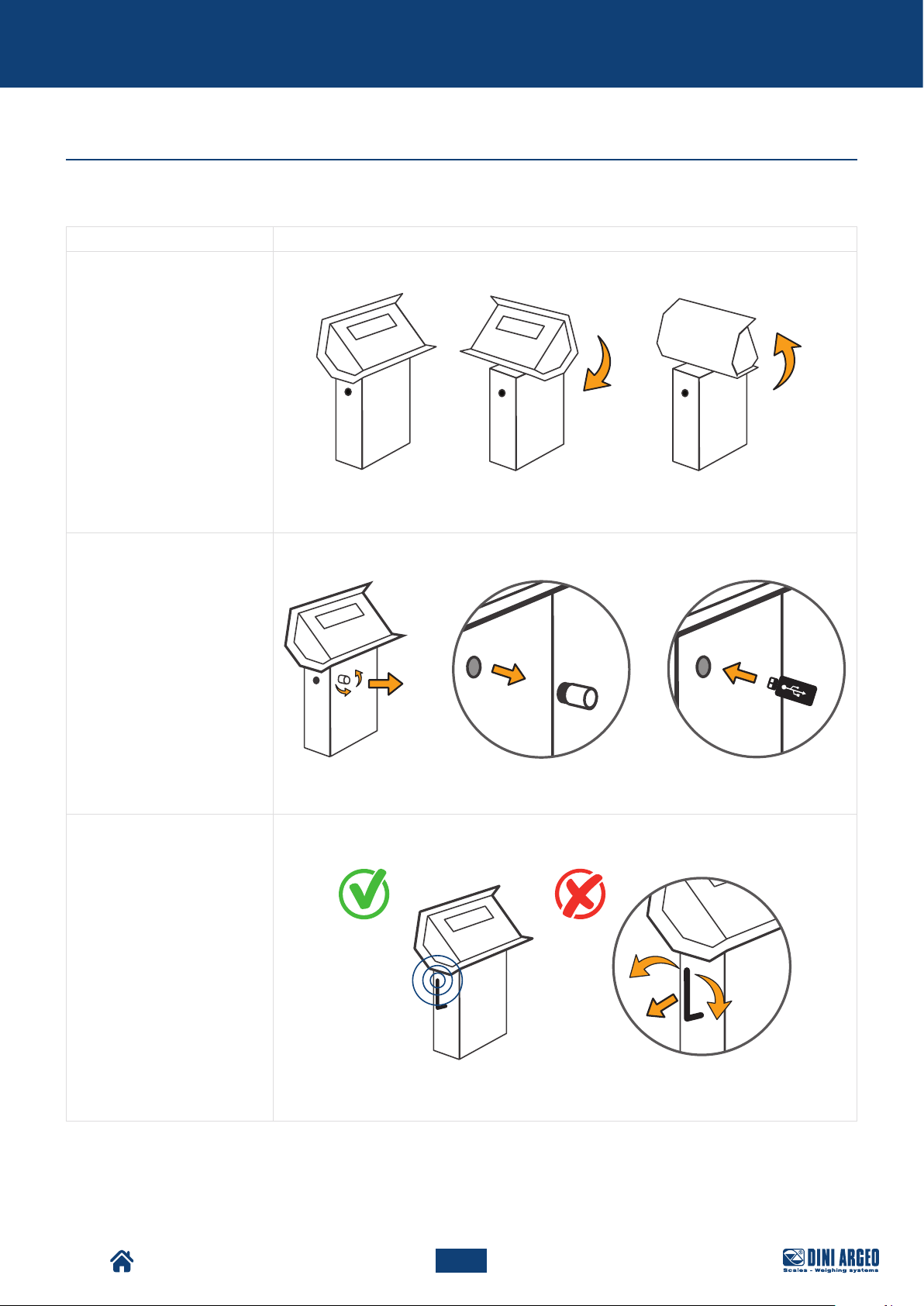
The machine can be equipped with the following optional components:
Component Description and Image
SWIVEL COLUMN
(standard depending on model)
USB PORT
(depending on model)
Ensures maximum display reading comfort.
Enables to store all completed weighing operations on memory stick.
ANTENNA
(depending on model)
TPW
Fixed antenna for wireless data transmission.
25
USER_MAN_ENG_TPW_v4
Page 26
Description
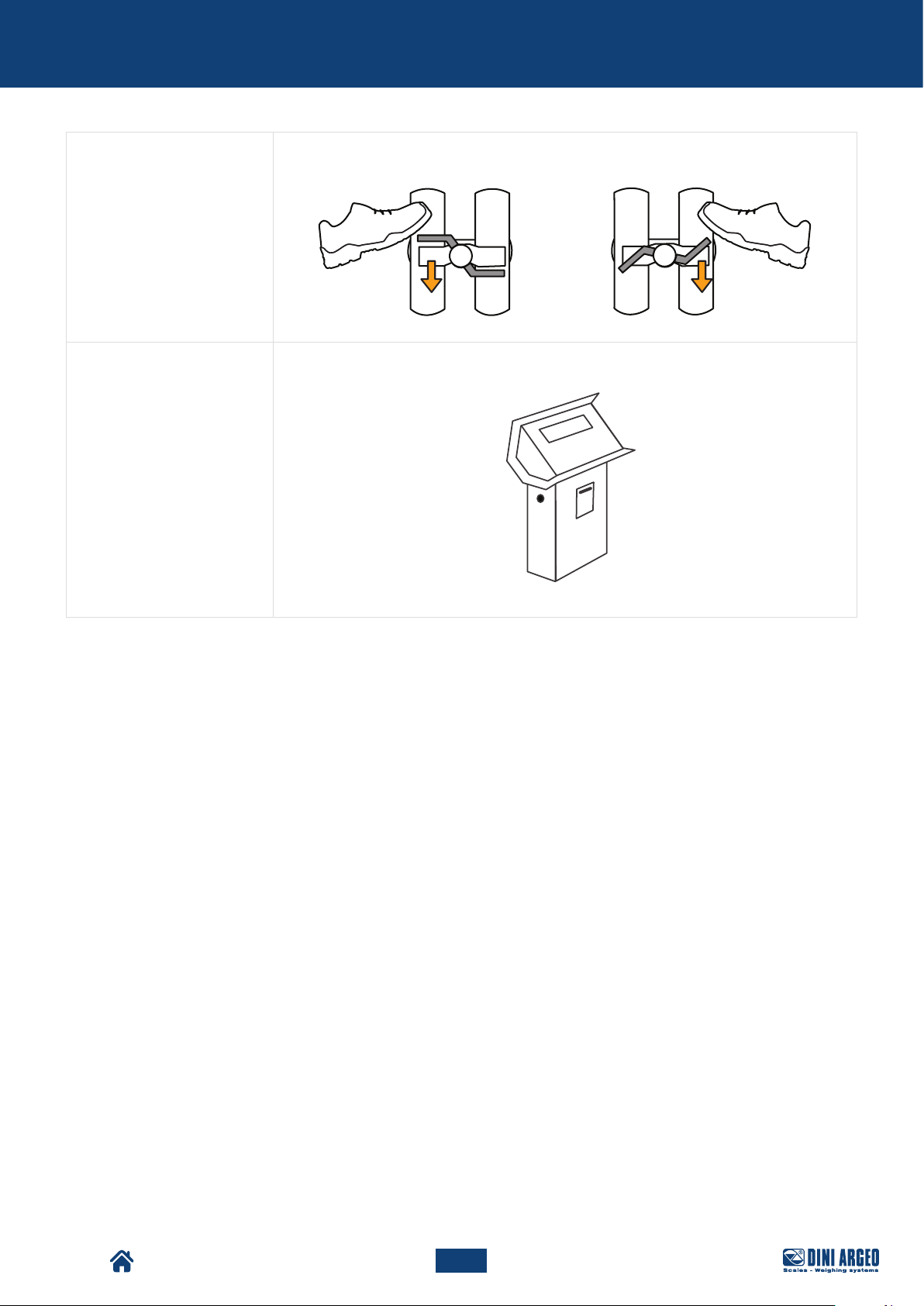
BRAKE Pedal parking brake unit installed on steering wheels.
INTEGRATED THERMAL
PRINTER
It allows to print the receipt or the label, which in turn can be customised.
TPW
26
USER_MAN_ENG_TPW_v4
Page 27
Packaging and handling
PACKAGING AND HANDLING
Packaging and handling warnings
WARNING!
DINI ARGEO is not liable for damage, to things or people, caused by accidents due to failure to follow
the instructions provided in this manual.
WARNING!
Use lifting equipment with a capacity suitable for the weight to be lifted.
IMPORTANT!
Lifting and handling operations must only be carried out by specialised and trained personnel, who are
qualified to carry out these activities.
TPW
27
USER_MAN_ENG_TPW_v4
Page 28
Packaging and handling
Packaging
The pallet truck is transported disassembled and packaged inside a cardboard box with a strapped pallet. The
TPWLKI and TPWLKW models on the other hand, are transported fully assembled on a pallet and strapped to it.
Upon receiving the packaged machine, the customer must verify that there is no damage caused by the mode of
transport or by the personnel in charge of the specific operations.
If damage is detected, leave the packaging in question in the state found and immediately request the assessment of
the damage by the competent shipping company, then communicate the damage found to the competent transport
insurance and sales outlet by means of a damage certificate.
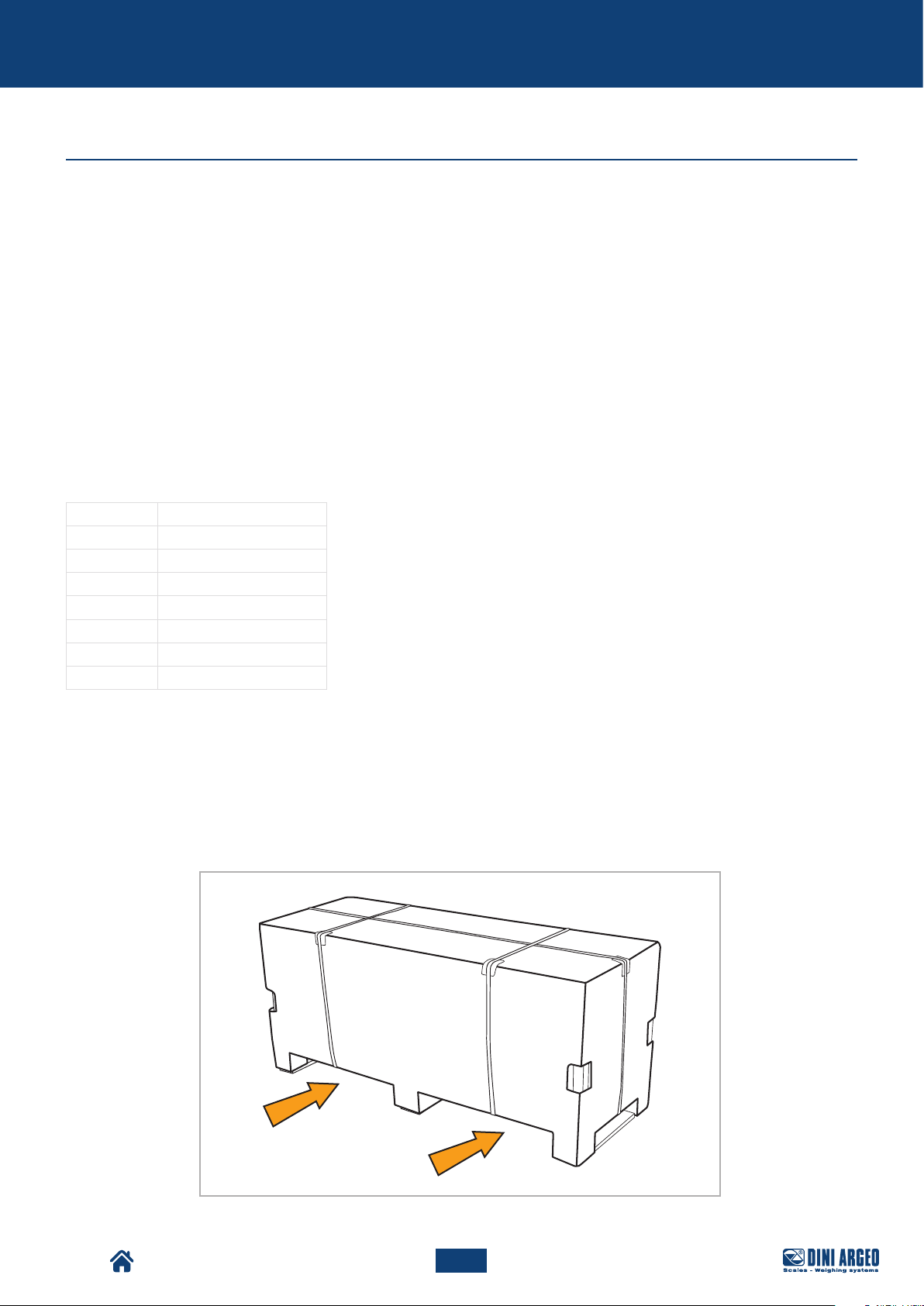
Packaging handling
The packaging must be moved by means of a forklift with a capacity suitable for the weight to be lifted (refer to the
table below to check the weight of your model).
Weights with transport crate:
MODEL WEIGHT
TPWN 124 kg
TPWLK 138 kg
TPWA 138 kg
TPWP 138 kg
TPWLKW 148 kg
TPWLKI 135 kg
TPWI 135 kg
For handling, proceed as follows:
1. Position the forklift forks under the packaging containing the machine, as shown in the figure.
2. Make sure the forks come out from the rear of the load, for a length sucient to eliminate any risk of tipping.
3. Lift slowly, making sure that the centre of gravity of the section is positioned at the centre of the lifting forks.
TPW
POSITIONING
FORKS
28
USER_MAN_ENG_TPW_v4
Page 29
Packaging and handling
Packaging removal
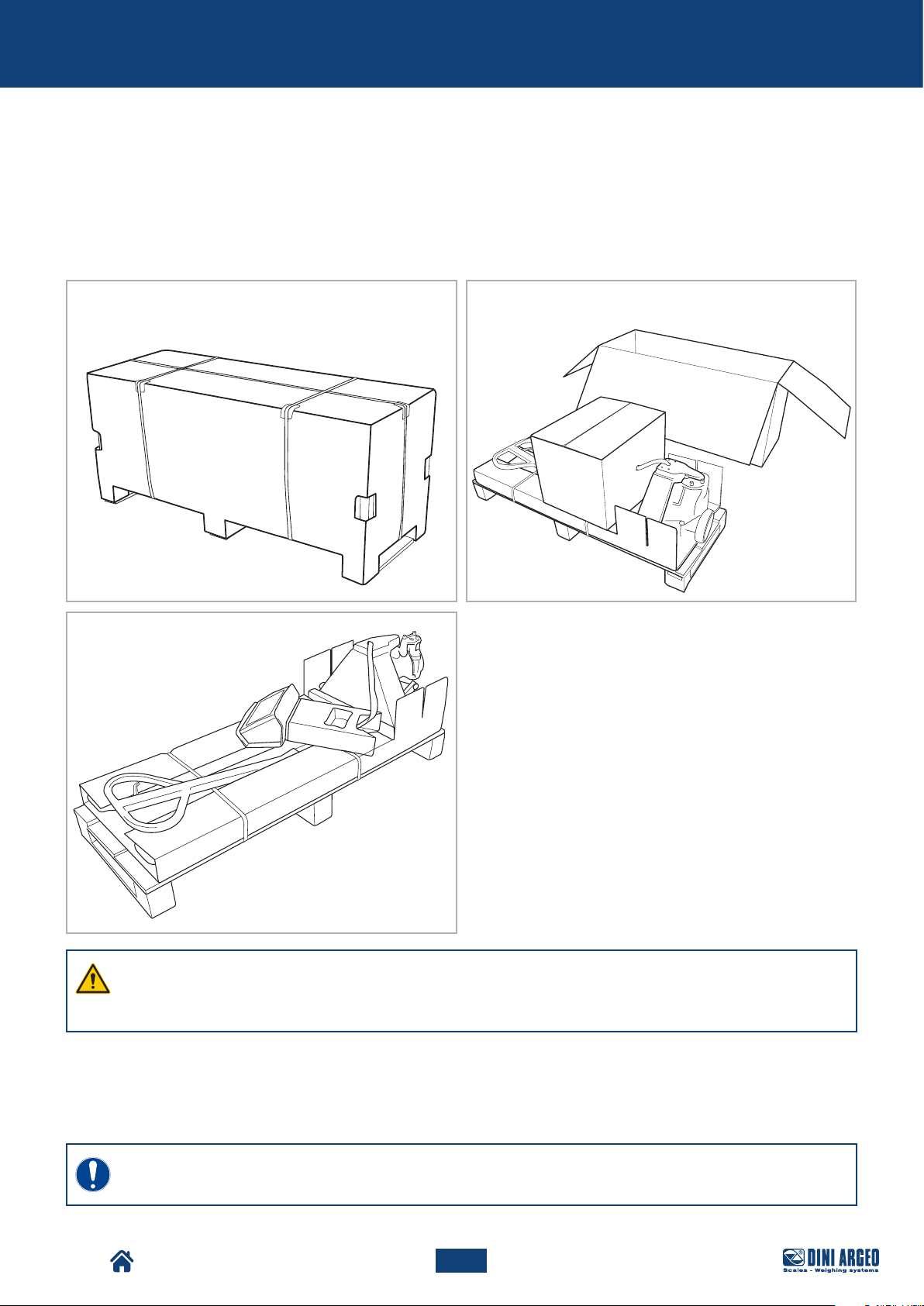
To remove the packaging, proceed as follows:
1. Place the packaging containing the machine in the place of destination.
2. Remove the machine parts from the packaging and place them on a flat surface.
3. Proceed with assembly operations (refer to chapter “ASSEMBLY”).
1 2
3
WARNING!
The TPWLKI and TPWLKW models on the other hand, are transported fully assembled on a pallet and
strapped to it.
Packaging disposal
The packaging is an integral part of the supply and is not collected, therefore the purchaser is in charge of disposing
of it.
IMPORTANT!
Dispose of the packaging in compliance with the regulations in force in the country of the user.
TPW
29
USER_MAN_ENG_TPW_v4
Page 30
Assembly
ASSEMBLY
Assembly warnings
WARNING!
DINI ARGEO is not liable for damage, to things or people, caused by accidents due to failure to follow
the instructions provided in this manual.
IMPORTANT!
Assembly operations must only be carried out by specialised and trained personnel, who are qualified
to carry out these activities.
TPW
30
USER_MAN_ENG_TPW_v4
Page 31
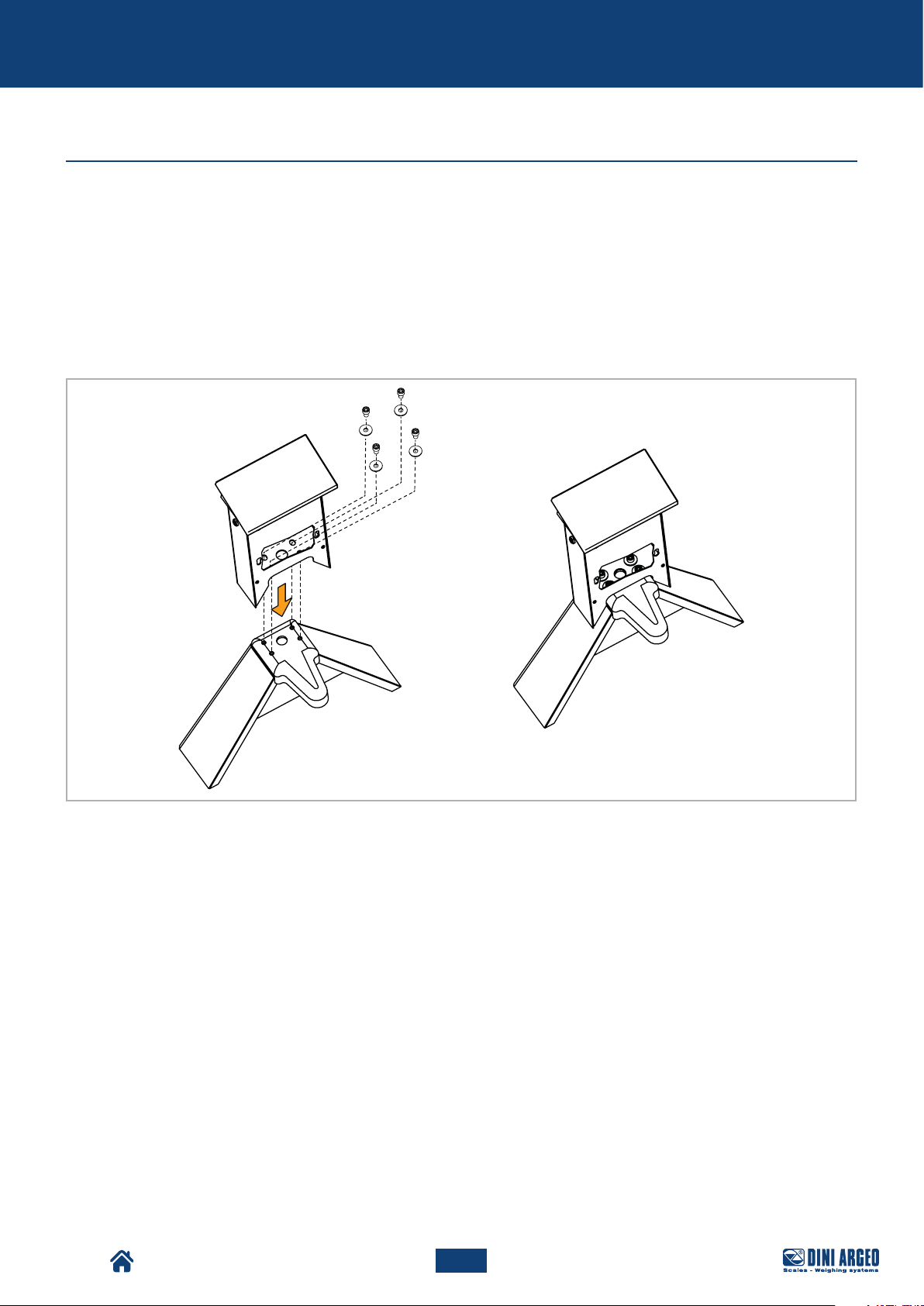
Assembly
Assembly procedure
The machine is delivered divided into 3 parts:
• tiller,
• column,
• carriage.
To assemble the parts, proceed as follows:
A. Place the column on the base of the carriage and fix it by using the 4 bolts supplied.
A
TPW
31
USER_MAN_ENG_TPW_v4
Page 32
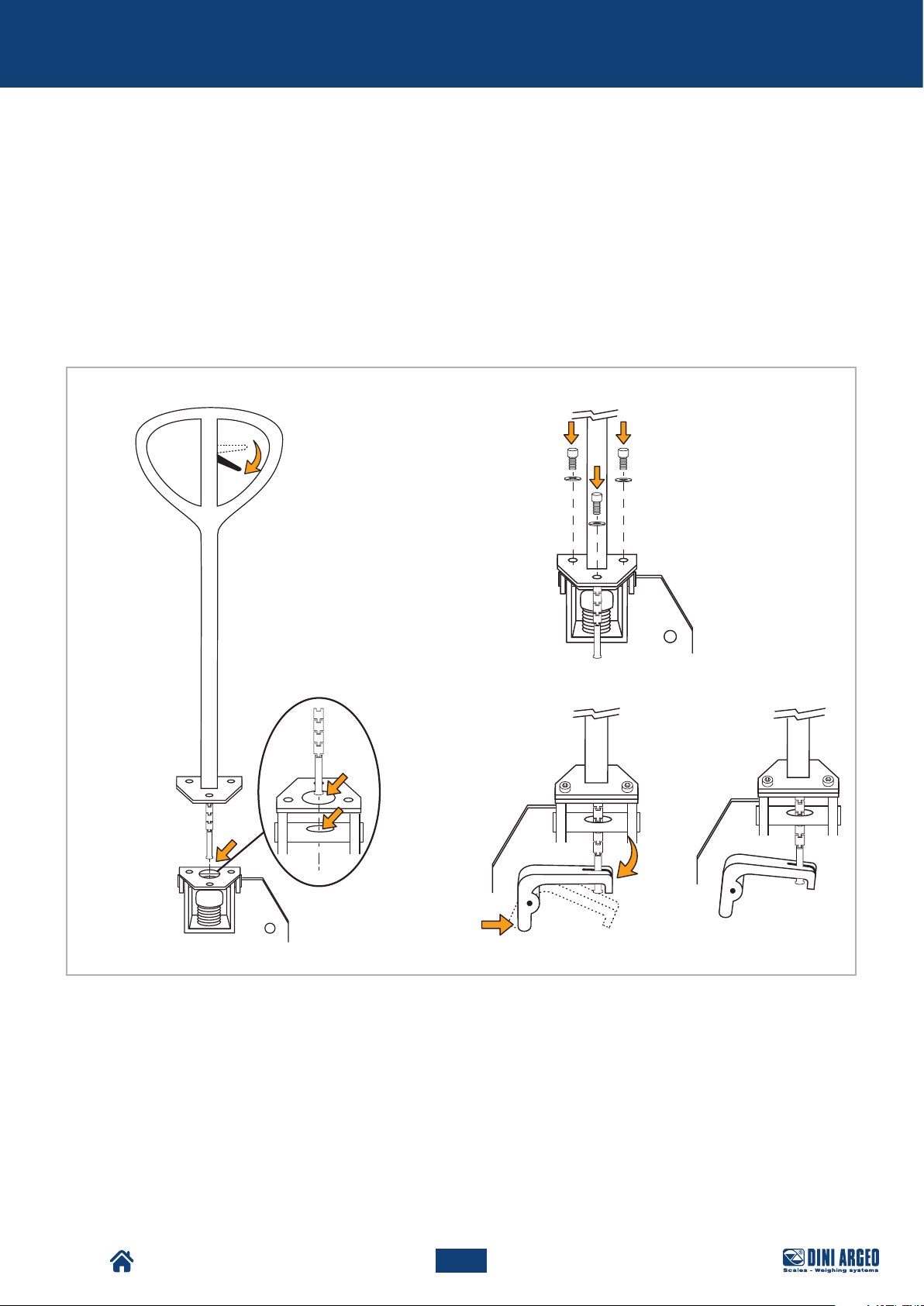
Assembly
B. Assemble the tiller “version 1” or “version 2”, depending on the pallet truck model purchased.
VERSION 1
B.1. Make sure the lifting lever is in “lowered” position.
B.2. Position the tiller vertically above the carriage, making sure that the chain falls at the hole.
B.3. Fix the tiller to the carriage by using the 3 bolts supplied.
B.4. Hook the chain pin to the specific lever.
B
B.3
B.1
B.2
B.4
TPW
32
USER_MAN_ENG_TPW_v4
Page 33
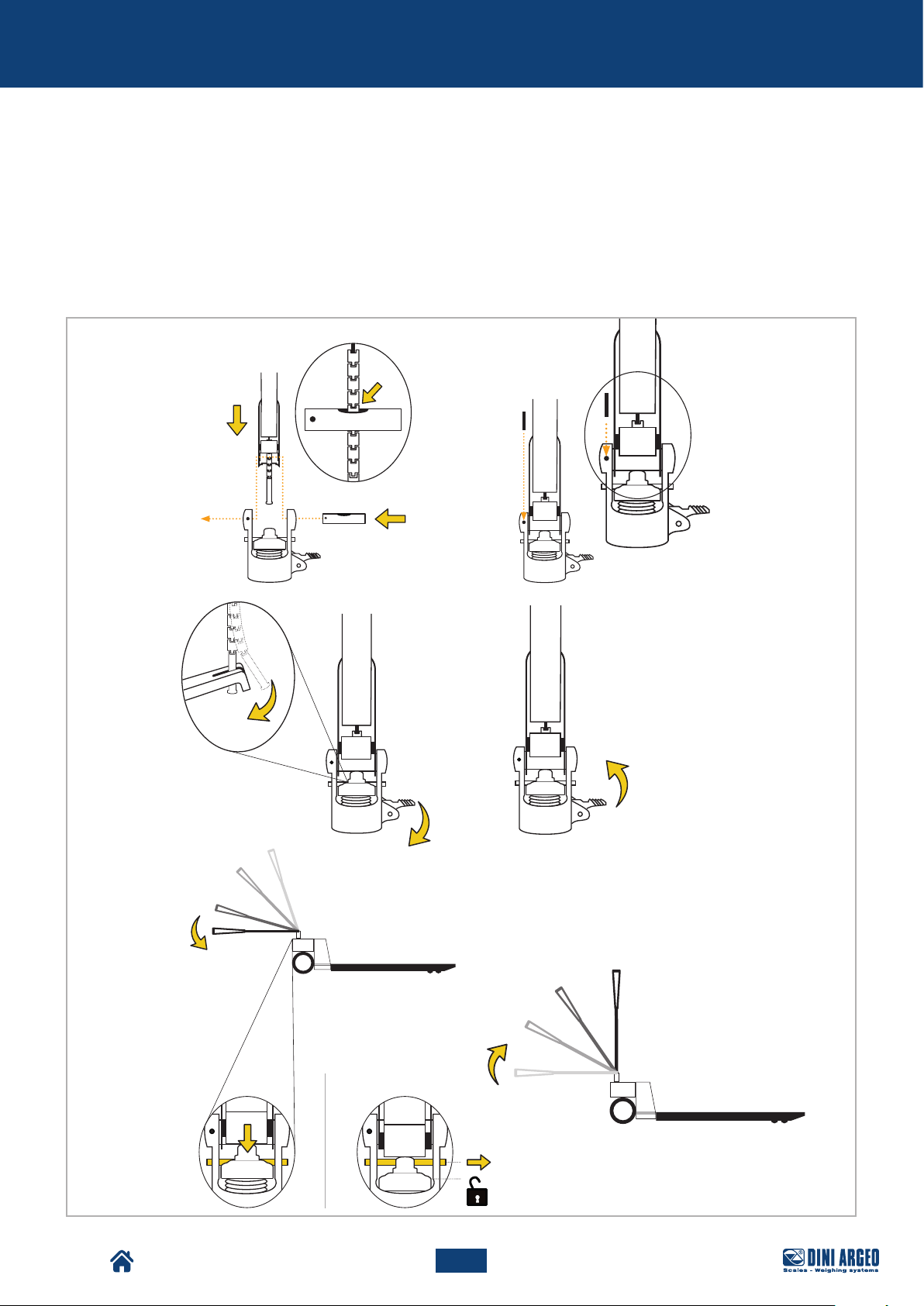
Assembly
VERSION 2
B.5. Position the tiller vertically above the carriage, making sure that the chain falls at the hole. Then insert the
pin into the side hole.
B.6. Insert the split pins to lock the pin.
B.7. Hook the chain to the specific locking lever.
B.8. Fully lower the tiller to compress the spring as much as possible, so as to leave enough space to remove
the pin. Bring the tiller back to normal position.
B
B.5
B.7
B.6
TPW
B.8
12
33
USER_MAN_ENG_TPW_v4
Page 34
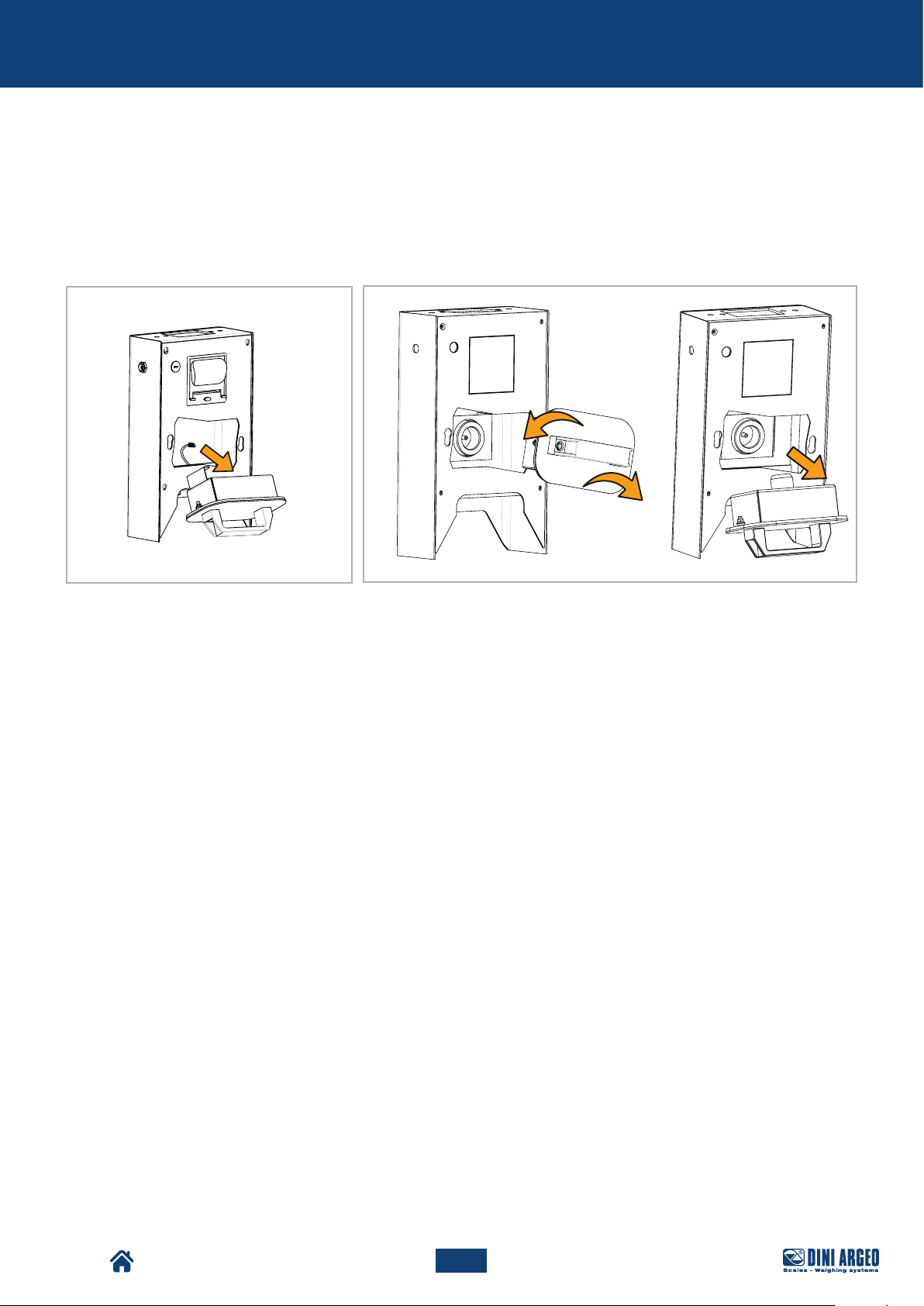
Assembly
C. Install the battery in the specific compartment.
The battery can be connected to the machine by means of:
• with connection cable (C.1),
• snapping on (C.2).
When connecting the battery by using a connecting cable, after connecting the cable, place the battery in the
specific compartment.
C.1
After carrying out the assembly operations described, it is possible to proceed with regular use of the machine.
C.2
TPW
34
USER_MAN_ENG_TPW_v4
Page 35
Assembly
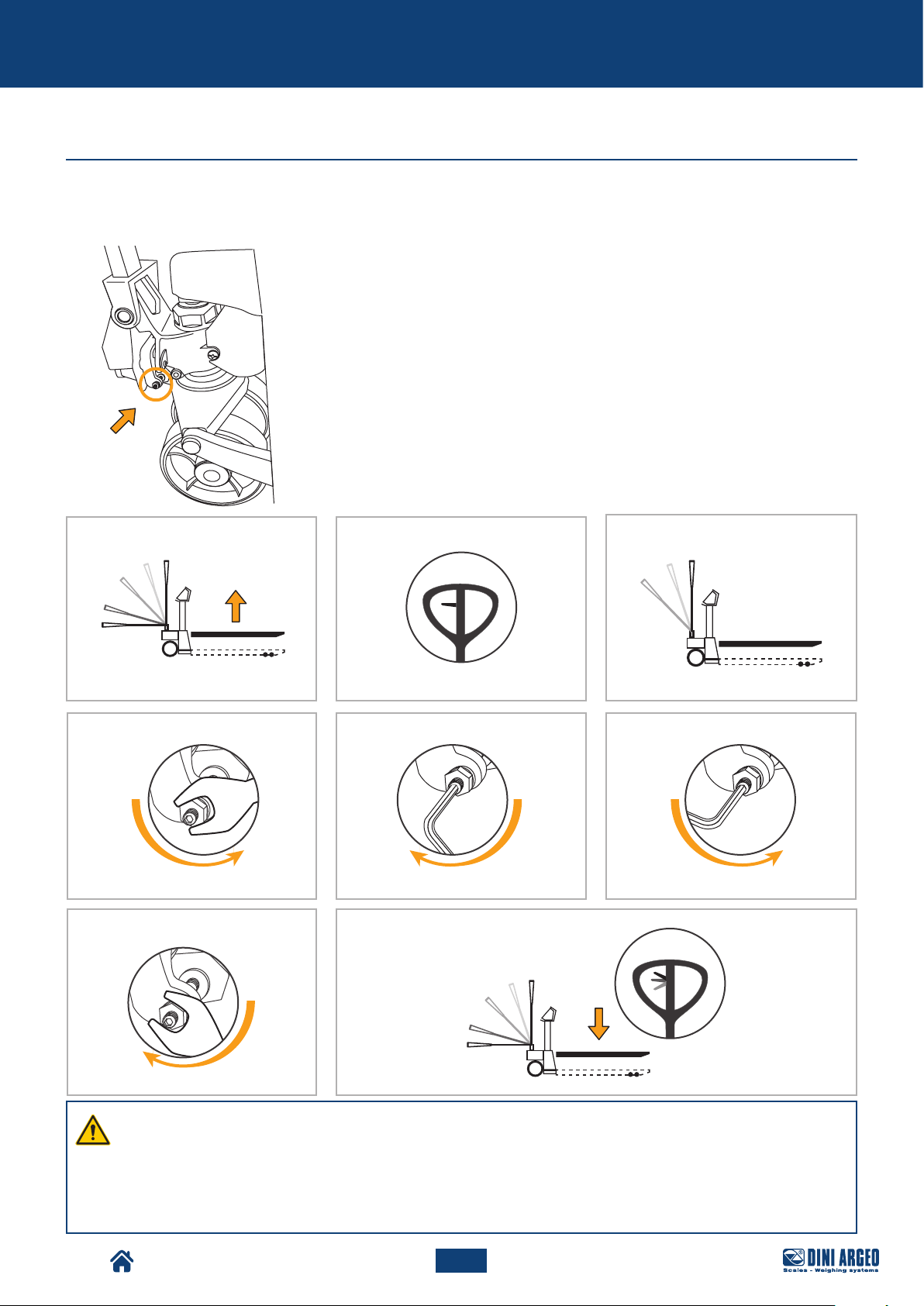
Descent adjustment
The machine is already adjusted for correct operation. However, should it be required to perform descent adjustment,
refer to the procedure described below:
A. Place the forks at the maximum height.
B. Place the tiller control lever in POS. 1 (centre).
C. Make sure the tiller is in the upright position.
D. Unscrew the locknut, to unlock the adjustment screw.
E. Slowly turn the adjustment screw clockwise until the forks start moving
downwards.
F. As soon as the forks start lowering, turn the adjustment screw one and a half
turns anti-clockwise.
G. Tighten the locknut, to lock the adjustment screw.
H. Using the control lever, the downwards movement can be carried out from
any tiller position.
A
B
D E F
G H
C
TPW
WARNING!
Make sure that with the tiller in its transport position, it is not possible to raise the forks.
Otherwise:
• release the locknut,
• turn it half a turn clockwise,
• tighten the locknut back up again.
35
USER_MAN_ENG_TPW_v4
Page 36
Commands
COMMANDS
Tiller commands
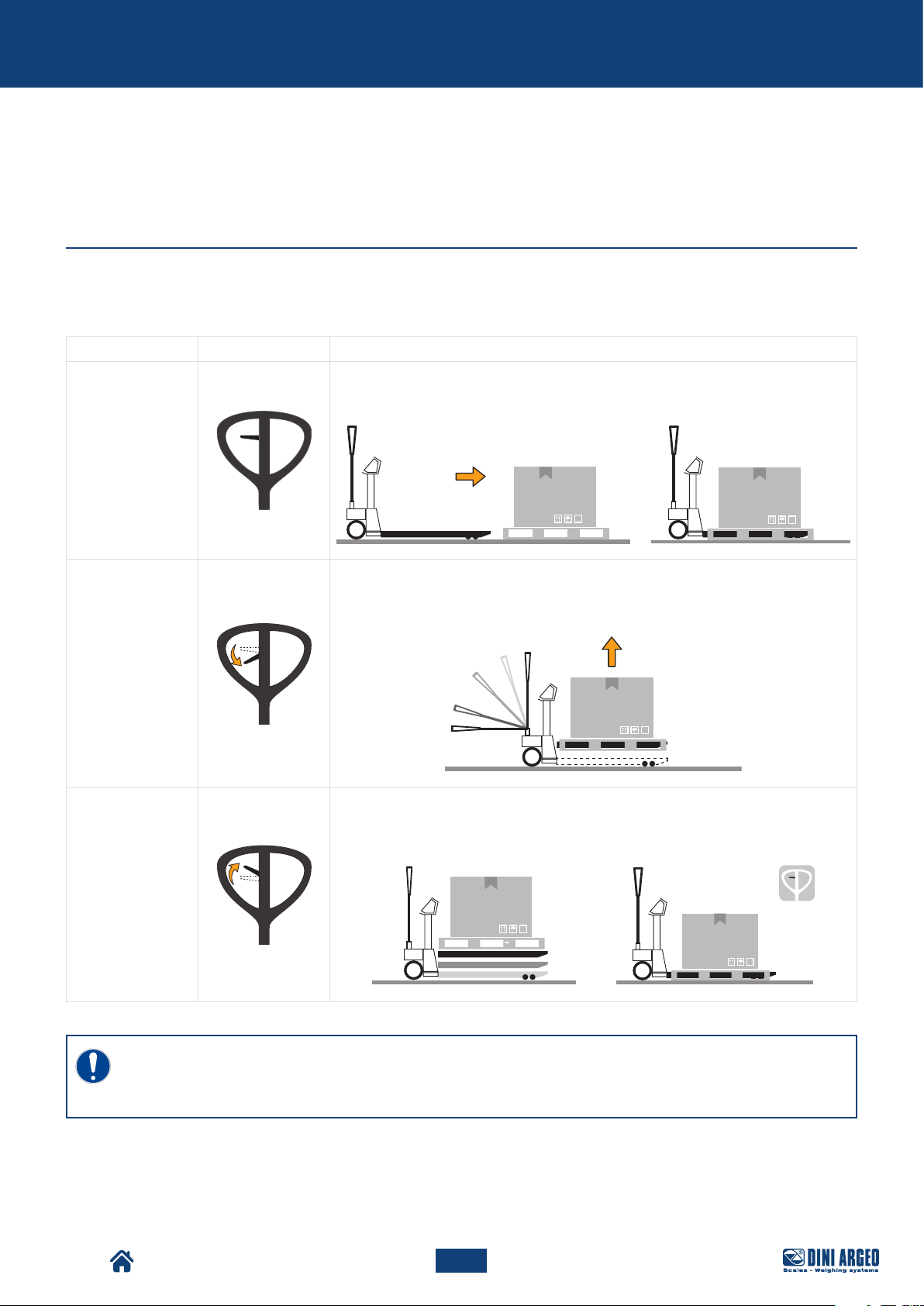
The raised load is moved forwards or backwards by the tiller, which controls the steering wheels. The tiller can be
used in the following conditions:
Condition Image Mode
TRANSPORT
The tiller is completely free for transport manoeuvres.
AT THE CENTRE
DOWN
UP
LIFTING
Pull the tiller downwards to start up the lifting pump. A return spring places the tiller
back in its upright position.
DESCENT
Pull the lever upwards to lower the load. The descent speed is controlled by a
special valve that starts up when the lever is firmly pulled to the end of its stroke.
TPW
IMPORTANT!
The pallet truck is equipped with a dual-function tiller: traction or manoeuvre and hydraulic lift.
Raise or lower the truck only when stationary.
36
USER_MAN_ENG_TPW_v4
Page 37
Commands
Display
1
2
3
4
6
5
7
131415
12
8
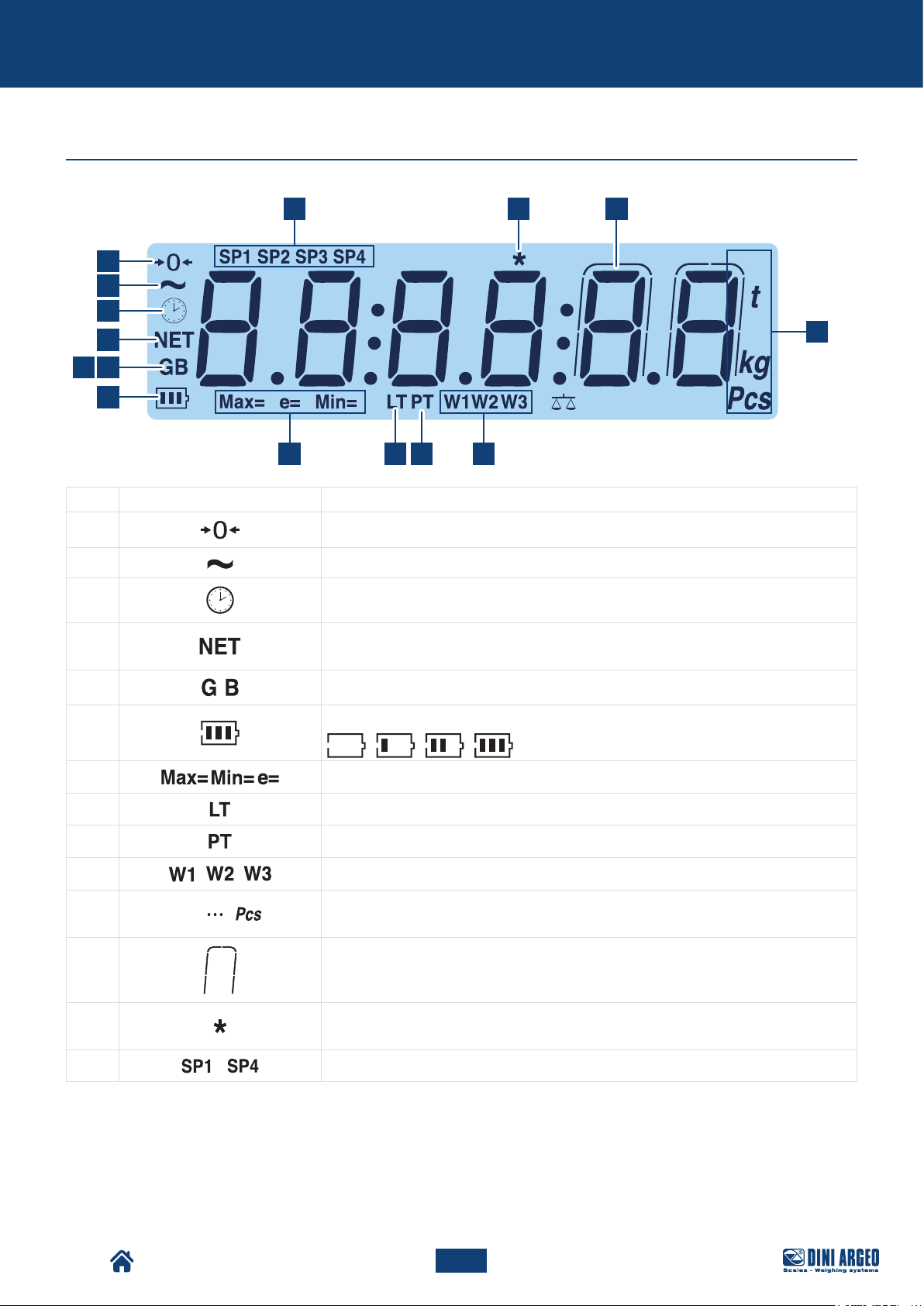
Pos. Icon Description
1
2
3
4
5 / 6
Indicates that the scale is unloaded and at zero (gross).
Indicates that the weight is unstable.
Displays the time.
The net weight is displayed.
Note: there is a saved tare.
The gross weight is displayed.
Indicates the battery level:
7
8
9
10
11
Metrics are displayed.
A locked tare is active.
A manual tare is active.
Indicate the range of active weighing.
9 10 11
TPW
12
13
14
15
lb
Indicates the units of measurement: pounds (lb), tonnes (t), kilograms (kg), grams (g),
number of pieces (pcs).
The weight is displayed in high resolution.
This means a key is pressed. In some operating modes, it means that a specific
function is active.
...
These indicate the active relay outputs (only with the optional board).
37
USER_MAN_ENG_TPW_v4
Page 38
Commands
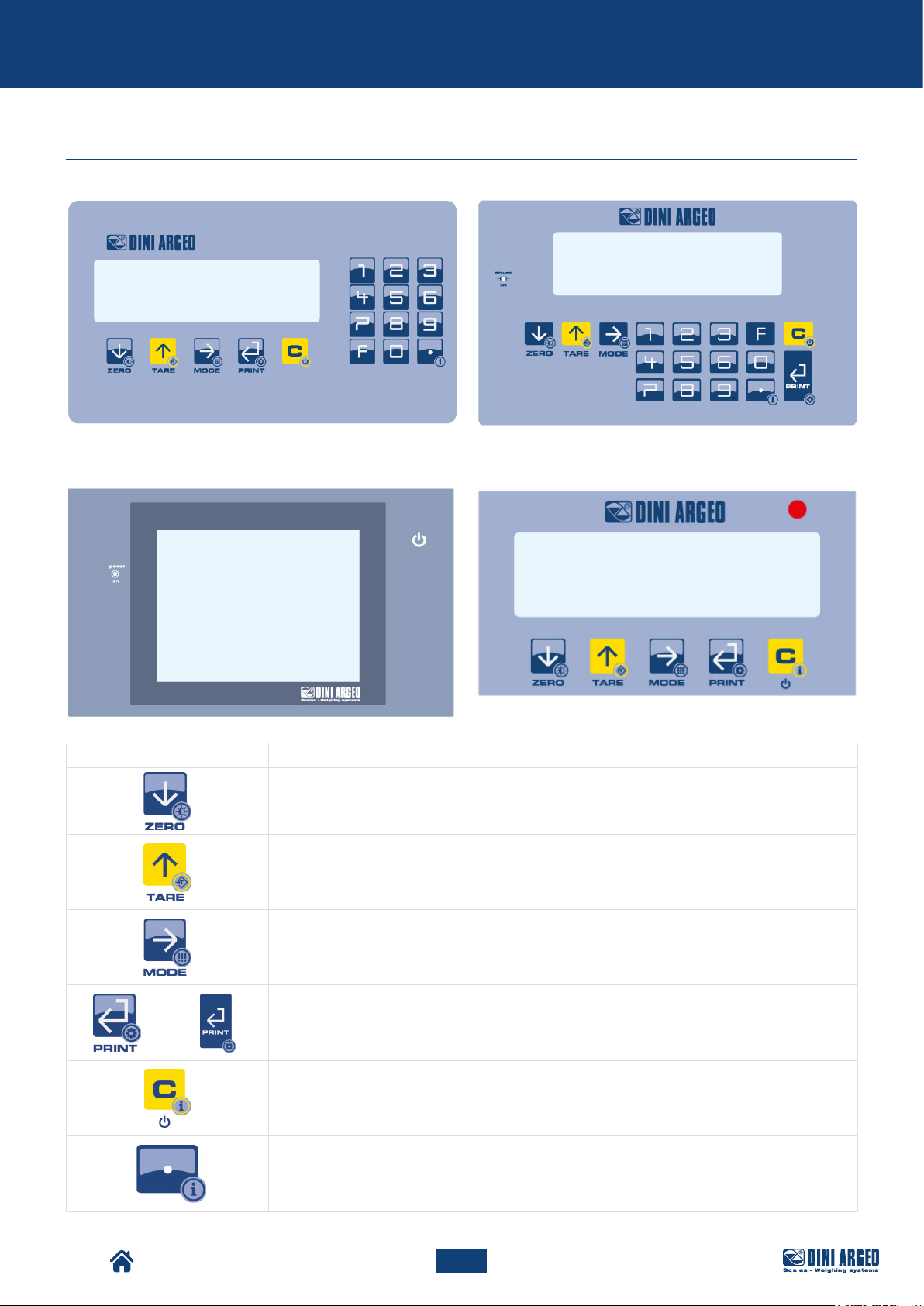
Keyboard types
KEYBOARD FOR DFWK06 INDICATOR
KEYBOARD FOR 3590EGTXP INDICATOR KEYBOARD FOR DFWL-1 INDICATOR
KEYBOARD FOR DFWLKI INDICATOR
Button Description
• Resets the weight on the scale.
• If pressed for a long time (2 sec), it is possible to set the brightness of the display.
• Performs tare on the scale.
• If pressed for a long time (2 sec), a preset tare can be entered.
• Recalls the specific function of the operating mode.
• If pressed for a long time (5 sec), it allows to change the operating mode.
• Confirm key.
• Prints the receipt.
• If pressed for a long time (5 sec), the configuration menu can be accessed.
• If pressed for 2 sec it switches o the instrument.
• If pressed for 5 sec it displays the metrological information.
If pressed for a long time (2 sec) it displays the metrological information.
TPW
38
USER_MAN_ENG_TPW_v4
Page 39
Commands
WARNING!
For a clearer view and advanced functions related to the keys and operating modes, see the chapter
“BASIC SCALE FUNCTIONS” and “ADVANCED SCALE FUNCTIONS”.
Performs the function (followed by pressing a number).
If on, it indicates that the instrument is charging (for battery powered instruments).
It allows to quickly set a numerical value.
WARNING!
For the functions of the models with touchscreen keypad, refer to the specific manual of the weight
indicator software.
TPW
39
USER_MAN_ENG_TPW_v4
Page 40
Use
USE
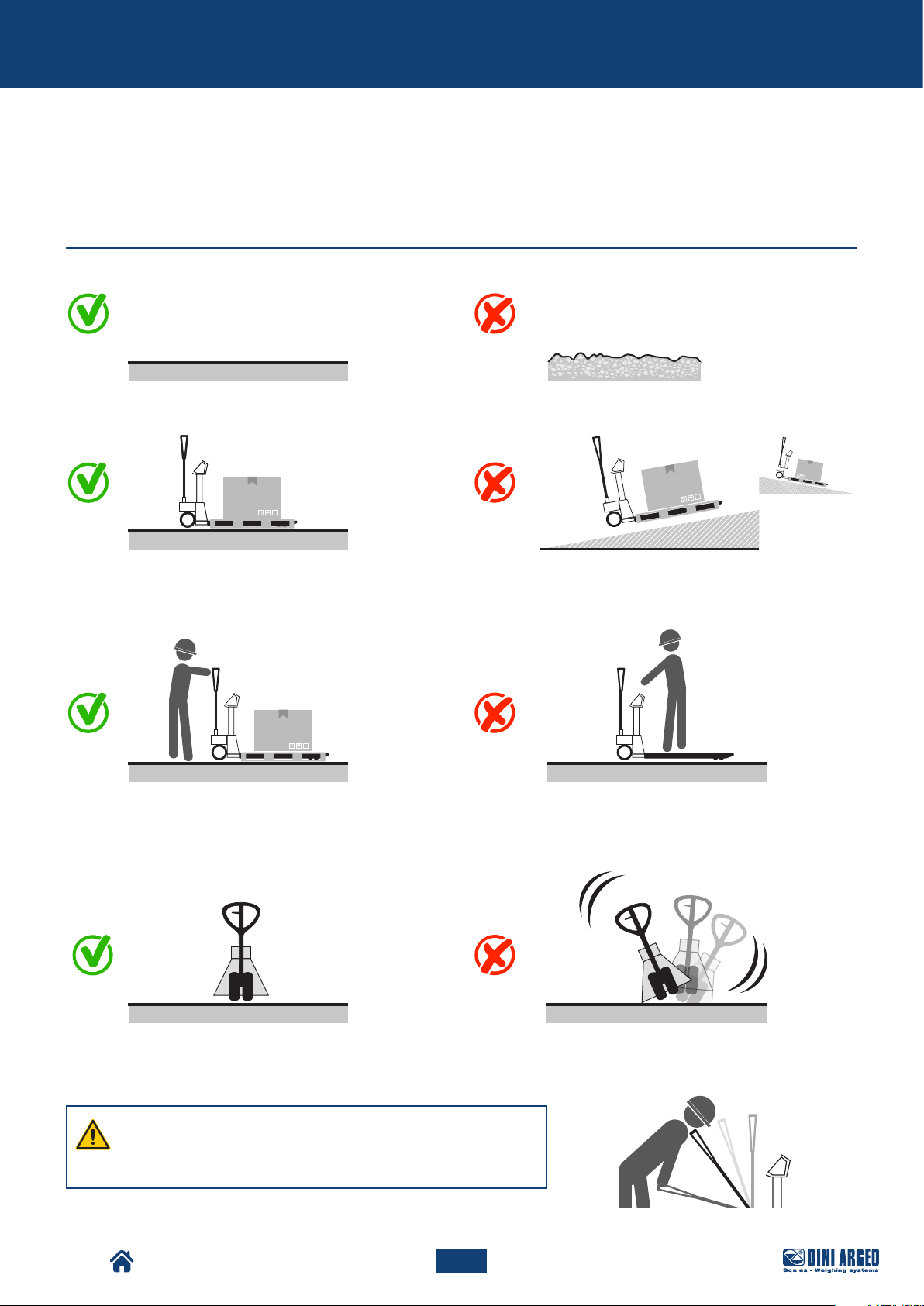
General warnings for correct use
TPW
WARNING!
Pay attention during manoeuvring operations as the tiller
has an upright return system.
40
USER_MAN_ENG_TPW_v4
Page 41
Use
TPW
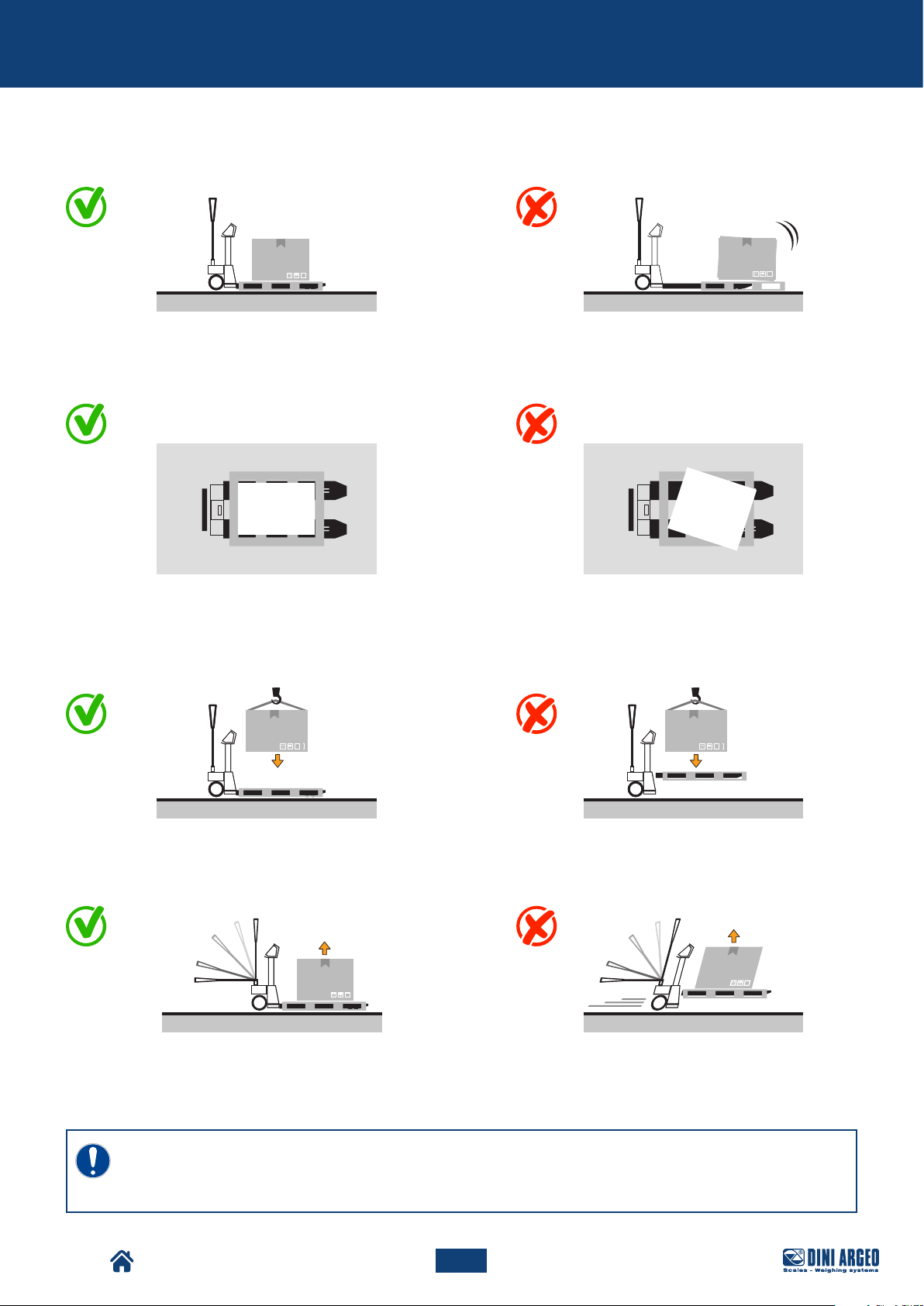
ONLY LIFT FROM STATIONARY*
IMPORTANT!
The pallet truck is equipped with a dual-function tiller: traction or manoeuvre and hydraulic lift.
Note: raise or lower the truck ONLY when stationary.
41
USER_MAN_ENG_TPW_v4
Page 42
Use
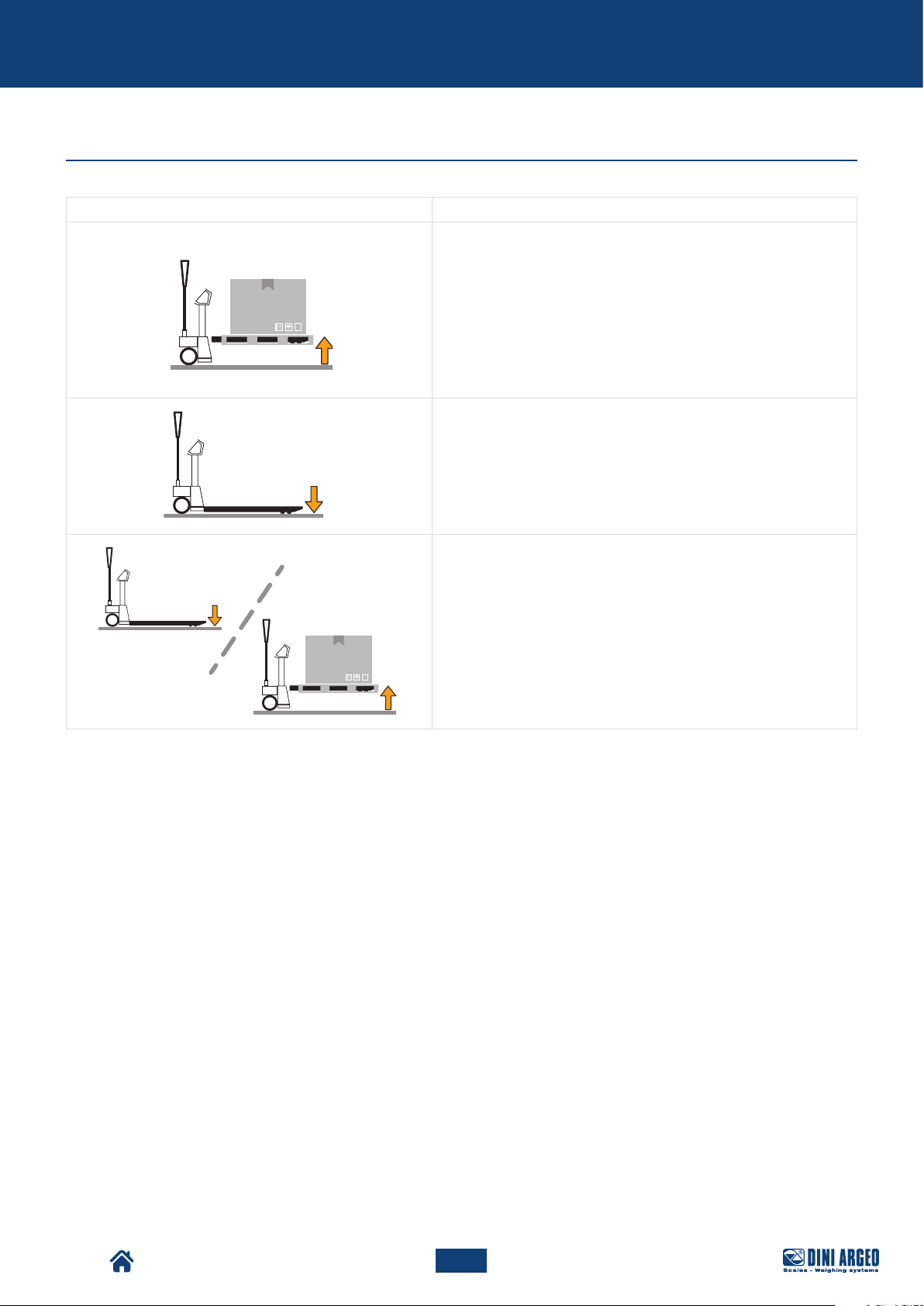
Pallet truck conditions
Condition Description
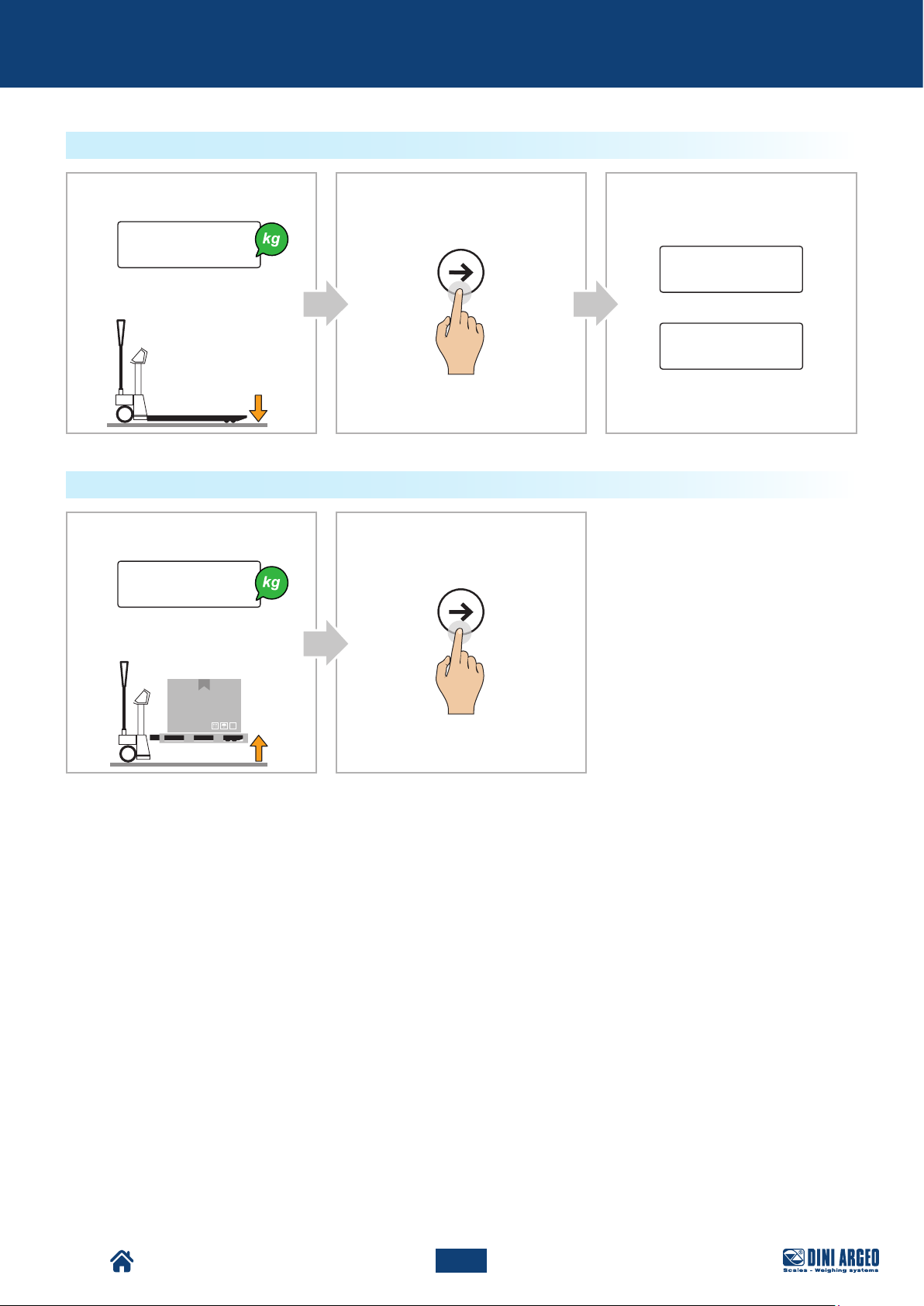
The pallet truck is on, loaded and the forks are raised from the
ground.
The pallet truck is on, loaded and the forks in lowered position.
In this condition it does not matter whether the pallet truck is
loading or unloading.
TPW
42
USER_MAN_ENG_TPW_v4
Page 43
Use
Checks before use
Before using the pallet truck, check that:
• the forks do not show evident damage;
• the area of use is clear of any obstacles;
• no consumables losses are present in the area under the machine;
• the labels installed on the pallet truck are present and legible.
IMPORTANT!
If faults and/or anomalies are detected, report them to the personnel in charge.
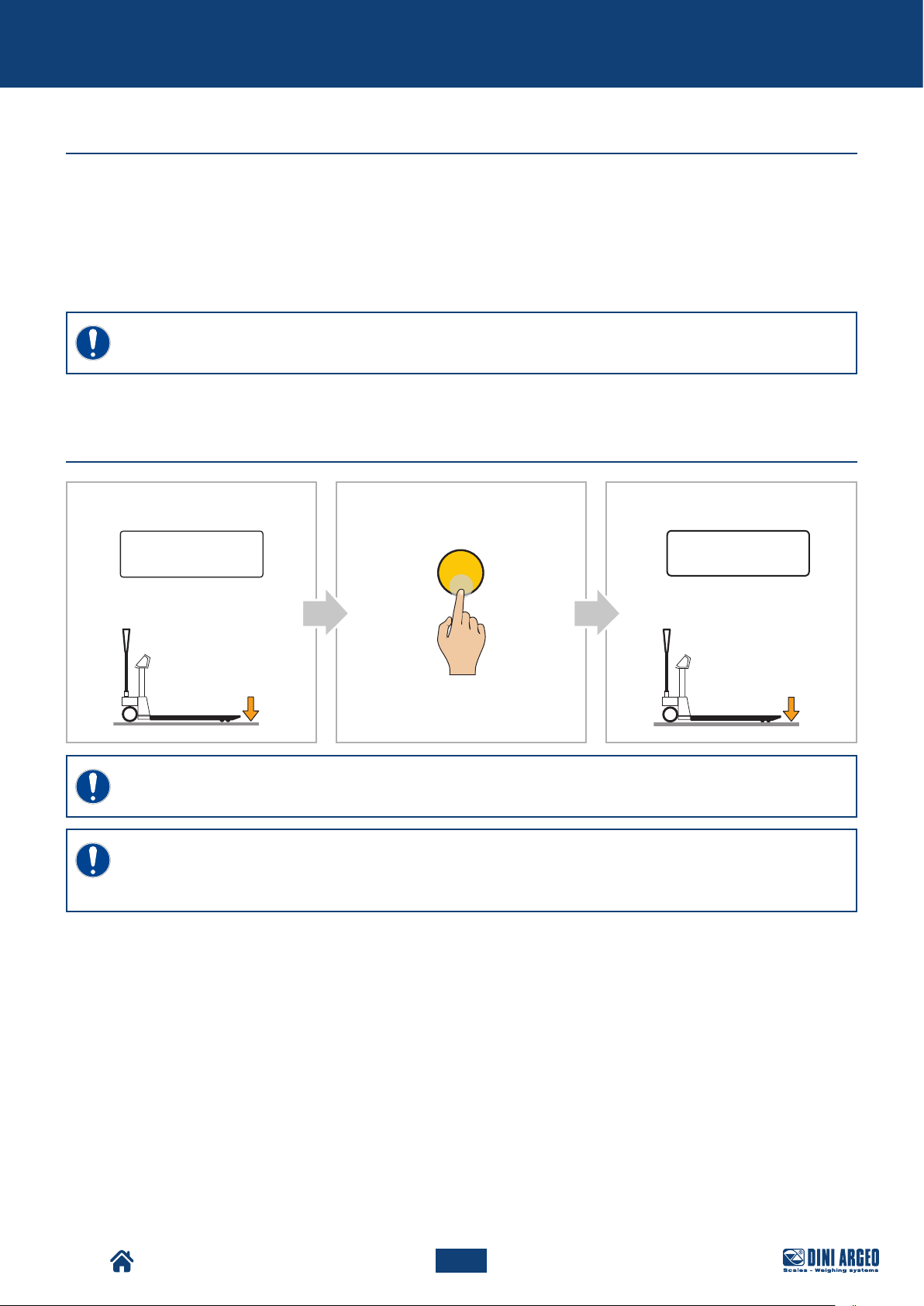
Display switch-on
Display:
CA B
Display:
0.0
C
Pallet Truck Condition:
IMPORTANT!
Unload the Pallet Truck before turning it on
IMPORTANT!
If the instrument is approved, the power on must be carried out on the surface where the weighing will
take place.
Pallet Truck Condition:
TPW
43
USER_MAN_ENG_TPW_v4
Page 44
1000.0
Use
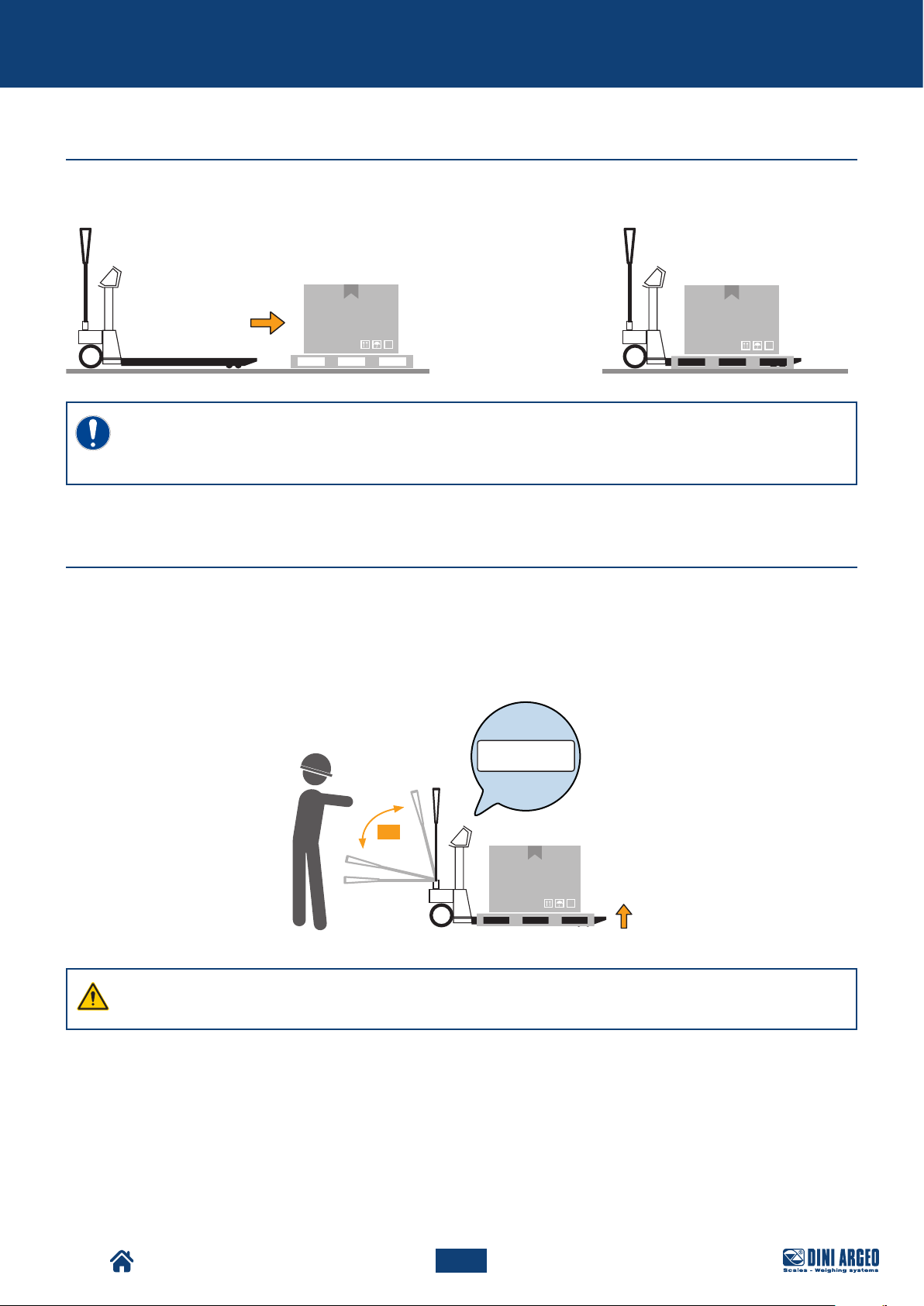
Pallet truck positioning
Position the pallet truck under the load to be weighed, as shown in the figure below.
IMPORTANT!
With approved scale, you can perform weighing on EUR pallet 800 x 1200 mm
(UIC standards 435-2 and UIC 435-4 ref.).
Load lifting and weight reading
Lift the load, as shown in the figure below.
The value of the weighing can be read on the display.
Weighing accuracy is achieved when the pallet truck is fully stationary.
x 5
WARNING!
Make sure the pallet is fully raised from the ground.
TPW
44
USER_MAN_ENG_TPW_v4
Page 45
Use
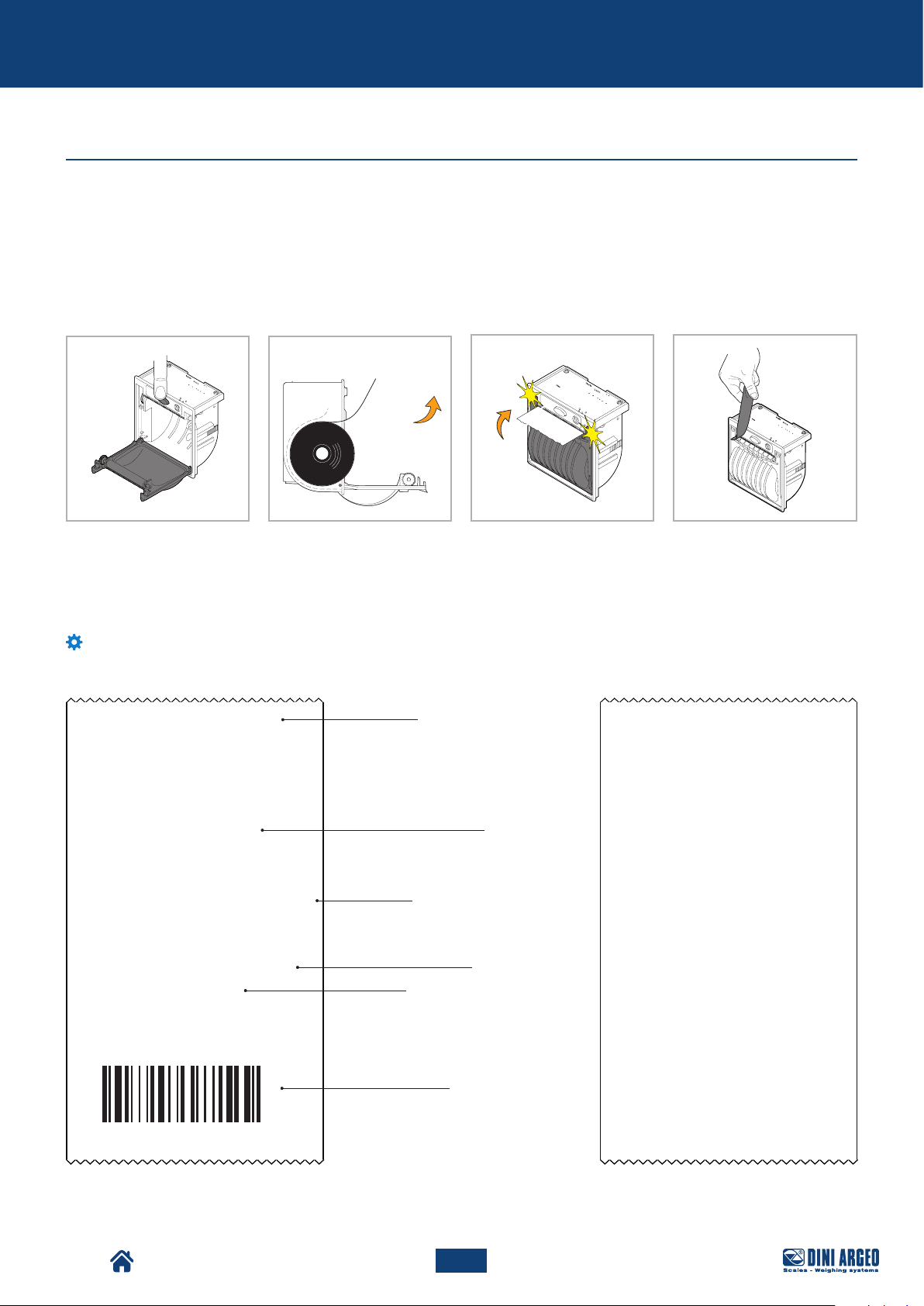
How to replace the roll
To replace the integrated thermal printer roll (if present), proceed as follows:
A. Open the door by pressing the centre button.
B. Put the roll in, keeping the thermal surface facing outward.
C. Close the door by pressing on both sides.
D. Remove excess paper.
A
B
C D
Customisable printouts
If the instrument is equipped with a printer, the ticket or label can be customised as shown in the following example.
Customising printouts requires advanced configuration.
Example of ticket/label
MARIO ROSSI SRL
VIA DELL'INDUSTRIA, 20
41042 - FIORANO (MO) - ITALY
WWW.MARIOROSSI.IT
WEIGHING NUM. 1
Header
Progressive weighing
number (for accumulation
modes)
Example of packing list
MARIO ROSSI SRL
VIA DELL'INDUSTRIA, 20
41042 - FIORANO (MO) - ITALY
WWW.MARIOROSSI.IT
WEIGHING NUM. 00000001
NET 1,000 kg
GROSS 15,000 kg
TARE 3,000 kg
NET 12,000 kg
TICKET No. 54321
05/08/2015 15:39:03
TPW
Weight data
Progressive ticket
number
Date and time
Bar code 39
USER_MAN_ENG_TPW_v4
WEIGHING NUM. 00000002
NET 1,000 kg
WEIGHING NUM: 00000003
NET 1,000 kg
WEIGHING NUM. 00000004
NET 1,000 kg
TOTAL WEIGHINGS 00000004
TOTAL NET 4,000 kg
TICKET No. 12345
09/05/06 15:39:03
45
Page 46
Basic scale functions
BASIC SCALE FUNCTIONS
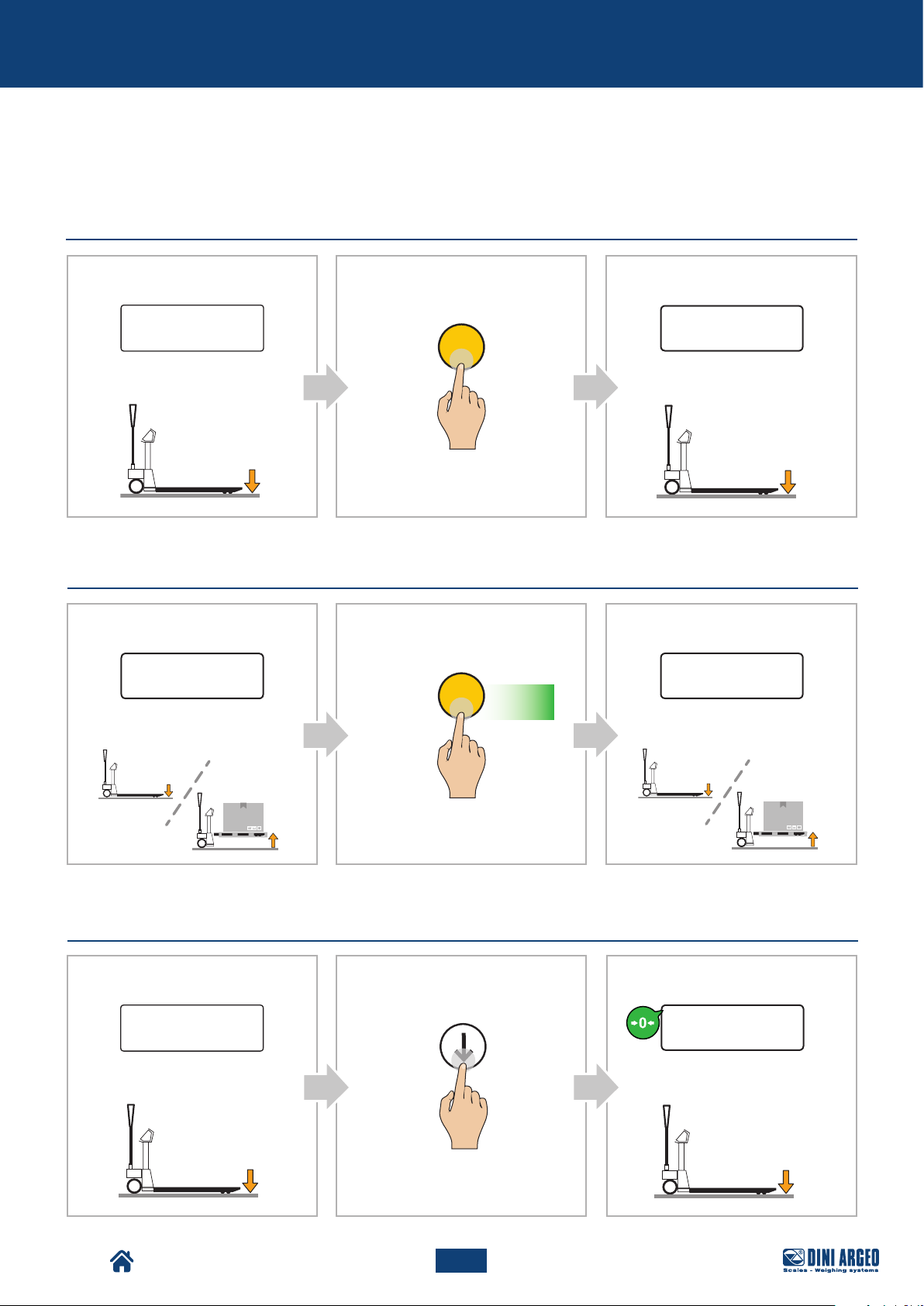
Start-up - On
Display:
Pallet Truck Condition:
Shutdown - O
Display:
0.0
C
C
Press
for 2s
CBA
Display:
Pallet Truck Condition:
CBA
Display:
-off-
0.0
Pallet Truck Condition:
Zero
Display:
Pallet Truck Condition:
0.1
Pallet Truck Condition:
B
ZERO
CA
Display:
0.0
Pallet Truck Condition:
TPW
46
USER_MAN_ENG_TPW_v4
Page 47
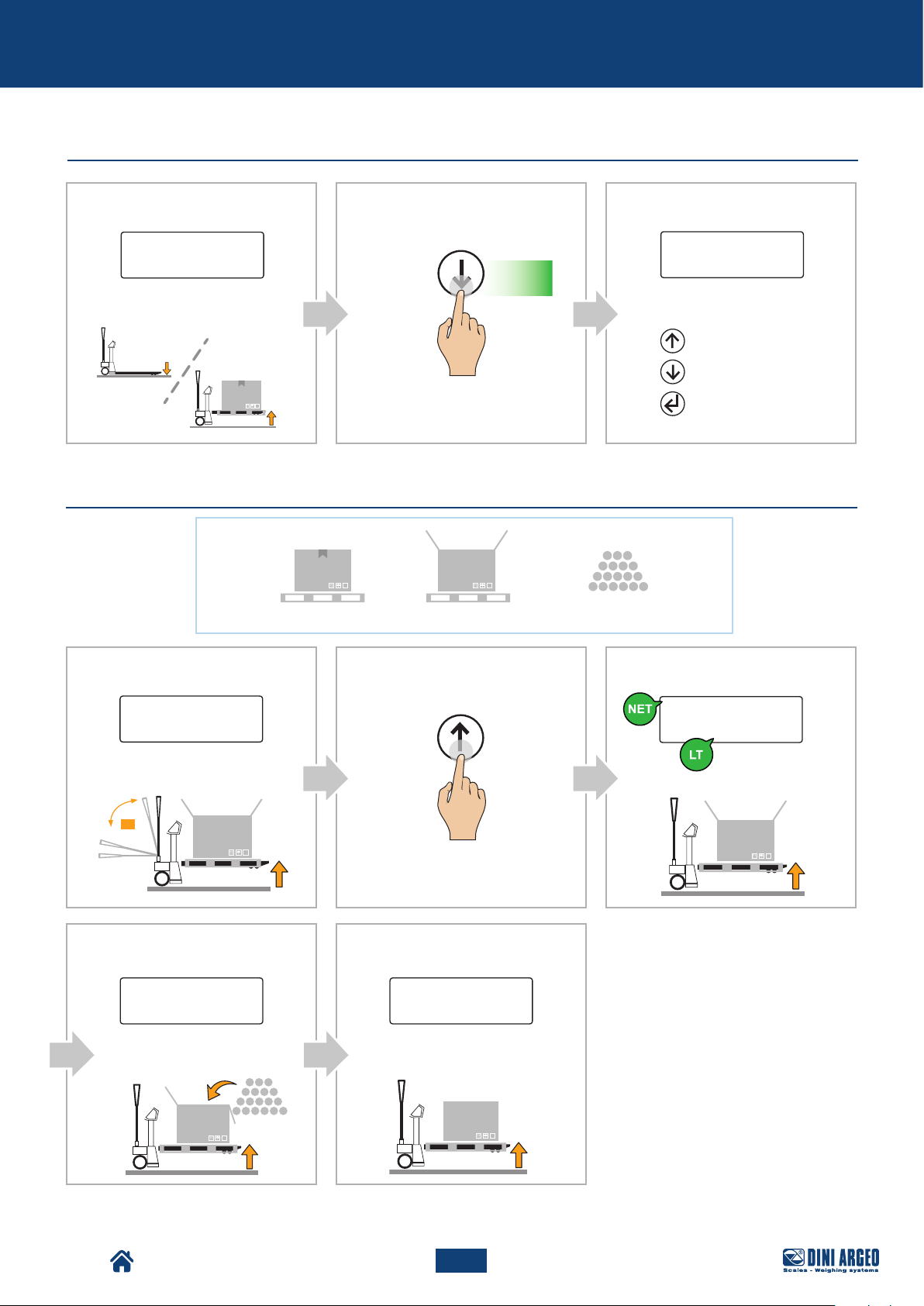
=+
Basic scale functions
Display brightness adjustment
Display:
Pallet Truck Condition:
Automatic tare
0.0
ZERO
Press
for 2s
? kg ? kg
CBA
Display:
brGt 0
Setting the brightness value:
Increase the value
Decrease the value
Confirm
Display:
Pallet Truck Condition:
x 5
D
Display:
Pallet Truck Condition:
15
0.0
.0
CBA
Display:
TARE
0.0
Pallet Truck Condition:
E
Display:
1 2 0.0
Pallet Truck Condition:
TPW
47
USER_MAN_ENG_TPW_v4
Page 48
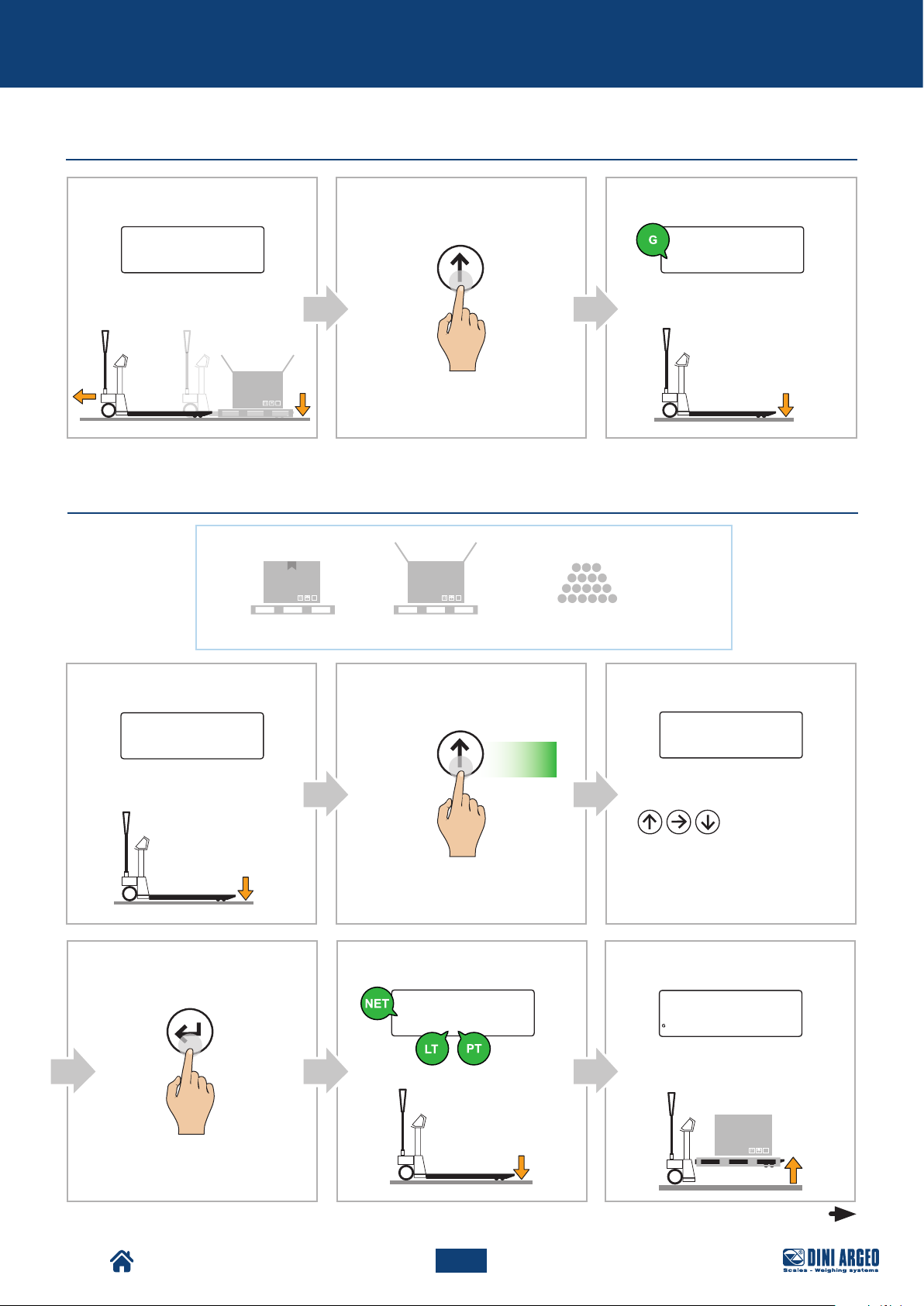
Basic scale functions
Tare deletion
Display:
- 1 5.0
Pallet Truck Condition:
Set a known tare value (PT)
CBA
Display:
TARE
0.0
Pallet Truck Condition:
=+
? kg15,0 kg
A
Display:
Pallet Truck Condition:
CONFIRM
0.0
B
TARE
ED
Display:
- 1 5.0
Pallet Truck Condition:
Press
for 2s
C
Display:
00015.0
Setting the tare value:
F
Display:
1 2 0.0
Pallet Truck Condition:
Increase /
Decrease
the value
TPW
continue
48
USER_MAN_ENG_TPW_v4
Page 49
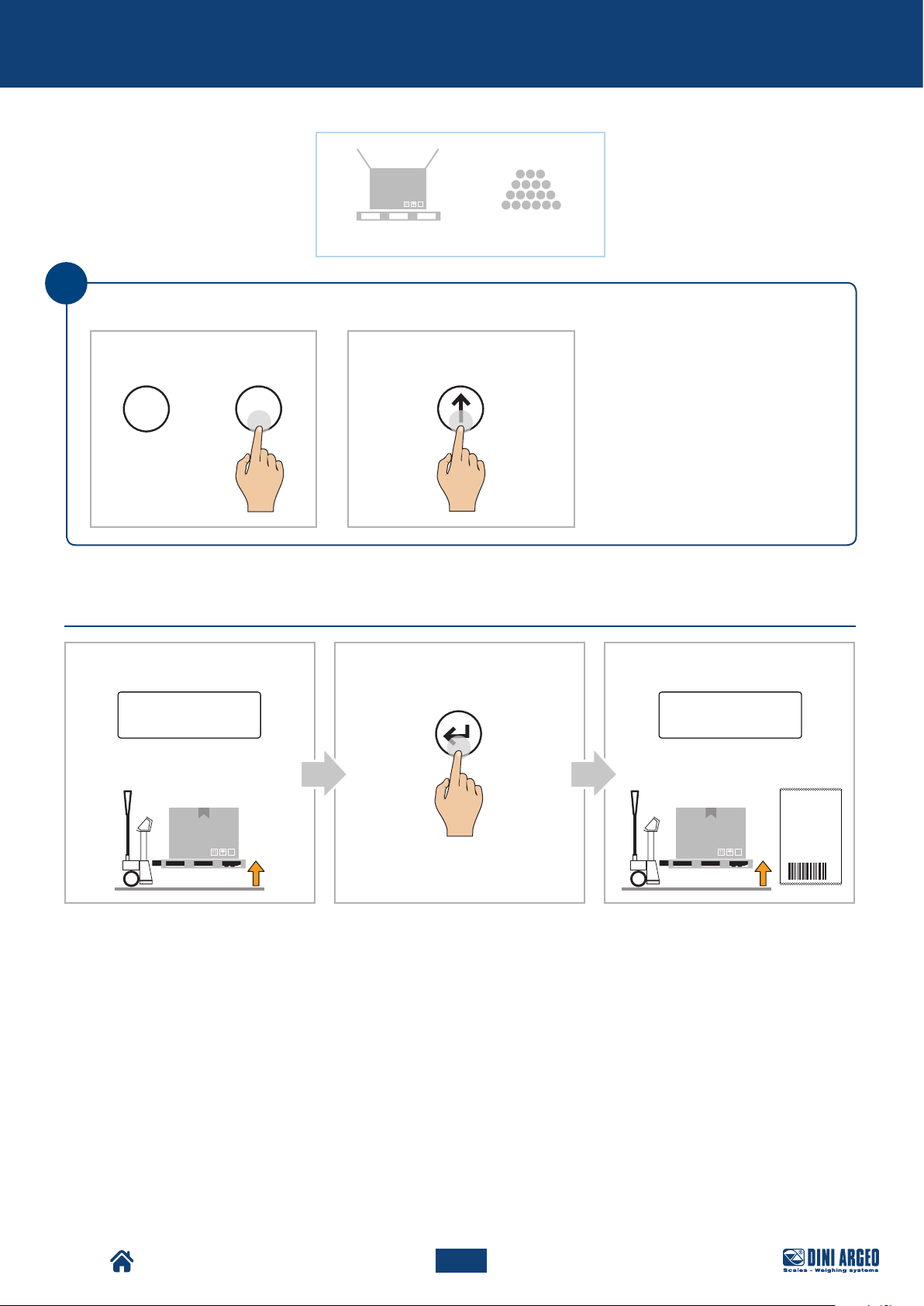
NUM. PESATA
1
TARA
N. SCONTRINO 54321
15/11/2018
15:39:03
LORDO 15.000 kg
NETTO
3.000 kg
12.000 kg
Basic scale functions
15,0 kg
i
If the pallet truck has a number keypad, it is possible to enter the tare quickly:
A
Enter the tare value:
0 9
...
B
TARE
Display:
PRINT
1 2 0.0 print
120,0 kg
CBA
Display:
TPW
Pallet Truck Condition:
Pallet Truck Condition:
49
USER_MAN_ENG_TPW_v4
Page 50
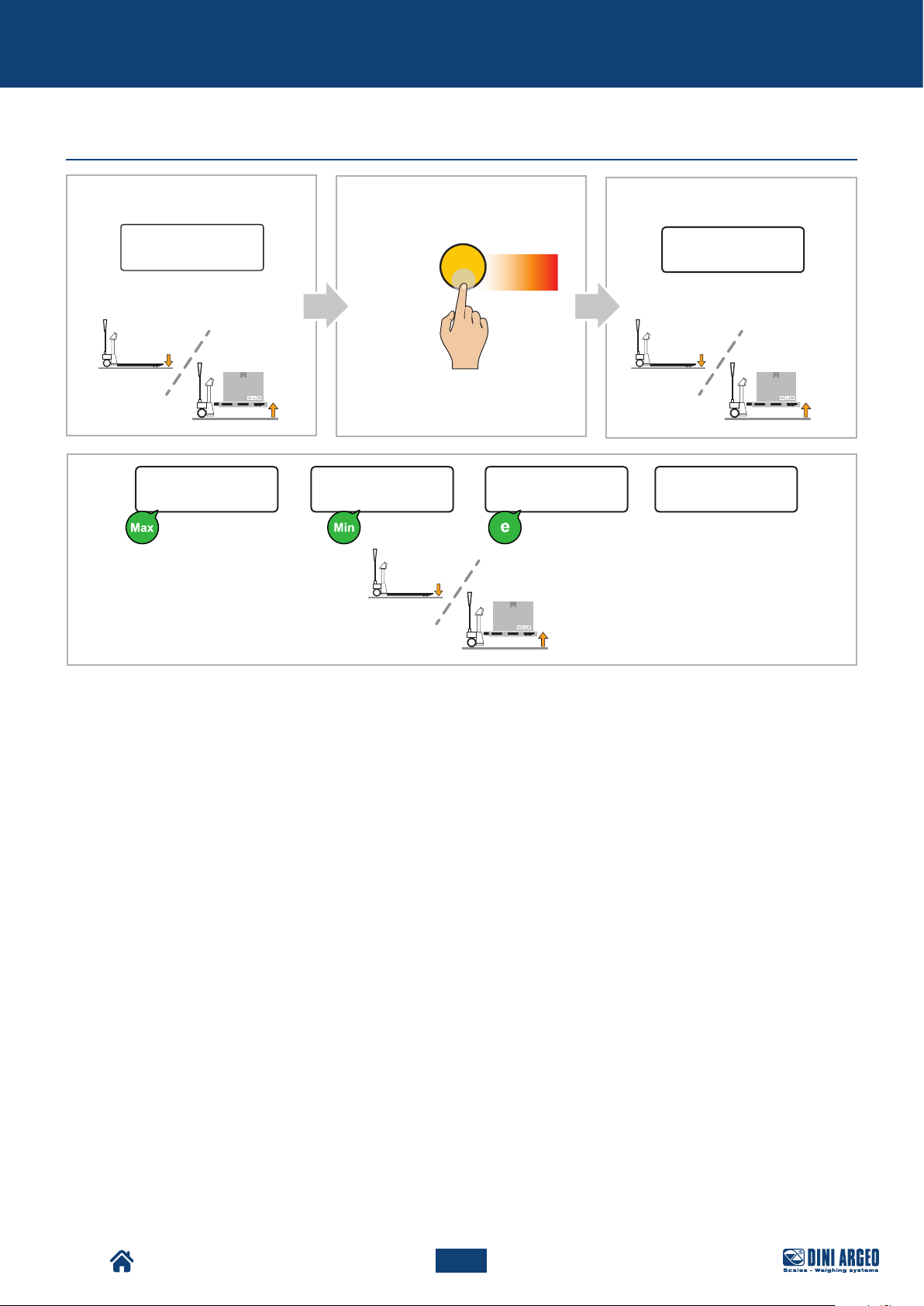
Basic scale functions
Metrics
A
Display:
Pallet Truck Condition:
0.0
B
C
Press
for 4s
C
Display:
INFo
Pallet Truck Condition:
020 12000
TPW
50
USER_MAN_ENG_TPW_v4
Page 51
Additional functions for models with number keypad
ADDITIONAL FUNCTIONS FOR MODELS WITH NUMBER
KEYPAD
30-tare log
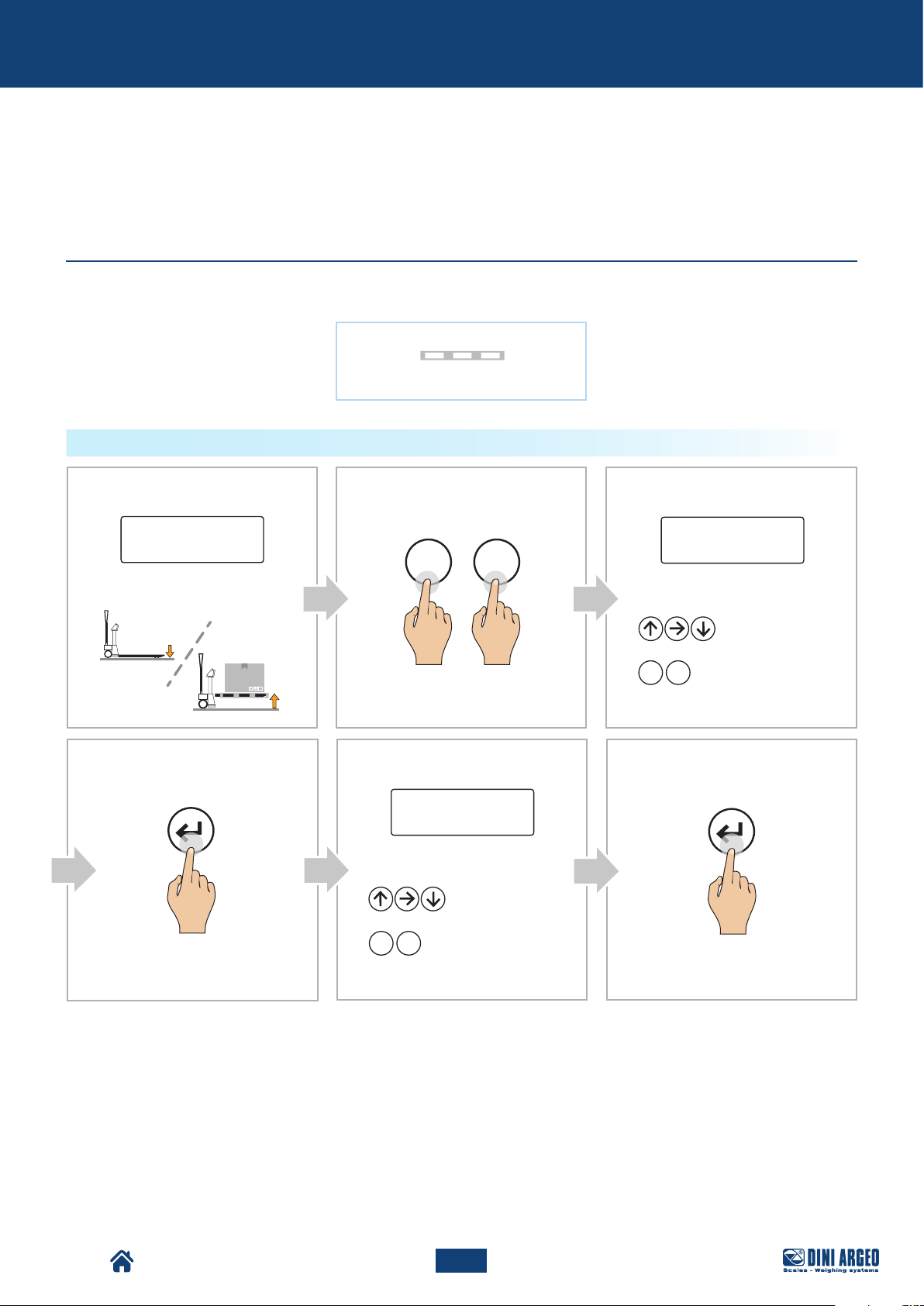
This memorises the most commonly used tares (up to 30), to simplify retrieval with quick selection.
Example
HOW TO STORE A TARE
Display:
Pallet Truck Condition:
D
PRINT PRINT
0.0
F 9
Display:
00015.0
Setting the tare value:
Increase /
or
0 9
...
Decrease the value
Enter the value
CBA
Display:
Select the memory:
or
0 9
Enter the value
...
FE
T.01
Increase /
Decrease the value
TPW
51
USER_MAN_ENG_TPW_v4
Page 52
Additional functions for models with number keypad
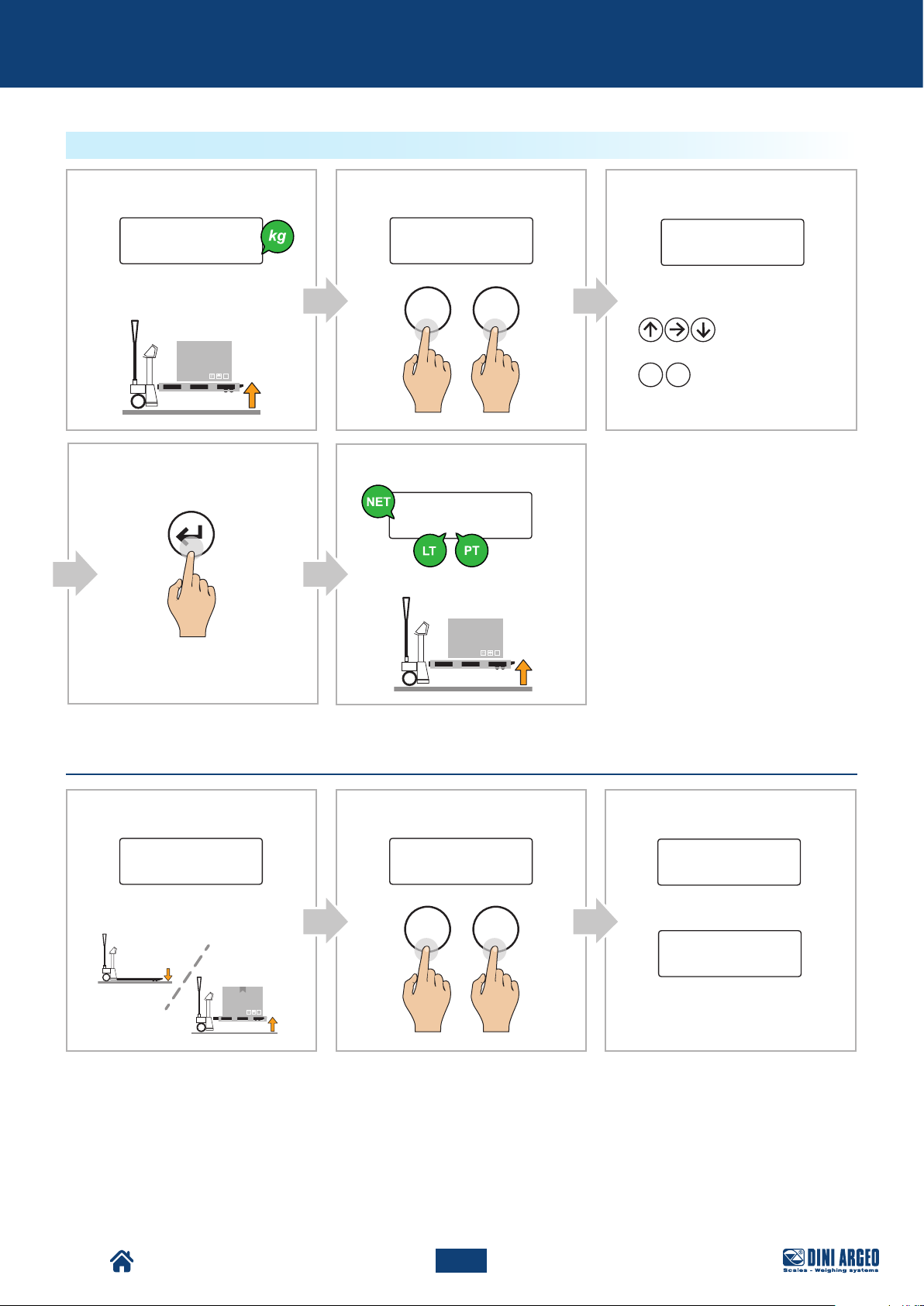
HOW TO RETRIEVE A STORED TARE
Display:
135,
Pallet Truck Condition:
D
PRINT
0
BA
Display:
Fun 1
F 1
E
Display:
120,0
Pallet Truck Condition:
C
Display:
Select the memory:
or
0 9
Enter the value
...
T.01
Increase /
Decrease the value
Automatic tare deletion
A
Display:
0.0 Fun 2
Pallet Truck Condition:
B
Display: Display:
C
F 2
Ta-L
Automatic
deletion disabled
Ta-u
Automatic deletion
enabled: the tare is deleted
automatically once the pallet
truck is unloaded.
TPW
52
USER_MAN_ENG_TPW_v4
Page 53
Additional functions for models with number keypad
Number IDs
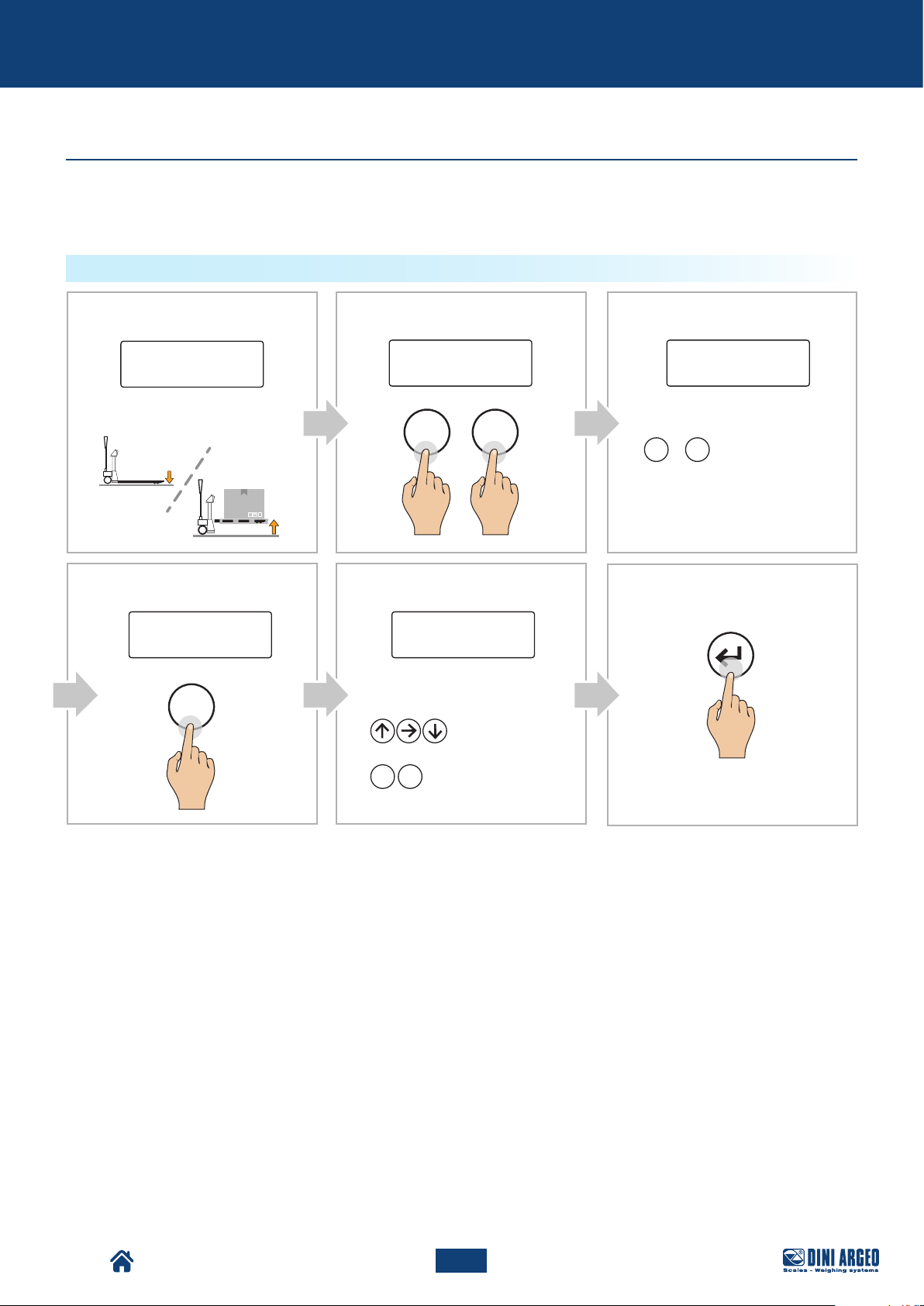
The instrument has 2 memories for the temporary recording of numerical codes that can be used to identify the
product, the operator, the batch, etc. These codes, if entered, will be shown on the receipt at the time of printing.
HOW TO ENTER THE ID
Display:
0.0
Pallet Truck Condition:
D
Display: Display:
iidn
1
Display:
Fun 3
F 3
E
000000
Enter the required ID
(up to 10 digits):
or
0 9
Enter the value
...
Increase /
Decrease the value
CBA
Display:
iidn
Select the memory:
1 2
or
F
Enter the value
PRINT
TPW
53
USER_MAN_ENG_TPW_v4
Page 54
Additional functions for models with number keypad
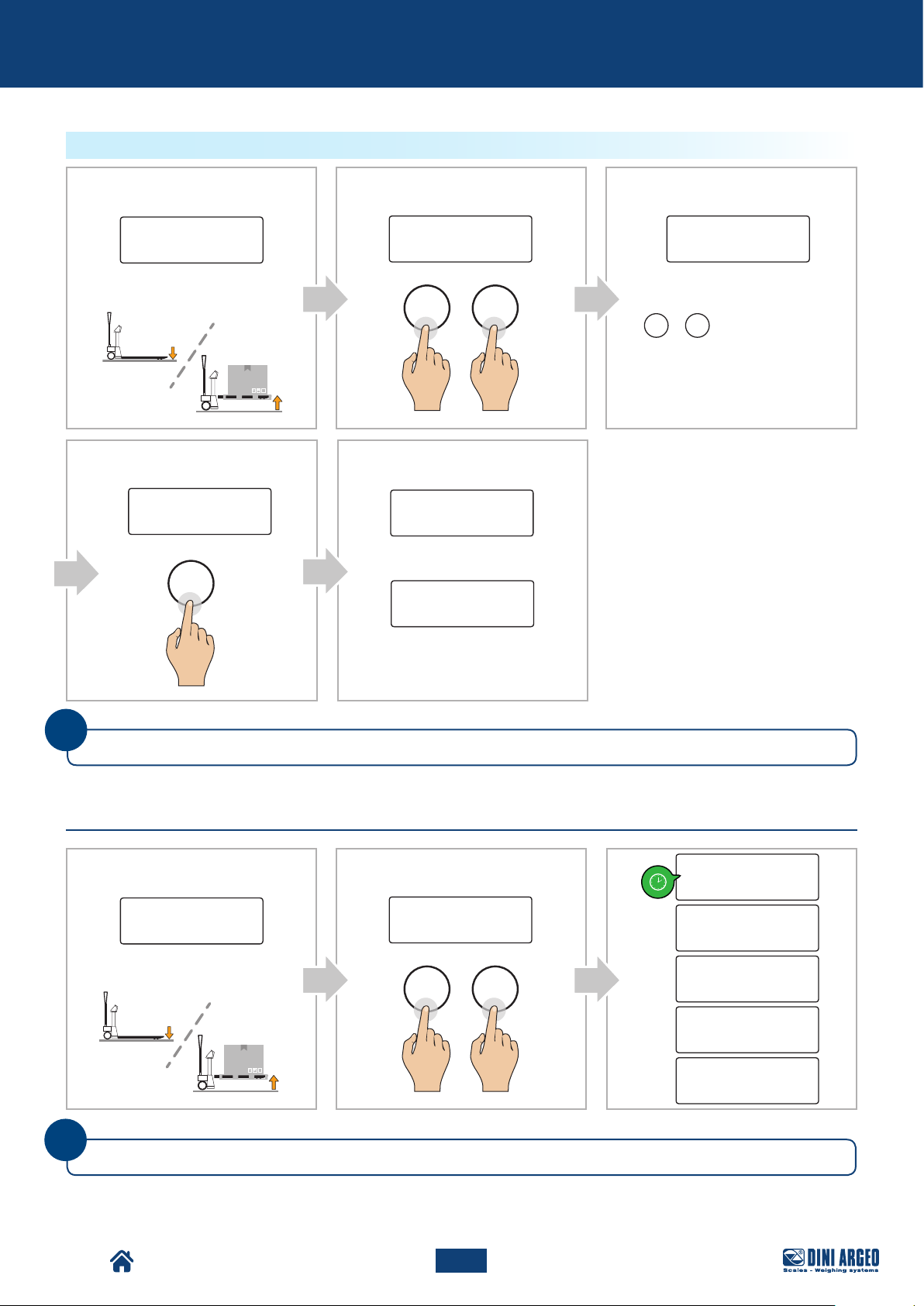
HOW TO ENABLE AUTOMATIC ID DELETION
A
Display:
Pallet Truck Condition:
D
Display:
iidn
1
0.0
B
Display:
Fun 4
F 4
E
Display:
id1L
Automatic
deletion disabled
id1u
Automatic deletion enabled:
the entered ID will be deleted
automatically when the pallet
truck is unloaded.
C
Display:
iidn
Select the memory:
1 2
or
Enter the value
i
The numeric IDs are automatically reset when the scale is turned off.
Date and time
A
Pallet Truck Condition:
i
Only if the date and time option is available.
0.0
B
Display:Display:
Fun 8
F 8
C
day
month
year
hour
Minute
TPW
54
USER_MAN_ENG_TPW_v4
Page 55
NUM. PESATA
1
TARA
N. SCONTRINO 54321
15/11/2018
15:39:03
LORDO 15.000 kg
NETTO
3.000 kg
12.000 kg
NUM. PESATA
1
TARA
N. SCONTRINO 54321
15/11/2018
15:39:03
LORDO 15.000 kg
NETTO
3.000 kg
12.000 kg
Additional functions for models with number keypad
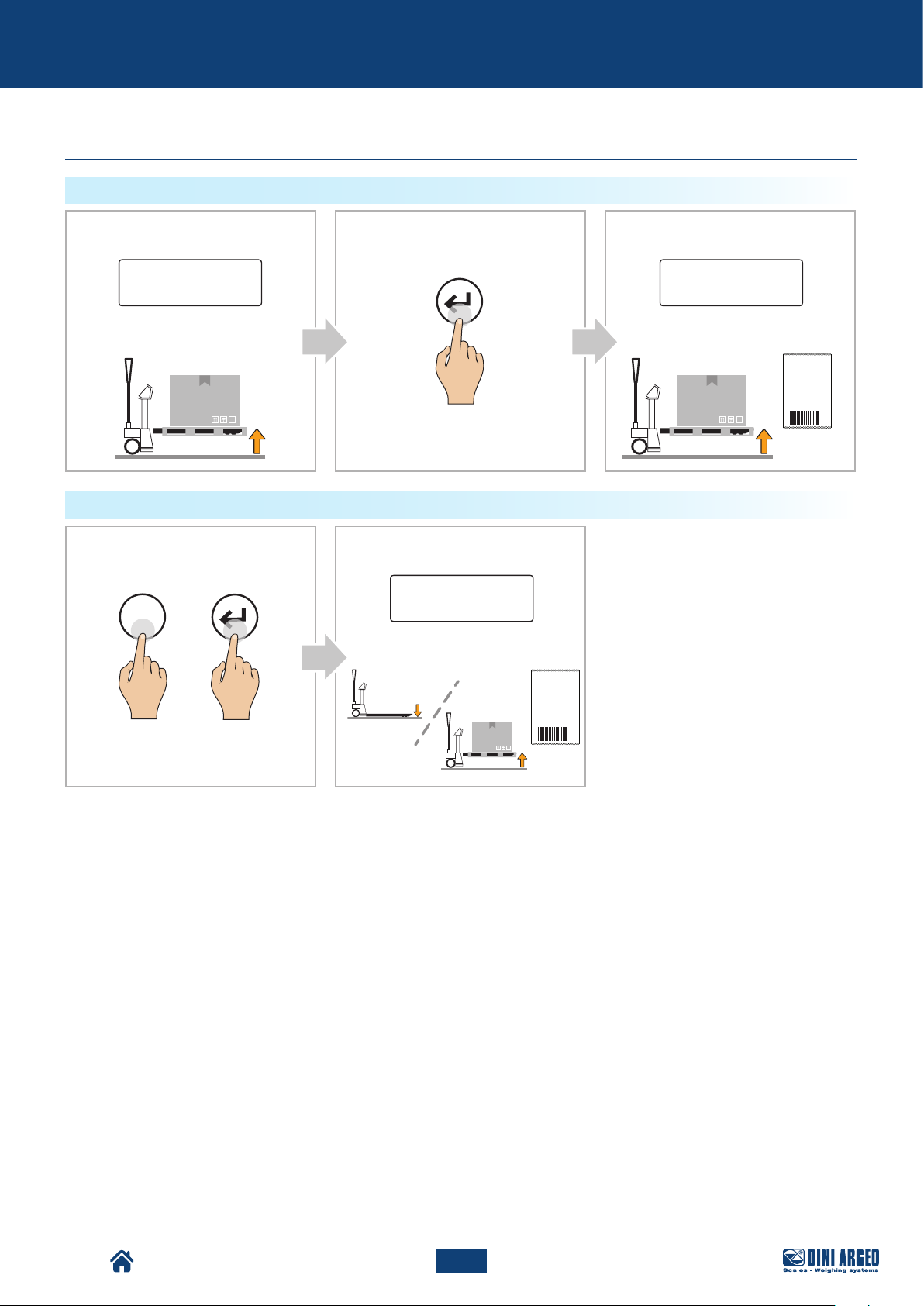
Print (and reprint of last receipt)
PRINT
Display:
1 2 0.0 print
Pallet Truck Condition:
REPRINT OF LAST RECEIPT
A
PRINT
F
CBA
Display:
PRINT
Pallet Truck Condition:
B
Display:
print
Pallet Truck Condition:
TPW
55
USER_MAN_ENG_TPW_v4
Page 56
Additional functions for models with number keypad
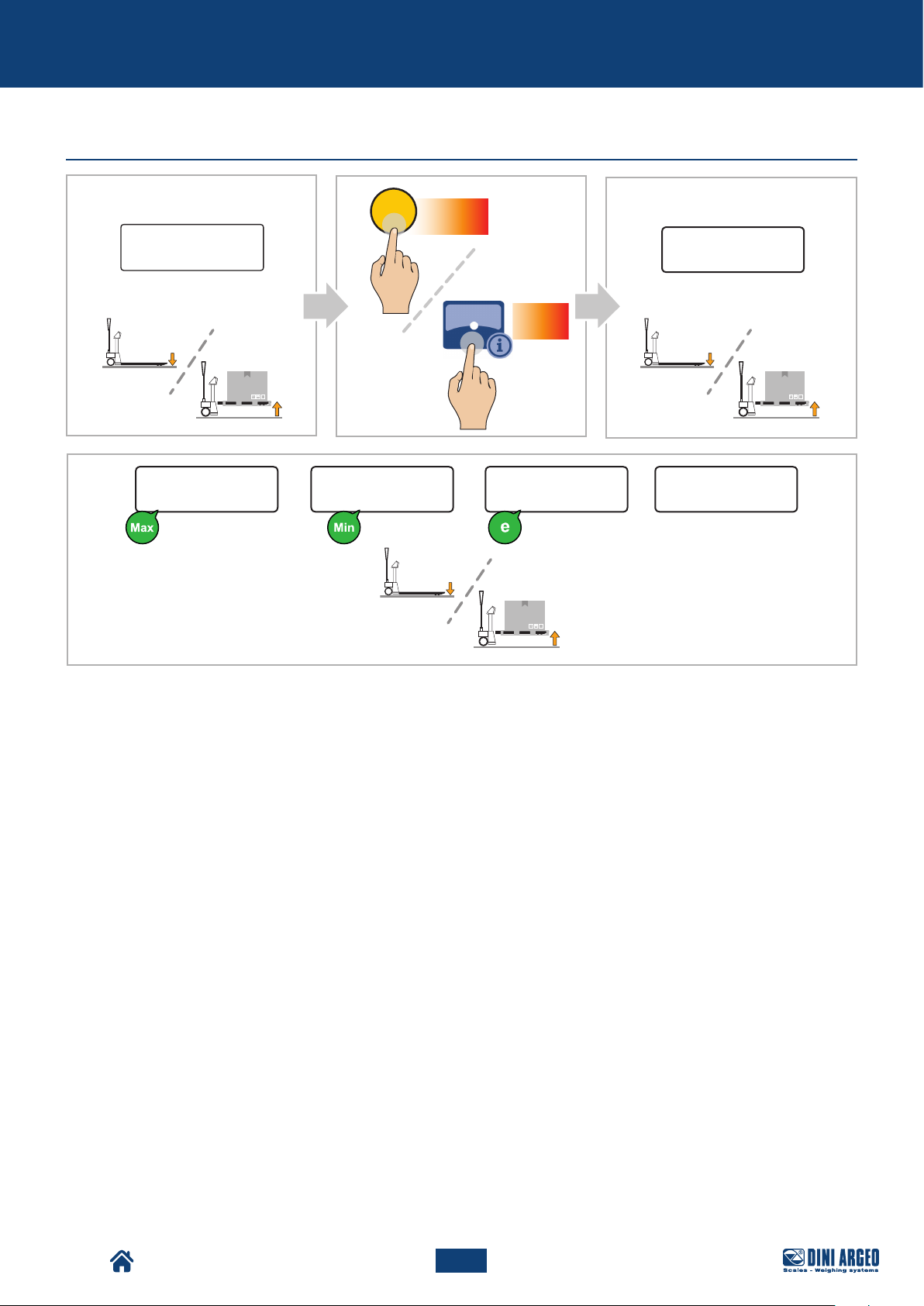
Metrics
A
Display:
Pallet Truck Condition:
0.0
B
C
Press
for 4s
C
Display:
INFo
Press
for 2s
Pallet Truck Condition:
020 12000
TPW
56
USER_MAN_ENG_TPW_v4
Page 57
Advanced scale functions
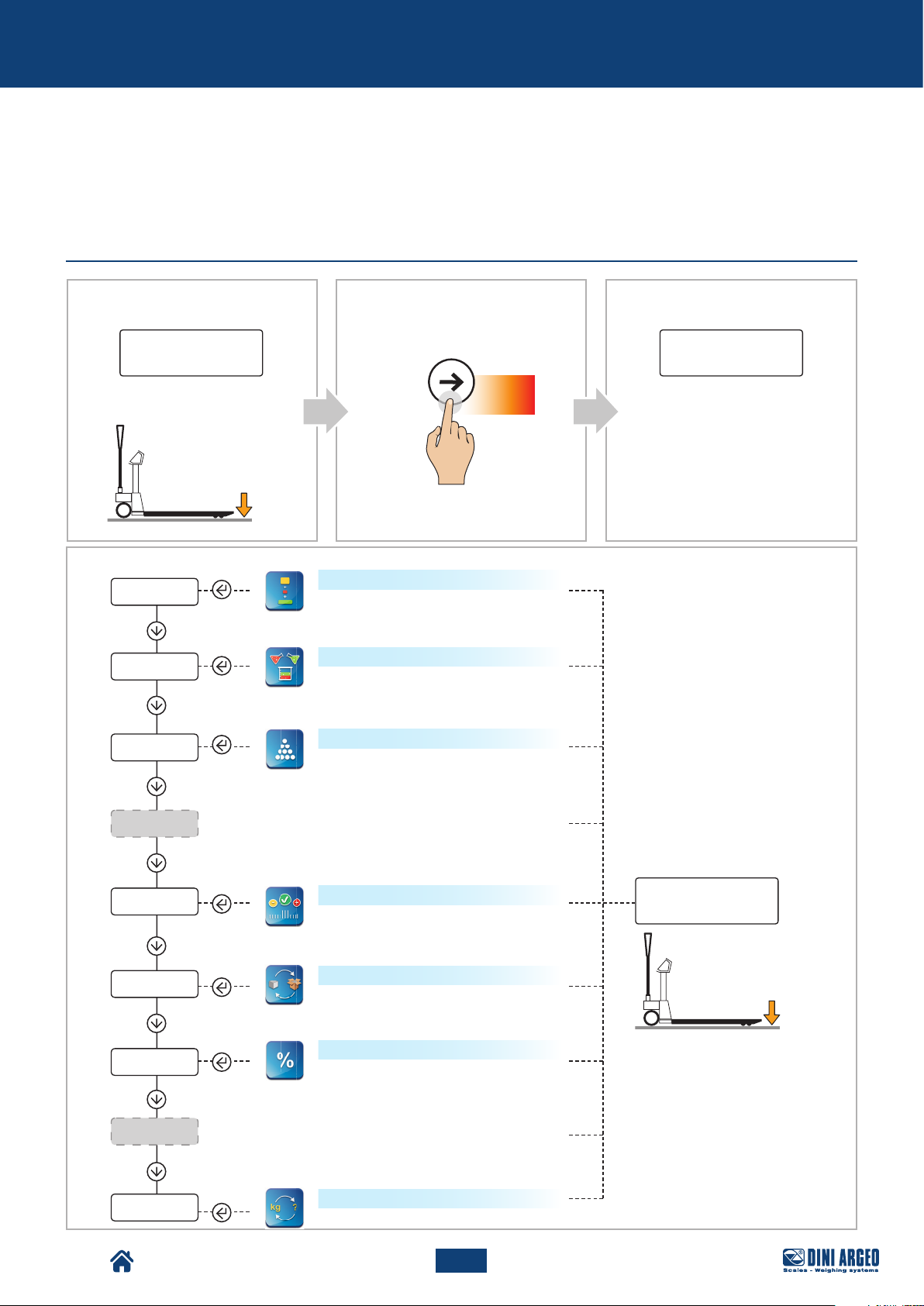
ADVANCED SCALE FUNCTIONS
How to access the function menu
Display:
Pallet Truck Condition:
D
total
formul
Count
0.0
CBA
Display:
MODE
funCt
Press
for 5 s
The indicator is in the
configuration menu: the currently
active function appears.
Horizontal accumulator
Sum of the weight of several objects to
obtain the total weight
Mixing several components
Vertical formulation or accumulation:
mixing several components
Piece count
TPW
HoLD
CheCk
net.Gro
PerC
HI.RES
Conver
Weight check
Checking the weight with respect to a
reference sample
Net weight / gross weight exchange
Percentage weighing
Weighing in % compared to a reference sample
Unit of measurement conversion
57
USER_MAN_ENG_TPW_v4
Once you have selected the
function, the scale goes back
to weighing mode.
0.0
Page 58
Advanced scale functions
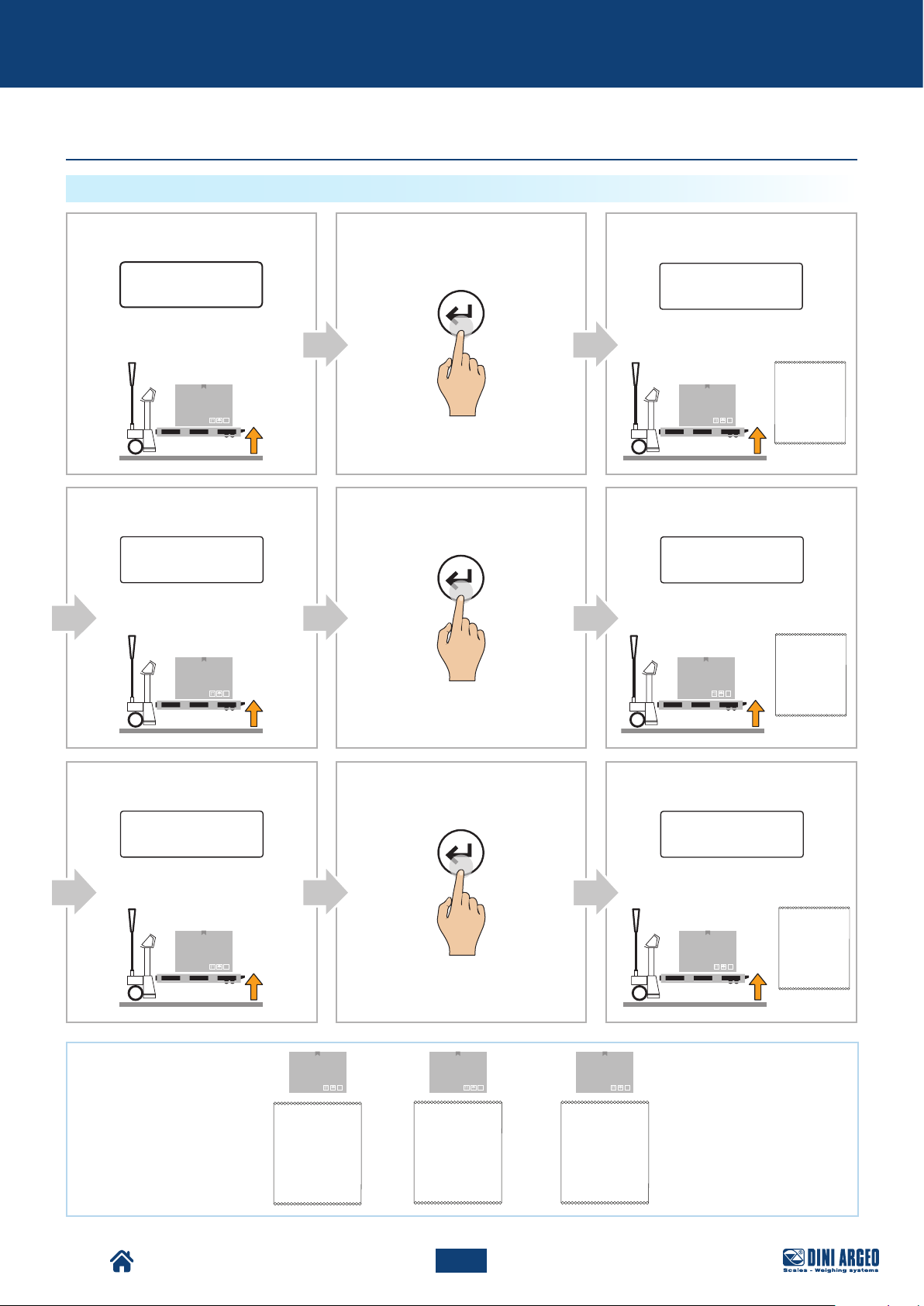
Horizontal accumulator
HOW TO ADD UP THE WEIGHINGS
Display:
Pallet Truck Condition:
D
Display:
1 8 0.0
Pallet Truck Condition:
CBA
Display:
PRINT
5 0.0
t. 1
Pallet Truck Condition:
P1 P1
E
PRINT
F
Display:
t. 2
Pallet Truck Condition:
P2 P2
NUM. PESATA 00000001
50.0 kg
NETTO
NUM. PESATA 00000001
NETTO
50.0 kg
NUM. PESATA 00000002
NETTO
180.0 kg
G
Display:
90.0
Pallet Truck Condition:
H
I
Display:
PRINT
t. 3
Pallet Truck Condition:
P3 P3
P1 P2 P3
NUM. PESATA 00000001
NETTO
50.0 kg
+ +
NUM. PESATA 00000001
NETTO
NUM. PESATA 0000000 2
NETTO
50.0 kg
180.0 kg
NUM. PESATA 00000001
NETTO
NUM. PESATA 0000000 2
NETTO
NUM. PESATA 0000000 3
NETTO
50.0 kg
180.0 kg
90.0 kg
NUM. PESATA 00000001
NETTO
50.0 kg
NUM. PESATA 00000002
NETTO
180.0 kg
NUM. PESATA 00000003
NETTO
90.0 kg
TPW
58
USER_MAN_ENG_TPW_v4
Page 59
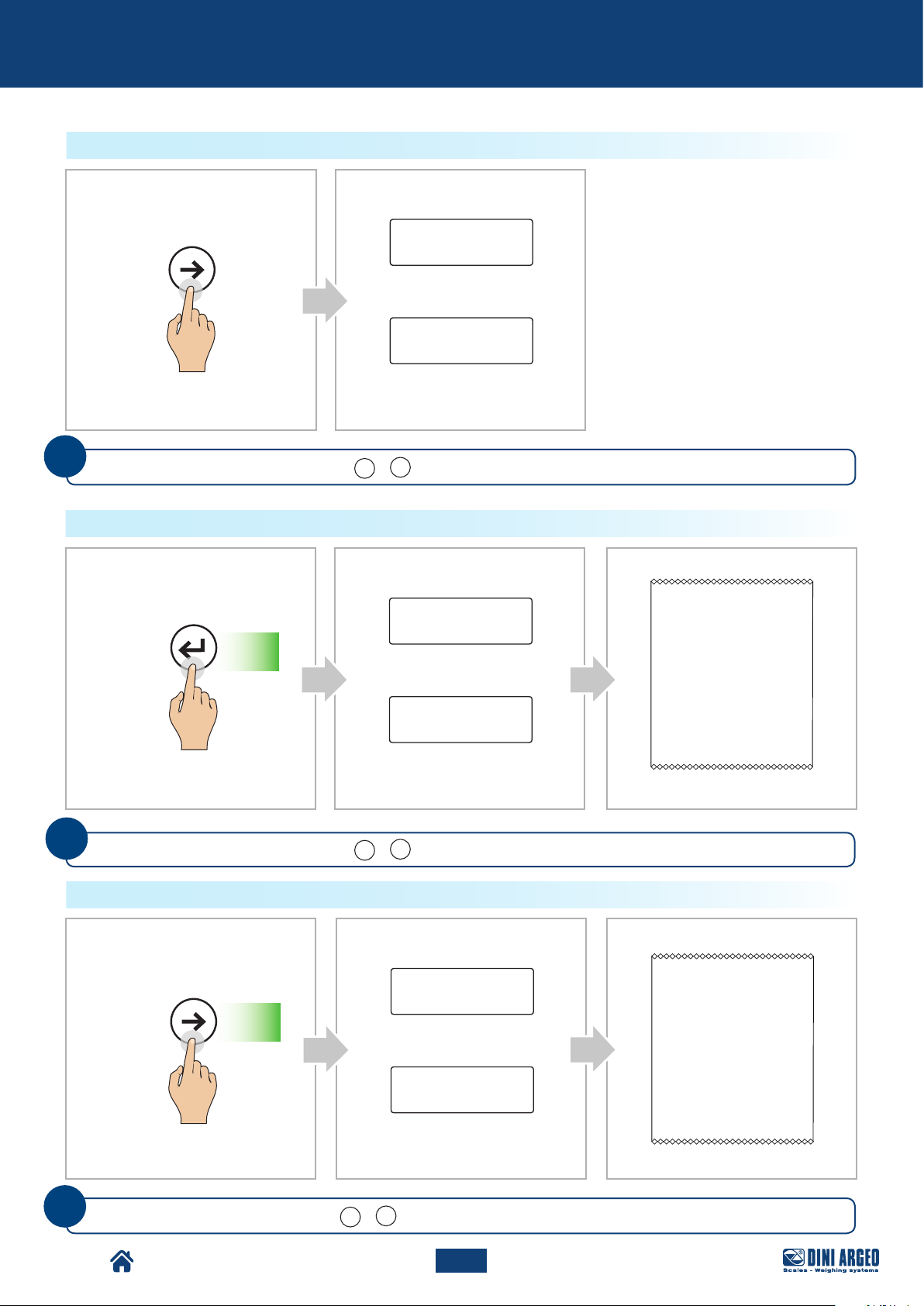
Advanced scale functions
HOW TO MOMENTARILY READ THE TOTAL
BA
Display:
MODE
N. 3
Number of weighings
Total weight
i
With the number keyboard, pressing F + 7 displays the current total without printing it/resetting it.
HOW TO END ACCUMULATION AND RESET THE TOTAL
BA
Display:
PRINT
N. 3
Press for
2 s
Number of weighings
3 2 0.0
C
NUM. PESATA 00000001
NETTO
NUM. PESATA 00000002
NETTO
NUM. PESATA 00000003
NETTO
50.0 kg
180.0 kg
90.0 kg
i
3 2 0.0
Total weight
TOTALE PESATE 00000003
TOTALE NETTO 320.0 kg
15/11/2018 9:23:03
If PRINTER present
With the number keyboard, pressing F + 7 displays the current total without printing it/resetting it.
HOW TO PRINT AND RESET THE GRAND TOTAL
C
NUM. PESATA 00000001
NETTO
NUM. PESATA 00000002
NETTO
NUM. PESATA 00000003
NETTO
TOTALE PESATE 00000003
TOTALE NETTO 320.0 kg
15/11/2018 9:23:03
If PRINTER present
MODE
Press for
2 s
BA
Display:
N. 3
Number of weighings
3 2 0.0
Total weight
50.0 kg
180.0 kg
90.0 kg
i
TPW
With the number keyboard, pressing F + 6 displays the current total without printing it/resetting it.
59
USER_MAN_ENG_TPW_v4
Page 60
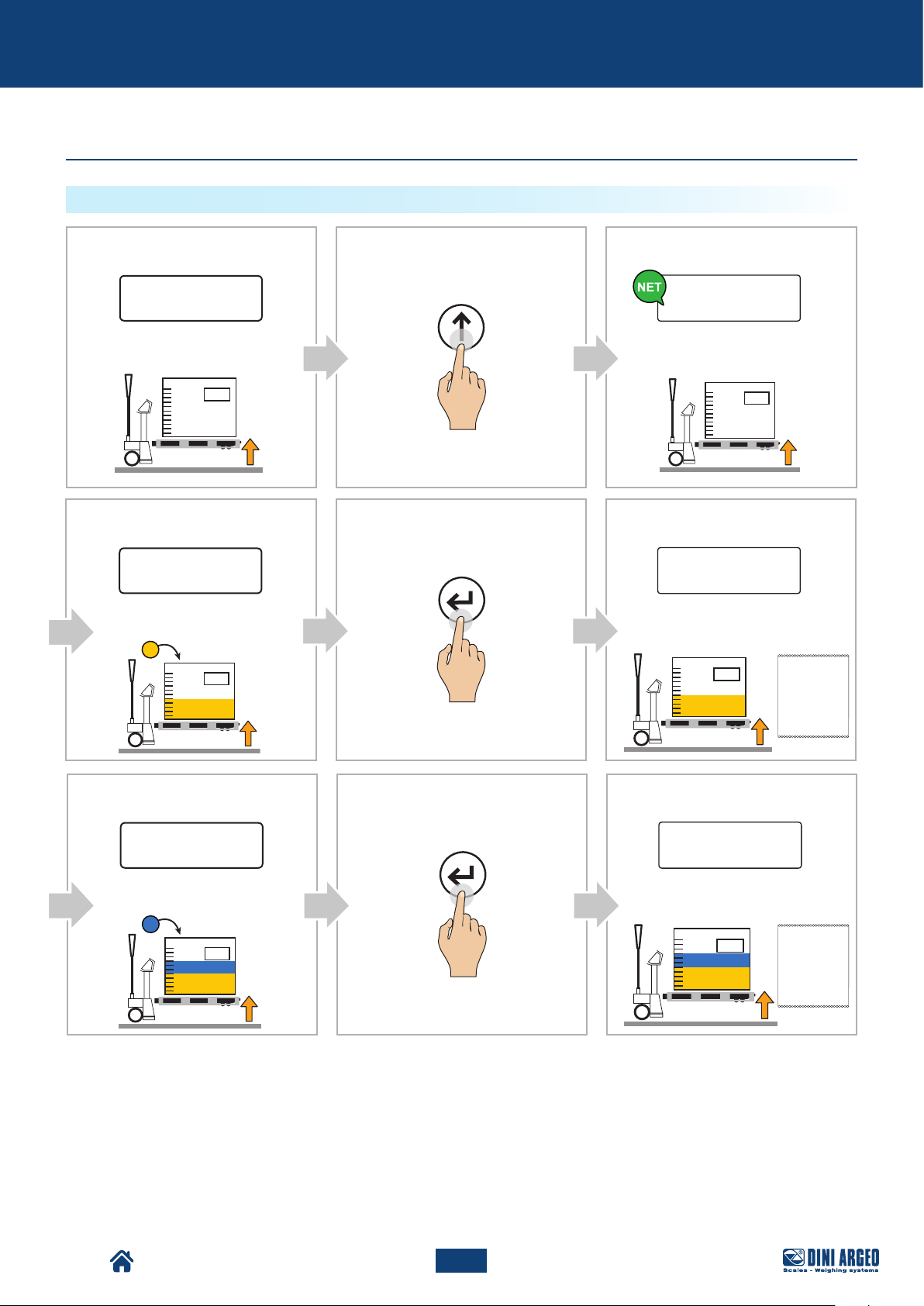
Advanced scale functions
Mixing several components
HOW TO ADD UP THE WEIGHINGS
Display:
3 0.0
Pallet Truck Condition:
Display:
2 5 0.0
Pallet Truck Condition:
B
CA
Display:
TARE
0
Pallet Truck Condition:
E
FD
Display:
PRINT
t. 1
Pallet Truck Condition:
NUM. PESATA 00000001
NETTO
250.0 kg
Display:
1 0 0.0
Pallet Truck Condition:
H
PRINT
IG
Display:
t. 2
Pallet Truck Condition:
NUM. PESATA 00000001
NETTO
NUM. PESATA 00000002
NETTO
250.0 kg
100.0 kg
TPW
60
USER_MAN_ENG_TPW_v4
Page 61
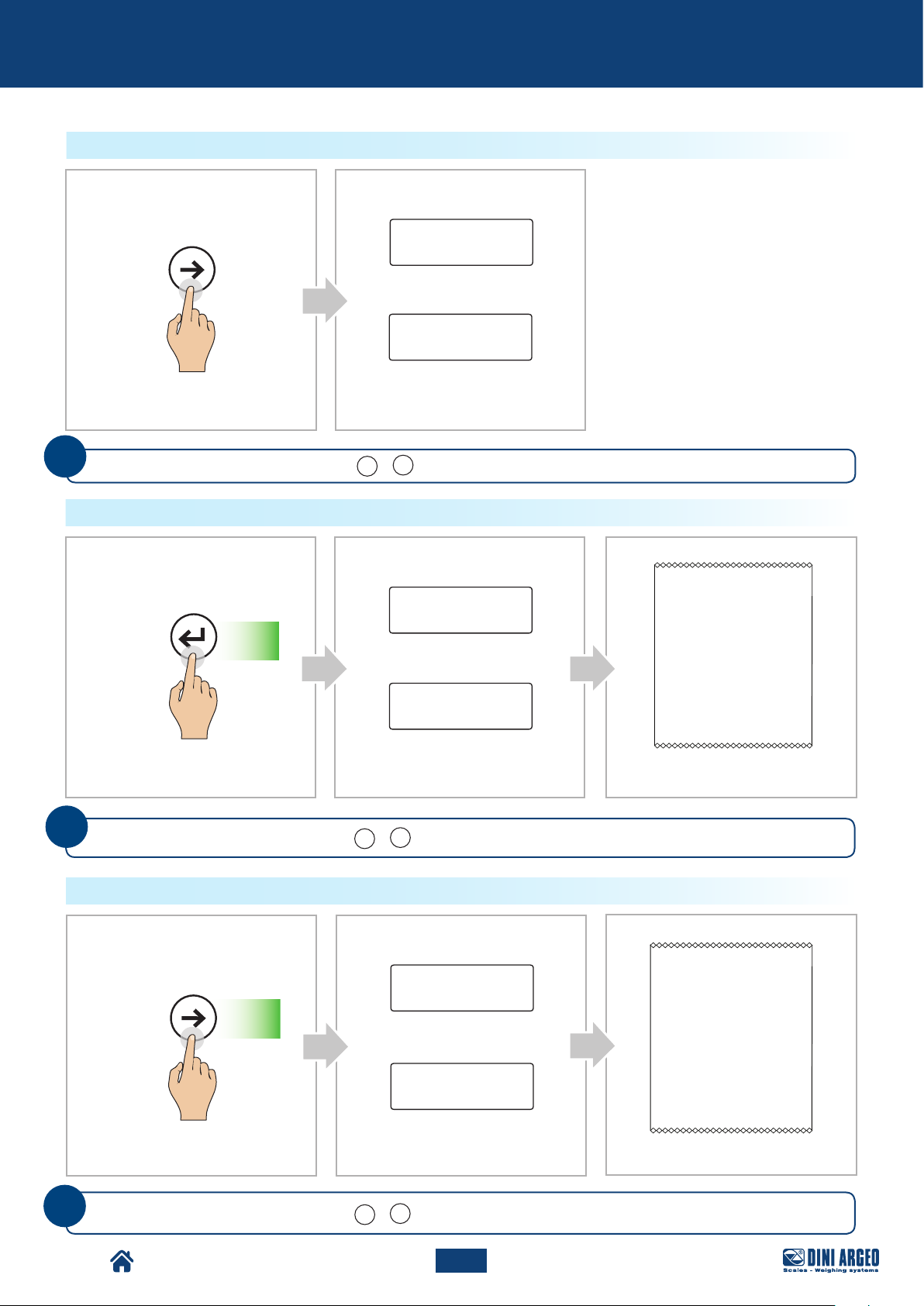
Advanced scale functions
HOW TO MOMENTARILY READ THE TOTAL
BA
Display:
MODE
N. 3
Number of weighings
Total weight
i
With the number keyboard, pressing F + 7 displays the current total without printing it/resetting it.
HOW TO END ACCUMULATION AND RESET THE TOTAL
BA
Display:
PRINT
N. 3
Press for
2 s
Number of weighings
3 5 0.0
C
NUM. PESATA 00000001
NETTO
NUM. PESATA 00000002
NETTO
250.0 kg
100.0 kg
i
3 5 0.0
Total weight
TOTALE PESATE 00000002
TOTALE NETTO 350.0 kg
15/11/18 09:23:03
If PRINTER present
With the number keyboard, pressing F + 7 displays the current total without printing it/resetting it.
HOW TO PRINT AND RESET THE GRAND TOTAL
C
NUM. PESATA 00000001
NETTO
NUM. PESATA 00000002
NETTO
TOTALE PESATE 00000002
TOTALE NETTO 350.0 kg
15/11/18 09:23:03
MODE
Press for
2 s
BA
Display:
N. 3
Number of weighings
3 2 0.0
Total weight
250.0 kg
100.0 kg
i
TPW
If PRINTER present
With the number keyboard, pressing F + 6 displays the current total without printing it/resetting it.
61
USER_MAN_ENG_TPW_v4
Page 62
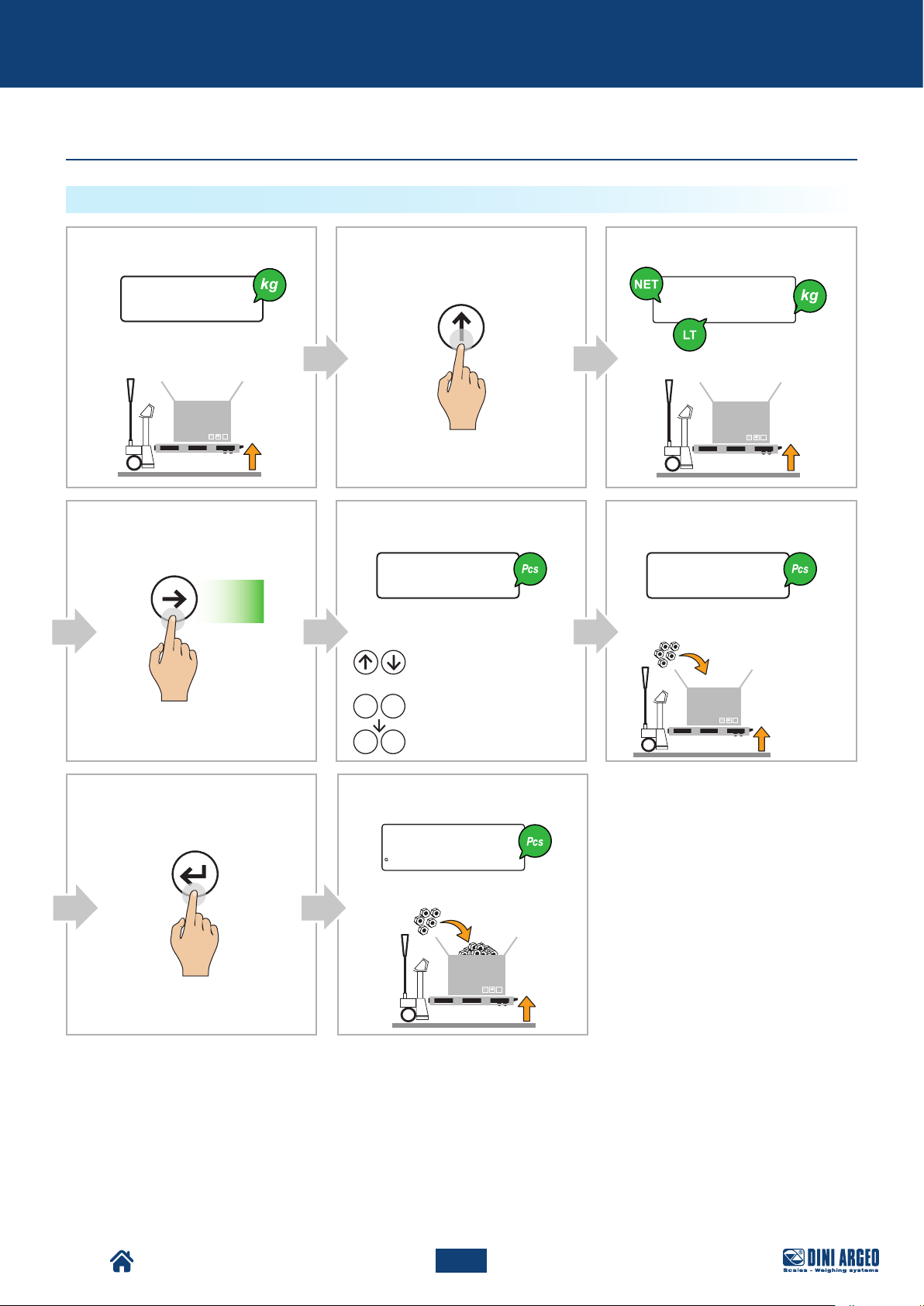
Advanced scale functions
Piece count
HOW TO SAMPLE AND COUNT
Display:
TARE
15.0
Pallet Truck Condition:
D E F
MODE
Press
for 2 s
Display: Display:
-5- 5 -5- 5
Set the loaded reference amount
(5, 10, 20, ..., 200 pieces):
Increase / Decrease
the value
or
F 5
0 9
Press the key combination
+
to activate free typing and
then enter a quantity
...
CA B
Display:
0.0
Pallet Truck Condition:
Load the selected reference
quantity.
Weight
> 0.1% Cap. Max.
ref
G H
PRINT
Display:
1500
Pallet Truck Condition:
TPW
62
USER_MAN_ENG_TPW_v4
Page 63
Advanced scale functions
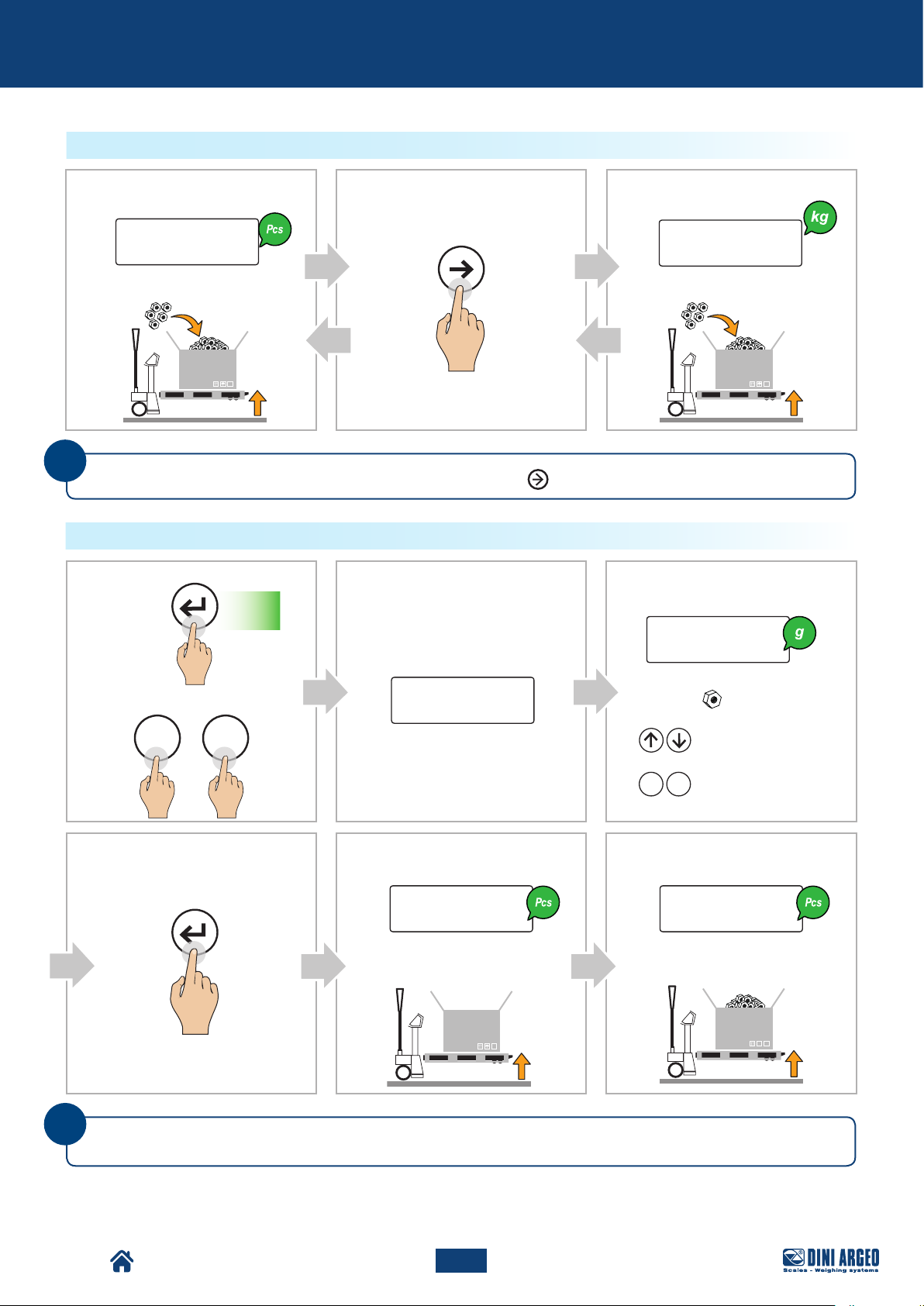
HOW TO SWITCH FROM PIECE TO WEIGHT DISPLAY AND VICE VERSA
Display: Display:
MODE
CA B
3000
Pallet Truck Condition: Pallet Truck Condition:
i
You can go from counting to weighing at any time by pressing
HOW TO ENTER THE AVERAGE UNIT WEIGHT (PMU)
PRINT
Press for
2 s
B CA
MODE
Display:
10.3427
Display:
Enter the average unit weight
Or:
apw
(Example: = 10,3427 g):
3 0 0.0
+
F 6
D E F
Display: Display:
PRINT
0 100
Pallet Truck Condition: Pallet Truck Condition:
i
For correct counting, you must set the known tare value or tare the empty container and fill it with the
pieces to count.
or
0 9
...
Increase / Decrease
the value
Enter the value
TPW
63
USER_MAN_ENG_TPW_v4
Page 64
Advanced scale functions
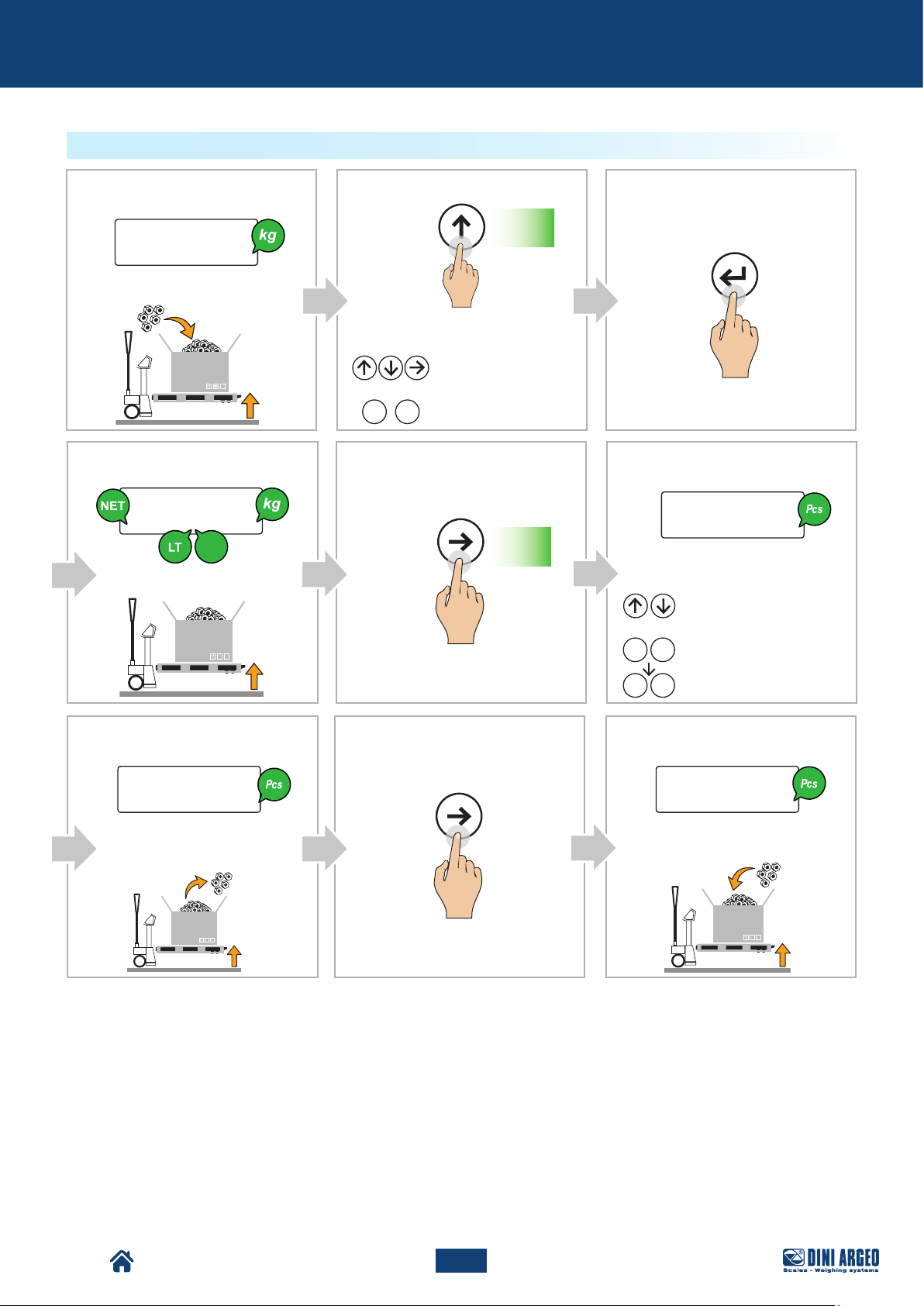
TOTAL LOAD COUNT
Display:
1000.0
Pallet Truck Condition:
Display:
9 8 5.0
PT
Pallet Truck Condition:
B
Manually set the tare value (pallet
+ container):
or
0 9
...
TARE
Press for
2 s
Increase / Decrease
the value
Enter the value
E
MODE
Press for
2 s
CA
PRINT
FD
Display:
-s- 5
Select the desired reference
quantity (5, 10, 20, ..., 200 pieces):
Increase / Decrease
the value
or
F 5
0 9
Press the key combination
+
to activate free typing and
then enter a quantity
...
G I
Display: Display:
H
MODE
-s- 5
Pick up the sampling pieces (5, 10,
20, 30, 40, 50, 60, 75, 10 0, 200 pieces).
Pallet truck condition:
3780
Pallet Truck Condition:
TPW
64
USER_MAN_ENG_TPW_v4
Page 65
Advanced scale functions
Weight check
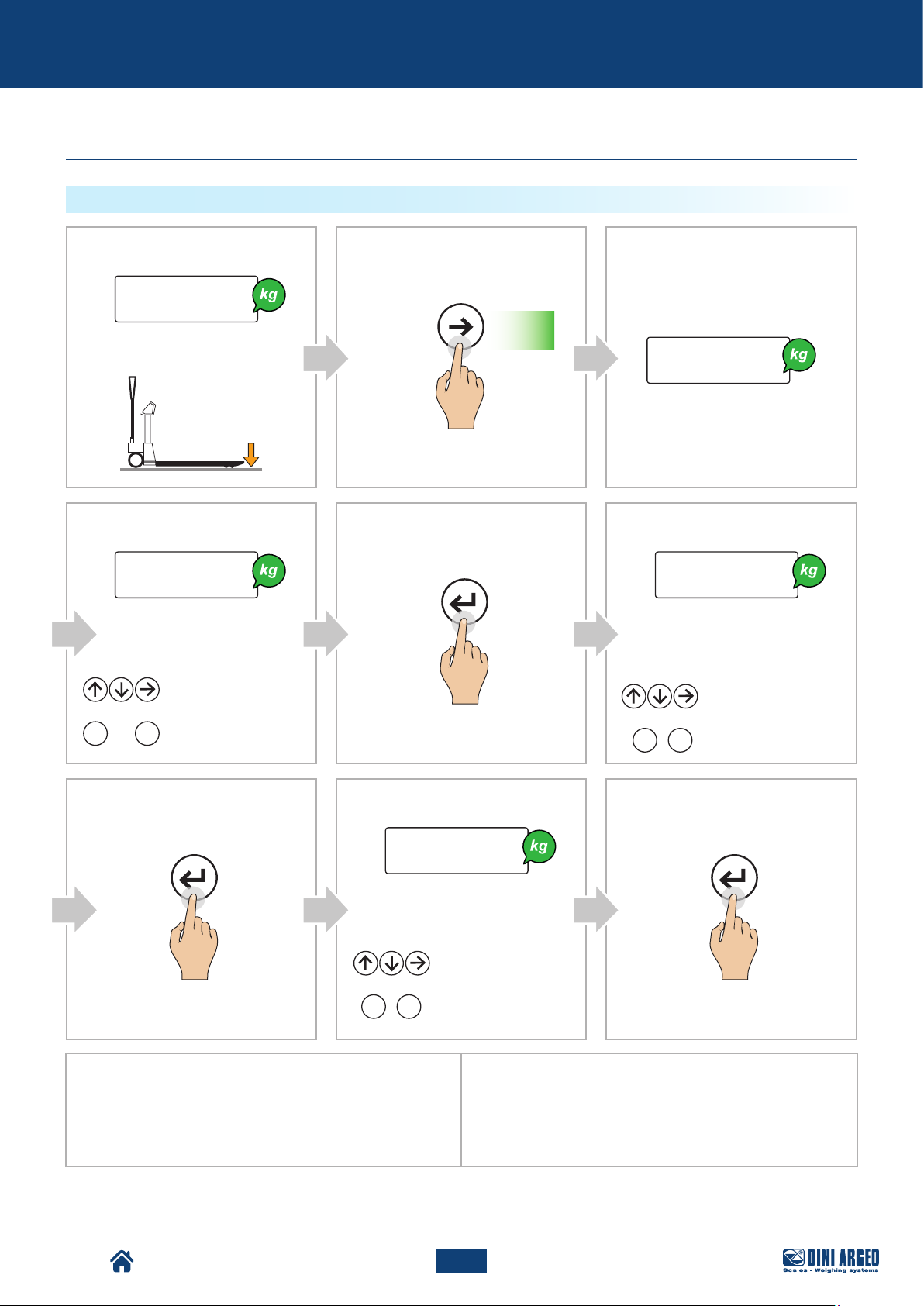
HOW TO START THE CHECK WITH KNOWN REFERENCE WEIGHT
A
Display:
0.0
Pallet Truck Condition:
D
Display:
T00000
Manually set the value:
Increase / Decrease
or
0 9
...
the value
Enter the value
B
MODE
Press for
2 s
C
Display:
tarGet
E
PRINT
F
Display:
l00000
Enter the lower tolerance:
Increase / Decrease
...
the value
Enter the value
or
0 9
G
PRINT PRINT
H
Display:
H00000
Enter the higher tolerance:
Increase / Decrease
the value
or
0 9
Example 1:
To check a weight of 1000 g with +/- 5 g tolerance (that is,
between 995 g and 1005 g), set:
t01000
l00005
h00005
...
Enter the value
I
Example 2:
To check a weight of 500 g with
+/- 10 g / -20 g tolerance (that is, between 480 g and 510 g), set:
t00500
l00020
h00010
TPW
65
USER_MAN_ENG_TPW_v4
Page 66
Advanced scale functions
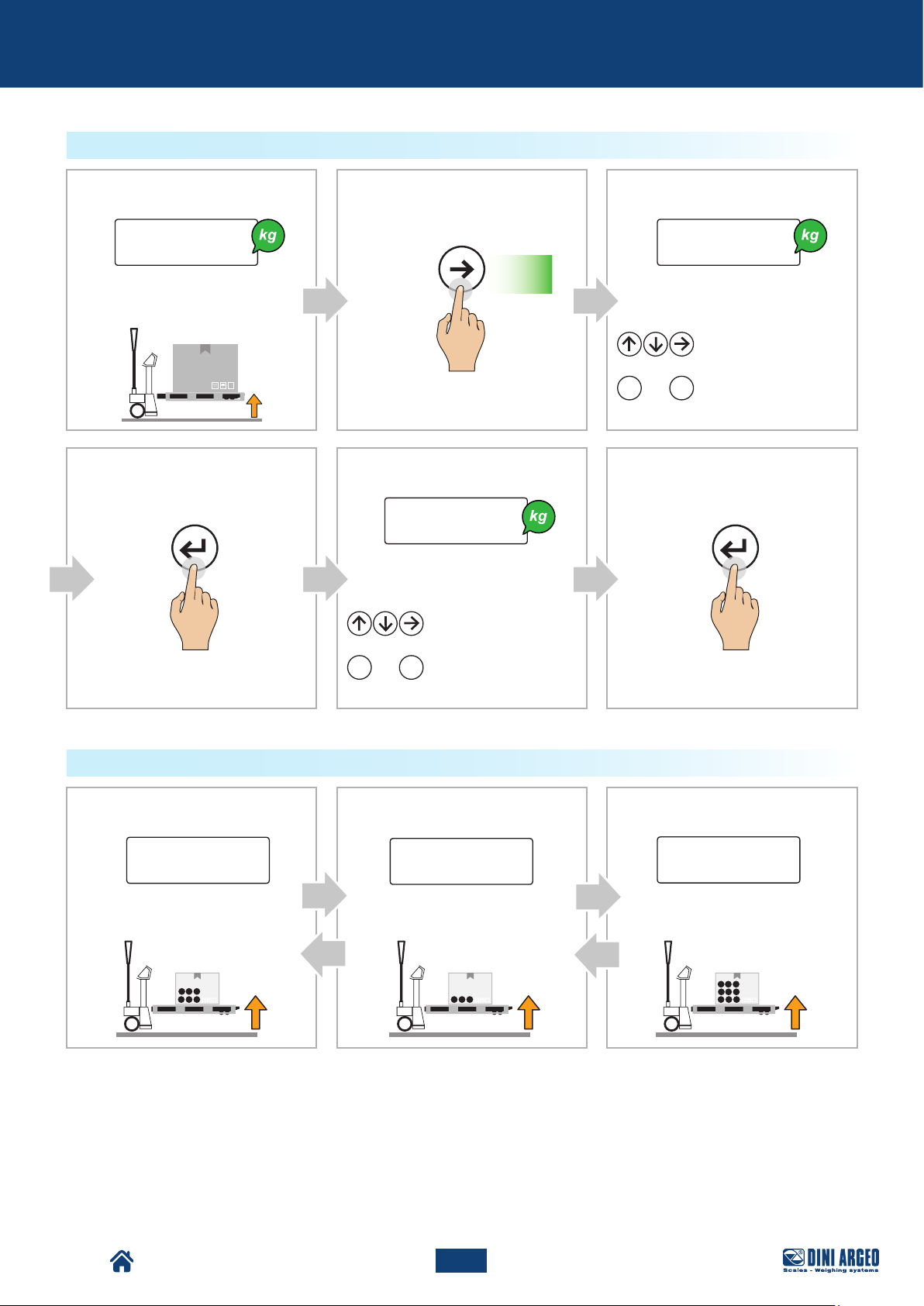
HOW TO START THE CHECK WITH AUTOMATIC TARGET ACQUISITION
A
Display:
5 0 0.0 l00000
Pallet Truck Condition:
D
PRINT PRINT
B
MODE
E
Display:
H00000
Enter the higher tolerance:
Increase / Decrease
the value
or
0 9
...
Enter the value
Press for
2 s
C
Display:
Enter the lower tolerance:
Increase / Decrease
the value
or
0 9
...
Enter the value
F
HOW TO CHECK THE WEIGHT
A
Display: Display: Display:
_under
Pallet Truck Condition: Pallet Truck Condition: Pallet Truck Condition:
B
- ok -
C
Over
TPW
66
USER_MAN_ENG_TPW_v4
Page 67
Advanced scale functions
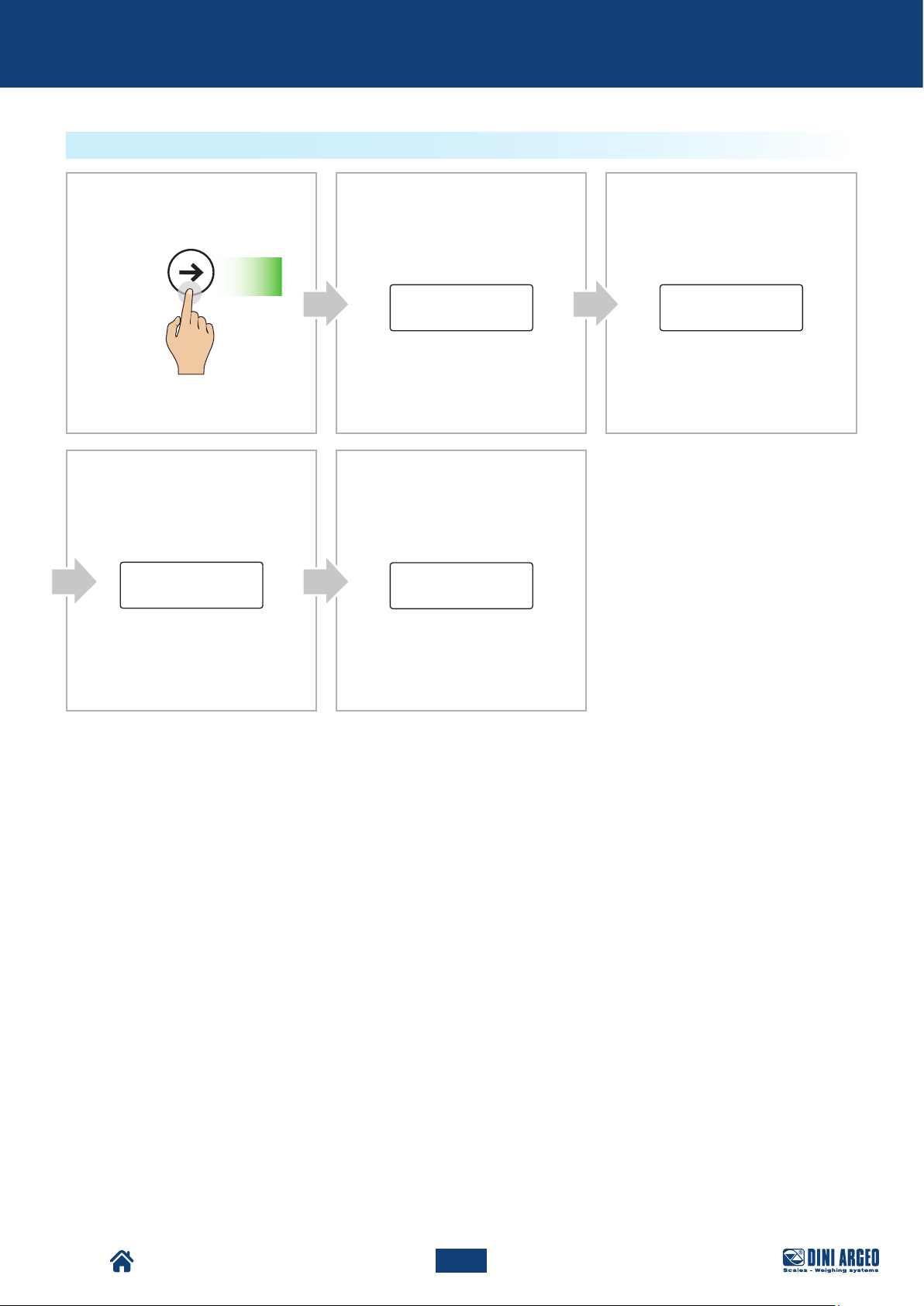
HOW TO UPDATE THE NOMINAL WEIGHT WITH KNOWN REFERENCE WEIGHT
Display:
B
MODE
CA
Display:
0.0
Pallet Truck Condition:
HOW TO UPDATE THE NOMINAL WEIGHT WITH AUTOMATIC TARGET ACQUISITION
A
Display:
B
MODE
5 0 0.0
tarGet
t00000
Pallet Truck Condition:
TPW
67
USER_MAN_ENG_TPW_v4
Page 68
Advanced scale functions
HOW TO EDIT THE CHECK THRESHOLDS
D
MODE
Press for
t.m a x
2 s
B
E
Display:
Display:Display:
h00000
CA
Display:
t.m i n l00000
TPW
68
USER_MAN_ENG_TPW_v4
Page 69
Advanced scale functions
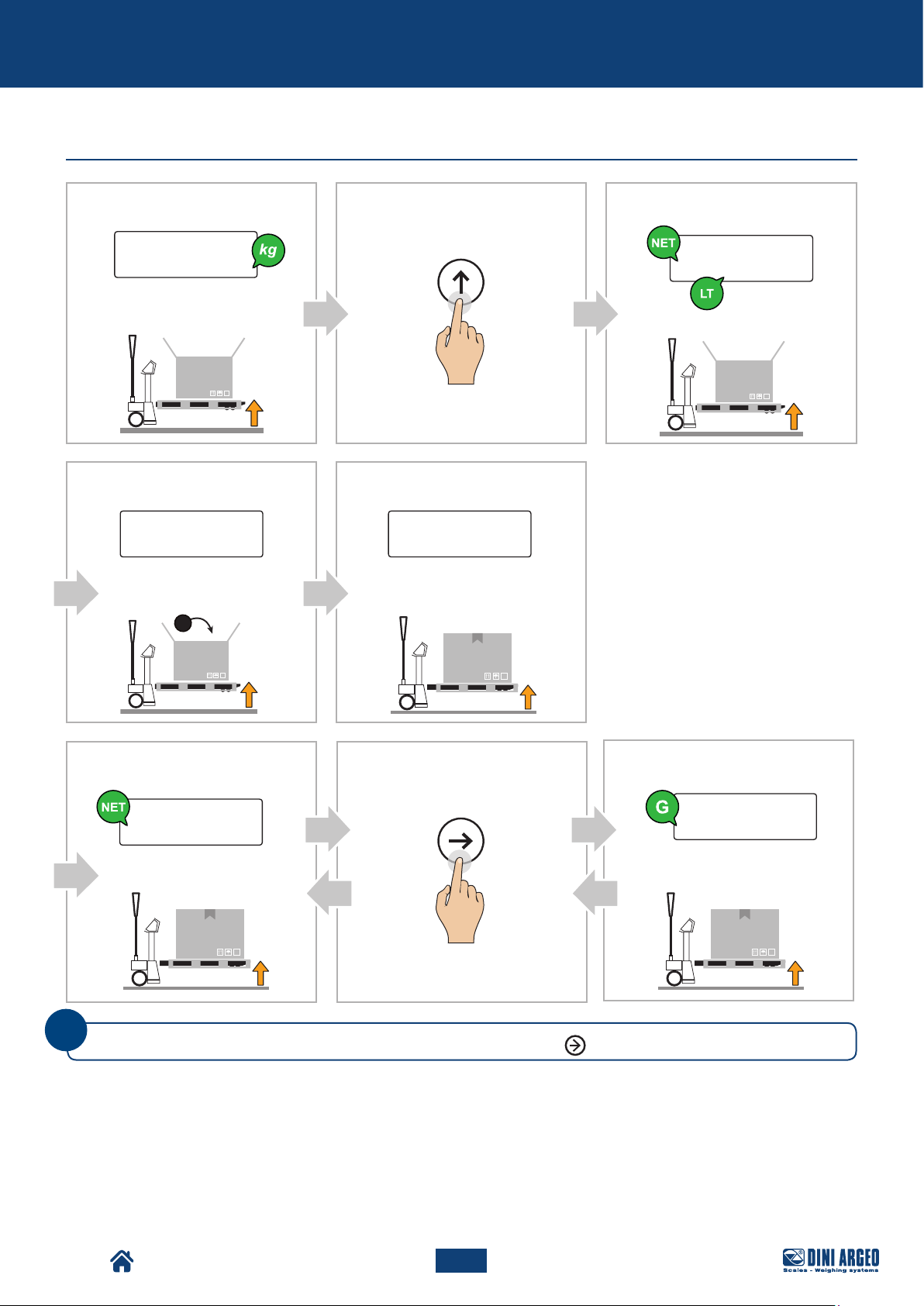
Exchange between net weight and gross weight
Display:
B
15.0
Pallet Truck Condition:
D
Display: Display:
E
0.0 1 0 0.0
Pallet Truck Condition: Pallet Truck Condition:
TARE
CA
Display:
Pallet Truck Condition:
0.0
F
Display:
Pallet Truck Condition:
i
You can go from net weight to gross weight at any time by pressing
1 0 0.0
G H
MODE
MODE
.
Display:
1 1 5.0
Pallet Truck Condition:
TPW
69
USER_MAN_ENG_TPW_v4
Page 70
Advanced scale functions
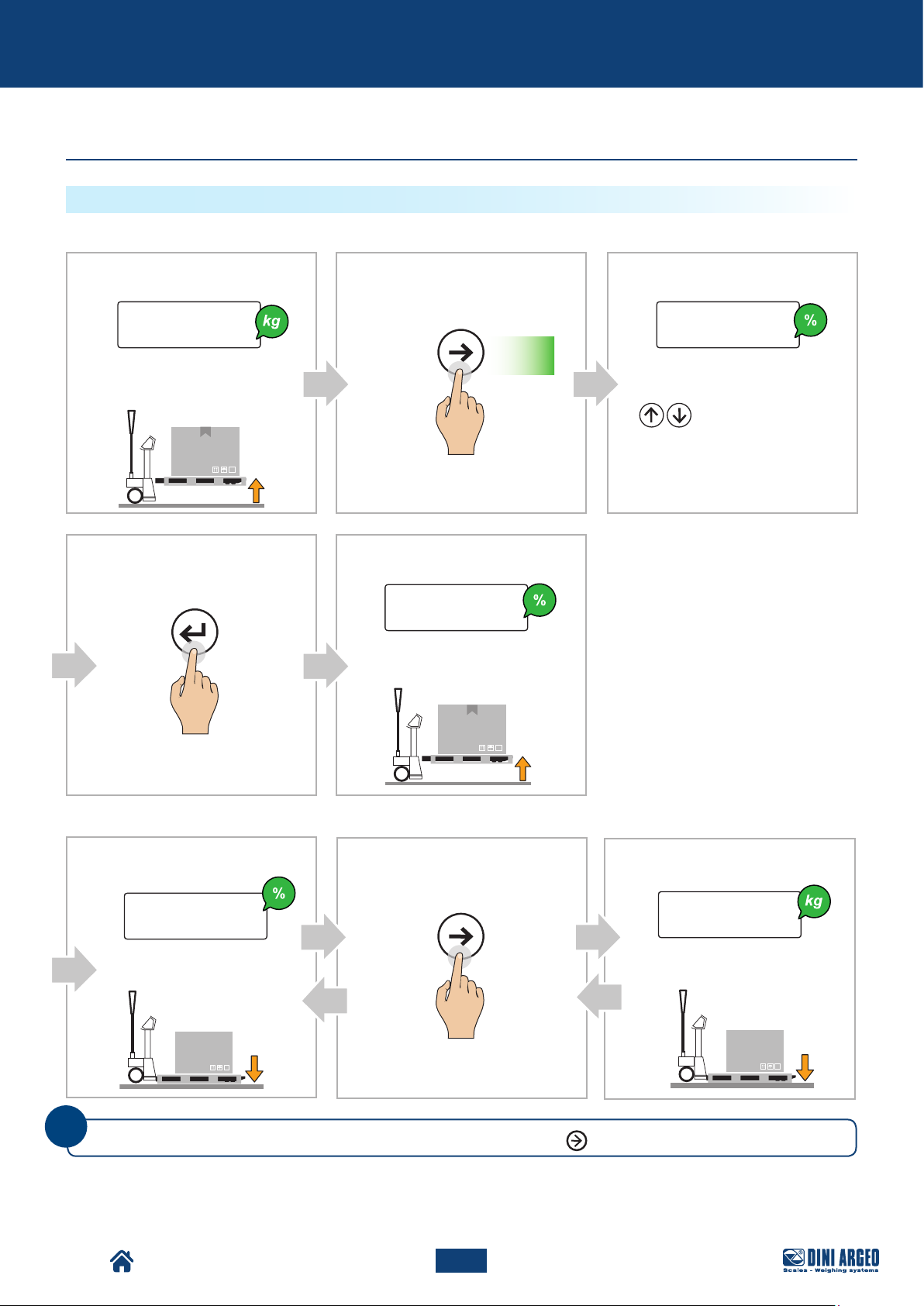
Percentage weighing
PERCENTAGE CHECK
I. How to acquire the 100% reference
A
Display:
Pallet Truck Condition:
D
PRINT
5 0.0
B C
MODE
Press for
2 s
E
Display:
1 0 0.0
Pallet Truck Condition:
Display:
S-100.0
Set the value:
Increase / Decrease
the value
II. How to check the weight
F
Display:
Pallet Truck Condition: Pallet Truck Condition:
i
TPW
You can go from weight in % to weight in kg at any time by pressing
5 0.0
G H
MODE
MODE
.
70
USER_MAN_ENG_TPW_v4
Display:
2 5.0
Page 71
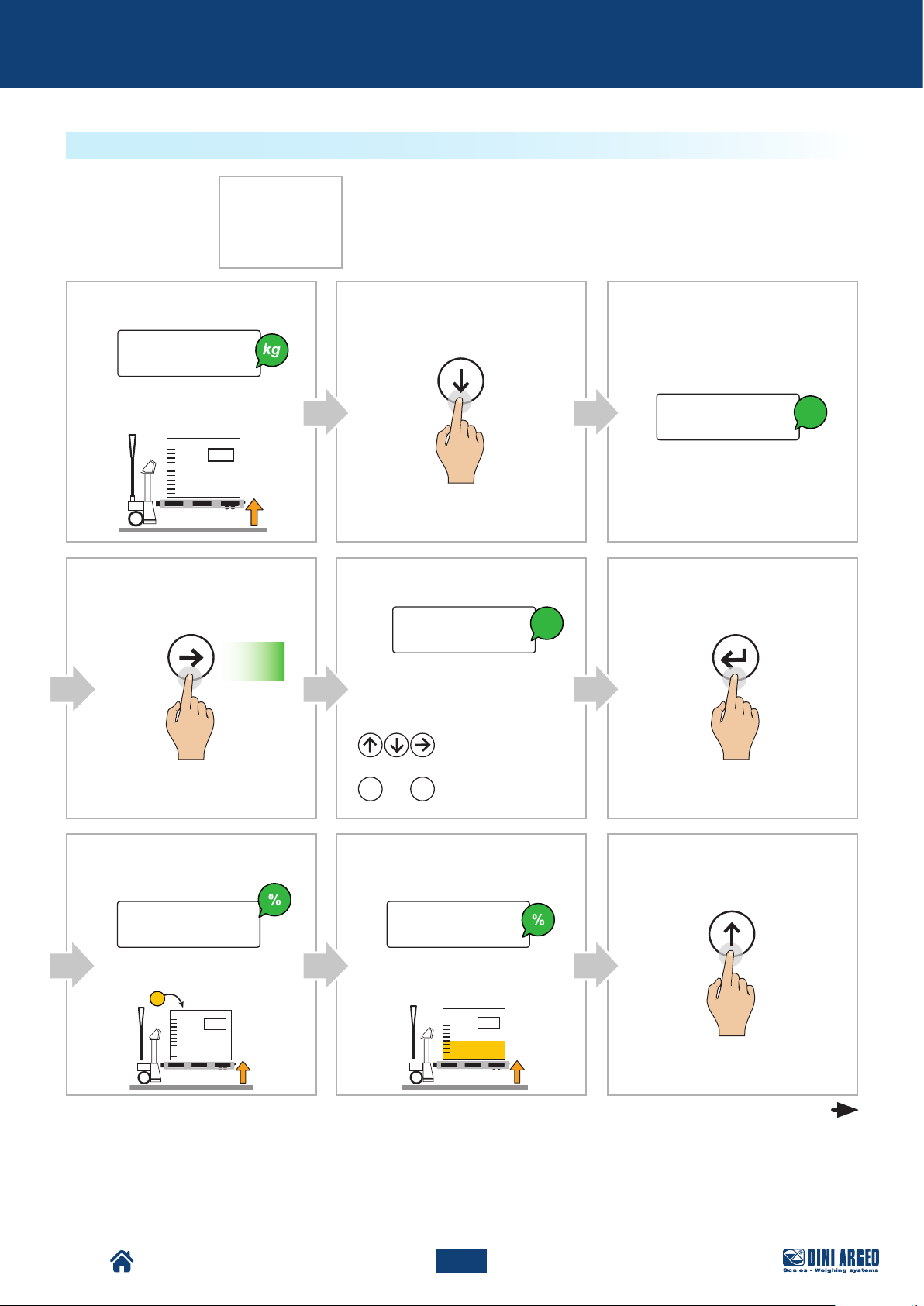
Advanced scale functions
PERCENTAGE METERING
Example of formula:
A
Display:
Pallet Truck Condition:
D
MODE
1 0.0
Press for
Product: RP28K
1. 2127A3 - 50%
2. 23AB4 - 30%
3. Water - 20%
Meter 500 kg
2 s
B C
ZERO
E
Display:
kg
00500.0
F
Display:
PRINT
0.0
kg
Enter the total quantity to achieve:
Increase / Decrease
the value
Enter the value
G
Display: Display:
H
or
0 9
...
0.0
Pallet Truck Condition: Pallet Truck Condition:
I
TARE
5 0.0
continue
TPW
71
USER_MAN_ENG_TPW_v4
Page 72
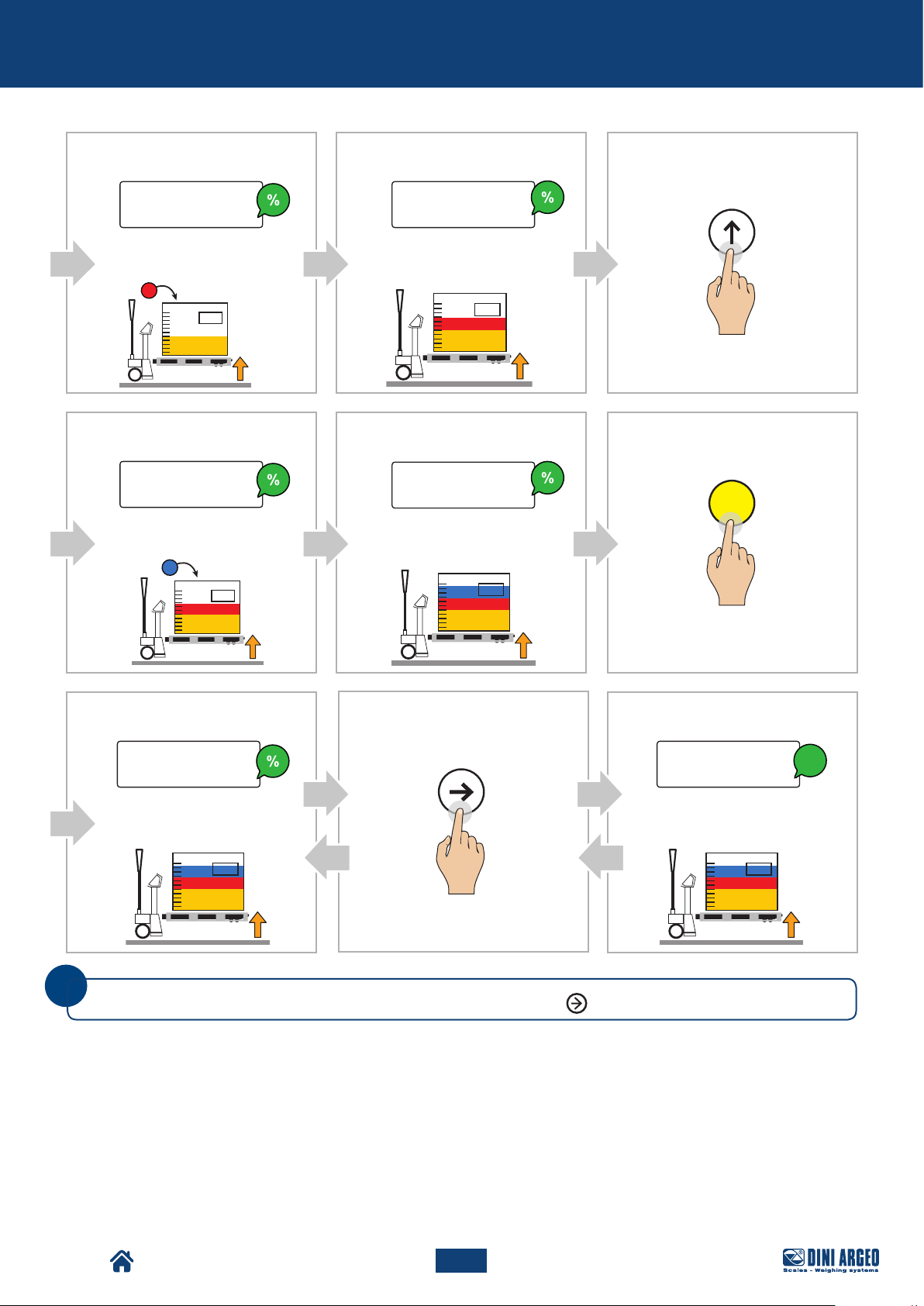
Advanced scale functions
J
Display:
Pallet Truck Condition:
M
Display:
Pallet Truck Condition:
0.0
0.0
K
Display:
Pallet Truck Condition:
N
Display:
Pallet Truck Condition:
L
TARE
3 0.0
O
2 0.0
C
P Q R
Display:
MODE
1 0 0.0 5 0 0.0
Pallet Truck Condition:
i
You can go from weight in % to weight in kg at any time by pressing
MODE
Display:
kg
Pallet Truck Condition:
.
TPW
72
USER_MAN_ENG_TPW_v4
Page 73
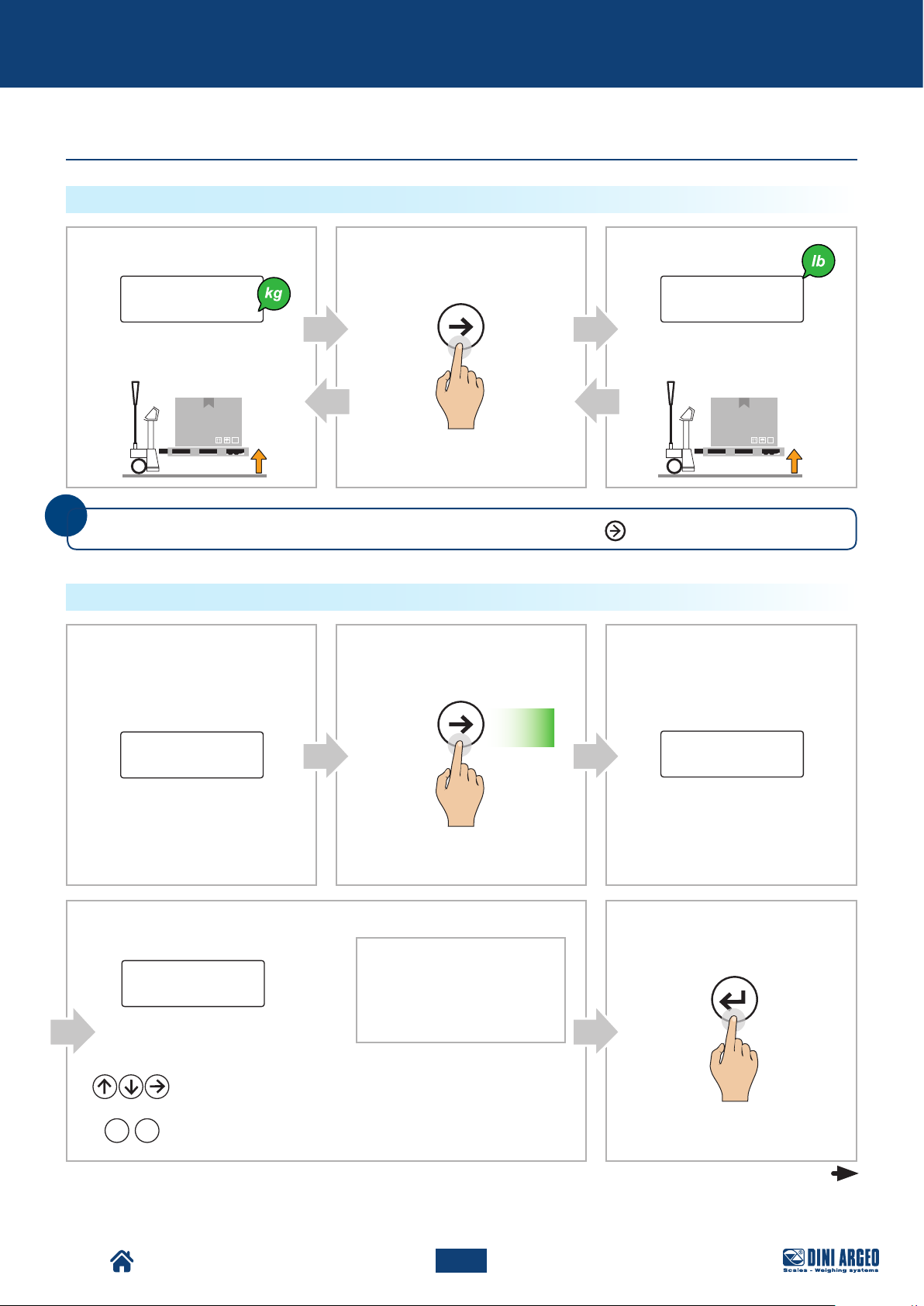
Advanced scale functions
Unit of measurement conversion
HOW TO COVERT THE UNIT OF MEASUREMENT INTO POUNDS (STANDARD MODE)
Display:
B CA
MODE
Display:
5 0.0 110,23
Pallet Truck Condition: Pallet Truck Condition:
i
You can go from weight in kg to weight in pounds at any time by pressing
HOW TO CONVERT THE UNIT OF MEASUREMENT WITH FREE CONVERSION FACTOR
A
Display:
B C
MODE
Press for
2 s
5 0.0
MODE
.
Display:
faCtor
TPW
D
Display:
Display:
00000.0
Insert the conversion factor:
Increase / Decrease
or
0 9
the value
...
Enter the value
Examples:
Pounds (lb) 1g = 0.00220
Ounces (oz) 1g = 0.03527
Stones (st) 1g = 0.00016
Karats (kt) 1g = 5.00000
Grains (gr) 1g = 15.43240
Any conversion factor must be
multiplied by the weight.
73
USER_MAN_ENG_TPW_v4
E
PRINT
continue
Page 74
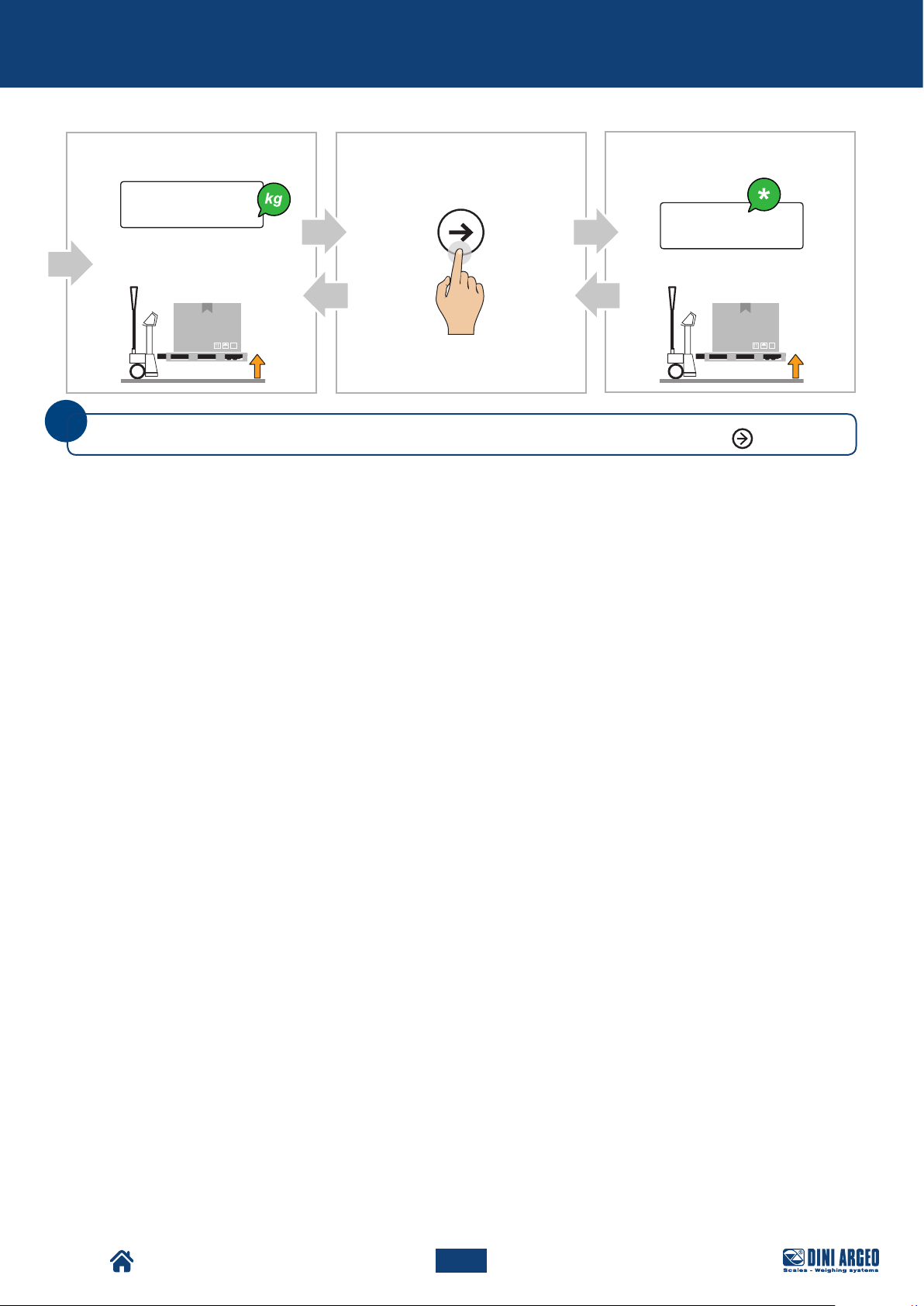
Advanced scale functions
F
Display: Display:
G H
MODE
5 0.0
110,23
Pallet Truck Condition: Pallet Truck Condition:
i
You can convert the unit of measurement with free conversion factor at any time by pressing
MODE
.
TPW
74
USER_MAN_ENG_TPW_v4
Page 75
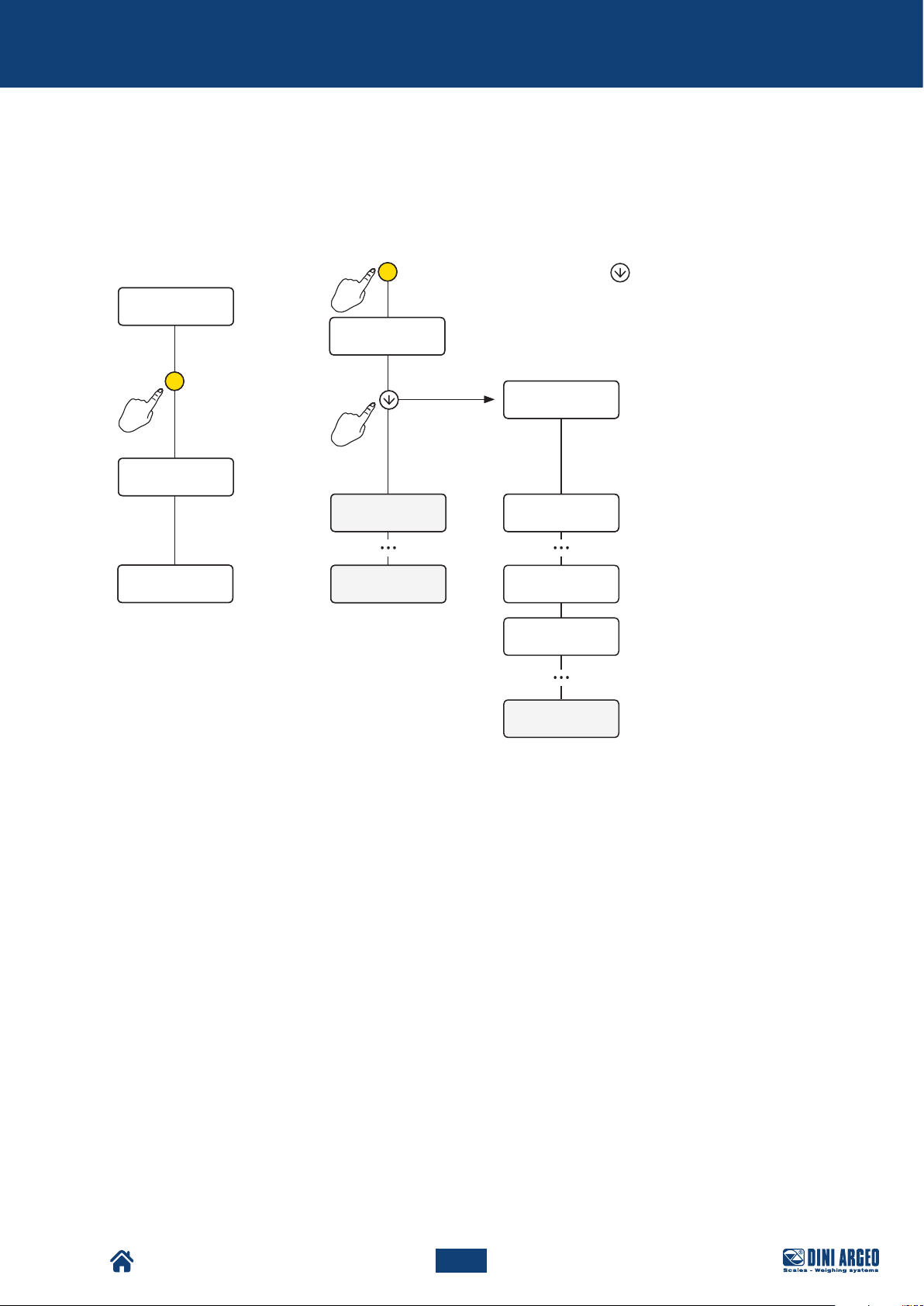
Metrological scale information
METROLOGICAL SCALE INFORMATION
1. Turn off the scale
0.0
0.0
C
2 sec2 sec
C
-off-
-off-
2. Follow the procedure:
C
C
Turn on the scale and press the key while the
startup messages are being displayed.
888888
888888
max
max
0.0
0.0
x x.y y
x x.y y
a a.b b.C C
a a.b b.C C
leGal
9.80390
Prefix: identifies the tool
xx
model
Version: identifies the legal
YY
software
Weighing program
version
0.0
TPW
75
USER_MAN_ENG_TPW_v4
Page 76
Maintenance
MAINTENANCE
Maintenance warnings
WARNING!
Perform maintenance operations when the machine is switched off and in a safe condition.
WARNING!
Maintenance operations must be performed by qualified and authorised personnel.
Machine maintenance includes the operations (inspection, verification, control, adjustment and replacement) that
become necessary following normal use.
• During maintenance operations do not release work residues into the environment.
• Only perform the maintenance operations described herein, any unspecified procedures can pose a serious risk
to untrained operators and in any case alter the machine’s degree of safety.
• Always and only use original spare parts.
• During operation or maintenance, plates and stickers must NOT be removed, hidden, or made illegible.
• The maintenance technicians must wear all the personal protective equipment required for the operation to be
carried out.
WARNING!
Repair or maintenance operations not contained in this manual may only be carried out with the prior
authorisation of DINI ARGEO
No responsibility for damage to persons or property may be attributed to DINI ARGEO for operations
other than those described or carried out in ways other than those indicated.
Machine maintenance operations are divided, from the operational point of view, into two main categories:
All those operations that the operator must perform, in a preventive manner, to ensure
Scheduled Maintenance
Unscheduled Maintenance
good operation of the machine over time; scheduled maintenance includes inspection,
control, adjustment, cleaning and lubrication.
All those operations that the operator must perform when the machine requires it.
Unscheduled maintenance includes the overhaul, repair, restoration of nominal operating
conditions or the replacement of a faulty, defective or worn out unit.
TPW
76
USER_MAN_ENG_TPW_v4
Page 77
Maintenance
Scheduled maintenance
The machine, when delivered to the user, is already adjusted to work properly; however, in order to ensure its proper
functioning over time, it is required to carry out periodic and preventive checks and maintenance.
The scheduled maintenance includes inspections, checks and operations that, to prevent breakdowns, keep under
control:
• the mechanical conditions of the machine,
• the lubrication of the machine,
• the cleaning of the machine.
WARNING!
Before starting the maintenance operations, place the Pallet Truck on a solid and flat surface.
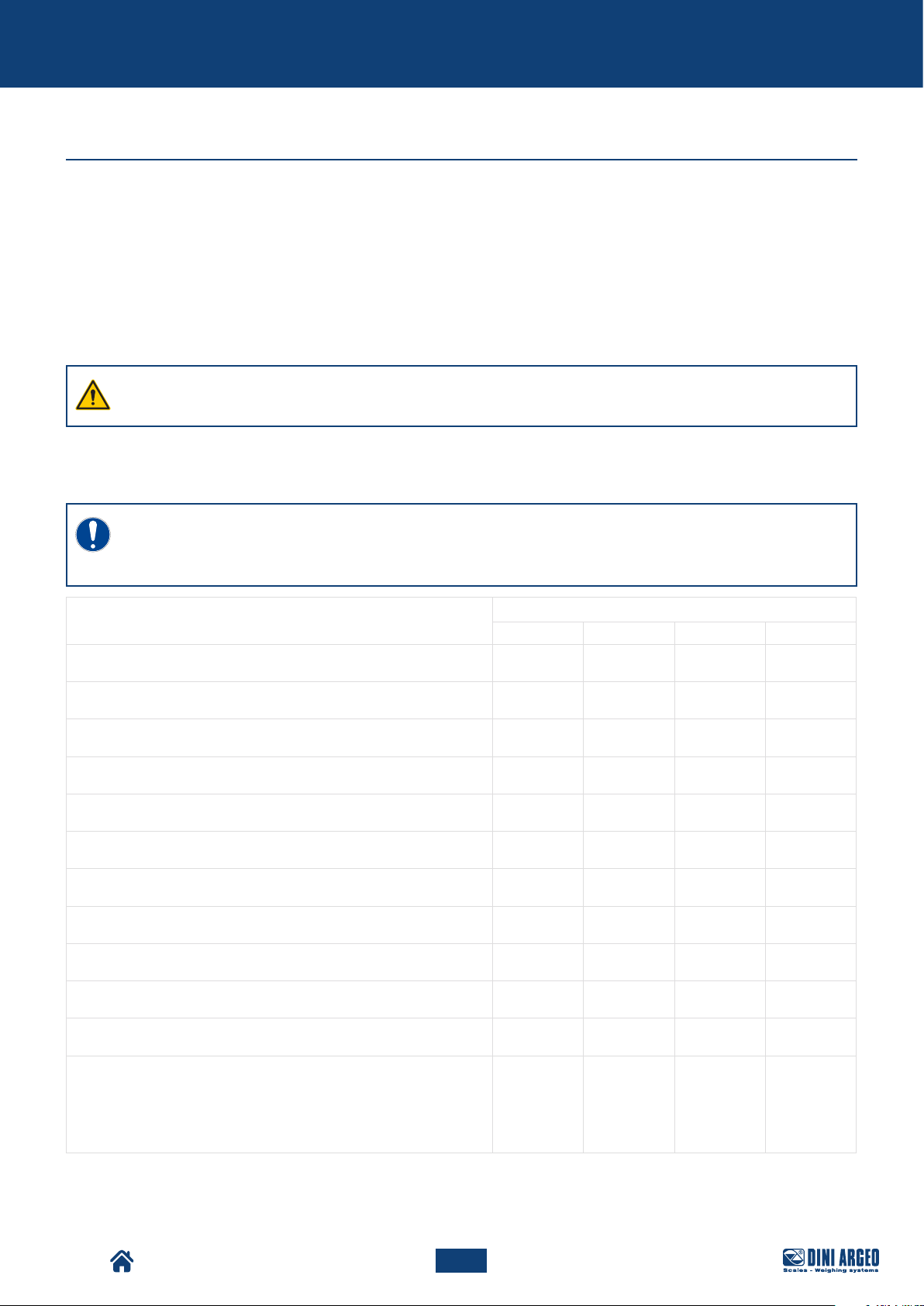
Scheduled maintenance table
IMPORTANT!
Scheduled maintenance operations to be carried out daily are the responsibility of the operator
responsible for driving the pallet truck.
Operation
Roller and wheel integrity check ♦
Visual check of the state of the truck frame ♦
Weight indicator operation check ♦
Integrated printer operation check (if present) ♦
Pump operation check ♦
Greasing the bearings of the rollers and wheels ♦
Greasing the tiller control lever guide ♦
Chain greasing with spray ♦
Greasing the lifting system ♦
Daily Weekly Monthly Biannual
Frequency
Oil level check ♦
Wheel cleaning ♦
General cleaning of the machine with compressed air and nonpressurised water
Note: in non-IP models, do not use water on the battery and on the
interface.
TPW
USER_MAN_ENG_TPW_v4
77
♦
Page 78
Maintenance
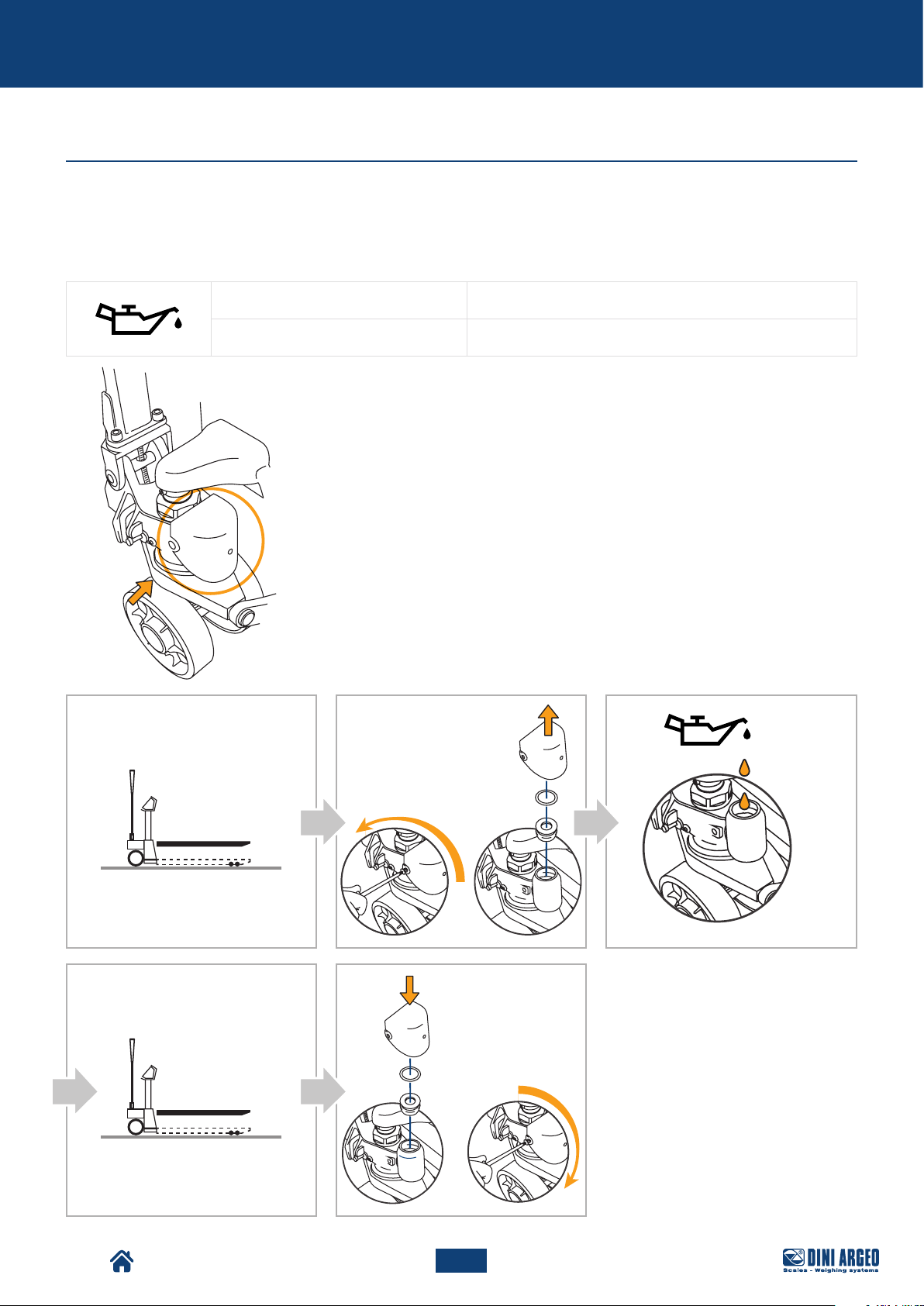
Oil level top-up
Tank top-up for models with pump with plug
Check the oil level every 6 months.
Only use hydraulic oil (not motor or brake oil) to top-up.
Oil viscosity: 30 CST at 40°C
Total volume: 0.3 l
A. Fully lower the forks.
B. Remove the protective casing, the seal and the cap.
C. If required, add up to 20 mm from the top edge of the tank.
D. Operate the pump several times to release any air from the
hydraulic circuit, then lower the forks completely.
E. Put the cap, the seal and the protective casing back on.
A B C
D E
TPW
78
USER_MAN_ENG_TPW_v4
Page 79
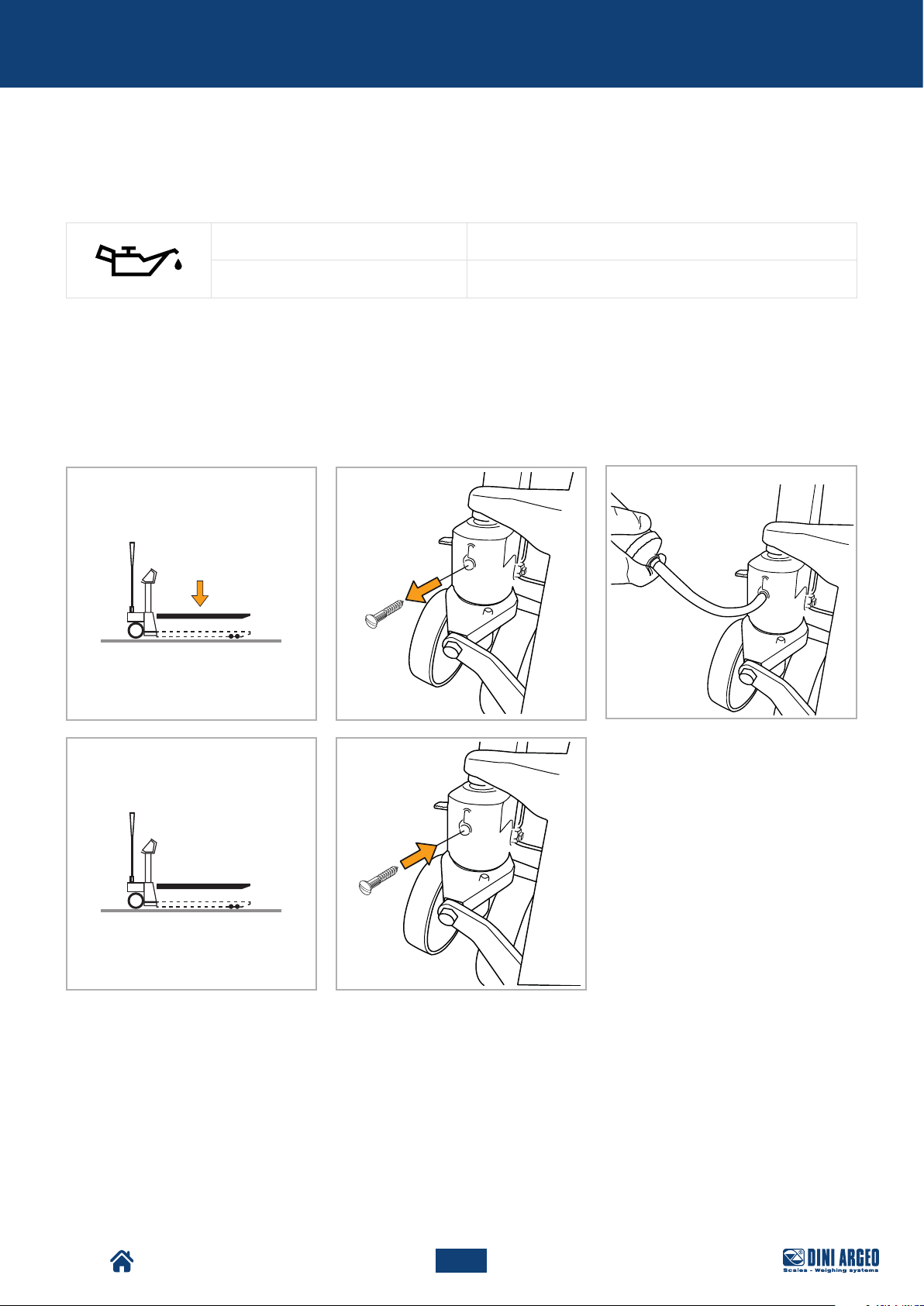
Maintenance
Tank top-up by means of syringe for models with mono-block pump
Check the oil level every 6 months.
Only use hydraulic oil (not motor or brake oil) to top-up.
Oil viscosity: 30 CST at 40°C
Total volume: 0.3 l
A. Fully lower the forks.
B. Unscrew and remove the oil tank closing screw.
C. If required, add oil through the syringe (not supplied) until the first leak.
D. Operate the pump several times to release any air from the hydraulic circuit, then lower the forks completely.
E. Reassemble the closing screw.
A B
D E
C
TPW
79
USER_MAN_ENG_TPW_v4
Page 80

Maintenance
Unscheduled maintenance
For unscheduled maintenance on the machine, contact the Authorised Support Centre.
WARNING!
Unscheduled maintenance and repair of the machine are reserved for qualified, instructed and authorised
technicians, depending on the manufacturer or authorised service centre.
These operations require in-depth and specialised knowledge of the machines, of the operations
required, of the risks involved and of the correct procedures to operate in safety.
TPW
80
USER_MAN_ENG_TPW_v4
Page 81

Troubleshooting cases
TROUBLESHOOTING CASES
PRINT
TOTALISATION
The scale does not
print
The scale does not
accumulate
• Another printout is already in progress (busy)
• Make sure there is a roll in the printer
• The printer does not switch on
• The weight is unstable (unStAb)
• The net or gross weight is negative or insucient for printing (low)
• Underload or overload (______ or ------) (un.oVEr)
• The scale was not unloaded after the last printing (no.0.unS)
• You are trying to print a non-approved weight
• Make sure there is a roll in the printer
• The printer does not switch on
• The weight is unstable (unStAb)
• The net or gross weight is negative (loW)
• Underload or overload (______ or ------) (un.oVEr)
• The scale was not unloaded after the last printing (no.0.unS)
• The weight is too low for the weighing operation (low)
- less than 10 divisions for the accumulator modes
- less than “Min” for the approved products (shown on the measuring plate)
TARE
WEIGHING
The scale has lost the
total
The scale does
not tare
The scale does
not switch on
The scale switches
o suddenly
The scale is
not reactive
The scale display
switches o and
displays a dot
• Switching off the scale causes the accumulated totals to be lost
• The weight is unstable (unStAb)
• The gross weight is negative (loW)
• The weight is insufficient
• The weight exceeds the maximum capacity
• The tare function has been deactivated
• In the event of manual tare, the value exceeds the maximum capacity
• Make sure the power cable is connected properly
• Connect the battery charger and try again. If the instrument continues to
malfunction, contact the dealer.
• Automatic switching off active
• Low battery
• Battery failure
• Power supply line failure
• One of the available energy saving modes has been activated
• An unsuitable weighing filter has been selected
• Stand-by mode is active: press a key to reactivate weighing.
• Energy saving mode is active: contact the dealer for further details.
TPW
The scale displays
a permanent “Zero”
message
• The scale is unable to automatically reset the weight because it exceeds
the maximum resettable weight at switch-on.
• Unload the scale and try again. If the scale continues to have the same
problem even when there is nothing on it, contact the dealer.
81
USER_MAN_ENG_TPW_v4
Page 82

Troubleshooting cases
PIECE COUNTER
The weight is
unstable
The scale does
not carry out
sampling
• Check whether the weighing filter is active.
• If the support surface is subjected to vibrations from machinery or mov-
ing vehicles, move the scale onto another surface and try again.
• The weight is unstable (Err.Mot)
• The weight is insufficient, add more pieces and try again (Error)
TPW
82
USER_MAN_ENG_TPW_v4
Page 83
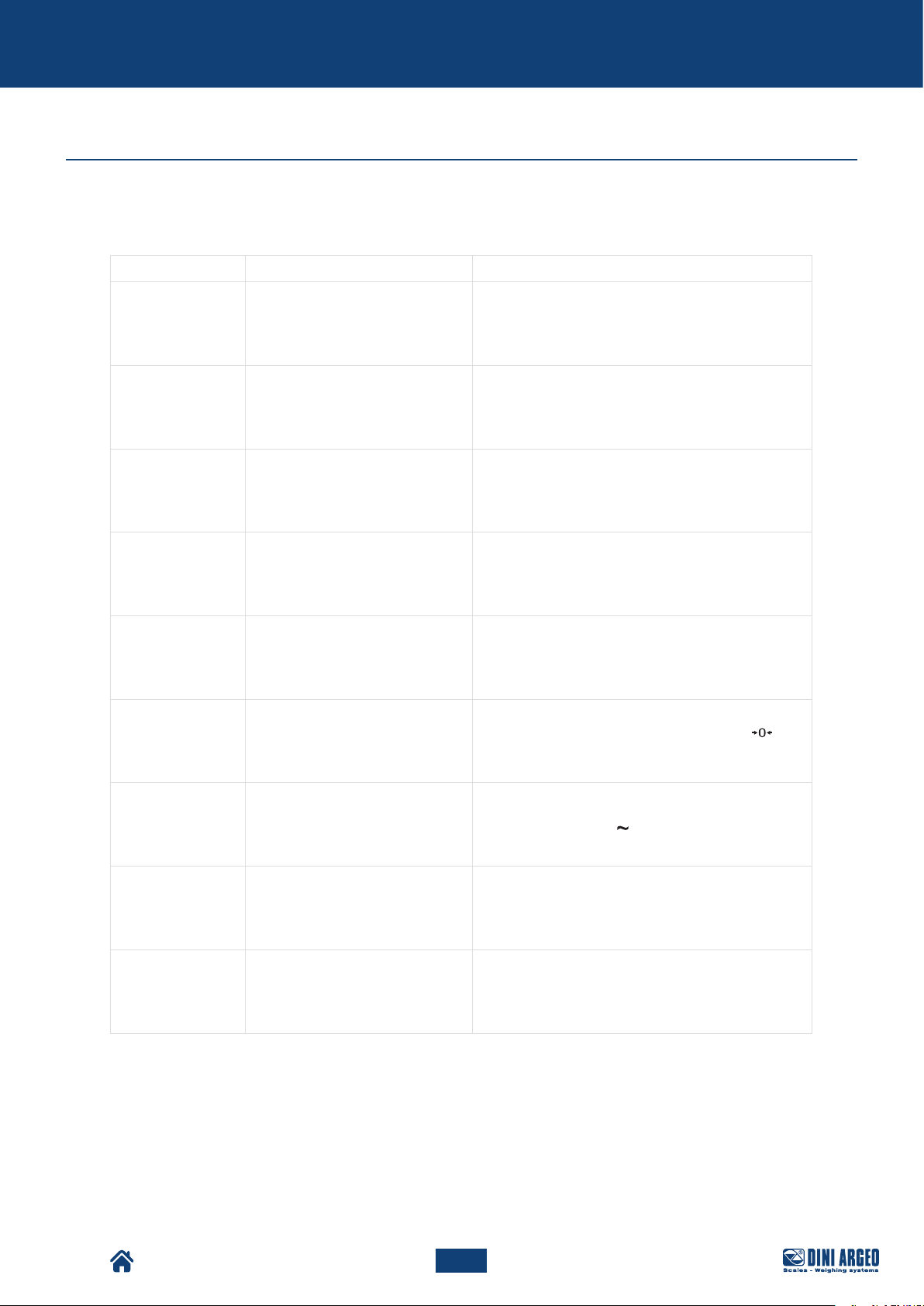
Troubleshooting cases
Error messages
MESSAGE DESCRIPTION SOLUTION
BUSY
UNSTAB
low
under
over
no.0.unS
Another printout is already in
progress
The weight is unstable
The net or gross weight is
negative or insufficient for
printing
Underload
Overload
The scale was not unloaded
after the last printing
Wait for the printout in progress to be finished and
try again.
Check the weighing filter.
If the support surface is subjected to vibrations from
machinery or moving vehicles, move the scale onto
another surface and try again.
Add weight and try again.
Load the scale and restore a valid weight condition.
If the problem persists, contact customer service.
Unload the scale and restore a valid weight
condition. If the problem persists, contact customer
service.
Completely unload the scale, making sure
lights up. Load the weight and try again.
TPW
err.mot
Error
Tilt
The weight is unstable Wait for stability (the light) and try again.
In piece counting mode, the
weight is insufficient for proper
sampling.
Angle error.
USER_MAN_ENG_TPW_v4
Add more pieces and try again.
Move the pallet truck to a flat surface and try
again.
83
Page 84

Notes
This publication, or por tions thereof, may not be duplicated without written permission from the Manufac turer. All information contained in this manual is based on the
data available at the time of its publication; the Manufacturer reserves the right to make changes to its products at any time without notice and without incurring any
penalty. We therefore recommend that you always check for any updates.
The individual in charge of pallet truck operation must ensure that all safety regulations in force in the country of use are applied, ensuring that the appliance is used in
accordance with the purpose it is intended for and to avoid any danger for the user.
The Manufacturer declines any liability arising from any weighing operation errors.
TPW
84
USER_MAN_ENG_TPW_v4
Page 85

Notes
TPW
85
USER_MAN_ENG_TPW_v4
Page 86

Notes
TPW
86
USER_MAN_ENG_TPW_v4
Page 87

Notes
TPW
87
USER_MAN_ENG_TPW_v4
Page 88

HEAD OFFICE
Via Della Fisica, 20
41042 Spezzano di Fiorano, Modena - Italy
Tel. +39 0536 843418 - Fax +39 0536 843521
SERVICE ASSISTANCE
Via Dell’Elettronica, 15
41042 Spezzano di Fiorano, Modena - Italy
Tel. +39 0536 921784 - Fax +39 0536 926654
Authorised service centre stamp
The information in this document is approximate and can be subject to variations without prior notice by Dini Argeo, with respect of the norms in force. The official
technical data is available in the updated version on the www.diniargeo.com website or by contacting the Dini Argeo Customer Service.
www.diniargeo.com
Rev. 11.02.2019
USER_MAN_ENG_TPW_v4
 Loading...