

Page 1

Electronic Analytical Balance
Model DWP-B2004
USER MANUAL
Page 2

INDEX
Ⅰ、Summary------------------------------1
Ⅱ、Setting------------------------------2
Ⅲ、Using--------------------------------6
Ⅳ、Choose sensitive level---------------8
Ⅴ、Show speed---------------------------8
Ⅵ、Transfer unit------------------------9
Ⅶ、Set figures output-------------------10
Ⅷ、Function of counting-----------------10
Ⅸ、Output interface--------------------11
Ⅹ、Glitch and eliminate-----------------12
Ⅺ、Maintenance-------------------------13
Ⅻ、Guarantee to repair------------------13
Addenda--------------------------------14
Page 3

Ⅰ Summary
This user manual is used for DWP-B series multifunction electronic
balance.
Product characteristics:
* Adopt electromagnetic force balance sensor with high accuracy
* With sensitive reaction. Measure rapidly, weighing speed can be
regulated
* High intelligent, easy to operate
* A variety of international common quality unit conversion
function
* With functions of getting rid of tare, zero, counting, overload,
underload display, fault alarm, etc.
*Build-in rs-232 serial port can connect external equipment such as
computer and printer
Page 4
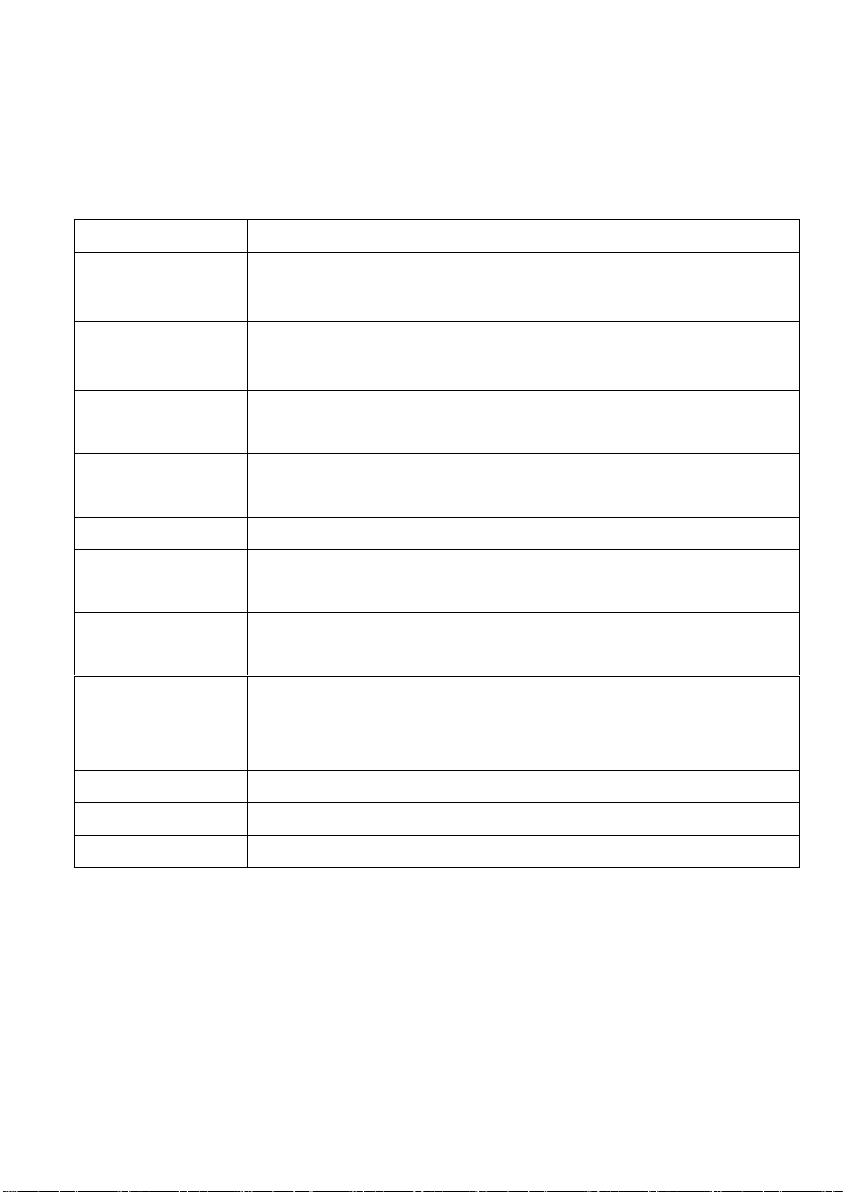
model
DWP-B2004
max
metage
200g
Min
metage
0.0001g
reproducibilit
y
±0.000
1g
Linearity
error
±0.0003g
Steady time
≤8s
Work
temperature
17.5℃-22.5℃
Size of
balance pan
Φ80mm
Size of
windproof
cover
225mm×220mm×265mm
Dimension
340mm×215mm×350mm
weight
7.2kg
Power supply
AC adapter
-1-
Page 5

-2-
Ⅱ Setting
1、Open-package
Please open the packing carefully, take out of the balance and other
articles lightly, conserve the packing material so as to reuse.
Products in the box:
1) Host balance
2) Balance pan
3) Power cord (AC adapter)
4) User manual
5) Certificate of quality
6) Maintenance card
7) Weight
2、Working condition
When DWP series multifunction electronic balance weighs under
groovy lab or industry condition, it has the function of expediting
metage and enhancing metage precision. If condition is not
committed, the working condition should be chosen as follow:
1)The working room should be clean and dry.
2)The balance should put on the steady, fixative table.
-3-
Page 6
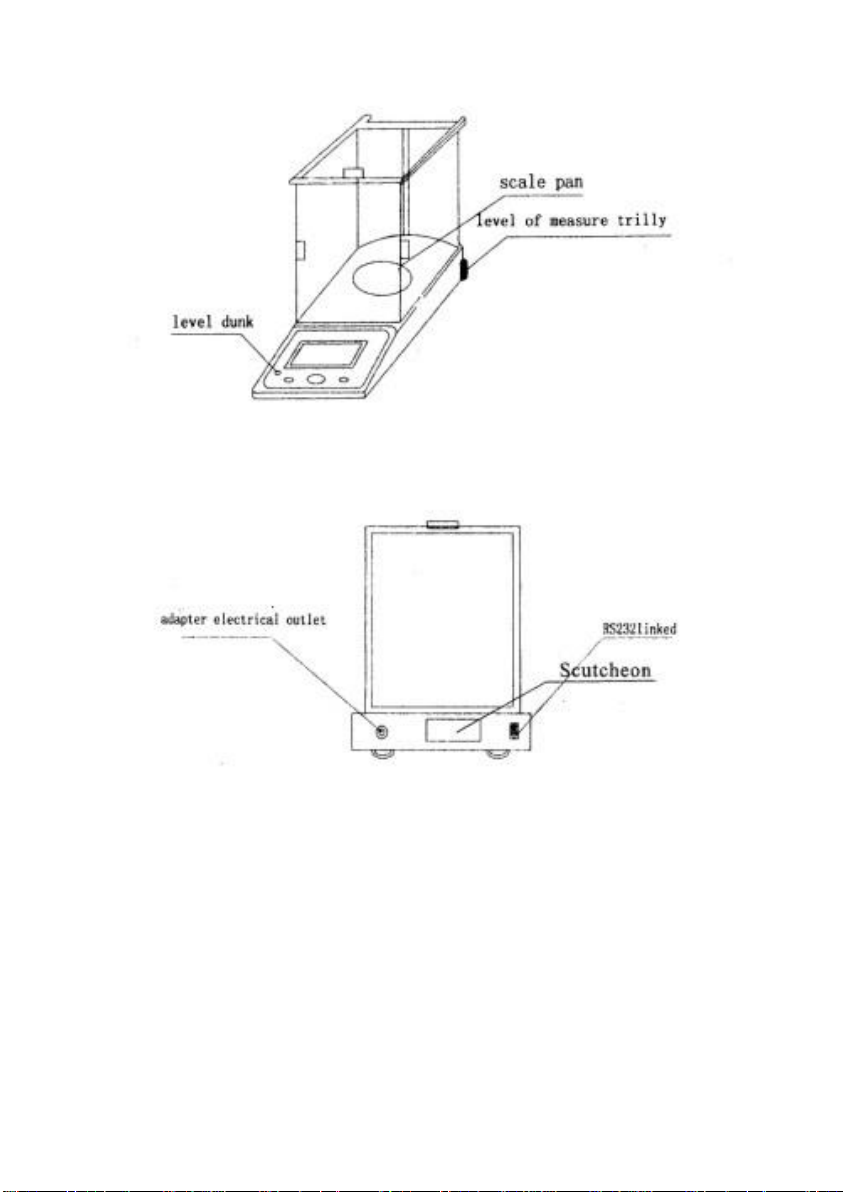
2) The table had better put far away from the door and window in
-4-
Page 7

order not to influence from airflow of opening or closing the door or
window.
4)The table should put with less libration.The around of the room is
the best place to put the balance since that place has little libration.
5)The balance should put where avoid shining and be far away from
heating.
6) The balance should put far away from goods or equipment which
has magnetism or bring magnetism.
7)Don’t use the balance where is dangerous.
8) Don’t use the balance under the condition of high wet and high
dust for long time.
9)The best temperature for using the balance is 20℃±5℃.The best
humidity is 50—60%RH.
1 0)When the balance moves from a colder place to a warmer place,
moisture of air will coagulate inside the balance,result in influencing
the balance definition and reliability.In order to eliminate the
influence,is better to put the balance in the working place without
power supply for 2 hours.
3.Setting
Open windproof cover and put balance pan in the balance. Insert
external power supply wire BNC into the balance.and insert output
BNC into the power supply again(voltage 220V),Wait for turning on
the balance.
-5-
Page 8

Ⅲ Using
Before using the balance,put it horizontally.Use the screw at the
base to adjust the balance levelly,make the air bubble in the middle
of the circle of the level instrument,then press“ON”lightly.
1.Adjust
DWP-B series electronic balance is made of“electronic magnetic
force balance principle”.Among some of the factors which influence
precision,gravity is the most prominent. Different zone,different
gravity makes metage figures different.The south and the north will
-6-
Page 9

make matage different.These errors could be eliminated by adjusting
Types
weight
DWP-B2004
200g
the balance.
In addition,when using the balance for a long time,little errors will
appear because of circumstances such as temperature and humidity.
These errors could also be eliminated by adjusting the balance.
Therefore, when using the balance for the first time or moving it from
a place to another, adjusting is necessary.
2.Standard weight
Choose standard weight ad requirement according to different types:
3.Steps of adjusting
DWP-B series balance should warm up for two hours.
For example,nothing on the balance pan,press TAR.the display will
show 0.0000g,then press CAL lightly and quickly, CAL-200 will
appear,at that time put 200g standard weight on the balance pan,
wait for some seconds,adjusting ends when“200.00g’’ appear.
-7-
Page 10

Ⅳ choose sensitive level
Ⅴ show speed
-8-
Page 11

Ⅵ transfer unit
Procedures are as follows: Press [on] key after turn on stability, when
display “SET-U” on the screen, press on [PRT] key, three kinds of
unit conversion modes will appear successively on the screen. The
user can choose one of them and press [TAR] key, unit conversion
setting is finished.
Explanation of three unit conversion modes:
(UNT—1)--------g
(UNT—2)--------ct
(UNT—3)--------oz
-9-
Page 12

Ⅶ set figures output
Ⅷ function of counting
-10-
Page 13

Ⅸ output interface
1 2 3
4
type
blank
blank
positive sign or
negative
5 6 7
8
data
data
data
data or radix point
9
10
11
12
data or radix point
data
data
data
13
14
15
16
Unit one
Unit two
Carriage return
newline
1、when the consumer is using the balance, sometimes metage date
will get through external equipment such as computers and printers.
The ways of connection:
Electronic balance’s connection interface as follow.
Balance (nine cores) Microkit (nine cores)
RXD(Input) 2…………………3
TXD(Output)3……………… 2
GND(Earth)5…………………5
2、 (1)Band rate of connection interface is 1200 bps;
(2)Format 0f date is10 bits.Among them.One starting bit is(0),
eight date bits(ASCII code,low bit at anterior),one stopping bit(1);
(3)N0 old and even numbers adjusting;
3、 Set output mode of balance’s data:
Set auording to“PRT”which is in the users’ manual.PRT-0 is
constant output.Prt-1 is key stoke output, (press key PRT one time,
one date comes),PTR-2 is time output.
Four Balance-order of data output as follow:
-11-
Page 14

Ⅹ Glitch and Eliminate
Glitch
Cause
Eliminate
no display
No power supply;
Something wrong with
fuse;
Something wrong with
electronic transformer;
Change power supply thread;
Chang fuse;
Change electronic transformer
If bad again after change
Please send to the
maintenance apartment to
repair;
showing
figures
unsteady
Work condition is not very
good.
Hasn’t closed the
preventing wind door;
There is something
between the balance pan
and the preventing wind
door;
Electronic is not steady
exceed permit tiguce,
goods need to metage is
not steady
(such as vaporizing)
Improve working condition;
Avoid libration and disturb of
airflow close the preventing
wind door;
Take out the eye winker, turn
the balance pan, prevent
blowing and touching,
connect 220V ac power
supply manostat
showing
figures
different
from
fact
figures
The balance hasn’t been
adjusted not turn to zero
before metage;
Not horizontal
Adjust the balance;
Press “TARE” to zero;
Use horizontal base to be level
-12-
Page 15

Ⅺ Maintenance
DWP-B series multifunctional electronic balance is exact intelligent
measured instrument which connect machine and electricity.It’s
better to maintenance.
1) Don’t use sharp-pointed matter (such as pencil and ball-point pen)
to press
2)Just use hands.
3)Don’t make goods from too high to the balance pan,in order not to
4)Damage the balance.
5)Don’t explore the balance under high humidity and high acne.
6)After using the balance,it’s better to use the mantle to prevent
acne.
7)Keep the balance clean,dry.
Attention when cleaning the balance:
Before clean,pull out the power supply thread;
Don’t use caustic cleanser (such as impregnant),just choose gentle
cloth add some neuter scour to clear When clean,don’t add water.
After clean,use a gentle cloth to wipe up。
Ⅻ Guarantee to repair
The product which made by our corporation has one-year guarantee
time.(just from the day you buy the product).In the guarantee time,
the consumers has the right to
-13
Page 16

change or maintain without money. The unpuafie balance by taking
Serial No.
comment
No 1 Host balance
1 2 Balance pan
1 3 Wind proof cover
1
4
fuse
1
5
External connect power supply
1
6
User manual
1 7 Maintenance certificate
1 8 Cleaning cloth
1
the guarantee certificate or invoice.
The conditions follow except:
1、Exceed guarantee time.
2、Damage the balance by the consumers’ faults.
3、Damage the balance since,the consumer don’t operate according
to the Users’ manual.
4、Damage the balance since,it explored under the condition
of emissive an caustic matter.
5、The consumers take apart and damage the balance without being
allowed.
Addenda
1、set box
-14
Page 17

2、The balance connecting computers’ step as follow:
-15-
 Loading...