

Page 1
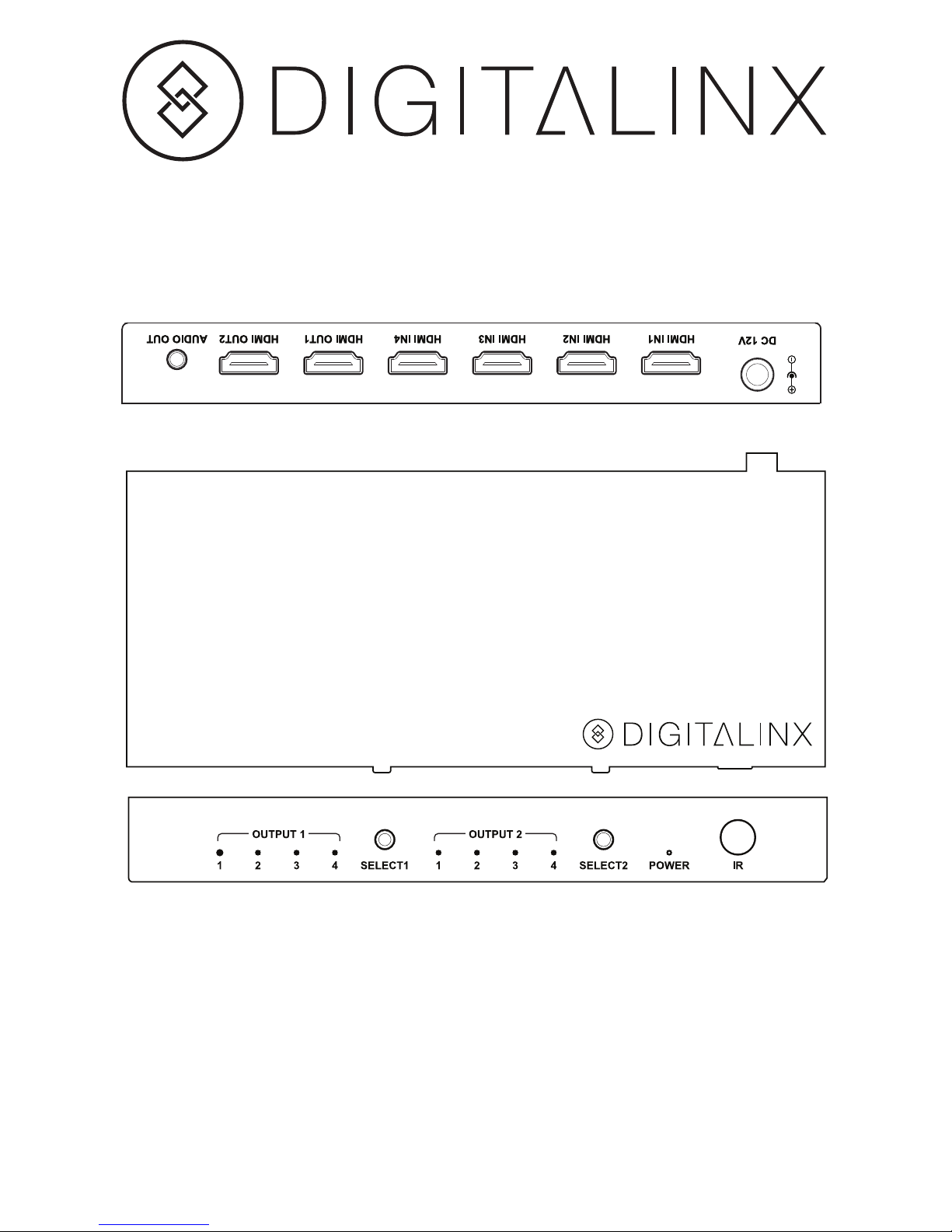
DL-S42 Installation Guide
Included Accessories
• Installation Guide
• Power Supply
• Mounting Brackets with Screws (Pair)
• IR Remote
DL-S42
4x2 HDMI Matrix Switcher
Page 2

The DigitaLinx DL-S42 is a four input by two output slim HDMI matrix with Ultra HD 4K
support. The DL-S42 is HDMI 1.4 and HDCP 1.4 compliant and supports resolutions up
to 4K@30Hz and 1080p@60Hz. Built-in diagnostic LEDs ensure hassle-free and robust
installations.
The DL-S42 features two advanced technologies: automatic EDID management,
which provides Copy/Fixed EDID options for dierent resolution outputs, and HDCP
management, which authenticates HDCP encryption between all devices, ensuring the
HDMI source reliably outputs correct content for display.
The matrix switcher supports CEC control to turn on/o the TV and oers a stereo audio
output. The 12 volt power supply is secured with a screw-on connector to prevent the
power from being accidentally disconnected.
Instructions
1. Verify all components included with the matrix switcher are present before
installation.
2. If the matrix switcher is going to be permanently mounted to a surface, attach the
included mounting brackets.
3. Turn o power and disconnect the audio/video equipment by following the
manufacturer’s instructions.
4. Connect HDMI source devices (such as a Blu-Ray, game consoles, media server etc.)
to the input ports of the matrix using quality HDMI cables.
5. Connect HDMI display devices (LED/LCD display or projector) to the output ports
of the matrix.
6. Connect the audio out to an audio system, audio is de-embedded from HDMI Out 2.
7. Connect the included power supply to the matrix switcher and lock the power
supply to the power connector by twisting the locking collar clockwise.
8. Power on attached audio/video devices.
Page 3
Important notice:
• Do not attempt to disassemble or alter the extender housing. There are no userserviceable parts inside the unit. Doing so will void your warranty.
• To minimize the possibility of equipment damage from electrostatic discharge
(ESD), all source and destination equipment must be powered o during installation.
• Do not connect the extender to a telecommunication outlet wired to unrelated
equipment. Doing so may damage the unit or any connected equipment. Ensure all
connected twisted pair cabling is straight-through (point-to-point).
• Allow proper ventilation to reduce the risk of thermal failure.
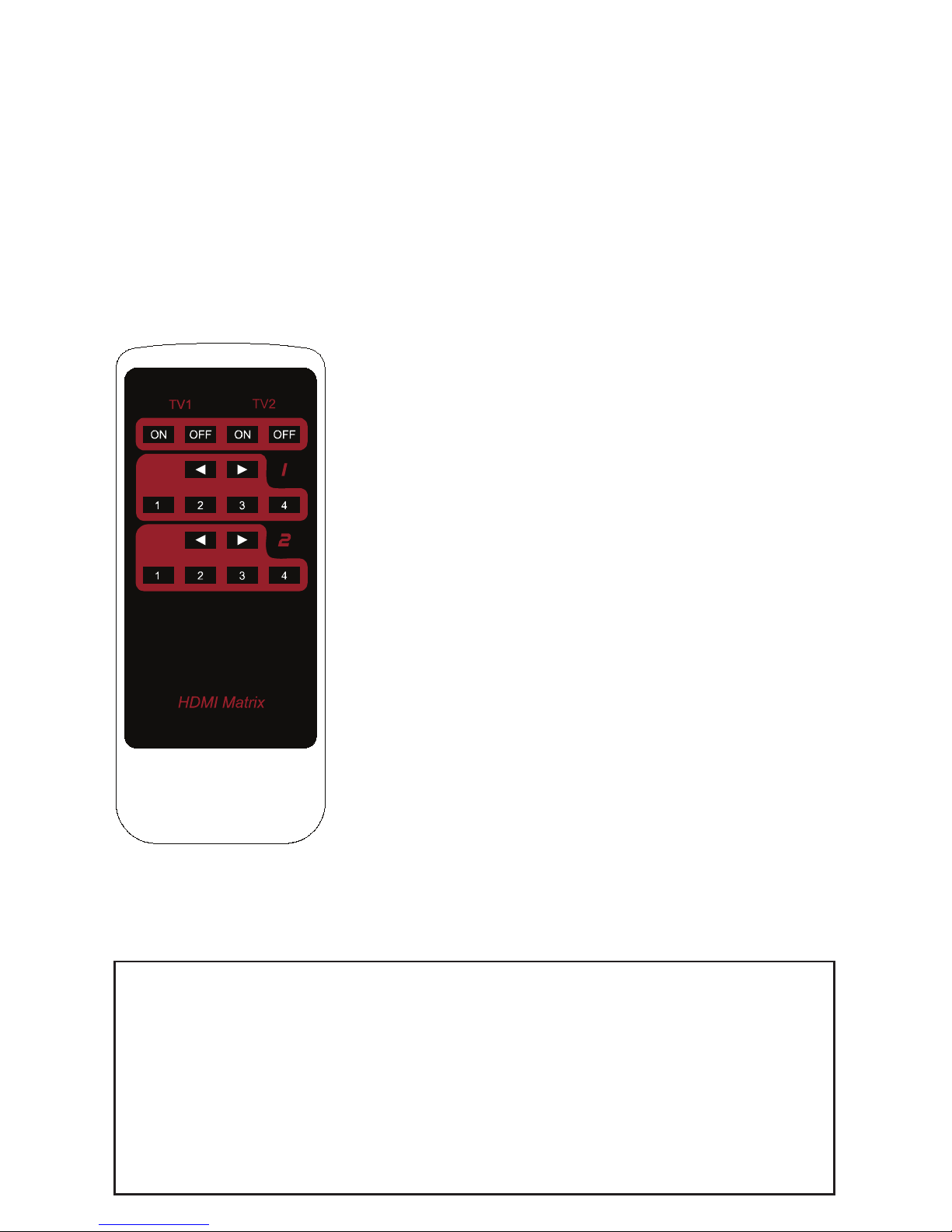
Select the previous source input
Select a specific source input
Turn off
a CEC-enabled display devic
e
Select the next source inp
ut
IR Remote Functionality
The included remote control can be used to turn on and o a CEC-enabled display
device and to switch the HDMI source for each display device.
The internal battery inside the remote control of our device is packaged by insulation
slice, please remove the insulation slice before use.
Please make sure that the remote is pointed directly at the IR receiver window.
TV1, TV2 : Turn on/o CEC enabled display device.
Arrows : Select previous/ next source input.
1-4 Selection : Select a specic source input.
Page 4

Technical Specications
Supported Audio and Video
Maximum Video Compatibility 480i, 480p, 576i, 576p, 720p,1080i, 1080p, 1920x1200@60Hz,
3840 x 2160@30Hz,
4096 x 2160@30Hz
Input/output 4 x HDMI IN,
2 x HDMI OUT
1 x Audio OUT,
1 x IR Remote
Input/output Signal Type HDMI 1.4
Video Compliance HDCP 1.4
Chassis and Environmental
Dimensions 182mm × 22 mm × 77 mm (7.16 in. x 0.86 in. x 3.03 in.)
Weight 0.34kg
Operating Temperature 32°F ~ 113°F (0°C ~ 45°C)
Storage Temperature -4°F ~ 140°F (-20°C ~ 70°C)
Operating Humidity (Environment) 10 % to 90%, Non-condensing
Power
ESD Protection Human-body Model: 8Kv (Air-gap discharge)/ 4Kv (Contact Discharge)
Power Supply Output Voltage DC12V1A
Power Consumption 5W (Max.)
Regulatory CE
Other
Standard Warranty 2 Years
Included Items Installation Guide, Power Supply, Mounting Brackets with Screws (Pair), IR Remote
11675 Ridgeline Dr.
Colorado Springs, CO 80921
Toll-Free: 800-530-8998
Fax: 719-260-0075
www.libav.com rev 170208
 Loading...