

Page 1
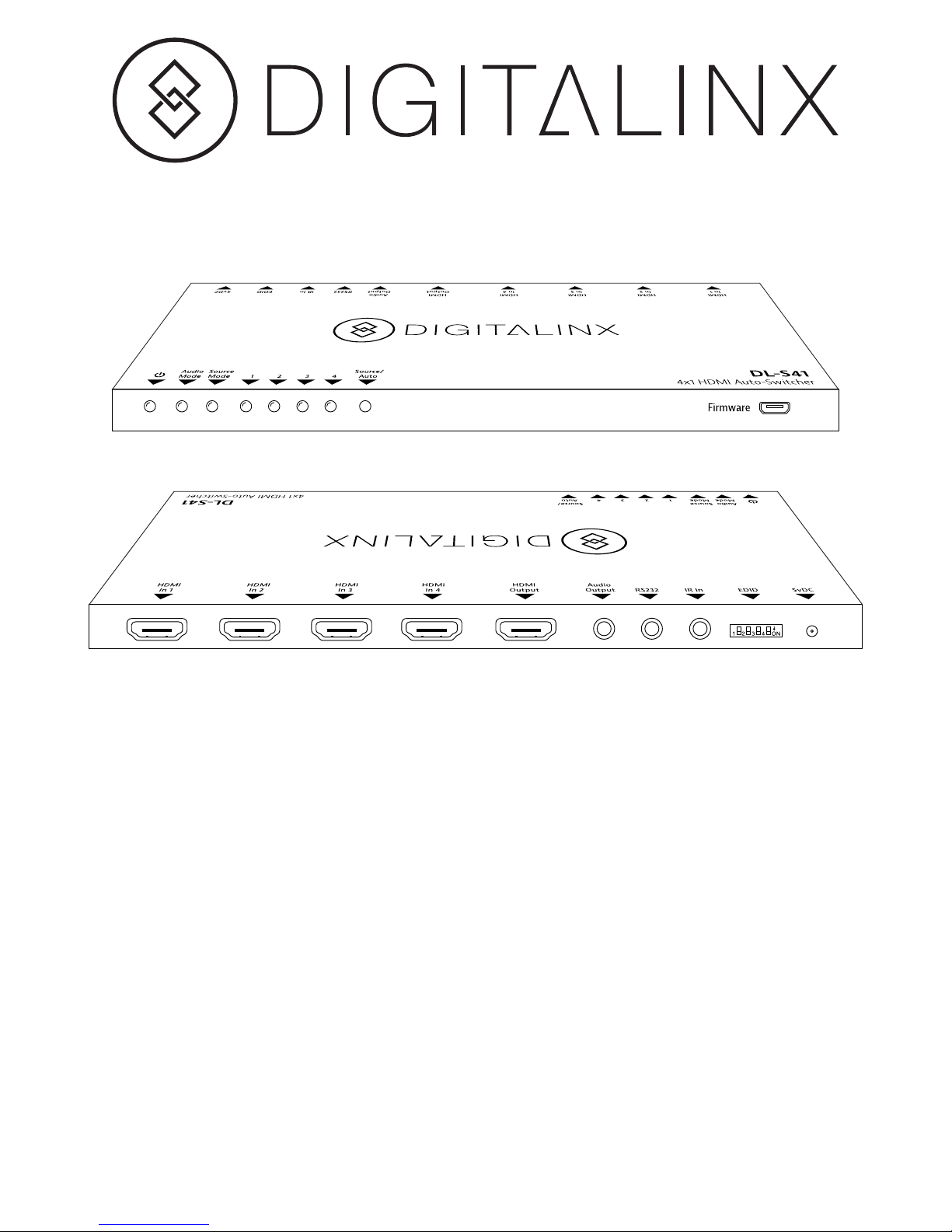
DL-S41 Installation Guide
Included Accessories:
The DL-S41 is a small format auto-switcher with four HDMI video inputs and
one HDMI output. This switcher supports HDMI video resolutions up to 4K
(3840x2160) at 30 Hz, 1080p 3D, and multichannel audio. In addition to passing
EDID information from the display, there are multiple built-in EDID settings to
simplify an installation. The DL-S41 will de-embed digital stereo audio to provide
an analog audio source for an existing audio system. This switcher also features
audio return channel (ARC) support through the analog audio output.
When in auto-switch mode, the DL-S41 will switch to an HDMI input as soon as
a new source is connected. When the active source is removed, the switcher will
select the first source on the lowest numbered input. The DL-S41 may also be
controlled via RS232, IR with the included remote, or from the source button on
the front of the switcher.
• Mounting rails with screws
• Rubber feet
• RS232 Cable
• IR Remote with battery
• IR Receiver
• Power Supply
• Installation Guide
Page 2
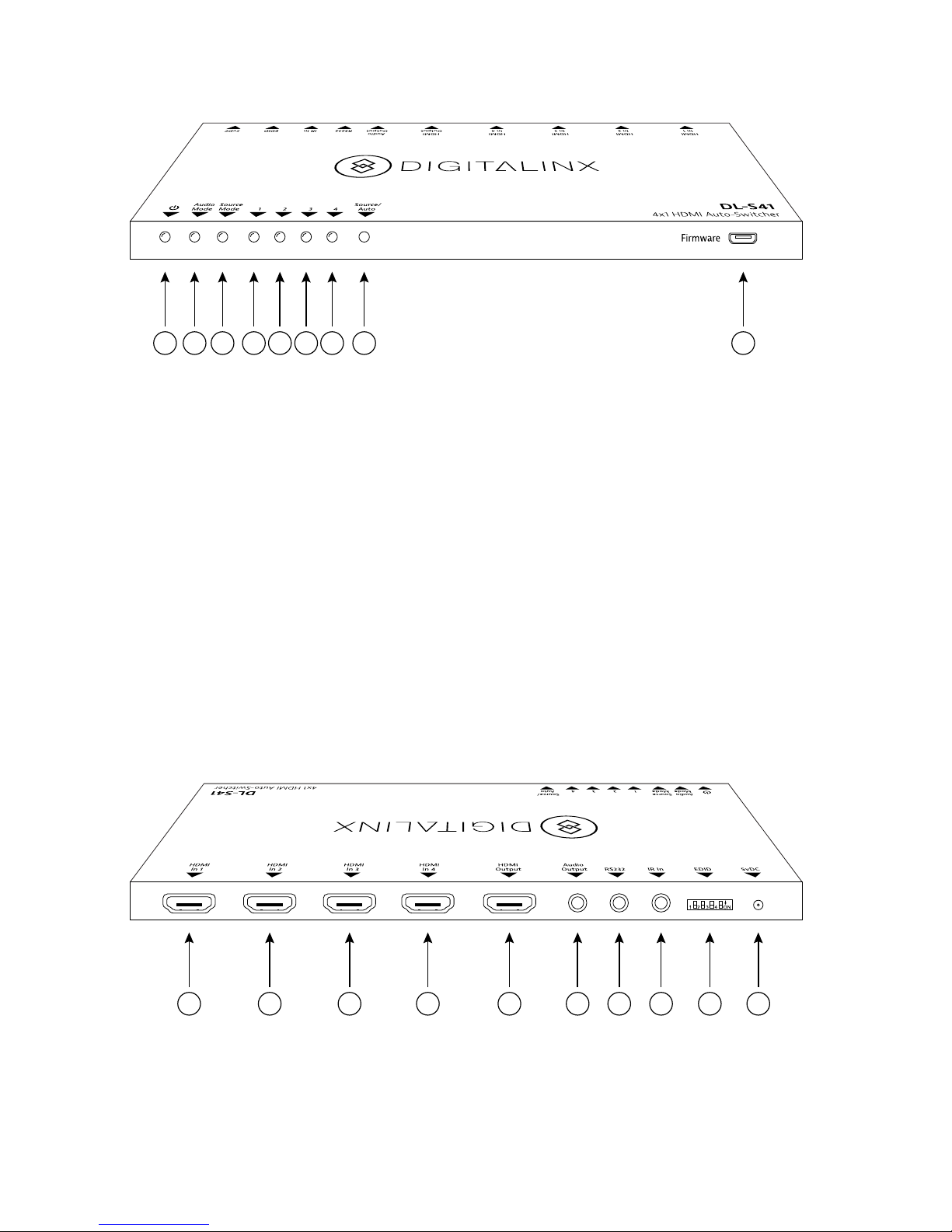
A B C D E F G H I
1 2 3 4 5 6 7 8 9 10
A. Power LED
Red when powered on
B. Audio Mode LED
Green when de-embedding audio
Yellow when in ARC mode
C. Source Mode LED
Green in manual switch mode
Yellow in auto-switch mode
D. Input 1 LED
E. Input 2 LED
F. Input 3 LED
1. HDMI In 1
2. HDMI In 2
3. HDMI In 3
4. HDMI In 4
5. HDMI Output
G. Input 4 LED
H. Source/Auto Button
Press to switch to next input
Press and hold to switch between
manual and auto modes
I. Firmware Update Port
A separate document will provide
usage instructions once a new
firmware update is available.
6. Audio Output
7. RS232
8. IR In
9. EDID switches
10. 5V DC Input
Rear Panel:
Front Panel:
Page 3

EDID Settings:
1. Verify all components included with the switcher are present
before installation.
2. If the switcher will be permanently mounted to a surface, attach
the included mounting brackets with the supplied screws.
3. If the switcher will be sitting on a shelf, attach the included
rubber feet to the bottom of the unit.
4. Turn off power and disconnect the audio/video equipment by
following the manufacturer’s instructions.
5. If the switcher needs to use preset a preset EDID instead of the
EDID of the connected display, set the EDID switches according to
the table below.
6. Connect an HDMI cable between the sources and the HDMI
Input ports.
7. Connect an HDMI cable between the display and the HDMI
Output port.
8. Connect an analog audio cable with 3.5 mm stereo audio plug
to the Audio Output port.
9. If the switcher will be controlled via IR, plug in the supplied IR
receiver to the IR In port.
10. If the switcher will be controlled via RS232, plug in the supplied
RS232 cable to the RS232 port.
11. Connect the included power supply to the switcher.
12. Power on attached audio/video devices.
Up, Up, Up, Up EDID Pass-through (default)
Up, Up, Up, Dn 1080p 3D, 2 channel audio
Up, Up, Dn, Up 1080p 3D, 6 channel audio (Dolby and DTS)
Up, Up, Dn, Dn 1080p, 2 channel audio
Up, Dn, Up, Up 1080p, 6 channel audio (Dolby and DTS)
Up, Dn, Up, Dn UHD at 30 Hz (3840x2160)
Instructions
Page 4

Source Button Control
Manual Switching:
Automatic Switching:
When the DL-S41 is in manual switching mode, the Source Mode LED will be
green. To advance to the next input, press the Source/Auto button.
To enable automatic switching, press the Source/Auto button for three
seconds. The Source Mode LED will change to yellow.
When in auto-switch mode, the DL-S41 will switch according to the
following rules:
New Input: Upon detecting a new input, the switcher will automatically
select the new input.
Reboot: Once power is restored to the switcher, Input 1 will automatically
be selected as the current source even if an active source is on another
input.
Source Removed: When an active source is removed, the DL-S41 will switch
to the first available active input starting at HDMI Input 1.
Page 5
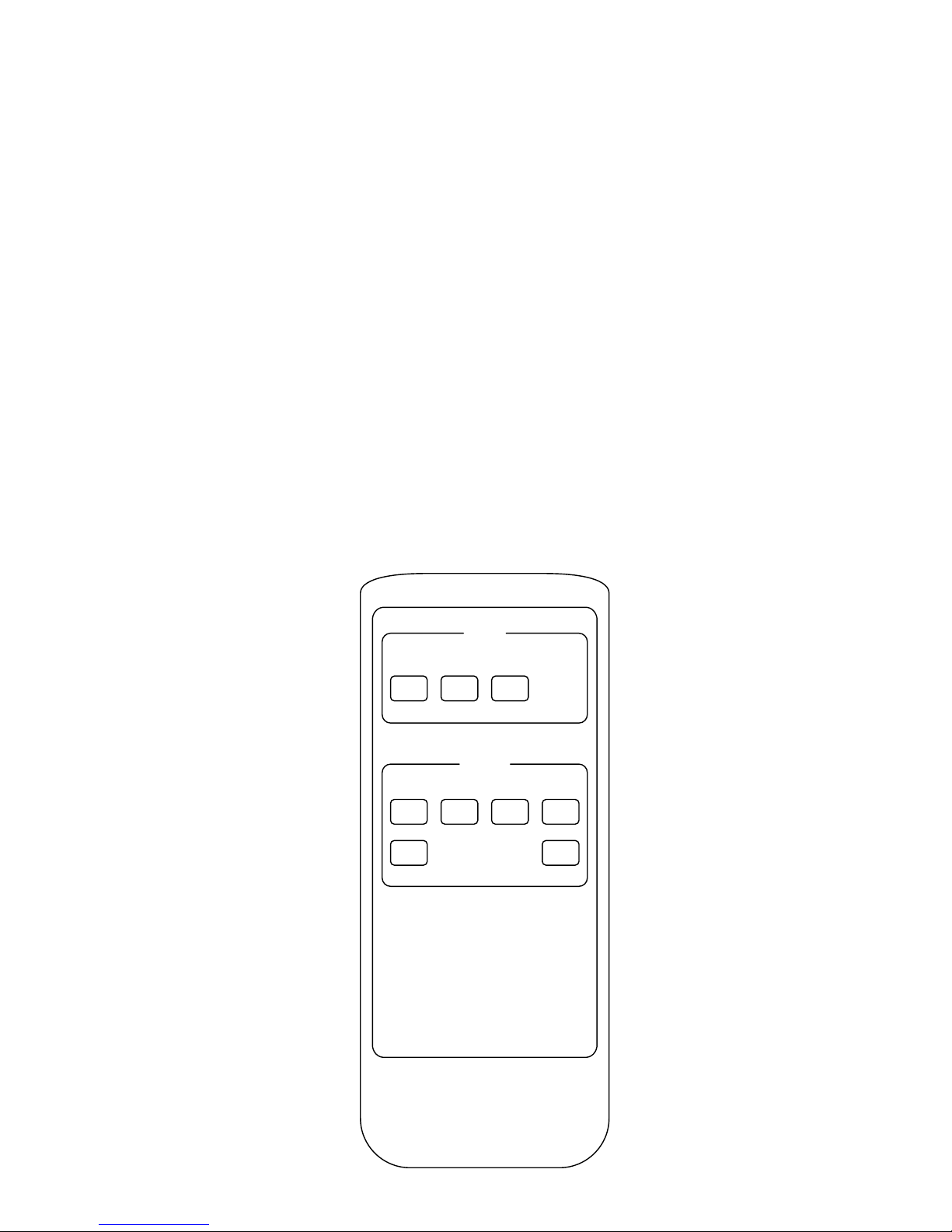
IR Control
MENU:
INPUTS:
4K HD Video Switcher
INPUTS
MENU
Mute Audio
1 2 3 4
Prev Next
Source
Auto
Mute
Turns on and off audio and video output.
Audio
Switches between source HDMI audio and ARC audio output available on the Audio
Output port.
Source/Auto
Same function as the Source/Auto button on the switcher.
1, 2, 3, 4
Switches directly to the specified input
Prev
Switches to the previous input
Next
Switches to the next input
Page 6

RS232 Control
RS232 Settings: 9600 baud, 8 Data bits, 1 Stop bit, Parity = None
x = Input Number
There is either a period (.) at the end of many commands. This character
must be present for the command to process correctly.
A carriage return and line feed will follow all responses.
Description Command Response
Switch to x input
xB1. AV: x -> 1
Turn off audio and video output
and lock Source button.
0B0. MUTE
Turn on audio and video output
and unlock Source button.
0B2. UNMUTE
Turn on auto switch mode
601% Auto Switch
Turn on manual switch mode
602% Manual Switch
Turn on ARC
ARC1& Audio Return System
Turn off ARC
ARC0& Switch Device System
Get system status: current source,
switch mode, and ARC mode
600%
AV: x -> 1 AND
MUTE OR
UNMUTE AND
Auto Switch OR
Manual Switch AND
Audio Return System OR
Switch Device System
Page 7

Important notice:
• Do not attempt to disassemble or alter the switcher housing. There are no
user-serviceable parts inside the unit. Doing so will void your warranty.
• To minimize the possibility of equipment damage from electrostatic
discharge (ESD), all source and destination equipment must be powered off
during installation.
• Allow proper ventilation to reduce the risk of thermal failure.
ARC
Audio Output
Audio Return Channel (ARC) allows audio from a display to pass “upstream”
through an HDMI cable to an audio processing device, such as an AV receiver.
When ARC mode is active on the DL-S41, the ARC stream will pass to the
active HDMI source device if it can process the signal.
When the DL-S41 is not in ARC mode, audio from the selected input will be
de-embedded to the Audio Output port. This provides a means of sending
analog audio to an amplified stereo speaker system.
When the DL-S41 is in ARC mode, the ARC stream will be de-embedded to
the Audio Output port.
Page 8

11675 Ridgeline Dr.
Colorado Springs, CO 80921
Toll-Free: 800-530-8998
Fax: 719-260-0075
www.libav.com
rev 150326
Technical Specications
I/O Connections
HDMI Inputs Four (4) HDMI Type A Receptacle
HDMI Output One (1) HDMI Type A Receptacle
Audio Output One (1) 3.5mm TRS Jack
IR Input One (1) 3.5mm TRS Jack
RS232 One (1) 3.5mm TRS Jack
EDID Selection Four (4) Position DIP Switch
5v DC Power One (1) 2.35 mm Outside Diameter, 0.7 mm Inside Diameter Barrel (EIAJ-1)
Source/Auto Button One (1) 3 mm Microswitch
Firmware One (1) Micro USB Type B Receptacle
Supported Audio and Video
Maximum Video Compatibility Deep Color 48/36/30/24 Bit at 1080p, 3D, and 2160p/30
Video Compliance HDMI, HDCP, CEC (Consumer Electronics Control), and ARC (Audio Return Channel)
Embedded Audio Up to PCM 8 channel, Dolby Digital TrueHD, and DTS-HD Master Audio
Input DDC Signal 5.0 volts p-p (TTL)
Input Video Signal 0.5 to 1.0 volts p-p
IR Carrier Frequency Range 33-55kHz at 5 volts
RS232 Baud Rate 9600 baud
Chassis and Environmental
Enclosure Painted aluminum
Dimensions (W x H x D) 193 mm x 80 mm x 11 mm (7.60 in x 3.15 in x 0.43 in)
Shipping Weight 0.82 kg (1.8 lbs.)
Operating Temperature (Environment) 0° to +40° C (+32° to +104° F)
Operating Temperature (Chassis) 31° C (88° F) (S); 38° C (100° F) (R)
Operating Humidity (Environment) 20% to 90%, Non-condensing
Storage Temperature (Environment) -10° to +60° C (+14° to +140° F)
Storage Humidity (Environment) 20% to 90%, Non-condensing
Power, ESD, and Regulatory
Maximum Power Consumption 5 watts
Power Supply Input Voltage 100-240v AC at 50/60 Hz at 0.5 A
Power Supply Output Rating 5v DC at 1 A
ESD Protection 15kV
Device Regulatory CE, RoHS
Power Supply Regulatory CE, RoHS, TUV, UL, SGS
Other
Standard Warranty 2 Years
Diagnostic Indicators Power, Audio Mode, Source Mode, Selected Input
Included Items Installation guide, power supply, AC adapters (AU, EU, UK, and US), RS232 cable, IR receiver,
IR remote with battery, rubber feet, mounting “L” brackets (2 ea), mounting screws (4 ea)
 Loading...