

Page 1
User’s Manual
Digital Media Converter Package
Part #: DL-HDCAT-WP
Page 2

1-1
Digital Media Converter Package
|
Part #: DL-HDCAT-WP
|
1-1 Table of Contents
1-2 Welcome and Safety Notes
1-3 Product Description and General Specications
1-4 Environmental Reliability Specications
1-5 Features
1-6 Installation
1-7 Mechanical Specications
1-8 Technical Specications
1-9 Warranty Information
1-10 Troubleshooting and Customer Service Information
TABLE OF CONTENTS
Page 3

1-2
Digital Media Converter Package
|
Part #: DL-HDCAT-WP
|
Congratulations on your purchase of a DigitaLinx™ Digital Media Converter System.
This manual contains information that will assist you in the installation and
operation of this product. Please inspect the contents of the package to ensure
all required material is present.
Contents:
Each DigitaLinx™ Digital Media Converter package contains
the following items:
1 each DL-HDCAT-WP Digital Media Converter Set (TX and RX unit)
1 each 5 VDC Power Supply (UL) and C(UL) listed Class 2 C(UL)US
1 each Users Manual
Safety Precautions:
1.) Please read all product manuals and safety notes prior to operating
this or any devices.
2.) Retain the product manuals and safety notes for future reference.
3.) Unplug this unit prior to cleaning; do not use liquid cleaners or
aerosol cleaners. Use a damp cloth for cleaning.
4.) Do not use this equipment near damp or wet locations.
5.) The product should only be powered by the indicated sources in the
specications. Do not use other sources of power.
6.) Do not use damaged power cords or plugs and do not use loose
electrical outlets. Please refer repair of non-conforming electrical
equipment to certied personnel.
7.) Do not place heavy articles or other equipment on top of this device
or its associated peripherals.
8.) Do not use this device near ammable material, liquids, or gas.
Welcome and Safety Notes
Page 4
1-3
Digital Media Converter Package
|
Part #: DL-HDCAT-WP
|
This DigitaLinx™ Digital Media Converter is an externally powered digital HDMI and DVI
Media Converter system to send HDMI and DVI over standard Category Cable, unshielded or
shielded. The unit uses an included 5 VDC power source. The device is compliant with DVI
1.0 and supports HDMI 1.3 signals. The device is fully compliant with HDCP protocol. This
device is certied HDMI 1.3b Category 1 through an Authorized Testing Center (ATC).
This Digital Media Converter is ideal for installations where pre-wire has been done with
multiple category cables or where space constraints limit installing HDMI® or DVI cables.
The Category cable solution is also excellent for retrot applications. The compact design
allows the devices to be unobtrusive in the nal installation. It is recommended to test
an application using the customer equipment as the signal from the source device varies
between manufacturers.
The system can easily accommodate DVI only inputs and outputs by using Liberty’s high
quality HDMI to DVI interconnects. The DVI connector is routed to the sources and display
unit while the HDMI connector plugs into the DigitaLinx™ Digital Media Converter. The
digital audio signal is not transmitted when using DVI connectors.
The actual transmission distance can vary depending on many factors. Liberty Wire and
Cable has performed application testing and found these devices can eectively operate in
excess of the distances listed. The quality of the Category cable is a prime factor in limiting
distances. Use of Category 6 cable will extend distances and use of overall shielded category
cables will reduce EMI issues. This is a practical application chart with actual observed
distances and performance in a real application.
User results will vary based upon the quality of the Category Cabling, the installation practices used, and the
features of the sources and displays. It is recommended the Category cable be properly tested to verify Gigabit
Ethernet capability. This will identify any issues caused during installation and termination.
Product Description and General Specications
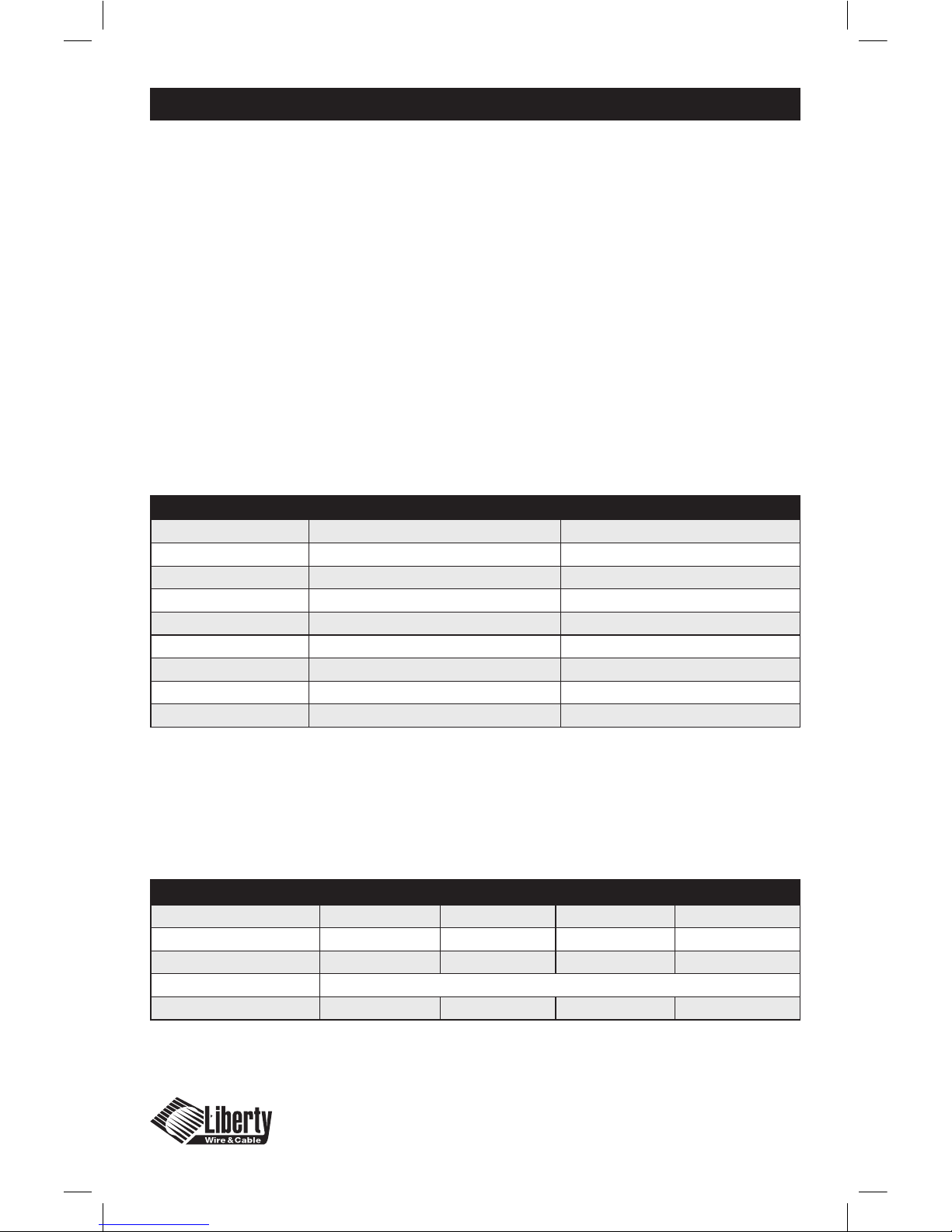
ITEM DESCRIPTION
Model Name DL-HDCAT-WP (TX Unit) DL-HDCAT-WP (RX Unit)
Input(s) (1) HDMI type A Receptacle (2) 8P8C Shielded Modular Jacks (RJ45)
Output (2) 8P8C Shielded Modular Jacks (RJ45) (1) HDMI type A Receptacle
Supported Resolutions 480i, 480p, 720p, 1080i, 1080p up to 60 Hz 480i, 480p, 720p, 1080i, 1080p up to 60 Hz
HDCP Compatible Yes Yes
Power Consumption N/A – Power on the RX unit 5 VDC 1.0 Watt from supplied DC unit
Dimensions: 114.5x70.5x70.4mm 114.5x70.5x70.4mm
(Length x Width x Height) (Without bracket mounted) (Without bracket mounted)
Weight ~0.14 Kg ~0.144 Kg
Cable-------Resolution 720p60 1080i30 1080p24 1080p60
Category 5e UTP 60m (197 feet) 60m (197 feet) 20m (66 feet) 20m (66 feet)
Category 5e F/UTP 60m (197 feet) 60m (197 feet) 20m (66 feet) 20m (66 feet)
Category 6 80m (260 feet) 80m (260 feet) 50m (165 feet) 50m (165 feet)
LOW SKEW UTP NOT RECOMMENDED
Recommended UTP Distance 40m (132 feet) 40m (132 feet) 20m (66 feet) 20m (66 feet)
Page 5

1-4
Digital Media Converter Package
|
Part #: DL-HDCAT-WP
|
The DigitaLinx™ Digital Media Converter recommended environmental operating
limits are a temperature range from 10°C to 40°C, non-condensing humidity levels
from 10-80% and an altitude ceiling of 3,000 meters (9,840 feet).
Environmental limits for transportation are established as a temperature range of
-25°C to 60°C, non-condensing humidity levels from 5-95%, and an altitude ceiling
of 15,000 meters (49,200 feet)
Environmental limits for storage are established as a temperature range of -20°C to
45°C, non-condensing humidity levels from 5-95%, and an altitude ceiling of 3,000
meters (9,840 feet)
Environmental Reliability Specications
Page 6
1-5
Digital Media Converter Package
|
Part #: DL-HDCAT-WP
|
High Quality Picture –
No Loss of Resolution or introduced Digital Artifacts
Our Digital Media Converters are manufactured to deliver the highest quality
picture by preserving the native resolution from the video sources and
eliminating any digital artifacts (pixel loss or “sparklies”). Due to the nature of
digital signals any non-active connector junctions will detrimentally aect the
signal, this device provides active junctions to equalize and amplify the signal
(boosting) and ensures the best signal quality to the display. The display unit (RX)
contains the repeater technology.
Signal Amplication
is available to perform the signal boost to the correct specication. This is
necessary because the introduction of a Digital Media Converter usually indicates
that longer cable lengths are in use. This device equalizes the signal loss from
a longer length cable to the original native resolution and signal power. The
maximum length of an interconnect cable recommended for this device is 2
meters from the converter to either source or display. All Liberty Wire & Cable
HDMI interconnects are tested to ensure 1080p resolution.
Compact Design
The Digital Media Converter devices are manufactured in a small size which
allows the devices to be situated in an unobtrusive installation. The twin RJ45
receptacles are oriented 180° from the HDMI connector to facilitate a straight
cable lay.
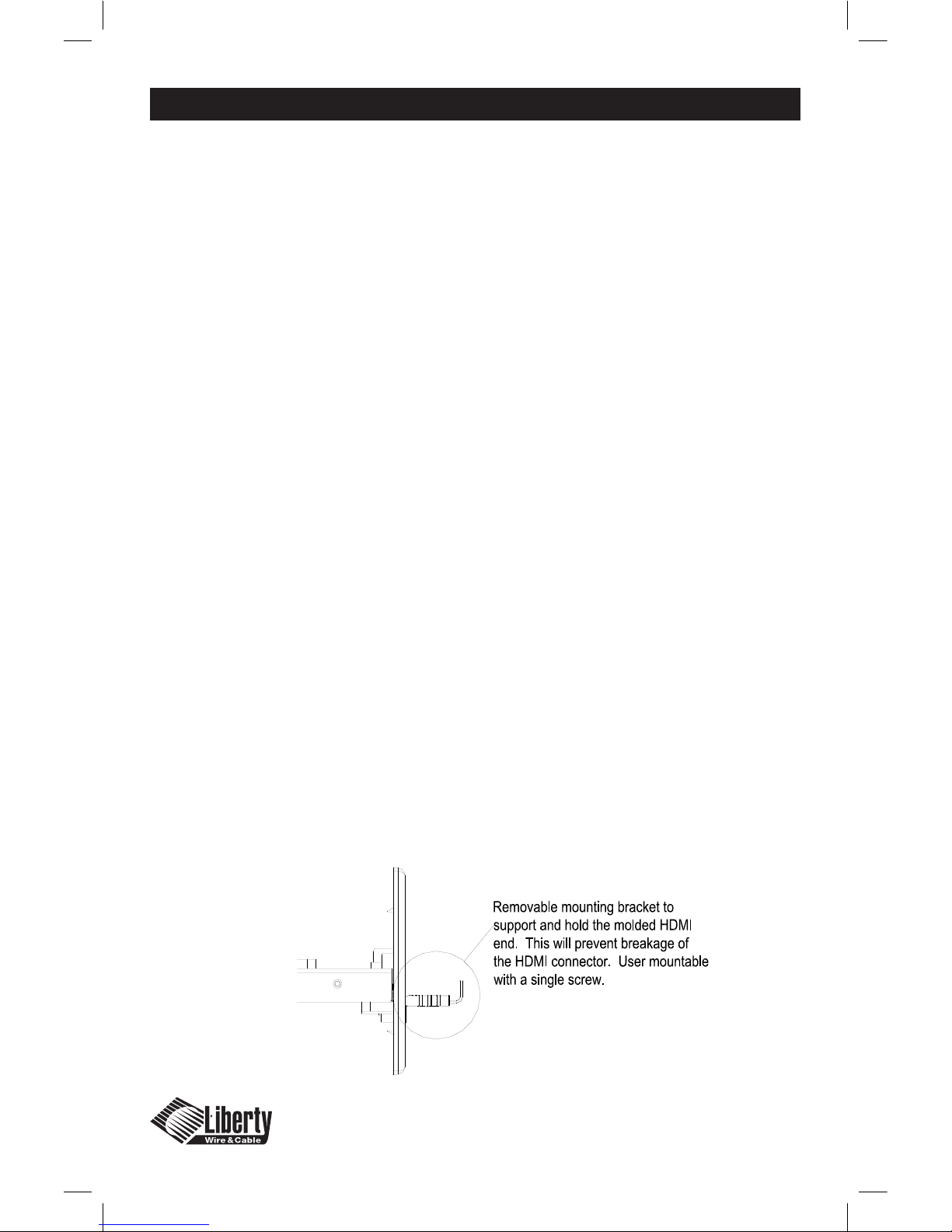
Universal Cable Mounting Bracket
The Digital Media Converter system includes (2) two universal support brackets
that can be mounted on the front of the plate to support the HDMI connector
and protect it from lateral, horizontal and vertical pulling. This ensures the HDMI
cable remains secure in the receptacle.
Features
Page 1-4
Features
Page 7

1-6
Digital Media Converter Package
|
Part #: DL-HDCAT-WP
|
Installation
Ensure the two Category Cables are plugged into the appropriate RJ45 Jack. The
wires should be routed RJ45-1 to RJ45-1 and RJ45-2 to RJ45-2. Ensure the modular
plugs are fully seated and locked into the receptacles. Category 5e or better UTP or
F/UTP (overall shielded) is recommended.
The recommended method for connection of devices to the Digital Media
Converter is listed in the following steps. Please ensure this order is followed to
enjoy the full function of the device.
1.) Ensure the digital video/audio source and display is turned o.
2.) Connect the digital video/audio source to the input port of the
DigitaLinx™ Digital Media Converter.
3.) Connect the digital display to the output port of the DigitaLinx™
Digital Media Converter.
4.) Power up the DigitaLinx™ Digital Media Converter.
5.) Power up the digital display.
6.) Power up the digital video/audio sources
7.) HDCP handshaking operation can take up to 20 seconds.
Green LED’s will illuminate when complete.
8.) Check the LED power indicator and status indicators on the DigitaLinx™
Digital Media Converter. The signal indicators should be green when the
devices are correctly attached. See troubleshooting on Page 1-10 if the
LED’s are not green.
Note: The unit can function without the DC power supply however HDMI.org does
not recognize or authorize devices using source device voltage (Pin 18 on your
video source) as part of their specication. If using this item for DVI or Video only
applications the DC power source can be removed. It is recommended to use the
DC power source for full operation of the device.
Page 8
1-7
Digital Media Converter Package
|
Part #: DL-HDCAT-WP
|
Mechanical Specications
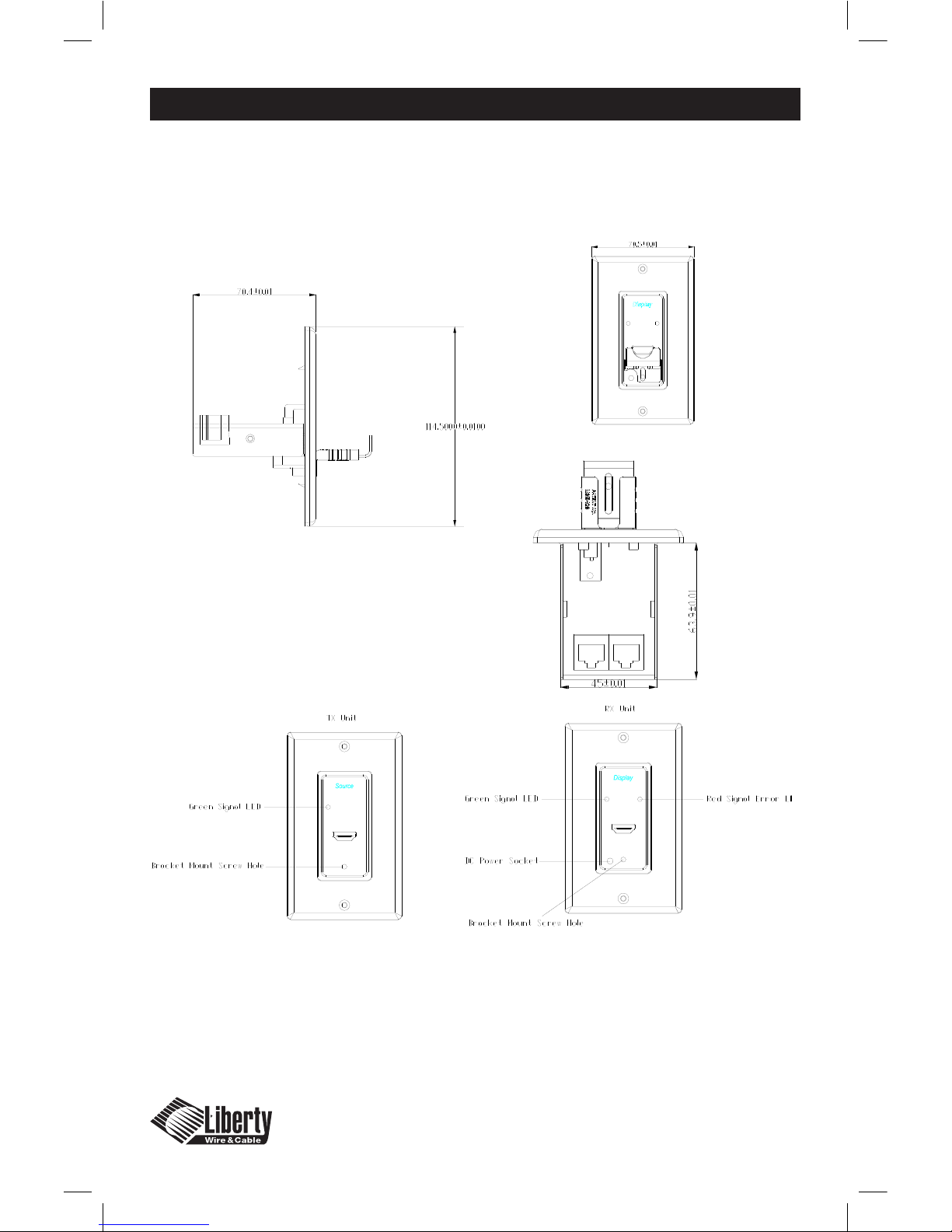
Dimensions:
DL-HDCAT-WP: HxWxD 114.50mm x70.5mm x70.4mm
(Unit drawing is showing the cable support bracket mounted)
Indicator and front plate legend
Green LED: Signal Status Good
Red LED: Signal Status Error
HDMI IN: HDMI from digital media source
HDMI OUT: HDMI to digital video display
Page 1-6
Mechanical Specifications
Dimensions: DL-HDCAT-WP: HxWxD 114.50mm x70.5mm x70.4mm
(Unit drawing is showing the cable support bracket mounted)
Front View
Side View
Top View
Page 9
1-8
Digital Media Converter Package
|
Part #: DL-HDCAT-WP
|
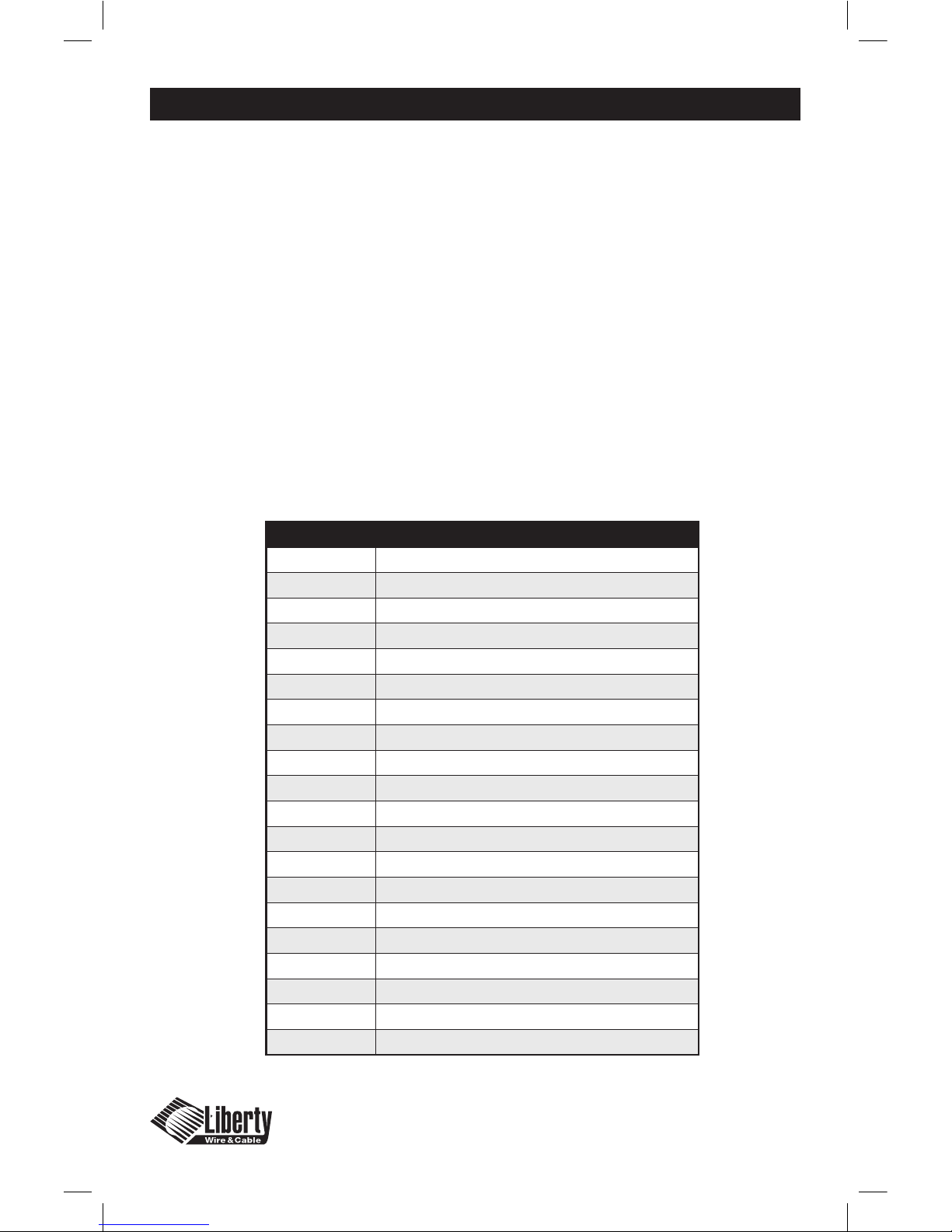
Technical Specications
Frequency Bandwidth: 1.65 Gbps
Equalizer Performance: 40 dB at 1.65 Gbps
Supporting Graphic Resolution: Up to display 1080p60 (2200 x 1125@60Hz)
Inputs: HDMI Type A receptacle 1 port, 8P8C
Modular Jack 2 ports
Outputs: HDMI Type A receptacle 1 port, 8P8C
Modular Jack 2 ports
Power Supply: External power from DC Adapter
HDCP (High-bandwidth Digital Content Protection) Compliant
Connector Pin Assignment for HDMI Type A Receptacle
Pin # Description
1 TMDS Data 2 +
2 TMDS Data 2 shield
3 TMDS Data 2 -
4 TMDS Data 1 +
5 TMDS Data 1 shield
6 TMDS Data 1 -
7 TMDS Data 0 +
8 TMDS Data 0 shield
9 TMDS Data 0 -
10 TMDS Clock +
11 TMDS Clock shield
12 TMDS Clock -
13 CEC
14 RESERVED
15 SCL
16 DDC DATA
17 DDC/CEC GROUND
18 +5VDC POWER
19 HOT PLUG DETECT
Page 10

1-9
Digital Media Converter Package
|
Part #: DL-HDCAT-WP
|
Warranty Information
1 (One) Year Warranty
Liberty Wire & Cable warrants this DigitaLinx™ Digital Media Converter to be free
from defects in workmanship and materials, under normal use and service, for a
period of one (1) year from the date of purchase from Liberty Wire & Cable or its
authorized resellers.
If a product does not work as warranted during the applicable warranty period,
Liberty Wire & Cable shall, at its option and expense, repair the defective product or
part, deliver to the customer an equivalent product or part to replace the defective
item, or refund the customer the purchase price paid for the defective product.
All products that are replaced will become the property of Liberty Wire & Cable.
Replacement products may be new or reconditioned.
Any replaced or repaired product or part has a ninety (90) day warranty or the
remainder of the initial warranty period, whichever is longer.
Liberty Wire & Cable shall not be responsible for any software, rmware, information,
or memory data loss of customer contained in, stored on, or integrated with any
products returned to Liberty Wire & Cable for repair under warranty or not.
Warranty Limitation and Exclusion
Liberty Wire & Cable shall have no further obligation under the foregoing limited
warranty if the product has been damaged due to abuse, misuse, neglect, accident,
unusual physical or electrical stress, unauthorized modications, tampering,
alterations, or service other than by Liberty Wire & Cable or its authorized agents,
causes other than from ordinary use of failure to properly use the product in the
application for which said product is intended.
Page 11
1-10
Digital Media Converter Package
|
Part #: DL-HDCAT-WP
|
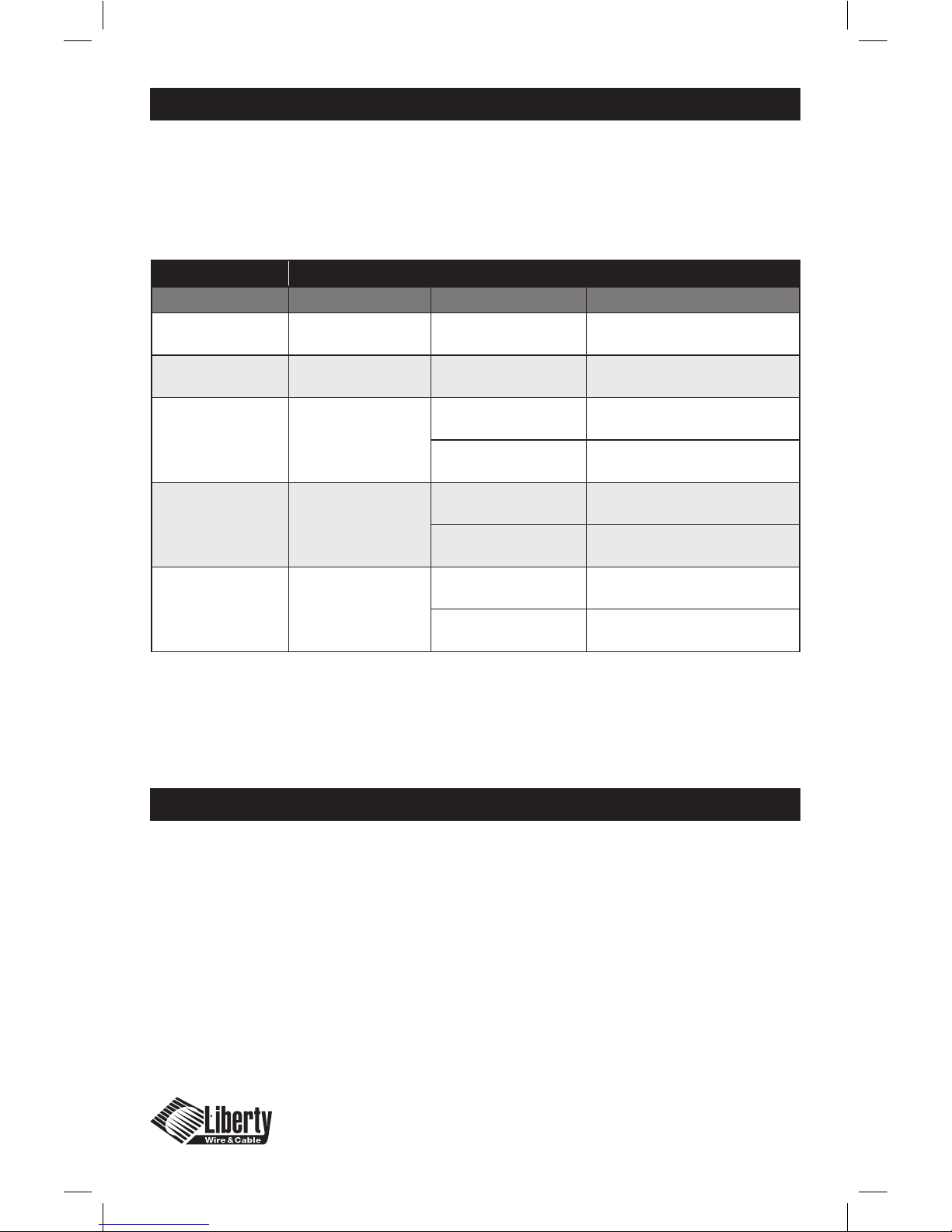
Troubleshooting
The DigitaLinx™ Digital Media Converter is designed for years of trouble free
service, please reference the troubleshooting chart below if experiencing issues
with the device.
Customer Service
Liberty Wire and Cable
11675 Ridgeline Drive
Colorado Springs, CO 80921
If you have issues, questions, or require assistance with the use of this device please
contact Liberty Wire and Cable with any of the following contact points:
Phone: (800) 530-8998 and ask for
technical assistance.
Email: [email protected] and indicate
in Subject Line “Technical Assistance”
Symptom Solution
TX Unit RX unit Status Solution
Green Light on Green light on Video OK, no Audio Shorten the cable length
Green Light on
Green & Red
Light on
Display not connected Check display connection
Green Light on
Green & Red
Light Flashing
Display power o Power up the display
Cable is too long Shorten the cable length
Green Light o
Green & Red
Light on
No source signal
Check and reconnect
the source
Display and Source
reversed
Ensure TX is at the source and
RX is at the display
Green Light o
Green & Red
Light o
No power Connect the DC power unit
No source or display
connected
Connect the source and display
Page 12
© 2008 Liberty Wire & Cable. All Rights Reserved.
Liberty Wire & Cable
11675 Ridgeline Drive
Colorado Springs, CO 80921
800-530-8998
www.libertycable.com
 Loading...