

Page 1
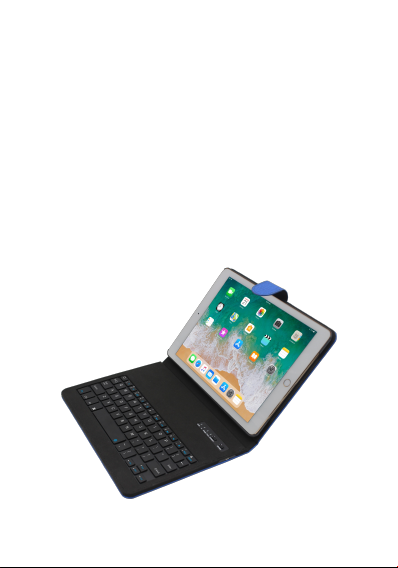
Bluetooth Keyboard
User Manual
FCC ID: X2KBAIPD97CSSD-R
Page 2
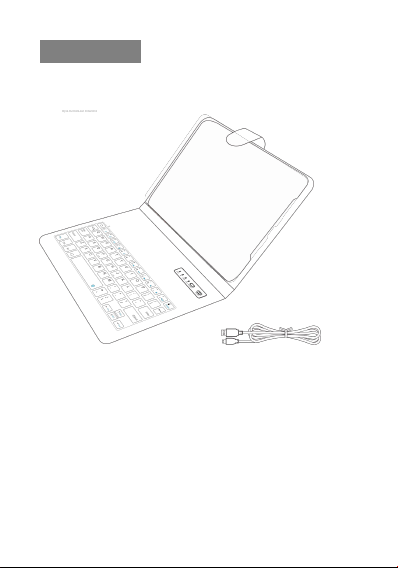
Know your product
1. Bluetooth leather cover keyboard
2. Micro-USB charging cable
3. User Manual
4. Packing
Included in the box
Page 3
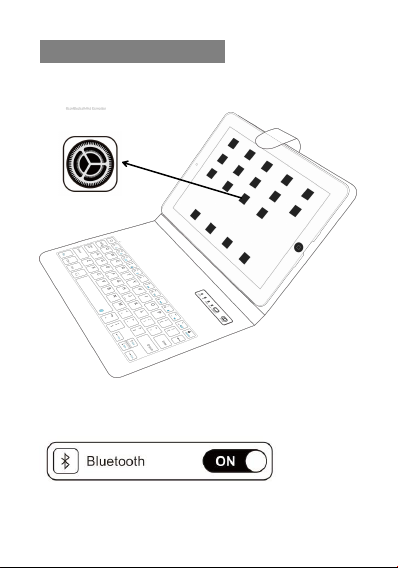
Open Bluetooth And Connection
② Open your Bluetooth signal,keep the Bl uetooth
showing onsearch state
③ Open the power key to “ON”,and then press the
①Open your iPad,Select settings-universal-bluetooth
Page 4
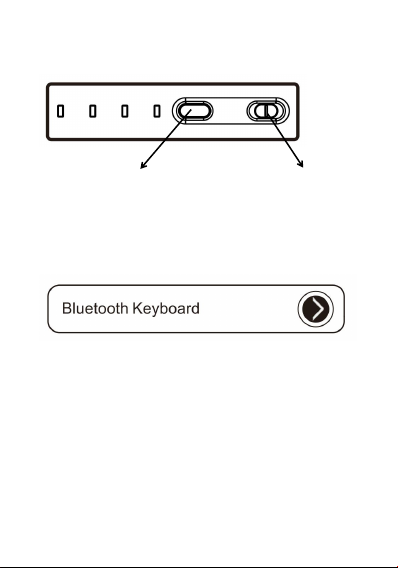
“connect”button
④On the setting menu choose “Bluetooth Keyboard”,
Bluetooth signal light go out,connection is successful
Bluetooth
connection
Power ON/OFF
Page 5
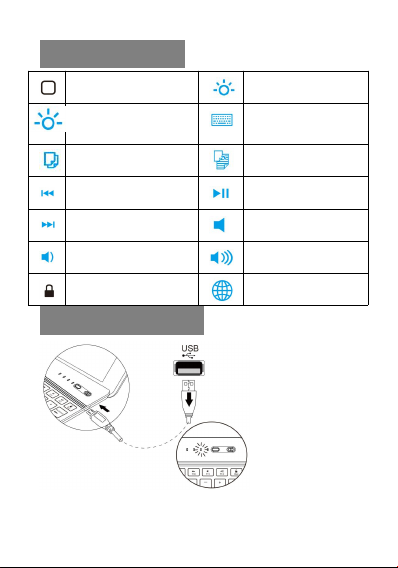
Product Features
Home
Screen brightness
enhancement
copy paste
back Paly/Pause
Forward mute
Volume down Volume up
Lock screen Switch Language
Screen dimming
virtual keyboard
Recharge Keyboard
Page 6

1.Need recharge the keyboard when the battery
indicator is flashing.
2. Insert the usb charging cable at the keyboard port
and the indicator become steady red light. It is charging
the keyboard.
3.It means a full charge while the indicator light goes
out automatically.
Maintenance:
Preserve the keyboard under normal temperature,
recharge under normal voltage. It need timely charge if
it don’t be used for long time.(About one time per two
months.)
Product Parameter
Bluetooth 4.2 interfcae standard
1. Operating distance to 10 meters
2. Modulation System: GFSK
3. Working Voltage:3.0-5.0V
4. Working Current:<100mA
pi/4-DQPSK,8DPSK
Page 7

5. Standby Current:0.3mA
6. Sleep Current:<40μA 7
7. Standby Time:60days
8. Charging Time:3hours
9. Lithium battery capacity:300mAh
10. Uninterrupted working time with backlight: 6hrs
11. Uninterrupted working time without backlight:
50-60hrs
12. Lithium battery Life:1 year
13. Key life:>5 million strokes
14. Operating temperature:-10±55°C
Current Reference Value
The reference of the typical current is under Lithium
battery application Battery = 3.7V:
Working status Typical index Unit
Regular working 1.4~2.2 mA
Primary sleeping mode 0.6~0.9 mA
Deep sleeping mode 180 μA
Page 8

Features And Wareanty
Energy saving sleep mode
When the keyboard is without operation for 10min will
be in sleep mode,the keyboard indicator will be
closed,when you need to use,just press any key and
wait for 3s,the keyboard will start,the power indicator
light up again.
Warranty certificate
The warranty is free maintenance for one year starting
from the date of purchase(inclusive).
After-sales service is provided by supplier
One year free warranty for quality issues
The company is not responsible for issues by related to
the following:
1.The e ffective period for the the three guaranteed service
types(repair,exchange and return)has expired;
2.There is no valid warranty card and valid invoice(unless the
customer can prove that the goods is still within effective warranty
period)
Page 9

3.The warranty card is altered,the product co de does not match
with the product’s own co de
4.The damage is due to customer’s fa ilure in using,maintaining
and keeping the produc t according to requirement;
5.Damage due to mishan dling;
6.Normal wear and tear,corrosion,discolration,etc;
7.Line break or tear caused by heavy loa d;
8.Any damage caused by sharp objects;
9.Product with signs of burning or flooding;
10.Product failure or damage caused b y force majeure
events(such as earthquakes,war,fire,etc.)
Page 10

FCC Caution.
This device complies with part 15 of the FCC Rules. Operation is subject to the following two
conditions:
(1) This device may not cause harmful interference, and
(2) this device must accept any interference received, including interference that may cause
undesired operation.
Any Changes or modifications not expressly approved by the party responsible for compliance
could void the user's authority to operate the equipment.
Note: This equipment has been tested and found to comply with the limits for a Class B digital
device, pursuant to part 15 of the FCC Rules. These limits are designed to provide reasonable
protection against harmful interference in a residential installation. This equipment generates
uses and can radiate radio frequency energy and, if not installed and used in accordance with the
instructions, may cause harmful interference to radio communications. However, there is no
guarantee that interference will not occur in a particular installation. If this equipment does
cause harmful interference to radio or television reception, which can be determined by turning
the equipment off and on, the user is encouraged to try to correct the interference by one or
more of the following measures:
-Reorient or relocate the receiving antenna.
-Increase the separation between the equipment and receiver.
-Connect the equipment into an outlet on a circuit different from that to which the receiver is
connected.
-Consult the dealer or an experienced radio/TV technician for help.
The device has been evaluated to meet general RF exposure requirement. The device can be used
in portable exposure condition without restriction.
 Loading...