

Page 1

USERS MANUAL
DIGIDOC.COM
800-518-1102
Page 2
SAFETY INSTRUCTIONS
THIS SYMBOL ALERTS THE USER THAT
IMPORTANT LITERATURE CONCERNING
THE OPERATIONS AND MAINTENANCE OF
THIS UNIT HAVE BEEN INCLUDED OR IS
AVAILABLE ONLINE. THEREFORE, IT SHOULD BE READ
CAREFULLY IN ORDER TO AVOID ANY PROBLEMS.
CAUTION
TO REDUCE THE RISK OF ELECTRIC
SHOCK, DO NOT DISASSEMBLE. NO USER
SERVICEABLE PARTS INSIDE. REFER MAINTENANCE
TO QUALIFIED SERVICE PERSONNEL
WARNING
TO PREVENT FIRE OR ELECTRICAL SHOCK, DO NOT
EXPOSE THIS DEVICE TO EXCESSIVE MOISTURE
CAUTION
CHANGES OR MODIFICATIONS NOT EXPRESSLY
APPROVED BY THE MANUFACTURER COULD VOID
THE WARRANTY
CAUTION
MAINTAIN ELECTRICAL SAFETY. POWER LINE OPER
ATED EQUIPMENT OR ACCESSORIES CONNECTED
TO THIS UNIT SHOULD NOT HAVE BEEN MODIFIED
SO AS TO DEFEAT THE SAFETY FEATURES. THIS WILL
HELP TO AVOID ANY POTENTIAL HAZARD FROM
ELECTRICAL SHOCK OR FIRE. IF IN DOUBT, CONTACT
QUALIFIED SERVICE PERSONNEL.
CAUTIONS
❏ Federal law restricts this device to sale by or on the
order of a Licensed Dental practitioner.
CAUTIONS ON SAFETY
❏ Do not place a container with water or liquid, or any
small metallic objects on this unit.
❏ If smoke, abnormal sound or smell occurs, disconnect
the battery and contact Digital Doc.
❏ Do not apply impacts to this unit
CAUTIONS ON INSTALLATION
❏ Do not install this unit in a poorly ventilated place, a
dusty place, an unstable place, or where soot or steam
occurs.
❏ Do not use this unit in high temperatures (higher than
50 degrees C) or at temperatures (lower than 0 degrees
C)
❏ Do not use in surgical theaters in hospitals where safety
requirements are different from a standard dental clinic.
CAUTIONS ON CLEANING
❏ Do not wipe the surface using benzene, Dicide, thinner,
or gluderaldihyde. As this may degrade the lens, or
damage the case material.
❏ Do not totally submerge product, battery compartment
is not waterproof.
IMPORTANT SAFEGUARDS
INSTALLATION
❏ Read and follow Instructions- All of the safety and
operating Instructions should be read before the LUM
product is operated. Follow Online operating and
usage instructions.
❏ Retain instructions - The safety and operating
instructions should be retained for future reference
❏ Heed warnings - Comply with all warnings on the LUM
and in the operating instructions
❏ This product should only be powered by battery.
❏ Do not use this product near water.
2.
Page 3
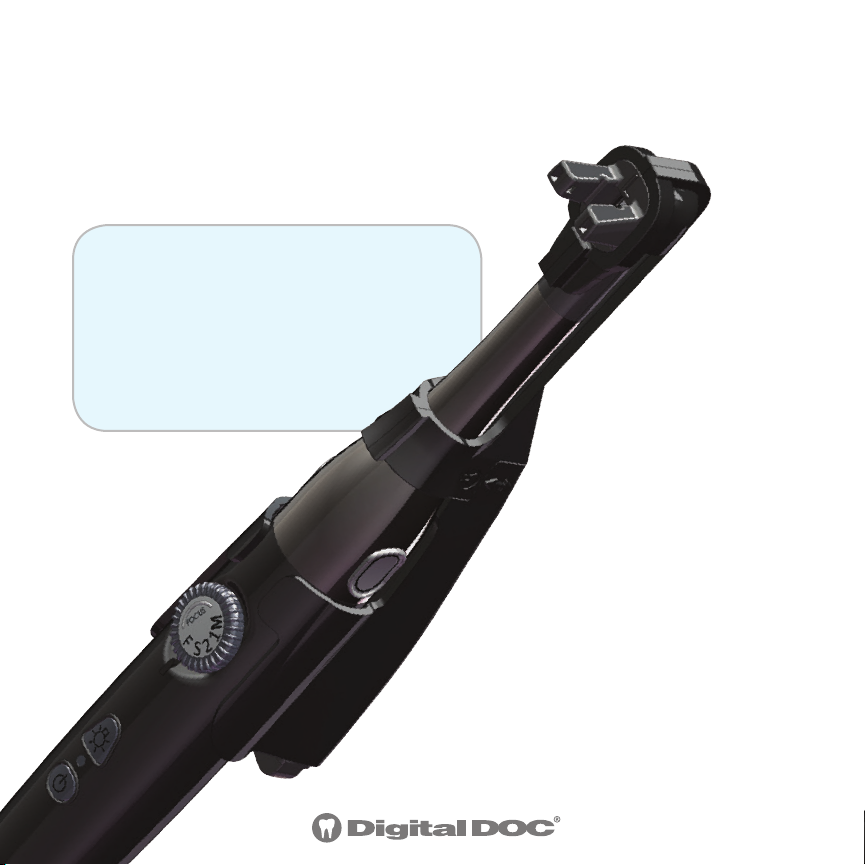
Congratulations on your purchase of the Digital Doc
LUM G2. This manual will guide you through the setup
and use of the LUM G2.
STEP 1: Install the LUM G2
software from the USB Drive.
Or to download the latest
version of software, go to
WWW.DIGI-DOC.COM.
The LUM G2 software
converts the camera
images into B/W, providing
enhanced contrast and
clarity.
3.
Page 4

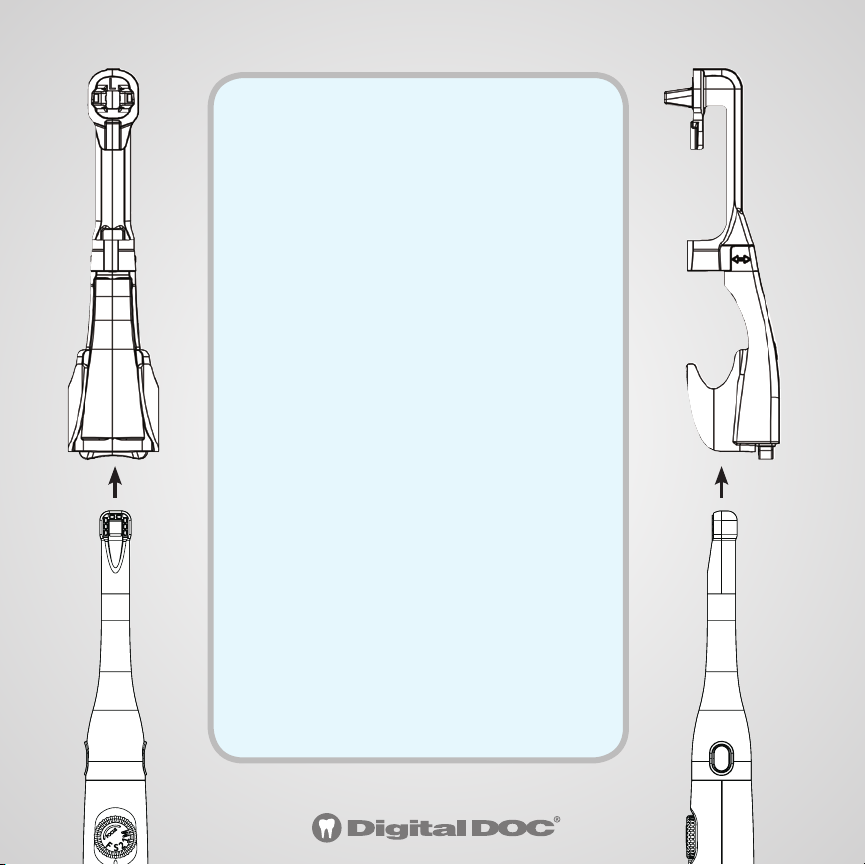
STEP 2: Attach the Base section
to the Tip section. The top end of
the Base fits over the bottom of the
Tip. Slide it straight down
firmly until it clicks.
Tip Section
Base Section
To Remove: Grasp the Base with your thumb on top and extended over
the joint onto the Tip section. Push down with your thumb as you pull
the Base straight up with your fingers.
Tip Section
4.
Base Section
Page 5
STEP 3: Attaching the LUM G2
to the IRIS 2.0 camera.
1. Use the LUM G2 program to
turn the camera lights OFF and
the image to Black and White.
2. Put a Camera Sheath over
camera BEFORE inserting the
camera into the LUM G2
3. Hold the camera so you are
looking at the lens
4. Align the arrow of the LUM
G2 tip with the center of the
camera.
5. Slide the LUM G2 onto the
camera until the tip is fully
seated and engaged
5.
Page 6
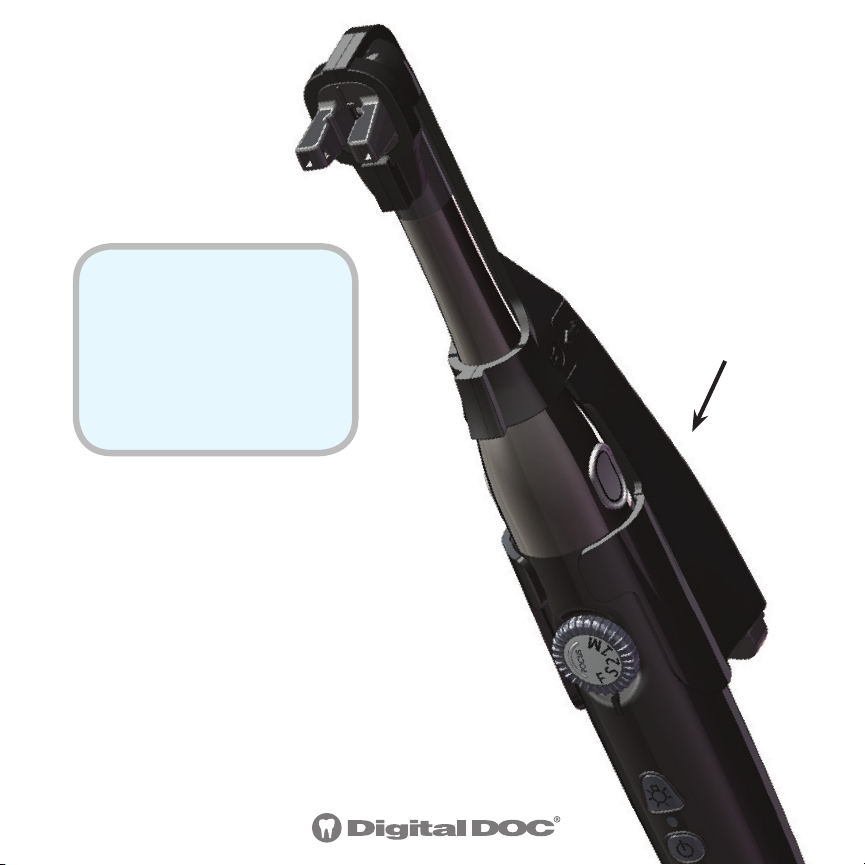
STEP 4: Turn the
LUM G2 lights ON
and OFF using the
light button on the
back.
Tip: Camera Focus should
be in the #1 position and
camera lights TURNED OFF
when using the LUM G2.
6.
LUM G2 light
button on back
Page 7
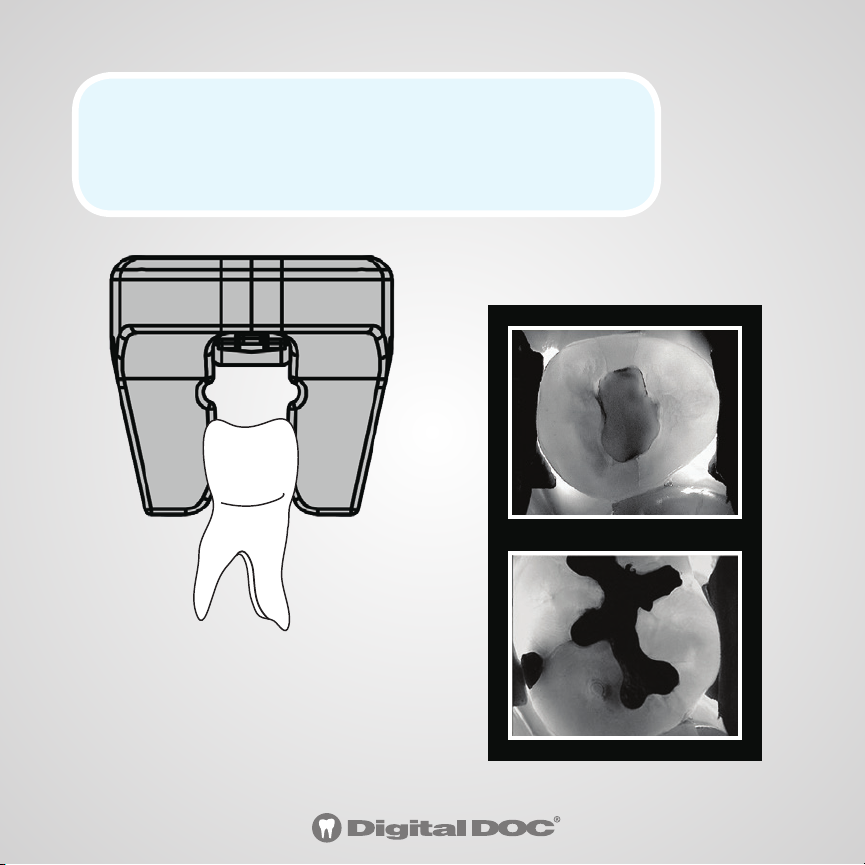
STEP 5: Position the rubber arms around the
tooth with the LUM G2 light turned ON. View
through the camera, capture and save.
7.
Page 8
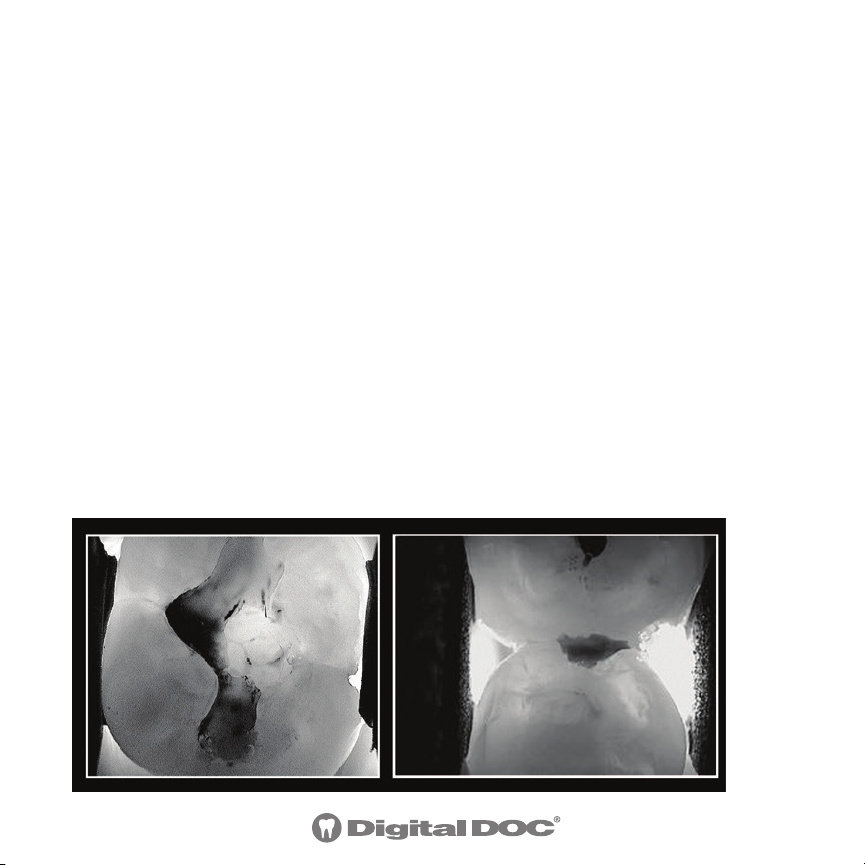
The Use Of Sub-Illumination And Advanced
Digital Technology, For Enhanced Crack & Caries
Detection Power
Sub-illumination is a detection method that provides the
most information easily. It visually represents whether a crack
or caries is present. It is based on a law of physics, namely
that a beam of light will continue to penetrate through a
substance until is meets a space, after which the light beam
is reflected. This results in a light and a dark area of the tooth
separated by the fracture line. The results are displayed in
real-time on screen. Ready for image capture and saving to
patient file.
8.
Page 9
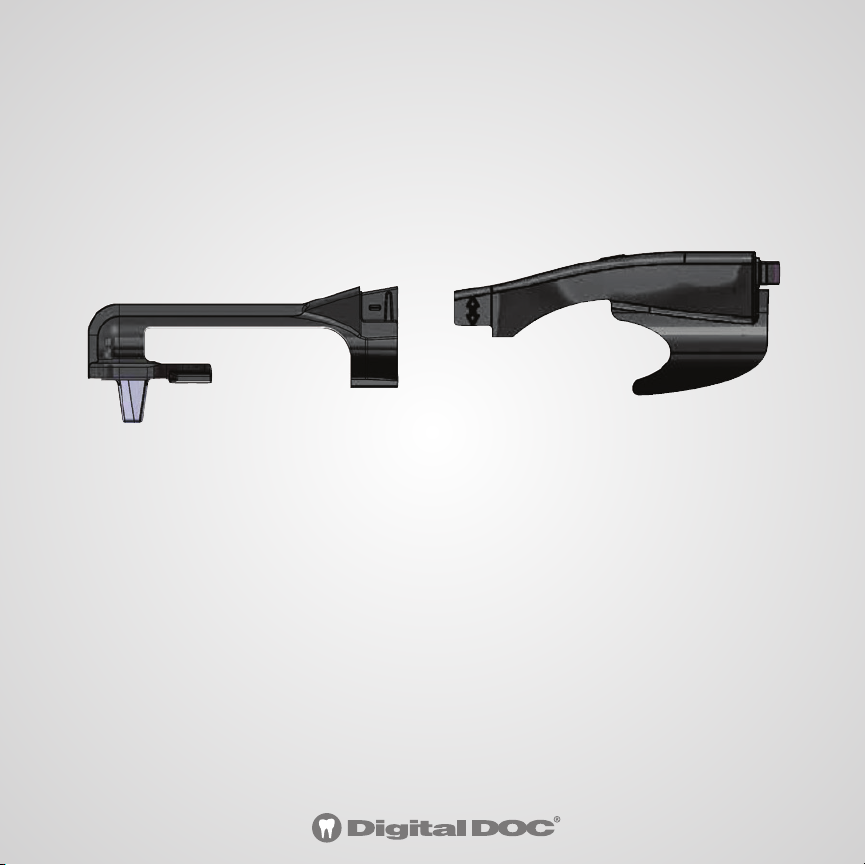
Disinfecting the LUM G2:
1. Separate the Tip section from the Body section
2. Disinfect the Tip section by autoclave
3. Spray or wipe down the Base section with Ethyl Alcohol
(Digi-doc wipes or spray CoEfect by GC)
Tip Section
Base Section
CAUTIONS ON CLEANING
❏ Do not wipe the surface using benzene, Dicide,
thinner, or gluderaldihyde. As this may degrade
the lens, or damage the case material.
❏ Do not submerge Base section, battery
compartment is not waterproof.
9.
Page 10
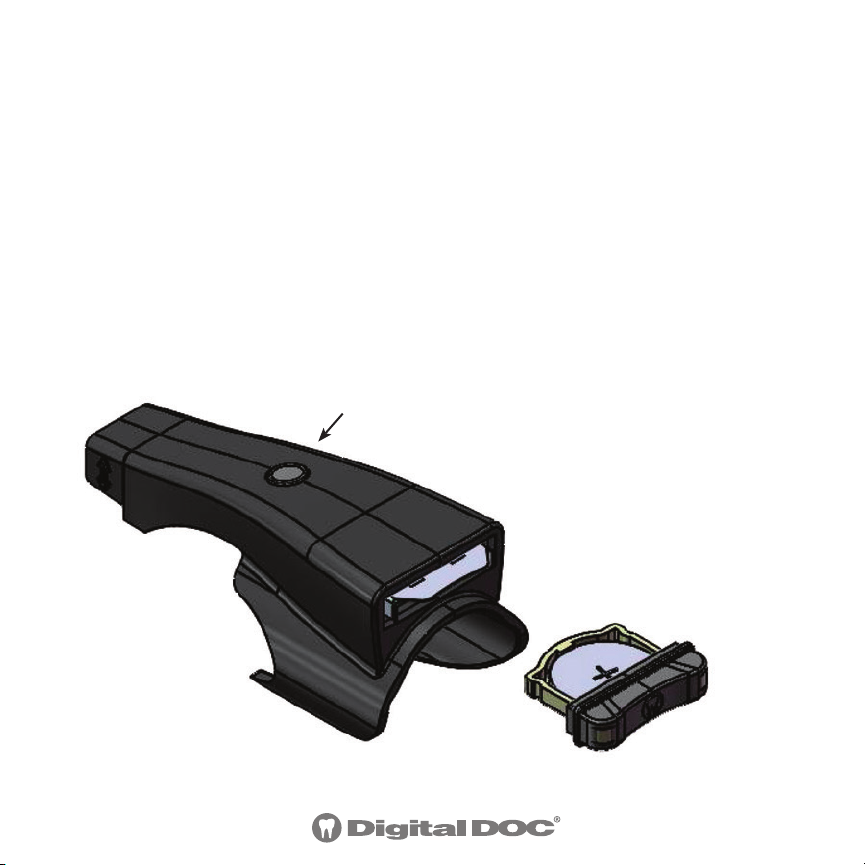
Battery Replacement: The LUM G2 is battery powered with
a Li-ION CR-2032 non-rechargeable coin cell. Remove the
battery tray found at the end of the Base section by pulling
out the tray cap. Only replace with the recommended model
battery.
WARNING: Do not slide the Battery tray into the battery slot without
a battery in place. The metal contact tabs will prevent the tray from
reopening.
LUM G2 light button
Battery Tray
10.
Battery
Tray Cap
Page 11

Digital Doc LLC agrees to guarantee parts and labor for each
WARRANTY:
purchase, when used in accordance with manufacturer’s instructions. In the event a product is
returned by the dealer, or the end user, and the warranty has expired, Digital Doc LLC reserves the
right to collect a reasonable fee from the end user for services mutually agreed upon. Digital Doc
LLC does agree to replace any defective unit, free of charge, during the first thirty (30) days from
the date of purchase. After the first thirty (30) days, Digital Doc LLC, will repair under warranty the
defective item and pay the shipping to return the repaired item to the customer. The customer
will be responsible for shipping charges to Digital Doc. If the customer elects to ship the product
three-day economy, Digital Doc LLC, will return-ship in the same manner. Further, if the customer
elects to ship the product overnight, Digital Doc LLC will reciprocate in the same manner.
Digital Doc LLC will require the end user to phone the Technical Service Department at
800.518.1102. Please have your camera serial number ready prior to contacting Technical Support.
Once the cause of the failure has been determined, Digital Doc LLC will issue a “Return Merchandise Authorization” (RMA) number to be written clearly on the outside of the package in which
the item is shipped. Items shipped to Digital Doc LLC without the RMA written on the outside of
the package will be returned to the customer at their cost. No items will be received for warranty
or non-warranty work without the RMA number printed clearly on the package. All non-warranty
repairs will need a credit card, or some form of payment prior to the repair work being authorized.
If your repair is deemed under warranty, Digital Doc LLC agrees to repair or replace the item, at
Digital Doc’s discretion. The item will then be shipped to the person, or persons whose name appears on the shipping label. All non-warranty repairs will be billed at $135.00 (USD) per hour plus
parts. All refusals to authorize non-warranty work will be subject to a one-hour minimum charge.
Loaner units are not available.
LUM G2 system for the term of one year from the date of
11.
Page 12

USERS MANUAL
DIGIDOC.COM
800-518-1102
4789 Golden Foothill Parkway
El Dorado Hills, CA 95762
LUM G21805
 Loading...