

Page 1
MIX-16/MIX-32 USER GUIDE
Version 1.2
January 2017
1266 Park Road
Chanhassen, MN 55317
952-401-7700
[email protected]
www.digitalaudio.com
Page 2
SAFETY INSTRUCTIONS
TO REDUCE THE RISK OF ELECTRIC SHOCK, DO NOT REMOVE COVER. NO USER SERVICEABLE
PARTS INSIDE. CONTACT DIGITAL AUDIO LABS FOR SERVICING.
The lightning ash with arrowhead symbol, within an equilateral triangle, is intended to alert the
user to the presence of un-insulated and/or potentially dangerous voltage within the products
enclosure that may be of sufcient magnitude to constitute a risk of electric shock to persons.
The exclamation point within an equilateral triangle is intended to alert the user to the presence
of important operating and maintenance (servicing) instructions in the literature accompanying
the appliance.
POWER CORD NOTICE FOR INTERNATIONAL OPERATION
Please call Digital Audio Labs Support at 952-401-7700.
IMPORTANT SAFETY INSTRUCTIONS
1. Read and understand this entire manual.
2. Keep this manual available for reference.
3. Heed all warnings and precautions in this manual and notices marked on the product.
4. Do not use this product near water or damp environments.
5. Do not block any ventilation openings. Install in accordance with the manufacturer’s instructions.
6. Provide for proper airow around product. Do not install near products that produce high levels
of heat. Do not expose the unit to direct sun light or heating units as the internal components’
temperature may rise and shorten the life of the components.
7. Do not defeat the safety purpose of the polarized or grounding-type plug. A polarized plug has
two blades with one wider than the other. A grounding type plug has two blades and a third
grounding prong.
8. Protect the power cord from being walked on or pinched particularly at plugs, convenience
receptacles, and the point where they connect to the product. Do not use the unit if the electrical
power cord is frayed or broken.
9. Only use attachments/accessories specied by the manufacturer.
10. Unplug this product during lightning storms or when unused for long periods of time.
11. Refer all servicing to qualied service personnel. There are no user serviceable components inside
the product.
12. The product shall not be exposed to moisture. Do not touch the unit with wet hands. Do not
handle the unit or power cord when your hands are wet or damp.
13. The product should be connected to a power supply only of the type described in the operating
instructions or as marked on the product.
CARE
• From time to time you should wipe off the front and side panels and the cabinet with a dry soft
cloth. Do not use rough material, thinners, alcohol or other chemical solvents or cloths since this
may damage the nish or remove the panel lettering.
• The Livemix system is capable of delivering high levels of volume. Please use caution with
volume levels, listen with the lowest possible volume for proper operation and avoid exposure to
prolonged high volume levels.
• The manufacture cannot be held responsible for damages caused to persons, personal
possessions, or data due to an improper or missing ground connection.
LIVEMIX MIX-16/32
Page 3

DIGITAL AUDIO LABS LIMITED WARRANTY
Digital Audio Labs warrants their products against defects in material and workmanship for a period of two
years from date of purchase. During this period, Digital Audio Labs will, at its option, repair the defective unit
or replace it with a new or rebuilt one.
The warranty does NOT cover:
• Damage due to abuse, misuse, or accident.
• Damage due to operation contrary to the instructions in the product instruction manual.
• Units on which the product serial number has been removed or altered.
• Units that have been serviced by unauthorized personnel.
All implied warranties, including warranties on merchantability and tness, are limited in time to the length of
this warranty. Some states do not allow time limitations on implied warranties, so this limitation may not apply
to you. Digital Audio Labs’ liability is limited to the repair or replacement of its product. Digital Audio Labs
shall in no way be held liable for incidental or consequential damages resulting from the use of their product
or its software, including, without limitation, damages from loss of business prots, business interruption,
loss of business information or other pecuniary loss. Some states do not allow the exclusion or limitation of
incidental or consequential damages, so the above limitation or exclusion may not apply to you.
REPAIR POLICY
Please do not return the product without obtaining an RMA number rst. Contact Digital Audio
Labs at [email protected] to acquire an RMA number. Do not return the product to the
place of purchase. Please write the RMA number on the outside of the shipping carton. Any product
sent to us without a valid RMA number will be refused. Include the following with the product: a
brief description of the problem, your name, return shipping address, phone number and the RMA
number. Do not include any accessories. DAL is not responsible for any damage to or loss of the
product during transit. We recommend that customers obtain a receipt and tracking number for all
packages shipped to us. Turnaround time on repairs is generally ten business days. If you live outside
of the United States, please contact your local distributor for warranty service.
Please return product to:
Digital Audio Labs
Attn: RMA Number
1266 Park Road
Chanhassen, MN 55317
USA
WARRANTY SERVICE
You will be required to pay the shipping charges when you ship your product to DAL. DAL will pay for return
shipping via UPS ground. We reserve the right to inspect any product that may be the subject of any warranty
claim before repair is carried out. For warranty service, we may require proof of the original date of purchase
if you have not registered your product with DAL. Final determination of warranty coverage lies solely with
Digital Audio Labs.
NON-WARRANTY SERVICE
If it is determined that the product does not meet the terms of our warranty, you will be billed for labor,
materials, return freight and insurance. There is a $80 USD minimum charge for materials and labor.
Appropriate shipping charges will be applied. We require payment in advance of repair by credit card; we
accept Visa and Master Card. In the event the charges are over the minimum charge, DAL will contact you
and inform you of the cost of the repair before any work is completed.
LIVEMIX MIX-16/32
1
Page 4

CONTENTS
SAFETY INSTRUCTIONS ..................................................................................... II
IMPORTANT SAFETY INSTRUCTIONS .......................................................... II
CARE .............................................................................................................. II
DIGITAL AUDIO LABS LIMITED WARRANTY...................................................... 1
REPAIR POLICY .............................................................................................. 1
WARRANTY SERVICE..................................................................................... 1
NON-WARRANTY SERVICE ........................................................................... 1
CONTENTS OF BOX ........................................................................................... 3
INTRODUCTION .................................................................................................. 3
ANATOMY OF THE MIX-16/MIX-32* ............................................................ 3
SETUP DIAGRAMS ............................................................................................... 5
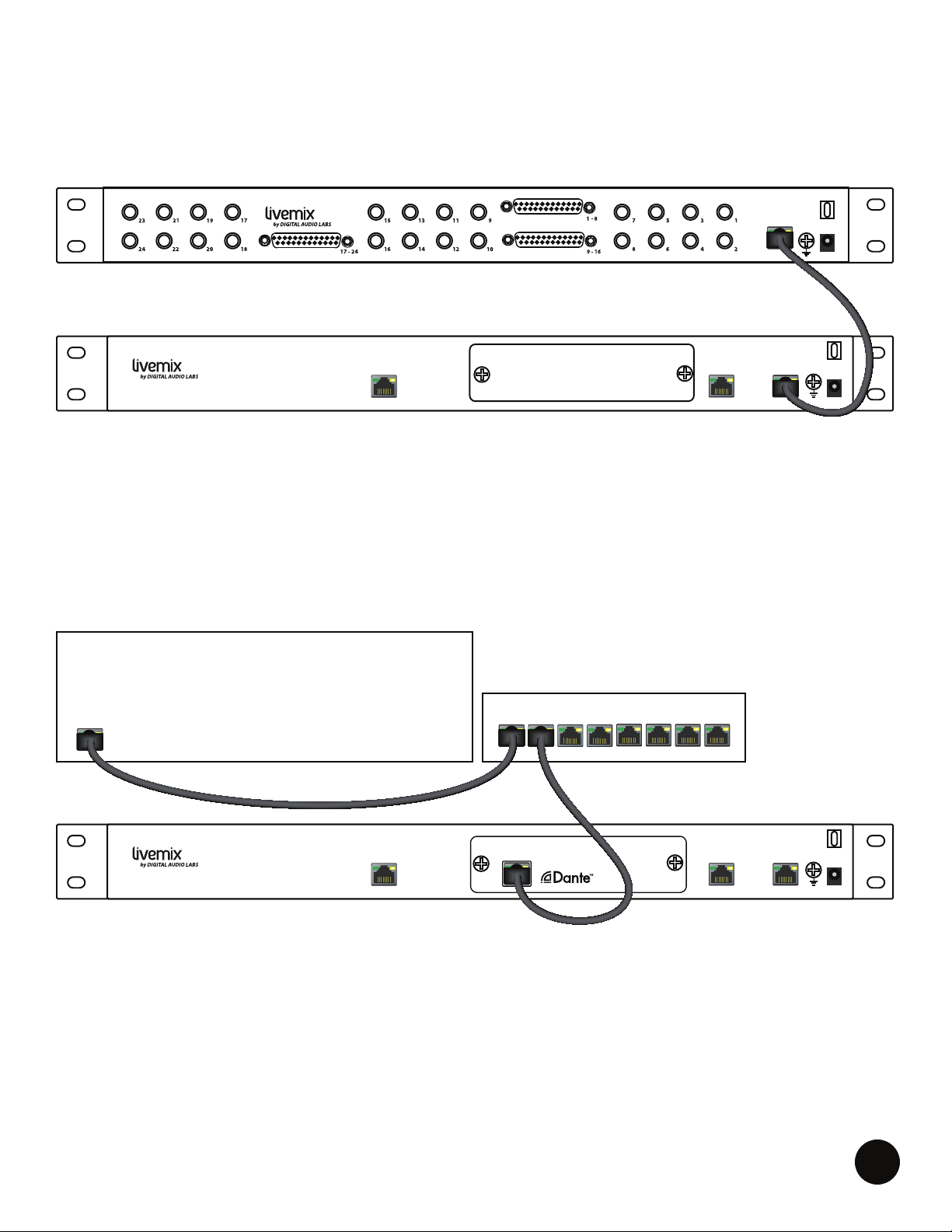
ANALOG INPUT TO MIX-16/MIX-32 ............................................................. 5
DIGITAL INPUT TO MIX-16/MIX-32 ............................................................... 5
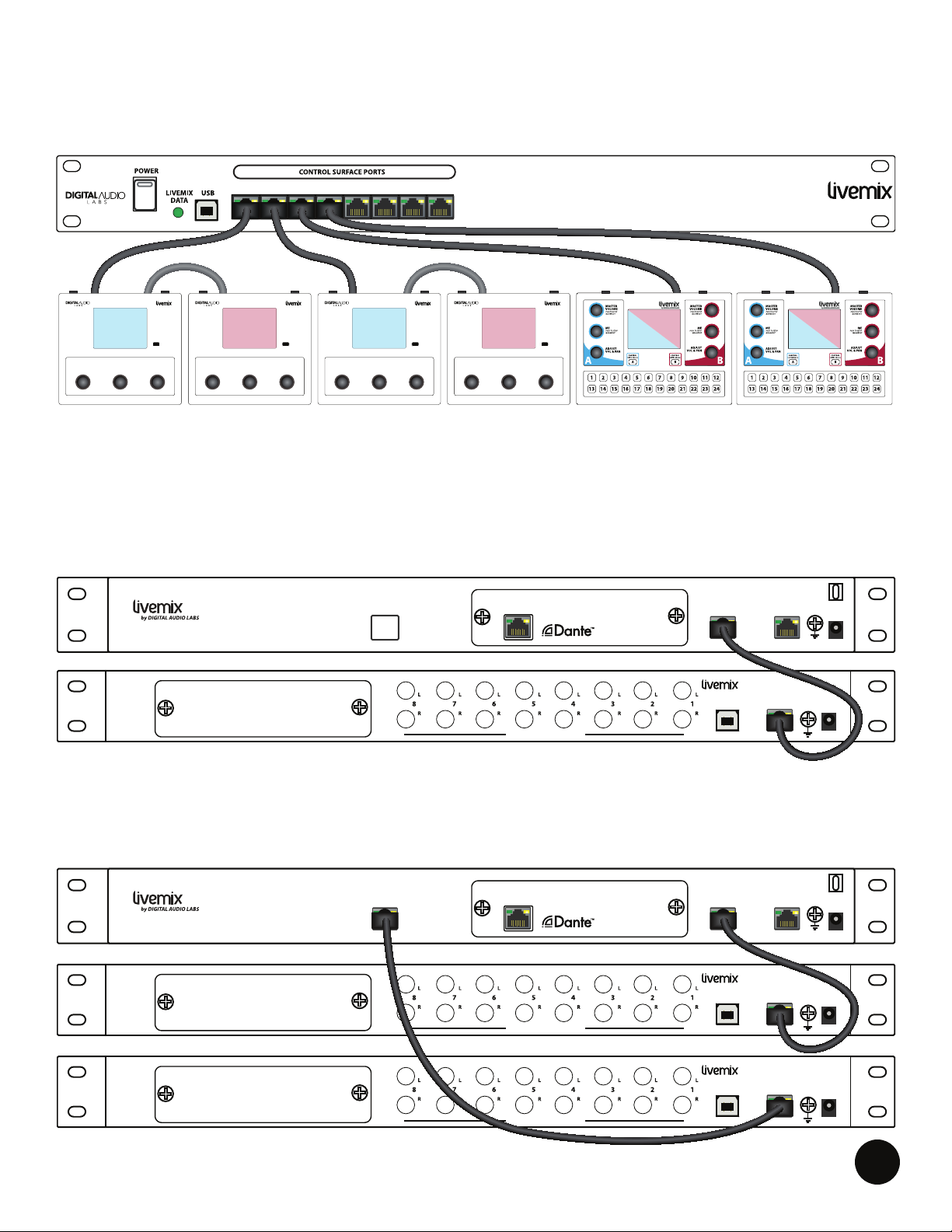
MIX-16/MIX-32 TO LIVEMIX CS-SOLO/CS-DUO PERSONAL MIXERS* ....... 6
CONNECTING THE DA-816 TO THE MIX-16 AND MIX-32 ......................... 6
CONNECTING TWO DA-816 UNITS TO THE MIX-32 .................................. 6
SETUP AND OPERATION .................................................................................... 7
MIX-16/MIX-32 FIRMWARE UPDATE INSTRUCTIONS ....................................... 8
LIVEMIX SYSTEM EXAMPLES ............................................................................. 9
TROUBLESHOOTING ........................................................................................ 10
LIVEMIX SUPPORT ............................................................................................. 11
TECHNICAL SPECIFICATIONS .......................................................................... 11
LIVEMIX MIX-16/32
Page 5
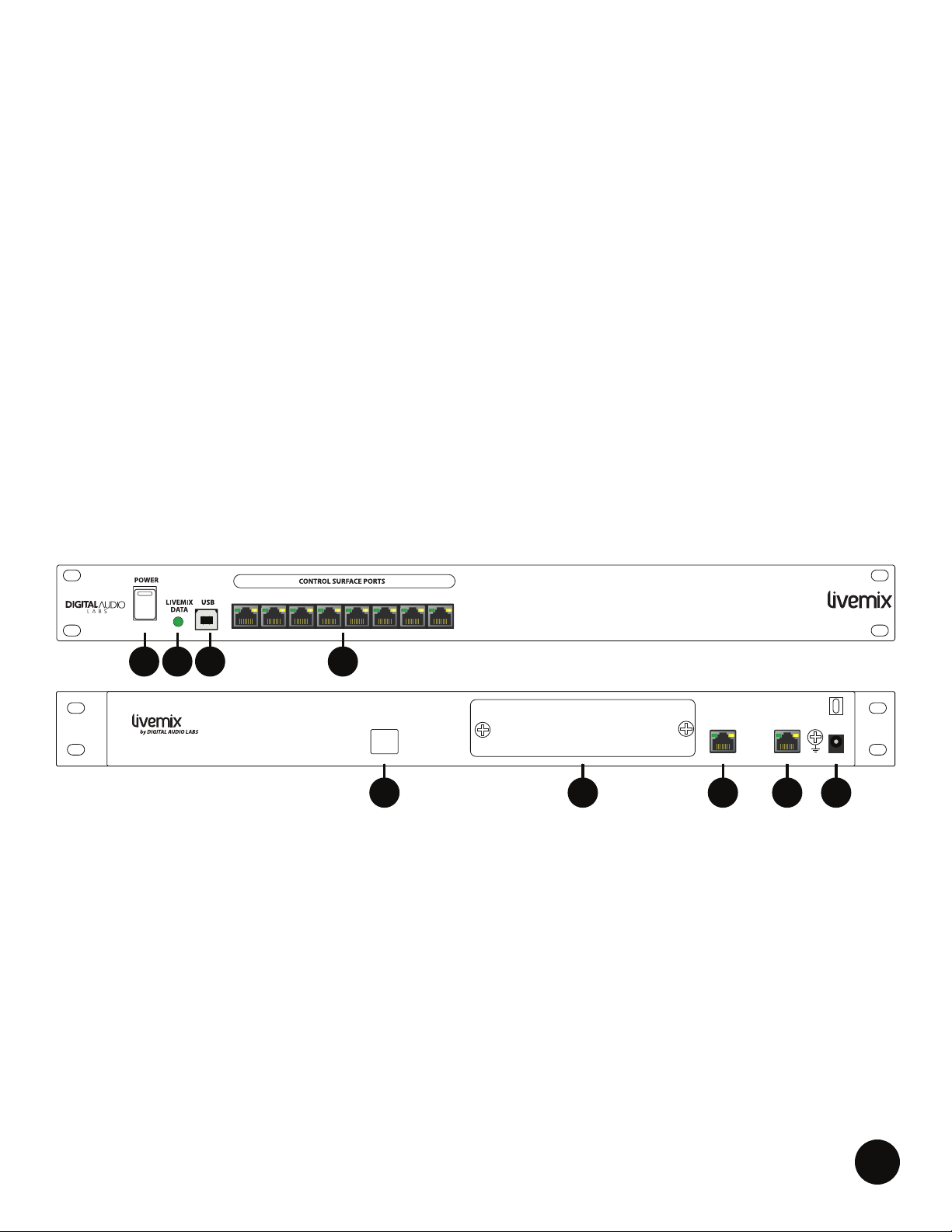
FRONT
REAR
CONTENTS OF BOX
• MIX-16/MIX-32
• External Power Supply
• AC Power Cable
• System Quick Start
• Registration Card
INTRODUCTION
The MIX-16/MIX-32 is the Livemix central mixer and power distributor. The MIX-16/MIX-32 provides:
• 24-channel digital input
• 24-bit digital mixing and processing
• Power and audio distribution to attached personal mixers over a single network cable
• 16 discrete monitor mixes with the MIX-16
• 32 discrete monitor mixes with the MIX-32
ANATOMY OF THE MIX-16/MIX-32*
1. EXTERNAL POWER SUPPLY CONNECTOR: Connect the included power supply here. Only use
2. LIVEMIX DATA IN: If using an analog input source and the AD-24, connect a shielded CAT5e or
* MIX-16 pictured
1 2 3 4 5 6 7 8
MIX-16
7
MIX-16MIX-16/32
463
LIVEMIX DATA
OUT 2 (MIX-32 ONLY)
LIVEMIX DATA
OUT 1
LIVEMIX DATA
IN
24VDC
3.75A
1289 5
the power supply that is supplied with your MIX-16 or MIX-32. The MIX-16 is supplied with a 24V
/ 3.75A power supply. The MIX-32 is supplied with a 24V / 5A power supply. Contact support for
a replacement power supply if necessary.
CAT6 cable from the Livemix Data Out port on the AD-24 to the Livemix Data In on the MIX-16/
MIX-32. This will be unused if using the LM-DANTE-EXP Dante Option Card.
3. POWER SWITCH: This switch turns power on/off. The MIX-16/MIX-32 supplies power to
connected Livemix personal mixers.
LIVEMIX MIX-16/32
3
Page 6

4. CONTROL SURFACE PORTS: Each port supplies communication data and power to connected
Livemix personal mixers (also called control surfaces) through a standard network cable.
Two indicator lights on each port report device status
information.
• The green light illuminates when a personal mixer has a
valid connection with the MIX-16/MIX-32.
• The yellow light is a fault indicator. It may illuminate
briey when each personal mixer is powered on. If it
remains lit, this indicates one of the following problems:
1. The rmware on the personal mixer
2. The network cable
NOTE:
If power is interrupted to the
MIX-16/MIX-32, the personal
mixer will automatically return
to the last loaded mix when it
powers back on. Additionally, the
MIX-16/MIX-32 will automatically
return to the last loaded Global
Template
.
3. The port
4. The personal mixer
5. OPTION CARD SLOT: This slot is used to provide access to additional input formats. When using
an option card, such as the LM-DANTE-EXP Dante card, the system may need to be congured
for digital input. The system will default to the option card slot if one is installed. Otherwise, this
can be done on the Livemix personal mixer (see Livemix CS-SOLO or CS-DUO User Guides for
more information).
6. LIVEMIX DATA LIGHT: This light will change color to indicate the audio and power status of the
MIX-16/MIX-32. If the light is off, the MIX-16/MIX-32 doesn’t have power. Any illuminated LED
light color means that power is on.
If using the AD-24 with analog inputs:
• The light will illuminate green when the MIX-16/MIX-32 is receiving audio data.
• The light will illuminate red when there is no audio data present.
If using an option card (digital input):
• A green light means communication is working. Please verify channel mapping from your
audio source. (See LM-DANTE-EXP User Guide for more information).
• A yellow light means at least one digital channel is not connected properly (See LMDANTE-EXP User Guide for more information).
• A red light means that at least one channel is reporting an error (See LM-DANTE-EXP User
Guide for more information).
7. USB PORT: The USB port connects to a Windows PC for rmware updating.
8. LIVEMIX DATA OUT 1: This port connects to a Livemix DA-816 analog output rack unit.
9. LIVEMIX DATA OUT 2 (MIX-32 ONLY): This port connects to a Livemix DA-816 analog output
rack unit. If only using one DA-816, connect to the Livemix Data Out 1.
LIVEMIX MIX-16/32
4
Page 7
LIVEMIX
DATA
AD-24
12VDC
3.33A
LIVEMIX
DATA OUT
AD-24
ANALOG MIXER/SNAKE/INTERFACE
TRS CABLE
DB25 CABLE
(TASCAM PINOUT)
SETUP DIAGRAMS
LIVEMIX
DATA
AD-24
24VDC
3.75A
MIX-16/32
LIVEMIX DATA
IN
LIVEMIX DATA
OUT 1
LIVEMIX DATA
OUT 2 (MIX-32 ONLY)
12VDC
3.33A
LIVEMIX
DATA OUT
AD-24
SHIELDED
CAT5e
12VDC
3.33A
LIVEMIX
DATA OUT
AD-24
ANALOG MIXER/SNAKE/INTERFACE
TRS CABLE
DB25 CABLE
(TASCAM PINOUT)
ANALOG INPUT TO MIX-16/MIX-32
MIX-16/32
DIGITAL INPUT TO MIX-16/MIX-32
DANTE ENABLED MIXER/SNAKE/INTERFACE
AD-24
LIVEMIX DATA
OUT 2 (MIX-32 ONLY)
GIGABIT NETWORK SWITCH
LIVEMIX DATA
OUT 1
LIVEMIX
DATA OUT
SHIELDED
CAT5e
LIVEMIX DATA
IN
12VDC
3.33A
24VDC
3.75A
MIX-16/32
LIVEMIX MIX-16/32
CAT5e/CAT6
LIVEMIX DATA
OUT 2 (MIX-32 ONLY)
DANTE
NETWORK
Dante™ is a trademark of Audinate Pty Ltd.
LINK/ACT 1G
CAT5e/CAT6
LM-DANTE-EXP
LIVEMIX DATA
OUT 1
LIVEMIX DATA
24VDC
3.75A
IN
5
Page 8
LIVEMIX
DATA
AD-24
24VDC
3.75A
MIX-16/32
LIVEMIX DATA
IN
LIVEMIX DATA
OUT 1
LIVEMIX DATA
OUT 2 (MIX-32 ONLY)
12VDC
3.33A
LIVEMIX
DATA OUT
AD-24
SHIELDED
CAT5e
GIGABIT NETWORK SWITCH
DANTE ENABLED MIXER/SNAKE/INTERFACE
CAT5e/CAT6
CAT5e/CAT6
24VDC
3.75A
MIX-16/32
LIVEMIX DATA
IN
LIVEMIX DATA
OUT 1
LIVEMIX DATA
OUT 2 (MIX-32 ONLY)
LM-DANTE-EXP
Dante™ is a trademark of Audinate Pty Ltd.
DANTE
NETWORK
LINK/ACT 1G
DA-816
ANALOG OUTPUTS
LIVEMIX DATA
IN
12VDC
3.33A
DA-816
BALANCED +4dBu LINE OUT
USB
LM-DANTE-EXP
Dante™ is a trademark of Audinate Pty Ltd.
DANTE
NETWORK
LINK/ACT 1G
DA-816
ANALOG OUTPUTS
LIVEMIX DATA
IN
24VDC
3.75A
MIX-16/32
LIVEMIX DATA
OUT 1
LIVEMIX DATA
OUT 2 (MIX-32 ONLY)
LM-DANTE-EXP
Dante™ is a trademark of Audinate Pty Ltd.
DANTE
NETWORK
LINK/ACT 1G
LIVEMIX DATA
IN
12VDC
3.33A
DA-816
BALANCED +4dBu LINE OUT
USB
LM-DANTE-EXP
Dante™ is a trademark of Audinate Pty Ltd.
DANTE
NETWORK
LINK/ACT 1G
LIVEMIX DATA
IN
12VDC
3.33A
DA-816
BALANCED +4dBu LINE OUT
USB
MIX-16/MIX-32 TO LIVEMIX CS-SOLO/CS-DUO PERSONAL MIXERS*
1 2 3 4 5 6 7 8
* MIX-16 pictured
MIX-16
MASTER
VOLUME
PUSH FOR MASTER SETUP
ADJUST
VOL & PAN
INTERCOM
|
ME
PUSH FOR GROUP SETUP
CS-SOLO
MASTER
ADJUST
VOLUME
VOL & PAN
PUSH FOR MASTER SETUP
INTERCOM
|
ME
PUSH FOR GROUP SETUP
CS-SOLO
MASTER
VOLUME
PUSH FOR MASTER SETUP
ADJUST
VOL & PAN
INTERCOM
|
ME
PUSH FOR GROUP SETUP
CS-SOLO
MASTER
ADJUST
VOLUME
VOL & PAN
PUSH FOR MASTER SETUP
INTERCOM
|
ME
PUSH FOR GROUP SETUP
CS-SOLO
Each MIX-16/32 Control Surface Port supports a maximum combined CAT5e (shielded recommended) cable distance of 100 meters.
CONNECTING THE DA-816 TO THE MIX-16 AND MIX-32
LM-DANTE-EXP
MIX-16/32
LIVEMIX DATA
OUT 2 (MIX-32 ONLY)
DANTE
NETWORK
Dante™ is a trademark of Audinate Pty Ltd.
LINK/ACT 1G
BALANCED +4dBu LINE OUT
LIVEMIX DATA
OUT 1
DA-816
USB
LIVEMIX DATA
IN
LIVEMIX DATA
IN
12VDC
3.33A
24VDC
3.75A
CONNECTING TWO DA-816 UNITS TO THE MIX-32
MIX-16/32
LIVEMIX DATA
OUT 2 (MIX-32 ONLY)
NETWORK
LINK/ACT 1G
DANTE
Dante™ is a trademark of Audinate Pty Ltd.
BALANCED +4dBu LINE OUT
BALANCED +4dBu LINE OUT
LIVEMIX MIX-16/32
LM-DANTE-EXP
LIVEMIX DATA
OUT 1
USB
USB
DA-816
DA-816
LIVEMIX DATA
IN
LIVEMIX DATA
IN
LIVEMIX DATA
IN
12VDC
12VDC
3.33A
3.33A
24VDC
3.75A
6
Page 9

SETUP AND OPERATION
Although the MIX-16/MIX-32 is the Livemix central mixer
and power distributor, there aren’t any direct controls.
Setting up the MIX-16/MIX-32 is simple and all conguration
is done on a Livemix personal mixer (See the CS-SOLO or
CS-DUO User Guide).
1. If using the analog input, connect the Livemix Data
Out port on the AD-24 to the Livemix Data In port on
the MIX-16/MIX-32. Shielded CAT5e or CAT6 cable is
required to make this connection. If using an option
card, you will not use the Livemix Data In port.
2. Connect each personal mixer to a Control Surface Port
on the front of the MIX-16/MIX-32 with a CAT5e or CAT6
cable. These do not have to be in any particular order
or sequence. Planning which Livemix personal mixer
goes into which Control Surface Port may help identify
®
each personal mixer when using the MirrorMix
mixing feature.
remote
NOTE:
The audio data sent over the
Livemix system is a proprietary
data format. It will not work with
a switch or a standard Ethernet
network. When using an Option
Card designed for networked
audio use, such as the LM-DANTEEXP, consult the Option Card user
guide for information on how to
connect to the network.
NOTE:
Either CAT5e or CAT6 cabling is
appropriate.
3. Connect the power supply on the back of the MIX-16/
MIX-32 to an appropriate power source.
4. Turn on the MIX-16/MIX-32.
LIVEMIX MIX-16/32
7
Page 10
MIX-16/MIX-32 FIRMWARE UPDATE INSTRUCTIONS
The MIX-16/MIX-32 can be updated with a CS-SOLO/CS-DUO
or a PC application.
You can update with a CS-SOLO or CS-DUO if:
• The MIX-16/MIX-32 serial number is greater than
12-02-01030
• The MIX-16/MIX-32 rmware is 1.01 or above
• The CS-SOLO/CS-DUO rmware is 1.31 or above
If your MIX-16/MIX-32 does not meet the criteria above, update with a Windows PC application.
In most cases, this will bring your MIX-16/MIX-32 up to date and subsequent updates can be
performed with the CS-SOLO/CS-DUO. For reference, both methods are listed below.
UPDATE FIRMWARE OF MIX-16/MIX-32 WITH THE PC APPLICATION:
1. Update all CS-SOLOs and CS-DUOs to the latest version per the instructions above.
2. Download the MIX-16/MIX-32 Update Application from http://www.digitalaudio.com/support.
3. Connect the USB port on the MIX-16/MIX-32 to a Windows computer.
4. Wait for MIX-16/MIX-32 drivers to fully install.
5. Run MIX-16/MIX-32 Update Application. A second set of drivers will be installed at the start
of this process and may take a few minutes. Once the updater has started, a progress bar will
appear. Do not turn off the power until the update is complete or you may damage the unit.
6. PRESS Finish.
7. Disconnect the MIX-16/MIX-32 from the PC and verify the update was successful by checking
the rmware version with the CS-SOLO/CS-DUO.
UPDATE MIX-16/MIX-32 FIRMWARE WITH A CS-SOLO OR CS-DUO:
1. Download the latest rmware: http://www.digitalaudio.com/support.
2. Unzip the rmware zip le and copy the LMUPDATE folder to the
root directory of a USB ash drive (FAT Format). Please verify the
LMUPDATE folder is not in another folder.
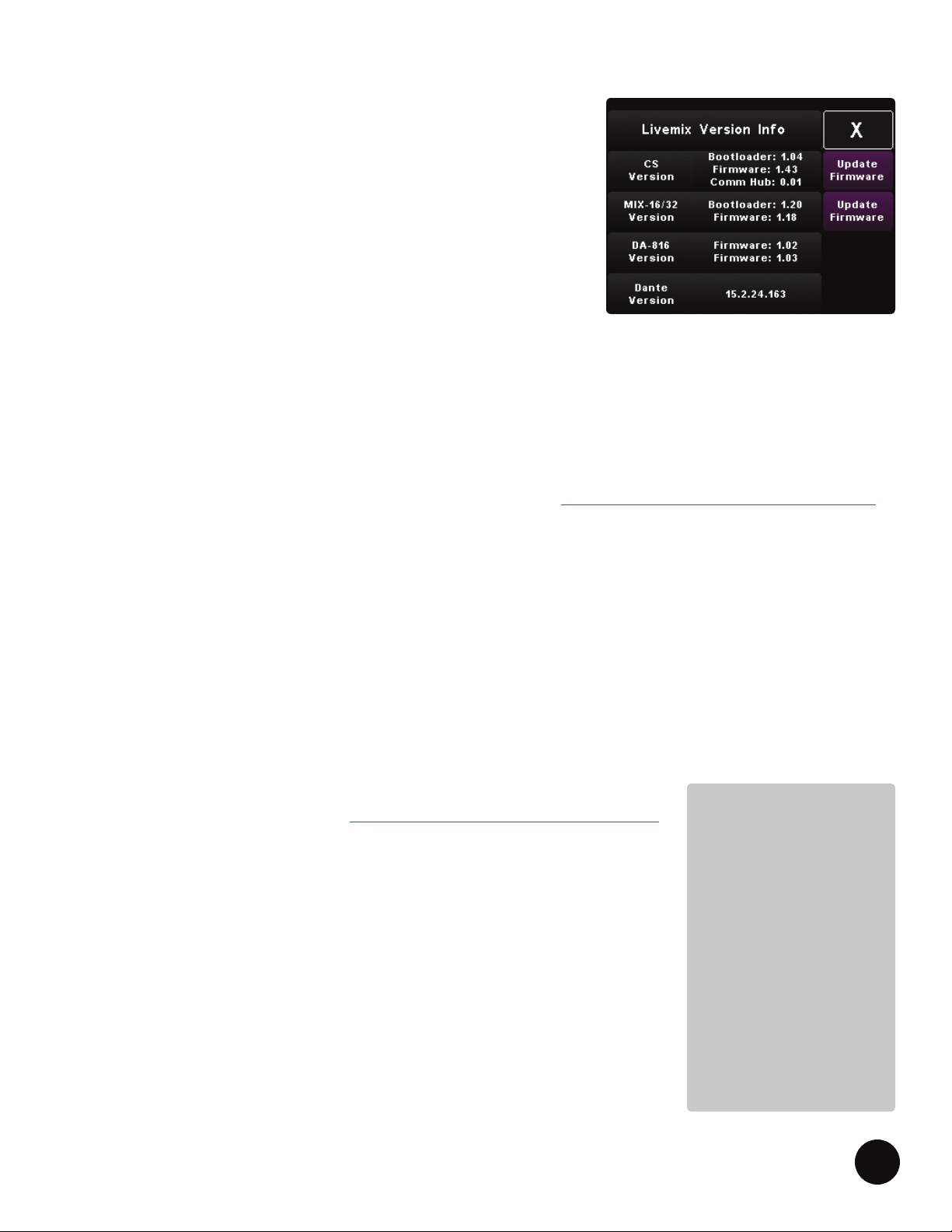
3. Go to Livemix Version Info by pressing Mix Tools, Global
Conguration and then Livemix Version Info.
4. PRESS Update MIX-16/MIX-32 Firmware.
5. PRESS Yes to update, or No to cancel.
6. Insert USB ash drive containing the update, when prompted. PRESS
Continue or Exit to cancel. Once the update has begun, do not turn
NOTE:
If updating with the
CS-SOLO or CS-DUO
does not work, please
use the PC Application.
Some updates take a
while to complete. If
updating the MIX-16/
MIX-32 from the
CS-SOLO/CS-DUO, it
works best to have only
one personal mixer
connected.
off the power to the MIX-16/MIX-32 or you may damage the unit.
LIVEMIX MIX-16/32
8
Page 11

LIVEMIX SYSTEM EXAMPLES
A Livemix system requires either an analog (AD-24) or digital input (option card), the MIX-16/MIX32 central mixer, and at least one Livemix personal mixer. Below are some examples of what a basic
system may look like.
ANALOG INPUT SYSTEM
1 x AD-24 Analog Input Rack Unit
1 x MIX-16 Central Mixer
4 x CS-DUO Dual Mix Personal Mixers
4 x MT-1 Dual Position Mounts
1 x CBL-CAT6-100 Shielded CAT6 Cable 100’ **
4 x CBL-CAT6-50 Shielded CAT6 Cable 50’
**Shielded cable between AD-24 and MIX-16 (and the DA-816 if applicable) is required. CAT6 is not required, CAT5e is
acceptable.
ANALOG OR DIGITAL?
Users receiving their audio from an analog source will use the AD-24. Using the TRS or DB-25 inputs,
audio from the source is made available to the Livemix system.
Users receiving their audio from a digital source will use the Option Card (LM-DANTE-EXP). This is
an option card that is installed in the MIX-16/MIX-32 and allows the Livemix system to receive audio
from a digital device or network.
DIGITAL INPUT SYSTEM
1 x MIX-16 Central Mixer
1 x LM-DANTE-EXP Dante option card
4 x CS-DUO Dual Mix Personal Mixers
4 x MT-1 Dual Position Mounts
1 x CBL-CAT6-100 Shielded CAT6 Cable 100’ **
4 x CBL-CAT6-50 Shielded CAT6 Cable 50’
PERSONAL MIXER / CONTROL SURFACE
Livemix needs at least one connected personal mixer to make a mix. Each Livemix personal mixer
connects via CAT5e/CAT6 cable to one of the ports of the MIX-16/MIX-32. Using various controls
on the unit, users can each create their own custom mix, which is then output to headphones, in-ear
monitors or stage monitors, directly from the personal mixer or Livemix DA-816 analog output unit.
LIVEMIX MIX-16/32
9
Page 12

TROUBLESHOOTING
The Livemix MIX-16/MIX-32 is not powering on
correctly.
I am not seeing the “Livemix Data” light
illuminate.
I was planning on feeding the MIX-16/MIX-32
from my digital mixer, but do not see the right
connector to use on the MIX-16/MIX-32.
Verify that you have connected the external
power supply to a working power outlet.
Verify that the front panel power switch is set
to ON.
If the Livemix Data light is not illuminating,
there is a problem with the power to the MIX-
16/MIX-32. Check to make sure that the power
supply is connected to the MIX-16/MIX-32 and
that all the cables are secure. Also verify that the
power supply is plugged into an appropriate
power source and that the power cable from
the source to the power supply transformer is
securely attached.
The MIX-16/MIX-32 interfaces with digital
consoles through the use of an option card that
inserts into the MIX-16/MIX-32.
There is a clicking or popping sound in my mix.
Audible clicking and popping is usually an
issue with the clock source. If you are using
Livemix with a Dante network, make sure that
your console or Dante device is set to be the
Master and Livemix is set to be the Slave.
This can be done through Dante Controller
software on a Windows PC or Apple computer.
NOTE: If you desire to have your console’s
internal clock be the clock source, select this
conguration setting on your console. Then
in Dante Controller, set your console’s Dante
option card to be the Master Dante device
on the Dante network and select “Sync to
External”.
LIVEMIX MIX-16/32
10
Page 13
LIVEMIX SUPPORT
Phone Support: 952-401-7700
Toll Free: 844-DAL-INFO
DIGITAL AUDIO LABS
1266 Park Rd
Chanhassen, MN 55317
TECHNICAL SPECIFICATIONS
MIX-16/MIX-32
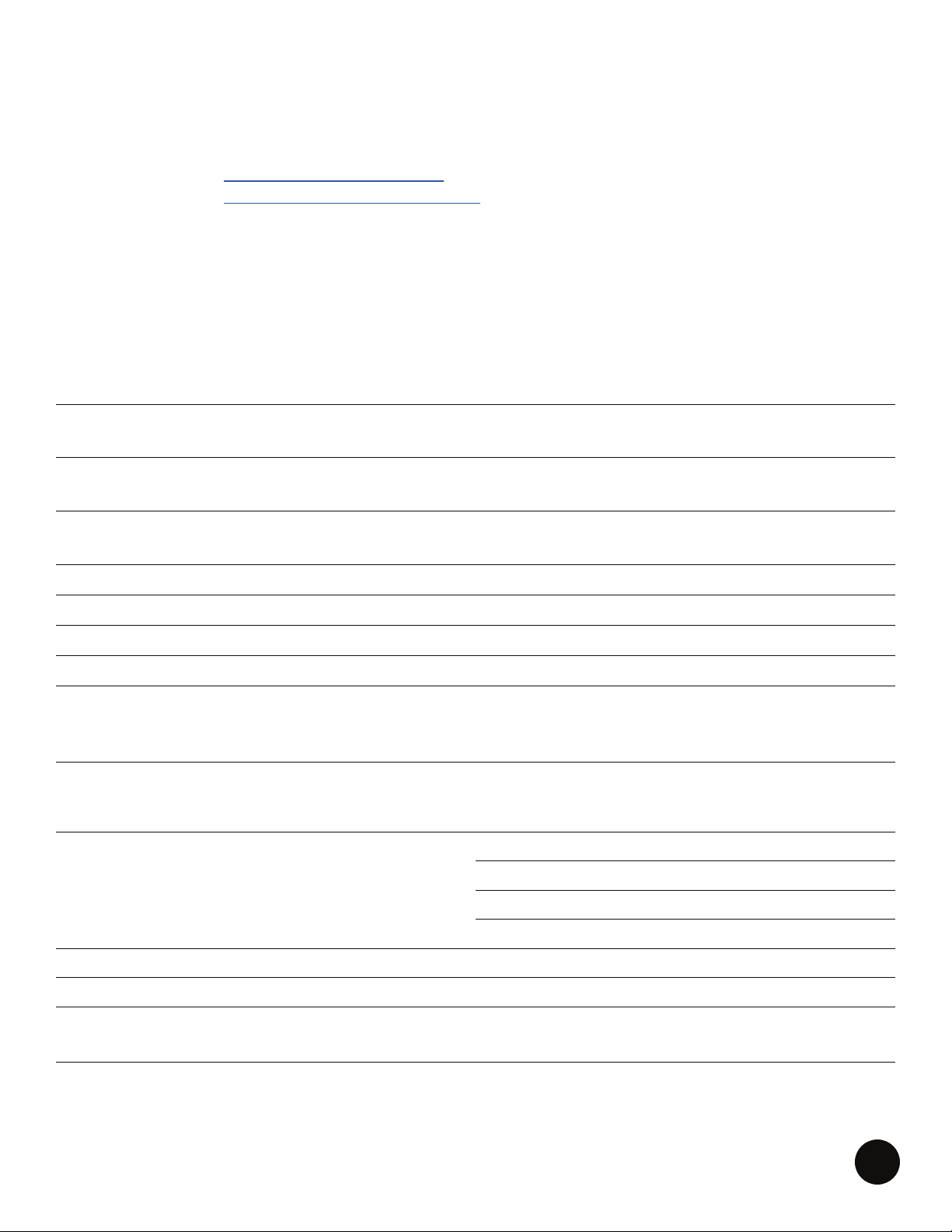
Max Cable Length
to CS-SOLO/CS-DUO
Max Cable Length to AD-24/DA-816
Bit Rate
Sample Rate 48 kHz
USB Output 16-bit / 48 kHz Stereo
Digital Format Proprietary in system
Expansion Input option card slot
Dimensions
Weight 6.72 lbs (3.05kg)
WHOLE SYSTEM
100m CAT5e cable
(shielded recommended)
100m CAT5e cable
(shielded required)
24-Bit Digital Mixing
and Processing
19” (483mm) W
10.25” (260mm) D
1U, 1.75” (44mm) H
.03% (100mW, 22Ω)
THD+N
(18 dBu 1kHz input)
S/N Ratio 103dB
Frequency Response 20Hz-22 kHz ± 3dB
Crosstalk
(Left to Right)
Latency 1.5 ms
LIVEMIX MIX-16/32
.014% (100mW, into 32Ω)
.005% (100mW, into 64Ω)
.003% (100mW, into 300Ω)
-103 dB
11
Page 14

Open Source Statement
The Livemix MIX-16/MIX-32 rmware includes the open source software module FreeRTOS, which
is licensed under the terms of the GNU General Public License (version 2) AND MODIFIED BY the
FreeRTOS exception, as outlined in the FreeRTOS license. In accordance with those licensing
terms, we must provide you the source code for the version of FreeRTOS used in the MIX-16/MIX-
32. You may download the FreeRTOS source code at http://www.digitalaudio.com/open-source-
center.
LIVEMIX MIX-16/32
12
Page 15
® 2014, 2015 Digital Audio Labs. ™ & © 2017 Digital Audio Labs.
Audinate®, the Audinate logo and Dante are trademarks of Audinate Pty Ltd.
Livemix is a registered trademark of Digital Audio Labs.
Patents pending.
 Loading...