

Page 1

37 Sherwood Terrace, Suite 111
Lake Bluff, IL 60044 U.S.A.
Tel 847-604-9256
www.digitalacoustics.com
IP7-MZC-FD Application Guide
The IP7-MZC-FD Multi-Zone Controller is a network audio endpoint that provides the ability for a
central station call center to to communicate with up to forty-eight zones of microphones and speakers
(full-duplex) through a single IP audio connection. It also includes the ability to add an analog telephone
that can be used for private audio conversations with the call center over the IP connection. Any
combination of microphone and/or speaker zones can be turned on and off by the call center operator
either through custom applications or via a SIP based phone system.
This Application Guide presents some of the ways customers can integrate the IP7-MZC-FD into their
Alarm Monitoring system (which may have additional information on each of the zones the IP7-MZC-FD
is monitoring).
IP7-MZC-FD Configuration Options
Using the TalkMaster FOCUS Administrator Console, select the IP Endpoints → Configuration tab.
The IP7-MZC-FD can be configured as a TalkMaster Client, a SIP Client or a hybrid TalkMaster/SIP
client. The TalkMaster FOCUS .NET Console SDK can be used to develop custom applications if the
IP7-MZC-FD is configured as a TalkMaster Client or hybrid TalkMaster/SIP client. DTMF commands
can be used to control it if configured as a SIP Client.
The IP7-MZC-FD supports up to 48 full duplex audio zones created by attaching 1 or more IP7-ZX4L
expansion boards (each IP7-ZX4L adds four speaker/microphone zones). The IP7-MZC-FD detects
the number of IP7-ZX4L’s attached at startup and calculates the number of available zones.
The IP7-MZC-FD includes:
● An onboard speaker and a switch to enable it (used for testing)
● An onboard microphone and a switch to enable it (used for testing)
● An RJ-11 connector for an analog telephone
Audio between the Call Center and the IP7-MZC-FD is always available to the onboard speaker and
microphone (if enabled by the switches) and to the analog telephone if it’s handset is taken off-hook. A
command must be received from the central station in order to turn on or off zones on the attached
IP7-ZX4L zone boards.
The IP7-ZX4L Expansion boards include:
● Four 1 watt speaker terminals
● Four analog speaker volume controls
● Four 12V powered Line Level Microphone terminals (2-wire or 3-wire)
● Four analog microphone sensitivity controls
Page 1 of 7
Page 2
37 Sherwood Terrace, Suite 111
Lake Bluff, IL 60044 U.S.A.
Tel 847-604-9256 Fax 847-604-9346
www.digitalacoustics.com
● Four output pins to record microphone audio to a DVR
On the IP Endpoints → Options 2 tab, press the Set button next to Audio Profile and select the
IP7-MZC to set the proper output volume gain. Use the analog speaker and microphone controls on
the IP7-ZX4L to set the speaker volume level and microphone sensitivity level for each zone.
Communications with an IP7-MZC-FD can be initiated from the call center to the IP7-MZC-FD from a
TalkMaster console application or by dialing a SIP extension. The IP7-MZC-FD may also initiate
contact with the call center by lifting the handset of the analog telephone or activating it’s Talk button.
The IP7-MZC-FD will either place an incoming call to TalkMaster or by dial a SIP Extension at the call
center. Based on the configuration options, the handset of the analog telephone and/or Talk switch
can:
● Do nothing
● Send an Off-Hook event that can be processed using the .NET SDK
● Signal an Incoming Call to TalkMaster
● Dial a SIP extension
If an analog handset is attached and the configuration option IP Endpoints → ZC → Zone Controller
has handset has been set, the Off-Hook Activates PTT option affects the operation of picking up the
analog telephone’s handset or activating the Talk switch:
IP7-MZC-FD Configuration Options
Action Performed When:
Type
SIP Type
Off-Hook
Activates PTT
Handset Goes
Off Hook
Talk Button
Engaged
Client
Not a SIP Device
No
Incoming Call
Incoming Call
Client
Not a SIP Device
Yes
Ring / Incoming
Call
No Action
Client
SIP Extension Only
No
Incoming Call
Incoming Call
Client
SIP Extension Only
Yes
Ring / Incoming
Call
No Action
Client
Dial SIP Extension
on PTT
No
Incoming Call
SIP Call
Client
Dial SIP Extension
on PTT
Yes
Ring / SIP Call
SIP Call
SIP
StandAlone
SIP Extension Only
No
No Action
No Action
SIP
StandAlone
SIP Extension Only
Yes
Ring Only
No Action
SIP
Dial SIP Extension
No
No Action
SIP Call
Page 2 of 7
Page 3
37 Sherwood Terrace, Suite 111
Lake Bluff, IL 60044 U.S.A.
Tel 847-604-9256 Fax 847-604-9346
www.digitalacoustics.com
StandAlone
on PTT
SIP
StandAlone
Dial SIP Extension
on PTT
Yes
Ring / SIP Call
SIP Call
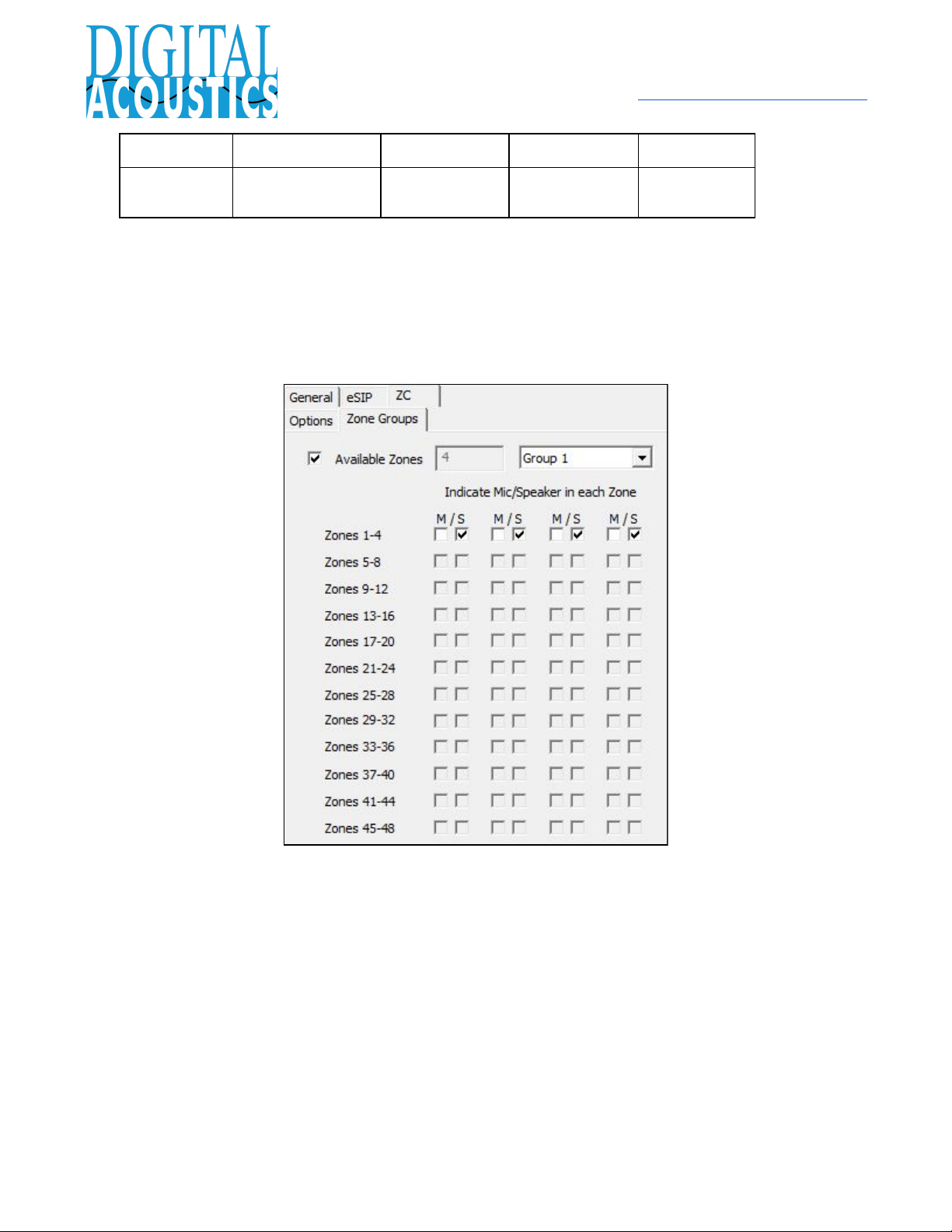
Zone Groups - The IP7-MZC-FD can have up to 48 zones of microphones and/or speakers which can
be programmatically activated in any combination. For convenience, the device can be configured with
up to eight Zone Groups that specify a set of pre-defined microphone and speaker zones.
Additionally, Zone Group 0 turns off all zones and Zone Group 9 turns on all zones. The Zone Groups
are defined using configuration option IP Endpoints → ZC → Zone Groups
Page 3 of 7
Page 4
37 Sherwood Terrace, Suite 111
Lake Bluff, IL 60044 U.S.A.
Tel 847-604-9256 Fax 847-604-9346
www.digitalacoustics.com
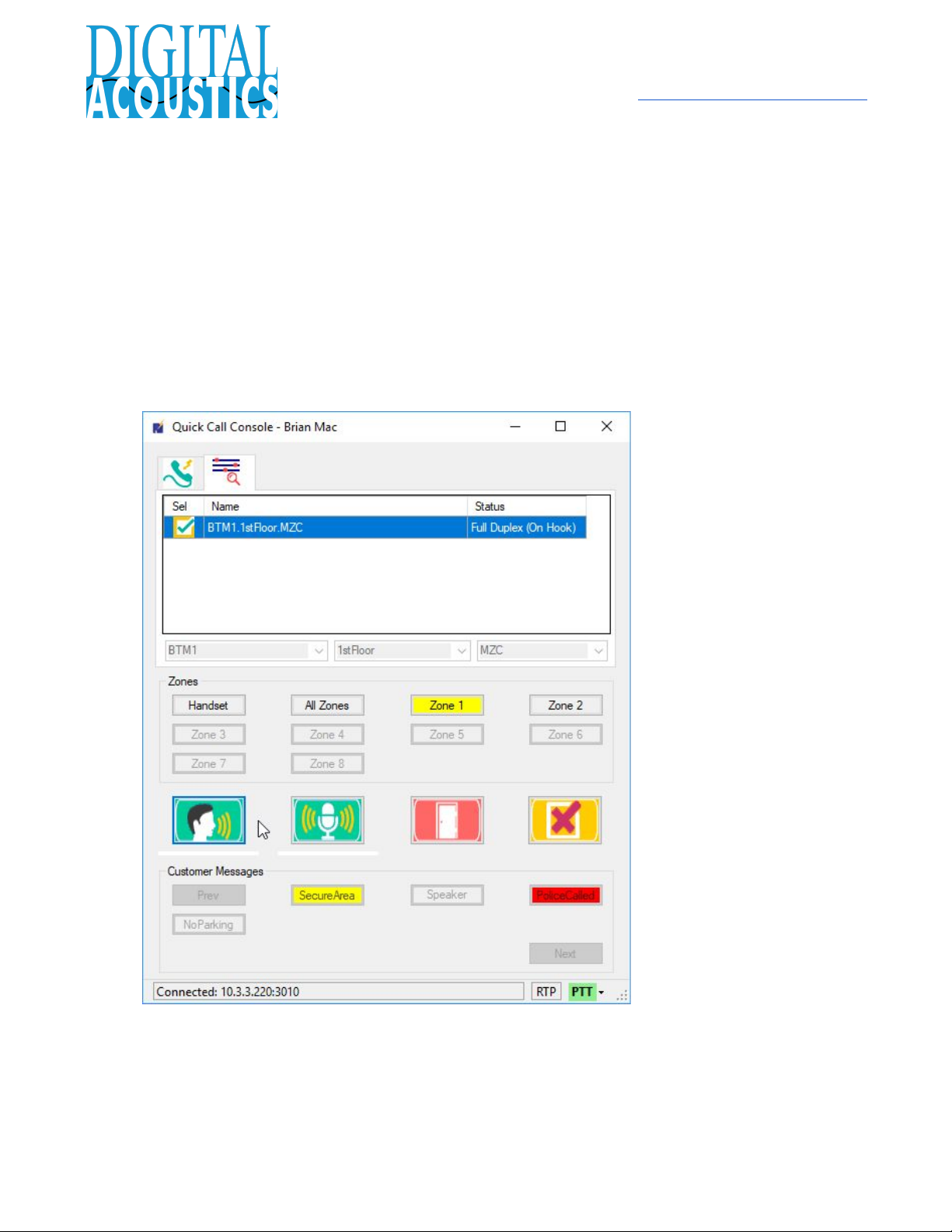
TalkMaster FOCUS - QuickCall Console
The QuickCall Console (included with TalkMaster FOCUS) supports the IP7-MZC-FD when
configured as a TalkMaster Client. The QuickCall Console supports:
● Detection of an Incoming Call
● Initiation of an Outgoing Call
● Automatic detection of the analog Handset initiating a call or going Off-Hook during a call
● Selection of a pre-defined Zone Group or the Handset
● Full Duplex Audio with the ability to mute the Console’s microphone
● Sending a pre-recorded audio file to the Active Zone(s)
● Activating the IP7-MZC-FD’s onboard “double pole double throw” relay
This option does not provide any integration with a custom central station alarm system, so the Zones
need to be standardized in order for the QuickCall Operator to understand which zones they are
controlling.
Page 4 of 7
Page 5

37 Sherwood Terrace, Suite 111
Lake Bluff, IL 60044 U.S.A.
Tel 847-604-9256 Fax 847-604-9346
www.digitalacoustics.com
TalkMaster - Custom Console
When the IP7-MZC-FD is configured as a TalkMaster Client (or a hybrid TalkMaster/SIP client), the
TalkMaster FOCUS .NET SDK can be used to develop applications to monitor and control it. The SDK
has the ability to:
● Monitor the connection status of the IP7-MZC-FD
● Monitor the On-Hook/Off-Hook status of the attached analog phone
● Detect incoming TalkMaster calls
● Initiate outgoing TalkMaster calls
● Initiate outgoing SIP calls
● Hang Up a SIP call
● Turn on/off individual speakers and/or microphones in each audio zone
● Turn on/off pre-defined audio Zone Groups
● Send/Receive live audio
● Send pre-recorded audio
● Activate the IP7-MZC-FD’s onboard “double pole double throw” relay
When a call is ended, the application should turn off any zones that are currently active.
Consult the TalkMaster FOCUS .NET Console SDK Reference Manual for complete details.
Page 5 of 7
Page 6

37 Sherwood Terrace, Suite 111
Lake Bluff, IL 60044 U.S.A.
Tel 847-604-9256 Fax 847-604-9346
www.digitalacoustics.com
SIP StandAlone
Once a SIP call has been initiated, DTMF commands can be sent to the IP7-MZC-FD to:
● Turn on/off individual speakers and/or microphones in each audio zone
● Turn on/off pre-defined Zone Groups
● Activate the IP7-MZC-FD’s onboard “double pole double throw” relay
Please note: The IP7 only recognizes Out of Band DTMF codes
To activate the audio zones attached to the IP7-MZC-FD (Multi-Zone Controller), DTMF commands
may be sent across the active SIP channel via software control or via the phone’s keypad. Each digit
must be sent within 3000ms of the previous key or the command will timeout.
A #9 followed by 24 ASCII digits indicates the mics and/or speaker on each of the 12 Zone Extension
boards to be controlled:
● Two ASCII digits are used for each zone extension board. The first digit represents the 4 mics
and the second digit represents the 4 speakers
● Each ASCII digit is constructed as a hex "nibble" or four bits to indicate the audio path that
needs to be activated. So:
○ 0001 = 1 = 1st mic or speaker
○ 0010 = 2 = 2nd mic or speaker
○ 0100 = 4 = 3rd mic or speaker
○ 1000 = 8 = 4th mic or speaker
● The bits are added together resulting in a digit with value of 0 - F.
● If the resulting value is equal to 10 (hex A), substitute an (A) keypress
● If the resulting value is equal to 11 (hex B), substitute a (B) keypress
● If the resulting value is equal to 12 (hex C), substitute a (C) keypress
● If the resulting value is equal to 13 (hex D), substitute a (D) keypress
● If the resulting value is equal to 14 (hex E), substitute an asterisk (*) keypress
● If the resulting value is equal to 15 (hex F), substitute a pound sign (#) keypress
Here are a few examples:
● To turn on the 1st mic and 1st speaker on the first Zone Extension board, send
#9110000000000000000000000
● To turn on all four mics and all four speakers on the first Zone Extension board send
#9##0000000000000000000000
● To turn on the first speaker on the first and second Zone Extension board (zones 1 and 5), send
● #9010100000000000000000000
The selected Zones will stay activated till a new zone activation command is sent. The zones are
automatically deactivated when the SIP call is ended
Page 6 of 7
Page 7

37 Sherwood Terrace, Suite 111
Lake Bluff, IL 60044 U.S.A.
Tel 847-604-9256 Fax 847-604-9346
www.digitalacoustics.com
To activate all of the speakers and/or microphones in a Zone Group, a * followed by a single numeric
digit indicates:
● The Zone Group (1-8) to activate
● *0 is reserved for “Turning off all Zones”
● *9 is reserved for “Turning on all Zones”
For additional details, contact Digital Acoustics Technical Support.
Page 7 of 7
 Loading...