

Page 1
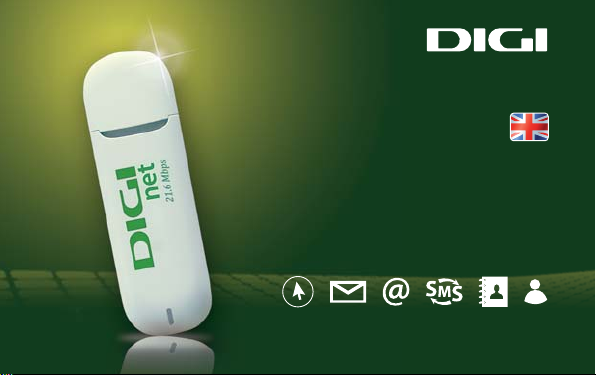
net
User Guide
USB Modem
V 1.0
Page 2
net
At DIGI mobil we want to oer you the easiest way to navigate on the Internet and be
always informed. DIGI net (Internet using USB modem) allows you to connect to the
Internet using your PC computer or tablet with the máximum 3G speed oered by DIGI
mobil.
This guide will help you using DIGI net Service with your new USB modem.
The DIGI net USB modem allows you to :
Browse the Internet: you will be able to access the Internet anytime and
anywhere, using the best network in Spain.
Browse the Internet in Spain and Romania: you will be able to use the DIGI net
USB modem to connect to the Internet in Spain and, also, in Romania.
Check your emails: you will be able to check your email account wherever you
are.
42
Welcome to DIGI mobil
Page 3
net
Send and receive SMS´s: using the same application, you will be able to send and
receive short text messages.
Organize your contacts: the application will allow you to save the frequently used
numbers in order to send them SMS´s.
Connect to Mi cuenta DIGI (My DIGI Account): you will be able to manage the
services that DIGI mobil oers you and access to all the information about them in the web
page https://micuentadigi.digimobil.es/en/
For more information, you can reach us at:
1200 (Customer Care Service – free of charge from DIGI mobil network)
642.642.642 (Customer Care Service – for calls from other networks)
[email protected]
www.digimobil.es
43
Page 4
net
Installing and activating the DIGI net service.
The activation of the DIGI net service will be complete once the following steps are
completed: 1. insert the SIM into your modem (if it is not already inserted), 2. install the
application on your PC, 3. insert the PIN code and 4. connect for the rst time to DIGI net
with the USB modem.
In any case, to complete the activation, the client must have been duly identied with a
valid identication document and giving its correct and exact information.
1. Preparing
the modem
44
2. Installing
the application
3. Introducing
the DIGI net
Pin code
4. Connection
Page 5
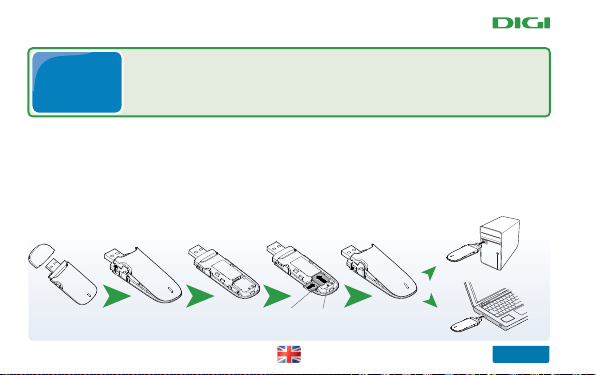
Follow the instructions below to insert the DIGI net SIM card in the USB
1. Preparing
the modem
Open the back cover and pull it o from the modem .
1.
Insert the SIM card and the micro SD if you have one, into the appropiate slots, as
2.
shown in the following image.
modem (if it isn´t already inserted) and connect the modem to a USB port
in your computer or tablet. We also recommend to check the Quick guide
included with the modem.
3. Replace the cover and slide it back to the original position.
Tarjeta SIM
Tarjeta Micro SD
net
45
Page 6
net
Note: The microSD is an optional accessory. If the product you have purchased doesn’t
include it, you may buy it by yourself.
Please make sure you’ve inserted the SIM card and the microSD card correctly, according
to the direction of the drawing shown in your equipment.
Don’t remove the microSD card or the SIM card while in use. The modem or the data
from your card might be damaged.
2. Install
DIGI net
application
Now you need to install the DIGI net application in your device. The
following steps will help you install it in a PC using Windows operating
system.
When you connect the USB modem for the rst time, it will be necessary to install the
DIGI net application that works the modem and connects you to Internet. This application
depends on your opperating system. The conguration of your modem may take a few
minutes and you will have to follow several steps (see the Quick Guide attached).
46
Page 7
INSTALL GUIDE
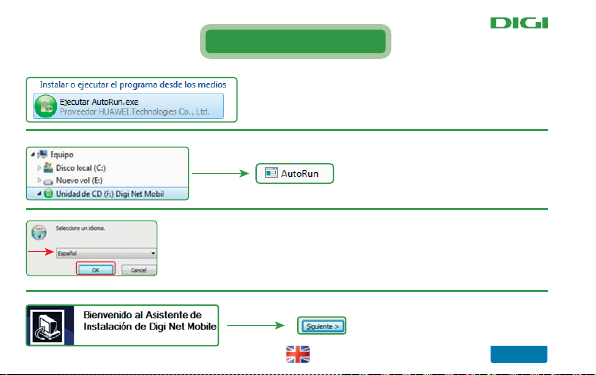
Once you’ve installed the les, the following window will appear in
your screen.
If the window of the automatic
installation does not appear, it will be
necessary to install the application from the
new drive taht appears . Double – click on the
le “Autorun.exe”
An installation wizard will help you installing the DIGI net application. Select
the language “Spanish “ (or any other language you like) and then press ”OK”.
Press “Siguiente”.
net
47
Page 8
net
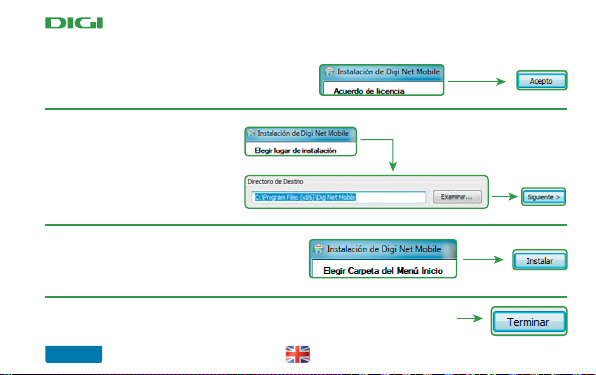
You have to click “Acepto” button in order to install the
application.
In the next step, you have to choose the
folder where you wish to install the
application (we reccomend you to choose
the default one) and then click “Next”..
Next, you will have to choose the folder to install the
shortcut in your windows start menu for an easier access to
the application (we recommend you to accept the default
name) and then press “next”.
Next, the installation will begin. Please wait untill the installation is complete. Once it is
nished, click “Terminar”
48
Page 9
net
3. Introducing
the DIGI net
Pin code
The DIGI net application has been succesfully installed in your pc.
A new window with the application will automatically appear (if it
doesn’t, you may open it manually from your Windows start menu).
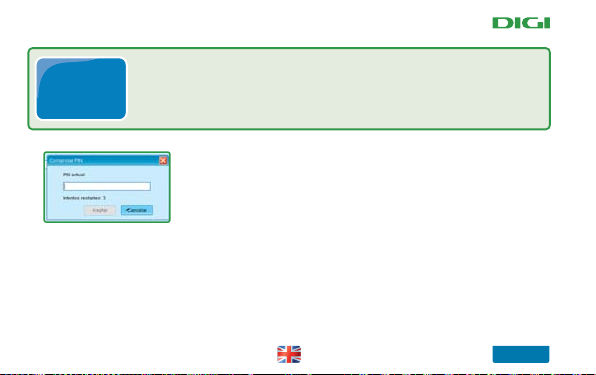
The application will ask you to type the PIN code of your
DIGI net SIM card in order to continue.
The PIN code and the PUK code of your DIGI net SIM card are written on the plastic card
where you can nd the SIM card as well. Keep these codes in a safe place. For your safety, we
recommend that you change your PIN code using the DIGI net application (Menu-Tools –
Pin Operations – change PIN) in order to prevent a fraudulent use.
49
Page 10
net
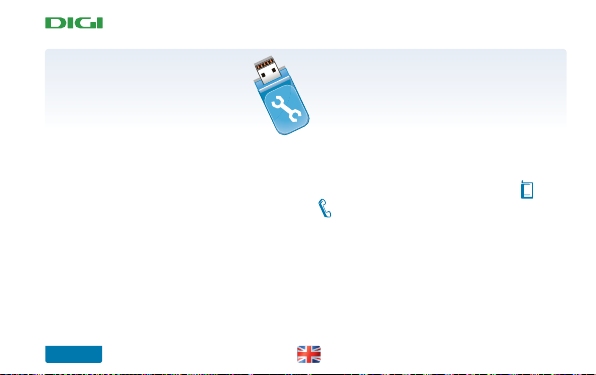
In case you enter a wrong PIN code for three consecutive times, your SIM card will be
blocked and you will have to enter the PUK code written on the plastic card, next to the PIN
code. In case you don’t have access to this code, you can call Customer Care Service 1200
(free of charge within DIGI mobil network) or 642.642.642 (for calls made from other
networks).
VERY IMPORTANT: If the application doesn’t ask for you for the PIN code, ensure that
the SIM card is correctly inserted into the modem.
After you enter the PIN code, the next window will show you the default prole,
DIGI mobil (DIGI ES).
50
Page 11
net
4. Connection
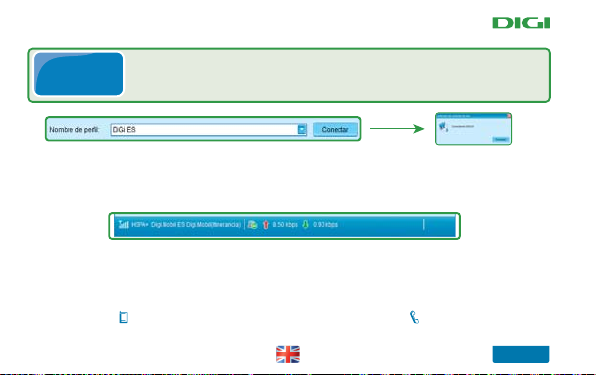
You may now connect, using “DIGI ES” prole.
You must have chosen the DIGI ES prole in the USB modem
application whether you are in Spain or in Romania.
Once connected, on the bottom of your screen you’ll see your connection name and the
network your USB modem is connected to (DIGI mobil). Also, you will be able to check the
bandwidth of your connection (upload and download).
If you see this screen it means that you are now connected to the internet using DIGI net. If you wish, you may
minimize the window, but pay attention not to close it. If you close it, your modem will disconnect.
If you have any problems installing the DIGI net application in other Operating Systems, please contact the Customer
Care Service dialling 1200 (free of charge for calls made within DIGI mobil network), 642.642.642 (from any other
network – ordinary charge according to your mobile phone network fees to a mobile network) or send an email to
[email protected]
Congratulations!
51
Page 12
net
Monthly DIGI net quota
For postpaid subscribers, the monthly MB quota included in the DIGI net product you
contracted will be automatically activated every month.
For prepaid customers (Rechargeable), the activation of the monthly MB quota requires that
your prepaid balance should be at least 10 € to avoid that your DIGI net is deactivated every
month, and also to be able to enjoy the SMS service or to get an EXTRA 200 MB. The rates for these
services are available in www.digimobil.es
With DIGI mobil, topping up your SIM card is very easy. You can top up through various
methods:
a) In DIGI mobil selling points, shops and shopping centers where SIM cards
top ups are available.
b) At tobacconists and kiosks where SIM cards top ups are available.
c) In Telefónica cabins, where you can top up from 1 Euro.
d) Through the online application “My DIGI account” that you can access
from our website: www.digimobil.es
e) In booths, shopping centers and shops where SIM cards top ups are available.
Look for the DIGI mobil stickers to nd the places where you can top up your SIM card.
52
Page 13
net
How to buy the EXTRA 200 MB
Mi cuenta DIGI
https://micuentadigi.digimobil.es/en/
You can activate the EXTRA 200MB everytime you need and as many times as you want,
using your personal My DIGI Account.
Note: the MB that you purchase every month are available until the validity date
indicated when you purchase them (this is the date in wich a new monthly period of your
DIGI net Service begins again). Please take into account that the MB that you haven’t used
will no longer be available next month.
53
Page 14
net
Services and applications in DIGI net Service
ES RO
DIGI net is a new service that allows you to use 2 numbers with the same SIM card (a
Spanish number and a Romanian number) to connect to Internet. This way you can
connect to Internet in Spain and in Romania as well. The Spanish number will be used
when you are in Spain, to connect to the Internet and send SMS´s, while the Romanian
number can be used in Romania for the same services. Both numbers use the same
credit from your SIM card and the USB modem will use that one according to the
country (Spain or Romania) where you are.
54
2x1: Two phone numbers in the same SIM card
Page 15
net
py
Note:
The S
Th
) i
d
ote:
eS
a
b
S
d
SMS
keep close to your friends and family (whether they have or they don’t have an Internet
connection) and to easily manage all the sent and received SMS. This way you can save and
keep as many favourite messages you want.
at ww.digimobil.es. If you are prepaid customer (rechargeable card) you will need enough
t ww.digimo
credit to send SMS.
credit to send
number) in order to send them easier SMS.
number
Short messages (SMS)
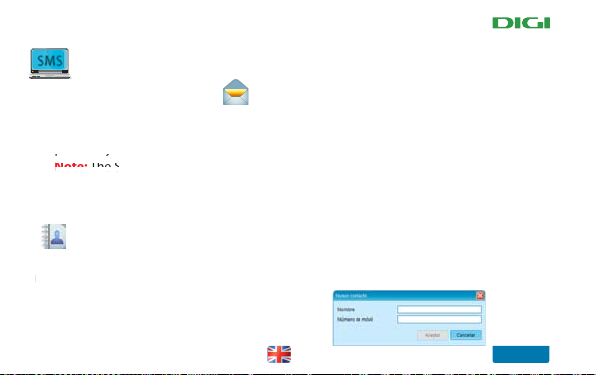
Sending and receiving SMS with DIGI net is an additional tool oered to you to
Note: The SMS you send with the DIGI net application are subject to the rates available
Address book
A
This tool allows you to save all your contacts (persons by their name and phone
is tool a
n or
55
Page 16
net
SIM card duplicate
If for any reason (damage, theft or loss), you can´t use your SIM card, you can request
a duplicate of your SIM card. For that, you must call 1200 o r 642.642.642 (from other
networks) and request a duplicate, identifying yourself as the owner of the SIM card.
You´ll get the information to receive your duplicate as soon as possible.
Portability
To request the transfer of your number from the network of another operator to DIGI
mobil, you can do it in two ways:
A Request the transfer at one of the DIGI mobil selling points.
B Submit your request for the transfer directly on our website: www.digimobil.es
We take care of your transfer and make a request for the switch from your former
operator to DIGI mobil, so you can benet from the best DIGI mobil rates.
56
Page 17
Mi cuenta DIGI (https://micuentadigi.digimobil.es)
net
Activate
SERVICES
CREDIT CARD
111 000 55000
online
PAYMENT
RECHARGE
online
CALLS
History
Mi Cuenta DIGI
micuentadigi.digimobil.es
Easy, simple, fast!
Mi cuenta DIGI (My DIGI Account is an application made
thinking about you, where you can manage your
DIGI mobil services and much more.
57
Page 18

net
ADVICES AND RECOMMENDATIONS
- Unplug the USB modem > restart your computer > connect your modem to your computer
- Contact the DIGI mobil Customer Care Service and check the availability of your service.
Shut the DIGI net application and try to restart it. If it’s still not working, restart
-
- If the problem doesn’t x, please contact the DIGI mobil Customer Care Service.
58
If the modem doesn’t appear in the list of devices
Check if the SIM card is correctly inserted inside your modem.
-
Try to relocate closer to the outside if you are inside of a building.
-
If no network is available
If you can’t open any connection
your computer and try again.
- Try to reconnect a few minutes later.
Page 19

- Check your software update preferences in your computer.
- Congure your system and other programs in your PC to notify you about
any update available, instead of installing them automatically . Otherwise, it is posible
that you might have a slower mobile connection or you exceed your MB quota.
- In the statistics tab you'll see an estimate of data usage with your
DIGI net USB modem. Note that the data shown here may dier from the actual data.
To get to know your usage data, you can contact DIGI mobil Customer Care Service.
If the connection is too slow
Usage Statistics
59
net
Page 20
net
Siempre contigo
DIGI SPAIN TELECOM, S.L.U.
Avda de la Vega 15, edif. 3, planta baja
28108 Alcobendas (Madrid)
www.digimobil.es
 Loading...