

Page 1
i-MOST-Porsche
rev.01MFO
DICE fiber
optic iPod kit
for Porsche vehicles
Copyright 2007 DICE Electronics, LLC. The DICE Electronics logo is a trademark of DICE Electronics, LLC.
User's Manual
HDL 2201
Page 2
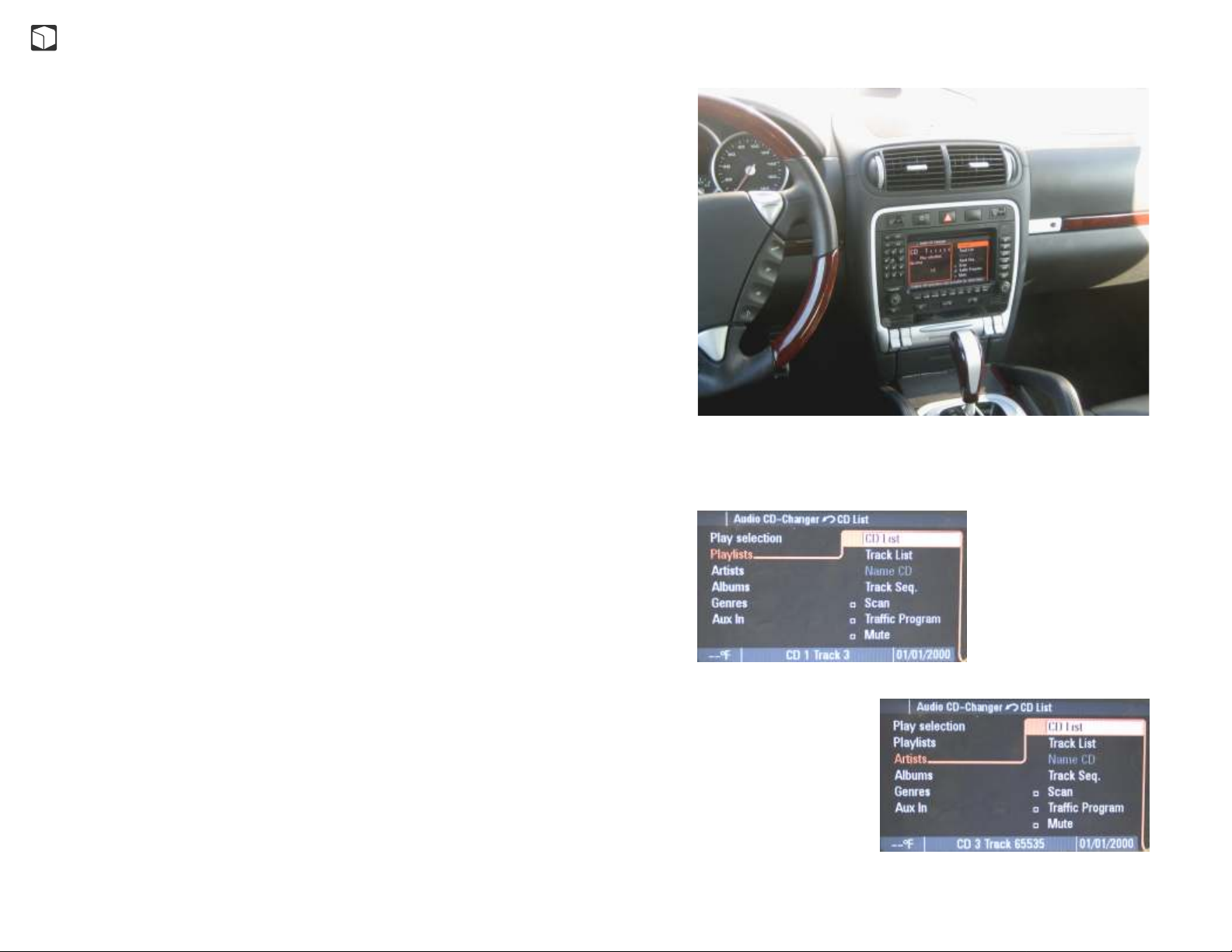
Table of contents
Introduction ................................................................................. 3
Warning .................................... ................................................... 3
Getting started ............................................................................. 3
Specifications ..............................................................................4
Icon legends ................................................................................ 4
General operation ........................................................................5
Easy access
MODE 1 - Selecting
MODE 2-5 - Browsing
MODE 6 - Extras
About browsing
Instrument cluster
Track sequence selection
Porsche radio controls
Disclaimer .................................................................................... 10
Warranty and support ..................................................................10
Registration ..................................................................................10
Page 3
Introduction
Factory radio compatible
developed for Porsche vehicles utilizing the fiber optic bus.
vehicle's factory entertainment system and hear what an iPod should sound like.
CD quality sound* and controls from your radio, steering wheel or the iPod. The
DICE iPod integration keeps your iPod charged and ready to go. Radio will also
display text from your iPod, allowing you to view, select and browse Playlists,
Artists, Albums, Genres.
DICE fiber optic iPod integration is a direct iPod interface
Connect the iPod to your
Warning
Don't allow the Apple iPod or operating the kit to distract you from driving! Only
operate the unit when stationary or ask passengers to operate it for you. Keep your
eyes on the road at all times! Neither DICE Electronics, LLC., NAV-TV Corp., Apple
Computer, Inc., its regional offices, distributors or resellers accept any responsibility
for any damage or injury as a result of using the DICE iPod integration kit. The use of
this product constitutes to your acceptance of our terms and conditions.
Getting started - important information
Is Your iPod Up To Date?
Before you start, please check your iPod firmware version. For a complete list of
supported iPod firmware versions, please visit http://support.diceelectronics.com.
Supported iPods.
iPod Model
4th Gen.
Photo
Video
mini
nano
2nd Gen. nano
Required minimum FW version
Must have FW version 3.1.1
Must have FW version 1.2.1
Must have FW version 1.1.1
Must have FW version 1.1.1
Must have FW version 1.4.1
Must have FW version 1.1.1
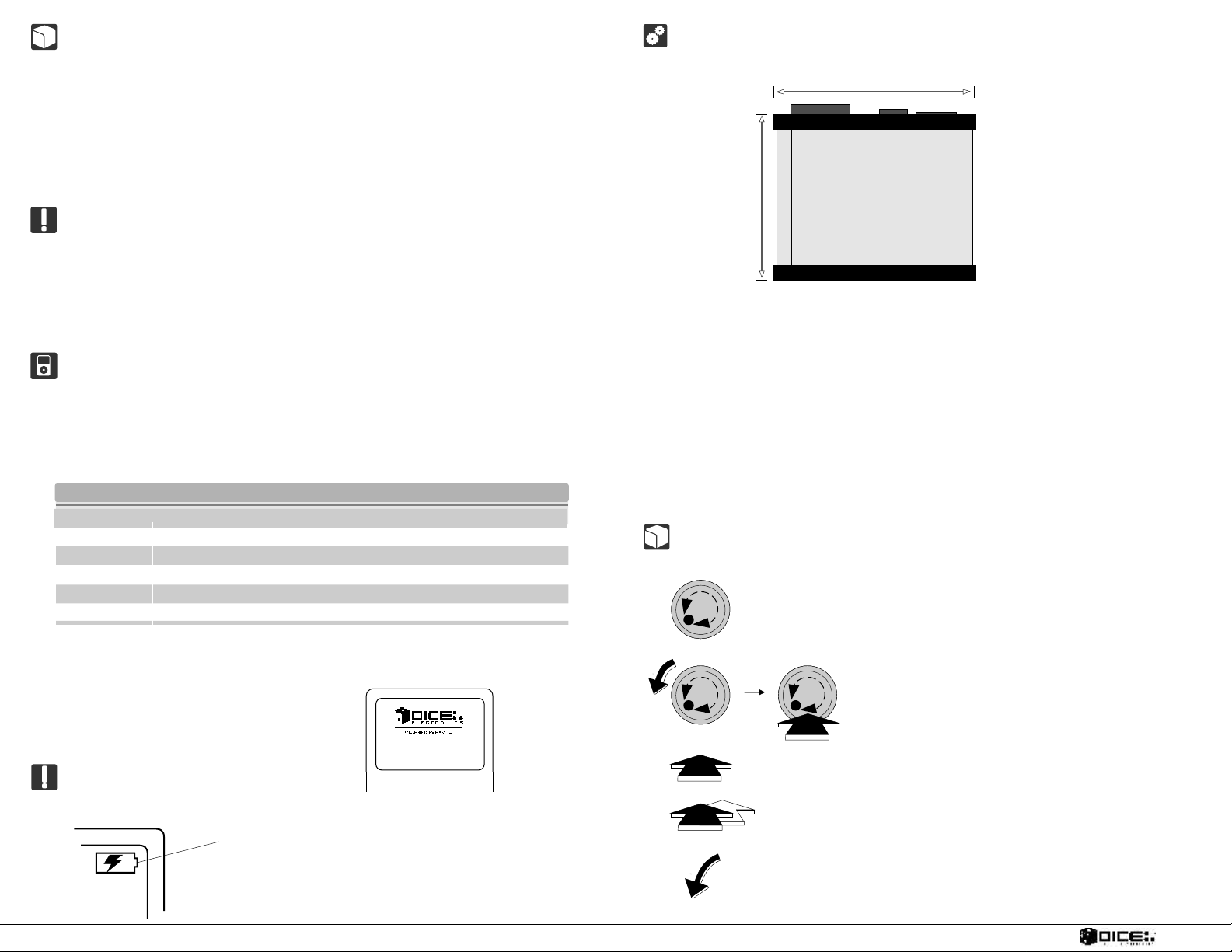
DICE fiber optic iPod interface specifications
1
3 3/4"
Height: 1 1/4"
1 - Power/AUX connector
2 - iPod input
∀
3 - Fiber optic connector
Standby current consumption: ~ 22mA
Maximum current consumption: ~ 1A
Storage temperature: 0-150F
Operating ambient temperature: 30-120F
Assembled in the US
4"
2
3
View from top/bottom
Icon legends
Jog dial
Note that the iPod is locked when connected to the radio and a DICE Electronics
logo will be displayed in operation. You can select manual control in DISC 6 which
unlocks the iPod. If radio is turned off iPod becomes unlocked after 10-30 seconds
and eventually turns off.
Charging
The interface automatically charges the iPod's battery when connected.
Charging icon will appear on the upper
right corner of the iPod screen to indicate
charging
3
Press button
Press and hold button
Turn the dial left
DIGITAL IN CAR ENTERTAINMENT
Turn and then press jog dial
4
Page 4
General operation
Professional installation is required. Find a local car audio dealer. The iPod kit takes the
place of the factory CD changer.
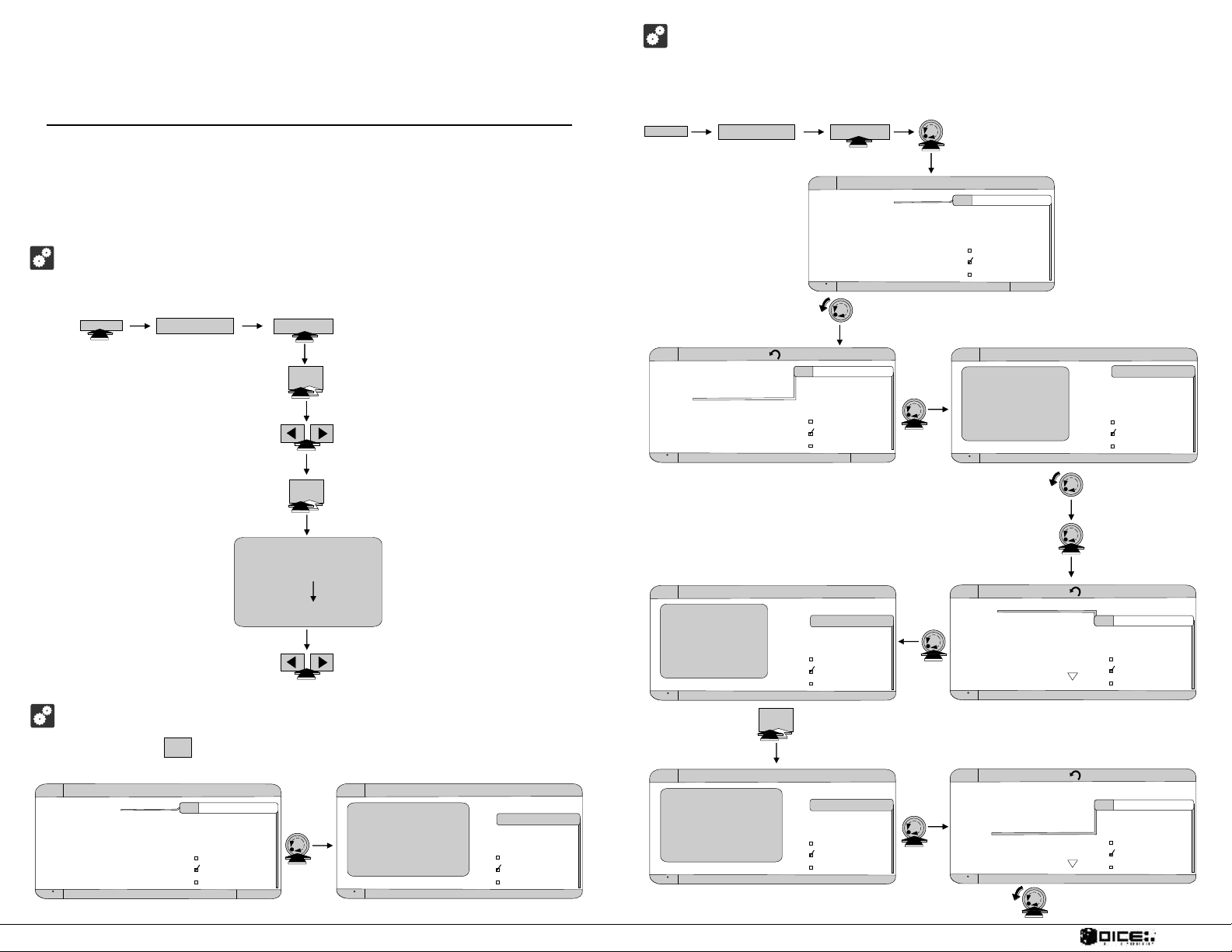
Easy access - Enjoy your iPod on the road.
Follow these steps to operate your iPod with the MOST fiber optic DICE kit.
CD/CDC
DICE iPod
AUDIO
DISC 2-5 - Browsing
Accessing and operating the MOST fiber optic iPod interface
Press the CD/CDC button to access the interface and its features. The following is
an example of the operation in DISC 3. The same steps are to be followed in DISC 2,
4 and 5.
CD/CDC
DICE iPod
AUDIO
Audio CD-Changer
Play selectionPlay selection
Playlists
Artists
Albums
Genres
<Extras...>
95 F CD 1 Track 1 TP 03/14/2007
to select Playlists/Artists/Albums/Genres/Extras
CD List
Track List
Name CD
Track Seq.
Scan
Traffic Program
Mute
to select Playlists
2
to select next/previous playlist
to play selection
1
1 2 3 4 5 6
CD
Play selection
Almost there
01:32 3/15
DISC 1 = Play selection
DISC 2 = Playlists
DISC 3 = Artists
DISC 4 = Albums
DISC 5 = Genres
DISC 6 = <Extras...>
to select next/previous track
DISC 1 - Selecting
Press and hold the button for 3-5 seconds to choose your selection. See
details on page 6.
Audio CD-Changer
Play selectionPlay selection
Playlists
Artists
Albums
Genres
<Extras...>
95 F CD 1 Track 1 TP 03/14/2007
1
CD List
Track List
Name CD
Track Seq.
Scan
Traffic Program
Mute
Audio CD-Changer
1 2 3 4 5 6
CD
Play selection
Almost there
01:32 1/15
95 F CD 1 Track 1 TP 03/14/2007
CD List
Track List
Name CD
Track Seq.
Scan
Traffic Program
Mute
Audio CD-Changer CD List
Play selection
Playlists
ArtistsArtists
Albums
Genres
<Extras...>
95 F CD 3 Track 1 TP 03/14/2007
Audio CD-Changer
1 2 3 4 5 6
CD
Artists
Oasis
01:32 1/15
95 F CD 3 Track 1 TP 03/14/2007
CD List
Track List
Name CD
Track Seq.
Scan
Traffic Program
Mute
CD List
Track List
Name CD
Track Seq.
Scan
Traffic Program
Mute
1
Audio CD-Changer
1 2 3 4 5 6
CD
Play selection
Little by little
01:32 1/15
95 F CD 1 Track 1 TP 03/14/2007
CD List
Track List
Name CD
Track Seq.
Scan
Traffic Program
Mute
Audio CD-Changer
1 2 3 4 5 6
CD
Artists
Track 6... of 15
01:32
95 F CD 3 Track 1 TP 03/14/2007
Audio CD-Changer Track List
OasisOasis
Red Hot Chil
Prodigy
Tool
Evanescence
AC/DC
95 F CD 3 Track 1 TP 03/14/2007
Audio CD-Changer Track List
Little by little
Wonderwall
Champaign sup
HelloHello
Roll with it
Morning glory
95 F CD 1 Track 4 TP 03/14/2007
to select a track
CD List
Track List
Name CD
Track Seq.
Scan
Traffic Program
Mute
to go to Track List
CD List
Track List
Name CD
Track Seq.
Scan
Traffic Program
Mute
CD List
Track List
Name CD
Track Seq.
Scan
Traffic Program
Mute
5
DIGITAL IN CAR ENTERTAINMENT
6
Page 5
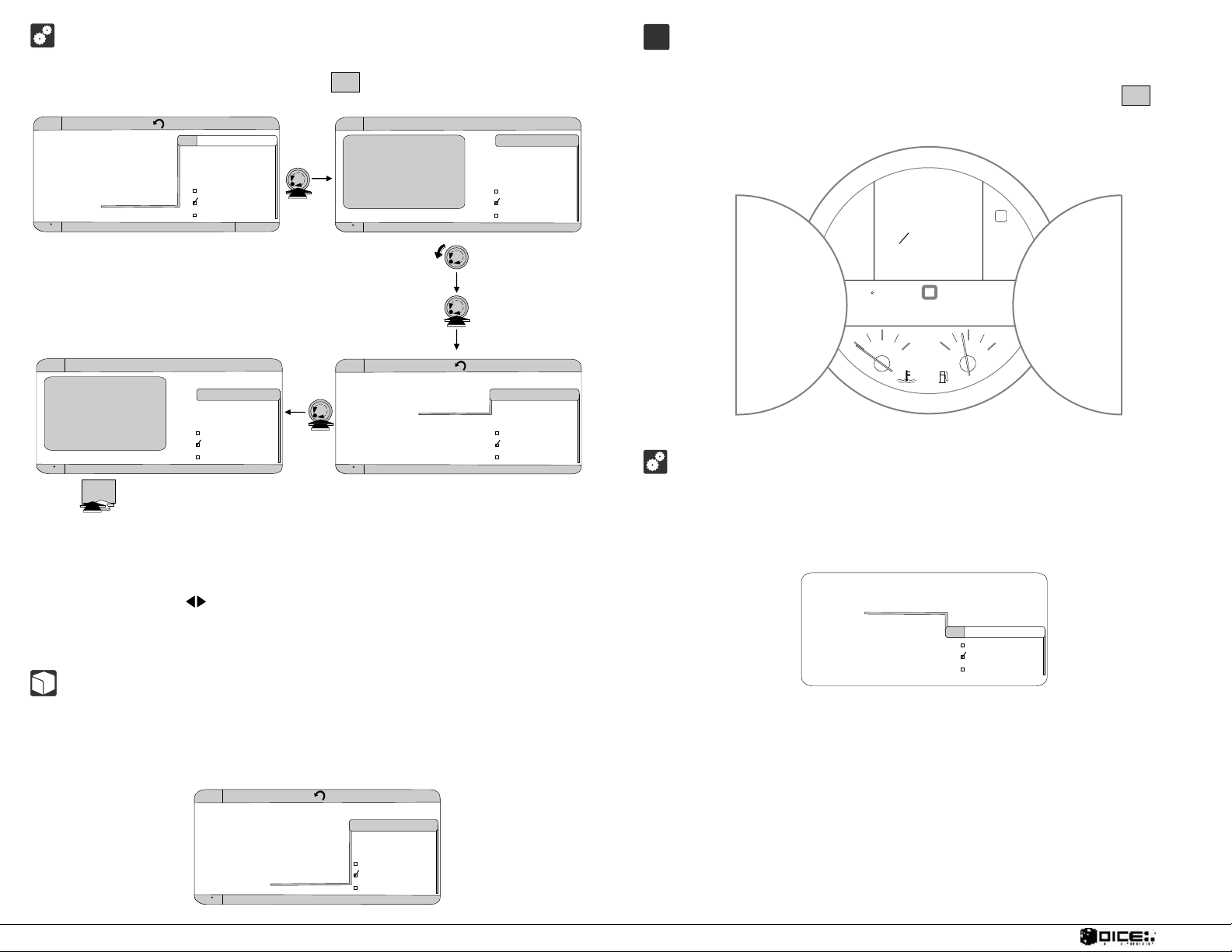
DISC 6 - Extras
In DISC 6 you can change between radio control, manual control and Aux in.
Once selection is made, press and hold the button to confirm selection.
Audio CD-Changer CD List
Play selection
Playlists
Artists
Albums
Genres
<Extras...><Extras...>
95 F CD 6 Track 1 TP 03/14/2007
CD List
Track List
Name CD
Track Seq.
Scan
Traffic Program
Mute
1
Audio CD-Changer
1 2 3 4 5 6
CD
<Extras>
"Firmware version"
01:32 1/4
95 F CD 6 Track 1 TP 03/14/2007
CD List
Track List
Name CD
Track Seq.
Scan
Traffic Program
Mute
to go to Track List
A
B
C
Instrument cluster
CD x T 65536 is a confirmation that shows once the selected list is loaded. Use
the Next/Previous buttons to move in the list, then press and hold the button
1
to choose your selection.
CD 2 T 65536CD 2 T 65536
o Speedo Speed
28mph28mph
16914mls16914mls 156.5mls156.5mls
mphmph
6
6
5 P
5 P
4 R
4 R
3 N
3 N
2 D
2 D
1
1
3:343:3473 F73 F
Audio CD-Changer
1 2 3 4 5 6
CD
<Extras>
Manual Control
01:32 3/4
95 F CD 6 Track 3 TP 03/14/2007
to make selection
1
CD List
Track List
Name CD
Track Seq.
Scan
Traffic Program
Mute
Audio CD-Changer Track List
"Firmware version"
Radio Control
Manual ControlManual Control
Aux In
95 F
CD 6 Track 3 TP 03/14/2007
CD List
Track List
Name CD
Track Seq.
Scan
Traffic Program
Mute
Radio Control - Select this option to control your iPod from the radio. This selection
locks your iPod.
Manual Control - Select this option and control music from your iPod. In this option
only next and previous functions are available from the radio.
Aux In - Select this option to be able to operate any other audio device.
About browsing
When browsing, the radio displays 30 items per screen. To view the next 30 items,
scroll down to [Next page]. Transition from one screen to the next takes a few
seconds. Update time depends on the amount of data stored on the iPod.
180180
100100
260260
2/42/4
00
4/44/4
Track sequence selection
To adjust track sequence go to Track Seq. and select from "Repeat CD", "Repeat
Track" or "Normal" functions. Note that "Random" function is not available. See
illustration below.
Normal
Repeat CDRepeat CD
Repeat Track
Random
CD List
Track List
Name CD
Track Seq.
Scan
Traffic Program
Mute
Audio CD-Changer Track List
Oasis
Red Hot Chil
Prodigy
Tool
Evanescence
[Next page][Next page]
95 F CD 1 Track 30 TP 03/14/2007
7
CD List
Track List
Name CD
Track Seq.
Scan
Traffic Program
Mute
DIGITAL IN CAR ENTERTAINMENT
8
Page 6

Important disclaimer, please read!
Driving could be dangerous and requires concentration. Do not allow the DICE iPod
integration to distract you from prevailing traffic conditions. If in doubt, operate the
unit only when stationary or ask a passenger to operate it for you.
Do not submerge or expose to water or other s.
components are NOT water resistant and will be damaged by water. You must
properly insulate its casing if your installation environment may subject the unit to
water, such as a convertible vehicle.
Keep away from children!
Interface components may contain small parts, can be broken or disassembled and
components may become loose from vibration and heat. Small components and
packaging materials may be a chocking hazard when handled by children.
Unauthorized reproduction or reverse engineering is strictly prohibited! Intellectual
property included is distributed under specific license agreement with respective
owners. No warranty, explicit or implied, is stated. Neither DICE Electronics nor any
of its agents, distributors, dealers or vendors shall be liable for damages.
IN NO EVENT SHALL DICE ELECTRONICS' LIABILITY EXCEED THE PRICE
PAID FOR THE PRODUCT FROM DIRECT, INDIRECT, SPECIAL, INCIDENTAL,
OR CONSEQUENTIAL DAMAGES RESULTING FROM THE URƒ†&‘`install`w4p0
http://support.diceelectronics.com.
any part of the kit liquid DICE
, or visit our support site at
 Loading...