

Page 1

DIAMOND VIEW
DV200B
Colour TFT LCD Monitor
20.1” (51 cm) LCD Panel Size
User’s Manual
Page 2

Copyright 2002, Mitsubishi Electric Australia Pty. Ltd. All rights reserved.
No part of this publication may be reproduced, transmitted, transcribed, stored
in a retrieval system or translated into any language or computer language, in
any form or by any means, electronic, mechanical, magnetic, optical, chemical,
manual or otherwise, without the prior written permission.
Page 3

3
Table of Contents
1 Important Safety Instructions ...........................5
2 Features ...........................................................6
3 Unpacking the Monitor .....................................8
4 Hardware Installation .......................................9
5 Windows Software Installation .......................12
6 Setting the Display Resolution .......................16
7 Adjusting the Monitor .....................................20
Picture Optimisation .................................................. 20
The DV200B Monitor’s Controls ................................ 21
On Screen Display Functions .................................... 22
Manual Picture Adjustment - D-Sub Input ................. 26
8 Security Lock Installation .............................28
9 Troubleshooting .............................................29
Frequently Asked Questions (FAQ) .......................... 29
10 Specifications .................................................31
11 Service Contacts ............................................32
Page 4
4
Copyright Notice
Copyright 2002, Mitsubishi Electric Australia Pty. Ltd. All rights
reserved. No part of this publication may be reproduced, transmitted,
transcribed, stored in a retrieval system or translated into any language or computer language, in any form or by any means, electronic,
mechanical, magnetic, optical, chemical, manual or otherwise, without
the prior written permission.
Disclaimer
Mitsubishi Electric Australia Pty. Ltd. makes no representations or
warranties, either expressed or implied, with respect to the contents
hereof and specifically disclaims any warranties, merchantability or fitness for any particular purpose. Further, Mitsubishi Electric Australia
reserves the right to revise this publication and to make changes from
time to time in the contents hereof without obligation to notify any person of such revision or changes.
Diamond View is a registered trademark of Mitsubishi Electric Australia Pty.
Ltd.
Microsoft and Windows are registered trademarks of Microsoft Corporation.
Reference Information
For future reference, write the following information about your
monitor in the space below. The serial number is on the back of the
product or on the bottom of its stand.
Monitor Information
Product Name: DV200B
Serial Number:
Date of Purchase:
Dealer Information
Dealer:
Telephone
Number:
Address:
Page 5

5
1 Important Safety
Instructions
Please read the following safety instructions before installing or
cleaning your Diamond View monitor:
1. Unplug the monitor power cable from the wall outlet before
cleaning. Do not use liquid or aerosol cleaners. Use a soft
cloth to clean the monitor’s screen and cabinet.
2. Slots and openings on the back or top of the cabinet are
provided for ventilation. They must not be blocked or covered. This product should never be placed near or over a
radiator or other heat source, or in a built-in installation
unless proper ventilation is provided.
3. Never push objects of any kind, or spill liquid of any kind
into this product.
4. Do not attempt to service this product or its AC adaptor
(power supply) yourself as opening or removing covers
may expose you to dangerous voltages or other risks.
5. If any abnormal operation or accident (such as dropping
the unit) occurs, disconnect the monitor from the wall
power outlet and contact qualified service personnel.
Page 6

6
2 Features
Your Diamond View DV200B Monitor has the following
features:
◆ High Resolution, 1600 x 1200 Pixel LCD Panel
◆ High Brightness and Contrast
250 cd/m² brightness and 350:1 contrast ratio
◆ Plug and Play Compatibility
With Microsoft
®
Windows® 95, 98, 2000, Millennium Edition
and XP.
◆ Compatible with Apple
®
Macintosh® computer systems
◆ Space Saving- only 260 mm deep including the stand
◆ Light Weight - only 10.5 kg.
◆ Low Power Consumption
60 Watts maximum during operation. Less than 3 watts in
power saving mode
◆ Power Saving
Power management complies with VESA DPMS standard.
When the system is idle (in power saving mode), the monitor automatically cuts its power consumption to less than 5
Watts.
◆ On Screen Display
Allows you to adjust all settings simply using on-screen
menus.
◆ High Quality Ratiometric Expansion
With any resolution within the monitor's specified range,
your Diamond View DV200B monitor can expand the image
to full screen.
Page 7

7
◆ True Colour Display
With dithering support, Diamond View DV200B monitor
enhances the visual effect and offers you better image
quality.
◆ Auto Adjustment Function
The auto adjustment key automatically optimises the displayed image.
◆ Removable Stand with VESA Standard Mounting
◆ Dual Computer Signal and Dual Video Inputs
The DV200B can display 4 types of video signal: Analogue
RGB (PC-type VGA graphics via the monitor’s D-Sub connection), DVI-D, S-Video and Composite video. Connect
external video sources, such as computers, VCRs, video
cameras and DVD players directly to the monitor.
◆ DVI-D digital graphics compatibility
The direct, high-performance connection between digital
displays and computers. Eliminates video distortion.
◆ Picture In Picture (PIP)
The PIP function displays video images (from either the
composite or the S-Video input) in a window within the main
screen.
Page 8

8
3 Unpacking the
Monitor
Please check that the following items are included with your
monitor. If they are missing or damaged, please contact your
place of purchase immediately.
◆ DV200B LCD monitor
◆ This User’s Manual
◆ VGA signal cable 1- D-Sub (attached)
◆ DVI-D signal cable 2- DVI-D
◆ AC adaptor
◆ Australian power cable
◆ Utilities and Driver Floppy Diskette
Locate the model name and the serial number label on the
back of your monitor and write the details of the monitor and
your place of purchase in the space on page (ii) of this manual
for future reference.
Page 9
9
4 Hardware
Installation
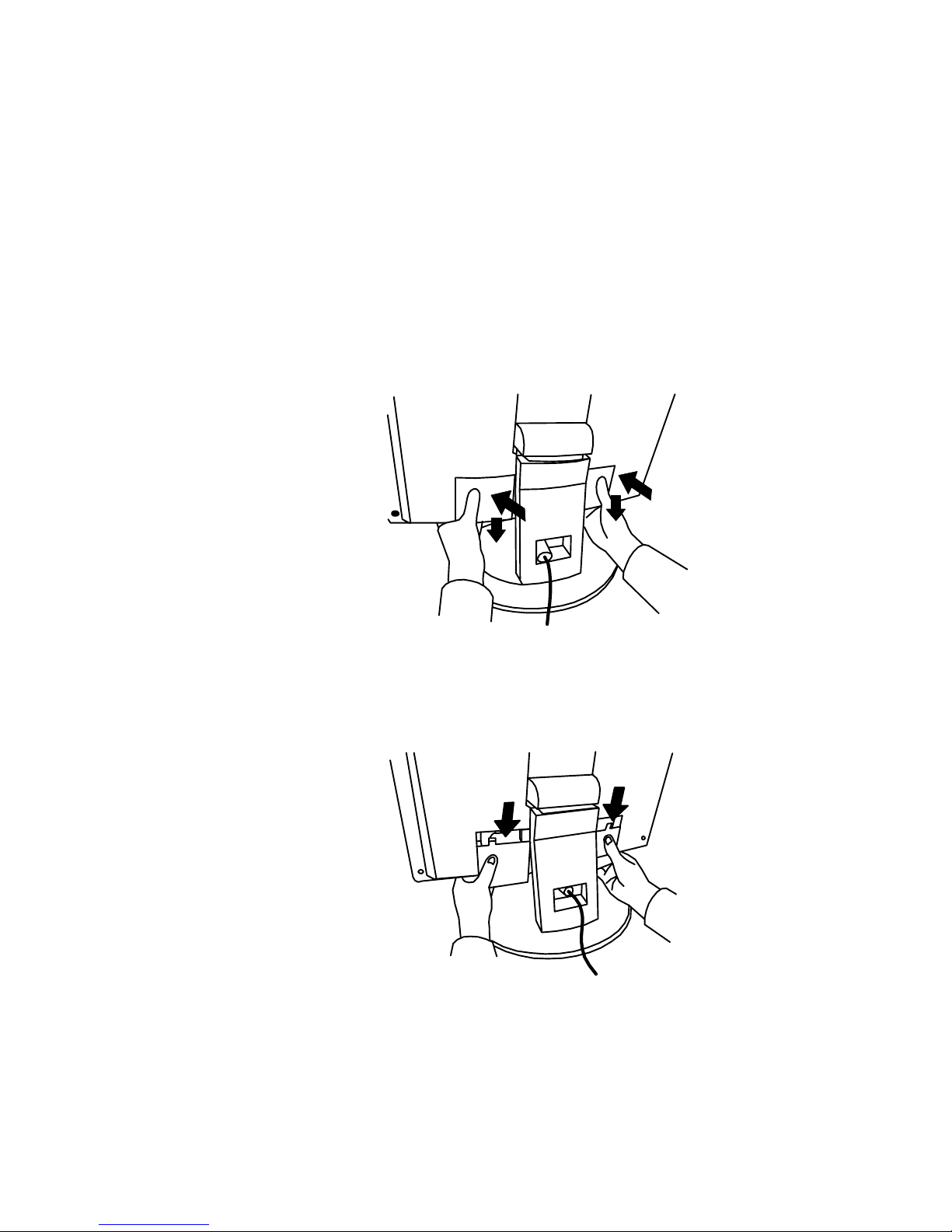
Step 1
Remove the cover from the back of the monitor. To do this,
push the cover in on either side, where it is marked with the
two arrows.
Step 2
Pull the cover down.
Page 10
10
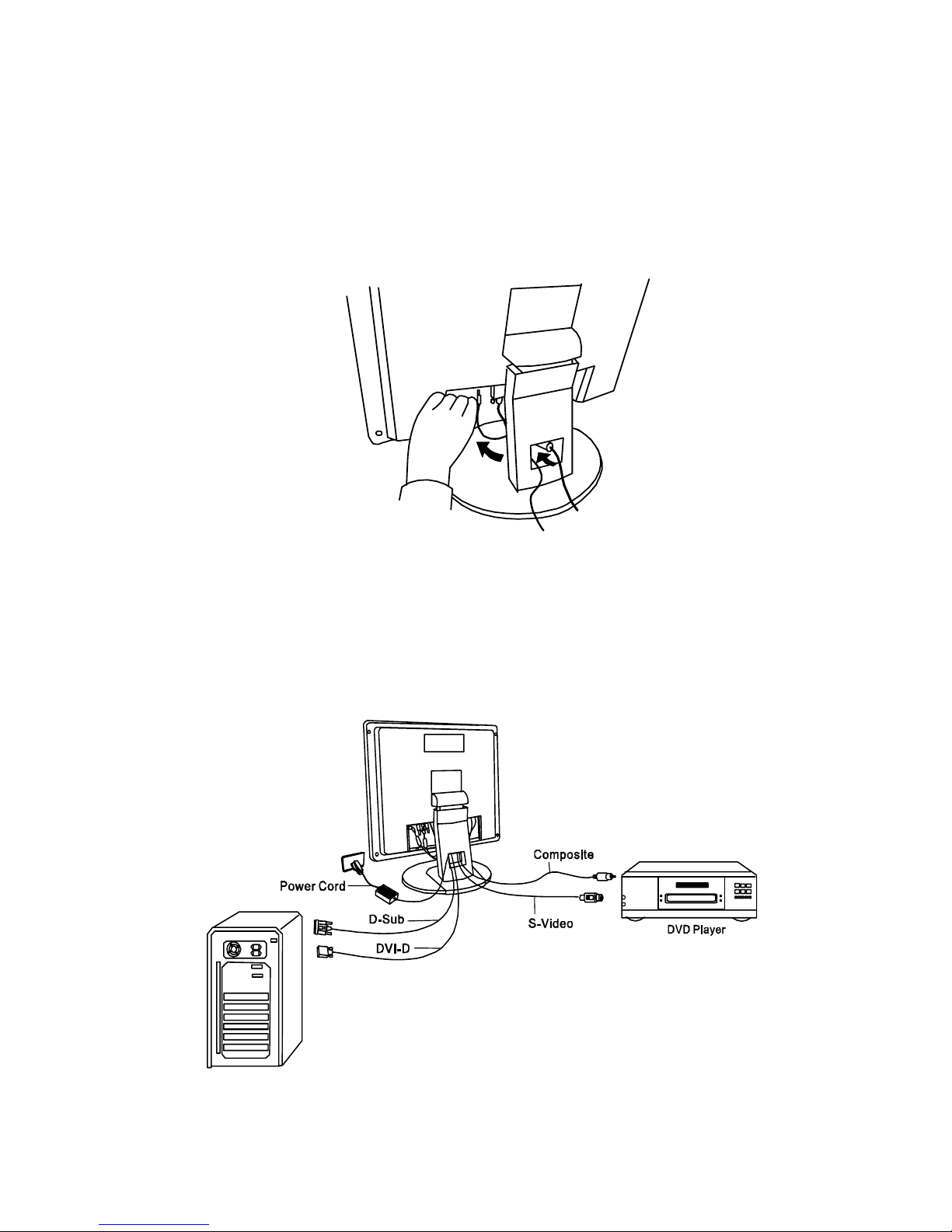
Step 3
Connect power cord to AC adaptor, and plug the AC adaptor into DC19V jack at the rear of the monitor. Connect the
power cord to an AC power socket.
Step 4
Connect a signal cable or cables to the computer, DVD
player or other image source.
Page 11
11
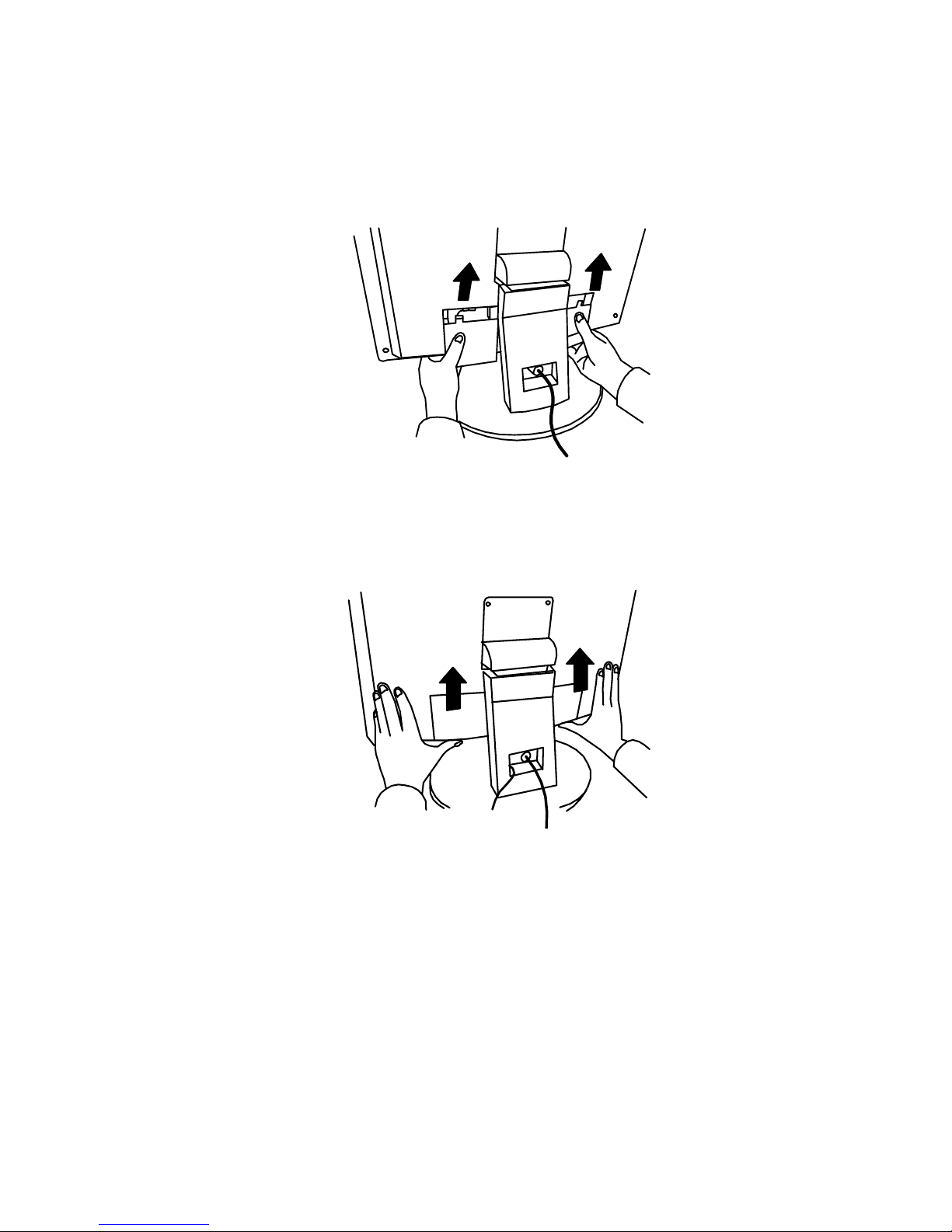
Step 5
Put the cover back and push it upwards until it is closed.
Page 12

12
5 Windows Software
Installation
To get best performance with Microsoft Windows 95, 98,
Millennium Edition, 2000 or XP you should set the PC to use
the driver supplied with your DV200B monitor.
Windows 95
The first time you start Windows after connecting your new
monitor, the system will detect it and automatically install the
driver for Plug and Play displays. To install the Diamond View
DV200B driver and colour profile:
1. Insert the Diamond View LCD Monitor Utilities floppy disk
into your floppy disk drive.
2. Right-click on the Windows desktop and select
Properties or open the Control Panel and double-click
Display.
3. From the Display Properties window, select the
Settings tab and then click the Advanced Properties
button at the bottom, right corner.
4. Select the Monitor tab and then click the Change button.
5. Click the Have Disk button at the bottom right corner. The
Install From Disk window will appear with the floppy
drive A:\ selected. Click OK.
6. Select DV200B from the list and click OK again to install
the driver.
7. You will be returned to the Advanced Graphics
Properties dialogue. Close this window by clicking OK
and confirm the subsequent messages by clicking Yes.
Click OK and then Yes once more.
8. The installation is now complete, click OK to close
Display Properties.
Page 13

13
Windows 98
The first time you start Windows with a new monitor; the system will detect it and automatically start the Add New Hard-
ware wizard.
1. Click the Next button. Select Search for the best driver
for your device (recommended) and click Next.
2. Insert the Diamond View LCD Monitor Utilities floppy disk
into your floppy disk drive. Select the Floppy disk drive
check box and click Next.
3. Click Next again and then click Continue. The driver and
monitor colour profile will be installed. Click Finish to
complete the installation.
Windows Millennium Edition (Windows Me)
The first time you start Windows with a new monitor; the system will detect it and automatically start the Add New Hard-
ware wizard.
1. Insert the Diamond View LCD Monitor Utilities floppy disk
into your floppy disk drive. Select the Floppy disk drive
check box and click Next.
2. Select Search for the best driver for your device
(recommended), tick the Removable Media (Floppy, CDROM,…) and click Next.
3. Click Next again and then Finish to complete the
installation.
Page 14

14
Windows 2000
If the system detects your DV200B automatically and starts the
Add New Hardware Wizard, carry out these instructions
beginning at step 7. Otherwise, to install the monitor driver and
ICC colour profile:
1. Click Start and then Settings and open the Control
Panel.
2. Double click the Display icon.
3. From the Display Properties dialogue box, select the
Settings tab. Click the Advanced…. button at the
bottom, right corner.
4. Select Monitor then click Properties.
5. Select the Driver tab and click Update Driver.
6. The Upgrade Device Driver Wizard will pop start. Click
Next.
7. Insert the Diamond View LCD Monitor Utilities disk into
your floppy disk drive.
8. Select Display a list of the known drivers for this
device so that I can choose a specific driver and click
Next.
9. In the next window, click Have Disk. The Install From
Disk dialogue will open. The default drive is the floppy
disk drive, A:\. Click OK.
10. Select the DV200B LCD monitor from the list and then
click Next twice.
11. A window displaying the message “Digital Signature Not
Found“ may appear. If it does, click Yes
12. Click Finish to complete the driver installation.
Page 15

15
Windows XP
1. Use the mouse to right-click on the Windows desktop and
choose Properties.
2. Select the Settings tab and click the Advanced button. A
small window will pop up. Select the Monitor tab in the new
window and then click Properties.
3. Select Driver and then click Update Driver…
4. The Hardware Update Wizard will pop up. Click Next.
5. Select Don’t search. I will choose the driver to install
and then click Next.
6. In the next window, click Have Disk… The Install From
Disk window will pop up.
7. Click Browse. The Locate File window will pop up.
8.
Select your floppy disk (A:\) drive and then click Next.
9. The Digital Signature Not Found window may appear. If it
does, click Continue Anyway
10. Finish to complete the driver installation.
Page 16

16
6 Setting the Display
Resolution
Choosing The Best Resolution
All Liquid Crystal Displays (LCDs) have a fixed resolution that
is the same as the maximum graphics resolution that may be
displayed. In the case of the DV200B the LCD resolution is
1600 x 1200 pixels. This is also known as the “native” resolution of the monitor. Lower resolution graphics signals can be
displayed at full screen through an interpolation circuit.
Because the lower resolution must be expanded, the quality of
the displayed image is not as good as that available when the
native resolution is displayed. For optimal performance from
any LCD monitor, you must use the monitor’s native resolution.
If you are using Windows 95, 98, 2000, Me, NT 4.0 or XP, you
can change the resolution as follows:
1. Double-click the Display icon in the control panel.
2. From the Display Properties dialogue box, select the
Settings tab. There is a slider on the right-hand side in the
middle of the dialogue that alters the displayed resolution.
Set the resolution to 1600 x 1200.
Windows NT users only: select a refresh rate of 60Hz
and click Test. A test pattern will be displayed. Make
sure that there are no error messages shown by the
monitor. If an error message is displayed, check the resolution and refresh rate settings or choose a different
refresh rate.
3. Click OK to close Display Properties.
Page 17

17
If you are using an Apple Macintosh, you may change the
resolution by:
1. Clicking the Apple icon at the top, left corner of the screen.
2. Select Control Panel and then select Monitors & Sound.
4. Select a resolution of 1600x1200 pixels with 60 Hz refresh
rate.
5. If a refresh rate of 60 Hz is not available, click
Recommended in the Show drop-down box and change it
to All. Select the resolution and refresh rate as above. A
color depth of Millions is recommended.
Supported Graphics Modes and Refresh Rates
There is no need to choose the highest possible refresh rate
when using an LCD monitor. It is not technically possible for an
LCD monitor to flicker. Even at a refresh rate of 60 Hz you will
get a flicker-free image.
For best results, it is important that you set the graphics adaptor to use one of the monitor’s preset display modes shown in
Table 1 on the next page. Other graphics signals may be displayed poorly or not at all. Note that the DV200B’s preset
modes correspond to VESA standard graphics signals for
these resolutions. All recent models of graphics adaptor should
be able to support these modes. For the native resolution of
1600x1200 pixels, for example, refresh rates of 60 Hertz is
supported.
With Windows 95, 98, 2000, Millennium Edition or XP you can
change the refresh rate of the graphics signal as follows:
1. Double click the Display icon in the control panel.
2. From the Display Properties dialogue, select the Settings
Page 18

18
tab and click the Advanced Properties button.
3. Select the Adapter tab. The refresh rate selection field is
located in the centre, at the bottom of the dialogue box.
4. Choose a refresh rate that corresponds with one of the
factory modes from the table below.
5. Click Apply, and then OK twice.
Please Note:
◆ Graphics modes that are not listed in the table may not be
supported. For an optimal picture it is recommended that
you choose a graphics mode with a resolution of 1600x
1200pixels that is listed in Table 1 on the next page. All 10
modes are compatible with Microsoft Windows. Resolutions
of 640 x 480, 800 x 600, 1024 x 768, 1280 x 1024 and 1600
x 1200 pixels are supported by most other operating
systems, including the Apple Macintosh's Mac OS.
◆ The displayed image may show some distortion or noise.
This can be caused by the signal from the VGA card if it
does not correspond with the usual standard. This is not,
however, a problem with the monitor. If some distortion is
still visible after using the Automatic adjustment, you can
usually improve the displayed image by manually adjusting
the phase, horizontal position and pixel frequency settings.
See Chapter 7, Adjusting the Monitor, for more details.
◆ When you shut Windows down you may see interference
lines on your screen. This caused by the manner in which
Windows controls the graphics card at this point and is
normal with all LCD monitors.
◆ To extend the service life of the product, we recommend that
you use your computer's power management functions to
turn the monitor off after extended idle periods.
Page 19
19
Resolution Horizontal
Frequency
(kHz)
Vertical
Frequency
(Hz)
Pixel
Frequency
(MHz)
Comments
720x400 31.47 (N) 70.08(P) 28.32 DOS
640x480 31.47 (N) 60.00(N) 25.18 DOS
640x480 37.50 (N) 75.00(N) 31.50 VESA
800x600 37.88 (P) 60.32(P) 40.00 VESA
800x600 46.87 (P) 75.00(P) 49.50 VESA
1024x768 48.36 (N) 60.00(N) 65.00 VESA
1024x768 60.02 (P) 75.00 (P) 78.75 VESA
1280x1024 64.00 (P) 60.00 (P) 108.00 VESA
1280x1024 80.00 (P) 75.00 (P) 135.00 VESA
1600x1200 75 (P) 60 (P) 162.00 VESA
Page 20

20
7 Adjusting the
Monitor
Picture Optimisation
The easiest way to obtain an optimal picture is by using the
monitor’s AUTO button. This only works reliably if the computer’s graphics adaptor is set to use one of the monitor’s factory modes (see Table 1 in the previous chapter) and if you are
displaying an appropriate full-screen test pattern.
Windows users should run the adjustment software (Auto.exe)
from the Utilities floppy disk included with the monitor, to display the correct test pattern. Press the Auto button once while
the test pattern is displayed. You can quit Auto.exe by clicking
the left mouse button once and clicking on Exit.
Test patterns in TIFF and JPEG file formats are also available
from the File Downloads section of Mitsubishi Electric Australia’s web site at www.mitsubishi-electric.com.au. Follow the
link to the TFT LCD monitors page and download a pattern with
the resolution that you need. Display the test pattern at its
actual size (100% zoom), preferably at full screen and then
press the monitor’s Auto button.
If you are still not satisfied with the result, you can enhance the
image by using the monitor’s On Screen Display and its Geometry adjustment functions.
Page 21
21
The DV200B Monitor’s Controls
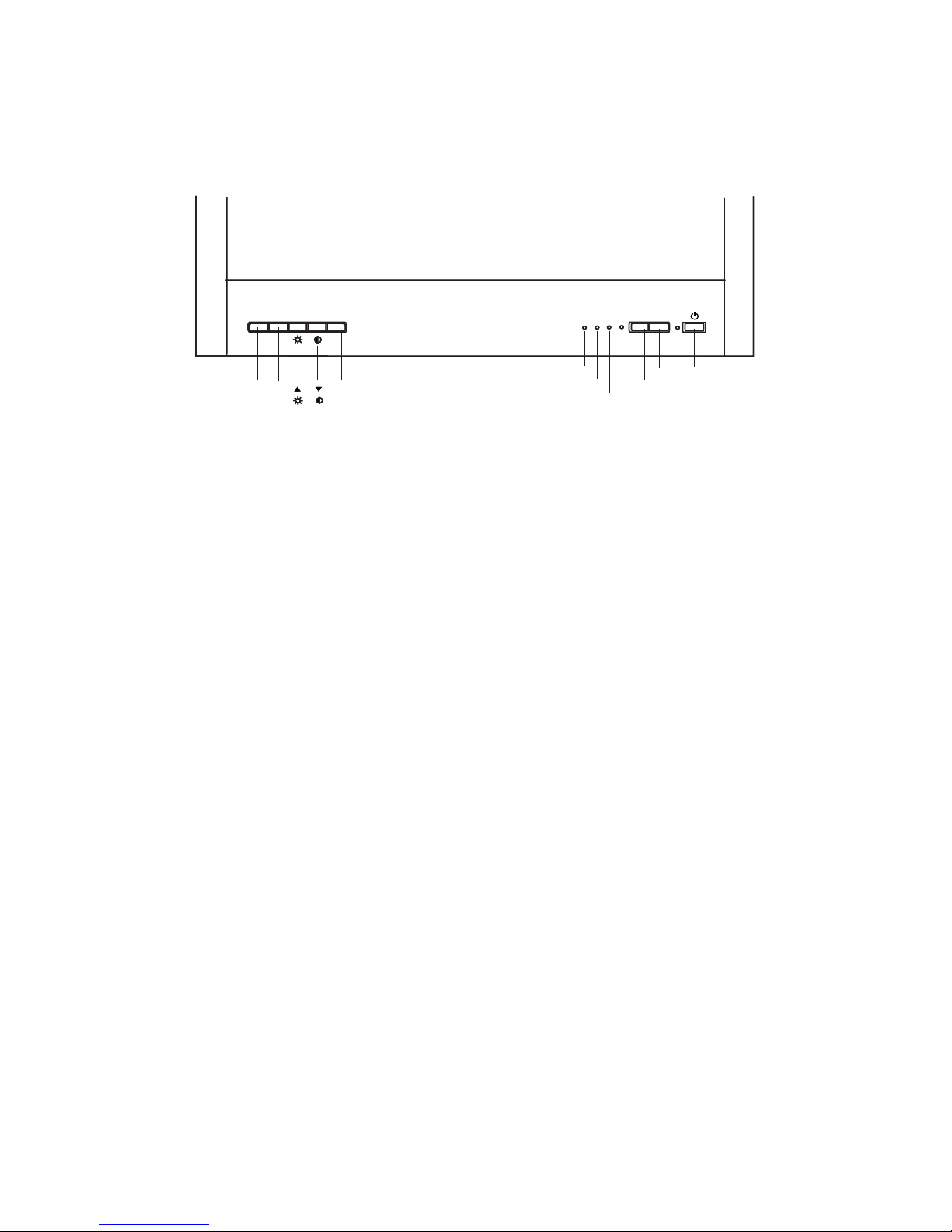
The 8 buttons on the front of the DV200B monitor perform the
following functions:
Power Turns the monitor on or off.
Auto Automatically adjusts and optimises the picture,
based on the currently displayed image. For best
results, run the test pattern program (Auto.exe, supplied on floppy disk with your monitor) before pressing Auto.
Input Select the type of signal that is to be displayed: Ana-
logue RGB (D-SUB), DVI-D, S-Video and Composite
video signals are supported.
Menu Opens the monitor’s On-Screen Display (OSD).
↑ Selects the Contrast adjustment. If the OSD is dis-
played, use this key to select the required menu
item.
↓ Selects the Brightness adjustment. If the OSD is dis-
played, use this key to select the required menu
item.
+ / - Increase or decrease the value of the selected
parameter.
S-Video
Composite
DVI-D
D-SUB
Input
Auto
Power
- + Menu
Page 22

22
On Screen Display Functions
Press Menu to open the On-Screen Display (OSD) and adjust
the monitor. The OSD has 8 sub-menus, organised in separate
functional groups: Luminance, Geometry, Color, OSD,
Language, Recall, PIP and OSD.
Press ↑ or ↓ to select the required functions and press Menu
again to open the Luminance sub-menu.
Luminance
Press ↑ or ↓ to select the Brightness or the Contrast
adjustment, then press + or - to increase or decrease the
Brightness or Contrast of the display.
Press Menu again to return to save the changes that have
been made and return to the main menu.
Geometry
Adjusts the positioning and quality of the displayed image. This
submenu is disabled if the DVI-D digital graphics signal is
being displayed.
Use ↑ or ↓ to select the required parameter and use + or - to
adjust its setting. Press Menu again to return to the main menu
and save the new settings.
H. Position Adjusts the horizontal position of the image.
V. Position Adjusts the vertical position of the image.
Pixel Clock Changes the sampling frequency of the pixel
clock
Phase Adjusts the phase of the sampling clock.
Sharpness Adjusts the Sharpness the displayed image.
Scaling Optimizes the display for the type of graphics
signal that you are using. Options are 1:1 and
Fill.
Page 23

23
The 1:1 setting displays an image that has the same resolution
as the connected signal. Signals that have a lower resolution
than the monitor’s LCD panel are displayed with a black border
around them.
The Fill selection causes the image to be scaled to fill the full
screen. Scaling interpolates low-resolution graphics signals
and may cause some blurring of the image.
Please note that when a Composite or S-Video input is
selected, only the Scaling and Sharpness functions are available from this submenu.
Color
Adjusts the colours displayed on screen. The selections that
are available will vary depending on the type of signal that is
being displayed on the screen.
If one of the computer inputs (D-Sub/Analogue RGB or DVI-D)
is being displayed this menu is used to select the colour
temperature or change the colour balance. Select between
preset colour temperatures of 9300 K (C1) or 6500 K (C2), or
the User Preset. The User Preset van be adjusts the levels of
the red (R), green (G) and blue (B) colour components
individually.
When a video signal is being displayed, from either the Composite or the S-Video input, only the colour Hue and Saturation
can be adjusted. The Hue adjusts the colour bias of the image
and the Saturation increases or decreases the amount of
colour that is displayed.
Page 24

24
OSD
Changes the position of the On Screen Display on the screen.
Three items can be set:
H. Position The horizontal position of the image.
V. Position The vertical position of the image.
OSD Time The idle time before the OSD switches off
Language
Select the language that is used by the On Screen Display.
Available languages include English, Espanol, Francais, Italiano, Deutsch, Japanese, Traditional Chinese, and Simplified
Chinese.
Recall
The Recall function returns the monitor’s settings to their factory preset values. Three groups of parameters may be reset:
Position Recall Resets the geometry of the currently dis-
played graphics mode. This function is only
available if the graphics signal matches one
of the preset modes listed in Table 1, on page
19.
Recall All Resets all parameters
Color Recall Returns the colour balance settings to their
default values
Select the item to be reset and then press Menu.
Page 25

25
Picture In Picture (PIP)
Enables and configures the Picture-In-Picture window. The PIP
window is used to display a video image from either the Composite video or the S-Video input, while computer graphics are
being displayed on the main part of the screen, from either the
D-Sub or the DVI-D input.
PIP Source
Choose the video input that is to be displayed, either S-video or
Composite video. Disable PIP by selecting Off.
PIP size
Select one of three sizes for the PIP window - Small, Medium,
or Large.
PIP Hue
Change the hue (colour bias) of the video signal that is
displayed in the PIP window.
PIP Saturation
Use the + and - buttons to increase or decrease the colour saturation of the video signal displayed in the PIP window.
PIP Position
Repositon the PIP window using the horizontal (PIP H.P.) and
vertical (PIP V.P.) position settings.
Page 26

26
Manual Picture Adjustment - D-Sub Input
This section applies to the D-Sub input, only, as it is the input
connection for analogue RGB graphics, including VGA-type
signals. Adjustments to the displayed image are made using
the On-Screen Display’s Geometry submenu, described previously in this chapter.
To manually adjust the image:
1 Display the adjustment test pattern. This is the best way to
observe changes as you adjust the image. Windows users
should run the Auto.exe test pattern program provided with
the monitor on floppy diskette. For non-Windows operating
systems, you also can use the test pattern described in the
previous section or another full-screen image, such the
desktop of the operating system.
2 Open the OSD menu by pressing the Menu button on the
monitor.
3 Select the Geometry submenu and then press Menu.
4 Select Clock and then use + or - to tune the sampling clock
to get the optimum picture. Look at the centre section of
the test pattern that has alternating black and white vertical
lines that are each 1 pixel wide. There should be no vertical
noise bands visible within the image. The centre section
will clearly show the alternating black and white lines or a
uniform level of noise will appear across the image.
5 Select H. Position and adjust the horizontal position so
that the image is centered. Its width should be the exactly
same as the width of the active area of the screen.
6 If some noise or distortion is still visible in the centre sec-
tion of the test pattern, select Phase and use + or - to
adjust the phase of the sampling clock. The alternating
black and white lines in the centre area of the test pattern
should be clearly visible and distinct.
7Press Menu to go back to the main OSD menu.
Page 27

27
If you are still not satisfied with the result, try repeating the procedure using a graphics signal that has a different refresh rate.
Notes:
For best results, you must use one of the factory modes. If the
AUTO button is not working, or the NON PRESET MODE message is shown on the OSD you are not using one of the supported modes. If you are having difficulties generating a
supported mode, ask your computer dealer or the distributor or
manufacturer of your graphics card for assistance.
The procedures described in this chapter should be performed
separately for every resolution and type of graphics signal that
you wish to use. For example, if a particular application
requires a resolution of 800 x 600 pixels, but all other applications use the monitor’s native resolution, you will need to display the test pattern and make adjustments.
The monitor will remember your settings and use them whenever you turn the monitor on. Note that you may need to readjust the monitor if it is connected to a different computer or if
the computer’s graphics adaptor is replaced.
Page 28

28
8 Troubleshooting
Frequently Asked Questions (FAQ)
1. The image is blurred, how can I get the best
quality picture?
Please read chapters 6 and 7 of this manual for information
about selecting the correct type of video signal and adjusting
the monitor for best performance. For computer graphics, set
the computer’s graphics adaptor to display a resolution of 1600
pixels x 1200 pixels. Lower resolution signals can be displayed
by the monitor, but the displayed image will not be optimal if the
monitor’s scaling setting is set to Fill the screen.
Are you using a VGA or video extension cable?
Blurring and other types of distortion can be caused by
conduction losses or impedence mismatches in extension
cables. Test whether the extension cable is the source of the
problem by removing it and connecting the monitor directly to
the computer or other signal source.
Is the image correct? If not, and you are viewing a computer
graphics signal, optimize the image as described in chapter 7.
You can usually minimise these losses and improve the quality
of the displayed image by using an extension cable with better
conduction properties.
2. Why does the image look yellow, blue or pink
instead of showing the correct colours?
The most common cause of this problem is a loose signal
cable or connector. Check that the cable is securely connected
to the computer or video source.
Check the signal cable for damage. If any pins are bent or
broken off, the cable will need to be replaced.
Page 29

29
Check the monitor's colour settings. Press the Menu button to
open the OSD, select Recall and the press Menu. Select
Colour Recall and press Menu to restore the factory colour
settings.
3. No image is displayed, what can I do?
Check that you have selected the correct input. Press the Input
button to change the signal source.
Check that the light (LED) next to the monitor’s power button is
lit and is green in colour. If the LED is green, press the Menu
button on the monitor to access the On Screen Display. If the
message NON PRESET MODE appears there, please read
chapter 6, Setting the Display Resolution and reset the
graphics card to one of the monitor’s supported graphics
signals.
If the LED is orange the monitor is in power saving mode.
Press a button on the computer’s keyboard or move the mouse
to wake the computer. If that does not help, check that the
signal cable is securely plugged into the monitor and the signal
source. Also check the pins of the signal cable’s connectors. If
any pins are bent or broken off, then the cable will need to be
replaced.
If the LED is not lit at all, check that the the power supply is
plugged into the monitor and into a mains socket and that the
mains power switch is turned on. Check that the monitor’s
power switch is also turned on.
4. The image is or distorted, flashes or flickers.
Check that the monitor's signal cable is securely connected to
the computer.
Read the chapters 6 and 7 of this manual, then select the
correct resolution, refresh rate and make adjustments based
on these instructions.
Page 30
30
9 Specifications
Model DV200B
Display type
Viewable diagonal size
Native (maximum) Resolution
Colours
Contrast Ratio / Brightness
Response time
Viewing angle
Active Matrix Thin Film Transistor
20.1" / 51cm
1600 x 1200 pixels
16.7 million
350:1 / 250 cd/m² maximum
45 ms
80/80, 80/80 degrees
(left/right, up/down)
Horizontal frequency
Vertical frequency
31-80 kHz Multi-frequency
56 - 76 Hz
Controls and OSD functions
Graphics Modes
8 buttons and Auto-Calibration key.
Contrast, brightness, vert. &
hor. image position, phase, pixel
clock, color balance, color palette,
choice of language (8 language OSD),
OSD position, status indicator
10 Factory Preset Timings
Power Management
Max. power consumption
Power saving mode
VESA DPMS, EPA
60 Watts Maximum
< 5 Watt
Input signal connector 1. D-SUB 2.DVI-D 3.S-Video
4.Composite
Temperature (operating)
Air humidity (operating)
5 °C - 35 °C
10% - 80%
Certifications FCC Class B, ISO 13406-2, CE, C-Tick,
MPRII
Operating voltage
Dimensions (WHD)
Weight
Automatic switched mode power supply,
90-264 V, 47-63Hz
514 x 492 x 260 mm
10.5 kg
Page 31

31
10 Service Contacts
If problems remain after checking this manual, please contact
your place of purchase or your nearest Mitsubishi Electric
office.
Australian Service Contacts
Visit the Mitsubishi Electric Australia web site at
www.mitsubishi-electric.com.au
For details of your nearest Mitsubishi Electric Authorised Service Centre or contact the Service Department for your state:
New South Wales and the Australian Capital Territory
348 Victoria Road
Rydalmere, NSW, 2116
Queensland
1 / 104 Newmarket Road
Windsor, Qld, 4030
Telephone: 1300 651 808
Fax: (02) 9684-7684
Telephone: (07) 3357-8877
Fax: (07) 3357-8488
Page 32

32
South Australia and the Northern Territory
77 Port Road
Hindmarsh, SA, 5007
Victoria and Tasmania
4 / 303 Burwood Hwy
East Burwood, Vic,
Western Australia
5 / 329 Collier Road
Bassendean, WA, 6054
Telephone: (08) 8340-0444
Fax: (08) 8340-0555
Telephone: (03) 9262-9899
Fax: (03) 9262-9850
Telephone: (08) 9377-3411
Fax: (08) 9377-3499
 Loading...