

Page 1
USER MANUAL
DG-HD19LCDVD/DG-HD22LCDVD
R
The Future of Home Entertainment
A cleverA clever
productproduct
Hills.Hills.
Page 2
Contents
Safety precaution.........................................................................................
Accessories.................................................................................................
Remote control manual.................................................................................
Remote control functions..............................................................................
LCD TV panel overview................................................................................
Connecting to external devices....................................................................
The OSD menus.........................................................................................
TV.............................................................................
NEED HELP?.............................................................
DVD Functions operating instructions.........................................................
Supporting DVD format............................................................................
Basic operation.......................................................................................
Trouble shooting......................................................................................
Function Settings....................................................................................
MP3/JPEG Playback................................................................................
Maintenance............................................................................................
Specifications..........................................................................................
DVD........................................................................
RR
2
3
4
5
6
7
9
10
18
19
20
22
23
28
29
30
Page 3
2
RR
NEED HELP?
If you are experiencing difficulty operating this product or require set up assistance please
contact the DGTEC Service Centre. The call is free from anywhere in Australia. Our
operators will assist you in plain English without the technical jargon:
(Australia)
8:00am-8:00pm Australian EST
*Subject to change without notice.
Page 4
3
R
R
Notes:
1.Safety precaution
The lightning flash with arrowhead symbol, within an equilateral
triangle, is intended to alert the user to the presence of insinuated
dangerous voltage within the product's enclosure that may be
of sufficient magnitude to constitute a risk of electric shock
WARNING:
TO REDUCE THE RISK OF FIRE OR ELECTRIC SHOCK, DO NOT EXPOSE THIS PRODUCT TO RAIN
OR MOISTURE.
The exclamation point within an equilateral triangles is intended
to alert the user to the presence of important operating and
maintenance (servicing) instructions in the literature
accompanying the product.
CAUTION:
TO REDUCE THE RISK OF ELECTRIC SHOCK, DO NOT
REMOVE COVER(OR BACK). REFER SERVICING TO
AUTHORISED SERVICE PERSONNEL.
WARNING
RISK OF ELECTRIC SHOCK
DO NOT OPEN
DO's
Always power this product from an outlet with the same rating (voltage and
frequency) as indicated on the rating label on the back of the product.
If this product has been damaged (including cord or plug) take it to an authorised
D G T E C service technician for inspection, and if necessary, repair.
Turn off and disconnect the power cable before cleaning or storing this product.
Ensure this product does not get wet or splashed.
Only use the A/C power adapter supplied with your product, or a replacement
recommended by an authorised technician.
DONT'S
Do not place naked flames, such as lit candles on or near the product.
Do not place objects filled with liquids, such as vases on or near the product.
Do not install this product on top of other electrical equipment or on uneven surfaces.
Do not use or store this product in a place where it is subject to direct sunlight, heat,
excessive dust or vibration.
Do not use this product with wet hands.
Do not clean this product with water or other liquids.
Do not block or cover the slots and holes in the product.
Do not push foreign objects into the slots or holes in the product.
The screen surface is easily scratched. Do not touch the screen with your hands or
any hard object.
Do not pull the power cord when disconnecting power. Turn off the switch on the
socket and pull the plug not the cord.
Do not attempt to open this product yourself. There are no user serviceable parts
inside.
DO's and DONT'S
Page 5
Before using this product, read and follow all warnings and instructions.
This product is intended for household use only and not for commercial or
industrial use.
Allow suitable distances around the product for sufficient ventilation.
Ventilation should not be impeded by covering ventilation openings with items
such as newspapers, table cloths, and curtains.
Make sure the LCD TV stand is adjusted to a stable position. Damage caused by
using this product in an unstable position or by failure to follow any other warning
or precaution contained within this user manual will not be covered by warranty.
This product is not intended for use by young children. Young children should
be properly supervised.
SAFETY WARNINGS
2.Accessories
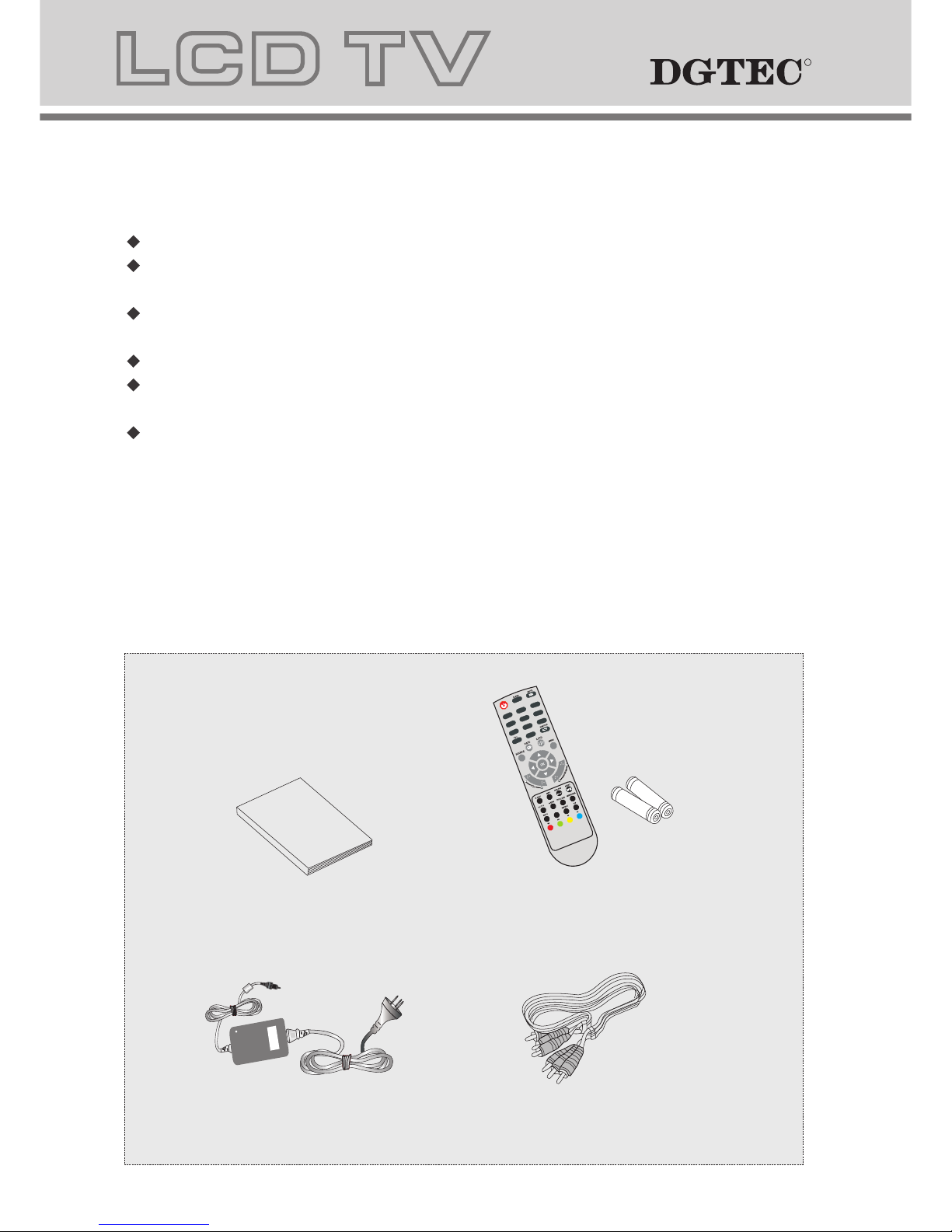
Check the accessories
(TV accessories)
User manual
Remote control/batteries
AV cableconnection
Power Cord
4
1
4
7
2
5
8
0
3
6
9
A
S
P
E
C
T
A
N
G
E
L
R
R
Page 6
5
POWER: Power on/off button , press once to turn the TV on and press again to turn the TV off.
SLEEP: Sleep button , sets TV power off time.
MUTE: Mute button , press once to disable the audio and press again to enable the audio.
0,1-9: TV channel selection button.
ASPECT:ASPECT button,display formats 4:3 and widescreen 16:9.
: Previous channel button , return to the previous channel watched.
SOURCE: Signal source selection button (TV/AV/YPBPR/DVD/VGA/HDMI/SVIDEO).
P.STD: P.STD button , setting the picture mode.
S.STD: S.STD button , setting the sound mode.
TV MENU: OSD menu button , to enter the TV setup menu.
/ (Left/Right): Left and right buttons of the OSD menu. To select the OSD menu items
VOL+/-: Volume adjusting button, to increase or decrease the volume.
Program+/-: Channel selection button, to increase or decrease channel.
EPG: Press the EPG to detail information about the channel.
TTX: Press the TTX to open Teletext, press TTX enter DTV Teletext setting.
I/II: Press the I/II to switch modes of sound processing A2 or NICAM.
FAV: Press the FAV to start the "Favourite List" to select your favourite program.
ADD: Press ADD to add Favourite channel.
SUB.: Press the Subtitle button to enable/disable subtitles (closed captions).
EXIT: Press the EXIT to exit the operation.
:Press the OPEN CLOSE button when the power is on the disc is pushed out Put the disc on the tray with the data
side facing towards you . Press OPEN CLOSE again to close the disc tray and the unit starts playing automatically
(Without auto play function for JPEG discs)
:When playing the disc,press PLAY/PAUSE once to pause,Press PLAY/PAUSE again to return to normal play.
:When playing DVD,SVCD,VCD,CD disc,press STOP once,the unit will memorize the previous ending point.Press
PLAY/PAUSE button to resume play. Press STOP for the second time to stop playback and clear the memory.
:Press the button for quick forward search.
:Press the button for quick rewind search.
:When playing a DVD disc,press NEXT to play the next chapter .when playing a SVCD,CD disc,press NEXT to PLAY the
next track.
:When playing a DVD disc,press PREV to play the previous chapter.when playing a SVCD,VCD,CD disc,press PREV
to play the previous track.
TITLE:When playing a DVD disc,press TITLE to return to the main title page.
GOTO:
ANGLE:Press to select different angles to witch the picture more comfortly.
Color button: The RED, GREEN, YELLOW &BLUE buttons are used for quick access to color coded pages
transmitted by FAST TEXT broadcast.
Example: RED selects CITY INFORMATION, BLUE selects TRAVEL INFORMATION, GREEN selects WEATHER
INFORMATION, YELLOW selects TV PROGRAMMING.
you want to change.After you entered the desired value, confirm your choice with the ENTER button.
REPEAT button continually, the TV screen will show in sequence: chapter repeat, all repeat, repeat cancel. When
playing a VCD,CD disc the sequence will be: track repeat, all repeat, repeat cancel. When playing a MP3 disc the
sequence will be: single repeat, directory repeat, file repeat, repeat cancel.
SUBTITLE (for DVD and Super VCD discs)
- Press the SUBTITLE button once to display current subtitle.
- Press again to toggle between different subtitle modes in sequence.
NOTE: For Multi-languages subtitle DVD & Super VCD discs, press the SUBTITLE button to select your favourite subtitle
language.
REPEAT:
DVD SETUP:Press the SETUP button to open the setting menu.
AUDIO:Press the L/R button to choose a different audio channel.
INFO:Press the INFO button for information.
A-B:Press the A-B button for repeat play point A and B.
RR
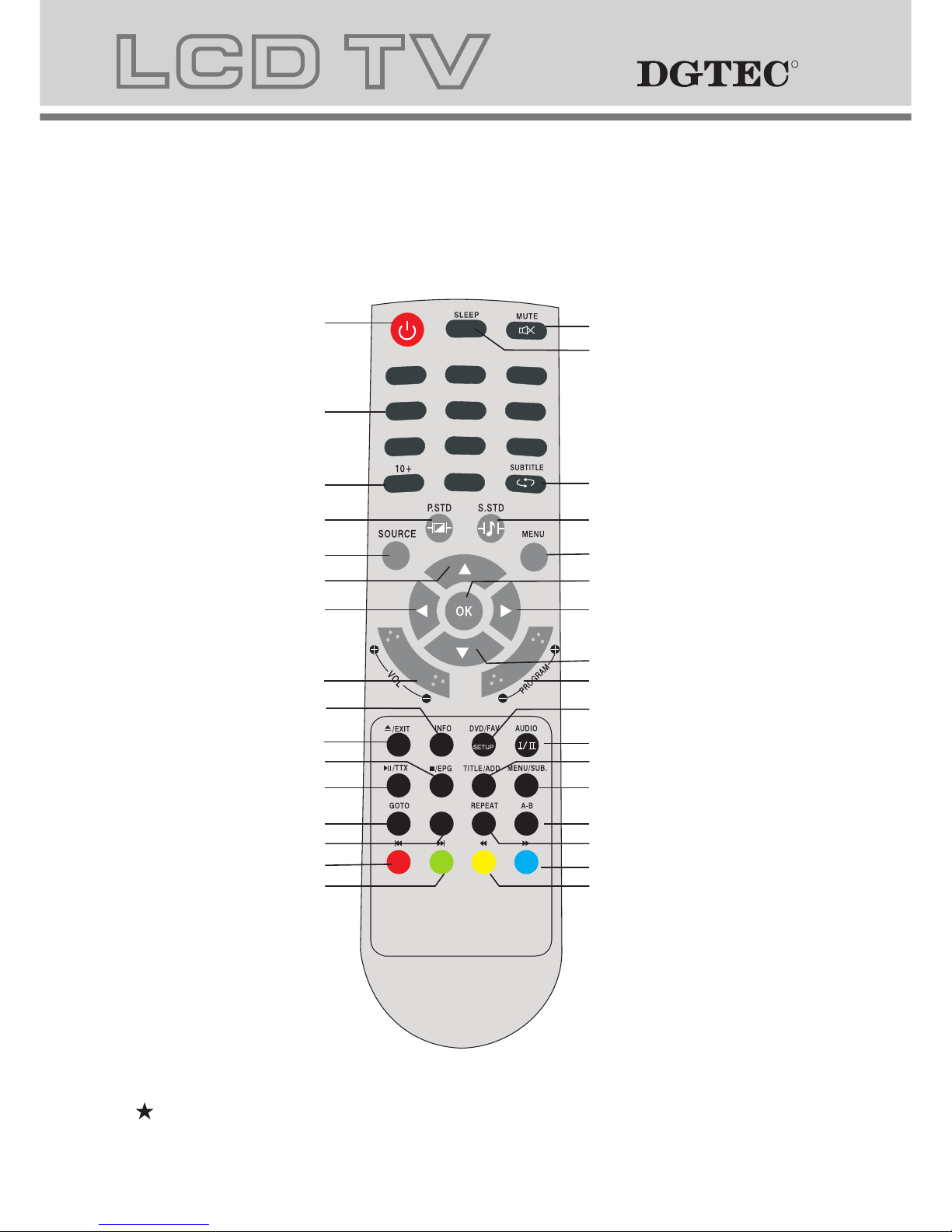
3.Remote control manual
Bright sunlight or lighting may cause erratic remote operation
1
4
7
2
5
8
0
3
6
9
Power button
Numeric button
Picture mode button
Sound mode button
RIGHT
DOWN
Channel selection button
UP
LEFT
Signal source selection button
Volume adjusting button
Sleep button
Mute button
SUBTITLE/Return channel button
TV setup menu
ENTER
PREV/RED button
Information button
Play/Pause/TTX
Stop/EPG button
GOTO button
ANGEL button
DVD SETUP/Favourite button
AUDIO/NICAM
TITLE/ADD button
MENU/Subtitle button
REPEAT button
A-B button
FORWARD/BLUE button
REWIND/YELLOW button
NEXT/GREEN button
Open/Close/Exit the OSD
menu completely button
ASPECT/DVD 10+ button
ASPECT
ANGEL
Page 7
6
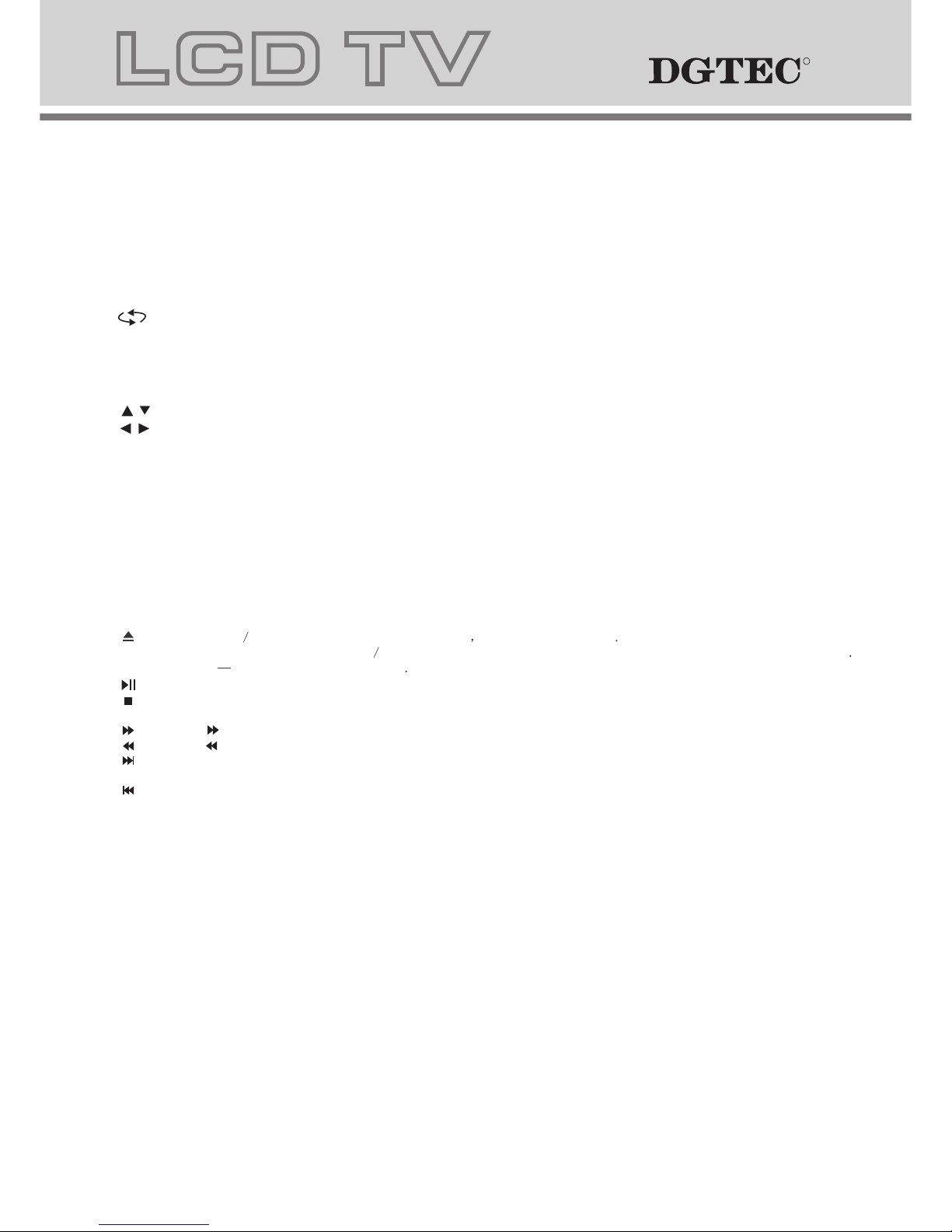
4.Remote control functions
POWER: Power on/off button , press once to turn the TV on and press again to turn the TV off.
SLEEP: Sleep button , sets TV power off time.
MUTE: Mute button , press once to disable the audio and press again to enable the audio.
0,1-9: TV channel selection button.
ASPECT:ASPECT button,display formats 4:3 and widescreen 16:9.
: Previous channel button , return to the previous channel watched.
SOURCE: Signal source selection button (TV/AV/YPBPR/DVD/VGA/HDMI/SVIDEO).
P.STD: P.STD button , setting the picture mode.
S.STD: S.STD button , setting the sound mode.
TV MENU: OSD menu button , to enter the TV setup menu.
/ (UP/Down): Up and down buttons of the OSD menu. To change the OSD menu items
/ (Left/Right): Left and right buttons of the OSD menu. To select the OSD menu items
VOL+/-: Volume adjusting button, to increase or decrease the volume.
Program+/-: Channel selection button, to increase or decrease channel.
EPG: Press the EPG to detail information about the channel.
TTX: Press the TTX to open Teletext, press TTX enter DTV Teletext setting.
I/II: Press the I/II to switch modes of sound processing A2 or NICAM.
FAV: Press the FAV to start the "Favourite List" to select your favourite program.
ADD: Press ADD to add Favourite channel.
SUB.: Press the Subtitle button to enable/disable subtitles (closed captions).
EXIT: Press the EXIT to exit the operation.
:Press the OPEN CLOSE button when the power is on the disc is pushed out Put the disc on the tray with the data
side facing towards you . Press OPEN CLOSE again to close the disc tray and the unit starts playing automatically
(Without auto play function for JPEG discs)
:When playing the disc,press PLAY/PAUSE once to pause,Press PLAY/PAUSE again to return to normal play.
:When playing DVD,SVCD,VCD,CD disc,press STOP once,the unit will memorize the previous ending point.Press
PLAY/PAUSE button to resume play. Press STOP for the second time to stop playback and clear the memory.
:Press the button for quick forward search.
:Press the button for quick rewind search.
:When playing a DVD disc,press NEXT to play the next chapter .when playing a SVCD,CD disc,press NEXT to PLAY the
next track.
:When playing a DVD disc,press PREV to play the previous chapter.when playing a SVCD,VCD,CD disc,press PREV
to play the previous track.
TITLE:When playing a DVD disc,press TITLE to return to the main title page.
GOTO:
The coloured topics appear at the bottom of most text pages.
ANGLE:Press to select different angles to witch the picture more comfortly.
Color button: The RED, GREEN, YELLOW &BLUE buttons are used for quick access to color coded pages
transmitted by FAST TEXT broadcast.
Example: RED selects CITY INFORMATION, BLUE selects TRAVEL INFORMATION, GREEN selects WEATHER
INFORMATION, YELLOW selects TV PROGRAMMING.
The GOTO button lets you instantly select a title, chapter or time.Use the navigate buttons to highlight the digit
you want to change.After you entered the desired value, confirm your choice with the ENTER button.
press the REPEAT button to repeat a title , chapter, track or whole disc.When playing a DVD disc, press the
REPEAT button continually, the TV screen will show in sequence: chapter repeat, all repeat, repeat cancel. When
playing a VCD,CD disc the sequence will be: track repeat, all repeat, repeat cancel. When playing a MP3 disc the
sequence will be: single repeat, directory repeat, file repeat, repeat cancel.
SUBTITLE (for DVD and Super VCD discs)
- Press the SUBTITLE button once to display current subtitle.
- Press again to toggle between different subtitle modes in sequence.
NOTE: For Multi-languages subtitle DVD & Super VCD discs, press the SUBTITLE button to select your favourite subtitle
language.
REPEAT:
DVD SETUP:Press the SETUP button to open the setting menu.
AUDIO:Press the L/R button to choose a different audio channel.
INFO:Press the INFO button for information.
A-B:Press the A-B button for repeat play point A and B.
RR
Page 8
7
RR
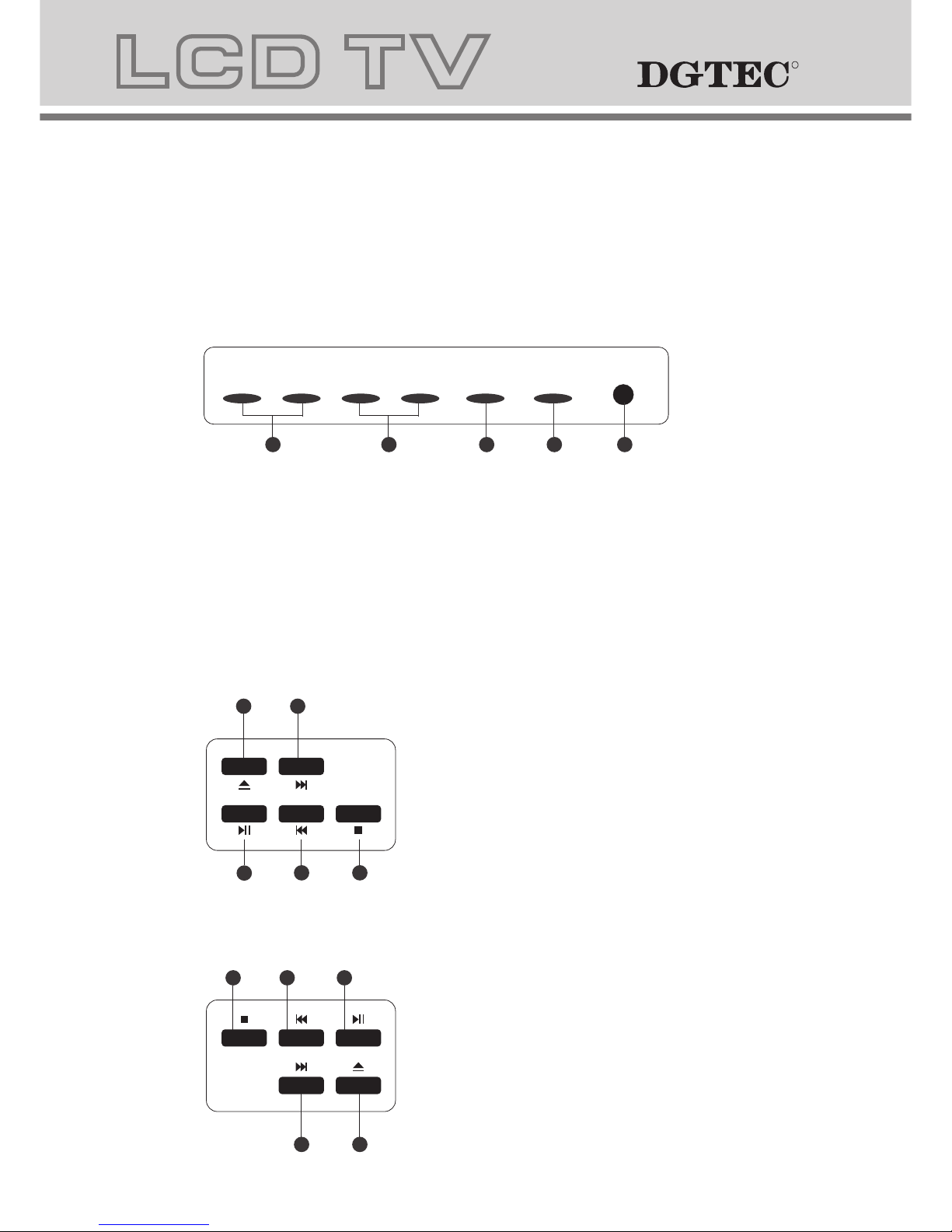
5.LCD TV panel overview
TV Control Panel
DG-HD19LCDVD
SOURCE
MENU
CH- CH+
VOL- VOL+ POWER
1.Volume adjusting.
2.Channel selecting.
3.Main menu display and confirm.
4.Selecting exterior signal input.
5.On/off button.
1
2 3
4
5
1
2
3
5
4
1.STOP button
2.PREV button
3.PLAY/PAUSE
4.NEXT button
5.OPEN/CLOSE button
1
2
3
5
4
1.OPEN/CLOSE button
2. NEXT button
3.PLAY/PAUSE
4.PREV button
5.STOP button
DG-HD22LCDVD
Page 9
VGA
7 8 9
RF(75 )
PC
AUDIO
R
L
VIDEO
HDMI
DC-12V
S-VIDEO
Y PB PR
8
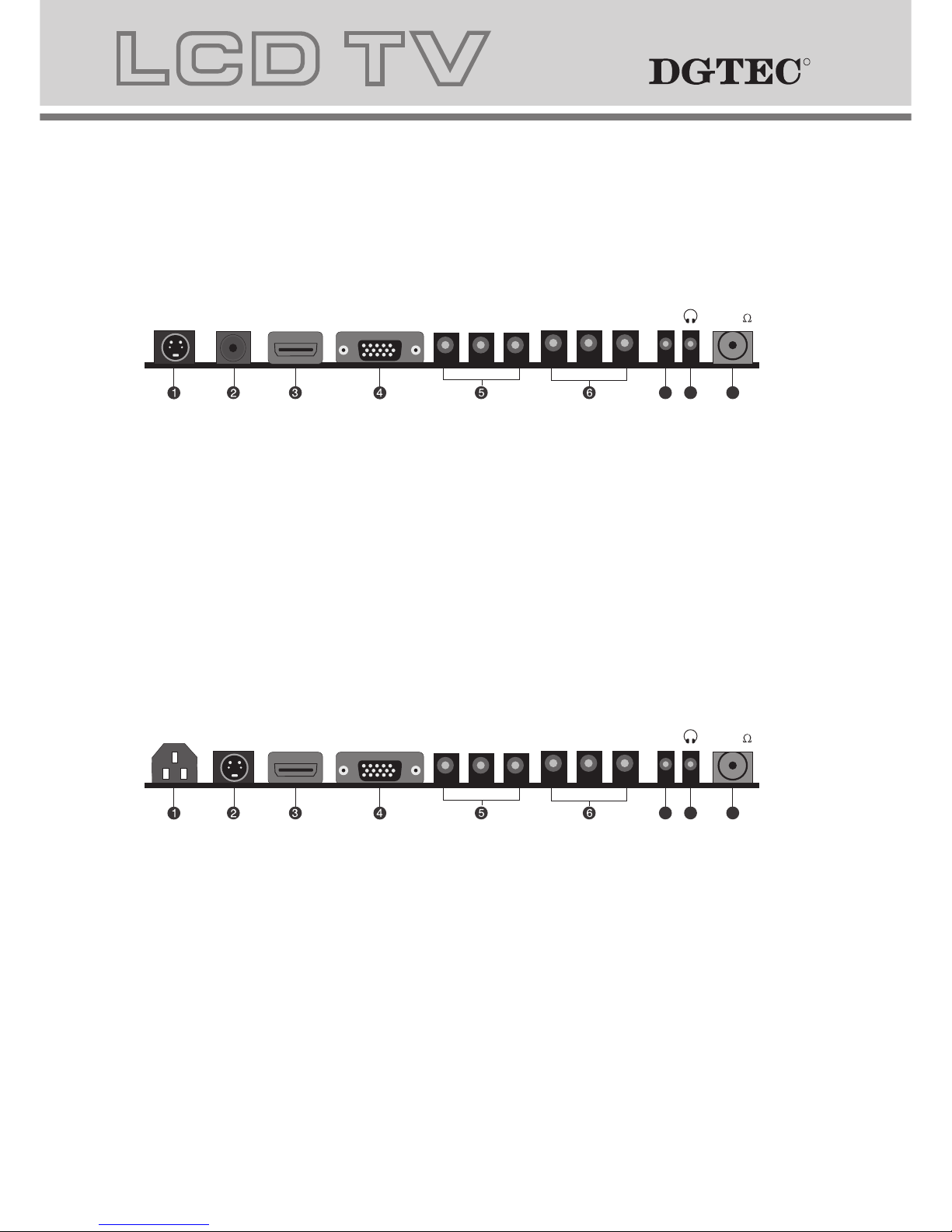
TV Terminal connections
DG-HD19LCDVD
DG-HD22LCDVD
1. S-VIDEO input.
2. DC 12V power input.
3. HDMI input.
4. VGA input.
5. Component input terminal.
6. AV input .
7. PC audio input.
8. Headphone output.
9. Antenna input (75 Ohm VHF/UHF).
1. Power input.
2. S-VIDEO input.
3. HDMI input.
4. VGA input.
5. Component input terminal.
6. AV input .
7. PC audio input.
8. Headphone output.
9. Antenna input (75 Ohm VHF/UHF).
VGA
7 8 9
RF(75 )
PC
AUDIO
R
L
VIDEO
HDMI
POWER
S-VIDEO
Y PB PR
RR
Page 10
9
7.The OSD menus
RR
Notes:
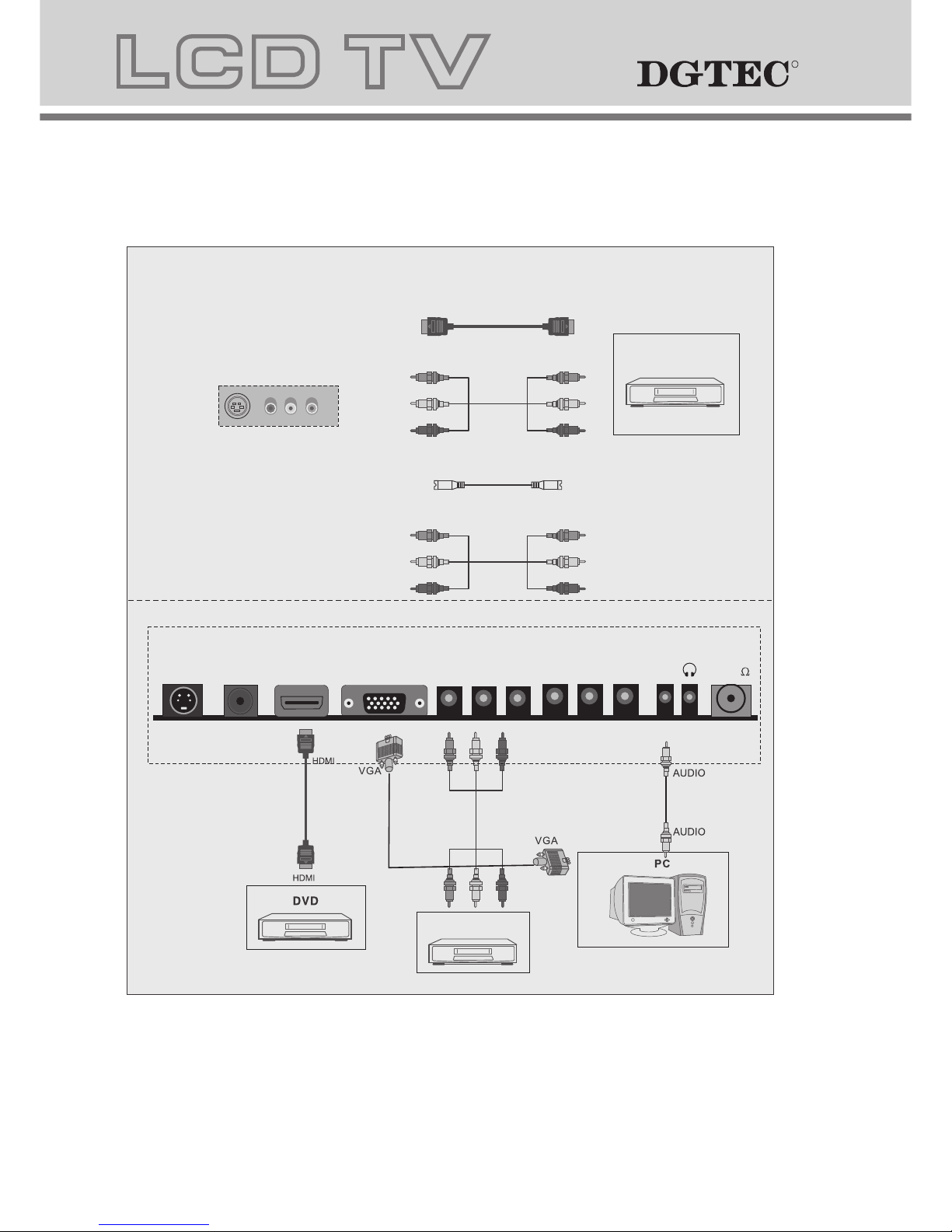
VGA use a common PC AUDIO in.
6.Connecting to external devices
Connecting external devices to your LCD TV
The rear of TV
YPBPR
RCA
OR
OR
OR
DVD
HDMI
S Video
VCR
DG-HD19LCDVD
VGA
RF(75 )
PC
AUDIO
R
L
VIDEO
HDMI
DC-12V
S-VIDEO
Y PB PR
Page 11
10
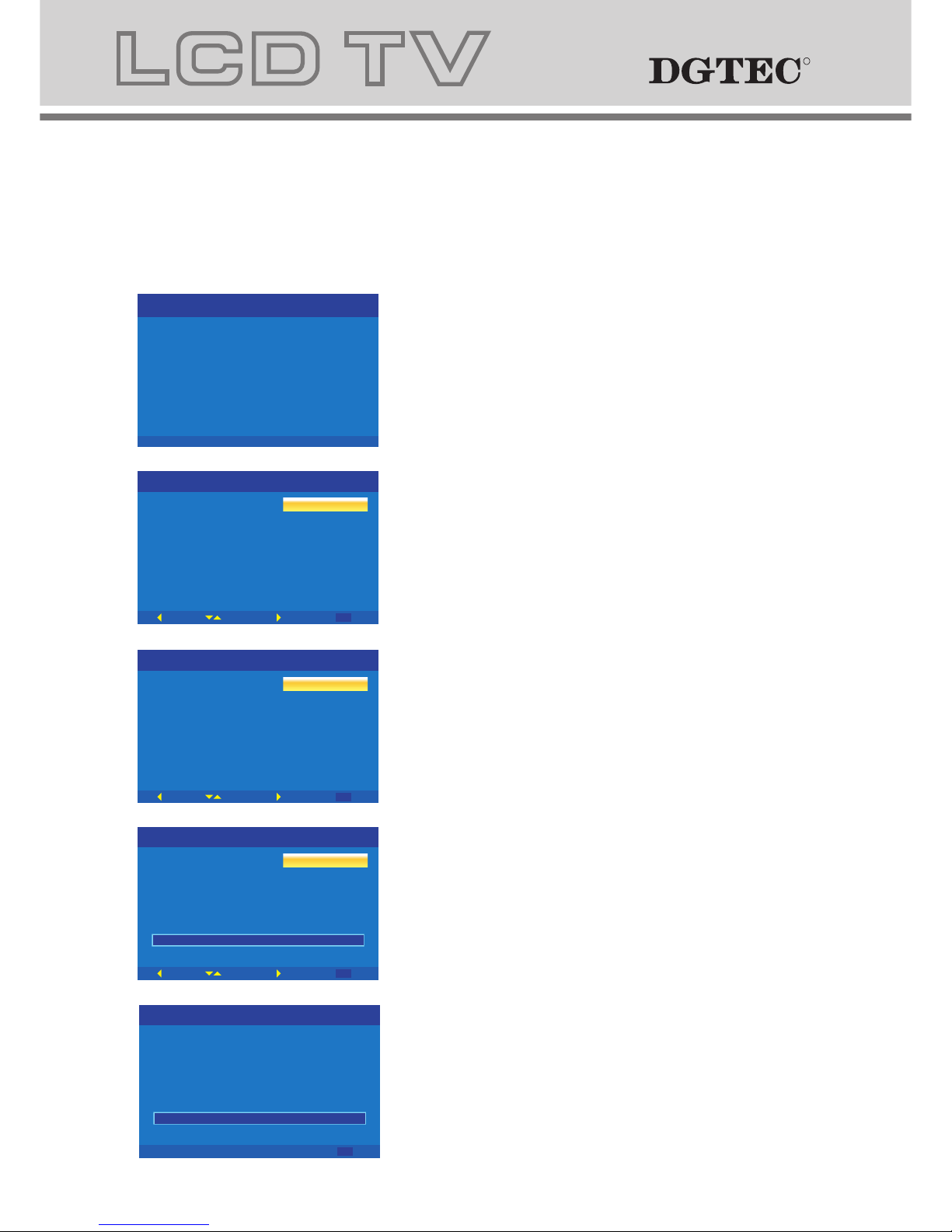
1. Turn on TV, Then press"OK" to
start the wizard
Menu Setup TV (First time installation wizard)
7.The OSD menus
3. Please select your region
2. Please select your language
4. Connect antenna and Press
"OK " to start channel scan
Initial Setup
Welcome
Welcome to use the Wizard for
Initial Setup !!
Please press [OK] to start the
wizard.
Initial Setup
Please select your region:
Region
NSW/ACT
VIC
QLD
SA
WA
TAS
NT
Back
Select
Next
EXIT
Exit
Initial Setup
Please select your Language:
Language
English
French
Spanish
German
Italian
Back
Select
Next
EXIT
Exit
Initial Setup
Back
Select
Next
EXIT
Exit
Channel Scan
First, please connect antenna.
Start channel scan now?
Ify ous kip thiss tep,th ec hannel
scanc ould bep erformedi nM enu.
Scan
Skip Scan
0%
Initial Setup
EXIT
Cancel
Channel Scan
The channel scan may take a while
to complete.
Status:Scaning.
AnalogC hannels:0
DigitalC hannels:0
0%
RR
Page 12
11
RR
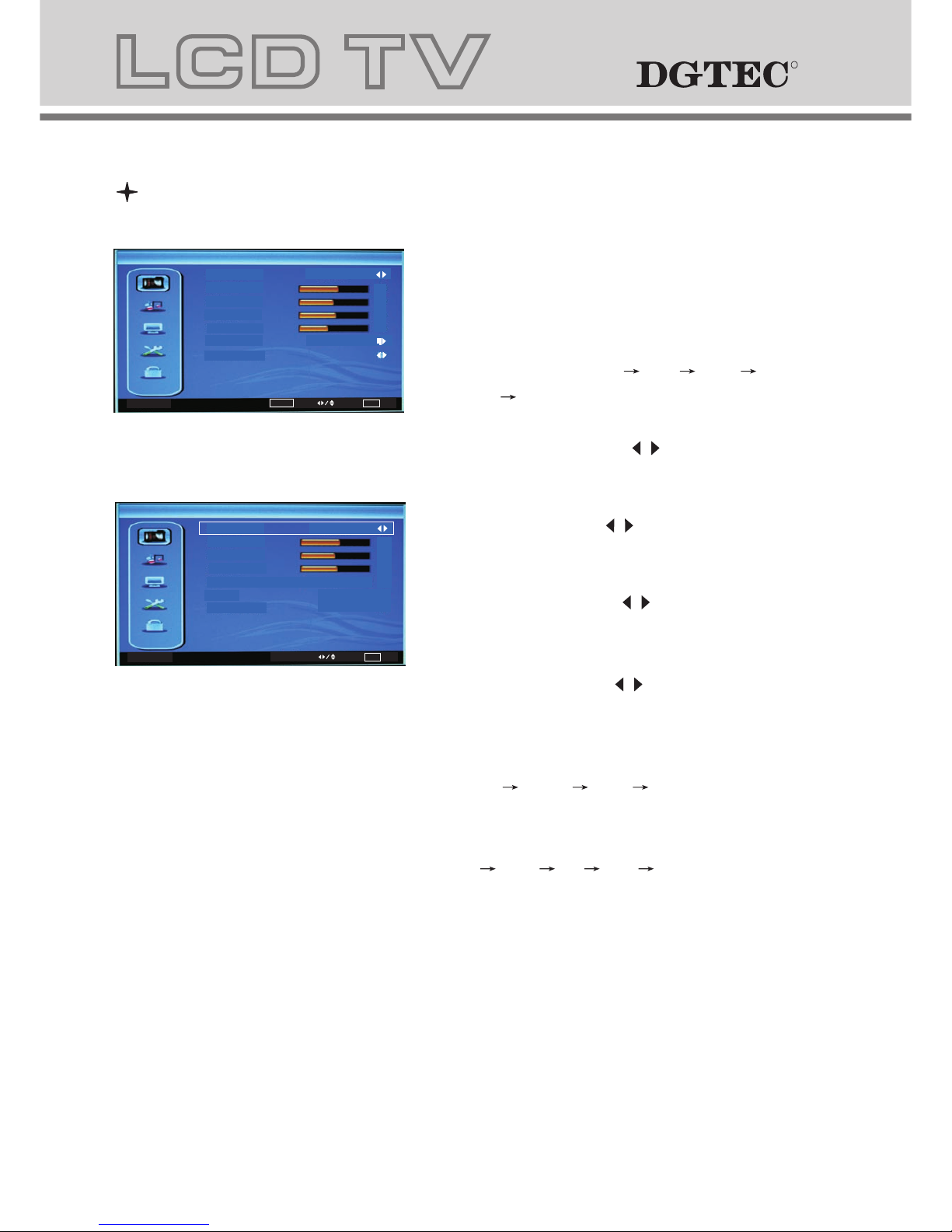
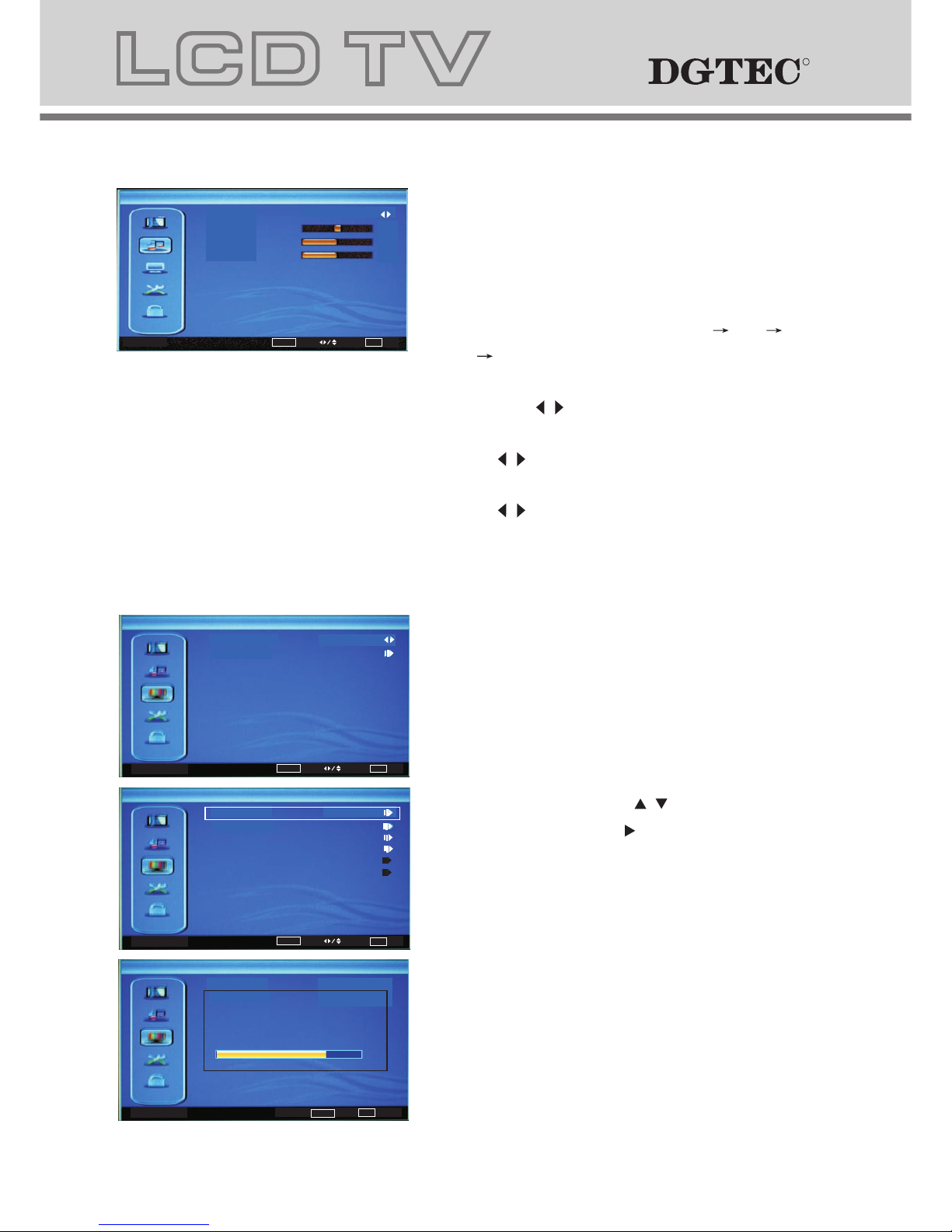
1 VIDEO MENU
a. The image on the left depicts the OSD menu.
b. The definition of each option:
b-1. Picture Mode: Changes the picture mode
in sequence : Standard Mild Vivid
Hi-Bright User
b-2. Brightness: Changes the value of
brightness with the key / in the range
of 0 to 100.
b-3. Contrast: Changes the value of
contrast with the key / in the range of 0
to 100.
b-4. Saturation: Changes the value of
saturation with the key / in the range
of 0 to 100.
b-5. Sharpness: Changes the value of
sharpness with the key / in the range of
0 to 7.
b-6. Color Temperature: Changes the
color temperature in sequence as :
Standard Warm User Cool, also R Gain,
G Gain, B Gain included in each item.
b-7. DNR: Changes the DNR in sequence as :
Strong Auto Off Low Medium.
Menu Operation Under TV Input
Video
Picture Mode
Brightness
Contrast
Saturation
Sharpness
DNR
Color Temperature
Standard
Strong
50
52
55
3
OK
Enter
Select
EXIT Exit
Color Temperature
Select
EXIT Exit
Color Temperature
B Gain
G Gain
R Gain
Standard
3
-6
0
Page 13
12
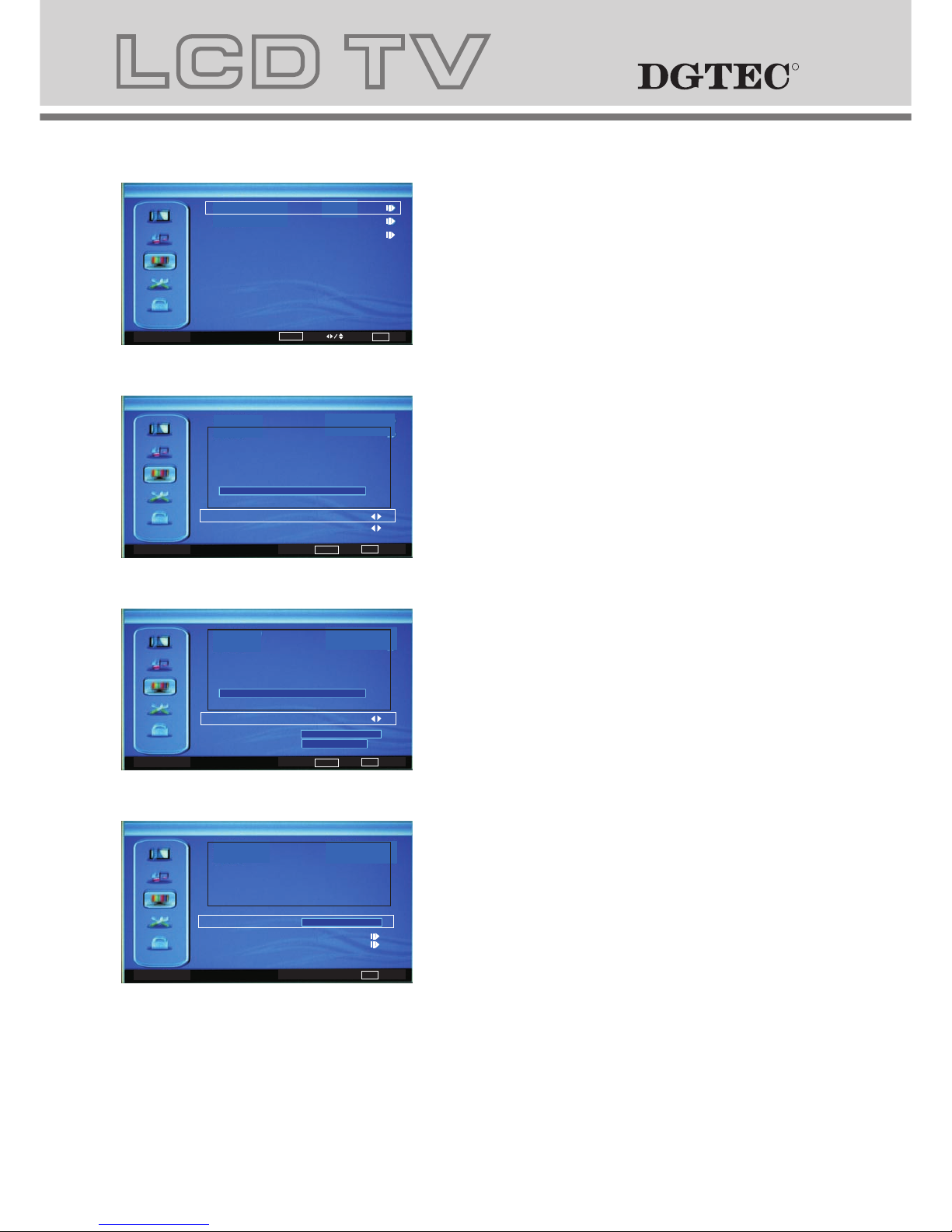
a. The image on the left depicts the
manual scan menu.
b. The definition of each option:
b-1. Country Region: Changes the country
in sequence as: VIC,QLD,SA,WA,TAS,
NT,NSW/ACT.
b-2. Channels: Press / key to this
position, Then press key to enter manual
search programs, Other menu options
include Auto Scan,Manual Scan,Channel
Skip,Channel Sort,ChannelEdit,
Analog Channel Fine Tune.
3 MANUAL SCAN MENU
2 AUDIO MENU
a. The image on the left depicts the audio
menu.
b. The definition of each option:
b-1. Sound Mode: Changes the Sound
Mode in sequence as: Standard Pop
Rock News.
b-2. Balance: Changes the value of Balance
with the key / in the range of -50 to +50.
b-3. Bass: Changes the value of Bass with
the key / in the range of 0 to 100.
b-4. Treble: Changes the value of Treble with
the key / in the range of 0 to 100.
Audio
OK
Adjust
Select
EXIT Exit
Balance
Bass
Treble
Sound Mode
Standard
0
50
50
Manual Scan
OK
Enter
Select
EXIT Exit
Channels
Country Region
NSW/ACT
Channels
OK
Scan
EXIT Exit
82%
Status:Scan Canel
Digital Channels:0
Analog Channels:0
Channels
OK
Scan
Select
EXIT Exit
Atuo Scan
Auto Scan:Press"OK"to enter Auto Scan
Manual Scan
Channel Skip
Channel Sort
Channel Edit
Analog Channel Fine Tune
RR
Page 14
13
RR
Analog Manual Scan
EXIT Exit
Start Frequency (MHz)
Scan Down
Scan Up
47.0
Search for analog channels
Digital Manual Scan
OK
Scan
EXIT Exit
RF Channel
Signal Level
6
0
Start Frequerny (MHz)
0%
177.5
Digital manual scan channel.
Digital Channel Range Scan
OK
Scan
EXIT Exit
Scan with a range of channels
From Channel
6
69
To Channel
0%
Digital Channel Range Scan
Digital Manual Scan
Analog Manual Scan
Manual Scan
OK
Enter
Select
EXIT Exit
Manual Scan:Press"OK"to enter Manual Scan,
Select one of the following options:
Digital Channel Range Scan,Digital Manual
Scan,Analog Manual Scan.
OR
OR
Digital Channel Range Scan:Press"OK"to enter
Digital Channel Range Scan.
Digital Manual Scan:Press"OK"to enter
Digital Manual Scan.
Analog Manual Scan:Press"OK"to enter
Analog Manual Scan.
Page 15
14
OK
Enter
Select
EXIT Exit
Setup
Display Mode
OSD Language
16:9
On
English
Time Setup
Subtitle
Teletext
Blue Screen
Reset Default
4 SETUP MENU
Select
EXIT Exit
Time Setup
Time Zone
As Broadcaster
Time
Off
Sleep Timer
Select
EXIT Exit
Time
Auto Synchronization
2000/01/01
16:51:46
00:00:00
00:00:00
Timer
On
Off
Date
Power On Timer
screen
Power Off Timer
Select
EXIT Exit
Subtitle
Normal
Subtitle Type
Select
EXIT Exit
Teletext
Off
Digital Teletext
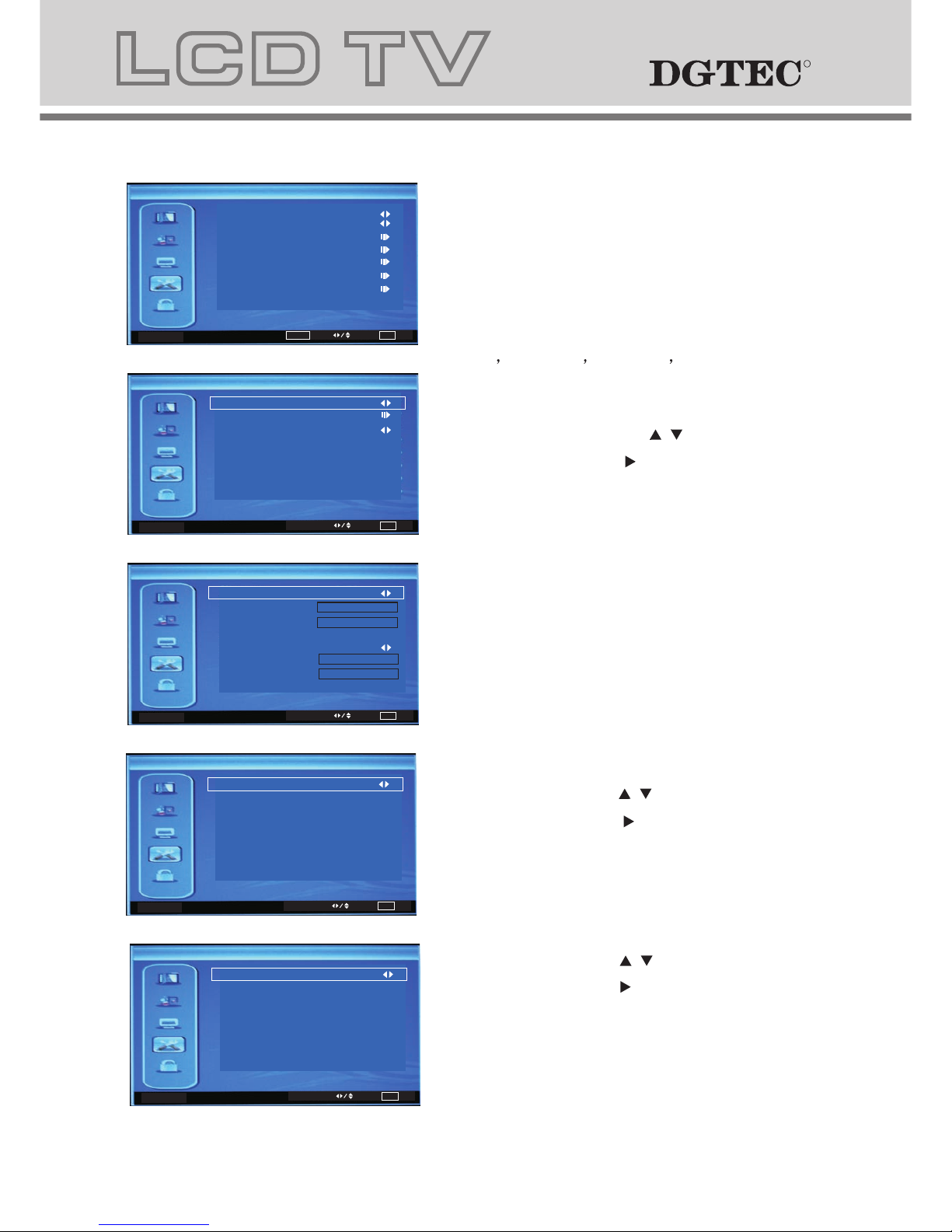
a. The image on the left depicts the setup
menu.
b. The definition of each option:
b-1. OSD Language: Changes the OSD
Language in sequence as:
.
b-2. Display Mode: Changes the Display
Mode in sequence as: 16:9,4:3.
b-3. Time Setup: Press / key to this
position, Then press key to enter Time
Setup , Other menu options include
Time Zone,Time,Sleep Timer.
Time Zone:As Broadcaster,GMT+0:00,
GMT+1:00,GMT+2:00,GMT+3:00...
Time:Auto Synchronization,Timer
Sleep Timer:Off,10Minutes,20Minutes...
English,
French Spanish German Italian
b-4. Subtitle: Press / key to this
position, Then press key to enter
Subtitle, and activate ON.
b-5. Teletext: Press / key to this
position, then press key to enter
Teletext, Other menu options include
Digital Teletext.
RR
Page 16
15
RR
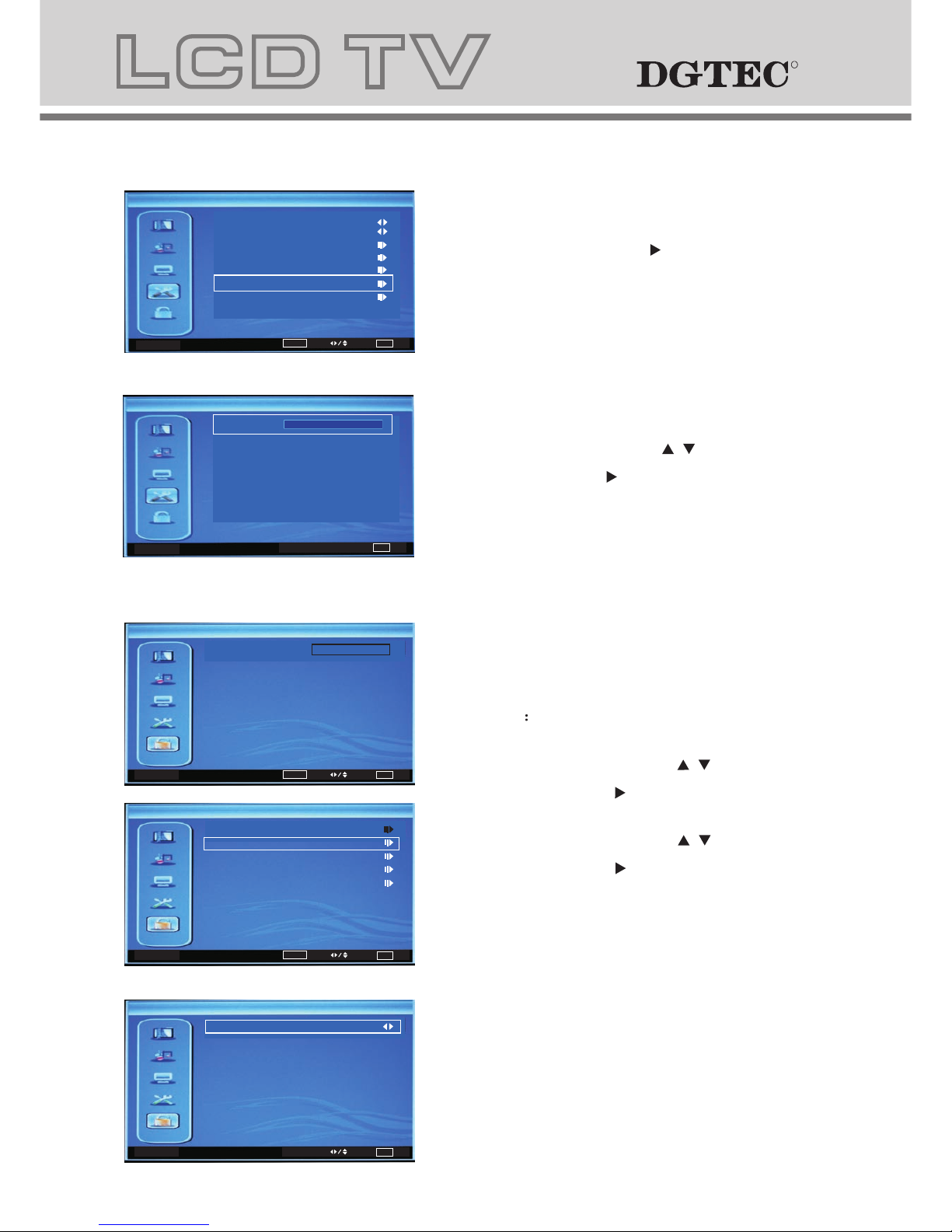
5 PARENTAL MENU
b. The definition of each option:
b-1. Channel Block: Press / key to this
position, then press key to enter
Channel Block.
b-2. Program Block: Press / key to this
position, then press key to enter
Program Block , Other menu options include
Restriction of Access(No Block,Block G...).
b-6. Blue Screen: press key to enter
Blue Screen(On/Off).
b-7. Reset Default: Press / key to this
position, then press key to enter
Default Password is "0000".
EXIT Back
Password
OK
Enter
Select
EXIT Exit
Setup
Display Mode
OSD Language
16:9
On
English
Time Setup
Subtitle
Teletext
Blue Screen
Reset Default
EXIT Exit
Setup
OK
Enter
Select
EXIT Exit
Password
Parental
a. This menu is used to set the block
function.
Password The initial password is 0000.
ExitEXIT
Select
Enter
OK
Change Password
Clear All Blocks
Channel Block
Program Block
Input Block
Parental
ExitEXIT
Select
No Block
Restriction of Access
Program Block
Page 17
16
Cancel
Are you sure?
OK
EXIT
Confirm Password
New Password
Change Password
Exit
Exit
EXIT
Select
Set
OK
S-VIDEO
YPBPR
DVD
HDMI
TV
AV
PC
1
2
3
4
5
6
7
Input Block
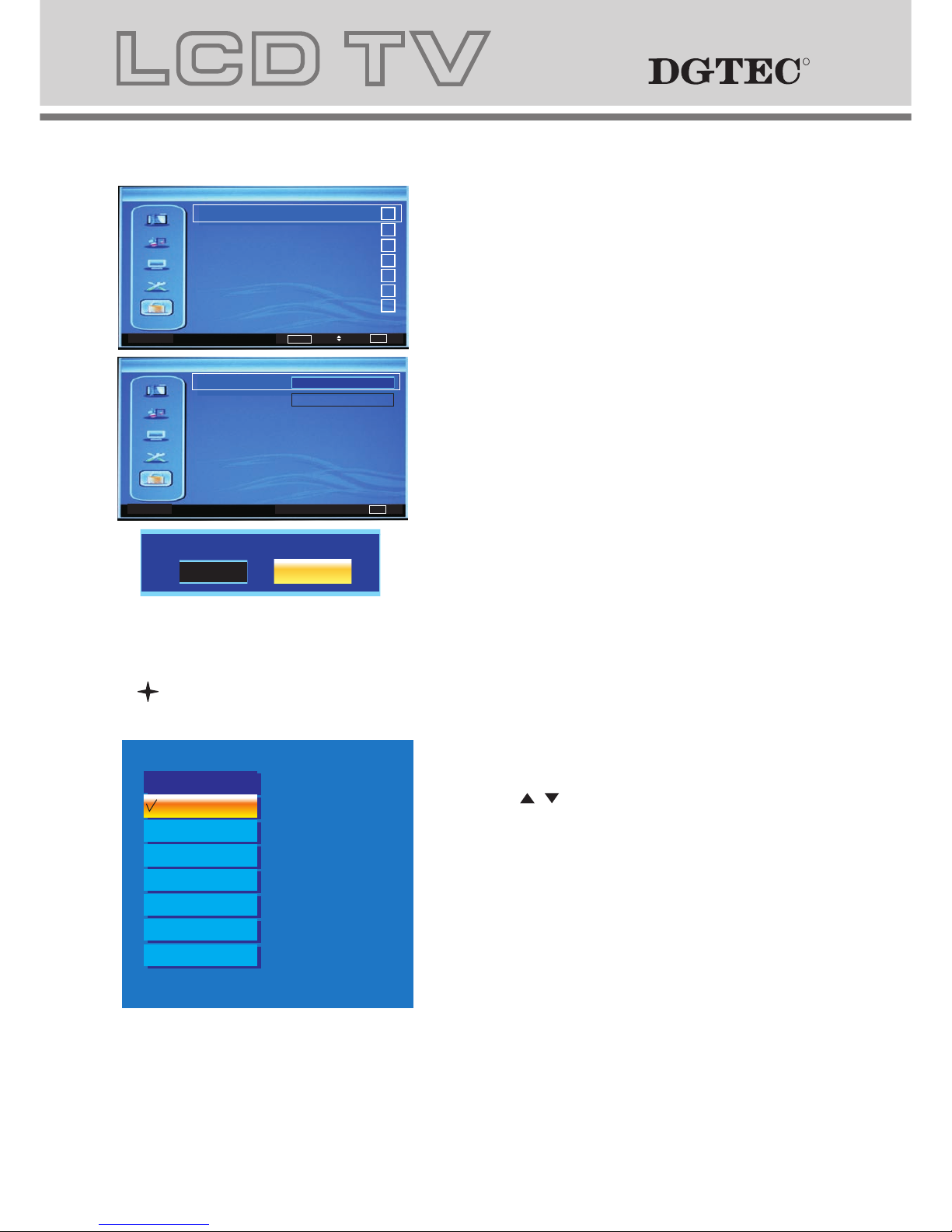
b-3.Input block: you can block any input
source.
b-4.Change password: changing of the
parental password.
b-5.Clear All Blocks: restore your
settings.
SOURCE
1. Press "SOURCE" button to change from
DTV to other available inputs.
2. Press " / " button to select signal source.
3. Press "OK" button to confirm.
4. Press "EXIT" button to exit signal
source menu.
TV
Source
AV
YPBPR
DVD
VGA
HDMI
S-VIDEO
RR
Page 18
DVD Operation DVD Operation
Basic operationBasic operation
1.Turn on the LCD TV and then press SOURCE repeatedly to select DVD mode.
2. Insert Disc to DVD player
- Insert the Disc in the Disc slot (Data side of the disc has to face towards front of the unit), the player will load
the disc automatically. There will be an on screen indication “CLOSE” then “READ”. When loading the
disc content, it will switch to play mode automatically.
NOTE: - Some disks will require you to press " ", start from disc menu.
- Please make sure when inserting the Disc, the Data side of the disc should be facing yourself.
If disk is inserted incorrectly, you may damage the DVD mechanism.
3. Play the DVD
- Depending on the disc content, the disc menu will display for your selection. When playing the disc, you may
use button to toggle between Play and Pause mode. The DVD player also supports Menu, Title, Sequential
and Program playback.
4. Menu playback (for DVD/ super VCD and VCD discs)
- Press MENU button
- For DVD discs, use the navigation buttons to select and Play the highlighted contents. For Super
VCD & VCD discs, use the numeric buttons to play your favourite content directly.
NOTE: PBC should be OFF.
- Press OK or button to start from the highlighted content.
- Return to the Root Menu when playing the disc
- STOP
5. Title playback (for DVD disc only)
- Press TITLE button, there will have an on screen indication “TITLE”.
- Press the direction or numeric buttons to select your favourite title.
- Will play from the first chapter of the selected title.
Page 19
18
Basic operationBasic operation
1.Turn on the LCD TV and then press SOURCE repeatedly to select DVD mode.
2. Insert Disc to DVD player
- Insert the Disc in the Disc slot (Data side of the disc has to face towards front of the unit), the player will load
the disc automatically. There will be an on screen indication “CLOSE” then “READ”. When loading the
disc content, it will switch to play mode automatically.
NOTE: - Some disks will require you to press " ", start from disc menu.
- Please make sure when inserting the Disc, the Data side of the disc should be facing yourself.
If disk is inserted incorrectly, you may damage the DVD mechanism.
3. Play the DVD
- Depending on the disc content, the disc menu will display for your selection. When playing the disc, you may
use button to toggle between Play and Pause mode. The DVD player also supports Menu, Title, Sequential
and Program playback.
4. Menu playback (for DVD/ super VCD and VCD discs)
- Press MENU button
For DVD discs, the screen will display the DVD Disc Menu (Root Menu)
For Super VCD & VCD discs, the screen will display the Super VCD, VCD Disc Menu
(Press the MENU button to display the PBC status).
For Super VCD and VCD disk playback, default the PBC status to ON.
- For DVD discs, use the navigation buttons to select and Play the highlighted contents. For Super
VCD & VCD discs, use the numeric buttons to play your favourite content directly.
NOTE: PBC should be OFF.
- Press OK or button to start from the highlighted content.
- Return to the Root Menu when playing the disc
For DVD discs, press MENU to display the Disc Menu.
For Super VCD & VCD discs, when PBC is ON, press MENU to display the Disc Menu.
- STOP
Press button once to stop. Press button to resume from where you stopped.
Press button Twice to stop. Press button to start from beginning.
In order to protect the disc, press button then press EJECT button to take the disc out. When the disc is
ejected, hold the disc edge to prevent scratches.
When not using the DVD function (in stand-by mode or using others modes for a long time), please take out
the disc to protect the DVD loader and the disc.
5. Title playback (for DVD disc only)
- Press TITLE button, there will have an on screen indication “TITLE”.
- Press the direction or numeric buttons to select your favourite title.
- Will play from the first chapter of the selected title.
RR
Page 20
19
Supporting DVD format Supporting DVD format
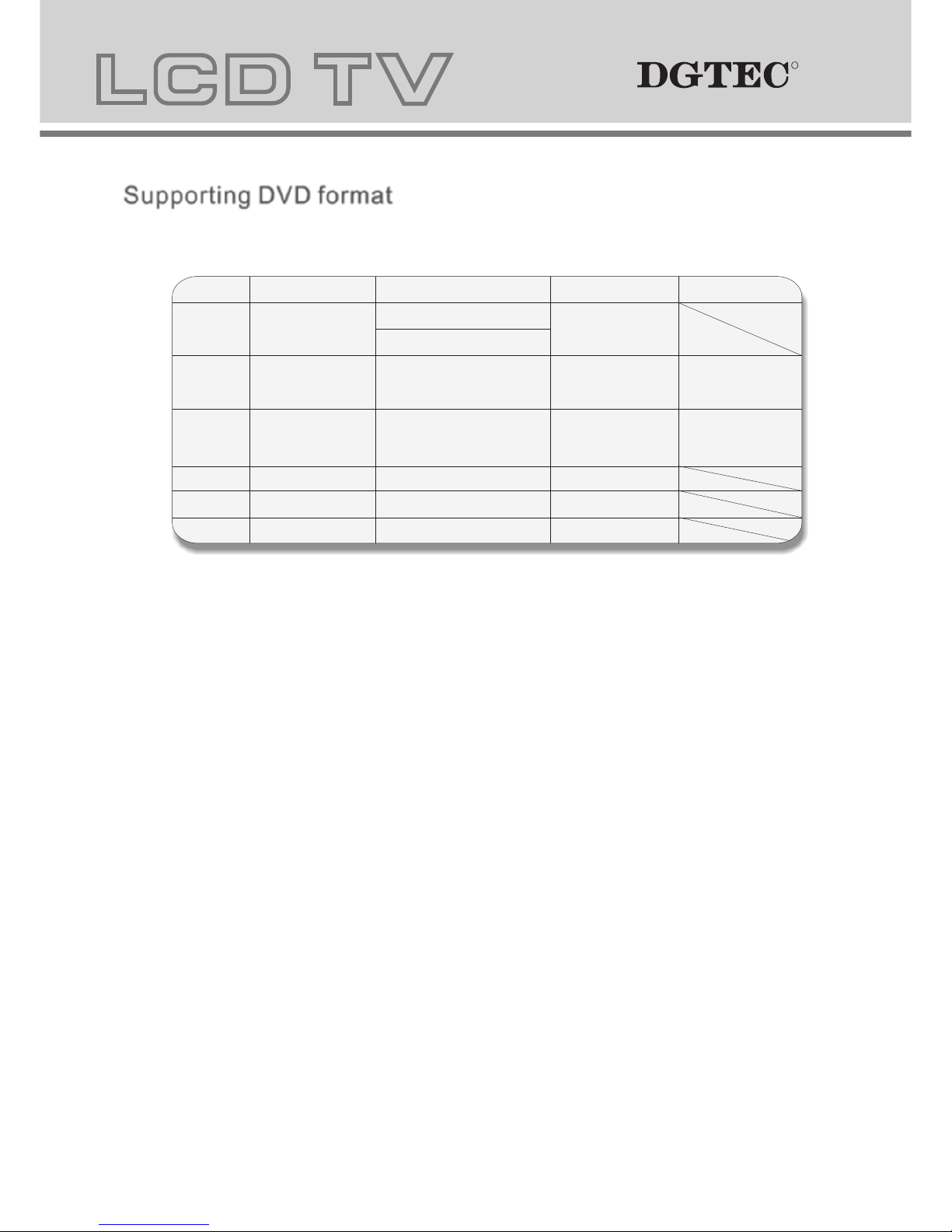
This product can play the following DVD formats disc.
Remarks
Include SVCD
Include:
VCD2.0/ VCD1.1
VCD1.0/ DVCD
Disc Type
Recorded Content
DVD format:
Compressed digital
audio and video
MPEG2
Compressed digital
audio and video
MPEG1
Compressed digital
audio and video
CD-DA: Digital audio
HD-DA: Digital audio
Disc Size (Diameter) Recorded Time
DVD 12cm
Single side:120mins. Approx
Double side:240mins. Approx
Super VCD
12cm
45mins. Approx
VCD
12cm
74mins. Approx
CD
12cm
74mins. Approx
HD-CD
12cm
74mins. Approx
MP3/JPEG
12cm
600mins. Approx
Digital audio
NOTE: Also support DVD-R, CD-R, CD-RW playback.
1. Play (for DVD/ Super VCD/ VCD/ CD/ CD-G/HD-CD and Mp3/ JPEG discs)
- For DVD disc, press button from root or title menu; when playing the DVD, you may play your favourite title
directly with title selection by pressing the TITLE button.
- For Super VCD & VCD discs, you may play your favourite tracks by using the numeric buttons.
- For CD, CD-G & HD-CD discs, you may play your favourite tracks by using the numeric buttons.
- For MP3 / JPEG disc, you may play your favourite tracks by numeric buttons from the content menu.
- If input track number is not valid, it will not function.
NOTE: From track 1-10, use numeric buttons directly; For tracks over 10, press - / -- button first. (E.g. Track 15,
press - / -- then 5)
2. Previous/Next (for DVD/ Super VCD/ VCD/ CD/ CD-G/HD-CD and Mp3/ JPEG discs)
- While playing the disc;
3. Forward/ Backward (for DVD/ Super VCD/ VCD/ CD/ CD-G/HD-CD and Mp3/ JPEG discs)
- While playing the disc, you may use forward or backward function.
- There are 4 speeds for forward. Press button to toggle between different speeds in sequence.
(FORWARDx2 / FORWARDx4 / FORWARDx8 / FORWARDx20 / Play).
4. ANGLE
Press to adjust picture for personal viewing.
NOTE: During Slow motion, the sound will be off.
5. Pause (for DVD/ Super VCD/ VCD/ CD/ CD-G/HD-CD and Mp3/ JPEG discs)
- FOR CD, CD-G, HD-CD & MP3/JPEG discs, press button to pause; press button to resume.
- FOR DVD, Super VCD, VCD discs, press button to pause; press SLOW/STEP button to playback frame
by frame; press button to resume.
6. Repeat (for DVD/ Super VCD/ VCD/ CD/ CD-G/HD-CD and Mp3/ JPEG discs)
- Press REPEAT button once to display the current visual file.
7. INFO (for DVD/ Super VCD/ VCD/ CD/ CD-G/HD-CD and Mp3/ JPEG discs)
- Press INFO button to activate the on screen roll-down menu for the current Title, Chapter, time and other
information
RR
Page 21
202
1. Play (for DVD/ Super VCD/ VCD/ CD/ CD-G/HD-CD and Mp3/ JPEG discs)
- For DVD disc, press button from root or title menu; when playing the DVD, you may play your favourite title
directly with title selection by pressing the TITLE button.
- For Super VCD & VCD discs, you may play your favourite tracks by using the numeric buttons.
- For CD, CD-G & HD-CD discs, you may play your favourite tracks by using the numeric buttons.
- For MP3 / JPEG disc, you may play your favourite tracks by numeric buttons from the content menu.
- If input track number is not valid, it will not function.
NOTE: From track 1-10, use numeric buttons directly; For tracks over 10, press - / -- button first. (E.g. Track 15,
press - / -- then 5)
2. Previous/Next (for DVD/ Super VCD/ VCD/ CD/ CD-G/HD-CD and Mp3/ JPEG discs)
- While playing the disc;
Press button to play to the last Title / Chapter / track.
Press button to play to the next Title / Chapter / track
3. Forward/ Backward (for DVD/ Super VCD/ VCD/ CD/ CD-G/HD-CD and Mp3/ JPEG discs)
- While playing the disc, you may use forward or backward function.
- There are 4 speeds for forward. Press button to toggle between different speeds in sequence.
(FORWARDx2 / FORWARDx4 / FORWARDx8 / FORWARDx20 / Play).
While rewinding, you may press to resume normal speed.
For CD, HD-CD, MP3, rewind also has audio (and only for forwardx2).
4. ANGLE
Press to adjust picture for personal viewing.
NOTE: During Slow motion, the sound will be off.
5. Pause (for DVD/ Super VCD/ VCD/ CD/ CD-G/HD-CD and Mp3/ JPEG discs)
- FOR CD, CD-G, HD-CD & MP3/JPEG discs, press button to pause; press button to resume.
- FOR DVD, Super VCD, VCD discs, press button to pause; press SLOW/STEP button to playback frame
by frame; press button to resume.
6. Repeat (for DVD/ Super VCD/ VCD/ CD/ CD-G/HD-CD and Mp3/ JPEG discs)
- Press REPEAT button once to display the current visual file.
For Super VCD, VCD, CD, CD-G, HD-CD discs. While playing in sequence, you may use the repeat playback.
There are 2 repeat modes, press REPEAT to toggle between different modes in sequence. (REPEAT (OFF)/ REPEAT (1)
/REPEAT (ALL)).
For DVD discs, you may setup the repeat playback mode. There are 2 repeat modes, press REPEAT to toggle between
different modes in sequence. (REP: (OFF) / REP: (CHAPTER) / REP: (TITLE) / REP: (ALL)).
For MP3 / JPEG discs, you may use the repeat playback. There are 3 repeat modes, press
REPEAT to toggle between different modes in sequence. (REPEAT (OFF) / REPEAT (1) / REPEAT (DIR) / REPEAT (ALL)).
7. INFO (for DVD/ Super VCD/ VCD/ CD/ CD-G/HD-CD and Mp3/ JPEG discs)
- Press INFO button to activate the on screen roll-down menu for the current Title, Chapter, time and other
information
RR
Page 22
21
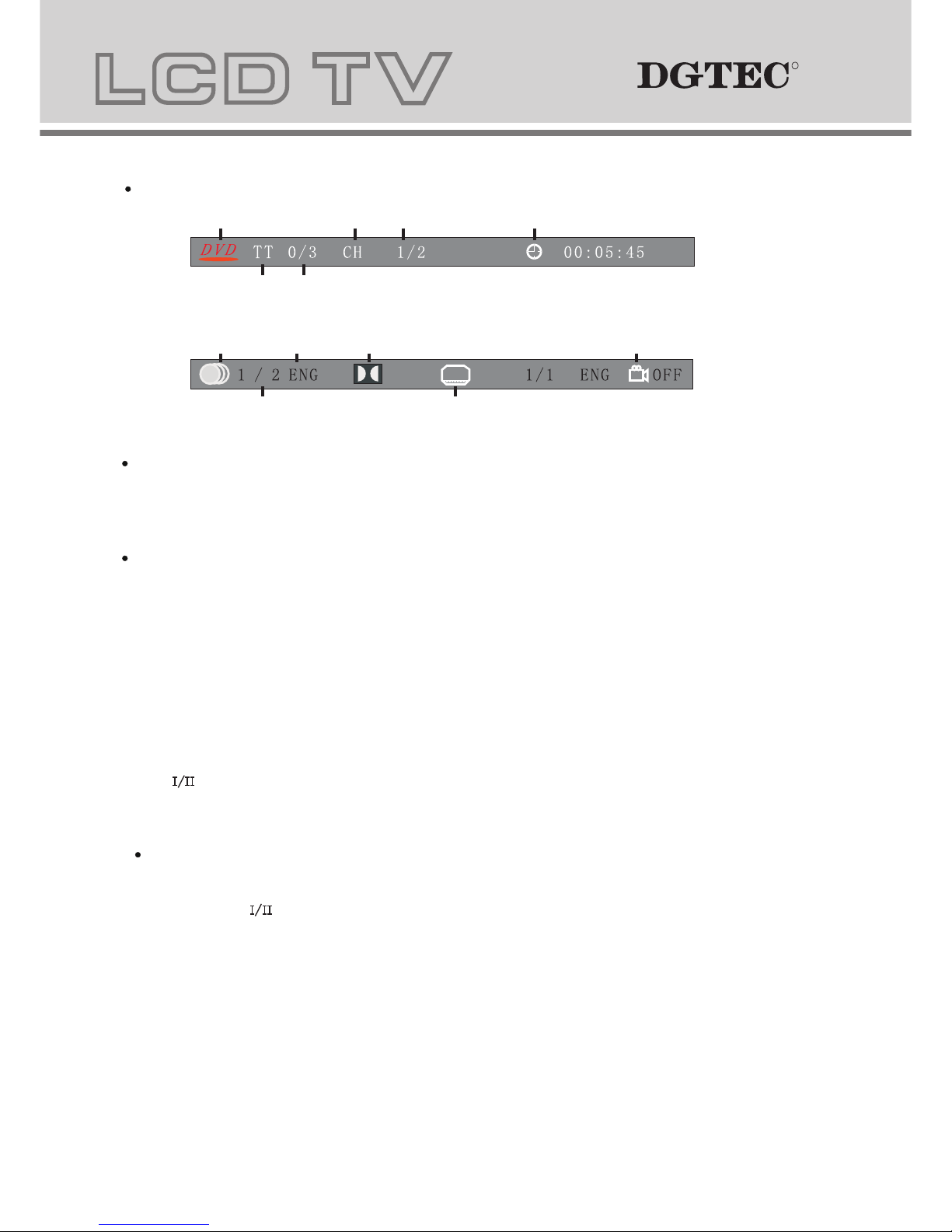
For DVD discs, Press INFO button once to display first page as shown below:
Press INFO button again to turn off the on screen display.
For Super VCD discs, Press INFO button once to display first page: Disc type, Track -/- (Current
/ Full), Mute status, PBC status, Repeat mode status, Current track time. Press INFO button again to
display second page:Audio-/--(Current/Full) or OFF, Audio type, Language, Subtitle-/-(Current/Full) or OFF.
Press INFO button again to turn off the on screen display.
For CD, CD-G, HD-CD, MP3 / JPEG discs, Press INFO button once to display first page: Disc type, Track
-/- (Current / Full), Mute status, Repeat mode status, Current track time.
- Press INFO button again to turn off the on screen display.
8. Goto (for DVD/ Super VCD/ VCD/ CD/ CD-G/HD-CD and Mp3/ JPEG discs)
- This function allows you to play your favourite Title / Chapter / track. Press GOTO button to activate the on
screen scroll- down menu for edit. Access the highlighted area, input your favourite Title / chapter /
Track number by using the numeric buttons or input the playback time. After editing, press OK to start. If the
input is invalid, it will not function.
9. AUDIO(For VCD/ CD/ CD-G/HD-CD and Mp3/ JPEG discs)
- Press again to toggle between different audio modes in sequence.
- Press button once to display current audio mode.
Note: Switching to Auto L / R audio channel may vary due to different disc contents. Bilingual VCD
discs can use button to switch between different languages.
Disc Type Chapter -/-(Current/Full) Elapsed disc time
Tiltle -/- (Current/ Full)
Press the INFO button again to display the second page shown below:
Audio Language Audio Type Angle ON/OFF
-/- (Current/ Full) or OFF Subtitle -/-(Current/Full)or OFF
For CD/VCD/MP3/HD-CD discs:(stereo/monoL/monoR)
10. Mute (for DVD/ Super VCD/ VCD/ CD/ CD-G/HD-CD and Mp3/ JPEG discs)
- Press MUTE button to mute the audio output. There will be an on screen symbol indicating “MUTE”.
-
- In case there is no audio output, press MUTE button to cancel mute.
11. Repeat A- B (for DVD/ Super VCD/ VCD/ CD/ CD-G/HD-CD and Mp3/ JPEG discs)
12. Volume (for DVD/ Super VCD/ VCD/ CD/ CD-G/HD-CD and Mp3/ JPEG discs)
- Press VOL+ / VOL - buttons to adjust the output volume.
RR
Page 23
222
10. Mute (for DVD/ Super VCD/ VCD/ CD/ CD-G/HD-CD and Mp3/ JPEG discs)
- Press MUTE button to mute the audio output. There will be an on screen symbol indicating “MUTE”.
-
- In case there is no audio output, press MUTE button to cancel mute.
Press again to cancel, or Press VOL+/VOL - to cancel and adjust the volume.
11. Repeat A- B (for DVD/ Super VCD/ VCD/ CD/ CD-G/HD-CD and Mp3/ JPEG discs)
12. Volume (for DVD/ Super VCD/ VCD/ CD/ CD-G/HD-CD and Mp3/ JPEG discs)
- Press VOL+ / VOL - buttons to adjust the output volume.
MP3/JPEG Playback MP3/JPEG Playback
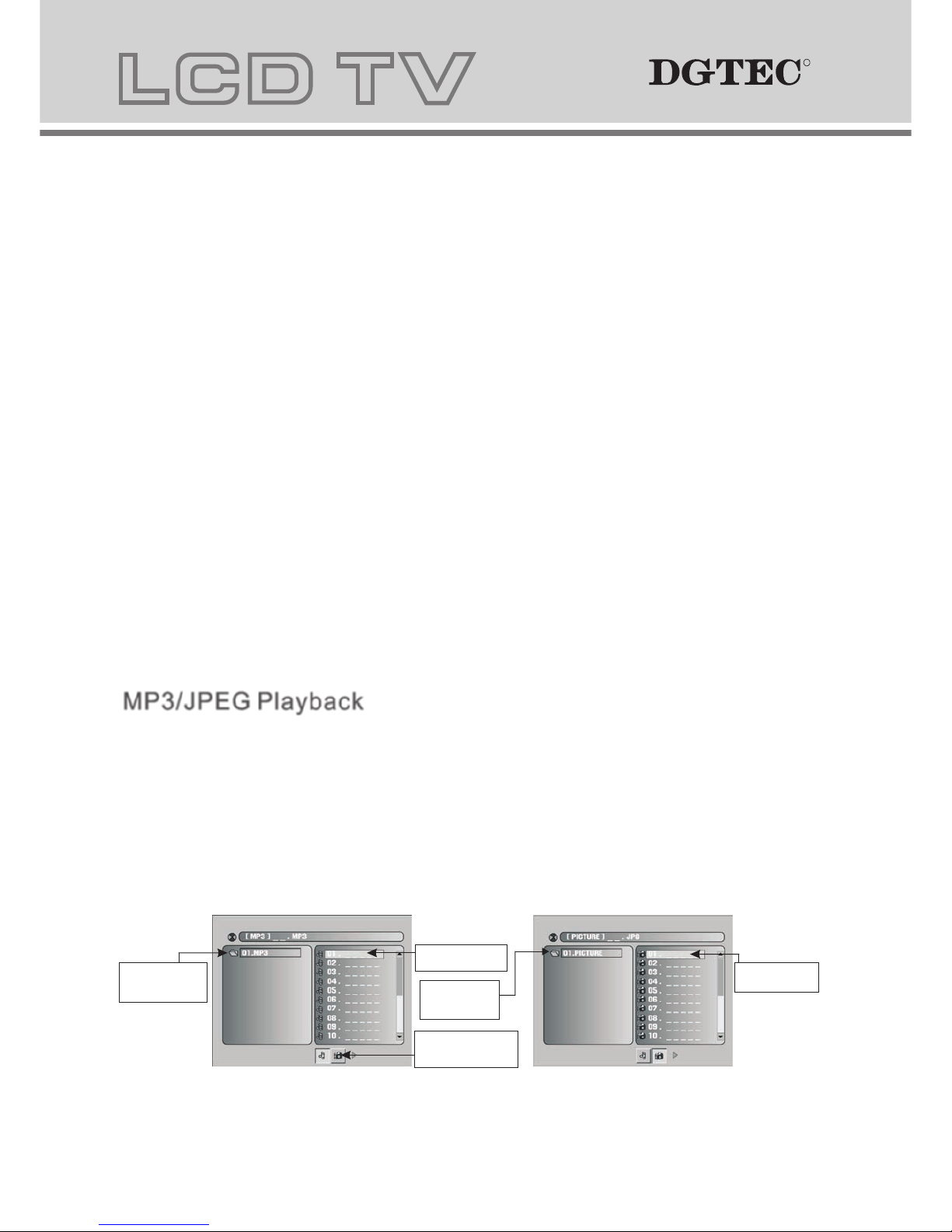
After loading the MP3 / JPEG disc, player will start to scan for the stored MP3 /JPEG folders.
It will display the MP3 content automatically and start to play the first file (highlighted file).
Depicted in screens below:
Display current
MP3 playback
function
Highlight file for
current playback.
Buttons for switching
between MP3 and JPEG
playback function.
Display current
MP3 playback
function
Scroll bar to view
next page.
When playing DVD ,VCD,CD disc,press A-B button to repeat chosen content.press A-B key on the start
point (A)and the ending point(B)to select the repeat portion.Press A-B for the third time to cancel the A-B repeat
function and return to normal play.
RR
Page 24
23
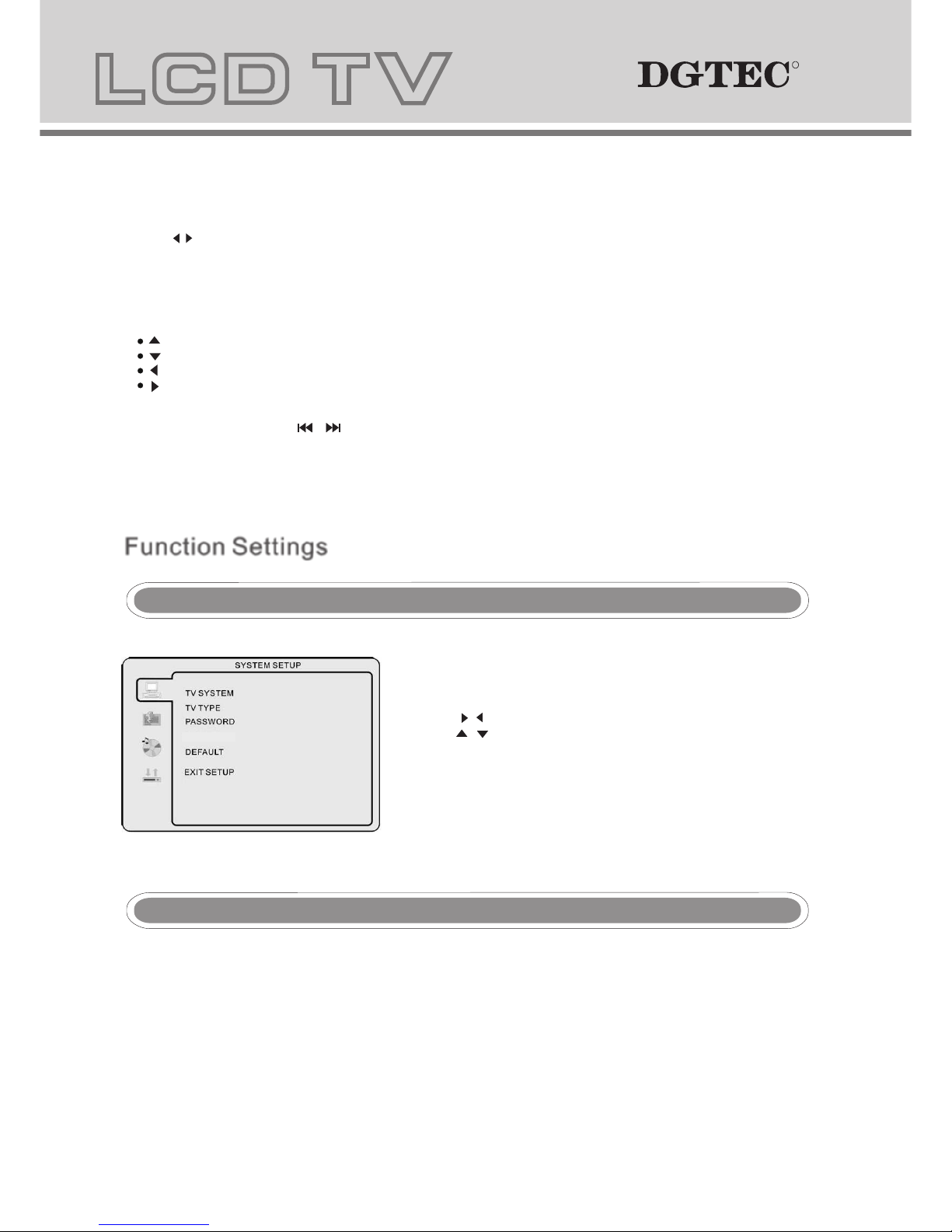
- Press the DVD setup button to activate the DVD player OSD
menu;
- Press the / buttons to move between the different sub-menus.
Press the / buttons to highlight the preferred
option, confirm with the OK button.
- Press the DVD setup button to exit the OSD menu, or move
to EXIT SETUP and press the OK button to exit.
NOTE:
- Press buttons to move the highlight to folders, documents or mode selections.
- Press numeric buttons to select the content directly. For number over 10, press -/-- button first. (e.g.
File number 15, press -/-- then 5.)
- With MP3 playback, there is no picture display, only audio output.
- When playing or pausing a picture , you may use navigation buttons to flip / rotate the picture.
button to flip horizontally.
button to flip vertically.
button to rotate left 90°.
Button to rotate right 90°.
- Play or pause with picture playback, you Use D.MENU button to enter preview mode to
display 12 pictures. Press / button to select next / previous page or press numeric buttons to view
the corresponding pictures.
- The maximum JPEG image size that can be displayed is 1280 x 1024.
Function Settings Function Settings
DVD Function General setup DVD Function General setup
NOTE: In Setup mode, the disc playback function will be cancelled or paused.
.
System Setup System Setup
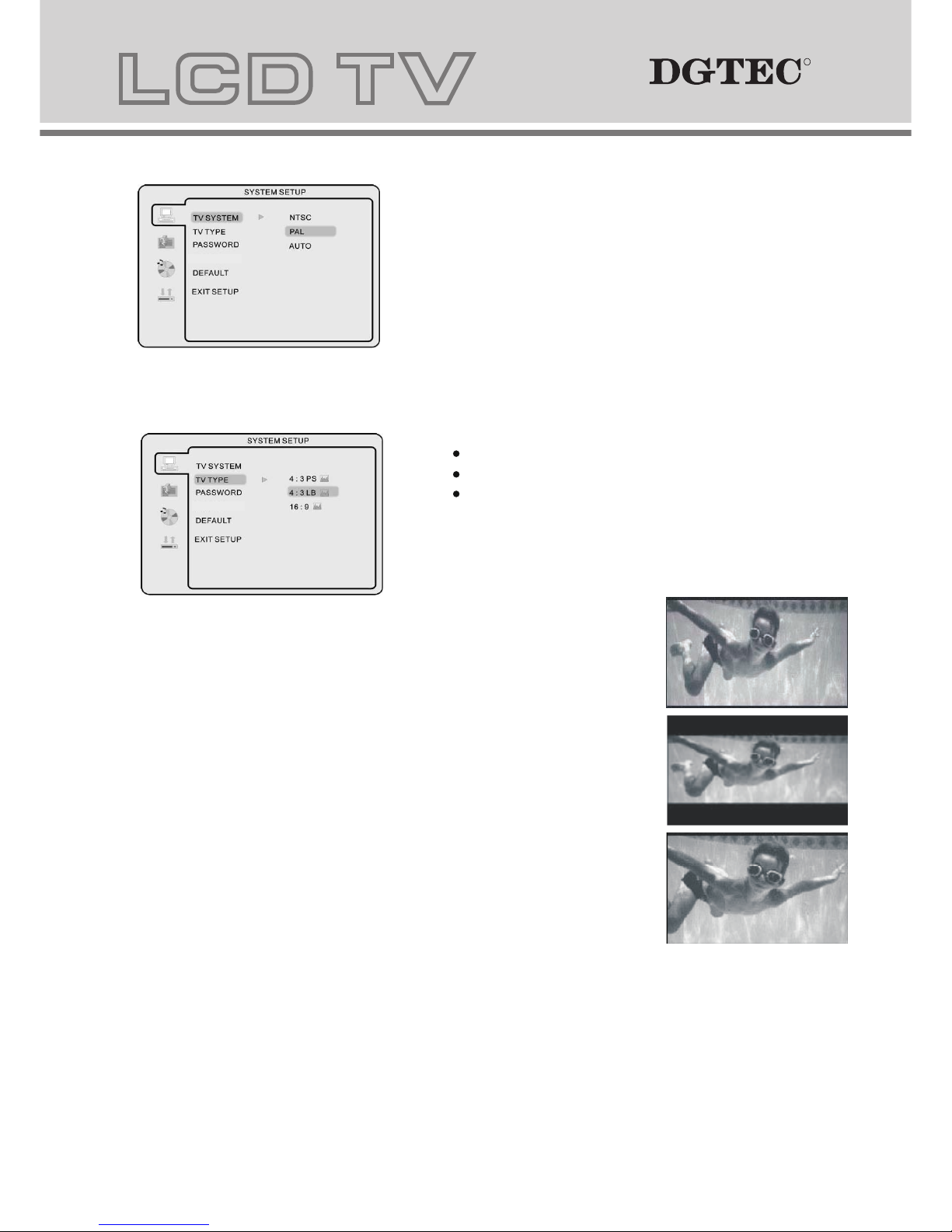
TV colour system
This menu enables you to set the picture format for your DVD.
NTSC
This format is used by some other countries, e.g. USA
PAL
This is the format used in Australia UK and the default setting.
AUTO
This format can be used if your TV/DVD is capable of both PAL and NTSC formats.
PARENTAL
TV Type
DVDs are produced in a variety of screen aspect ratios. This menu enables you to select one of the three aspect
ratios:
RR
Page 25
242
TV Type
DVDs are produced in a variety of screen aspect ratios. This menu enables you to select one of the three aspect
ratios:
4:3 PS (Normal)
4:3 LB (Normal)
16:9 (Wide)
- Select the most appropriate aspect ratio for the DVD being
viewed.
4:3PS (Normal)
Normal Pan and Scan is used for most normal television broadcasts and
is the default setting. It has an aspect ratio of 4:3. If you select this setting
when viewing a DVD the picture will fill the entire screen.
4:3LB (Normal)
Normal Letter Box will show the DVD in its original aspect ratio so depending
on the size of your television screen, you may see black borders above and
below the picture.
16:9 (Wide)
Choose this setting if you have a widescreen television.
NOTE:
- Playback screen size may vary according to the disc content.
- For discs with 4:3 content, using any mode would only display a 4:3 screen
- Screen ratio selection should be according to the connected TV / Display
aspect ratio.
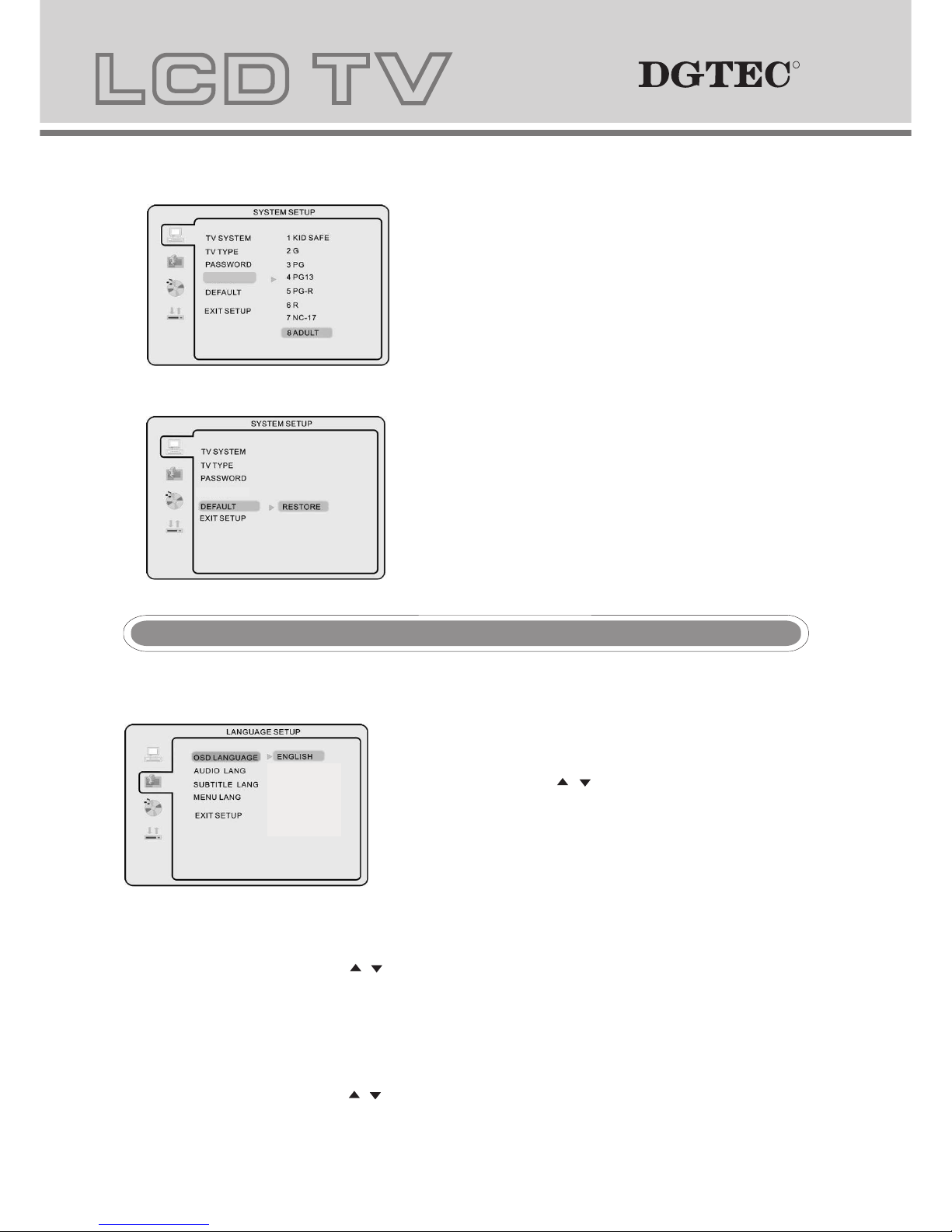
PassWord
- To make any rating change, access needs to be granted by entering in 0000 as the password.
- To change password, input any 4 digit number when the unit is unlocked. Once the 4 digit number is entered,
this will be your new password.
PARENTAL
- Discs with Parental settings can be set according to your preference.
PARENTAL restrictions is divided in eight different catagories from KID SAFE to ADULT.
PARENTAL
PARENTAL
RR
Page 26
25
Default Setting
NOTE: Only editable when password is unlocked, and
functional when password is locked.
- Press ok button to restore factory default.
Press SETUP button to enter the DVD OSD menu.
-
FRENCH/GERMAN/SPANISH
/
OSD Language
Use navigation buttons to select the OSD LANGUAGE setup
icon, press OK button to confirm. There are 5 languages
for your selection, press & buttons to toggle between
different languages ENGLISH/
DUTCH
NOTE: If the selected language is not included in you DVD disc
content, it will select the default language of the disc
automatically. The default language setting is English.
- Audio Language
Use navigation buttons to select the AUDIO LANG setup icon, press OK button to confirm. There are 5
languages for you selection, press & buttons to toggle between different languages. (ENGLISH / FRENCH/
SPANISH /GERMAN / ITALIAN). Press OK button to confirm.
NOTE: If the selected language is not included in you DVD disc content, it will select the default language of
the disc automatically. The default language setting is English.
- Subtitle Language
Use navigation buttons to select the SUBTITLE LANG setup icon, press OK button to confirm. There are 5
languages for you selection, press & buttons to toggle between different languages. (ENGLISH / FRENCH/
SPANISH /GERMAN / ITALIAN/OFF) . Press OK button to confirm.
Language Setup Language Setup
PARENTAL
PARENTAL
FRENCH
SPANISH
GERMAN
ITALIAN
NOTE: If the selected language is not included in you DVD disc content, it will select the default language
of the disc automatically. The default language setting is English.
MENU Language
Tone
- Use & buttons to adjust the Tone setting.
Audio out
- Use & buttons to adjust the Audio out setting.
RR
Page 27
26
NOTE: If the selected language is not included in you DVD disc content, it will select the default language
of the disc automatically. The default language setting is English.
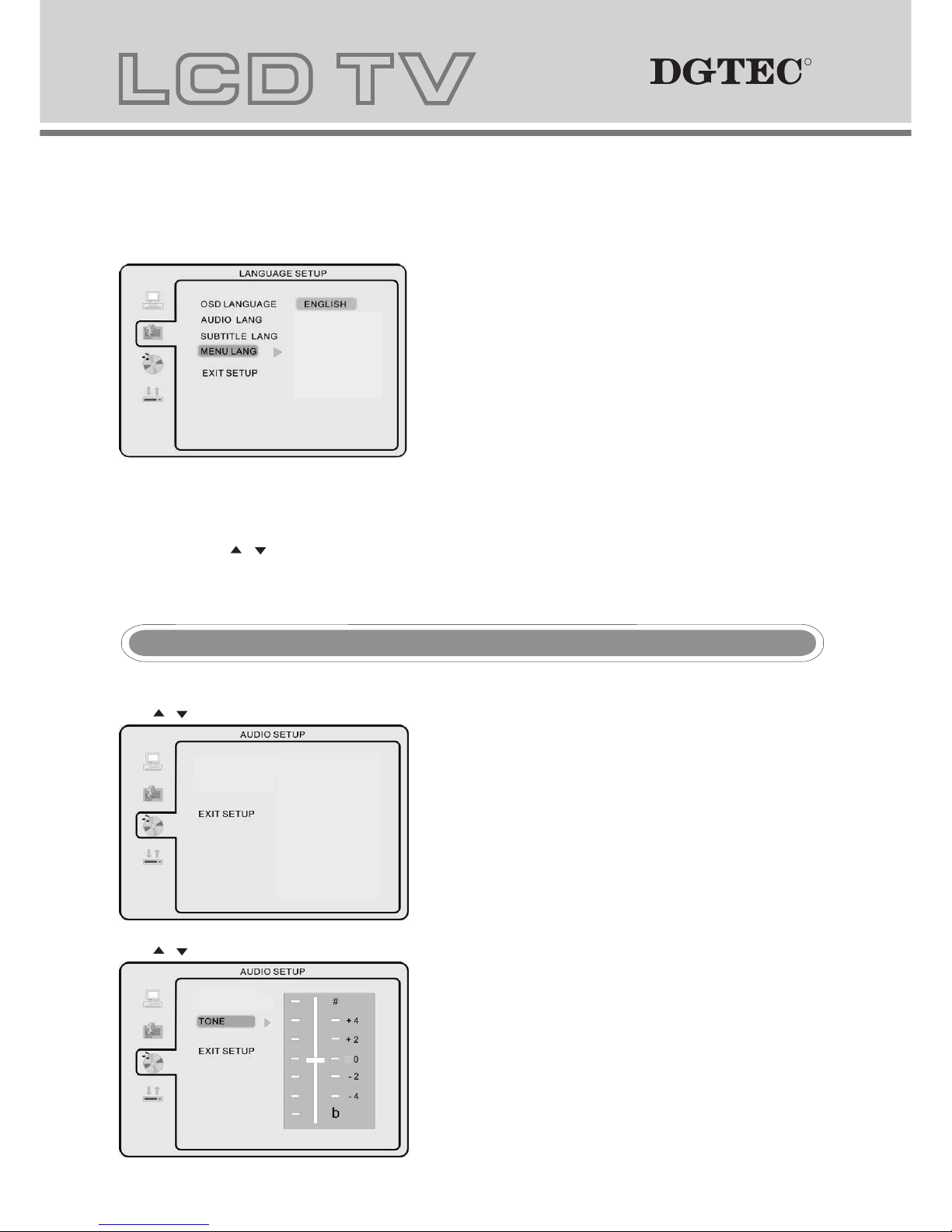
MENU Language
- Use navigation buttons to select the MENU LANG setup icon,
press OK button to confirm. There are 5languages for your
selection, press & buttons to toggle between different
languages.
Press OK button to confirm.
Audio SetupAudio Setup
Tone
- Use & buttons to adjust the Tone setting.
Audio out
- Use & buttons to adjust the Audio out setting.
AUDIO OUT
TONE
AUDIO OUTAUDIO OUT
SPDIF/OFF
SPDIF/RAW
SPDIF/PCM
FRENCH
SPANISH
GERMAN
ITALIAN
RR
Page 28
27
Dolby Digital SetupDolby Digital Setup
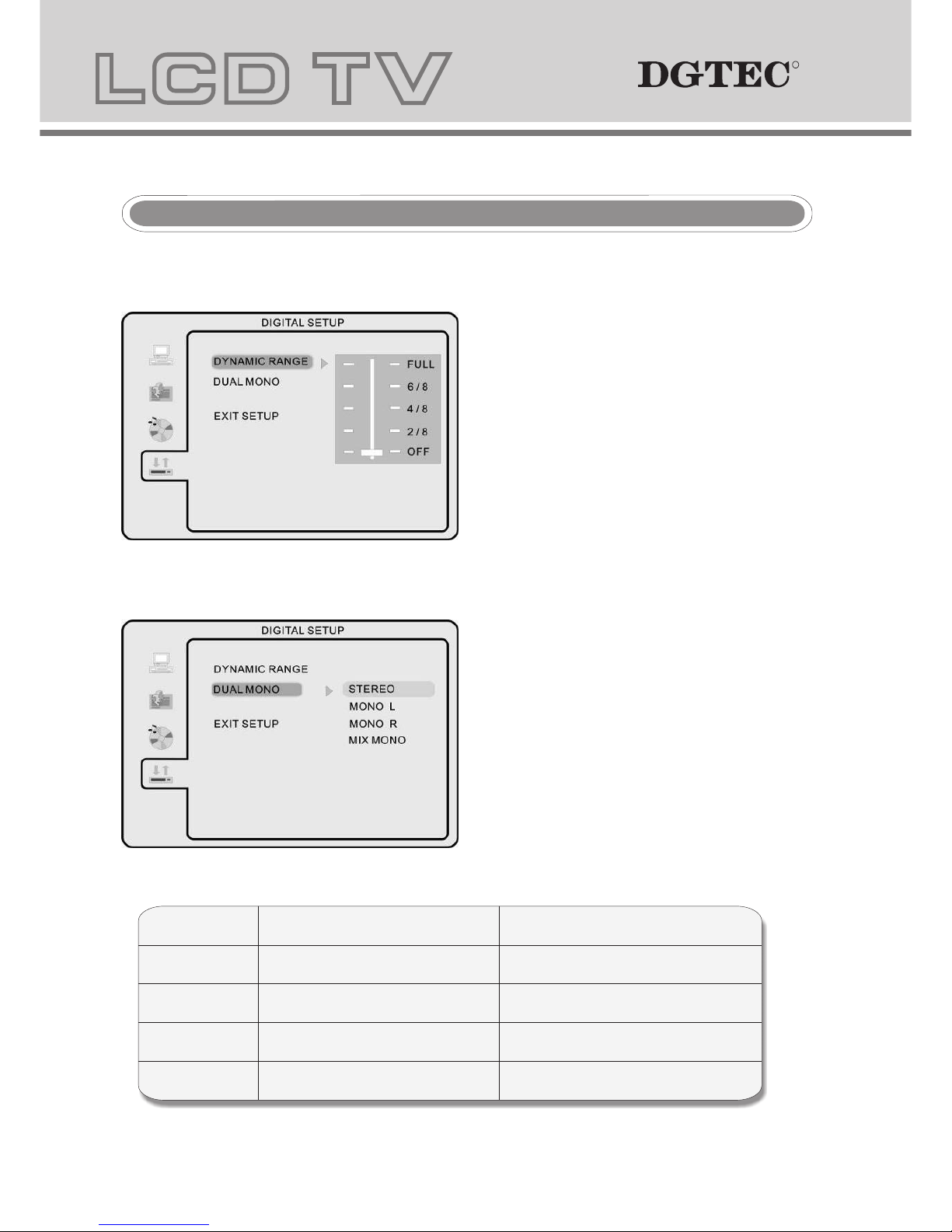
Dynamic Range
- When switching the compressed mode to “Audio output”,
adjust switching from the compress ratio for different
effect. When selecting FULL, the peak signal value
is smallest. When selecting OFF, the peak signal
value is biggest.
Dual Mono
- You can select four different audio outputs, STEREO,
MONO L, MONO R, MIX MONO. The audio out
description of these Selections is shown in the table
below.
MODE LEFT SPEAKER RIGHT SPEAKER
STEREO STEREO-L STEREO-R
L-MONO L-MONO L-MONO
R-MONO R-MONO R-MONO
MIX-MONO L-MONO+R-MONO L-MONO+R-MONO
Trouble shootingTrouble shooting
Before contacting the service technician, perform the following simple checks. If any problem still persist,
please contact DGTEC technical support on 1800 189 941.
RR
Page 29
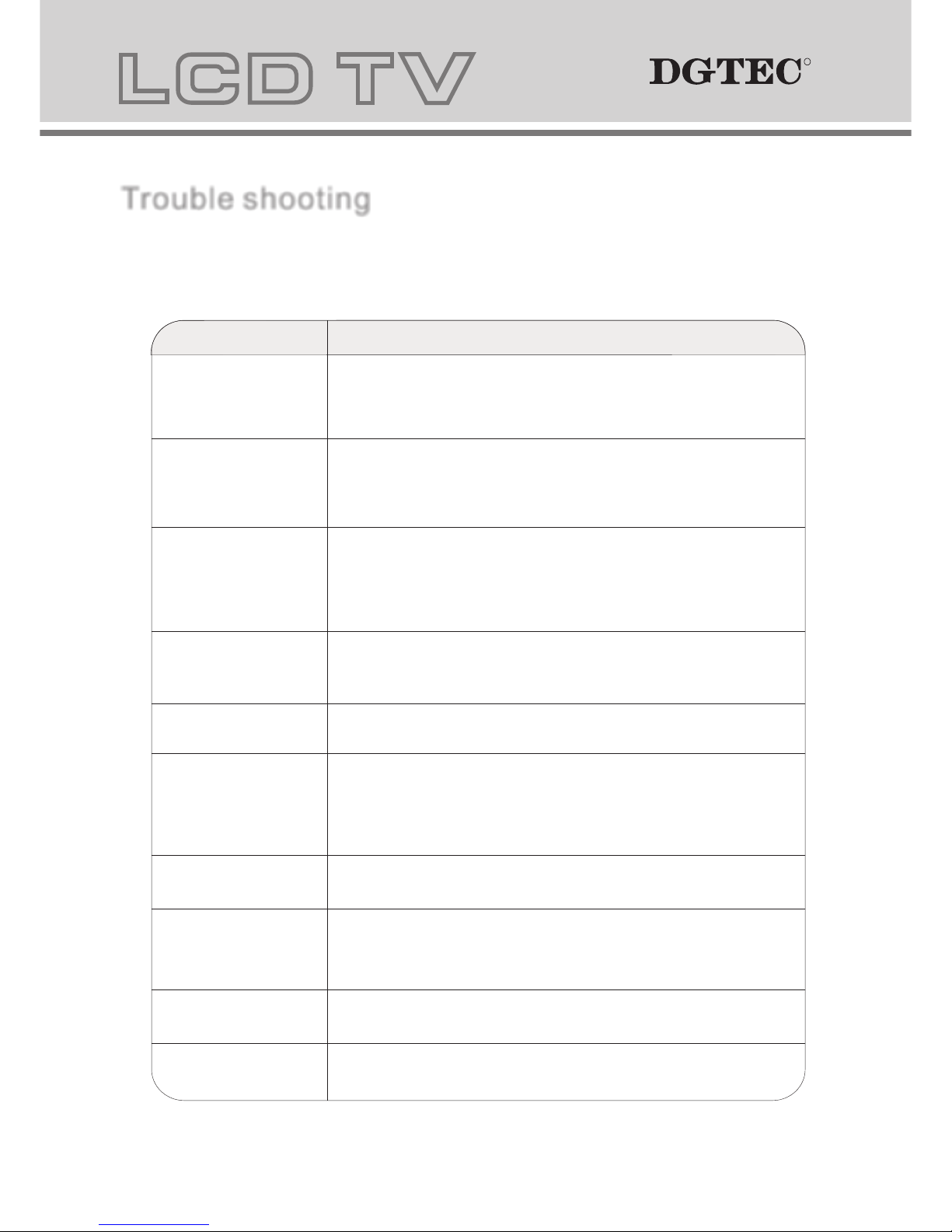
28
Trouble shootingTrouble shooting
Before contacting the service technician, perform the following simple checks. If any problem still persist,
please contact DGTEC technical support on 1800 189 941.
No sound and picture
PROBLEM POSSIBLE SOLUTIONPROBLEM POSSIBLE SOLUTION
- Check that the main plug has been connected to the mains.
- Check that you have switched the toggle switch on the back to ON.
- Check the picture contrast and brightness settings.
Normal picture but no
sound
- Check the volume.
- Sound muted? Press the MUTE button.
- Try another channel the problem may be with the broadcast.
- Are the audio cables installed properly.,
The remote control does
not work
- Ensure there is no obstructing object between RCU and sensor on LCD.
- Are batteries installed with correct polarity(+ to +,- to -).
- Correct remote operating mode set: TV, VCR etc.?
- Install new batteries
Power is suddenly turned
off
- Is the sleep timer set.
- Check the power control settings. Power interrupted.
Picture appears slow
after switching on
- This is normal, the image is muted during the product startup process. Please
contact your service centre if the picture has not appeared after five minutes.
No color or poor picture
- Adjust the colour in menu option.
- Keep sufficient distance between the product and the VCR.
- Try another channel, the problem may be with the broadcast.
- Are the VIDEO cables installed properly?
- Activate any function to restore the brightness of the picture.
Horizontal/vertical bars
or picture shaking
- Check for local interference such as an electrical appliance or power tools.
Poor reception on some
channels
- Channel signal is weak, recheck antenna on roof.
- Check for sources of possible interference.
Lines or streaks in pictures
- Check the antenna(Change the direction of the antenna).
No output from one of the
speaker
- Adjust balance in menu option.
RR
Page 30
29
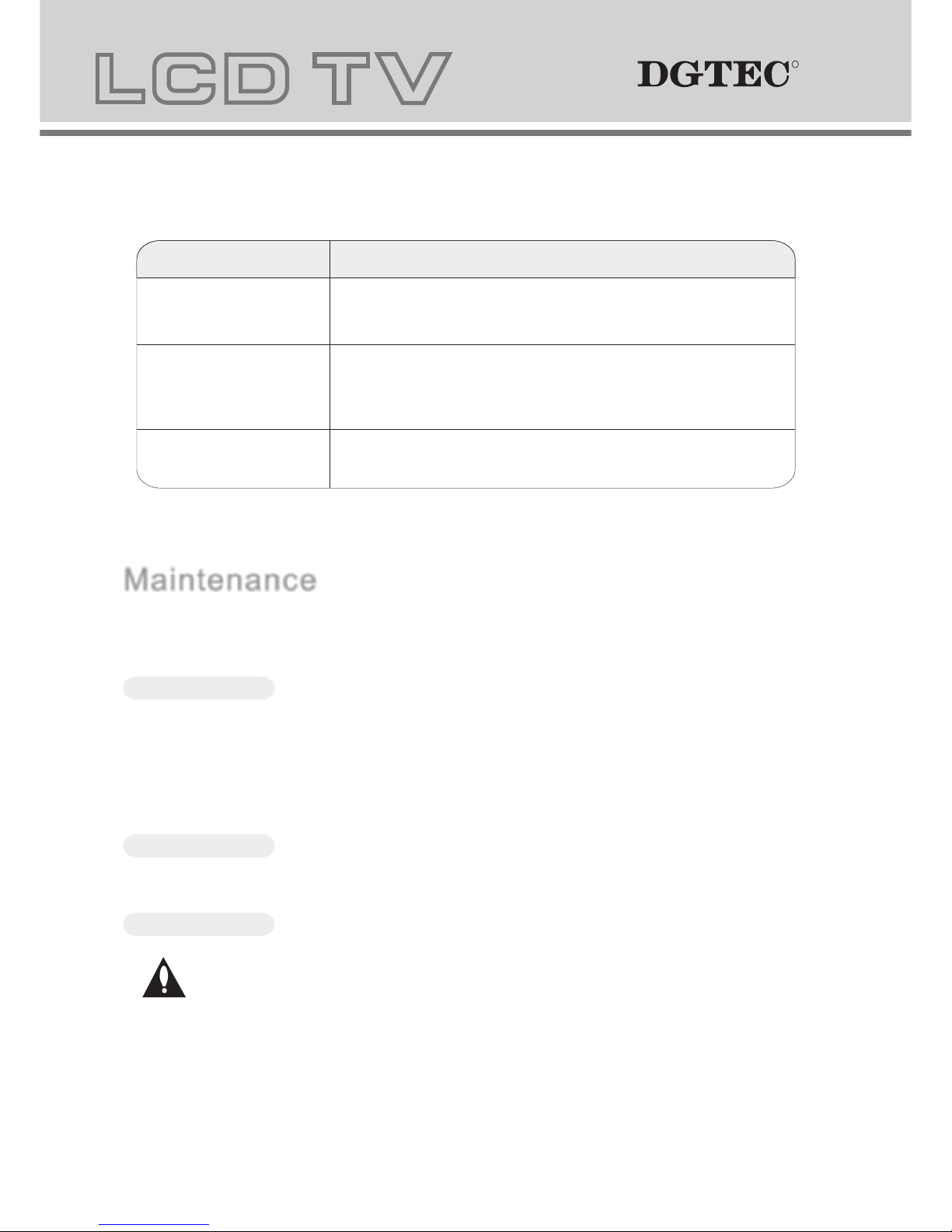
NOTE: The troubleshooting suggestions below apply only when LCD is set to VGA mode.NOTE: The troubleshooting suggestions below apply only when LCD is set to VGA mode.
PROBLEM POSSIBLE SOLUTIONPROBLEM POSSIBLE SOLUTION
The signal is out of range.
- Adjust resolution, horizontal frequency, or vertical frequency.
- Check whether the signal cable is connected or loose.
- Check the input source.
Vertical bar or strip in
background/Horizontal
noise incorrect positioning.
- Work the auto configure or adjust clock, phase, or H/V position.
Screen colour is unstable
or single colour.
- Check the signal cable.
- Reinstall the PC video card.
MaintenanceMaintenance
Careful and regular cleaning can extend the life span of the product. Be sure to turn the power off and
unplug the power cord before you begin any cleaning.
Cleaning the screenCleaning the screen
1. Here’ s a great way to keep the dust off your screen . Wet a soft cloth in a mixture of lukewarm
water and a little fabric softener or dish washing detergent. Wring the cloth until it’s almost dry, and then
use it to wipe the screen.
2. Make sure the excess water is off the screen, and then let it air-dry before you turn it back on your TV.
Cleaning the cabinetCleaning the cabinet
To remove dirt or dust, wipe the cabinet with a soft, dry, lint-free cloth. Please be sure not to use a wet cloth.
Extended AbsenceExtended Absence
If you expect to leave your TV dormant for a long time(going away on holidays), it’s a good idea to
unplug the power cord to protect against possible damage from lightning or power surges.
Specifications
RR
Page 31
30
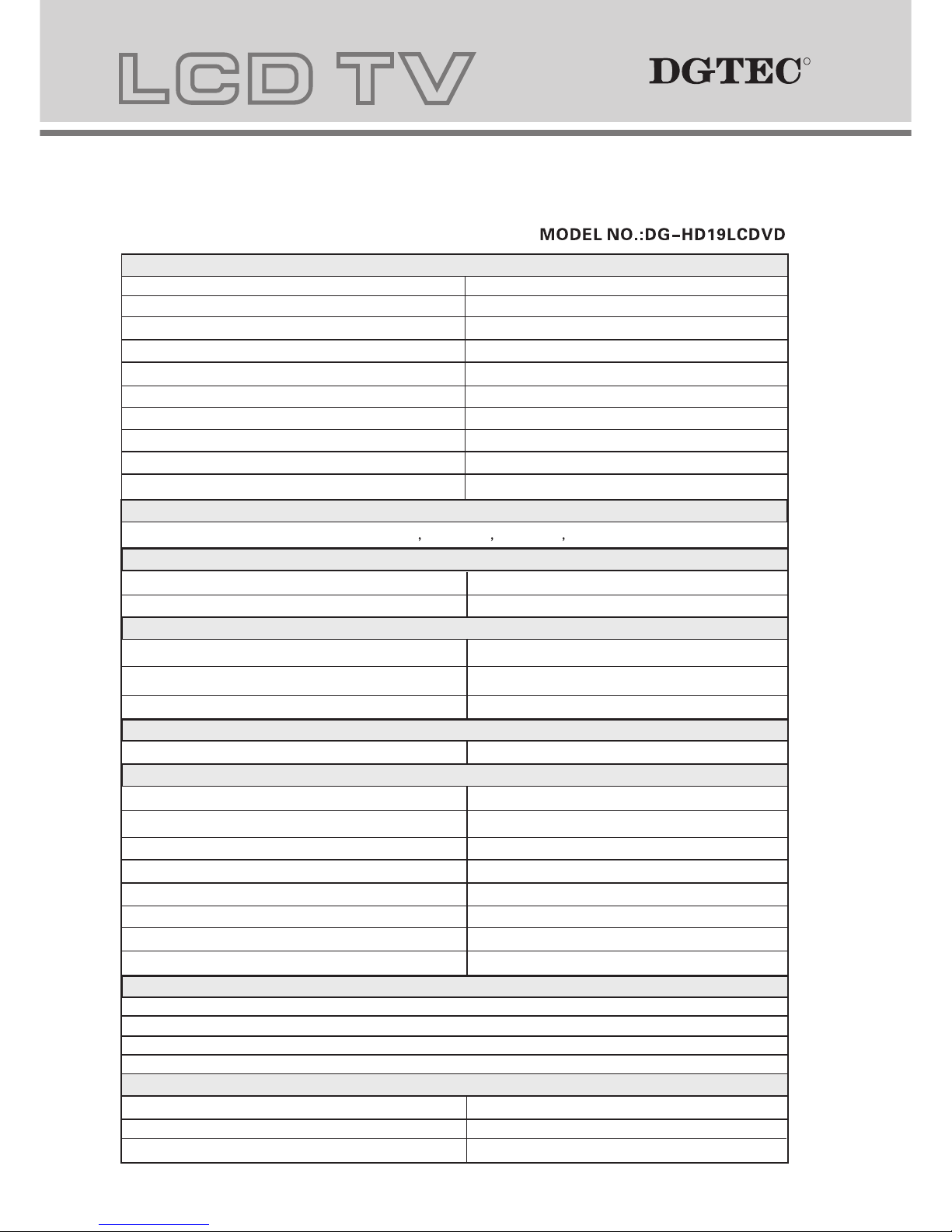
Specifications
Panel Features
Screen Size
19 inch
Active Area
408mm(H) X 255mm(V)
Aspect Ratio
16:10
Panel Resolution
1440 X 900
Brightness
300 cd/m²
Contrast Ratio
700:1
Viewing Angle
170º(H) X 160º (V)
Dot Pitch
0.283mm(H) X 0.283mm(V)
Maximum Colour
16.7M
Response Time Black-White (R&D) 8ms
OSD Languages
TV Function
Broadcast System
PAL/SECAM/DVB-T
Receiving Channel
Video Standards Supported
NTSC / PAL / SECAM
NTSC / PAL / SECAM
S-Video Input
Composite Video input
Antenna (RF)
Audio Output
Maximum Audio Output
Input Connections
TV Input (Analogue TV Antenna)
1 (RF - 75 Ohm)
VGA Input
1 (15 pin D-Sub)
AV Input
L+R Audio Input(For YPBPR,S-Video)
1 (21 pin SCART)
1 (White RCA,Red RCA)
PC Audio in
Stereo Mini Phono Jack Input (3.5mm)
VGA Resolutions Supported
640x480 @ 60Hz
800x600 @ 60Hz
1024x768 @ 60Hz
Power
2 (3W, 4 Ohm)
1440x900@ 60Hz
PAL / SECAM/DVB-T
B/G,D/K/I
YPBPR Input 1 Composite(Yelow RCA)
HDMI Input
1 (19 pin )
S-VIDEO 1 (4 pin DIN)
English, French Spanish German Italian
Power
Power Consumption
TV Power Input
< 60W
DV 12V 5A
AC 100V - 240V~ 50 / 60Hz
RR
Page 32
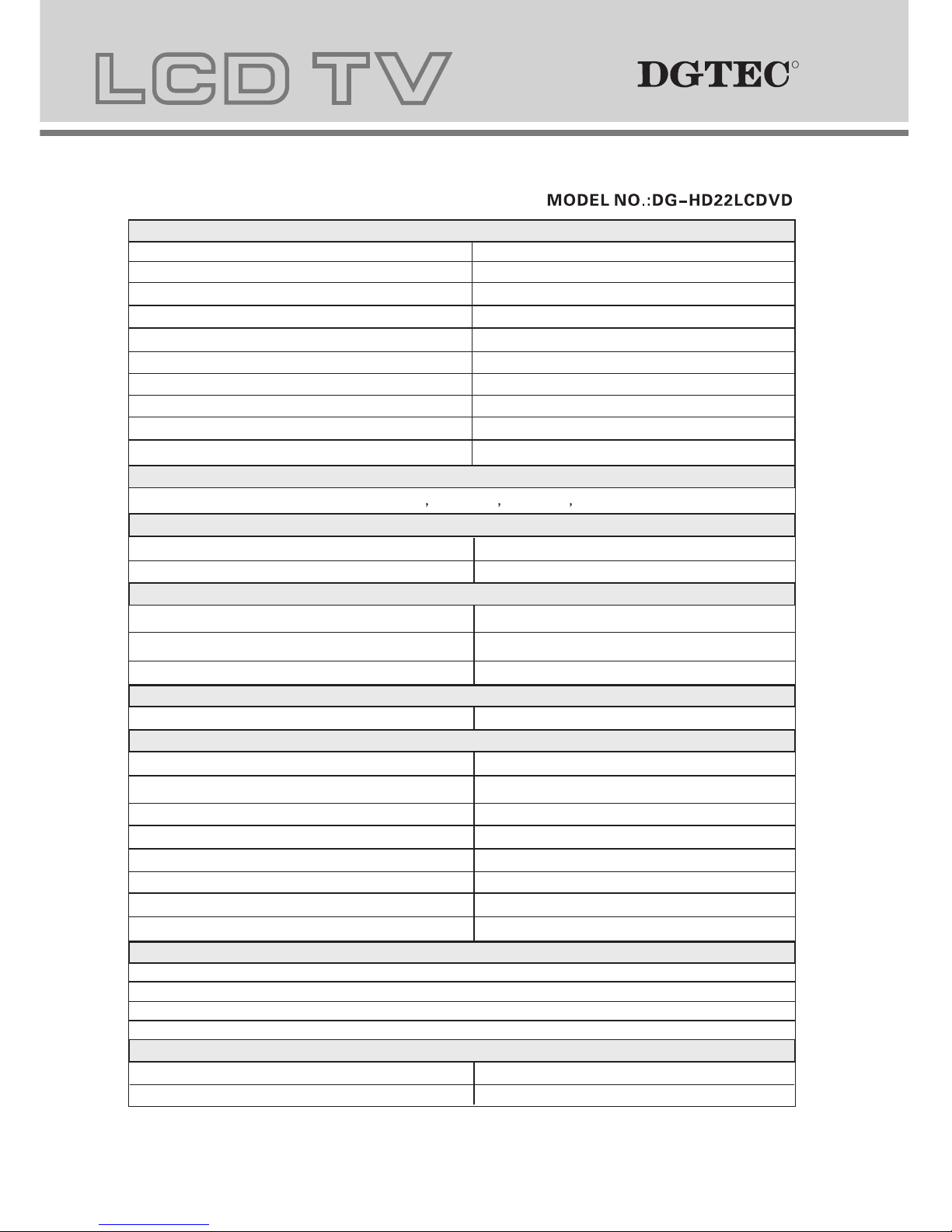
Panel Features
Screen Size
22 inch
Active Area
473.76mm(H) X 296.1mm(V)
Aspect Ratio
16:10
Panel Resolution
1680 X 1050
Brightness
300 cd/m²
Contrast Ratio
700:1
Viewing Angle
170º(H) X 160º (V)
Dot Pitch
0.282mm(H) X 0.282mm(V)
Maximum Colour
16.7M
Response Time Black-White (R&D) 5ms
OSD Languages
TV Function
Broadcast System
PAL/SECAM/DVB-T
Receiving Channel
Video Standards Supported
NTSC / PAL / SECAM
NTSC / PAL / SECAM
S-Video Input
Composite Video input
Antenna (RF)
Audio Output
Maximum Audio Output
Input Connections
TV Input (Analogue TV Antenna)
1 (RF - 75 Ohm)
VGA Input
1 (15 pin D-Sub)
AV Input
L+R Audio Input(For YPBPR,S-Video)
1 (21 pin SCART)
1 (White RCA,Red RCA)
PC Audio in
Stereo Mini Phono Jack Input (3.5mm)
VGA Resolutions Supported
640x480 @ 60Hz
800x600 @ 60Hz
1024x768 @ 60Hz
Power
2 (3W, 4 Ohm)
1680x1050@ 60Hz
PAL / SECAM/DVB-T
B/G,D/K/I
YPBPR Input 1 Composite(Yelow RCA)
HDMI Input
1 (19 pin )
S-VIDEO 1 (4 pin DIN)
English, French Spanish German Italian
Power
Power Consumption
< 72W
AC 100V - 240V~ 50 / 60Hz
31
RR
Page 33
 Loading...