

Page 1
TECHNICAL BULLETIN TB-3061
Body Voltage Monitor
Installation, Operation and Maintenance
ANSI/ESD S20.20 section 7.3 states “Compliance verification
records shall be established and maintained to provide
evidence of conformity to the technical requirements.”
Per ANSI/ESD S1.1 Annex A.3 Daily (wrist strap system)
testing may be omitted if constant monitoring used.” Per
ESD Handbook ESD TR 20.20 section 5.3.2.4.4 “Typical
Test programs recommend that wrist straps that are used
daily should be tested daily. However, if the products that
are being produced are of such value that knowledge of a
continuous, reliable ground is needed, and then continuous
monitoring should be considered or even required.”
Packaging
1 Body Voltage Monitor
1
Figure 1. Desco 19241 Body Voltage Monitor
Description
The Desco Body Voltage Monitor is a single station
continuous monitor for one operator, one ESD worksurface
and one tool ground. A second monitored jack is featured for
use by a supervisor or second operator.
The Body Voltage Monitor uses Dual-Channel Voltage
Monitoring Technology for true continuous monitoring (versus
pulsed or intermittent). The Dual-Channel Voltage Monitoring
Technology uses one lead of the dual-wire wrist strap to
provide a path-to-ground for the operator while the other lead
continuously monitors for voltage induced onto the operator
greater than ±3 VDC. Voltage on the operator can be caused
by strong AC fields in the work area or by other charge
generators such as rolling a non-ESD safe chair.
Power Adapter, 5VDC, North America
1 Mat Monitor Cord (White)
1 Tool Monitor Cord (White)
1 Monitor Ground Cord (Green and Yellow)
1 Washer
1 Flat Head Screw, 6-32 thread
1 Alligator Clip
1 Ring Terminal
1 Mounting Bracket
2 Pan Head Screws, #8 x 3/4"
1 Certificate of Calibration
Made in the
United States of America
The Body Voltage Monitor has a second monitored jack for a
supervisor or a second operator if needed at the workstation.
An optional tool ground can be used to monitor the ground
integrity of a conductive tool or fixture less than 3 Ohms.
Each Body Voltage Monitor is calibrated with accepted
procedures and standards traceable to the National Institute
of Standards and Technology (NIST) and includes a NIST
certificate.
DESCO WEST - 3651 Walnut Avenue, Chino, CA 91710 • (909) 627-8178
TB-3061 Page 1 of 4
DESCO EAST - One Colgate Way, Canton, MA 02021-1407 • (781) 821-8370 • Website: Desco.com
February 2019
© 2019 DESCO INDUSTRIES INC
Employee Owned
Page 2
Features and Components
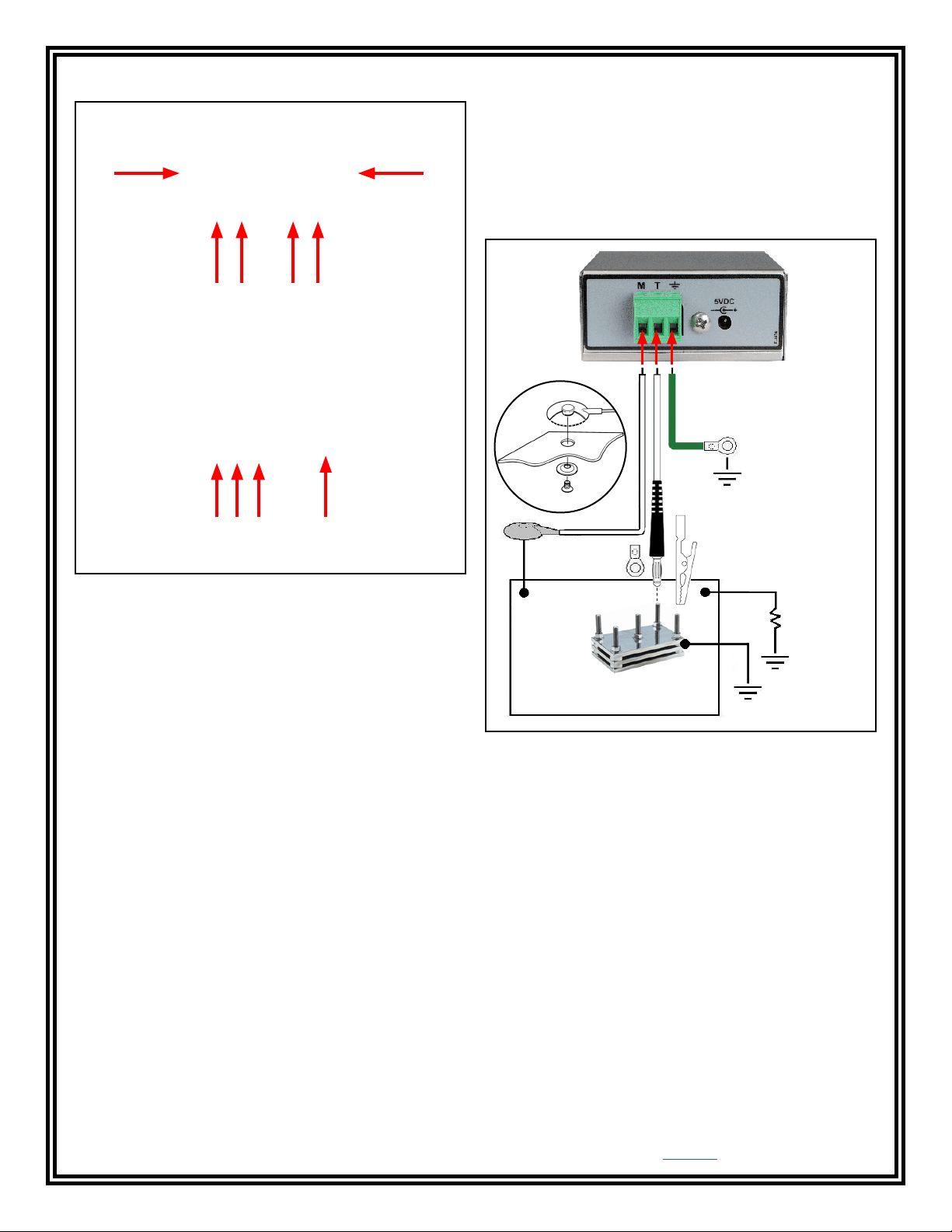
H. Monitored Tool Terminal: Monitors a grounded metal
tool fixture. Connect the white tool monitor cord here.
I. Ground Terminal: Common ground point for the monitor.
Connect the green and yellow monitor ground cord here.
A B
C D E F
FRONT VIEW
G H I J
REAR VIEW
Figure 2. Body Voltage Monitor features and
components
A. Monitored Operator Jack: The operator connects to the
monitor here.
B. Monitored Supervisor Jack: The supervisor or second
operator connects to the monitor here.
J. Power Jack: Connect the included 5VDC power adapter
here.
Installation
Monitor Ground
Cord
Tool Monitor Cord
Mat Monitor
Cord
1 megohm
resistor
Metal Tool
Worksurface
Fixture
C. Operator LED: When the LED is illuminated green, the
operator is properly grounded. When the LED is illuminated
Figure 3. Installing the Body Voltage Monitor
red and the alarm sounds, the operator is not properly
grounded.
D. Mat LED: When the LED is illuminated green, the
worksurface mat is properly grounded. When the LED is
illuminated red and the alarm sounds, the worksurface mat is
not properly grounded.
E. Tool LED: When the LED is illuminated green, the tool is
properly grounded. When the LED is illuminated red and the
alarm sounds, the tool is not properly grounded.
F. Supervisor LED: When the LED is illuminated green, the
supervisor is properly grounded. When the LED is illuminated
1. Remove the monitor from the carton and inspect for
damage.
NOTE: All Body Voltage Monitors are packaged with a
wire shorting the tool terminal to the ground terminal.
This is to prevent the tool circuit from alarming when not
in use.
2. Determine the mounting location of the Body Voltage
Monitor. The front panel should be visible to the
operator. Use the included mounting bracket and #8 pan
head screws if desired.
red and the alarm sounds, the supervisor is not properly
grounded.
G. Monitored Mat Terminal: Monitors a worksurface mat for
proper dissipative resistance and static charges. Connect the
white mat monitor cord here.
DESCO EAST - One Colgate Way, Canton, MA 02021-1407 • (781) 821-8370 • Website: Desco.com
DESCO WEST - 3651 Walnut Avenue, Chino, CA 91710 • (909) 627-8178
TB-3061 Page 2 of 4
© 2019 DESCO INDUSTRIES INC
Employee Owned
Page 3
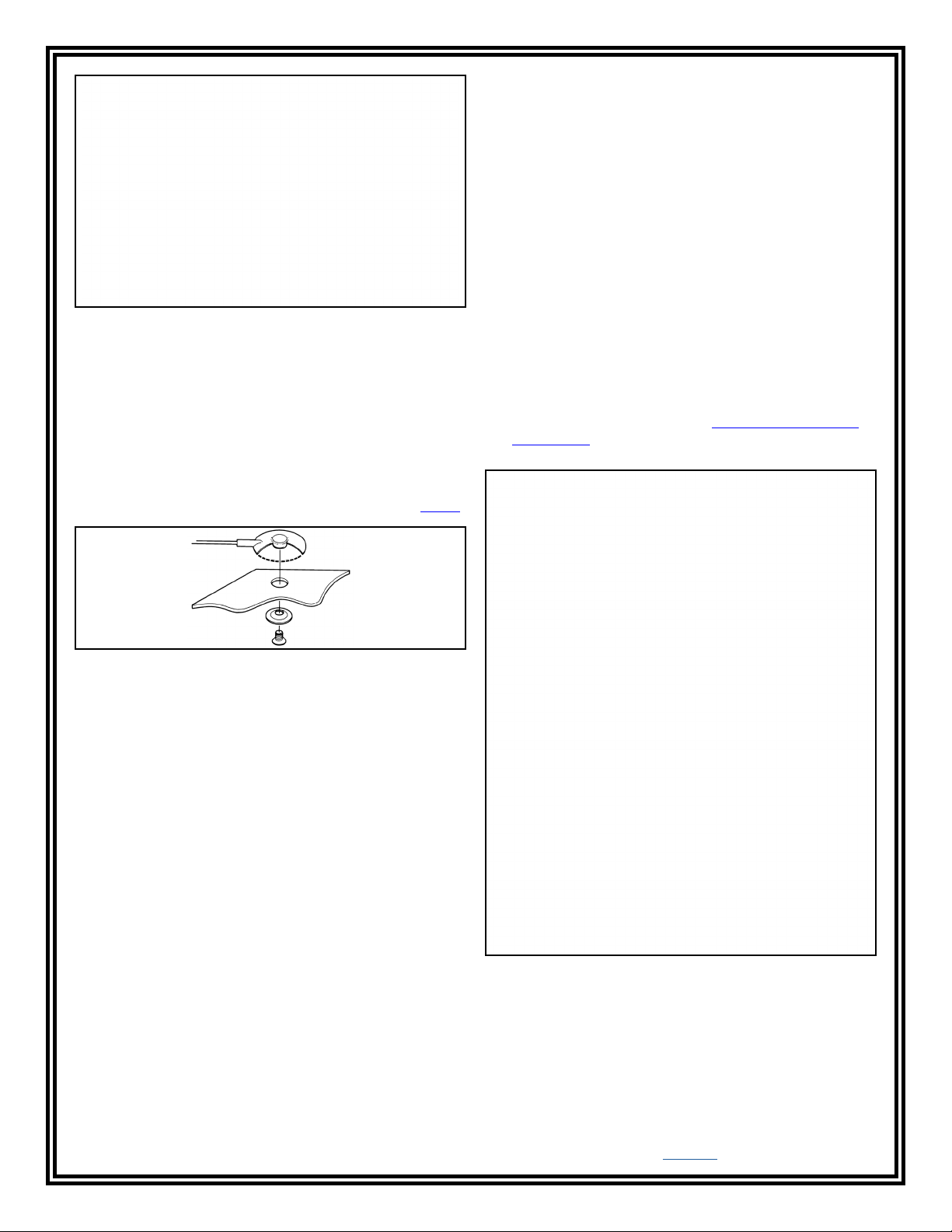
Figure 4. Body Voltage Monitor with included mounting
bracket
NOTE: Worksurface must have a conductive layer such as
Dual Layer Rubber or Dissipative 3-Layer Vinyl or Micastat®
Dissipative Laminate with conductive buried layers. Desco
continuous monitors are not recommended for use with
homogeneous matting.
Operation
USING THE MONITOR
1. Fit the wristband snugly onto your wrist.
2. Snap the wrist cord to the wristband.
3. Plug the wrist cord into the monitored jack labeled
“OPR”. The corresponding operator LED will illuminate
solid green. This indicates that the operator is properly
grounded.
3. Attach the tinned wire end of the mat monitor cord to its
appropriate terminal block connection located on the
back of the monitor.
4. If this does not happen, examine the wrist cord for
continuity or damage and your wristband to ensure that it
fits securely. If you have dry skin, apply an approved
dissipative hand lotion such as Menda Reztore® ESD
4. Route the mat monitor cord from the back of the monitor
Hand Lotion.
to the worksurface mat. Use the included washer and
screw to secure the cord to the mat (see Figure 5). The
worksurface mat requires its ground cord to have an
embedded 1 megohm resistor such as the Desco 09813.
Figure 5. Screw allows ground cord to be bolted to mat
to keep cord from disconnecting
5. Attach the tinned wire end of the included ground cord to
the appropriate terminal block connection on the back of
the monitor. Attach the ring terminal end to a ground
point. It is important that this ground cord is attached to
a different ground point than that of the worksurface mat.
The face plate screw of a grounded AC wall outlet may
provide a convenient connection point.
6. If applicable, attach the tinned wire end of the tool
monitor cord to the appropriate terminal block connection
on the back of the monitor. The included alligator clip
or ring terminal may be applied to the banana plug for a
secure connection to the grounded metal tool fixture that
you choose to monitor.
7. Connect the DC power supply to the power jack located
on the back of the monitor. Route the wire from the
supply to a nearby AC outlet and plug it into the outlet.
Make sure the voltage and frequency match those listed
on the power supply. The monitor is now powered.
DESCO WEST - 3651 Walnut Avenue, Chino, CA 91710 • (909) 627-8178
DESCO EAST - One Colgate Way, Canton, MA 02021-1407 • (781) 821-8370 • Website: Desco.com
TB-3061 Page 3 of 4
Figure 6. Using the Body Voltage Monitor
© 2019 DESCO INDUSTRIES INC
Employee Owned
Page 4

Specifications
Operating Voltage 5 VDC
Operating Temperature 32°F - 104°F (0 - 40°C)
Monitor Dimensions 2.4" x 2.7" x 1.2"
(6.1cm x 6.9cm x 3.0cm)
Monitor Weight 0.4 lbs (0.2 kg)
DEFAULT TEST VOLTAGES
Operator (Open Circuit) < 0.5 V
Worksurface (Open Circuit) < 1.5 V
Tool (Open Circuit) < 0.5 V
DEFAULT TEST LIMITS
Operator Fail: > ±3 VDC
Alarm Accuracy ±1 VDC
Worksurface Low Fail: < 450 kilohms
Pass: 500k - 5M
High Fail: > 5.5 megohms
Tool Pass: 0 - 2 ohms
Fail: > 3 ohms
Limited Warranty, Warranty Exclusions, Limit
of Liability and RMA Request Instructions
See the Desco Warranty -
Desco.com/Limited-Warranty.aspx
TB-3061 Page 4 of 4
DESCO EAST - One Colgate Way, Canton, MA 02021-1407 • (781) 821-8370 • Website: Desco.com
DESCO WEST - 3651 Walnut Avenue, Chino, CA 91710 • (909) 627-8178
© 2019 DESCO INDUSTRIES INC
Employee Owned
Page 5

Mouser Electronics
Authorized Distributor
Click to View Pricing, Inventory, Delivery & Lifecycle Information:
Desco:
19241
 Loading...