

Page 1
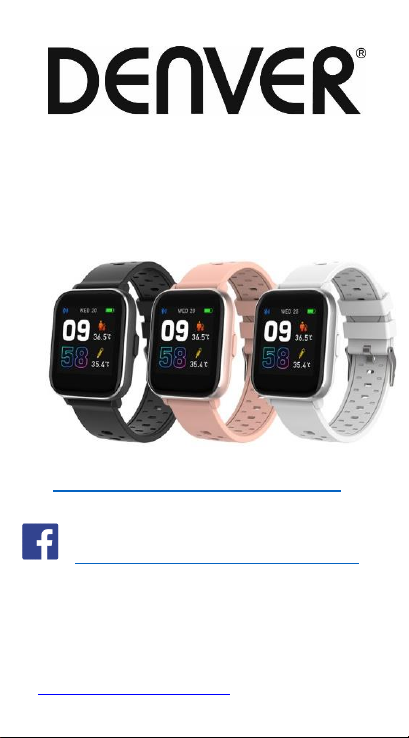
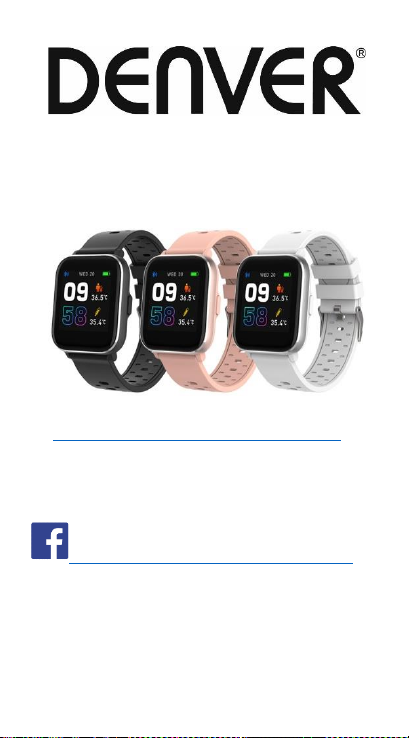
SW-164 SMARTWATCH
User’s Guide
www.denver-electronics.com
www.facebook.com/denverelectronics
ENGLISH
lf the user manual is not printed in your local language,
then please enter our website to see if it is found
online under the model you have.The website address
is: www.denver-electronics.com
Page 2

Page 3
1. Quick start guide
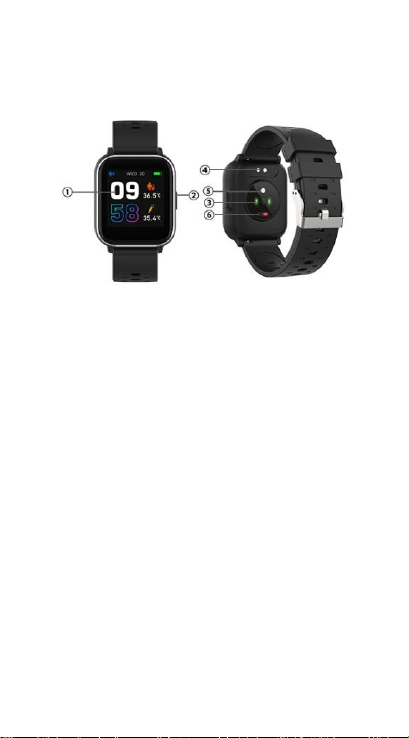
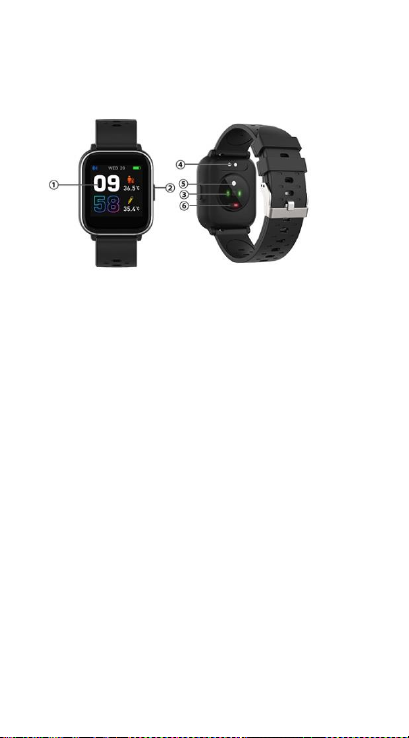
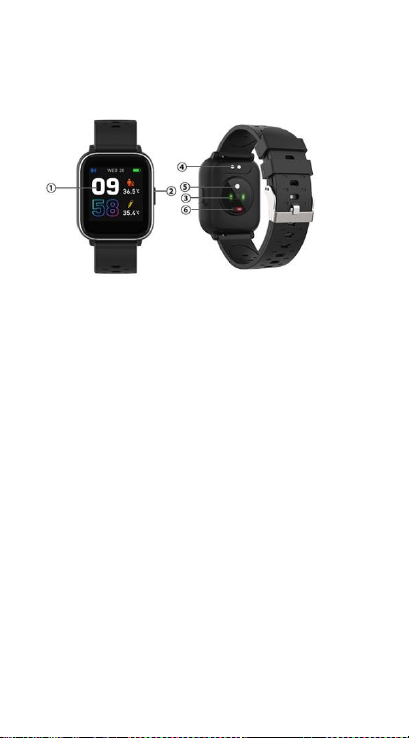
Overview
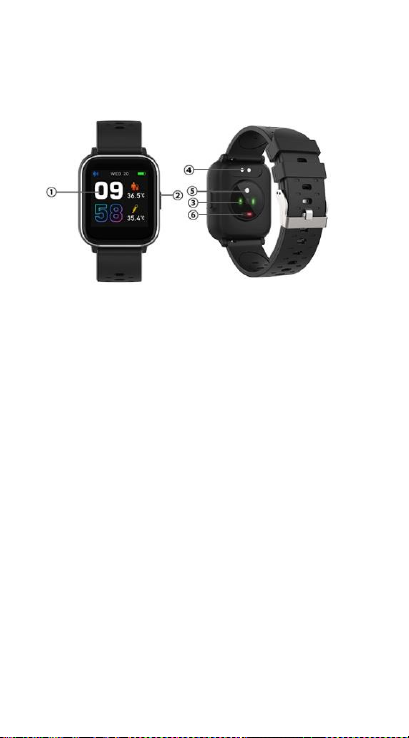
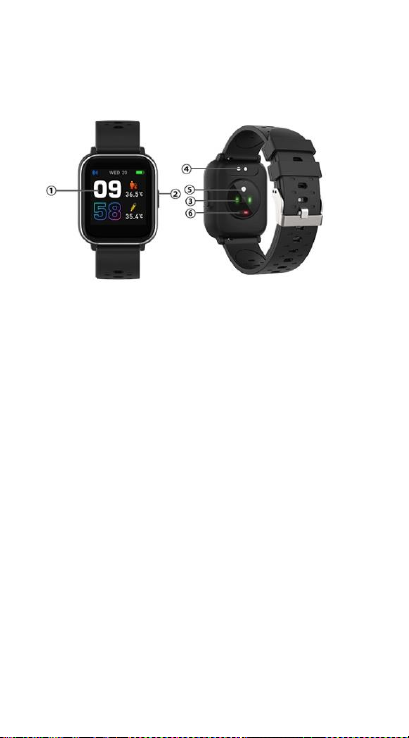
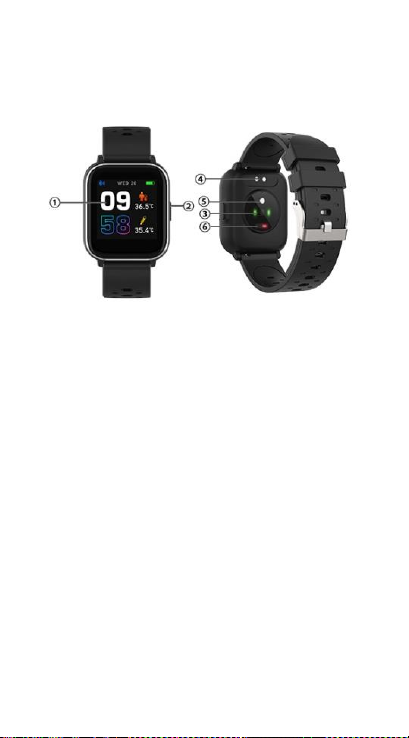
1. Touch screen
2. Function button
3. Heart rate sensor
4. Charging plate
5. Temperature sensor
6. Blood oxygen sensor
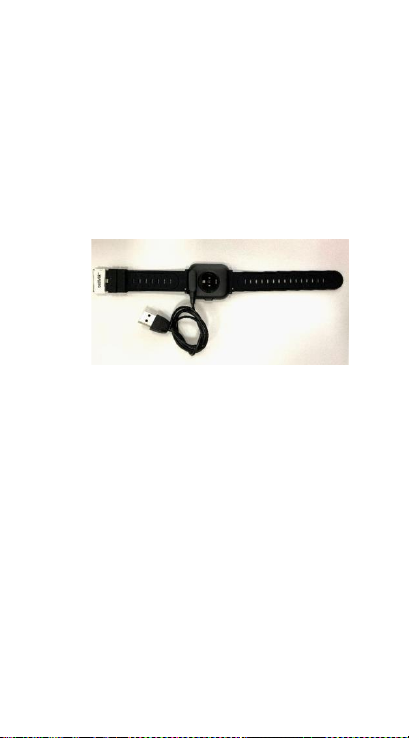
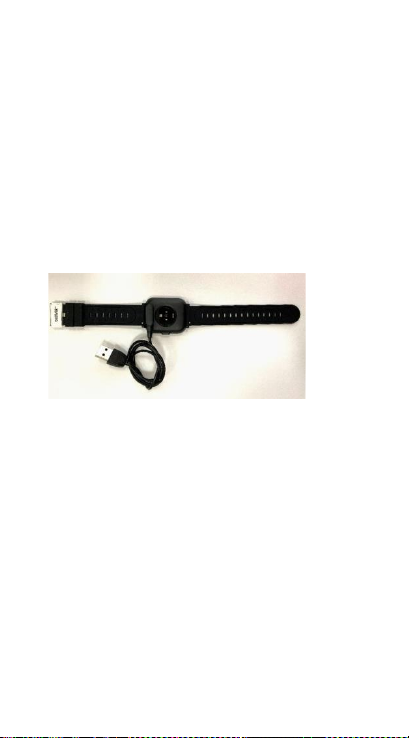
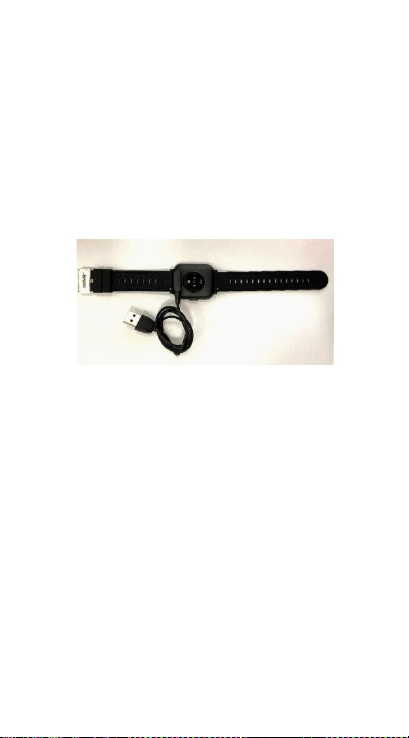
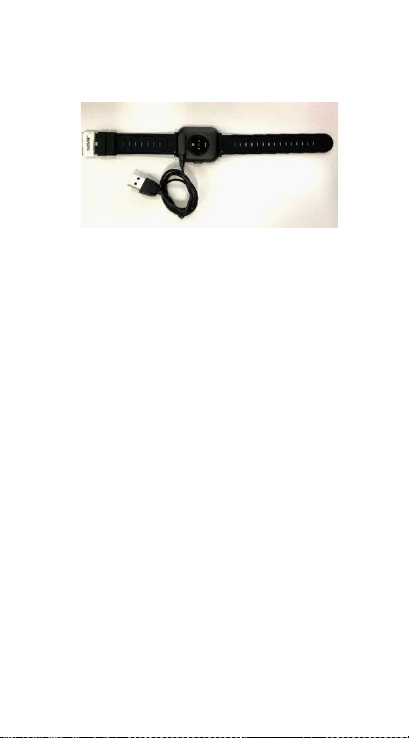
To charge the smart watch,
connect the charging clip of
the USB cable to the
charging plate on the back
ENG-1
Page 4
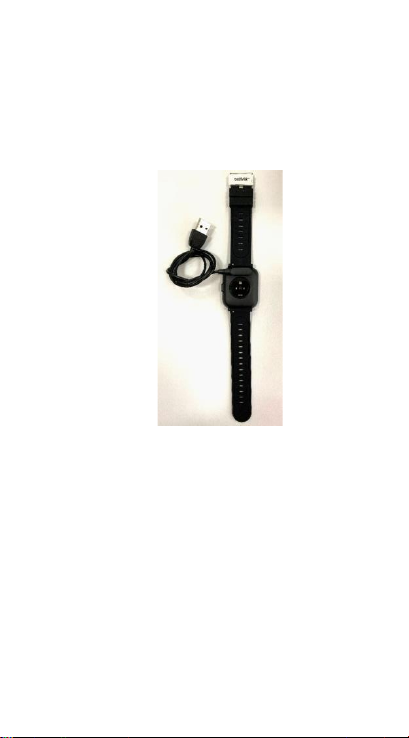
of the smart watch. If
successfully connected, the
charging icon appears on
the screen.
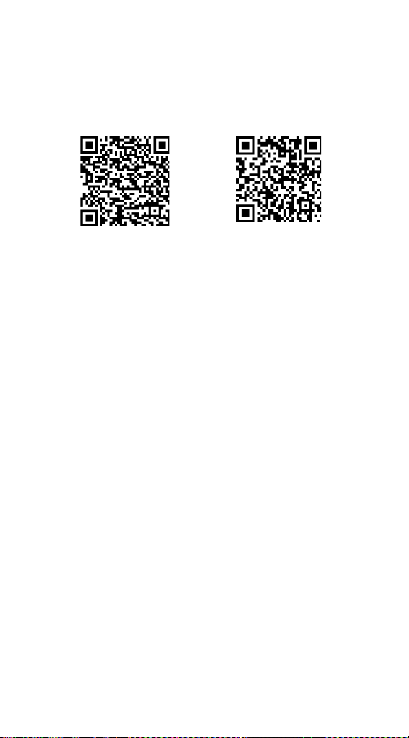
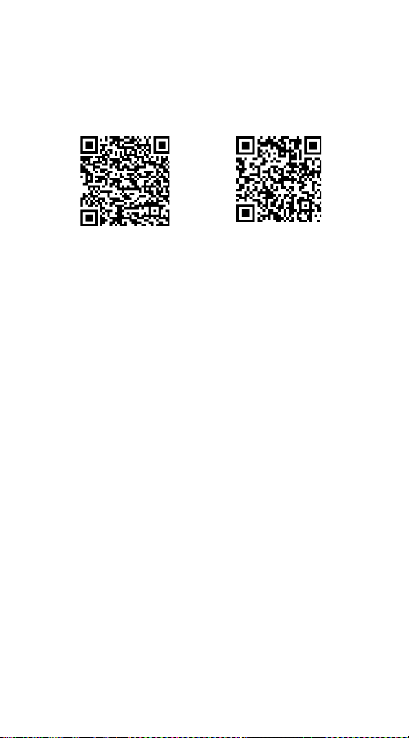
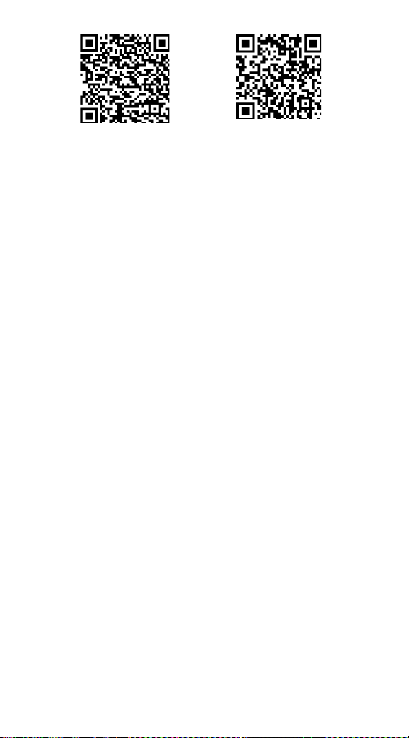
Install “Denver Smart
Home” app on the phone
Search and install the
“Denver Smart Home” app
from Google Play or App
Store. Or scan the following
ENG-2
Page 5
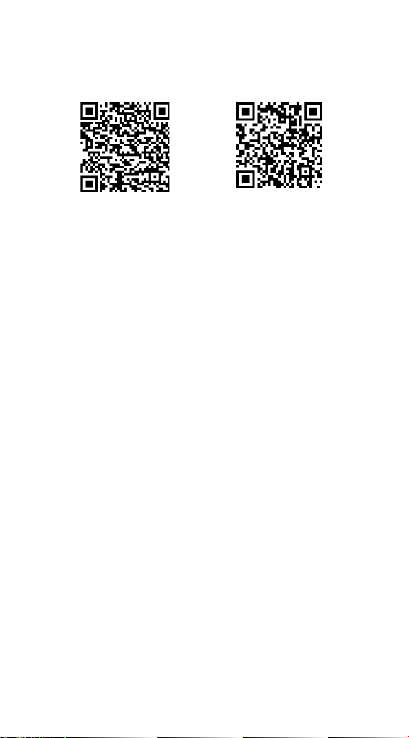
QR code to directly install
the app.
Android IOS
Connect the smart watch
with mobile phone
1. Turn on Bluetooth on
your mobile phone.
2. Tap the icon of DENVER
SMART HOME app to
open it.
3. Add device.
4. Auto scan your smart
watch and then pair.
Unbind the smart watch
with mobile phone
1. Open the “Denver Smart
ENG-3
Page 6

Home” app on your
smart phone.
2. Long press your device.
3. Remove your device.
Operation introduction
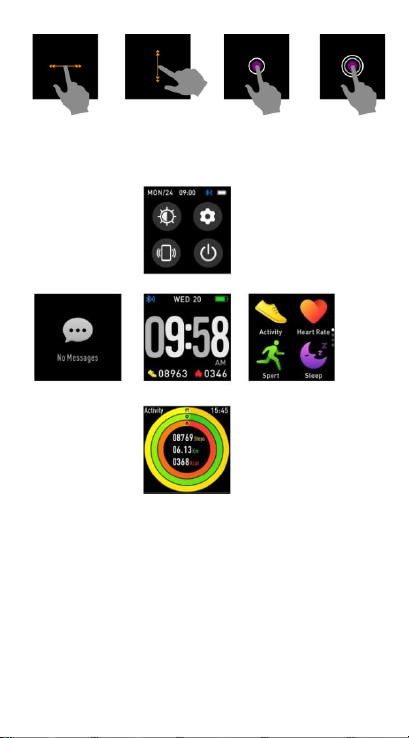
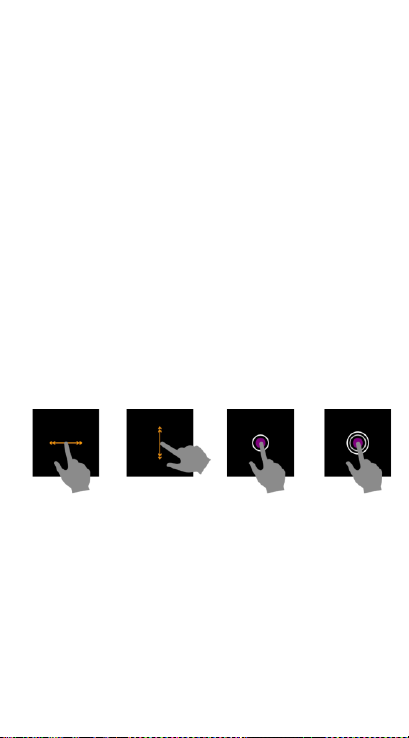
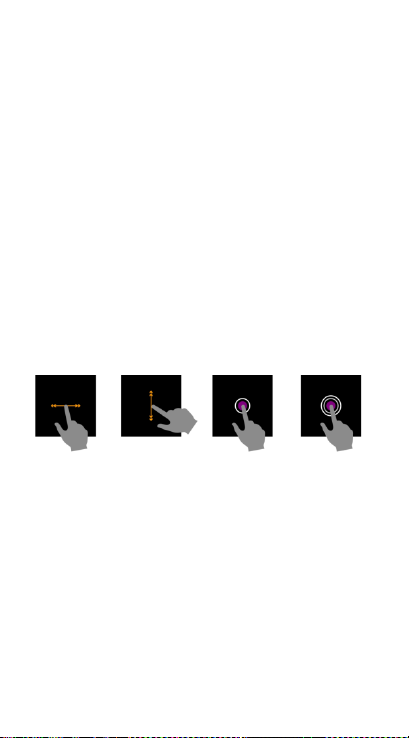
⚫ You can raise your hand
or press the function
button to light the
screen.
⚫ Press and hold the
watch face screen, then
slide up or down to
change the watch face.
⚫ Press and hold the
function button to turn
on the smart watch
when powered off.
ENG-4
Page 7

2. How to use
⚫ Turn on: Press and hold
the function button for 3
seconds.
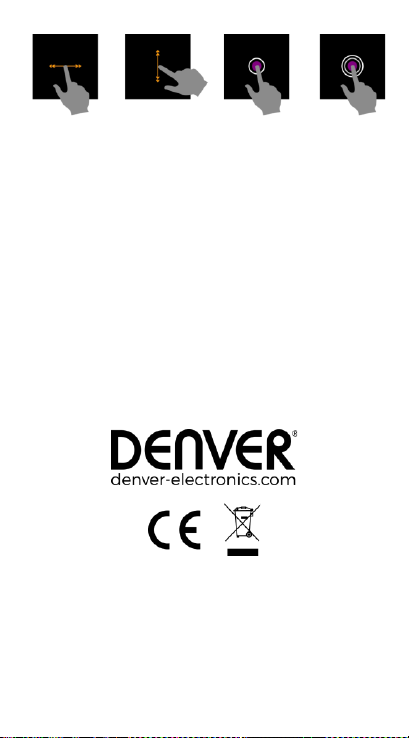
⚫ Go to menu screen: Slide
left in the watch face
screen.
⚫ Select a function: Click on
the icon.
⚫ Exit the menu: Slide the
screen from left to right.
⚫ Return to the watch face:
Short press the function
button in any screen.
⚫ Check messages: Slide
from left to right in the
watch face screen.
ENG-5
Page 8
3. Menu navigation
After turning on the smart
watch, the watch face
screen is displayed.
ENG-6
Page 9
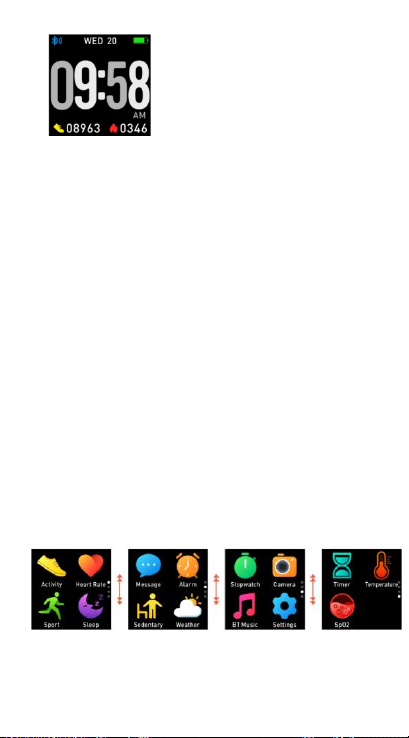
When the watch face
screen is displayed:
1. Go to the menu screens
a. Slide left in the watch
face screen to enter the
menu screens.
b. Slide up and down to
switch the menu screens.
c. Tap the icon to enter the
sub menu. Slide from left
to right to return to the
previous menu.
ENG-7
Page 10
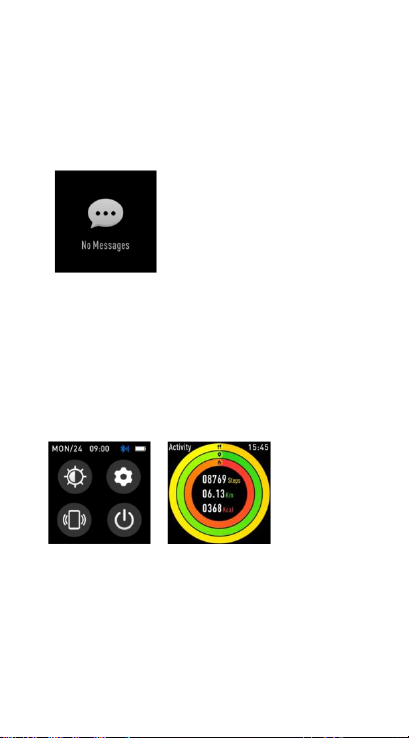
2. Go to the messages
shortcut screen
Slide from left to right in
the watch face screen.
3. Go to other shortcuts
screen
Slide up and down in the
watch face screen.
4. Functions
ENG-8
Page 11
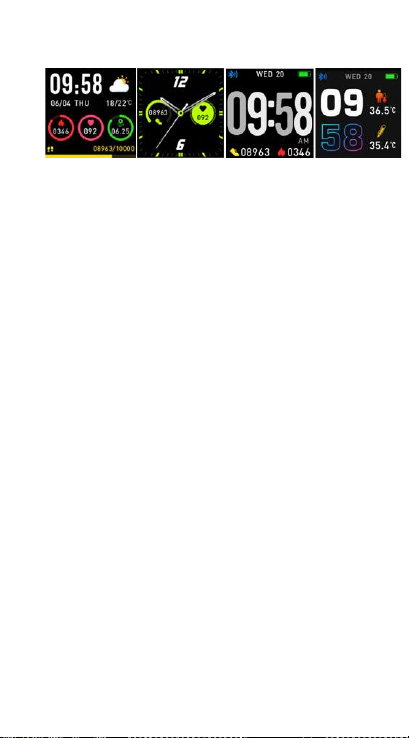
Watch face screen
You can press the function
button to go to the watch
face screen quickly.
If you want to change the
watch face of your smart
watch, press and hold the
current watch face for 3
seconds, then slide up and
down to go through the
different watch faces and
choose the one you like.
ENG-9
Page 12
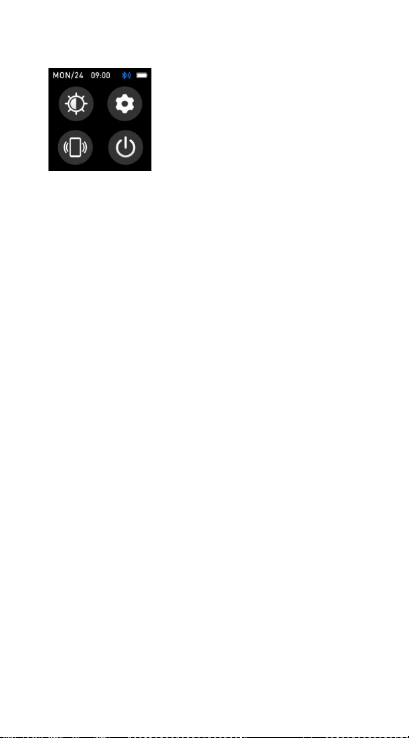
Shortcut
⚫ Screen brightness
You can tap the brightness
icon to adjust (+/-) the
screen brightness.
⚫ Find phone
If your smart watch is
connected with Denver
Smart Home app, you can
find your phone by tapping
this icon and your phone
will ring.
⚫ Shut down
You can shut down your
smart watch by tapping this
icon.
ENG-10
Page 13
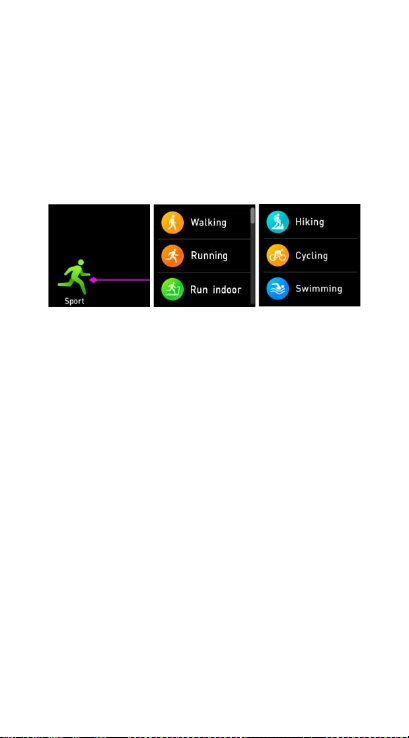
⚫ Settings
You can go settings quickly
by tapping this icon.
Multi-Sport
Tap this icon to enter the
multi-sport mode. The
smart watch has multiple
sports modes: walking,
running, cycling, run indoor,
hiking, swimming and more.
Choose a sport mode you
want, and then do sports.
The smart watch records
your exercise data.
ENG-11
Page 14
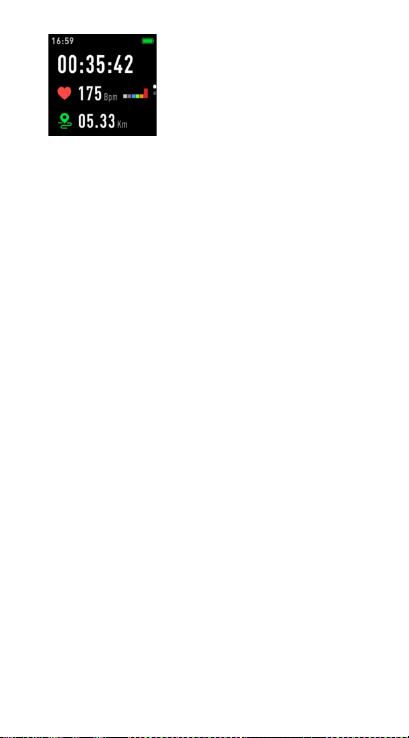
If you want to end the
sports, slide the screen to
right and tap the “√” icon
to finish your sports and
save the data. The smart
watch displays your
exercise data. If you’ve
connected your smart
watch with the “Denver
Smart Home” app via
Bluetooth, you can also
check your exercise data in
the app.
ENG-12
Page 15
Note: Too little exercise
data will not be saved.
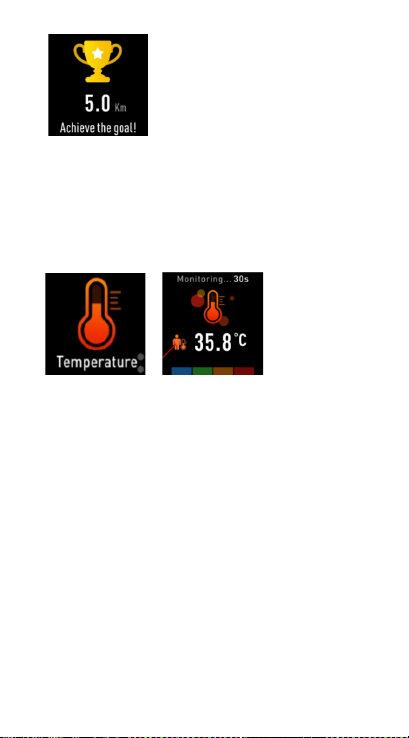
Body temperature monitor
Tap the body temperature
icon to monitor your
current body temperature.
To exit the body
temperature monitor, slide
the screen to right. Please
notice – this is not medical
grade. If you are unsure,
always use a standard
ENG-13
Page 16
thermometer.
Measurement tolerance 0.4
degrees Celsius.
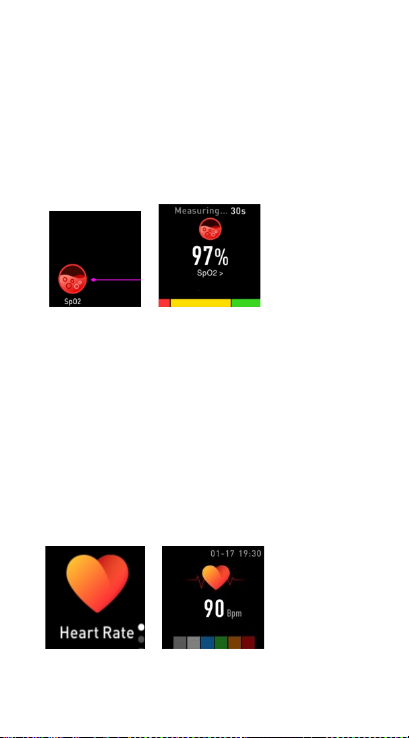
Blood oxygen monitor
Tap the blood oxygen icon
to monitor your current
blood oxygen. To exit the
blood oxygen monitor, slide
the screen to right.
Heart rate monitor
Tap this icon to monitor
ENG-14
Page 17
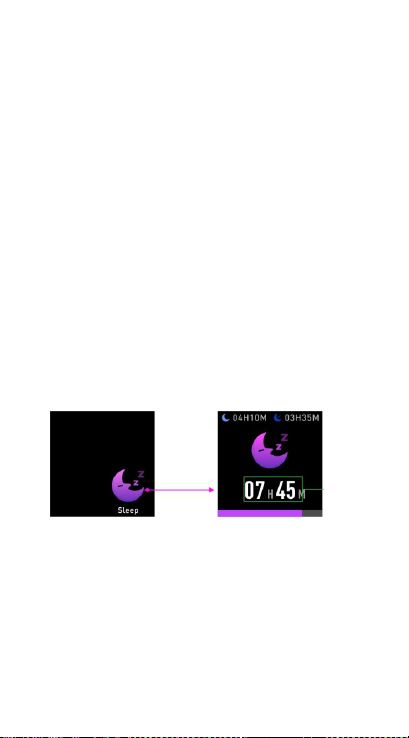
your current heart rate. To
exit the heart rate monitor,
slide the screen to right.
If you’ve connected your
smart watch with the
“Denver Smart Home” app
via Bluetooth, you can also
check your heart rate data
in the app.
Sleep monitor
The smart watch
automatically monitors
your sleep between 9:00
p.m. and 9:00 a.m.
ENG-15
Page 18
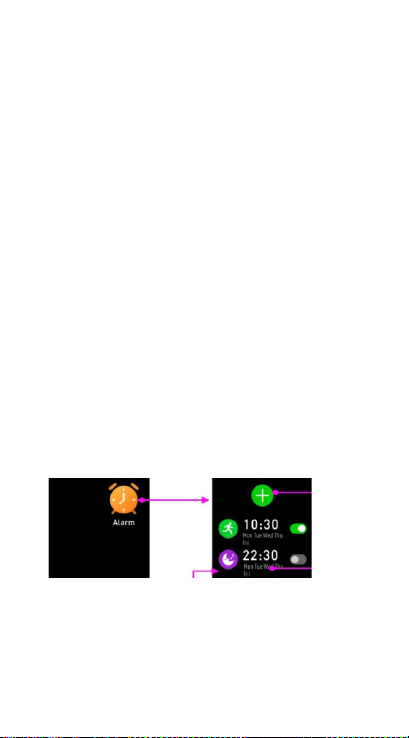
When you get up the next
day, the smart watch
displays your sleep report
about the time of total
sleep, light sleep and deep
sleep. If you’ve connected
your smart watch with the
“Denver Smart Home” app
via Bluetooth, you can also
check more detailed sleep
report in the app.
Alarm
You can set reminders in
both “Denver Smart Home”
app and smart watch itself.
ENG-16
Page 19

When alarm time is up, the
alarm icon is animated and
the smart watch vibrates.
Messages
Slide the watch face from
left to right, and then you
can check your phone calls,
SMS, QQ, WeChat,
Whatsapp, Facebook and
Twitter notifications, etc.
The messages will be
automatically deleted after
reading.
ENG-17
Page 20
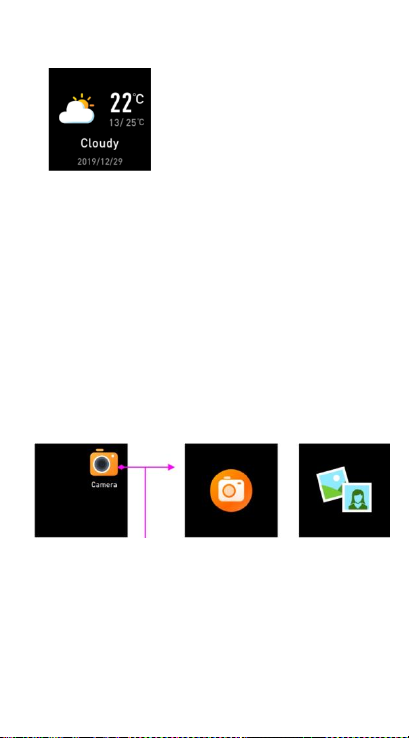
Weather
If you’ve connected your
smart watch with the
“Denver Smart Home” app
via Bluetooth, the smart
watch displays the weather
forecast.
Camera
After connecting with the
app, you can take pictures
remotely from your smart
watch.
ENG-18
Page 21
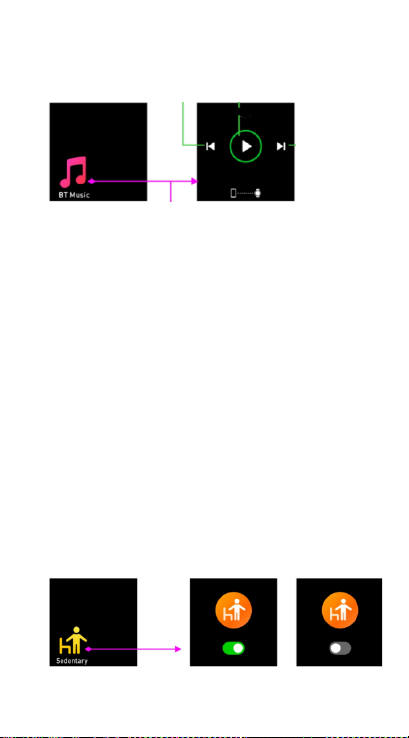
Music playback control
Tap the music icon to enter
the music playback control
interface.
You can select the
previous/next song, and
play/pause music. To exit
music playback control,
slide the screen from left to
right.
Sedentary reminder
ENG-19
Page 22
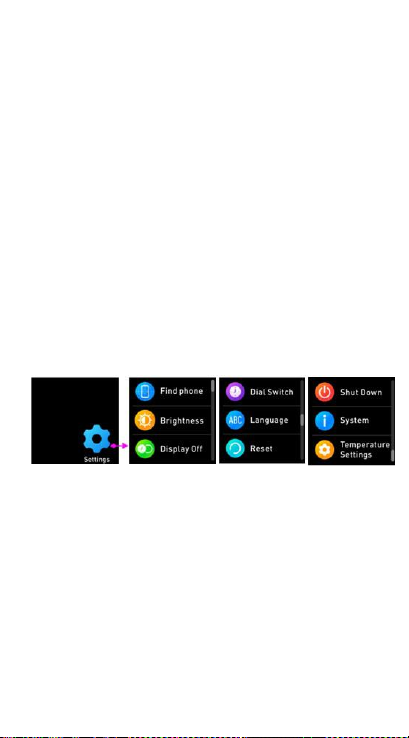
Go to the “Settings” in the
“Denver Smart Home” app
to set the time intervals
(minutes), start time and
end time. Turn on/off
sedentary reminder on
smart watch or app. Slide
the screen to right to exit.
Settings
Tap this icon to enter the
settings menu.
⚫ Find phone
If your smart watch is
connected with Denver Smart
ENG-20
Page 23

Home app, you can find your
phone by tapping this icon
and your phone will ring.
⚫ Dial Switch
Tap the icon and then slide
up and down to go through
the different watch faces and
choose the one you like.
⚫ Screen brightness
You can tap the brightness
icon to adjust (+/-) the screen
brightness.
⚫ System
You can check the system of
your smart watch by tapping
this icon.
ENG-21
Page 24

⚫ Languages
You can set language here.
⚫ Shut down
You can shut down your
smart watch by tapping this
icon.
⚫ Reset
You can reset your smart
watch by tapping this icon.
⚫ Display Off
You can set time to turn off
display.
⚫ Temperature settings
You can set temperature unit
here.
ENG-22
Page 25
Please notice - All products
are subject to change without
any notice. We take
reservations for errors and
omissions in the manual.
ALL RIGHTS RESERVED,
COPYRIGHT DENVER
ELECTRONICS A/S
Electric and electronic
equipment and included
batteries contains materials,
components and
substances that can be
hazardous to your health
ENG-23
Page 26

and the environment, if the
waste material (discarded
electric and electronic
equipment and batteries) is
not handled correctly.
Electric and electronic
equipment and batteries is
marked with the crossed
out trash can symbol, seen
below. This symbol signifies
that electric and electronic
equipment and batteries
should not be disposed of
with other household
waste, but should be
disposed of separately.
As the end user it is
ENG-24
Page 27

important that you submit
your used batteries to the
appropriate and designated
facility. In this manner you
make sure that the
batteries are recycled in
accordance with legislature
and will not harm the
environment.
All cities have established
collection points, where
electric and electronic
equipment and batteries
can either be submitted
free of charge at recycling
stations and other
collection sites or be
collected from the
households. Additional
ENG-25
Page 28

information is available at
the technical department
of your city.
Hereby, Inter Sales A/S
declares that the radio
equipment type SW-164 is
in compliance with
Directive 2014/53/EU. The
full text of the EU
declaration of conformity is
available at the following
internet address:
www.denver-electronics.co
m, and then click the
search icon on top line of
website. Write model
number: SW-164. Now
enter product page, and
ENG-26
Page 29

red directive is found under
downloads/other
downloads.
Operating Frequency Range:
2.402GHz—2.480GHz
Max Output Power: 4.0dBm
Warning Lithium battery
inside
DENVER ELECTRONICS A/S
Omega 5A, Soeften
DK-8382 Hinnerup
Denmark
www.facebook.com/denver
electronics
ENG-27
Page 30
SW-164 SMARTWATCH
Bedienungsanleitung
www.denver-electronics.com
www.facebook.com/denverelectronics
DEUTSCH
Page 31
GER-1
1. Schnellstartanleitung
Ü berblick
1. Touchscreen
2. Funktionstaste
3. Herzfrequenzsensor
4. Ladeplatte
5. Temperatursensor
6. Blutsauerstoffsensor
Verbinden Sie zum Laden
der Smartwatch die
Ladeklemme des
USB-Kabels mit der
Page 32
GER-2
Ladeplatte auf der
Rückseite der Smartwatch.
Wenn die Verbindung
erfolgreich war, dann
erscheint auf dem Display
das Ladesymbol.
Installation der App
“Denver Smart Home” auf
dem Mobiltelefon
Suchen Sie die App “Denver
Smart Home” im Google
Play Store oder im App
Store und installieren Sie
sie. Alternativ können Sie
Page 33
GER-3
den nachstehenden
QR-Code scannen, um die
App direkt zu installieren.
Android
IOS
Verbinden der Smartwatch
mit dem Mobiltelefon
1. Schalten Sie Bluetooth
auf Ihrem Mobiltelefon
ein.
2. Tippen Sie auf das
Symbol der DENVER
SMART HOME-App, um
sie zu öffnen.
3. Gerät hinzufügen.
4. Scannen Sie Ihre
Smartwatch automatisch
Page 34

GER-4
und koppeln Sie sie
dann.
Trennen der Verbindung
zwischen Smartwatch und
Mobiltelefon
1. Öffnen Sie die App
„Denver Smart
Home“ auf Ihrem
Smartphone.
2. Drücken Sie lange auf Ihr
Gerät.
3. Entfernen Sie Ihr Gerät.
Funktionsanleitung
⚫ Sie können Ihre Hand
heben oder die
Funktionstaste drücken,
um das Display zu
Page 35

GER-5
beleuchten.
⚫ Halten Sie die
Startoberfläche
angetippt und schieben
Sie sie nach hoch oder
runter, um das Design
der Startoberfläche zu
ändern.
⚫ Halten Sie die
Funktionstaste gedrückt,
um die Smartwatch
einzuschalten, wenn sie
ausgeschaltet ist.
2. Bedienungshinweise
⚫ Einschalten: Halten Sie die
Funktionstaste ca. 3
Sekunden lang gedrückt.
⚫ Aufruf der
Page 36

GER-6
Menüoberfläche:
Schieben Sie die
Startoberfläche nach links.
⚫ Bestätigen: Tippen Sie das
Symbol an.
⚫ Das Menü beenden:
Schieben Sie die
Oberfläche von links nach
rechts.
⚫ Rückkehr zur
Startoberfläche: Drücken
Sie kurz die Funktionstaste
in einem beliebigen
Bildschirm.
⚫ ÜNachricht ansehen:
Schieben Sie die
Startfläche von links nach
rechts.
Page 37
GER-7
Bitte beachten - Technische
Änderungen am Produkt,
Irrtümer und Auslassungen
im Handbuch vorbehalten.
ALLE RECHTE
VORBEHALTEN,
URHEBERRECHTE DENVER
ELECTRONICS A/S
Elektrische und
elektronische Geräte sowie
Batterien enthalten
Page 38

GER-8
Materialien, Komponenten
und Substanzen, welche für
Sie und Ihre Umwelt
schädlich sein können,
sofern die Abfallmaterialien
(entsorgte elektrische und
elektronische Altgeräte
sowie Batterien) nicht
korrekt gehandhabt
werden.
Elektrische und
elektronische Geräte sowie
Batterien sind mit der
durchgestrichenen
Mülltonne, wie unten
abgebildet, kenntlich
gemacht. Dieses Symbol
bedeutet, dass elektrische
Page 39

GER-9
und elektronische Altgeräte
sowie Batterien nicht mit
dem Hausmüll entsorgt
werden dürfen, sie müssen
separat entsorgt werden.
Als Endverbraucher ist es
notwendig, dass Sie Ihre
erschöpften Batterien bei
den entsprechenden
Sammelstellen abgeben.
Auf diese Weise stellen Sie
sicher, dass die Batterien
entsprechend der
Gesetzgebung recycelt
werden und keine
Umweltschäden anrichten.
Städte und Gemeinden
Page 40

GER-10
haben Sammelstellen
eingerichtet, an denen
elektrische und
elektronische Altgeräte
sowie Batterien kostenfrei
zum Recycling abgegeben
werden können, alternativ
erfolgt auch Abholung.
Weitere Informationen
erhalten Sie bei der
Umweltbehörde Ihrer
Gemeinde.
Hiermit erklärt Inter Sales
A/S, dass der
Funkanlagentyp SW-164
der Richtlinie 2014/53/EU
entspricht. Der vollständige
Text der
Page 41

GER-11
EU-Konformitätserklärung
ist unter der folgenden
Internetadresse verfügbar:
Bitte geben Sie
„www.denver-electronics.c
om“ ein. Klicken Sie dann
auf das Suchen-SYMBOL in
der oberen Leiste der
Webseite und geben Sie
hier die Modellnummer
„SW-164 “ ein. Sie gelangen
nun zur Produktseite. Die
Funkanlagenrichtlinie
(Richtlinie 2014/53/EU)
finden Sie unter
„downloads/other
downloads“.
Betriebsfrequenzbereich:
Page 42

GER-12
2,402 GHz – 2,480 GHz
Max.Ausgangsleistung: 4,0
dBm
Warnung Lithium-Batterie
im Inneren
DENVER ELECTRONICS A/S
Omega 5A, Soeften
DK-8382 Hinnerup
Dänemark
www.facebook.com/denver
electronics
Page 43
RELOJ INTELIGENTE SW-164
Guía de usuario
www.denver-electronics.com
www.facebook.com/denverelectronics
ESPAÑ OL
Page 44
ESP-1
1. Guía de inicio rápido
Vista general
1. Pantalla táctil
2. Botón Función
3. Sensor de frecuencia
cardíaca
4. Placa de carga
5. Sensor de temperatura
6. Sensor de oxígeno en
sangre
Para cargar el smartwatch,
conecte la sujeción de
Page 45
ESP-2
carga del cable USB a la
placa de carga situada en la
parte posterior del
smartwatch. Si está
conectado correctamente,
aparece en pantalla el
icono de carga.
Instalación de la aplicación
“Denver Smart Home” en
el teléfono
Busque e instale la
aplicación “Denver Smart
Home” de Google Play o
App Store. O escanee el
Page 46
ESP-3
siguiente código QR para
directamente instalar la
aplicación.
Android
IOS
Conexión del smartwatch
con el teléfono móvil
1. Encienda Bluetooth en su
teléfono móvil.
2. Toque el icono de la
aplicación DENVER SMART
HOME para abrirlo.
3. Añadir dispositivo.
4. Escanee
automáticamente su reloj
inteligente y luego
empareje.
Page 47

ESP-4
Desvincular el smartwatch
del teléfono móvil
1. Abra la aplicación
“Denver Smart Home”
en su smartphone.
2. Mantenga presionado
su dispositivo.
3. Quita tu dispositivo.
Introducción al
funcionamiento
⚫ Puede levantar la mano
o presionar el botón de
función para iluminar la
pantalla.
⚫ Mantenga presionada la
pantalla de la esfera del
reloj, luego deslice
hacia arriba o hacia
Page 48

ESP-5
abajo para cambiar la
esfera del reloj.
⚫ Mantenga pulsado el
botón de función para
encender el smartwatch
cuando se apague.
2. Cómo usarlo
⚫ Encender: Mantenga
pulsado el botón de
función durante 3
segundos.
⚫ Ir a la pantalla del menú:
Deslice hacia izquierda en
la pantalla de la cara del
reloj.
⚫ Selección de una función:
Toque el icono.
⚫ Salir del menú: Deslice la
Page 49
ESP-6
pantalla de izquierda a
derecha.
⚫ Volver a la cara del reloj:
Pulse brevemente el
botón de función en
cualquier pantalla.
⚫ Comprobar mensajes:
Desliza el dedo de
izquierda a derecha en la
pantalla del reloj.
Page 50

ESP-7
Aviso: Los artículos pueden
estar sujetos a cambios
técnicos sin notificación
anticipada. Además,
Denver se reserva el
derecho de corregir errores
y omisiones en el manual.
TODOS LOS DERECHOS
RESERVADOS, COPYRIGHT
DENVER ELECTRONICS A/S
Los equipos eléctricos y
electrónicos, y las pilas o
baterías incluidas,
Page 51

ESP-8
contienen materiales,
componentes y sustancias
que pueden ser
perjudiciales para su salud
y para el medio ambiente si
el material de desecho
(equipos eléctricos y
electrónicos y baterías) no
se manipula
correctamente.
Los equipos eléctricos y
electrónicos y las pilas o
baterías incluidas llevan un
símbolo de un cubo de
basura cruzado por un aspa,
como el que se ve a
continuación. Este símbolo
indica que los equipos
Page 52

ESP-9
eléctricos y electrónicos y
sus pilas o baterías no
deben ser eliminados con
el resto de residuos
domésticos, sino que
deben eliminarse por
separado.
Como usuario final, es
importante que usted
remita las pilas o baterías
usadas al centro adecuado
de recogida. De esta
manera se asegurará de
que las pilas y baterías se
reciclan según la legislación
y no dañarán el medio
ambiente.
Page 53

ESP-10
Todas las ciudades tienen
establecidos puntos de
recogida en los que puede
depositar los equipos
eléctricos y electrónicos y
sus pilas o baterías
gratuitamente, o solicitar
que los recojan en su hogar.
Puede obtener información
adicional en el
departamento técnico de
su ciudad.
Por la presente, Inter Sales
A/S declara que el tipo de
equipo radioeléctrico
SW-164 es conforme con la
Directiva 2014/53/EU. El
texto completo de la
Page 54

ESP-11
declaración EU de
conformidad está
disponible en la dirección
Internet siguiente. Entre en:
www.denver-electronics.co
m y después haga clic en el
ICONO búsqueda situado
en la línea superior de la
página web. Escriba el
número de modelo:
SW-164. Ahora entre en la
página del producto y la
directiva roja se encuentra
bajo descargas / otras
descargas.
Rango de frecuencias
operativas:
2.402GHz—2.480GHz
Page 55

ESP-12
Potencia de salida máxima:
4.0dBm
Advertencia de batería de
litio en su interior
DENVER ELECTRONICS A/S
Omega 5A, Soeften
DK-8382 Hinnerup
Dinamarca
www.facebook.com/denver
electronics
Page 56
SW-164 SMARTWATCH
Gebruiksaanwijzing
www.denver-electronics.com
www.facebook.com/denverelectronics
NEDERLANDS
Page 57
NED-1
1. Snelstartgids
Overzicht
1. Aanraakscherm
2. Functietoets
3. Hartslagsensor
4. Laadcontact
5. Temperatuursensor
6. Bloedzuurstofsensor
Voor het opladen van het
slimme horloge sluit u de
oplaadclip van de
USB-kabel aan op de
Page 58
NED-2
oplaadplaat aan de
achterkant van het slimme
horloge. Het oplaadicoontje
verschijnt op het scherm als
de verbinding tot stand is
gebracht.
Installeren van de app
“Denver Smart Home” op
de telefoon
Zoek en installeer de app
“Denver Smart Home”
vanuit Google Play of App
Store. Of scan de volgende
QR-code om de app te
Page 59
NED-3
direct installeren.
Android
IOS
Het slimme horloge met
uw telefoon verbinden
1. Schakel Bluetooth in op
uw mobiele telefoon.
2. Tik op het pictogram van
de DENVER SMART
HOME-app om deze te
openen.
3. Voeg apparaat toe.
4. Scan uw slimme horloge
automatisch en koppel
vervolgens.
Page 60

NED-4
Het slimme horloge met
mobiele telefoon
ontkoppelen
1. Open de app “Denver
Smart Home” op uw
smartphone.
2. Druk lang op uw
apparaat.
3. Verwijder uw apparaat.
Introductie bediening
⚫ U kunt uw hand
opsteken of op de
functietoets drukken om
het scherm te verlichten.
⚫ Houd de wijzerplaat
ingedrukt en schuif
omhoog of omlaag om
de wijzerplaat te
Page 61

NED-5
wijzigen.
⚫ Houd de functietoets
ingedrukt om het slimme
horloge in te schakelen
wanneer het is
uitgeschakeld.
2. Gebruiksaanwijzingen
⚫ Aanzetten: Houd de
functietoets 3 seconden
ingedrukt.
⚫ Ga naar het
menuscherm: Schuif
naar links op het
horlogescherm.
⚫ Selecteer een functie:
Druk op het icoontje.
⚫ Verlaat het menu: Schuif
het scherm van links naar
Page 62
NED-6
rechts.
⚫ Terug naar de
wijzerplaat: Druk in elk
scherm kort op de
functietoets.
⚫ Berichten controleren:
Schuif van links naar
rechts op het
horlogescherm.
Page 63

NED-7
Technische wijzigingen
kunnen zonder
voorafgaande kennisgeving
worden gewijzigd. Fouten
en weglatingen in de
handleiding zijn
voorbehouden.
ALLE RECHTEN
VOORBEHOUDEN,
AUTEURSRECHT DENVER
ELECTRONICS A/S
Elektrische en
elektronische apparatuur
en de inbegrepen batterijen
Page 64

NED-8
bevatten materialen,
componenten en stoffen
die schadelijk kunnen zijn
voor uw gezondheid en het
milieu, indien de
afvalproducten (afgedankte
elektrische en
elektronische apparatuur
en batterijen) niet correct
worden verwerkt.
Elektrische en
elektronische apparatuur
en batterijen zijn
gemarkeerd met een
doorgekruist kliko-symbool,
zoals hieronder afgebeeld.
Dit symbool is bestemd de
gebruiker er op te wijzen
Page 65

NED-9
dat elektrische en
elektronische apparatuur
en batterijen dient als
normaal huishoudelijk afval
afgedankt dienen te
worden, maar gescheiden
moeten worden
ingezameld.
Als eindgebruiker is het
belangrijk dat u uw
verbruikte batterijen
inlevert bij een geschikte
en speciaal daarvoor
bestemde faciliteit. Op deze
manier is het gegarandeerd
dat de batterijen worden
hergebruikt in
overeenstemming met de
Page 66

NED-10
wetgeving en het milieu
niet aantasten.
Alle steden hebben
specifieke inzamelpunten,
waar elektrische of
elektronische apparatuur
en batterijen kosteloos
ingeleverd kunnen worden
op recyclestations of
andere inzamellocaties. In
bepaalde gevallen kan het
afval ook aan huis worden
opgehaald. Vraag om meer
informatie bij uw
plaatselijke autoriteiten.
Hierbij verklaar ik, Inter
Sales A/S, dat het type
Page 67

NED-11
radioapparatuur SW-164
conform is met Richtlijn
2014/53/EU. De volledige
tekst van de
EU-conformiteitsverklaring
kan worden geraadpleegd
op het volgende
internetadres: Bezoek
a.u.b.:
www.denver-electronics.co
m en klik vervolgens op het
ZOEK-icoontje op de
bovenste regel van de
website. Type model
nummer: SW-164. Open nu
de productpagina en de
rode richtlijn is te vinden
onder downloads/overige
downloads.
Page 68

NED-12
Frequentie bereik:
2.402GHz—2.480GHz
Totaal vermogen: 4.0dBm
Waarschuwing interne
Lithiumbatterij
DENVER ELECTRONICS A/S
Omega 5A, Soeften
DK-8382 Hinnerup
Denemarken
www.facebook.com/denver
electronics
Page 69
SW-164 SMARTWATCH
Användarhandbok
www.denver-electronics.com
www.facebook.com/denverelectronics
SVENSKA
Page 70
SWE-1
1. Snabbstartsguide
Ö versikt
1. Pekskärm
2. Funktionsknapp
3. Hjärtfrekvenssensor
4. Laddningsplatta
5. Temperatursensor
6. Blodsyresensor
Anslut USB-kabelns
laddningsklämma till
laddningsplattan på
baksidan av smartklockan
Page 71
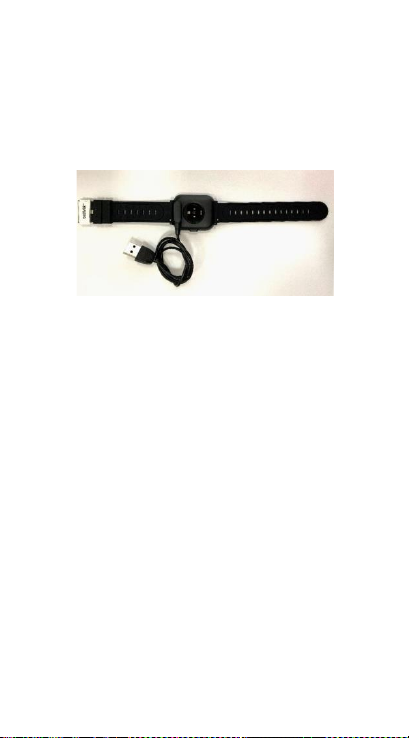
SWE-2
för att ladda den. Om den
ansluts framgångsrikt visas
laddningsikonen på
skärmen.
Installera appen “Denver
Smart Home” på telefonen
Sök efter och installera
appen "Denver Smart
Home" från Google Play
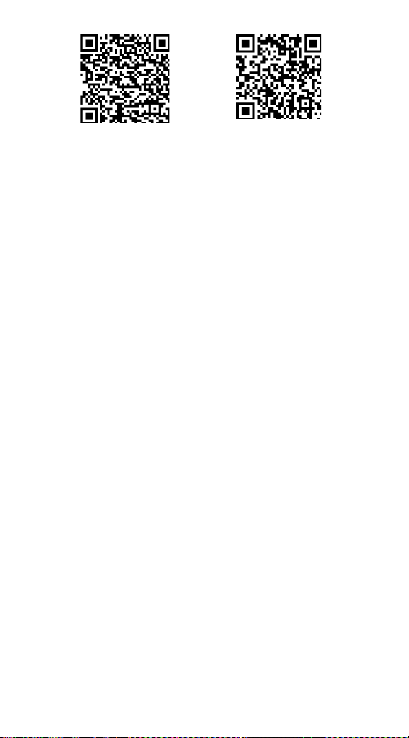
eller App Store. Eller
skanna följande QR-kod för
att direkt installera appen.
Page 72
SWE-3
Android
IOS
Anslut smartklockan med
telefonen
1. Aktivera Bluetooth på din
smarttelefon.
2. Klicka på ikonen för
DENVER SMART
HOME-appen för att
öppna den.
3. Lägg till enhet.
4. Skanna din smarta klocka
automatiskt och para
sedan ihop dem.
Page 73

SWE-4
Koppla från smartklockan
från mobiltelefonen
1. Ö ppna appen "Denver
Smart Home" på
smarttelefonen.
2. Tryck länge på din enhet.
3. Ta bort enheten.
Introduktion till att
använda enheten
⚫ Du kan höja handen
eller trycka på
funktionsknappen för
att tända skärmen.
⚫ Tryck och håll klockans
skärm nedtryckt och
svep sedan åt upp eller
ner för att ändra
urtalvan.
Page 74

SWE-5
⚫ Tryck och håll ned
funktionsknappen för
att slå på smartklockan
när den är avstängd.
2.Bruksanvisning
⚫ Slå på: Tryck och håll
funktionsknappen
nedtryckt i tre sekunder.
⚫ Gå till menyskärmen:
Svep vänster på klockans
skärm.
⚫ Välj en funktion: Tryck
på ikonen.
⚫ Lämna menyn: Svep
skärmen från vänster till
höger.
⚫ Gå tillbaka till klockans
urtavla: Tryck kort på
Page 75
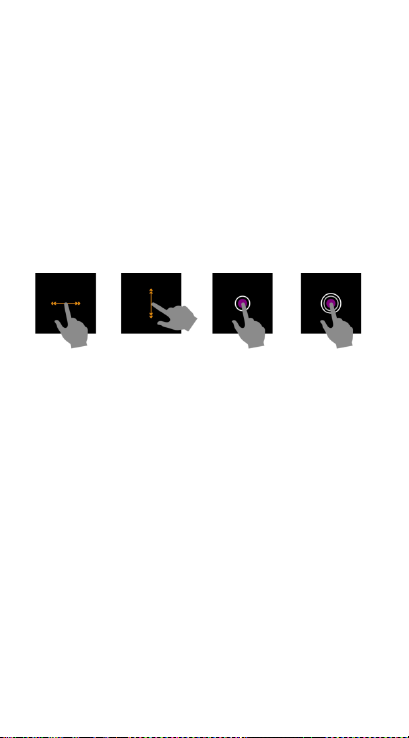
SWE-6
funktionsknappen på
valfri skärm.
⚫ Kontrollera
meddelanden: Svep från
vänster till höger på
klockskärmen.
Page 76

SWE-7
Observera - Alla produkter
är föremål för ändringar
utan föregående
meddelande. Vi reserverar
oss för fel och
utelämnanden i
handboken.
MED ENSAMRÄTT,
UPPHOVSRÄTT DENVER
ELECTRONICS A/S
Elektrisk och elektronisk
utrustning och tillhörande
batterier innehåller
material, komponenter och
Page 77

SWE-8
ämnen som kan vara
skadliga för hälsan och
miljön om avfallet
(kasserad elektrisk och
elektronisk utrustning och
batterier) inte hanteras
korrekt.
Elektrisk och elektronisk
utrustning och batterier är
märkta med en symbol i
form av en överstruken
soptunna (syns nedan).
Denna symbol visar att
elektrisk och elektronisk
utrustning och batterier
inte bör slängas
tillsammans med annat
hushållsavfall, utan ska
Page 78

SWE-9
istället slängas separat.
Som slutanvändare är det
viktigt att du lämnar in dina
använda batterier i en för
ändamålet avsedd facilitet.
På det viset säkerställer du
att batterierna återvinns
lagenligt och att de inte
skadar miljön.
Alla kommuner har
etablerat
uppsamlingsställen där
elektrisk och elektronisk
utrustning och batterier
antingen kan lämnas in
kostnadsfritt i
återvinningsstationer eller
Page 79

SWE-10
hämtas från hushållen.
Vidare information finns att
tillgå hos din kommuns
tekniska förvaltning.
Härmed försäkrar Inter
Sales A/S att denna typ av
radioutrustning SW-164
överensstämmer med
direktiv 2014/53/EU. Den
fullständiga texten till
EU-försäkran om
överensstämmelse finns på
följande webbadress: Ange:
www.denver-electronics.co
m och klicka sedan på
IKONEN längst upp på
webbsidan. Ange
modellnumret: SW-164
Page 80

SWE-11
Ange nu produktsida, och
direktivet finns under
hämtningar/övriga
hämtningar.
Driftsfrekvensområde:
2.402GHz—2.480GHz
Maximal utgående ström:
4.0dBm
Varning för litiumbatteri
inuti
DENVER ELECTRONICS A/S
Omega 5A, Soeften
DK-8382 Hinnerup
Danmark
www.facebook.com/denver
electronics
Page 81
SW-164 SMARTWATCH
Guide d’utilisation
www.denver-electronics.com
www.facebook.com/denverelectronics
FRANÇAIS
Page 82
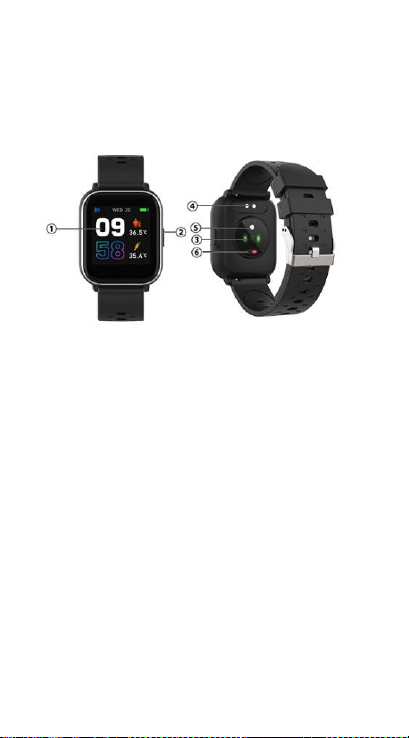
FRA-1
1. Guide de démarrage
rapide
Vue d'ensemble
1. Écran tactile
2. Touche Fonction
3. Capteur de fréquence
cardiaque
4. Contacts de charge
5. Capteur de température
6. Capteur d'oxygène dans
le sang
Pour charger la montre
Page 83
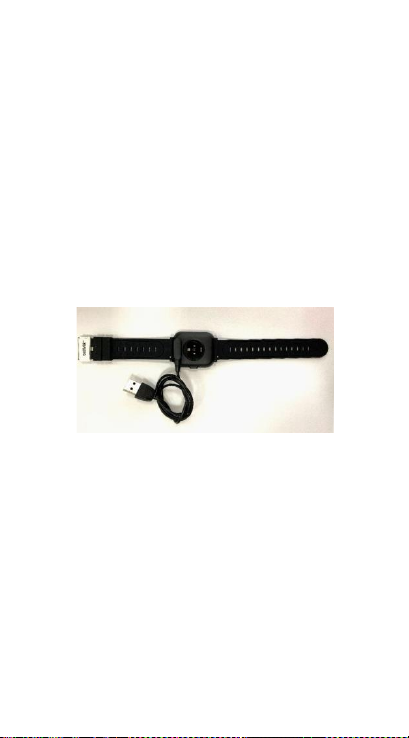
FRA-2
intelligente, connectez les
contacts de charge du câble
USB à la plaque de charge
située à l’arrière de la
montre intelligente. Si la
connexion est établie avec
succès, l’icône de charge
apparaît à l’écran.
Installer l’application
“Denver Smart Home” sur
le smartphone
Recherchez et installez
l’application «Denver Smart
Home» à partir de Google
Page 84
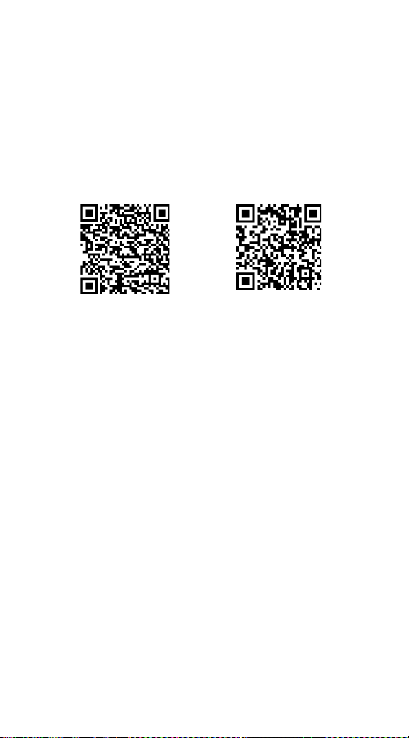
FRA-3
Play ou de l’App Store. Ou
installez directement
l’application en scannant le
code QR suivant.
Android
IOS
Connecter la montre
intelligente au smartphone
1. Activer le Bluetooth de
votre smartphone.
2. Appuyez sur l'icône de
l'application DENVER
SMART HOME pour
l'ouvrir.
3. Ajoutez un appareil.
4. Analysez
Page 85

FRA-4
automatiquement votre
montre intelligente, puis
associez-la.
Déconnecter la montre
intelligente d’un
smartphone
1. Lancez l’application
«Denver Smart Home»
sur votre smartphone.
2. Appuyez longuement
sur votre appareil.
3. Retirez votre appareil.
Mode d'emploi
1. Vous pouvez lever la
main ou appuyer sur la
touche de fonction pour
éclairer l'écran.
Page 86

FRA-5
2. Maintenez appuyé le
cadran de la montre,
puis faites glisser vers
là-haut ou bas pour
changer de cadran.
3. Maintenez appuyée la
touche de fonction pour
allumer la montre
intelligente lorsqu’elle
est éteinte.
2. Instructions d'utilisation
⚫ Allumer : Maintenez
appuyée la touche de
fonction pendant 3
secondes.
⚫ Aller aux menus : Faites
gauche sur le cadran de
la montre.
Page 87
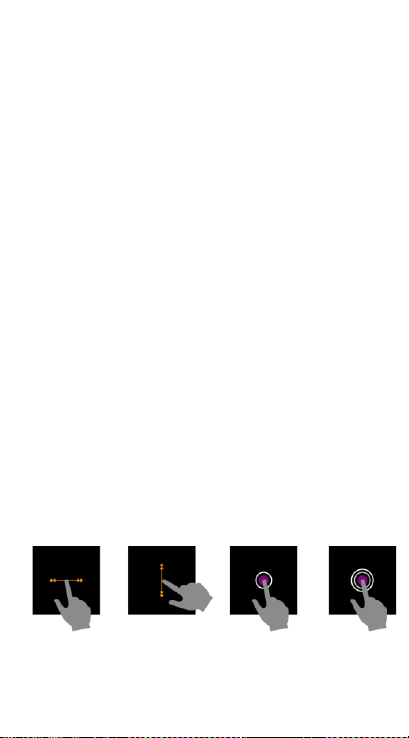
FRA-6
⚫ Sélection d’une
fonction : Appuyez sur
l'icône.
⚫ Quitter le menu : Faites
glisser de gauche à
droite.
⚫ Retour au cadran :
Appuyez sur la touche
de fonction dans
n'importe quel écran.
⚫ Consulter les messages :
Faites glisser de gauche
à droite sur le cadran de
la montre.
Page 88

FRA-7
Remarque - Tous les
produits sont susceptibles
d’être modifiés sans préavis.
Ce document est établi
sous toute réserve d’erreur
ou d’omission.
TOUS DROITS RÉSERVÉS,
COPYRIGHT DENVER
ELECTRONICS A/S
Les appareils électriques et
électroniques et les
batteries contiennent des
matériaux, composants et
substances qui peuvent
Page 89

FRA-8
nuire à votre santé et à
l'environnement si ces
déchets ne sont pas traités
de façon appropriée.
Les appareils électriques et
électroniques et les
batteries sont marqués par
le symbole de poubelle
avec roulettes et une croix
dessus, voir ci-dessous. Ce
symbole indique que les
appareils électriques et
électroniques et les
batteries doivent être
collectés et jetés
séparément des ordures
ménagères.
Page 90

FRA-9
En tant qu’utilisateur final,
il est important que vous
jetiez les batteries usagées
dans des centres de
collecte appropriés. En
mettant en rebut les
batteries pour être
recyclées conformément à
la règlementation vous
contribuez à préserver
l’environnement.
Dans toutes les villes
existent des points de
collecte où les appareils
électriques et électroniques
et les batteries peuvent y
être déposés sans frais
pour le recyclage. Vous
Page 91

FRA-10
pouvez obtenir des
informations
supplémentaires auprès
des autorités locales de la
ville.
Le soussigné, Inter Sales
A/S, déclare que
l'équipement
radioélectrique du type
SW-164 est conforme à la
directive 2014/53/EU. Le
texte complet de la
déclaration EU de
conformité est disponible à
l'adresse internet suivante:
Veuillez entrer dans le site :
www.denver-electronics.co
m, puis cliquez sur l’ICÔNE
Page 92

FRA-11
de recherche sur la ligne
supérieure du site Web.
Entrez le numéro de
modèle : SW-164
Maintenant, accédez à la
page du produit, et la
directive rouge est indiquée
sous les
téléchargements/autres
téléchargements.
Plage des fréquences de
fonctionnement:
2.402GHz—2.480GHz
Puissance de sortie
maximale: 4.0dBm
Avertissement concernant
la batterie au lithium à
l'intérieur
Page 93

FRA-12
DENVER ELECTRONICS A/S
Omega 5A, Soeften
DK-8382 Hinnerup
Denmark
www.facebook.com/denver
electronics
Page 94
SW-164-ÄLYKELLO
Käyttöopas
www.denver-electronics.com
www.facebook.com/denverelectronics
SUOMI
Page 95
FIN-1
1. Pikaopas
Yleiskatsaus
1. Kosketusnäyttö
2. Toimintopainike
3. Sykeanturi
4. Latauslevy
5. Lämpösensori
6. Veren happianturi
Älykello ladataan kytkemällä
USB-johdon latausklipsi
älykellon takana olevaan
latauslevyyn. Jos kytkentä
Page 96
FIN-2
on onnistunut, latauskuvake
ilmestyy näytölle.
Denver Smart
Home-sovelluksen
asentaminen puhelimeen
Hae ja asenna ”Denver
Smart Home”-sovellus
Google Playstä tai App
Storesta. Voit myös asentaa
sovelluksen skannaamalla
seuraavan QR-koodin.
Page 97
FIN-3
Android
IOS
Älykellon yhdistäminen
puhelimeen
1. Ota Bluetooth käyttöön
älypuhelimessasi.
2. Napauta DENVER SMART
HOME -sovelluksen
kuvaketta avataksesi sen.
3. Lisää laite.
4. Skannaa älykello
automaattisesti ja
muodosta sitten pariliitos.
Page 98

FIN-4
Älykellon yhteyden
purkaminen
matkapuhelimen kanssa
1. Avaa älypuhelimen ”Denver
Smart Home”-sovellus.
2. Paina laitettasi pitkään.
3. Poista laite.
Käytön esittely
⚫ Voit nostaa kättäsi tai
painaa toiminto
näppäintä sytyttääksesi
näytön.
⚫ Paina kellotaulun
näyttöä ja pidä sitä
painettuna, pyyhkäiset
sitten ylös tai alas
kellotaulun
vaihtamiseksi.
Page 99

FIN-5
⚫ Paina
toimintopainiketta ja
pidä sitä painettuna
älykellon virran
kytkemiseksi päälle, kun
sen virta on pois päältä.
2. Käyttöohje
⚫ Päälle kytkeminen: Paina
toimintopainiketta
pohjaan 3 sekunnin ajan.
⚫ Siirry valikkonäyttöön:
Pyyhkäise vasemmalle
valintanäytössä.
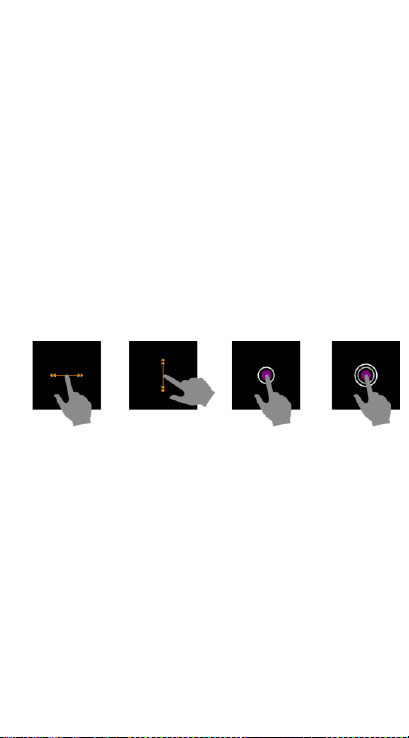
⚫ Valitse toiminto:
Napauta kuvaketta.
⚫ Poistu valikosta:
Pyyhkäise näyttöä
vasemmalta oikealle.
Page 100
FIN-6
⚫ Kellotauluun
palaaminen: Paina
lyhyesti
toimintopainiketta missä
tahansa näytössä.
⚫ Viestien tarkistaminen:
Liu'uta vasemmalta
oikealle valintanäytössä.
 Loading...