

Page 1
PORTABLE DVD
Befor e co nnect ing, op erati ng or adjus ting th is prod uct,
pleas e re ad this u ser's m anual c ar efull y and com plete ly.
www.face book. co m/den verel ectro ni cs
USER'S MANUAL
MT-983
Page 2
1
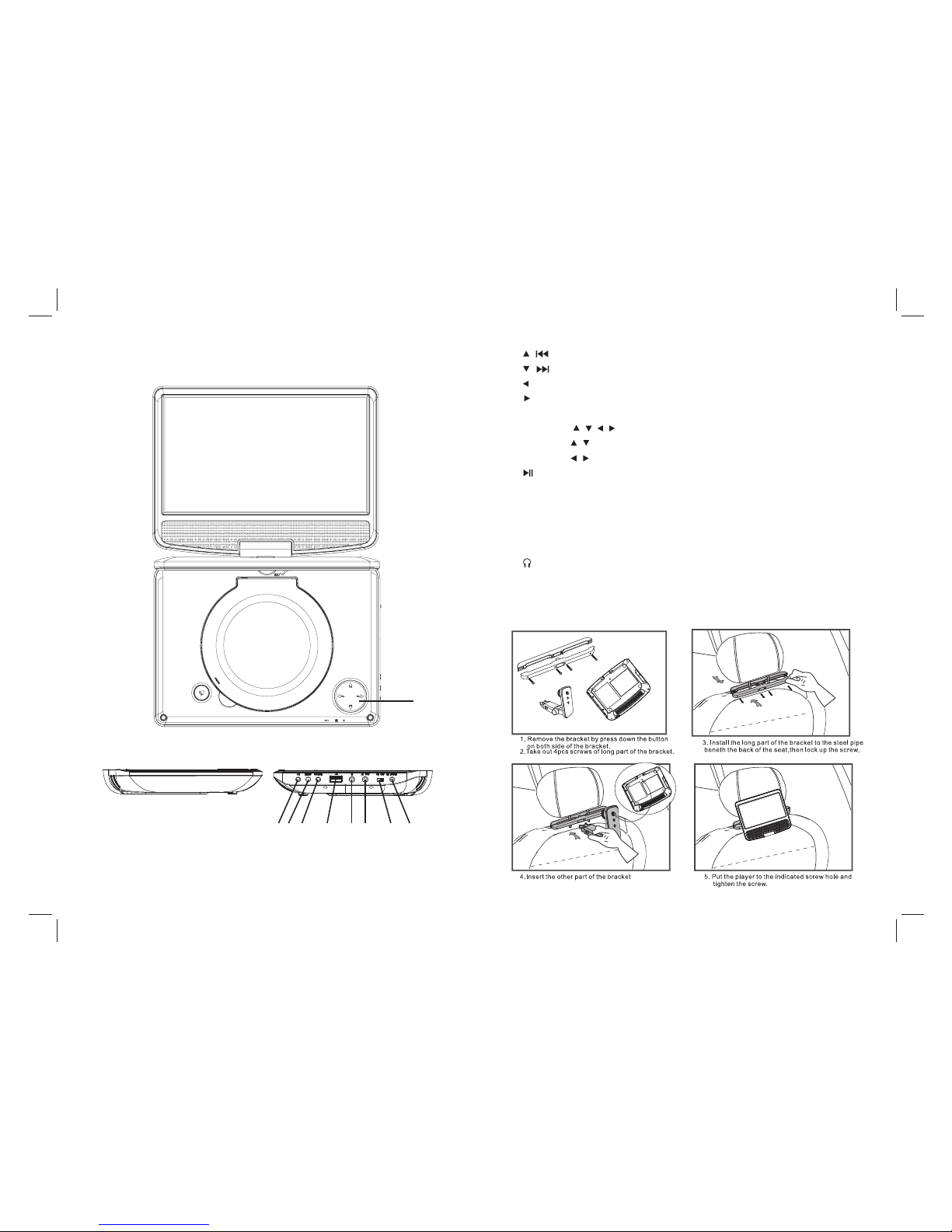
Identification of Controls
Main Unit
1
1. / Up / Pre v
/ Down / Ne xt
/ VOL - Left / V OL-
/ VOL + Righ t / VOL+
Remar ks :
Short p re ss / / / is Up/ Down/ Left/ Ri ght;
Long pr es s / is Prev /Next
Long pr es s / is VOL- / V OL+
2. PLAY/ PAUS E;RET UR N
Short p re ss PLAY/PAUS E;
Long pr es s RETUR N
3. SE TUP
4. SOUR CE
5. USB
6. Earp ho ne Sock et
7. AV OUT
8. ON/O FF
9. DC IN 9- 12 V
2 3 4 5 6 7 8 9
Page 3
1 2
3
4
5
6
7
8
9 0
10+
VOL -
VOL+
REPE AT
SEAR CH
TITL E
ENTE R
RETU RN
STEP
SUBTI TLE
AN GLE
AUDI O
MENU
SETU P
AB
DISPL AY
ZOOM
MUTE
SOURC E
1
13
19
8
4
11
23
17
20
21
9
10
27
26
15
16
7
6
25
24
18
12
3
5
22
2
14
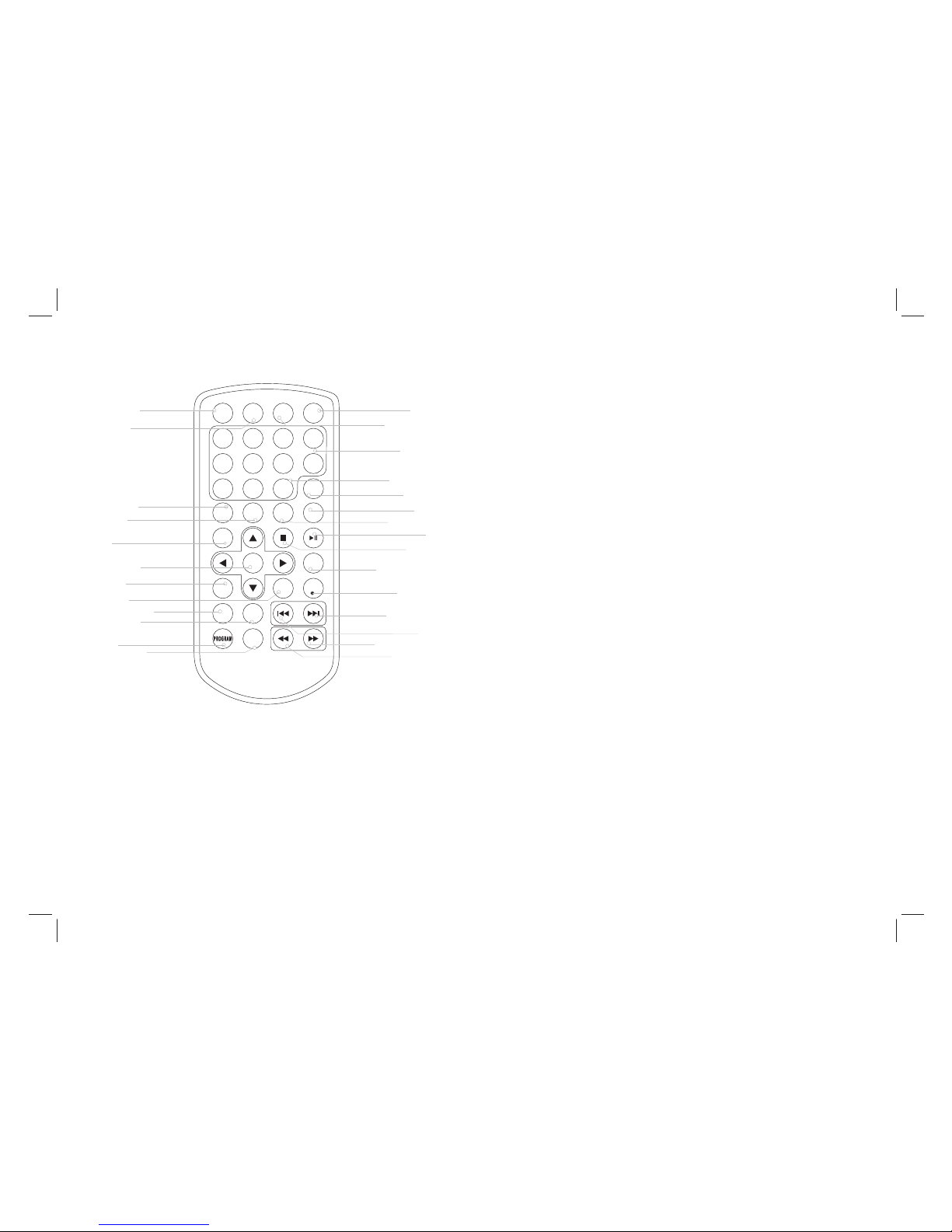
Remote control unit
Identification of Controls
2
1. ZOOM
2. SEAR CH
Goto ti me p oint , ti tle or ch apter y ou w ant in DV D Mode.
3. SUBT IT LE
Press S UB TITLE r epeat edly du ri ng play back to h ear a dif feren t
subti tl e langu ages.
4. AN GLE
Press AN GL E will ch ange th e view an gl e, on DVD s that su pport t hi s
featu re .
Each pr es s of the ZO OM butt on chan ge s the TV scree n in the fo ll owing
seque nc e:2X si ze 3X siz e 4X size 1 /2 1 /3 1/4.
5. TITL E
Retur n to D VD titl e menu.
6. ENTE R
Confi rm s menu se lecti on.
7. SETU P
Acces se s or remo ves set up menu .
8. VOL -
Adjus t VO LUME.
9. REPE AT
Press R EP EAT durin g pl aybac k to sele ct a desi re d repea t mode.
DVD: yo u ca n play a ch apter /titl e/ all on a di sc.
VCD/C D: y ou can pl ay a trac k/all o n a di sc.
WMA: yo u ca n selec t Repea t one/R ep eat fol der/A LL
play mo de o n a disc.
10.A B
To repeat a s eg ment: p ress AB on ce to set t he s tarti ng poin t for
repea t se gment , press i t again t o se t an end po int, an d the pla ye r
will re pe at the se gment f rom the s ta rt to the e nd poin t.
11.PRO GR AM
DVD/V CD /CD: The pro gram func tion en ables y ou t o
store y ou r favou rite tr acks fr om t he disc . Press P ROGRA M
butto n, th en PROG RA M MENU wi ll appe ar on scree n, now yo u
can use t he n umber o r direc tion ke ys i nput th e title s, chap te rs or
track s nu mber an d selec t PLAY option t o resum e no rmal
playb ac k, pres s PROGR AM and se le ct CLEA R optio n on the
progr am m enu.
JPEG: You ca n press P RO GRAM re peatl y to sele ct t he slid e show
mode, t he a re 16 typ es slid e show.
12. DIS PL AY
To displa y th e playt ime and s tatus i nf ormat ion.
13. SOU RC E
DVD/U SB .
Page 4

Identification of Controls
Remote control unit
3
14. MUT E
Disab le Au dio out put.
15. 0-9 N UM BER BUT TON
Selec ts n umber ed item s in a menu .
16.10 + BU TTO N
In orde r to s elect a t rack 10 o r great er, f irst pr ess 10+ , For exa mp le;
selec t tr ack 12, f irst pr ess 10+ , an d then pr ess num ber 2 but to n.
17.ST EP
Press S TE P onc e to paus e playbac k, Form t his sta tion, pre ss STEP
to adva nc e one vid eo fram e.
18. MEN U
Acces se s menu on a D VD disc , PBC on/ off swi tch for V CD.
19. AUDIO
DVD: Pr es s AUDIO re peate dly dur in g playb ack to he ar a diff erent
audio l an guage o r audio t rack, i f av ilabl e.
CD VCD: P re ss AUDIO r epeat edly du ri ng play back to h ear a
diffe rent au dio cha nn el (Ste reo, Le ft, or Ri gh t).
20. PLAY/PAU SE
Press P LAY/PAUSE on ce t o pause p layba ck, pre ss ing PLAY/
PAUSE se cond ti me will r esume the p layba ck.
21. STO P
When th is b uttom i s press ed once , th e unit re cords t he stop pe d
point ,f rom whe re play back wi ll r esume i f ENTER i s press ed a fter
wards . Bu t if STOP bu tt on is pre ssd aga in inst ea d of ENTE R
butto n, t here wi ll be no re sume fu nc tion.
22. RET UR N
Retur n to u pper pa ge.
23. VOL +
Adjus t VO LUME.
24. Rev er se Skip
Go to pre vi ous cha pter/ t rack to t he b eginn ing.
25. For wa rd Skip
Go to nex t ch apter / track .
26. BUT TON
Press B UT TON a llow sk ippin g ah ead at 5- level s peed(X2 ->
X4->X 8- >X20) , press E NTER bu tt on retu rn to nor mal pla yb ack.
27. BUT TON
Press B UT TON a llow sk ippin g ba ck at 5-l evel sp eed(X2- >
X4->X 8- >X20) , press E NTER bu tt on retu rn to nor mal pla yb ack.
Page 5
Parameters and specifications
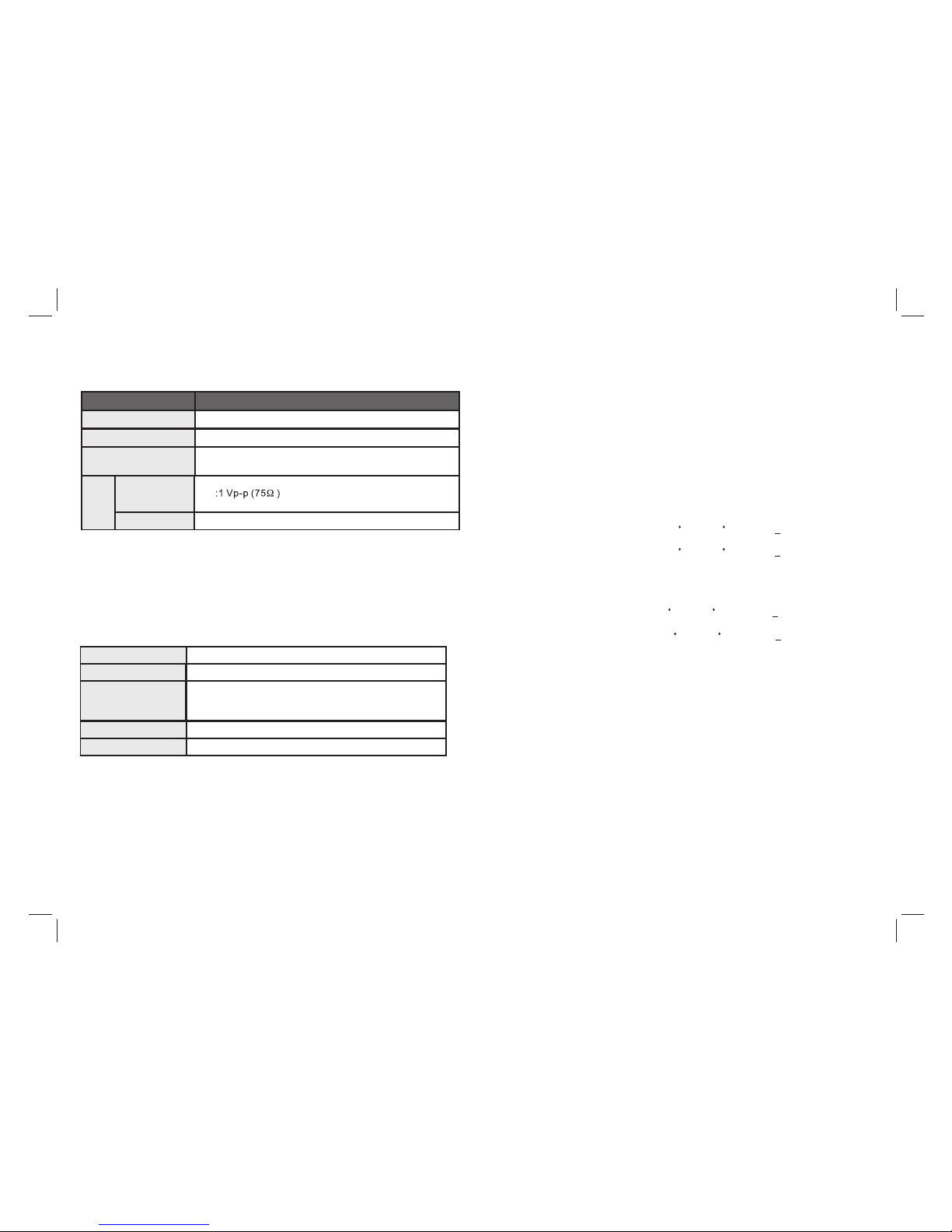
Item
Standard requirement
Electronical parameters
Power r equ ire men ts
: AC 100-2 40 V , 50 /60 H z
Output
VIDEO O UT
AUDIO O UT
:1.2 Vrm s (1 KH z, 0 dB )
Power c ons ump tio n
Opera tin g hum idi ty
: <10W
: 5 % to 90 %
Sy ste m
Laser
:Semi con duc tor l ase r, wavel eng th 65 0 nm
Signa l sys tem
: NTSC / PAL
Frequ enc y
respo nse
Sig nal-t o-noi se rati o
:More t han 8 0 dB (A NAL OG OU T con nec tors on ly)
Dynam ic ra nge
:More t han 8 5 dB (D VD/ CD)
Note: D es ign and s pecif icati on s are sub ject to c hange p ri or noti ce.
: 20Hz to 2 0 kHz (1d B)
Battery Parameters
Batte ry S pecif icati ons:
Outpu t:7. 4V
Charg e / Di schar ge Time:
Stand ar d charg e time:3h ~ 4 h
Stora ge a nd work c ircum stanc es:
1. Stor ag e circu mstan ces Temper at ure Hum idity
2.Wor k circu mstan ces Temperat ure Hum idity
6 month s
-20 C +45 C~
-20 C +65 C~
65+20 %
65+20 %
Stand ar d charg e
Stand ar d disch arge
0 C +45 C~
-20 C +65 C~
65+20 %
65+20 %
1 week
4
Page 6
Electric and electronic equipment and included batteries contains materials,
environment, if the waste material (discarded electric and electronic equipment and batteries) is not handled correctly.
Electric and electronic equipment and batteries is marked with the crossed out trash can symbol, seen below. This symbol signifies that electric and
electronic equipment and batteries should not be disposed of with other household waste, but should be disposed of separately.
As the end user it is important that you submit your used batteries to the approriate and designated facility. In this manner you make sure that the batteries
are recycled in accordance with legislature and will not harm the environment.
All cities have established collection points, where electric and electronic equipment and batteries can either be submitted free of charge at recycling
stations and other collection sites, or be collected from the households. Additional information is available at the technical department of your city.
Please fill the blank with the model number of this player for future reference
Importer:
DENVER ELECTRONICS A/S
Stavneagervej 22
DK-8250 EGAA
DENMARK
www.facebook.com/denverelectronics
components and substances that can be hazardous to your health and the
 Loading...