

Page 1
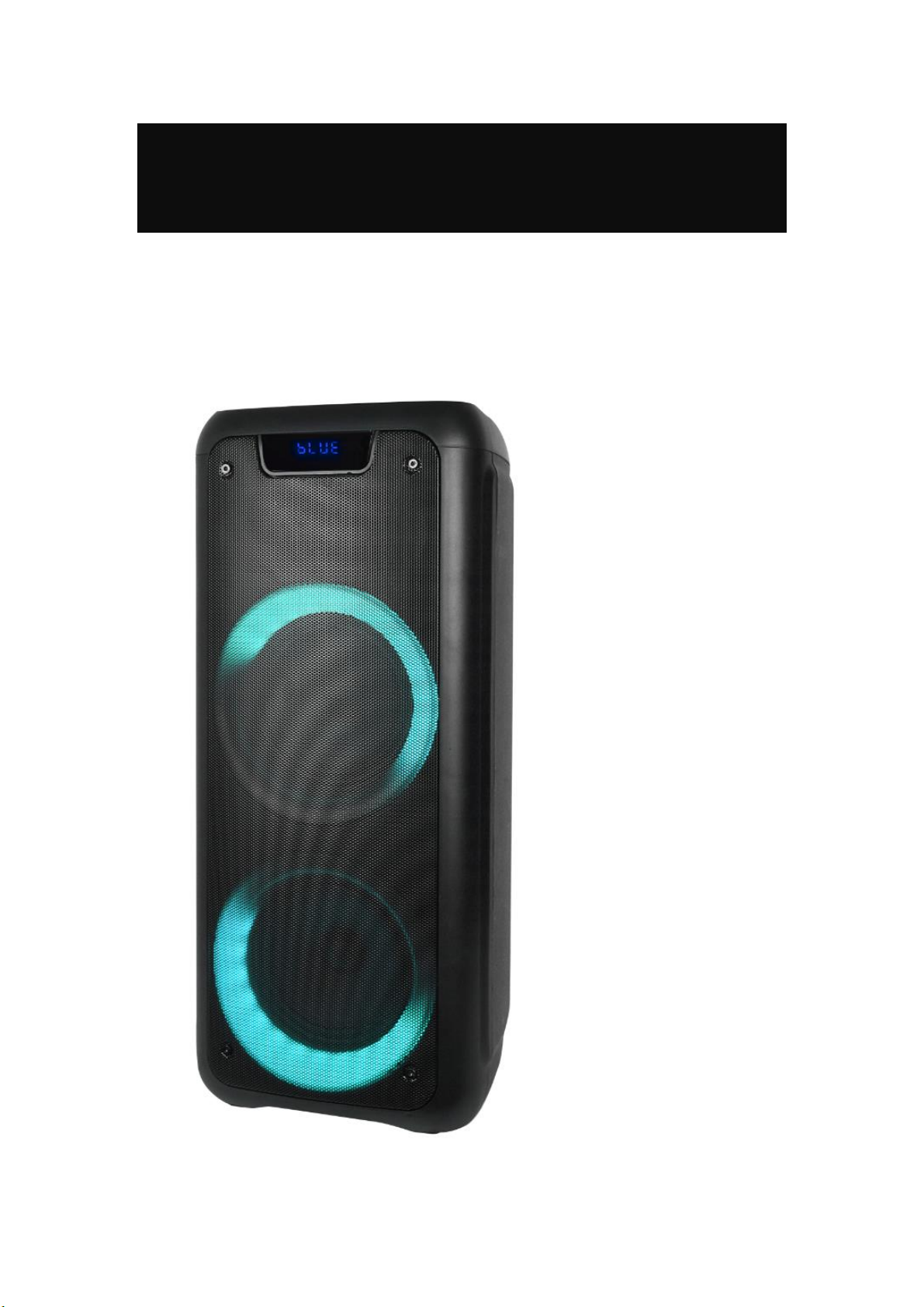
Rechargeable Party Speaker
Denver BPS-350
BASS
BOOM
POWER
COLORS
LIGHTS
Page 2

Specification:
6.5" +6.5" woofer
2" tweeter
Battery: 7.4 V/3600 mA
Power: 25 W RMS
3.5 mm Aux-in
TWS function: Wireless connection, up to 2pcs speakers playing
together to double the sound.
USB/Micro SD Card play; FM Radio; Bluetooth connect
Microphone input x 2
BASS/Treble/Microphone Volume/Echo control
Product size: 25 x 24.2 x 59.5 cm
Product net weight: 5.35 kg
Play time: 2 hours and 5 min at 100% volume
Charging time: 6-8 hours
Features on remote control
LED light control: color control-LED ON/OFF control
Recording function: Record your sound via microphone to USB
flash/Micro SD card
What you have in pack:
- User manual
- Remote control
- 9V/2A Adaptor
Page 3
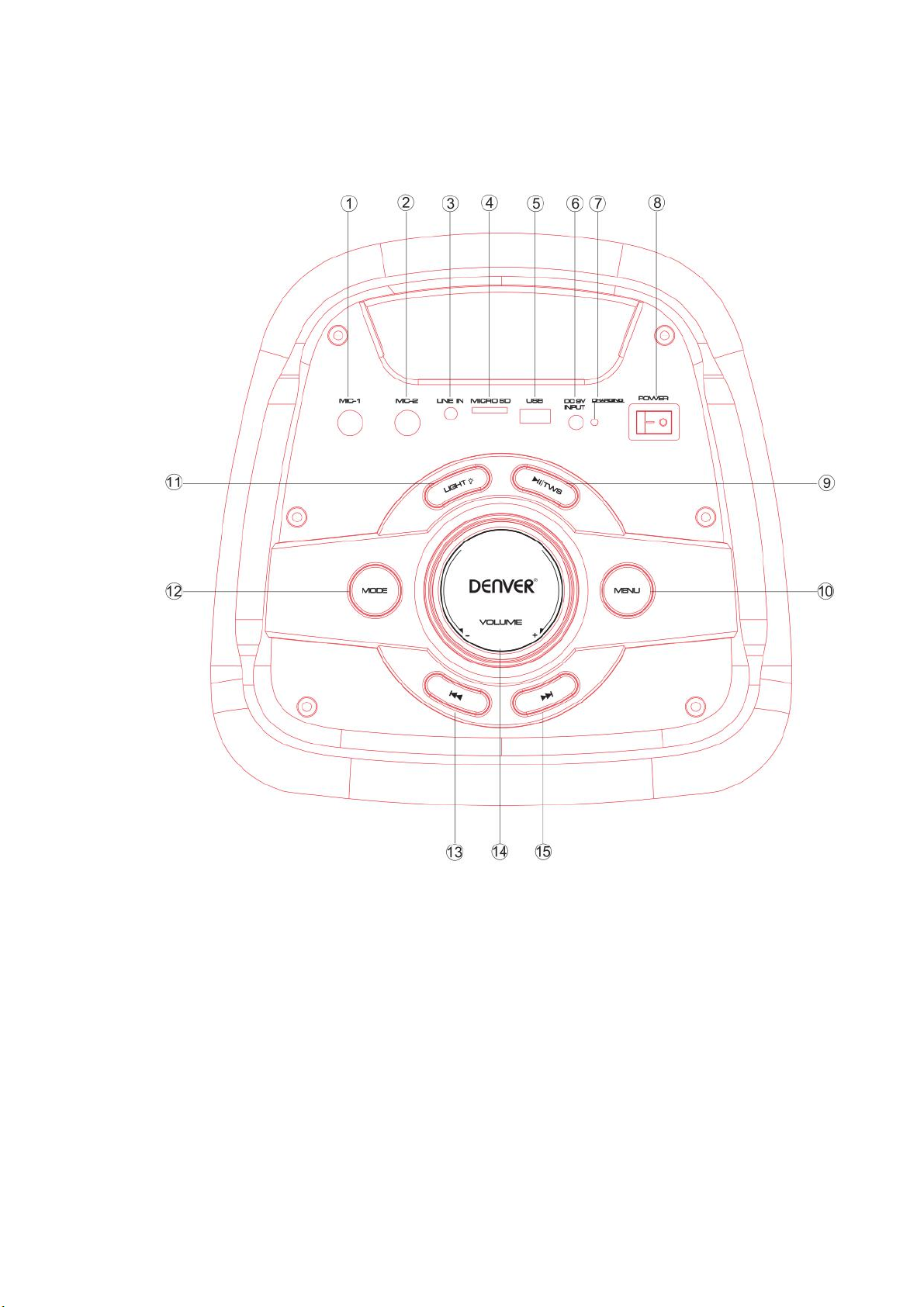
Top panel operation
1. Microphone 1 Input
2. Microphone 2 Input
3. Aux-in(3.5mm)
4. Micro SD Card input
5. USB Playing back
6. DC 9V charge.
7. Charging indicator(Red-charging, Green-Full)
8. Switch the Power on/off
9. Play/pause under USB/Micro SD/BT mode, and long press to get TWS function.
Page 4

TWS connection spec:
When you are playing a speaker (host) under USB/Micro SD/AUX/BT mode, at this
time you want another speaker to share this song. You can turn on another speaker,
long press the “Play/pause” button, the LED display will show “SLAU” and keep
blinking, now it is searching for the host. Once host found, this new speaker will
connect automatically to the host, and “SLAU” will not blink. At this time 2pcs
speakers are playing the same song.
The new joining speaker can operate: play/pause - previous song-next song- volume
control
10 MENU(control BASS/Treble/MIC Volume),
Press the “MENU” button, the LED Display will show “TE/BS/CV/EC”,
“TE” means Treble control: if you see “TE” and rotate the main Volume knob, the
Treble / mid-high frequency will be from “-9” to “+9”.
“BS” means Bass control. Press the “MENU” button and the LED display will show
“BS”, Once you see “BS” and rotate the main Volume knob, the BASS effect will be
from “-9” to “+9”
“CV” means Microphone Volume, “EC” means Echo +/- control. Once you see “cv”
or “EC”, rotate the Main Volume knob and the Microphone Volume and Echo will be
decreased and increased.
Long press the “MENU” button to restore factory settings.
11 Light mode switching on/off, short switch to get different color, long press to
change the light mode, or off the light. Press “light” again to start the light
Next sound (under USB/Micro SD/BT mode)
12 MODE switch
13 Short press to get the previous song, long press to fast backward
14 Main volume
15 Short press to get the next song, long press to get fast forward
Page 5
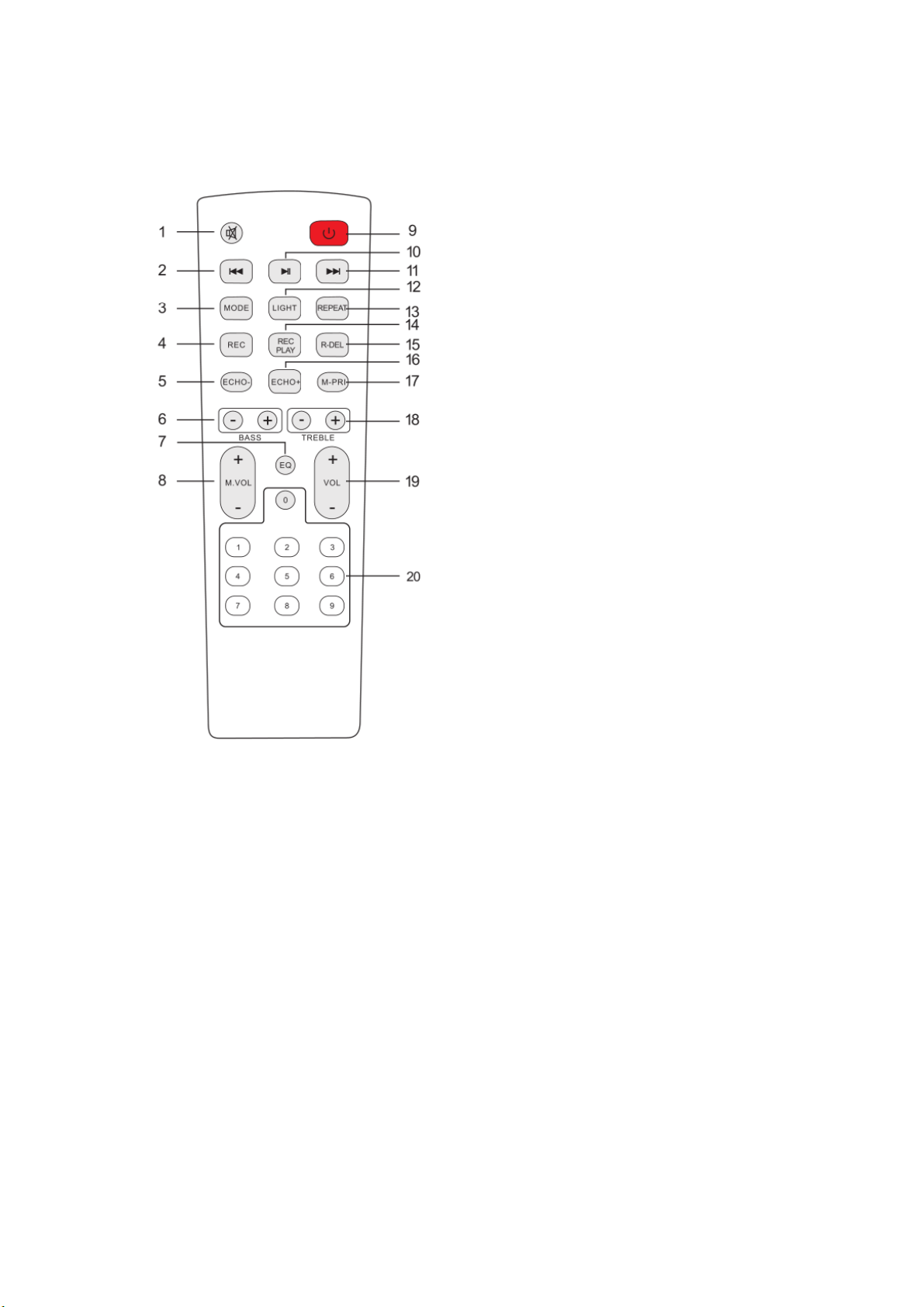
Remote control
1. Mute
Available to be mute at any mode
2. Previous Song
Under USB/Micro SD card mode - previous song.
Under BT connection mode- previous song.
3. Mode
Press short to skip to Wireless BT/LINE IN/USB/Micro SD mode.
4. Record function
Under USB/Micro SD card mode, press the “REC” button to record songs into
USB/Micro SD
5. Echo-
6. BASS+/-
7. EQ function (Pop-rock-Jazz-Classical-Flat)
8. Microphone Volume+/-
9. Stand by
10. Pause & Play
11. Next song
Page 6

Under USB/Micro SD card mode - next song.
Under BT connection mode- next song.
12. Light mode switch
Short press to change light colors. Press and hold this button to get different
modes or turn off the light. Press this button again to turn on the light
13. Repeat function
Repeat one song, or loop playback the song in USB/Micro SD storage.
14. Record play
15. Record delete
16. Echo+
17. Microphone priority
(If you speak via microphone when playing music, your sound will override the
sound in USB/Micro SD card)
18. Treble+/-
19. Main Volume
20. Number buttons
Under USB/Micro SD card mode to choose songs
OPERATING INSTRUCTIONS
● Wireless BT Pairing Mode:
Press the MODE button on the unit or the remote control until BT is selected.
1. Put the cell phone within 20 meters;
2. Activate the BT features on your cell phone so that the cell phone starts to
search for BT device. Please refer to the user manual for details
3. Select the correct model no. (BPS-350)The device found by the cell phone;
4. Short press PLAY/PAUSE button to play or pause music. Short press the
“ ” or “ ” key to select the previous or next track.
● LINE IN MODE:
Press the MODE button on the unit or the remote control until the LINE is
selected. Play the music of the device connected to the LINE input.
Page 7

● FM RADIO MODE:
Press the MODE button on the unit or the remote control until FM is selected.
Press the “ ”key and the speaker will auto search, then the speaker will read
signal from 87.5MHz till 108MHz, if any frequency has signal, the unit will
remember it and store it as a channel. After the searching is done, shortly press
the “ ” key to the previous channel and the “ ” key to the next channel.
● USB Mode:
1. After start up, press MODE to select “USB” and insert the USB device. The unit
will automatically read and play the music in the USB device.
2. Press the “ ” key short to pause or play.
3. Short press the “ ” key to the previous song.
4. Short press “ ” key to the next song
Page 8
Please notice - All products are subject to change without any notice. We take
reservations for errors and omissions in the manual.
ALL RIGHTS RESERVED, COPYRIGHT DENVER ELECTRONICS A/S
Electric and electronic equipment and included batteries contains materials,
components and substances that can be hazardous to your health and the
environment, if the waste material (discarded electric and electronic equipment and
batteries) is not handled correctly.
Electric and electronic equipment and batteries is marked with the crossed out trash
can symbol, seen above. This symbol signifies that electric and electronic equipment
and batteries should not be disposed of with other household waste, but should be
disposed of separately.
As the end user it is important that you submit your used batteries to the
appropriate and designated facility. In this manner you make sure that the batteries
are recycled in accordance with legislature and will not harm the environment.
All cities have established collection points, where electric and electronic equipment
and batteries can either be submitted free of charge at recycling stations and other
collection sites, or be collected from the households. Additional information is
available at the technical department of your city.
Hereby, Inter Sales A/S declares that the radio equipment type BPS-350 is in
compliance with Directive 2014/53/EU. The full text of the EU declaration of
conformity is available at the following internet address:
www.denver-electronics.com and then click the search ICON on topline of website.
Write model number: BPS-350. Now enter product page, and RED directive is found
under downloads/other downloads.
Operating Frequency Range: 2402MHz~2480MHz FM:87.5-108MHz
Page 9

Max Output Power:25W
DENVER ELECTRONICS A/S
Omega 5A, Soeften
DK-8382 Hinnerup
Denmark
www.facebook.com/denverelectronics
 Loading...