

Page 1
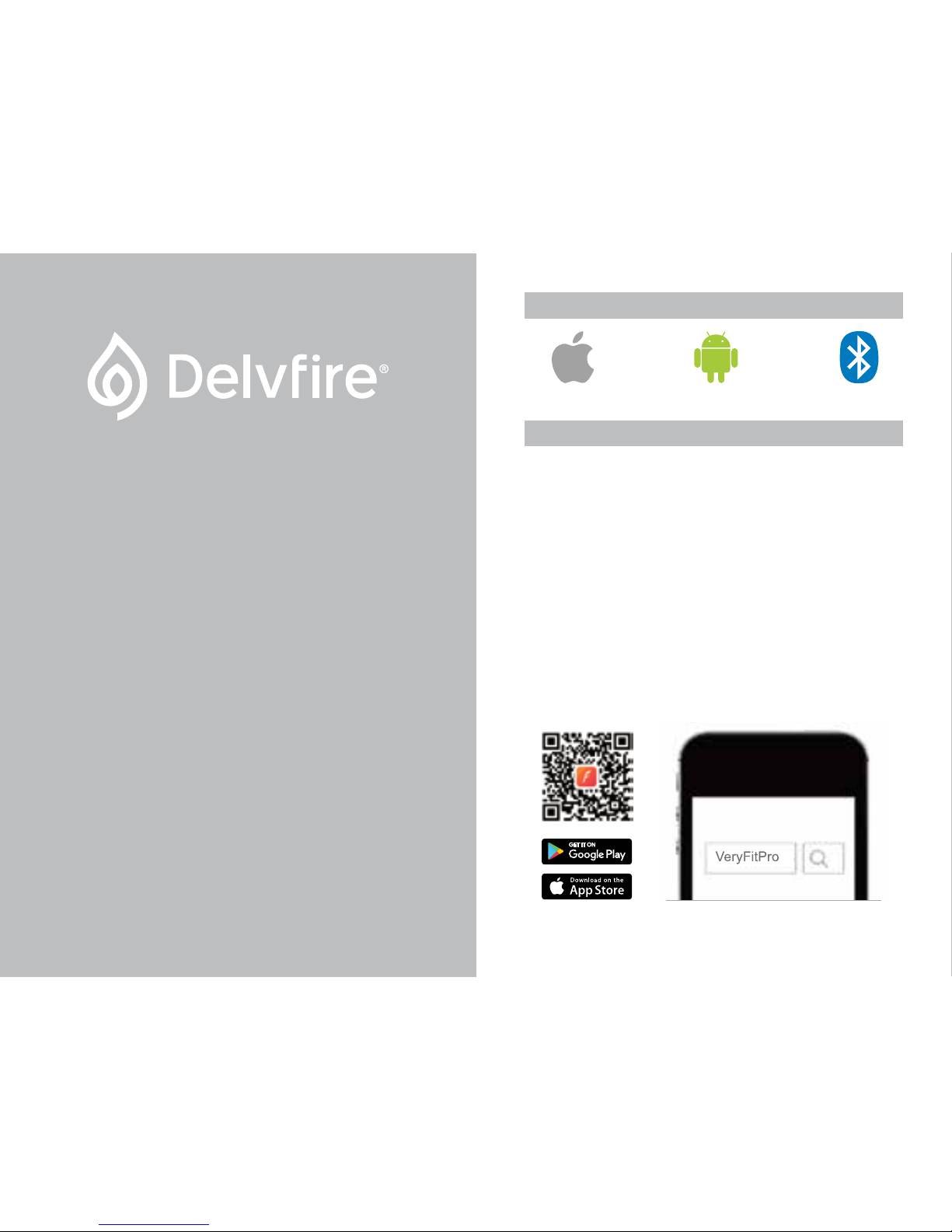
Android 4.5 & aboveiOS 7.1 & above Bluetooth 4.0
1. Download the VeryFitPro App
To set up your tracker you will first need to pair it with your
phone/tablet using the VeryFitPro app. There are 2 options for
downloading and installing it:
Option 1: Search for ‘VeryFitPro’ in the App Store
Search for and download the VeryFitPro app from the Apple
App or Google Play stores. If you are installing on an iPad, you
will need to select the ‘iPhone Only’ search option in the Apple
App Store to reveal the English version of the app.
Option 2: Scan QR Code to Download the App
Use a QR code scanning app on your phone/tablet to scan the
QR code below. This will open the corresponding app store
ready for you to download the VeryFitPro app.
QUICK START GUIDE
PHONE/TABLET REQUIREMENTS
01
Quick Start Guide
delvfire.com
Flare
Smart Activity Tracker
ID115U
Page 2
02 03
2. Remove Screen Protector
Your new tracker is fitted with a screen protector to protect it
whilst in transit. To remove the screen protector, lift the tab
located at the top right corner of your tracker’s screen and
slowly peel it back.
3. Charge Your Activity Tracker
Before using your tracker for the first time we highly
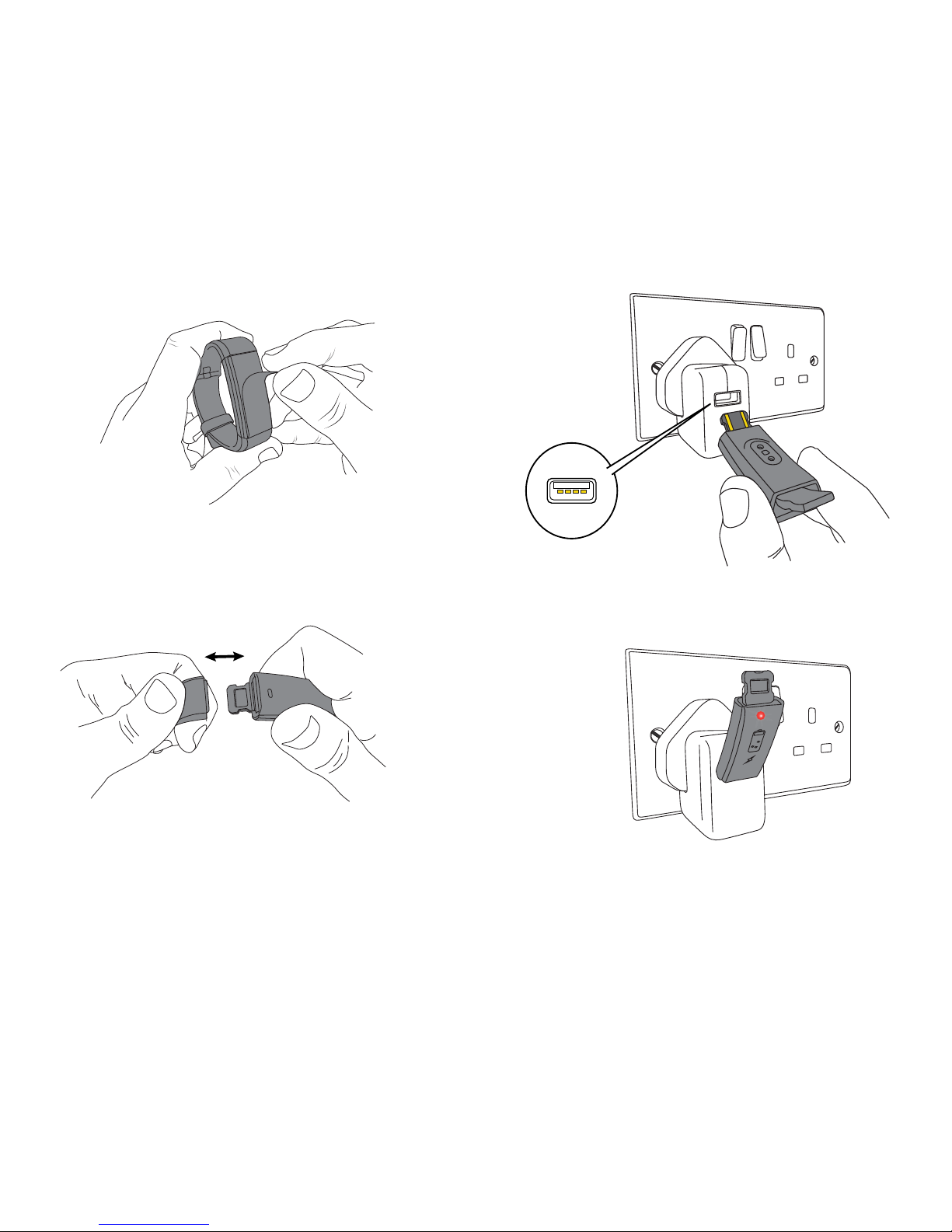
recommend that you fully charge it first. To do this, remove
both straps from the body of your tracker (Fig. 1) to expose
the 2 gold coloured USB charging strips.
Fig. 1
Plug in the body of your tracker directly into a USB socket,
ensuring that the 2 gold coloured charging strips on the
tracker are facing the 4 charging contacts inside the USB
socket (Fig. 2).
Once plugged into a USB socket, a red light will illuminate and
a charging icon will appear on screen to indicate that your
tracker is charging. If the red light does not illuminate, check
Fig. 2
Fig. 3
Page 3
04 05
that you have plugged in your tracker the correct way round,
and that the gold coloured charging strips on your tracker are
facing the 4 contacts inside the USB socket.
Your tracker will take around 1 hour to fully charge after which
time the red light will go out to indicate that it’s fully charged.
A full charge will last around 5-7 days.
You can charge your fitness tracker using a USB socket on
any computer, phone/tablet charger or power bank.
4. Set Up Your Activity Tracker using VeryFitPro
On your phone/tablet, ensure that Bluetooth is turned on
(Settings > Bluetooth) and open the VeryFitPro app that you
installed earlier.
1. When prompted, allow VeryFitPro to send notifications and
access to Apple Health/Google Fit if desired.
2. On the next page, keep swiping left until you get to the ‘Add
Device’ page.
3. Tap ID115U in the device list, wait a few moments for a tick
to appear and tap ‘Confirm Device’. Your activity tracker will
vibrate briefly to confirm which device you are pairing.
4. When the Bluetooth Pairing Request pop-up appears, tap
‘Pair’ to complete the pairing process.
5. Enter your personal stats and set goals for steps and sleep
to finish the set up process.
If the VeryFitPro app fails to find your tracker, restart your
phone/tablet and check that Bluetooth is turned on. Plug your
tracker into a USB socket, open VeryFitPro and tap ‘Refresh’ to
refresh the device list on the ‘Add Device’ page.
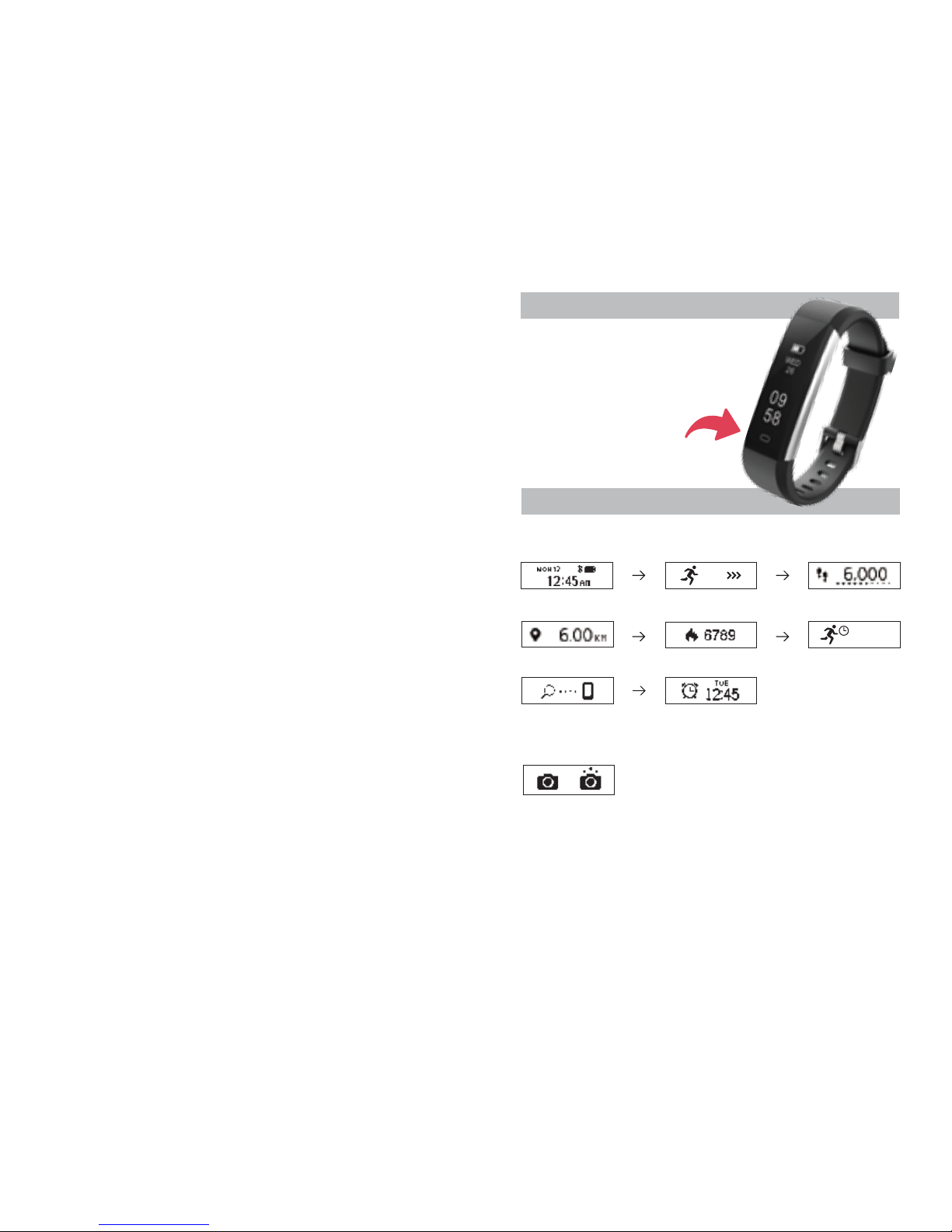
1. Normal Mode
HOW TO USE
Function Button
Tapping the touch sensitive function
button at the bottom of your tracker’s
screen will scroll through the
available options.
2. Remote Camera
To take a photo remotely using your tracker, open the
VeryFitPro app, tap Device > Camera (allow VeryFitPro access
to your camera if prompted). Position your phone/tablet in the
desired location for taking a photo, then use the function
button on your tracker to take a photo. Rotating your wrist will
also trigger the camera if the ‘Wrist Sense’ option is enabled
in the app.
Find Phone
Alarm
Date/Time
Steps
Sports Mode
Distance Calories
Active Minutes
120MIN
MODES
Page 4
Activity Tracking
Your tracker tracks daily activities including steps, distance,
calories burned and minutes you were active for during the
day. Your stats can be checked on your tracker at any time, or
by using the app for a more detailed view.
Sleep Tracking
Your tracker will automatically track how long and how well
you sleep. Stats including light sleep, deep sleep and duration
awake can be viewed in the app.
Silent Alarms
Set an alarm in the app and your tracker will vibrate to wake
you peacefully.
Reminders to Move
Your tracker will give you gentle reminders to stay active
throughout the day if you are stationary for too long.
Call, Text & Social App Alerts
See alerts for incoming calls, text messages and notifications
from Facebook, WhatsApp, Twitter, Instagram and more.
Remote Camera Control
Take photos with your phone/tablet using your tracker to
trigger the shot remotely.
Anti-Lost
Your tracker will alert you if you move more than 5 metres
away from your phone/tablet.
Find Phone
Use your tracker to trigger an audio alert on your phone/tablet
until you have located it.
FUNCTIONS
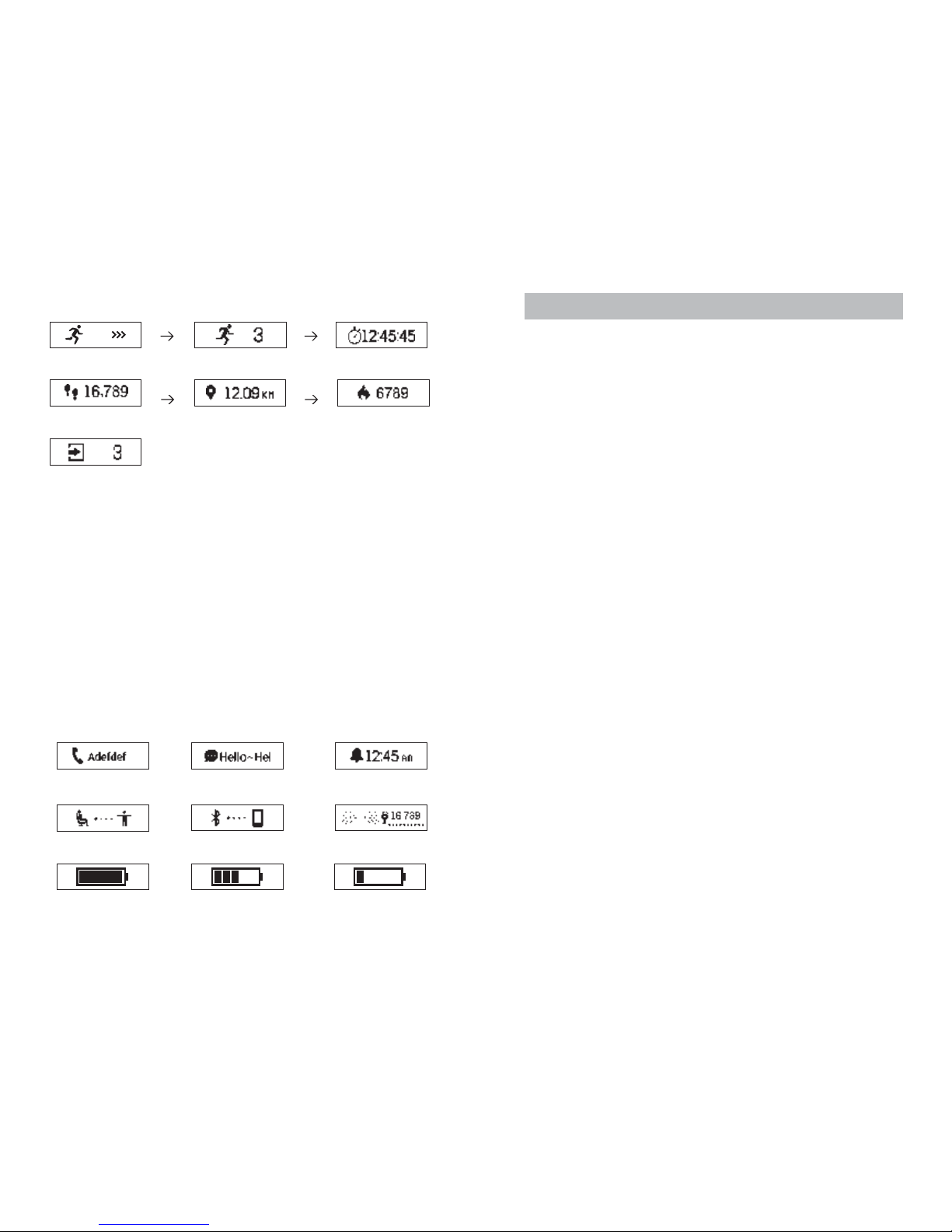
Incoming Call
Message
Alarm
Anti-Lost
Goal Achieved
4. Notification Mode
Fully Charged
Reminder to Move
Charging
Low Power
Sports Mode allows you to track stats for a specific period of
time. For example, you may wish to see how many calories
you have burned or steps you have achieved during a run or
other type of activity.
To start Sports Mode, tap the function button until Sports
Mode appears, then press and hold the function button for 3
seconds and Sports Mode will begin. Whilst in this mode you
can scroll through different stats by tapping the function
button. When you no longer require Sports Mode and you
have finished reviewing your stats, you can exit this mode by
pressing and holding the function button for 3 seconds.
3. Sports Mode
Steps
Distance
Calories
Stop Mode
Start
Time Elapsed
Sports Mode
06 07
Page 5

FAQ - CHARGING
Why isn’t a charger included?
Your tracker is charged by USB and can be plugged directly
into any USB socket on a computer, phone/tablet charger or
power bank. This does away with the need for a special
charger and messy cables. For the correct way to charge your
tracker, refer to section 3 on page 2 of this Quick Start Guide.
Why won’t my tracker charge?
The most common problems are a) the wrong end of the
tracker body has been inserted into the USB socket, b) the 2
gold coloured charging strips on the tracker are not facing the
4 charging contacts inside the USB socket. Refer to section 3
on page 2 of this Quick Start Guide.
PAIRING
Why can’t I pair my tracker?
1. Make sure that your phone/tablet meets the minimum
requirements of Apple iOS 7.1 or above (iPhone 4s or above,
iPad 3 or above, iPod Touch 5 or above), Android 4.5 or above,
Bluetooth Version 4.0 or above.
2. Make sure your phone/tablet has Bluetooth switched on.
3. Whilst searching for your tracker during set up within the
app, ensure that your tracker’s display is on and close to your
phone/tablet.
If you are still unable to pair your tracker to your phone/tablet
within the VeryFitPro app then please do the following exactly
as instructed:
1. Switch off your phone/tablet and restart it.
2. Ensure your phone/tablet’s Bluetooth is switched on.
08 09
Model: ID115U
Main Body Size: 38 x 16 x 10mm
Wrist Size: Smallest – 14cm, Largest 21cm
Screen: 22mm OLED Touch Sensitive
Battery: Built-in rechargeable 45mAh Lithium Polymer
Waterproof: IP67 (water resistant up to 2m)
System Requirements
Apple iOS 7.1 or above (iPhone 4s or above, iPad 3 or above,
iPod Touch 5 or above)
Android 4.5 & above
Bluetooth Version: 4.0 & above
Package Contents
1 x Delvfire Flare Activity Tracker
1 x Quick Start Guide
1 x Warranty Card
SPECIFICATION
NEED MORE HELP?
Tracker Data Storage
Activity data displayed on your tracker is reset every day at
midnight. Up to 7 days of data can be stored on your tracker
without the need to sync it to the app. To sync your data, open
the app and swipe down anywhere on the main page.
Progress will then be indicated at the top of the page.
A full User Manual for the VeryFitPro app is available at our
website. Please visit: www.delvfire.com/help
If you still can’t find what you’re looking for, email
[email protected] for assistance.
Page 6

3. Delete the VeryFitPro app from your phone/tablet.
4. Open the Bluetooth settings on your phone/tablet and
delete/forget all devices listed (you can add these back later).
5. Reinstall the VeryFitPro app (don't open the app at this
point).
6. Plug your tracker into a USB socket away from other USB
devices that might cause interference and make sure that the
red light is on and the charging symbol is displayed on the
screen to show that it's charging.
7. Open the VeryFitPro app and run through the set up. At the
point where the app starts searching for your tracker, hold your
phone/tablet close to your tracker and ensure that the
tracker’s display is turned on.
8. You should now be able to select ID115U (your tracker) from
the device list to complete the set up process.
STEPS
Why isn’t my step counter working correctly?
First you need to install the VeryFitPro app and run through
the set up process to pair it to your phone/tablet. Your tracker
will not function correctly if you skip this.
When you first set up your tracker it will go through an initial
calibration phase which can take up to a day to complete.
During this time you may find that steps may either not
register correctly or appear to jump around. This is
completely normal. After the first day of use, step counting
will register and record as expected.
It's also worth pointing out that after the calibration period,
the display will not always update in real time (step-by-step)
as you are walking. Under certain circumstances the screen
will update in batches of steps. This is especially apparent
when walking whilst watching the display.
If after the initial calibration period your steps are not
registering, we recommend resetting your tracker. To do this,
open the VeryFitPro app and go to Device > More > Reboot
the Device > Confirm to Reboot. This will backup the data on
your tracker and factory reset it. Once this operation is
complete your data will be restored back to your tracker.
Why do my steps keep reverting back?
If you walk less than 35 steps within a certain amount of time,
these steps will not be stored. This is to help improve
accuracy by filtering out movements other than steps, for
example driving, typing on a keyboard or washing your hands.
SYNCHRONISING YOUR DATA
Why isn’t my activity data showing in the app?
To transfer your activity data from your tracker to the app on
your phone/tablet, open the VeryFitPro app and swipe down
anywhere on the main page (the first page you see when you
open the app). This will initiate a sync of data between the
two devices.
MISCELLANEOUS
Why can’t I see all functions on my tracker?
Some functions require turning on from within the VeryFitPro
app before they will appear on your tracker.
How do I factory reset my tracker?
Make sure your tracker is connected to the app. Open the
VeryFitPro app and go to Device > More > Reboot the Device
> Confirm to Reboot. This will backup the data on your tracker
and factory reset it. Once this operation is complete your data
will be copied back to your tracker.
10 11
Page 7

How do I install the VeryFitPro app on an iPad?
First check that your iPad is 3rd generation or above and is
running Apple iOS 7.1 & above.
1. Tap the Apple App Store icon on your iPad and search for
‘VeryFitPro’ (all one word).
2. Change the search option (normally top left of the Apple
App Store app) from 'iPad Only' to 'iPhone Only'.
3. Tap the 'Get' button next to VeryFitPro to install it.
Is my phone/tablet compatible?
Apple
iPhone 4s or above
iPad 3 or above
iPod Touch 5 or above
Running Apple iOS 7.1 or above
Android
Android 4.5 or above
Bluetooth 4.0 or above
Windows
Not currently supported
Is my tracker waterproof?
Your tracker is water resistant up to 2m and can be worn
whilst swimming.
Will my tracker work independently of a phone/
tablet?
In order to set up your tracker you first have to pair it with a
phone/tablet. Your tracker needs to know the current
time/date from your phone/tablet, plus information such as
your age, height, weight, preferred units of measurement
(metric or imperial) and your activity and sleep goals. This all
goes towards the tracking algorithm it uses to calculate
activity/sleep stats. However, once you've been through the
initial set up there is no need to keep it connected to your
phone/tablet in order for it to function correctly.
Can I connect more than one tracker to my
phone/tablet?
Yes, you can connect up to 2 trackers to a single phone/
tablet. To do this you will need to install an additional app to
pair with the second tracker. We recommend ‘VeryFit for
Heart Rate’.
How do I get call, text or social alerts on my
tracker?
First, ensure that Bluetooth is enabled on your phone/tablet
and open the VeryFitPro app.
1. Enable Call Alerts
Tap Device > Call Alert > Call Alert (tap slider). Tap the tick
button (top right) to confirm your selection (tap ‘Pair’ if
prompted).
2. Enable SMS and/or Social Alerts
Tap Device > SNS Alert > Allow Notifications (tap slider), then
tap the slider for SMS to see incoming text messages. Tap
the tick button (top right) to confirm your selection. Tap
sliders for any of the desired social apps then tap the tick
button (top right) to confirm your selection.
How do I set the time and date?
Date and Time are set automatically when you pair your
tracker to your phone/tablet during the set up process in the
app. If you need to change the time in future e.g. the clocks
have gone back/forward, you simply open the VeryFitPro app
on your phone/tablet and swipe down anywhere on the main
page to initiate a sync.
12 13
Page 8
Register your new Delvfire product
and claim...
1 Year free warranty
The easy way to register - simply visit:
www.delvfire.com/warranty
and complete the online registration
e: [email protected]
w: www.delvfire.com
© 2018 Copyright Beronetti Limited
Delvfire™ is a registered trademark of Beronetti Limited
delvfire.com
 Loading...